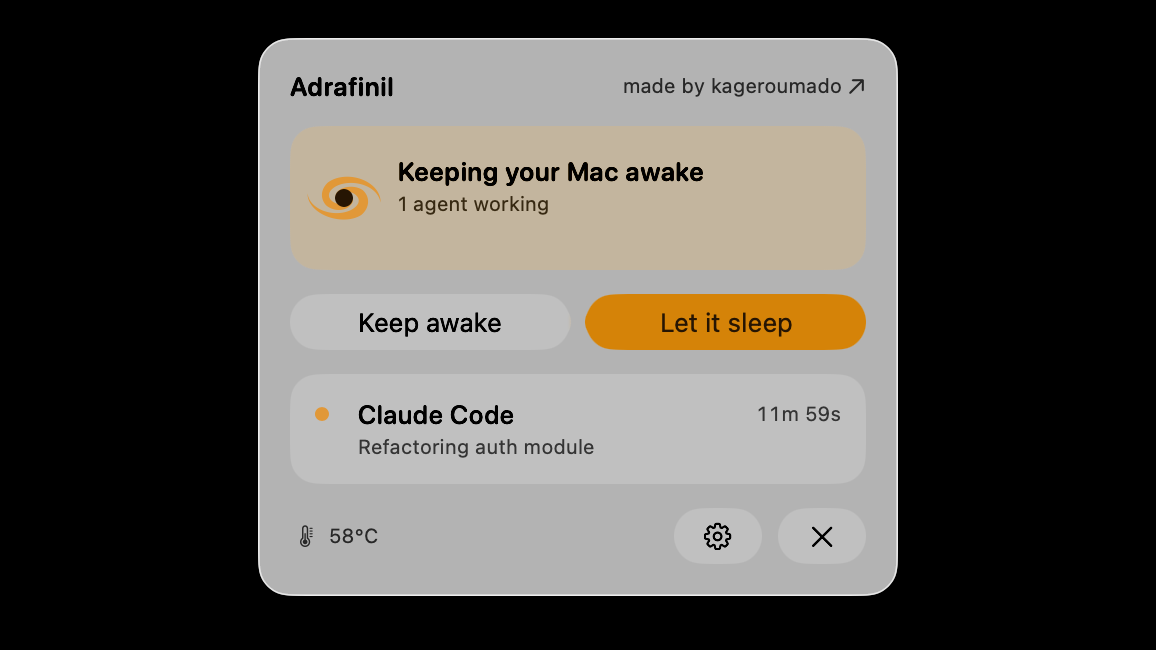
This open-source tool only lets your Mac sleep once the AI stops working
- Adrafinil is a macOS menu bar tool that only blocks sleep while an AI coding Agent (Claude Code, Cursor, etc.) is actively running a task — including clamshell sleep — and immediately restores normal sleep behavior the moment the Agent stops.
- Supports 9 major Agents, calling acquire / release automatically through each one's own Hook system, with CLI round-trip latency under 50ms.
- With multiple Agents running concurrently, it uses reference counting: each session adds +1 / −1 independently, and sleep is only re-enabled once the count hits zero — the Mac only sleeps after the last task finishes.
- Built-in thermal protection: when skin or CPU temperature crosses a threshold, all sleep-blocking assertions are force-released, preventing overheating from closing the lid with inadequate cooling.
- The architecture is split into three privilege tiers, with root access confined to the smallest possible Helper component, exposing just one boolean interface, setSleepBlocked(Bool) — everything else runs in user space.
You close the lid to sleep — the Agent is still running
Open-source developer kageroumado recently released Adrafinil, a macOS menu bar tool that only blocks Mac sleep while an AI coding Agent is actively working, automatically restoring normal sleep once the Agent stops.
3 a.m. You go to sleep. The Agent doesn't. It's still running in a session you started hours earlier, and just as you close your eyes, you close the laptop lid — except this "eye" hasn't actually shut. That's the mismatch: the Agent's task cycle and the Mac's sleep policy have no idea what the other is doing. The moment the lid closes, the system sleeps as usual, and the task gets cut off mid-way.
The name itself explains the design. Adrafinil is named after a eugeroic (wakefulness-promoting compound). Unlike a stimulant, a eugeroic only promotes alertness when needed and stays out of the way otherwise — which is exactly what separates it from "always-awake" tools like caffeinate: it only stays awake when there's actual work to do.
Why the old approaches fall short
Before Adrafinil, keeping a Mac awake during long-running tasks meant choosing between two extremes — neither of which actually tracked when a task was really running.
caffeinate and Amphetamine are stimulant-style: once turned on, they keep the machine awake the whole time, regardless of whether anything is actually running. The task finishes early, and the machine keeps idling, burning power and generating heat. Go the other way — install nothing — and closing the lid means instant sleep, cutting off long-running tasks outright. Here's all three laid out on the same timeline, so you can see at a glance whether the awake window actually lines up with the task window.
With caffeinate, the awake bar stays lit start to finish — everything after the task ends is pure waste. With nothing installed, there's a red X right at the lid-close point, cutting the task off before it's done. Only adrafinil's lit bar tracks the task window precisely, with no extra second held on either end.
Breathing in sync with the Agent
Adrafinil's core idea is simple: the Agent requests wakefulness when it starts working, and releases it when it stops. The Mac only stays awake for the stretch the Agent is actually executing a task. The menu bar icon only ever shows these two states.


Agents don't talk to Adrafinil directly — they go through its bundled command-line tool, invoked via each Agent's own Hook system:
Take Claude Code as an example — here's how the signal chain flows:
The key is that it protects the "actually working" window, not the "program is open" window. Claude Code calls acquire on UserPromptSubmit and release on Stop, so a session that's open but just sitting there waiting for you to type still lets the Mac sleep normally. That's called activity-scoped wakefulness, as opposed to session-scoped wakefulness.
The direct payoff for developers: you can close the lid and walk away, let the Agent run a build, test, or deploy, and the Mac automatically resumes sleeping the moment the task finishes — no remembering to turn off caffeinate, and no worry about leaving it running idle and wasting power.
No chaos even when several are running at once
What happens with multiple Agents running together? Adrafinil uses reference counting: each session adds +1 at start and −1 at end, and sleep-blocking is only released once the count hits zero.
An office where the lights only go off once the last person leaves — not whenever any single person walks out. One task finishing never accidentally kills sleep-blocking for other tasks still running.
The counter ring below is the signature piece of this whole page. Try lighting up a few Agents: as long as the number in the ring is above 0, the Mac stays awake (blue pulse); switch them off one by one, and the moment the count hits zero, the ring goes gray — only then can the Mac actually sleep.
Click to start / stop any Agent. The number in the ring = the current count of sessions holding a wakefulness lock; sleep-blocking releases only once it hits zero.
Closing the lid won't cook your Mac
The biggest fear with running long tasks under a closed lid is stuffing it in a bag with inadequate cooling and baking the machine. Adrafinil has built-in thermal protection — the key fallback that makes it safe to actually close the lid and walk away.
Beyond temperature, there's a second layer of auto-release: if the process holding an assertion has died, or the CPU has been idle for N minutes, the corresponding wakefulness lock gets dropped automatically — closing the gap where "the program crashed but the wakefulness lock never got released."
Since the screen is off with the lid closed and can't show a notification, it plays a confirmation chime once the lock takes effect; when you reopen the lid, it gives you a summary — what ran while you were away, the peak temperature, and whether thermal protection ever kicked in.
Process sniffing (optional)
Even without installing a Hook, the Daemon can automatically call acquire when it detects a known Agent process running. This is an optional fallback for setups where configuring a Hook isn't convenient.
root does exactly one thing
Blocking clamshell sleep can't avoid root privileges — that's a hard macOS requirement. Adrafinil's approach is to shrink root's exposure down to the bare minimum.
First, why root is needed at all. A Mac has two kinds of sleep-blocking: blocking "idle sleep" only needs a regular API (IOPMAssertion); but blocking "clamshell sleep" (lid-closed sleep) requires the root-level pmset disablesleep. Adrafinil does both, which is what lets it hold up a task through a closed lid.
A regular employee can extend the timer on the office lights (idle sleep), but unlocking every door in the building so nobody gets stuck (clamshell sleep) requires admin privileges.
Its solution is to lock that sliver of root privilege inside the smallest possible box. The whole architecture is three tiers, top to bottom:
All the policy lives in user space. Reference counting, thermal monitoring, process monitoring, and the CLI socket all run in a Daemon with no special privileges; the only component running as root, the Helper, exposes exactly one state-changing interface — setSleepBlocked(Bool) — and just flips the final switch. Auditing that piece is a much smaller job.
LaunchAgent vs LaunchDaemon, and pmset's side effects
A LaunchAgent starts as the logged-in user once you log in; a LaunchDaemon starts as root at boot. Adrafinil deliberately makes the Daemon a LaunchAgent (user privileges), and only makes the minimal Helper a LaunchDaemon (root) — shrinking the privileged surface that way.
Two more engineering notes: the public IOPM assertion (the same one caffeinate uses) simply can't block clamshell sleep at all, so v1 uses the blunter pmset disablesleep 1, which also disables idle sleep along with it and must be cleared on shutdown or it leaks — so the Helper resets state to disablesleep 0 on restart before reapplying it.
Which 9 Agents, and how to install
One command writes the Hook into every Agent's config. Here's the supported list first:
Installing it
Download the signed and notarized dmg, drag it into Applications, and launch it. On first launch it will ask for admin privileges once, to register that privileged Helper. After that, one install-hooks command writes the Hook config into every one of the Agents above; if you want to stop using it, uninstall-hooks cleans out every Hook entry it added.
System Requirements
macOS Tahoe 26.4 or later (earlier 26.x releases might work, but the author hasn't tested them). Building it yourself requires Xcode 26 or later, with Swift 6 strict concurrency enabled. A non-admin install places the CLI in ~/.local/bin instead of /usr/local/bin.
Two more commands worth knowing
For background tasks that might outlive a reply (a single long build or a deploy), you can hold wakefulness for a set stretch with a timeout, and it auto-releases when that runs out; Agents that support MCP can also call it directly through the tool adrafinil mcp exposes:
Adrafinil only intervenes when an agent (Claude Code, Codex, Cursor, …) is mid-task, and gets out of the way the moment that work finishes. kageroumado · adrafinil README (GitHub)
Sleep-blocking upgrades from "always on" to "on only while AI is working, off the moment it stops"
The open-source tool Adrafinil only keeps a Mac awake while an AI coding Agent is genuinely running a task. Here's a one-page, illustrated walkthrough of how it pulls that off.
↓ Read it in one pass · one animated diagram included
You close the lid to sleep, and the AI Agent (an AI assistant that can write code and run builds on its own) is still running the task you kicked off hours ago. Until now, keeping the Mac awake for that meant reaching for an "always-awake" tool like caffeinate.
✘ But it has no idea whether the task actually finished
The task's long over and it's still awake, burning power and generating heat all night; go the other way and install nothing, and closing the lid sleeps instantly, cutting long tasks off mid-way — neither extreme actually tracks the window when a task is genuinely running.
Adrafinil flips the approach: instead of staying awake forever, it follows the AI's own start and stop — the Agent requests "don't sleep" the moment it starts working, and hands sleep control straight back the moment it stops.
# always awake once on
# toggles with the task
So how does the Mac know when the Agent starts and stops working? See the diagram below.
The trick: each Agent, through its own Hook (a pre-built trigger point the program exposes), calls out acquire when it starts (count +1) and release when it stops (count −1). Multiple Agents running together just stack the count, and only once the last one stops and the count hits zero does the Mac actually go to sleep.
XiaoHu closes the lid at midnight — Claude Code is running a build, Cursor is running tests. Every task started bumps the count by +1, every one that stops by −1; as long as the count is above 0 the Mac stays awake (even with the lid closed), and only the moment it hits zero does it actually go to sleep.
"How much faster" isn't really the point here — what matters is how much needless "staying awake" gets eliminated. Here's an example to get a feel for it.
All figures above come from author kageroumado's own testing on macOS Tahoe 26.4, or from the project documentation — no third-party reproduction.
started hours
ago
keeps the Mac
awake forever
- × Task's done, still awake
- × Burns power all night for nothing
- × Install nothing, lid closes = dead task
last one out
turns off the lights
Members can copy or download the full Markdown, and let their AI subscribe and ask.
Found this useful? Leave your email — every new explainer, the moment it's out. Unsubscribe anytime.