Renaming one function saved up to two-thirds of the tokens for 14 models reading the same code
- The names you give your functions decide whether an AI flips through 19 files or 459 when it edits one. Modem ran 1,680 comparisons to get this number.
- Why? Because AI finds code with plain-text search, not a compiler-drawn dependency graph or a language server that resolves symbols. The Claude Code team tried vector databases early on, then dropped them.
- With search-friendly names, all 14 model-and-tool combos burned fewer tokens reading the same code. The biggest saver dropped from 70K to 24K average tokens. Median savings: 30%. Confidently wrong answers: zero.
- Saved search budget becomes judgment. Give a weak model an eight-round bug-finding budget and it finds only 3 of 8 bugs in a monolith. Split and rename the code and it catches all 8. Most failed reviews don't even reach a conclusion—they burn the budget flipping through files.
How AI Actually Finds Your Code
Ask an AI to rename a function and its first move is a search of your repository.
That search is no magic. It scans every line of the repo for the exact string, same as pressing Ctrl+F in your editor. The command-line version is grep, decades old. AI uses its faster cousin ripgrep (evoked as rg).
It won't ask the compiler for a dependency graph, and no language server resolves symbols for it. It only sees the literal text. Search, read the surrounding lines, and if that's not enough, search a different word.
That's not a shortcut. The Claude Code team tried vector databases early on, then abandoned them because plain-text search simply worked better. The academic SWE-agent landed on the same approach: give the model a keyword search tool, nothing fancier.
File paths are search terms too. Ask how the session broker works, and the AI will scan filenames for session-broker, sessionBroker, and session_broker. A directory named session-broker/ counts as a hit before a single line of code is read.
So the loop is: search, read context, search again with a different term if needed, and only then start editing.
So one input in this chain is entirely within the developer's control: can the words and filenames in your code serve as good search terms?
Modem did the math. The company decided in early 2025 to let AI write all its code. After a year, models had generated 99.9% of its 360K lines of TypeScript app code and 320K lines of tests. The findings below, and the 1,680 comparison runs, come from that year.
What Does a Vague Name Really Cost?
How big is the difference between a good and a bad search term? They tested it with three functions.
All three do the exact same thing—create an API client for an external service. Only the names differ:
export function create(apiKey: string) { ... }
export function createClient(apiKey: string) { ... }
export function createStripeClient(apiKey: string) { ... }
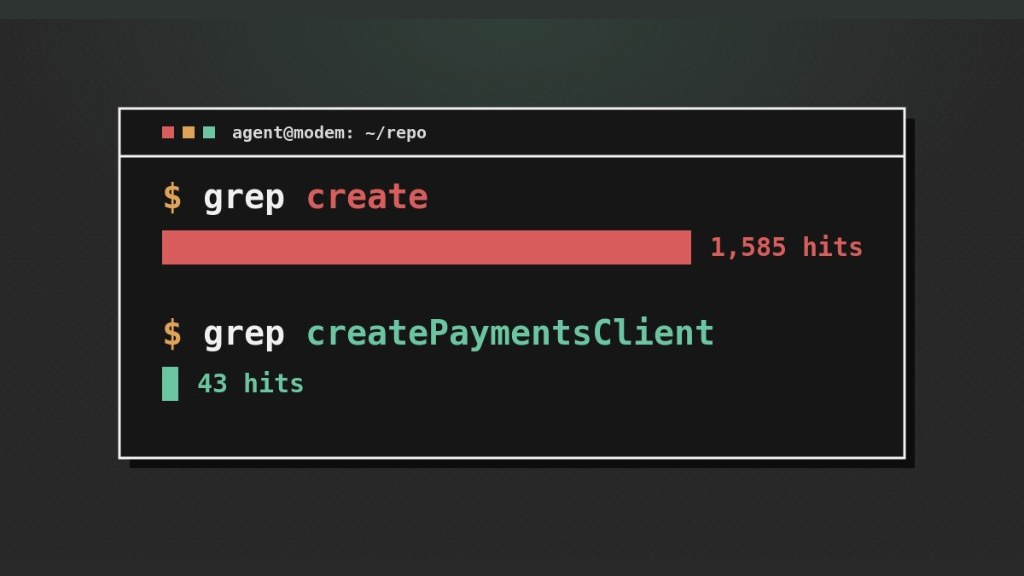
Searching each in Modem's ~2,900-file TypeScript repo:
So the problem isn't search speed. grep returns matching lines, not answers. A line like const client = create(config) doesn't tell the AI if this is the client you meant, or just one of hundreds of unrelated creates.
To find out, it opens the file and reads around the hit, often expanding outward or opening other sections. A file can be tens to thousands of lines. At roughly 10 tokens per line (tokens are how AI counts text—they determine buffer limits and cost, roughly one token per English word), eliminating one wrong candidate costs hundreds to thousands of tokens. Eliminate a dozen and you've burned tens of thousands of tokens without touching the task.
Those 1,585 hits are scattered across a lot of noise: test fixtures, database inserts, background task registrations. The 43 hits for createStripeClient are its definition, call sites, and tests—all about the same client.
And the savings go beyond this one task. Context has a limit. Every token spent eliminating a fake create is a token you can't use for the real edit. Worse, when context fills with plausible-but-wrong matches, the model's reliability drops. A name that grep can find in one jump protects both the AI's attention and its budget.
Why Isn't the Import Enough?
At this point, someone will ask: aren't imports like a signpost? Find the definition, go straight there.
That works if you're moving from a call site to a definition. An import is a one-way arrow. But the task here is a rename, which works in reverse: start at the definition and find every call site. Plain-text search has no backlink index. The file containing the definition has no record of who references it.
Three call sites of the same create might import it via relative path, package name, or with a local alias. Searching the path only finds the first, since package names don't contain paths. Searching the function name finds two, misses the aliased one, and pulls back a pile of unrelated creates.
An import says the module comes from @modem/common, but that's not a path. The AI must check package.json or search the package name to locate it. That often lands on a barrel file full of export *—a directory listing at the package entrance that says "everything below is re-exported" but not what maps to what. The AI has reached a roster without names, so it has to grep inside the package again. Three hops to get back to the search it could have run at the start.
A call like client.getUsers()—imports only cover modules and their top-level exports, not methods. This isn't a TypeScript quirk. The same gap exists in Python, Go, Ruby, and Java.
Modules point one way, they blur at barrels and package names, and they stay silent on methods. The name does the heavy lifting.
What Can Precise Parameter Types Save?
Everything above covers *finding* your code. What happens next depends on types.
Types differ from comments and READMEs in a fundamental way: comments can be ignored, types are enforced by the compiler. A type error during compilation is concrete feedback and the AI often fixes it within one round.
Even before the compiler complains, types are already saving tokens. A signature like this says what goes in and what comes out—often the implementation doesn't need to be opened:
function enrichUser(user: User): EnrichedUser;
function enrichUser(data) or data: any, and to learn what data is, the AI has to read the implementation. But the implementation passes it to something else, so it reads that too. Maybe it even checks a call site. One missing type annotation turns a one-line read into a multi-file investigation.TypeScript's any is sneakier: the damage is the same, but it *looks* like a type.
Names for types matter too
Here's a function where all three parameters are strings. Pass them in the wrong order, and the compiler stays silent:
transferOwnership(
  userId: string,
  orgId: string,
  projectId: string
)
Swap the arguments and the build passes. The error shows up at runtime.
transferOwnership(
  userId: UserId,
  orgId: OrgId,
  projectId: ProjectId
)
Swap them, and the build fails immediately. The error explicitly says OrgId can't be used as UserId.
Research on this self-correction loop—letting a model iterate on compiler errors—shows roughly a 3× success rate increase.
Here's the connection back to the beginning. The OrgId named in that compiler error is likely defined in another file. To fix the error, the AI needs to read that definition, and the only way to find it is the same search it's always used.
Type names and function names obey the same rule: OrgId and UserEnrichmentResult grep directly to their definitions. Names like Result, Data, or Config send the AI back into the haystack. The compiler tells it where to look; the name decides how long the look takes.
This is the real problem with any: the compiler has nothing to say, so the AI has no search term. A bad name, at least, leaves a trail.
Does It Actually Work?
So far, all theory. Names should be specific, types precise. But what's the actual token savings? Modem turned it into an experiment.
They had Fable 5 compress this blog post into a one-page skill file to load into context. Then they gave two authoring models a spec unrelated to the post (a small notification pipeline library with retries, rate limiting, and signing). Each model wrote it twice: once without the skill file, once with. The authors were Haiku 4.5 (in Claude Code) and GPT-5.6 Sol (in Codex CLI). That gave them four versions of the same library.
Haiku without the skill produced exactly the code this post warns about:
Sol's no-skill output was already decent—calculateBackoffDelay in backoff.ts, TokenBucket in token-bucket.ts. With the skill, it went further: backoff.ts became notification-retry-backoff.ts. But the gap between Sol's two versions was visibly narrower than Haiku's.
Next, the reading test. Each of the four versions was dropped into the same 500 files from a real repository. Fresh sessions, only search-and-read tools, and questions like these:
How long is the wait before a retry, and where is it calculated?
At what point is the calculated HMAC signature (a tamper-evident seal) attached to the data being sent?
Given a notification ID, where can I find its full delivery attempt history?
14 model-and-tool combinations each answered 10 questions about all four versions, 3 times each. That's 1,680 runs, tracking tokens consumed and correctness.
With Sol's code, 12 of 14 combinations improved, median 12%; the other two didn't get worse.
The pattern is consistent: rougher original code leaves more room to improve. Sol already wrote decent code, so there was less to save.
No Privilege for the Author
One data point stands out. When Sol read its own no-skill code, switching to the skill version still saved 13% to 38%, depending on the tool driving it.
The model that wrote the code has no memory of where things are. It runs the same search as every other model.
A Type of Failure That Only Appears in the Vague-Named Version
Wrong answers were almost exclusive to Haiku's generic-named code, and they were confidently wrong: asked where this notification library stores its delivery history, it pointed to a Slack delivery ledger for something else in the repo. Asked where the HMAC signature gets attached, it pointed twice to a URL signer in a media proxy service.
The skilled version had zero wrong answers. A file named hmac-payload-signer.ts doesn't look like anything else. These failures barely appeared in Sol's two versions, which were correct 834 out of 840 runs; the few errors were scattered on both sides.
Does It Hold Up on a Real Project? (A 4,943-Line File)
A synthetic codebase only proves so much, so they picked a real challenge: Odysseus, a self-hosted AI workbench that gathered tens of thousands of GitHub stars in its first week.

Its routes/email_routes.py is 4,943 lines, about 3,900 of which are a single function. All 81 route handlers (each responding to a web request type) are jammed inside it. One function. An entire email client.
Modem refactored only this one file. No behavior change, no route changes, mechanically verified. They split it into concept-named modules:
email_routes.py
  4,943 lines
  81 handlers in one function
email/
  smtp_settings.py
  message_rendering.py
  folder_fallbacks.py
  delivery_history.py
Then they asked four models the same six questions. Same pattern: the models lost in the monolith saved the most (Haiku 4.5 at 34.3%, Grok 4.5 at 31.5%). The ones that weren't lost barely saved anything (GPT-5.6 Sol at 5.9%, Sonnet 5 at 3.9%). Haiku used to burn 400K tokens flipping through the monolith; after the refactor, it stopped.
More important is the worst case. Those catastrophic runs—400K tokens burned, nothing found—happened almost entirely on the un-refactored version. *Almost*, because Haiku had one bad run on the refactored version, and the location explains it: they only refactored one file. Haiku got lost in the untouched 1,800-line email_helpers.py junk drawer next door. The refactor raised the floor, and the new floor is the worst file you didn't touch.
routes/email_routes.py is now 6,032 lines, and a single function setup_email_routes() accounts for 4,580 lines. In five days, the file grew by over a thousand lines, and the giant function by about 700. This detail comes from our own source pull; it's not in the blog. Your pull today might give a different number.What Do the Saved Tokens Buy You?
The first two experiments measured cost. There's a more important question: Does spending less lead to getting it *right*?
They planted four identical, subtle bugs in both versions of the email code (byte-identical changes, so both versions have the exact same defects). Then four models were given a fixed budget of eight rounds to check the code against the spec. Each model checked each bug twice: 32 reviews per version, 64 total across both.
Grok 4.5 and GPT-5.6 Sol found all of them in both versions. Eight rounds is plenty for a model with a search strategy, even in a 4,943-line file.
Haiku and Sonnet couldn't. In the monolith, they found 4/8 and 3/8 respectively. Most of those failed reviews didn't produce a wrong answer. They burned the whole budget flipping through files and never reached a conclusion. Give them the refactored code, and both go perfect.
Sonnet's row is especially telling. In the earlier retrieval experiment, it barely saved any tokens from this refactor. But add a budget limit, and its accuracy goes from 3/8 to 8/8. Being able to *afford* a search in a monolith and being able to *conclude* something there are two very different things.
Writing AI-Friendly Code (Actionable Advice)
We've covered the mechanism and the data. Now for what you can do today.
The skill file used in the experiment is MIT-licensed. We fetched it, read it, and found several rules that are easier to apply than the blog post suggests.
Name your exported symbols with 2 to 4 words, at least one being a business term. Tested on a ~700K-line monorepo: one-word exports were globally unique only 61% of the time. Three words: 96%. Four or more: 98%. Use the shortest name that's uniquely searchable, and put the rest in a comment.
Humans and AI ask questions in natural language: "rate limit", "retry delay". But RateLimiter as an identifier won't match a search for "rate limit". So use a comment above each export to write out that phrase with spaces. A SessionExpiryChecker should sit above "Checks whether the user session has expired", so a search for "session expired" actually lands there.
Never build event names, feature flags, or error codes with template literals. github.${entity}.${action} makes github.pr.merged an unsearchable string. Write it out, even if it feels verbose.
Make any logged error traceable back to the line that threw it. Write Webhook signature mismatch for ${id}, not ${prefix}: mismatch.
config.ts, types.ts, utils.ts, and helpers.ts are content-free in search results, and they collide with every other module's config/types/utils/helpers. Prefix them with a business term: billing-plan-config.ts.
Require an OrgScopedDb instead of a raw database connection. As the skill file puts it: a comment is a request; a required type is a law of physics.
Almost none of this is new. Descriptive naming, precise types, comments that explain "why" — we've been telling each other this for decades, and forgiving ourselves for not doing it, because a human can always ask a colleague or check git blame. AI can't. It has your words, your types, and a search box. — Modem Engineering Blog
Finally, the edges of these conclusions. The authors list three: the skill file changes naming, file layout, types, and structure all at once, so the token savings can't be credited to naming alone; the Odysseus token numbers are only comparable within a row, not across tools; and the Odysseus test refactored just one file. One more limitation they don't mention, in our view: the skill file was distilled from the blog post itself by Fable 5, and then used to validate the blog—a bit of self-confirmation. They also point to promising data from Cursor showing that embedded retrieval on top of grep does help, so plain-text search might not be the final word. But grep, repository maps, and embedding retrieval all feed on the same input: the words in your source code.
email_routes.py is from our pull of the dev branch on 2026-07-25; the blog's numbers reflect the file at publication time.AI reads your code with one search box. Give it a vague name, and it flips through hundreds of files before it dares to edit.
Modem let AI write all its code for a year, then turned the lessons into a controlled experiment. This page tells the story with visuals.
↓ One page, one moving diagram
Ask an AI to edit a function, and the first thing it does is search your repo. That search is the same as Ctrl+F in your editor: scan every line for the string.
Full-repo text scan for matches (the CLI tool grep; AI uses ripgrep, a faster version)
Reads the context around a hit
If that's not enough, search a different term
A dependency graph from the compiler (the step that turns code into a runnable program and checks for errors)
A language server—the thing that powers "go to definition"
Reverse lookup: finding all call sites from a definition
SWE-agent also just gives models a keyword search tool. The import at the top of a file can't fill the gap. It only points forward, but a rename needs to work backward. So every name in your code is a search query.How big is the difference? Modem tested three functions: functionally identical, each creates an API client for Stripe. Only the names differ. All three searches took 40–50 ms. The cost comes after the hit, when the AI opens files one by one to read and judge. Every read burns tokens (AI's unit for reading and writing text—it sets context limits and cost; roughly one token per English word).
And the savings go beyond this one task. Context (how much an AI can hold at once) is finite. Every token spent eliminating a false create is a token you can't use for the actual edit. Fill the context with plausible-but-wrong matches, and the model's reliability drops.
The logic sounds right. But what's the actual saving? Modem had Fable 5 distill the practice into a one-page spec, then had two models write the same requirement (a notification library with retries, rate limiting, and signing) twice: once without the spec, once with. The four versions were dropped into the same 500 real files, then 14 model-and-tool combos each answered 10 questions, 3 times per version.
The wrong answers are worth remembering. Asked where this notification library keeps its delivery log, the model pointed to a Slack delivery ledger for something else entirely—with total confidence. After the rename, code that merely looks like the thing can't shoulder a name that says exactly what it is.
The final set is even more telling. Same four planted bugs, same eight-round budget. The weaker models only found 3 to 4 of them in a real file—4,943 lines, 81 web request handlers packed into a single function. They mostly didn't give wrong answers. They spent all eight rounds flipping through files and never reached a conclusion. Split that one file into concept-named modules, and both go perfect.
All these numbers come from Modem's own design and execution; no third party has replicated them yet. On 2026-07-25, Xiaohu pulled the same branch: that 4,943-line file is already 6,032 lines.
Modem released the spec under the MIT license (free to take and drop into your own project). The most approachable rules don't change any behavior.
validateConfig()
github.${entity}.${action}(userId: string, orgId: string)
Filenames say nothing about purpose and collide with every other config in the repo. Verbs miss their object. Event names are built from templates, so they're unsearchable in source. Parameters are all strings; pass them in the wrong order and the compiler stays quiet.
validateSmtpConfig()
"github.pr.merged"
(userId: UserId, orgId: OrgId)
Filenames carry a business term. Verbs get their object. Strings are written in full. Same-type IDs get distinct type labels, so a wrong order fails the build immediately—and the name in that error is another searchable word.
One more counterintuitive rule: humans and AI ask questions with spaces ("rate limit"), but RateLimiter won't match a phrase search. So the comment above each export must spell out that phrase in plain words. Modem counted on a ~700K-line repo: a one-word name is globally unique only 61% of the time. Three words: 96%. Three words is the turning point.
that creates the Stripe client
one tool:
a search box
looks for that string
in every line
- × Compiler-drawn dependency graph
- × One-click "go to definition"
- × Reverse lookup from a definition
if it's not enough, search again.
test fixtures, DB inserts,
background tasks...
Nothing to do with this client
Definition, call sites, tests.
All about the same thing.
Where's the cost?
Which one is the right one?
You have to open the file.
Nothing edited yet.
every combo used fewer tokens:
6% to 66%, median 30%.
Confidently wrong: zero.
Members can copy or download the full Markdown, and let their AI subscribe and ask.
Found this useful? Leave your email — every new explainer, the moment it's out. Unsubscribe anytime.