AliExpress uses spy-tech-style tricks to track shoppers
A Bluetooth headphone glitch reveals how the site runs inaudible audio, harvests device details, and builds a fingerprint in the background.
- The page showed an active audio indicator even though nothing was playing, and it interfered with Bluetooth switching on the author's hardware.
- The site plays a fixed waveform and measures tiny computation differences, then combines them with graphics, hardware, and OS signals into a device fingerprint that gets uploaded.
- Two filter rules can block the behavior, but they may also break login and payment flows.
How it started: Bluetooth headphones hijacked by a browser tab
AliExpress is using a technique that sounds like something out of a spy movie to monitor users — but it's not secretly turning on the microphone. Instead, the site creates a "fingerprint" of your device in the background. In both audio graphs identified so far, there's no microphone input at all. The signal is generated entirely by the webpage itself, which sends an inaudible signal through the device's audio pipeline and then combines the result with graphics, hardware, and OS details to build a device fingerprint.
Tech writer m-c-tech stumbled onto this by accident. His Bluetooth headphones were connected to both a Windows PC and a phone. Normally, music plays from the phone, but when the computer makes a sound, the headphones automatically switch to the PC.
A few seconds after he opened the AliExpress homepage, the music on his phone suddenly stopped. The page wasn't playing any video or audio. Muting the tab, the browser, and even Windows did nothing — the music only came back once he closed the AliExpress tab entirely.
This was reproduced on his specific setup of Windows, a phone, and multipoint Bluetooth headphones. It may not happen on every device. But the glitch exposed something telling: the AliExpress page wasn't producing any sound, yet it kept the computer's audio channel active the whole time.

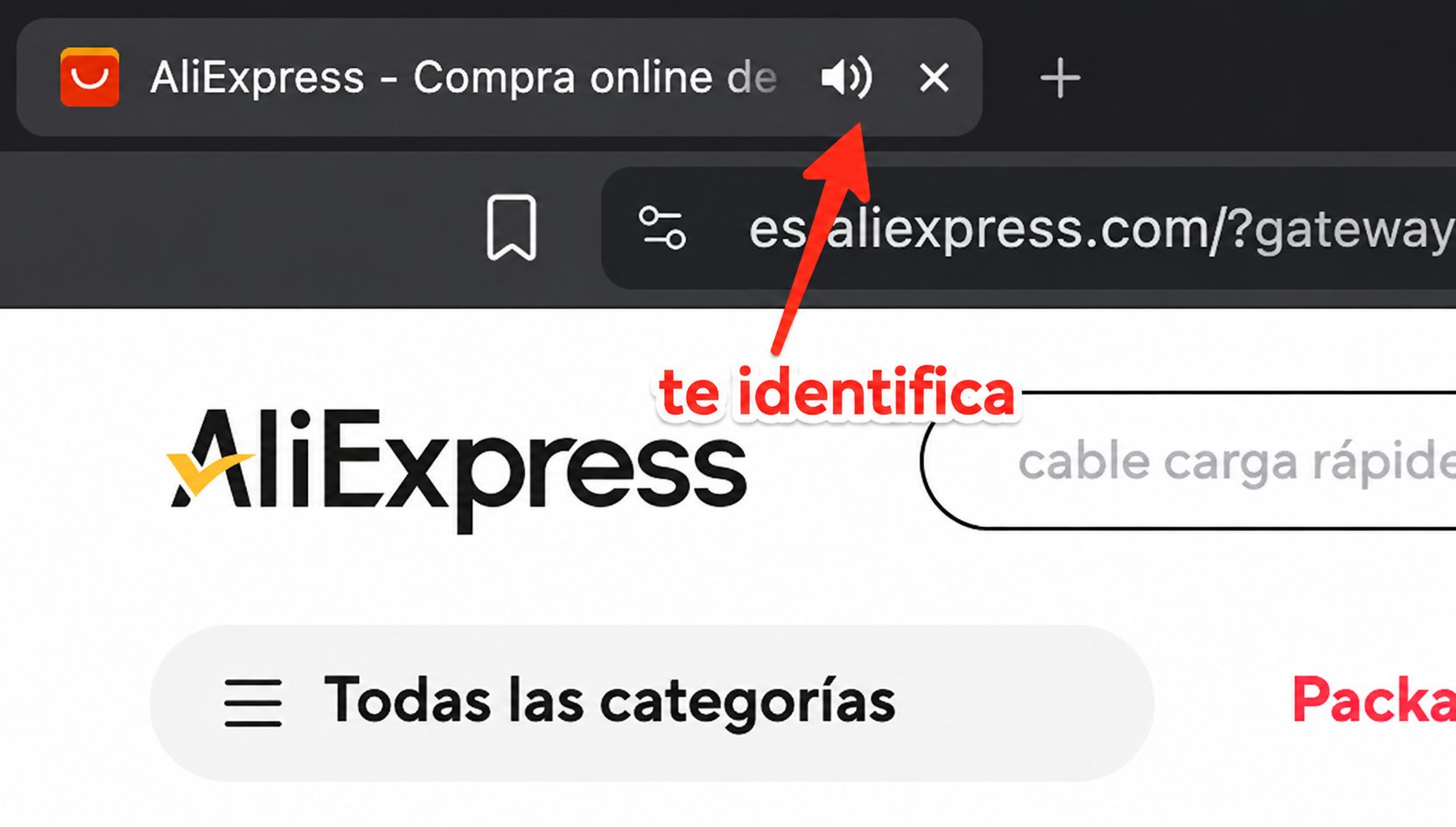
midudev captured this on the Spanish AliExpress page: the tab shows a speaker icon, which means the browser recognizes the page as actively using audio. The Spanish text te identifica means "it identifies you" — that's the original poster's judgment, added to the image. The icon alone only proves the page enabled an audio channel; it doesn't prove the site has identified a specific person.
This isn't the first time a similar underlying issue has surfaced. Mozilla documented back in 2023 that AliExpress pages could make Windows 11 think an audio device was in use, even preventing the machine from sleeping on schedule. Closing the tab fixed it.
The smoking gun: an inaudible audio track running in the background
Digging deeper, the author found two AudioContext instances running in the background. Think of them as audio processors inside the page. One comes from collina.js, the other from fireyejs.js. Both were running.

Supplementary evidence: midudev also caught fireyejs.js in the developer tools on the Spanish AliExpress homepage. The code shows onaudioprocess and statements connecting to audio output. This confirms the code was loaded, but it doesn't mean the server has linked a visitor to a specific identity.
What the scripts do can be understood as giving the device a very short "math problem."
Step one: the page generates a fixed sawtooth wave. This isn't a sound picked up from a microphone — it's a signal computed entirely from code. The problem is essentially the same for every visitor.
Step two: the browser has the CPU, audio engine, and low-level drivers process this signal. Different hardware, operating systems, and browsers can produce tiny variations in floating-point calculations, rounding, and audio implementation. It's like different calculators solving the same equation but showing slightly different results in the final decimal places.
Step three: the script reads the processed output and turns those imperceptible differences — which code can still detect — into a set of numbers. This set is the raw material for an "audio fingerprint." The sawtooth wave is just the test question; it's not the fingerprint the site is after.
Finally, the script sets the output volume to 0, so nothing is audible to humans. But to complete the processing pipeline, it still connects the audio graph to the browser's system output endpoint, destination. That's also why the browser might display a speaker icon.
The page generates a fixed waveform
This is a code-generated test signal, not a microphone recording.
The device computes the answer
The CPU, browser, and driver can differ in the last few digits.
The result is read out; volume is set to zero
The page pulls the numeric result, so the human ear hears nothing.
The audio context isn't properly stopped
Some processing may continue, so the system still thinks the audio device is in use.
Bluetooth headphones might stay connected to the computer; a separate Mozilla report shows Windows automatic sleep was also blocked.
The Bluetooth effect comes from the author's own setup; the sleep issue comes from a separate Windows 11 record in Mozilla's logs.
The measurement itself is quick. Mozilla's logs show that some nodes are disconnected after roughly 80–100 milliseconds. But the script never properly stops, suspends, or closes the entire audio context. For the operating system, "no audible sound" and "no audio task" are not the same thing, so it may still consider the tab as holding onto the audio device.
The outcome: the system may still treat the audio device as in use. On the author's device, that meant the Bluetooth headphones stayed locked to the PC and wouldn't switch back to the phone. In the environment Mozilla documented, it also prevented Windows from sleeping automatically.
This also explains why muting doesn't help. Muting only stops you from hearing anything; it doesn't close the AudioContext on the page's behalf. And multipoint headphones don't analyze whether the audio is at zero volume — they just see that the PC still has an active audio session. On the author's headphones, the PC kept priority and the phone's music was interrupted. Closing the tab destroyed the audio context, and the headphones returned to normal.
The real technique: fingerprinting your device
The silent audio is just one piece. Both scripts also collect a range of other device characteristics:
- Graphics behavior such as Canvas and WebGL;
- Screen size, pixel ratio, CPU, memory, and browser plugins;
- Audio/video formats, WebRTC, and runtime performance;
- Signs of mouse, touch, scrolling, sensor, and automation tooling.
What's more insidious is where this happens: these heavily obfuscated scripts load on the ordinary shopping homepage, with no visible indication to the user.
The site isn't interested in any one metric on its own. It's interested in what the combination of all these characteristics says about the current device. The audio test is one answer sheet; Canvas, GPU, screen, CPU, plugins, and interaction patterns are others. A single sheet may not identify a device, but when multiple sheets are pieced together, the range of possibilities narrows considerably.
This data is bundled with the audio measurement, serialized, encrypted, and sent to Alibaba's telemetry service. Individually, none of these signals is all that distinctive. But together, they form a kind of fingerprint for the current browser and device.
Graphics performance
Differences in Canvas, WebGL, and other graphics APIs
Screen and hardware
Screen, pixel ratio, CPU, memory, and plugins
Media and network
Audio and video codecs, WebRTC, and execution speed
Input and sensors
Mouse, touch, scroll, sensors, and signs of automation
Silent audio result
The numeric difference left when the same waveform is computed on a device
Audio is one answer sheet; the other signals are more answer sheets. Put them together and the device becomes easier to distinguish.
After Firefox 118, 99.24% of audio results fall into three main values; how the server stores or uses the combined data remains unknown.
Why go through all this when cookies already exist? Cookies can be deleted, copied, or replaced. Faking multiple device characteristics at once is far harder, which is why fingerprinting is often used to flag suspicious devices, distinguish humans from bots, and support anti-fraud and risk scoring.
But it's a stretch to call this a universal tracker. Since Firefox 118, WebAudio output has been largely standardized. In Mozilla's samples, 99.24% of results fall into three main values, which mostly reflect CPU instruction architecture rather than a specific machine.
That means the audio signal alone almost never identifies a single device. It's more like a hint about which category your device falls into than a unique ID. The real identifying power comes from combining multiple types of information. And from the code alone, there's no way to tell how long the server retains this data, how it connects different visits, or whether it's used only for fraud and bot detection — or also for tracking users.
How to block it
The author used uBlock Origin on Firefox to block both scripts. In "My Filters," add:
||assets.aliexpress-media.com/g/AWSC/uab/*/collina.js$script,domain=aliexpress.com
||assets.aliexpress-media.com/g/AWSC/fireyejs/*/fireyejs.js$script,domain=aliexpress.com
After clicking "Apply changes," it's important to close all open AliExpress tabs and then reopen the site. The audio contexts already running in existing tabs won't stop automatically just because a new filter rule was added.
In the author's tests, the homepage and regular product browsing still worked, and the two audio contexts no longer appeared. However, these scripts may be involved in security checks. Blocking them could increase CAPTCHA challenges or affect login, checkout, and payment flows. If that happens, you can temporarily disable the rule and try again. If the script addresses change in the future, these filters may stop working.
Members can copy or download the full Markdown, and let their AI subscribe and ask.
Found this useful? Leave your email — every new explainer, the moment it's out. Unsubscribe anytime.