PrismML squeezes a 27B model into your iPhone without gutting its smarts
It compresses an ~54GB 27B model down to about 3.9–5.9GB — runnable locally on a phone, while keeping roughly 90% of the average benchmark score. Here's the big picture first, then the technical details and the caveats.
PrismML just shipped Bonsai 27B. The headline: a model that used to need a beefy workstation or the cloud now fits inside your iPhone — and it barely loses a step in raw intelligence.
Three minutes to the core idea
Previously, a mid-to-large model like 27B (27 billion parameters) needed about 54GB in its original form. Even with common 4-bit compression, you're still looking at ~18GB — far too big to fit or run on a phone.
Bonsai 27B uses extreme low-bit compression (1-bit and ternary) to shrink the language weights down to roughly 3.9GB–5.9GB (the actual ternary deployment package is about 7.2GB). You can run it locally, offline, on a phone or a regular laptop. On the desktop, it hits peak speeds around 163 tok/s on an RTX 5090, and roughly 66–87 tok/s on Apple's M5 Max.
Heavier compression usually means a noticeably dumber model. In their tests, they ran 15 benchmarks in the high-effort thinking mode and compared against the original:
Math and coding hold up best. Tool calling and vision take a bigger hit — more on that later. This isn't a toy that only chats; on this benchmark suite, it still performs like a production-ready model.
- 1-bit phone version · ~3.9GB · Fits within a flagship iPhone's app budget; keeps about 90% of the avg score
- Ternary desktop version · Ideal 5.9GB / actual ~7.2GB · Better for laptops; keeps ~95% avg score
- License · Apache 2.0 — weights and demo are public
Below, we break down the tech: which model it's based on, why regular compression falls apart, what actually fits in phone memory, and how to read the speed/demo claims. "Runs on a phone" doesn't mean you can switch on 262K long-context, vision, and long-running agent tasks all at once.
Qwen3.6-27B is the base; Bonsai maps the whole network into extreme low-bit
The base is Alibaba Qwen's Qwen3.6-27B: roughly 27B parameters, hybrid attention (75% linear attention layers, 25% full attention), with native support for very long contexts. PrismML didn't train a bespoke 27B from scratch. Instead, they mapped this pre-trained network onto binary or ternary weights and wrote custom kernels to run those weights directly.
One shared scale factor per 128 weights. Theoretically ~1.71 bit/weight, ideal size 5.9GB; the current kernel packs them in 2-bit slots, so real-world size is ~7.2GB. Avg score: 80.49 — about 94.6% of the original.
Only the sign bit plus group scaling, ~1.125 bit/weight, deploying at ~3.9GB. Avg score: 76.11 — about 89.5% of the original. This is the one that fits within a single phone app's budget.
The vision tower sits at ~4-bit on disk (~0.63GB) and usually isn't kept in memory during text-only sessions. The optional DSpark speculative decoding layer adds another ~1.8–2.0GB.
The real barrier to a local 27B: you have to stream the entire model for every token
When generating text locally, the device has to re-read the entire set of model weights from memory for each new token. In low-batch scenarios, memory bandwidth — not raw compute — is usually the bottleneck. A bigger model means more data shuffled per step, which hurts speed, thermals, and battery life all at once.
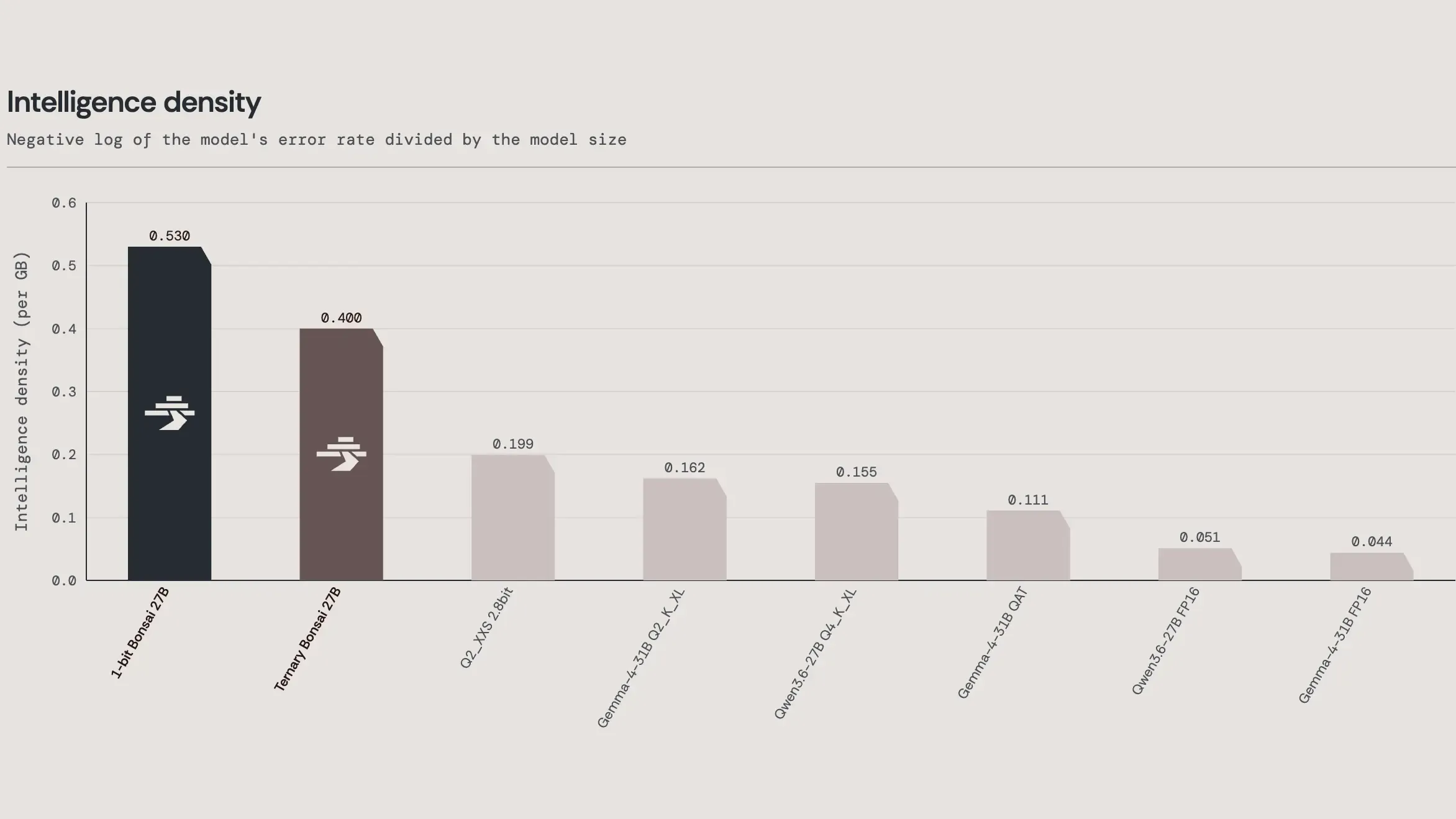
FP16 Qwen3.6-27B is about 54GB. A typical "4-bit" package like Q4_K_XL actually averages ~5.2 bit/weight, landing around 17.6GB. The more aggressive IQ2_XXS is labeled "2-bit" but averages ~2.8 bit, ~9.4GB — still too heavy for most phone app budgets, and its long-chain reasoning scores collapse.
This is where "what's the big deal about 27B" actually lands: it's not the parameter count that's new, it's that this capability tier has been squeezed into a size that's truly deployable on-device. Regular methods hold up above 4-bit, but below that, scores don't just degrade evenly — tool-call parsing and multi-step reasoning coherence start to shatter. Bonsai's claim is that it keeps these behaviors largely intact even in the sub-2-bit zone.
It compresses weights, but the KV cache determines whether long contexts fit
Qwen3.6-27B's hybrid attention helps a lot: only 16 of the 64 layers have full attention caches that grow with sequence length. An FP16 cache costs about 0.064GB per 1K tokens — already roughly 4× cheaper than a full-attention 27B. Still, an FP16 cache at 262K context is about 17.2GB, which is larger than the 1-bit weights themselves.
Bonsai weights are quite "tolerant" of a 4-bit KV cache. Measured by forward-KL divergence from the output distribution: with the same 4-bit cache enabled, Bonsai's deviation from its own FP16-cache baseline is about an order of magnitude smaller than for FP16 or typical 4-bit weights. Compressing the weights and compressing the cache work together on this path, not against each other. The repo still flags 4-bit KV as experimental: it saves memory, decoding gets a bit slower, and you should calibrate it against your actual workload.
Average holds at ~90%; losses concentrate in instruction-following, tools, and vision
Benchmarks were run in thinking mode, 15 tests total, covering knowledge, math, coding, instruction following, tool calling, and vision. FP16 baseline averages 85.07; ternary gets 80.49; 1-bit scores 76.11. The most striking contrast isn't how much Bonsai drops — it's how badly typical aggressive quantization collapses: IQ2_XXS falls from 93.33 to 57.5 on AIME26 and from 87.77 to 56.4 on LiveCodeBench. On the same tasks, 1-bit Bonsai still scores above 87 on AIME and 76.4 on LiveCodeBench.
| Ability category | FP16 | Ternary | 1-bit | 1-bit delta |
|---|---|---|---|---|
| Math | 95.33 | 93.40 | 91.66 | −3.67 |
| Coding | 88.74 | 85.96 | 81.88 | −6.86 |
| Knowledge & reasoning | 83.15 | 76.96 | 73.39 | −9.76 |
| Instruction following | 78.47 | 71.77 | 65.74 | −12.73 |
| Tool calling | 80.00 | 74.01 | 66.03 | −13.97 |
| Vision | 72.61 | 65.19 | 59.57 | −13.04 |
| Overall avg (15 tests) | 85.07 | 80.49 | 76.11 | −8.96 |
That's the split between the two versions: ternary is for laptops with enough RAM, aiming to stay close to the original 27B feel; 1-bit solves "it fits" first. Don't read "90% average" as "90% agent capability." A few points off on tool calling is plausible for ternary; for 1-bit, the tool category is nearly 14 points behind.

Where to discount the eval
They used EvalScope, vLLM, and H100, and published token budget and scoring methodology for each test — far more complete than a press release with only a radar chart. But no third-party replication exists yet. Most runs are single-shot; Bonsai used sampling temperature 0.7 while Qwen baselines and typical quantization used 1.0, so generation settings aren't fully consistent. The overall average is a simple mean of 15 tests, with math making up 4 of them — Bonsai happens to retain math best, so the "95% / 90%" figures look better than a tool-heavy or instruction-heavy real-world load would be. For agent work, look at BFCL v3, τ²-Bench, IFEval, and IFBench rather than the overall average.
Speed has two layers: low-bit data movement, and draft acceleration on CUDA
Low-bit weights directly reduce the bytes shuffled each step, so token generation benefits the most. Speeds are reported uniformly at tg128 (~128 tokens generated) and pp512 (512 input tokens processed), batch size 1, without draft layer and vision tower.
DSpark speculative decoding: a small draft model guesses a few tokens (depth k=4), then the target model validates them in one pass. Validation is lossless — the output distribution matches running the target model alone. On H100, ternary goes from 98.0 to 131.8 tok/s (~1.34×), and 1-bit from 104.8 to 143.8 (~1.37×). On Apple Silicon, with single-request workloads, multi-token validation can't amortize its cost, so it's off by default; the project itself labels it highly experimental.
On energy: 1-bit on M5 Pro draws about 0.275 mWh/token — an order of magnitude lower than the 0.63–1.32 mWh/token range across six data-center GPUs. On iPhone 17 Pro Max, it generates roughly 672 tokens per 1% battery, sustaining ~10.8 tok/s, and after ~5.2 minutes (~3,360 tokens) battery drops from 100% to 95% with mild thermal throttling. Treat these as ballpark figures; specific devices will vary.
What to try first — and what not to assume
Privacy-sensitive local Q&A and document work; offline assistant; offloading repetitive, non-critical agent steps from the cloud to local; hosting a 27B on a single consumer GPU; long-document work with the ternary version on a laptop.
Full 262K context on a phone; keeping the vision tower resident; enabling DSpark by default; long multi-file agentic coding; treating the 15-task average as a guarantee of production reliability.
Desktop is easiest; mobile is still a developer path
Want to try it now? The desktop demo is the smoothest route. It does run on phones, but there's no "App Store one-click install" app yet — you'd need to integrate the 1-bit weights with Apple's MLX / Swift kernels yourself, or wait for a future app wrapper.
Official all-in-one repo: PrismML-Eng/Bonsai-demo. Two commands spin up a local chat service (including vision and tool calling).
- Default pulls ternary 27B: quality-first, good for laptops / desktops with enough RAM (~7GB language package)
- To match the phone's footprint: switch to the 1-bit family with
BONSAI_FAMILY=bonsai - If 27B weights are still private: set your Hugging Face read token to
BONSAI_TOKEN - Once up: open
http://localhost:8080in your browser; Mac users can also use the MLX scriptrun_mlx.sh - Windows: use
setup.ps1/run_llama.ps1from the same repo
- Install git, ensure ~15GB+ free disk (weights + runtime)
- Clone and enter the repo (see copy-paste block below)
- Run
./setup.sh(downloads models, precompiled binaries; on Mac also handles MLX) - Run
./scripts/start_llama_server.sh, open localhost:8080 in browser - For 1-bit: set
BONSAI_FAMILY=bonsaibefore setup/start
git clone https://github.com/PrismML-Eng/Bonsai-demo.git
cd Bonsai-demo

# Default: ternary 27B (better for laptops)
export BONSAI_MODEL=27B
# Only if the 27B repo is still private — add your HF read token
export BONSAI_TOKEN="hf_your_token_here"
./setup.sh
./scripts/start_llama_server.sh
# Open http://localhost:8080 in your browser

# To switch to the 1-bit phone-class family:
# BONSAI_FAMILY=bonsai BONSAI_MODEL=27B ./setup.sh
On iPhone 17 Pro Max, 1-bit fits in ~3.9GB of language weights and generates around 11 tokens per second. Apple devices use MLX (Python / Swift).
- Weights: 1-bit MLX package on Hugging Face, e.g., prism-ml/Bonsai-27B-mlx-1bit (~4GB scale, includes packaging overhead)
- Kernels: officially maintained mlx-swift branch (iOS / macOS low-bit kernels); only the language side runs true 1-bit
- Reality check: flagship phone memory budgets are tight (~half of physical RAM for the app); you need Xcode / Swift integration skills — this isn't a drag-and-drop installer for casual users
- Don't force the ternary version on a phone: ~7.2GB deployment will blow past typical iOS single-app budgets
- Android: this release focuses on Apple MLX and NVIDIA CUDA; there's no equivalent one-click Play Store path. If you're a developer, you can port via GGUF / llama.cpp yourself, but there's no official plug-and-play package.
The launch page offers a limited-time free developer preview API, so you can test its capabilities without downloading the 27B locally. The local weights and demo remain the main Apache 2.0 open-source path: see the Bonsai 27B Collection.
Data and demos above come from launch materials and the technical whitepaper. Independent replication and mid-range phone viability are still open questions. The 27B weights have pushed the local deployment bar down to ~4GB for the first time; long-context, multimodal residency, and agent reliability still need real-world testing per scenario.
Primary sources
PrismML launch page: Announcing Bonsai 27B
Technical whitepaper: Bonsai 27B Whitepaper
Runtime & limitations: Bonsai Demo Repository
Model weights: Bonsai 27B Collection
27B model fits in iPhone, but it's the language part that's inside
PrismML squeezed an original ~54GB model into a phone-sized footprint. Here's how the math works, what holds up, and where the gaps are.
↓ One page · includes an animated chart
A 27B (27 billion parameter) model takes up about 54GB as a raw file; even common 4-bit compression leaves ~18GB — too big for a phone to store or run. PrismML's Bonsai 27B compresses the language weights to ~3.9GB (1-bit version) or 7.2GB (ternary version), allowing it to run offline on iPhone or laptops while keeping roughly 90% of the original's average score across 15 tests.
The base model is Alibaba Qwen's Qwen3.6-27B. PrismML mapped the weights of this pre-trained network onto 1-bit or ternary values (each weight is just −1/0/+1), then wrote custom kernels to run them efficiently. The entire language-side pipeline stays low-bit, from embedding to output head — unlike typical "2-bit" packages that leave sensitive layers at 4–8 bit, so the size number actually matches the name.
The vision tower is separate, ~0.63GB, loaded on demand. The optional DSpark speed-up layer adds ~1.8–2GB and is flagged as experimental, off by default. On a phone, the realistic envelope is the smallest of these blocks.
PrismML's custom 15-test suite (thinking mode) covers knowledge, math, coding, instruction following, tool use, and vision: the ternary version averages 80.49, the 1-bit version 76.11 — roughly 95% and 90% of the original. For contrast, typical aggressive quantization IQ2_XXS drops from 93.33 to 57.5 on AIME26 and from 87.77 to 56.4 on LiveCodeBench; on the same tasks, 1-bit Bonsai stays above 87 on AIME and hits 76.4 on LiveCodeBench.
Math drops 3.67 pts, coding 6.86 pts; long-chain reasoning doesn't cliff-drop like typical quantization
Tool calling drops 13.97 pts, instruction following 12.73, vision 13.04; the 1-bit version's losses here are significant, so it's not a full-fidelity agent
Lower-bit weights mean fewer bytes moved per step, which boosts generation speed. These are PrismML's official self-tests; no third-party replication yet:
an iPhone?!
the only part that's always there
- × Vision tower 0.63GB, loaded on demand
- × Long-chat cache grows as you talk
- × DSpark speed layer, off by default
Coding −6.86
On a phone? Not yet.
- × No app to download
- × You'd wire up MLX / Swift yourself
Members can copy or download the full Markdown, and let their AI subscribe and ask.
Found this useful? Leave your email — every new explainer, the moment it's out. Unsubscribe anytime.