OpenAI Releases GPT Images 2.5: Photoshop-Level Precision Image Editing with Astonishing Power
Targeted editing, sequential fine-tuning, reference-based outfit swaps, and composite photos, plus sketches, templates, and prompt sharing: see how Images 2.5 integrates into creative workflows.
- 2.0 already supported image editing; 2.5 further improves precision editing, reference subject preservation, and multi-turn consistency.
- From outfit swaps and multi-person composites to Chinese infographics, tickets, and candle lighting, explore full images and videos directly.
- Sketch, templates, in-image comments, and prompt sharing make conveying compositional and localized editing requirements much easier.
- Flare prioritizes speed while Sunburst prioritizes quality; both models share the exact same token unit rates as GPT Image 2.
OpenAI has released its latest image generation model, GPT Images 2.5. The most significant update in this model is the enhancement of three key AI photo-editing capabilities: more accurately modifying designated areas, better preserving people and objects from reference photos, and carrying forward previously completed adjustments across sequential edits. While GPT Images 2.0 already supported image generation and editing, 2.5 further refines editing precision and consistency.
Key features of GPT Images 2.5 include:
- More accurate edits: Targeted adjustments to designated areas, better carrying forward existing results across sequential edits.
- More natural photos: Better preservation of subject characteristics from reference photos, delivering more natural lighting and richer textures.
- Better understanding of complex instructions: More precise interpretation of visual requirements, better organization of complex layouts, and improved rendering of image content containing real-world information.
- Better stylistic alignment: Closer adherence to specified artistic styles, along with native support for transparent background output.
GPT Images 2.5 reduces image generation latency by up to 50% compared to 2.0. It also introduces sketches, preset templates, in-image comments, and prompt sharing, while the API offers two versions: the speed-optimized GPT Images 2.5 Flare and the quality-optimized GPT Images 2.5 Sunburst.
OpenAI reports that over 3 billion images are now created weekly across ChatGPT and the Image API.
Precision Editing: Modify Designated Areas While Preserving Surrounding Content
In AI photo editing, the core of precision editing lies in achieving controlled local adjustments: more accurately modifying the elements specified in instructions while preserving surrounding figures, backgrounds, lighting, and brand styles as much as possible. Each edit produces a modified image; playing back results from different turns in sequence reveals the transformation process.
- Multi-city ticket: While maintaining similar handheld tilted compositions and ticket stub layouts, city names and representative landmarks on the ticket are sequentially replaced. For instance, swapping New Delhi's India Gate for São Paulo's cable-stayed bridge cityscape, Tokyo's cherry blossom pagoda, Paris's Eiffel Tower, and San Francisco's Golden Gate Bridge demonstrates the model's ability to precisely replace localized text and imagery on a card.
- Full-body edits: Using a full-body frontal photo of the same standing woman as a baseline, multiple independent localized adjustments are performed: swapping to a lilac satin blouse, changing to a terracotta courtyard background, adding a navy blue beret, converting to a gouache painting style, or shifting to harsh direct afternoon sunlight and shadows. Across each independent edit, the subject's pose, body proportions, and core facial features remain similar to the baseline.
Multi-turn Editing: Carrying New Adjustments Forward from Existing Results
Multi-turn editing consistency refers to how subsequent requests build smoothly upon previous results when sequentially modifying an image, minimizing the loss of earlier edits or degradation in image quality. For example, updating the title first, then adjusting the itinerary, and finally removing a module brings an image step by step toward the desired final version.
- Travel infographic / Yichang travel (information-level revisions on a Chinese long-form graphic): On an infographic featuring multi-section layout and Chinese text, five sequential precision revisions are performed:
- The main headline is updated from “宜昌” (Yichang) to “宜昌旅行” (Yichang Travel);
- The red subtitle banner text is replaced with “一泊两日攻略” (Two-Day, One-Night Guide);
- The trip duration callout in the upper right is modified to “2天1夜(约48小时)” (2 Days, 1 Night [approx. 48 hours]);
- The blue recommended itinerary card title is updated to “推荐行程(2天1夜)” (Recommended Itinerary [2 Days, 1 Night]);
- The purple “费用参考(人均)” (Cost Reference [Per Person]) card in the lower right is removed, leaving natural whitespace while keeping the bottom summary text and upper layout structure similar overall.
- Cube rotation: Through multi-angle rotational transformations of a cube, different faces are revealed as the angle shifts, allowing continuous observation of its geometric structure and perspective relationships.
- Birthday candles: On a log-shaped chocolate cake, slender candles are lit one by one from left to right. Throughout the incremental lighting of the candle flames, the bark texture of the cake, the glaze sheen, the miniature tabletop mushrooms, and the three-dimensional green frog ornament on the right maintain a similar overall composition.
Reference Photos: Outfit Swaps, Composite Group Shots, and Room Tidying
After uploading photos of people, pets, or rooms, you can swap outfits, composite scenes, or alter artistic styles based on those images. 2.5 does a better job of preserving subject identity while rendering more natural lighting and textures.
- Remixed baby portrait: Given a real-life snapshot of someone holding a printed paper photo of a child, the child's red top inside the print is replaced with an off-white suit and black bow tie, while the fingers holding the photo, the tilt angle, and the surrounding environment remain similar.


- Dog in costume: A light-colored curly-haired dog standing beside black patio furniture on a sunlit terrace is dressed in a stuntman outfit reading “STUNTMAN” complete with a red-and-blue star-spangled helmet. The dog's physical features remain harmonious with the terrace background and long ground shadows.


- Making the bed: Given a real photo of an unmade bed with messy sheets in a sloped-ceiling bedroom, the output image smooths out the duvet and neatly aligns the pillows while preserving natural fabric crease textures, keeping the spatial layout of the sloped ceiling, window, lamp, and nightstand similar.


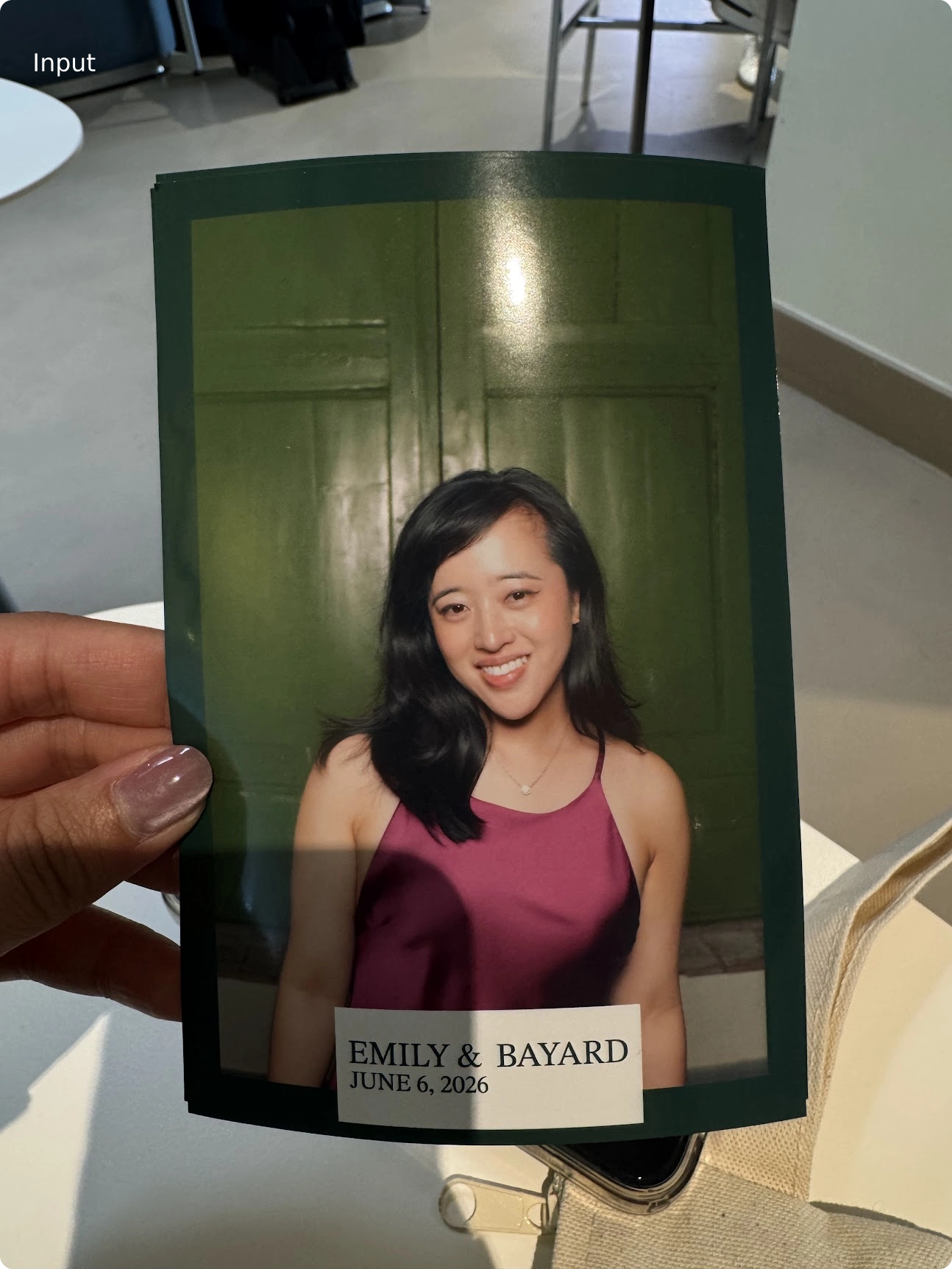
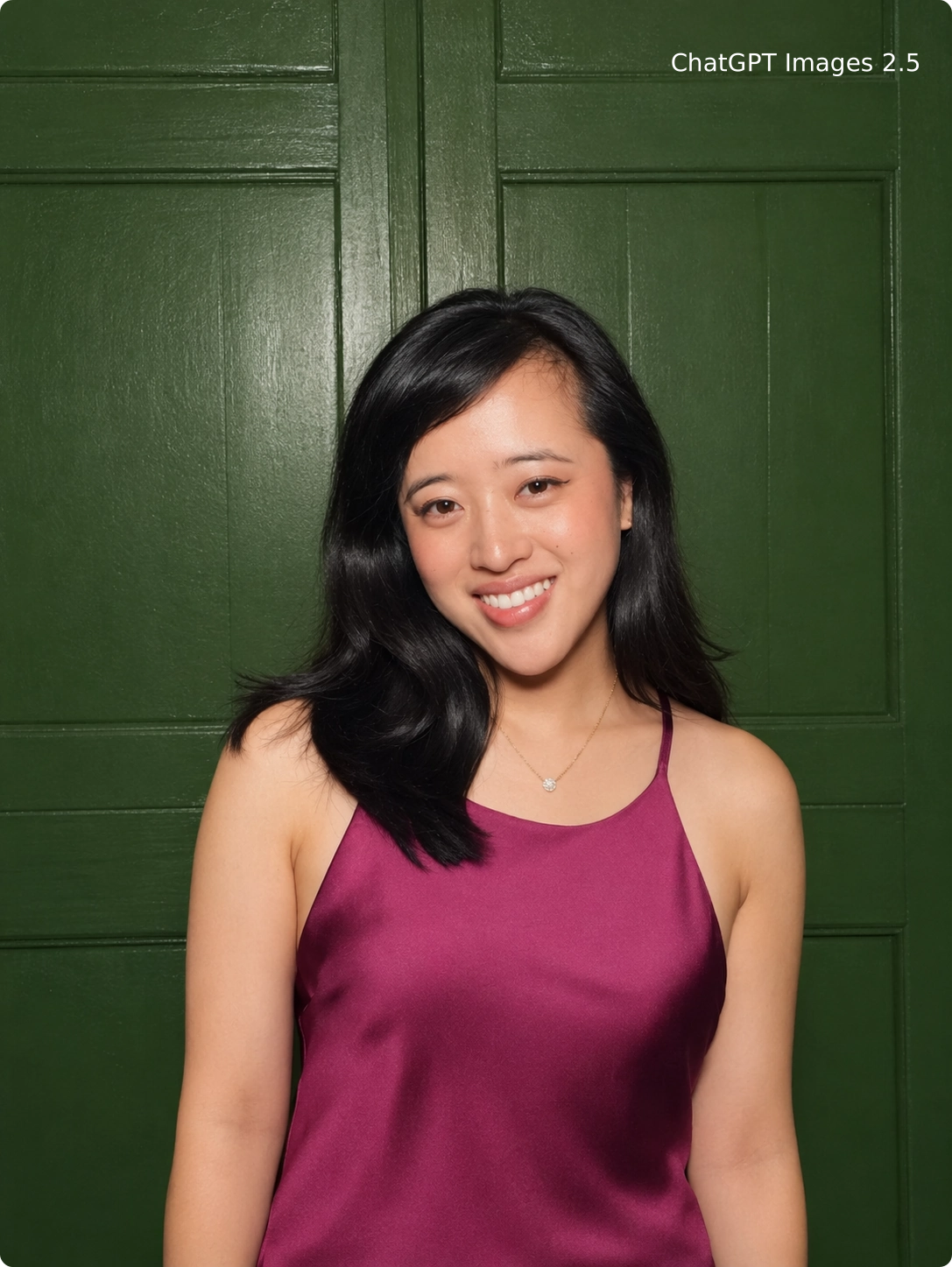
- Headshot from photobooth: Given a handheld snapshot complete with glare, photo paper edges, and a label at the bottom, the output removes the holding fingers and glare obstructions to extract a clean frontal portrait, retaining the magenta top and the green door background.
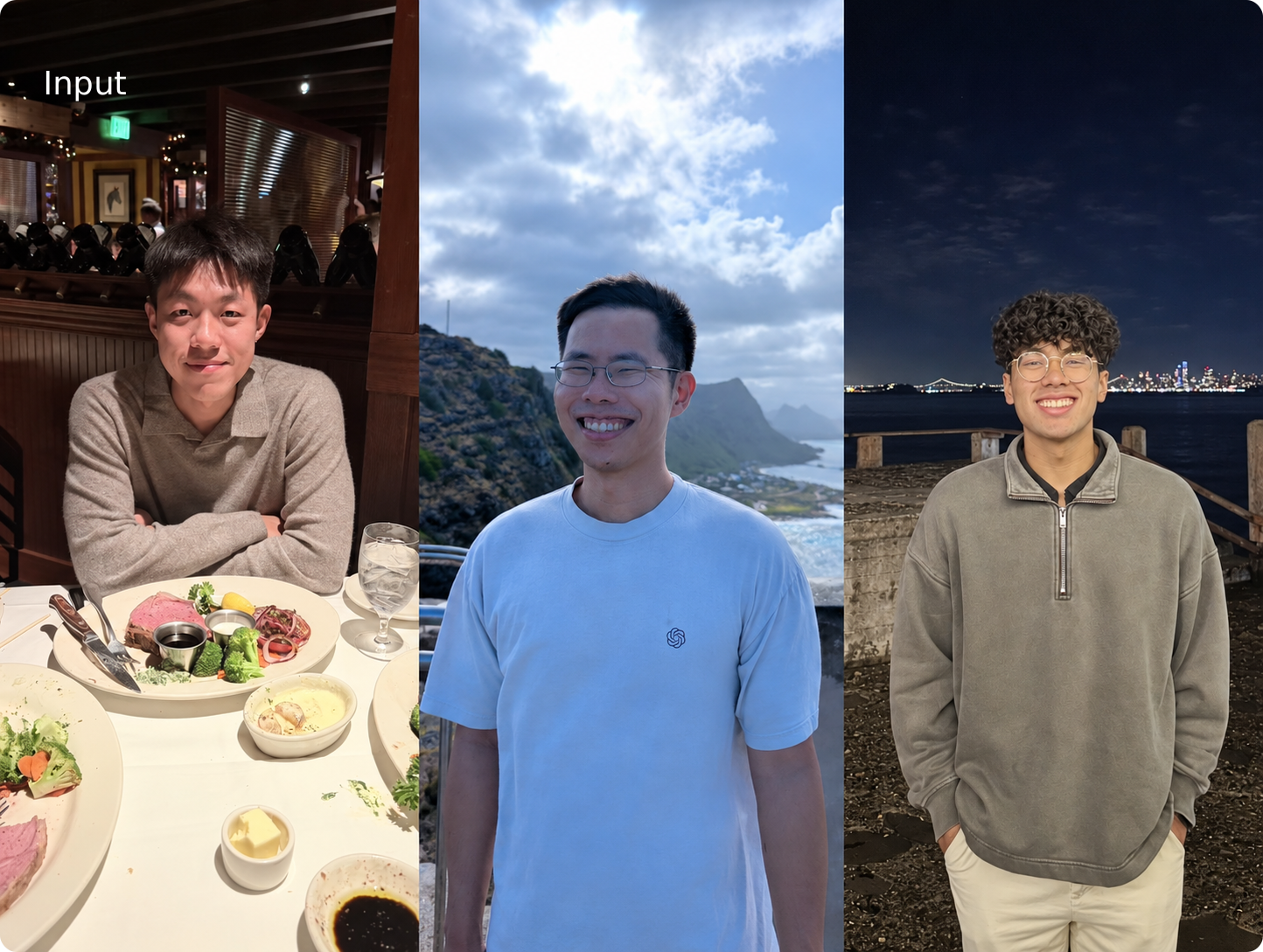
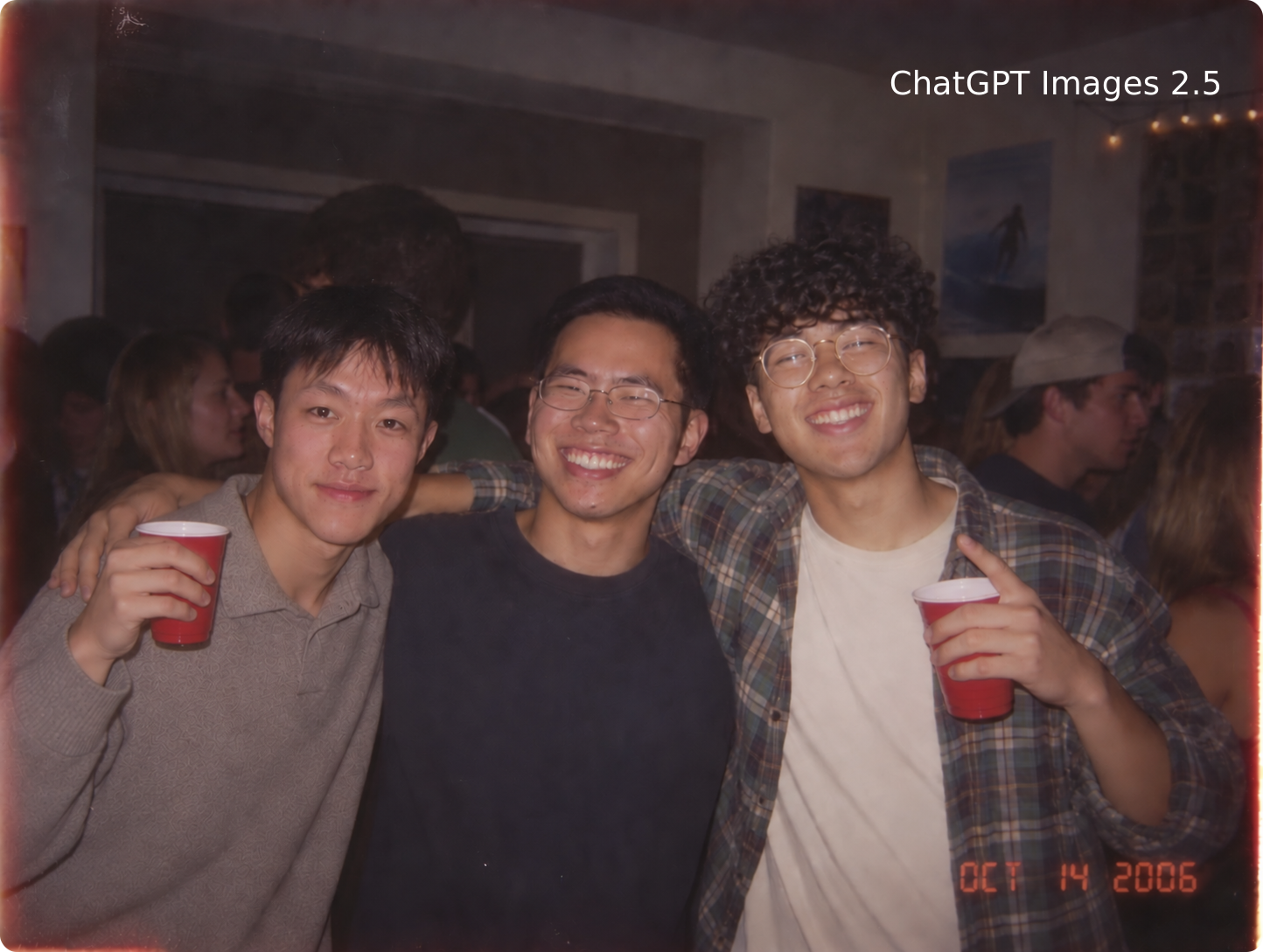
- Composite party photo: Taking three individual photos of men shot under different lighting conditions as input, the model merges them into a single party photo of the three standing side by side holding red cups at an indoor gathering.
Intelligence and Style Comprehension: From Complex Layouts to Cohesive Collateral
Images 2.5 enhances its ability to parse complex visual instructions, achieving higher accuracy when handling real-world information, adhering more closely to specific artistic styles and layout requirements, and supporting native transparent background output.
- Multi-unit layout coordination (mid-century-modern-posters): Coordinating 9 independent geometric symbols (waves, flowers, face profiles, staircases, eyes, etc.) with striking English phrases (such as CREATE, GROW TOGETHER, CHOOSE KINDNESS, etc.) across a 3×3 grid, showing how multiple visual elements can be organized together.
- Unified collateral styling across a series (vintage-national-park-stamps): Covering 8 distinct landforms including Yellowstone, Grand Canyon, and Glacier, all uniformly adhering to vintage print textures and perforated stamp borders.
- Hierarchical structure and real-world information (presentation-image): Simulating a slide editor interface featuring the main title “What Causes Solar Flares?”, an image of the sun, and a four-step scientific process diagram at the bottom, matching the visual hierarchy of professional reports.
- Diverse artistic style rendering:
- Retrofuturism: A family of three gazing through a window at a colossal cylindrical space habitat, evoking vintage sci-fi poster art;
- Impressionist cityscape: Using impasto color brushstrokes to depict a bay, sloping streets, and a red suspension bridge;
- Sci-fi surrealism: Inverted city buildings, figures floating horizontally across a night sky, and a curved horizon;
- Wedding invitation: Cream-and-gold elegant borders, symmetrical crests, and calligraphic typography;
- Mosaic: Blue-and-gold mosaic tile tessellations forming Earth and galaxies;
- Sticker poster: A vintage-textured poster of a black cat holding a sticker sheet;
- Cyberpunk metropolis: Rain-soaked neon-lit towers in cold blue, colossal glowing billboards, and hovering airborne vehicles.
- Native transparent background support: Direct output of transparent base images with alpha channels (PNG/WebP) during generation and editing, reducing background removal workflows when creating UI icons, product cutouts, presentation graphics, and web assets.


ChatGPT Interactive Upgrades: Four Practical Creative Tools
Beyond enhancements to model image quality and consistency, the client introduces four interactive tools that lower operational barriers and boost control precision:
@Sketch(hand-drawn sketch guidance): Spatial layouts or garment lines are often difficult to describe fully in plain text. Typing@Sketchinto the prompt input brings up a drawing canvas where you can hand-draw room wireframes, garment contours, or rough compositions as a visual guide, generating polished final artwork when paired with descriptive text.
Templates(preset scene templates): Provides starting points for popular creative formats such as posters, flyers, and merchandise, providing a starting point instead of a blank canvas. Users simply enter text details and style preferences to generate quick mockups.
-
In-image Comments: Instead of laboriously describing where to edit in the chat dialog, users can drop comments directly onto target areas of generated images to trigger focused local modifications.
-
Prompt Sharing: When sharing images, the full prompt used to generate the image can be attached, allowing recipients to use the composition and style as a starting point while swapping in their own photos or details (such as the popular 1980s retro portrait style).

Dual API Model Selection and Precision Prompting in Practice
Depending on quality requirements and latency tolerance, the API provides two models:
Flare: Speed-Optimized
GPT-Image-2.5 Flare is a smaller model offering image quality comparable to GPT Image 2, with latency reduced by up to 50% compared to 2.0. It is well-suited for social content, product UI prototypes, visual search, and high-concurrency batch generation.
Sunburst: Quality-Optimized
GPT-Image-2.5 Sunburst is the base model, delivering higher image quality than GPT Image 2, finer control across editing turns, and relatively longer generation times. It is ideal for brand visuals, advertising collateral, and polished e-commerce product imagery.
If GPT Image 2 quality is already sufficient for your use case, test Flare first to see if it reduces waiting times; if intricate details fall short, evaluate Sunburst and choose based on practical results, turnaround time, and budget.
GPT-Image-2.5 has also been integrated into Adobe Firefly, allowing creators to combine it with professional design tools to move from concept to final design.
Configuring API Parameters
Dimensions, quality, and background format are configured via API parameters, while prompts handle visual content.
Model model
Select gpt-image-2.5-flare or gpt-image-2.5-sunburst.
Quality quality
Supports auto (default), low, medium, high, xhigh, and max.
Try high for small infographic text or dense layouts; when you have more exacting visual standards and can tolerate longer wait times, test xhigh or max. Higher tiers do not guarantee superior results every time.
Size size
Standard presets include 1024x1024, 1536x1024, and 1024x1536. Custom dimensions must satisfy:
- Each edge must not exceed 3,840 pixels and must be a multiple of 16.
- Aspect ratio between long and short edges must not exceed 3:1.
- Total pixels must fall between 655,360 and 8,294,400.
Total pixel counts exceeding 3,686,400 (2560×1440) are experimentally supported.
Background background
Supports auto, opaque, and transparent.
For transparent backgrounds, set background="transparent" and select PNG or WebP as the output format. PNG does not use output_compression; WebP allows compression adjustments.
Writing Effective Prompts
Clearly specify objectives, reference image roles, and precisely what needs to change versus what must be preserved. For additional scenarios, consult the GPT Image 2.5 Prompting Guide.
- Assign roles to references: When providing multiple reference images, specify image indices and roles in the prompt (e.g., “Image 1 is the subject,” “Image 2 is the target outfit”), explaining the compositional logic.
- Separate changes from constraints: Explicitly state “change only X” and enumerate elements that must remain locked (such as facial features, expressions, hairstyles, posture, background composition, camera angles, and lighting temperature).
- Verbatim text in quotes: Place text that should appear in the image verbatim inside quotation marks, specify occurrence counts (e.g., “render exactly once”) and layout positions, and explicitly instruct the model not to add extraneous text.
- Refine across turns: Use the image generated in the preceding turn as the baseline input for the next request, fine-tuning only one local attribute per turn. Verify the result before proceeding to the next change, making it easy to catch and correct unintended modifications.
Outfit Swap Prompt: Separating Changes from Constraints
API request parameters are configured separately, such as model="gpt-image-2.5-flare", quality="medium", size="1024x1536". The prompt can be structured as follows:
Image 1 is the person reference; Image 2 is the clothing reference.
Replace clothing only: Dress the person in Image 1 in the outfit from Image 2.
Preserve the person's face, skin tone, hairstyle, body build, pose, and facial expression.
Preserve Image 1's background, camera angle, lighting direction, and overall composition.
Ensure the clothing naturally fits the existing pose, with realistic fabric folds and contact shadows.
Do not add any text, logos, or watermarks.
Compare modified and preserved areas after each turn. Sequential edits may still shift details you wanted untouched; if a specific region must remain pixel-identical, compositing the usable modifications back into the original image is recommended.
API Pricing and Cost Breakdown
Standard mode is billed based on token consumption in USD per 1 million tokens ($ / 1M tokens).
Across GPT-Image-2.5 Flare, GPT-Image-2.5 Sunburst, and the prior-generation GPT-Image-2, base token unit pricing remains completely identical:
| Pricing Item ($ / 1M tokens) | GPT Image 2 | 2.5 Flare | 2.5 Sunburst |
|---|---|---|---|
| Image Input | $8.00 | $8.00 | $8.00 |
| Cached Image Input | $2.00 | $2.00 | $2.00 |
| Image Output | $30.00 | $30.00 | $30.00 |
| Text Input | $5.00 | $5.00 | $5.00 |
| Cached Text Input | $1.25 | $1.25 | $1.25 |
Corresponding unit rates across all three models remain unchanged compared to 2.0. Pricing verified: September 9, 2026. View current pricing.
Calculating Cost per Image
The cost of a single request is the sum of three components: text input, image input, and image output. Each component is calculated by multiplying actual token usage by the corresponding unit price above, then dividing by 1 million.
- Prompts: Billed by text token count.
- Reference images: Count and dimensions affect image input token usage; cached portions are billed at the cached input rate.
- Generated images: Output dimensions and
qualitytier affect image output token usage, with final charges based on actual consumption.
Release Date, Availability, and Safety Mechanisms
- Release date and platform coverage: Rolling out starting September 8, 2026, across all tiers of ChatGPT, ChatGPT Work, and Codex, spanning desktop apps, mobile apps, and the web.
- API availability: Developers can now invoke
gpt-image-2.5-flareandgpt-image-2.5-sunburstvia the API. - Safety and compliance governance:
- Prompts and images are screened to help mitigate harmful outputs;
- Output images consistently embed C2PA provenance metadata and invisible digital watermarking to help trace image origin.
Hands-On Template for Multi-Turn Precision Fine-Tuning of Chinese Long-Form Infographics and Posters
Subject-Anchoring and Environment/Outfit Replacement Template for Real Photos
Practical takeaway
Scroll through the Markdown, then copy and adapt it to your team.
Loading Markdown…
Members can copy or download the full Markdown, and let their AI subscribe and ask.
Found this useful? Leave your email — every new explainer, the moment it's out. Unsubscribe anytime.