Claude Code's Official Breakdown of Loop Design: 4 Escalating Levels to Unattended Autonomy
- Anthropic's Claude Code team published a blog post breaking "designing a loop" into 4 standard patterns: turn-based, goal-based (
/goal), time-based (/loopand/schedule), and proactive — escalating from low to high autonomy. - The official definition of a loop: an agent repeatedly executes rounds of work until some stopping condition is met. The four types are distinguished along four dimensions: who triggers it, how it decides to stop, which feature implements it, and what kind of task it suits.
- The core mechanism of
/goalis bringing in a separate evaluator model to judge whether the bar has been cleared — Claude itself can't just decide "good enough" and call it done — and you can also cap the maximum number of attempts. - Proactive loops stack five features together —
/schedule(time-based triggering),/goal(stopping condition), skills (validation criteria), dynamic workflows (multi-agent parallel orchestration), and auto mode (no manual confirmation) — to handle ongoing work like bug-report triage, issue classification, and dependency upgrades, unattended. - Two practical recommendations: use scripts for deterministic work — it's cheaper in tokens than making Claude re-derive it every time; and for large-scale dynamic workflows (which can spin up hundreds of agents), do a small-scale test run before going live.
90 and "hundreds of agents" cited in this piece are all drawn from the original — this is the official line.AI Does the Work — But Who Decides It's "Done"?
Claude Code team members Delba de Oliveira and Michael Segner published a post on Anthropic's official blog on June 30, 2026, laying out a systematic approach to designing "loops" for Claude Code: having an agent repeatedly execute work until it meets a stopping condition.
The authors open by pointing to a phenomenon: X is full of chatter about "stop prompting your coding agent one line at a time — design loops instead," but if you actually go look for what a loop even is, you'll find a pile of answers that contradict each other. This piece sets out to clear that up.
Below, we unpack the 4 levels of loops one by one, from simplest to most complex — each one should map onto some class of work you already deal with.
First, Get Clear: What Exactly Is a "Loop"
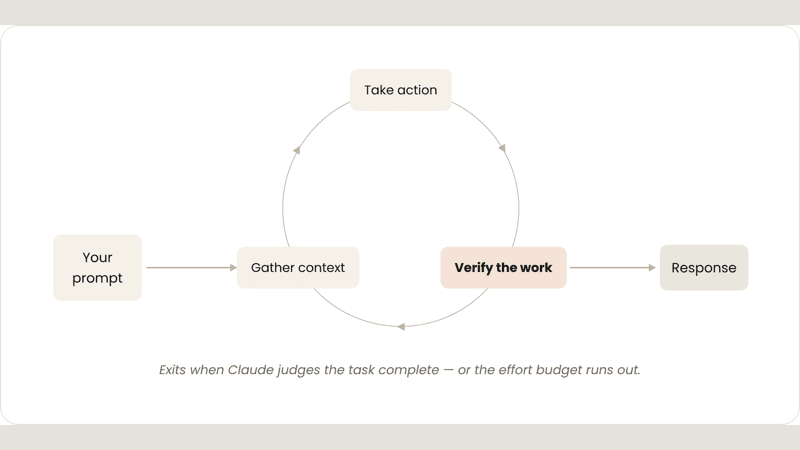
The official definition is a single sentence: a loop is an agent repeatedly executing rounds of work until some stopping condition is met. The key distinction is that "when it's considered done" is defined in advance and left to the system to judge — not something you personally chase round after round.
The authors classify loops along four dimensions, and these four dimensions form the shared reference frame for every loop type that follows: who triggers it, how it decides it should stop, which feature in Claude Code implements it, and what kind of task it suits best. Set up the coordinate system first, and then the four loop types slot right in.
A single prompt → manual, real-time → on a timer (interval) → an event or a schedule, with no one present at all
Claude decides for itself → hits the bar or the retry cap → you cancel it or the work is done → each task exits on its own bar, you shut down the whole pipeline by hand
Default conversation → /goal → /loop, /schedule → all of the above + dynamic workflows + auto mode
Short tasks → tasks with a verifiable exit criterion → periodic tasks or ones that touch external systems → recurring, clearly-defined workflows
The authors also note: not every task needs a complex loop — start from the simplest option, and pick up these patterns as needed.
You Ask, It Does One Round
This is the default mode you use every day. Every prompt you send kicks off a loop where you personally steer each round: Claude gathers context, makes the change, checks its own work, repeats if needed, and then reports back. Officially, this is called the "agentic loop."
An example from the original piece: you ask Claude to build a like button. It reads your code, edits the files, runs the tests, then hands back something it "believes" works. From there, you manually verify it and write the next prompt. What triggers it is a single prompt; the call on when to stop sits with Claude itself; it suits short tasks that don't belong to a fixed process and don't run on a schedule.

How to Make Its Self-Checks More Thorough
You can strengthen the "verification" step: turn the steps you normally check by hand into a SKILL.md, so Claude can check more things end-to-end on its own. The key is giving it tools or connectors that let it see, measure, and act — the more quantifiable the check, the easier it is for Claude to self-verify, and the fewer rounds it needs.
The original piece gives a verify-frontend-change skill: for any frontend change, it's not allowed to declare the job done just because the edit succeeded — it has to walk through the whole process the way a human reviewer would.
- Start the dev server, open the changed page in the browser
- Interact with the change directly: click the button, confirm the state change, screenshot before/after
- Check the browser console: zero new errors or warnings allowed
- Run a performance trace with Chrome DevTools MCP, audit Core Web Vitals
If any step fails, fix it and rerun from step 1 — never hand back partially finished work.
See the original SKILL.md sample code
---
name: verify-frontend-change
description: Verify any UI change end-to-end before declaring it done.
---

# Verifying frontend changes
Never report a UI change as complete based on a successful edit alone.
Verify it the way a human reviewer would:

1. Start the dev server and open the edited page in the browser.
2. Interact with the change directly. For a new control (button,
   input, toggle): click it, confirm the expected state change,
   and screenshot before/after.
3. Check the browser console: zero new errors or warnings.
4. Use the Chrome Devtools MCP, run a performance trace and audit
   Core Web Vitals.

If any step fails, fix the issue and rerun from step 1 — do
not hand back partially verified work.
Set the "Passing Bar" First — Only Then Can It Stop
Sometimes one round isn't enough, especially for complex tasks — agents perform better when they're allowed to iterate. You can use /goal to clearly define "what counts as done," extending how long Claude gets to iterate.
Once you've defined a success criterion, Claude no longer has to judge for itself whether something is "good enough" and quit early. Every time Claude tries to stop, a separate evaluator model checks it against your criteria — if it doesn't pass, it gets sent back to keep working, until the goal is met or it hits the maximum number of attempts you set.
In other words, the power to decide gets taken out of Claude's hands and handed to a dedicated evaluator model. This is also why "deterministic criteria" work especially well — things like the number of passing tests or clearing a specific score threshold — the evaluator model can check them off unambiguously, with no ambiguity.
It's like a QC checkpoint before you turn in your homework: the inspector isn't grading their own work — it's a different party (the evaluator model) holding a checklist, checking off each item, sending it back for redo if it falls short, up to a maximum number of retries.

A concrete example:
/goal get the homepage Lighthouse score to 90 or above, stop after 5 tries.
Goal-based loops suit tasks with a verifiable exit criterion; what you hand over is a "stopping condition," and the feature that implements it is /goal. To manage cost: make both the success criterion and the retry cap specific — e.g., "stop after 5 tries."
Check In On a Schedule
Some work is periodic: the task itself stays the same and only the input changes — like rounding up Slack messages every morning. Other work depends on an external system, and the simplest way to hook into it is to check in at a fixed interval and react to whatever changed — like a PR that might get review comments or might have CI fail.
This class of work is triggered with /loop, which reruns a prompt at a set interval. It stops when you cancel it, or when the work is done (the PR gets merged, the queue empties). Example:
/loop 5m check my PR, address review comments, and fix failing CI
Reruns the same prompt at a fixed interval on your own machine.
Turn your computer off, and it stops. Suits work you're around for and only need to watch for a while.
Use /schedule to set up a routine, moving this "rerun on a timer" setup to run persistently in the cloud.
Turn your computer off, and it keeps running. Suits work that needs to stay up long-term, independent of whether you're around.
/loop 5m checks the PR every 5 minutes, addresses review comments, fixes failing CIStack Five Features and It Runs Itself, Unmanaged
Take the earlier primitives, add auto mode (auto mode — doesn't stop at every step to ask whether to continue) and dynamic workflows (dynamic orchestration across agents, research preview), and you get a loop that can be combined to handle long-running work. What triggers it is an event or a schedule, with no one present in real time at all.
A proactive loop's stopping logic has two layers: each individual task exits once it hits its own goal, while the routine itself keeps running until you manually shut it down. It best suits recurring, clearly-defined workflows: bug reports, issue triage, migrations, dependency upgrades, and the like.
Take handling feedback as an example — the official recipe stacks four features layer by layer, then wraps the whole thing in auto mode:

Put together, a complete prompt looks like this:
/schedule every hour: check #project-feedback for bug reports.
/goal: don't stop until every report found this run is triaged,
actioned, and responded to. When fixing a bug, use a workflow to
explore three solutions in parallel worktrees and have a judge
adversarially review them.
In plain terms: every hour, check the #project-feedback channel for bug reports; for every one found this run, don't stop until it's been triaged, actioned, and responded to; when fixing a given bug, use a workflow that tries three solutions in parallel across three separate branches (worktrees), then has a judge agent adversarially pick them apart. Here, dynamic workflows can spin up on the order of hundreds of sub-agents in a single run, working in parallel and coordinating with each other.
To manage cost: hand the routine off to a smaller, faster model, and only bring in the strongest model at the key decision points that actually need it.
Don't Let the Loop Drift Off Course
The quality of a loop's output depends on the system around it. When designing that system, the official post gives four rules:
- Keep the codebase itself clean
Claude follows the patterns and conventions already in your codebase — if the foundation is clean, what it produces following that foundation will be clean too.
- Give Claude a way to self-check
Codify "what counts as good" into skills as a shared standard for you and your team, so it can check its own work end-to-end.
- Keep documentation within reach
A framework or library's official docs carry the latest best practices — don't make it guess from stale memory.
- Use a second agent for code review
A reviewer starting from a fresh context has fewer biases and isn't influenced by the main agent's reasoning. You can use the built-in
/code-review, or hook up GitHub's Code Review.
When a given result falls short, don't just stop at patching that one instance. Try to codify it as a rule and improve the system as a whole, so every later round of iteration benefits. When something goes wrong, what needs fixing is the system's rules, not just that one result.
Don't Let a Loop Quietly Burn Through Your Tokens
To keep tokens under control, a loop needs clear boundaries. The original piece gives a six-item, actionable checklist:
/usage breaks down recent usage by skills, subagents, and MCP; /goal with no arguments shows rounds used and tokens; /workflows shows per-agent usage and lets you stop any of them anytime.Which Loop to Pick — One Table Says It All
Facing a concrete task, you need to think through three things: what you hand over, when to use it, and which feature to use. The original piece's summary table lines up the four loop levels row by row for comparison — click into each card for a concrete example.
| Loop | You hand over | When to use it | What you use |
|---|---|---|---|
| Turn-based | a "check" | You're exploring or deciding | Custom verification skills |
| Goal-based | a "stopping condition" | You know what counts as done | /goal |
| Time-based | a "trigger" | Work happens outside the project on a schedule | /loop, /schedule |
| Proactive | a "prompt" | Work is recurring and clearly defined | All of the above + dynamic workflows |
Turn-based · see example
Ask Claude to build a like button: it reads the code, edits files, runs tests, and hands back a version it believes works; you manually verify it, then write the next prompt.
Goal-based · see example
/goal get the homepage Lighthouse score to 90 or above, stop after 5 tries.
Time-based · see example
/loop 5m check my PR, address review comments, and fix failing CI
Proactive · see example
/schedule every hour: check #project-feedback for bug reports.
/goal: don't stop until every report found this run is triaged,
actioned, and responded to. When fixing a bug, use a workflow to
explore three solutions in parallel worktrees and have a judge
adversarially review them.
Look at the work you're already doing, pick a task where you're the bottleneck, and ask yourself which piece can be handed off:
- Can you write down the verification checks for this task?
- Is the goal for this task clear enough?
- Does this work run on a schedule?
Once you have an idea, get the loop running, watch where it gets stuck or oversteps, and iterate on it from there.
We define a loop as: an agent repeatedly executing rounds of work until some stopping condition is met. Claude Code team, Getting started with loops, 2026-06-30
Getting AI to Do Repeated Work: From "You Watch Every Round" to "Set the Condition and Let It Stop Itself"
The Claude Code team didn't ship a new product — they organized 5 scattered features into a 4-level loop framework, from manual to unattended, explained in one illustrated page.
↓ One page, fully covers the article · one animated diagram included
On June 30, 2026, the Claude Code team published a post on Anthropic's official blog about how to design "loops" for an AI coding assistant — having an agent (an AI assistant that can act on its own) repeatedly do work until it meets a "stopping condition" set in advance. The key is that condition: when something counts as done is decided ahead of time and left to the system to judge — not something you chase round after round yourself.
This isn't a new product launch. What the team did was take 5 features that already existed (/goal, /loop, /schedule, dynamic workflows, auto mode) and organize them into a 4-level loop system ranked by "degree of autonomy," with combination templates you can copy directly.
Features scattered, each used on its own; how far a given task ran before stopping was down to you nudging it prompt by prompt and manually verifying.
Turn-based → goal-based → time-based → proactive, laid out on a single coordinate system; the further up, the more you hand off and the less you watch — the top level runs fully unattended.
So the question becomes: without you watching, what actually decides "time to stop"? That's exactly where the four levels differ.
Take the same job — XiaoHu needs to handle a steady stream of bug reports — and see how the four loop levels each run it. The difference comes down to just two things: who shouts "go," and who decides "stop."
What a loop saves isn't machine time — it's "the number of times XiaoHu has to watch the screen." For the same recurring job (handling new bug reports every hour), here's how the old and new approaches compare:
Two token-saving (AI billing unit) principles worth remembering too: hand deterministic steps to a script rather than making Claude re-derive them each time; and when a given result falls short, fix the system's rules so every future round benefits, rather than just patching this one instance.
All figures above come from the definitions and examples in Anthropic's official blog post (/schedule and dynamic workflows are both marked as research preview features) — there's no third-party reproduction.
it can get through a whole round on its own.
but is it actually done?
so every round needs XiaoHu to manually sign off.
when this is DONE?!
organized into one framework.
set "when to stop" first.
→ time-based → proactive
at the top level, it's fully unattended.
Can I be done?
sent back, redo it.
checked by the evaluator model
it can't just decide "good enough" on its own.
before you turn in homework
hit go, and walk away.
hits the bar, wraps itself up.
Members can copy or download the full Markdown, and let their AI subscribe and ask.
Found this useful? Leave your email — every new explainer, the moment it's out. Unsubscribe anytime.