Claude Releases Real-Time Dashboards and Code-Driven Claude Motion: Turning Any Work into Moving Video
From asking a business question to verifying data, generating an animation, and handing it to the team for further edits: this update connects analysis and storytelling within the same conversation.
In daily office work and cross-departmental reporting, two of the biggest headaches are "looking up data" and "putting together presentations." When business anomalies occur, teams often have to file requests and wait for data analysts to write SQL. After finally receiving a batch of static charts, any data change the following week requires starting all over again. Meanwhile, when presenting complex workflows at all-hands meetings or customer demos, people often end up compromising with dense, static slide decks or being put off by complicated professional video editing software.
Claude's new approach connects "finding the answers" and "explaining them clearly" within the same conversation. Its Artifacts—work products that can be opened, edited, and shared—receive a major upgrade: introducing the beta releases of Claude Dashboards (real-time data dashboards) and Claude Motion (code-driven animated explainers), while officially graduating the iteratively refined Docs, Slides, and Design out of beta to all users.
The feature distribution and access requirements across this new suite are clearly defined:
- Real-time data dashboards (Claude Dashboards, Beta): Connects directly to enterprise data warehouses or CRMs, generating linked business dashboards from natural-language questions that automatically refresh as underlying data changes (available for Pro, Max, Team, and Enterprise paid plans).
- Code-driven animated explainers (Claude Motion, Beta): Turns reports, charts, or product demos into short animations and exports them as MP4s. Claude uses code to choreograph text, charts, shapes, and images into motion, allowing edits to specific text, numbers, and pacing without using video generation models or creating new footage or AI avatars (available for Team and Enterprise team plans).
- Core creation tools graduate to general availability (Docs, Slides, Design): Sheds the beta label to support real-time collaborative editing between team members and Claude, cross-device viewing, and formatted exports that preserve layouts across all tiers, including Free.
Full official demo, approx. 81 seconds, with original audio; English transcript is default, with selectable translated Chinese subtitles in the player. Original video
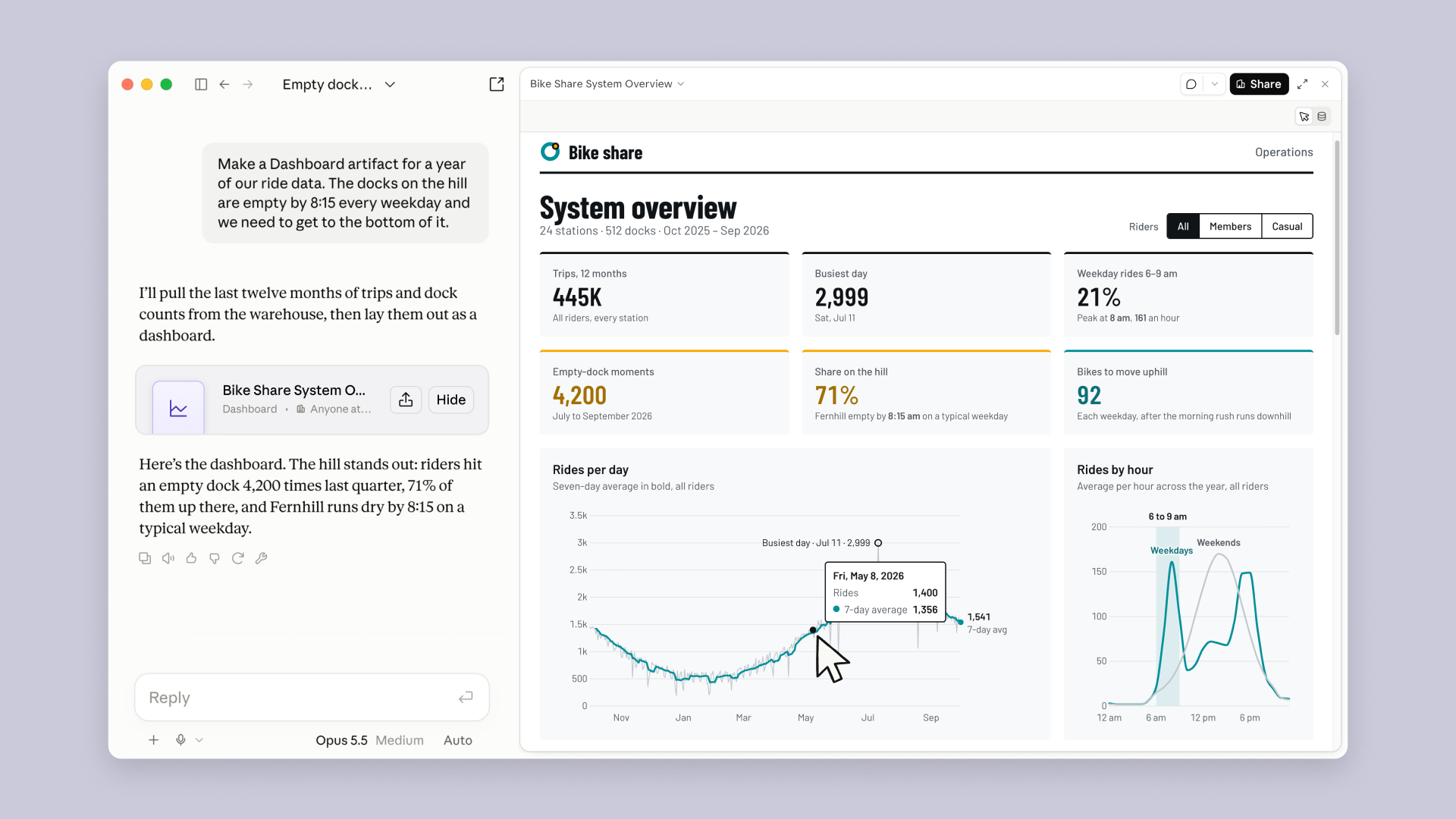
The official demo centers around a single bike-share operational scenario: the team first investigates the root cause of morning rush-hour bike shortages at a hillside station via a data dashboard, and then directly initiates a comment on the dashboard to generate a morning rebalancing explainer animation, smoothly transitioning analytical findings into a presentation video.
Real-Time Data Dashboards: Connect to Business Data in Plain Language Without Filing Tickets or Waiting on Queues
In the past, exploring a business question within an enterprise often forced non-technical staff to rely on BI tools or data teams. With Claude Dashboards, once data connectors are configured, you can talk directly to your company's data foundation in plain language.
1. Mechanism and Connectivity: From Natural-Language Questions to Traceable Dynamic Charts
Dashboards supports connecting to major cloud data warehouses (such as Amazon Redshift, BigQuery, ClickHouse, Databricks, and Snowflake) as well as common business systems (such as Salesforce CRM). It is particularly well-suited for answering quick exploratory questions, such as "How do this week's signups compare to last month?" or viewing opportunity pipelines in Salesforce. Users simply ask in plain language, and Claude generates the corresponding database queries behind the scenes, retrieves the data, and arranges it into an interactive dashboard.
The core of this workflow lies in establishing a closed loop from questions to traceable results:
- Traceable data sources and metric verification: Clicking any figure on the dashboard allows you to view the specific underlying query directly, or follow up to ask Claude to explain the calculation logic. In real-world business, different roles may calculate metrics like "new signups" or "active opportunities" differently; being able to view the underlying query directly makes it easy for business users and technical teams to verify the data scope and filter conditions.
- Dynamic refresh with source data: When the underlying database changes, dashboard data updates accordingly, with each chart explicitly indicating its last refresh time. The refresh timestamp tells you when the chart's data was captured. Only by combining the query with the timestamp can you determine whether the numbers truly answer your current question.
2. An Operational Example: Why Hillside Bikes Keep Running Out
In the official demo, the presenter constructs a hypothetical bike-share operations scenario: the fleet team notices that every weekday morning at 8:15 AM, the Fernhill station halfway up the hill runs completely out of bikes. The operations team needs to identify the cause and propose rebalancing recommendations.
Prompted to "Make a dashboard of our ride data over the past year," Claude retrieved 12 months of data (the demo period spans October 2025 to September 2026) covering 24 stations and 512 docks, generating a dashboard featuring six core metrics and trend charts:
- Overall volume: 445,000 total rides completed across the year, with the highest single-day peak occurring on Saturday, July 11 (2,999 rides).
- Morning rush distribution: Rides between 6:00 AM and 9:00 AM accounted for 21% of weekday volume, peaking at 8:00 AM with 161 rides per hour.
- Problem focus: Out of 4,200 empty dock events recorded in Q3 (July to September 2026), 71% were concentrated at hillside stations (the Fernhill station ran out of bikes by 8:15 AM on a typical weekday). The dashboard interface simultaneously presented a recommendation to rebalance 92 bikes up the hill each day after the morning peak. This example puts "where bikes are lacking, when they run out, and how many to rebalance" onto a single dashboard; 92 bikes is the recommended volume in the demo.
The two charts at the bottom of the dashboard address macro-level cycles and micro-level time windows respectively: the left chart, "Rides per day," contrasts the gray daily ride curve against the cyan 7-day moving average (for example, 1,400 rides on May 8 against a 7-day average of 1,356, reaching the single-day peak of 2,999 on July 11) to smooth short-term daily volatility and observe mid-to-long-term trends; the right chart, "Rides by hour," separates cyan weekday distributions from gray weekend curves, clearly showing that weekday ride spikes concentrate during the 8:00 AM commute, while weekend peaks shift toward midday. The left chart helps observe cross-month trends, while the right chart helps compare when the day is busiest; which chart to look at depends on which operational question you are investigating.

3. Bridging to In-Depth Analytics Tools
The value of rapid exploration is turning a business question into a viewable and verifiable dashboard first. When questions require deeper analysis, Claude can hand off the current dashboard to existing BI and analytics tools, enabling teams to continue working along the same problem. Platforms currently supported and coming soon are as follows:
| Currently Supported Analytics Platforms | Coming soon |
|---|---|
| Amplitude, Grafana, Hex, Mixpanel, Omni, Perplexity, PostHog, Sigma | Looker, monday.com, Tableau |
Animated Explainers (Claude Motion): Turning Reports and Charts into Editable Animations
During presentations, animated charts often explain problems better than static slides. Claude Motion is designed specifically to explain your own work: it does not use a video generation model, meaning it produces neither newly shot footage nor AI virtual avatars; instead, it writes code to choreograph text, charts, shapes, and images into animation.

1. How Code-Choreographed Animation Works
The official announcement highlights three typical practical use cases for Motion: turning a quarterly business report into a 30-second all-hands animated explainer (30 seconds is an official scenario example, not a uniform system limit), bringing static charts to life in a board presentation, and creating product onboarding walkthroughs for new customer guidance.
All these use cases require explaining your own content clearly: reports need to make conclusions understandable, charts need people to follow the shifts, and product walkthroughs need new users to grasp workflows. Motion choreographs text, charts, shapes, and images with code, meaning modifications can target an exact word, a specific number, or the hold duration of a particular frame. You can edit directly in the editor or tell Claude how to revise it before exporting as MP4. For instance, you can update a number in a chart after data revisions or hold a key frame a beat longer to help the audience follow along.

2. Team Collaboration and Detail-Refining Workflow
Watch the full official demo (approx. 81 seconds, English). The demo strings "data analysis → dashboard comment → animation refinement → team collaboration" into a single task.
The official demo weaves the bike-share operational case into a visible operational chain:
- Stating clear requirements from the dashboard: After completing the analysis on the bike-share data dashboard, start an
@Claudecomment directly on the station map, requesting that the analytical takeaways be turned into a briefing animation for an all-hands meeting. When prompting, the presenter not only specifies the action ("make it an animation"), but also defines the audience (company-wide), the communication tone (keep it simple and clear), and the core business takeaways that must be highlighted—the 8:15 AM empty dock issue at the hillside Fernhill station and the recommendation to rebalance 92 bikes after the morning rush.

- Unfolding dynamic narrative over time: Claude responds to the comment and generates the animation. The visuals open with a 3D bird’s-eye view of the city at 5:30 AM with glowing station dots, translating data conclusions into a morning operational narrative unfolding across time.

- Fine-tuning pacing on the timeline: Once the initial cut is generated, team members can add comments directly on specific freeze-frames along the playback timeline. The presenter comments on the empty dock freeze-frame: "Hold on the empty dock a beat longer so it lands." This comment identifies both the frame to alter and the rationale: hold the empty dock state a bit longer so the conclusion truly lands with the audience. On-screen text indicates this comment has been sent to Claude and is being processed.

- Exporting and handing off to professional tools: Once the animation is finalized, it can be downloaded directly as a standard MP4 video for all-hands playback; if the team requires further post-production, it can also be handed off to external video and creative tools for continued work:
| Currently Supported Video and Creative Tools | Coming soon |
|---|---|
| Adobe, Descript, HeyGen, Higgsfield, invideo, Luma AI, Runway | Canva, Captions |
Core Collaboration Tools Graduate to General Availability: Docs, Slides, and Design Open to All
According to Anthropic's official figures, users have created over 45 million documents, slide decks, and designs in chat since these features launched. In this update, Docs, Slides, and Design have officially shed their beta tag, rolling out to all users across all plans, including the Free tier.
Graduating these tools primarily resolves collaboration and compatibility friction in daily workflows:
- Multi-party team co-editing: Rather than humans simply prompting and AI outputting results, team members and Claude can collaborate on the same doc, deck, design canvas, or dashboard—editing copy and adjusting layouts together just like in collaborative document apps.
- Controlled external sharing: With administrator permission, slides, designs, dashboards, and animations can be shared via links with external parties or anyone with the link.
- Post-export continuity: Exported PPT and PDF files retain identical layouts to the in-editor view. Slides can be pushed directly to Google Slides to generate native, editable files, while docs can be exported to Word, Markdown, and PDF. Pushing to Google Slides is especially valuable because collaborators can continue modifying slide content rather than rebuilding from screenshots.
- Keyboard navigation and accessibility support: Slides supports navigating between regions, selecting, and editing text or shapes using keyboard controls, alongside presentation controls and screen reader support to aid daily editing and presenting.
- Mobile edits on the go: In the Claude mobile app, users can directly open and edit documents, slides, or designs.
- Enterprise-grade security and governance: For enterprise organizations, Artifacts officially supports Customer-Managed Encryption Keys (CMEK, allowing enterprises to manage their own keys to encrypt relevant data assets), while administrators can centrally manage which artifact templates are permitted across the organization.
Key Actions for Claude Design Migration: Legacy Site Shutting Down, Note Data Migration Steps
Previously, Claude Design operated as a standalone website at claude.ai/design. Design within the main Claude app can leverage the context, files, and connectors of the current conversation. Anthropic noted that maintaining two separate versions slowed down fixes on both sides, prompting the consolidation of the standalone site into Claude.
This transition introduces several firm deadlines and actionable steps concerning asset safety:
1. Key Timeline and System Migration
- Legacy site access retention period: The legacy site
claude.ai/designwill remain accessible until December 14, 2026, after which all traffic will redirect to the main Claude site. - Migrating design systems: Open the Artifacts page in Claude and click "Migrate team design systems." A single migration run encompasses the organization's design systems and can be initiated once by any authorized user; however, this migration is not without exceptions: blank design systems and systems created from built-in starter themes will not be migrated, and some systems may fail to migrate due to file size limits or other issues, requiring review and re-migration according to prompts. Design systems on the legacy standalone site remain unchanged prior to shutdown.
- Projects currently remain on the legacy site: Currently, the main site Artifacts page can list up to 60 legacy projects, which still open and operate within the standalone site upon clicking. Detailed migration plans for projects will be announced later. If users need backups, they can export projects individually as
.ziparchives from the legacy site (free of charge and not counted against usage quotas).
2. Asset Retention and Transition Reminders
After the standalone site shuts down, certain content will not migrate to the new platform:
- Chat history and comments: Historical conversations with Claude on the legacy site and comments left on projects and design systems will not carry over to the new site, and will be deleted following the shutdown in accordance with data retention policies.
- Public share links will break: Public project links previously shared from the legacy site will stop working once the site is shut down, requiring teams to audit external references.
Teams with critical discussions stored in legacy Design should complete manual backups before the shutdown, and proactively review and update externally shared links.
How to Get Started: Launch Tasks Directly with Everyday Prompts
Getting started with this toolkit does not require learning complex database queries or professional animation software. The official announcement suggests starting with a dashboard you would otherwise file a ticket for, or a report that cannot be explained clearly on a single slide, describing your desired output and specific purpose directly in the prompt:
- "Build a dashboard showing regional revenue for this quarter."—Specify metrics, time ranges, and grouping dimensions.
- "Turn the pricing tier comparison into an animation for the sales kickoff."—Explain what the animation covers and who the audience is.
- "Turn these notes into a presentation deck for Monday."—Provide existing notes and specify the deliverable format.
Each prompt clearly defines the target deliverable and purpose. When building business dashboards, remember to connect the appropriate data source first; choosing which feature to use also depends on the plan and permission requirements below.
Plan Permissions and Admin Enablement Checklist
While these new capabilities are compelling, their availability varies across plans. Enterprise administrators, in particular, need clear configuration paths:
1. Plan Permissions Overview
| Feature | Free | Pro / Max | Team | Enterprise |
|---|---|---|---|---|
| Docs | ✅ | ✅ | ✅ | ✅ |
| Slides | ✅ | ✅ | ✅ | ✅ |
| Design | ✅ | ✅ | ✅ | ✅ |
| Dashboards (Beta) | ❌ | ✅ | ✅ | ✅ |
| Motion (Beta) | ❌ | ❌ | ✅ | ✅ |
2. Essential Admin Steps for Enterprise
- Prerequisite capabilities: All Artifacts features require enabling Cloud code execution and file creation permissions, which must remain enabled under Capabilities in settings (Settings > Capabilities for Free, Pro, and Max; Organization settings > Capabilities for Team and Enterprise).
- Default status for beta features:
- Team plans: The Motion template is enabled by default.
- Enterprise plans: Dashboards and Motion are disabled by default, requiring an enterprise owner to manually enable them under
Organization settings > Artifacts; for Docs, Slides, and Design, the system is scheduled to enable them by default for Enterprise plans on October 15, 2026, though admins can also enable them manually ahead of time.
- Zero Data Retention (ZDR) restrictions: Organizations with Zero Data Retention configured cannot enable Artifacts and therefore cannot use design system migration. Organizations with legacy Design assets under ZDR must download individual
.zipproject archives for backup before December 14.
This article is based on the Claude official blog, supplementary details from the official launch thread, and the Artifacts help documentation and Design migration guide used to verify permissions and migration specifics.
Members can copy or download the full Markdown, and let their AI subscribe and ask.
Found this useful? Leave your email — every new explainer, the moment it's out. Unsubscribe anytime.