One Product Designer, Six Projects at Once: His Five Workflows, Down to the Claude Skill Source Code
- A product designer at a VR fitness company went from handling 1 project to 6 in six months, with iteration cycles measured in days.
- His takeaway is that AI actually changes the scope a designer can cover, but the real gold is in the five workflows, each paired with a genuine screenshot.
- The most valuable bits are all in the screenshots: the full trigger conditions and output templates for a Claude Skill, an AI-written data logic doc, and a branching prototype built with just two fields.
What He Did: From 1 Project to 6 in Six Months
Krystian Zun is a product designer at VR fitness company FitXR with over eight years of experience building 0→1 products. Six months ago, he was focused on a single project. Now he's juggling six simultaneously—handling brainstorming, system logic, prototyping, tickets, and progress updates himself, with iteration cycles of just a few days. He's sharing the five workflows he's developed over this period, each backed by real screenshots. The full Claude Skill definition, the AI-generated data logic document, and the branching prototype implementation are all ready to be copied verbatim.
His own framing is this: AI is usually seen as a speed tool—getting the same work done faster. After a year, he thinks that framework misses the point. What it truly changes is scale—how much a single designer can own end-to-end. Speed is just a byproduct. He stresses that he hasn't gotten smarter or started working longer hours; what changed is where his attention goes, and the rest is delegated to AI.
The catalyst was FitXR, which he describes as the fastest-paced place he's ever worked. In the first few months, he kept shipping experiments and quickly hit a wall: he needed to find a way to keep up. Since then, whenever he hits a bottleneck, he asks himself the same question:
Can I find a way to inject AI into this?
Krystian Zun
Can I offload part of it? Make it faster? Get a better result? It's all been trial and error, he says, including figuring out where AI doesn't help—or slows him down—where doing it himself is better. Unfortunately, he didn't give a single example of that, which is the biggest gap in the whole piece. More on that later.

His Mental Model: AI Extends the Horizontal Bar of the T-Shaped Designer
The design world has an old concept: the T-shaped person. The vertical stroke is your deepest expertise—UX, UI, research, motion, whatever it is. The horizontal bar is your ability to span other disciplines and get things done—not at the same level or speed, but enough to move the work forward.
AI lengthens that horizontal bar. It makes him significantly faster in areas where he's not an expert.
Here, he offers a refreshingly honest caveat, worth quoting directly: the benefit varies by domain and by person. For instance, AI still fails at high-quality visual design—at least by his standards, by what he demands of himself. But give a developer who isn't a designer a prompt to generate a simple landing page, and the result looks surprisingly decent.

The second layer is about what the job of a designer actually is. He breaks it down to its core: understanding the problem, understanding the connections and impacts across business, technology, and product, and then finding a solution that ties it all together. In practice, it's a constant loop of switching directions, changing approaches, and iterating until something clicks.
AI makes this loop faster. He says he uses AI like a sketch or a paper prototype: the output isn't the point; pushing his thinking past the "obvious" layer is.
Workflow 1: Handing Weekly Reports and Tickets to a Claude Skill, He Just Approves or Skips
First, a crucial premise that determines whether you can copy this: FitXR doesn't have product managers in the traditional sense. The projects and their day-to-day operations are handled by the people building them. Scheduling, alignment, writing tickets, updating progress, reporting to management—all of it piles on top of the core design and engineering work. So they automate whatever they can.
His stack is Claude + Skills + MCP connected to Slack, Granola, and Linear.Granola is a meeting notes tool that transcribes calls and creates summaries; Linear is the team's project and task management tool.
The chain has three steps:
Granola handles the context. The team is remote, and context is scattered across Slack threads, stand-ups, and calls. With it, he can be truly present in meetings instead of heads-down taking notes. Then, each weekend, a Skill scans those transcripts and Slack messages, drafting Linear progress updates for different roles and people.
A second Skill manages "drift." He says his team is notorious for making decisions in Slack and never leaving Slack. This Skill compares conversations against Linear tickets, flagging discrepancies: scope changes that weren't synced back, incorrect statuses, decisions made but not recorded. He reviews each suggestion, approves or skips, and it's done in minutes.

He's currently involved in six projects, all part of the same larger picture, but each with its own details, challenges, and loose ends. A few months ago, he could only give this level of attention to one project. His conclusion: if he had to track all of this manually, it would easily become a full-time job. AI can't replace involvement and understanding, but it can offload the repetitive, time-consuming parts.
The Skill Source Is in the Screenshot: Trigger Conditions and Output Template
This section isn't in the article text at all—it's read entirely from the middle panel of the screenshot above. The Skill is called linear-status-update, and its trigger is "slash command + automatic."
Its description is almost entirely about "when to show up."
The description spends most of its space enumerating the ways a user might phrase a request: draft an update for the project, write a status update, update Linear based on slack, write a project update from our meetings, pull together a project update, plus "any combination of source (Slack, Granola, meetings) and destination (Linear, project update)." It ends with a safety net:
Use this Skill whenever compiling recent activity into a Linear update, even if the user doesn't mention the word 'skill'.
Skill description from screenshot, translated by us
This approach is worth learning in itself. Skill writers tend to pour all their energy into "how to do it," and the result never gets triggered when it should. The more specific and natural the trigger conditions are, the more reliable it becomes.
Step 3: Figure Out What's New Before Writing
Step 3: Identify what's new
Before drafting, work out:
- What has happened since the last update?
- What decisions were made?
- What was completed? What's in progress?
- Are there any timeline changes, milestone shifts, or blockers?
- Is there any significant engineering or enablement work worth
  calling out?

Focus on substance. Ignore noise like channel join messages, bot
notifications, and minor logistics. If something was already
covered in a previous update, don't repeat it.
Chinese reference: Before writing, figure out what's happened since the last update. What decisions were made? What's done, what's in progress? Any timeline changes, milestone shifts, or blockers? Any significant engineering or enablement work worth highlighting? Focus on substance. Ignore noise like join messages, bot notifications, and minor logistics. If it was already covered last time, don't repeat it.
The last two lines are the ones to steal. Weekly reports usually fail from too much noise and repetition, not a lack of information. Writing down what to ignore is more effective than writing down what to write.
Step 4: Match the Project's Existing Format First, Fall Back to the Default Template
Step 4 starts with "strictly follow the format and tone of the project's existing updates," and only falls back to this default template when there are no historical updates:
# DD.MM.YY - [Project Name] Update

## Status:

* :[emoji]: [On Track / At Risk / Off Track]

[Optional: one or two sentences of framing context — a key
decision, headline shift, or anything needed to set the scene.
Omit if there's nothing essential to say here.]

## Last Week:

**[Workstream]:**
* [What happened — @mention relevant people where useful]
Chinese reference: The title is "Day.Month.Year - [Project Name] Update"; the status line has an emoji plus "On Track / At Risk / Off Track"; then optional 1-2 sentences of framing context—a key decision, a major direction change, or anything needed to set the scene, omit the whole section if there's nothing essential; then blocks by workstream, each listing "what happened" and @mentioning the relevant people.
Workflow 2: Let AI Dump the Obvious Ideas Fast
He admits this one is fairly obvious, but his thinking is worth reading.
He doesn't expect AI to provide "the answer"—most of the time, it can't. What AI is genuinely good at is rapidly exhausting all the obvious, simple, and sometimes even dumb ideas.
In any creative process, the first ideas that surface are usually the most predictable ones. Only after you get past that layer do you start touching something interesting. AI accelerates that layer, so he doesn't start from a blank page—he has a starting point.
Use it as a rubber duck. You explain the problem out loud, and the answer often takes shape as you speak. AI is similar: the very act of articulating the problem, constraints, and context helps you think clearly, and then it throws something back for you to react to.
The second scenario is when he's genuinely stuck: a weird edge case, a ton of variables to consider, every option feeling wrong, trade-offs everywhere—it's a loop you can't get out of. In these moments, he has AI lay out possible directions quickly. The directions themselves aren't perfect, but laying them out helps you see the space and all its trade-offs more clearly, and that's usually enough to break free and move forward.

Workflow 3: Feed Raw Materials, Get a Structured Draft from AI, Then Edit and Polish
This is where AI starts to feel like a "real superpower," he says: situations that require processing large amounts of data, logic, and moving parts. The pattern is consistent,
Feed raw materials → Have AI generate a structured draft → Human edits and polishes.
Case Study: Checkpoints
One of his recent projects is like a "Spotify Wrapped" for fitness—a milestone celebration moment that gives users a summary of their data, achievements, and highlights. It needs to feel special and personal.
On paper, this sounds great, but it gets complicated fast when you start thinking about implementation and logic. The challenges are concrete: they have eight different fitness categories (the original says "eight studios," referring to class types like boxing, kickboxing, HIIT, dance, Zumba), some sharing data points like calories and streak scores, but many metrics are entirely different—boxing and kickboxing track punch counts, while HIIT, dance, and Zumba track steps. Plus, there's a bunch of data collected that never even makes it to the UI.
He got a raw data dump from engineering and says sorting through it manually was "honestly a nightmare."
· Project background
· What I'm trying to achieve
· Data file
· Link to Figma designs
· Notes explaining each screen
Note the fourth and fifth items: data alone isn't enough; you need the design files and an explanation of what each screen is for. That's how AI can map the data to the screens.
His assessment of the output is measured, and worth quoting in full: it wasn't perfect—there were a few issues, some data he didn't want to use, and some parts where AI misunderstood or made wrong assumptions. But that wasn't the point. The point was that he didn't have to start from scratch. He had a strong starting point to dig into, refine block by block, and polish until it was production-ready.
A byproduct was a structured document he could share with the team, serving as a single source of truth. He said something striking: this kind of output used to be something he'd be proud to have built from scratch in a week. This time, he had a solid version in less than a day.

The AI-Written Data Logic Doc: 20 Highlight Candidates Plus a Five-Step Selection Algorithm
The article gives this document only a passing mention, but the screenshot shows the whole thing. It's called DATA-LOGIC.md, and it opens with a self-description:
This document defines what data is shown on each screen, where it comes from, and how it's calculated. It is the source of truth for prototyping iterations.
Opening of DATA-LOGIC.md, translated by us
Inside, there are four sections, each more specific than the last:
| Section | Content |
|---|---|
| Screen Flow | The entire checkpoint is split into two phases, Wrapped Moment (Screens 0–5) and Plan Reset (Screens 6–9), organized into a table with columns "# / Screen / Section / Figma Node". The Figma Node column lists real IDs (like 3139:3609), meaning the document and design files map 1-to-1 |
| Data Hierarchy | Four levels, drawn as a tree: Chapter (all sessions since the last checkpoint) → Day (all sessions on a calendar day) → Workout (the 1-3 classes in a structured path for the day) → Class (a single session, one row in the CSV). Each level has a definition |
| Data Sources | Session-level fields listed one by one: field name, type, notes. For example, dateCreation is a Unix timestamp with a note saying "used to generate formats like 'Jan 23'" |
| Per-Screen Logic | H1 through H20—twenty highlight candidates, each with ID, label, granularity, example value, calculation formula, subtitle format, and ending with the selection algorithm |
At the end of the Data Hierarchy section, AI itself flagged an open question: grouping sessions into workouts requires a workout identifier field; relying solely on classId and dateCreation isn't enough to reliably group classes into the same workout. It labeled this as an open Q.
It didn't gloss over the uncertainty with fancy language—it explicitly left a to-do. How useful a draft is largely depends on whether it dares to do this.

What Makes a Good Highlight, As Written in the Doc
He later turned this document into a browsable explainer site, and in that version there's a definition that's the single most valuable product judgment in the entire piece:
A highlight is the single most impressive number in this chapter. It should feel like a specific memory, not a summary metric.
What makes a good highlight: specific, readable (
Checkpoints data logic explainer site, translated by us312 punches, notoverall performance score 72.4); unique to a specific workout; different each checkpoint, so it never gets boring.
"312 punches, not an overall performance score of 72.4"—that one line basically explains the success or failure of this entire feature type.

The Five-Step Selection Algorithm
Out of twenty candidates, only one makes it to the screen, determined by these five steps. This is the most directly copyable section in the whole piece:
1. Filter  Exclude candidates where key fields are null or zero
         for the entire chapter; exclude candidates failing
         granularity conditions
         (e.g., no day with multiple classes → skip "Day"-level
         candidates)

2. Score   score = value ÷ threshold for that metric to be
         "impressive"

3. Select  Highest score wins;
         ties go to finer granularity (single-class > single-workout
         > single-day > whole chapter)
         Rationale: more specific is more memorable

4. Variety If the same category won the previous checkpoint,
         skip it and take the next highest score

5. Subtitle Single-class level → "{class type}, {date}"
         Single-workout level → "Workout, {date}"
Step 2 is the key to the whole algorithm. Punch counts, calories, streaks, reaction times—all different units, impossible to compare directly. After dividing by their respective "impressive" thresholds, they're all on the same scale, so a 312-punch session and a 70-kcal class can fairly compete for the same highlight slot.
His First Two Prototyping Attempts for a Branching Flow Failed: Chaos in Figma, Crickets in Google Docs
This is the most useful lesson in the whole piece, because he details the failures more than the successes.
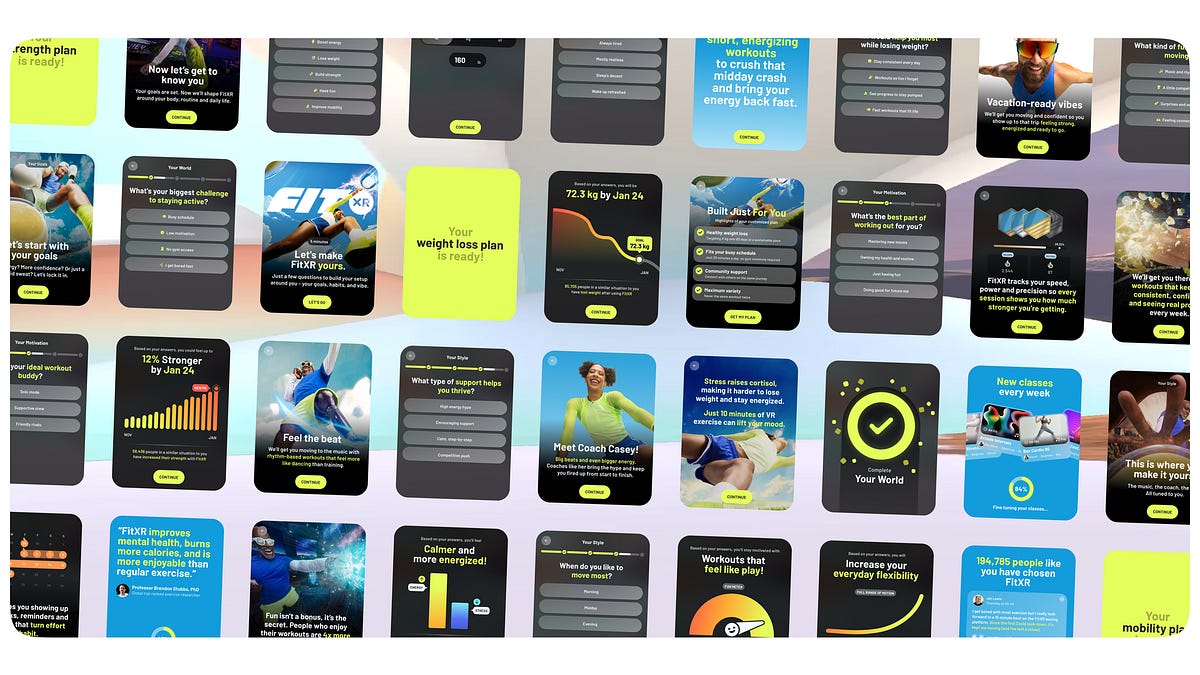
The project is called Positive Friction, his first big project at FitXR: redesigning the new user onboarding. The direction shifted from "optimizing time-to-first-workout" to a much more personalized flow. Users go through a longer series of questions, split into sections, see different insights based on their answers, and end with a set of personalized highlights and a plan to reach their goals. He basically owned it all: the questions and answers, the logic and branching, the insight screens, and finally the high-fidelity designs.
Attempt 1: Sketching in FigJam and Figma, Out of Control Almost Immediately
He started mapping the flow in FigJam and then built small prototypes in Figma to demo how certain answers and insights would play out. It became unmanageable almost immediately. Too many combinations, too many conditions, and any small change rippled everywhere else.
Attempt 2: Writing a Script for Review, Getting Zero Feedback
Someone suggested he focus on content first: put all the questions, answers, and branching logic into a Google Doc, almost like a script, and review it that way.
The result: he got almost no feedback at all. And he admits this makes perfect sense—it was painful to read:
You can't feel the flow. You can't tell if it's too long, you can't tell if the questions are any good. And you definitely can't test the experience.
Krystian Zun, translated by us
At that point, probably out of desperation, a thought hit him: I've been using AI to prototype my own products and ideas. Could I use AI to turn this document into a prototype?
It worked, and it worked well.

After Switching to an AI Prototype: Changing Logic Becomes Changing a Line of Data
First, let's be clear about Figma's limits. Figma is fine for most design work, but some projects are actually a system—with branching, logic, personalization, and ever-changing states. The screens are just the surface. Prototyping something like that in Figma, in his words, ranges from "painful to basically impossible."
After switching, he barely touched Figma until it was time for visual design. Instead, he used AI to iterate on the real experience: content, question order, branching logic, different ways of presenting insights, even different input methods.
The biggest difference is that he can iterate on the entire flow at once. Feedback like "change this question," "move this section forward," "show this insight differently," or "update the logic for this answer" no longer requires manually updating a source-of-truth document and then rewriting changes across every corner of the prototype. He drops the feedback into the conversation, and AI updates the whole thing at once.
This completely changed the speed and depth of iteration. Because I'm no longer prototyping screens—I'm prototyping behavior.
Krystian Zun, translated by us
How the Prototype Was Built, As Seen in the Screenshot
The project is called positive-friction, and it's a Next.js app. The most important structural decision visible in the repo: there's a docs/ folder containing BRANCHING_LOGIC.md, BRANCHING_LOGIC_EXAMPLES.md, and QUESTIONNAIRE_OVERVIEW.txt. The logic specs and the code live in the same repository, so AI can read the rules while modifying the code.
QUESTIONNAIRE_OVERVIEW.txt is a plain-language spec. The screenshot shows actual content: Question 2 is "What's your main goal for fitness (or FitXR)?" with five options—boost energy and reduce stress / lose weight and get healthier / build muscle and tone up / have fun / improve flexibility. Below that, it's marked with asterisks: this is a branching question; it determines which questions appear later. Then it expands BRANCH A: only those who select "boost energy and reduce stress" will see the next question, "When do you most need an energy boost?" and the subsequent transition screen.
And the copy on that transition screen changes to one of three versions based on the answer to the previous question. Try it below:
Morning energy slumps are real. A quick FitXR session can start your day with endorphins and focus, better than any coffee.
contentMap["morning"]
The midday crash gets everyone. FitXR's short, invigorating workouts are perfect for a quick recharge without disrupting your day.
contentMap["midday"]
Evening fatigue is tough. FitXR helps you shake off the day's stress—fun, energizing workouts leave you feeling refreshed, not drained.
contentMap["evening"]
QUESTIONNAIRE_OVERVIEW.txt in the screenshot, translated by us. The interaction is a demo we built using the same data.It's All Driven by Just Two Fields
The corresponding structure in the code is in questionnaire-data.ts, where just two fields power the entire system:
// Conditional display: this step only appears if a previous
// question has a specific answer
showIf: {
  conditions: [
    { questionId: "goal-selection",
      operator: "equals",
      value: "have-fun" },
  ],
}

// Dynamic content: change this screen's content based on the
// answer to a previous question
dynamicContent: {
  questionId: "fun-type",
  contentMap: {
    "music-rhythm":       "...",
    "competition":        "...",
    "variety-surprises":  "...",
    "feeling-connected":  "...",
  },
  defaultContent: "Got it — we'll fill your plan with the
                   kind of fun that keeps you hooked.",
}
It's simple, but these two fields are what turn "changing logic" into changing a line of data, rather than a pile of artboards. The defaultContent line is also worth learning from: any path not covered has fallback copy, so you never get an empty screen.
The rest of the organization is clean too: lib/ contains five files split by responsibility—data, condition evaluation, dynamic content, state, and types. UI components and screens each have their own directory. There's also a nice touch worth stealing: DebugNavigation.tsx, which adds a Debug button to the top-left corner of the running prototype, so reviewers can jump around without answering the whole questionnaire every time.

docs/ directory (branching logic specs and questionnaire overview) and the lib/ directory (data, conditions, dynamic content, state, types—one file each). In the middle, the questionnaire spec is open, with a boxed note: "This is a branching question; it determines which questions appear later". On the right is the prototype in action, saying "Let's craft your perfect fitness plan," marked "About 5 min", with the purple Debug button in the top-left for skipping around. Source: Design with AI newsletter.How He Gets Feedback: Deploy the Prototype, Share the Link on Slack
The article doesn't mention this step either, but it's the engine that makes the whole loop work. The prototype is deployed to vercel.app, and the link is dropped straight into Slack, with a structured note: what changed this round, what specific feedback you're looking for, and what's next.
There's also a subtle trick: he saves his colleagues' feedback as txt files committed to the repo. Git history shows commits like Create sams_suggestions_v2.txt and add sam's notes to breakdown. Feedback goes into the repo, so AI can read it directly on the next iteration.

He says this project became one of the most successful experiments in company history, without providing any numbers. His own framing: this is an example of AI not just making him faster, but enabling a version of the project that likely wouldn't have happened at all.
Workflow 5: Four Agents Draw UIs in Parallel on Paper, One Screen in About Three Minutes
First, his overall judgment: the previous workflows were all logic, systems, and structure—AI's strongest territory. For refined, production-ready UI, he still thinks AI is lacking, unless you have a solid design system to back it up.
But there are two things he's been experimenting with recently that genuinely excite him.
Paper: An Infinite Canvas Built for AI Drawing
Paper is a canvas design tool. He describes it as similar to Figma, but built on HTML rather than a proprietary format, and designed from the ground up for AI and MCP workflows. He explicitly says it's still in alpha, missing basic features, and can't replace Figma yet.
But as an infinite canvas for AI agents to create on, he says it's already miles ahead: you can run multiple agents simultaneously, exploring several layouts or directions in parallel instead of one at a time. With a well-written design.md, the results are "surprisingly good." And because it's HTML-based, the design-to-code gap almost disappears. He did a small experiment: replicated a Figma component in Paper, then had AI build it directly into their codebase.

Called paper—that's them calling Paper's MCP tools. Source: Design with AI newsletter.The status bars in the bottom-right corner of the screenshot reveal hard numbers you won't find in the article:
What's even more interesting is how it checks its own work. The log shows a conversation like: "Everything's placed, let me take a screenshot and check the quality." → "Looks good! Content is clipped at the bottom; switching the canvas to fit-content." → "fit-content cleanly resolves the clipping." This self-correction loop—generate → screenshot → self-review → fix—is why it actually produces decent work, rather than just being a one-shot generator.
The final report shows how it works from the design system, with granular detail: the status bar uses a #FAFAFA neutral shell with dark icons; the navigation title is Barlow 700; the avatar has a #3B8AF3 blue ring; the data row is three white cards (workouts / streak days / calories); the weekly goal progress card has a blue fill with a white track at 80% completion; the exit button is a #E4FE5B lemon-lime pill with dark text. It even notes "Lemon-lime is reserved for primary CTAs per FitXR specs" and "Blue accent consistency: data numbers, PRO badge, progress fill, and icon tints all use #3B8AF3".
1. Paper is more mature now than described in the article. The author was writing about the version he used, and his screenshot does indeed say "Paper Alpha" in the bottom-left. But checking the official site now, the homepage is focused on Paper Desktop, featuring a row of companies using it in production: Ramp, Vercel, Perplexity, Lovable, PostHog, Tailwind, Zed, and others. So "can't replace Figma" is his judgment, not the official line.
2. Free-tier limits are a real constraint for this parallel workflow. The official pricing page states: the free tier gets 100 MCP tool calls per week, while Pro is $20 per editor per month (or $16 annually) for up to 1 million calls per week. Looking at the screenshots, drawing one UI took over a dozen Called paper calls, so a single round of four parallel agents easily consumes dozens. Based on that call density, our estimate is that the free tier could only support two to three rounds of this parallel setup per week. This estimate is ours, calculated from the screenshots, not a figure from the article or the official site.
Motion Isn't His Strength, So He Lets AI Explore While He Does Other Things
This loops back to the T-shaped model from the beginning, and closes the causal loop of the entire piece.
His attitude toward motion design is specific: he respects it, and beautiful animation can elevate a product's feel enormously. But it's not where he's naturally fast. He dreads touching it, mainly because he knows it'll eat up a lot of time. The difficulty is that he can't easily imagine transitions between static frames, let alone conceive something both attractive and original. This isn't his vertical stroke.
His current approach is simple: give context, describe the idea, provide keyframes or static screens, and have AI propose transition options, or animate directly between them.
His self-assessment is honest: to a professional motion designer, this is probably very basic, but for someone like him, it's immensely useful. It gets him to a much better starting point, and he can then refine and polish it himself.
The biggest difference is: this task no longer requires his full, uninterrupted attention from the start. He can have AI explore that space while he works on something else.
Put that together with the opening line about "changing where his attention goes," and managing six projects at once stops being mysterious. How many things you can run in parallel depends on how many of them don't require your undivided attention.

His closing point: AI hasn't made him good at everything, nor has it eliminated the need for taste, judgment, and problem understanding. What it provides is leverage—getting started faster, exploring more directions, handling more complexity, doing decent work in areas he's not strong in, and keeping multiple things moving forward simultaneously. So he believes the real opportunity is in rethinking how we work around it: deciding where to stay in control, where to hand off, where to use it to get unstuck, and where to use it to free up more space for our own thinking. Saving a few minutes on small tasks is the least valuable part of the equation.
What He Didn't Cover: AI Has Its Downsides, But He Gave Zero Examples
This methodology archive has a few holes worth knowing about before you copy it.
1. The most frustrating one. He explicitly stated at the beginning that trial and error taught him where AI is no help, or even slows him down, or where it's better to do it himself—and then he doesn't give a single concrete example in the entire piece. In methodology posts, "when not to use it" is often more valuable than "when to use it," and this section is completely missing.
2. No quantitative baseline for "six projects." How big is a "project"? How much time does each require? Did quality decline? None of that is specified. "One of the most successful experiments in company history" also lacks any numbers—no retention, conversion, or completion metrics. It's all based on his own account.
3. The organizational premise doesn't apply to most readers. He can manage six projects because FitXR has no product managers; the responsibility falls on the people building. In teams with dedicated PMs, the work he offloaded isn't even on the designer's plate to begin with, so the leverage is significantly smaller.
4. Only one of the two Skills is visible. The weekly report Skill can be fully reconstructed from the screenshot, but the "drift" management Skill has no visible material at all—and the latter sounds like the harder, more interesting one.
5. The design.md isn't shared. He says "with a well-written design.md, the results are surprisingly good," but doesn't mention what that file looks like at all. Given the granularity of the Agent's report in the Paper section (down to a specific color value being reserved for primary CTAs), it's likely that file is the primary determinant of output quality—unfortunate that it wasn't shared.
He Turned Design's Most Time-Consuming Parts into Files AI Can Read—Now He Runs Six Projects at Once
FitXR product designer Krystian Zun shares five screenshot-backed workflows. Here's one page, with visuals, on what he actually hands off and what he keeps.
↓ One page to read · One animated figure inside
Krystian Zun designs products at VR fitness company FitXR. Six months ago, he was focused on one project; now he's running six simultaneously, iterating every few days. His take: AI changes scale—how much a single designer can own end-to-end. Speed is a byproduct. He emphasizes he hasn't gotten smarter or started working longer hours; what changed is where his attention goes.
· Weekly progress updates and ticket reviews
· Dumping obvious ideas in one pass
· Turning raw data into structured documents
· Prototyping branching flows
· First-pass exploration of motion options
· Refined, production-ready UI—unless there's a solid design system backing it up
· High-quality visual design by his standards
· The final approval or skip on every AI draft
First, the premise that determines if you can copy this: FitXR has no traditional product managers. Scheduling, writing tickets, weekly reports, reporting to management—it all lands on top of the designers' and engineers' core work. He turned this process into a Skill (a set of fixed instructions for AI: when to act, what steps to follow, what the output looks like), running it every weekend.
Granola turns calls into text, so he can be genuinely present in meetings. Linear is where the team tracks tickets and progress. The last step is always human. Two things in the Skill's screenshot are directly copyable: the trigger conditions enumerate how he'd naturally phrase a request, with a fallback line to use it even if the user doesn't say "skill"; and the steps explicitly define what to ignore—join messages, bot notifications, and things already reported last time.
Here's the more substantial one: feed raw material, have AI produce a structured first draft, then edit and polish. The feature he built is like Spotify Wrapped, giving users a periodic summary. The challenge: the eight fitness categories have different metrics (boxing/kickboxing track punches, HIIT/dance track steps), plus a pile of data collected but never surfaced. He fed in project background, goals, the data file, design links, and notes explaining each screen, and got back a data logic document: what's shown on each screen, where the data comes from, how it's calculated—even mapping to specific design node IDs. In the past, this kind of output was something he'd be proud to build from scratch in a week; this time, he had a solid version in under a day (his account).
Twenty candidates in, one makes it out—the rules were written by AI into the document and adopted by him. In that same document, AI also flagged an open question: you can't reliably group classes into a single workout with the fields available. It marked it as an unresolved issue instead of glossing over it.
He built a prototype for a branching onboarding flow and failed twice. First, in FigJam and Figma—as combinations and conditions multiplied, it spiraled out of control; a single change rippled everywhere. Second, as a script in a Google Doc sent out for review—almost no feedback, because readers couldn't feel the flow, judge its length, or test it. On the third try, he had AI turn that document into a runnable web prototype, deployed it, and shared the link on Slack for feedback. The result: "changing logic" became "changing a line of data."
Q2 answered "Lose weight" → another set
Q2 answered "Build muscle" → yet another
…every condition multiplies artboards
Edit one line of copy → update every artboard
showIf: {
questionId: "goal-selection",
operator: "equals",
value: "have-fun"
}
// This screen's copy changes by previous answer
dynamicContent: {
questionId: "fun-type",
contentMap: { "music-rhythm": "…",
"competition": "…" },
defaultContent: "…" // Fallback, never blank
}
Here his judgment is more conservative: for refined, production-ready UI, he still thinks AI isn't good enough unless there's a solid design system underneath. He's experimenting with Paper—a canvas-based design tool built on HTML instead of a proprietary format, so its output is closer to runnable code. He runs four Claude Code agents simultaneously, each drawing a separate screen: settings, profile, workout details, and paywall. The logs show it taking a screenshot to check its work, noticing content clipped at the bottom, switching to fit-content, and confirming the fix. That self-correction loop is why it produces decent work.
Krystian Zun
in six months
or skip
he keeps in this loop
anything from last week's update—skip it all
out of control fast
feel the flow or test anything
showIf controls when this screen appears,
contentMap controls what it says
one line
changing a line of data
min
burning ~10k+ tokens
- × Production-ready, polished UI
- × High-quality visual design by his standards
- × The final human approval
how many don't need your attention from start to end.
The repetitive stuff? Write it into files AI can read,
and hand it off.
Members can copy or download the full Markdown, and let their AI subscribe and ask.
Found this useful? Leave your email — every new explainer, the moment it's out. Unsubscribe anytime.