
Hands-On Breakdown: How to Use GPT-6 Astra to Build a Large-Scale Space Exploration Web Game
Using Void Explorer as the main case study, this guide breaks down how to define gameplay and visual direction first, then build observable testing, multi-scale coordinates, streamed terrain, performance benchmarks, and a Blender asset pipeline.
If the goal is merely to have AI generate a small, functioning game prototype, the task is relatively straightforward. But once the ambition scales up to a large browser game capable of flying seamlessly from interstellar space down to a planet's surface, art direction, scale representation, streamed terrain loading, controls, rendering, testing, and performance must all work in concert.
OpenAI officially showcased this engineering workflow in Codex using GPT-6 Astra, with Void Explorer as the case study. The final product features 2,048 galaxies and more than 10,000 procedural planets, allowing players to select any visible star and fly toward it, as well as descend continuously from deep space to shorelines and planetary terrain.
The challenge does not lie in generating an isolated snippet of code, but in establishing experience boundaries, enabling Astra to observe and reproduce issues, using the same test suite to compare results before and after changes, and progressively scaling up the game. Following this production sequence, every engineering decision below traces back to a concrete problem and an inspection method.
This methodology first establishes explicit constraints, lets Astra propose engineering implementations, relies on human judgment for aesthetics and handling feel, and builds a reproducible testing and debugging feedback loop.
Experience First: Setting Physical and Visual Boundaries with Natural Language
Rather than starting with a tech stack checklist, this project began by clarifying to Astra the experience players should have and the immutable physical boundaries, letting these constraints shape the engineering architecture in reverse.
When building Void Explorer from the outset, the initial requirement description directly established the physical laws of the entire universe:
Core Prompt (Design Principles): “Everything I see must be reachable. Keep real cosmological distances, but dissolve boredom through scale and transit speeds. I want to fly seamlessly from deep space into a planet’s atmosphere and touch down smoothly on the ground. Planets can be Earth-sized, so we will need procedural terrain and a chunk-based renderer.”
This description set three distinct boundaries for the system:
- Distant stars cannot merely be points of light painted on a skybox; they must be selectable destinations that players can fly toward.
- Approaching a planet cannot abruptly trigger a separate level load; the transition from space to the ground must be completely continuous.
- Realistic cosmic distances require pulse travel and hyperdrive to make journeys viable, while Earth-sized planets require procedural terrain and chunk-based rendering.
The visual direction was also iteratively calibrated with images before building out extensive gameplay content. The initial batch of concept art was overly realistic, while the subsequent revision was overly simplistic. The direction was then steered further with more specific requirements:
Core Prompt (Visual Calibration): “This version is too plain. We need a middle ground: richer colors, a neon luminescence, and deep space high contrast. Show what the ship looks like at high speed, surrounded by stars and dust.”
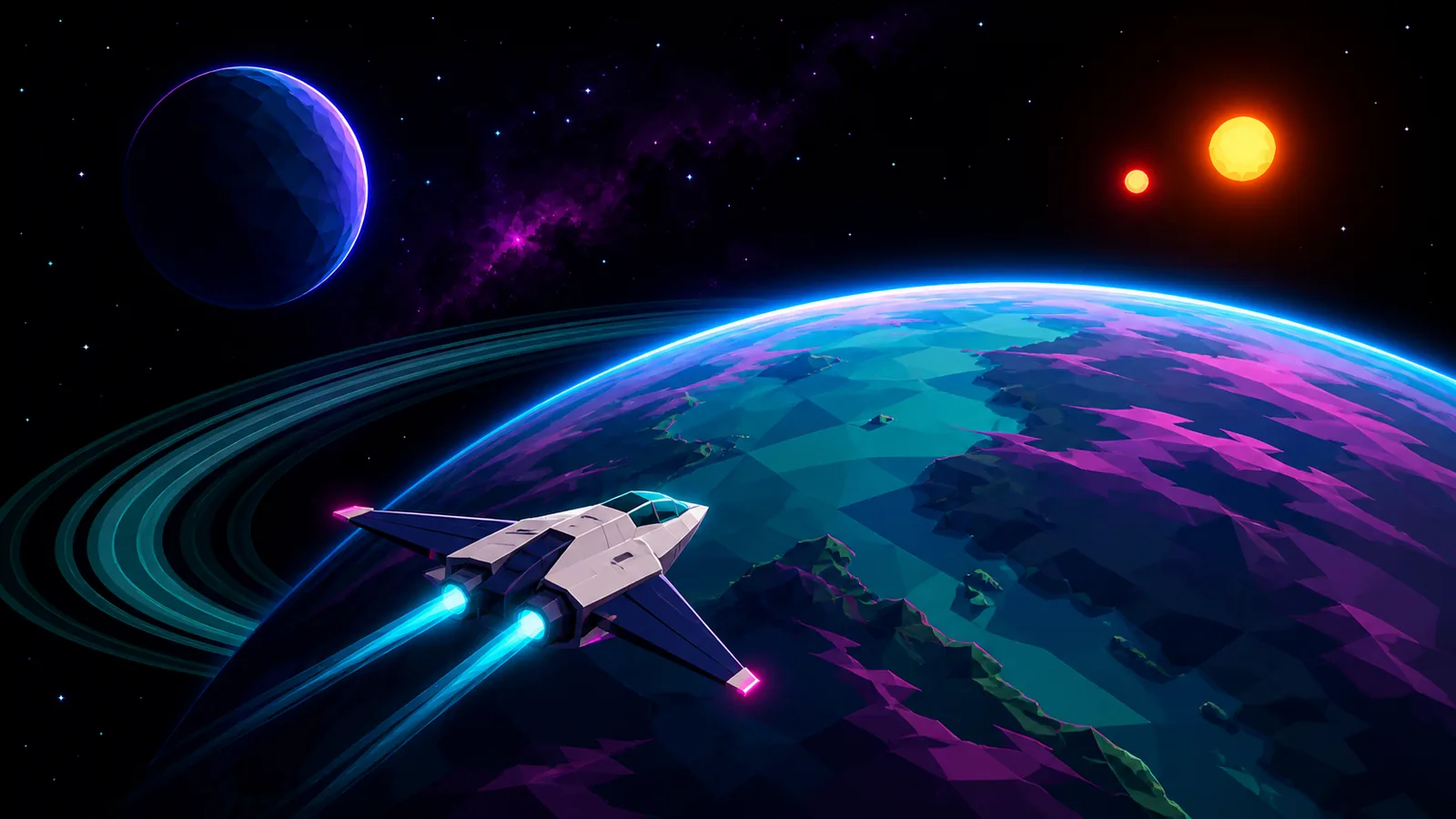
Satisfying images were saved to serve as visual reference points for orbital flight, high-speed travel, atmospheric entry, and landing. With these concrete targets in place, evaluating whether subsequent builds aligned with expectations became far more straightforward.
Architectural Evolution: Decoupling Three.js, WebGPU, and Background Multithreading
The front-end tech stack was built on TypeScript with the Vite build tool, and the core rendering layer was based on Three.js. Three.js provided direct programmatic control over underlying meshes, materials, lighting, and custom procedural geometry—the core medium for nearly all of Void Explorer's visual presentation.
The first playable renderer utilized WebGL2. As development progressed, the team probed whether Three.js was bottlenecking the visual presentation. Astra recommended preserving the universe, navigation, and terrain systems intact while migrating solely the rendering layer to Three.js's WebGPU architecture.
Key Technologies and Responsibilities:
- Node Materials and TSL: Three.js node materials and the Three.js Shading Language (TSL) allow atmosphere, water bodies, and lighting effects to be defined entirely in code.
- Web Workers: Terrain generation prepares geometric data off the thread responsible for user input and drawing, preventing all computation from bottlenecking a single execution pipeline.
- Vitest and Playwright: Vitest validates reproducible generation, coordinate mathematics, and terrain contracts, while Playwright operates the game inside a real browser to verify end-to-end interactions.
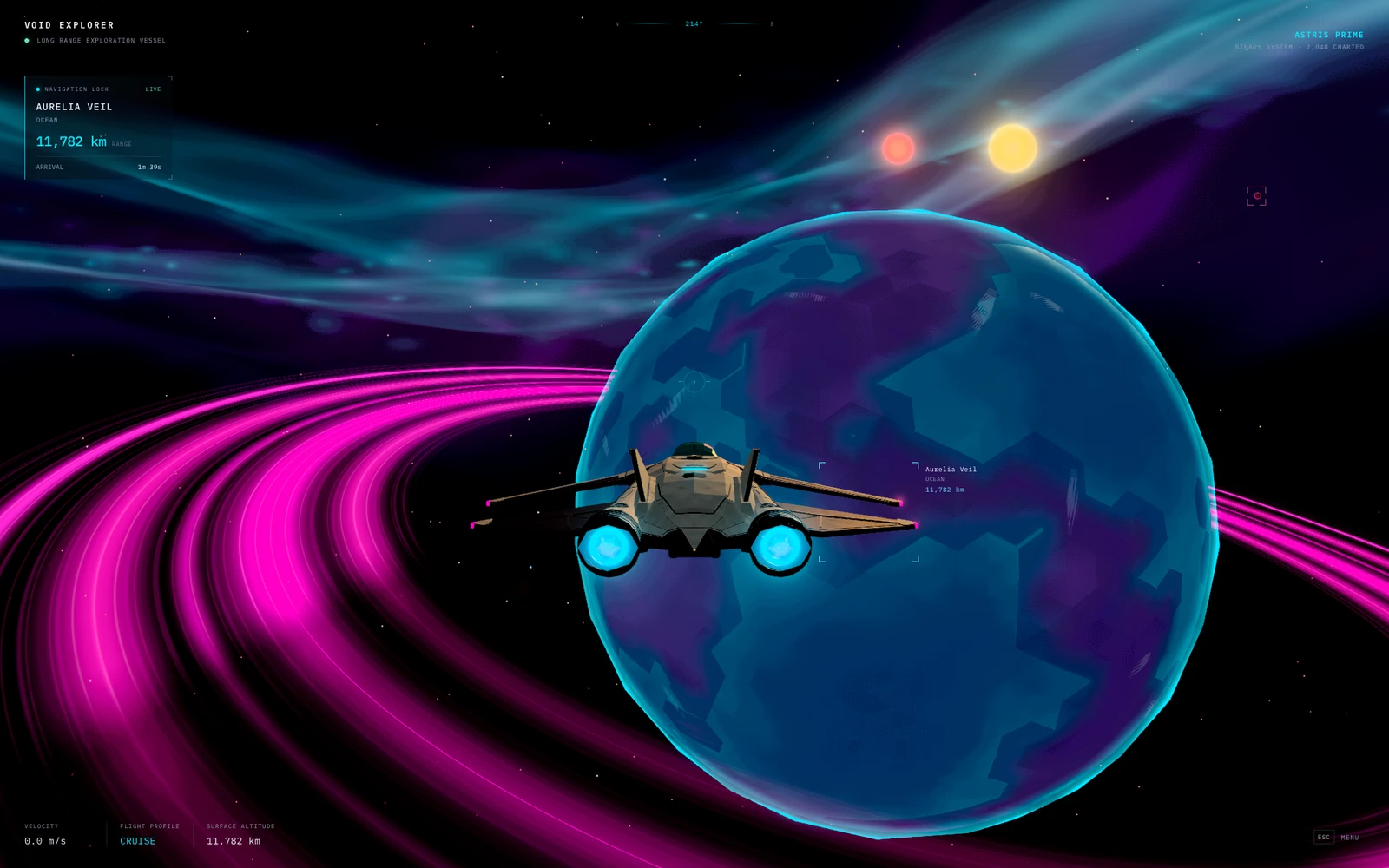
To match the aesthetic established in the concept art, a Neon Phosphor effect was incorporated into the rendering pipeline. It adds a retro display texture to the visuals while keeping navigation information legible.
Empowering the AI with Diagnostic Tools: Automated Inspection and State Passthrough
While humans are responsible for hands-on playtesting and qualitative judgment, Astra needed an investigative entry point more concrete than subjective feedback like “something feels off here.” The project therefore exposed a compact JavaScript interface, window.__VOID_EXPLORER__, enabling browser tests to inspect the celestial body currently being approached, the active flight mode, terrain readiness status, and the active camera. It also exposes rendering and streaming telemetry including draw calls, triangle counts, queued terrain jobs, and buffered terrain data.
The next step was establishing reproducible, named test scenes: orbit, pulse travel, atmospheric descent, and coastal landing. Playwright can load a specific scene directly, await terrain readiness, capture a screenshot, and verify the underlying state. This eliminated the need for Astra to fly across the entire universe each time to reach the location where an issue occurred.
Static test scenes cannot replace end-to-end journeys. The project also maintained journey tests that use authentic flight controls and log position and state transitions throughout flight, covering landing, leaving the ship, walking, saving and reloading, boarding, and taking off. These tests catch issues that a single screenshot would miss, such as unready collision meshes or positional snapping when switching ship states.
During hands-on playtesting, Astra can also be instructed to inspect the active browser tab—for instance, verifying whether the cloud layer of Aurelia remains visible at a specific moment. The scope here is critical to understand: this is a point-in-time inspection, not Astra continuously watching every frame in real time.
This formed a closed-loop debugging workflow: reproduce the issue, inspect screenshots and state, trace the relevant code, adjust the implementation, and rerun the exact same check. For new game projects, it is invaluable to prepare a handful of reproducible scenes, meaningful state and performance counters, and browser tests for primary interactions as early as possible.
Mathematical Decoupling at Astronomical Scales: From Big-Integer Grids to Quadtree Spheres
Positions on a light-year scale differ vastly from standing beside a spaceship on the ground. Passing these massive coordinates directly to the GPU loses the precision required near the surface. To resolve this, the system decouples “an object's coordinate address in the universe” from “its position used for rendering in the current frame.”
Big-Integer Cells and Local Offsets: Universal coordinates are jointly represented by large integer cells and small local offsets. Prior to rendering, the observer's position is subtracted, keeping the camera anchored at the origin while nearby objects continue to use small relative coordinates. Display distances and relative scales thus remain mathematically stable and consistent.
Analytic Orbits and Unified Time: Stars, planets, and moons follow analytic orbits, and the renderer computes their positions using the same simulation time as the observer. A parked ship moves in tandem with its rotating planet; stellar positions and colors also feed into the lighting system, ensuring that a twin-sun sunset viewed from the ground corresponds to the same stars seen from orbit.
Hosting tens of thousands of planets does not mean loading tens of thousands of high-detail meshes. Every planet begins simply as a lightweight specification: radius, orbit, atmosphere, and seed. The seed ensures that identical terrain can be deterministically reproduced; the engine generates local geometry only when the player draws near, and faithfully reconstructs the same landscape upon their return.
Cube Spheres and Quadtree LOD: Distant planets are initially represented by inexpensive polyhedral proxy meshes. As a planet expands on screen, the system transitions to terrain projected from 6 cube faces onto a sphere; each face recursively subdivides into 4 smaller quadrants. This concentrates geometric refinement strictly around visible regions and along the flight vector, with local patches supplying higher-density geometry near the ground.
Shared Heightfield Functions: Both coarse and fine meshes sample the exact same planetary generation function. It combines continents, mountain ridges, craters, and smaller relief while supplying signals for elevation, water, biome, and more; unified color mapping rules ensure visual consistency across disparate surface detail levels.
While this heightfield architecture is exceptionally robust and performant for rendering planetary expanses, it carries an inherent engineering constraint: each surface normal can accommodate only a single elevation value. Consequently, the system cannot natively represent vertical overhanging cliffs, multi-tiered caverns, or subterranean tunnels that can be freely excavated.
Smooth Atmospheric Entry: Velocity Envelopes, Complementary Masks, and Rigid-Body Physics
When transitioning from space to ground, flight speed, terrain streaming, and the handoff between varying detail levels must be orchestrated in unison. A playtest involving a shallow-angle planetary approach surfaced an acute problem:
Core Prompt (Atmospheric Entry Optimization): “When cutting in at a shallow angle grazing the planetary limb, the ship travels too fast for the terrain to stream in, causing the entire planet to vanish into thin air. We need to coordinate the deceleration curve with the terrain streaming pipeline. Can we introduce an atmospheric scattering layer to soften the pop between the distant low-poly proxy and high-detail terrain? The planet must never disappear, even for a single frame, during descent.”
To address this, the system revised both flight dynamics and mesh-transition logic simultaneously:
Dedicated Velocity Caps for Shallow Angles: Flight controls enforce an independent speed cap for shallow entries based on altitude and the calculated orbital-speed derived from planetary radius and gravity. Closer to the ground, the system samples terrain ahead of the flight path to dynamically adjust braking force.
Retaining Old Surfaces Until New Ones Are Fully Ready: Distant planets remain visible until all 6 coarse terrain faces are completely generated; likewise, a terrain tile is retained until all 4 of its children are fully prepared. During transitions, complementary pixel masks assign each pixel strictly to either the old surface or the new surface, preventing the entire planet from becoming transparent while replacement meshes stream in.
Touchdown and EVA (extravehicular activity) introduce a dedicated physics pipeline:
Rapier Local Physics Worlds: When the player character walks on the surface, physics is driven by a localized physics world powered by Rapier.
Atomic Landing Data Readiness: A contact patch's visible ground mesh, collision triangles, and liquid hazard data originate from a single generation pass and must become ready simultaneously. The ship's landing logic independently evaluates landing gear contact, ground slope, and clearance.
Engineering Attribution Behind Frame Drops: Data Governance Under Controlled Benchmarks
When a frame drops, relying merely on whether it “feels choppy” fails to diagnose whether waste stems from triangle counts, data transmission overhead, or repeatedly discarded tasks. The project therefore converted subjective visual hitches observed by players into reproducible browser benchmark tests.
In these benchmarks, Astra used Three.js renderer counters to inspect draw calls, triangles, geometries, and textures; Playwright recorded 90 frame intervals, reporting average and percentile timings. For visual artifacts, rendered pixels were compared with an effect toggled on versus off—such as contrasting terrain with and without the overlap-hiding mask—to pinpoint why the ground vanished rather than guessing from a static screenshot.
When evaluating a spaceship asset replacement, Astra ran the exact same 90-frame orbital test on the WebGPU backend using headless Chromium and SwiftShader across both versions:
| Evaluation Dimension | Early Procedural Ship | Initial Blender AURORA Ship |
|---|---|---|
| Total Scene Draw Calls | 119 calls | 77 calls |
| Total Scene Triangle Count | 48,809 triangles | 61,092 triangles |
| Average Frame Interval (SwiftShader) | 251.48 ms | 199.26 ms |
How to interpret these figures: While the new ship has more triangles, both draw calls and average frame interval decreased in this specific test. This benchmark predates the four-wing ship described below and solely reflects changes within this controlled test environment, not real-hardware gameplay frame rates; these tools also did not measure individual GPU commands or shader execution times.
Focusing on streaming and descent, Astra continued measuring how much geometry was generated, how much data was transferred between workers and the renderer, and how many terrain tasks were discarded before ever being utilized.
Allocating Distant Detail by Screen Coverage: A planet dominating the viewport requires an immediate, high-fidelity silhouette; a planet smaller than a pixel does not require identical geometry. In a controlled starting-scene comparison holding the geometry producer constant, the new strategy used 7,040 proxy triangles compared to 51,200 under the old strategy.
Reducing Redundant Data with Indexed Grids: Adjacent triangles share vertices, eliminating the need to transmit duplicate position, color, and normal attributes. In a test configured with High terrain quality, 6 ground layers, and holding 241,952 triangles constant, the transfer buffer shrank from roughly 35 MB down to 15 MB. Ground and scenery generation were also decoupled into separate jobs, allowing terrain geometry to render without waiting for environmental props.
Stabilizing Subdivision Decisions: The prior selector requested chunks, changed decisions, discarded them, and queued replacements. The improved selector subdivides a tile only when the scheduling budget permits generating all 4 children, drastically curtailing discarded work.
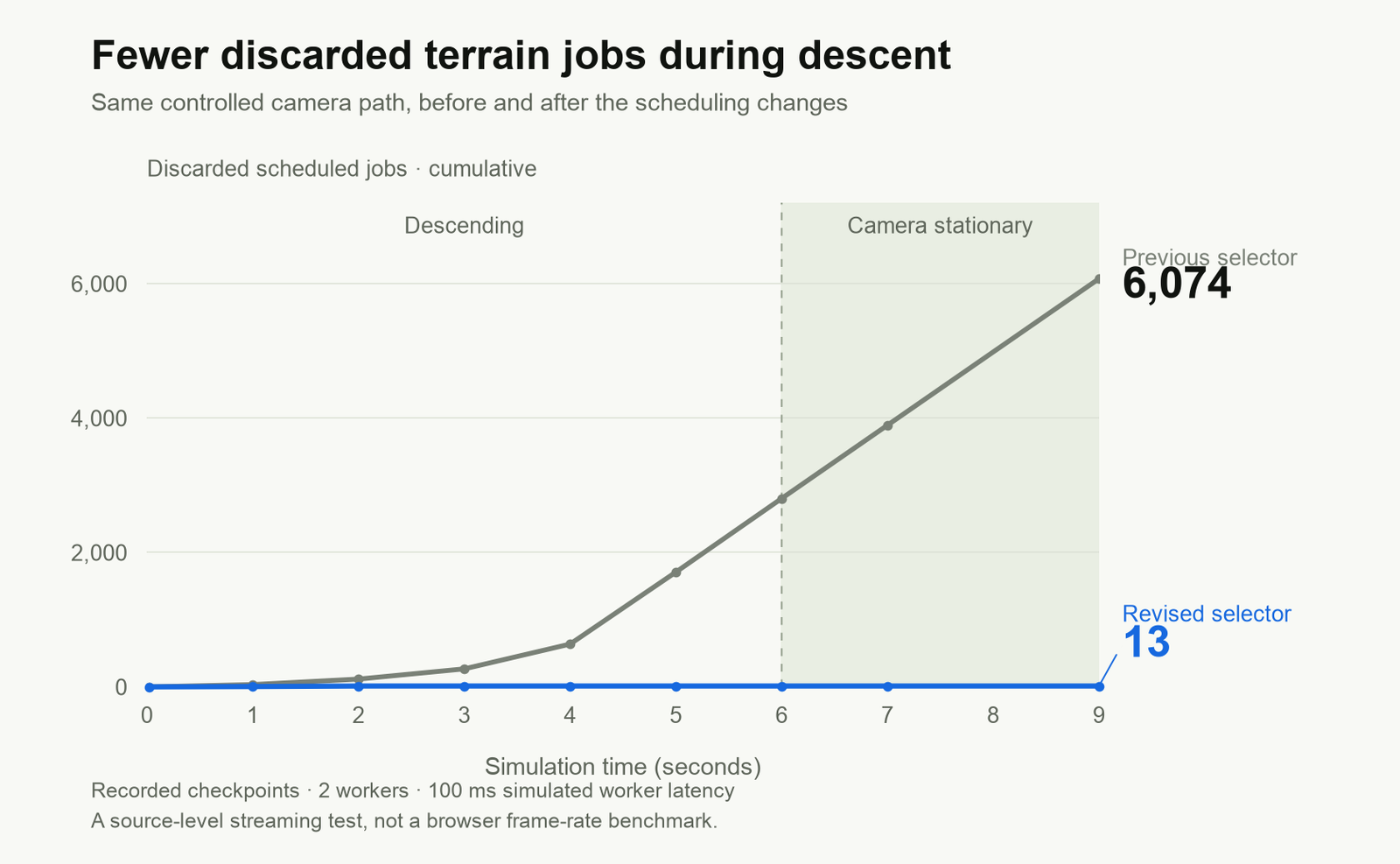
Web Workers still cannot eliminate all hitches. Main-thread terrain fallbacks were broken down into resumable slices with a budget of roughly 4 ms per frame, preventing heavy terrain jobs from blocking a single frame. The engine also decoupled world resolution from interface resolution, ensuring navigation text remains sharp even when downscaling 3D world resolution. Even so, these synthetic benchmarks do not account for shader compilation stutter, GPU upload latency, or perceptual motion smoothness, making in-browser playtesting indispensable.
Hybrid Asset Pipeline: From 2D Concept Art to Lightweight 3D Assets
While Void Explorer's cosmic environment is generated almost entirely through pure code and mathematical algorithms, the spaceship—the primary visual focal point—relied on a classic art asset pipeline for fine-grained craftsmanship.
In this phase, the workflow shifted from “exploring visual aesthetics with image generation” to “converting selected 2D references into functional runtime assets”: human developers locked down core silhouettes, and Astra drove 3D modeling in Blender before importing the asset into the engine.
Addressing issues with early models featuring conjoined wings and flat profiles, developers issued explicit structural revision instructions:
Core Prompt (Ship Redesign): “Generate clean views of this ship from multiple angles, emphasizing separated forward and rear wing structures. We will rebuild the 3D model based on these images. I dislike the current model’s continuous, curved wing shape.”
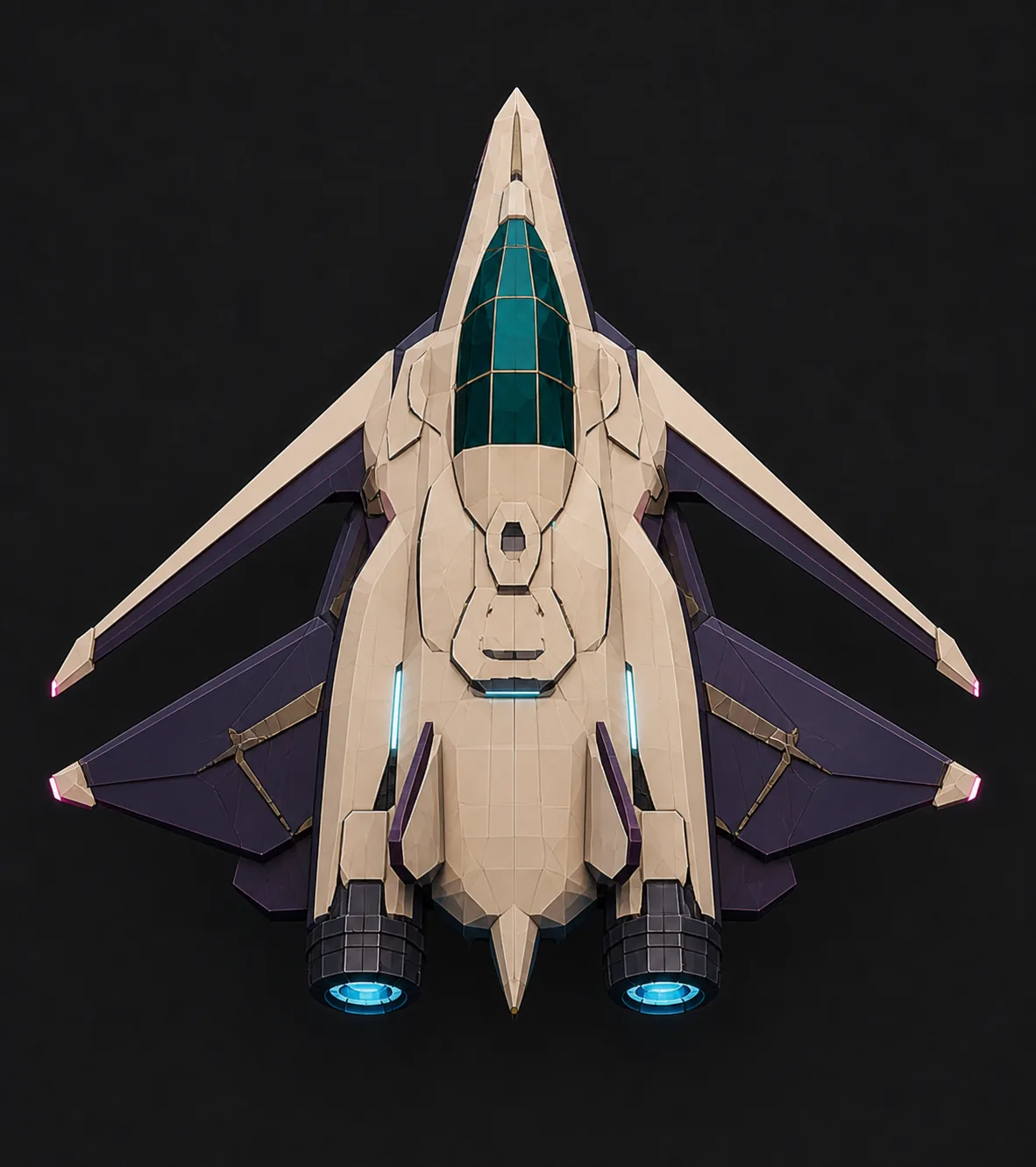
The selected reference design featured four distinct separated wings, a symmetrical silhouette, and pink wingtip lights. Astra was then tasked with modeling the vessel in Blender, preserving the game's artistic style, and integrating it into the game. This process encompassed converting the reference image into geometry, evaluating silhouettes and materials, and preparing the runtime asset. The Blender source file contains 193 editable meshes.
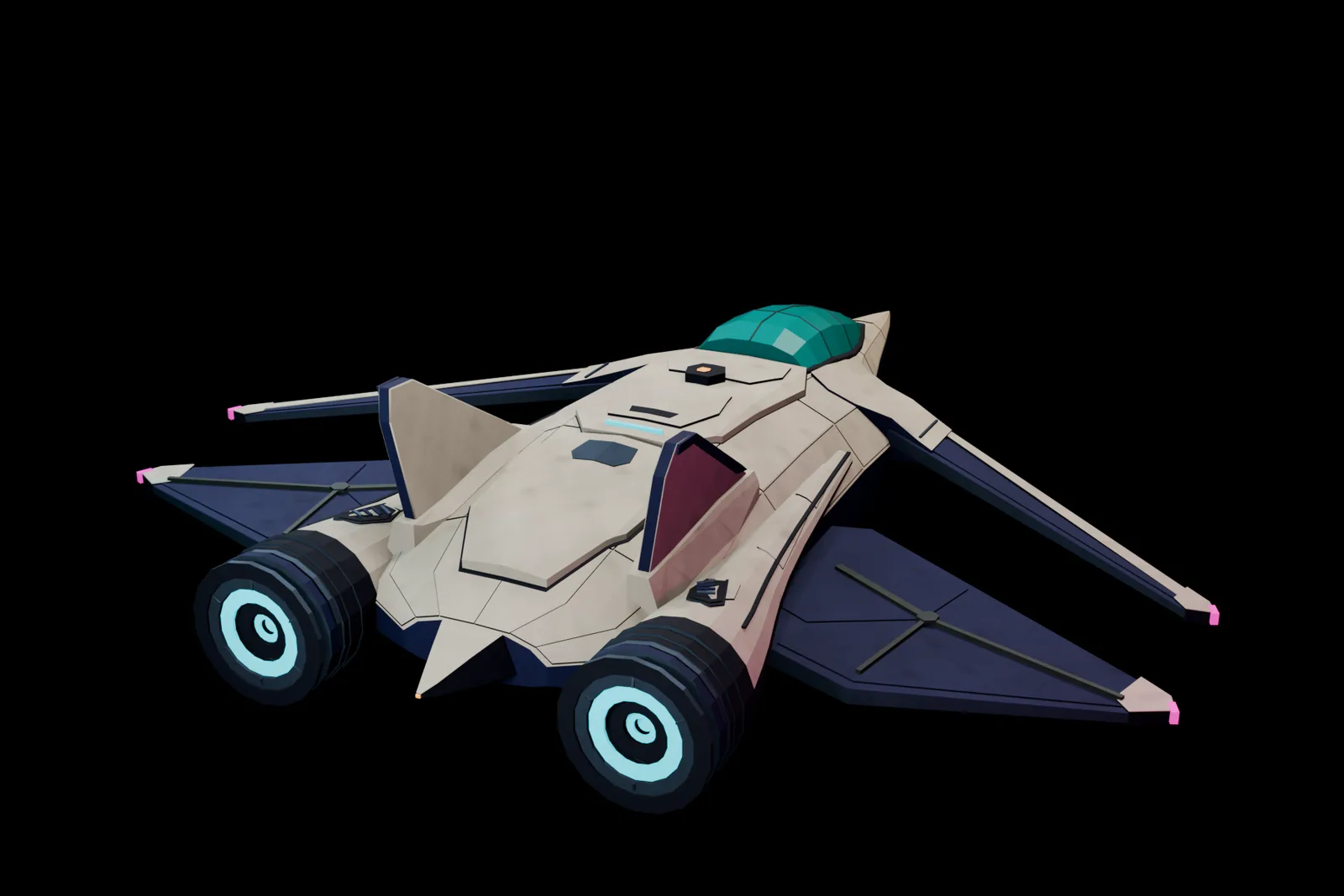
The final exported hull consists of 14,968 triangles partitioned into 8 opaque material batches. Developers can iteratively refine visual fidelity while keeping Astra accountable for the rendering cost of exported assets.
Extending Water Simulation: Cross-Modal Implementations in Sunwake and Hollowflux
The philosophy of “letting a single simulation govern both visuals and gameplay” also manifested across two other games:
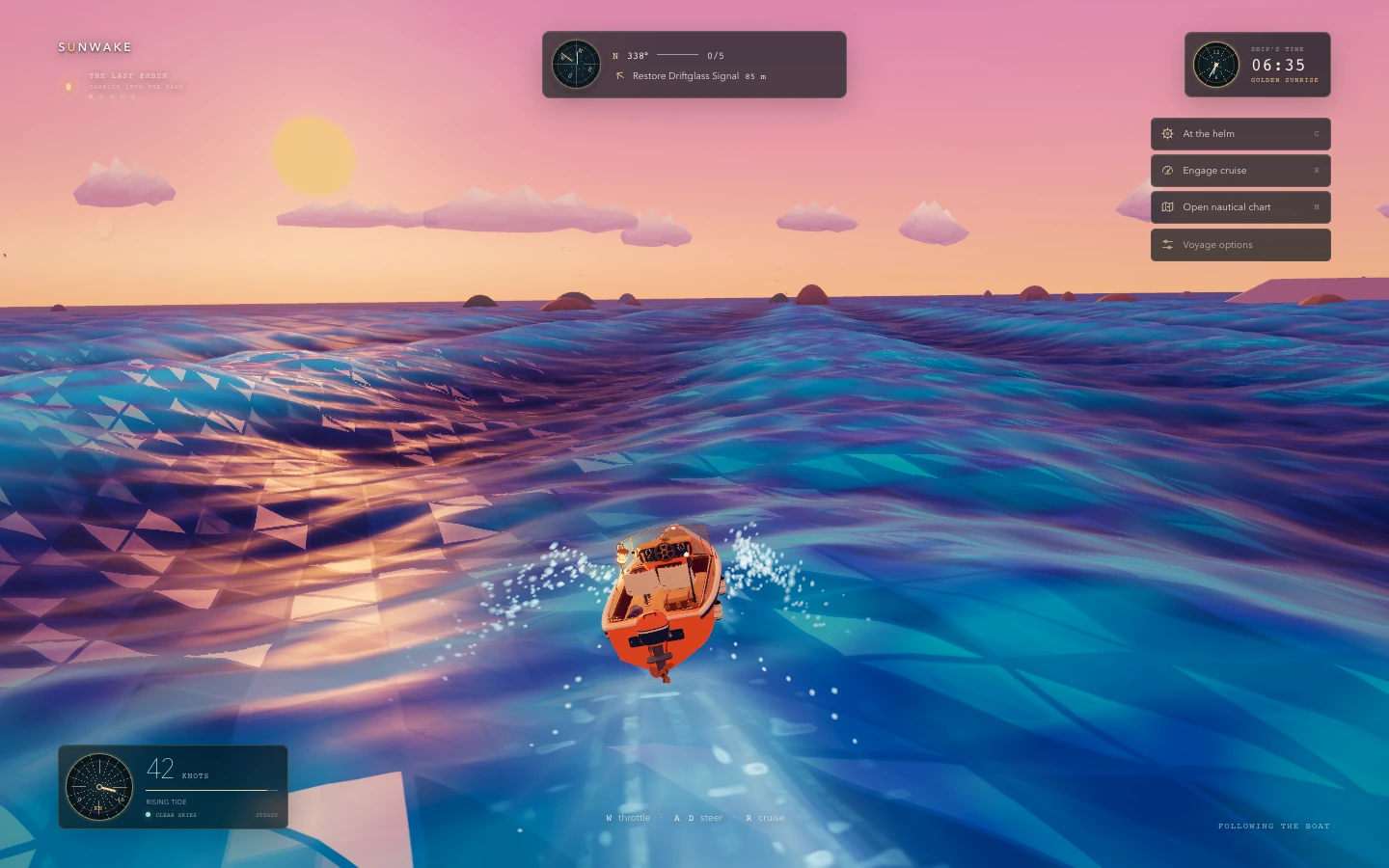
Sunwake: Astra built a custom water renderer in Three.js where a unified wave model drives both visible ocean displacement and vessel buoyancy. Ships heave, pitch, and roll with swells; a localized simulation handles ripples and foam, while ships leave wakes and spray trailing behind them. Astra subsequently modeled a detailed vessel in Blender and integrated it into the game, yielding an effective fusion of “procedural environment + handcrafted vehicle.”
Hollowflux: In this 2D action RPG, caverns, characters, and gear are rendered entirely via code without importing sprite sheets. A grid-cell system tracks water height, currents, foam, and electrical charge.
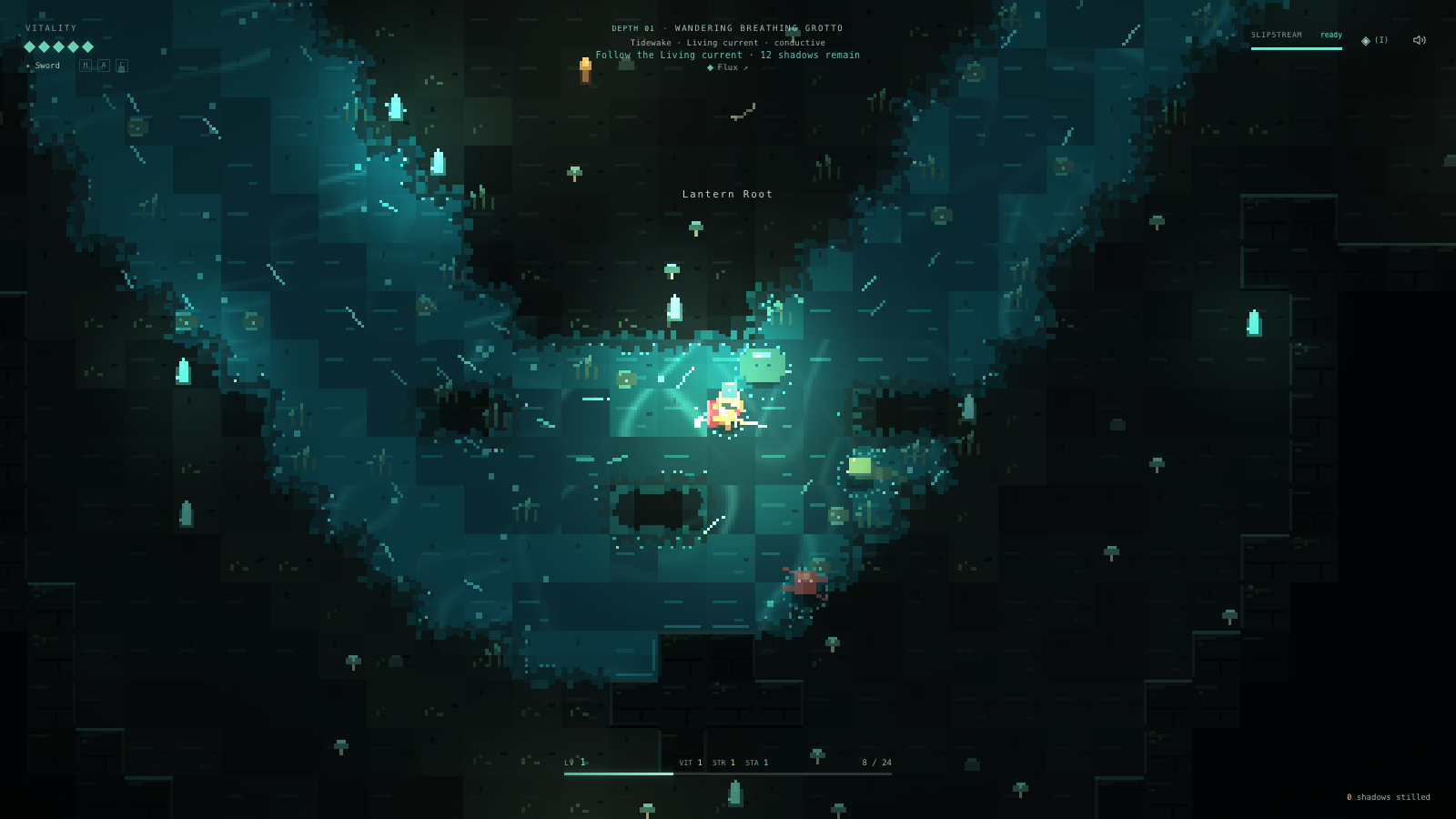
Here, water is not merely aesthetic dressing. Footsteps create ripples, spear thrusts carve narrow wakes, and hammer strikes emit concentric shockwaves; currents sweep along riverbanks, carrying foam downstream and exerting physical push on players and enemies alike. An electric eel's discharge propagates throughout contiguous bodies of water, while retreating to dry stone platforms offers safe harbor from electrocution.
One-Click Deployment and Getting-Started Advice for Indie Developers
When a game is ready to be shared, developers can invoke Codex’s @Sites plugin to deploy the project and receive a public link:
Use @Sites to deploy this game and give me a link.
Once the site is set to public access, anyone can play it immediately in their browser.
For indie developers looking to build games with Astra, consider starting with this structured methodology:
- Focus on one thing that must “feel right” first: A single ship, a single room, or a single mechanic is enough. Build the smallest playable prototype first rather than attempting a full universe on day one.
- Provide concrete visual references and rely on hands-on playtest feedback: Let Astra see the target visual aesthetic first. Once a build is ready, test it personally and give specific critique—pinpointing what moves too fast, what pops out of view, or which colors clash—instead of vague complaints like “it feels off.”
- Establish reproducible checks early: Prepare repeatable scenes, state and performance counters, and browser tests for core game loops early on. While human developers steer artistic vision and control feel, Astra can trace code, construct reproducible measurements, implement fixes, and re-verify. Get this iterative cycle turning reliably before expanding the game's scope.
Members can copy or download the full Markdown, and let their AI subscribe and ask.
Found this useful? Leave your email — every new explainer, the moment it's out. Unsubscribe anytime.