Ideogram 4.5: Keep Editing with AI While Changing Less of What You Want to Keep — An Image Editing Model Focused on Precise Local Edits and Strong Consistency
When recoloring, updating text, or swapping backgrounds across multiple rounds, why do images degrade, shift colors, or lose details? Ideogram 4.5 focuses on hitting targeted edits, preserving the rest of the canvas, and letting changes accumulate reliably.
Core Pain Point and Key Selling Point: Multi-Round Editing Without Degradation or Collapse
You have picked a product shot: first, you swap the product color to red, then replace the background, and finally adjust the lighting. Each individual step seems straightforward. But by the third or fourth round, buttons start deforming, dirty smudges appear on metal surfaces, and even the color you were previously happy with begins to drift. The areas you targeted for editing change as intended, but untouched areas look less and less like the original image.
This kind of "quality drift" isn't just a loss of sharpness; it also encompasses shifts in position, color, and surface texture:
- Pixel shift: Edges or fine details shift slightly from their original positions. For instance, button contours or clothing seams drift out of place; even if the image still appears sharp, the original silhouette has warped.
- Color drift: Regions not intended for color changes begin shifting in tone anyway. When changing only the product color, the background turns yellower, and the subject's skin tone alters as well.
- Texture artifacts: The model generates synthetic surface details not present in the original image that look unnatural—such as strange splotches on skin, distorted fabric weaves, or grime-like streaks on metallic surfaces. "Artifacts" refers to these incorrectly generated details, while "texture" denotes how they corrupt the tactile quality of skin, cloth, metal, and other surfaces.
Why do these problems worsen with each consecutive edit? Because each successive round typically builds on the output of the previous round. The stray artifacts and color shifts introduced in round one become part of the base canvas for round two. If subsequent rounds fail to correct them, new distortions continue to accumulate. Consequently, you are not just compounding intended modifications—you may also be compounding unwanted errors. Ultimately, even if the core subject or product remains recognizable, original shapes, tactile textures, and color schemes gradually erode.
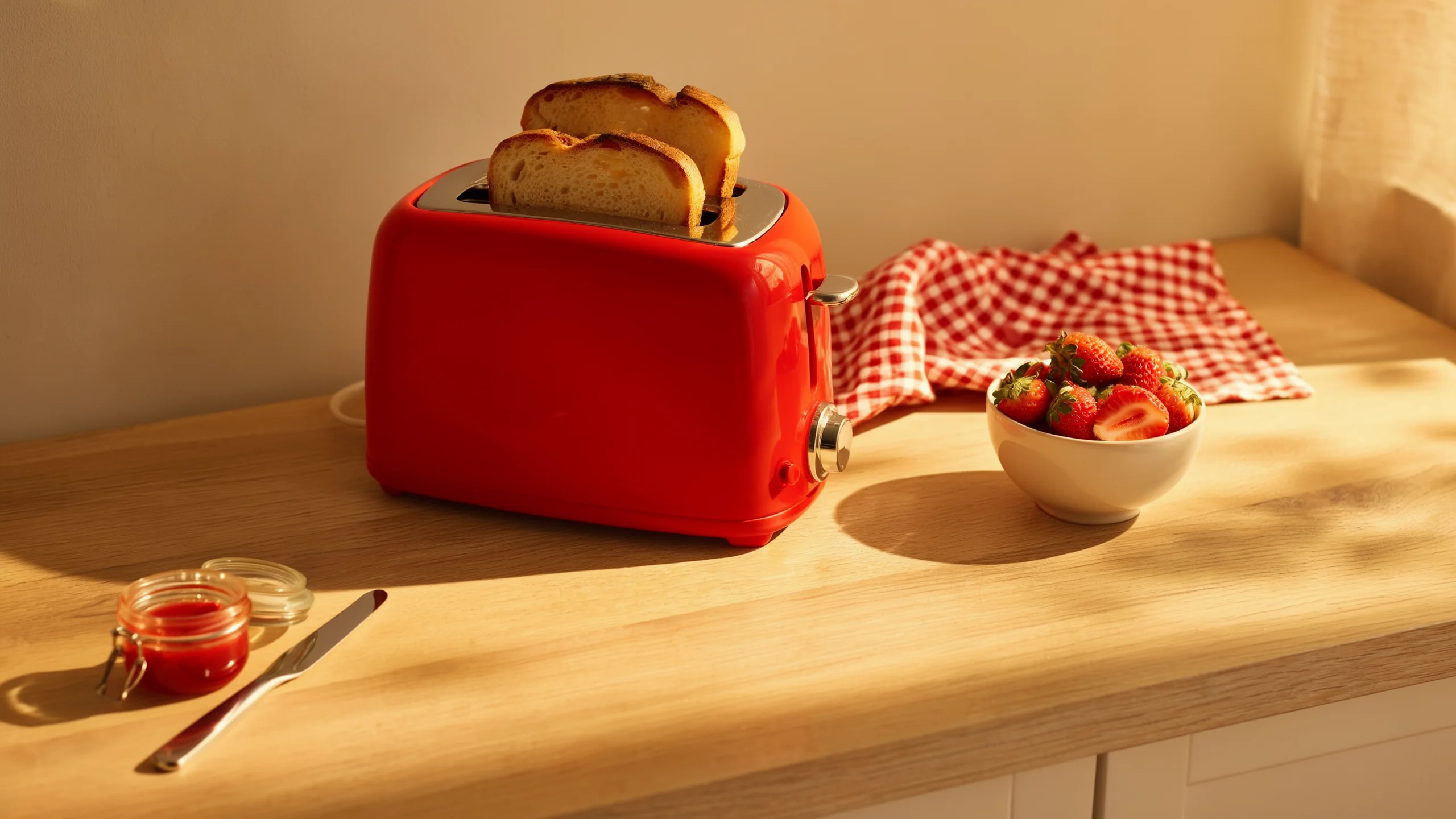
Ideogram 4.5 is an image editing model designed around high-precision local editing and multi-round consistency. Ideogram's core promise is to eliminate this round-by-round artifact buildup: precisely altering designated targets while preserving the rest of the canvas as much as possible, allowing subsequent rounds to build directly on earlier progress. For example, after recoloring a toaster and then replacing the fruit beside it, subsequent edits continue to respect the toaster's established body color, buttons, and chrome accents.
Precise editing copies pixels not substantively impacted by the current edit directly into the result. These untouched regions reuse input pixels, curbing color drift and texture degradation caused by full regeneration. API Documentation
"High precision" focuses on whether an individual round hits its mark without collateral damage to surrounding areas; "consistency" focuses on whether the same product or character retains its signature identity across consecutive rounds. Working together, they transform iterative editing from "starting from scratch with each roll" into "progressively refining a single canvas to completion."
Ideogram 4.5 is available on the Ideogram platform, via API, and through launch partners. Open weights have been announced as coming soon, with no specific release date provided yet.
After Multiple Consecutive Rounds, Is the Image Still Usable?
The comparison video provided by Ideogram below showcases 14 consecutive rounds of editing using identical prompts across Ideogram 4.5 Medium, GPT Image 2.5 Sunburst High, Nano Banana Pro, and Nano Banana 2.
The same subject has her outfit color, lip color, hair, and background changed sequentially, before switching into a white dress. What matters here is not merely whether each color swap succeeds, but whether the subject's facial likeness, fabric texture, and overall color harmony remain usable throughout subsequent rounds.
In the video, Ideogram maintains greater visual stability, whereas competing models exhibit more noticeable color and texture degradation in later rounds. That represents the practical value of multi-round consistency: minimizing the need to touch up previously perfected details after every new revision.
Local Zoom Editing: When Changing Just a Handbag on a Large Canvas, Why Crop First?
Consider a runway photo exceeding 20 megapixels where you only want to recolor the handbag held by the model. If the entire image is downscaled before editing, delicate details in fabric weaves, flyaway hair, and background spectators are lost in the compression; upscaling the result afterward cannot automatically restore all of the original image's authentic details.
The Zoom Editing workflow feeds only the target region to the model: crop out the handbag region → edit the cropped patch → blend it back into the high-resolution original. Most untouched regions remain intact from the original image, bypassing downscaling or regeneration entirely.
The challenge lies along the crop seams. If recoloring the bag inadvertently alters adjacent garment folds, shadows, or background elements along the boundary, visible misalignments or seams can emerge upon reassembly. Preserving these boundary details ensures seamless integration between the edited patch and the surrounding image.
The original runway photograph below measures 4,016 × 6,016 pixels (approx. 24.2 MP), with the objective of changing the pale turquoise handbag to burgundy.
Handbag Recoloring: Editing the Detail While Preserving the Full Frame


Source: Official Ideogram example.
Once modified, the cropped patch containing the handbag is composited back into place, preserving the complete photograph's 24.2 MP resolution and untouched regional details.
Precise Edit or Fresh Generation? Choosing the Right Entry Point
Ideogram 4.5 offers two endpoints tailored to different editing objectives:
| Entry Point | Best Suited For | Output Handling |
|---|---|---|
| Precise Edit | Recoloring a product, modifying signage text, and preserving existing imagery | Retains pixels untouched by edits, typically returning output matching the input aspect ratio and dimensions |
| Generate+Edit | Synthesizing new images from text, or uploading an image to recompose the canvas | Allows custom output dimensions; accepts image inputs for editing |
Precise Edit also supports masking to delineate modification boundaries: black areas indicate zones to edit, while white areas denote zones to preserve. Reference images can supply product, material, or style cues—up to four references without a mask, or up to three when combined with a mask. Precise Edit API
Images exceeding the maximum dimensions supported by the API are scaled down proportionally. To preserve details on ultra-large source images, crop only the target editing area, run the edit, and composite the patch back into the original frame.
Four quality tiers support native 2K output. The 2K specification refers to the model's native generation bounds; to preserve larger source assets, use the crop-and-recomposite workflow detailed above.
10 Use Cases: What Can Each Help You Edit?
Different editing tasks require preserving different elements: some prioritize product identity, others text fidelity, spatial structure, or stylistic cues. Clarifying what you need to keep intact helps you harness each capability effectively.
1. Color and Lighting
With the objective of preserving object geometry and spatial positioning, iteratively edit local colors, surface finishes, and scene illumination.
Relighting an image is not simply laying a warm color filter across the canvas. When the light source direction or time of day changes, cast shadows, reflections, and specular highlights must update accordingly to keep the scene convincing. The goal is locking down product geometry, placement, and composition, rather than freezing all the lighting.
- E-commerce Knit Running Shoes:
- Initial coral red knit shoe ➔ Slate blue upper ➔ White midsole replaced with translucent gum outsole ➔ Soft lavender backdrop paper ➔ Switch to warm golden afternoon light from the left, casting elongated shadows.
- Pebble Speaker:
- Beige fabric speaker resting on reflective water, featuring brand lettering on a metal rim;
- Deep terracotta fabric swap (preserving logo and metal ring) ➔ Sunset orange backdrop ➔ Transition to "Blue Hour," with cool dusk tones over the water and warm reflections catching the copper rim.
- Espresso Machine: Mint green lacquer changed to cherry red; terracotta arched alcove replaced with deep blue Moroccan Zellige tiles; two almond biscotti added beside the drip tray; evening side-angle lighting applied.
- Emerald-Cut Solitaire Ring: Gold prong-set diamond ring worn on a hand; band switched to silver; center diamond swapped for an emerald-cut deep green emerald of matching proportions; finished with a warm amber twilight glow.
- Steel Bottle: Cobalt blue powder coat changed to mint green; floating silk ribbon and backdrop recolored; harsh sunset lighting and chilled surface condensation beads added.
Running Shoe: One Targeted Edit per Round


Source: Official Ideogram examples; original remains on the left, right steps through sequentially.
2. Text and Typographic Modification
Editing text in a photograph requires more than typing on a blank canvas: the replacement copy must blend into existing signboards, paper bags, or chalkboards. When changing copy, preserve surface textures, typographic hierarchy, and the surrounding environment:
- Coffee Packaging System and Japanese Localization:
- Starting from a blank, unbranded kraft paper valve pouch;
- Printing geometric sans-serif "NORTHBEAN" branding and origin details;
- Upgrading the pouch to matte black with metallic gold foil lettering;
- Adding a 5-dot roast level indicator;
- Placing a steaming cup of black coffee beside it, then branching out a terracotta Colombian single-origin variant;
- Translating English copy to Japanese, directing the model to preserve typography, visual hierarchy, and layout;
- Expanding into a three-bag family lineup (Black, Sage Green, Terracotta) displayed on a wooden café shelf with a "¥1,800" kraft tag, finished with a winter holiday edition featuring golden snowflakes.
- Market Stall Chalkboard Menu Updates:
- Indonesian chalkboard menu: price updated from "CREPES 10K" to "CREPES 12K";
- "SALAD BUAH 20K" swapped to "ES KOPI 15K";
- Further translating chalkboard text into English, directing the model to retain chalkboard chalk texture and authentic scene details.
- Fast-Food Digital Promo Banner Typography Overhaul:
- Original fried chicken nugget promotional banner;
- Rebranding to fictional "BUN & BLAZE";
- Promotional copy "BUY ONE, GET ONE / FREE" translated and replaced with French "UN ACHETÉ, UN OFFERT / GRATUIT";
- Typeface substitution: Changing friendly retro rounded type to sleek, modern geometric sans-serif capitals (like Futura Bold), with explicit instructions to preserve the chicken nuggets and frame.
Coffee Packaging: From Single Pouch to Holiday Product Lineup


Source: Official Ideogram examples; original remains on the left, right steps through sequentially.
3. Commercial Product Photography
Producing in-car, street, interior, and studio marketing assets for a single product can be achieved by retaining the product asset while swapping backgrounds and adjusting lighting to match new settings:
- Leather Duffel Scene Transitions:
- Placed in a vintage convertible back seat: Retaining the identical leather bag while matching interior materials and ambient lighting;
- Carried on the move: Carried by a man in a camel coat walking through a train terminal;
- By a window in a historic European city: Placed on a small hotel table, with blue-hour views of the old town outside;
- Studio setup: Deep coral backdrop wall and stone pedestal with hard window light.
- Pour-Over Coffee Set: Ceramic dripper and carafe placed successively on an oak counter, beside a rainy café window with active pouring steam and water stream, in an intimate candlelit evening setting, and in a high-contrast suspended studio commercial shot.
- Custom Mechanical Keyboard: Background swapped to pure seamless white; select orange keycaps replaced with deep cyan-blue (instructed to preserve keycap legends and positions); staged on an organized desk with mouse and houseplant; warm coffee mug added nearby.
- Earring Curation (Ear Stack): Ear cuff and hoop stack worn by the same fair-skinned woman with short hair changed from gold to polished silver; white pearl drop replaced with a Tahitian black pearl; background enhanced with light and shadows from spring cherry blossom branches.
The six-round sequential toaster edit provides a clear illustration: mint green body recolored to red, blueberries replaced with strawberries, rosemary swapped for jam, towel changed to red-and-white gingham, morning sunlight shifted to warm golden hour, and finally the camera angle adjusted. Each round instructs the model to preserve the product details established in the preceding round.
Toaster: How Six Rounds of Edits Accumulate


Source: Official Ideogram examples; original remains on the left, right steps through sequentially.
4. Interior Design
Design consultations often start with quick visual tests: "How would this sofa look?" or "Does a green accent wall work here?" Iterating while maintaining the room's structural layout and perspective simplifies evaluating soft furnishings, finishes, and lighting options:
- 1980s Dated Living Room Refresh:
- Keeping original window placements and camera perspective: yellowed walls coated in warm white, beige carpet replaced with light oak herringbone parquet;
- Worn brown leather sofa replaced with a modern curved off-white bouclé sofa;
- Round natural jute rug and low-profile travertine coffee table introduced;
- Heavy floral drapes swapped for airy floor-to-ceiling sheer white linen curtains;
- Built-in light oak alcove shelving added on the left wall, washi paper lantern pendant hung above the table, large fiddle-leaf fig placed in the corner, and abstract wall art hung behind the sofa.
- Iterative Style Explorations:
- The space can also be steered progressively toward distinct aesthetics:
- Parisian Chic: Soft white wainscoting paneling, curved velvet sofa, parquet floors, and ornate accents;
- Art Deco: Deep emerald walls, black-and-white geometric marble flooring, brass and velvet furnishings, sculptural lamps;
- Japandi: Warm plaster textured walls, low-profile raw timber and linen seating, minimalist Ikebana floral branch arrangement.
- The space can also be steered progressively toward distinct aesthetics:
Living Room: Preserving Perspective While Updating Finishes and Furnishings


Source: Official Ideogram example.
5. Architecture and Exterior Renovations
A yellowed architectural blueprint sketch can be progressively rendered along the same perspective: cleaning the paper ground, laying watercolor washes, rendering photorealistic textures, adding front courtyards, doors, windows, trees, afternoon sun, and pedestrians, before culminating in a night view across nine iterative rounds. The architectural design process can thus be broken down into discrete steps, focusing on one adjustment at a time.
Architectural Elevation: Nine-Round Iteration Along Identical Composition


Source: Official Ideogram examples; original remains on the left, right steps through sequentially.
- Storefront Rebrand:
- Street curbside blue car and black trash bin removed, paving cleaned up;
- Weathered grey tile awning replaced with deep navy canvas awning;
- Dimensional gold serif lettering "HALDEN & CO." installed on brick facade, with "BOOKS · COFFEE" subtitle on awning hem;
- Window trims coated in matte black enamel, storefront vitrines filled with book stacks, trailing greenery, and warm accent lamps;
- Chalkboard A-frame sidewalk easel sign and potted boxwood planters positioned at entrance;
- Transitioned to an illuminated evening window scene, followed by a festive Christmas edition with a wreath, string lights, and light snowfall.
- Abandoned Brick Factory Converted to Loft: Dilapidated red-brick warehouse with overgrown saplings and broken window panes transformed by clearing debris, installing black steel-framed floor-to-ceiling glass doors, applying warm white limewash over exposed brick, replacing asphalt with granite cobbles, adding a green roof, and revealing warm interior loft lighting.
- Queen Anne Victorian: Beige exterior painted soft sage green with crisp white trim preserved; front door and turret painted deep plum; front steps flanked by manicured boxwood spheres and hanging Boston ferns.
Storefront: From Street Cleanup to Brand Identity and Holiday Theme


Source: Official Ideogram example.
6. Archival Photo Restoration
Restoring vintage photographs can be accomplished in three modular steps: scratch and blemish cleanup, colorization, and modern lens rendering. Tackling one objective per round makes it easier to revisit the colorization round if its colors are unsatisfactory, while retaining earlier damage repairs:
- Machine Shop c.1910:
- Removing scratches and spots from yellowed film while maintaining black-and-white tonal depth;
- Colorizing deep green cast-iron lathes, brown leather drive belts, and machinists' white shirts and dark aprons according to prompt directives;
- Rendering modern high-resolution prime lens optical clarity and contrast.
- Seattle Harbor c.1920: Severely damaged panoramic harbor photograph ➔ Tone leveling and blemish repair ➔ Colorization of white steamships with red funnels, deep emerald waters, and red-brick waterfront buildings ➔ Clean, poster-grade clarity.
- 1920s Wedding Party: Ivory silk gown and veil colorized alongside bridesmaid bouquets, with instructions to preserve facial features and expressions.
Vintage Workshop Photo: Blemish Repair, Colorization, and Modern Clarity


Source: Official Ideogram example.
7. Sketch to Photorealistic Rendering
Sketches provide object locations, perspective grids, and spatial composition, leaving the model to fill in materials and lighting. Compared to unguided prompts like "render a street," sketches anchor the output to concrete structural intent:
- Urban Sketch to 2030 Pedestrian Promenade:
- Charcoal sketch converted into a photorealistic rural street scene;
- Upgraded to a pedestrian-first narrow street with light granite paving stones;
- Right flank planted with manicured shade trees; left side lined with open-air café umbrellas and patio seating;
- Separated bike lane with bicycles introduced, along with pedestrians resting on benches;
- Shifted to a warm sunset palette with overhead string lights spanning between buildings;
- Dark green corner badge added reading "Proposal — Main Street 2030";
- Original charcoal sketch embedded as an inset reference thumbnail in the upper-right corner for client proposal comparisons;
- Final evolution into an autumn rainy evening with realistic rainwater reflections on the ground.
Street Sketch: Preserving Core Layout to Develop a Design Proposal


Source: Official Ideogram example.
8. Style Reference and Thematic Transfer
Isolating brushwork, palettes, and flattening conventions from specific artistic traditions allows rendering contemporary subject matter in distinct visual styles:
- Ancient Greek Black-Figure Pottery Style:
- Reference image: classic black-figure terracotta vase motif;
- Adaptation 1: An elderly woman watering tomatoes in a rooftop garden;
- Adaptation 2: A modern electric vehicle charging beneath a desert night sky;
- Adaptation 3: A crowd lined up at an illuminated taco truck in a rain-slicked city.
- Gustav Klimt The Kiss Gold Ornamentation Style:
- Extracting iconic gold leaf mosaic textures to render modern urban skylines or a skateboarder catching air over a graffiti bowl bathed in golden sunset.
- Balinese Narrative Line Art, Mayan Embroidered Textiles, Beatrix Potter Illustrations, Traditional Tarot Woodcuts: Applying authentic printmaking and textile finishes to contemporary themes like rocket launches, alpine trains, and lighthouse surfing.
Borrowing Pottery Aesthetics for Contemporary Themes


Source: Official Ideogram example.
9. Reframe: Layout-Aware Aspect Ratio Adaptation
Adapting a vertical poster for horizontal billboards, square posts, and mobile Stories by naive cropping cuts off key elements, while stretching distorts typography and geometry. Reframe reorganizes elements to fit new aspect ratios harmoniously.
Reframe repositions key subjects and copy intelligently:
- After Form Sculpture Exhibition Poster:
- Original vertical gallery poster (featuring bronze sculpture, white plinth, primary title "AFTER FORM", subtitle, and dates "WHITNEY MUSEUM · MAR 6 — JUL 28");
- 16:9 Widescreen Billboard: Rebalancing sculpture to one side and typography to the other with deliberate negative space; the instructions ask the model not to stretch the layout or add or remove text;
- 1:1 Square Social Media Card: Subject scaled and centered with tight typographic framing;
- 9:16 Full-Screen Mobile Story: Vertically stacked composition maintaining headline legibility.
- Total Eclipse Poster & Sunday Ramen: Reorganizing solar corona graphics, ramen bowl elements, and titles cleanly across different format proportions.
Same Poster, Reorganizing Content Across Aspect Ratios


Source: Official Ideogram examples; original remains on the left, right steps through sequentially.
10. Depth-Guided Generation (Depth to Image)
A depth map uses brightness to represent distance. In these examples, brighter regions are nearer and darker regions are farther away. It supplies the model with object contours, poses, and front-to-back positions, while prompts specify textures, environment, and lighting:
- Challenging Beach Yoga Pose: A backbending inversion with one leg raised; the depth map specifies the raised leg and backbend silhouette, while the output adds the person, sea, and natural light along that composition.
- Potter's Hands Throwing Clay: Depth map dictates hand placement over the clay vessel on the wheel; the generation adds photographic textures for skin, wet clay, and the wheel.
- Jack Russell Terrier & Coyote in Meadow: Poses and silhouettes defined by depth maps, filled with realistic fur textures, wild grass, and shallow depth-of-field bokeh.
Using Depth Maps to Guide Pose and Spatial Relationships


Source: Official Ideogram example.
How to Use It and Pricing per Edit
Ideogram 4.5 can be accessed directly on Ideogram, via API, or through launch partner platforms including Picsart, Krea, Runware, fal, Gamma, and ComfyUI. Users with existing workflows on these platforms can look for the Ideogram 4.5 integration.

When calling the Ideogram 4.5 edit endpoint on fal, pricing is calculated per generated output image across four quality tiers: $0.008, $0.03, $0.06, and $0.22:
| Quality Tier | Price per Image (USD) |
|---|---|
| Very Low | $0.008 |
| Low | $0.03 |
| Medium | $0.06 |
| High | $0.22 |
All four tiers support editing, though the lowest tier (Very Low) requires an uploaded source image. Selecting higher quality tiers increases processing latency and cost accordingly. Generation API
Budgeting for multi-round workflows must account for each request: modifying an image across five rounds represents five billable operations. The table above reflects per-image pricing for the fal edit endpoint; platform subscriptions, partner offerings, and custom output dimensions may follow distinct pricing structures.
Prompting Strategies for Clear Iterations
Every iterative instruction should explicitly articulate what to change and what to preserve, giving the model unambiguous targets.
Specify What to Change and What to Preserve
For example, when changing the color of a toaster, avoid simply prompting "turn red." Instead, instruct the model to preserve product shape, dimensions, proportions, mechanical details, position, camera perspective, and surrounding scene elements.
When subsequently swapping the fruit, the follow-up prompt should instruct the model to preserve the red finish and chrome accents established in the preceding round. This structured prompting allows changes to accumulate iteratively rather than re-rolling the canvas from scratch.
"Keep unchanged" serves as a target constraint for the model; upon generation, always inspect buttons, logos, and lettering to ensure they have not suffered collateral drift.
Detail Desired Textures and Lighting
Replace vague terms like "premium" or "aesthetic" with concrete visual parameters: whether skin should retain pores and micro-lines, which direction window light enters from, and what contact shadows an object casts on a tabletop. Specifying camera angles, material properties, and lighting makes it easier for the model to deliver your intended outcome.
When changing a product color, start with an explicit template like this, adapting it to your subject:
Change the product color to cherry red, keeping its original shape, proportions, details, position, and camera framing unchanged. Maintain all other unmentioned elements exactly as they are.
Moving from "Generating an Image" to "Refining an Image to Usability"
For commercial product imagery, storefront design, and marketing collateral, the value of continuous editing lies in retaining what works from the initial version while progressively building improvements—without constantly having to recover lost details. The coffee packaging case study—expanding from a single unbranded pouch to Japanese localization, product families, café settings, and holiday editions—demonstrates this workflow in practice.
Different workflows carry different preservation priorities. When recoloring products, verify silhouettes and logos; when reframing posters, check headlines, pricing, and small type; when restoring vintage photographs, keep in mind that introduced colors and restored textures are synthetic reconstructions rather than verified historical records.
The core proposition of Ideogram 4.5 is curbing collateral changes during editing. When evaluating its utility for your production pipeline, the most revealing question is simple: after several consecutive rounds of edits on the same image, how much of your original, perfected work remains intact?
Members can copy or download the full Markdown, and let their AI subscribe and ask.
Found this useful? Leave your email — every new explainer, the moment it's out. Unsubscribe anytime.