Karpathy: Four Ways to Make AI Explain Complex Problems Clearly
From plain text to interactive web pages and custom explainer videos, an in-depth look at turning AI outputs into understandable, verifiable results.
When AI Does More, How Do We Understand Its Output?
As AI outputs grow longer and the code or technical arguments involved become increasingly complex, readers must spend substantial time parsing textual structure, resolving pronoun references, and verifying logic.
Addressing this pain point, Andrej Karpathy offered a forward-looking insight in his original post: as AI autonomously takes on more and more basic execution, human work will shift toward oversight and understanding, and we will spend vastly more time working hard to make sense of AI outputs. All six English excerpts cited in this article are key passages from that original post.

Key Takeaways from Karpathy's Post (Selected)
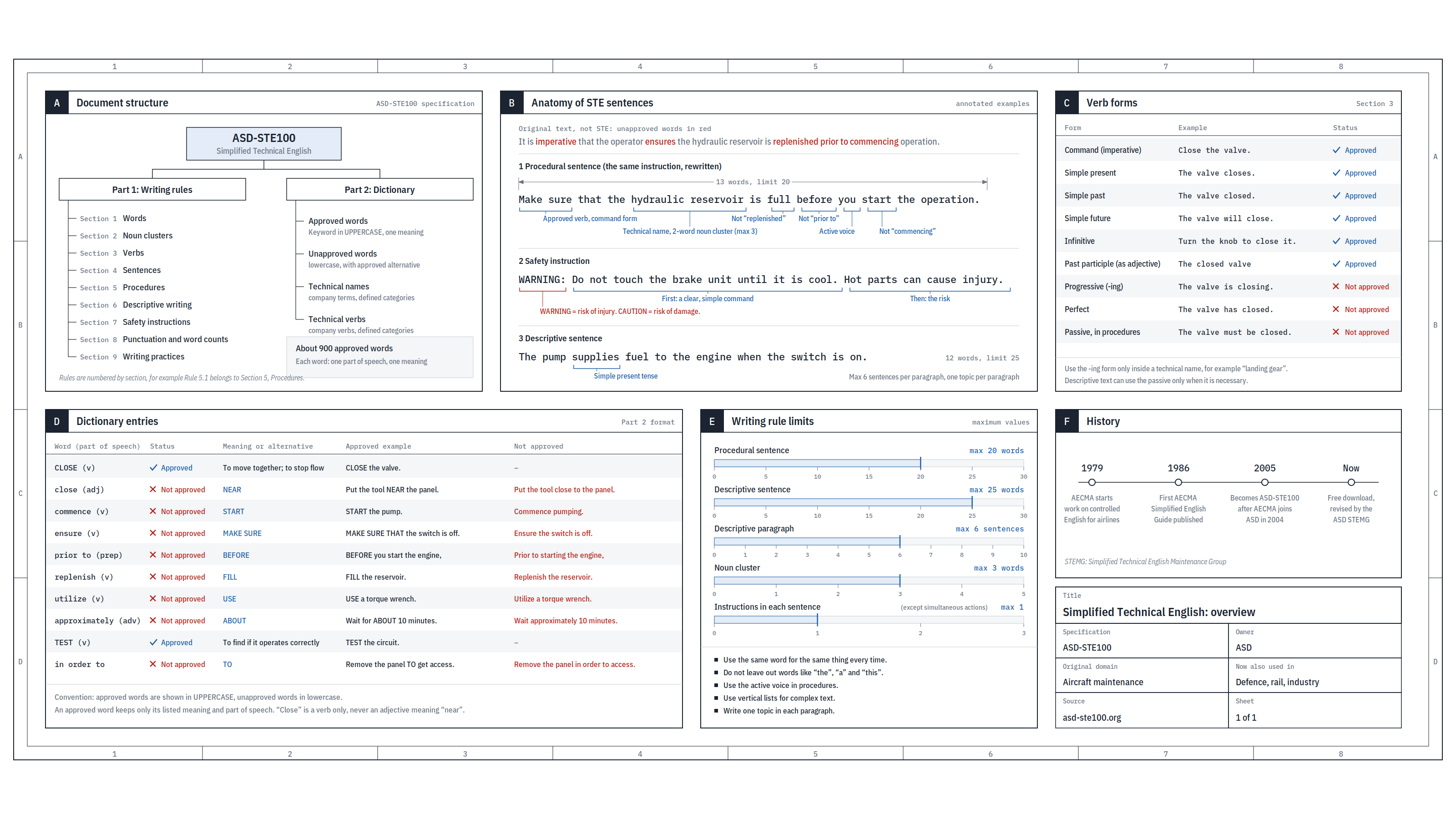
- Writing: One thing that has worked well for me is to ask your AI to explain something in the ASD-STE100 specification.
- Diagrams / Images: Instead of writing text, ask your AI to draw a diagram. Diagrams can be much easier to process, parse, and understand.
- Webpages: Ask for output "in HTML" to get a beautiful, interactive webpage.
- Explainer Videos: The output format I am most optimistic about is fully custom explainer videos generated on any arbitrary topic.
He concludes at the end of his post:
- As AI becomes more capable, it will autonomously handle more and more low-level execution, while more of our work will shift to a higher level of abstraction—oversight and understanding.
- Fortunately, AI can help here as well. With intelligence and code becoming increasingly abundant, you can ask it to generate substantial, custom, disposable software artifacts—such as web apps and explainer videos—that in the past simply wouldn't have been worth building. Experiment more beyond existing workflows, and you'll be surprised.
Starting with the most readily accessible written text method, this article unpacks the mechanisms, usage, and specific cases behind these six ideas one by one.
1. Use Clear Language to Reduce Guesswork for Readers
Original excerpt: Ask your LLM to explain something in ASD-STE100
Translation: Ask your AI to explain something using the ASD-STE100 specification.
1. In-Depth Explanation: Why Saying "Keep It Simple" Isn't Enough
When we find an AI output obscure, our habitual reaction is usually to follow up with "Please explain this more simply." This prompt doesn't identify where you are stuck, nor does it provide concrete rewrite rules. The reason is that "accessible" or "simple" is a highly subjective, abstract requirement lacking operational boundaries. The AI might interpret "simple" as stripping out details, or it might switch to metaphors. Text that is shorter and sounds friendlier does not mean conditions and causal links have been clarified.
In contrast, giving the AI a concrete set of writing rules tells it exactly how to revise. Karpathy recommends ASD-STE100, an international controlled natural language standard originally developed by the aerospace industry for maintenance documentation. Karpathy notes that AI is familiar with this standard, and using it has helped him obtain far more readable explanations. Compared to simply requesting "simple language," specifying a formal standard provides clear constraints on vocabulary and sentence structure; after generating the output, one still needs to verify that facts and procedural steps have not been misrepresented.

Download ASD-STE100 Issue 9 Specification (Official PDF)
Background Context: Core Mechanisms of ASD-STE100
ASD-STE100 (Simplified Technical English) consists of two parts: a controlled dictionary and writing rules:
- One Word, One Meaning and Fixed Parts of Speech: Approved words in the general dictionary typically retain only a single meaning and an approved part of speech (for example,
closecan only be used as the verb "to close", not as the adjective "near"), reducing guesswork caused by polysemous words.- Sentence Length Limits and Single-Instruction Sentences: Procedural instructions generally do not exceed 20 words, and descriptive sentences generally do not exceed 25 words; a sentence typically expresses only one instruction, though simultaneous actions may be combined.
- Active Voice: Procedural text directly states the action so readers know what to do. In Chinese operating instructions, conditions can also be placed before the action, such as "After the network is restored, retry once", making it easy to evaluate conditions first.
- Preserving Technical Facts: A controlled standard by no means eliminates technical facts; beyond general vocabulary, it permits the rule-governed use of specialized technical nouns and technical verbs.
Short sentences primarily aim to reduce reader guesswork regarding nested subjects/objects and clausal modifiers in long sentences; one must not eliminate the preconditions for an action or essential technical facts merely to cut words.
2. Key Distinctions: Boundaries of Understanding and Application
- "80%" Is a Colloquial Tuning Prompt, Not a Standard Version: Karpathy noted that if STE rules feel too rigid and stiff, you can prompt the AI to aim for about 80% compliance. This is a prompting technique he experimented with to relax constraints and maintain fluency; the standard itself has no 80% compliance tier.
- Chinese Borrowing Applies Structural Principles, Not the English Dictionary: ASD-STE100 is a vocabulary and grammar system built specifically for American English, whereas Chinese grammar operates under entirely different mechanisms. In Chinese practice, one should adopt its underlying mindset of "short sentences, active voice, one idea per sentence, and preconditions first," rather than mechanically claiming Chinese text conforms to this international standard.
3. Concrete Demonstration: Operation Document Rewrite Comparison
The following is a hypothetical case created for this article.
- Prompt Reference:
Drawing on STE principles, one can prompt AI in a Chinese-language environment like this:"Please rewrite the following operational instructions in a concise technical writing style. Requirements: 1. Express only one fact or action per sentence; 2. Use active-voice imperative sentences; 3. Place prerequisites of a step before the action; 4. Maintain causal logic and factual completeness, and remove redundant polite filler."
Scenario: Rewriting the Handling Procedure for a Failed Web File Upload
- [Before Rewrite: Wordy Version]
"When a user performs a file upload operation in the front-end interface but encounters a system error notification indicating that the upload failed, the very first step should be to investigate and verify the smoothness of the network connection on the local device. In order to avoid sending redundant requests to the backend server and aggravating the burden of system congestion, the user must be sure not to click the submit button repeatedly and continuously within a short period of time. Once it is confirmed that the local network has completely returned to normal, one may attempt to click the submit button again to perform a single retry. If after this the file still cannot be smoothly uploaded, please make sure to take a complete screenshot of or copy and save the specific error code that pops up on the interface, and then reach out to the technical support team to obtain further assistance."
- [After Rewrite: Clear Version]
- When an upload fails, check the local network connection first.
- Do not click the submit button repeatedly.
- After the network recovers, retry submitting once.
- If the upload still fails, save the error code and contact technical support.
Comparative Analysis: The rewritten text does not remove any operational preconditions; instead, it strictly implements "evaluate conditions before acting." For example, in step 3, "After the network is restored, retry submitting once", if the condition in the first half were lost and written simply as "Retry submitting," the reader might continue submitting while the network is still down. The sentence became shorter, but the operational logic was lost. "Preconditions first" ensures that readers verify whether the environment permits the action before executing it every time. Readers can therefore find the intended action more easily while preserving the original sequence of operations.
2. Diagram the Relationships to Avoid Assembling Workflows in Your Head
Original excerpt: Instead of writing, ask your LLM to create a diagram.
Translation: Instead of having the AI write text, ask it to draw a diagram.
1. In-Depth Explanation: Why Do Diagrams Aid Comprehension?
When technical content involves multi-module coordination, data flow, or sequential ordering, readers must memorize each module while reading and piece them together mentally. Later in the text, they have to turn back to check which earlier node connects to it. Karpathy pointed out that instead of having AI output large blocks of text, it is better to ask it to generate a diagram, because graphical structures visually present the relationships between modules directly, making them much easier to parse and understand.
The value of an explanatory diagram lies in preserving key processing branches, convergence nodes, and flow directions. In practice, one can have the AI directly generate a Mermaid flowchart or an SVG architecture diagram.
2. Concrete Demonstration: AI Retrieval-Augmented Generation (RAG) Workflow
The following is a hypothetical case created for this article.
- Prompting Idea:
Drawing on the original post's idea, one can prompt the AI in a Chinese-language environment like this:"Please use a Mermaid flowchart to illustrate the workflow of AI Retrieval-Augmented Generation (RAG). Label stages including user query, retrieval, reranking, context merging, and AI response, and show the data flow."
RAG Operational Mechanism and Diagram Breakdown
Before viewing the diagram, clarify the core pipeline of RAG through straightforward logic:
- Retrieval: After the user asks a question, the system searches the knowledge base for potentially relevant reference document chunks.
- Reranking: Candidate chunks from the initial retrieval may vary in relevance; the reranking module rescores chunk relevance to select the highest-quality chunks most closely aligned with the question.
- Combining Question and Chunks: The original question and the filtered background chunks are assembled together to form a prompt containing external reference material.
- Generating Answer: The AI reads the complete prompt with context and generates an answer accordingly.
The "filtering 3 chunks from 20 recalled chunks via reranking" shown in the flowchart is merely a hypothetical configuration for instructional demonstration, not a fixed engineering standard.
Where Questions and Reference Materials Meet
The original question is preserved through to the assembly stage rather than discarded after retrieval. Arrows indicate the flow of information; even with reference materials available, the answer must still be verified for correctness.
What can readers discover from the diagram?
Following the diagram, two things in particular must be distinguished: the original question must be preserved, and the retrieved materials must also be fed into the final prompt. They serve different purposes:
- The original question tells the AI what the user is actually asking, and it is still retained when assembling the prompt;
- The retrieval step uses representations of the question to look for materials, reranks and filters chunks, and then merges those chunks with the original question. The illustrative configuration retains 3 chunks out of 20.
With each stage laid out together, readers can trace the process to ask: if the final answer is incorrect, did the initial retrieval fail to find the material (a recall gap), did reranking drop the correct chunk (a ranking distortion), or were the materials already supplied but the AI failed to utilize them properly? The diagram prompts which stage to inspect; determining the exact cause still requires examining the actual inputs and outputs.
3. Let Readers Change Conditions to See How Results Vary
Original excerpt: Ask for output "in HTML"
Translation: Ask the AI for output in HTML format.
1. In-Depth Explanation: Turning Software into an Interactive Tool for Comprehension
Karpathy's third tip is to ask the AI directly for HTML—that is, web page code. He believes AI is getting better and better at front-end development, capable of building pages complete with controls, animations, and interactivity. HTML determines content structure, CSS handles presentation, and JavaScript connects reader actions with computational outcomes.
Static text can only make one-way assertions like "if A changes, B changes"; an interactive web page with sliders and input fields allows readers to adjust parameters hands-on and observe the continuous causal process of how outputs change with inputs in real time. By actively exploring edge cases, readers can compare the behavior of the same algorithm under different conditions.
2. Concrete Demonstration: Design and Logic of the Interactive Webpage
The following demonstration uses hypothetical scores calculated according to explicit formulas.
- Prompt Reference:
Drawing on the original post's idea, one can prompt the AI in a Chinese-language environment like this:"Please output HTML (including CSS and JS) to create an interactive webpage that intuitively explains how the Temperature parameter affects AI word selection probabilities. Requirements: 1. Provide a Temperature slider at the top (range 0.1 to 2.0); 2. Display a bar chart of probabilities for candidate words 'park, walk, library, Mars' under hypothetical logit scores [3, 2, 1, 0]; 3. In real time, update each word's probability and description according to the formula when dragging the slider."
Interactive Component Form and Operating Process Demonstration
-
Mathematical Formula and Calculation Baseline:
Assume the AI's raw scores (logit scores) for four candidate words in the current context are: Park z₁ = 3, Walk z₂ = 2, Library z₃ = 1, Mars z₄ = 0. The system calculates the selection probability of each word using the Softmax formula with temperature:
pᵢ = exp(zᵢ / T) ÷ Σ exp(zⱼ / T), where exp is the exponential function, and the denominator sums the values across all four candidates so the total probability equals 1.
Please note: The raw scores here are pedagogical hypothetical values; the demonstration focuses on the algorithmic transformation mechanism rather than actual prediction probabilities from a real AI. -
Tracking Computational Differences Under Fixed Inputs:
In this interactive design, the raw scores of the four words are strictly fixed; the only variable that changes is the temperature slider T. By dragging the slider, readers can clearly track the complete progression of "input parameter → formula calculation → probability distribution":- When the slider is pulled to T = 0.1: The small temperature magnifies the raw score differences after dividing by T; after exponential calculation, the probability gap is magnified further. The probabilities for each word are approximately: Park 99.995%, Walk 0.00454%, Library 0.000000206%, Mars 0.00000000000936%. The note below indicates: The probability distribution is extremely steep, almost always selecting the highest-scoring candidate.
- When the slider is pulled to T = 1.0: This yields the baseline probability distribution at T=1, approximately: Park 64.39%, Walk 23.69%, Library 8.71%, Mars 3.21%.
- When the slider is pulled to T = 2.0: The higher temperature smooths the exponential differences. The probabilities for each word are approximately: Park 45.51%, Walk 27.60%, Library 16.74%, Mars 10.15%. The selection chances for lower-scoring words rise noticeably.
-
How Readers Build Understanding Through Comparison:
Looking at the formula alone, readers may know that it involves "dividing by T," but have little intuition for how this term alters the result. In the interactive demo, by fixing baseline scores and continuously dragging the slider, readers can watch the bar chart transition from "extreme disparity" to a gentle curve before their eyes. This gives readers a tangible realization: the temperature parameter itself does not inject new knowledge into the AI or change score rankings; rather, it alters the chances of each candidate being selected—the higher the temperature, the more opportunities lower-scoring candidates receive. Furthermore, when T=0 the formula cannot be directly computed; as T approaches 0 from positive values, the probability of the highest-scoring candidate approaches 1 (in engineering, this typically degenerates into greedy selection of the top-scoring token); high temperature does not equate to pure fabrication out of thin air, nor does low temperature guarantee the answer is correct.
Change Temperature to Observe the Same Candidate Words
Illustrative scores: Park 3, Walk 2, Library 1, Mars 0. Demonstrating only four candidates, not actual model outputs.
Probability = exp(score ÷ T) ÷ sum of exp(score ÷ T) across all candidates.
Probabilities are distributed by score; the highest score still holds the advantage.
Higher temperatures flatten the probability distribution; it does not add knowledge, nor does it guarantee the answer is correct. Values for T=1 are retained when scripts are disabled.
4. Use Custom Video to Unfold Changing Processes for the Viewer
Original excerpt: fully custom / bespoke explainer videos generated on any arbitrary topic
Translation: Generate fully customized explainer videos on any arbitrary topic.
1. In-Depth Explanation: From Static Reading to Dynamic Evolution
Among all output formats, Karpathy stated that his favorite by far is fully customized explainer videos generated on any arbitrary topic. In his original post, he outlined a concrete implementation approach: instruct an AI to produce a 3Blue1Brown-style topic explainer video, use an ElevenLabs key for voiceover narration, or have the AI find free local compute alternatives. Karpathy believes this direction is already starting to work and is immensely worthwhile to explore.
3Blue1Brown (often abbreviated as 3b1b) is a popular science channel that explains mathematics through animation. What is borrowed here is the instructional approach of using visuals to show mathematical relationships.
To turn this idea into a playable video, automated video generation involves multiple interconnected steps: defining the relationship to explain, writing a storyboard script, generating geometric animation code, rendering frames, synthesizing voiceover narration, and aligning subtitles. The critical value of video is that it can present abstract mathematical derivations as observable, continuous transformations.
2. Concrete Case: Why Can a Dot Product Become Negative?
This article uses Opus 5.5 in Claude Code to produce an approximately 63-second mathematical demonstration video, paired with Chinese narration in the Doubao "Liu Fei" voice. It places continuous rotation, projection, and numerical values in the same frame to show how a dot product turns negative. Vector A is fixed at (2,0), and vector B has a length of 1; the signed projection of B along the horizontal direction is cosθ, which multiplied by A's length of 2 yields the dot product 2cosθ.
- Chinese Paraphrase of Original Method:
Produce a 3Blue1Brown-style topic explainer video, using an ElevenLabs key for voiceover narration, or finding free local alternatives. - Chinese Prompt (Translated):
"Please design a roughly one-minute 3Blue1Brown-style mathematical animation script that intuitively explains [Topic: Geometric Meaning of the 2D Vector Dot Product]. Requirements: Use a fixed vector A=(2,0) and a rotating vector B of length 1 as an example to show the signed projection of B onto A multiplied by the length of A (2cosθ); break down the geometric visual transformations and corresponding spoken narration along a timeline."
What Happens in the Video?
| Time (approx.) | Visual Change | Corresponding Meaning |
|---|---|---|
| 0–7 sec | B rotates from an acute angle to an obtuse angle; projection and values change synchronously | First see that the dot product can go from positive to negative |
| 7–19 sec | Labels A's length as 2 and B's length as 1; displays horizontal projection | Dot product equals signed projection multiplied by A's length |
| 19–25 sec | A and B point in the same direction; right comparison table highlights 0° | Projection is 1, dot product is 2 |
| 25–29 sec | B rotates to 60°; projection shrinks by half | Dot product is 1 |
| 29–34 sec | B rotates to 90°; projection shrinks to the origin | Dot product is 0 |
| 34–48 sec | B crosses 90° and rotates to 120°; projection falls onto the negative semi-axis | Projection is -0.5, dot product is -1 |
| 48–53 sec | B rotates to 180°; the two vectors are completely opposite | Projection is -1, dot product is -2 |
| 53–63 sec | Sweeps across aligned, perpendicular, and opposite orientations again, retaining comparison table | Connects vector orientation with positive and negative dot products |
How do continuous motion and synchronized narration help understanding?
Static diagrams can usually only show a slice of projection at an isolated angle; even if readers memorize the formula A·B = |A||B|cosθ, they may not know where the negative sign comes from. In a continuous video:
- Frame-by-frame revelation of where the negative sign originates: As vector B rotates past 90 degrees, its projection on the horizontal axis passes through the origin and lands on the negative semi-axis. "Projection lands on the left" and "value is less than zero" occur in the very same process, allowing readers to connect spatial direction with the negative sign.
- Narration, subtitles, and visual alignment: When reaching 120 degrees, the screen displays a projection of -0.5 and a dot product of
2 × (-0.5) = -1. The narration explains why it becomes negative, subtitles retain key values, and graphics show positional changes. Readers don't have to finish reading a paragraph of text while hunting elsewhere for the matching state in a diagram. The concrete meaning of the dot product depends on what the vectors represent.
How to Choose: It Depends on Where You Are Stuck
1. Medium Selection Depends on the Specific Cognitive Task
In his original post, Karpathy used progressive rhetoric to showcase expressive potential from text to video. In practical application, however, each medium has its strengths, and there is no universal silver bullet for every scenario:
- Controlled Text (STE Specification): Quick to reference and directly searchable; ideal for troubleshooting errors, interface definitions, and safety operating procedures without requiring readers to wait through playback.
- Structural Diagrams: Intuitively present module relationships, chronology, and branching topologies, making it easy for readers to construct an overarching architecture in their minds.
- Interactive Webpages: Ideal for multi-variable exploration and dynamic parameter response; readers observe changes in output by manually adjusting inputs, developing causal intuition.
- Dynamic Video: Well-suited for demonstrating continuous motion and geometric evolution, though a linear timeline makes reverse lookups and targeted information retrieval relatively costly.
5. Human Focus Shifts to Oversight; Understanding Determines What You Can Verify
Original excerpt: oversight and understanding
Translation: Oversight and understanding.
1. In-Depth Explanation: Why "It Runs" Doesn't Equal "Business Correctness"
The core trend Karpathy pointed out is: as AI capabilities continue to strengthen, basic writing and execution will increasingly be handled autonomously by AI, and human work will center more heavily on oversight and understanding.
A refund button can be clicked normally and requests can send successfully, yet issues like duplicate refunds, amounts exceeding limits, or treating unknown states as failures can still occur. A functioning interface only verifies a fraction of behavior. AI requires explicit business requirements, and you also need to know which conditions must hold to check whether its implementation fulfills them. The depth of your understanding of business rules directly determines what test cases you can design to inspect the AI's output. For example, without understanding that "a timeout yields an unknown result," one might test only success and failure while missing the intermediate state that most needs handling.
2. Concrete Case: Implementation and Review of an E-Commerce Refund Function
The following is a hypothetical instructional case; it is not connected to real payment systems, nor was it part of the original post.
When asking AI to quickly generate front-end and back-end processing logic for a refund interface, you can have AI write the forms, validation, and request-handling code, and then verify three scenarios against concrete business rules:
- Preventing Duplicate Refunds for the Same Order:
- Test Input: For an order that has already been fully refunded, click to initiate a refund again.
- Business Requirement: The server must intercept duplicate requests based on confirmed refund records and return "Order already refunded, cannot resubmit." Merely graying out the front-end button is insufficient to handle duplicate requests; the server must also prevent concurrently arriving requests from executing repeatedly.
- Refund Amount Cap and Partial Refund Validation:
- Test Input: An order has an actual paid amount of 100 yuan; input a refund amount of 120 yuan; or after 60 yuan has already been refunded, submit another refund request for 50 yuan.
- Business Requirement: The system must verify that the cumulative refund total does not exceed the total paid amount, intercepting excess refunds and returning an error.
- State Consistency and Request Identifiers Under Network Timeout:
- Test Input: Simulate a network timeout (no definitive response received) when sending a refund request to the payment gateway.
- Business Requirement: A network timeout means the "result is unknown": the other party may have already processed the refund, but the response never made it back. The system should retain the unique business identifier for this refund, set the status to "Processing / Pending Reconciliation," and query the result according to payment service API rules. When retrying, it must also reuse the same request identifier in accordance with API rules to avoid treating a retry as a new refund; this requires coordinated support from both the server and payment APIs.
Throughout this process, the AI shoulders the execution work of writing code, while the human provides oversight by defining clear rules, designing boundary inputs, and checking actual results. The more concretely you understand the problem, the better your tests can pinpoint "what is wrong and what it should be changed to."
6. Build Software for a Single Moment of Understanding, Then Discard It
Original excerpt: large, custom, discardable software artifacts
Translation: Substantial, custom, disposable software artifacts.
1. In-Depth Explanation: Why Disposable Software Used to Be Impractical, but Is Now Worth Trying
In the past, building custom software for a single decision almost always required weighing whether the investment was worth it: defining requirements, writing interfaces, implementing calculations, debugging, and shipping all took time. When a task was done only once, manual calculations or spreadsheets were often more cost-effective.
The change Karpathy values is: now that code is much easier to generate, tools that in the past weren't worth building are now worth trying. You can frame requirements around the problem right in front of you and have AI produce a web page or explainer video tailored to this single task. The value of software can come from helping you understand a problem, rather than necessarily from long-term use. "Substantial" here indicates that temporary tools can support considerable content and interactivity; "disposable" refers to lifespan, whereas development and verification still demand careful effort.
2. Concrete Case: Cost Comparison Between Event Venue Options A and B
The following is a hypothetical instructional case.
A team needs to decide between two candidate venues for an event, but the final number of attendees is not yet settled:
- Venue A: Fixed rental fee of 1,000 yuan, 80 yuan per person; total cost formula is
1000 + 80x. - Venue B: Fixed rental fee of 4,000 yuan, 50 yuan per person; total cost formula is
4000 + 50x.
To assist the decision, one can have AI generate a temporary dual-option cost comparison webpage:
- At 50 attendees: Venue A costs 1000 + 80 × 50 = 5,000 yuan; Venue B costs 4000 + 50 × 50 = 6,500 yuan; Venue A is 1,500 yuan cheaper.
- At 100 attendees: Venue A costs 1000 + 80 × 100 = 9,000 yuan; Venue B costs 4000 + 50 × 100 = 9,000 yuan; the costs are identical.
- At 150 attendees: Venue A costs 1000 + 80 × 150 = 13,000 yuan; Venue B costs 4000 + 50 × 150 = 11,500 yuan; Venue B is 1,500 yuan cheaper.
Calculate Venue Costs for This Single Event
Hypothetical quotes: A has a fixed fee of 1,000 yuan plus 80 yuan per person; B has a fixed fee of 4,000 yuan plus 50 yuan per person. Comparing only these costs.
A: yuan
1000 + 80 × attendees
B: yuan
4000 + 50 × attendees
At 100 attendees, both venues cost the same.
50 attendees: A 5,000 yuan, B 6,500 yuan. 150 attendees: A 13,000 yuan, B 11,500 yuan. Capacity, transportation, and cancellation terms must be checked separately.
How to understand decision boundaries from the results?
This temporary tool visually demonstrates the cost breakeven inflection point between the two options (100 attendees): when there are fewer than 100 attendees, Venue A is cheaper; when there are more than 100 attendees, Venue B is cheaper. This result answers the cost question. To choose a venue, other factors must be considered:
- If the team estimates attendance in the fluctuating range of 90 to 110 attendees, the conclusion can flip with slight headcount variations;
- If actual headcount might cross 100 attendees, which option is cheaper will also change. One should also examine capacity, transportation, and cancellation policies: if a venue cannot accommodate the crowd or meet event requirements, no low price can make it suitable.
Once this venue evaluation is complete, the webpage can be closed and discarded with no maintenance needed. "Disposable" means the software's lifespan is tied only to a single task—it does not mean the underlying logic can cut corners. The mathematical boundaries and input assumptions behind it still require rigorous human verification.
Directly Reusable Prompts
| Target Dimension | Chinese Paraphrase of Prompt Strategy | Chinese Prompt (Translated) |
|---|---|---|
| Minimalist, Restrained Text | Recommend using the ASD-STE100 standard or aiming for about 80% compliance | Please explain [Topic] in a technical writing style inspired by ASD-STE100 principles. Requirements: State only one fact or action per sentence, use active voice, place prerequisites before actions, maintain complete causality, and remove polite filler. |
| Structural Relationship Diagrams | Instead of having AI write text, ask it to output structural diagrams | Please avoid large blocks of text; use a Mermaid flowchart to visually present the core structure and data flow of [Topic], indicating each processing node and sequential transition. |
| Parameter-Interactive Webpages | Directly ask for interactive webpages output in HTML format | Please output HTML to create an interactive webpage explaining [Topic]. Provide parameter sliders or controls so that I can observe calculation results or graphical changes in real time through interaction. |
| Custom Video Explainers | Produce 3Blue1Brown-style topic explainer videos with voiceover narration | Please design a 3Blue1Brown-style animated short film plan for [Topic], outputting a shot-by-shot storyboard script (including dynamic evolution of geometric shapes and spoken voiceover narration), accompanied by a core code framework. |
Members can copy or download the full Markdown, and let their AI subscribe and ask.
Found this useful? Leave your email — every new explainer, the moment it's out. Unsubscribe anytime.