OpenAI's Postmortem: How We Built GPT-Live's Real-Time Voice System in Six Months
Making AI speak without stuttering is about more than a fast model. Every link in the chain, from the moment you press the button to the sound in your ear, has to hold up.
- Older voice AI relied on a small model to guess when you were done talking. Guess too early and it cut you off; guess too late and it felt sluggish. This generation removes it altogether.
- Tough questions get handed off to GPT-5.5 running in the background while the front-end model keeps talking to you. You can hear it in a recording in this piece: for the dozen or so seconds the background task runs, the front-end never stops talking.
- A bonus fix: they reworked WebRTC's connection handshake, collapsing six round trips into a single one. The change is heading to the IETF, and both major implementations already support it.
Why older voice AI always sounded a bit off
OpenAI published a rare engineering retrospective on building GPT-Live's real-time voice system in six months—from deleting the "are you done?" model to rebuilding WebRTC's handshake. They're candid about trade-offs at every step. For product people, this post is worth more than a launch announcement: it turns "fast response" from a model metric into a full chain that runs from button to ear.
Before the architecture, here are three recordings. Listen—the difference is in your ears.
The awkwardness of the first two comes down to two root causes.
Root Cause 1: A Small Model Dedicated to Guessing "Are You Done?"
Older voice AI was turn-based, like a walkie-talkie: you talk, you stop, it answers. In the middle sat a small model called a turn detector, whose only job was to decide if you had finished speaking.
That judgment was a no-win game. Guess too early, you get cut off mid-sentence. Guess too late, it stares blankly after you finish—feeling sluggish. It relied mostly on detecting silence, so a pause to think, a side conversation, or a passing car could all be mistaken for "the person is done."
Worse was the sequencing: the small model had to make its call before the much larger model could even start. The two latencies stacked, rather than running in parallel.
Root Cause 2: Three Models in a Row
One generation back was slower still. The earliest ChatGPT voice strung three models together: speech-to-text, the LLM thinking, then text-to-speech. Each step waited on the last, adding latency at every link. Your tone, pacing, and pauses were discarded at transcription—the downstream model only saw a plain line of text.
GPT-Live does two things: kill the detector, then split talking from thinking
OpenAI addressed those two root causes with two distinct cuts.
Cut 1: A Model That Can Listen and Speak at the Same Time
GPT-Live's voice model is full-duplex—it listens and speaks at the same time, more like a phone call than a walkie-talkie. A walkie-talkie forces you to wait until the other side releases the button; a phone call lets both people talk at once.
Since the model makes hundreds of "speak or listen" decisions per second, the dedicated turn detector has no reason to exist. It was removed entirely from the audio pipeline. Pause to think, and it won't barge in. Try to interject, and it lets you.
Cut 2: Split "Speaking" from "Deep Thinking" into Two Models
But fast models aren't always smart ones. Ask a question that needs a live web search, and a lightning-quick voice model fumbles it.
So they made a second change: GPT-Live-1 handles real-time conversation on the front end; GPT-5.5 handles search, code, and retrieval in the background. When you ask for something that needs digging, the front-end hands the job to the back-end, keeps chatting, and weaves the result back when it arrives. That mechanism is called delegation.
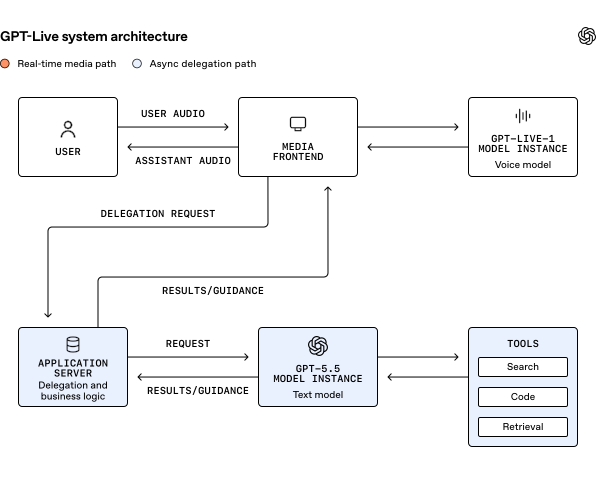
This all sounds abstract, but you can hear it. Below is a real conversation recording from the official release, with three tracks: you speaking, GPT-Live-1 responding, and GPT-5.5 running a search underneath:
The launch page is explicit: GPT-Live solves its problems through these two architectural changes. Full-duplex keeps the conversation in sync with human pacing; delegation lets it handle hard questions. Neither works without the other.
Fast lane, slow lane: keeping the audio backbone unstoppable
Handing off the job is easy. The hard part is doing it without a single audible pause.
The whole piece distills to one design principle: Audio must flow; everything else can wait.
Concretely, they carved out a dedicated fast lane. Audio travels directly between the client and the voice model, with no business logic in between. Delegation, tool calls, and conversation logging all happen behind an async boundary. A slow tool call only slows its own result—it can never stall the audio.
There's a nice side effect: changes to the application layer never affect responsiveness. Swap a tool, change a policy, rework back-end logic—the fast lane stays untouched.
p95 Caught Up to the Old p50
Design alone isn't enough; what matters is the result. They rewrote the pipeline from Python's asyncio to Go, which smoothed out frame delivery considerably. The result: the new system's p95 matches the old system's p50.
In plain terms: p50 means half of cases are faster than this; p95 is the best of the worst 5%. So the new system's worst matches the old system's average.
For voice, this matters enormously, because a single glitch is an audible glitch—a blip of noise or a pause. You don't care about the average; you care about the worst few.
Late Packets? Just Stretch the Audio a Little
Transport uses WebRTC, the built-in standard for real-time audio/video in browsers and mobile apps—basically what video calls run on. It has a genuinely clever trick: if a packet arrives late, it subtly stretches the existing audio to fill the gap, then slightly speeds up playback once the packet catches up. The listener barely notices. Without it, that moment would be a hole.
The Delegation Lane Has to Be Fast, Too
The front-end can fill a few moments with small talk, but not forever. So the entire route—from delegating a task to receiving the result, including routing, prompt processing, reasoning, and tool calls—all counts against the "response budget." The core idea is do everything possible ahead of time:
| Approach | What It Saves |
|---|---|
| As soon as a voice session starts, spin up the GPT-5.5 reasoning session and pre-fill its initial context | By the time you actually ask that research-heavy question, the prompt is already processed—no waiting in line |
| Keep that reasoning session alive for the entire call, always sending follow-ups to the same worker (session stickiness), plus prompt caching | Repeated context isn't recomputed; since it's "sticky" rather than "pinned," it can recover if a worker dies |
| Fine-tune reasoning effort, output token limits, tool description format, and the number of model↔tool round trips | Shaves time off getting the result into the conversation |
Seamless Handoff: When Context Fills Up, How to Swap Brains Without Anyone Noticing
All that works for short calls. But a 30-minute conversation?
Two problems hit at once. First, machines have to change: inference instances scale up and down; you can't keep one conversation pinned to one machine forever. Second, context fills up: the longer you talk, the longer the accumulated context grows, until it eventually exceeds what the model can hold.
The second problem needs explaining before the solution makes sense:
When context is full, you compress it—shorten what came before. But compression has a side effect: it modifies the past context. The model's KV cache, which stores intermediate attention results so it doesn't recompute them every time, is now invalidated entirely. Everything has to be re-prefilled. That takes time, and during that time, the model can't respond quickly. In a voice scenario, that's an audible stall.
They used the same trick for both problems: Don't operate on the same machine. Spin up a new one, and only switch over when it's ready.
Here's the sequence: old machine A keeps talking to you without a pause. Meanwhile, new machine B is spun up next to it. The compressed context snapshot is loaded into B, and B catches up to the current state. There's a period where both run in parallel. Only when B is fully ready does the system switch over, and only then does A stop.
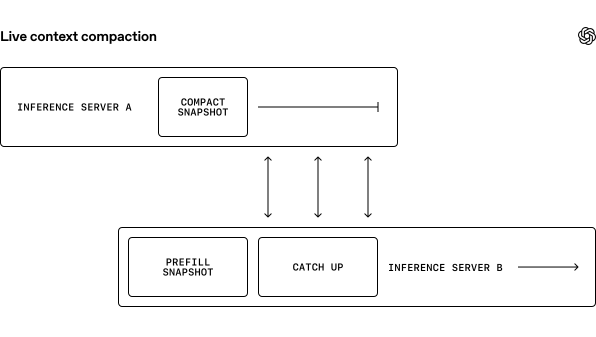
All the heavy lifting happens outside the fast lane, so the user hears nothing unusual the entire time. That's also why they can support very long conversations: compress whenever context fills up, as many times as needed, and it never affects speech.
Continuous Speech, Split into Saveable Messages
Since the conversation is now continuous on the voice side, how do those message bubbles in the ChatGPT UI still get displayed one by one?
This is a surprisingly tricky problem. The voice model produces a continuous stream of audio, with no turns. But the surrounding systems still work in "messages": the ChatGPT conversation view needs bubbles, and the analytics and safety pipelines need records. So the app server has to slice that continuous—and often overlapping—conversation into discrete messages.
Three layers of difficulty:
While listening and slicing in real time, the latest message is provisional. Its text, its timing, and even whose it is can all shift as more audio arrives. The system has to wait until one person has held the floor long enough before it can finalize. Overlapping speech is even messier: if the model lets out an "mm-hmm" while you're talking, that shouldn't count as its own message. But if it jumps in with a substantive interjection, it usually should. And there's a timing trade-off: slice too early and the history becomes fragmented and out of order; slice too late and captions lag, slowing down anything that depends on them.
Their solution is to keep two ledgers simultaneously:
Tracks the current state, can change at any time.
The UI uses this one. The conversation view can redraw whenever a message's text or attribution changes—no problem.
Records what was actually said; only written when final.
The analytics pipeline must use this one. Logs and stats need facts that won't change.
This way, the rest of ChatGPT gets a stable conversation history, and the real-time voice path doesn't get forced back into a turn-based mold.
First Packet, Instant Connect: Squeezing the Handshake to Its Limits
Everything so far happens after the conversation begins. But there's an even earlier place where time gets lost.
The moment you press the voice button, the system has to establish the media channel and feed audio to the model before the conversation can start. All of that time sits on the critical path.
Why Standard WebRTC Requires Six Round Trips for the Handshake
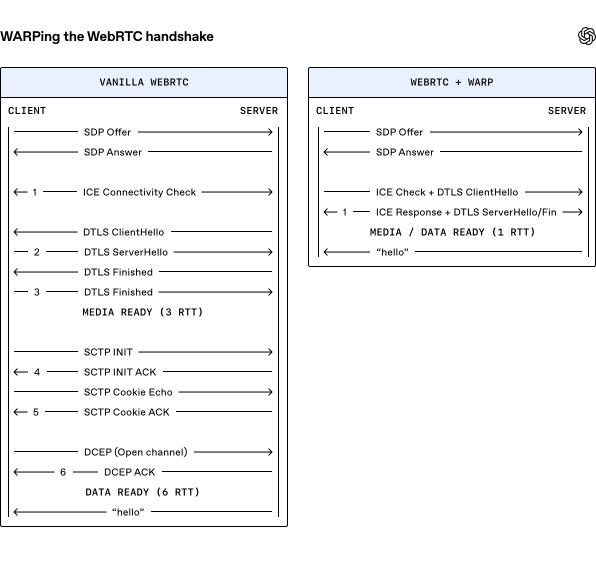
Because WebRTC is a sandwich of several protocols: ICE punches through the network, DTLS handles encryption, SCTP provides reliable transport, and DCEP opens the data channel. Each layer was designed independently, each with its own DoS-protection handshake. Stacked together, they duplicate effort.
Using the official comparison diagram's math: media requires 3 round trips to start flowing, and the data channel requires 6. One round trip (RTT) is the time for data to go from you to the server and back. Six round trips means waiting for the network six times.
Why Fix It Now?
This problem isn't new—it just became unbearable recently. The IETF draft spells out the cause:
When WebRTC was designed in 2011, those round trips were roughly comparable to what it took to establish a WebSocket over TCP/TLS. Not slow. Then QUIC appeared and did the same thing in 1 round trip, making the old way look painfully slow by comparison.
More importantly, the usage pattern changed. Back then, WebRTC was mostly for person-to-person video calls, where connection time was hidden behind "waiting for the other person to answer." Now it's person-to-server, and slowness is immediately audible.
WARP: Four Changes That Eat Five Round Trips
Their solution is called WARP (WebRTC Abridged Roundtrip Protocol), composed of four independent, backward-compatible changes:
One Last Tail: Instant Connect
The handshake is fast, but before a WebRTC connection can even start, the two sides must exchange SDP parameters once—telling each other "I support these codecs, here are my keys." That exchange is still on the critical path.
So they built something called Instant Connect: negotiate those parameters ahead of time, but don't reserve server resources. When the first media packet arrives, the server materializes the session on the spot. If the pre-negotiated parameters have expired or become invalid, no harm done—the standard signaling flow is running in parallel anyway, so falling back costs nothing extra.
WARP and Instant Connect aren't two names for the same thing. They handle different round trips: WARP manages the handshakes across the transport-layer protocols, while Instant Connect handles the SDP signaling exchange that comes before them.
You can see this in the numbers. The IETF draft summary says "six round trips down to two"; the blog post says "down to one." The draft's two are 1 signaling round trip + 1 media round trip. The blog only counts the media trip, because the signaling trip has been moved off the critical path by Instant Connect. Both are right—it's a question of what you're counting.
Together, a single UDP packet from the client opens a session, and the server responds instantly.
What Did It Actually Save?
The blog doesn't include connection-speedup numbers, but the IETF draft has a set: in a real production deployment, WARP reduced connection latency by roughly 4 round trips at p50 and roughly 12 at p95.
Why does p95 improve so much more than p50? The draft's explanation: fewer handshake packets means a lower probability of hitting packet loss. Users with worse networks benefit disproportionately more.
Why Did This Move So Fast?
WARP was built as an open standard. It's currently advancing through the IETF's TSVWG working group, and both major implementations—libwebrtc and Pion—already support it. The draft's co-author is Meta's Philipp Hancke; engineers from two competing companies wrote it together.
The speed also has a reason: one of WebRTC's original architects, Justin Uberti, and Pion's author, Sean DuBois, both now work at OpenAI. Uberti is also a co-author of this blog post. It's literally the same person coming back to modify something he defined more than a decade ago.
Shadow Testing: Tempering with Real Traffic
A system that's fast on paper can still buckle under real traffic.
Before letting users at it, they ran a shadow test: feeding a small percentage of real ChatGPT voice conversations to both the old Advanced Voice Mode and the new system simultaneously, gradually increasing the ratio. The old system served users as usual; the new system ran inference read-only, with no audio going to anyone. This way they could stress-test with real clients, real networks, real call durations, and real geographic distribution—without users noticing a thing.
Four lessons came out of it:
A voice session is always on—it's constantly sending frames. So the CPU-side stream processing, queues, and network paths all have to scale alongside inference. Under real load, one supporting component saturated earlier than load testing predicted (the blog doesn't say which), and inference requests started to pile up, amplifying latency.
They ended up reframing the entire capacity question. It shifted from "how many requests can a GPU handle?" to "how many concurrent sessions can the system sustain while keeping every frame on time?"
When sessions were routed to a distant data center, latency piled up across startup and transport. They started validating model launches together with regional capacity and traffic-shaping config, then broke down latency by user region.
Moving inference closer to users helped, but the bigger lesson was this: end-to-end response time depends on every service along the path, not just the model server.
Long calls exposed memory and persistence pressure. Reconnects triggered context compaction and state recovery. Users hanging up normally exposed races in the shutdown flow.
Short load tests mostly miss these. They depend on time, on accumulated state, on cross-service behavior. No matter how aggressively you load-test, if you don't run long enough or get the state dirty enough, you won't find them.
They found metrics that mixed latencies from different sources. Dashboards that looked fine at the aggregate level were hiding unhealthy individual instances behind the average. And there was configuration drift between the test and production environments.
They added finer-grained telemetry, validation against known-good configs, phased rollout, and the ability to isolate or kill a single path quickly. The shadow test became a dress rehearsal for launch—not just for how much traffic it could handle, but for how fast a problem could be discovered, contained, and recovered from.
- Full-duplex architecture: The model can listen and speak simultaneously, and the dedicated "are you done?" model was deleted from the audio pipeline entirely. The payoff: you can pause to think and it won't interrupt; you can interject and it catches.
- Talking and thinking separated: GPT-Live-1 stays on the front line chatting with you; hard questions that need search or reasoning get handed to GPT-5.5 in the background. The payoff: you don't have to choose between fast and smart, and the conversation doesn't stall while the back-end works.
- Fast and slow lanes separated: Audio goes through a dedicated fast lane with no business logic attached; delegation, tool calls, and logging all happen behind an async boundary. The pipeline was also rewritten from Python to Go. The payoff: the new system's worst performance (p95) equals the old system's average (p50).
- Seamless handoff: Machine swaps and context compaction don't happen in place; they spin up a new instance, warm it up, let it catch up, then switch. The payoff: no matter how long the call gets, the audio never drops out for context cleanup.
- WARP + Instant Connect: WebRTC handshakes go from six round trips to one, and the SDP signaling exchange gets moved off the critical path. The payoff: a single UDP packet from the client opens a session. And since it's an open standard, already supported by libwebrtc and Pion, any real-time app using WebRTC can benefit.
OpenAI's GPT-Live Postmortem: Making AI Voice Not Stutter Means No Weak Links from Button to Ear
OpenAI's engineering team opens the books on six months of changes—from deleting the "are you done?" model to rebuilding a network handshake that had gone untouched for over a decade. All of it, with diagrams, on one page.
↓ Read in one go · includes an animated diagram
Most voice AI you've used is turn-based, like a walkie-talkie: you finish, it answers. In the middle sits a turn detector (a small model dedicated to judging whether the user is done). Until it gives the go-ahead, the much larger model isn't allowed to speak.
It mostly guesses based on silence, so a pause to think or a passing car can be mistaken for "done." And its decision forces the big model to wait—two latencies stacked on top of each other.
GPT-Live's voice model is full-duplex (it can listen and speak at the same time, like a phone call rather than a walkie-talkie). It can make hundreds of "speak or keep listening" decisions per second, so the turn-guessing model no longer needs to exist.
But a fast model often can't handle hard questions. The second cut is separating talking from thinking: GPT-Live-1 handles real-time chat on the front end, while GPT-5.5 handles search, code, and retrieval on the back end. The front end hands off the job and keeps talking; the result comes back and gets woven into the conversation. That's delegation.
Audio travels between you and the voice model on a dedicated fast lane, with no business logic in between. Delegation, tool calls, and conversation logging all happen behind an async boundary. A slow tool only slows its own result—it can't stall the audio.
Long calls are another hurdle. When context fills up, it has to be compressed. But compression alters past context, which means the KV cache (the model's stored intermediate results; change anything and they're all invalidated) has to be recomputed. During that time, the model can't speak. In voice, that's an audible stall.
KV cache fully invalidated, must be re-prefilled
The model can't speak during this time
What you hear is an immediate stall
New machine B warms up alongside: load the compacted snapshot, catch up to the current state
There's a deliberate overlap period with both running
Only when B is fully ready do they switch; only then does A stop
All the heavy work happens outside the fast lane; you hear nothing unusual
There's a hard number for the result: after rewriting the pipeline from Python to Go, the new system's p95 caught up to the old system's p50. The worst 5% of cases now perform at the old system's average. Voice cares precisely about the worst cases—one stutter is one audible glitch.
The moment you press the button, the system has to establish the media channel first. That time sits entirely on the critical path. WebRTC (the built-in real-time audio/video standard in browsers and phones) is a sandwich of four protocols: ICE punches through the network, DTLS handles encryption, SCTP handles reliable transport, and DCEP opens the data channel. Each layer was designed independently, each with its own handshake. Stacked together, they duplicate effort.
Round-trip counts follow OpenAI's official comparison diagram; the blog doesn't give millisecond figures. The IETF draft has another set of real-deployment measurements: WARP reduces connection latency by roughly 4 round trips at p50 and roughly 12 at p95. Fewer handshake packets mean a lower probability of hitting packet loss, so users with worse networks benefit more. WARP is built as an open standard, currently advancing through the IETF; the draft's co-author is from Meta, and both libwebrtc and Pion already support it.
One more tail remains: before a connection starts, the two sides exchange SDP parameters once—telling each other which codecs they support and which keys to use. So they built Instant Connect: negotiate those parameters ahead of time without reserving server resources. When the first media packet arrives, the server materializes the session on the spot. Together, a single UDP packet from the client opens a session.
Before letting users at it, they ran a shadow test: feeding a small percentage of real ChatGPT voice conversations to both the old system and the new one, gradually increasing the ratio. The old system served users as usual; the new one ran inference read-only, with no audio going to anyone.
✔ Reconnects trigger context compaction and state recovery
✔ Users hanging up normally expose races in the shutdown flow
✘ Short load tests miss them: these faults depend on time, accumulated state, and cross-service behavior
✘ Adding GPUs doesn't help either: voice sessions are always on and always sending frames; what saturates first is the CPU-side stream processing, queues, and network paths
Two more lessons worth keeping: routing sessions to a distant data center adds latency across startup and transport, and end-to-end response time depends on every service along the path, not just the model server. Also, some metrics mixed latencies from different sources, dashboards hid unhealthy individual instances behind totals, and observability itself had to be rebuilt.
the audio pipeline
and speak
at once
both sides can talk
can wait
from Python to Go
equal to the old
system's average
the connection setup round trips
real network travel
- × DTLS handshake hitches a ride with ICE, saves 1
- × DTLS 1.2 to 1.3, saves 1
- × SCTP handshake pre-negotiated, saves 2
- × Data channels pre-arranged, no on-the-fly negotiation
first packet arrives,
session appears instantly
Reconnects triggered compaction and recovery
Normal hang-ups exposed races in shutdown
the CPU-side stream processing,
queues, and network paths
Members can copy or download the full Markdown, and let their AI subscribe and ask.
Found this useful? Leave your email — every new explainer, the moment it's out. Unsubscribe anytime.