Claude Opus 5.5 Writes Code to Paint a Hand-Drawn Music Video: How It Was Made, and How to Make Your Own with the Open-Source Template
X user NotinReality handed the lyrics and audio to Claude Opus 5.5, which wrote JavaScript to paint a 156-second hand-drawn watercolor music video frame by frame, without any image or video generation model. This piece breaks down the difference between the two rounds, how the model split the work into chapters and ran them in parallel, and then walks you step by step through making your own animation with ClaudeAnimationBase, the template the creator open-sourced.
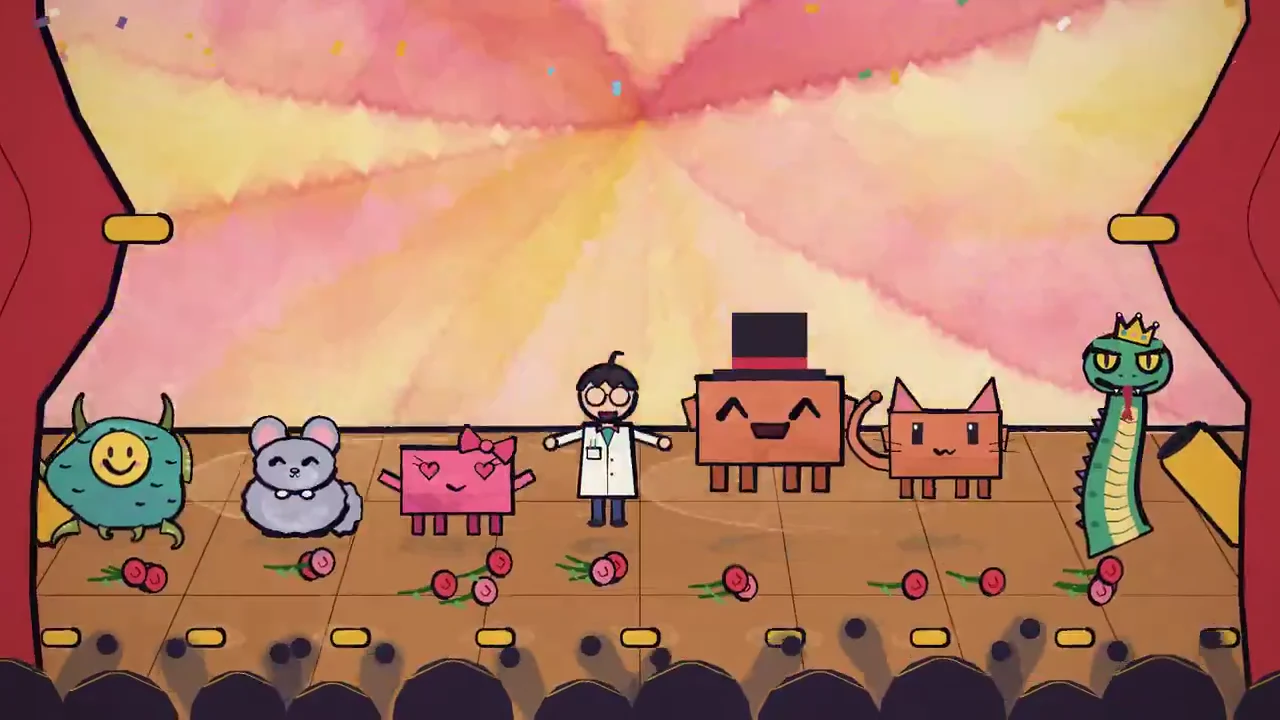
This animated music video was drawn by Claude writing code. No ready-made AI video generation model was involved. Instead, Claude Opus 5.5 wrote JavaScript directly and used a web canvas engine to paint 156.6 seconds of hand-drawn watercolor animation, frame by frame.
The video is called "I'm Upping My P(doom)". P(doom) is AI-world slang for "the probability that AI brings catastrophe to humanity," so the title means "I'm raising my odds of doom." It comes from X user NotinReality (original post, YouTube version). The look is an old-fashioned picture book: watercolor paper texture, slightly wobbling brush-ink lines, movement that lands on the beat, and plenty of expressive acting.
The song originally came with a 3D music video posted by another creator, @slimer48484, where the dancer is a humanoid character with a sunflower for a head. NotinReality's version is a remake set to the same song:
NotinReality kept the original audio track and simply handed the lyrics and audio to Claude. The only requests were to use the Clawd character and to give every lyric line a fun visual and a transition. No scene ideas were specified, and everything in the repository was generated by the model (source code at PDoomVideo). Afterwards, the creator also open-sourced the whole animation production pipeline as a starter template, ClaudeAnimationBase.
Even if you don't normally write code, once you set up a few basic tools on your computer by following this tutorial, you can use Claude Code (or another coding Agent) to make hand-drawn style animation of your own.
Part 1. Behind the scenes: how this hand-drawn video came to be
According to the creator, the process took just two rounds, and the model wrote all of the code.
1. From Flash style to a watercolor picture book
For the first version (Gen 1, whose code is kept in the repository's legacy/ folder), the creator only pasted the lyrics and audio file into Claude and asked for a "cute animation," with Medium reasoning turned on.
The model quickly came back with a basic animation: flat solid-color shapes, thick outlines, and lots of text labels and speech bubbles (such as "AGI?", "LOSS", "don't eat me!"). Overall it looked a lot like 2000s-era Flash animation.
For the second round, the creator asked for these things:
- Turn reasoning up to the highest level (xhigh reasoning).
- Use a p5 brush style (
p5.brush, a library that adds watercolor and brush strokes to p5.js). - Make the scenes more interesting, with something worth watching in every one.
- Transition from every scene into the next.
In the second round, the storyboard Opus wrote for itself, STORYBOARD.md, set a rule: keep text on screen to a minimum. The whole film uses only a few big sound-effect words (FOOM, CHOMP and the like), with no labels, no captions, and no signs repeating the lyrics, because karaoke subtitles are already there. So the text in the finished video is mostly the lyric subtitles at the bottom plus the P(DOOM) prop sign.
The creator says this round ran for about 45 minutes. Here are the same lyric moments side by side:

2. How round two was organized: storyboarding, splitting into chapters, and parallel subagents
Here is how the work in round two was divided. Opus first wrote STORYBOARD.md, which imagined the whole film as a stage play spiraling out of control. It opens and closes with a curtain. Clawd grows from a little doodle inside a monitor into something the size of a planet, dragging a researcher through the various AI doom memes in the lyrics. A P(doom) thermometer is a physical prop on stage, pumped higher with a bicycle pump at every chorus (8→34→61→86→99.9), until the last line, "Was it all for show?", reveals that everything was just a stage performance. Next, Opus split the song into 9 chapters, each with its own code file, and wrote an ANIMATION_GUIDE.md to brief the parallel subagents. Each subagent only edits the chapter it owns, and if it finds a bug in a shared file, it reports it rather than fixing it. Finally, render.mjs renders every frame in headless Chrome (Chrome running with no visible window), and ffmpeg combines them into an MP4.
3. The rulebook in the starter pack
After finishing the video, the creator released a starter pack. Its animation guide (ANIMATION_GUIDE.md) is built from this video's code and from an analysis of "what the model did well and what it did badly." It starts by setting three goals:
- Handmade: it should look like someone drew it frame by frame, with brush strokes, slightly wobbling ink lines, flat 2D, and no writing.
- Alive: something on screen is always moving and something is always happening, expressions are acted out, and characters are big enough.
- One piece: it's a short film, not a pile of clips stitched together. Plan first, then draw, and connect every scene to the next.
Under those three goals sits one baseline: the audience has to be able to follow it. The guide specifically warns that timing is where the model goes wrong most often. Here are the most important of its specific rules:
Rule 1: A purely flat, handmade texture (Solid Medium & Boil)
- Never use plain geometric shapes: p5.js's built-in
rect(),ellipse()and ordinary solid fills are strictly off-limits, because they look like 2000s Flash animation. Everything is drawn withp5.brush. Characters and props use flat color washes with ink outlines; skies, hills and shadows use watercolor fills with bleeding edges and pigment texture. - Make the ink lines "boil" (Boiling Linework): in traditional hand-drawn animation, every frame's lines are drawn by hand, so the edges of the strokes jitter slightly. The template changes the random wobble of the lines 12 times per second (
BOIL), so every line trembles gently and looks hand-drawn frame by frame. - Absolutely no 3D projection: no 3D perspective rotation, and no WebGL 3D faking depth. When a character turns, it mimics a traditional hand-drawn model sheet, cutting between 5 pre-drawn key views: front, three-quarter front, profile, three-quarter back, and back.
- Colors mix like paint: p5.brush mixes colors the way real paint does, so yellow painted over blue turns green. That's why anything that glows always uses
glow(), which is true additive light and won't get mixed into a muddy green.
Rule 2: No text on screen (No Text)
- When large language models generate animation, they lean heavily on "text labels" (a lost character holds up a sign saying "I'm lost"). The guide calls this out directly as a textbook failure.
- "Show it, don't write it": every emotion must come through the character's movement, eyes, props and visual symbols (sweat drops, question marks, hearts, a light bulb overhead, a rain cloud). Speech bubbles on screen are strictly forbidden.
- Exceptions: when words are truly needed (a name, say, or a sign that is itself the joke),
letter()can paint a word or two into the scene, used just once. And if the user explicitly asks for subtitles, follow the user.
Rule 3: Design the timing for the viewer's eyes (Timing: Model the Viewer)
The most common flaw in code-generated motion is that it feels "mechanical": everything moves at a constant speed, every event piles up at once, and it's over before the viewer can take it in. The guide sets out a core principle: "While designing, always keep a model of the viewer in your head (Timing: model the viewer)."
- Write the reads: how many things does the viewer need to understand in this shot? Only one thing can happen at a time.
- Fast actions, slow meanings: the action itself can flash by (a swing, a fall), but it needs an "anticipation" beforehand (like pulling the arm back before a punch) and enough "hold" time afterwards for the viewer to see the result and feel something.
- A real example: the guide ends with a concrete case. The first version of the sample film's ending crammed throwing a star, the star flying back, a flash, falling in love, waving goodbye, the star answering, and the wrap-up all into about 1.3 seconds, and nobody could follow it. It was later reworked into 6 beats that appear one after another, stretched to about 4 seconds (6.95–11.0 seconds), so each beat has enough time to be seen.
The other four rules
- Something has to happen in every shot: there should be a change between the start and end of a shot, such as wanting, discovering, trying, failing, reacting, getting. "Clawd standing on the grass being cute" doesn't count as a shot. Cause comes before reaction, and any setup has to pay off.
- Keep the picture alive: something is always moving, like idle fidgets, a slow camera push, swaying grass. A completely still frame looks like a bug. In medium shots Clawd has to be big enough, and all movement shares one beat.
- Transition at every seam: at the opening, between shots, and at the end. No hard cuts and no sudden stops. Transitions should relate to the story and shouldn't be the same every time. Options include a brush wipe, an iris (circle) mask, a whip pan, a shape match cut, and a cut on action.
- Have the whole idea before writing code: write the storyboard before starting, and work out what the film is about, what recurs, and how the ending echoes the opening.
Part 2. Hands-on: make your first hand-drawn animation with ClaudeAnimationBase
After finishing the video, the creator pulled out the refined animation engine and packaged it as a scaffold anyone can pick up and play with: ClaudeAnimationBase.
You don't need to tame p5.js yourself or write complicated low-level rendering logic. The template already comes with the character, 31 expressions, beat tools, and a background rendering script.
1. Getting set up
You need four things (works on Mac, Windows and Linux):
- Node.js (to run the scripts)
- Google Chrome (to render the canvas frame by frame offline)
- ffmpeg (to combine the generated image sequence and the audio into an MP4 video)
- Claude Code (or another AI coding tool that can read and write files and run terminal commands)
A note on hardware performance: Without a dedicated graphics card, watercolor fills can slow down to several seconds per frame; you can ask the model to swap out the watercolor fills. For reference, on an M3 Max (an Apple chip with no dedicated graphics card) we measured about 0.16 seconds per frame for the sample.
2. Installation and project layout
Open your computer's terminal and enter the following commands one by one to download the template and install its dependencies:
# 1. Clone the starter repository
git clone https://github.com/JohnHeibel/ClaudeAnimationBase.git
cd ClaudeAnimationBase

# 2. Install project dependencies (including p5.js, p5.brush and puppeteer-core)
npm install
The key project files at a glance:
ANIMATION_GUIDE.md: the core production rules and API reference (be sure to have the AI read this first).src/clawd.js: the drawing logic for Clawd, the main character (views, facial features, hats, movements, emotions).src/core.js: low-level helpers for the watercolor brushes, camera push and pull, beat math, and lighting.src/timeline.js: chaining multiple shots together with transitions (such as the brush wipe transitionbrushWipe).src/config.js: global settings, including total length (duration), song tempo (bpm), and the audio path.src/scenes/: where the animation shot files you write live (comes withdemo.js).render.mjs: the offline rendering script, which can output contact sheets, close-up crop checks, and the final MP4.studio.html: a local preview page. Open it in Chrome and drag the progress bar to preview.
3. The main character Clawd and 31 emotions
The template's default main character is Clawd (the Claude Code mascot, a small terracotta block): a terracotta-colored body 10 units wide and 6 units tall, with four stubby legs, two little hands, and two long slit eyes.
The template has as many as 31 lively preset emotions built in, so you don't have to draw expressions by hand:

The 31 expressions range from happy and smug to furious (the lid flips open like a lunchbox to show teeth), dizzy, and KO. Most come with little drawn symbols (sweat drops, question marks, hearts, a light bulb, zzz, a rain cloud).
Switching expressions is acted out, not an instant jump. You change expressions with emotions(), giving it times and a sequence of expressions, and it automatically adds the anticipation, a squint, a surprised reaction and a bounce back, for example emotions(lt, [[0, 'bored'], [1.2, 'surprised'], [1.7, 'excited']]). Meanwhile feel() is the idle fidget that comes with each emotion.
4. Prompt templates for getting Claude to make a new animation
Once you're set up, launch Claude Code in the project folder. The creator's own example is really just one sentence:
Read ANIMATION_GUIDE.md, then make a 15-second video of Clawd trying to catch a butterfly.
According to the README, from that one sentence alone the model will write a storyboard, build it shot by shot, render contact sheets to check itself, and finally output out/video.mp4.
The two prompts below are our expanded versions based on the guide. They split "storyboard first, then code once you approve" into two steps, so you can revise the storyboard in between. The README itself also suggests having the model give you a storyboard before it starts.
Step 1: Have Claude study the guide and produce a storyboard (prompt template)
First, read the ANIMATION_GUIDE.md in the project root in full, and make sure you understand its core rules: the hand-drawn watercolor style, no on-screen text, keeping the picture always moving, and "modeling timing from the viewer's point of view (Timing: Model the viewer)."

I'd like to make a 15-second short animation. The theme is: "On a sunny meadow, Clawd chases a glowing butterfly, misses, and falls over; in the end the butterfly lands on its nose and they smile at each other."

Please don't write code yet. First, following the guide, write a STORYBOARD.md storyboard document:
1. Settle the one-sentence story (Logline), the visual world (World), and the color palette;
2. Plan Clawd's emotional arc across the whole film (Emotional Arc);
3. Break it into specific shots (A, B, C...), clearly marking for each shot its start and end time, how it transitions in and out, the key event in the shot (Event), what the viewer needs to understand (Reads), and the path the eye should follow.
When the storyboard is done, report back to me and wait for my approval.
Step 2: After approving the storyboard, generate the scene code
Once Claude gives you a sensible storyboard, send the second instruction:
The storyboard looks great! Now please start coding:
1. Set the correct duration in src/config.js;
2. Create a dedicated scene file under src/scenes/ (e.g. butterfly.js), following the structure of demo.js, and implement the storyboard shot by shot. Make sure every frame is a pure function of time t, and use boilSeed(key) correctly so the noisy line art doesn't jitter abnormally;
3. Update the script include in studio.html to point to the new scene file;
4. Run the contact sheet render command to produce contact sheets of a few key moments, and check for yourself whether the action silhouettes read clearly, whether there's any forbidden text, and whether the transitions are smooth.
In the README, the creator also suggests trying a few different approaches:
- Have it give you a storyboard before writing code;
- Try both very loose and very specific instructions. The creator found it can make a lot from very little direction, and it's also very precise when you get specific;
- Have it use subagents working in parallel;
- Have it replace Clawd, or add new expressions or outfits;
- Give it your own reference images.
5. The self-check review loop (The Review Loop)
This is the most important secret of code-generated animation: neither the AI nor a person can just read the code and imagine the picture. Key frames must be rendered into images and "checked by eye."
render.mjs offers three kinds of check images, and they render fast (the guide says contact sheets take about 0.1–1 second per frame):
# 1. Contact sheet: quickly check the key timing points of the whole film (e.g. seconds 1, 4, 8, 12)
node render.mjs --sheet=1.0,4.0,8.0,12.0 --cols=4 --w=320 --out=out/check/sheet.jpg

# 2. Motion strip: check frame by frame that a jump, turn or sudden expression change flows smoothly (checks 2.0s to 2.5s)
node render.mjs --strip=2.0:2.5 --cols=6 --w=320 --out=out/check/strip.jpg

# 3. High-resolution crop: check tiny facial movements, whether feet touch the ground, whether a held prop is floating
node render.mjs --sheet=4.5 --crop=760,420,500,400 --w=500 --out=out/check/face.jpg
The guide requires the model to actually open and look at these images. Claude Code can read images, so it checks the pictures itself to find problems.
6. Our local test numbers and the final render
We tested on our own machine (environment: a MacBook with an M3 Max chip, Node.js v22, with the installed Chrome detected automatically):
- A 6-frame contact sheet spot check took only 14.3 seconds (each frame took about 73–307 milliseconds to render).
- Fully rendering the template's built-in 11-second demo clip (264 frames @ 24fps) and encoding it to MP4 took 47.5 seconds in total (an average of 157 milliseconds per frame), producing a 10.8MB high-definition MP4 file.

At the same speed, rendering a full 156.6-second music video (about 3758 frames) offline would take roughly 10 minutes (not tested; more complex scenes are slower).
Once you're happy with it, a single command exports the final cut:
# Render every frame offline and package it into an MP4 with ffmpeg
node render.mjs --clip --out=out/my_animation.mp4

# If you have background music, set the audio in src/config.js, or just add the parameter:
node render.mjs --clip --audio=assets/music.mp3 --out=out/my_mv.mp4
7. Turning it into a music video: add your own song
If you want to turn your animation into a full music video, you can follow the guide's music rules and NotinReality's approach:
- Steps: put the song in
assets/; insrc/config.js, setbpm(beats per minute) andoffset(the second at which the first downbeat lands), and all the idling, bouncing and dancing will land on the beat. Cuts and big moves fall on the beat, and each musical phrase gets its own visuals. - Lyric subtitles: by default the guide says "lyrics don't go on screen; act out what the lyrics mean." If you want karaoke subtitles or animated lyrics like NotinReality's, say so explicitly in your prompt. The guide says user requests take priority.
- Licensing reminder: for public release, use a song you have rights to. Even the creator could only trace this song back to a YouTube video from 2024.
A copyable music video prompt template:
Please read the ANIMATION_GUIDE.md in the root folder first.

I want to make a full hand-drawn animated music video for a song. The audio is at assets/music.mp3, and here are the lyrics with timestamps:
[Paste lyrics and timestamps]

The requirements and process are as follows:
1. First measure the song's BPM and the second of the first downbeat (offset), and fill them into src/config.js;
2. Write a storyboard STORYBOARD.md for me to review first. Every lyric line needs a fun visual, and every scene transitions into the next; keep karaoke subtitles at the bottom;
3. Once I approve, split it by chapter and use subagents working in parallel, one file per chapter;
4. After each chapter is done, render a contact sheet and a frame strip to check it, making sure the motion and continuity are right;
5. Finally, run the render script to produce the MP4.
Part 3. Going further: Donald Jewkes's hybrid approach
Less than a day after NotinReality's video went out, Donald Jewkes quoted it and posted a new version made with Opus 5.5, then shared the full prompt in a reply:
"I made this with Opus 5.5 and one prompt. I talked to my computer for 5 minutes, Claude worked for 12 hours, and I woke up to it."
1. What Donald's prompt asked for
- A human-like lead and character design: the prompt asked for "a pop star lead inspired by Claude's sunflower look, more human-like, fitting a female vocal," using K-pop as the visual reference and steering away from a Pixar look (which Donald finds a bit overdone). It used fal (an API platform for AI image and video generation) to generate the character designs, backup dancers and scenes.
- Seedance base footage, rebuilt by tracing over it in JS: the song was cut into segments and sent to Seedance 2.5 (ByteDance's video generation model) to line up lip sync and timing, with a self-built verification process generating clips over and over as base footage for movement and physics. Claude was then asked to use the Seedance footage as a foundation and rebuild the picture from scratch in JavaScript as an overlay layer, so in the end you only see the hand-drawn JS layer, not the footage underneath. It's similar to rotoscoping, where you shoot live footage first and then draw over it.
- Audiovisual detail and dense information: the opening lyrics should be big, working as an attention-grabbing hook, with room left in each composition for lyrics; ElevenLabs could be used for sound effects; it asked Claude to rewatch the whole film repeatedly and check it section by section with screenshots; and it told Claude to use up the Claude Max plan's allowance, with about $2,000 of fal credit also available (how much was actually spent wasn't disclosed).
- Lots of on-screen text and insider memes: the opposite of NotinReality's almost text-free approach. Donald asked for lyrics in large animated type and for current tech-world memes to be packed in. The prompt named things like the X buzz about "AI eating hard math problems" such as the Navier-Stokes equations, and the Evangelion Shinji meme, and allowed pasting in material directly in an "internet brutalism" style. In the finished video you can spot paper screenshots, "400,000 GPUs", the NDA controversy, "What did Ilya see?" and more.
The prompt is also blunt about the goal: the audience is San Francisco tech Twitter, the aim is a viral hit on X, and the higher goal is "better than anything anyone has seen." Donald believes on-screen text is one of the best ways to hold attention, so the opening uses big text as a hook, and elsewhere big text alternates with small subtitle-style text.
At the end, the prompt attaches the source code of NotinReality's video, calls it "good, but nowhere near there," and tells Claude to build on top of it. In other words, Donald's version is NotinReality's code with more piled on.
It's worth noting that the prompt also references things Donald had prepared in advance on that computer: an /asic project folder, a reference material library skill called mesh, a video scoring skill, Seedance 2.5 documentation, and API keys. So the "one prompt" stands on a whole ready-made toolchain, and an ordinary reader who copies the prompt won't be able to run it.
2. Two creative philosophies compared
| Dimension | NotinReality route (pure code, hand-drawn) | Donald Jewkes route (multi-model hybrid pipeline) |
|---|---|---|
| Core mechanism | Claude writes p5.js/p5.brush code to draw every frame, with no image or video generation models at all | fal generates images and Seedance generates video as base footage, then Claude redraws over it in JS (as designed in the prompt) |
| Visual style | Watercolor picture book, stage play, watercolor bleeds, slightly wobbling line art | Anime-style collage with off-white paper, halftone dots, and a navy, pink and orange palette |
| Text strategy | Almost no text on screen, only lyric subtitles at the bottom; the story is told through movement and expressions | Heavy use of text: big animated lyrics, paper screenshots, tech memes |
| Control and cost | The same timestamp always draws the same frame, and you can revise down to a specific frame; beyond Claude itself, no extra image or video generation costs | Dense and high-impact; needs extra paid services like fal, Seedance and ElevenLabs plus tools built in advance, and Claude ran for 12 hours |
The finished video does show big lyrics, memes and a paper feel, but whether it's really Seedance footage traced over in JS is something outsiders can't confirm: we can see the prompt and the result, not the steps in between.
If you want to try it yourself, NotinReality's ClaudeAnimationBase is the more realistic starting point: the code is open source, it only needs Claude and a few free programs, and we've already run the template's built-in sample on our own machine.
Part 4. Final thoughts: the real craft of code-drawn animation
The real craft of this method is "the model writes code to draw every frame + renders screenshots and looks at them itself + works on chapters in parallel," plus a rulebook that spells out the aesthetics and the timing. According to the creator, the higher the reasoning level, the more lavish and detail-focused the scenes the model produces. For readers, we suggest first running a 15-second short through the whole flow of storyboarding, contact sheet self-checks and rendering, and then trying a full song.
Practical takeaway
Scroll through the Markdown, then copy and adapt it to your team.
Loading Markdown…
Members can copy or download the full Markdown, and let their AI subscribe and ask.
Found this useful? Leave your email — every new explainer, the moment it's out. Unsubscribe anytime.