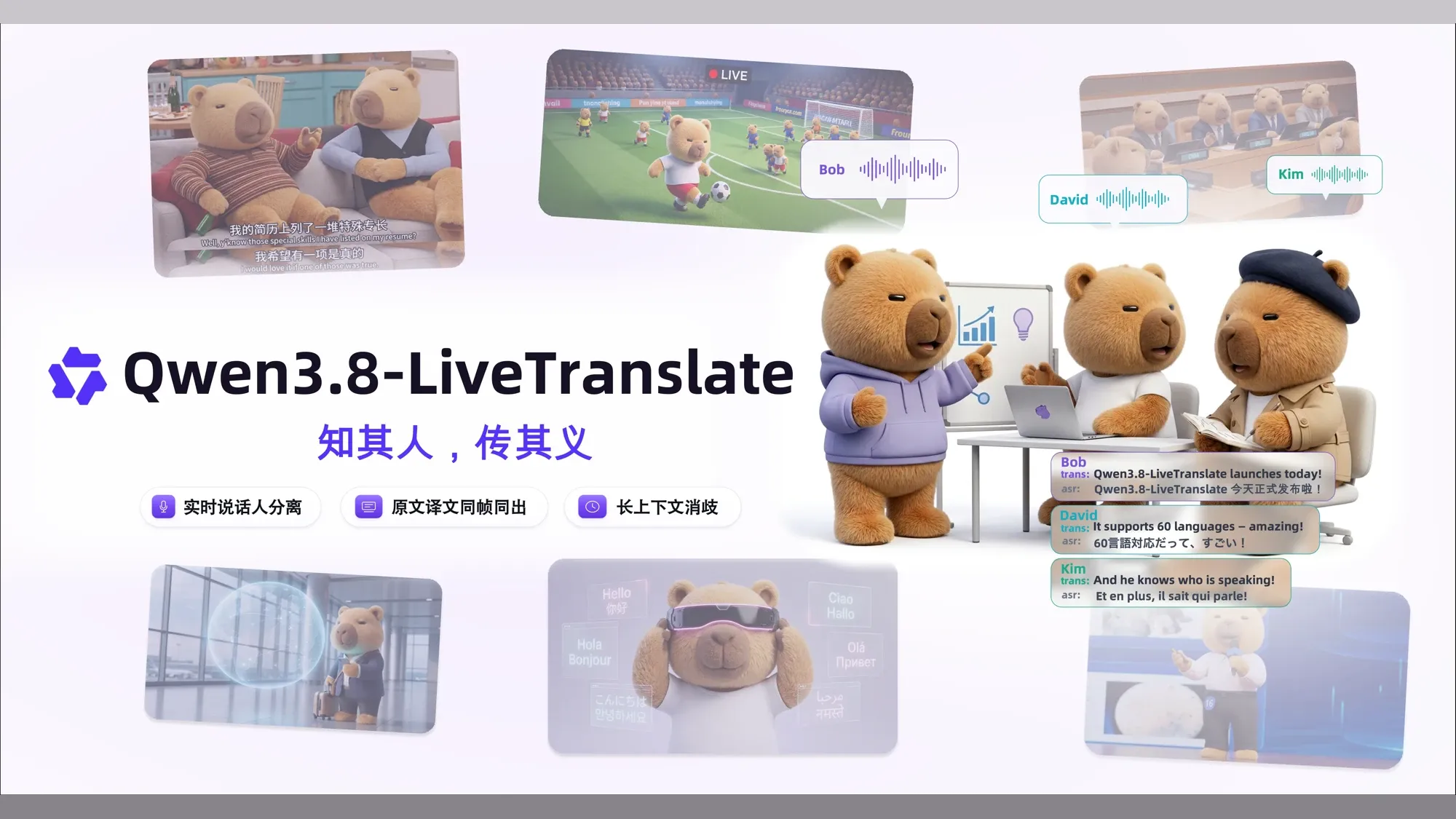
Alibaba Releases Qwen3.8-LiveTranslate Real-Time Speech Translation Model: Live Interpretation with Multi-Speaker Diarization
It also presents source and translated text simultaneously, resolving ambiguities using long context and visual frames. This article breaks down its architecture, supported languages, benchmarks, API integration, and actual pricing.
In a multilingual meeting with multiple participants, translating quickly is only the starting point. Listeners also need to know who said what, cross-check names and technical terms against the original phrasing, and ensure later conversation retains the context established earlier. Only when live interpretation conveys all this context together does it truly become a practical communication tool.
The Qwen team has released Qwen3.8-LiveTranslate, a large model designed for real-time speech interpretation, and launched its streaming API endpoint qwen3.8-livetranslate-flash-realtime on Alibaba Cloud's Model Studio platform.
Qwen3.8-LiveTranslate operates through two collaborating components: the Thinker listens while interpreting content using visual frames and prior context, and the Talker speaks the translated text. In official multilingual FLEURS benchmarks, the translation progress lagged behind the original speech by an average of 2.3 seconds; this metric, abbreviated as LAAL, measures how fast a real-time translation system keeps up with a speaker.
This upgrade focuses on four core capabilities:
- Telling speakers apart: Distinguishes multiple speakers in a stream while preserving each speaker's voice timbre in the translated speech as closely as possible;
- Simultaneous source and translation: Concurrently returns source-language recognition results and target-language translations within the same data stream, facilitating subtitle verification and content compilation;
- Disambiguation via context and visuals: Combines long context with static image frames to resolve coreferences, proper nouns, and homophones;
- Reduced streaming latency: Alternates audio and text within a single processing stream, reusing previously ingested audio and already generated translations; on FLEURS tests, the average delay behind the original speech decreased from 2.8 seconds in the previous generation to 2.3 seconds.

How It Listens, Translates, and Speaks Concurrently
Conventional speech interpretation systems operate in three sequential steps: first recognizing speech into text, then translating the text, and finally synthesizing the translated text into speech. Because these three steps run in series, an error in hearing in the first step cascades down the pipeline; moreover, a speaker's unique voice timbre can rarely survive such a text-centric chain.
Qwen3.8-LiveTranslate adopts a dual-module Thinker–Talker design instead. Its underlying Hybrid MoE is an architecture that activates a task-specific subset of expert modules for computation; "Interleave" signifies that audio, source text, and translated text no longer queue in separate batches, but instead enter a single processing stream chronologically interleaved.

The system's core operation relies on collaboration between the two modules:
The Thinker handles comprehension. It processes visual frames, audio, recognized source text, and in-progress translations chronologically within a unified stream. The system can keep utilizing previously heard audio and already translated output without recomputing from scratch every time, allowing it to proceed with subsequent translation much faster.
The Talker handles speaking the translation. It references both the translated text and the original voice, allowing the synthesized target-language speech to preserve the original speaker's vocal timbre as closely as possible.
How the Four Capabilities Function in Real Conversations
To handle multi-party discussions and complex conversational contexts, Qwen3.8-LiveTranslate introduces targeted streaming capabilities:

Distinguishing Speakers While Preserving Individual Voice Timbres
When multiple people take turns speaking or engage in back-and-forth dialogue, the model tags each utterance with labels like spk1, spk2, and spk3 to identify who is speaking, while ensuring the corresponding translated speech retains each person's unique timbre.
Simultaneous Source and Translated Text
Along with returning the translation, the model simultaneously outputs the recognized source text. Applications can display both texts side by side, allowing readers to read the translation directly while cross-checking against the original words at any time. This also provides readily usable data for bilingual subtitling, content summarization, and information retrieval.
Resolving Names and References Using Prior Context
By incorporating preceding dialogue and conversational history, the model mitigates ambiguities in pronoun references, personal names, and proper nouns during streaming translation. In the official demonstration clip, the conversation develops around the Flaming Mountains, perpetual heat throughout the four seasons, and the inability to grow crops; towards the end, the demo showcases the model leveraging context to correct "铁山郡/Tieshan Country" to "铁扇仙/Iron Fan Fairy" (as displayed in the video).
Disambiguating Homophones Using Visual Context
When homophones occur in speech and surrounding context remains insufficient to determine meaning, the model can also reference camera video frames. The official demo uses three pairs of homophones with identical pronunciation but distinct meanings—pear/pair, leek/leak, and sail/sale: whichever physical object appears in the visual frame, the model selects the corresponding meaning accordingly.
Translation Speed, Quality, and Speaker Diarization Performance
On the multilingual FLEURS evaluation benchmark, the Qwen team compared 70 translation directions across 19 languages—where "Chinese-to-English" and "English-to-Chinese," for instance, count as two distinct directions. For the automated translation quality metric xCOMET-XXL (where higher is better), Qwen3.8-LiveTranslate scored 85.7 points, compared to 83.0 for previous-generation Qwen3.5, 79.4 for Seed LiveInterpret 2.0, 73.5 for Gemini 3.5 Live Translate, and 65.2 for GPT-Realtime-Translate.

Regarding speed, LAAL measures how far behind the original speech the translation lags on average, where lower numbers indicate faster tracking. Qwen3.8 achieved 2.3 seconds, compared to 2.5 seconds for Gemini, 2.8 seconds for Seed and Qwen3.5, and 3.1 seconds for GPT. Transcription accuracy is measured by WER (Word Error Rate), where lower is better: Qwen3.8 scored 6.6%, Seed scored 7.0%, and Gemini scored 11.4%. Synthesized speech naturalness is evaluated using UTMOS scores out of 5, where higher indicates greater naturalness; Qwen3.8 scored 4.0 points. Seed's speech naturalness was evaluated only across the 26 translation directions that support speech output, while the other systems covered all 70 directions.
In the Omnilingua-MSpeaker multi-speaker long-audio benchmark, the Qwen team conducted pairwise comparisons between Qwen3.8's translations and those of other models, assessing faithfulness of content, fluency of expression, and conciseness of sentences:
- Faithfulness: Against Seed, GPT, and Gemini, Qwen3.8 achieved win rates of 81.0%, 79.3%, and 79.9% respectively (competitor win rates were 15.4%, 17.3%, and 15.0%, with the remainder tied);
- Fluency: Win rates were 87.2%, 74.6%, and 95.6% respectively (competitor win rates were 9.9%, 20.9%, and 3.4%);
- Conciseness: When facing Seed, Qwen3.8 was superior in 20.3% of samples, tied in 70.0%, and inferior in 9.7%; against GPT and Gemini, its win rates were 39.2% and 83.2% respectively.

Speaker diarization accuracy is reflected by DER (Diarization Error Rate), where lower values indicate better performance. Processing incoming audio in real time, Qwen3.8 registered an error rate of 9.7%, compared to 30.6% for Seed-asr-2.0, which also operates in real time. Two additional offline baselines that process audio only after receiving the complete recording showed 18.0% for GPT-4o-transcribe-diarize and 26.7% for Gemini-3.5-transcribe-preview.
Language Support and Coverage
The system offers three tiers of capability across different languages:
- Audio Input · 60 languages: These languages can be fed into the model as source audio;
- Text Output · 60 languages: Translated text can be generated in these target languages;
- Speech Output · 29 languages: Only this subset can further synthesize target-language speech.
For instance, Cantonese can be used as input speech and generated as output text, but cannot currently be synthesized into output speech. All supported languages are grouped below by capability, and specific languages can also be searched directly.
60 translatable languages · 29 with speech output
Check what each language supports
ChineseAudio inputText outputSpeech output
Speech output available
29 languagesSupports audio input, text output, and speech output.
- Chinese
- English
- German
- Italian
- Portuguese
- Spanish
- Japanese
- Korean
- French
- Russian
- Thai
- Indonesian
- Arabic
- Vietnamese
- Turkish
- Finnish
- Polish
- Hindi
- Dutch
- Czech
- Urdu
- Filipino
- Swedish
- Danish
- Hebrew
- Icelandic
- Malay
- Norwegian
- Persian
Audio input and text output only
31 languagesCan produce translated text but is not currently listed for speech synthesis.
- Afrikaans
- Asturian
- Azerbaijani
- Belarusian
- Bengali
- Bosnian
- Bulgarian
- Cantonese
- Catalan
- Cebuano
- Croatian
- Estonian
- Galician
- Gujarati
- Greek
- Hungarian
- Javanese
- Kannada
- Kazakh
- Kyrgyz
- Latvian
- Macedonian
- Malayalam
- Marathi
- Punjabi
- Romanian
- Slovak
- Slovenian
- Swahili
- Tajik
- Ukrainian
Choose a language above to see whether it supports audio input, text output, and speech output.
Developer Integration: Continuous Streaming via WebSocket
On the Model Studio platform, clients maintain a persistent WebSocket connection to stream audio while simultaneously receiving translations, without waiting for the entire recording to finish uploading. The endpoint URL follows this format:
wss://{workspace_id}.cn-beijing.maas.aliyuncs.com/api-ws/v1/realtime?model=qwen3.8-livetranslate-flash-realtime
The address above is the endpoint for the North China 2 (Beijing) region, where
{workspace_id}represents your Model Studio workspace ID; endpoint URLs vary across different regions (such as the Singapore international service). Authentication is passed via the HTTP headerAuthorization: Bearer <DASHSCOPE_API_KEY>when establishing the WebSocket handshake.
Four Steps in an Interpretation Session
Once the connection is established, the client completes four tasks: specifying the target language and output format to the server, continuously streaming audio or visual frames, receiving translation results, and waiting for remaining data to finish processing before closing the connection.
1. Configure Target Language and Output Modality (session.update)
After establishing the client connection, the first event sent to the server should be session.update. According to the latest official documentation, a minimal configuration example for qwen3.8-livetranslate-flash-realtime is as follows:
{
  "type": "session.update",
  "session": {
    "output_modalities": [
      "text",
      "audio"
    ],
    "translation": {
      "language": "en"
    }
  }
}
These fields control the following options:
- Text vs. Speech: Setting
session.output_modalitiesto["text", "audio"]returns both translated text and speech; setting it to["text"]returns text only. - Simultaneous Source Transcription: Qwen3.8 continuously performs speech recognition, transcribing ingested audio into source text; this result is returned without additional charge and does not need to be manually enabled via
input_audio_transcriptionas in Qwen3.5. - Target Language: Specify the target language in
translation.language. You can also provide terminology pairs viatranslation.corpus.phrases(such as{"人工智能": "Artificial Intelligence"}) to help the model consistently translate industry terms and proper nouns.
2. Continuously Stream Audio, Adding Visuals When Needed
- Streaming Audio (
input_audio_buffer.append): Slice audio captured from the microphone into small chunks using 16,000 Hz, mono PCM format, encode them into Base64 strings for network transmission, and stream them continuously. The server automatically detects speech start and end boundaries to trigger translation. - Sending Visuals (
input_image_buffer.append): When the model needs visual reference, static images can be sent as Base64-encoded strings. Images must meet the following criteria:- Image format must be JPG or JPEG, with a recommended resolution of 480p or 720p (up to 1080p maximum);
- Each individual image must not exceed 500 KB before Base64 encoding;
- Image streaming rate must not exceed 2 frames per second;
- At least one
input_audio_buffer.appendaudio event must have been sent in the session prior to sendinginput_image_buffer.append.
3. Receive Source Text, Translated Text, and Translated Audio
Rather than waiting until an entire dialogue turn ends before returning output, the server streams results in chunks via distinct events:
- Translated Audio (
response.audio.delta): Returns a small chunk of 24,000 Hz, mono PCM audio each time, which the client enqueues in sequence for playback. - Translated Text: When outputting audio concurrently, text arrives in fragments via
response.audio_transcript.delta; when outputting text only, it arrives viaresponse.text.delta. The client concatenates these chunks in order of receipt. - Recognized Source Text:
conversation.item.input_audio_transcription.textcontinuously streams confirmed source text; once an utterance finishes recognition,conversation.item.input_audio_transcription.completeddelivers the complete source transcript and language. - Turn Complete (
response.done): Indicates that the current translation turn has finished generating and reports the token counts consumed in this turn. Tokens represent the metering unit for API usage and billing.
4. Wait for Remaining Processing Before Closing
When recording finishes, the client first sends session.finish to signal that all audio has been transmitted. After processing the remaining audio, the server returns session.finished. Disconnecting only after receiving this event and finishing local playback queue ensures that the final sentence is not cut off.
Client Reference Implementation Archive Note
The official blog previously provided a Python-based full-duplex client sample containing microphone capture streaming and background multithreaded playback logic. This code has been archived as-is for reference: official-client.py.
This script preserves the original comments from when the blog was published, some of which differ from current API documentation; adjustments should follow current documentation during actual integration.
API Pricing and Free Quota
This API converts speech, images, text, and synthesized audio into tokens for separate billing. According to prices published by Alibaba Cloud Model Studio, the standard rates for qwen3.8-livetranslate-flash-realtime per million tokens in the North China 2 (Beijing) region are:
- Audio Input: 40 RMB;
- Image Input: 3.3 RMB;
- Text Output: 100 RMB;
- Speech Output: 160 RMB.
The North China 2 (Beijing) region offers a free tier of 1 million tokens, valid for 90 days from the latest of activating Model Studio, model release, or application approval; other regions do not include this free quota. In the Singapore region, the four unit prices are 54.688 RMB, 4.01 RMB, 145.835 RMB, and 218.752 RMB per million tokens, respectively. Audio, images, text, and speech use different token conversion formulas, so these unit prices cannot simply be applied based on audio duration alone; official integration should always reference the Model Studio pricing page and console billing statements.
Three Critical Tests After Integration
After integrating real-time interpretation, three sets of tests should be conducted around speaker separation, terminology, and latency:
Distinguishing Who Said What
- Test question: When multiple participants speak in turns or quickly interject, can the system reliably distinguish speaker attribution and maintain individual voice timbres in translated speech?
- What to observe: Whether
spkspeaker tags switch accurately with each speaker; whether translated speech preserves individual vocal timbres; and whether role confusion or vocal drift occurs during rapid back-and-forth dialogue. - Impact of failure: Listeners cannot identify speakers from subtitles or audio, leading to confused attribution in multi-party seminars or business negotiations.
Consistency of Names and Specialized Terminology
- Test question: Can domain-specific proper nouns, institutional abbreviations, and homophones maintain consistent translation across multi-turn exchanges in long sessions?
- What to observe: Whether key term translations improve before and after adding a terminology glossary; whether the same name retains a unified translation as dialogue progresses; and whether pronouns correctly resolve to the intended person or object.
- Impact of failure: Specialized terms get mistranslated as common everyday words, compromising the precision of professional meetings and increasing the cost of manual post-editing and verification.
Determining the Optimal Audio Chunk Length
- Test question: How long should each audio chunk be to minimize translation latency while maintaining smooth playback?
- What to observe: After adjusting audio chunk duration (such as around 100 ms), how quickly the first translated audio chunk returns; and whether playback stutters or buffers excessively under unstable network conditions.
- Impact of failure: Overly long chunks force the model to wait longer before starting processing; overly short chunks increase request overhead. A balance must be struck under real network conditions.
Looking ahead, the Qwen team plans to further reduce latency, explore cross-session long-term memory, and expand coverage to more low-resource languages and regional dialects.
Developers interested in testing or integrating the model can try it via the official interactive demo or consult the official Model Studio API documentation for the latest integration guidelines.
Practical takeaway
Scroll through the Markdown, then copy and adapt it to your team.
Loading Markdown…
Members can copy or download the full Markdown, and let their AI subscribe and ask.
Found this useful? Leave your email — every new explainer, the moment it's out. Unsubscribe anytime.