
Vercel Labs Open-Sources fx0: A Superfast HTML Artifact Builder
fx0 focuses on rapid generation and surgical edits: how do high-speed models, compact HTML, precise replacements, and streaming previews work together? Includes three live interactive examples and complete prompts.
Vercel Labs has open-sourced fx0, a web design agent built for rapid generation and surgical iteration: describe the page you want, and it outputs a single-file HTML document that runs directly in the browser, turning ideas into interactive first drafts as quickly as possible.
It also serves as an application showcase for libfx, the underlying agent library, demonstrating the speed and persistence of its execution model. Key highlights include:
- Fast initial drafts with minimal rewrites for targeted edits. It defaults to high-speed models and instructs the agent to minimize operational steps, directly patching existing code when tweaking colors or copy.
- Immediate previews during generation. Page structure and styling stream in before the HTML finishes writing; interactive scripts run only after the complete document is committed.
- Iterating with style guides and web references. It supports ten built-in style presets or custom uploaded
design.mdfiles, searches and fetches public reference pages, and accepts mid-generation text steering. - Single-file delivery with version history. The HTML can be copied or downloaded directly, earlier iterations can be reopened, and execution steps are persisted so interrupted runs can resume.
Where does the speed come from, and how is it implemented?
fx0 bakes speed into model selection, generation steps, modification workflows, and streaming previews. Generating less unnecessary boilerplate on the initial draft and avoiding full rewrites during minor tweaks lets users see visual results much earlier. This walkthrough does not perform end-to-end timing benchmarks or head-to-head product comparisons; what can be verified are these specific engineering decisions.
Initial Draft: High-Speed Models, Fewer Steps, Compact Files
The default model is claude-opus-5.5-fast. Guest trials are locked to low effort and Fast mode; authenticated chats allow users to configure the model, reasoning effort, and Fast toggle independently.
System instructions are also engineered to reduce latency: when requirements are clear, the agent chooses sensible defaults and starts building immediately; for simple color or copy tweaks, reasoning effort should match the scale of the change; multiple edits within a single prompt must be batched into a single tool call.
When generating a page from scratch, instructions require submitting the complete HTML via a single publish_design call, keeping standard first drafts under 12 KiB whenever possible. The design agent has no filesystem, shell, or deployment container; it delivers pure HTML directly, bypassing multi-file scaffolding, dependency installation, and build pipelines so the output can open directly in a browser. Compact code also means fewer tokens for the model to generate.
In our live run, the original ORBIT / FORM artifact measured 10,854 bytes (~10.6 KiB), while CHROMA FLOW measured 9,028 bytes (~8.8 KiB). These figures represent file sizes, not generation durations. The 12 KiB recommendation is a soft guideline for the model; the hard limit enforced by the backend validator is 512 KiB.
Targeted Edits: Passing Only Replacement Snippets
If you want to change the large heading on the FORM poster to blue and rename the shuffle button to "SHUFFLE POSTER", system instructions prioritize calling edit_design with pairs of old and new text rather than re-emitting the entire HTML document. When the target section is already known, the agent does not need to re-read the entire file first either.
A single invocation supports 1–20 exact replacements: each old text snippet must match uniquely, applied in sequence, and validated together before committing as a new version. If any single replacement fails, the entire batch is rejected. This approach applies all requirements within a turn atomically while cutting down on redundant code re-generation and tool round-trips.
| Operation | Tool Input | Result |
|---|---|---|
| Initial draft or full rewrite | publish_design takes complete HTML |
Generates full design after validation |
| Surgical edit | edit_design takes array of old/new text replacements |
Commits batch as an atomic version |
Streaming Previews: The Page Appears While Code Streams
When the model calls publish_design, the HTML is placed in the tool's html argument. fx0's transport layer listens for tool-input-delta events from the model stream, decodes this field chunk by chunk, and pushes partial HTML to the browser over a Redis pub/sub channel. It does not need to wait for the tool arguments to finish streaming before displaying the page.
Incomplete code cannot be executed as a live artifact. The frontend sanitizes incoming chunks by stripping <script> tags, inline event attributes, nested iframes, and external resources, while enforcing script-src 'none' via Content Security Policy. This allows users to inspect text, layout, and styling while the model is still writing, whereas Canvas animations and button handlers activate only after final validation and commit.
Preview updates also avoid rebuilding the entire DOM on every incoming chunk. draft-preview.ts diffs and patches the existing DOM, preserving unchanged nodes and current scroll positions; only after the complete HTML passes backend validation does the frontend swap in an executable, sandboxed iframe.
This architecture addresses two distinct kinds of latency: generating and rewriting less code reduces the actual work required, while streaming previews surface visual progress earlier. Earlier visual feedback should not itself be mistaken for a reduction in total completion time. Standard prompts also begin execution immediately in the request handler without first passing through a queue; reading billing credentials, initializing draft observers, and reserving step quotas occur in parallel before contacting the model gateway. Vercel Queues handles fallback takeovers, long-running continuations, and mid-generation steering across requests.
Two Prompts, Three Interactive Scenes
We tested fx0 directly using guest access on the fx0 web service: Turn 1 produced the dual-exhibit ORBIT / FORM artifact, and Turn 2 produced the CHROMA FLOW particle instrument. The interface displayed claude-opus-5.5 as the model. Each turn consisted of a single prompt without follow-up questions from the model.
Primary visual styling, canvas algorithms, and controls were generated by fx0. The interactive demos embedded below are presentation-adapted copies: adjustments were made to constrain poster typography within bounds, adjust orbit display scaling, expand touch target hit areas, and respect system reduced-motion preferences. The unedited original HTML files are preserved and available for download alongside each showcase.
01 ORBIT: Turning a Web Page into an Orbital Mission Console
Deep black space, glowing cyan orbital trajectories, and a vivid orange sun combine with telemetry panels to form a mission control station. Clicking EARTH, MARS, or SATURN highlights the selected planet and its orbit while updating telemetry readouts on the left—such as mission name, target radius, and orbital period. All three orbits and Saturn's rings are rendered simultaneously; switching targets changes visual emphasis.
A time speed slider adjusts motion between 0.1× and 5.0× in increments of 0.1; clicking PAUSE halts animation and updates the button label to RESUME. This artifact is an artistic simulation: orbital proportions, trajectories, and telemetry values should not be construed as scientific calculations.
ORBIT Mission Control Console
Interaction guide: Switch between EARTH, MARS, and SATURN missions at the bottom to see orbital highlights and telemetry readouts update dynamically, or drag the time speed slider. Defaults to a static screenshot; click "Run interactive demo" to mount the sandbox on demand.

02 FORM: Dragging Sliders to Restructure a Kinetic Poster
Switching to FORM within the same HTML document swaps the visual style to a warm ivory background, bold black and orange typography, and dense parametric waves. The words "MAKE SOME NOISE" sit atop undulating line geometry, functioning as an interactive, customizable poster.
Increasing wave frequency packs the crests more tightly, while adjusting density changes the total number of ribbon lines rendered. Users can switch between orange, black, blue, and red ink colors. Clicking RANDOMIZE COMPOSITION recombines frequency, density, palette, phase, and typographic offsets.
In the original output, large randomized offsets occasionally pushed the leading letter past the viewport edge; the presentation copy bounds these offsets and refines typographic scale. This highlights that even after generating a stylish page, interactive controls still warrant testing across boundary conditions.
FORM Kinetic Typography Poster Studio
Interaction guide: Generated in the same turn as Case 01. Drag the wave frequency and density sliders, toggle between orange/black/blue/red ink colors, or click "RANDOMIZE COMPOSITION" to recombine the layout. The showcase version bounds text offsets to prevent letter clipping on smaller viewports.

ORBIT and FORM originate from the same generation turn. The Turn 1 prompt specified visual directions, specific controls, and the requirement that every control visibly alter the canvas.
Full Turn 1 Prompt: Exact English prompt used in the live run
Original prompt sent in the live run:
Create a spectacular interactive exhibition called ORBIT / FORM with TWO distinct full-screen exhibits accessible through clear persistent tabs and URL hashes #orbit and #form. Exhibit 1 ORBIT: a cinematic orbital mission-control scene, near-black space, glowing cyan orbital trajectories and a vivid orange sun rendered with Canvas/SVG/CSS (no external assets). Hundreds of subtle animated stars, planet orbit paths, small telemetry panels with clearly labelled SIMULATED data. Visitors can pause/resume motion, adjust time speed, and switch between Earth/Mars/Saturn missions; selection must visibly change orbit and readouts. Exhibit 2 FORM: a completely different Swiss editorial generative kinetic typography poster studio, warm ivory background, huge black/orange type saying MAKE SOME NOISE, sculptural parametric ribbon or moire geometry, controls for wave frequency, density and ink color, plus a randomize composition button; all controls must change the live artwork. Polished art direction, intentional typography, no generic SaaS cards. Both scenes need distinct strong composition, responsive layout that works on a 390px phone, keyboard-accessible real controls, prefers-reduced-motion support, and a small plain-language instruction visible on each scene. All content and code in one self-contained HTML, no CDN, no external network requests, no mock buttons. This is a design exploration: use only fictional/simulated data, no real account or backend. Make it beautiful and publish the finished design.
03 CHROMA FLOW: Stirring a Field of Luminous Particles with the Pointer
The second turn produced a dark generative artwork: magenta, cyan, and acid-lime luminous points flowing across a black canvas to form ribbons or lattice networks. Moving, dragging, or touching the canvas disrupts the visual field.
The distinctions between the three modes are immediately visible:
- VORTEX: Particles swirl around three drifting centers, leaving fading trails; pointer input introduces an additional rotational vortex.
- WAVES: Rows of curved lines undulate with superimposed sine waves, with pointer movement triggering radiating, decaying ripples.
- CONSTELLATION: Points drift slowly, drawing connecting lines between neighbors within proximity to form an evolving network.
TURBULENCE adjusts perturbation intensity, FREEZE / RESUME freezes or resumes the animation, and RESEED regenerates the initial particle distribution. Users can also switch modes with the left/right arrow keys or toggle pause with the spacebar. As a piece of generative art, it does not solve real fluid physics equations.
The original artifact continued animating even when the operating system requested reduced motion, merely slowing down the time delta and reducing initial turbulence. The presentation showcase was adapted to display a static constellation by default, allowing users to resume motion manually on demand.
CHROMA FLOW Particle Instrument
Interaction guide: Generated in Turn 2. Switch between 01 Vortex (triple-center swirling ribbons), 02 Waves (multi-layer sine interference), and 03 Constellation (proximity-linked dynamic star network) at the bottom. Supports cursor/touch perturbation, turbulence slider adjustments, and spacebar pause.

Full Turn 2 Prompt: Exact English prompt used in the live run
Original prompt sent in the live run:
Build CHROMA FLOW, an extraordinary interactive liquid-light instrument, as one complete self-contained HTML file. Make it look like a physical creative instrument / experimental museum exhibit: almost-black background, enormous vivid magenta/cyan/acid-lime luminous flowing particle ribbons or fluid-like interference field on Canvas, editorial condensed CHROMA FLOW headline, delicate numbered scales, small generous controls. The artwork must fill most of the page and react to pointer/touch movement with attractive ripples or swirls. Provide three visually very different working modes (VORTEX, WAVES, CONSTELLATION), a turbulence/intensity slider, a real freeze/resume toggle, and an actual reset/reseed button. Each mode should change the algorithm/composition, not only color. Keep readable visible instructions and mode description, do not overclaim physical fluid simulation; label it generative art. Ensure attractive initial composition without interaction. No external assets, libraries, fonts, CDN or network. Use Canvas and inline JS/CSS only. Make it responsive at 390px width and large desktop with all controls readable, no clipped headline or overlapping instructions, min 44px touch targets, keyboard-accessible controls and prefers-reduced-motion support. Respect safe particle counts for mobile. Strong composition, bold visual identity, no SaaS cards. This is fictional artwork, no backend. Publish the completed design.
How to Reproduce the Results and Export the Code
- Open fx0 and paste one of the complete prompts into the chat box.
- Send the message, wait for the preview to finish, and interact with the mission toggles, sliders, and shuffle buttons to verify live responses.
- Select
copy HTMLordownload HTMLfrom the top menu to save the standalone document. The downloaded HTML opens directly in a local browser without running a local fx0 server or publishing viapublish with Drop. - To refine the design, request specific adjustments in the same session, such as tweaking colors or repositioning controls. fx0's surgical editing tools apply text replacements directly to the existing document, preserving per-turn versions that can be revisited and exported anytime.
Model outputs are inherently stochastic, so the same prompt will not produce identical layouts across runs. The two complete prompts provided here serve as reproducible starting points for experimentation and remixing.
The guest trial feature (optionally enabled in the repository) allows 5 total prompts per IP address without periodic refreshes. When we entered the test session, the interface showed 2 remaining prompts; after we used both, it prompted us to sign in. This remaining count is not the default quota for new users. Once logged in, model calls route through the AI Gateway and bill against the user's Vercel team, with costs scaling based on the selected model and token consumption.
Granular control over model settings, mid-generation steering, and version tracking makes follow-up refinements straightforward:
Independent configuration for model, reasoning effort, and Fast mode. Simple color adjustments and complex algorithmic logic do not need identical reasoning budgets. Note that Fast is a latency mode, not a free tier; costs still reflect model choice and token usage.
Mid-generation steering. In paid, text-only chats, users can send follow-up instructions while the agent is still running—for instance, "keep the layout, just adjust the color scheme." libfx injects this guidance into the model's context as soon as the active tool execution finishes, avoiding the need to wait for the entire turn to complete. Prompts containing images are queued for the next turn, and each prompt in the free trial also executes as a standalone turn.
Full version retrieval. A previous design can be reopened from its turn history to compare changes or export that specific HTML snapshot. If a color tweak does not work out, earlier iterations remain accessible without having to manually reconstruct past prompts.
How a Single HTML File Powers Rich Animations
Taking the FORM poster as an example, the single HTML file bundles three distinct layers: DOM elements provide the sliders and buttons, CSS defines palette, sizing, and placement, and JavaScript handles input events to repaint the canvas.
When you drag the density slider from 44 to 80, the script reads the updated value and draws additional lines on the next animation tick; picking blue updates the stroke color for subsequent draws. Continuous animations rely on the browser's native requestAnimationFrame loop to advance angles, particle vectors, and wave phases frame by frame. The AI model writes the code once; all subsequent interactivity and rendering run locally inside the browser without round-tripping to the model on every slider change.
All three interactive scenes rely exclusively on native browser capabilities. fx0's constraint is not an arbitrary ban on frontend frameworks, but a requirement to output a self-contained document: all CSS and JavaScript must be inlined, and any graphical assets must be embedded directly without pulling dependencies from external CDNs.
Behind the Scenes: How the Agent Builds Artifacts
While the browser runs the finished code, the backend agent orchestrates code generation. The full request lifecycle proceeds as follows:
- The frontend posts user requirements to Next.js at
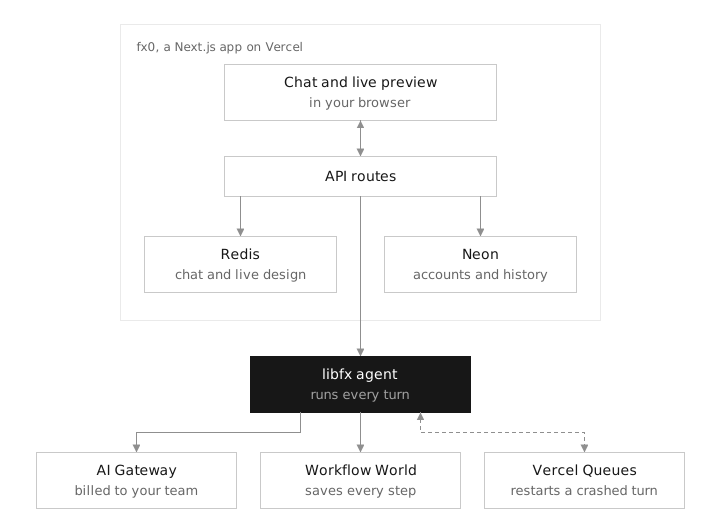
POST /api/prompt; fx0 persists the message and records the trial or paid billing identity for that turn. - The libfx session communicates with the model via AI Gateway, delegates model-emitted tool calls back to fx0 for execution, and feeds results back into the conversation turn.
- Initial drafts deliver complete HTML via
publish_design, while targeted updates pass atomic replacements viaedit_design. Completed artifacts pass through a validator that checks document structure, resource restrictions, and the 512 KiB size ceiling. - Once validated, the active design state updates, and the frontend loads the artifact into an isolated iframe where the browser executes scripts. Turn logs and design snapshots are then projected into Neon Postgres.
Within each server process, fx0 creates and reuses an agent instance via createFxAgent(), with individual chats running in dedicated sessions. When delegating isolated subtasks, tools spawn in-memory execution engines via createFxEngine(). The two serve distinct roles: the agent manages stateful sessions and task lifecycles, while the sub-engine executes discrete subtasks.
// Simplified illustration: configuration objects are provided by fx0, not a copy-paste runnable script.
const agent = createFxAgent(agentOptions)
const session = agent.session(sessionId, sessionOptions)
session.prompt(message, { messageId })
const engine = await createFxEngine(subtaskOptions)
Portability and Its Architectural Trade-offs
The backend validator caps individual design artifacts at 512 KiB while restricting external resources, form submissions, and nested iframes. fx0 also embeds generated pages within sandboxed iframes governed by Content Security Policies to block outbound network requests and prevent access to host cookies, storage, or session credentials.
Consequently, while the agent can browse the web during generation, the generated pages running inside fx0's preview cannot invoke production APIs, query external databases, or load web fonts. Standard HTTPS reference links can still be opened separately by users.
These sandbox measures enforce browser isolation, but they do not guarantee that generated pages are bug-free or vulnerability-proof. While single-file artifacts open easily offline, responsive layout, interaction states, and rendering performance still require hands-on verification across different viewports, browsers, and devices.
How Background Workers Resume Interrupted Generations
Suppose the agent is streaming particle canvas code when the serverless function handling the request suddenly terminates. Persisting chat logs alone is insufficient: the system also needs to know which steps finished, the state of the active design, and where execution should pick up.
fx0 decouples these responsibilities: the host application manages chat UI, previews, authentication, and design versions; libfx orchestrates model invocations, tool executions, retries, and turn lifecycles. Redis stores chat messages and active design state; Neon Postgres manages accounts, ownership, completed turns, and immutable versions; granular step-by-step execution traces are recorded in Workflow World. When resumption is needed, Vercel Queues spins up a new worker, allowing libfx to resume execution directly from persisted step state.
User messages are first written to Redis and confirmed only once libfx accepts them; execution results stream back live, and completed turns commit immutable design versions. Resumed tasks preserve the original billing identity, preventing guest runs from inadvertently charging an authenticated account.
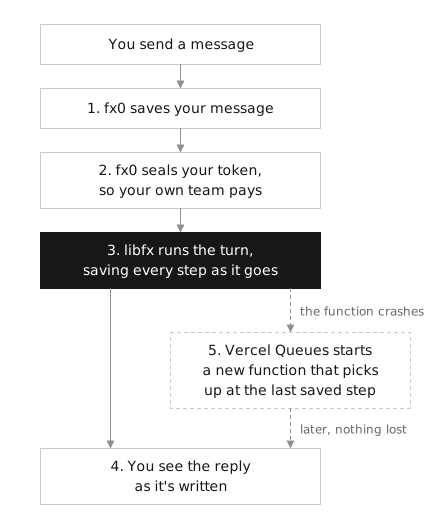
Resumption does not blindly replay all past tool calls. Idempotent read operations—such as inspecting designs or fetching web pages—can be safely rerun. Destructive edits, user questions, and subagent invocations are never blindly re-executed; instead, the model receives an interruption prompt and evaluates how to proceed, avoiding duplicate modifications.
Why Recovery Can Take ~13 Minutes After Initial Submission
On Vercel, libfx cannot instantly distinguish between a crashed function and one that is still making slow progress. To prevent two workers from concurrently mutating the same session, the original request holds the session lock until its 800-second execution budget expires; the fallback queue takes over 5 seconds later.
Consequently, if an initial request crashes unexpectedly, recovery triggers at approximately 805 seconds after the prompt was first sent, rather than waiting an additional 13 minutes after the crash event. Healthy long-running tasks checkpoint and hand off 30 seconds prior to timeout, bypassing this fallback window altogether.
A safety limit caps each turn at a combined maximum of 64 model steps across parent and child agents to prevent runaway execution loops; this is not a spending ceiling. Chat history is not pruned, meaning conversations with many turns may load more slowly. Our testing covered generation and interactivity, without inducing artificial cloud crashes or verifying production billing charges.
Guiding Designs with Style Presets and Finding the Right Fit
fx0 comes with ten built-in design.md presets inspired by brands such as Apple, Vercel, Stripe, and Linear, and also accepts custom user-uploaded text files. These presets were derived from VoltAgent's public analyses of brand websites rather than official brand design guidelines.
Style files steer every subsequent turn. Written in plain text, these files define core palettes, typographic scales, spacing systems, and component conventions. The entire file content is injected into subsequent model prompts for that chat. When creating multiple pages that share a cohesive visual identity, writing these constraints into a custom design.md eliminates the need to repeat them in each prompt. Uploads are capped at 100 KB; oversized files are rejected rather than automatically compressed.
Agents can ingest live web references. The agent can search using web_search and scrape public web pages using web_fetch. The fetching tool strips <script>, <style>, and raw HTML tags, passing sanitized text to the model. This path supplies text reference material only—it does not import external images, web fonts, or frontend frameworks into the finished product; the generated page must still adhere to single-file self-containment rules.
Subtasks can be delegated to subagents. For instance, a subagent can extract key findings from reference material or synthesize style requirements. Subagents use the same design tool suite but cannot spawn child agents of their own; they also share the parent's 64-step turn budget, preventing delegation from evading step quotas. The persistence and recovery mechanisms support continuing the overall task after an interruption.
Based on these runs, fx0 looks well suited to exploratory interactive exhibits, single-page creative visuals, kinetic prototypes, and educational widgets: completed outputs are interactive and can be inspected or edited offline. However, its sandboxed preview environment cannot host full-stack applications requiring authentication, live databases, or backend APIs; converting an exported artifact into a production system requires separate application scaffolding. The 512 KiB limit is also unsuitable for high-resolution images, video assets, or heavy 3D geometry.
Lightweight Artifact Consumption vs. Self-Hosting Overhead
Opening downloaded HTML files in a browser is trivial; running the full fx0 stack on private infrastructure is a distinct undertaking. Self-hosting requires Node.js 24 and three external backing services: a Vercel Sign-In integration, Neon Postgres, and Upstash Redis.
Self-hosting prerequisites and repository startup commands
First, configure a Sign in with Vercel OAuth application with scopes openid profile email offline_access, permissions AI Gateway: Use and Team: Read Only, and a redirect URI including http://localhost:3000/api/auth/callback. The offline_access scope is required to obtain refresh tokens.
Clone the repository, copy .env.example to .env.local, and supply credentials for the OAuth app, Neon, and Upstash; set SESSION_SECRET to a random string of at least 32 characters. If sharing a Redis instance with existing deployments, set a distinct FX0_REDIS_PREFIX to prevent session collisions.
git clone https://github.com/vercel-labs/fx0.git
cd fx0
cp .env.example .env.local
After configuring environment variables, run:
npm ci
npm run db:migrate
npm run dev
Database migrations must be run explicitly; the application does not execute them automatically. Our tests did not run this full backend; consult the repository instructions for complete environment variable reference and deployment configurations.
The greatest value of these three test cases lies in translating abstract design prompts into verifiable behavior: switching missions updates telemetry readouts, bumping density renders more ribbon strokes, and changing modes shifts the underlying generative algorithm. Evaluating artifacts by these concrete behavioral responses is far more reliable than merely judging first-glance aesthetics.
Members can copy or download the full Markdown, and let their AI subscribe and ask.
Found this useful? Leave your email — every new explainer, the moment it's out. Unsubscribe anytime.