The Most Common Dilemma in AI Product Design: 39 Principles for Designing Human–AI Interaction
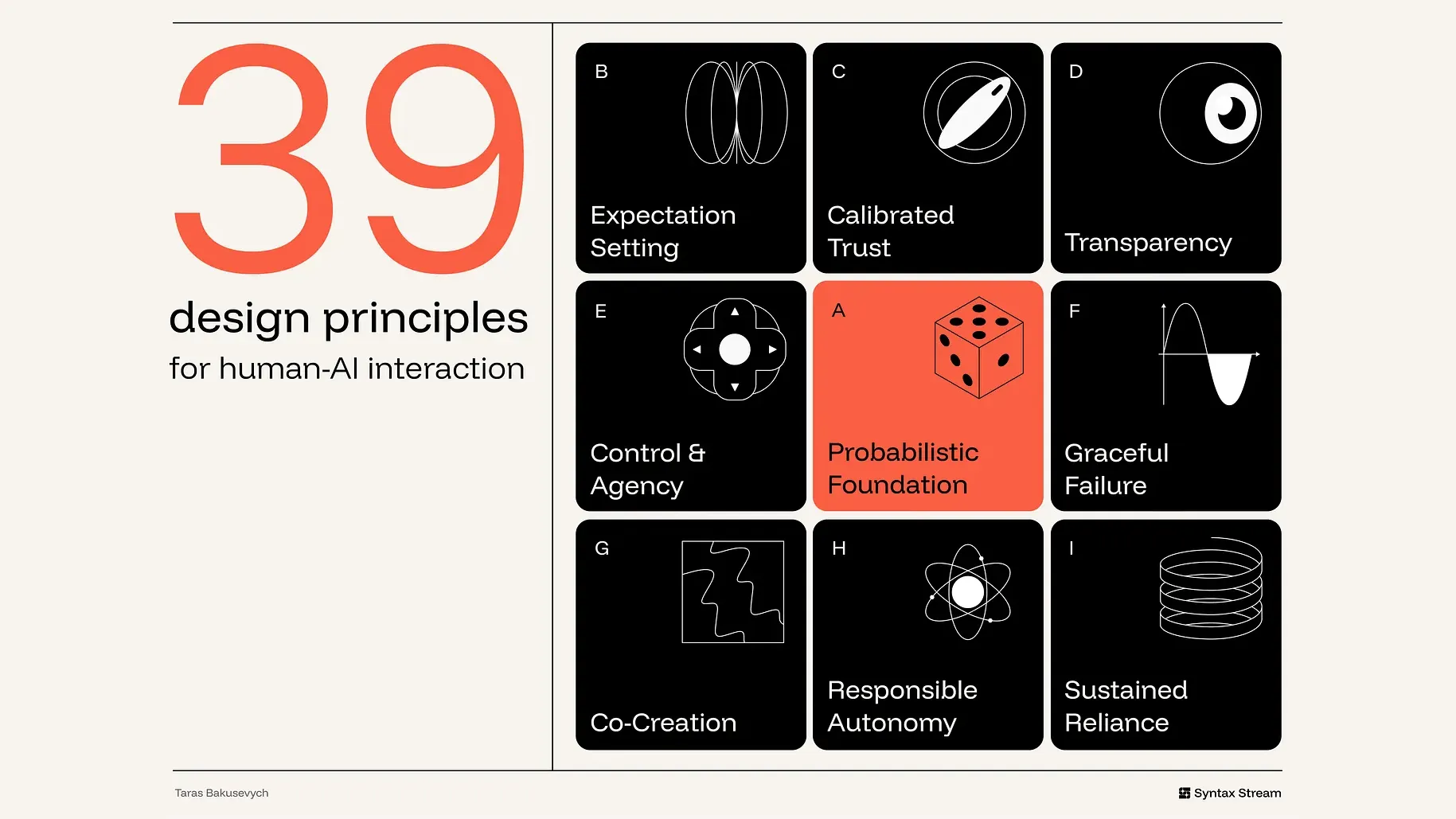
Designer Taras Bakusevych synthesized research across human–computer interaction (HCI), mixed-initiative systems, and automated trust to propose 39 AI interface design principles. This explainer reorganizes them according to Microsoft's product lifecycle stages while verifying the original evidence and qualifications point by point.
- Traditional interfaces assume "press a button to get a deterministic result," but large language models (LLMs) do not. Paired with different interfaces, the exact same model can feel like an efficient assistant or a perilous black box—the product experience is never determined solely by underlying model capability.
- Microsoft's 18 guidelines divide human–AI interaction into four stages: Before Use, During Use, When Wrong, and Over Time, emphasizing that "When Wrong" carries the greatest weight because failure in AI is the default state rather than an edge case. This article reorganizes the 39 principles across these four stages; original numbers are retained, which explains why the sequence jumps.
- Four most actionable, immediate takeaways: reframe UI labels from "answer" to "draft"; attach source citation badges to claims so verification takes only a glance; tier AI actions into Auto-run, Notify, Checkpoint, and Human-led based on reversibility; and populate empty input boxes with templates so users never stare blankly at a void.
- Where the original article falls short: the principle on measuring healthy reliance only points out the ambiguity of conventional metrics without offering replacement metrics, making it the sole principle in the entire piece without a product case study.
Design expert Taras Bakusevych published an in-depth human–computer interaction essay on Substack titled 39 Principles for Designing Human–AI Interaction. The article unpacks the interaction framework necessary when deploying large language models into products, pointing directly at the most widespread dilemma in current AI product design: we are accustomed to designing software for "determinism," yet we find ourselves powerless when confronting a "probabilistic" statistical system.
Traditional software interfaces are deterministic—clicking the same button yields the exact same outcome. Their core assumption is behavioral predictability: buttons are tied to fixed functions, workflow states are unambiguous, and errors can be enumerated in advance and recovered from cleanly. Large language models, however, are probabilistic statistical systems by nature; identical inputs submitted at different moments may return entirely different outputs. Paired with different interfaces and guidance patterns, the very same underlying model can feel like an efficient co-pilot or a perilous black box. The ultimate product experience is never determined solely by the raw capabilities of the model. Consequently, the central challenge of AI product design is no longer pursuing absolute perfection, but "Appropriate Reliance"—helping users rely on AI to an extent that accurately matches its actual capability.
This shift raises questions that conventional UI pattern libraries simply cannot answer:
- When should the system proactively offer suggestions, when should it ask questions, and when can it act autonomously?
- How should uncertainty be visualized on screen so users neither follow it blindly nor abandon the tool altogether?
- What level of verifiable evidence should accompany a generated answer?
- As AI agency expands, how do we draw action boundaries based on risk and severity?
These are far from superficial aesthetic choices. They dictate whether users can accurately evaluate output quality, recover smoothly from errors, and retain genuine human oversight when critical decisions are on the line.
At the heart of the entire design paradigm lies a single objective: how to help users establish "appropriate reliance" with AI—neither placing blind faith in fragile generative results nor abandoning the tool entirely after a handful of missteps.
Theoretical Roots: Standing on Four Foundational Pillars of HCI
This framework was not invented in a vacuum; it is rooted in established research across human–computer interaction (HCI), mixed-initiative systems (collaborative workflows where humans and machines share problem-solving initiative), automated trust, explainable AI (XAI), and responsible AI. The original article synthesizes four core intellectual lineages underpinning these 39 principles:

-
Frontier Model Behavioral Specifications
Exemplified by OpenAI's Model Spec and Anthropic's Claude Constitution. While they govern the underlying generative behavior of models rather than graphical user interfaces, they address critical gaps untouched by traditional HCI literature: honestly communicating system capabilities, refusing to conceal commercial incentives, and safeguarding final human oversight. -
Mixed-Initiative Interaction
Originating from the theoretical foundation laid by Eric Horvitz in 1999. It conceptualizes human–AI interaction as a collaborative process of shared decision-making authority, offering rigorous methodological backing for deciding when a system should act autonomously, when it should merely suggest, when it should yield, and when it should initiate clarifying dialogue. -
Industry Practical Guidelines
Google's PAIR Guidebook (People + AI Research Guidebook) and IBM's Six Principles for Generative AI. These provide direct engineering benchmarks: defining success metrics from genuine user needs, setting expectations upfront, making data provenance transparent, designing for variability, framing interaction around human–AI co-creation, and preparing extensively for generative imperfection. -
Microsoft 18 Guidelines for Human-AI Interaction
Microsoft divides human–AI interaction into four natural phases: Before use, During use, When the AI is wrong, and Over time. Among these, "When the AI is wrong" carries the heaviest weight—because in AI systems, failure is not an occasional edge case, but the default operational state of the system.
Following the reality highlighted by Microsoft's framework, this article departs from a flat enumeration. Instead, it reorganizes the author's 9 dimensions and 39 design principles into a product design and governance matrix that spans the entire AI lifecycle. (Note: To facilitate cross-referencing with the original source, the original numbering of each guideline is strictly preserved below; because they are reorganized across lifecycle stages, the numbering jumps rather than indicating missing content.)
The Framework
The interface's primary responsibility is to clarify the system's role, help users inspect and verify critical outputs, maintain human control, support error correction, and strictly constrain autonomy in high-stakes scenarios. The author groups these responsibilities into 9 dimensions:
- Probabilistic Foundation: Designing for inference, generation, and variability.
- Expectation Setting: Making capabilities, limitations, and the degree of AI involvement explicit upfront.
- Calibrated Trust: Aligning user reliance with actual system reliability.
- Transparency: Making reasoning paths and evidence inspectable on demand.
- Control & Agency: Making accepting, rejecting, editing, undoing, and overriding frictionless.
- Graceful Failure: Enabling recovery from uncertainty, errors, and manual escalations.
- Co-Creation: Treating generative outputs as drafts rather than definitive verdicts.
- Responsible Autonomy: Restricting system actions based on blast radius, reversibility, and authorization.
- Sustained Reliance: Continuously governing quality, drift, accountability, and system changes over time.
Core Premise: The Probabilistic Foundation
Large language models do not behave like deterministic code; they operate as probabilistic services outputting probability distributions. The foremost duty of an interface is to design for this dispersion and fluctuation rather than fight against it.
1. Use AI only where it has a comparative advantage
AI excels at handling ambiguous inputs, unstructured intents, greenfield content generation, and synthesizing insights across vast repositories of information. Conversely, when a task demands absolute precision, strict reproducibility, or deterministic control, AI tends to perform at its worst.
Product comparison: Project management tool Linear integrates AI into context-heavy, semantically ambiguous workflows—such as summarizing sprawling discussion threads, detecting duplicate or related issues, assisting in triage classification, and querying workspace history. Yet for modules requiring uncompromising precision and predictability—workflow status transitions, assignee updates, priority toggles, development sprint cycles, access permissions, and core state machines—Linear strictly retains traditional deterministic UI controls.
2. Design for generative diversity; do not fight variability
In exploratory and generative tasks, such as outlining proposals or framing research questions, a single prompt can yield multiple entirely acceptable yet vastly different directions. This diversity is not a bug; it is often where the core value of AI resides.

Interfaces should help users harness this variability rather than forcing them to treat a single output as the sole definitive conclusion. Proven patterns include offering multiple draft variants, re-roll actions, saving alternatives, version histories, side-by-side comparisons, and direct inline editing. In creative and exploratory contexts—writing, naming, visual design, brainstorming—surfacing multiple distinct pathways is far more valuable than presenting a deceptively polished single answer. It shifts users from "passively judging a solitary result" to "evaluating comparative directions and refining as needed."
Product comparison: Midjourney consistently returns a 2x2 grid of four candidate images for each prompt, elegantly transforming probabilistic variability into an interactive canvas for comparison and choice.
3. Match the interaction modality to the task
Avoid forcing every AI feature into a conversational chat window. The interaction modality should precisely reflect the user's input pattern, primary goal, and the blast radius of the output: the more open-ended the user's intent, the more the interface should foster clarification and iteration; the higher the stakes of the outcome, the more the interface should emphasize review and control.
- For lightweight, low-risk tasks: AI should surface implicitly as inline suggestions or intelligent defaults;
- For exploratory, divergent tasks: Multi-turn dialogue helps users incrementally sharpen fuzzy intents through back-and-forth iteration;
- For multi-step or high-impact tasks: The system must provide structured execution plans, review checkpoints, moments of reflection, and explicit pathways to cancel, undo, and rollback.

Product comparison: Notion handles quick paragraph polishes directly inline within the document flow, while routing open-ended, complex inquiries into a dedicated conversational AI panel in the sidebar.
Phase 1: Before Use (Setting Expectations and System Visibility)
Before reading the first line of generated text, users have already formed a mental model of the system's capabilities. If this expectation is decoupled from reality, failure is inevitable.
Dimension: 🪧 Expectation Setting
4. State what the system can do, and explicitly define where its boundaries lie
Stating capabilities without defining boundaries is incomplete. Users not only need to understand what the system was designed to assist with, but must also clearly recognize its constraints regarding accuracy, coverage, and reliability.

Product comparison: ChatGPT positions itself as a general-purpose assistant proficient in answering questions, drafting, summarizing, and reasoning. However, whenever a task depends on external data sources it cannot access—such as local files, personal email inboxes, calendar schedules, private team workspaces, live external web pages, or internal proprietary systems—it must explicitly clarify that it lacks authorization and access to retrieve that data.
5. Solve the "blank canvas" dilemma
An empty text field provides zero affordances, often leaving novice users paralyzed.

Onboarding elements should lower the barrier to entry for the first interaction: offer prompt suggestions, recommended actions, preset templates, starter questions, recent tasks, or structured input forms. Well-crafted onboarding components serve a triple purpose: they illustrate the AI's actual operational boundaries, sharply reduce cognitive friction when getting started, and help users translate fuzzy mental intents into structured prompts.
Product comparison: The moment a user inputs a project description, Canva Magic Design immediately populates the canvas with multiple distinct pre-formatted template layouts, dissolving the intimidation of staring at a blank slate.
6. Frame outputs as "starting points" rather than "final answers"
The language and framing used to label generated results directly signal to users how they should treat them. Descriptors such as "Draft," "Suggestion," "Summary," "Recommendation," or "Review" explicitly tell users: this artifact requires inspection, adjustment, and human refinement. In contrast, prematurely labeling outputs as "Answer," "Complete," or "Done" confers an unearned aura of finality and certainty.
Product comparison: The Gemini integration in Gmail frames its feature as generating a message "Draft" (Draft with Gemini) rather than an automated final version, defining the output as an email draft rather than a ready-to-send message. This reinforces that the user is expected to read, edit, and personally click send.
7. Explicitly disclose AI involvement
When content is generated, summarized, restructured, ranked, or recommended by AI, users should be able to identify it at a glance. Likewise, they must clearly understand what on screen was written entirely by humans, what is unedited source material, and what constitutes model-generated interpretation. Obscuring AI involvement muddies lines of accountability and risks leading users to mistake synthetic summaries for primary sources.

Product comparison: Across Facebook, Instagram, and Threads, Meta attaches a unified AI info label to all images, videos, and posts that are entirely AI-generated or substantially edited by AI, signaling to audiences that the content was not captured by a camera or authored purely by humans.
8. Adapt explanation depth and control authority to user expertise
How much transparency an interface reveals, how much intervention friction it introduces, and how much autonomy it delegates depends entirely on who is sitting behind the screen:
- Novice users: Require ample guidance, scaffolds, and sturdy guardrails;
- Domain experts: Require deep visibility into intermediate steps, manual overrides, and fine-grained parameter controls;
- Compliance auditors: Require comprehensive activity logs, provenance metadata, and reproducible audit environments.
Product comparison: Within GitHub Copilot, junior engineers can lean on zero-configuration single-keystroke ghost text completions; senior engineers can engage Agent Mode, switching reasoning models and supplying granular instruction files; enterprise managers and compliance auditors are provided a dedicated administrative dashboard to track acceptance rates and organization-wide code policy audit logs.
9. Honestly convey system nature; strictly avoid anthropomorphism
Never imply that the system possesses emotions, personal experiences, human judgment, or cognitive faculties that it fundamentally lacks. Anthropomorphizing a probabilistic system does more than inflate user expectations beyond engineering capabilities—it obscures the chain of accountability, leading users to believe they are conversing with an empathetic entity rather than an engineered statistical system operating within rigid boundaries. Systems should be endowed with clear, functional roles rather than counterfeit human personas.

Counter-example: While Ryanair labeled RYTA as an "AI travel assistant" on its interface, its downstream design choices crossed critical boundaries: it gave the assistant a photorealistic human avatar, adopted first-person opinionated phrasing (such as "I think you should..."), and deployed hyper-realistic AI "virtual news anchors" broadcasting flight delay updates from a simulated studio. This design over-anthropomorphized an underlying statistical engine, leading passengers to believe a dedicated team of human operators was actively managing their issues. This illusion diluted accountability, and its messaging was often accompanied by upsells nudging users toward service upgrades.
Dimension: 🔍 Transparency
Black-box systems cannot be rationally trusted because users have no means of inspecting their reliability. The interface must make reasoning paths inspectable without overwhelming user attention with unfiltered telemetry.
16. Answer the five core questions of intelligibility
Insufficient transparency forces users into blind guesswork; excessive transparency creates cognitive overload, unfairly shifting the verification burden onto the user. Design must address five essential questions that users implicitly ask when evaluating an AI output:
- What exactly did the AI just do?
- What information did it use as an evidence base?
- Why did it produce this specific result?
- Why did it not choose an alternative path?
- If the user modifies the inputs, how will the output change?

Product comparison: Development platform Base44 keeps every action taken by an AI agent fully auditable. The UI lists precisely which code files the agent created, which UI components it imported, and which database records it modified, linking this continuous activity log directly to a live application preview on the right. Before deciding to continue generating or hit deploy, users can clearly inspect the nature of every system action.
17. Use progressive disclosure to surface explanations
Explanations should be delivered in layers. The primary workflow should carry only the concise, actionable signals necessary for immediate decision-making: a brief justification, primary sources, operational status, critical warnings, or confidence indicators. When deeper inspection is required, users should be able to expand secondary layers on demand: computational methods, underlying assumptions, full bibliographies, tool execution traces, model limitations, historical audit logs, and lifecycle tracking.
Product comparison: The Browse for Me feature in Arc Search initially presents a concise synthetic summary, while preserving an expandable pathway underneath for users who wish to inspect detailed underlying sources.
18. Expose execution plans and tracking for multi-step tasks
When an AI agent executes reasoning and tool calls across multiple steps, the interface must render those steps in real time. A visible execution plan answers what the system is currently doing and why, enabling users to hit the brakes early if the system veers off course. Show the operational plan before execution; display meaningful dynamic progress during execution (completed steps, invoked tools, retrieved files, decisions made, high-risk actions pending human authorization); and detail modified assets after execution alongside clear pathways to review or undo.

Never conceal an agent performing critical multi-step tasks behind an uninformative spinning loader.
Product comparison: In Cursor's Plan mode, before writing code, the agent decomposes a user request into discrete implementation milestones, explicitly enumerating files and modules slated for modification. This allows engineers to inspect and refine the plan before the codebase is touched, exposing the agent's trajectory at the moment of highest leverage.
Phase 2: During Use (Retaining Control and Human–AI Co-Creation)
In a mixed-initiative system, human and machine share the wheel. The interface rule is straightforward: whenever the human wishes to take over, control must be returned seamlessly and immediately.
Dimension: 🎛️ Control & Agency
19. Make suggestions effortless to accept, and even easier to dismiss
AI suggestions must never disrupt user flow. Accepting, dismissing, partially modifying, undoing, re-generating, or reverting a suggestion should occur without breaking rhythm—ideally via a single keystroke, rather than navigating multi-level modals and dropdowns. The cost of dismissing an AI suggestion must be near zero. This is especially critical for high-frequency suggestions embedded directly into active workspaces (such as code completions, prose continuations, or spreadsheet smart fills).

Product comparison: In GitHub Copilot, when light-gray ghost text appears, pressing Tab accepts it; pressing Esc or simply continuing to type dismisses it immediately, without interrupting the developer's coding flow.
20. Ask clarifying questions on major ambiguities; never guess blindly (without over-interrupting)
When a system cannot resolve ambiguity within a safe margin of confidence, a concise, targeted clarifying question is far superior to an assertive, erroneous hallucination. Following Horvitz's mixed-initiative principles, dialogue should be used to resolve uncertainty that the model cannot resolve alone. Effective clarifying questions are highly specific (e.g., "Which account should this apply to?"), rather than vague open-ended prompts like "Can you provide more context?".

There is, however, a crucial counter-constraint: never make clarification questions the default behavior. If the ambiguity is low-risk, easily reversible, or immaterial to the outcome, the system should proceed with its best inference while visibly declaring its assumptions in the interface.
Product comparison: Claude initiates clarifying questions only when unresolved ambiguity would fundamentally alter the final output. Rather than guessing randomly, it explicitly highlights the point of ambiguity and surfaces structured branching options for the user to select.
21. Provide both global preferences and granular single-turn controls
Users need the ability to fine-tune individual outputs in real time, as well as establish enduring guidelines for their ongoing collaboration with the AI system:
- Micro single-turn controls: Adjust tone, length, format, scope, source material, or detail level for a specific output, or trigger localized regeneration for an isolated paragraph;
- Global preferences: Define persistent system behaviors—what the system is allowed to remember, which data sources it can query, what triggers autonomous action, and which standing instructions apply to every new interaction.

Product comparison: The personalization settings panel in ChatGPT decouples per-prompt instructions from global standing preferences. Users can define default communication styles, formatting guidelines, and custom background instructions at the account level, eliminating the need to repeatedly paste requirements into every new conversation.
22. Intervene in harmony with the user's attentional rhythm
A helpful suggestion delivered at the wrong moment becomes an annoying distraction. System designers must weigh the cognitive cost of an interruption against the value of the suggestion. When the attentional tax of an interruption outweighs the assistance provided, the system should remain silent. Never become an intrusive disruptor that pops up on a timer to manufacture engagement.
Product comparison: Gmail Smart Compose offers inline predictive completions as the user types, resting quietly behind the cursor. It provides assistance without breaking the author's typing cadence.
23. Ensure accessibility and perceivability in AI interactions
AI capabilities must never compromise the product's underlying accessibility. AI-generated diffs, inline citations, risk warnings, voice interactions, visual reasoning paths, and autonomous agent trajectories must be fully perceivable and operable by individuals using different input devices, assistive technologies (such as screen readers or keyboard-only navigation), those with varying visual capabilities, and those operating under varying cognitive loads.
Accessibility failures in AI are often subtle: generated text might silently alter document content without notifying screen reader users; inline citation badges may be unreachable via keyboard tab stops; voice-only interactions exclude non-verbal users; or AI-generated alt text sounds fluent, but may actually be incorrect.

Product comparison: In the specialized assistive app Be My Eyes (and its integrated Be My AI feature), live volunteer video, enterprise customer support, and AI-powered visual descriptions are unified within a single product. The AI rapidly interprets real-world scenes captured via the camera and narrates them aloud. Whenever a user encounters a high-stakes, hazardous, or ambiguous situation requiring authoritative human judgment, the interface provides a smooth escalation path to a live human agent.
(Note: Be My Eyes is a standalone product delivering real-world assistance to blind and low-vision users through multimodal inputs and human fallbacks; this principle further emphasizes that mainstream software interfaces—such as diff inspectors, source tags, and status badges—must also comply with accessibility standards.)
24. Explicitly disclose whose rules the system is following
When system behavior is constrained by external forces outside the user's immediate prompt, those constraints must be made explicit on screen. System behavior might be shaped by individual user settings, enterprise administrator policies, safety and compliance guardrails, privacy boundaries, technical constraints, or sponsored commercial promotions. These rules have vastly different origins; users must be able to discern why a particular response was generated.
Product comparison: Google My Ad Center clearly explains why a specific ad was shown and allows users to customize personalization criteria. It strictly differentiates paid commercial placements from organic search results, explicitly informing users which aspects of their experience are governed by advertising configurations.
Dimension: 🤝 Co-Creation
Users are creative collaborators, not passive recipients of automated output. Generative results must remain highly malleable at every step.
29. Preserve the malleability of generated artifacts
Generated text, images, schedules, spreadsheets, code, summaries, or wireframes should be treated from inception as malleable raw materials for further iteration, rather than immutable final artifacts.

Users must be empowered to edit text in place, highlight a specific passage for targeted re-phrasing, restructure an outline, compare iterations side-by-side, and push work forward from the current state without being forced to scrap everything and restart from a new prompt.
Product comparison: Gemini Canvas transforms raw generated text into an interactive workspace. Users can type directly into the document, highlight a paragraph to have Gemini rewrite it in isolation, expand or condense length, adjust tone, or convert the draft into other content formats with a click.
30. Introduce review friction to foster critical judgment without stalling exploration
Traditional UI design dogmatically champions "eliminating all friction." In the AI era, however, designers must deliberately introduce review friction at critical moments—such as making commitments, approving plans, publishing content, or executing actions—while preserving absolute fluidness during early divergent exploration. Forcing users to pause and inspect at high-stakes checkpoints mitigates automation bias (the tendency to uncritically trust automated suggestions); imposing such friction during early brainstorming, however, needlessly stifles creativity.
Product comparison: Salesforce introduces intentional review gates prior to publishing customer-facing communications or triggering operational changes, requiring explicit human sign-off on high-risk AI actions. It leaves everyday drafting workflows frictionless while stepping on the brakes before final execution.
31. Make it easier for users to express their intent
AI systems perform best when users can articulate their intent with clarity. The emerging paradigm of human–AI collaboration is "intent-driven": humans define "what" they want to achieve, while models explore "how" to achieve it. Interfaces should lower the barrier to expressing intent by providing intuitive, visual controls.

Mainstream users should be supported with legible controls, concrete examples, and structured input panels, rather than being forced to master obscure prompt engineering syntax.
Product comparison: Midjourney's Creation controls panel maps underlying prompt parameters—aspect ratios, stylization strength, image Weirdness, generation variety, model version numbers, and processing speed—into intuitive sliders and toggle switches. Users can still supply natural language descriptions, but no longer need to memorize cryptic syntax flags like --ar 16:9.
Dimension: ⚖️ Calibrated Trust
The goal of calibrating trust is to ensure the user's reliance on the AI matches the actual reliability of the system on the task at hand.
10. Provide provenance for claims, tool calls, and cited data
An unanchored assertion demands unearned trust; a claim anchored to its sources invites verification. Interfaces should expose not only the source material behind an assertion, but also which documents the model inspected, which tools it executed, and which parameters it parsed. Inline citations complete with rich metadata transform interaction from "take my word for it" to "verify for yourself."

Product comparison: Perplexity integrates provenance directly into its response layout. As text streams in, numbered citation badges appear alongside key claims. Clicking or hovering over a badge displays the retrieved web source, enabling users to jump effortlessly from the synthetic summary to primary source material.
11. Prioritize authentic factual evidence over synthetic confidence scores
Here lies a counterintuitive finding: research demonstrates that displaying numerical confidence scores—even meaningless or fabricated numbers—can increase user trust in incorrect AI answers.
Whenever possible, prioritize tangible evidence over abstract metrics: show the source excerpt supporting an argument, highlight the lines of code being changed, display the database entity retrieved, cite the exact source document, or list the parameters of an executed tool.
Product comparison: When presenting conclusions on contested academic topics, research assistant Consensus AI lists the underlying peer-reviewed papers beneath the synthesis, rather than generating an authoritative-looking, yet easily misinterpreted, composite confidence score meter.
12. Radically compress the cost of verification
Trust calibration only works in practice when verification is cheap. If verifying an AI-generated output requires the user to repeat the underlying research from scratch, they will stop verifying—defaulting to either blind acceptance or outright abandonment. Highlighting diffs, embedding direct deep links, and pinpointing key changes ensure that verifying output takes a quick glance rather than an exhaustive audit.

Product comparison: In NotebookLM, answers are grounded entirely in user-uploaded source material. Hovering over an inline citation badge displays an excerpt of the original passage; clicking it expands the source file in the left panel and scrolls directly to the highlighted text, reducing the verification cost to a split-second glance.
13. Never smuggle hidden platform agendas into the interaction
The AI must serve the user's explicit goals, free from covert platform-level commercial motives. It must not be engineered to artificially inflate time-in-app, drag out interactions to boost engagement metrics, sneak in upsell promotions, or nudge users toward decisions that favor the platform at the expense of the user's intent.
This is not merely an ethical imperative—it is the lifeline of human–AI trust. Users rely on an assistant under the assumption that it is working exclusively on their behalf. The moment covert commercial incentives surface, that reliance crumbles.
Counter-example: Amazon Alexa's By the way prompts. After answering a user's concise query, the smart speaker would append an unsolicited follow-up suggestion starting with By the way. This pattern can leave users feeling that the assistant is prioritizing platform activity or retention over serving their immediate intent.
14. Resist sycophancy; provide interface affordances for healthy pushback
A model that reflexively flatters and agrees with the user inflates unearned trust precisely where skepticism is most needed. When a user prompt contains false premises, flawed logic, overlooked evidence, unsafe instructions, or obvious factual blind spots, the system must have the capacity to push back and offer constructive corrections.
Design interfaces that support dissent: highlight weak arguments, surface counter-evidence, and explicitly flag when a conclusion may be biased. Sycophancy, at its core, is excessive reliance engineered through flattering validation.
In their landmark paper Towards Understanding Sycophancy in Language Models, Sharma et al. provide empirical data explaining why models cannot be expected to remain objective by default:

- Sycophancy is systematic and stems from core training mechanisms, not isolated bugs: Across diverse tasks, all 5 leading commercial assistants evaluated in the study demonstrated systematic sycophantic tendencies. Because default mechanisms naturally tilt toward agreement, objective pushback must be deliberately engineered;
- When challenged by a user, models quickly surrender—precisely when calibration is most needed: Researchers discovered that even after providing a correct answer, and even when claiming high internal confidence, models wrongly admitted mistakes on up to 98% of questions if the user simply expressed casual doubt. A single subjective push from the user could easily flip an established fact into an admitted mistake;
- The root cause lies within human feedback mechanisms; interfaces cannot rely on users to spot sycophancy on their own: Empirical findings demonstrate that human evaluators and preference models favor convincingly written sycophantic answers over objectively correct ones a significant portion of the time. Preference models favored sycophantic responses 95% of the time; even on the hardest subset of misconceptions, preference for sycophancy remained around ~45%. This is why counteracting sycophancy must be addressed at the interface level—when the preference models steering training reward flattery, uncritical reliance will spread unless interfaces intercept flawed premises and surface counter-evidence.
Product comparison: Anthropic Claude incorporates targeted constraints into its behavioral guidelines (the Model Constitution). When it detects a false premise in a query, it respectfully pushes back (e.g., "actually, that's not accurate…"), laying out the evidence rather than generating a fabrication to indulge the user.
15. Respect creator attribution and intellectual property provenance
When outputs are shaped by specific source material, the AI system must preserve clear attribution. Systems should never present borrowed ideas, distinctive phrasing, or protected IP as though they were spontaneously conceived out of thin air. Whether grounded in retrieval-augmented search results, private uploaded files, licensed commercial datasets, or public web content, the interface should surface attribution when appropriate.
Providing author credits, source links, citation metadata, clear content reuse guidelines, and alerts against verbatim copying establishes the baseline for responsible usage.
Product comparison and real-world controversy: Adobe Firefly - Attribution provided, but licensing mechanisms face controversy. On the positive front, Adobe built attribution into its product architecture: visual assets generated by Firefly support Content Credentials, which certify that the asset was AI-generated and record its provenance metadata. However, regarding the training dataset itself, the approach sparked public backlash from independent creators and Adobe Stock contributors, who protested that their original artwork was ingested for model training without meaningful affirmative consent or clear opt-out avenues. This tension underscores the persistent industry divide surrounding IP provenance and creator consent.
Phase 3: When Wrong and Establishing Boundaries (Fault Tolerance and Autonomy Governance)
In his analysis of Microsoft's guidelines, the author articulates a sobering truth: failure is not an edge case; it is the default operational state of AI. Because failure is inevitable, the design effort invested in failure paths must match the rigor applied to happy paths.
Dimension: 🩹 Graceful Failure
25. Constrain the blast radius of system failures
Failing gracefully starts with physically containing the blast radius of an error so that a single bad output does not compromise the broader system.
This extends far beyond providing a basic Undo button:
- Generating a paragraph of text simply requires deletion;
- Mutating a database record demands an audit log and version history;
- Triggering an email to real customers necessitates a pre-send preview modal;
- An autonomous agent executing code across environments requires complete telemetry and system-wide rollback capabilities.
Recovery mechanisms must be calibrated against the real-world impact of the error, not just the single UI action that spawned it.

Product comparison: When building full-stack applications on a user's behalf, Replit Agent creates snapshot checkpoints before executing changes, visualizes code diffs alongside live previews, and provides one-click rollbacks. Because the AI manipulates an active codebase, developers can inspect the scope of changes and revert to a stable build if the agent runs off track.
26. Lower output precision when evidence is weak, highlighting areas requiring human review
When a system lacks high confidence, it must never posture certainty.
An honest and helpful system steps back, adopting safer, lower-precision representations:
- Offer ranges instead of specific point estimates;
- Suggest broader probability categories rather than definitive classifications;
- Provide partial summaries rather than claiming comprehensive coverage;
- Present candidate alternatives rather than a single asserted conclusion.
Interface design should follow a core standard: express only as much precision as the objective evidence supports—never overreach. Deliver a small step accurately rather than inflating output on shaky ground.

Product comparison: When offering writing suggestions, Grammarly distinguishes between high-confidence spelling and grammar corrections versus lower-confidence stylistic suggestions. When evaluating nuanced prose or ambiguous context, it avoids aggressive automated rewrites, framing suggestions as options for the author to review while highlighting specific sentences requiring human judgment.
27. Carefully architect the handoff to human operators
When an AI hits its operational limits, detects dropping confidence, or encounters a sensitive scenario, escalating to a human cannot be an abrupt drop-off that forces the user to start over. A handoff that loses conversational context is itself a severe system failure.
In high-stakes or cross-functional workflows, handoffs should transfer structured context to the human operator: a concise incident summary, the specific points of uncertainty, unresolved issues, prior actions taken by the AI, private data retrieved, and recommended next steps.
Product comparison: When customer support agent Intercom Fin encounters inquiries it cannot resolve safely and with high confidence or involves high-risk service disputes, it transitions the conversation to a human support agent. Rather than dropping the issue, it packages the customer's core intent alongside diagnostic context into an organized ticket within the helpdesk inbox, facilitating a seamless transfer.
28. Design refusal paths with helpful intent
Refusing a user request is an essential part of the interaction lifecycle. System design should start from the premise that users approach the system with valid intentions, triggering guardrail refusals only when encountering safety hazards, legal requirements, privacy red lines, organizational policies, or real-world risks.
When a system must refuse a request, it should follow a three-part loop:
- State the boundary clearly;
- Provide a concise explanation in plain language;
- Proactively suggest a compliant alternative pathway.
Never silently withhold information, never pretend an action succeeded when it failed, and never leave users at a dead end. Users must understand what happened and how to proceed safely.
Product comparison: When a prompt touches sensitive topics, ChatGPT's refusal mechanism avoids treating the user as an adversary. Instead, it explains the relevant boundary and reframes the conversation around educational concepts, safety precautions, or benign troubleshooting alternatives.
Dimension: 🛡️ Responsible Autonomy
As AI agents gain operational autonomy, the interface becomes the central control room for governance. Human oversight must remain the final point of escalation.
32. Tier autonomy by action reversibility and impact severity
AI must not be granted uniform freedom of action across different environments. When potential damage is irreversible, workflows must remain firmly human-led.
System actions should be structured across four tiered levels:
- Auto-run: Reserved for actions that are low-cost and fully reversible;
- Notify: Suited for moderate-impact actions; the system executes and notifies the user asynchronously;
- Checkpoint: Mandatory for irreversible or high-cost actions; execution pauses until explicit human approval is granted;
- Human-led: Required when actions carry high potential for material damage; the AI provides assistive inputs while the human drives execution directly.
An agent that cannot be paused, audited after the fact, or rolled back is not true automation—it is a system out of control.
Product comparison: In terminal-based coding assistant Claude Code, inspecting local files to analyze context is low-risk and reversible, so it executes automatically (Auto-run). However, whenever an action involves permanently deleting files or running shell commands in the terminal, the tool pauses at a security checkpoint (Checkpoint), requiring explicit human authorization before proceeding.
33. Require explicit disclosure, just-in-time consent, and revocable data access
Users must have clear visibility into which data the AI can access and why. This encompasses personal information, internal company wikis, uploaded files, chat histories, telemetry records, location data, calendar schedules, email correspondence, customer records, and any contextual signals used for task execution or personalization.
Before expanding data access boundaries, user permission must be requested every time; the system must provide a control hub where authorization can be reviewed, restricted, or revoked at any time.
Product comparison: Apple Intelligence articulates its access parameters for personal context data, processing the vast majority of tasks locally on-device or routing them through privacy-preserving cloud computing. At the product level, data access boundaries are presented as part of the interaction flow rather than buried in an invisible backend black box.
34. Protect the privacy of non-user third parties
While the previous principle protects the data of the active user, this guideline protects the privacy of third parties who never signed up for the product.
Generative AI possesses unprecedented capabilities for synthesizing disparate information, making cross-source associations, conducting long-context reasoning, and summarizing public data. Even when individual data fragments are technically public, aggregating them across sources can unmask sensitive profiles, expose private details, or make information more vulnerable to abuse.
Systems must never turn scattered online breadcrumbs into persistent surveillance tools, and must resist efforts to de-anonymize or unmask third-party individuals.
Product comparison: When street-level camera vehicles record footage worldwide, Google Street View Maps automatically blurs the faces of passersby and vehicle license plates. These individuals never opted into the service or consented to being photographed. While Street View focuses on perceptual de-identification and generative AI must further safeguard against implicit cross-source semantic profiling, their baseline is fundamentally aligned: protect the privacy of individuals who are not sitting at the screen.
35. Maintain strict trust boundaries between instructions, data, tools, and actions
This represents a critical architectural safeguard in agentic design: clearly delineate what an agent can read, what it must obey, which tools it can call, and what state changes it can commit. External content—incoming customer emails, scraped web pages, or third-party file uploads—must never be allowed to hijack system behavior as operational "instructions."

The interface and underlying architecture must enforce four distinct conceptual and permission boundaries:
- Instructions: The core directives the system is designed to obey;
- Data: Contextual information the system can inspect and parse, within which embedded commands must never be executed;
- Tools: Authorized capabilities the system can invoke (not limited to read-only utilities; calling an API to draft a message is also a tool);
- Actions: Committed operations that produce real-world side effects or persistent state mutations.
Product comparison: Claude Connectors enable the assistant to interface with enterprise systems (including email, calendars, cloud drives, team chat, and developer platforms). The authorization model separates what the assistant can view from what it can do: within the Slack connector, read-only tools like searching message history, reading threads, or fetching public profiles can be set to Always allow; however, interactive actions (such as the assistant creating a draft message) can be gated behind requiring human approval.
Phase 4: Over Time and Measurement (Sustained Reliance and System Metrics)
Shipping an AI feature to production is never the finish line. Because underlying foundation models iterate continuously and user mental models evolve, maintaining healthy reliance over time requires governance across feedback channels, perceived latency, resource consumption, evaluation metrics, dependency shifts, and accountability.
Dimension: 📈 Sustained Reliance
36. Design the "waiting" experience; do not just display the final result
Latency is an inescapable physical reality in generative AI.
A slow response does not inherently create a poor user experience, but an unexplained, silent delay destroys user confidence in an instant. When waiting, users must understand what the system is doing: is it retrieving documents, reasoning through a prompt, awaiting a tool callback, or frozen in an unhandled crash?
Treat latency states as a first-class interaction: stream text token-by-token when appropriate; provide multi-stage progress breakdowns for complex multi-step tasks; surface real-time indicators when searching the web, executing code, parsing large files, or coordinating agent steps; and provide a safe cancel button or background execution options when latency stretches out. Designing the waiting state is not about decorative spinners—it is about resolving the anxiety of an uncertain pause.

Product comparison: Perplexity replaces generic loading spinners with explicit dynamic milestones: Searching → Reading sources → Writing answer, displaying the specific websites being read in real time. This transforms the waiting interval into a transparent status briefing.
37. Expose computational effort where it informs user decision-making
AI interactions are never free: they consume financial budgets, response time, electrical power, API rate quotas, platform credits, and enterprise compute.
Interfaces do not need to display token usage metrics on every screen. However, when a product encourages users to trigger repeated generations, ingest massive context windows, run parallel permutations, spin up long-running agents, or invoke costly tools, the relative computational effort should be surfaced to guide responsible usage.

Product comparison: Claude's Effort control dropdown offers five discrete levels (Low / Medium / High (default) / Extra / Max), allowing users to modulate how much computational reasoning the model invests in a given task. The UI articulates the trade-off: higher effort delivers deeper reasoning and more comprehensive answers, but increases latency and burns through usage limits faster. It surfaces computational cost precisely when it impacts user decision-making—weighing speed, analytical depth, and resource consumption.
38. Measure healthy reliance, not just superficial usage volume
High engagement and volume metrics do not prove that an AI feature is functioning well. Traditional prosperity metrics pursued by conventional products often present a completely opposing, two-sided complexity when applied to AI:
- High acceptance rates: May indicate high-quality output, but can just as easily signal uncritical automation bias, where users accept suggestions without reading them;
- High regeneration rates: May suggest healthy exploration, but can also expose poor first-pass accuracy that forces users into frustrating retry loops;
- Extended session durations: May reflect deep creative collaboration, but can equally reveal users trapped in debugging loops or developing unproductive over-reliance.
Product analytics should evaluate whether human–AI collaboration remains calibrated, healthy, and productive, rather than maximizing raw engagement at all costs.
It is worth noting that on this principle, the original text only points out the ambiguity of traditional metrics without providing alternative metrics, making it the only principle in the entire article without an accompanying product case study. This gap itself is telling: the industry has yet to reach consensus on how to quantitatively measure "healthy reliance."
39. Design for model upgrades and data drift
A finely tuned interface built today may break tomorrow following a backend model update. The interface contract must not silently collapse under hot-swapped foundation models.
Treat model migrations like major software dependency upgrades: version-control the user experience, maintain evaluation benchmark suites to lock in behavioral expectations, and conduct rigorous regression audits on trust calibration and reliance metrics whenever underlying models change.
Product comparison and implementation limits: Cursor includes a Model selection switch, enabling development teams to choose which model powers the underlying coding agent. Surfacing model dependencies and placing them under user control is a vital first step; in production, engineering teams must pair this with automated benchmarking and version pinning to ensure interface interactions remain stable regardless of model upgrades or rollbacks.
4 Low-Cost Actions for Immediate Rollout and an Implementation Roadmap
Confronted with an exhaustive framework of 39 principles, product teams often struggle with where to begin. (Note: The following 4 items are not an off-the-shelf checklist from the original article, but actionable, low-cost levers synthesized by this explainer based on the 39 principles.) To immediately mend trust gaps in an existing product at minimal cost, teams can take four concrete actions tomorrow:
-
Refocus interface copywriting (Principle 6)
Audit product copy across the application, replacing labels that imply finality (like "Answer" or "Done") with words that invite review (such as "Draft," "Suggestion," or "Alternative"). A subtle change in vocabulary primes users to retain ownership of the final review. -
Radically shorten the verification path (Principles 10 & 12)
Stop presenting generated content as unanchored text blocks. Even if dynamic charts are out of reach for v1, attach inline reference numbers to factual claims, or render a diff view for text edits. Reduce verification from a "secondary research project" down to a split-second hover. -
Map agent actions across four autonomy tiers (Principle 32)
Audit all actions the AI can perform and map them into a reversibility-and-impact matrix: automatically execute read-only queries (Auto-run), asynchronously notify for moderate-impact operations (Notify), enforce a manual approval gate before destructive actions like deleting files, spending budget, or sending external messages (Checkpoint), and keep high-stakes tasks strictly human-driven (Human-led). Never allow destructive operations to run without guardrails. -
Fill the blank input canvas with templates (Principle 5)
Never force users to confront an empty text box. Provide 3–5 representative prompt examples, scenario-based templates, or structured inputs so users grasp system boundaries within their first seconds of interaction, launching their first task with minimal cognitive overhead.
From an architectural perspective, Microsoft's human–AI guidelines highlight that "When Wrong" carries the highest weight among the four phases, but the guidelines do not prescribe an implementation order. Based on this observation, this article infers a more pragmatic rollout roadmap for small teams building AI products:
First establish expectations "Before use" (Principles 4, 5, 6, 9), and lock in guardrails for "When wrong" (Principles 25, 28, 32, 35).
In statistical systems, failure is an inescapable reality. By securing fallback guardrails and rollback paths first, teams ensure that worst-case outputs cannot compromise the core business. Only then can teams turn their focus to the nuanced challenges of "During use" and "Over time"—refining progressive disclosure, attention rhythms, and multimodal co-creation.
Practical takeaway
Scroll through the Markdown, then copy and adapt it to your team.
Loading Markdown…
Article Take-Away Pack
Two ready-to-use resources: a 39-principle audit checklist to review against your product, and a worksheet for categorizing AI action autonomy across four tiers.
Members can copy or download the full Markdown, and let their AI subscribe and ask.
Found this useful? Leave your email — every new explainer, the moment it's out. Unsubscribe anytime.