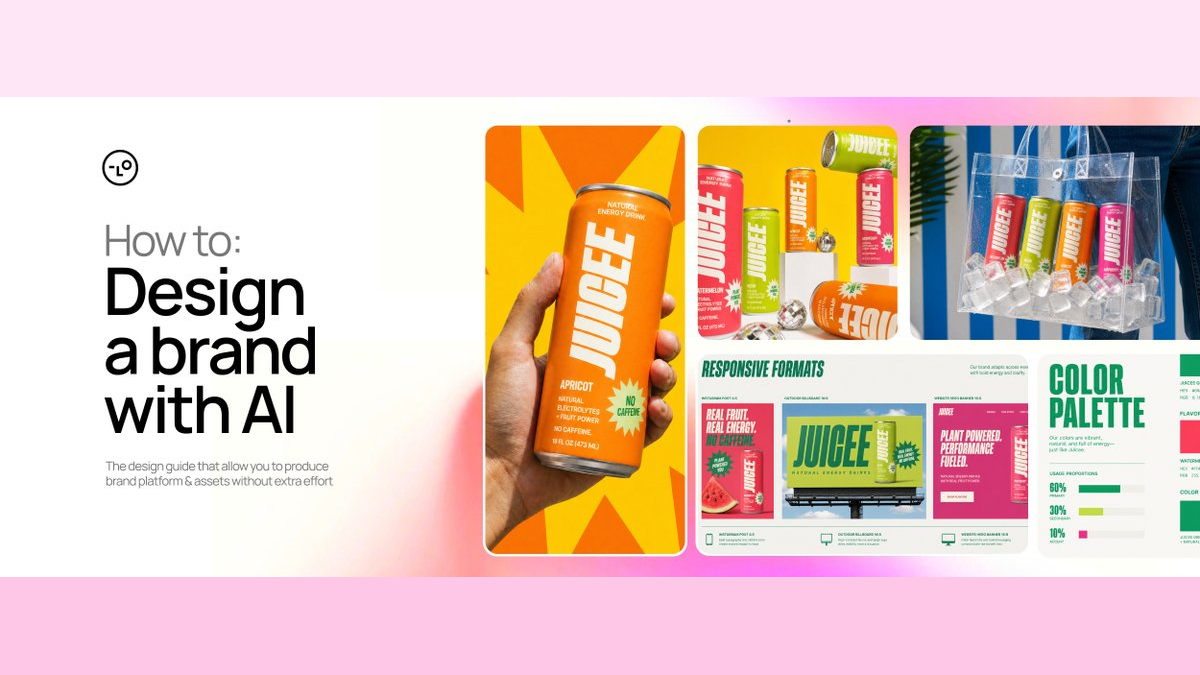
One pickle soda photo, a whole brand: how to build an AI brand system from a single reference
Amir Mušić's Juicee case study demonstrates a more reliable method for AI-assisted branding: extract the rules from the reference image, lock down a brand anchor, and assign control over each piece of source material.
- The reference image gets broken into rules for composition, hierarchy, photography, and whitespace; brand identity and specific scenes stay out of the copy list.
- The first Brand Kit pares away conflicting elements to form the anchor; later assets only alter variables within the approved scope.
- Brand Lock assigns different control levels to scene, brand, and packaging references, preventing new visuals from overriding the existing brand language.
- The open-source Skill uses approval gates, test assets, and consistency audits to turn creative director decisions into a repeatable Agent workflow.
AI tools can easily generate twenty images that look good individually, but a brand system demands that those twenty images still feel like they belong to the same brand when viewed together. What's usually missing is a set of rules to constrain subsequent choices.
Brand and advertising designer Amir Mušić used Lovart Agent for a complete case study: starting from a single Pinterest image of Pickle Potion, he developed a visual identity, four flavors, brand guidelines, ad scenarios, conceptual packaging, and video for a fictional natural caffeine-free energy drink called Juicee. This article is sponsored by Lovart, and the most valuable takeaway is how he encoded an art director's judgment into the Agent workflow.
The whole method can be compressed into one sentence: extract rules from a reference image, approve a brand anchor that all subsequent assets must obey, and then clearly define the scope of control for any new reference material.
This opening montage shows the end point: a single reference direction ultimately expands into identity, packaging, advertising, and motion assets. What follows breaks down why these results didn't splinter into different brands. Video: Amir Mušić.
Break the reference image into rules first
The Juicee project brief was very short: target an active demographic aged 20–35 with a natural, caffeine-free energy drink in four flavors—watermelon, melon, apricot, and raspberry. The reference image, Pickle Potion, is a pickle-flavored beverage; its specific brand identity obviously can't be carried over, but the organizational method behind the visuals can be transferred.
Mušić extracted four primary rules from it: split-screen composition, real food photography, bold typography, and a simple starburst element. Pickle Potion uses these rules to create a "salty impact," while Juicee translates the same compositional logic into a "fresh, in-your-face fruit sensation."

Objects, colors, and product identity are replaced entirely. What remains is the relationship between composition, hierarchy, photography, and graphic devices. Image: Amir Mušić.
The most practical move here is rewriting "I like this image" into three lists the Agent can execute:
- Transferable principles: composition, hierarchy, color behavior, photography approach, material finish, whitespace, and rhythm;
- Elements to avoid copying: logo, packaging, proprietary typefaces, characters, copy, unique patterns, and specific scenes;
- Translation for the new brand: how those principles serve a new audience, category, and selling points.
A task skeleton like this can be used directly:
Analyze this reference image from a creative director's perspective.

Extract its composition, visual hierarchy, typographic behavior, color logic, photography, materials, whitespace, and scalable rules.
List the brand identity and proprietary elements that must not be copied.
Finally, translate the transferable principles into a new direction suited to the brand, product, audience, and core selling point.
It forces the Agent to explain "why it works" before generating anything. The reference image becomes a set of design constraints rather than a template waiting to be reskinned.
After the first version fails, cut back to a single direction
The first version of the Brand Kit contained plenty of "design content": realistic liquids, cartoon characters, icons, product graphics, patterns, effects, and multiple typeface directions all appeared at once. That was the problem. Every element competed for dominance, and the material language clashed with the graphic language. The board read more like an inspiration collage than a shared foundation for subsequent work.

The first version had many usable elements but didn't make clear which visual language took priority. Image: Amir Mušić.
Mušić's feedback was short: "Add whitespace, reduce graphic devices, keep only one clear direction." Instead of asking the Agent to expand the creative further, he first removed the cartoon characters, liquid effects, wavy patterns, and competing styles, then rebuilt the Brand Kit around a modular grid, condensed type, solid color flavor coding, real fruit photography, a slim can silhouette, and a single starburst device.

The tightened anchor brings logo, palette, type, can form, graphic devices, and photography rules into a single hierarchy. Image: Amir Mušić.
The video fills in the process that's easiest to lose between two static images: uploading the reference, generating the first version, giving critical feedback, and tightening it down to an approvable brand anchor. Video: Amir Mušić.
This approved board is called the Anchor Brand Kit. Its purpose is specific: any subsequent brand guidelines, packaging, or ad assets must first answer whether they still obey this anchor. The anchor preserves decisions that already cost judgment to make, so the Agent doesn't have to guess what the brand looks like on every single round.
The open-source Skill also separates "fix it" from "start over": spacing, a single color, or local hierarchy issues can go through REFINE; but if the overall mood, type, color, material, packaging structure, or other foundational systems shift simultaneously, it triggers REJECT AND RESTART. Rejected Brand Kits are explicitly marked as forbidden references, preventing the old direction from contaminating new generations.
The anchor decides what doesn't change, so SKUs can change confidently
A scalable brand system needs both stable elements and variables. With only stable elements, every visual becomes stiff and repetitive; without stable elements, four flavors become four different brands.
Once the anchor is approved, the Agent expands it into multi-page brand guidelines. The modules the author lists aren't generic "brand book" filler—they cover logo usage, typography, color, graphic elements, key visual rules, packaging, brand usage rules, design rules, and photography guidelines. These turn a single direction board into constraints that subsequent tasks can check item by item.
The video shows how the brand anchor expands into a set of interconnected guideline modules within the same Canvas. Video: Amir Mušić.
| Must remain consistently stable | Can vary by task |
|---|---|
| Logo and wordmark logic | Fruit and flavor |
| Type family, weights, and information hierarchy | Switching the primary color among approved flavor palettes |
| Shape and usage of the starburst device | Aspect ratio and channel size |
| Can structure and label area | Product angle, shot type, and scene |
| Real fruit photography and material direction | Headline content and legal, approved product claims |
| Whitespace, product placement, and reading order | Format: social graphics, banners, video, etc. |
Mušić's four flavors share one key visual mechanism: fruit on the left, product on the right, a single headline, one starburst claim, and a consistent information hierarchy. Watermelon, melon, apricot, and raspberry each have their own personality without losing their family resemblance.

A large number of assets share the same visual grammar; variation is confined to approved dimensions like flavor, scene, and format. Image: Amir Mušić.
The author's original workflow diagram splits work into reference research, brand encoding, type testing, and asset refinement. Once decision points are added, the full pipeline looks closer to the control flow below.

Composition, hierarchy, photography, whitespace
Remove conflicting type, materials, and graphics
Logo, type, palette, packaging, and media rules
Only proceed after approvalScenes control the camera, anchors control identity, packaging boards control the product
Check brand consistency and reference contamination
Scale only after audit passesChange only the variables that were approved
The critical points in this pipeline are two gates: anchor approval determines whether scaling can begin, and consistency auditing determines whether a new scene can be expanded further. The faster generation becomes, the more important these gates are—a single wrong direction gets replicated into dozens of wrong assets almost immediately.
Multiple reference images require a control table
Once the brand anchor was stable, Mušić added 9 scene reference images to expand into overhead fruit shots, product close-ups, and lifestyle scenes. Visual drift soon appeared: fonts, colors, patterns, and packaging cues from the new references bled into the results. Some images looked cool on their own, but placed back into the Juicee system, they looked like they came from a different brand.

When scene references have too much control, local styles can override the approved brand identity. Image: Amir Mušić.
Brand Lock resolves permission conflicts between reference materials. There's no magic button—it's a control table that defines "who gets to decide what":
| Input | Allowed to control | Must not override |
|---|---|---|
| Scene reference images | Lens type, camera distance, lighting, material category, depth of field, negative space, rhythm, and mood | Logo, typography, brand colors, packaging, specific people, poses, object arrangement, and the original narrative |
| Anchor Brand Kit | Logo, type, color, hierarchy, graphic language, and whitespace rules | Does not govern people, environment, or narrative details in a scene |
| Packaging reference board | Product form, packaging design, label area, and SKU architecture | Does not determine overall photography style or composition for the scene |

Scene references provide the lens language, the brand anchor holds the line on identity, and the packaging board keeps the product in check. The three inputs no longer fight over the same level of authority. Image: Amir Mušić.
What's worth watching here is the continuous sequence: combining scene references, Brand Kit, and packaging board, generating new scenes, recognizing visual drift, and pulling results back into the approved system. Video: Amir Mušić.
New ad visuals still require substantive originality: people, poses, clothing, environment, props, object arrangements, product interaction, cropping, and narrative details all need to be redesigned. This approach borrows high-level creative principles from references without merely slapping a new logo on someone else's work.
Generation isn't the end point—fine editing comes next
The author places Text Edit → Touch Edit → Edit Elements after complete asset generation. Their value isn't in reopening the creative direction but in making text, local, and element-level corrections to assets that have already been selected. This order matters: polishing details before the direction is approved only adds sunk cost to a solution that might get abandoned. Once the direction is stable, refinement reduces production risk.

This image shows the fine editing interface: text in the visual becomes selectable layers with parameters like font and paragraph settings. It shouldn't be loosely categorized as a "packaging multi-view." Image: Amir Mušić.
This longer screen recording shows what a static screenshot can't: how editing tools are applied to a finished asset rather than relying on another round of generation. Video: Amir Mušić.
The same system also generates packaging concept views—front view, three-quarter view, isometric view, and exploded view. It's important to distinguish "visual exploration" from "production files": these results are not die lines, vector production artwork, pre-press files, mass-production 3D models, or manufacturing specs.
Brand rules also need to survive a medium shift from static to motion
This permission logic extends to video. Approved packaging, color, type, and advertising language continue to act as source facts. Seedance 2.5 generates motion assets within Lovart, and the author assembles the final commercial in Adobe. The medium changes from static to motion, but the brand's control surface doesn't reset.
Motion, edits, and medium change, but packaging, color, type, and ad language continue to constrain the result. That's the added value of a "brand system" over a single generated image. Video: Amir Mušić.
A complete Canvas brings every stage of this article back onto a single work surface: reference, anchor, guidelines, scenes, packaging, and motion assets have clear upstream/downstream relationships rather than being a set of images that merely look similar. Video: Amir Mušić.
The open-source Skill encodes aesthetic judgment as a state machine
Mušić has made his method public as the Lovart Brand System Skill. This Skill expands a mega-prompt into an Agent workflow that saves state, waits for approval, diagnoses failures, and decides what to do next.
The Skill sets up four approval gates that halt downstream work until cleared:
- The project brief must be approved before any reference image is analyzed.
- Transferable principles and the creative direction need sign-off before the first Brand Kit is generated.
- The Anchor Brand Kit must be approved before brand guidelines, advertising, and packaging work can begin.
- Once the roles of visual references, brand anchors, and packaging references are approved, Brand Lock testing can start.
Every action that consumes generation credits also requires an upfront Generation Plan listing goals, deliverables, inputs, the role of each reference asset, locked decisions, variable elements, exact fonts, prohibited items, and the number of outputs. Only after the user explicitly approves that plan can the agent invoke the generation tools.
These checkpoints don't actually slow down real production. They push the cost of rework into an inexpensive text-based stage, so you don't generate twenty images only to discover that the typography, packaging, or visual tone was wrong from the very start.

The repository encodes the workflow in SKILL.md and ships a 35-point Benchmark that checks process adherence, reference independence, brand consistency, Brand Lock usage, and revision quality. Image: Amir Mušić.
It also includes commands that feel like a production console: STATUS returns the current checkpoint, GO BACK reopens an already-approved stage and explains which downstream assets would be invalidated, AUDIT checks consistency without generating new images, REJECT DIRECTION isolates a failed direction, and STOP halts generation and saves the current state.
The repository is currently at version 0.2.0-alpha, licensed under CC BY 4.0, and optimized for Lovart Agent Thinking Mode. It's an independent community project, not an official Lovart product. The “alpha” label also reflects that while the workflow now has a clear structure, it still needs validation across more real-world projects.
What actually transfers is decision discipline around generation
This approach isn't limited to beverage packaging. Any creative workflow that needs AI to scale up production while maintaining consistency can follow the same sequence:
- Write a minimal project brief first. Missing product facts, audience details, and selling points must not be guessed by the agent.
- Break reference materials down into transferable principles versus elements that are off-limits to copy.
- Generate only one direction and route it through creative director review first.
- Remove competing language from the brief, then approve one anchor that downstream tasks can refer back to.
- Identify which elements stay fixed, which are variable, and exactly how much control each reference asset has.
- Generate a single test asset, run a consistency audit, fix issues, and only then scale up.
- Defer fine-grained editing until after full assets are generated, and do a final manual review of text, fonts, selling points, print, and manufacturing requirements before production.
The case also has clear limits. It demonstrates a workflow and a set of successful outputs, but doesn't include comparisons to other tools, production times, failure rates, or cost baselines. The generated packaging visuals are concept mockups only — they're not ready to serve as die lines, vector production files, pre-press documents, mass-production 3D models, or manufacturing specifications. Since generative models can also distort text, the fonts and final copy need to be verified by a human.
AI compresses the time spent on exploration and production, which makes the scarce part of brand work all the more visible: someone has to decide what's worth keeping, what should be rejected, what may change, and where change crosses a line. Stable brand language comes from those decisions being written down, approved, and carried forward through every iteration.
From a single reference image to a full brand system
AI brand work isn't about generating more images at once. It's about turning aesthetic taste into rules, then using approval gates and reference permissions to control every expansion.
01|Deconstruct what you like into rules
Instead of copying Pickle Potion's brand identity, Mušić extracted the split-screen layout, realistic food photography, bold typography, and radial graphics. Specific products, copy, and scenes stay off-limits.
02|Approve only one brand anchor
The first Brand Kit goes through criticism, drops conflicting language, then narrows down to a single direction board. Without passing this gate, packaging, ads, and video shouldn't start.
03|Scale within rules, not by redesigning
Watermelon, melon, apricot, and raspberry share a skeleton: fruit on the left, product on the right, a single headline, one radial selling point. Each changes flavor and mood but keeps family resemblance.
04|Brand Lock assigns permissions to reference assets
Scene references only steer camera language, the brand anchor holds identity, and packaging boards constrain product visuals. These inputs stop fighting over control, so visual drift has a clear correction basis.
05|Test one, audit, then scale
The open-source Skill turns the creative director's judgment into four approval gates, single-asset testing, and consistency audits. Faster generation makes these pauses more valuable: they catch massive rework during cheap text decisions.
Rules → anchor → single asset → audit → scaleConcept packaging still isn't print, die-cut, or manufacturing files
Why this drink keeps losing its identity the more it's generated?
On the studio desk, only a Pickle Potion pickle soda image sits central; the designer places a blank Juicee can beside it.
Designer:Borrow its methods, not its brand.
Start not by generating, but by setting the line between what can transfer and what can't be copied.
The screen shows a brand board overloaded with bold type, fruit, radial bursts, and clashing selling points; the designer circles three conflict zones in red.
Agent:I added all the elements I like.
Designer:That's exactly the problem.
One attractive image doesn't mean twenty will feel like the same brand.
The designer removes extra stickers, leaving only split screens, real fruit, bold type, and one radial burst; they stamp APPROVED on the board's corner.
Designer:From now on, all downstream assets must align to these.
Without approved anchors, packaging, ads, and video shouldn't start.
Three Juicee cans move past on a conveyor: the first looks fine, the second has a different font, and the third's packaging pattern matches a new reference image.
Designer:Scene references are rewriting the brand identity.
Faster generation amplifies wrong directions just as quickly.
The designer opens the Brand Lock console: scene reference links to CAMERA, brand anchor links to IDENTITY, and packaging board links to PRODUCT; three colored lines converge on the same can.
Agent:Scenes handle camera, anchors guard identity, packaging board manages the product.
Brand Lock's core isn't stacking references—it's giving each one a specific role.
A test can passes through a green door marked CONSISTENCY CHECK; beyond it unfold watermelon, melon, apricot, and raspberry cans, plus ad, packaging, and motion visuals. The designer still keeps the production file checklist in a pending folder.
Designer:Test one, fix, audit, then scale.
Generation speed yields volume; rules, approval gates, and audits build a brand system.
Members can copy or download the full Markdown, and let their AI subscribe and ask.
Found this useful? Leave your email — every new explainer, the moment it's out. Unsubscribe anytime.