
Official OpenAI Case Study: Designing and Building a Modern Home Step by Step with GPT-6 Astra—from a Simple Description to 3D Modeling, Materials, Lighting, and Real-Time Interaction in UE5
OpenAI's Astra case study demonstrates an inspectable 3D creation path: first turning textual intent into a Blender scene, then using floor plans, preview renders, and real-time walkthroughs to drive subsequent decisions.
In 3D design and architectural visualization, bridging the gap between a natural-language idea and a truly editable, navigable three-dimensional scene is a complex engineering challenge. A post on OpenAI's developer blog documents how GPT-6 Astra (used in Codex) helped take a modern residence named "Solace" from a simple text prompt through design, modeling, material and lighting refinement, and finally a dynamic walkthrough and real-time interaction in Blender and Unreal Engine 5 (UE5).
Throughout the process, the human author was responsible for continuously setting the direction, reviewing floor plans, inspecting render previews, and providing requirements for the next iteration; Astra was responsible for writing scripts to generate geometry, configuring materials, setting up lighting, and autonomously correcting errors through preview renders and interface inspections. Subsequently, the model assets were further migrated to Unreal Engine 5 (UE5), transforming them into an interactive space supporting first-person navigation, opening doors, and toggling lights.
Core Workflow Breakdown
1. Initial Concept and Atmosphere Setup (From a Single Sentence to a 3D Prototype)
The entire experiment began with a concise design intention. The initial prompt did not provide a floor plan or furniture catalog; it offered only a single sentence:
Initial Prompt (Prompt 1)
EN: Design a beautiful house with minimalist but highly detailed furniture and a nice garden. Make the scene cinematic, with considered lighting, materials, and time of day.
Translation: Design a beautiful home equipped with minimalist yet richly detailed furniture and a lovely garden. Create a cinematic scene with refined lighting, materials, and a specific time of day.
Upon receiving the request, Astra quickly established a starting scene named Solace using Blender's Python API (bpy): a detached courtyard home featuring low roofs, an open living pavilion, warm timber, and pale stone.
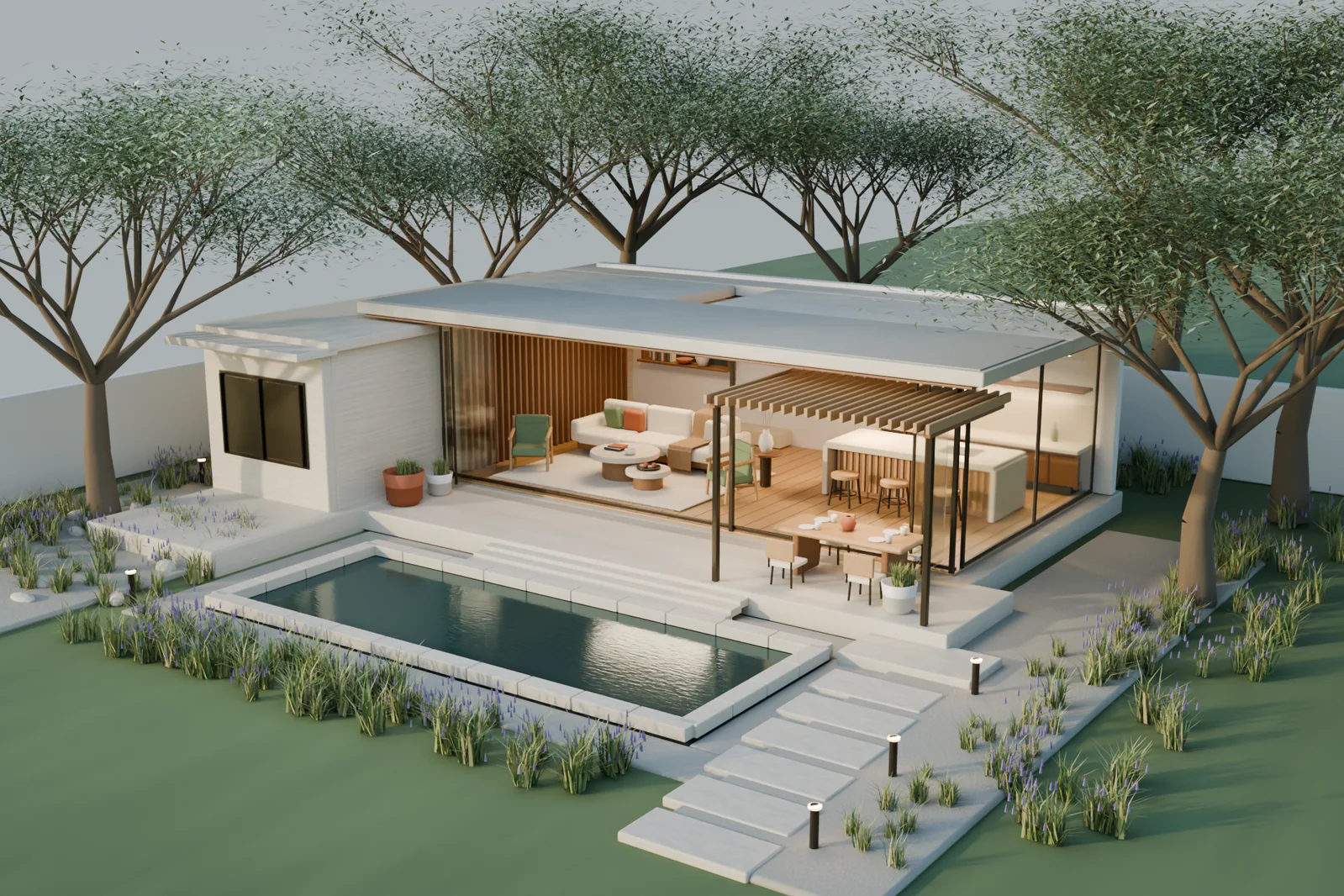
In this process, the core mechanism was the agent's autonomous iteration loop: Astra not only executed modeling code, but also inspected preview renders before presenting results to the author, actively adjusting composition and lighting while fixing planting intersections and placement details of the sofa throw.
Immediately following, a prompt requested shifting the environment deep into woodland:
Environment Adjustment Prompt (Prompt 2)
EN: Make it golden hour. We should see the sun, and the house should be in the middle of a viridian forest.
Translation: Change to golden hour at dusk. We should see the sun, and the house sits in the center of an emerald-green forest.
Astra preserved the newly built primary building structure entirely, arranging trees and undergrowth around its perimeter. To render the forest sunset, it positioned the sun and applied Atmospheric Scattering, allowing low-angle golden sunlight to filter through the trees and create visible light shafts.
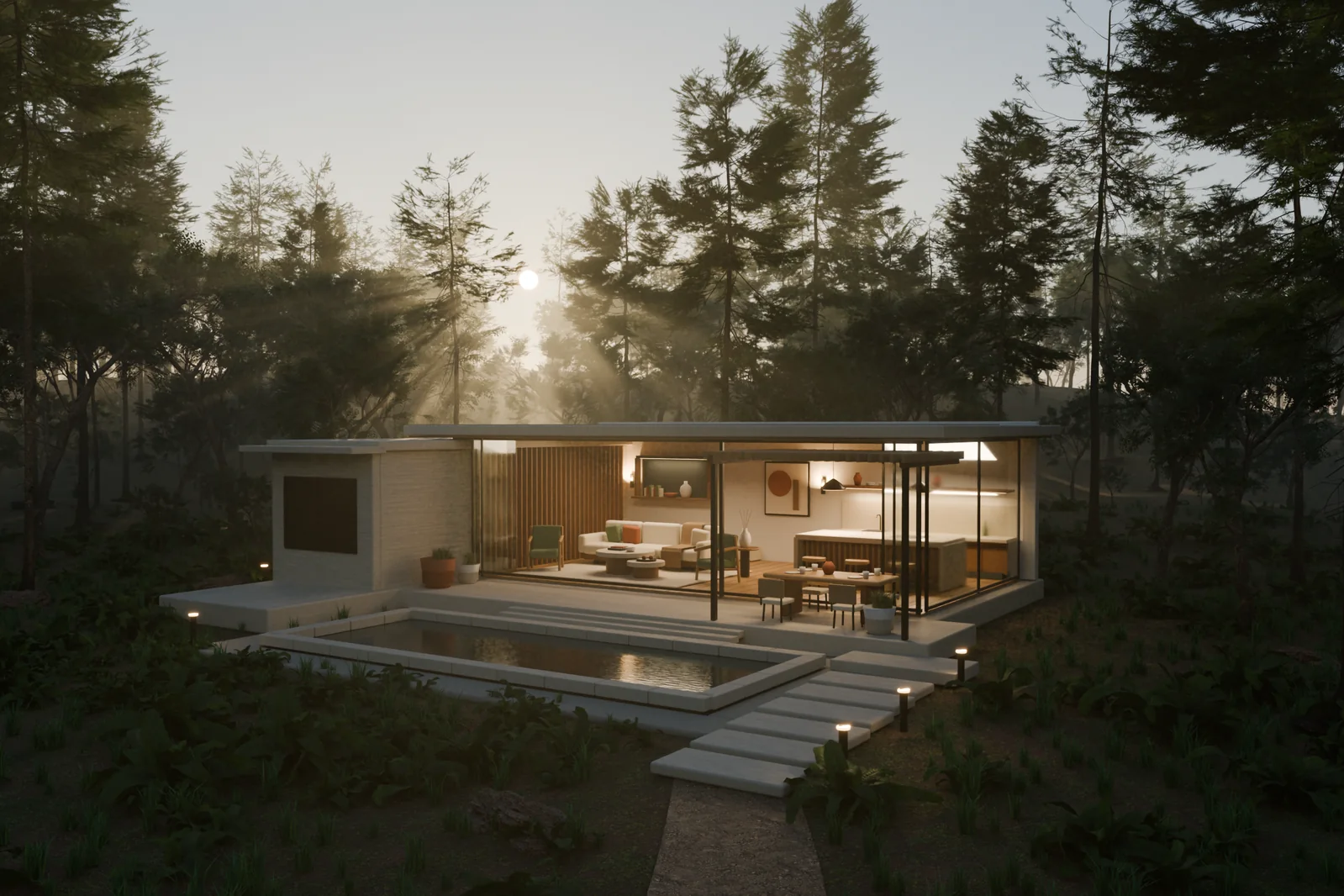
Regarding asset usage, the subsequent forest environment incorporated Poly Haven tree, fern, and rock assets, which worked alongside the procedurally generated main structure to complete the overall environmental composition and atmospheric tuning.
2. Plan the Layout First, Then Build the Full House
After establishing the preliminary aesthetic tone, the author proposed expanding the scene into a more livable residence, requesting a floor plan first for review and evolution:
Expansion and Floor Plan Prompt (Prompt 3)
EN: I like the minimalist, modern style, so keep that while we grow the house to be much more livable. Draw me a floor plan first. We'll validate and evolve it from there.
Translation: I like this minimalist modern style; please maintain this style as we expand it into a home more suitable for family living. Draw me a floor plan first, and we will validate and evolve from there.
Rather than rushing into 3D modeling, Astra first proposed a U-shaped conceptual floor plan totaling approximately 305 square meters (around 3,280 square feet) of enclosed building area, excluding terraces, courtyards, and the pool from this area calculation:
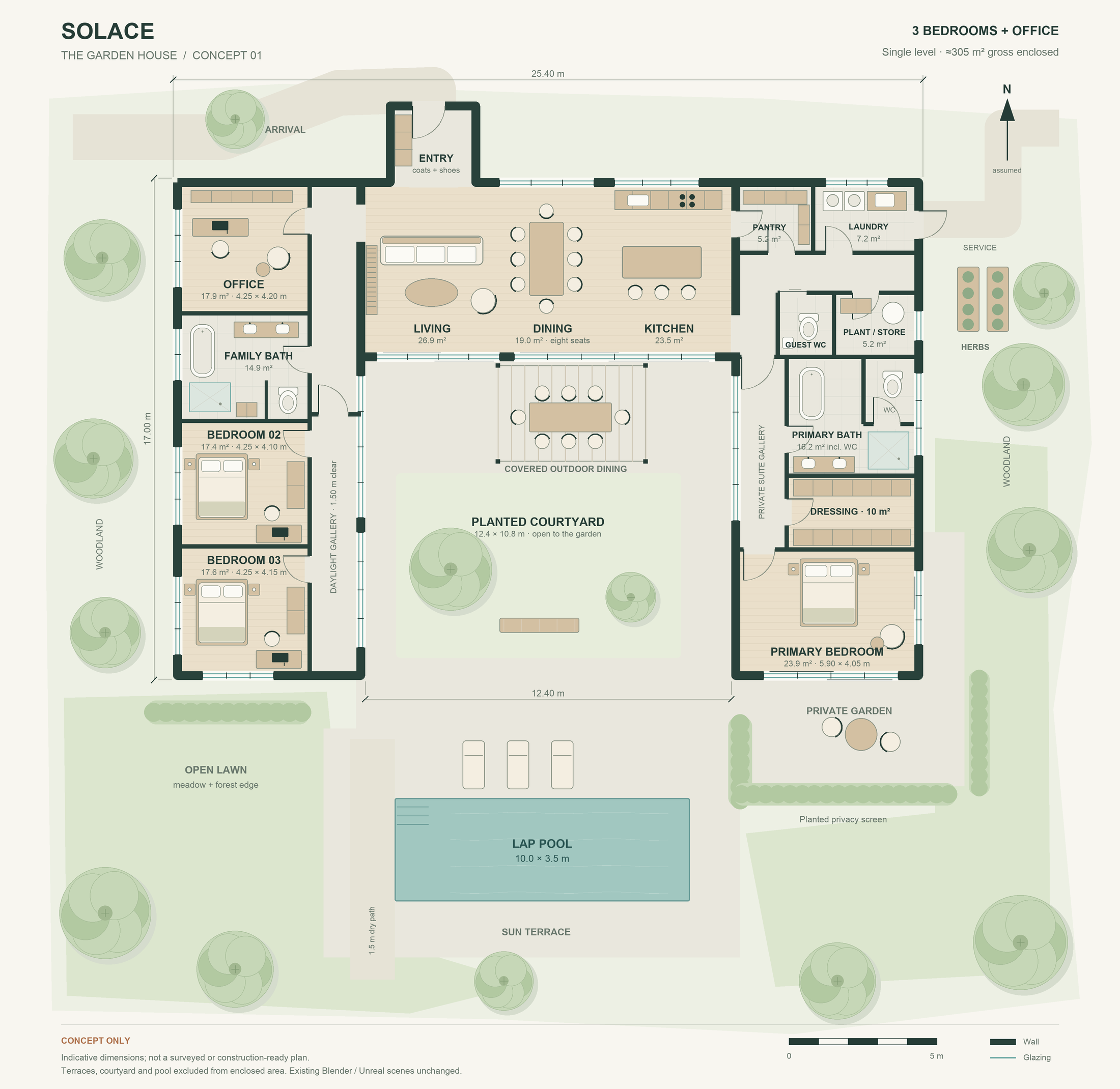
This scheme laid out spatial functions and circulation:
- Central Living/Dining/Kitchen and Two-Wing Layout: The center accommodates the main living, dining, and kitchen spaces, while the two wings house three bedrooms and an office, complete with bathrooms and wardrobe spaces.
- Circulation Free of Interference: Routes circulating around the courtyard avoid treating bedrooms as thoroughfares and avoid crossing kitchen work aisles.
- Auxiliary Utility Rooms: The layout includes a pantry, laundry, and storage spaces.
- Indoor-Outdoor Spatial Extension: Living spaces connect naturally to the central landscaped courtyard and pool terrace.
Scope note: This floor plan is a conceptual proposal. Real-world execution still requires professional review of the site, structure, and building requirements.
3. Modeling the Interior and Refining Details for Extreme Close-Ups
Once the floor plan was validated, work moved to the 3D interior construction phase. The author requested backing up the current project and proceeding with formal implementation in Blender:
Formal Modeling Prompt (Prompt 4)
EN: Keep the current scene as a backup, then build the updated house in Blender. Iterate until the house, furniture, and garden are detailed and the geometry is correct. Once we validate it in Blender, we'll export it to Unreal Engine 5.
Translation: Keep the current scene as a backup, then build the updated house in Blender. Iterate repeatedly until the house, furniture, and garden are richly detailed and the geometry is correct. Once validated in Blender, we will export it to Unreal Engine 5.
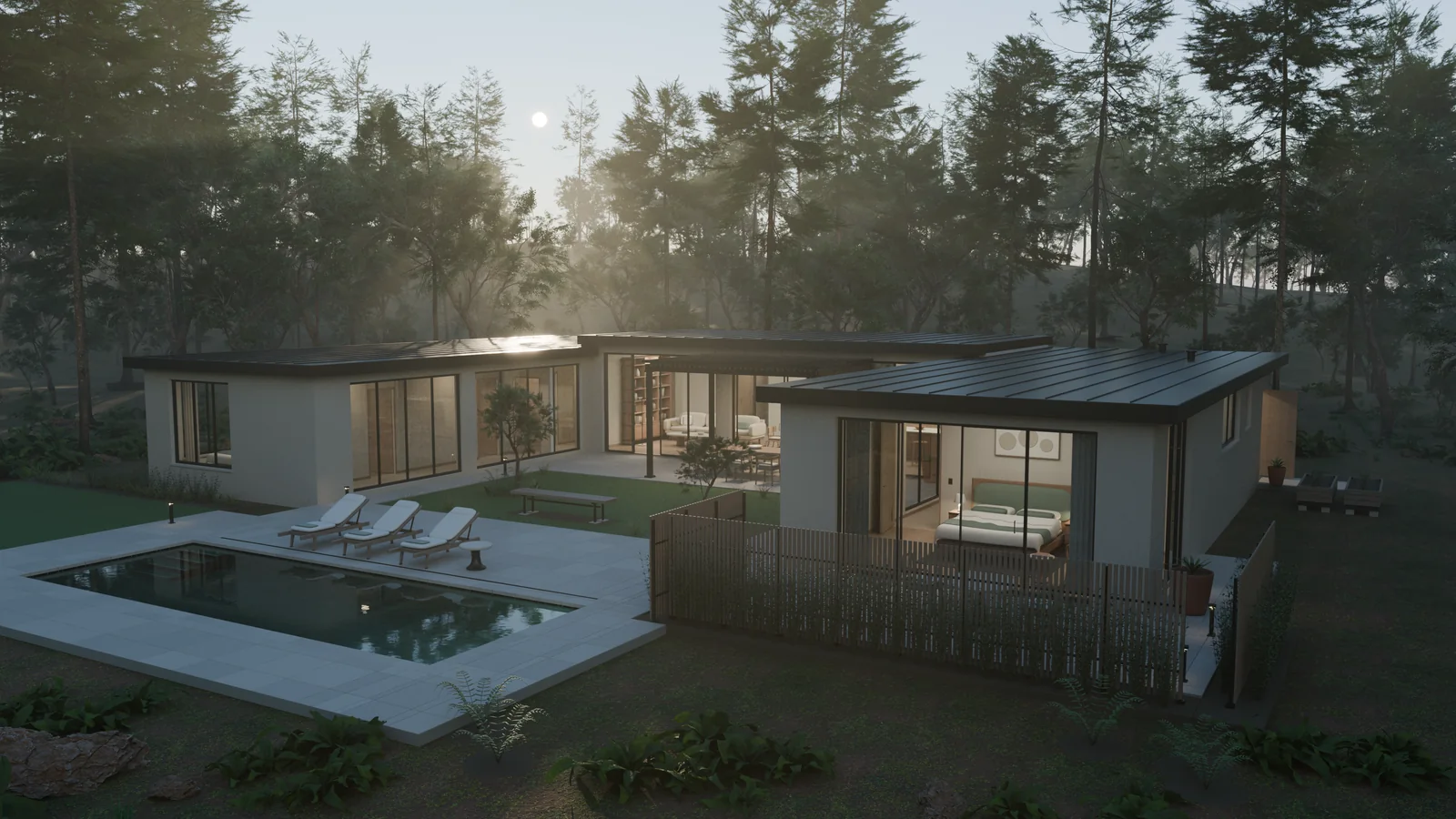
In actual modeling, Astra turned items specified in the text—such as cushions, bedding, and dishes—into explicitly authored/modeled geometry, ensuring that shots hold up across alternating angles and close-up views. It simultaneously incorporated scanned oak, walnut, and plaster textures (such as White Oak Veneer), aligning wood grain directions and keeping texture scales consistent with furniture dimensions, supplemented by procedural surface details.
Astra wrote dedicated solid-modeling scripts for various interior spaces:
- Living Room: Sofa cushions feature realistic edge piping, armchairs have curved timber frames, and bookshelves display books of varying thicknesses along with ceramic vases and jars. Bedding includes bed frames, slats, mattresses, and linens.
- Workspace and Wardrobes: Wardrobe interiors are equipped with shelves and hanging rods; desks provide cable management troughs, monitors, keyboards, and office chairs with omnidirectional casters.
- Kitchen and Bathrooms: Sinks and basins feature actual recessed volume; the kitchen island includes an oven cavity, internal racks, cutlery drawers, and storage compartments.
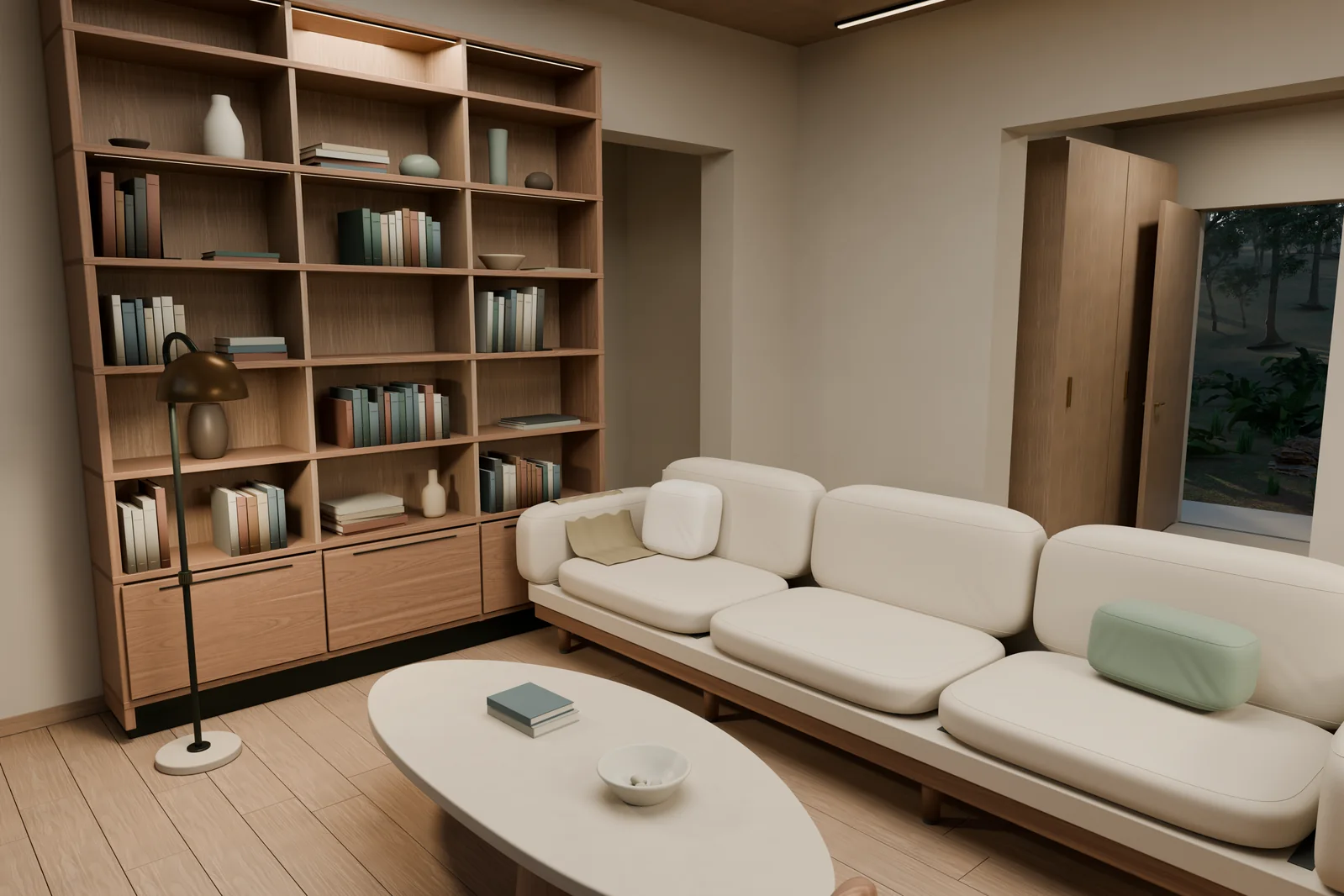
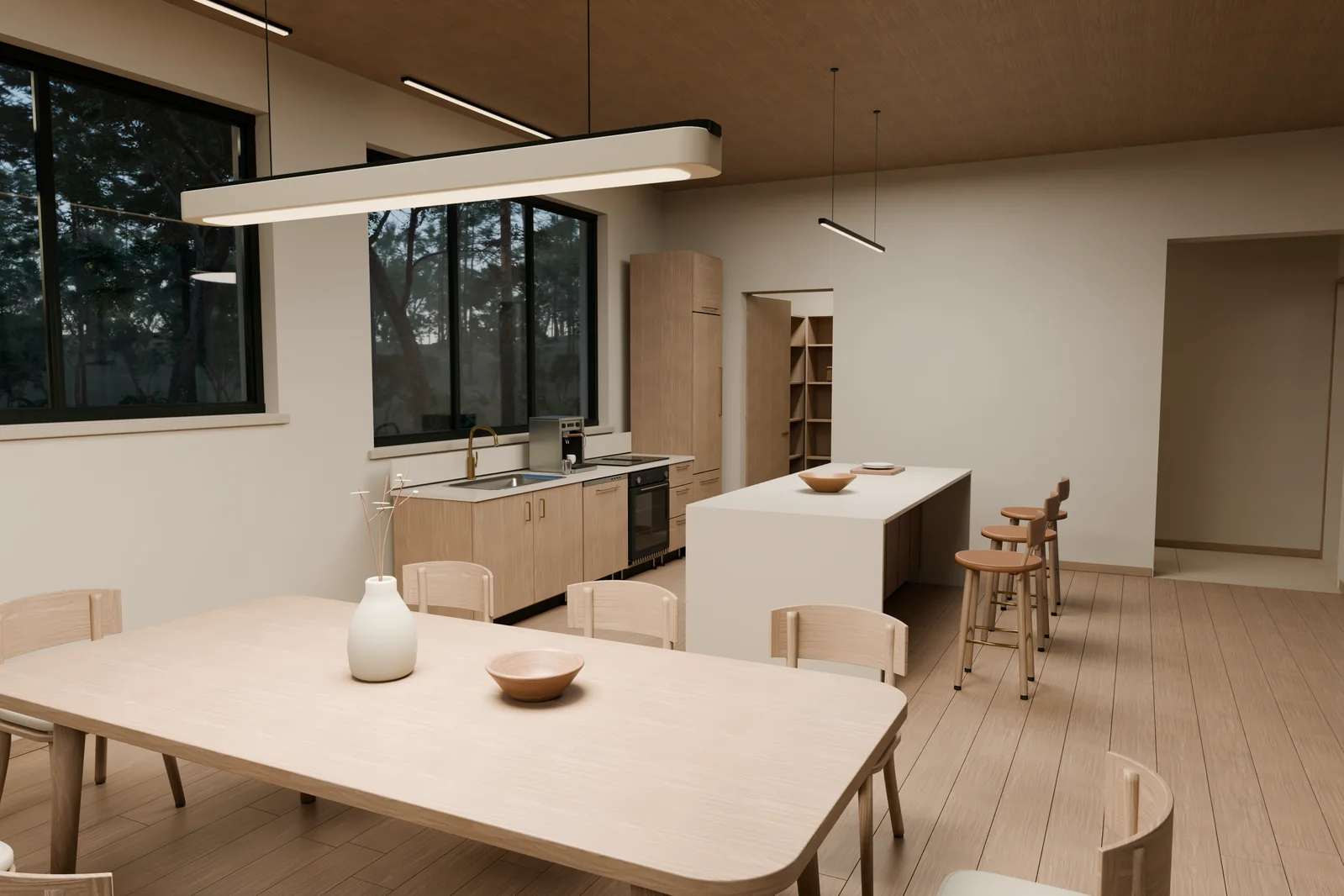
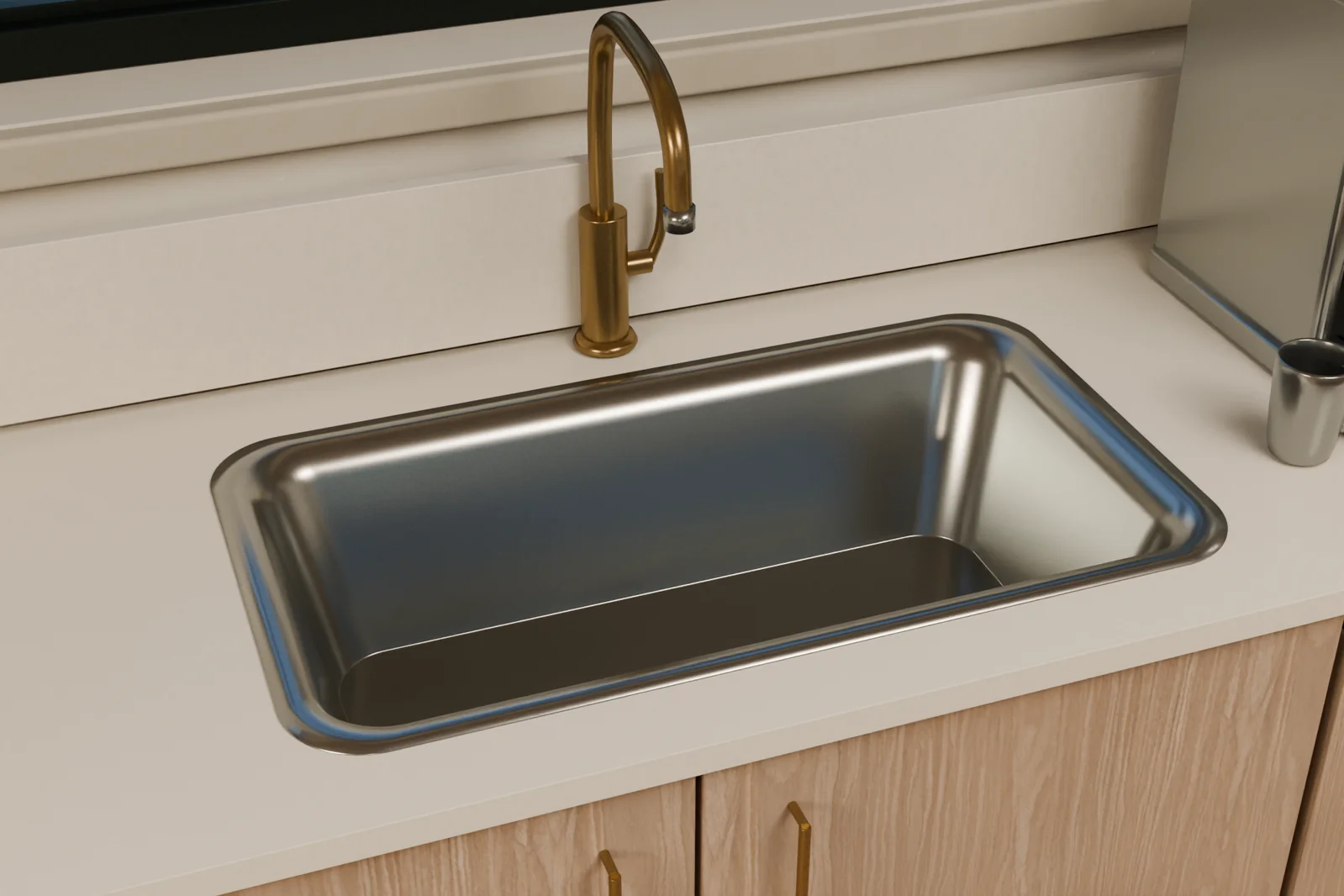
Render Debugging: Fixing Sink Surface Appearance
During a close-up render of the stainless steel kitchen sink, surface normals caused flat surfaces to appear pinched. After correcting normals and refining rounded edges, Astra produced significantly smoother, cleaner reflections across the metal surface.
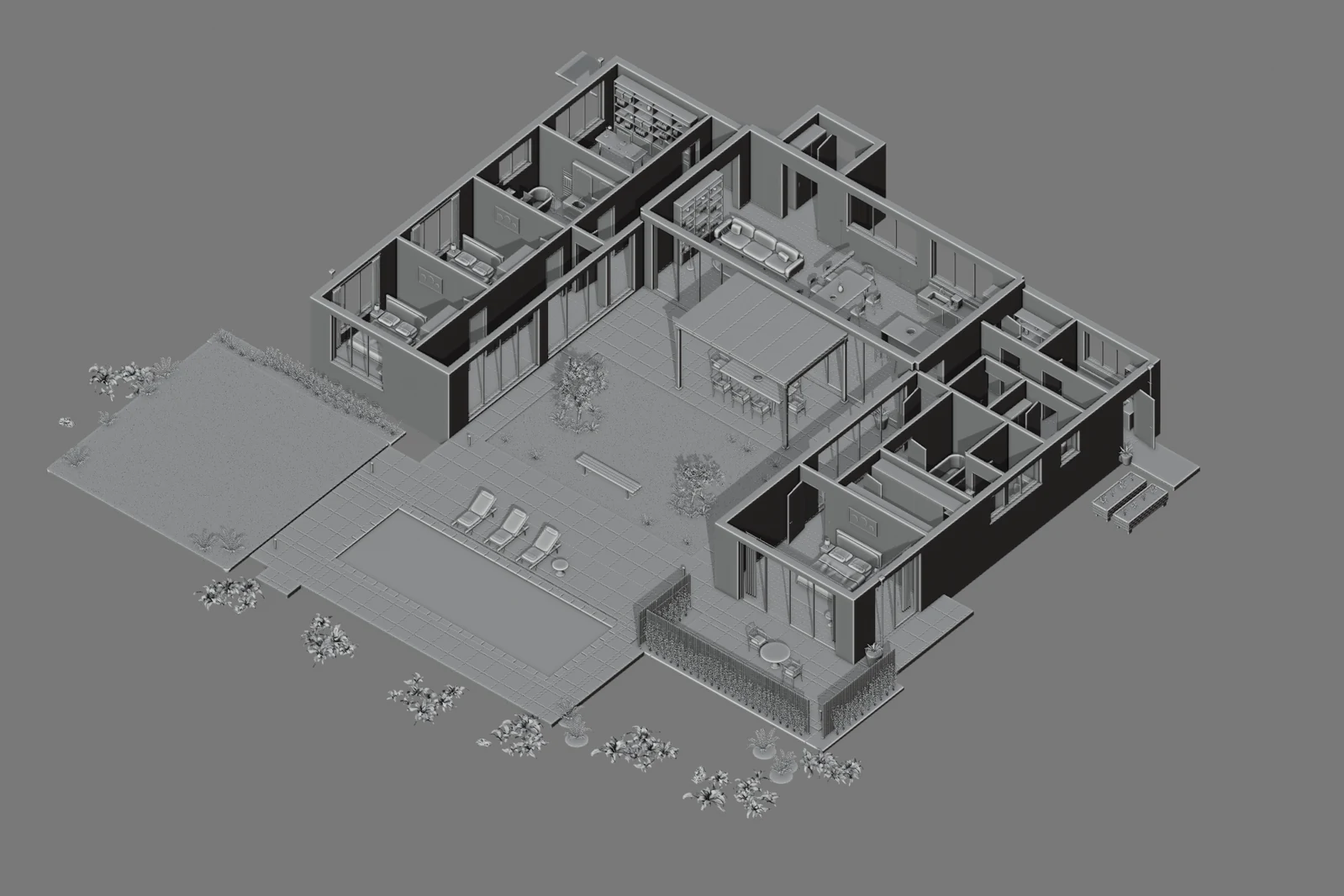
Untextured Solid Cutaway
With materials and lighting disabled, Blender's Solid Cutaway View allows for sample inspections of door and window openings, wall junctions, and interior circulation. It should be noted that this sampling is primarily intended to support visual review and does not constitute engineering certification of every intersection or specific architectural construction detail.
4. Adding a Lived-in Look and Realistic Lighting
Once the model was built, the author provided further instructions to refine the lighting and add everyday objects to give the space a lived-in feel:
Lived-in Details and Lighting Tuning Prompt (Prompt 5)
EN: Make the lighting quieter, warmer, and more accurate. Improve how the materials respond to light, and add dishes and everyday objects so the house feels lived in.
Translation: Make the lighting more understated, warmer, and more accurate. Improve how materials respond to light, and add tableware and everyday objects so the entire house feels lived in.
Astra then executed adjustments across two areas:
1. Everyday Objects Scattered Throughout
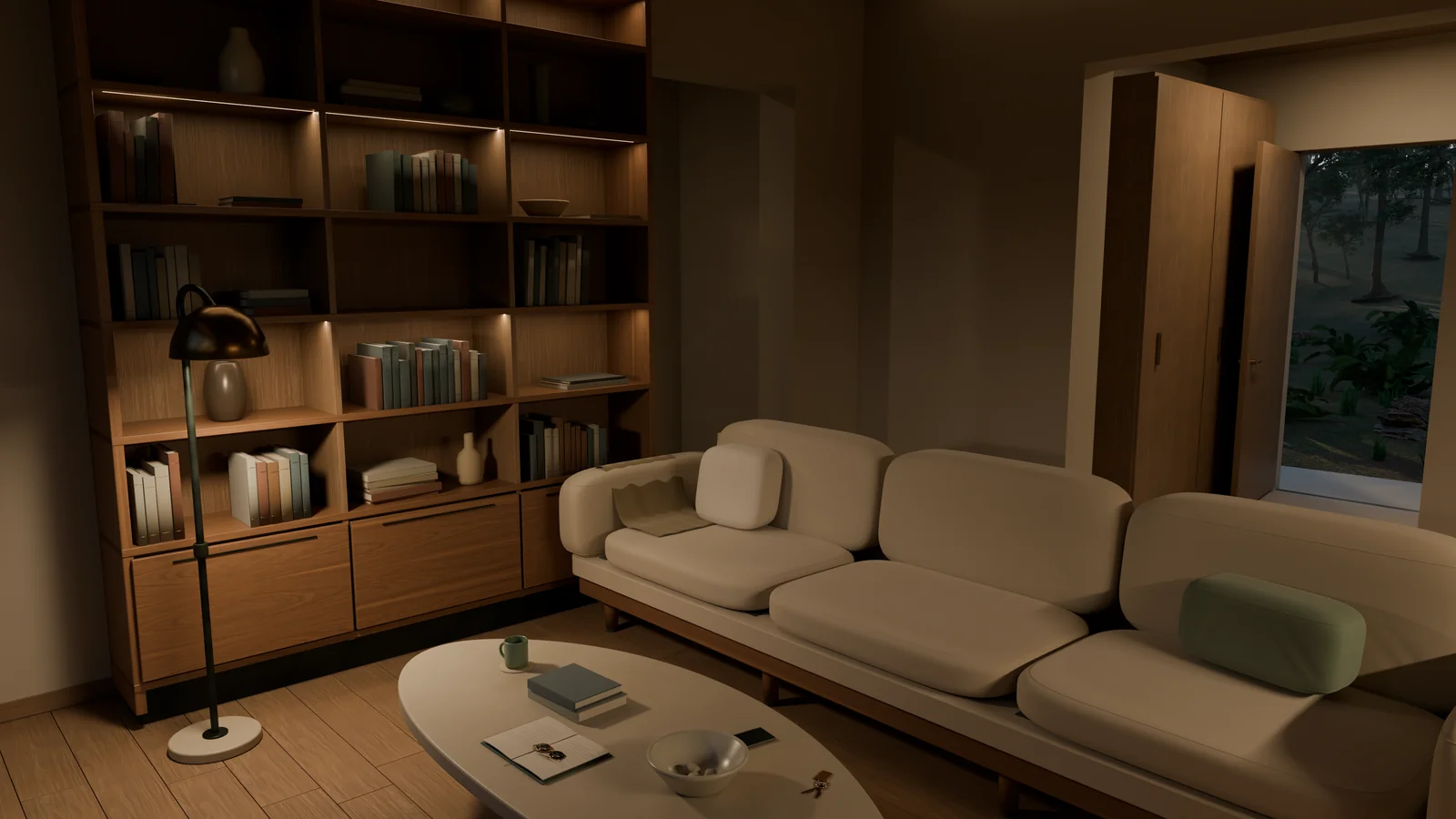
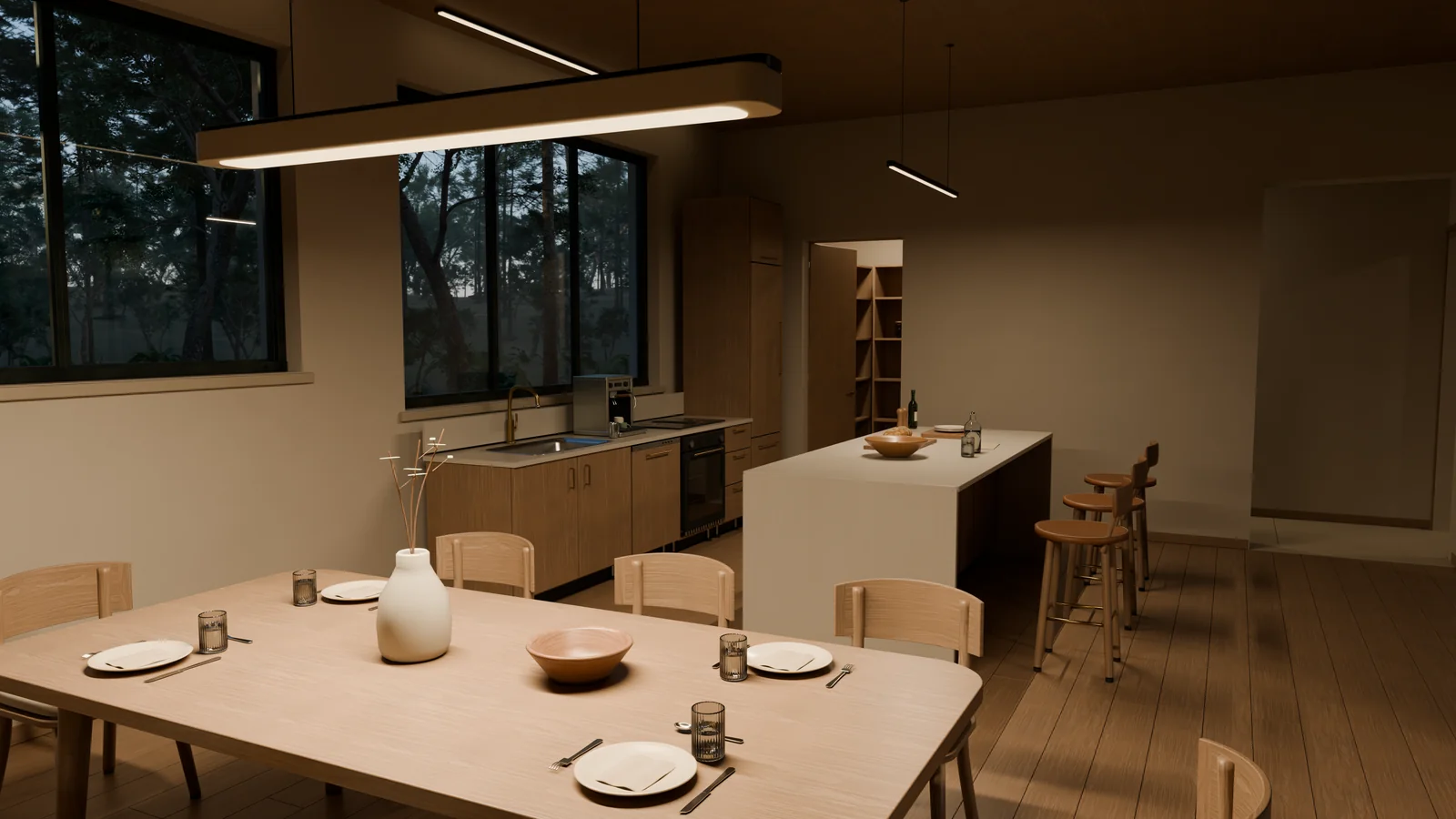
Plates, cutlery, ribbed glasses, and folded napkins were arranged on the dining table; bread, herbs, and bottles were added to the kitchen countertop; an open journal, reading glasses, a mug, a phone, and keys rested on the living room coffee table.
2. Lighting Adjustments and Visible Fixtures
In tuning the illumination, Astra removed hidden fill lights that flattened the space and warmed the remaining light, aligning light sources with visible fixtures in the space. Specific steps included modeling ceiling lights and placing glowing bulbs within translucent shades to scatter light more naturally.
5. Creating the Blender Camera Tour Film
Once static scene visuals stabilized, the author requested a 30-second, 1080p interior walkthrough short film. Astra configured virtual camera animation tracks within the Blender 3D scene.
Camera Movement Parameter Settings
The Python camera trajectory script written by Astra included the following settings:
- Eye-Level Height: The camera was set at approximately 1.65 meters above the floor.
- Focal Length: The lens used a focal length of 24–26 mm.
- Pacing Motion and Easing: A subtle, restrained walking motion was added, utilizing easing curves at camera start and stop points.
- Shot Breakdown: The entire film consists of 4 takes, traversing the living area, office, bathroom, and master bedroom. When previews revealed the camera dwelling too long on plain white walls, Astra proactively adjusted the orientation.
- Depth of Field Disabled: Depth of field was turned off to keep architectural edges crisp across the frame.
30-Second, 900-Frame Rendering
At 30 frames per second (30fps), this 30-second animation contains 900 frames at 1080p. Each frame was rendered by Blender Cycles using adaptive sampling paired with OpenImageDenoise, then assembled into a video without interpolating new frames.
Subsequently, based on an additional request, Astra prepended a 5-second pool entrance shot, forming a 35-second walkthrough short film:
In addition, the same scene yielded 5 native 4K stills covering the exterior, courtyard, living room, kitchen, and bedroom.
6. Importing into UE5 to Achieve an Interactive Walkthrough
In actual project execution, migrating the model to Unreal Engine 5 (UE5) was not a one-way transfer conducted only after finalizing all late-stage details; rather, it involved a two-stage bidirectional round-trip.
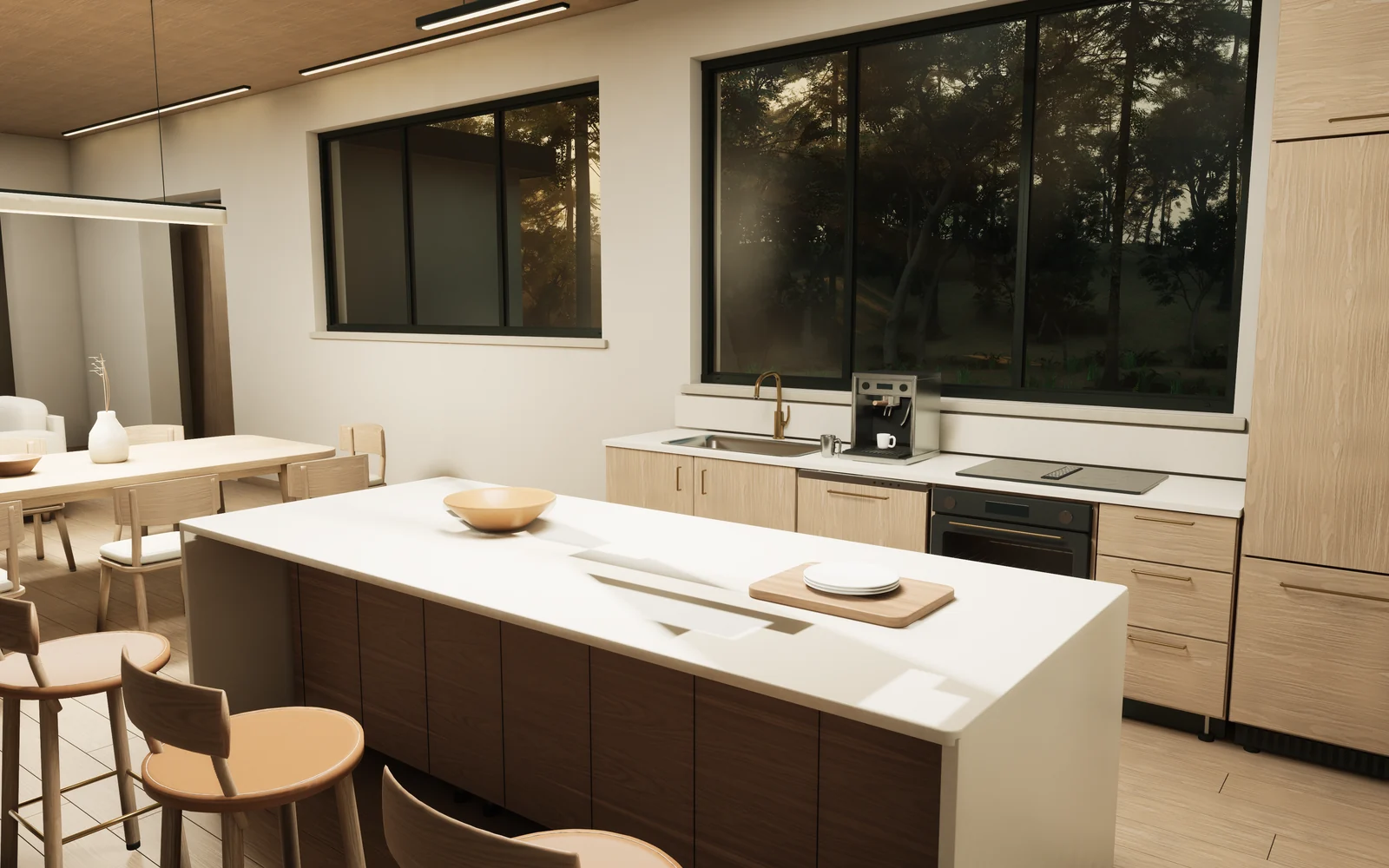
At an earlier stage of the project, once the Garden House's basic architectural massing and foundational furniture were established in Blender (prior to entering subsequent everyday object detailing and lighting upgrades), the author requested building the Blender version of that time into an explorable scene in UE5. To this end, Astra built an automated export and reconstruction pipeline, producing a walkthrough screen recording of this early interactive version:
Automated Cross-Engine Export and Reconstruction Pipeline
The cross-engine pipeline written by Astra handled asset reconstruction and visual mapping from Blender to UE5:
- Geometry Export and Unit/Coordinate Handling: Exported evaluated geometry (including details produced by curves and modifiers) into FBX format; the conversion pipeline handled unit conversions between meters and centimeters as well as coordinate orientation.
- Scene Metadata Recording: Generated a JSON scene description file recording part transforms, material assignments, lighting parameters, and camera information to guide scene hierarchy reconstruction in UE5.
- Instancing for Repeated Foliage: For recurring trees in the forest, maintained shared geometry instances in Unreal rather than generating multiple duplicate meshes.
- Material Mapping and Tuning: Read supported material inputs, reused source textures, and correspondingly constructed timber, stone, fabric, glass, and water materials in Unreal, preserving texture placement and scaling (including wood grain orientation). Because certain shader behaviors can only be approximated in real-time engines, interface inspection and tuning remained necessary.
- Sky and Volumetric Fog Matching: Configured the sky and volumetric fog in UE5, cross-referencing against Blender renders to fine-tune exterior fill and atmospheric haze.
Collision and First-Person Controls
Once in-engine, Astra established foundational movement logic and blocking boundaries for the scene:
- Passage Blocking Rules: Floors support the player; walls, furniture, and glass windows possess collision to block walkthrough; nearby tree trunks act as obstacles, while ferns do not act as invisible walls blocking movement.
- Character Controller and Walkthrough Verification: Added a first-person character, walking controls, and a starting point, packaged as a native Mac app, and verified navigation along pathways via standard character movement.
Re-importing the Updated Version: Assembly Linkage and Interaction Expansion
After validating the early UE5 scene, the author returned to Blender to further refine everyday objects, physical fixtures, and the camera tour film (phases four and five). Astra subsequently re-imported the updated model into the existing UE5 project, expanding richer interactive capabilities:
- Component Assemblies and Linkages: The pipeline recorded positions for door and drawer components, hinges, or slides, as well as control relationships between lights and switches; handles, drawer boxes, and contents moved together with the overall assembly.
- "E" Key Interaction System: Contextual prompts display on-screen during navigation; pressing the E key opens doors, pulls out kitchen storage drawers, and toggles selected lights.
- Espresso Machine Operation: Approaching the kitchen coffee machine and pressing the E key triggers a brewing sequence: machine buttons are pressed, coffee pours into the cup, and the liquid level inside the cup rises accordingly.
Render Comparison: Cycles Offline Renders vs. Lumen Still Capture Storyboards
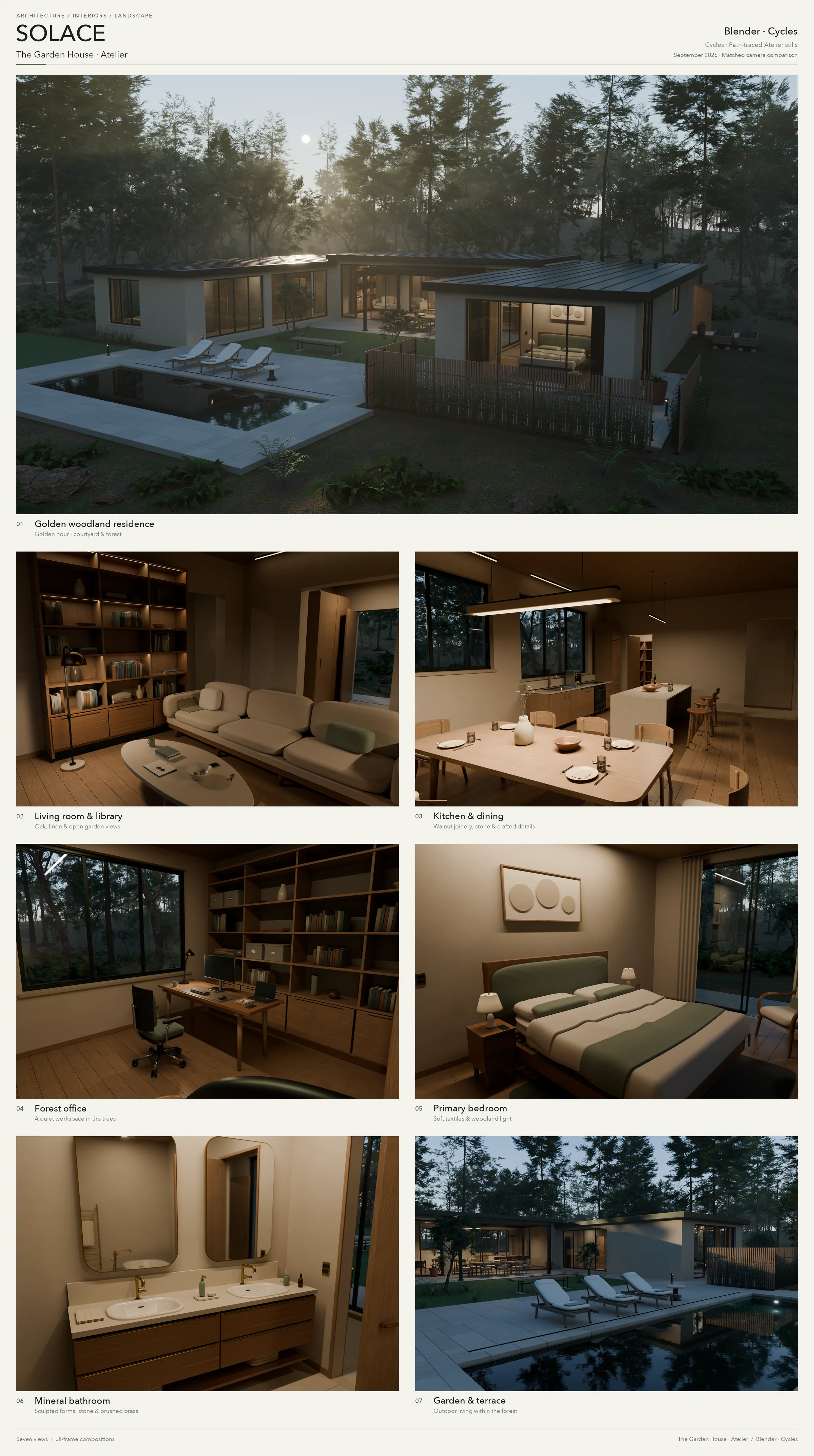
To compare the visual appearance of different rendering environments under controlled variables, Astra organized 7 themed camera views of the residence into two strictly corresponding storyboards. This side-by-side inspection was not intended as a performance benchmark, but as a visual comparison with camera parameters held fixed:
- Strictly Matched Camera Positions and Composition: Both storyboards unfold across the same sequence of 7 themes (woodland exterior, living room, kitchen, office, bedroom, bathroom, courtyard garden), maintaining matching camera positions, orientations, and fields of view.
- Respective Rendering and Tonal Characteristics: One set comprises Blender Cycles offline renders, while the other comprises Unreal Engine 5 Lumen still captures, each retaining its own lighting, materials, and tone mapping.
- Reflection Comparison: In the Unreal Engine captures, reflection artifacts are present in areas such as bathroom mirrors.
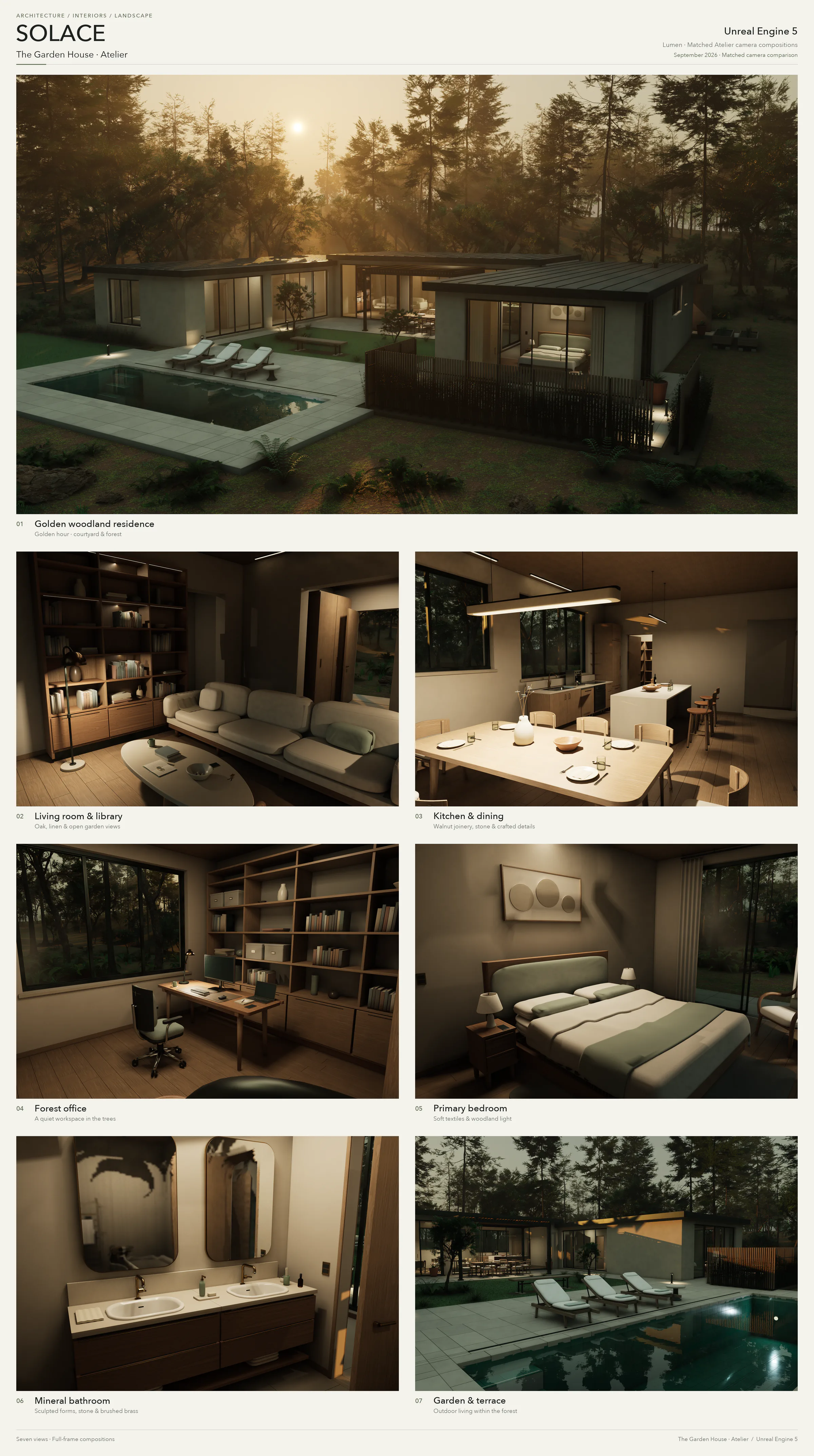
| Comparison Point | Blender (Cycles Offline Renders) | Unreal Engine 5 (Lumen Still Captures) |
|---|---|---|
| Camera and Composition | Covers 7 themes (exterior, living room, kitchen, office, bedroom, bathroom, courtyard) | Strictly matches the same sequence of 7 themes, camera positions, orientations, and fields of view |
| Lighting and Tone | Retains Cycles offline rendering lighting setup and tone mapping | Retains Lumen lighting characteristics and native tone mapping |
| Materials and Reflections | Uses the Blender scene's own materials, lighting, and tone mapping | Uses the UE5 scene's own materials, lighting, and tone mapping; bathroom mirrors still exhibit reflection artifacts |
| Nature of Comparison | Side-by-side visual inspection holding camera variables fixed, not an engine performance benchmark | Side-by-side visual inspection holding camera variables fixed, not an engine performance benchmark |
7. Extended Application Scenarios
Beyond the Solace residence, the author also applied this working method—"building editable 3D scenes with code, relying on render previews to identify issues, and advancing continuously"—across diverse subjects including science fiction and natural landscapes. The following three examples showcase specific approaches and results rather than controlled evaluations of generalized capabilities.
HELIOS (Sci-Fi Scene)
In constructing HELIOS, a megastructure surrounding the Sun, the initial version of the scene featured thousands of individual panels, recessed surfaces, cooling fins, braced service structures, and larger control hubs.
In the initial preview render, Astra observed that intense internal lighting washed out planetary surfaces with overexposure, and Saturn's rings were cropped by the edge of the frame. It subsequently proactively reduced internal ambient fill lighting and broadened the composition's field of view to encompass the entire planetary ring system.
When the author requested a composition looking back from low Earth orbit toward a nearly closed Dyson sphere, Astra constructed a near-enclosed shell assembled from 5,120 panels, leaving only three narrow light-escaping slits. After previews revealed only a single beam of light clearly visible in the image, Astra adjusted the relative positions of the luminous surfaces and attenuated excessively strong specular reflections on Earth's ocean surface, bringing the overall frame into balance. In this set of renders, celestial dimensions and relative distances were artistically adjusted to satisfy cinematic composition rather than representing actual astronomical scales.


Data and Asset Attribution: Solar observation data used in HELIOS originated from NASA JPL / STEREO and SDO ultraviolet observation imagery (SVS 30362); Earth textures came from NASA Earth Observatory's Blue Marble and Night Lights map (credited to NASA Earth Observatory / Robert Simmon, Suomi NPP VIIRS data courtesy of Chris Elvidge, NOAA NGDC); planetary and cloud textures were adapted from Solar System Scope / INOVE texture assets under the CC BY 4.0 license.
Shipyard (Hard-Surface Spaceship)
In the spaceship case study, Astra constructed a cruiser featuring a tapered hull, a segmented ring, and four detailed drives. The engine assembly specifically included outer containment bands, service lines, recessed nozzles, and concentric illuminated openings.
In the initial preview, the author and Astra noticed that the bow was too plain and the background planet too prominent in the composition. In subsequent script iterations, Astra added assembled armor panels and seams, docking hardware, and ring fasteners to the hull, while shifting the background planet aside and darkening its tones to make the subject's silhouette stand out distinctly.


Monet's Garden–Inspired Waterscape
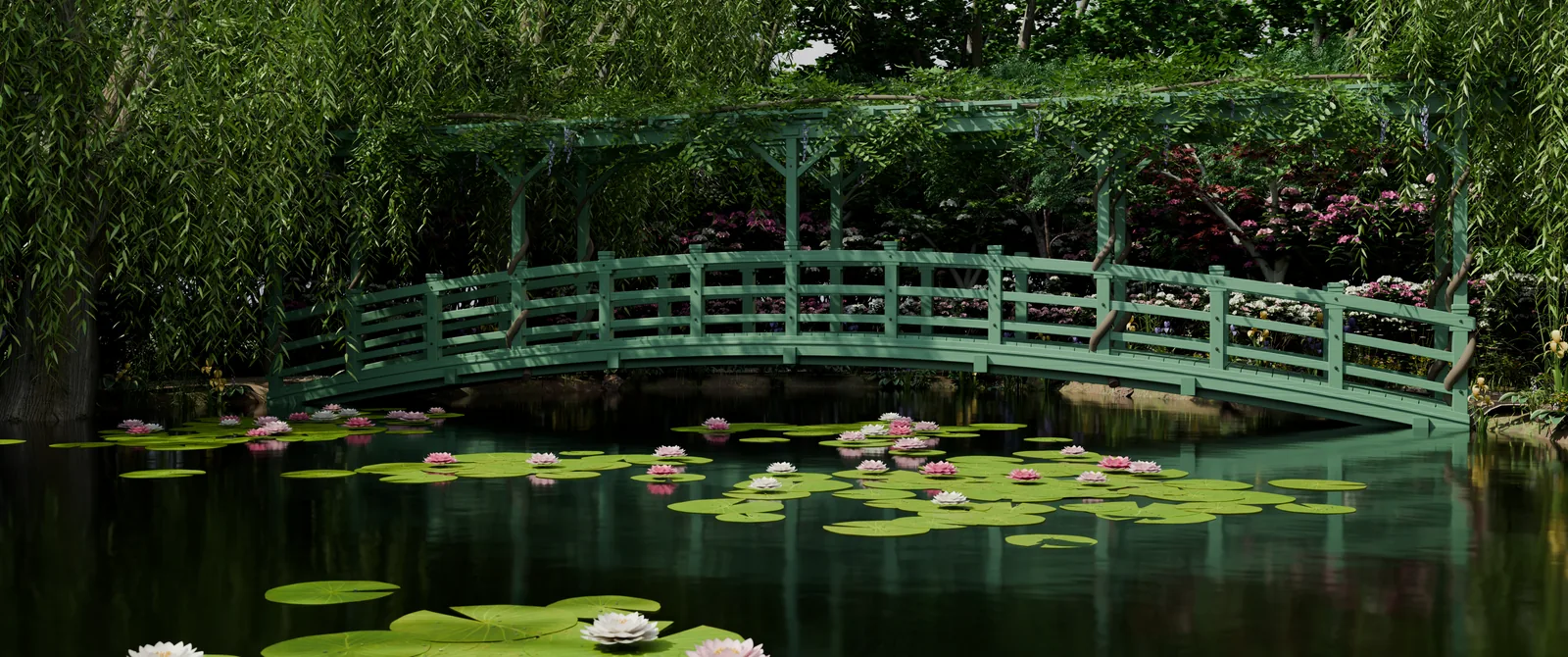
When dealing with organic natural forms, the author instructed Astra to study real references during scene creation, reproducing the iconic green Japanese wooden bridge, pond, water lilies, and weeping willows. To accommodate composition needs, the scene adjusted proportions relative to the actual garden. After early renders showed the terrain surrounding the pond to be relatively flat and bare, Astra added textured gravel and masonry based on author feedback, refined lily leaves and petals, and re-rendered the final image.
Workflow Distilled from the Solace Case Study: Progressive Construction Starting from Renders
Astra's exploration in the Solace project demonstrates a progressive building process that 3D creators can try. This is an approach distilled from a single case study, so it does not guarantee success across all projects or genres; nor does it mean every 3D project must mechanically begin with an architectural floor plan, move into Unreal Engine 5, or use solid geometry throughout.
The core logic of this methodology lies in:
- Starting with Concrete Objects and Atmosphere: Begin with a specific place or object you want to see, clearly describe its purpose and atmosphere, and request that the AI produce an editable scene alongside multiple viewing angles;
- Progressing from Broad Outlines to Local Details: Examine the broad shape and compositional volume first, and once the overall tone is confirmed, gradually zoom in to refine internal structures, material responses, and small-scale objects;
- Making Each Render the Starting Point for the Next Decision: Avoid trying to achieve everything in a single prompt; instead, treat each preview render as an entry point for visual inspection, where humans determine the next adjustment based on intuitive imagery, and AI translates those decisions into concrete code.
Five-Stage Progression of the Solace Case
Every Round Leaves an Inspectable Intermediate Artifact
The process does not require every project to complete the entire pipeline; the key is to produce observable results first, then decide on the next revision.
- 01Intent and Initial Scene
Describe objects, intended use, and atmosphere to generate an editable scene and observation camera angles.
- 02Spatial Planning
Architectural projects can start with floor plans or massing models to check circulation and proportions.
- 03Structural Refinement
Flesh out key geometry based on confirmed directions, checking for errors during modeling.
- 04Lived-in Details and Lighting
Add everyday objects, materials, and visible fixtures before adjusting scene lighting.
- 05Cinematic Rendering or Real-Time Interaction
Select camera motion for rendering or transfer the scene into a real-time engine through a dedicated pipeline, depending on the project's goal.
Original Prompt Bilingual Quick Reference Table
| Stage | Core Task | Original Prompt |
|---|---|---|
| Stage 1: Conceptual Tone | Establish aesthetic direction and the first small scene | EN: Design a beautiful house with minimalist but highly detailed furniture and a nice garden. Make the scene cinematic, with considered lighting, materials, and time of day. Translation: Design a beautiful home equipped with minimalist yet richly detailed furniture and a lovely garden. Create a cinematic scene with refined lighting, materials, and a specific time of day. |
| Stage 2: Environment and Atmosphere | Expand scene context and special lighting effects | EN: Make it golden hour. We should see the sun, and the house should be in the middle of a viridian forest. Translation: Change to golden hour at dusk. We should see the sun, and the house sits in the center of an emerald-green forest. |
| Stage 3: Spatial Planning | Work through circulation and functional layout according to project needs | EN: I like the minimalist, modern style, so keep that while we grow the house to be much more livable. Draw me a floor plan first. We'll validate and evolve it from there. Translation: I like this minimalist modern style; please maintain this style as we expand it into a home more suitable for family living. Draw me a floor plan first, and we will validate and evolve from there. |
| Stage 4: Building the Physical Structure | Refine critical geometry and troubleshoot against the floor plan | EN: Keep the current scene as a backup, then build the updated house in Blender. Iterate until the house, furniture, and garden are detailed and the geometry is correct. Once we validate it in Blender, we'll export it to Unreal Engine 5. Translation: Keep the current scene as a backup, then build the updated house in Blender. Iterate repeatedly until the house, furniture, and garden are richly detailed and the geometry is correct. Once validated in Blender, we will export it to Unreal Engine 5. |
| Stage 5: Lived-in Details and Lighting | Adjust material response and interior lighting, adding everyday objects | EN: Make the lighting quieter, warmer, and more accurate. Improve how the materials respond to light, and add dishes and everyday objects so the house feels lived in. Translation: Make the lighting more understated, warmer, and more accurate. Improve how materials respond to light, and add tableware and everyday objects so the entire house feels lived in. |
What This Case Study Actually Left Behind
- A Blender scene that can continue to be edited, alongside scripts used for modeling, camera setup, and rendering;
- Multi-angle stills and continuous camera movement films generated from the same scene;
- A UE5 export and reconstruction pipeline written specifically for this project, along with two stages of first-person walkthroughs;
- A set of items that still require manual inspection: conceptual floor plans are not construction drawings, geometric sampling is not full certification, and certain shaders can only be approximated in UE5.
Conclusion: Human-AI Collaboration Bridged by Inspectable Intermediate Artifacts
The core methodology demonstrated in this OpenAI case study lies in breaking broad design intentions down into inspectable intermediate artifacts—such as conceptual floor plans, preview renders, solid cutaways, and engine walkthroughs. The author determines next steps based on identified issues, and Astra implements those decisions within Blender scenes, Python scripts, and Unreal Engine 5 projects. For anyone seeking to explore AI-assisted 3D creation, this offers far greater reference value than striving for an exhaustive final deliverable right from the start: create something visible first, and let each observation guide the next concrete modification.
Practical takeaway
Scroll through the Markdown, then copy and adapt it to your team.
Loading Markdown…
Members can copy or download the full Markdown, and let their AI subscribe and ask.
Found this useful? Leave your email — every new explainer, the moment it's out. Unsubscribe anytime.