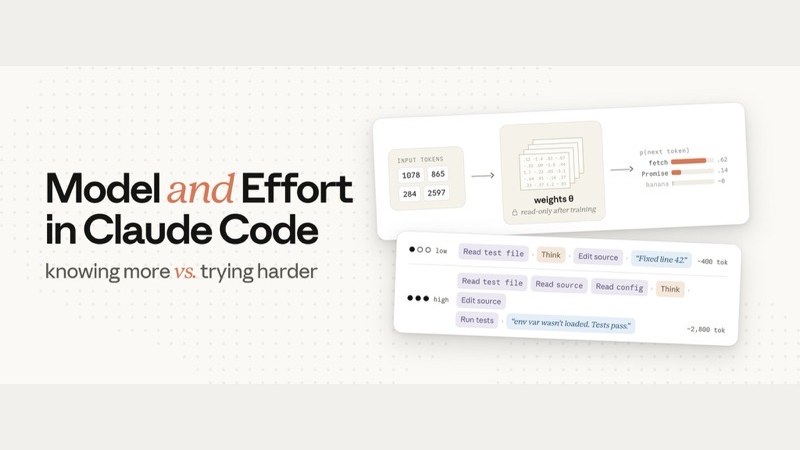
The Claude Code team teaches you how to work these two knobs: one controls whether it "can," the other controls whether it "will do enough"
- Anthropic's developer-facing account @ClaudeDevs published a long-form post on July 8, 2026, written by Claude Code team member Lydia Hallie (@lydiahallie).
- Effort controls how much work Claude does overall on this task: how much it thinks, how many files it reads, how many tests it runs, how much it verifies, and how far it pushes through multi-step work before asking you. The API commonly exposes five tiers: low / medium / high / xhigh / max; for most tasks, the model's default tier is enough.
- The model setting decides which trained, frozen set of weights you're using — in other words, what it "knows." Effort decides "how thorough it is." When it gets something wrong, first check the context, then ask: is it that it "can't," or that it "didn't try hard enough"?
- Role analogy: Fable is like a specialist, Opus is like an expert, Sonnet is like a solid generalist; effort is how long they're willing to spend on your case.
- On simple tasks, bigger models cost more; on hard, multi-step tasks, bigger models can sometimes come out cheaper overall, and can finish work that smaller models simply can't. In testing, Opus 4.8's default effort used roughly the same token volume as Opus 4.7's default, with better results.
Two knobs that both look like they "make the answer better"
On July 8, 2026, Anthropic's developer account @ClaudeDevs published a long-form Claude Code post, written by Claude Code team member Lydia Hallie.
What effort is: same model, how thorough this particular job gets done
In Claude Code, effort is a setting that sits alongside model choice. It doesn't change whether the model "can" do something — it tells that same model how much work it's willing to put in before handing back an answer this time. The common misconception is treating effort as "thinking longer"; really it governs how thorough the whole job is.
The post puts it plainly: effort controls how much work Claude does overall on this request — not just how long it thinks, but also:
Whether it opens up more source code, config, and logs, or just looks at what you pasted into the chat box
Whether it runs tests after making a change, double-checks its conclusion, or scans for edge cases on its own
On a multi-step task, how far it drives forward in one go versus quickly stopping to ask you for more context
Whether it writes a plan first and how deep that plan goes, and whether it verifies once more after finding an answer
In the API docs, effort is a behavioral signal, not a hard token cap: at a low tier, a genuinely hard problem may still get real thought, but on the same problem it will "think and do less" than a high tier would. The tiers the docs list run, from cheapest to most aggressive, roughly five deep (in the Claude Code interface you'll also see an "ultracode"-style entry bundled with multi-agent permissions — that's a product-side combination, not an extra API tier name).
Fixed task: "The production login endpoint occasionally returns a 500 — go look into it." Below, the five tiers run from the official low → max; the bars are relative only, not measured token counts. High is shown by default (the behavior when no effort parameter is set).
The post's recommendation: for most tasks, just use that model's default effort. The default is the tier the team judges as "how many tokens most people are willing to spend on this kind of task." Treat it as a manual override on your overall preference: only touch it when you consistently want things faster or consistently want to save money — no need to re-tune it for every single task. Also: in the team's testing, Opus 4.8's default effort used roughly the same token volume as Opus 4.7's default, with better results. If you turn it up and it's still sloppy, still skipping reads and tests, that's the "didn't try hard enough" signal; if you're running max daily for simple copy edits, that's mostly waste.
The model changes "what it knows"; effort changes "how much it does"
A bigger model, by common industry benchmarks, is more capable. The post concedes this directly. Effort, on the other hand, doesn't change "whether it can" — it only changes "how thoroughly it does this run."
High effort: more willing to read, verify, and reason through things itself before handing back an answer. Low effort: more willing to ask you for context up front, rather than burning tokens to guess.
From the moment you hit enter, what happens inside the request
Claude Code bundles your message, the system prompt, tool definitions, CLAUDE.md, conversation history, and the files currently in context into one API request and sends it.

The model doesn't directly "read Chinese sentences" — or English ones, for that matter. On the server, tokenization happens first: text gets cut into small chunks, each chunk mapped to an integer in the vocabulary. The post's example: const might be 1978, await might be 4293. From that moment on, the prompt is, to the model, a string of integers.

The model's job is: given the current string of tokens, assign a probability to every possible next token in the vocabulary, then sample from that. After "const x = await," the probability of "fetch" will be high, and "banana" close to zero.

What turns input into probabilities is the weights (parameters): matrices of numbers written into the model during training, scaling into the billions. Predicting one token means running the input through a long chain of operations across these matrices and reading off the probabilities at the end. The weights hold what the model "knows"; at inference time, the weights are read-only. Your prompt, CLAUDE.md, and context can't change the weights — they only "steer" the next prediction.

TypeScript, common frameworks, general programming knowledge — all of that was written into the weights during training. Putting your actual code into context is steering: it's very useful for this one request, but it doesn't "teach" the weights new knowledge. A library that didn't exist at training time isn't in the weights; you can paste in docs to let it use that library, but the effect only lasts for this one request. Hallucination, too, is the weights generating a token sequence that "looks right" — not a lookup that failed.
So switching models = swapping in a different set of frozen weights to handle your request. The model also doesn't write out a whole answer in one shot — it predicts token by token: write one, append it to the end of the sequence, then re-run the whole sequence to predict the next one. A 200-token reply = 200 passes through the weights. Latency and output cost largely come from this loop.

The model setting also decides the price of each output token. It doesn't directly decide "how many tokens get generated." On the exact same prompt, how much work Claude decides to do can vary a lot in output volume. The thing that controls that is effort.
Thinking, calling tools, and talking to you are all the same kind of output token
When Claude Code is working, the tokens it produces fall roughly into three kinds: thinking (the reasoning you see streaming by), tool calls (structured blocks like Read / Edit), and text addressed to you (plans, progress, summaries).
All three are ordinary output tokens from the same generation loop, billed at the same rate. Thinking tokens stick around in the context for the rest of that turn: while writing code, earlier reasoning has already effectively become part of the input, the same way a file you've read has.

The effort tier is sent to the model as part of the request. The model has learned, through training, how it's supposed to behave at each effort tier — that behavior is written into the frozen weights too. In production, effort is simply another input the model has to respond to, just like your prompt: it dictates how thorough and how confident the model needs to be before it considers the task done. That tradeoff gets re-weighed every turn; higher confidence usually costs more tokens.

At high effort, Claude often writes a plan first, and the plan is deeper and broader. The plan isn't locked in: as tool results come back, it updates "how far along things are, how confident it is in the result." If a debugging plan lists three hypotheses and the bug turns up on step one, it will often say straight out that the other two aren't needed, and the task list gets rewritten mid-stream.
High effort also means it's more willing to verify one extra time: double-checking an answer it's already found, or still scanning a hypothesis it could have skipped. But the post stresses: training specifically watches for "overthinking," so effort being maxed out doesn't mean it will rack up usage on simple tasks — padding usage actually hurts real-world results.
For how to dial this day to day, see "Understanding effort first" above; this section just fills in the mechanism: the tier is an input to the request, and, like the prompt, it triggers behavior the frozen weights learned during training.
Check the context first, then split "can't" from "didn't try hard enough"
When Claude messes up, the first move shouldn't be to change a setting — it should be to look at what you gave it: was the prompt vague, were the tools wrong, were the skills incomplete.
If you're cranking effort up on a task where it shouldn't need to be high, the problem is usually further upstream: context, CLAUDE.md, how the task got broken down.
If the context is already clear and it's still wrong, ask this one question:
Is it not capable enough, or not trying hard enough?

The problem itself is hard: a subtle bug, unfamiliar territory, an architectural tradeoff. If a smaller model, even with plenty of context stuffed in, is still confidently wrong, move to a bigger model. Bigger models also handle ambiguity better; smaller models are better suited to instructions where you can spell out the exact steps.
- Go big: hard, ambiguous, repeatedly confidently wrong
- Go small: mechanical changes, the answer's already in context, precisely-described routine work
Files that should have been read weren't, tests that should have run didn't, checks that should have happened were skipped. Especially relevant if you've set effort below default.
- Raise effort: obviously cutting corners, skipping verification, turning things in half-finished
- Don't raise it: the context is a mess or the task is vague — fix upstream first
Specialist, expert, generalist: who shows up, and for how long
The author's analogy: Fable is a specialist you call in almost only when nobody else can crack it; Opus is an expert; Sonnet is a very capable generalist. Effort decides how long any of them stays on your case.
Called in when others are stuck. Even at low effort, it can spot things others miss. The priciest per token, so save it for work that genuinely needs it.
Low effort is like a five-minute chat with an expert: it brings patterns and pitfalls learned outside your codebase, but it'll only skim — not comb through every file.
High effort is like a generalist spending an afternoon: solid engineering chops, will read, run, and double-check, and really gets to know your code.
The model setting ≈ how capable; the effort setting ≈ how thorough. There's no universally better combination. Most real tasks need a bit of both: Opus at low effort isn't simply a stand-in for Sonnet at high effort, and Fable isn't a sensible everyday default either.
For simple tasks versus very hard tasks, the billing logic flips
How model, effort, and token spend tangle together depends on how hard the task actually is.
Routine work, same effort
Both small and large models can generally get it right. Bigger models often take a few extra verification steps, so they use more tokens, and each token costs more too. So dropping to a smaller model for routine stages saves real money, usually with no quality loss.

Hard, multi-step work
A small model has to grind near the edge of its capability, burning through many iterations; a big model can reach the same quality in fewer steps. It costs more per token, but total cost for the task can sometimes end up lower. More importantly: some work simply requires a bigger model — maxing out effort can't rescue a small model there.
Fable pulls furthest ahead on long, multi-step tasks. In the team's testing, it completed work that neither Opus nor Sonnet could finish at any effort tier; it's also the priciest per token, so it's best reserved for work that genuinely needs it.

Effort decides how far Claude is willing to go along that curve — it doesn't mean it has to go that far before it's done. Effort shapes usage; it isn't a hard ceiling. The real hard cutoff in the system is max_tokens: hitting it cuts things off mid-stream, somewhat bluntly, and it's mainly aimed at API developers. Softer constraints, like task budgets, or simply asking for brevity in the prompt, are guidance the model has been trained to follow: it tends to wrap up as it nears the limit, rather than hitting a wall.
| Scenario | More cost-effective choice | Why (per the post) |
|---|---|---|
| Routine, clearly-described changes | Smaller model + default effort | Both get it right; a big model over-verifies and costs more per token |
| Hard, multi-step, ambiguous | A bigger model, effort at default or raised as needed | Reaches the quality bar in fewer rounds; sometimes total tokens are actually lower; some work only a bigger model can reach |
| Clearly skipping reads or tests | Raise effort first (especially if it's below default) | The problem is thoroughness, not knowledge in the weights |
| Small model confidently wrong, context already sufficient | Switch to a bigger model | The problem is a capability ceiling, not needing another read-through |
One line to remember, then go dial the knobs
Effort changes how much work Claude does; the model changes what Claude knows.
When the result isn't good enough: first give it a clear prompt, the right tools and skills, and a way to verify itself. If it's still wrong, ask: is it that it can't, or that it didn't try hard enough? Can't is a model problem; didn't try hard enough is an effort problem.
"Effort changes how much work Claude does. The model changes what Claude knows."
Two knobs that both feel like "make the answer better": one controls whether it "can," the other controls whether it "will do enough"
The Claude Code team pulls apart a pair of settings that are easy to mix up: switching models swaps its brain, adjusting effort changes how thoroughly it's willing to work this time. One page, with a diagram, covers it all.
↓ Read this in one page · there's an animated diagram
Claude Code is Anthropic's AI coding assistant for programmers (helps you write code and hunt bugs from your computer's terminal). It has two adjustable settings, and turning either one feels like "the answer got better," which makes them easy to lump together.
One swaps out "what it knows"; the other changes "how much it does" this time.
Swaps in a different set of "frozen weights" (a huge set of parameters fixed once training's done — read-only at inference time — holding what it "knows"). Switching models = swapping in a stronger or weaker brain: capability, knowledge, how many pitfalls it's seen.
Same brain, but this time — is it willing to read a few more files, run tests or not, double-check or not, push forward on its own how far, or stop quickly and ask you. It governs "how thorough," not "how long it thinks."
High effort: "Read through several spots in the login code, reproduced the intermittent error, ran tests to confirm — root cause is a connection timeout with no retry."
Hand it the exact same sentence, and "how much it does" can differ wildly. So how many tiers are there, exactly?
XiaoHu asked Claude Code to look into a bug: "The production login feature occasionally returns a 500 (a server error, and users can't log in)." Same bug — here's how much work each of the five effort tiers does,
"Burning more tokens (the smallest unit of text a model processes)" doesn't mean much on its own — convert it to money and it does: on the same bug, high effort burns roughly 7x the tokens of low effort. The extra money buys it finishing its own reading, verification, and double-checking, instead of tossing you a patch and circling back to ask questions.
go check it out!
send me the logs if not.
which one do I turn?
that'll fix it!
without reading enough!
go to a bigger model.
raise effort.
- × That 7x figure is the original post's own illustration
- × The cost curve isn't a real test
- × No third party has reproduced it either
then go turn the knobs.
Effort changes "how much work it does"
Members can copy or download the full Markdown, and let their AI subscribe and ask.
Found this useful? Leave your email — every new explainer, the moment it's out. Unsubscribe anytime.