Databricks' Playbook for Cutting AI Coding Costs: The Right Model Swap Alone Saves 50%+
- AI coding clearly works — some teams at Databricks saw 10x throughput. But token bills are growing just as fast, and nearly every company scaling it has hit that wall.
- The biggest lever is switching models. Stripe's tests showed the new Opus wasn't better, just pricier, so they refused to roll it out internally.
- The most counterintuitive finding: no company uses hard caps as a daily tool. They keep the kill switch, but only as a last resort. Two very practical reasons why, below.
Efficiency Is Up, But the Bill Is Rising Faster
Databricks recently published a strikingly practical post-mortem on cost control: in AI-assisted coding, every internal speed metric has improved, with some teams seeing 10x output. But the bill has climbed exponentially alongside it.
That curve is unsustainable. Left unchecked, it eventually outpaces company revenue. It puts businesses in an awkward spot: they want to push AI adoption as far as possible and put the best tools in every employee's hands, but the total cost is eating into — and in some cases canceling out — the very efficiency gains AI was supposed to deliver.
The good news is that the companies who scaled AI first have figured out how to do both: give everyone frictionless access to AI tools while keeping per-seat costs locked in a roughly fixed range. The material here comes from Databricks' own experience, plus conversations with Stripe, Coinbase, Uber, and Ramp.
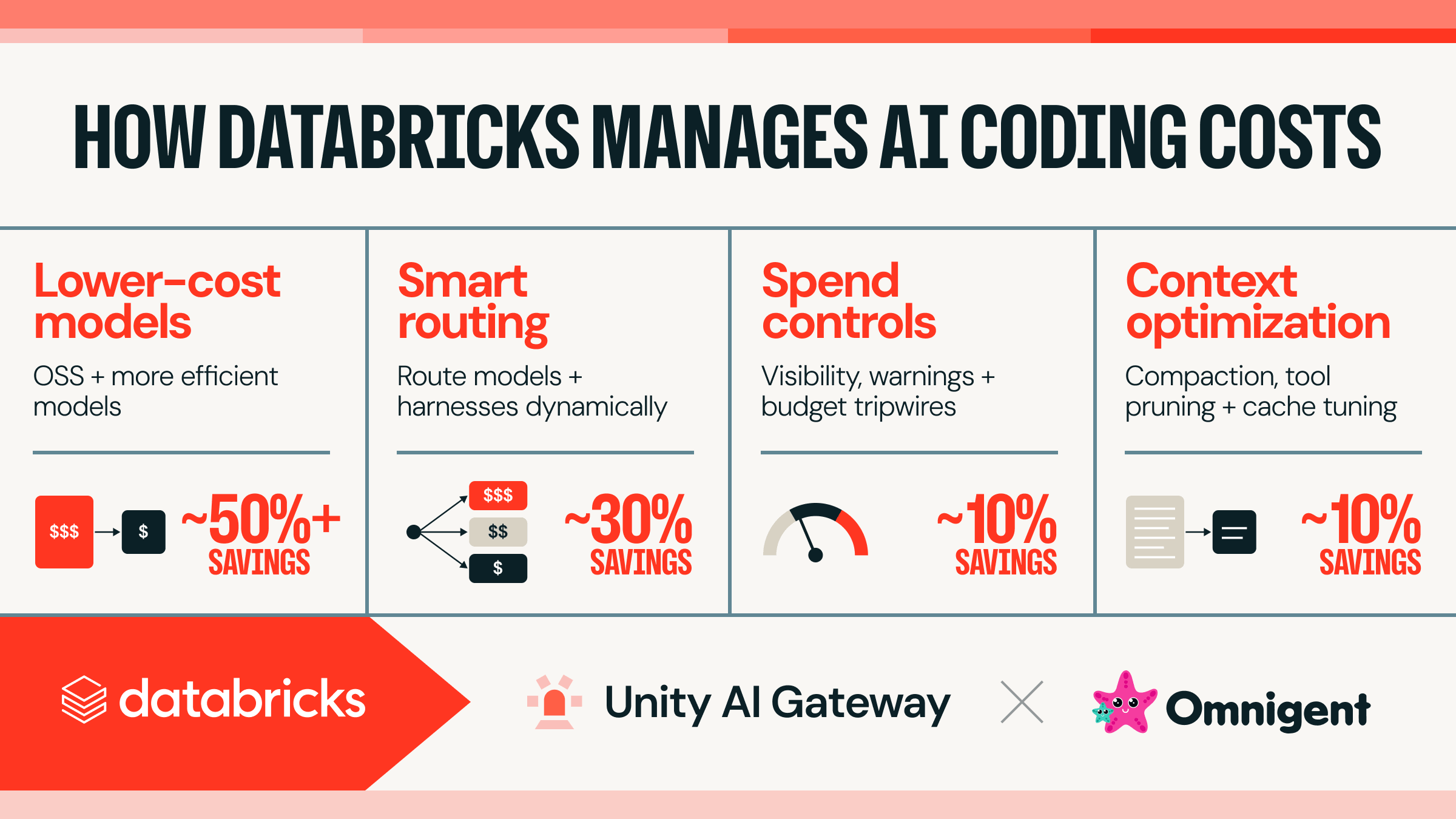
Four tactics, and what each one saves:

| Tactic | What it does | Savings |
|---|---|---|
| Switch to cheaper models | Open-source models + newer, more efficient ones | 50%+ |
| Smart routing | Dynamically dispatch between models and tools | ~30% |
| Spend governance | Cost visibility, overage alerts, budget tripwires | ~10% |
| Context optimization | Compression, trimming tool bloat, tuning caches | ~10% |
Some of this is off-the-shelf; the rest takes infrastructure work, especially on developer-local tools and multi-model traffic routing. Databricks has open-sourced or made freely available both key pieces of their own stack: Omnigent, the unified front-end for developers, and Unity AI Gateway, which manages the traffic.
Day-to-Day Coding Doesn't Need the Smartest Model
When people talk about "frontier models," they mean the smartest ones. Labs are racing to push the ceiling of intelligence; today's top models can crack math problems and surface novel security vulnerabilities.
But once AI is in the hands of thousands of developers across a company, a different frontier matters more: the efficiency frontier. It's the set of models that deliver a given level of intelligence at the lowest price.
You'd call Einstein for a genuinely hard physics problem. Renaming a component or filling in boilerplate doesn't need that brain — using Einstein there is just burning money. Most everyday coding falls in that second bucket: it needs a model that clears the engineering-quality bar, and a higher ceiling won't help.
So the real driver of your company's bill is what those "good enough" models cost. And this efficiency frontier is advancing much faster than the intelligence frontier: new models land almost weekly, and each dollar buys more usable intelligence than the batch before it.
Switching Models Saves the Most, but Public Benchmarks Can't Be Trusted
This is the biggest win of the four: rapidly moving to newer, more efficient models saves more than anything else. But to capture that, a company first has to know which new model is genuinely better than the one they're on.
That's harder than it sounds. Public benchmark scores don't track real-world coding performance; a high score doesn't mean a model will do well in your codebase. So several companies have built their own automated evals, using tasks that better reflect what their internal development actually looks like. Databricks built theirs on a multi-million-line codebase, and the results flagged the GLM series as a standout on cost-performance. They rolled GLM out to internal developers.
Evals also turn up negative results, like this one:
Stripe found that Opus 4.7 offered no real quality gain over 4.6 but cost more, so they decided not to offer it internally. Databricks saw a similar cost regression comparing Opus 5.0 with 4.8.
When a major company publicly says "we tried this new model and decided not to give it to our employees," — vendors rarely talk about the new versions they've rejected. A new version isn't automatically a better deal; you have to test it yourself to know.
Databricks plotted their findings as of August 6, 2026. The x-axis is average cost per task, the y-axis is average pass rate. The points connected by the red line form the efficiency frontier — at those pass rates, nothing is cheaper:

The recommendation list is down to three: GLM 5.2, Opus 4.8, and GPT-5.6 Sol. None of them is the smartest model available right now. The efficiency frontier was never about picking the smartest one.
Before You Can Switch Models Freely, Don't Get Locked In by Your Tools
The logic is straightforward, but when you actually try to switch, it's the tools — not the models — that get in the way.
The things developers actually use every day, Claude Code, Codex, Cursor, and the like, are called harnesses in the industry. The model does the thinking; the harness lets it read your code, edit files, and run commands.
The model is the engine; the harness is the whole car — steering wheel, transmission, dashboard. The catch: closed-source frontier models are increasingly built to pair with specific harnesses; certain cars just drive better with certain engines. Swapping engines without changing the car is getting harder.
Getting used to a particular tool quietly ties you to one vendor's models. Once the switching cost gets high enough, the tool becomes a de facto lock-in, and a company can't move its spend to cheaper models even when it wants to. There are two ways out:
Option one: let developers switch tools. Offer several harnesses side by side, and when costs need to shift, ask people to use a different one. The upside is that developers get to use what they prefer day-to-day. The downside is that for an individual, the switching cost is real, and the people who've built habits will be unhappy.
Option two: put a unified layer on top (a meta-harness, in industry jargon). Developers see the same interface; underneath, the meta-harness picks the harness and model to dispatch to, with both closed and open-source options plugging in. This preserves model and tool independence without forcing anyone to adapt to a new UI. Databricks went this route internally, with their open-source Omnigent as the default entry point. Some companies they've talked to built their own internal version, integrated into their dev toolchain.

Hard Tasks Get Expensive Models; Routine Tasks Get Cheap Ones
Both of the previous sections rely on people taking the initiative to switch. Could the system itself assign work based on difficulty? That's lever two: routing.
Think of parcel sorting: packages hit a sorting table, local small items go down a cheap line, international oversized ones take the expensive route. The only difference here is that what's being sorted is your AI work.
The original post breaks routing into three types, fine-grained to coarse:
1. Per-request routing
Insert a stateful proxy between your tool and the underlying models. It judges each request individually: who's the cheapest model that can answer this one, and sends it there. There's a trap to watch for: you have to factor in server-side caching. With large contexts, a cache miss is extremely expensive, so you can't just switch to the cheapest per-token price. Ready-made products already exist: Cursor Router, OpenRouter's AutoRouter, Ramp's Router, and Smart Routing inside Databricks' own Unity AI Gateway.
2. Per-task routing
One level coarser: you dispatch a whole task as a unit on the machine. "Rename component X to Y" is a simple task; "explore what designs could bring latency down" is a complex one. After the judgment, the whole thing goes end-to-end to the model in the right tier. The unified cockpit from the last section does exactly this; Omnigent supports this mode.
3. The expensive-cheap duo
Run two models inside the same tool: one expensive and high-intelligence, one cheap and workhorse. Both directions are in use:
- Cheap leads, expensive advises — like Claude's Advisor tool, where a cheap model handles the whole session and only escalates to a stronger model when it hits something beyond its reach.
- Expensive leads, cheap handles the grunt work — like Cognition's Devin Fusion, where a high-cost model runs the main loop and delegates selected subtasks to a cheap model.
On results, Databricks' internal numbers: the Smart Router consistently cuts average task cost by more than 30%, with quality roughly matching the most expensive model in the working set. Other companies they've talked to have seen similar results.

Skip Hard Caps; Add Friction in Stages Instead
Once the model layer is squeezed, it's time for the human layer. This is where many assume the answer is a monthly per-person cap: hit it, and you're done.
The post explains specifically why that isn't the answer. Every company interviewed treats hard caps as a last resort, not a daily tool. Both reasons are pragmatic:
- Cutting someone off mid-task is pausing their productivity. The developer is in the middle of work and AI suddenly stops responding — neither the company nor the employee wants that.
- Some of the biggest spenders are the highest producers. They're the ones using AI to unlock exceptional output. Cutting them off is self-harm.
In its place, a graduated approach: show people what they're spending first, then add friction in steps as spend rises.
Rung one: put spend in the open. Every company interviewed built near-real-time spend feedback, and many pair it with a suggestion — switch to this cheaper model, here's what you'd save. The key is that this ledger needs to aggregate across tools, so developers can judge which of their tools is returning the most per dollar. Databricks' internal developer dashboard looks like this:

Rung two: add friction at the gate. When spend crosses a threshold, something pops up that requires action. The lightest version is a self-dismissing notice — a heads-up that you're spending faster than usual, which Databricks found surprisingly effective at stopping unconscious spend. The next tier up requires approval, typically routing a budget request up the management chain.
Rung three: downgrade, don't cut off. Someone who hits the gate doesn't lose tokens. They get moved to a cheaper model. Because the gap between the cheapest models and the top-tier ones is huge, people can keep working but the bill stops climbing.
Rung four, and only then: disable. Most systems do keep the ability to cut someone off entirely. But it's usually temporary, and more often than not it's the opening of a conversation about how to use AI more cost-effectively.
The Real Bill Driver Is the Context the AI Adds Itself
The first three levers are about "which model" and "who approves." This last one is about cutting the tokens themselves.
In a coding agent, you might type one line: "help me debug this and fix it." What happens next is that the agent goes out and gathers a large amount of relevant context, calls a bunch of tools, digs through the codebase, and stacks on the skills and system information the company configured. By the time the actual expensive inference happens, the sentence you typed is a tiny fraction of what got fed in. The bulk of the bill is stuff you never explicitly asked for.
How to shrink that long bar? The methods are still new, and the post lists what people are trying:
- Compress the current context more frequently.
- Switch to a more "frugal" harness, or tune the one you have to use fewer tokens.
- Audit each commonly-used tool and strip the filler from its outputs.
- Encourage developers to break tasks into smaller units, so the scope of what needs to be read shrinks naturally.
As contexts get larger, prompt caching starts to matter more. Both closed and open models offer cache controls and retention settings: writing to cache costs money, but reading from it is much cheaper. Whether the trade-off works out depends on each team's working patterns, so manually tuning the default cache settings and pushing the hit rate up can have a big impact on the total bill.
Databricks says they made relatively simple adjustments to the harness and cache settings, and the generated token count — and associated cost — dropped by nearly half, with no quality regression observed by developers. They believe there's still plenty of headroom.

Every Savings Lever Hangs on One AI Gateway
Step back and all four levers share a technical precondition. To switch models freely, a company needs a single place managing the "model menu," and the developer tools need to support mixing. To make cross-tool spend visible, you need one unified ledger. To control context bloat, you need to see what the tools are emitting and force compression.
These needs are converging on a new class of infrastructure software with a name that's catching on: the AI Gateway. Think of it as the company's AI dispatch center — four things happen here:
| What it manages | What that means |
|---|---|
| Access & capacity | Unified proxy to the underlying models, closed and open |
| Budget & enforcement | Keeps the ledger and runs complex policies like graduated friction and auto-downgrade |
| Client-side config | Pushes local settings to dev tools: model allowlists, compression, etc. |
| Session traces | Logs coding session trails for later efficiency analysis and evals |
Databricks runs all four on Unity AI Gateway, paired with Omnigent for developers. Both are either open-sourced or free.
The exponential growth of AI coding costs isn't a fate to accept — it's an engineering and governance problem that can be solved. , the original post's conclusion
Companies that have tamed the curve all use the same playbook: watch the efficiency frontier, pick tools that preserve model freedom, route work to the cheapest model that can do it, replace hard caps with visibility and graduated friction, and cut the hidden context overhead. None of these levers sacrifices productivity — and productivity was the entire reason for adopting AI in the first place.
Switching to the Cheapest "Good Enough" Model Is the Biggest Lever on Your AI Coding Bill
Databricks, with Stripe, Coinbase, Uber, and Ramp, breaks down four ways to cut the bill — all on this page, with visuals.
↓ One-page read · one animated chart
AI coding works. Databricks has teams seeing 10x output. But token bills are climbing exponentially — left unchecked, they eat the efficiency gains; cutting people off mid-task just pauses the work. The savings figures below are Databricks' directional estimates from informal internal dev team surveys:
Labs compete on "how smart can the smartest model get" — that's the intelligence frontier, where math-solving models live. But most day-to-day coding is bug fixes, renames, and boilerplate, which doesn't need that brain. What actually drives your bill is "who's cheapest at good enough" — that's the efficiency frontier, and it refreshes far faster, with a new top pick almost every week.
Public benchmarks don't predict real coding performance, so several companies built internal evals on their own codebases. Coding tools (Claude Code, Codex, etc.) are increasingly designed around specific models, so getting used to one tool quietly ties you to its vendor. Databricks added a unified layer to keep models swappable without swapping tools. Three real-world verdicts:
Databricks' own eval
Stripe's eval — rejected for internal rollout
Databricks' own eval
The current recommendation list is down to three: GLM 5.2, Opus 4.8, GPT-5.6 Sol — none of them is the smartest model available.
Simple and complex tasks shouldn't run on the same-priced model. Routing does exactly this: per-request, pick the cheapest model that can answer; per-task, dispatch by overall complexity; or run a cheap/expensive duo where the cheap one handles the session and escalates, or the expensive one delegates. Databricks' Smart Router measured results: more than 30% cheaper than running Opus 5 alone, and a higher resolution rate:
Beyond models and routing, two levers remain. One: cut context. The sentence you type is a tiny sliver of a real inference; the bill is driven by the code, tool outputs, and skills the agent stacks on. Databricks tuned compression and caching settings and cut per-session tokens from 12M to 5.5M. Two: govern human spend. But none of the interviewed companies uses hard caps as a daily tool — cutting off supply stops active work, and the biggest spenders are often the biggest producers.
Hit the limit, work stops.
See spend → self-dismissing reminders, then approval → on hitting the gate, auto-downgrade to a cheaper model, no cut-off → disable is the last resort, usually temporary, often the start of a "how to use AI smarter" conversation.
All of it lands on one infrastructure layer: a unified AI Gateway that manages the model menu, keeps cross-tool books, pushes client-side config, and logs sessions. Databricks has open-sourced or made free its stack (Unity AI Gateway + Omnigent).
- × Opus 4.7
No gain, higher cost - × Opus 5.0
Cost regression vs. 4.8
Opus 4.8
GPT-5.6 Sol
are often biggest producers
Members can copy or download the full Markdown, and let their AI subscribe and ask.
Found this useful? Leave your email — every new explainer, the moment it's out. Unsubscribe anytime.