
Anthropic 官方 Skill 实践指南:怎样写、怎样改、怎样验证它有用
沿着 PDF 填表和数据查询的官方示例,讲清楚一份技能怎样从真实失败出发,变成可复用的工作方法。
Anthropic 官方发布过一份 Agent Skill 编写最佳实践指南,专门探讨如何写出能被 Claude 顺利发现并高效调用的 Skill。不少开发者在刚开始编写时,容易将 Skill 写成详尽的“业务操作手册”。
你可能也经历过类似的过程:Claude 某一次执行任务漏了个细节,你立刻在文件里加一条规矩;下一次它少考虑了一种情况,你再追加一段背景说明。久而久之,主说明文件写了上千行,里面塞满了各种库的介绍、参数列表和通用注意事项。主文件过长并不意味着模型能力必然下降,但上下文窗口始终是一项有限的共享资源。冗长的指令和通用知识一旦全部加载进来,不仅会与对话历史和当前任务争夺注意力,也容易增加模型定位关键信息的难度,带来不必要的推理消耗。
在官方的最佳实践里,一个核心认知是:一份有效的 Skill,不需要把模型当成毫无常识的新手来教,而应该在特定场景下提供有针对性的操作指引。
衡量一份 Skill 是否真正有效,规则写得多,并不能直接证明有效;要看的是:在没有该 Skill 时,模型在哪些具体任务上容易出现缺口或遗漏?补充这些指令后,问题是否得到有效解决?以及,是否用了足够简练的表达和明确的流程来达成目标?
Claude 什么时候读 Skill,什么时候去查资料?
要写好 Skill,首先得理解模型读取文件的机制。
在与 Claude 的交互中,上下文窗口(Context Window)是一项共享资源。每一次对话,系统提示词、聊天历史记录、用户当前的提问、所有可用 Skill 的基础信息,都在争抢这块有限的注意力空间。若将大量背景和实现细节一次性全部塞入上下文,往往会造成不必要的空间挤占。
官方设计 Skill 时,采用了一套基于渐进式披露(Progressive Disclosure)的三层加载机制:
- 第一层:元数据预加载(Metadata)
在会话刚启动时,Claude 并不会读取 Skill 正文,只会把所有已安装 Skill 头部的名称(name)和说明(description)预先注入系统提示词。此时模型掌握的是一份全局的技能索引清单。 - 第二层:主文件按需触发(SKILL.md)
只有当用户的提问触发了某个 Skill 的描述时,Claude 才会通过文件读取指令调入主文件SKILL.md。如果任务只涉及基础操作,模型仅依赖正文即可执行。 - 第三层:参考资料随用随读(Reference Files & Scripts)
当任务需要处理更深入的业务规则、完整 API 规范或特定工作流时,Claude 才会循着主文件中的链接读取二级分册,或直接调用配套脚本。
这就决定了 Skill 文件的核心结构:主文件应保持精炼概括,主要负责提供快速指引与目录跳转,引导模型在需要时再去抓取真正的深层知识。

写头部元数据时,有两个关键的实战细节:
- 名称(name)的规范要求:长度在 64 字符以内,且只能包含小写字母、数字和连字符(如
pdf-processing),不能包含 XML 标签或保留字(如 anthropic、claude)。官方示意图中若出现大写字母或空格,仅作结构示意,实际编写时应当遵循纯小写与连字符的标准命名规范。 - 描述(description)建议用客观第三人称写清触发场景:描述上限为 1024 字符,非空且不含 XML 标签。Claude 在启动时主要依靠描述在众多候选 Skill 中进行挑选与路由。若写成“你可以用这个工具处理 Excel”或“我能帮你整理文档”,注入系统提示词后容易带来人称视角的不一致。更稳妥的做法是采用客观第三人称,并明确列出触发场景与关键词,例如:“提取 PDF 文本与表格、填写表单并合并文档。当处理 PDF 文件,或用户提到 PDF、表单及文档提取时使用。”
查财务数据时,只读财务资料
官方建议,为了保持良好的运行表现,SKILL.md 主文档的正文建议保持在 500 行以内。这属于提高可维护性与专注度的最佳实践建议,而非平台的强制技术硬限;当内容接近或超过这一规模时,更适合拆分成独立的参考文件。
在文件拆分方式上,官方推荐采用“单层引用建议(One level deep)”:所有二级参考文档尽量直接由主文件 SKILL.md 链接,避免层层多级嵌套。

为什么建议避免深层嵌套?
如果文档结构是 SKILL.md 引用 advanced.md,而 advanced.md 内部又指向 details.md,Claude 在面对深层引用的文件时,有可能只调用类似 head -100 的命令进行局部预览,而不是完整读取整份文件,进而导致获取的信息不够全面。单层直接引用有助于引导模型在需要时更完整地调入目标内容,不过单层引用本身也只是一种组织建议,并不绝对保证模型每一次都会全文阅读。为此,官方进一步建议:对于超过 100 行的参考文档,最好在顶部附上目录(Table of Contents),以便模型即使进行局部快速预览,也能看清文件的全貌并准确跳转到相应章节。
合适的方式是按领域划分、由主文件单层引出。例如官方给出的 BigQuery 数据分析设想:
bigquery-skill/SKILL.md(总览与快速检索入口)reference/finance.md(收入、计费指标)reference/sales.md(商机、客户漏斗)reference/product.md(API 调用量、功能使用统计)
当用户提问“收入指标怎样计算”时,Claude 先查阅主文件,发现只需了解财务指标,便只读取 reference/finance.md。此时,只有实际读取的财务文档内容会计入上下文,尚未被读取的销售和产品文档依然留在文件系统中,不产生上下文开销。通过这种方式,既能按需提供详细的专业参考,又能减少不必要的上下文占用。
在搭建好多文件体系后,还需要观察模型在真实交互中的访问路径,借此检验结构划分是否合理:
- 是否漏跟重要链接:如果模型没有循着主文档打开相关的参考分册,通常提示入口位置不够显眼或跳转指引不够清晰;
- 是否反复读取同一资料:若某些参考文档在多次交互中频繁被重复读入,可能意味着这部分属于通用高频知识,值得考虑前移并入主文件;
- 是否完全不打开某文件:若某个附属文档从未被读取过,可能提示该资料对于当前业务场景也许并不必要,或是主文档缺乏足够明确的触发线索。 调整后再跑同类任务,观察模型是否找到了所需资料,任务结果有没有改善。
重复的确定性操作,准备好脚本再调用
在许多任务中,我们既可以写文字指令让 Claude 现场编写代码运行,也可以在 Skill 目录中附带现成的预制脚本。两者该如何分工?
官方给出的建议是:对于流程确定、容易出错的操作,优先提供预制实用脚本,由模型直接调用执行,而不是每次都让模型临时编写代码。

使用预制实用脚本具有多项优势:
- 节省上下文与生成时间:模型在终端中执行命令(例如提取表单字段:
python scripts/analyze_form.py input.pdf > fields.json),通常只需接收脚本打印的输出结果,不需要每次重新生成代码,也无需把脚本源码全文读入上下文。不过这并非绝对不让模型读源码,官方指出需在文档中区分指令意图:大部分常规工具以“执行”为主,而如果脚本包含关键算法逻辑,也可以明确指示模型“作为参考阅读”。 - 主动解决问题,而不是推卸给模型(Solve, don't defer):编写脚本时应显式处理错误并提供清晰的报错信息。官方文档曾以“遇到文件不存在时创建默认空文件或提供备选方案”作为代码示例,但这只是展示防御性处理思路的具体用例,并非所有业务场景都适合自动创建默认文件;核心要求在于脚本自身应具备明确的错误处理与排错信息,避免直接抛出难以理解的原生异常后交由模型猜测。
- 消除无依据常数(Voodoo Constants):脚本中配置的关键参数应有明确注释与依据。例如设置超时时间为 30 秒、重试 3 次,应注明“常规 HTTP 请求通常在 30 秒内返回,重试 3 次可兼顾响应效率与网络偶然抖动”,避免在缺乏依据的情况下随意设定魔数。
- 明确运行环境与依赖要求:通用常识(例如解释什么是 PDF 格式)确实应当精简,但执行所需的具体依赖包与环境限制必须明确声明。所用平台能否联网、能否运行时安装依赖,需要按实际代码执行环境确认。因此必须在文档中明确列出所需依赖(例如列出
pypdf依赖和适用的安装方式),方便在对应环境中提前准备。 - 给出默认路径与明确例外,避免堆砌过多选择:官方指出,不要向模型罗列一整串可选库(例如同时罗列 pypdf、pdfplumber、PyMuPDF、pdf2image 让模型自行权衡)。更清晰的做法是提供默认路线并注明例外触发条件:普通文本提取默认推荐使用
pdfplumber;若遇到扫描版 PDF 需要 OCR 处理时,再例外指定使用pdf2image配合pytesseract。默认路线让模型知道先用什么;例外条件让它知道何时需要换方法。
代码审查留判断空间,数据库迁移写明确步骤
一份 Skill 应该规定得多细致?关键在于根据任务本身的脆弱程度与可变性,匹配恰当的自由度(Degrees of Freedom)。
官方将模型探索形象地比作机器人的行进路径:
- 两侧都是悬崖的狭窄桥梁(低自由度):安全通行的路线只有一条,操作脆弱且极易出错,必须提供严格具体的指令与确定性脚本。例如数据库迁移操作,文档应明确指定固定命令:
python scripts/migrate.py --verify --backup,并说明不要随意修改命令或额外添加参数,通过明确边界保障关键流程的一致性。 - 参数化模式(中自由度):存在推荐的实施范式,但允许根据具体输入进行配置调整。例如生成分析报告,可提供带有参数的函数模板(如
generate_report(data, format="markdown", include_charts=True))或报告结构范例,允许模型根据实际数据形态决定展现细节。 - 没有险阻的开阔草地(高自由度):存在多种达成目标的可行途径,依赖具体上下文进行权衡。例如代码审查(Code Review),使用文本列表明确审查维度(分析代码架构与组织、检查潜在缺陷与边界用例、提出可读性改进建议、核对项目约定规范),由模型结合代码实际情况综合评估。
在工作流设计中,这种自由度划分往往与条件分支结合使用。例如官方给出的 DOCX 文档处理案例,明确区分了“从头创建”与“修改现有文档”两条路径:全新生成文档时使用专业库(如 docx-js)完整构建;而对于现有文档的简单修改,则不必大费周章走全套重建流程,而是直接解包并修改底层 word/document.xml,并在修改后立即运行校验脚本检查修改后的文档结构,确认合规后再重新打包测试。区分这两条路径,能避免在简单修改场景中陷入低效且容易破坏既有格式的全面重构。
输出格式也要按用途决定写得多严格。如果输出要交给程序处理,例如固定结构的 API 响应,就应明确模板,让下游知道到哪里取数据;如果分析报告的章节需要随发现变化,就给默认结构,并说明哪些部分可以调整。格式是否固定,取决于后续怎样使用它。
要传达写作风格和细节程度,成对的输入、输出示例也很有用。官方的 Git 提交信息案例给出:
输入:Added user authentication with JWT tokens
输出:
feat(auth): implement JWT-based authentication

Add login endpoint and token validation middleware
这个例子同时展示了标题采用 type(scope): brief description、正文补充具体改动的写法。相比只说“提交信息要简洁规范”,模型更容易看出什么样的输出符合要求。
填 50 个 PDF 字段,先检查计划,写完再查成品
在涉及大批量或不可逆修改的场景中,如果让模型直接修改目标文件,容易出现字段对错、格式覆盖或执行中断等问题。官方在此提出了一个设想场景:假设需要根据表格更新 PDF 表单中的 50 个字段,模型若缺乏校验步骤,容易引用不存在的字段、填入冲突的值,或是遗漏必填项。
针对这类任务,官方建议采用“计划—验证—执行”(Plan → Validate → Execute)的工作流模式,将整个过程拆分为清晰的闭环:
- 分析原件与视觉辅助(Analyze & Visual analysis):运行分析工具提取表单字段与对应位置,输出结构化描述文件,例如
python scripts/analyze_form.py input.pdf生成fields.json。若版面复杂,官方还建议引入视觉分析:通过编写并运行python scripts/pdf_to_images.py form.pdf将 PDF 页面渲染为图片,让模型直接观察各页图像中的字段实际位置、类型与整体页面布局。转换脚本需自行提供。看页图帮助理解“字段在哪里、页面长什么样”,结构化校验则按明确规则检查字段映射和冲突,两者配合使用。 - 生成计划(Create plan):让模型根据输入数据完成映射,生成独立的计划文件(如编辑
fields.json或生成changes.json)。在源文件未被真正触碰之前,所有映射与修改都在计划文件中进行,可以低成本地反复调整与修正。 - 验证计划(Validate plan):运行专门的校验脚本检查计划文件(例如
python scripts/validate_fields.py fields.json)。此处的计划校验聚焦于检查准备写入的字段映射与变更逻辑是否合法,例如是否存在引用不存在字段、值冲突或遗漏必填项(而在官方另一示例中,validate_boxes.py则用于检测边界框重叠)。若发现问题,脚本应输出具象的报错信息(如“未找到signature_date字段,当前可用字段为:customer_name,order_total,signature_date_signed”)。 - 修正重试(Fix errors):模型根据具体的校验反馈直接修改计划文件,再次运行校验,形成修正闭环。
- 正式执行(Execute):只有计划校验完全通过后,再调用执行脚本将修改真正写入目标文档,如
python scripts/fill_form.py input.pdf fields.json output.pdf。 - 验证最终产物(Verify output):执行后不能假定结果必然正确,必须运行成品校验脚本(如
python scripts/verify_output.py output.pdf)核验实际写入后的最终文档;若成品验证失败,则回退到计划环节排查修正。
这些脚本名用来说明各步骤的职责。实际使用时,需要为自己的表单提供或实现相应脚本;文档里的不同示例不能直接拼成一份完整安装包。
引入中间计划文件的价值在于,将容易波动的生成过程转化为可被程序机械核对的中间状态。计划校验检查的是准备写入的字段映射与变更,而成品校验检查的是实际写入后的最终结果;在源文件未被触碰之前,计划可以反复修正。
这种“校验 → 修正 → 重复”的反馈循环不仅限于编写脚本的代码任务,在纯文本或非代码任务中同样是提升产出质量的核心设计:
- 研究综述工作流:在官方给出的无代码分析案例中,将研究过程拆解为 5 个清晰步骤:阅读全部源文档、识别核心主题、交叉核对论据、生成结构化总结、核对引用出处。如果最后一步发现引用不完整,就返回交叉核对论据的步骤,补好出处再检查;
- 写作规范检查:在内容撰写场景中,可将参考文档(如
STYLE_GUIDE.md)作为“校验器”,要求模型起草后对照清单自查:检查专业术语是否前后统一、示例是否遵循标准格式、必须包含的章节是否齐全。若发现不合规项,标出具体小节逐一修改,修改后再次对照清单复查,全部满足后方可定稿。 没有脚本时,检查标准仍可以写清楚,并要求逐项修改后再查。模型对照规范检查,需要判断文字含义;程序校验则按预设规则核对字段或结构,两者能检查的错误不同。
换一个新会话,看看 Skill 能不能独立带它完成任务
在编写与优化 Skill 时,官方特别强调要以评测为驱动(Build evaluations first),避免凭空撰写大量没有实际针对性的说明。
如果在当前刚刚编写完 Skill 的对话中直接让模型测试,它的表现往往会受到此前交流中已注入的背景上下文影响,难以准确衡量 Skill 本身的独立引导效果。因此,官方推荐通过两个不同的角色来组织迭代:协助编写与设计的 Claude A,以及在独立新会话中执行测试的 Claude B。测试时并不需要更换账号或物理重启环境,只需启动一个不受此前对话干扰的全新会话窗口(Fresh instance)即可。
核心流转可以通过一条简明流程概括:
发现实际任务缺口与建立基线 → 借助 Claude A 起草与精简 Skill → 在全新会话中由 Claude B 实测 → 收集执行偏差并带回给 Claude A 迭代调优
完整迭代可以分为以下关键环节:
1. 发现任务缺口,建立评测基线
在动笔编写大段文档之前,先运行代表性任务,观察模型在没有 Skill 时的具体表现。记录它在哪些环节出现缺口:例如不知道特定的数据库表名、漏掉了过滤条件,或是使用了不恰当的处理工具。基于这些具体缺口,构建至少 3 个测试场景作为初始评测基线。
为了使预期明确,官方提供了一种结构化的评测数据示例(以 JSON 形式定义输入与预期行为):
{
  "skills": ["pdf-processing"],
  "query": "Extract all text from this PDF file and save it to output.txt",
  "files": ["test-files/document.pdf"],
  "expected_behavior": [
    "Successfully reads the PDF file using an appropriate PDF processing library or command-line tool",
    "Extracts text content from all pages in the document without missing any pages",
    "Saves the extracted text to a file named output.txt in a clear, readable format"
  ]
}
这份评测的完成标准很具体:读完全部页面,把提取结果保存为 output.txt。这些标准要通过实际文件来核对。文档提供的是评测用例的写法,没有附带内置评测执行器,需要自行安排运行和核验。
2. 让 Claude A 起草初稿并精简内容
在实际对话中完成某项典型任务后,梳理出那些具有复用价值的背景知识(如特定表名、字段口径与规则)。随后让 Claude A 协助整理成规范的 SKILL.md。Claude 模型本身能够较好地理解 Skill 的格式要求,无需额外的元提示词。
精简工作需要与评测紧密结合:撰写指令时应聚焦于弥补此前发现的实际缺口,只写解决真实缺口所需的最小必要指令(Write minimal instructions)。生成初稿并删去模型已知的通用解释与冗余说明后,必须重新运行原先建立的既有用例,观察精简后的 Skill 是否依然能够稳定满足预期。例如删掉“什么是胜率”的通用解释后,再检查模型能否用正确的表和过滤条件完成报表;如果关键行为没受影响,这段解释就没有必要留在主文件中。
3. 在全新会话中用 Claude B 测试
在新的空白会话中挂载该 Skill,让 Claude B 执行实际业务任务。若处于衡量 Skill 独立有效性的评测阶段,建议尽量不进行场外的人工实时补充提示,以便观察模型仅依靠文档能否独立找准信息并遵循规则;而在日常实际生产协作中,必要的人工介入自然是正常的。
以官方提到的 BigQuery 分析为例,整个 A/B 迭代过程十分具体:
- 在最初的一次数据探索中,作者逐步指导 Claude A 完成分析,并提取出核心资产:数据集表名、字段定义、查询模式,以及“必须过滤测试账号”的业务规则。
- Claude A 据此起草了 Skill,并将详细的表结构拆分到
reference/文件中。 - 随后在全新会话中,让 Claude B 使用该 Skill 生成一份“区域销售报表”。这个教学示例中,Claude B 虽能写出查询代码,却在特定场景下依然漏掉了过滤测试账号的规则。
- 作者记录下这一具体行为偏差,将其带回给 Claude A 并讨论改进:“Claude B 在生成区域报表时漏掉了测试账号过滤,是否因为该规则不够显眼?我们是否需要将表述调整为语气更明确的‘MUST filter’,或调整其排版位置?”
- 根据观察修改 Skill 后,再让新的会话执行类似任务,检查过滤条件有没有落实。
漏掉测试账号过滤时,先看模型在哪一步偏离,再决定改哪里。把官方关于触发、导航和迭代的建议串起来,可以整理出以下排查顺序:
- 根本未触发 Skill:优先排查元数据中的
description,检查关键词是否覆盖任务表述、触发场景是否明确,以及是否遵循了第三人称视角; - 已触发但漏读关键资料:排查主文档
SKILL.md的导航与文件架构,确认重要参考文档是否为单层直接链接、链接说明与跳转指引是否足够醒目; - 已读入资料但依然遗漏规则:排查关键规则在文档中的位置是否靠前、措辞是否明确,或是否需要将隐性规则重构为更显式的顺序工作流与检查清单(Checklist);
- 顺利执行但最终产物出错:排查前置输入数据、工具自身的错误处理机制,以及是否缺少中间计划校验或产物核验环节。
4. 针对不同模型进行针对性测试
需要注意的是,Skill 在初始 3 个基线场景下测试通过,并不构成其在所有开放场景下普遍无误的绝对保证,仍需持续结合实际业务场景观察。同时,Skill 的实际效果高度依赖底层模型,必须在计划使用的所有目标模型上分别进行测试:
- Claude Haiku(轻量经济):需检验 Skill 提供的操作指引是否足够详尽明确;
- Claude Sonnet(能力均衡):检验指令是否足够清晰且运行高效;
- Claude Opus(深度推理):检验文档是否精炼,避免过度解释导致提示冗余。
不同模型对指令详略的敏感度不同,不能仅凭单个模型测试通过就推断所有模型都能达到相同效果。
落地建议:一份随时可用的 Skill 自查清单
基于官方指南中的核查清单,在交付或优化一份 Skill 时,可以逐项对照以下要点进行快速自检:
- 元数据规范:
name控制在 64 字符内,仅使用小写字母、数字和连字符;description采用客观第三人称,明确说明 Skill 的功能并包含具体的触发场景与关键词。 - 主文件体积与内容分层:
SKILL.md正文建议保持在 500 行以内,避免冗长的通用概念科普;附属文件命名应具体可识别(如form_validation_rules.md,避免使用模糊的doc2.md);必要依赖库的安装指引与环境限制应予声明,具体能力按实际代码执行环境确认;超过 100 行的参考文件在顶部附上目录。 - 文件路径与引用层级:所有参考文件尽量从主文件单层直接链接(One level deep);路径一律使用正斜杠
/(即便在 Windows 环境下也避免反斜杠\)。 - 术语一致与避免日期分叉:全篇使用统一术语(如始终统一用“API endpoint”或统一用“field”,避免混用);避免编写“X年X月前用旧版、之后用新版”这种容易失效的时间分叉规则,若需保留过往方法,应归入独立的“旧做法”(Old patterns)小节单独存放。
- 工具调用与 MCP 规范:若 Skill 涉及调用 MCP(Model Context Protocol)工具,必须使用完整的命名格式
ServerName:tool_name(例如官方示例中的BigQuery:bigquery_schema),避免因缺少服务名前缀而导致工具无法识别。 - 脚本设计与错误处理:高确定性或容易出错的操作提供预制实用脚本,优先让模型执行;脚本显式处理错误并给出易于排查的反馈;参数设置明确合理依据,不留无注释的魔数。
- 高风险与批量操作防护:涉及批量修改或结构变更的任务,引入“计划文件(如 JSON)+ 机器校验”的中间反馈流,并在正式写入后安排产物校验。
- 实测与跨模型验证:先建立无 Skill 时的基线对比任务;在独立新会话中测试实际执行效果;在计划支持的所有目标模型(如 Haiku、Sonnet、Opus)上分别验证表现。
附录:Skill 迭代改进记录模板
以下提供一份纯文本形式的“Skill 改进记录”模板。该模板基于官方最佳实践中的迭代测试方法整理,供读者在日常开发与维护 Skill 时复用记录真实行为(使用时直接复制并按实际测试用例填写):
              Skill 迭代改进记录表
   (注:本模板基于官方评估与迭代建议整理,供读者复用)


【测试任务】:
(例:生成上季度区域销售报表,统计各大区签约总额)

【不用 Skill 的基线结果】:
(例:模型在无 Skill 状态下能够写出 SQL,但不知道内部核心数据表名)

【预期通过条件】:
(例:正确引用销售表名、包含时间范围过滤,且显式过滤内部测试账号)

【Skill 是否触发】:
(例:是,在执行记录中看到模型读取了该 Skill 的 SKILL.md)

【实际读了哪些文件 / 调用哪些工具】:
(例:读取了 SKILL.md 与 reference/sales.md,未调用外部脚本)

【实际失败/偏差表现】:
(例:新会话中使用初版 Skill,模型能定位数据表,但依然漏掉了排除内部测试账号的过滤条件)

【修改哪一条规则或哪份文件】:
(例:修改 SKILL.md,将“过滤测试账号”从末尾注释移入核心查询规范,并将措辞由“建议过滤”调整为“MUST filter test accounts”)

【改动前后核对依据】:
(例:对比修改前后生成的 SQL 查询语句中 WHERE 子句,核实是否包含 account_type != 'test' 过滤条件)

【新会话使用结果】:
(例:开启全新会话再次运行同类任务,模型在生成的 SQL 中正确添加了 WHERE account_type != 'test')

【下一步优化计划】:
(例:在 Claude Haiku 与 Opus 上分别运行该测试用例,检查 Haiku 是否需要更详尽的字段映射说明)
Anthropic 官方 Skill 实践指南
一次漏细节就加一条规则,容易把主文件写成庞大手册。上下文要与对话和任务共享;官方建议保留场景需要的指引,把深层资料留到需要时再读。
三层按需读取:主文件负责指路
先发现合适的 Skill,再读主文件;任务涉及具体领域时,才去找对应资料。查收入指标,就只读财务分册。
description 写清功能与触发场景;观察它是否漏跟链接、反复读同一资料或从不打开某文件,再调整入口与资料位置。500 行和单层引用都是组织建议,不保证每次完整阅读。
确定性操作配脚本,依任务脆弱度匹配自由度
确定、重复的操作可配预制脚本,减少每次生成代码;写清依赖、报错和参数依据。通常让模型执行,必要时也可指示它读源码。
高风险批量修改:用“计划—验证—执行”筑牢防线
官方设想:填 50 个 PDF 字段。先把修改写成计划,检查通过后再写文件;写完还要核对实际成品。
计划校验查“准备做什么”,成品校验查“实际做成什么”。脚本名只是职责示例,需自行提供;无代码写作也能按规范逐项检查、修改再查,但判断范围与程序校验不同。
评测驱动开发:在独立全新会话中检验 Skill
先记录不用 Skill 时的失败与通过条件。Claude A 帮助起草;Claude B 在新会话执行,避免借用编写时的背景。比较结果后再改。
排查顺序是依据正文建议整理的方法,不是官方固定流程。只在计划支持的目标模型上分别验证;一次成功不能代替其他任务的验证。
Skill authoring best practices
Learn how to write effective Skills that Claude can discover and use successfully.
Good Skills are concise, well-structured, and tested with real usage. This guide provides practical authoring decisions to help you write Skills that Claude can discover and use effectively.
For conceptual background on how Skills work, see the Skills overview.
Core principles
Concise is key
The context window is a public good. Your Skill shares the context window with everything else Claude needs to know, including:
- The system prompt
- Conversation history
- Other Skills' metadata
- Your actual request
Not every token in your Skill has an immediate cost. At startup, only the metadata (name and description) from all Skills is pre-loaded. Claude reads SKILL.md only when the Skill becomes relevant, and reads additional files only as needed. However, being concise in SKILL.md still matters: once Claude loads it, every token competes with conversation history and other context.
Default assumption: Claude is already very smart
Only add context Claude doesn't already have. Challenge each piece of information:
- "Does Claude really need this explanation?"
- "Can I assume Claude knows this?"
- "Does this paragraph justify its token cost?"
Good example: Concise (approximately 50 tokens):
Bad example: Too verbose (approximately 150 tokens):
The concise version assumes Claude already has information about PDFs and how libraries work.
Set appropriate degrees of freedom
Match the level of specificity to the task's fragility and variability.
High freedom (text-based instructions):
Use when:
- Multiple approaches are valid
- Decisions depend on context
- Heuristics guide the approach
Example:
Medium freedom (pseudocode or scripts with parameters):
Use when:
- A preferred pattern exists
- Some variation is acceptable
- Configuration affects behavior
Example:
Low freedom (specific scripts, few or no parameters):
Use when:
- Operations are fragile and error-prone
- Consistency is critical
- A specific sequence must be followed
Example:
Analogy: Think of Claude as a robot exploring a path:
- Narrow bridge with cliffs on both sides: There's only one safe way forward. Provide specific guardrails and exact instructions (low freedom). Example: database migrations that must run in exact sequence.
- Open field with no hazards: Many paths lead to success. Give general direction and trust Claude to find the best route (high freedom). Example: code reviews where context determines the best approach.
Test with all models you plan to use
Skills act as additions to models, so effectiveness depends on the underlying model. Test your Skill with all the models you plan to use it with.
Testing considerations by model:
- Claude Haiku (fast, economical): Does the Skill provide enough guidance?
- Claude Sonnet (balanced): Is the Skill clear and efficient?
- Claude Opus (powerful reasoning): Does the Skill avoid over-explaining?
What works perfectly for Opus might need more detail for Haiku. If you plan to use your Skill across multiple models, aim for instructions that work well with all of them.
Skill structure
Naming conventions
Use consistent naming patterns to make Skills easier to reference and discuss. Consider using gerund form (verb + -ing) for Skill names, as this clearly describes the activity or capability the Skill provides.
Remember that the name field must use lowercase letters, numbers, and hyphens only.
Good naming examples (gerund form):
processing-pdfsanalyzing-spreadsheetsmanaging-databasestesting-codewriting-documentation
Acceptable alternatives:
- Noun phrases:
pdf-processing,spreadsheet-analysis - Action-oriented:
process-pdfs,analyze-spreadsheets
Avoid:
- Vague names:
helper,utils,tools - Overly generic:
documents,data,files - Reserved words:
anthropic-helper,claude-tools - Inconsistent patterns within your skill collection
Consistent naming makes it easier to:
- Reference Skills in documentation and conversations
- Understand what a Skill does at a glance
- Organize and search through multiple Skills
- Maintain a professional, cohesive skill library
Writing effective descriptions
The description field enables Skill discovery and should include both what the Skill does and when to use it.
Be specific and include key terms. Include both what the Skill does and specific triggers/contexts for when to use it.
Each Skill has exactly one description field. The description is critical for skill selection: Claude uses it to choose the right Skill from potentially 100+ available Skills. Your description must provide enough detail for Claude to know when to select this Skill, while the rest of SKILL.md provides the implementation details.
Effective examples:
PDF Processing skill:
Excel Analysis skill:
Git Commit Helper skill:
Avoid vague descriptions like these:
Progressive disclosure patterns
SKILL.md serves as an overview that points Claude to detailed materials as needed, like a table of contents in an onboarding guide. For an explanation of how progressive disclosure works, see How Skills work in the overview.
Practical guidance:
- Keep SKILL.md body under 500 lines for optimal performance
- Split content into separate files when approaching this limit
- Use the following patterns to organize instructions, code, and resources effectively
Visual overview: From simple to complex
A basic Skill starts with just a SKILL.md file containing metadata and instructions:
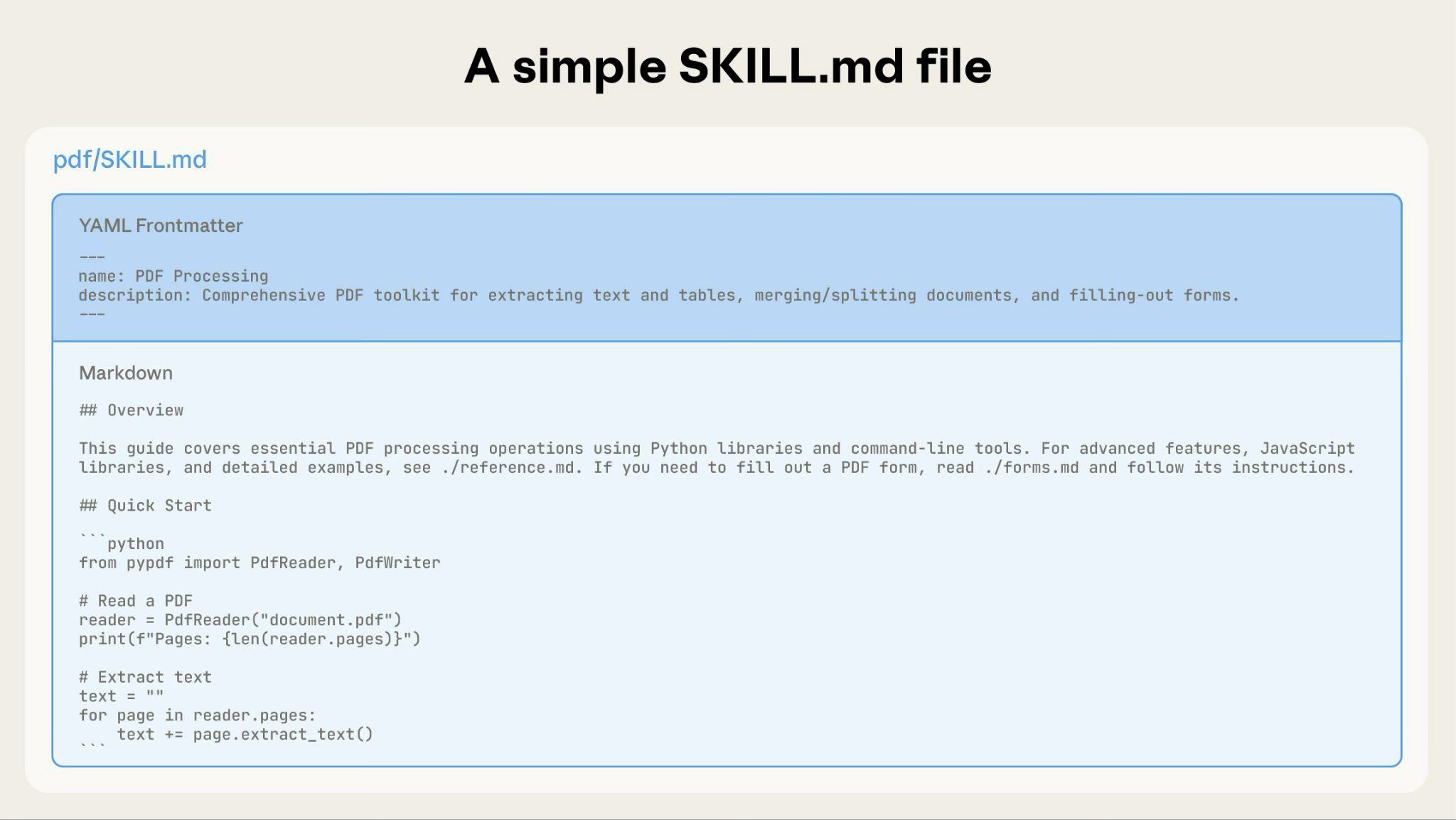
As your Skill grows, you can bundle additional content that Claude loads only when needed:
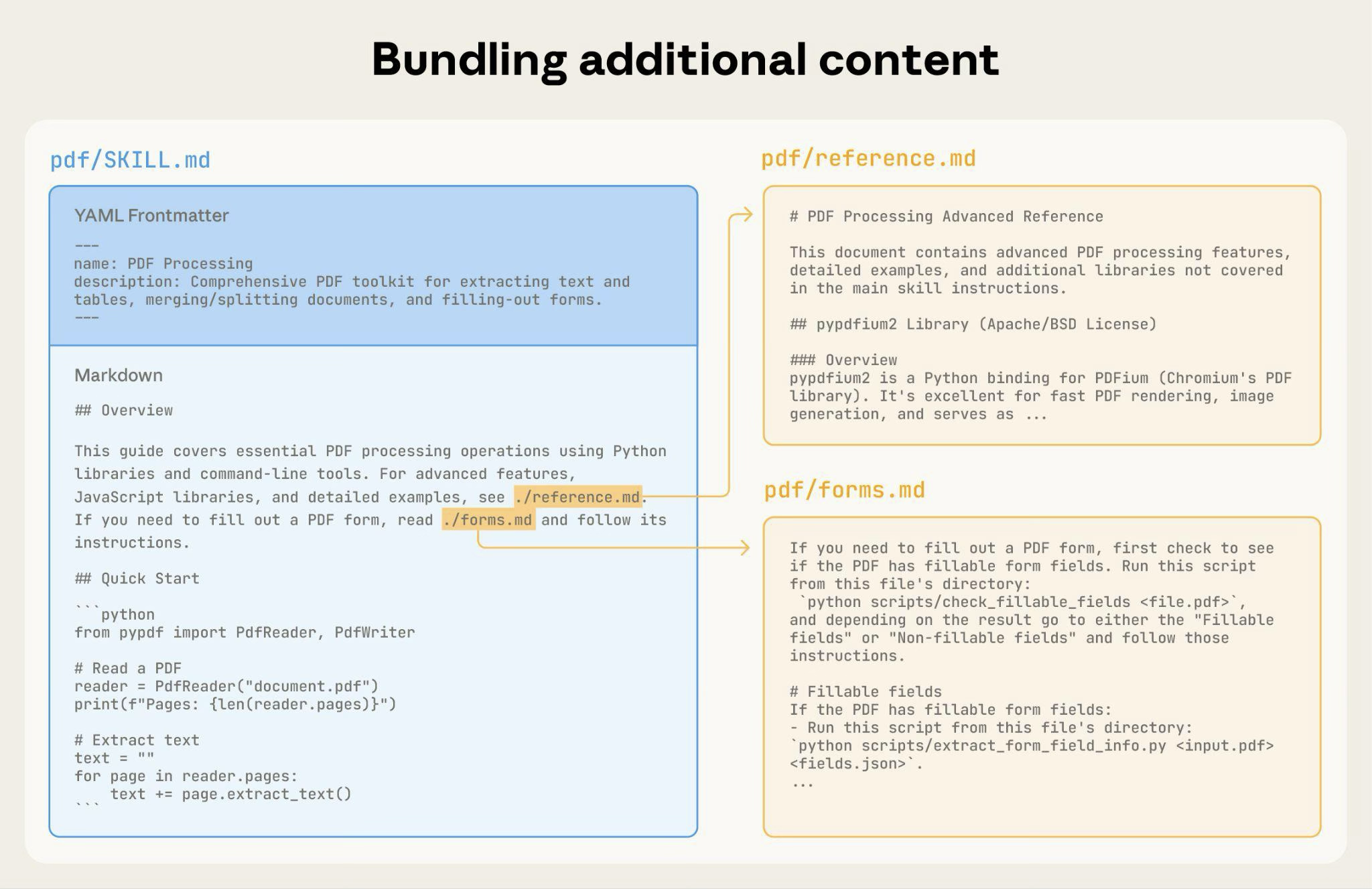
The complete Skill directory structure might look like this:
pdf/SKILL.md: Main instructions (loaded when triggered)FORMS.md: Form-filling guide (loaded as needed)reference.md: API reference (loaded as needed)examples.md: Usage examples (loaded as needed)scripts/analyze_form.py: Utility script (executed, not loaded)fill_form.py: Form filling scriptvalidate.py: Validation script
Pattern 1: High-level guide with references
Claude loads FORMS.md, REFERENCE.md, or EXAMPLES.md only when needed.
Pattern 2: Domain-specific organization
For Skills with multiple domains, organize content by domain to avoid loading irrelevant context. When a user asks about sales metrics, Claude only needs to read sales-related schemas, not finance or marketing data. This keeps token usage low and context focused.
bigquery-skill/SKILL.md(overview and navigation)reference/finance.md(revenue, billing metrics)sales.md(opportunities, pipeline)product.md(API usage, features)marketing.md(campaigns, attribution)
Pattern 3: Conditional details
Show basic content, link to advanced content:
Claude reads REDLINING.md or OOXML.md only when the user needs those features.
Avoid deeply nested references
Claude may partially read files when they're referenced from other referenced files. When encountering nested references, Claude might use commands like head -100 to preview content rather than reading entire files, resulting in incomplete information.
Keep references one level deep from SKILL.md. All reference files should link directly from SKILL.md to ensure Claude reads complete files when needed.
Bad example: Too deep:
Good example: One level deep:
Structure longer reference files with table of contents
For reference files longer than 100 lines, include a table of contents at the top. This ensures Claude can see the full scope of available information even when previewing with partial reads.
Example:
Claude can then read the complete file or jump to specific sections as needed.
For details on how this filesystem-based architecture enables progressive disclosure, see the Runtime environment section later in this guide.
Workflows and feedback loops
Use workflows for complex tasks
Break complex operations into clear, sequential steps. For particularly complex workflows, provide a checklist that Claude can copy into its response and check off as it progresses.
Example 1: Research synthesis workflow (for Skills without code):
This example shows how workflows apply to analysis tasks that don't require code. The checklist pattern works for any complex, multistep process.
Example 2: PDF form filling workflow (for Skills with code):
Clear steps prevent Claude from skipping critical validation. The checklist helps both Claude and you track progress through multistep workflows.
Implement feedback loops
Common pattern: Run validator → fix errors → repeat
This pattern greatly improves output quality.
Example 1: Style guide compliance (for Skills without code):
This shows the validation loop pattern using reference documents instead of scripts. The "validator" is STYLE_GUIDE.md, and Claude performs the check by reading and comparing.
Example 2: Document editing process (for Skills with code):
The validation loop catches errors early.
Content guidelines
Avoid time-sensitive information
Don't include information that will become outdated:
Bad example: Time-sensitive (will become wrong):
Good example (use "old patterns" section):
The old patterns section provides historical context without cluttering the main content.
Use consistent terminology
Choose one term and use it throughout the Skill:
Good - Consistent:
- Always "API endpoint"
- Always "field"
- Always "extract"
Bad - Inconsistent:
- Mix "API endpoint", "URL", "API route", "path"
- Mix "field", "box", "element", "control"
- Mix "extract", "pull", "get", "retrieve"
Consistency helps Claude parse and follow instructions.
Common patterns
Template pattern
Provide templates for output format. Match the level of strictness to your needs.
For strict requirements (such as API responses or data formats):
For flexible guidance (when adaptation is useful):
Examples pattern
For Skills where output quality depends on seeing examples, provide input/output pairs just like in regular prompting:
Examples convey the desired style and level of detail to Claude more clearly than descriptions alone.
Conditional workflow pattern
Guide Claude through decision points:
Evaluation and iteration
Build evaluations first
Create evaluations BEFORE writing extensive documentation. This ensures your Skill solves real problems rather than documenting imagined ones.
Evaluation-driven development:
- Identify gaps: Run Claude on representative tasks without a Skill. Document specific failures or missing context
- Create evaluations: Build three scenarios that test these gaps
- Establish baseline: Measure Claude's performance without the Skill
- Write minimal instructions: Create just enough content to address the gaps and pass evaluations
- Iterate: Execute evaluations, compare against baseline, and refine
This approach ensures you're solving actual problems rather than anticipating requirements that may never materialize.
Evaluation structure:
Develop Skills iteratively with Claude
The most effective Skill development process involves Claude itself. Work with one instance of Claude ("Claude A") to create a Skill that is used by other instances ("Claude B"). Claude A helps you design and refine instructions, while Claude B tests them in real tasks. This works because Claude models understand both how to write effective agent instructions and what information agents need.
Creating a new Skill:
- Complete a task without a Skill: Work through a problem with Claude A using normal prompting. As you work, you'll naturally provide context, explain preferences, and share procedural knowledge. Notice what information you repeatedly provide.
- Identify the reusable pattern: After completing the task, identify what context you provided that would be useful for similar future tasks. Example: If you worked through a BigQuery analysis, you might have provided table names, field definitions, filtering rules (such as "always exclude test accounts"), and common query patterns.
- Ask Claude A to create a Skill: "Create a Skill that captures this BigQuery analysis pattern we just used. Include the table schemas, naming conventions, and the rule about filtering test accounts."
- Review for conciseness: Check that Claude A hasn't added unnecessary explanations. Ask: "Remove the explanation about what win rate means - Claude already knows that."
- Improve information architecture: Ask Claude A to organize the content more effectively. For example: "Organize this so the table schema is in a separate reference file. We might add more tables later."
- Test on similar tasks: Use the Skill with Claude B (a fresh instance with the Skill loaded) on related use cases. Observe whether Claude B finds the right information, applies rules correctly, and handles the task successfully.
- Iterate based on observation: If Claude B struggles or misses something, return to Claude A with specifics: "When Claude used this Skill, it forgot to filter by date for Q4. Should we add a section about date filtering patterns?"
Iterating on existing Skills:
The same hierarchical pattern continues when improving Skills. You alternate between:
- Working with Claude A (the expert who helps refine the Skill)
- Testing with Claude B (the agent using the Skill to perform real work)
- Observing Claude B's behavior and bringing insights back to Claude A
- Use the Skill in real workflows: Give Claude B (with the Skill loaded) actual tasks, not test scenarios
- Observe Claude B's behavior: Note where it struggles, succeeds, or makes unexpected choices Example observation: "When I asked Claude B for a regional sales report, it wrote the query but forgot to filter out test accounts, even though the Skill mentions this rule."
- Return to Claude A for improvements: Share the current SKILL.md and describe what you observed. Ask: "I noticed Claude B forgot to filter test accounts when I asked for a regional report. The Skill mentions filtering, but maybe it's not prominent enough?"
- Review Claude A's suggestions: Claude A might suggest reorganizing to make rules more prominent, using stronger language such as "MUST filter" instead of "always filter," or restructuring the workflow section.
- Apply and test changes: Update the Skill with Claude A's refinements, then test again with Claude B on similar requests
- Repeat based on usage: Continue this observe-refine-test cycle as you encounter new scenarios. Each iteration improves the Skill based on real agent behavior, not assumptions.
Gathering team feedback:
- Share Skills with teammates and observe their usage
- Ask: Does the Skill activate when expected? Are instructions clear? What's missing?
- Incorporate feedback to address gaps in your own usage patterns
Why this approach works: Claude A understands agent needs, you provide domain expertise, Claude B reveals gaps through real usage, and iterative refinement improves Skills based on observed behavior rather than assumptions.
Observe how Claude navigates Skills
As you iterate on Skills, pay attention to how Claude actually uses them in practice. Watch for:
- Unexpected exploration paths: Does Claude read files in an order you didn't anticipate? This might indicate your structure isn't as intuitive as you thought
- Missed connections: Does Claude fail to follow references to important files? Your links might need to be more explicit or prominent
- Overreliance on certain sections: If Claude repeatedly reads the same file, consider whether that content should be in the main SKILL.md instead
- Ignored content: If Claude never accesses a bundled file, it might be unnecessary or poorly signaled in the main instructions
Iterate based on these observations rather than assumptions. The 'name' and 'description' in your Skill's metadata are particularly critical. Claude uses these when determining whether to trigger the Skill in response to the current task. Make sure they clearly describe what the Skill does and when it should be used.
Anti-patterns to avoid
Avoid Windows-style paths
Always use forward slashes in file paths, even on Windows:
- ✓ Good:
scripts/helper.py,reference/guide.md - ✗ Avoid:
scripts\helper.py,reference\guide.md
Unix-style paths work across all platforms, while Windows-style paths cause errors on Unix systems.
Avoid offering too many options
Don't present multiple approaches unless necessary:
Advanced: Skills with executable code
The following sections focus on Skills that include executable scripts. If your Skill uses only markdown instructions, skip to Checklist for effective Skills.
Solve, don't defer
When writing scripts for Skills, handle error conditions rather than deferring to Claude.
Good example: Handle errors explicitly:
Bad example: Defer to Claude:
Configuration parameters should also be justified and documented to avoid "voodoo constants" (Ousterhout's law). If you don't know the right value, how will Claude determine it?
Good example: Self-documenting:
Bad example: Magic numbers:
Provide utility scripts
Even if Claude could write a script, pre-made scripts offer advantages:
Benefits of utility scripts:
- More reliable than generated code
- Save tokens (no need to include code in context)
- Save time (no code generation required)
- Ensure consistency across uses
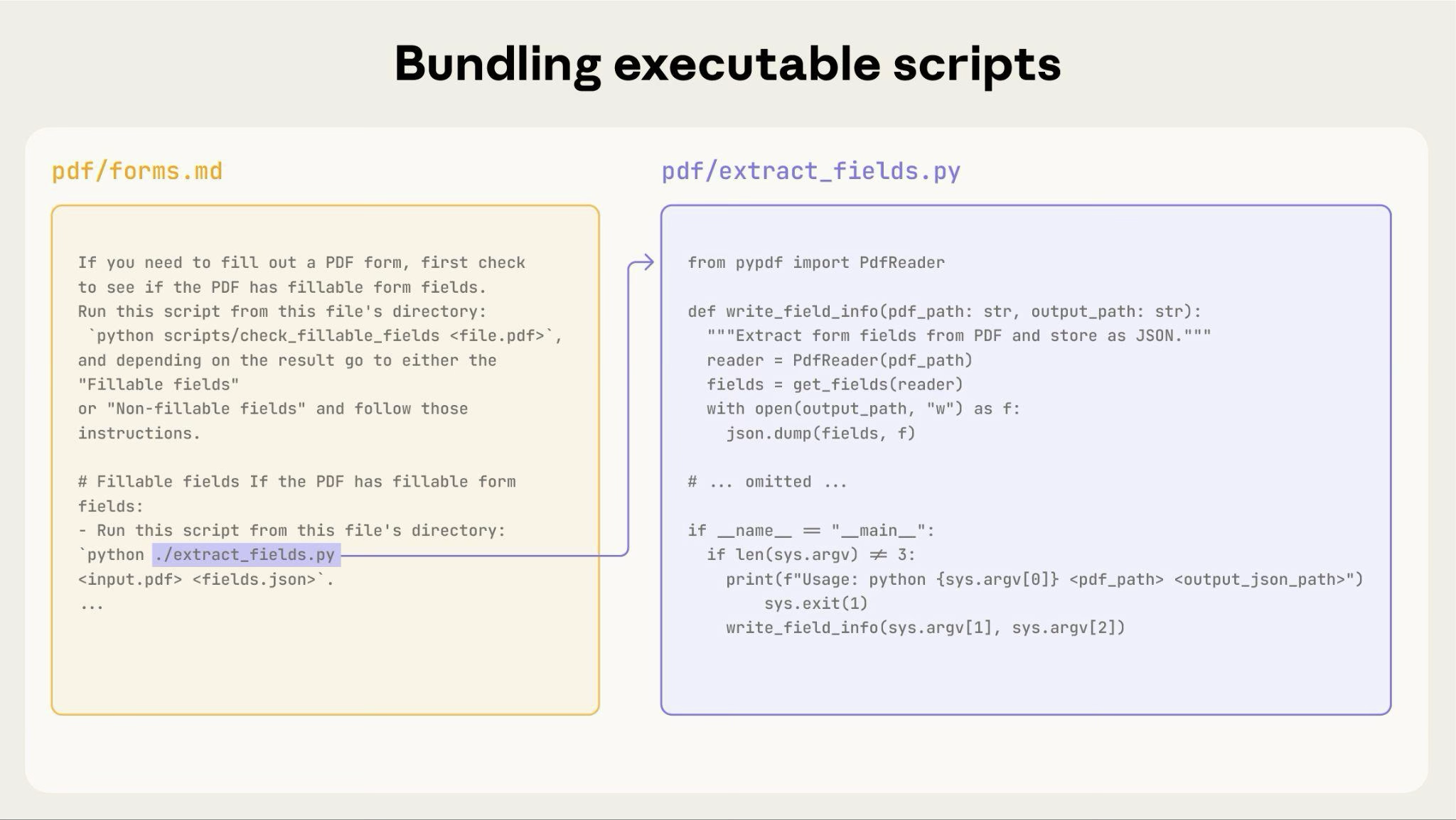
The preceding diagram shows how executable scripts work alongside instruction files. The instruction file (forms.md) references the script, and Claude can execute it without loading its contents into context.
Important distinction: Make clear in your instructions whether Claude should:
- Execute the script (most common): "Run
analyze_form.pyto extract fields" - Read it as reference (for complex logic): "See
analyze_form.pyfor the field extraction algorithm"
For most utility scripts, execution is preferred because it's more reliable and efficient. See the following Runtime environment section for details on how script execution works.
Example:
Use visual analysis
When inputs can be rendered as images, have Claude analyze them:
Claude's vision capabilities help analyze layouts and structures.
Create verifiable intermediate outputs
When Claude performs complex, open-ended tasks, it can make mistakes. The "plan-validate-execute" pattern catches errors early by having Claude first create a plan in a structured format, then validate that plan with a script before executing it.
Example: Imagine asking Claude to update 50 form fields in a PDF based on a spreadsheet. Without validation, Claude might reference non-existent fields, create conflicting values, miss required fields, or apply updates incorrectly.
Solution: Use the workflow pattern shown earlier (PDF form filling), but add an intermediate changes.json file that gets validated before applying changes. The workflow becomes: analyze → create plan file → validate plan → execute → verify.
Why this pattern works:
- Catches errors early: Validation finds problems before changes are applied
- Machine-verifiable: Scripts provide objective verification
- Reversible planning: Claude can iterate on the plan without touching originals
- Clear debugging: Error messages point to specific problems
When to use: Batch operations, destructive changes, complex validation rules, high-stakes operations.
Implementation tip: Make validation scripts verbose with specific error messages such as "Field 'signature_date' not found. Available fields: customer_name, order_total, signature_date_signed" to help Claude fix issues.
Package dependencies
Skills run in the code execution environment with platform-specific limitations:
- claude.ai: Can install packages from npm and PyPI and pull from GitHub repositories
- Claude API: Has no network access and no runtime package installation
List required packages in your SKILL.md and verify they're available in the Code execution tool documentation.
Runtime environment
Skills run in a code execution environment with filesystem access, bash commands, and code execution capabilities. For the conceptual explanation of this architecture, see The Skills architecture in the overview.
How this affects your authoring:
How Claude accesses Skills:
- Metadata pre-loaded: At startup, the name and description from all Skills' YAML frontmatter are loaded into the system prompt
- Files read on-demand: Claude uses bash Read tools to access SKILL.md and other files from the filesystem when needed
- Scripts executed efficiently: Utility scripts can be executed through bash without loading their full contents into context. Only the script's output consumes tokens
- No context penalty for large files: Reference files, data, or documentation don't consume context tokens until actually read
- File paths matter: Claude navigates your skill directory like a filesystem. Use forward slashes (
reference/guide.md), not backslashes - Name files descriptively: Use names that indicate content:
form_validation_rules.md, notdoc2.md - Organize for discovery: Structure directories by domain or feature Good:
reference/finance.md,reference/sales.mdBad:docs/file1.md,docs/file2.md - Bundle comprehensive resources: Include complete API docs, extensive examples, large datasets; no context penalty until accessed
- Prefer scripts for deterministic operations: Write
validate_form.pyrather than asking Claude to generate validation code - Make execution intent clear: "Run
analyze_form.pyto extract fields" (execute) "Seeanalyze_form.pyfor the extraction algorithm" (read as reference) - Test file access patterns: Verify Claude can navigate your directory structure by testing with real requests
Example:
bigquery-skill/SKILL.md(overview, points to reference files)reference/finance.md(revenue metrics)sales.md(pipeline data)product.md(usage analytics)
When the user asks about revenue, Claude reads SKILL.md, sees the reference to reference/finance.md, and calls bash to read just that file. The sales.md and product.md files remain on the filesystem, consuming zero context tokens until needed. This filesystem-based model is what enables progressive disclosure. Claude can navigate and selectively load exactly what each task requires.
For complete details on the technical architecture, see How Skills work in the Skills overview.
MCP tool references
If your Skill uses MCP (Model Context Protocol) tools, always use fully qualified tool names to avoid "tool not found" errors.
Format: ServerName:tool_name
Example:
Where:
BigQueryandGitHubare MCP server namesbigquery_schemaandcreate_issueare the tool names within those servers
Without the server prefix, Claude may fail to locate the tool, especially when multiple MCP servers are available.
Avoid assuming tools are installed
Don't assume packages are available:
Technical notes
YAML frontmatter requirements
The SKILL.md frontmatter requires name and description fields with specific validation rules:
name: Maximum 64 characters, lowercase letters/numbers/hyphens only, no XML tags, no reserved wordsdescription: Maximum 1,024 characters, non-empty, no XML tags
See the Skills overview for complete structure details.
Token budgets
Keep SKILL.md body under 500 lines for optimal performance. If your content exceeds this, split it into separate files using the progressive disclosure patterns described earlier. For architectural details, see the Skills overview.
Checklist for effective Skills
Before sharing a Skill, verify:
Core quality
- Description is specific and includes key terms
- Description includes both what the Skill does and when to use it
- SKILL.md body is under 500 lines
- Additional details are in separate files (if needed)
- No time-sensitive information (or in "old patterns" section)
- Consistent terminology throughout
- Examples are concrete, not abstract
- File references are one level deep
- Progressive disclosure used appropriately
- Workflows have clear steps
Code and scripts
- Scripts solve problems rather than defer to Claude
- Error handling is explicit and helpful
- No "voodoo constants" (all values justified)
- Required packages listed in instructions and verified as available
- Scripts have clear documentation
- No Windows-style paths (all forward slashes)
- Validation/verification steps for critical operations
- Feedback loops included for quality-critical tasks
Testing
- At least three evaluations created
- Tested with Haiku, Sonnet, and Opus
- Tested with real usage scenarios
- Team feedback incorporated (if applicable)
Next steps
Create your first Skill
Create and manage Skills in Claude Code
Upload and use Skills programmatically