AI 花的钱值不值:OpenAI 给企业的一套算账方法
OpenAI 给企业管理员一套从使用量走到业务价值的分析方法:先看钱花在哪些任务、模型和工具上,再和业务负责人用交付、质量与收入指标验证结果。
ChatGPT 和 Codex 在公司里铺开以后,团队负责人、IT 管理员和业务主管迟早会被财务和管理层问到同一个问题:这笔 AI 预算花得值不值?
开了多少账号、用了多少额度,只能说明工具有人在用,回答不了这些投入有没有换来交付变快、质量变好或者收入增长。OpenAI 给出了一套分析方法:先用 ChatGPT Admin Console(管理后台)看清团队在 ChatGPT Work 和 Codex 上做了什么、花在哪里,再和业务负责人一起把这些数据接到交付、质量和收入等业务结果上。文中的后台截图与销售 ROI 算例使用演示数据,作用是说明分析步骤。
管理后台主要提供什么
- 统一查看使用量:按团队或个人比较 ChatGPT Work 与 Codex 的活跃人数、积分和 token 用量,找出采用不足或成本集中的区域。
- 把花费映射到具体任务:Insights 根据消息样本识别使用场景与任务,让管理员看到积分主要花在功能开发、代码维护或客户调研等哪类工作上。
- 拆解模型与工具用法:任务详情会显示模型、推理档位、速度模式、插件和技能的使用分布,帮助团队调整配置或安排培训。
- 观察 Codex 参与的软件交付:Outcomes 统计合并提交和代码行中有 Codex 参与的比例,并与代码审查活动一起展示。
- 通过插件和 API 生成报告:管理员可以用对话分析团队数据、生成管理层报告,也能把数据接入自己的业务看板。
为什么光看账单和活跃人数算不清回报
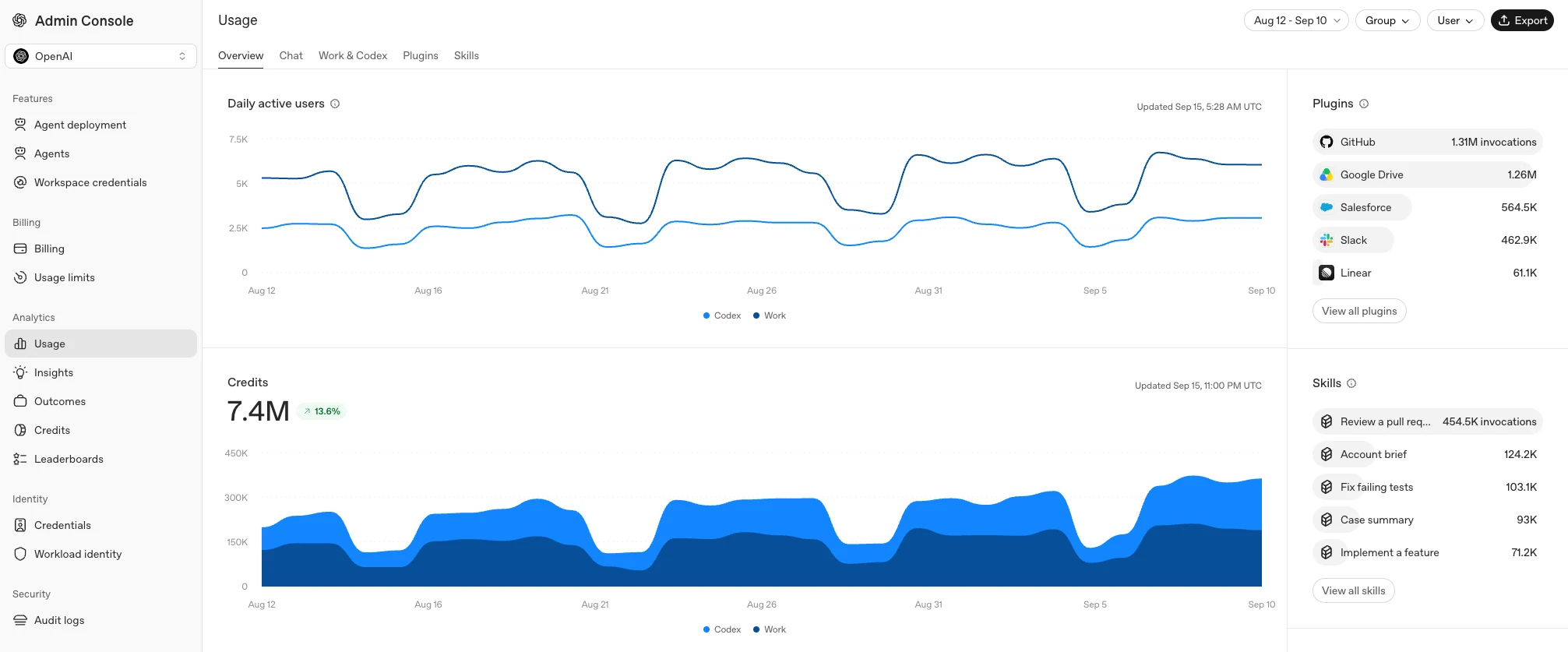
管理员最先看到的是两类数字:有多少人在用,花掉了多少。管理后台里的使用量(Usage)看板把 ChatGPT Work 和 Codex 的活跃用户数、积分(credits)和 token 用量放在一起。积分是后台统计用量和花费的单位,后面的任务看板会把积分折算成预估美元金额。
这张看板能按群组或个人筛选。某个团队的使用率一直很低,管理员就有了找团队负责人聊一聊的理由:一起看看最初设计的工作流顺不顺、要不要补培训。管理员也可以据此决定把支持力量放在哪、审查哪些成本、怎么评估某个团队追加额度的申请。

但使用量看板只回答「谁在用、花在哪」,回答不了「花出去的换回了什么」。要判断花费是否合理,得先看清员工具体在用 AI 做什么工作。
看清积分花在什么工作上
管理后台的 Insights 模块里有一个任务分类器(task classifier):它从员工发出的消息里抽取一部分样本,按「使用场景(use case)」和「具体任务(task)」归类。比如软件工程这个场景下有功能开发和代码维护,销售与营收场景下有客户调研与规划。
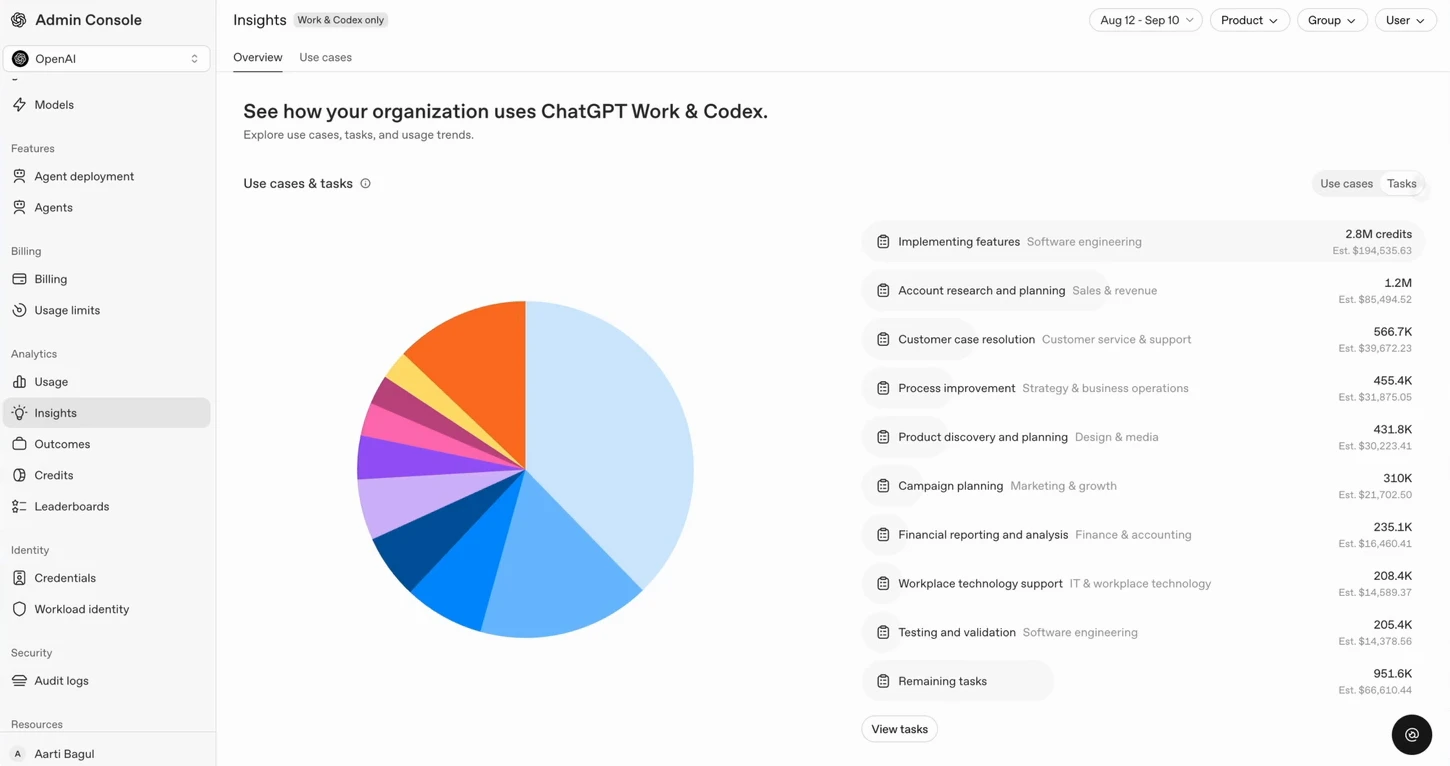
Insights 的概览页用一张图展示积分在各项任务之间怎么分布。演示数据里,功能实现(Implementing features)花掉 2.8M 积分,预估约 194,535.63 美元;客户调研与规划(Account research and planning)花掉 1.2M 积分,预估约 85,494.52 美元。账单上的金额由此能对应到具体的工作类型。

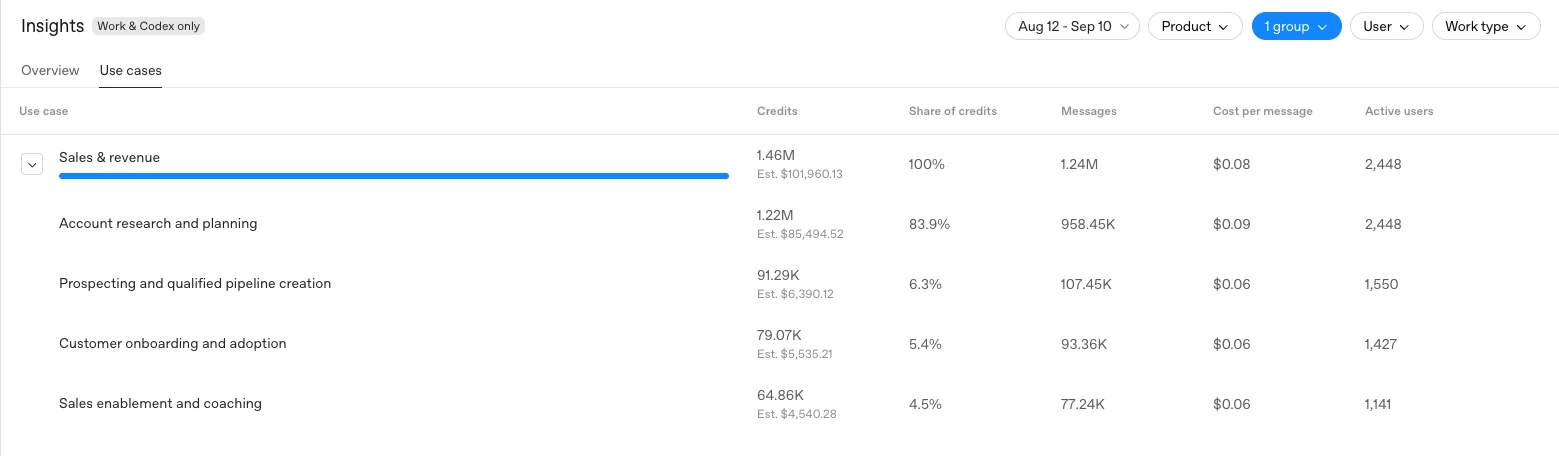
想看得更细,可以切到使用场景(Use cases)明细表,按群组筛选。表里列出每项任务的积分、占该场景积分的比例、消息数、单条消息成本和活跃用户数。
以演示数据里的销售团队为例:销售与营收场景共花掉 1.46M 积分,其中客户调研与规划一项就是 1.22M,占 83.9%,对应 958.45K 条消息、单条消息成本 0.09 美元、2,448 名活跃用户。这是销售团队最大的一块积分开销,也就给了管理员和销售负责人一个具体的讨论起点:AI 到底改变了销售准备客户资料的方式没有。

这些分类来自消息抽样,公开指南没有给出抽样比例与详细分类规则。因此它更适合用来定位值得继续调查的工作流,不适合作为精确的财务或合规审计口径。
模型设置和插件:团队需要调整还是需要培训
看清主要任务之后,下一个问题是:这项任务现在的用法合不合适。
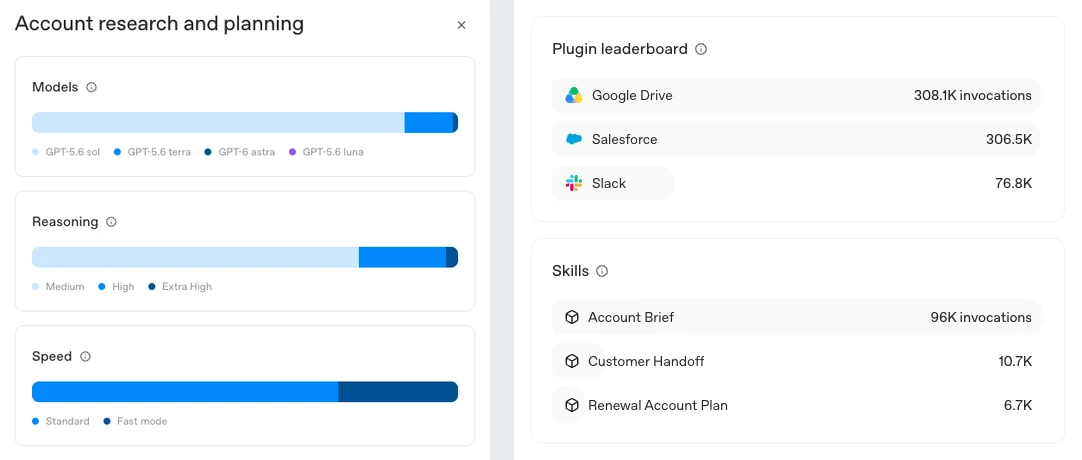
打开某项任务的详情,能看到 Models(用了哪些模型)、Reasoning(推理档位,如 Medium、High、Extra High)和 Speed(Standard 或 Fast mode)三组拆分,每组显示各个设置占这项任务积分的比例。管理员可以据此判断设置和工作是否匹配,把培训重点放在「怎么选模型」上。比如写一份例行简报,也许值得试一试更快或更便宜的设置,同时比较产出质量,以及人工审阅、修改所花的时间。
同一个详情页还有插件排行榜(Plugin leaderboard)和技能(Skills)调用情况,能看出这项任务靠哪些工具完成。插件把 ChatGPT 连到 Google Drive、Salesforce、Slack 这类外部系统;技能是可以反复调用的固定做法,演示数据里有 Account Brief(客户简报)、Customer Handoff(客户交接)和 Renewal Account Plan(续约客户计划)。

读这两份清单有两个常见信号。一项任务明明用得上某个插件,调用却很少,可能是员工没有访问权限,或者不会用,需要管理员跟进;某个技能调用得很频繁,就需要指定明确的负责人,并定期更新。
Datadog 的 AI 产品经理 Bharadwaj Tanikella 说,OpenAI 的这些分析帮他们了解团队怎么用 AI,为后续制定指引和政策打了基础。Datadog 已经在自家监控 AI Agent 的产品 Agent Console 里用上了 OpenAI 的任务分类,向客户展示他们的 Agent 在做哪类工作;他认为直接从 OpenAI 拿到这份数据,随着客户用 AI 越来越多,能更可靠地提供这类洞察。
研发团队:Codex 贡献和工程结果怎么对上
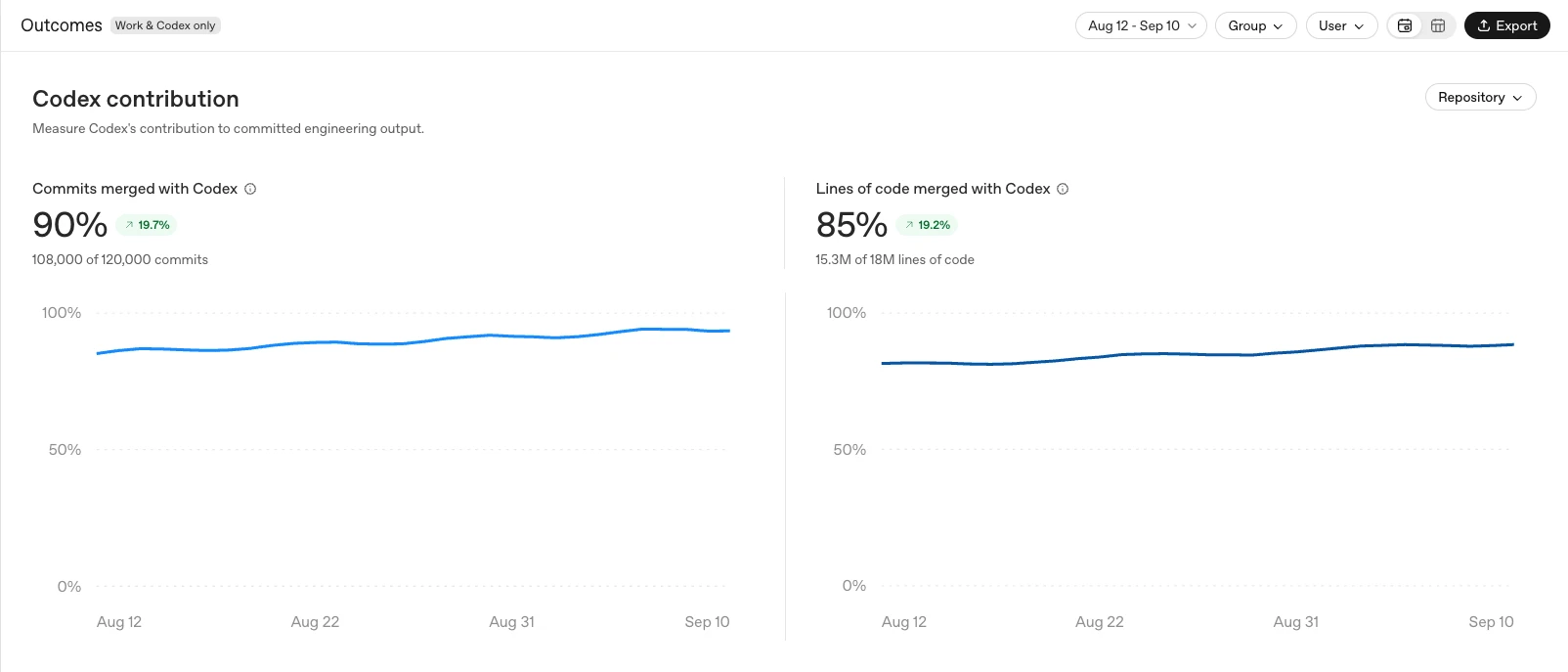
成果(Outcomes)视图面向工程团队,统计合并进代码库的提交(merged commits)和代码行里,有 Codex 参与贡献的比例,同时列出代码审查活动。趋势可以按群组、用户或代码仓库筛选,帮管理员和工程负责人判断工具普及情况,决定该给哪些团队扩大权限或补支持。
演示数据里,有 Codex 参与的合并提交占 90%(12 万次提交中的 10.8 万次),代码行占 85%(1,800 万行中的 1,530 万行),两条曲线在一个月里小幅上升。

合并代码里有 Codex 的份儿,不等于团队交付效率提高了。如果 Codex 贡献的合并代码占比在上升,工程负责人要把这条趋势和审查耗时、缺陷数、返工量放在一起看。代码写得更快,但审查拖长、缺陷增多、返工变多,整体交付未必变快。
后台没有提供「有 Codex 参与贡献」的详细认定规则。团队使用这个指标时,应先确定内部口径,再结合代码库和发布流程里的实际数据判断。
用 Admin 插件和 API 做分析、出报告
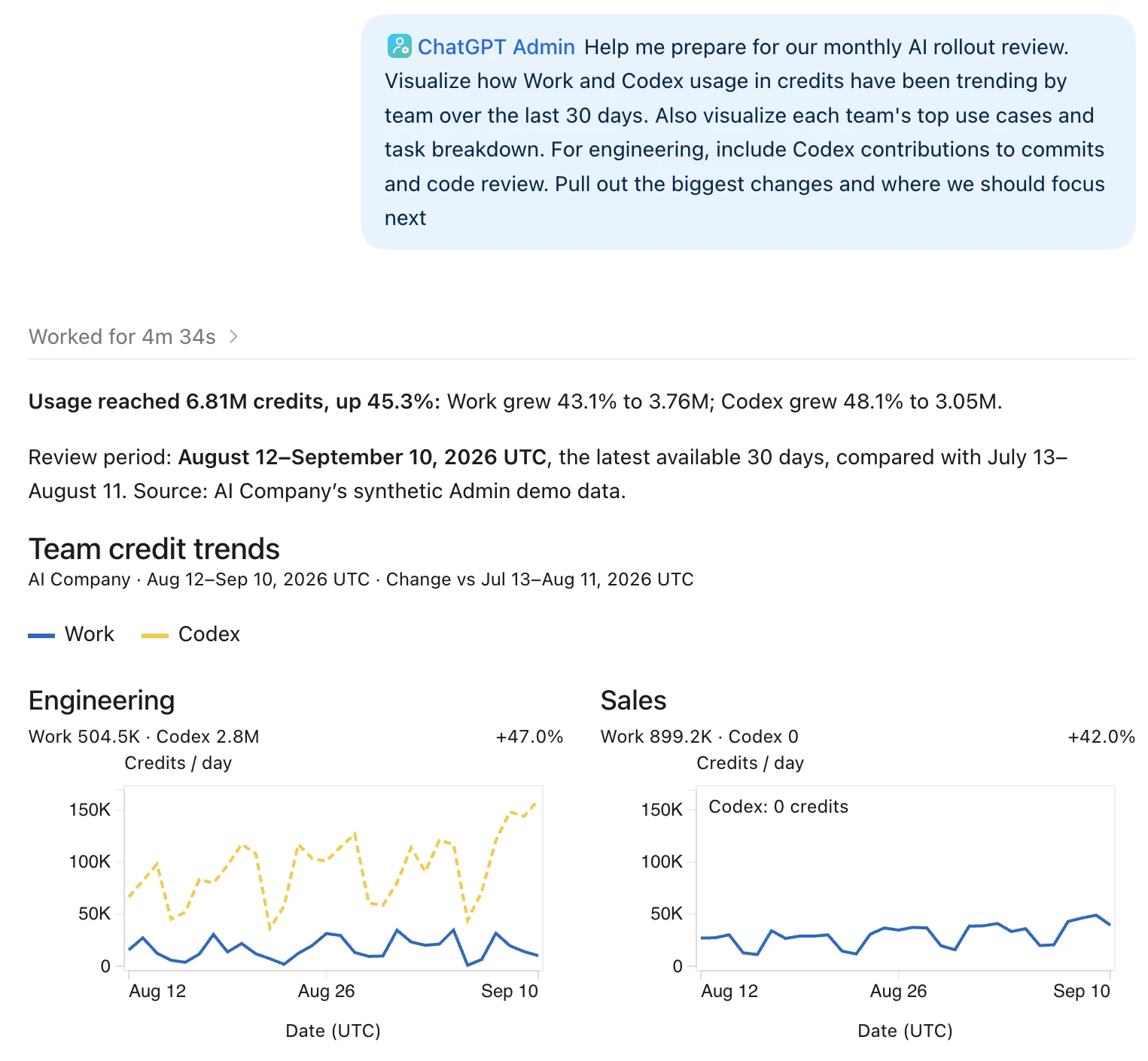
ChatGPT Work 里的 Admin 插件让管理员用对话的方式比较各团队的使用情况、花费和任务,把发现整理成报告,供预算和推广决策使用。它还能直接产出成品,比如一份带图表、关键发现和下一步建议的管理层汇报材料,发给跨部门的同事。
演示对话里,管理员请插件准备月度 AI 推广复盘。插件给出的结论是:最近 30 天积分用量 6.81M,比前 30 天增长 45.3%;其中 Work 增长 43.1% 到 3.76M,Codex 增长 48.1% 到 3.05M。分团队的图里,工程团队的积分主要花在 Codex 上(2.8M),销售团队只用 Work(899.2K),Codex 为 0。

Admin API 则让团队把这些报告自动化,放进自己的看板,和业务系统的数据合在一起看。比如客服团队的看板,可以把积分用量和工单解决时间并排显示。
从后台数据走到业务价值
用量和任务数据只是起点。要判断价值,管理员需要和业务负责人一起查。业务负责人掌握后台看不到的背景:工作流具体变了什么,结果有没有变好,这种改善值多少钱。两边合起来,才能把产品里的使用行为,和交付时间、质量、盈利这类指标联系起来。
以销售团队为例,这条链可以拆成下面几步。前两步主要靠管理后台,后面几步要靠销售负责人和业务系统里的数据:
- 后台发现线索:任务分类器显示,客户调研在某个销售群组里很常见。
- 管理员调整用法:检查模型设置是否适合这项任务;CRM 插件用得少的地方补培训;分享一个技能,让大家做出来的客户计划格式一致。
- 和基线比:销售负责人把准备时间和客户计划的质量,与团队用 AI 之前的水平(基线)对比。
- 追踪省下的时间去了哪:如果确实省了时间,看其中多少变成了和客户的沟通。
- 追踪沟通变成了什么:这些沟通里有多少变成了合格商机(经过销售判断、值得正式跟进的机会),又有多少商机最终成交。
- 算钱:看这部分生意带来的收入和边际贡献(收入减去随业务量变化的成本后剩下的部分),判断多出来的人力有没有产生财务上的回报。
评估一条工作流的价值,可以从五个问题开始:
- 想改善什么? 选一个对团队真正重要的结果,比如准备得更快、工作质量更高、成本更低,或者卖得更多。
- 现在的流程是什么样? 定一个起点:这项任务多久做一次、每次花多长时间、什么样的结果算好。没有这个基线,后面说「提效了」就没有参照。
- 用了 AI 之后变了什么? 在一段固定时间内比较结果。把审阅和修改的时间也算进去,确保做得更快的同时,结果仍然达到团队的质量标准。
- 这让团队能多做什么? 省下的时间可能意味着能多跟客户聊几次,质量更好可能意味着返工更少。和团队聊一聊,弄清这些改善在哪里最要紧。
- 收益抵得过投入吗? 把团队得到的收益,和花在 AI、配置以及持续支持上的钱放在一起比。结果能帮你决定哪些工作流该扩大,哪些团队需要更多帮助。
一个销售调研的年度 ROI 算例
设想一支销售团队,每人每周准备 2 份客户简报。每份简报要整理客户的历史往来、行业研究,并形成下一次沟通要谈的观点。
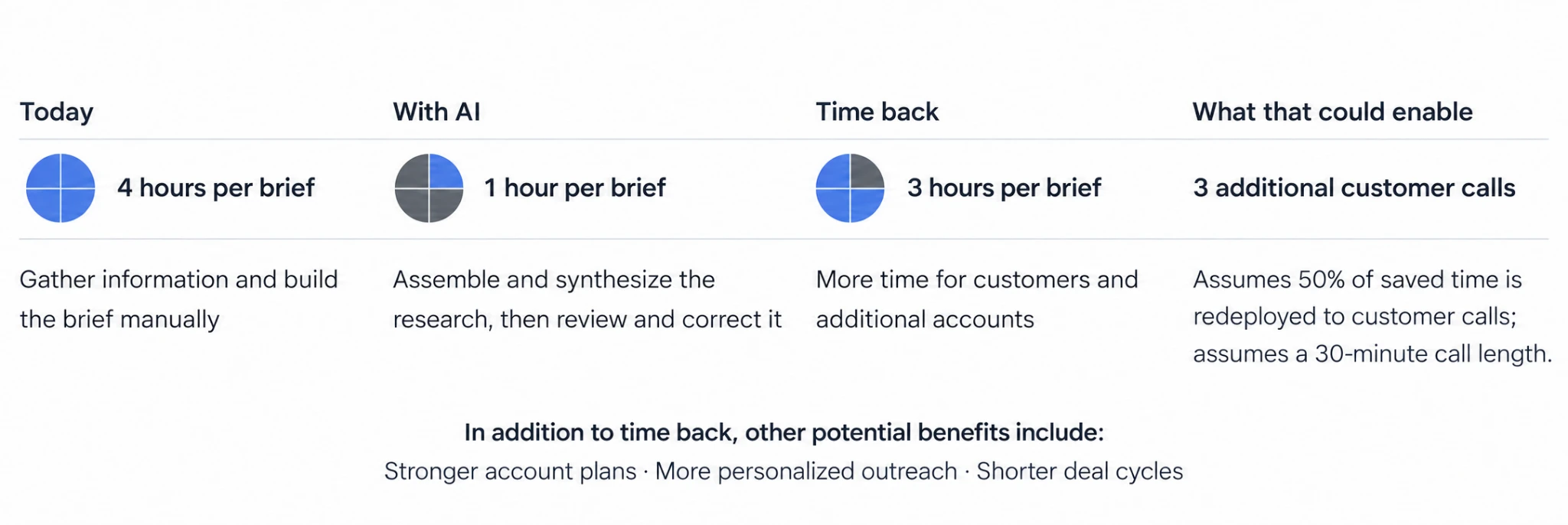
手工准备一份简报要 4 小时。用 AI 之后,由 AI 整理和归纳资料,人再审阅、修改,全部加起来 1 小时,每份净省 3 小时。如果省下的时间有一半用在打客户电话上,按每通电话 30 分钟算,每份简报省出的时间够多打 3 通电话。除了省时间,还可能带来几项好处:客户计划更扎实,触达客户的方式更个性化,成交周期更短。

这些变化加起来值多少,分三步算:
一年省下多少工时。 团队 20 人,一年按 46 个工作周算:
20 人 × 每周 2 份 × 每份省 3 小时 × 46 周 = 5,520 小时
这些时间折合多少产能价值。 假设团队把其中 50% 的时间用在有产出的工作上,比如联系新的潜在客户、跟进商机、多陪客户,每小时按 75 美元的全口径人力成本计价。全口径人力成本(fully loaded cost)指公司为一名员工付出的全部成本,工资之外还包括社保、福利和各项分摊费用。
5,520 小时 × 50% × 75 美元 = 207,000 美元
和第一年的投入比。 假设第一年在 AI、配置、培训和持续支持上共花 60,000 美元:
(207,000 美元 − 60,000 美元) ÷ 60,000 美元 = 245%,这是一个示意 ROI。
以上所有数字都是假设。这个 ROI 只反映估算出来的产能价值,也就是省下的工时按人力成本折算的钱,不是已经到账的收入;它也没有计入赢单率提高、单笔订单变大等其他销售结果可能带来的收益。一条工作流的价值也不只在提效:在销售场景里,更好的客户调研和团队对客户的共同理解,能支撑更深入的沟通、更牢固的客户关系和新的商机,团队可以接着衡量这些改善有没有带来成交周期缩短、赢单率提高这样的结果。
三道公式里,每份简报净省几小时、省下的时间有多少真正用在有产出的工作上、第一年花多少钱,这几项最容易因团队而异。下面的计算器沿用同样的公式,可以换成自己团队的假设看结果怎么变。
交互 · 按 OpenAI 示例公式计算
换成你们团队的假设,这笔账还剩多少
每周 2 份简报、一年 46 个工作周、全口径时薪 75 美元沿用 OpenAI 示例。净省时间已扣掉审阅和修改,成本包括 AI、配置、培训和持续支持。
一年省下的工时
5,520 小时
20 人 × 2 份/周 × 3 小时 × 46 周
折算的产能价值
$207,000
5,520 小时 × 50% × $75
示意 ROI
245%
($207,000 − $60,000) ÷ $60,000
按这组假设,省下的时间里只要有约 15% 真正变成有产出的工作,第一年就能回本。
所有数字都是假设。这个算法只算「省下的时间值多少钱」,不含赢单率、客单价变化等销售结果;回本线 = 第一年成本 ÷(年省工时 × $75),由原文公式推出。
已经在用的企业报告了哪些结果
三家客户的做法和数字如下,细节来自 OpenAI 各自的客户案例页,属于企业自报结果:
1Password(用 Codex 开发软件):用 Codex 构建、审查和测试软件,覆盖从规划、技术设计、跨技术栈开发、PR 审查、测试到生产问题排查的环节,在保持严格安全政策的同时更快交付功能和内部工具。它估算 Codex 带来 553% 的 ROI,以及每年约 80 万美元的工程产能价值。案例页给出的算法是:50 名持续使用 Codex 的开发者 × 每人每年 25 万美元全口径成本 × 实测生产力提升 20.9% × Codex 贡献其中 40%(方向性估算)× 75% 的产能实际转化率 = 783,750 美元。案例页还提到,PR 周期中位数缩短 10.9%,一个涉及 10 多个微服务的缺陷,排查时间从约 2 小时降到 5 到 20 分钟。
ATV Big Air Tour(两人团队用 ChatGPT Work 做运营):这家全美巡演的特技表演公司,管理团队只有两个人。他们用 ChatGPT Work 检查各渠道发布的活动信息、规划商品库存、提升网站在 AI 搜索里的可见度。每周核查活动信息的时间从约 8 小时降到 1 小时,商品盘点和补货从两三天降到两三个小时。
Playco(通过 API 用 GPT-6 Astra 做游戏原型):Playco 通过 OpenAI 的 API 使用 GPT-6 Astra 构建和测试可玩的游戏原型。团队从同一个灰盒原型(只用简单几何体搭的、还没加主题美术的基础版本)出发,做出三个不同主题的原型;和上一代模型相比,需要人工修复的次数少了 50%,开发者能试玩和比较更多想法。
怎么开始
起步可以只做三件事:
- 在管理后台打开 Insights,选一项常见、并且支撑某个业务重点的任务。
- 和这项业务的负责人一起过一遍,商定基线和要衡量的结果,定好复盘日期。
- 到了复盘日,根据结果决定:扩大这条工作流,改进团队的用法,还是换一种做法试试。
数据隐私方面,OpenAI 表示默认不会用组织的业务数据训练模型。
这套方法里的分工是:管理后台能告诉你钱花在哪些任务上、用法是否合适、Codex 在代码里占多大份额;至于这些变化有没有变成更快的交付、更多的成交和利润,要靠业务负责人定基线、看业务系统里的数据来回答。
AI 花的钱值不值:OpenAI 给企业的一套算账方法
ChatGPT 和 Codex 在公司里铺开以后,团队负责人、IT 管理员和业务主管迟早会被财务和管理层问到同一个问题:这笔 AI 预算花得值不值?
开了多少账号、用了多少额度,只能说明工具有人在用,回答不了这些投入有没有换来交付变快、质量变好或者收入增长。管理员最先看到的是使用量(Usage)看板,把活跃用户数、积分(credits)和 token 用量放在一起。但总账数据存在根本盲区:它只反映资源的消耗规模,却不能作为收益凭证。
但使用量看板只回答「谁在用、花在哪」,回答不了「花出去的换回了什么」。要判断花费是否合理,得先看清员工具体在用 AI 做什么工作。
管理后台的 Insights 模块引入了任务分类器(task classifier):它对员工发出的消息进行抽样,把积分归类到「使用场景(use case)」与「具体任务(task)」。账单上的抽象扣费,由此对应到具体工作职责中(以下均为演示数据):
以销售团队为例,客户调研占用了 83.9% 的积分、95.8 万条消息与 2,448 名用户,单条消息成本 0.09 美元。这给了管理员和销售负责人一个具体的讨论起点:AI 到底改变了销售准备客户资料的方式没有?同时,详情页还能拆解模型推理档位(Reasoning)与插件调用,例如用得上的 CRM 插件调用很少,可能是没有权限或不会用,需要跟进培训。
用量和任务数据只是起点。要判断价值,管理员需要和业务负责人一起查。业务负责人掌握后台看不到的背景:工作流具体变了什么,结果有没有变好,这种改善值多少钱。两边合起来,才能把产品里的使用行为,和交付时间、质量、盈利这类指标联系起来。
管理后台能告诉你钱花在哪些任务上、用法是否合适;至于这些变化有没有变成更快的交付、更多的成交和利润,必须靠业务负责人结合业务系统数据共同闭环:
为了让这套算账逻辑具备可落地的财务依据,OpenAI 提供了一套销售客户调研的年度 ROI 递进算例。设想 20 人的销售团队,每人每周写 2 份简报:手工需要 4 小时,使用 AI 辅助后人机协作只需 1 小时,每份净省 3 小时:
这个 ROI 只反映估算出来的产能价值,也就是省下的工时按人力成本折算的钱,不是已经到账的收入;它也没有计入赢单率提高、单笔订单变大等其他销售结果可能带来的收益。
在工程研发领域,管理后台提供了面向 Codex 的成果(Outcomes)看板,例如有 Codex 参与的提交占 90%、代码行占 85%(演示数据)。但研发主管必须时刻防范“虚假繁荣”:
研发度量边界警示
合并代码里有 Codex 的份儿,不等于团队交付效率提高了。如果 Codex 贡献的合并代码占比在上升,工程负责人要把这条趋势和审查耗时、缺陷数、返工量放在一起看。代码写得更快,但审查拖长、缺陷增多、返工变多,整体交付未必变快。
不同类型企业基于自身业务闭环,已验证了差异化的落地成效:
1. 打开 Insights 选一项高频且支撑核心业务的任务;
2. 联合业务负责人商定旧流程基线与待验证结果(如工时、转化率),定好复盘日期;
3. 复盘日依数据决策:扩大工作流、优化用法或果断调整路径。管理后台管用量与任务,业务现场管质量与营收,两方协同方能算清大账。
How to connect AI usage to business value
Learn how ChatGPT Work and Codex analytics help teams understand AI usage and spend, identify training needs, and connect adoption to business outcomes.
As more teams use AI, admins and business leaders need to understand where it creates value and where to invest next. Usage and spend tell part of the story, but admins also need to see what people use AI for and what it helps them accomplish.
Analytics in the ChatGPT Admin Console bring together usage and cost data, task insights, and outcome metrics across ChatGPT Work and Codex.
Here’s how admins can use these tools to understand adoption, support teams, and assess business value.
Understand AI usage and spend
Usage analytics show where adoption is growing and spend is concentrated, helping admins focus support, review costs, and assess capacity requests. The Usage view brings together active users, credits, and token usage across ChatGPT Work and Codex. For example, filtering by group or user can reveal where adoption is low, giving admins a reason to review starting workflows and training needs with the team owner.
See what work teams are doing with AI
The task classifier in Insights helps admins understand what work AI supports by grouping a sample of messages into use cases and tasks. Software engineering, for example, includes feature development and code maintenance, while sales & revenue include account research and planning. The Overview tab shows the mix of work at a glance; the Use cases tab provides a detailed table with task breakdowns. Admins can filter by group to see how teams use AI, then work with business owners to decide which workflows and outcomes to evaluate.
For the sales team shown below, account research and planning is the largest use of credits—a starting point for discussing how AI changes account preparation.
Identify where teams need training and support
In task details, the Models, Reasoning, and Speed breakdowns show each setting’s share of credits for a task. This helps admins assess whether the setup fits the work and target training on model selection. A routine brief, for example, may be worth testing with a faster or lower-cost setup, comparing quality and the time spent reviewing and correcting it.
The Plugin leaderboard and Skills view show which tools support a task, helping admins focus training and decide which workflows to maintain or share. Low use of a relevant plugin may point to an access or training need; a frequently used skill may need a clear owner and regular updates.
Track Codex contributions to engineering outcomes
The Outcomes view shows Codex contributions to merged commits and lines of code, alongside code-review activity. Trends and available group, user, or repository filters help admins and engineering leaders understand adoption and decide where to expand access or support teams.
If Codex contributes to a growing share of merged code, engineering leaders can compare that trend with review time, defects, and rework to assess whether it is helping the team ship software more effectively.
The Admin plugin in ChatGPT Work lets admins compare adoption, spend, and tasks, then turn findings into reports for budget and rollout decisions. It can also create finished work, such as a leadership deck with charts, key findings, and recommended next steps, ready to share with cross-functional stakeholders.
With the Admin API, teams can automate reports in their own dashboards and combine analytics with business-system data. For example, a support dashboard could show credit use alongside ticket resolution time.
Connect analytics to business outcomes
Usage and task data are a starting point for admins to investigate value with business owners. Business owners add the context needed to assess it: what changed in the workflow, whether results improved, and what that improvement is worth. Together, they can connect product activity to measures such as delivery time, quality, or profitability.
Suppose the task classifier in the Admin Console shows that account research is common in a sales group. The admin checks whether model choices fit the task, provides training where a CRM plugin is underused, and shares a skill for consistent account plans. The sales owner then compares preparation time and plan quality with the team’s baseline. If time is saved, they track how much goes into customer conversations, which conversations become qualified opportunities, and which opportunities become sales. Revenue and contribution margin on that business help show whether the extra capacity produces a financial benefit.
To explore the value of a workflow, start with a few questions:
- What would you like to improve? Choose an outcome that matters to the team, such as faster preparation, better-quality work, lower costs, or more sales.
- How does the process look today? Establish a starting point: how often the team does the task, how long it takes, and what a good result looks like.
- What changes with AI? Compare results over a defined period. Include the time spent reviewing and correcting the work so that faster completion still meets the team’s quality standards.
- What does this make possible for the team? Time saved might mean more conversations with customers. Better-quality work might mean fewer corrections. Talk with the team to understand where those improvements matter most.
- Is the benefit worth the investment? Compare what the team gains with what you’re spending on AI, setup, and ongoing support. That can help you decide what to expand and where the team could use more help.
Illustrative annual ROI: sales account research
Imagine a team of sellers, each preparing two account briefs per week. Every brief brings together account history, industry research, and a point of view for the next conversation.
What changes with AI?
What does that add up to?
Annual time saved
20 sellers × 2 briefs per week × 3 hours saved × 46 weeks = 5,520 hours
Estimated annual capacity value
Assume the team puts 50% of that time into productive work, valued at a fully loaded employee cost of $75 per hour. Sellers could use that time to connect with new prospects, follow up on opportunities, and spend more time with customers.
5,520 hours × 50% × $75 = $207,000
Total first-year costs
Assume $60,000 for AI, setup, training, and ongoing support.
($207,000 − $60,000) ÷ $60,000 = 245% illustrative ROI.
The value of a workflow can extend beyond productivity. In sales, better account research and a shared understanding of the customer can support deeper conversations, stronger relationships, and new opportunities. Teams can then measure whether those improvements lead to additional business outcomes, like accelerated deal cycles or increased win rate.
All figures are hypothetical. ROI reflects estimated capacity value and excludes potential benefits from higher win rates, larger deal sizes, or other sales outcomes.
The business impact customers are seeing with AI
From shipping software to running live events, customers are putting AI to work on tasks that matter to their businesses:
1Password uses Codex to build, review, and test software so engineers can ship features faster. It estimates 553% ROI and $0.8M in annual engineering capacity value, using Codex to build production-ready features and internal tools faster while maintaining rigorous security policies.
ATV Big Air Tour uses ChatGPT Work to check event listings, plan inventory, and improve its website’s visibility. Listing reviews fell from eight hours to one hour a week, and inventory work from two to three days to two to three hours, giving the team more time to focus on the tour and its customers.
Playco uses GPT‑6 Astra through OpenAI’s API to build and test playable game prototypes. The team created three themed prototypes from one foundation and reported 50% fewer manual fixes than with the previous model, helping developers test and compare more ideas.
How to get started
Open Insights in the Admin Console and choose a common task that supports a business priority. Review it with a business owner, agree on a baseline and the outcome to measure, and set a date to review progress. Use the results to decide whether to expand the workflow, improve how teams use it, or test a different approach. Learn more(opens in a new window) in our docs.