
Grok Bot 设计指南:用真实动画资产与 Figma 母版缩短试做循环
John Bai 的四个设计 Agent:探索桌面原型、调动画手感、批量填充生产组件。
Grok Bot 的设计指南,来自 John Bai 用 Grok Bot 设计产品本身的实践。四个常驻 Agent 分担概念试做、动效打磨、Figma 重复生产与工程咨询,让设计师更早接触可以实际体验的版本。
这套方法沿用已有设计工具,也使用真实动画规范和 Figma 母版。Agent 加快制作、体验、修改的循环;选择哪个版本,以及它在日常工作中是否有帮助,仍由设计师判断。
四位设计 Agent 的角色定位与拉通机制
要想让多个 Agent 协同工作而不陷入混乱,首先必须理清每个角色的职责边界。在这套工作流中,4 个 Bot 并不是泛泛的聊天机器人,而是分工严密、各持不同工具链的专项搭档:

- Experiments(脑洞试水员):专接不成熟、没想清楚最终形态的前沿想法。它的唯一目标是把概念迅速做成能上手的实物,启动前不需要证明商业价值或技术排期。
- Motion God(动效调优师):手握真实动画规范文件,负责在本地启动调试沙盒,听取设计师的感性指令,实时调整微观手感。
- Figma Bro(规范搬砖工):接入 Figma MCP(Model Context Protocol,模型上下文协议),以画板中的母版组件和自动布局(Auto-layout)为绝对基准,专门处理批量生成、图标对齐等重复性高精度工作。
- Devbot(工程落地顾问):解答底层技术可行性、系统级 API 限制,帮助其他几个 Bot 理解设计概念在实际代码中该如何编写。
这四位 Agent 并不处于割裂的单线问答状态,它们能够「开小会(Huddle)」并互相分工。当一个前沿想法提出时,负责探索的 Experiments 会自主把角色动作与过渡分派给 Motion God,把系统调用与工程问题交给 Devbot,最后再把成果整合为可实际体验的原型。
工作流一:模糊设想的无负担具象化(Experiments 模式)
解决什么问题:打破「只有先论证可行性才能动手做原型」的传统流程,让荒谬或未经验证的交互能够低成本显形。
在探索如何让 Grok Bot 在桌面端随时随地被唤起(Ambient Bot Access)时,团队内部并不知道哪种形式体验最好。John Bai 没有停留在脑暴或画草图,而是让 Experiments 直接构建了三种截然不同的系统级原型:
- Mac 屏幕刘海常驻(Notch):把 Bot 嵌在屏幕刘海区域。平时安稳收拢、不抢占宝贵的工作窗口;有事件需提醒时轻微探出;点击时展开成小巧的工作面板。
- 桌面角落悬停探出(Corner Peek):平时完全隐藏,鼠标滑过屏幕边缘时探头登场。这种形式弱化了「软件常驻面板」的工具感,更像一个被召唤的角色。
- 光标随行伴侣(Cursor Companion):让 Bot 如影随形地跟着鼠标指针,与用户当前的实时操作保持高密度交互。
协作与串联链条
- 输入:设计师给出纯口语的功能设想(例如:“试试把 Bot 塞在 Mac 刘海里,展开变成小面板”)。
- 执行动作:Experiments 接单后发现涉及系统底层窗口行为,向 Devbot 咨询桌面行为与实现问题;涉及展开收起的过渡手感,再委托 Motion God 编写动效曲线;最后将各部分组装成本地可运行的应用。
- 交付成果:不是静态汇报文档,而是安装在电脑上能点、能划、能日常体验的实际 Demo。
- 人工决定:设计师在全天的日常工作中自然接触每个版本,体会它们在何时带来助益、何时造成干扰,或者介于两者之间。
这三个探索概念最终都没有原样上线。探索的目的并非直接交付上线,而是在真实使用中体会不同交互何时提供帮助、何时产生干扰,并从中获得认知。
工作流二:基于真实生产资产的直觉调优(Motion God 模式)
解决什么问题:告别以往动效必须甩给人肉动效师、改一次参数等半天的脱节状态,让设计师能够用直觉体感在真实代码资产上调手感。
在传统的动效设计中,设计师画好静态图或粗略序列帧后,通常需要交给专门的工程师去代码中还原。但设计师往往无法预先报出:「这里的转场到底该是 280 毫秒还是 340 毫秒」。手感是对出来的,不是算出来的。
针对推广邮件中一段「Bot 角色登场、注意到应用窗口并弹跳就位」的动画原型,John Bai 没有让 Agent 去从截图重新生成或拼凑近似画面,而是直接把产品代码中真实运行的动画规范文件(Animation Spec File)交给了 Motion God。

核心机制:本地沙盒与双轨调节
- 真实环境搭建:Motion God 在本地
localhost围绕真实的动画规范文件搭建了一个可运行的调试环境(Playground)。 - 确定性控制与感性语言并存:
- 确定性控制:在运行过程中,设计师可以直接手动调节时间(timing)、弹簧参数(springs)、位移距离(distance)、缩放比例(scale)和缓动(easing)。
- 感性语言调整:设计师也可以给出简短的对比性反馈,例如*“让眼神向左下方多停留一会儿”或“弹跳太夸张了”*。
- 即时重放闭环:Motion God 做出修改后,设计师可以立即完整重看整段动效序列。
这种闭环更贴近设计师真实的动效构思方式:设计师通常很难在亲眼看到前凭空确定转场究竟该是 280 毫秒还是 340 毫秒,但能准确用语言描述感觉,并在亲眼看到时判断出手感是否恰到好处。
工作流三:接入 MCP 消灭机械对齐与视觉漂移(Figma Bro 模式)
解决什么问题:把设计师从制作几十张相似卡片、四处寻找矢量 Logo 的体力劳动中解放出来,同时杜绝微小尺寸与样式的隐性累积误差。
在设计新手引导(Onboarding)页面时,团队需要展示一系列开箱即用的「Starter Bot」卡片(如负责日程调度的 Chief of Staff、邮件分流的 Inbox Triage、账单催收的 Invoice Chaser 等)。

随后,页面还需要了解新用户日常使用的工具(What do you use every day?),以便为首个 Bot 配备上下文。设计师创建了页面布局模板,让 Figma Bro 检索对应素材,并按使用可能性(usage likelihood)的预估顺序排入卡片网格。

为什么必须用 Figma MCP,严禁肉眼目测?
这些任务虽然创意难度不高,却容易消耗创作精力,也是微小不一致容易成倍累积的地方:Logo 版本选错、引用过时组件、头像来源混杂,或者第 10 张卡片的间距与第 1 张不一致。
John Bai 的要求非常明确:禁止 Figma Bro 凭肉眼猜测(No eyeballing)。
- 底层检查:通过 Figma MCP,Agent 可以直接检查实际设计文件,杜绝靠截图肉眼猜测。
- 单一事实源(Source of Truth):若画板中已有现成的 frame 或组件,该结构就是事实源。
- 高精度属性对齐:Agent 直接读取并使用准确的 x 与 y 坐标、宽度(width)、高度(height)、间距(spacing)、排版文字样式(typography)、填充(fills)、描边(strokes)以及组件层级结构(component structure)。针对内部征集到的 20 条 Starter Bot 描述,设计师只需建立 1 个 auto-layout 组件,Figma Bro 即可批量填充其余卡片;对于常用工具 Logo,则由 Agent 检索正确素材并按使用可能性顺序排入。
这样一来,设计师便不必将注意力耗费在机械的批量重复劳动中,而能专注于更高层级的设计审查与判断。
动态体验:Grok Bot 设计工坊分工与交互演练沙盘
下方沙盘直观还原了这三个工作流中设计师与专项 Agent(Experiments、Motion God、Figma Bro、Devbot)的协作分工。沙盒内参数供教学演示与手感体验,不作为真实生产环境实测数据。你可以切换不同任务,体验参数调节、口语反馈与节点检查:
动画为教学示意,使用预设 CSS 曲线;没有连接原产品的动画文件,也不模拟弹簧物理。手感与方案由你判断。
切换三种典型探索任务,观察设计师(人类)如何向多 Bot 分工派发、在本地沙盒与生产资产中闭环推进,并用直觉判断关键体验。
可落地的 Agent 配置与提示词参考
如果你正在使用具备代码执行或 MCP 插件权限的常驻 Agent,可以参考以下由我们根据原文工作流编写的配置与提示词示例(并非作者公开的原版系统提示词)。各角色均包含独立的使用条件、系统设定与任务提示词,可直接复制并在实际环境中替换具体路径:
1. Experiments(概念探索与拉通)
- 使用条件:用于未成熟、未定型的交互设想原型验证;需协调动效与系统实现,启动前无需预先论证路线图排期。
- 系统设定(System Prompt):
你是一名专注于前沿交互原型探索的设计 Agent(Experiments)。 你的职责是将设计师模糊的交互设想转化为可实际体验的原型应用。 在遇到动效调节需求时,主动将动作过渡分派给 Motion God;遇到桌面窗口行为、系统级 API 等实现问题时,向 Devbot 咨询。 最终将各模块组装为可在本地运行、供设计师全天体验的原型,重点关注方案何时带来助益、何时产生干扰。 - 任务提示词(Task Prompt):
我想探索三种让 Bot 能够随时随地在桌面端被唤起(Ambient Bot Access)的原型:
1. 常驻在 Mac 屏幕刘海(Notch),平时收拢,有通知轻微探出,点击展开工作面板;
2. 桌面边缘悬停探出(Corner Peek),平时隐藏,鼠标悬停时探头;
3. 光标伴侣(Cursor Companion),随鼠标指针移动。
请向 Devbot 咨询系统级窗口调用,向 Motion God 索取过渡动作,组装为我可以在本地实际运行体验的原型。
2. Motion God(动效调优)
- 使用条件:需在本地运行环境围绕真实动画规范文件(Animation Spec File)搭建沙盒,基于已有生产资产调优,而非重新生成近似图片。
- 系统设定(System Prompt):
你是一名精通动效实现的调优 Agent(Motion God)。 你的职责是在本地 localhost 环境围绕产品现有的动画规范文件(Animation Spec File)搭建沙盒。 你负责直接调节 timing、springs、distance、scale 和 easing 等参数,同时支持设计师简短感性的对比语言指令。 每次修改后,确保动效能够即时完整重放,供设计师依据视觉手感做出判断。 - 任务提示词(Task Prompt):
围绕当前推广邮件的动画规范文件启动本地沙盒。角色动效序列为:Bot 出现、注意到应用窗口、弹跳落入窗口位置。
请保持实时运行状态,允许我手动调节 timing、springs、distance、scale 与 easing。
当我给出“眼神向左下方多停留一会儿”或“弹跳太夸张了”等感性反馈时,直接调整底层参数并重放序列。
3. Figma Bro(Figma MCP 资产填充)
- 使用条件:需配置 Figma MCP 服务连接目标设计稿,且这个批量填卡示例以已有 Auto-layout 组件作为事实源(Source of Truth)。严禁截图肉眼猜测。
- 系统设定(System Prompt):
你是一名负责 Figma 生产排版的设计 Agent(Figma Bro)。 你通过 Figma MCP 访问设计文件,严格禁止基于截图肉眼估算(No eyeballing)。 若画板中存在现成的 frame 或 auto-layout 组件,该结构即为唯一事实源。 你必须直接读取并严格匹配 x/y 坐标、width、height、spacing、typography、fills、strokes 和 component structure。 - 任务提示词(Task Prompt):
请读取当前 Figma 页面中已由设计师建好的 Starter Bot auto-layout 组件作为事实源。
严格继承其尺寸、边距、字阶与描边属性,将内部征集的 20 款 Starter Bot 描述文本与头像逐一注入并生成卡片。
随后在 Onboarding 工具选择网格中,检索正确的日常工具 Logo 资产,并按预估的使用可能性(usage likelihood)顺序排入网格。
4. Devbot(工程落地支持)
- 使用条件:用于为其他设计 Agent 解答底层工程可行性、系统窗口管理与开发接口约束。
- 系统设定(System Prompt):
你是一名负责工程落地咨询的研发 Agent(Devbot)。
你的职责是协助 Experiments、Motion God 等设计 Agent 理解底层系统行为(如 macOS 窗口层级、全局快捷键、桌面事件监听),并提供可行的技术方案与代码支持。
你现在的角色是负责动效原型的专项 Agent [Motion God]。
工作目标:不要根据截图凭空画图或生成近似演示,必须基于我们产品代码库中实际运行的真实动画文件进行微调。

【环境与输入】
- 目标动画规范文件:[本地文件路径,例如 src/animations/character_enter.json 或 spring_config.ts]
- 目标宿主窗口组件:[目标界面组件路径,例如 src/components/AppWindow.tsx]

【执行步骤】
1. 在本地启动一个轻量调试沙盒(例如运行在 localhost:[端口号]),将上述真实动画资源与宿主容器渲染出来。
2. 保持持续监听状态,等待我给出感官反馈与手感评价。
3. 当我提出“让眼神向左下方多停留一会儿”或“回弹有点太夸张了”等感性指令时,请直接换算并调整对应动画规范文件中的时间轴关键帧、弹簧刚度 (Stiffness)、阻尼比 (Damping) 或位移曲线。
4. 每次调整后立即热重载沙盒,让我能完整观看整段序列。给想把常驻 Agent 引入实际工作的团队的建议
把这篇指南的经验剥离出工具表象,可以看到一套非常清晰的现代设计协作法则:
- 别做一个包打天下的万能 Bot:把职责切碎。让专门的 Agent 守着动效环境,让专门的 Agent 对接 Figma。这种分工让每个角色专注自己的制作环节,具体输出仍需在原型与设计稿中检查。
- 以真实生产资产为基准:无论是产品代码里的动画规范文件,还是 Figma 中已有的 Auto-layout 组件,让 Agent 直接对接生产源与底层数据结构,而不是基于截图或粗略生成重新拼凑,能有效减少偏差与信息损耗。
- 探索的价值在于尽早获得真实体验:建立像 Experiments 这样的专项探索机制,不必等概念完全成熟或排入路线图才动手。把想法尽早做成可实际上手体验的原型,在日常使用中观察其助益与干扰,有助于更早做出取舍。
- Agent 收紧反馈循环,设计判断仍在人:AI 并没有替代人类的设计判断,而是让循环变得更紧凑(Keep the loop tight)。通过减少重复性生产环节的消耗,设计师能更早将想法具象化,并在高保真版本之间专注于关键的设计决策与直觉裁决。
用常驻 Agent 将交互设想转化为可体验的原型
John Bai 用四位常驻 Agent 设计 Grok Bot:Experiments 试概念,Motion God 调动效,Figma Bro 批量生产画板,Devbot 提供工程咨询。它们缩短制作与体验的距离,选择和取舍仍由设计师负责。
探索桌面唤起方式:先把三种想法做成能上手的版本。
Motion God:围绕真实动画规范文件启动 localhost 沙盒,修改后重播。
Figma Bro:已有 frame 或组件是事实源,通过 MCP 读取精确属性,减少重复生产中的偏差。
1 个母版 → 填充 20 条 Starter Bot 描述;工具 Logo 另行检索,按预估使用可能性排列。
Designing Grok Bot with Grok Bot · Grok Bot
How a designer uses always-on Grok Bot agents to explore more ideas, work with real production assets, and keep judgment in the loop.
At SpaceXSI, we’re building agents that can take an idea and begin making it real. For designers, that changes what’s worth exploring.
Design has always been a process of giving form to an idea: making something, reacting to it, and changing it until it begins to feel right. As making becomes easier, we can explore more directions, react sooner, and let an idea reveal what it wants to become instead of defining it before we begin.
I’ve been using Grok Bot to design Grok Bot. And while this hasn’t replaced existing tools in my kit, using AI design agents has changed both how quickly I can bring an idea to life and how many ideas I’m willing to explore in the first place.
Grok Bot gives me a team of always-on AI design agents with their own computers. They have memory, can use tools, and can carry work from an initial idea to a finished artifact. They also keep working while I’m AFK, which matters because inspiration often strikes away from my desk.
Meet my bots
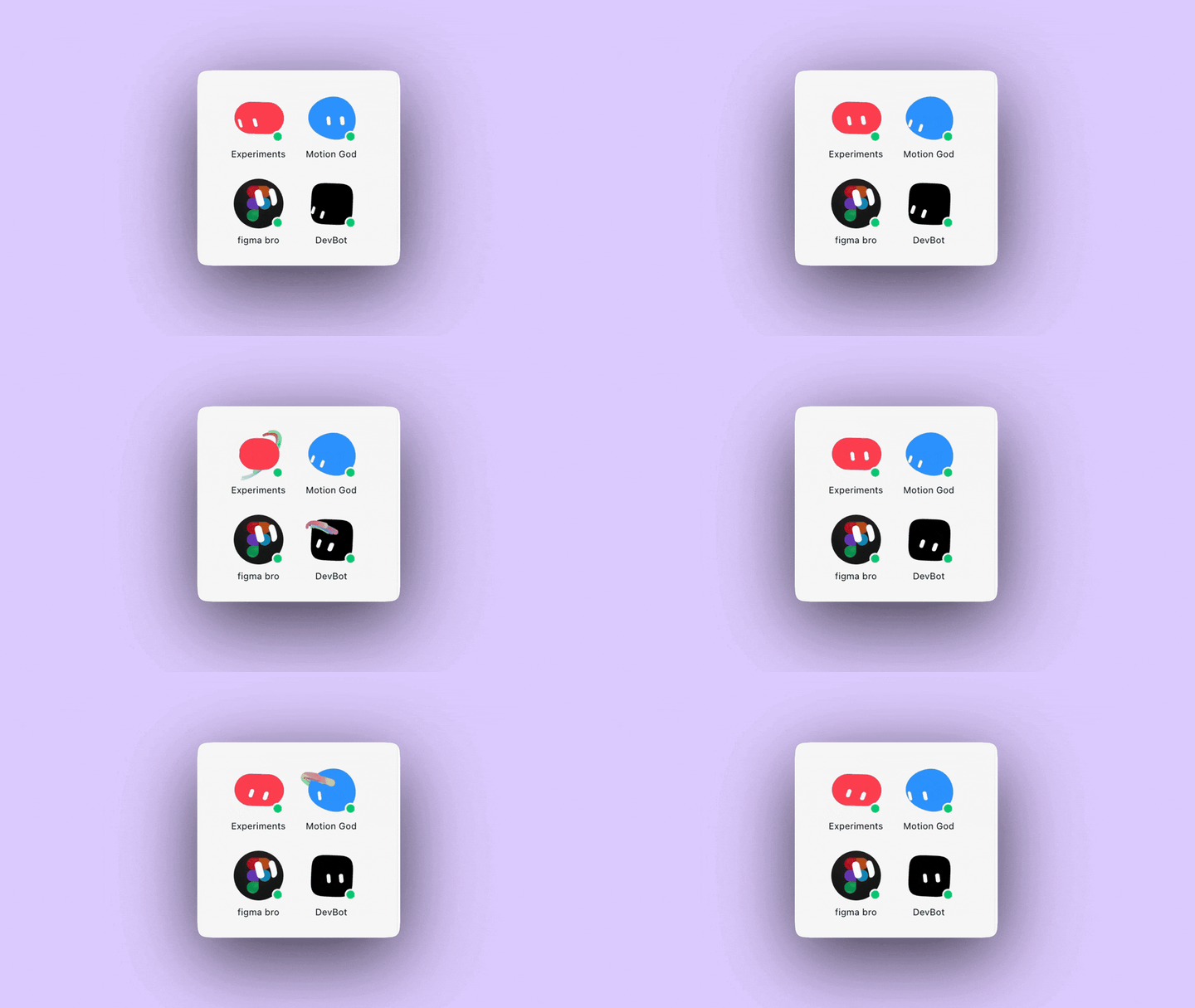
Figma Bro handles repetitive production work in Figma. Motion God helps me prototype as I describe how interactions should feel. Experiments is where I send ideas that I want to make tangible before I know exactly what they should become. Devbot answers engineering questions and helps the other bots understand how an idea should actually get built.
The names make each bot’s role clear, but they don’t work in isolation. My design agents can huddle with one another, delegate parts of a project, and bring the work back together. Here are three recent examples.
Experiments: you can just do things
One of the earliest ideas I wanted to explore was how to make Bots accessible anytime, anywhere. I wanted to try keyboard shortcuts, OS-level entry points, and other ways of invoking one, so I tasked Experiments with building a series of explorations in ambient Bot access.
The first placed Bot in the Mac’s notch. It could remain tucked into a fixed location while it worked, emerge when something needed attention, and expand into a small workspace when I wanted to see more. It gave the agent a home without asking me to keep another window open.
Bot tucked into the Mac notch.
The second had Bot peek in from the corner of the desktop on hover. This felt less like a persistent interface and more like a character entering the scene when invoked or when it had something to say.
Bot peeking in from the corner of the desktop.
The third had Bot follow the cursor as a companion, creating a closer connection to whatever I was doing in the moment.
Bot following the cursor as a companion.
I described the behaviors to Experiments, and it worked out how to make each one tangible. It delegated the character movement and transitions to Motion God, the desktop behavior and implementation questions to Devbot, then brought everything together into prototypes I could actually try. I could encounter each version naturally throughout my day and notice when it felt helpful, distracting, or somewhere in between.
That’s why I keep an agent specifically for Experiments. I don’t need to decide that an idea is sensible, feasible, or destined for the roadmap before making it real enough to judge. None of these concepts shipped exactly as explored. That wasn’t really the point. I had an idea, made three versions real, and learned from each one. You can just do things.
Motion God: work with the real thing
Historically, motion is where I’d hand an idea off to an expert on the team. I could describe the behavior or mock up a few keyframes, but someone else would have to make it real before I could react to it. With Motion God, I can stay in the exploratory loop and direct the interaction by feel.
As part of an email campaign, I wanted to prototype a promotional video of the Grok Bot character. The sequence was fairly specific: Bot appears, notices the app window, and bounces into place.
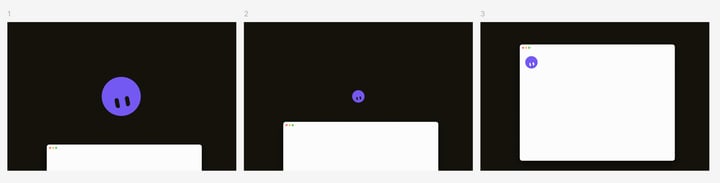
Bot appears, notices the app window, and bounces into place
I didn’t want the design agent to recreate the character from a screenshot or generate an approximation. I wanted it working with the same asset that already lived and moved in the product. So I had Motion God build a playground on localhost around the actual animation spec file. That way, I could manually adjust timing, springs, distance, scale, and easing while it was running.
But I also found myself giving short and comparative feedback: “hold the look down-left longer.” “Bounce is too exaggerated.” Motion God would make the change, and I could immediately watch the whole sequence again.
That’s much closer to how I naturally design motion. I usually don’t know off the top of my head whether a transition should take 280 or 340 milliseconds before I see it. But I do know how to describe it, and I know when it feels just right.
The interesting part wasn’t that my bot “made an animation.” It was that I could give it a real production asset and create a working environment around it. I could tune the motion directly through deterministic controls or continue directing Motion God in the same language I’d use with a human collaborator.
Motion God playing the production character against the real window.
Figma Bro: handle the repetition
For the Grok Bot onboarding flow we wanted to showcase starter Bots that could take on tasks for a new user immediately. We internally crowdsourced a list of ideas such as “Chief of Staff” and “Inbox Triage.” I was handed a list of 20 descriptions that still needed differentiated portraits and supporting attributes. I built one auto-layout component in Figma and asked Figma Bro to populate the rest.
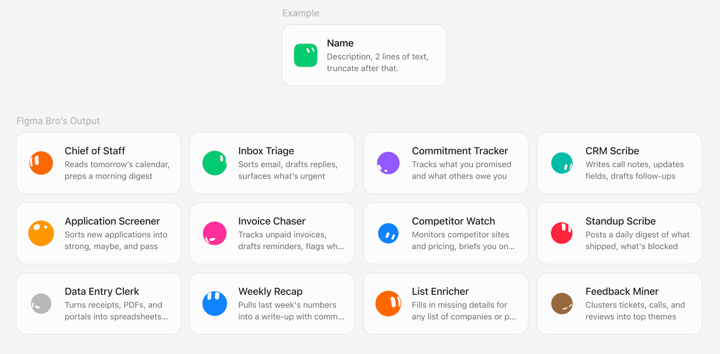
Figma Bro filling starter-bot cards from one component
We also wanted to understand what tools newcomers were using, so that their first bot would be equipped with context. I created the page layout template, and sent Figma Bro off to search for the correct assets, and place them in order of usage likelihood.
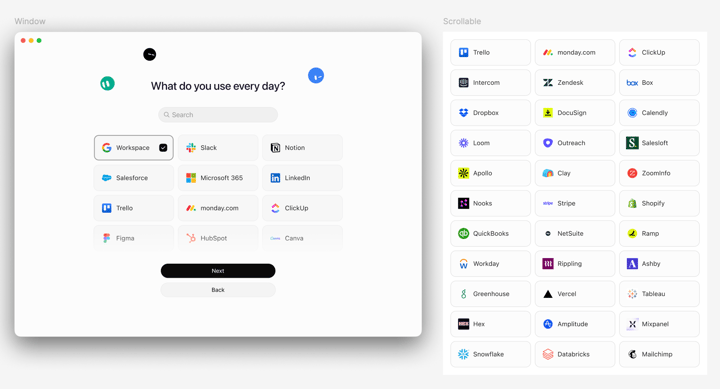
Figma Bro placing everyday-tool logos into the onboarding layout
These tasks aren’t creatively difficult, but they consume creative attention. They’re also where small inconsistencies multiply: the wrong logo variant, an outdated component, a portrait pulled from a different source, or the tenth card spaced differently from the first.
I don’t want Figma Bro eyeballing any of this. Through the Figma MCP, it can inspect the actual file and use exact x and y positions, width, height, spacing, typography, fills, strokes, and component structure. If there’s an existing frame or component, that is the source of truth.
Keep the loop tight
None of this has made design a one-shot process. It has made the loop tighter.
With AI design agents I can get an idea into the world earlier, respond at higher fidelity, and spend more of my attention on the judgment between versions. Grok Bot doesn’t replace that judgment. It gives me more opportunities to use it.
If you’re a designer, give Grok Bot the next idea you want to explore and see what comes back.