Glimpse:专门理解图片和视频,还能为机器人规划任务的 AI 模型
盯住同一个物体,重看关键的0.9秒,再用画面检查动作结果。Elorian如何让AI从认出物体走向理解变化?
Elorian 发布了视觉思考模型 Glimpse,能一边分析图片和视频,一边回到画面里检查细节。它目前以研究预览形式开放,提供聊天界面和 API,主要面向几类任务:
- 跟住视频里的变化:追踪同一个物体,分清动作先后,遇到模糊片段再局部重看。
- 理解空间与动作后果:判断物体如何连接、哪里有支撑,以及移动之后可能发生什么。
- 把视觉理解用于工作:标注机器人训练视频、拆解机器人任务、描述视频细节,以及计数、解迷宫和找不同。
完整保留约 90 秒原片;旁白说明视觉草稿空间如何把处理后的画面重新带入推理。
看不清的地方,值得再看一遍
判断列车有没有减速,光认出“这是一列火车”还不够。需要盯住同一个车窗边缘,比较它在相等时间里移动了多远:移动距离逐渐缩小,才是减速的证据。
Glimpse 的一份实际运行记录就采取了这个办法。列车约在 2.2 秒进入画面,早期窗边移动明显;到 4.5–4.9 秒,位移收缩,接近片尾时只移动几个像素。它回到这些位置核对后,回答“减速”。这里需要把前后画面联系起来,一张照片无法单独给出速度变化趋势。
官网展示的实际模型记录,保留观察时间点与回答;原片无音轨。
另一段 6.13 秒的动画更能说明“回看”的用处。两只蓝鸟先盘旋,落在门把手上,再起飞进入发光的拱窗。镜头跟着它们快速移动,中间究竟是连续摇镜,还是剪掉一段后换了镜头?这会影响对事件是否连续、两只鸟如何先后到达的理解。
Glimpse 先以每秒 8 帧查看全片,再把 4.3–5.2 秒这 0.9 秒加密到约每秒 14 帧。补看的墙面位置能连成连续移动,支持“镜头一直在摇动”的判断。它还用粉色系带和浅绿头饰区分两只鸟,确认它们先后进入拱窗。额外检查集中在决定答案的短区间。


向前或向后查看,墙面和窗框的位置能连续接上;两端的参照画面始终保留。这里按等间隔从原片抽取 13 帧,供读者观察,未复现模型的完整取帧记录。
Elorian 把这种能力称为“视觉思考”:视觉表示参与推理,模型可以在思考过程中回访、细化对画面的理解。用户在平台上能看到的“视觉草稿空间”,会展示放大局部、重看视频区间、追踪特征等过程。模型也能调用代码、图像变换和视频工具来辅助检查,裁出的局部、选中的帧和变换后的新视图,会再交给模型,成为下一步推理的视觉依据。
模型还经过端到端训练,学习使用这些多模态工具,并能协调多个子 Agent,让它们交换文字、中间视觉产物和内部表示,共同解决问题。内部表示具体怎样存储和更新,发布材料没有展开;外部工具操作让读者看到了它如何重新取证,不能据此还原全部神经网络机制。
从认出物体,到理解它会怎样变化
跨帧追踪解决的是时间问题。物理判断还需要找到物体之间的关系。
三个人正在抬起一只大轮胎,如果条纹上衣的女性突然松手,谁最容易被砸到?关键线索是轮胎下缘仍贴着草地,抬高侧还没越过直立位置。失去支撑后,抬高的一侧会绕着着地边缘回落,正好扫向俯身在那一侧的女性。

同样的关系判断也出现在扳道岔的录像里:手柄从右拨到左,连接的尖轨跟着变位,列车可走的路径随之改变。描述到“她动了手臂”还不够,需要把动作和它改变的东西接起来。
片段对应源视频 12—26 秒,动作发生在约 15—20 秒。官网配以参考答案,未把它列为 Glimpse 的实际运行记录;原片无音轨。
计数也有类似的细节门槛。数“张开的钳子”,既要确认它是钳子,又要确认它处于张开状态。闭合的钳子只满足第一项;剪刀虽然也有把手和转轴,却不属于目标类别。官网给出的参考数量是 4 把。

这些例子说明,识别“有什么”只是起点。回答具体问题,往往还要保留接触位置、连接关系、状态和身份;少看一个细节,后续推理就可能沿着错误前提继续走。
机器人需要知道,一步操作什么时候才算完成
机器人训练视频里,“机械臂动过了”和“已经把东西放好”是两回事。
Glimpse 的标注演示会给海绵、记号笔、剪刀等物体画框、命名,并把三个物体的拿起、放下分别切成 6 个带时间戳的事件。这样,一段连续录像就变成了可用于训练的动作记录:拿的是谁、何时拿起、何时放到目标位置。官网另一份记录还区分了“从容器里取出记号笔”和“放上桌并松手”的完成时间,分别是 8.9 秒与 14.085 秒。
黄色海绵、绿色记号笔、橙色剪刀分别被框选和命名;标注演示无音轨。
同样的完成判断也能进入任务执行。给机器人一句话:“把奶油奶酪放进碗,再把碗放到柜顶。”Glimpse 负责拆解步骤,在机械臂操作期间查看相机,判断第一步是否做完,随后决定是否进入第二步。真正执行动作的是 Physical Intelligence 的 π0.5 视觉语言动作模型。
LIBERO 模拟任务中两边都完成了操作;Glimpse 使用默认思考档、每 20 个控制步检查相机,Astra 使用 high 档、每 40 步检查。演示无音轨。
这次任务的规划费用分别为 0.035 美元和 0.249 美元,Glimpse 低约 86%。这是这一个任务、上述设置下的费用。它展示了较低成本的高层规划路径;让模型直接输出机器人的动作,仍是 Elorian 后续要做的方向。团队还计划推进多模态原生预训练、结合理解与生成,以及更准确的场景重建;这些方向还需要进一步实现。
视频描述的价值,藏在总括句漏掉的地方
一句“有人在跳舞”,不能帮助创作者找出“舞者把裙摆举到脑后”的瞬间。密集视频描述会把这些细节连同发生时间记录下来,让素材能按动作、事件或人物互动检索。
在 2 分 46 秒的哈瓦那街头表演中,演示设置了 14 项检查点,包括赤脚舞者、裙摆位置、镜头右移、独舞和最后空下来的场地。Glimpse 本次覆盖 14 项,GPT-6 Sol 覆盖 12 项,Gemini 3.8 Flash 覆盖 11 项;Glimpse 三次运行的平均值为 13.7 项。
原素材 2 分 46 秒,播放器为对照演示。Glimpse 和 Gemini 按每秒 2 帧查看,GPT-6 Sol 接收 333 张带时间戳的帧;所有模型均未听到音频。
另一段 16 秒的打包争执片段,检查的不只是动作,还有动作透露出的情绪:一人匆忙装包,另一人张开手掌、试图挽留,随后双手抱头,最后对方提包离开。13 项检查点中,本次三者分别覆盖 13、12、11 项。画面支持对紧张、抗拒、懊恼的推断;没有对白,就不能确定他们说了什么,也不能确定离开是否意味着永久分手。
这些演示的对照标签是 GPT-6 Sol;官网主表另比较 GPT-6.1 Sol。两段视频采用各自的事件清单和采样设置,数字表示这些案例里的细节覆盖情况。
镜头移开再回来,同一个对象不能重算
计数视频还多了一道去重任务:镜头离开又回来,同一只小狗不能再算一次。庭院演示给每只狗保留颜色和编号,最终数出 5 只。
手持手机视频的计数演示;最初镜头未移动的六秒以四倍速播放,原片无音轨。
工地车辆的录屏则给出“约 30 辆”,并列出证据时间点,提醒不同视角拍到的可能是同一批设备;这个估数没有附逐车核验的独立真值。
录屏给出的数量是“约 30 辆”,并识别不同视角下重复出现的设备;原片无音轨。
哪些能力追上了,哪些问题仍然很难
Elorian 用一个小团队、数百张 GPU,在开放权重基础模型上完成了 Glimpse 的后训练。基础模型名称、具体参数量没有公开,使用开放权重底座也不等于 Glimpse 的权重已经开放。
按照官网主表,Glimpse 在机器人操作事件、科学图表推理、短视频描述和开放词表计数四项评估中高于 GPT-6 Astra,具身空间推理持平。下面保留原表的全部 12 项评估、5 款模型及输入输出价格,能同时看见强项与不足:
| 评估项目 | Glimpse | GPT-6 Astra | GPT-6.1 Sol | Opus 5.5 | Gemini 3.8 Flash |
|---|---|---|---|---|---|
| WGO Bench|机器人操作事件理解 | Glimpse42.70 | GPT-6 Astra39.42 | GPT-6.1 Sol38.91 | Opus 5.512.34 | Gemini 3.8 Flash33.99 |
| ERQA|具身空间推理 | Glimpse83.75 | GPT-6 Astra83.75 | GPT-6.1 Sol82.45 | Opus 5.582.20 | Gemini 3.8 Flash81.20 |
| BabyVision|细粒度视觉推理 | Glimpse95.36 | GPT-6 Astra97.68 | GPT-6.1 Sol97.16 | Opus 5.5— | Gemini 3.8 Flash83.25 |
| HSS|视觉场景理解(图像与视频) | Glimpse46.36 | GPT-6 Astra53.6 | GPT-6.1 Sol46.6 | Opus 5.549.81 | Gemini 3.8 Flash41.6 |
| CharXiv-R|科学图表推理 | Glimpse92.90 | GPT-6 Astra92.10 | GPT-6.1 Sol92.60 | Opus 5.593.40 | Gemini 3.8 Flash91.80 |
| UGC-VideoCap|短视频描述 | Glimpse82.66 | GPT-6 Astra80.32 | GPT-6.1 Sol80.41 | Opus 5.576.35 | Gemini 3.8 Flash78.33 |
| DREAM-1K|密集视频描述 | Glimpse76.04 | GPT-6 Astra79.05 | GPT-6.1 Sol77.93 | Opus 5.572.05 | Gemini 3.8 Flash70.00 |
| TOMATO|细粒度时序推理 | Glimpse93.60 | GPT-6 Astra96.02 | GPT-6.1 Sol89.02 | Opus 5.572.44 | Gemini 3.8 Flash83.02 |
| Video-MME v2|带字幕视频评估 | Glimpse56.68 | GPT-6 Astra64.06 | GPT-6.1 Sol65.27 | Opus 5.5— | Gemini 3.8 Flash59.58 |
| E.T. Bench|事件理解 | Glimpse63.55 | GPT-6 Astra— | GPT-6.1 Sol59.79 | Opus 5.5— | Gemini 3.8 Flash63.45 |
| FSC-147|开放词表计数 | Glimpse83.36 | GPT-6 Astra82.02 | GPT-6.1 Sol82.69 | Opus 5.573.78 | Gemini 3.8 Flash67.06 |
| CountQA|商品图像计数 | Glimpse82.66 | GPT-6 Astra86.42 | GPT-6.1 Sol86.42 | Opus 5.582.20 | Gemini 3.8 Flash81.09 |
加粗为原表标出的最高分;— 表示原表未提供数据。不同项目的分数不可直接相加。
| 评估项目 | Glimpse | GPT-6 Astra | GPT-6.1 Sol | Opus 5.5 | Gemini 3.8 Flash |
|---|---|---|---|---|---|
| 输入价格|美元 / 百万 token(未缓存) | Glimpse$0.60 | GPT-6 Astra$10.00 | GPT-6.1 Sol$2.00 | Opus 5.5$4.00 | Gemini 3.8 Flash$0.75(尝鲜价) |
| 输出价格|美元 / 百万 token | Glimpse$3.00 | GPT-6 Astra$50.00 | GPT-6.1 Sol$10.00 | Opus 5.5$20.00 | Gemini 3.8 Flash$3.75(尝鲜价) |
Gemini 3.8 Flash 为官网所列尝鲜价;价格与成绩均按本次发布原表保留。
原表评估设置:Glimpse 为 max;Astra、GPT-6.1 Sol、Opus 5.5 通常为 max 并使用 Code Interpreter;Gemini 图像评估为 high 加 Code Interpreter,视频为 high 加 Video Agent。视频评估中,Sol 和 Opus 改用 high 加 Code Interpreter,Sol 的 Video-MME v2 例外使用 max。HSS 包含论文公布的结果。
表中是各项独立得分,不能横向加成总分。测试主要采用各模型的高思考档与原生 Agent 环境,视频档位有例外,HSS 还包含论文公布的结果。Glimpse 在 BabyVision 细粒度视觉推理、DREAM-1K 密集视频描述、TOMATO 时序推理和 CountQA 商品计数上,也仍低于 Astra;科学图表成绩则略低于 Opus 5.5。
迷宫和找不同的演示很亮眼:Glimpse 解出 20/20 道迷宫;找不同严格计分为 47/53,其中一组图返回的框坐标把横纵轴顺序弄反,交换坐标轴后重计为 53/53。同样的纠正规则用于所有模型,另外两者的成绩没有变化。GPT-6 Sol 分别为 10/20 和 41/53(另有两处误报),Gemini 为 3/18(另有两题超时)和 29/53。这里 Glimpse 可以用托管工具写、运行代码,另两者没有工具。结果体现的是各自这套运行方式下的能力。
20 道迷宫从 8×8 到 40×40,9 组找不同图片共 53 处差异。演示用代码核验各模型返回的路径是否到达出口且不穿墙;原片无音轨。
物理直觉依然困难。从 HSS 中随机抽取的 12 道“会去哪里、落在哪里、撞到什么”题,Glimpse 答对 5 道,Gemini 也答对 5 道,GPT-6 Sol 答对 2 道;Glimpse 有工具,另两者没有。演示挑选展示的 3 道题偏向成功案例,不能拿其中的命中比例代替这 12 道题的结果。
题目后播放的运动动画,由 Seedance 2.5 根据静帧生成,用来演示参考答案。被测模型只看过静帧和问题,没看过那段动画。能画出一条看似合理的运动路线,距离稳定判断真实物理后果,还有明显差距。
录屏展示三道样例,末页给出随机十二题的完整成绩:Glimpse 5/12、GPT-6 Sol 2/12、Gemini 5/12。原片无音轨。
看懂视频之后,还能把图案和节奏重新做出来
Andrew Dai 在发布主题帖的续帖里,还展示了两段创作结果:一只戴红围巾、骑自行车的鹈鹕;以及参考 Santa Monica 摩天轮实拍视频生成的灯光动画。他说鹈鹕任务没有专门调优,摩天轮任务要求的是“相似灯光风格的可编辑矢量动画”。
约 1.6 秒的无声循环片段;作者称未针对该任务专门调优。可重复播放观察车轮与脚踏动作。
这个用途把视觉理解和创作接在了一起:目标是把参考视频里的几何结构与灯光变化,转成可继续修改的图形作品。OpenRouter 当前列出的 Glimpse 输出模态是文字,动画演示也不能直接当作原生视频生成能力的证明。对创作者更值得试的是,模型能否把看见的结构与节奏转成可修改的表达。
怎么试,费用要怎么算
Elorian 聊天平台提供体验入口,Andrew Dai 在主题帖中说明聊天界面可免费试用,平台会显示视觉草稿空间。开发者可以使用官方 API,或者通过 OpenRouter 选择 elorian/glimpse;后者列出的上下文为 262,144 token,接收文字、图片和视频,返回文字。
最直观的试法,是上传一段有镜头移动、物体暂时被挡住的宠物短片,问:“一共出现几只?请给每只保留身份,列出确认它再次出现的时间点和画面特征。”回答中的数量、身份对应和时间点,都可以回到自己的视频逐一检查。
API 标价是每百万输入 token 0.60 美元、输出 token 3 美元。按官网比较表,输入、输出单价均比 Astra 低 94%,比 Opus 5.5 低 85%、比 GPT-6.1 Sol 低 70%,比 Gemini 3.8 Flash 的尝鲜价低 20%。
单价差不直接等于任务账单差。局部回看、密集检查需要时间和 token,Elorian 也把提高 token 效率列为下一步重点。实际使用时,要把完成一件事的费用、等待时间和正确率一起看。机器人单例已给出一种成本结果;更复杂的视频和物理判断,还需要在自己的任务上继续验证。
Introducing Glimpse
A visual thinking model that reasons about the physical world from what it sees — at frontier-level multimodal performance and 16.7× lower token prices.
A glimpse is where looking starts. Understanding begins when a model knows what deserves a second look.
Glimpse is a new category of visual thinking model: a system that reasons about the physical world from what it sees. Glimpse follows objects in motion and across changing viewpoints, understands how parts fit together, and connects an observation to what happens next. That understanding matters in robotics, scientific discovery, and the creative industries.
Compared to existing frontier large language models, Glimpse pushes furthest on bringing visual representations into the reasoning process itself. It can reason in visual space, revisiting and refining internal visual representations as thinking unfolds, and is more grounded, learning to reason about objects and their spatial relationships. As an agent, Glimpse is also trained end-to-end to use multimodal tools that write code, transform images, and watch videos; and Glimpse can spawn and coordinate subagents that exchange text, visual artifacts, and internal representations to solve a shared problem. Together, these capabilities let Glimpse inspect a problem and revise its interpretation as it reasons.
On multimodal benchmarks, Glimpse attains frontier-level performance at the level of (and sometimes exceeding) GPT-6 Astra and Claude Opus 5.5 while being a substantially smaller and cheaper model. We developed Glimpse as a small team with only a few hundred GPUs, post-trained on an open weights base model. Glimpse is available through API and our chat UI today.
Model results
Glimpse exceeds Astra on four evaluations spanning scientific chart reasoning, open-vocabulary counting, short-form video captioning, and manipulation-event understanding, and matches it on embodied reasoning. These capabilities support applications from analyzing laboratory data and tagging social-media videos to identifying completed actions in robot footage.
More generally, Glimpse is competitive across a suite of multimodal benchmarks. Input tokens cost $0.60 per million and output tokens $3.00 per million: both rates are 94% lower than GPT-6 Astra’s, 85% lower than Claude Opus 5.5’s, 70% lower than GPT-6.1 Sol’s, and 20% lower than Gemini 3.8 Flash’s introductory rates.
What makes Glimpse so capable is careful and dense review to parse the best information for sound reasoning decisions. Looking that closely takes time, and tokens. Token efficiency is our next highest focus, alongside ramping up our research into the hardest visual reasoning model skills.
| Capability | Evaluation | Glimpse | GPT-6 Astra | GPT-6.1 Sol | Opus 5.5 | Gemini 3.8 Flash |
|---|---|---|---|---|---|---|
| Input priceUSD / 1M tokens, uncached | $0.60 | $10.00 | $2.00 | $4.00 | $0.75introductory | |
| Output priceUSD / 1M tokens | $3.00 | $50.00 | $10.00 | $20.00 | $3.75introductory | |
| Robotics | WGO BenchEnd-to-end manipulation events | 42.70 | 39.42 | 38.91 | 12.34 | 33.99 |
| Robotics | ERQAEmbodied spatial reasoning · accuracy | 83.75 | 83.75 | 82.45 | 82.20 | 81.20 |
| Visual perception | BabyVisionFine-grained visual reasoning | 95.36 | 97.68 | 97.16 | — | 83.25 |
| Visual perception | HSSScene understanding · image + video | 46.36 | 53.6 | 46.6 | 49.81 | 41.6 |
| Scientific reasoning | CharXiv-RScientific chart reasoning | 92.90 | 92.10 | 92.60 | 93.40 | 91.80 |
| Video captioning | UGC-VideoCapShort-form video captioning | 82.66 | 80.32 | 80.41 | 76.35 | 78.33 |
| Video captioning | DREAM-1KDense video captioning | 76.04 | 79.05 | 77.93 | 72.05 | 70.00 |
| Temporal reasoning | TOMATOFine-grained temporal reasoning | 93.60 | 96.02 | 89.02 | 72.44 | 83.02 |
| Temporal reasoning | Video-MME v2 with subtitlesGrouped rubric score | 56.68 | 64.06 | 65.27 | — | 59.58 |
| Temporal reasoning | E.T. BenchEvent understanding | 63.55 | — | 59.79 | — | 63.45 |
| Counting | FSC-147Open-vocabulary counting | 83.36 | 82.02 | 82.69 | 73.78 | 67.06 |
| Counting | CountQAProduct image counting | 82.66 | 86.42 | 86.42 | 82.20 | 81.09 |
Unless otherwise noted, all model results use the highest thinking effort and native agent harness: Glimpse max; GPT-6 Astra max + Code Interpreter; GPT-6.1 Sol max + Code Interpreter; Opus 5.5 max + Code Interpreter; and Gemini 3.8 Flash high + Code Interpreter for image and Gemini 3.8 Flash high + Video Agent for video. For video evals, GPT-6.1 Sol and Opus 5.5 use high + Code Interpreter, except Sol Video-MME v2 which uses max + Code Interpreter; max-effort results are not available for the other video evaluations. HSS includes paper-reported results.
What visual thinking changes
The following examples illustrate different modalities of visual thinking — from following an event, to predicting an outcome based on the physics, to connecting an action to its effect, to counting objects precisely. These worked examples are meant to give you a glimpse into what simple visual thinking patterns look like, and how they can capture chains of reasoning more efficiently and accurately than text-based reasoning alone. As you chat with Glimpse, our platform shows the model’s visual scratch space as it reasons: it will zoom into a region, watch a short interval at a denser frame rate, or track one feature across time — and you too will start to build intuition around what kinds of problems visual thinking can unlock.
01 · Follow the world through time
Follow the event, not a sample of frames
Follow a slowing train
“What is the pattern of the train's speed?”
- Constant speed.
- Not moving at all.
- Decelerating.
- Accelerating.
C. Decelerating.
- Locate The train enters the frame at about 2.2 seconds; use the same visible window edge as the reference point.
- Compare From 2.2–3.0 seconds the reference point moves a large distance between nearby observations and carries visible motion blur.
- Rewatch From 4.5–4.9 seconds the displacement contracts sharply; from 4.9–5.13 seconds it moves only a few pixels.
- Answer Distance per equal time interval decreases as the train reaches the platform.
Recorded model output. Timestamps, the observed displacement pattern, and the answer are preserved; the evidence trace is condensed for publication.
Follow two birds through a camera move
“Describe the video completely, including subjects, actions, timing, shot structure, and uncertain details.”
Task summary · Required answer: An open-ended, detailed video caption. Describe the birds’ actions and their order, including what happens during the camera move. No candidate answers are supplied.
0.00–1.75 fly and circle → 1.75–4.00 perch and call → 4.00–5.10 take off during a continuous pan → 5.10–6.13 enter the glowing arch
- Map Cover all 6.13 seconds, then watch at 8 fps: two blue birds circle a brass door handle, land, face each other, and take off left.
- Inspect Zoom 2.4–4.0 seconds: both pairs of feet grip the lever; the leading bird carries a magenta strap and the second a pale-green head covering.
- Resolve Rewatch 4.3–5.2 seconds near 14 fps. Intermediate wall positions show a continuous pan, not a hard cut.
- Verify At 5.25–6.05 seconds the first bird enters the lit arch; the second pauses at the sill, then follows. Both remain visible in the final sampled frame.
Recorded evaluation run. The published trace preserves the model's timestamps, competing cut-versus-pan hypothesis, targeted rewatches, and final event order while condensing the dense caption.
The two recorded traces above show different ways to resolve uncertainty: track one stable feature across time to judge speed, or revisit a short ambiguous transition at a denser sampling rate. In the second trace, the model moves from an 8 fps inspection to roughly 14 fps over the 0.9-second interval that distinguishes a pan from a cut. The extra inspection is concentrated on the moment that determines the answer.
In the train clip, the model follows a window edge from the train’s entrance at about 2.2 seconds to its near-stop at 5.13. The edge travels progressively less distance between observations. In the bird clip, the camera swings as two birds leave a door handle; the model checks the intervening wall positions to determine whether the shot continues through the movement.
02 · Predict what happens next
What happens if the grip slips?
Read the contact, predict the consequence
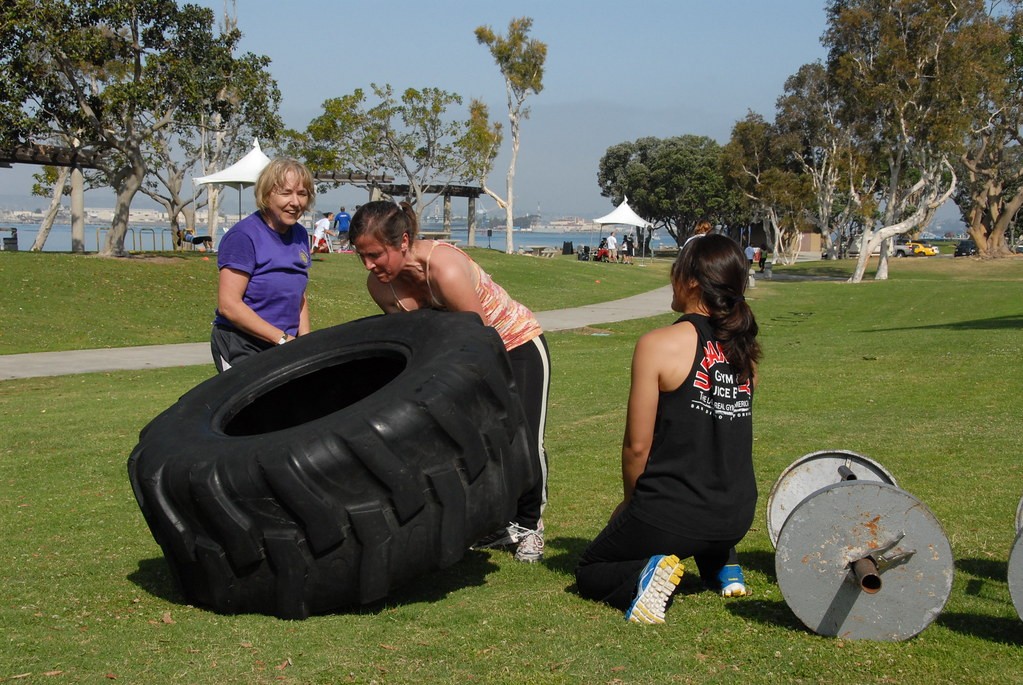
“If the woman in the striped top suddenly loses her grip before the tire becomes upright, which woman is most immediately at risk of being struck, and how would the tire move to create that risk?”
Required answer: Identify which woman is at risk and explain how the tire would move toward her. This is an open-ended question, with no supplied answer choices.
Most immediate risk: the woman in the striped top.
- Locate The tire’s lower edge is still in contact with the grass; its raised side has not crossed the upright balance point.
- Model If support disappears, gravity rotates the elevated side back down around the grounded edge.
- Project The returning edge sweeps toward the striped-shirt woman, who is leaning over the raised side.
Source photograph and reviewed reference answer. The explanation identifies the visible support and projected motion; it is not a recorded simulation or model trace.
The reviewed reference answer follows the tire’s motion: the grounded edge acts as a pivot, and gravity brings the raised edge back down toward the striped-shirt woman. Her position puts her most immediately in its path. This is a qualitative prediction from the photograph; no trajectory or impact force has been simulated.
Three women are lifting a tractor tire. Its lower edge rests on the grass, while the woman in the striped top leans over the raised edge. The question asks what would happen if she lost her grip before the tire reached an upright position.
03 · Understand cause and effect
Connect an action to what it changes
Action changes the path
“What happened when woman placed the circular rail from her right to left?”
Required answer: Explain the physical effect of moving the switch. This is an open-ended question, with no supplied answer choices.
The switch changes the direction of the track points.
- Locate Find the operator and the switch mechanism beside the locomotive.
- Follow During 15–20 seconds of the source clip, she moves the switch across her body.
- Connect The action repositions the track points: the visible hand movement changes the railway’s physical path.
Source footage and reviewed reference answer, not a recorded Glimpse trace or generated control sequence. This excerpt covers source seconds 12–26.
The recorded robot-video inspection makes a related distinction in time: picking the marker out of the pot ends at 8.9 seconds; placing it on the table and releasing it ends at 14.085. Its output contains those two completed events. We are developing direct action outputs as a next step toward using this kind of scene understanding to control robots.
During seconds 15–20 of the railway source clip, the operator pulls the switch from her right to her left. The lever is connected to the track points. The reviewed reference answer follows that connection: moving the lever changes the points’ position and the path through the track.
04 · See precisely
Count the right objects
Count the open pliers
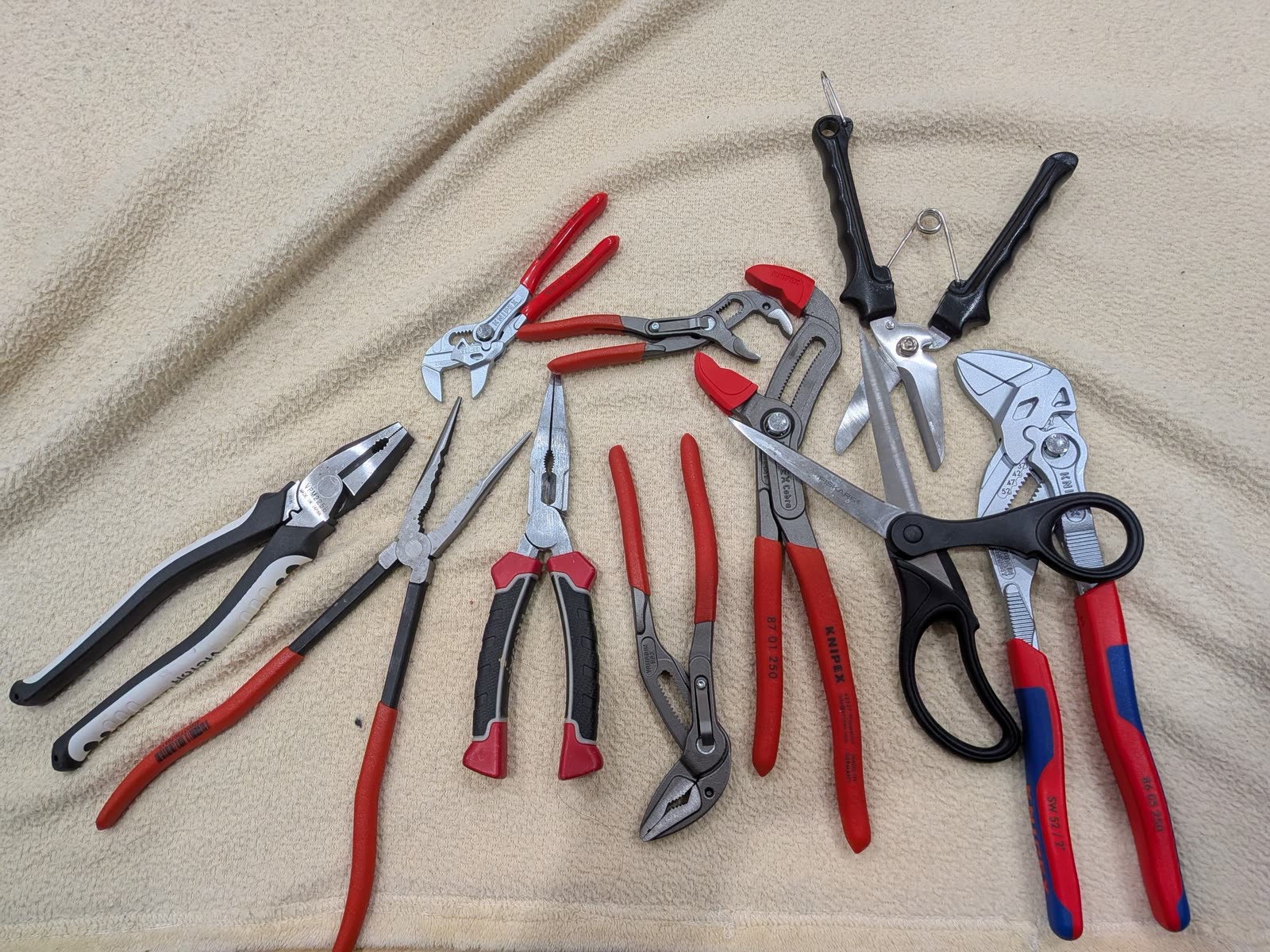
“How many open pliers are there? Return an integer.”
Required answer: One integer. Count only open pliers; there are no multiple-choice options.
4
- Define The target is not every hand tool and not every pair of pliers. It is pliers whose handles and jaws are visibly open.
- Separate Closed pliers are category matches in the wrong state. Scissors are lookalikes in the wrong category.
- Verify Revisit each candidate against both constraints—tool identity and open state—before adding it to the count.
- Reference The reviewed reference count is four.
Original photograph and reviewed reference answer. The steps explain the visual distinctions in the task; they are not a recorded model trace.
In the photograph above, the question asks for open pliers. A closed pair has the right tool shape but does not qualify; scissors have two handles and a hinge but belong to a different category. Checking the handles and jaws of each candidate gives the reviewed reference count: four.
Counting is a fundamental perception ability: identifying the set of objects within a scene. In a crowded collection, that means keeping adjacent objects separate, distinguishing them from lookalikes, and checking which ones meet the question’s criteria.
What Glimpse can do
The worked examples above illustrated how visual thinking works in theory. The below examples illustrate how Glimpse is applied in practice to a range of real tasks, from robotics (synthetic data generation for training, System 2 planning for a VLA model), to dense captioning over short form videos, to precise video counting of a group of puppies in a yard or equipment on a construction site, to reliably solving simple visual reasoning puzzles that a child can do, but have proven so challenging for many of today’s frontier models.
A foundation model for robotics — from synthetic data generation to high-level planning
Labeling and segmenting teleoperation data
Planning and checking the work of a VLA model
Asked to “put the cream cheese in the bowl, then put the bowl up on top of the cabinet,” each model acts as the planner for the same vision-language-action policy, π0.5 from Physical Intelligence. The planner breaks the request into steps, checks the robot's cameras while the arm works, and decides when a step is done and what comes next. Both planners complete the task. Glimpse's planning costs $0.035 for the episode; Astra's costs $0.249.
Mapping the world’s video archives
Dense captioning focused on fine-grained movements — a street performance in Havana
Dense captioning focused on social and emotional dynamics — a couple and a packed bag
In both videos, Glimpse is able to capture fine-grained visual details and subtle inferences that both Gemini 3.8 Flash and GPT 6.1 Sol miss.
Counting — from your yard to the general contractor’s
Count and track — every puppy, counted once
On the job site — how many construction vehicles are in the yard?
Recorded Glimpse session in the Elorian platform, answer shown as returned.
Advanced visual reasoning
Visual puzzles — mazes and spot-the-difference
Humanity's Sixth Sense — can a model see what happens next?
The motion that plays after each answer is generated from the still by Seedance 2.5 to illustrate the benchmark's reference answer. No model saw it.
Toward models that understand visual worlds
Glimpse is a preview into the capabilities we are looking to unlock at Elorian. We believe building the full stack across systems, data, model architecture, and training — from the ground up for multimodal intelligence — can unlock AGI in the physical world. Models must be able to reconstruct a scene, predict what happens when something moves, and use that understanding to guide the next actions. Beyond robotics, engineering, and defense applications, these capabilities can help creators produce and edit video, technology companies search and organize online media, and game developers build and test interactive environments.
We are working toward these goals through multimodal-native pretraining, models that both understand and generate, and direct action outputs for robots. Glimpse’s visual understanding capabilities are an early step; calibrated reconstruction and robot control remain work ahead.
Glimpse is available through an API and an interactive chat interface. Try Glimpse free on the Elorian platform.