Gemini 4 Argon 官方开发者指南:长任务怎么交给 AI,结果怎么验收
从修复整站页面、理解录屏,到生成 3D 场景:Google 的这份指南把重点放在目标、工具和验证闭环,也带来了共享百万 token 窗口与长解码。
Google 发布了 Gemini 4 Argon,把重点放在需要持续推进的复杂工作:读懂项目、调用工具、检查结果,再根据反馈修改,直到完成约定目标。它面向开发者和企业,适合跨文件重构、漏洞修补、多模态资料处理与 3D 应用等任务。
这份官方开发者指南给出了三类值得关注的用法:
- 把一项工程任务持续推进到交付:让模型运行测试、阅读报错、修改多个文件,减少人逐轮发指令的负担。
- 把多种资料转成可用成果:结合视频、PDF、表格与账目核对信息,制作看板、幻灯片或带修改记录的文档。
- 完成需要反复试验的创作与仿真:编写 3D 场景、游戏和渲染程序,借助实际运行结果调整实现。
Google 同时开放了输入、思考与回答共用的百万 token 窗口,以及超过原有单次响应长度的长解码。更大的额度给复杂任务留出空间,真正让工作向前走的,还包括清楚的目标和可检查的反馈。
长任务先对齐目标,再建立验证循环
以“修好整个网站的布局和无障碍问题”为例,先约定完成标准:哪些页面要检查、哪些设备要覆盖、什么结果算通过,哪些操作要由人确认。还可以让 Argon 先提出澄清问题,讨论架构和里程碑,并确认它能访问代码、文档与所需工具。
这些准备决定了模型往哪里走。目标明确以后,可以让它连续执行计划,运行检查并根据结果修改;遇到不可逆操作,仍应暂停等人确认。
模型要知道一处修改有没有效果,需要真实反馈。编译器报错、测试失败记录、运行日志、浏览器截图与页面结构,都能让下一次修改有依据。Agent 是把模型接到工具上、让它根据结果继续行动的程序;普通聊天生成一段代码,并不意味着已经运行或验证了它。
没有现成检查脚本时,可以先让它编写一个:遍历网站页面,记录当前失败项,形成修改前的基线。再把失败项按共同根因归类,例如多个页面都受同一个公共导航组件影响,就先修这个组件,而不是逐页打补丁。
目标与边界 → 测出基线 → 按根因修改 → 重新检查;失败就继续定位,达标后交付。
每次修改都重新运行同一套检查,才能看出修复是否有效、有没有影响其他页面。脚本显示“零违规”只说明它能检查的项目通过了;真实页面的阅读、操作和视觉效果仍需查看。
实战资产:Web 应用无障碍与布局排查自动化基准 Prompt
在已经连接项目仓库、能启动网站并运行浏览器检查的 Antigravity 或其他 Agent 环境中,发送以下提示词。中英文任选一种;请将 src/routes/ 换成项目实际路由目录。普通聊天可以协助写脚本,但不会凭这段话自动取得你电脑上的项目。
英文原文
We want to fix accessibility and layout issues across our web app, but we don't have automated checks yet. First, write a headless Chrome script that crawls every route in src/routes/, inspects the live DOM and accessibility tree, and logs all violations to record our baseline score. Group the failing checks into shared root causes across our shared components, then fix them one cluster at a time. Re-run your script after each change to verify that each single fix resolves the entire cluster with zero regressions. Keep going until all routes pass with zero violations.
中文翻译
我们需要全面修复 Web 应用中的无障碍及布局问题,但目前项目尚未建立自动化检查体系。首先,请编写一个 Headless Chrome 自动化脚本,遍历爬取 src/routes/ 目录下的所有路由页面,审查实时运行的 DOM 和无障碍可访问性树(Accessibility Tree),并记录所有违规项以建立初始基线评分。接着,将失败检查项按照跨公共组件的根本原因进行归类聚类,随后以集群为单位逐一进行代码修复。每次完成局部修改后,重新执行你的基准脚本,验证该次修改是否彻底解决了该集群的问题且没有引入任何功能回退(Regression)。持续循环迭代,直到所有路由页面均以零违规通过检查。
参考图与录屏,也能成为任务说明
想让 AI 复现一种界面风格,给一两张具体参考图,比只写“高级、简洁”更容易对齐。也可以先让它把字体、配色和布局规则写进轻量的 DESIGN.md,让后续组件按同一套规则实现。
动画、交互和时序故障则适合用视频说明:录一段操作应用的画面,一边点击,一边说哪里不顺,同时保留相关日志。Argon 的视频 Agent 能力可以主动跳到相关时间点、检查高清帧,并把画面与声音中的线索对应起来。Google 还给出一个用法:提供 20 分钟用户测试录屏,让它找到用户卡住的位置,再修对应组件。
这样,视频参与的是定位过程。多模态资料也可以作为业务工作的原料:把长视频、PDF、表格、账本等放在同一任务中交叉核对,再整理成看板、幻灯片或文档修改稿。
1. 复杂业务流水到交互式数据呈现
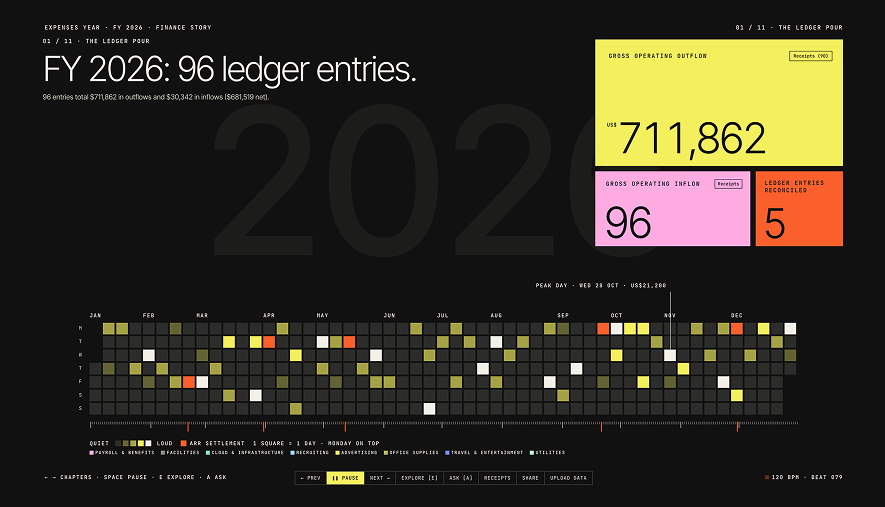
在企业财务与运营场景中,杂乱的账本、发票扫描件、PDF 财报常常难以直观比对。指南中的 Finance Story 应用会接收过去一年的交易数据,再制作成动画与可视化。

Finance Story 的示例界面把交易按月份与星期排成热力图。画面中的 96 笔账目和 711,862 美元支出是演示账本数据。
2. 用户意向到全功能应用交付
除了静态分析,托管环境中的 Argon 能够在沙盒内完成从界面构思、玩法编写、自主试玩调试到最终交付的全套流程。

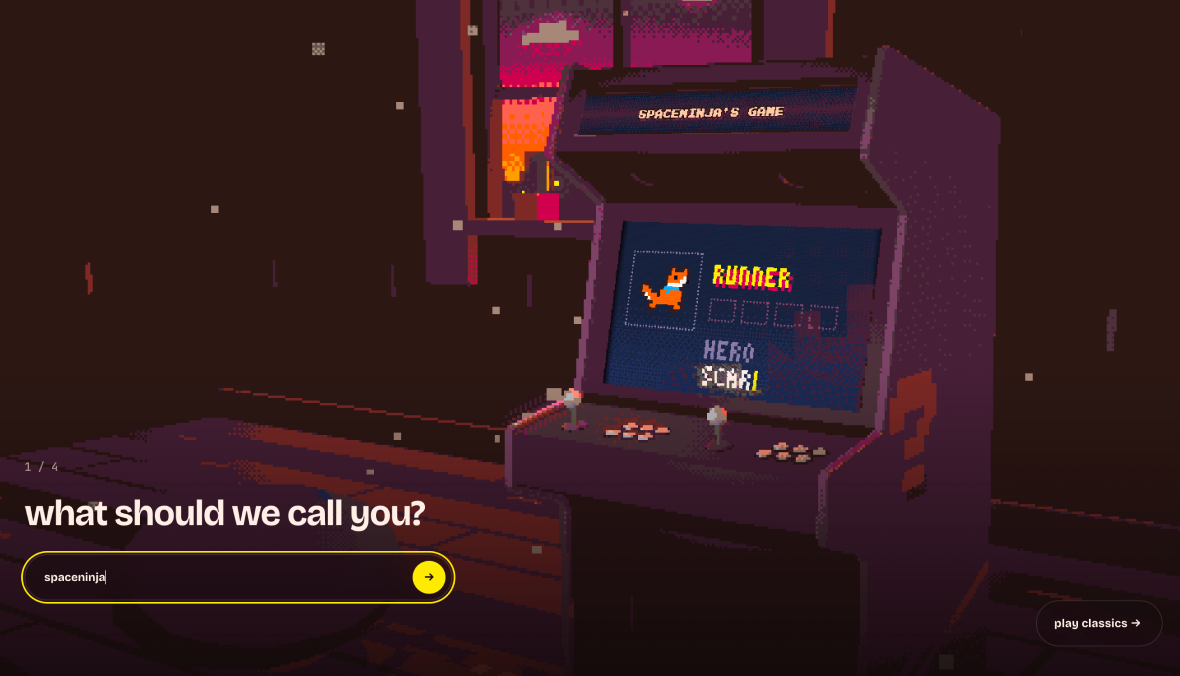
展示了 Pixel Arcade 的生成交互起始屏,使用者只需输入昵称与游戏意向,这个应用会让托管 Agent 构建并试玩游戏,再返回结果。
3. 把空间与光影写成可以运行的程序
图书馆视频展示了一条具体实现路径:Argon 编写约 5,500 行 Python/NumPy 代码,用光线追踪表现窗边日光、木材、玻璃和阴影。光线追踪会计算光线与场景物体怎样相遇,再形成画面中的明暗与反射。这个案例把数学实现变成了能观察的视觉结果。
画面展示了 Argon 编写的约 5,500 行原生 Python 光线追踪引擎,独立实现了程序化材质(Procedural Materials)、日光阴影(Daylight & Shadows)以及玻璃焦散(Glass Caustics)渲染,背景音轨则由多模态音乐模型 Lyria 3.5 协同生成。
让 Argon 定方向,让 Flash 并行执行
Google 团队给出了一种分工方式:Argon 负责拆任务、设计接口和审查结果;把范围清楚、可以独立推进的实现工作交给 Gemini 3.8 Flash 子代理。这样可以并行探索,同时把整体架构交给同一个主控把关。
分工逻辑
- 主控 Argon(设置
thinking_level="medium"或"high"):专注于大局。通读整个项目背景、理清架构设计、敲定模块边界与 API 规范,并在各子任务交付后进行严格的代码审查(Code Review); - Flash 子代理(如 Gemini 3.8 Flash):并行打下手。负责全代码库快速关键词扫描、批量补写单元测试样板代码、迁移相互独立的小模块;
- 分别负责图像、语音和音乐的模型:如界面 UI 图像与像素精灵交给 Nano Banana,语音交给 Gemini 3.8 Flash TTS,音乐交给 Lyria。
在火星漫游车着陆物理仿真任务中(需考虑降落伞撕裂阈值、推进器燃料、横向侧风与 18 度撞击坑坡度),左侧单 Argon 耗时 14 分 13 秒历经 6 次设计,花费 0.11 美元;右侧 Argon 统筹 Flash 子代理耗时 8 分 33 秒历经 26 次设计,花费 0.08 美元完成安全着陆。
视频只有 26 秒,压缩展示的是数分钟运行过程。这一次演示中,协作方案尝试了更多设计,用时和费用也更低;单个案例不能证明所有工程任务都会得到同样的收益。
任务结束后,留下可复用的经验和解释
在长时间自主编码或调试复杂的边缘问题时,模型不可避免会走弯路。项目代码库中常常隐藏着各种非显性的“暗坑”——例如某些私有构建参数、特定的代码规范偏好、已经废弃却未清理的内部工具库。
如果每次开启新会话都让模型从零摸索,会白白浪费大量 Token。可以在任务结束后,让 Argon 复盘本次会话全过程,把摸索出的教训提取出来,直接沉淀到代码库的 AGENTS.md 文件或团队 Skill 中。
实战资产:会话复盘与经验固化 Prompt
在复杂调试告一段落时,中英文任选一种发送给模型:
英文原文
Investigate our current session to see where things stalled or required extra steps, and analyze why. Propose updates to our AGENTS.md or custom skills so we can improve our flow and take a more direct path next time.
中文翻译
请深入审查我们当前会话的完整执行过程,定位在哪些步骤出现了停滞或耗费了多余的调试轮次,并分析具体原因。随后,请为我们项目根目录的 AGENTS.md 文件或自定义技能规范(Custom Skills)提出增量修改建议,以便我们在后续会话中规避这些陷阱,直接走通最高效的操作路径。
长任务改了几十个文件后,人也需要理解方案。可以要求 Argon 生成一张可交互的架构图、数据流图或逐步管线讲解,把改动怎样协作展示出来。它能帮助审阅者在合并前检查设计,也能让不熟悉渲染算法或数学逻辑的人看懂改动的作用;测试通过和解释清楚,分别承担验证与理解的任务。
百万 token 怎样分给材料、思考与回答
Argon 的统一窗口上限是 1,048,576 token,由输入、思考和回答共同使用。(token 是模型处理内容时使用的计量单位,并不等于一个字或一个单词)它允许一个难题使用更多推理与回答空间,也意味着输入材料越多,留给生成的余量越少。
例如,输入已经用了 800,000 token,思考和回答合计最多还剩 248,576 token。这个算术关系不会因为把输出参数设得更大而改变。
思考档位决定投入,额度上限决定何时停止
thinking_level 有三档:low 适合分类、路由与定向提取;默认 medium 面向多数编程和 Agent 工作;high 适合最难的跨文件排错、数学与科学推理。可以在自己的任务上比较三档,选达到质量要求的最低一档。
另一个参数 max_output_tokens 限制的是思考加回答的总量。假设把它设成 8,192,而模型把额度全部用于思考,最后可能没有可见回答。这是额度耗尽的可能情形,并不是 high 固定会消耗多少 token。
想降低推理投入,可以调低思考档位;把额度硬压得很小,则可能把尚未完成的回答截断。更高上限也只是允许模型多用一些,不能保证答案更好或一定写满。
一百万 token,怎样分给输入、思考和回答?
这是额度算术示例。思考用量由你假设,不是根据模型档位预测;给出的回答空间也是上限,不代表模型一定写满。
max(0,min(65,536,1,048,576 − 50,000) − 16,384) = 49,152
额度同时覆盖思考与回答。thinking_level 调整推理投入,没有固定 token 换算表。
本例的额度未超过 64K,无需长解码。多轮 Agent 每轮都很短时,通常也不需要开启长解码。
长解码怎样接着生成
在 Interactions API 中,普通流式与非流式请求默认都以 65,536 token 为上限。需要超过它时,必须同时设置 background=True 和大于 65,536 的 max_output_tokens;只开启后台模式,默认仍停在 64K。
服务端会以每段最多 64K token 继续生成:第一段结束后,将原始输入与已经生成的内容交给下一段,直到模型结束或达到额度。每段都在同一个 interaction 中留下一个 model_output 步骤,取结果时需要把这些步骤的文本合并。
这里会出现一个容易误读的数字:total_input_tokens 是各段输入的累计值,不是当前窗口大小。官方示例中,1,000 token 输入生成 200,000 token 的思考与回答,分成四段;各段输入合计约 397,000 token,但窗口里实际只需容纳约 201,000 token。重复输入有隐式缓存优惠,仍应根据实际用量核对费用。
长解码解决的是某一次响应需要很长思考或输出的问题。Agent 如果每次调用工具只用很短一轮,通常不需要长解码;把每一轮都放大,反而会更快填满共享窗口。大多数普通任务也不必开启它,更不能把上限理解为模型能按要求稳定写出固定字数。
Interactions API 的方式由服务器负责续接;如果要自己管理每段重试与错误恢复,GenerateContent API 也提供客户端续接方式。
怎样开始使用,以及迁移时要改什么
不想写代码,可以在 Google AI Studio Playground 试提示词,或在 AI Studio Build 做应用。指南列出的使用路径包括 Google AI Ultra 订阅,以及 Gemini API 付费层;Ultra 用户也可以在 Google Antigravity 选择 Argon 进行复杂任务规划与执行。
要在自己的程序中调用,可以使用 Google 官方 google-genai SDK。下面示例用于说明接入方式,未在本次解读中执行付费 API 调用。
1. 前置准备与环境配置
首先安装官方最新 SDK:
pip install google-genai
在运行任何代码前,必须确保终端中已配置有效的付费 API 密钥(Gemini 4 Argon 为全功能付费模型,暂不提供免费配额层):
export GEMINI_API_KEY="your-paid-api-key-here"
2. 基础调用:单文件 Web Audio 鼓机与合成器生成
体验 Argon 的默认开发调用方式非常直接。以下官方示例使用默认 thinking_level="medium" 请求生成带 16 步进音序器与动态波形显示的独立音频 Web 应用:
from google import genai

client = genai.Client()

interaction = client.interactions.create(
    model="gemini-4-argon",
    input=(
        "Build a single-file HTML drum machine and synth using the "
        "Web Audio API with a 16-step sequencer, tempo slider, and "
        "a live waveform visualizer."
    ),
    generation_config={
        "thinking_level": "medium"  # 可选: "low" | "medium" (默认) | "high"
    },
)

print(interaction.output_text)
把代码存成 try_argon.py,在配置好密钥的同一终端运行 python3 try_argon.py,终端会打印生成结果。检查返回内容,把其中完整 HTML 保存成 drum-machine.html,用浏览器打开后尝试音序器、速度滑块和波形显示。生成结果可能需要调试,应以实际运行效果验收。
不写调用代码,也可以发送鼓机提示词
中英文任选一种;在 AI Studio 打开已填入英文提示词的官方示例。
- 英文原文:
Build a single-file HTML drum machine and synth using the Web Audio API with a 16-step sequencer, tempo slider, and a live waveform visualizer. - 中文意译:
使用 Web Audio API 构建一个单文件 HTML 鼓机与合成器,包含 16 步进音序器、节拍速度滑块以及实时音频波形可视化画布。
进阶:长解码后台任务完整代码与状态处理
长解码后台任务模式(跨越 64K 生成边界)
对于需要超长推导或生成完整大型源码库的任务,必须显式开启 background=True,并赋予充足的 max_output_tokens。下面代码由开发者每隔 5 秒查询状态,再拼接各段 model_output。后台方式要求保存交互(store=True);示例中的证明请求来自官方文档,生成文本仍需要数学核验。
import time
from google import genai

client = genai.Client()

# 发起长解码后台任务
interaction = client.interactions.create(
    model="gemini-4-argon",
    input="Write a complete, rigorous proof of the prime number theorem.",
    background=True,
    store=True,
    generation_config={
        "max_output_tokens": 262144,  # 提升硬顶,防止思考吃满正文
        "thinking_level": "high",      # 极高难度任务开启高思考
    },
)

# 轮询等待后台分段 Hop 生成完成
while interaction.status in ("in_progress", "queued"):
    time.sleep(5)
    interaction = client.interactions.get(id=interaction.id)

# 退出等待后检查状态;completed 表示生成结束,不代表内容已核验。
if interaction.status != "completed":
    raise RuntimeError(f"Interaction ended with {interaction.status}: inspect status and usage")

# 合并各段 model_output 文本
text = "".join(
    content.text
    for step in interaction.steps
    if step.type == "model_output"
    for content in step.content
    if content.type == "text"
)

print(text)
print("最终交互状态:", interaction.status)
print("实际计费使用统计:", interaction.usage)
completed 表示这次生成已结束;requires_action 表示需要执行工具并回传结果;incomplete 可能是额度用完;failed 与 cancelled 需分别处理。退出等待循环不能直接当成成功。多轮对话或工具调用可通过 previous_interaction_id 续接已有交互。
进阶:让托管 Agent 搜索、运行代码并验证
接入托管沙盒 Agent(Managed Agents)
如果你希望直接借助 Google 托管的基础设施让 Argon 自主调用网络搜索、运行代码并生成审查报告,可以调用托管 Antigravity Agent。它提供运行沙箱与工具调度环境,支持搜索、写代码、验证以及调用 MCP 工具。MCP 是让 Agent 接入外部工具的一种接口方式。下面示例要求它检查网站表现并整理优先修复项:
from google import genai

client = genai.Client()

interaction = client.interactions.create(
    agent="antigravity-preview-09-2026",
    agent_config={
        "type": "antigravity",
        "model": "gemini-4-argon",
    },
    input=(
        "Audit https://web.dev for performance, Core Web Vitals, and SEO. "
        "Query Google's PageSpeed Insights API for both Mobile and Desktop strategies. "
        "Check search indexing with Google Search for site:web.dev. "
        "Format the output as a side-by-side scorecard table with prioritized fixes."
    ),
    environment="remote",
)

print(interaction.output_text)
从旧模型迁移时的关键改动清单
如果你正准备把现有的 Gemini 项目切换到 gemini-4-argon,要检查参数兼容性和运行设置:
- 废弃
thinking_budget:改为使用显式的thinking_level("low" | "medium" | "high"); - 彻底移除采样参数:
temperature、top_p、top_k在 Argon 中已不再生效,强行传入会收到废弃警告; - 下线显式缓存管理:不要再调用
cachedContents或caches.create。Argon 对至少 4,096 token 的提示词默认启用隐式缓存,只有命中的输入部分享受 95% 折扣; - 拉长客户端网络超时:深度推理或长解码单次任务可能持续运行数分钟,务必开启
background=True,或将 HTTP 客户端超时时间至少设置为 15 至 20 分钟。
价格怎样算,长时间运行要留意什么
Gemini 4 Argon 不提供 Gemini API 免费层。官方列出了促销价与之后恢复的常规价,截止与生效安排见页末来源说明及官方实时定价。
| 计费项 (每 1M Tokens) | 当前促销价 | 之后常规价 | 关键适用条件与计费说明 |
|---|---|---|---|
| 常规输入 (Input) | $2.00 | $4.00 | 包含提示词、上传的多模态媒体及历史会话上下文 |
| 缓存输入 (Cached Input) | $0.10 | $0.20 | 命中部分减免 95%。要求单次输入达到 4,096 Tokens 阈值且命中隐式缓存 |
| 输出与思考 (Output & Thinking) | $10.00 | $20.00 | 按输出费率计费。模型在后台展开的深度思考(Thought Tokens)与最终正文按统一费率结算 |
必须看清的成本底线
- 思考过程也付费:假设模型为一个棘手问题使用了 10 万个思考 token,这 10 万个 Token 与最终回答中的 token 按同一输出费率收费。因此,面对简单工作,切忌随意将
thinking_level拉到high; - 分段续接会重复读取输入:各段输入累计会拉高
total_input_tokens,重复读取的部分有 95% 的隐式缓存折扣。核对成本时要区分输入、缓存命中输入、思考和回答。
后台任务即使失败或取消,已经执行的部分仍会计费。结束后应查看 usage,而不是只看有没有得到最终正文。
实操带走包
滚动查看原始 Markdown,复制后可按团队实际系统与政策修改。
正在载入 Markdown…
长任务怎么交给 AI,结果怎么验收
假设要修好整个网站的布局和无障碍问题。只让 AI 生成一段代码,还不知道页面是否真的变好;给它能运行的项目、测试和浏览器,它才能检查修改结果,再继续排错。
先约定“怎样算修好”,再让检查推动下一步
哪些页面、哪些设备要检查?什么结果算通过?不可逆操作由人确认。
没有检查脚本,就先写一个。记录当前失败项,留下前后比较的依据。
多个页面都被同一个导航组件影响,就先修这个组件,减少逐页打补丁。
确认问题解决、其他页面未受影响。没通过,就根据报错回到定位与修改。
脚本“零违规”只说明它能检查的项目通过,真实页面的阅读、操作和视觉效果仍需查看。
百万 token 是共享空间,材料越多,生成余量越少
token 是模型处理内容的计量单位。Argon 的输入、思考和回答共用一个窗口,不是各有一百万。
thinking_level 调整推理投入;max_output_tokens 限制思考+回答的总量。若思考把额度用完,可能没有可见回答。上限更高也不保证答案更好或一定写满。思考也按输出费率计费。用实际 usage 核对成本,失败或取消前已执行的部分仍会计费。
Argon 把关,Flash 并行做范围清楚的工作
官方火星漫游车着陆仿真中,协作方案尝试了更多设计,用时和费用更低:
| 方案 | 耗时 | 设计 | 费用 |
|---|---|---|---|
| 单 Argon | 14分13秒 | 6次 | $0.11 |
| Argon+Flash | 8分33秒 | 26次 | $0.08 |
一次需要很长回答时,才考虑长解码
Interactions API 默认上限为 65,536 token。超过它,需同时开启 background=True,并把 max_output_tokens 设得更高;只开后台模式仍停在默认上限。
原始输入 → 开始生成
原始输入+已生成内容 → 继续生成
最后合并各段 model_output 文本。各段输入的累加值不是当前窗口大小;重复读取的输入只有命中隐式缓存的部分才享 95% 折扣。
每轮都很短的 Agent 通常不需要长解码。生成 completed 也不代表内容正确,结果仍要验收。
任务完成后,把经验留下。让 Argon 复盘哪里停滞、为何多走弯路,把改进建议写进 AGENTS.md 或团队技能,供下次复用。
Gemini 4 Argon: Developer Guide | Google AI Studio
Developer guide for our frontier model, Gemini 4 Argon. What is new and tips and tricks to get the most out of the model.
Developer guide
Gemini 4 Argon is our new frontier model for complex workflows across real-world software engineering, enterprise knowledge work, and cybersecurity defense.

Published October 13, 2026
Today, we are rolling out Gemini 4 Argon globally to developers and enterprises. You can start building using the paid tier of the Gemini API in Google AI Studio, and for Google AI Ultra subscribers in AI Studio and our agent-first development platform, Google Antigravity.
Gemini 4 Argon is trained to work longer and retain context better than any previous Gemini model. From large-scale codebase refactoring and performance optimizations to vulnerability patching and multimodal synthesis, it is built to take on your hardest tasks, from start to finish.
Gemini 4 Argon model overview
| Model | Model ID | Default thinking | Pricing (per 1M tokens) |
|---|---|---|---|
| Gemini 4 Argon | gemini-4-argon | medium | Intro (through Nov 30): $2 input · $10 output (95% off cached) From Dec 1: $4 input · $20 output · Pricing details |
Argon supports a unified 1M token context window via the Gemini API for input and output tokens (up from 64k in previous models), tunable thinking levels (low, medium, high), and the same suite of built-in Gemini API tools.
In this guide, we cover what is new in Gemini 4 Argon and share practical tips for building with the model. For more on how Gemini 4 Argon is being used across robotics, science, finance, legal and more, check out our announcement blog post.
What Gemini 4 Argon unlocks across developer workflows
Gemini 4 Argon's enhanced reasoning and problem solving capabilities give it the room to work through massive problems from start to finish.
- Long-horizon engineering and security tasks: Hand Argon a measurable target—like untangling a legacy subsystem, refactoring a codebase from C++ to Rust, or remediating security vulnerabilities and let it build its own verification harness, test hypotheses against compiler or runtime output, and iterate until the task is done.
- End-to-end multimodal and business workflows: Point Argon at dense folders mixing long videos, PDFs, spreadsheets, financial ledgers, or legal filings to cross-reference facts across formats and turn unstructured inputs directly into interactive dashboards, slides, or audited redlines.
- 3D visualizations, simulations, and full-stack apps: Combine Argon's spatial reasoning and visual code generation across tools like Blender, Three.js, and WebGPU to build complex 3D scenes, physics simulations, and full-stack web apps. Check out our companion guide, Building 3D Games and Procedural Worlds with Gemini 4 Argon, for practical workflows.
What’s new in the API
Before diving into workflow tips, here are the key API updates to know when calling gemini-4-argon via the Gemini API:
Controlling reasoning depth with thinking_level
Gemini 4 Argon uses thinking_level ("low" | "medium" | "high") to control how much reasoning (thinking) the model does before responding:
• "high": Maximizes reasoning depth for multi-file root-cause debugging, security vulnerability patching, formal math, and upfront architecture design.
• "medium" (default): Recommended when you want an optimal balance of speed, cost efficiency, and high first-pass accuracy across interactive coding and agentic tool use.
• "low": Minimizes latency and cost for high-speed classification, routing, and targeted extraction.
python
12345678910111213141516
from google import genai

client = genai.Client()

interaction = client.interactions.create(
    model="gemini-4-argon",
    input=(
        "Build a single-file HTML drum machine and synth using the "
        "Web Audio API with a 16-step sequencer, tempo slider, and "
        "a live waveform visualizer."
    ),
    generation_config={
        "thinking_level": "medium"  # "low" | "medium" (default) | "high"
    },
)
print(interaction.output_text)
123456789101112131415
import { GoogleGenAI } from "@google/genai";

const client = new GoogleGenAI({});

const interaction = await client.interactions.create({
  model: "gemini-4-argon",
  input:
    "Build a single-file HTML drum machine and synth using the " +
    "Web Audio API with a 16-step sequencer, tempo slider, and " +
    "a live waveform visualizer.",
  generation_config: {
    thinking_level: "medium", // "low" | "medium" (default) | "high"
  },
});
console.log(interaction.output_text);
Unified 1M input-output token limit and long decodes
Earlier Gemini models capped max output (thinking + response) at 64K tokens. In Gemini 4 Argon, input, thinking, and output share a unified 1M-token window in the Gemini API, and you can use long decode to generate past 64K tokens (up to 1M tokens minus your input) so Argon can think as long as needed and still return complete multi-file diffs, test suites, or long-form proofs in a single pass.
- Default output limit is
65,536(64K) tokens: On the Interactions API, both streaming and non-streaming requests default to65,536tokens with no code changes required. - Generate up to 1M tokens with
background=True: To generate past65,536tokens on the Interactions API, setbackground=Trueand setmax_output_tokensabove65536. Set it high enough that thinking doesn't cut the answer short, and low enough to limit spend when a hard prompt uses all of it.
NOTE: If you need finer-grained control over long decode, you may prefer client-side continuation for long decoding, which is currently only available via the legacy GenerateContent API. Client-side continuation will soon come to the Interactions API as a more advanced option to manage your own resilience.
python
12345678910111213141516171819202122232425262728293031
import time

from google import genai

client = genai.Client()

interaction = client.interactions.create(
    model="gemini-4-argon",
    input="Write a complete, rigorous proof of the prime number theorem.",
    background=True,
    generation_config={
        "max_output_tokens": 262144,
        "thinking_level": "high",
    },
)

while interaction.status in ("in_progress", "queued"):
    time.sleep(5)
    interaction = client.interactions.get(id=interaction.id)

# Each segment adds a model_output step, so join the text of all of them.
text = "".join(
    content.text
    for step in interaction.steps
    if step.type == "model_output"
    for content in step.content
    if content.type == "text"
)
print(text)
print("Status:", interaction.status)
print("Usage:", interaction.usage)
See the What's new in Gemini 4 Argon for details on updating hardcoded 64K synchronous output limits, background retention, dynamic output clamping, and stateless continuation.
Migrating from previous models
When migrating to Gemini 4 Argon, clean up the following parameters:
- Replace
thinking_budgetwiththinking_level:thinking_budgetis deprecated and returns a warning. - Remove
temperature,top_p, andtop_k: Custom sampling values are ignored bygemini-4-argonand return a deprecation warning. - Move off explicit context caching: Remove calls that create or pass explicit
cached_content. Implicit caching is enabled automatically at a 95% discount on cached input tokens. - Increase client timeouts: Hard reasoning prompts can take several minutes. Use
background=Trueon the Interactions API, or set your HTTP client timeout to at least 15 to 20 minutes.
For full details, check out our migration checklist, or install the gemini-api-devskill in your coding agent and ask it to migrate your codebase to gemini-4-argon.
Use Gemini 4 Argon in managed agents
You can also use gemini-4-argon as the model for Managed Agents in the Gemini API. Managed agents provide a hosted sandbox and the Antigravity harness where Argon's frontier reasoning can search the web, write code, verify work, and call MCP tools all with a single API call.
python
123456789101112131415161718192021
from google import genai

client = genai.Client()

interaction = client.interactions.create(
    agent="antigravity-preview-09-2026",
    agent_config={
        "type": "antigravity",
        "model": "gemini-4-argon",
    },
    input=(
        "Audit https://web.dev for performance, Core Web Vitals, and SEO. "
        "Query Google's PageSpeed Insights API for both Mobile and Desktop strategies. "
        "Check search indexing with Google Search for site:web.dev. "
        "Format the output as a side-by-side scorecard table with prioritized fixes."
    ),
    environment="remote",
)

print(interaction.output_text)
1234567891011121314151617181920
import { GoogleGenAI } from "@google/genai";

const client = new GoogleGenAI({});

let interaction = await client.interactions.create({
    model: "gemini-4-argon",
    input: "Write a complete, rigorous proof of the prime number theorem.",
    background: true,
    generation_config: {
        max_output_tokens: 262144,
        thinking_level: "high",
    },
});

while (["in_progress", "queued"].includes(interaction.status)) {
    await new Promise((resolve) => setTimeout(resolve, 5000));
    interaction = await client.interactions.get(interaction.id);
}

console.log(interaction.output_text);
Finance Story
A personalized interactive visualization for your finances built by Argon. Drop in your transactions from the past year and let the agent turn them into animations and visuals.
Pixel Arcade
An arcade machine that lets you generate your own personalized games. Choose a character and type of game style you want and a managed agent builds, plays, and returns you a working game.
5 practical tips for building with Gemini 4 Argon
Here are five patterns we’ve seen our teams use to get the most out of the model and tackle their hardest problems.
1. Align on intent before long runs
Gemini 4 Argon can work on a task independently for a long time. This means that clear alignment upfront on measurable goals and key milestones helps you get to your result most effectively. Once pointed at a clear goal, the model holds context across long runs on its own really well. To make sure a long autonomous run is pointed at the exact right target from step one:
- Share your goal and ask Argon to surface clarifying questions about edge cases and success criteria upfront.
- Ideate with Argon while scoping: Use the planning phase to pressure-test architecture and explore creative solutions. In our workflows, we’ve seen it suggest novel upgrades across the stack - from designing surprising gameplay mechanics and procedural visual effects to recommending cleaner data models and more intuitive API design.
- Run a quick pre-flight check: Have Argon confirm it has access to the required tools, docs and understands the intent before starting.
- Step back and let Argon run to completion: Instead of prompting turn by turn, let Argon execute the full plan autonomously - writing code, running checks, and iterating across files until it hits the target you agreed on, while pausing for your confirmation before taking irreversible steps.
2. Give the model a way to verify its work
Argon does its best long-horizon work when it can test its own changes against a real feedback loop. Instead of making Argon guess whether a fix worked, give it a concrete signal to check: point it at your test suite, pipe in runtime logs, let it take browser screenshots to inspect the UI, or ask it to write a verification script and iterate in a loop until every check passes. Better yet, have Argon write a reproducible verification script, record a baseline score, and test every change against that script in a loop until the target is met. With a concrete pass/fail target, Argon can record a baseline, test hypotheses in a loop, and iterate until the checks are green.
If you don’t have something to measure, ask Argon to help analyze your project and build a baseline benchmark.
prompt
We want to fix accessibility and layout issues across our web app, but we don't have automated checks yet. First, write a headless Chrome script that crawls every route in src/routes/, inspects the live DOM and accessibility tree, and logs all violations to record our baseline score. Group the failing checks into shared root causes across our shared components, then fix them one cluster at a time. Re-run your script after each change to verify that each single fix resolves the entire cluster with zero regressions. Keep going until all routes pass with zero violations.
3. Use multimodal references
Gemini models have long been great at multimodal capabilities and Gemini 4 Argon is no different. It can take in images, audio, video, code, and text as input. Pass reference images when building frontends or recreating images in 3D builds, or pass it a video when you want to recreate a certain animation or interaction on your web app.
If you have a specific target style in mind for your project, point Argon at 1–2 concrete visual references, or ask it to summarize your typography, color palette, and layout rules into a lightweight DESIGN.md file first so every component stays visually cohesive.
Gemini 4 Argon also includes agentic video understanding, which lets the model dynamically scrub across timestamps, inspect individual frames in high resolution, and connect what it sees on screen with spoken narration or console audio. Try recording a quick screen-share where you click through your app and talk through rough edges out loud, capturing a tricky timing bug alongside your live console logs, or drop in a 20-minute user testing recording and ask Argon to pinpoint where users got stuck and patch the underlying components.
4. Use Argon as an orchestrator
For deeply technical tasks, Argon is great at orchestrating subagents to parallelize work. While you can let Argon steer multiple Argon subagents for complicated tasks, developers across Google frequently enjoy pairing Gemini 4 Argon with Gemini 3.8 Flash subagents as high-speed implementation workhorses. Argon handles the heavy architectural reasoning and code review, while Flash speeds through parallel execution, giving you the best of both worlds in terms of speed, cost, and code quality.
- Use Gemini 4 Argon (
thinking_level="medium"or"high") as the lead orchestrator to break down the problem, design interfaces, and review finalized work. - Delegate parallel, well-scoped tasks, such as fast codebase explorations, writing boilerplate tests, migrating individual leaf modules, or running high-frequency checks to Gemini 3.8 Flash subagents (
model: flash). - For rich interactive apps, let Argon orchestrate specialized models across modalities: Nano Banana for UI images, textures, and sprites, and Gemini 3.8 Flash TTS or Lyria for voice and music
5. Have Argon reflect on past work
At the end of a complex task - or mid-session when tackling a particularly gnarly problem - ask Argon to step back and review the trajectory so far. Because Argon excels at synthesizing details across long histories, building a habit of reflection pays off in two ways:
- Skip repeated trial-and-error on codebase quirks: Every repo has non-obvious gotchas - custom test flags, strict lint rules, or deprecated helpers - that can cost extra turns to diagnose. Having Argon write those lessons into
AGENTS.mdor a reusable skill means future sessions take the direct path on the first try - Turn one-off debugging into reusable team skills: Once Argon figures out a reliable multi-step workflow (like running a tricky local migration or verifying a build), ask it to package those exact steps into a reusable skill so you - and your teammates - never have to rediscover them from scratch.
Try prompting Argon with:
prompt
Investigate our current session to see where things stalled or required extra steps, and analyze why. Propose updates to our AGENTS.md or custom skills so we can improve our flow and take a more direct path next time.
When Argon completes a long autonomous run across dozens of files, reading the raw diff isn't always the fastest way to build a mental model of what changed. Try asking Argon to generate an interactive visual explainer of its solution - like a live architecture diagram, a data-flow map, or a step-by-step pipeline walkthrough. It’s a fast way to sanity-check the design before merging, get up to speed on unfamiliar math or rendering logic, or see the progress on your 3D render in a satisfying animation so you can understand which changes had the biggest impact.
Getting started
You can start building with Gemini 4 Argon today across Google’s developer platforms:
- Google AI Studio: Test prompts in Playground or build full-stack apps in Google AI Studio Build, available to Google AI Ultra subscribers and developers using a paid tier in the Gemini API.
- Gemini API: Use
gemini-4-argonin the Interactions API with day-one support across thegoogle-genaiSDKs and in Managed Agents. - Google Antigravity: For Google AI Ultra subscribers, select Gemini 4 Argon (
gemini-4-argon) as your active model in Google Antigravity for complex planning,/goalruns, and multi-agent orchestration. - Developer Documentation: Read the full Gemini 4 Argon and Long Decode documentation, plus our companion guide on Building 3D Games and Procedural Worlds with Gemini 4 Argon.
- Use your favorite development tools: You can also start building with Gemini 4 Argon today across popular tools and harnesses such as Vercel, LiteLLM, OpenRouter, Pydantic, OpenCode, LiveKit, BrowserBase, Eigent, and Cua.
- Gemini API skill: Install the
gemini-api-devskill in your coding agent and ask it to migrate your codebase togemini-4-argon.