
Grok Bot 营销指南:从竞品研究到落地页、广告与复盘的六岗位协作
六个营销 Bot 在 Docs、Google Ads 与代码仓库中完成交付,项目经理减少搬运,营销者保留定位和花费决策。
Grok Bot 的营销指南讲的是怎样让六个长期岗位完成一次营销交付。Josh Kim 用 Bot 阅读竞品、在 Google Docs 写定位、搭 Google Ads 广告结构、在网站代码库开 PR,再读取投放数据。
这些动作原本分散在不同工具和专业岗位中。Bot 可以直接互相询问背景;交接多起来以后,Project Manager 负责协调,营销者集中审阅定位、真实账户操作与花费。
为什么单一大模型聊天会失灵?拆解六大专业岗位
营销推广从来不是某一个人脑子里的单点任务。调研、定位、建站、投放、复盘,在真实商业团队中本就分属不同角色。如果试图在同一个聊天窗口里让一个通用 AI 既做宏观竞品分析,又写前端 HTML/CSS 代码,还要排期广告关键词,单条会话往往容易变得臃肿,逐渐偏离最初设定的目标。
团队需要的是各司其职的「常驻专业岗位」:
- Market Researcher(市场研究员):自带独立浏览器,自主阅读竞品官网与自身产品页,挖掘真正有营销穿透力的差异化切入点。
- Product Marketer(产品营销 / PMM):将调研发现转化为 Google Docs 中的定位简报、落地页结构大纲以及搜索广告文案变体。
- Website Ops(网站运营与开发):底层调用 AI 编程工具 Cursor,将落地页大纲写成可运行的前端代码,并在 GitHub 营销代码库直接提 Pull Request(PR)。
- Performance Marketer(效果营销投放员):直接接入 Google Ads 账户,把已过审的测试文案搭建成可执行的广告系列外壳(Campaign Shells)。
- Marketing Analyst(营销数据分析师):定期拉取实际广告测试数据,输出概念维度的得分看板(Scoreboard),提供增删停投建议。
- Project Manager(项目经理 / PM):全局协调各岗位之间的交接流转,充当人类操盘手的「单一入口」,终结在多个对话框来回切换的疲劳。

按原文岗位整理;图中配置示例需由你补充时间、系统与权限。
Grok 营销六大岗位协同与安全控制盘
点击切换不同智能体岗位,查看其实际接入的工具、产出物、自动化协作上下游,以及至关重要的人类审批决策卡点。
跨智能体消息总线、任务状态看板。对接所有专家的会话上下文。
监听各专项 Bot 的运转进度,主动推动跨岗位上下文流转(Handoff),并将前端截图、运行阻塞点汇总呈报给人类负责人。
人类负责人保留全局指挥权与异常裁决权。只在各专业岗位流转顺畅后引入,一人直面 PM 即可,避免同时盯 5 个专项聊天窗口。
仅具备会话流转与协调权限。不触碰任何真实的广告账户资金或线上生产分支的直接合并操作。
全流程实战推演:虚构航司 X-Air 的从零到一闭环
为了展示这套体系如何在真实业务中运转,原文引入了一家名为 X-Air 的虚构长途航空公司,作为跑通从调研、落地页、广告到分析复盘全流程的独立示例。
第一步:发现非同寻常的“差异化盲区”
传统的 AI 调研往往会输出厚厚几十页空话,什么“主打尊贵服务”、“高端航程体验”,对实际操盘毫无参考价值。
操盘手把 Market Researcher 指向 X-Air 官网及指定的长途航司竞品集合。智能体打开自己的浏览器,阅读相关页面,给出了竞品之间的具体切入差异:
核心结论:侧重飞行中的实用时间(useful time in the air),而非单纯追求奢华(not luxury for its own sake)。
这一洞察足够具体,便于下游的产品营销据此展开工作。
第二步:跨 Bot 私信传导与 Docs 批注协同
以往我们需要把调研文字复制出来,重新整理成 Prompt 喂给下一个对话框。但在 Grok Bot 体系下,智能体之间可以在后台互发私信调取上下文。
Product Marketer 收到任务后,在后台直接找 Market Researcher 同步了竞品背景,然后在团队的 Google Docs 中创建了一份定位简报:
- 提炼了核心一句话卖点(One-liners);
- 梳理了核心价值主张(Value statements);
- 拟定了落地页的信息架构;
- 预先撰写了针对 Google 搜索广告测试的系列标题变体。
人类的关键动作在此发生:操盘手像审阅人类下属的草稿一样打开 Google Docs,在觉得特别出彩的一行文案旁边留了一条协同批注(Comment),指示“顺着这个角度继续挖深”。Bot 识别到人类的文档批注后,自动刷新了定位文档与配套广告变体。
第三步:落地页代码化与带图 PR
拿到了经过人类首肯的落地页大纲,任务流转给 Website Ops。
很多营销团队卡在落地页上,动辄等排期、等设计做 Figma、等前端切图。而这个 Bot 底层接入了 Cursor 编程引擎,直接在营销站点的 GitHub 代码库上新建分支、编写页面代码,并提交 Pull Request(代码合并请求)。
在编写过程中,它会把阶段性的 UI 渲染截图实时发回。代码合并之后,营销人直接打开已上线的真实页面(live page),而不是面对着从未交付的视觉原型争吵。
第四步:进驻广告后台搭建“真外壳”
Performance Marketer 拿到过审的测试文案后,直接连入 Google Ads 账户,搭建出专门用于验证文案说服力(Messaging Tests)的广告系列外壳(Campaign Shells)。
(说明:广告外壳 Campaign Shells 指的是在广告后台中建好的真实账户结构,而非离线表格;具体定向、排期或状态等可按需作为自配建议自行设置。)
这省去了后续手动在后台挨个复制粘贴建计划的巨大脏活。
第五步:分析师输出“只建议、不调价”的记分牌
投放开启并积累阶段数据后,Marketing Analyst 开始介入。它从后台拉取实验数据,按照测试概念(下列概念名称仅作解释示例,如“空中高效办公”与“长途舒适体验”)归纳出一张记分牌:
- 消耗预算(Spend)
- 点击率(CTR)
- 转化率(CVR)
- 每次转化成本(CPA)
- 广告支出回报率(ROAS)
分析师会在记分牌后附带简短的调优建议(如扩量哪套概念、淘汰哪套方案)。但这里有一道极其坚固的权限规则:分析师绝对无权自主调整任何在线广告的状态、出价或预算! 钱该怎么花,永远由人类审批。
第六步:分析洞察回到下一份研究简报
原文的流程图把分析洞察连回下一份研究简报,让测试结果成为后续研究的输入。图中没有给出自动触发产品升级或立项的规则;下一步扩量、停止或继续测试,仍由营销者判断。

落地四大法则:在真实组织中用好常驻 Agent
如果明天你打算把这套机制落地到自己的业务中,可以从作者经验中整理出以下四条做法:
1. 警惕“流转税”(The Handoff Tax)
当你在团队里只启用了 1 个营销助手时,完全可以跟它单线沟通。但一旦多个角色之间的交接流转变得频繁,在不同会话间搬运背景信息、反复交代上下文的“流转税”就会迅速耗费精力。
这就是为什么需要 Project Manager。它专门学习各专家的输入输出协议,推动智能体间的交接,把最终的阻碍和截图汇总给人类。记住作者的建议:只在协同流转真正让你感到繁琐时才引入 PM,千万不要过早引入。
2. 模板是“菜谱”,绝不是做好的“饭”(Share as Template)
当某个岗位(比如专门写搜索广告壳的 Bot)调试得很顺手后,可以用“分享为模板”(Share as Template)分发给团队其他同事。
但一定要明白:模板只携带你注入的运作风格、规则与工作流协议,它不会带走你的电脑环境、登录状态或聊天历史。 接收模板的同事,依然需要把他们自己的工具和权限接上去。
3. 权限递进原则(Progressive Permissions)
绝不能在创建 Agent 的第一天,就把公司的信用卡或线上主代码库权限交给它。权限必须随着交付信任逐步升级:
- 初期:先开放文档重写(Doc rewrites)与 Slack 草稿回复等相对安全的协作权限;
- 中期:允许在 GitHub 提交带截图的特性分支 PR、在广告后台搭建广告外壳;
- 红线:涉及真实扣费、生产环境部署、更改在线广告出价,永远由人类负责最终审批。
4. 岗位恒定与记忆复利(Permanent Seats)
很多人用 AI 的习惯是:每来一个新促销活动,就新建一个新群或新 Prompt。这种做法丢掉了所有的历史记忆。
正确的做法是:岗位是恒定的,活动是流水的。 保持这 6 个岗位常驻,当有新的 X-Air 或短期营销战役时,把这几个常驻 Bot 拉进同一个协同会话中。它们对品牌语调的掌握、对工具链的熟悉度、对历史踩坑的记忆,会随着一次次战役不断沉淀和复利增长。
核心岗位提示词模板与本地化改造参考
以下为编辑结合原文工作流自拟的岗位提示词参考,供本地化落地时选用。你可以根据自身业务环境(例如将 Google Docs 替换为飞书文档、将 Google Ads 替换为巨量引擎或腾讯广告平台)进行修改使用。
岗位一:Market Researcher(市场研究员)
【角色定位】
你是一名专注长途出行/消费业务的资深市场研究专家。你的任务不是输出宽泛的行业通论,而是通过实际对比分析,为产品定位提供尖锐、可执行的战略差异点。

【输入与工作方式】
1. 自主调取给定的品牌官网与竞品主页链接。
2. 提炼各家在主页、产品页的核心承诺与宣传主张。
3. 找出竞品集体陷入同质化竞争的维度,以及未被充分满足的潜在诉求。

【核心约束与交付物】
- 严禁空洞的宏观定性词汇(如“高端奢华”、“优质体验”)。
- 必须交付一份结构化的《战略切入简报(Strategic Read)》,清晰对比:竞品主打什么 vs 我们应该卡位什么。
- 交付格式必须精简,直接作为下游产品营销(PMM)编写文案的底层依据。
岗位二:Product Marketer(产品营销)
【角色定位】
你是一名顶级产品营销(PMM),擅长将市场调研结论转化为高转化率的定位文档、网页结构大纲与广告测试文案。

【工作流与输入】
1. 从 Market Researcher 处获取最新战略切入简报。
2. 在云端协同文档中输出内容;参考人类协作者在文档中留下的批注反馈进行针对性迭代与更新。

【交付物规范】
1. 品牌一句话定位(One-liner)与 [N] 条核心价值主张(Value Statements)。
2. 营销落地页的完整页面结构骨架(包含 Hero 区域主副标题、痛点拆解区、产品实证区、行动召唤 CTA)。
3. [N] 组针对搜索广告的测试文案变体(包含 Headline 与 Description),分别聚焦不同的测试方向。
岗位三:Performance Marketer(效果营销)
【角色定位】
你是一名效果广告搭建专家,负责将已过审的营销文案转化为线上广告系统中的实际测试框架。

【工作流与约束】
1. 读取 PMM 已过审的广告测试文案矩阵。
2. 依据广告投放渠道规范,自动化组织广告系列(Campaign)、广告组(Ad Group)、受众定向与素材对应结构。
3. 【安全建议】:搭建的广告系列外壳为真实账户结构,建议预设为“暂停(Paused)”或“草稿”状态以供审核。
4. 不得自主启用广告系列或自主调整每日预算与出价策略。搭建完成后,生成结构清单等待投放负责人人工审查。
岗位四:Marketing Analyst(数据分析师)
【角色定位】
你是一名冷静客观的增长数据分析师,负责从投放实验数据中剥离噪音,量化各套文案概念的真实转化效率。

【核心交付】
1. 输出《概念维度效果记分牌(Scoreboard)》,至少包含指标:消耗金额(Spend)、点击率(CTR)、转化率(CVR)、每次转化成本(CPA)、投产比(ROAS)。
2. 【权限绝对边界】:你拥有只读报表分析权限,绝对禁止向广告系统发起任何修改预算、调整出价、关停广告的写操作。
3. 将本轮表现最佳的概念要素整理为简要洞察,回传给市场研究员作为下一阶段素材迭代的输入。
总结:从劳力输出走向“指挥与裁决”
把大模型用进真实营销的核心分水岭,在于你究竟是在陪它聊天,还是在指挥它接管工具。
当这 6 个 Grok Bot 各就各位,在 Docs 中写稿、在 GitHub 上提交 PR、在广告系统搭建框架、在报表库里提炼洞察时,人类营销人的角色终于发生了质的转变:从一个疲于在各类软件之间搬砖、核对表格的执行者,变成了真正掌控业务方向、把关品牌灵魂、审定资金花费的总指挥官。
不妨先从最痛的一个环节开始——挑一个独立的岗位,接上它唯一需要的工具,试着把你的第一份业务脏活交出去。
原文提供的模板入口
- Market Researcher
- Product Marketer
- Performance Marketer
- Website Ops
- Marketing Analyst
- Project Manager
以上为原文提供的入口。安装后仍需连接自己的账户、资料与工具;本次核查未执行安装或验证登录后的模板状态。
Grok Bot 营销指南:从竞品研究到落地页、广告与复盘的六岗位协作
把全部任务塞进同一会话,容易让背景膨胀、目标漂移。六个常驻角色分别连接工具,彼此调取上下文;人不必反复在多个窗口复制材料。
一份简报,怎样走到真实交付
前一步的产物是后一步的输入。Bot 可以在后台互发私信取背景;人在文案、代码与账户操作的关键点审阅。
权限随信任逐步开放
先验证低风险交付,再增加账户操作权限。作者的经验可整理为以下层次;执行仍取决于实际账户与 Bot 的配置。
第六岗 PM 何时加入? 交接真正变繁琐时再引入;过早加入反而增加协调负担。
岗位常驻,活动轮换:复用岗位积累的品牌语气和工具经验,不为每次活动重建整支队伍。
模板分享的是规则与工作方式,不会替使用方接好电脑、登录与历史会话;安装后仍需连接自己的工具与账户。
Grok Bot for Marketing · Grok Bot
Six marketing bots that research competitors, draft positioning in Google Docs, build Google Ads shells, and open PRs on the marketing site.
I used to treat marketing AI like a clever intern that never left the chat window. Useful for brainstorming, terrible at finishing the job.
A few months ago I was still the one pushing every step: paste research into a Doc, rewrite the brief myself, chase someone for a web page, rebuild ad shells by hand, then stare at a spreadsheet hoping everything was right. Now I orchestrate a small team of Grok Bots through that loop. They draft, hand off, open PRs, and build campaign shells while I keep the judgment calls.
There are a lot of guides about using AI to automate social posts or write faster. I want to show you the six bots that really changed how I ship marketing work.
Meet the marketing bots
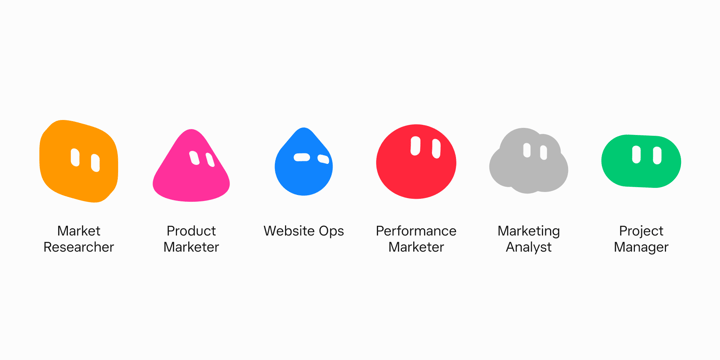
A marketing launch rarely lives in one person’s head. Research is one role. Positioning is another. Web, paid, and analysis are usually different people again. Keeping work moving across those jobs without losing context is always the most difficult part.
I staff that with six specialists:
Market Researcher studies product pages and competitors, names gaps, and writes the strategic read.
Product Marketer turns that research into positioning briefs, landing page outlines, and search ad variants in Google Docs.
Performance Marketer builds Google Ads campaign shells and traffics approved copy into them.
Website Ops takes a landing outline, writes the page with Cursor under the hood, and opens a PR on the marketing site.
Marketing Analyst pulls Google Ads data, writes a scoreboard, and recommends what to scale, cut, or test next. It does not change a live ad, bid, or budget.
Project Manager studies the other bots, runs handoffs, and is my single thread so I am not trafficking five specialist chats myself.
Each one has a job description. That is the point. A generalist chat that tries to do research, ads, and code in one thread gets bloated and forgets why you hired it.
X-Air, start to finish
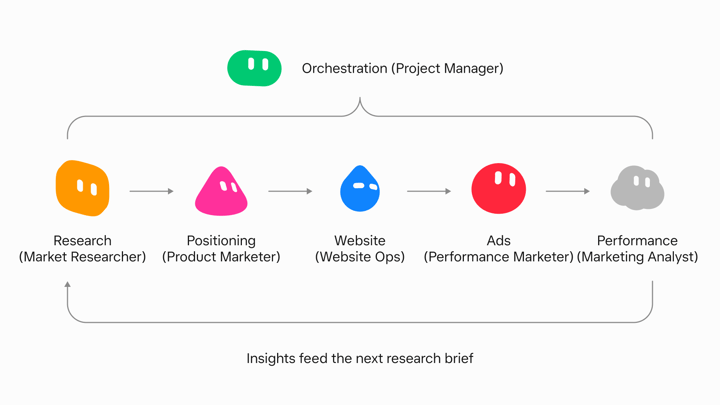
X-Air is a fictional long-haul airline. I use it here as a standalone example of the full loop, from research through a page, ads, and an analyst read.
I pointed Market Researcher at the X-Air site and a competitor set. It opened its own browser, read the pages, and came back with a concrete gap between the competitors: lean on useful time in the air, not luxury for its own sake. That is the kind of output a marketer can use, and it is specific enough for Product Marketer to work from.
Product Marketer got the next ask. In the background it messaged Market Researcher for context, then drafted a positioning brief in Google Docs with one-liners, value statements, and how the idea should show up across a few surfaces. I reviewed the Doc the way I review a teammate’s draft. I left a comment on a line that worked and told the bot to lean into that direction. The next pass updated the brief, outlined the landing page, and drafted Google Search variants for messaging tests.
I leave feedback in Docs, the bot revises, and I still own the judgment layer. Early on I tell one bot to talk to another. It tells me what it is doing, then does it. Once the handoffs settle, I spend less time on orchestration and more time on the decisions that matter.
Pages, ads, analyst
Performance Marketer took the approved copy and built Google Ads shells aimed at clicks for messaging tests. It is hooked into the Ads account, so the shell is real structure, not a mock spreadsheet I have to rebuild later.
Website Ops took the landing outline, wrote the page with Cursor, and opened a PR on the marketing site through GitHub. I get screenshots while it works. After merge I open the live page instead of arguing about a mock that never shipped.
Marketing Analyst later pulled recent messaging experiment data from Google Ads and handed me a scoreboard by concept. It returned spend, CTR, CVR, CPA, and ROAS, then a short recommendation. The decision to scale, cut, test, or look closer stays my call. The bot recommends and I approve what spends.
The bots work in the same tools I do. Google Docs, Google Ads, the site repo, and a browser when a live website needs to be read. They message each other for context so I am not pasting research from one chat into another.
The handoff tax
Running the loop by hand works. You still pay a tax moving context between specialist bots and checking five threads. That tax is what Project Manager eats.
It learns the specialist seats, pushes handoffs, and surfaces screenshots and blockers to me. I stay on decisions. It stays on coordination. When I only have one specialist spinning up, I do not bother with Project Manager yet. Once the handoffs are real, I want one front door.
Templates, permissions, memory
When a seat is working, I use Share as Template. That snapshot is a recipe another person can add. It is not a meal. It does not carry the computer, the logins, or the chat history. People keep expecting a clone of my whole setup. They get the operating style I injected. The rest they connect themselves.
I start permissions small. Doc rewrites and Slack draft replies before anyone gets ads write or prod. Trust comes from delivered work, not from handing over the company credit card on day one.
I also keep permanent roles so memory compounds. For a short initiative I put the right bots in a group chat instead of inventing a new persona every campaign. The seats stay. The campaign changes.
So what does this change?
Mental load, mostly. The bots finish jobs in Docs, Ads, Slack, and the site repo. I still approve what leaves the building and what hits a live account. A teammate finishes the grind in the tools. A chatbot answers in the thread and stops.
Stand up one specialist for one job. Connect only the tools that job needs. Template it when the seat is stable. Add Project Manager after the handoffs hurt, not before.
Try one bot on one marketing job this week. Get started here.