
Grok Bot 效果营销指南:从报表起步,接住广告投放的日常运营
Miguel Cruz 分享四个常驻 Bot 如何支持广告项目搭建、取数、线索监测与创意推进。
Grok Bot 的效果营销指南,来自负责其付费投放的 Miguel Cruz。他用常驻 Bot 支持新广告项目的前期准备,再持续处理报表、花费和转化检查、下游线索表现与创意推进。
重点是把重复操作与投放判断分开:Bot 交付研究、结构和建议,人批准预算与方向;同时设置门卫,避免多个 Bot 对广告账户过量点击或请求 API。
为什么通用的“单一大模型”做不好效果广告?
在做付费买量时,操盘手每天的工作充满了无休止的系统切换:每个广告平台(Google 搜索、Meta、LinkedIn 等)都有自己专属的考核目标、账户命名规则、人群定向机制以及完全不兼容的操作界面。更现实的阻碍在于:市面上根本没有任何一套单一 API 能完整覆盖所有广告平台的深层操作。
Grok Bot 能在这个场景跑通,核心在于底层运行逻辑的三个根本差异:
- 拥有属于自己的独立虚拟环境:每个 Bot 就像拥有自己专属的电脑和浏览器会话。它们可以像真人投手一样登录后台、点击界面、填表和导出报表,遇到平台缺少公开 API 时,直接通过图形界面操作作为兜底保底。
- 专职专岗,绝不搞“全能通用助手”:买量团队如果招人,绝不会指望一个人能同时精通全球六个平台的全部算法和规则。Agent 同样如此——负责 Google 搜索的 Bot 必须吃透广泛匹配、词组匹配、完全匹配与否定词库(Negative Keywords,用于过滤不相关搜索流量);负责 LinkedIn 的 Bot 则必须精通 B2B 线索表单漏斗和站内信广告(Message Ads)的规格。专人专事才能保证动作的可靠度。
- 同时常驻在多套企业基建中:这些 Bot 不是孤立停留在广告后台,而是同时驻扎在 Slack、Google Sheets、Databricks 数据仓库以及各大广告账户中。这使得一条广告带来的表单线索不再是孤零零的注册数字,而是能顺着下游漏斗(Down-funnel,指线索后续转化为销售认可商机、签约成单的全过程)持续跟踪实际收益,并随时把上下文调取回决策沟通中。
从 0 到 1:搭起全新广告项目的 7 级流水线
在过去,为一个新产品上线从零搭建一套买量体系,往往需要几个星期的前期筹备。在这个体系中,Bot 承担的是“在各个环节快速交出高完成度的初稿(v1)”,人类操盘手负责最后的审阅与拍板。
1. 需求与竞品调研(Demand Research)
- 过去的做法:投手花好几个小时反复刷 Google 关键词规划师(Keyword Planner)和各类竞品广告资料库。
- Bot 动作:自动抓取大盘搜索量,筛选出高价值的非品牌词机会点(Non-brand Keywords,即潜在客户在搜索通用行业痛点或解决方案、而非品牌名称本身的关键词),并汇总竞品正在投放的核心文案套路。
- 人工决定:人类阅读提炼后的简报,评估哪条切入路径符合当前的战略定位。
2. 预算制定与渠道组合(Budget & Media Mix)
- Bot 动作:人类输入预期的获客成本目标(CAC,Customer Acquisition Cost),Bot 测算并起草一套预算分配建议书。建议书严格拆分:
- 存量需求捕获(针对高意向搜索,直接承接购买冲动);
- 增量需求激发(通过社媒与视频拓展认知);
- 敏捷测试预留金(留作快速试错);
- 学习期校验:核算分配到每个系列上的预算是否有足够权重跑出平台的广告学习期(Learning Phase,各大平台算法为了弄清何种受众转化概率更高,通常要求在初始阶段积累足够的转化事件),看预算是否足以支持计划走出学习期。
- 人工决定:人类优化师逐项审核并正式批准预算数字,否则流程禁止进入下一阶段。
3. 渠道结构与命名规范(Channel Mix & Structure)
- Bot 动作:预算敲定后,Bot 自动起草各渠道的 Campaign 架构与命名规范(如团队可按需选用渠道、受众等可选字段示例,原文未指定固定格式),以便后续拉取和汇总报表。
4. 渠道专精文案(Channel-specific Copy)
- 运作细节:这里没有配置一个通用的文案 Bot,而是由负责各个渠道的专职 Bot 各自起草。它们熟悉各自渠道的字符数限制与文案最佳实践。
- 交付与人工介入:生成的第一版(v1)文案能满足绝大部分基础表达要求,人类优化师快速通读,重写任何看起来不合适、语调不符或有偏差的句子。
5. 创意物料流转(Creative Briefing)
- Bot 动作:由名为 Iris 的项目协同 Bot 接管。它把人类审批通过的文案自动组装为 Notion 中的设计需求卡(Creative Brief),并通知设计团队有新需求;尺寸与交付日期等字段可由团队按需补充。
6. 转化追踪与埋点验证(Conversion Tracking)
- Bot 动作:由一个熟悉公司内部基础设施的专职 Bot 负责。它在 Tag Manager 中建立转化事件,随后检查确认转化数据是否在各渠道间正常流入。
7. 报表底座搭建(Reporting Setup)
- Bot 动作:每次新项目立项,跨部门问得最多的就是“数据怎么看”。专职报表 Bot 会在第一时间建立第一版 Google Sheets 跟踪底表,并在内部定制的 BI 报表系统中接通专属看板。
四位常驻效果广告专用岗位
在业务跑通后,团队将日常最耗费精力、也最容易出错的节点固化成了 4 只各司其职的 Bot。

- Fuse(熔断守门人 / Gatekeeper)
- 为什么最先设立:自动化 Agent 最忌讳在账户里无节制操作。如果 Bot 在广告后台过度点击,或者高频调用 API 触发平台风控,可能导致企业账户被封禁。因此这是团队最早设立的守门人(Gatekeeper)之一。
- 核心动作:充当守门人,阻止其他 Bot 在广告账户中过度点击,并防止 API 请求过猛导致账户被封。
- Tally(Slack 即时取数助手)
- 为什么不可或缺:买量优化师每天会被同事和领导在 Slack 里抛出的各种临时查数需求淹没(例如“能不能拉一下过去 7 天英国区的展示成本?”)。遇到开连环会议时,这些需求往往被拖延好几个小时。
- 核心动作:在 Slack 监听各类查数请求,自动解析时间段、渠道和指标,直接从 Databricks 数据仓库调取只读数据生成回复草稿。如果所需数据不在数仓中,Bot 会使用已登录的广告平台作为取数后备路径。
- Leadsworth(深层线索与全漏斗管家)
- 为什么不可或缺:只盯前端表单提交量的买量都是“虚假繁荣”。如果前端拿到一堆垃圾线索,销售根本无法成单。
- 核心动作:穿透浅层注册,将广告消耗与下游销售漏斗数据打通。它对照整体线索指标监控推进速度,主动在群内发送预警并给出调仓建议。
- 权限红线:在不同目标人群画像之间转移预算、或者判断某张广告素材出现“素材疲劳”(Creative Fatigue,同一素材持续曝光后,受众反应可能减弱)并下线广告,必须由人类投手决断。
- Iris(跨部门项目流转推进员)
- 为什么不可或缺:广告跑不快,通常不是创意卡壳,而是跨部门协同流程死在 Slack 讨论串里——等设计改图、等采购审批合同、等法务审核合规。
- 核心动作:追踪 Notion 中的需求状态,在 Slack 对应线程中主动推进跟进催办,确保待审核物料、待加推帖子(Boosted Post)与合同流程顺畅流转。
流程教学示意:用于观察交接与处理条件,示例对话不是原始运行记录。
Grok Bot 效果广告团队:人机分工与协同运转全景图
在真实的投放体系中,Bot 并非无所不能的自动驾驶,而是各司其职的专职执行人。切换不同视图,观察 4 只常驻 Bot 如何在严密的人工安全防线下运转。
Fuse(操作守门人)
黑色标识 · 账户风控与 API 门禁
Tally(即时取数助手)
绿色标识 · Slack 问答与数仓拉取
Leadsworth(深层线索管家)
蓝色标识 · 下游漏斗跟进与进度建议
Iris(项目推进协调员)
黄色标识 · 创意、设计与采购流转
花费异常:列出当前值、预算和对比口径,等待投手判断。上线之后:日常巡检的“静默告警原则”
新项目搭建只是 0 到 1,后续日复一日的运营才是真正的硬仗。这些 Bot 运行在自己的虚拟工作站中,设定了晨间定时任务,许多排查工作在优化师早晨坐到工位前就已经执行完毕。
1. 每日早间全渠道健康度巡检
每天清晨,巡检 Bot 会自动检查各渠道的消耗节奏与转化流入情况,做两套核心对比:
- 月度目标比对:当前消耗进度是否符合当月的预算目标?
- 过去 7 天对比:消耗节奏与该渠道过去 7 天的消耗情况相比是否在正常轨道?
在告警机制上,团队遵循“无异常即不打扰”的静默原则。指标正常时不会收到通知,只在出现异常时收到提醒:
- 渠道夜间消耗达到日预算的两倍(A channel spends double the daily budget overnight);
- 渠道消耗直接为 $0(A channel gets $0 in spend,可提示排查投放是否受限等原因);
- 转化计数归零(Conversion count dropped to zero,原因为代码标签停止触发,提示排查埋点是否失效)。
在管理众多广告平台时,这些异常往往难以及时察觉,因此及早捕获至关重要。
2. 产品频繁发版时的搜索词跟进
在快节奏迭代的科技团队中,产品往往几天就发布一次新特性。很多时候工程团队已经上线了新功能,广告端却迟迟没有同步跟进,错失了最早一波主动搜索的潜客。
团队设计了周常同步机制:
- 每周一次,专用 Bot 会自动读取工程团队的更新日志(Changelog);
- 比对 Google Search 当前活跃的关键词与广告组架构;
- 筛查出哪些新功能完全没有广告覆盖,将覆盖缺口以及对应的 Campaign、Ad Group 映射建议整理到表格,供优化师复核。
实操手册:如何把自己的 Bot 调教成合格的“数字下属”?
从报表和一个渠道开始,跑稳以后再扩充岗位。启动时可以按以下步骤配置:
第一步:必须从“自动报表与拉数”开始
不要一上来就让 Bot 碰广告账户的“发布”或“修改出价”按钮。报表是最容易标准化、风险最低、却能立刻帮优化师抢回大量工时的切入点。把做报表省下来的时间,用来搭建更复杂的协作链路。
第二步:工具连接的优先级排序
第一阶段只连接最基础的四个生产力工具:
- 沟通中枢:Slack 或同类团队协作即时通讯工具;
- 数据载体:Google Sheets(电子表格);
- 任务管理:Notion 或同类知识库;
- 核心广告平台:只挑你消耗预算最大、规则最熟悉的单一渠道(例如仅限 Google Ads 或 Meta)。
像 Databricks、Snowflake 这类大型数据仓库,可以等单平台链路跑通之后再逐步接入。
第三步:像写“职位描述(Job Description)”一样写 Prompt
定义一个营销 Agent 时,不要使用模糊的“你是一个资深营销大师”。必须清晰定义以下三大模块,尤其是最后一点,重要性远超前两点:
- 模块一:管辖范围(What it owns):明确负责的账户、渠道与工具;
- 模块二:核心指标(KPI):它需要监控或守护的具体目标值;
- 模块三:必须停下来向人类请示的红线(Where it has to stop and ask you):清楚列出在什么条件下它绝对禁止擅作主张。
第四步:录下熟悉的点击路径,再逐步扩大执行范围
用内置训练工具,录制一遍你已经做过很多次的平台操作,把点击路径教给 Bot。作者建议前几周将平台动作保持为草稿,观察它原本打算怎样执行;第一个 Bot 的工作稳定、变得乏味以后,再增加第二个。扩展之前,把涉及 API 的动作纳入门卫管理。
提示词工程参考(编辑自拟示例)
以下为根据原文核心逻辑与实践约束自拟的中文提示词参考示例,非作者原始逐字模板。其中的变量、时间和阈值请替换为 [团队确认的时间/标准]。
模板 1:新项目“预算与渠道组合初稿”生成指令(编辑示例)
适用场景:新业务立项时,根据目标 CAC 快速生成预算分配初稿。
【角色与任务】
你是一名资深效果广告策略专员。你需要根据业务团队给出的获客成本目标(Target CAC),为即将上线的产品制定一份包含多渠道分配比例的预算初稿。

【输入参数】
- 产品类型与核心受众:[输入产品定位与客群]
- 月度总测试预算:[如:¥100,000 / $15,000]
- 目标获客成本(Target CAC):[如:$65]
- 意向投放渠道:[如:Google 搜索, LinkedIn 营销, Meta]

【生成约束与逻辑】
1. 需求分层拆解:
   - 存量需求捕获(Capturing Demand):配置到高意图搜索类渠道,直接承接精准搜索;
   - 增量需求激发(Creating Demand):配置到信息流或社媒渠道,负责触达潜在客群;
   - 敏捷测试备用金(Testing Reserve):预留 [团队确认的测试预算比例/金额],用于测试;
2. 学习期门槛校验:
   - 评估每个细分渠道分配到的预算是否有足够权重跑出平台的学习期(依据 [团队确认的转化门槛/标准] 评估);
   - 若分配预算难以支撑跑出学习期,明确发出预警并建议调整渠道分配或集中预算。
3. 结构交付要求:
   - 输出清晰的渠道分配比例,以及推荐的 Campaign 命名规范<small>(可按需选用渠道、受众等字段示例)</small>。

【强制停顿与权限拦截】
- 本方案仅为第 1 版草案。未经人工优化师在表格中正式签署 Approve,严禁直接在任何广告系统内创建充值或扣款订单。
模板 2:晨间投放巡检与异常告警指令(编辑示例)
适用场景:根据原文巡检逻辑自拟的提示词参考示例。每天清晨自动检查各渠道消耗与转化状态。
【角色与任务】
你是付费广告项目的健康巡检助手。你需要在每天早晨 [团队确认的巡检时间] 自动检查各渠道消耗与转化流入情况,仅在出现异常时向团队告警。

【巡检对比基线】
1. 当月预算目标与推进节奏;
2. 该渠道过去 7 天的消耗水平;
3. 全渠道转化数据流入状态。

【异常告警触发条件(命中即报)】
- [条件 A - 消耗异常]:某渠道夜间消耗达到日预算的两倍,或超出 [团队确认的消耗上限标准];
- [条件 B - 消耗归零]:原本投放中的渠道消耗为 $0,提示排查投放与账户状态;
- [条件 C - 转化断流]:转化计数归零(如代码标签停止触发),提示排查数据追踪配置。

【静默规则】
- 若指标均在 [团队确认的正常波动范围] 内,保持完全静默,不要在群内发送冗余信息。

【告警输出格式】
触发报警时,在 [Slack 等协作工具] 输出结构化卡片:
- 异常级别:[P0 / P1 等按团队标准标注]
- 异常渠道与计划 ID:
- 偏离详情:[列出当前数值与过去 7 天消耗对比]
- 排查指引:[如排查账户投放状态 / 检查代码标签触发情况]
- 建议动作:[待人工核实与决策]
常见疑问与误区澄清
- Q1:Grok Bot 会擅自修改我的广告预算吗?
- 作者团队把预算修改配置为需要明确授权,并设置审批护栏。这是他们的工作规则,需要在自己的账户权限和 Bot 配置中落实。
- Q2:这和数据看板(Dashboard)有什么区别?
- 在作者看来,看板通常需要人主动打开查看;而这些 Bot 会登录各工具并按预定计划运行,在任务完成或数据源异常时主动发送通知,最终决策仍由人工把关。
- Q3:刚开始做,我需要一口气为每个平台配置一个专属 Bot 吗?
- 完全不需要。 最好的策略是“单点突破”。先为你消耗最大的主阵地搭建一个精通该平台细节的 Bot,并在前几周把它的所有操作限制在“仅生成草稿(Drafts)”模式。等你习惯了审阅它的工作、建立了信任感之后,再逐步引入第二个 Bot,并在放量前务必先搭建好 Fuse 这类操作门卫。
正如一线操盘手 Miguel Cruz 的总结:做效果广告的底层商业逻辑与风控原则从未改变;我们使用常驻 Agent,不是为了追求玄妙的 AI 概念,而是为了彻底卸下那些“本来就不需要人类肉身去重复点击”的机械劳动。把杂务交给专职 Bot,人类投手才能回归真正的商业判断与战略决策。
原文提供的模板入口
- Add Fuse to Grok Bot
- Add Tally to Grok Bot
- Add Leadsworth to Grok Bot
- Add Iris to Grok Bot
- this reporting bot
以上为原文提供的入口。安装后仍需连接自己的账户、资料与工具;本次核查未执行安装或验证登录后的模板状态。
Grok Bot 效果营销指南:从报表起步,接住广告投放的日常运营
Miguel Cruz 把跨平台取数、项目准备与日常巡检交给常驻 Bot,把预算、调仓和素材去留留给投手。
不同广告平台的规则与数据口径各异。作者按渠道设置专职 Bot,使用独立电脑与浏览器;有 API 就调用,缺接口时可用界面操作,并连接 Slack、表格和数仓。先从自己最熟悉的一个渠道起步。
Bot 做准备,人做投放判断
新项目先产出研究、预算草案、账户结构与素材需求,人审阅再推进;重复操作与业务判断分开承担。
- 调查非品牌词机会与竞品文案。
- 按目标 CAC 起草渠道预算与测试金,检查学习期条件。
- 设计 Campaign 结构和命名,起草各渠道文案。
- 建立素材需求并跟进设计交付。
- 检查转化标签,建立报表与数据看板。
- 选择符合战略的切入方向。
- 逐项审核预算,明确批准后推进。
- 校正文案语气与事实偏差。
- 决定跨客群调仓、素材疲劳判断与下线。
Fuse:操作门卫,约束过量点击与 API 请求,减少触发平台风控的风险。原文没有公开具体限流或熔断实现,不能视为账户绝对安全保证。
Tally 在 Slack 接取数请求;Databricks 缺少所需数据时,才从已登录的广告后台取数。Leadsworth 把消耗连接到销售管线,给目标进度预警和调仓建议。Iris 跟进 Notion 需求与 Slack 协作进度。
正常时安静,异常时说明原因
晨间巡检比较预算进度、最近 7 天消耗及转化流入。作者列出的三个异常信号:
夜间消耗达到日预算两倍。
渠道消耗为 $0,检查投放或账户状态。
转化计数归零,检查标签与页面变更等原因。
每周对照产品更新日志与 Google Search 覆盖,提出新特性关键词缺口和 Campaign/广告组映射,交人复核。
起步顺序:报表与一个渠道 → 接 Slack、Sheets、Notion → 写清职责、指标和停手条件 → 录制实际点击路径教 Bot。前几周保持草稿模式;首个 Bot 稳定后再加第二个,扩规模前将 API 操作纳入门卫管理。
Grok Bot for Performance Marketing · Grok Bot
How we stood up an entire ad program with a team of bots, and the parts we still do ourselves.
I run paid media for Grok Bot, and we ship faster than any team I've been on. That's almost entirely because of our bots.
We've been dogfooding the product since day one, but the real test was Grok Bot's own launch. The bar for success was simple. Can we use Grok Bot to stand up an entirely new ad program from scratch?
How to launch a new performance marketing program with Grok Bot
Going 0 to 1 on a new product used to take weeks of prep before a single ad ran. Most of that prep can be delegated to Grok Bot now. The bots get us to a strong v1 on every piece of the planning process, and we spend our time on the parts that need strategic decisions.
- Demand research. This used to be a few hours in keyword planners and ad libraries. A bot pulls search volume, flags where non-brand coverage opportunities lie, and summarizes what competitors are running. I read it and decide which path forward makes the most sense for us.
- Budget and media mix. Instead of building the split manually, we give a bot the target CAC and it drafts a recommended mix. What captures demand that already exists, what creates it, what's held back for testing, and whether each line has enough weight to get out of a learning phase. We approve the numbers before moving forward.
- Channel mix. After budgets are confirmed, our bot drafts the campaign structure and a naming convention to make reporting easy to pull together.
- Copy. We don't have a dedicated copy bot, but our channel-specific bots take a first stab. Each channel bot is familiar with character limits and best practices to follow across the board. The v1 gets us most of the way there, and I rewrite anything that looks off.
- Creative. Iris, my project manager bot, turns approved copy into a brief in Notion and pings our design team letting them know that a new ask is in.
- Conversion tracking. This is where a dedicated bot trained on your infrastructure really makes a difference. It stands up the events in Tag Manager and then checks to make sure conversions are flowing across channels.
- Reporting. Whenever we stand up a new product or initiative, reporting asks are the first questions we receive. We have a dedicated bot that builds out a v1 reporting sheet, and then wires up a new tab in our bespoke reporting tool.
Bots don't replace the media buyer, but they sure make our lives easier.
Why Grok Bot works for performance marketing
Paid media is a lot of clicking around. Every channel has its own goals, its own naming convention, its own targeting, and there's no single API that covers all of it. That's why it matters that these bots have their own computer. They can work inside the platforms the same way we do, and hand back the part that needs a decision from us.
Our channels are specialized, so our bots are too. The one working in LinkedIn knows the lead funnel and what a message ad should look like. The one in Search knows match types and how our negatives are structured. That's a lot easier to trust than one generalist with partial knowledge of six platforms, and it's how you'd staff the team if you were hiring for it anyway.
They also sit in Slack, Sheets, Databricks, and the ad accounts at the same time, so a lead isn't just an orphaned form fill. We're actually able to track down-funnel performance and store that context for decision-making conversations on which campaigns to scale.
The bots keep up with our pace whether or not my laptop is open, which allows a small team like ours to punch way above its weight.
Meet the performance marketing bots
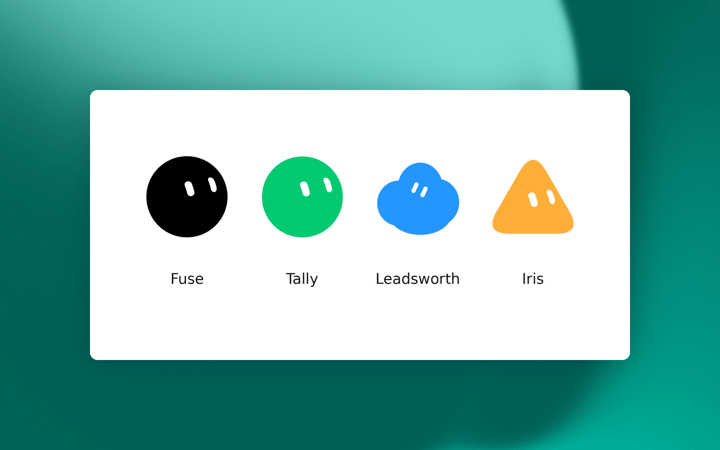
The four performance marketing bots
These are the four bots that we actually run internally for performance marketing, with shareable templates so you can add them directly into Grok Bot.
Fuse stops other bots from clicking around an ad account profusely, or from firing APIs hard enough to get our account banned. This is our gatekeeper and one of the first bots we set up. Add Fuse to Grok Bot
Tally watches Slack for "can you pull" requests and drafts a response by pulling metrics from our data warehouse. Life saver when you're in back to back meetings. Add Tally to Grok Bot
Leadsworth tracks down-funnel lead performance and keeps us on pace for lead goals with proactive recommendations. Add Leadsworth to Grok Bot
Iris keeps creative, procurement, and project threads from dying in Slack. This one saves me so much time and is one of the main reasons why we're able to ship ads at the pace we move. Add Iris to Grok Bot
Once the program is live
The 0 to 1 work gets you launched. After that it turns into the same handful of jobs every week, and those are the ones our bots own. They run on their own computers on a schedule, so most of this is done before I'm at my desk.
Spend and conversions get checked by channel every day
A bot watches every channel each morning and checks whether spend is pacing where it should be and whether conversions are still coming through. Pacing gets measured against the monthly budget goal and against what that channel spent over the last 7 days.
When it all looks normal, we don't hear about it. We only get pinged when something's off.
- A channel spends double the daily budget overnight.
- A channel gets $0 in spend.
- Conversion count dropped to zero because a tag stopped firing.
These are imperative to catch early, and can be difficult to track given the amount of ad platforms that we manage.
The "can you pull" asks get answered without me
Most reporting requests are essentially the same. A channel, a date range, a campaign. Tally catches them in Slack and drafts the answer from the data warehouse, so a question at 11am doesn't sit around until I'm out of meetings. If the data isn't in the warehouse, our bots use the platform logins as a fail-safe.
Lead pacing and performance
Leadsworth tracks down-funnel performance against our lead goal and tells us when pacing is off, with recommendations attached.
Budget between personas is still my call, and so is when a boosted post is fatigued and needs to come down.
Search coverage every time the product ships
Once a week, a bot reads the product changelog and checks whether Search already covers whatever is new. Any gaps go to a sheet for review, with recommendations on campaign and ad group mapping. We ship new features almost every day, so it's important to keep up and keep our campaigns up to date.
Creative that would otherwise stall in a thread
Iris keeps the briefs moving. A new batch in review, a post we want to boost, an asset waiting on design or procurement. Shipping ads quickly is mostly a coordination problem, not a creative one, and this is the bot that handles the coordination half.
None of these jobs need me to kick them off, which took a minute to get used to.
Where to start with performance marketing bots
Start with reporting. It's the easiest job to hand off, and it buys back the time you need to build everything else.
Connect the tools you use the most. Slack, Sheets, Notion, and the ad platform where most of your budget sits. The data warehouse can come later.
Write the bot like a job description. What it owns, the KPI it's responsible for, and where it has to stop and ask you. That last part matters more than the first two.
Give it one channel instead of all of them. A bot that knows one platform's rules cold is worth more than one that's vaguely familiar with six.
Record a click-path you've already done a hundred times with the built-in training tool.
Keep platform actions as drafts for the first few weeks. You'll trust it faster once you can see what it would have done.
Add the second bot when the first one gets boring, and put anything that touches an API behind a gatekeeper before you scale up.
FAQs
What should a performance marketer automate first with Grok Bot?
Reporting. This is the easiest starting point and saves a ton of time throughout the day to keep shipping ads.
Only if you explicitly tell it to. We have guardrails in place to make sure nothing changes without our approval.
How is this different from a dashboard?
A dashboard waits for you to open it. These bots sign into the tools, run on a schedule, and post when the job is done or when a source failed. You still make the call.
Do I need a separate bot for each channel?
Not to start. But a bot that knows one platform's character limits, structure, and quirks ends up more useful than one trying to cover everything. We grew into it that way.
That's how we run paid media now. The basics haven't changed. We just stopped doing the parts of them that never needed a person.
If you try one thing this week, make it this reporting bot. Everything else gets easier once you're not rebuilding the same numbers by hand.