手把手拆解:如何使用GPT-6 Astra 打造一款大型太空探索网页游戏
以 Void Explorer 为主案例,具体拆解如何先定义玩法与视觉,再搭建可观测测试、多尺度坐标、流式地形、性能基准和 Blender 资产管线。
如果目标只是让 AI 生成一个能运行的小型游戏原型,问题还相对简单;一旦目标扩大为一款能从星际空间连续飞到行星地表的大型浏览器游戏,美术方向、尺度表示、地形流式加载、操控、渲染、测试和性能就必须协同工作。
OpenAI 官方以 Void Explorer 为案例,展示了如何在 Codex 中使用 GPT-6 Astra 推进这套工程流程。最终成品拥有 2,048 个星系、超过 10,000 颗程序化行星,玩家可以选择可见恒星并飞往那里,也能从太空连续下降到海岸和地表。
难点不在于生成某一段代码,而在于怎样确定体验边界、让 Astra 看见并复现问题、用同一套测试比较修改前后的结果,再逐步扩大游戏规模。沿着这条制作顺序,下面的每个工程选择都能落回一个具体问题和检查方法。
这套工作方法先设立明确约束,让 Astra 提出工程实现,再由人持续判断外观与操控手感,同时建立可复现的测试与调试闭环。
体验先行:用自然语言确立物理与视觉边界
这个项目没有从技术栈清单开始,而是先向 Astra 明确玩家应该获得的体验和不可改变的物理边界,再让这些约束反向影响工程架构。
在构建 Void Explorer 之初,最初的需求描述直接框定了整个宇宙的物理法则:
核心提示词(设计原则): “所有我能看到的东西都必须是可抵达的。保持真实的宇宙距离,然后通过尺度与航行速度来化解枯燥。我想直接从太空飞进行星的大气层并平稳降落到地面。行星可以像地球一样巨大,因此我们需要程序化地形和分块渲染器。”
这段描述给系统设定了三个明确边界:
- 远处的恒星不能只是背景上的光点,而要成为可选择、可飞往的目标。
- 接近行星时,它不能突然变成一个独立关卡;从太空到地面必须连续。
- 真实宇宙距离需要 pulse travel 与 hyperdrive 让旅程可行,而地球尺度的行星需要程序化地形和分块渲染。
视觉方向也在正式搭建大量游戏内容前用图像反复校准。第一批概念图太写实,下一版又太简单,于是继续用更具体的要求修正:
核心提示词(视觉校准): “现在这个版本太简单了。我们需要一个折中方案:更好的颜色、霓虹光感,以及深空的高对比度。请展示出飞船高速航行时的模样,周围带有恒星和尘埃。”
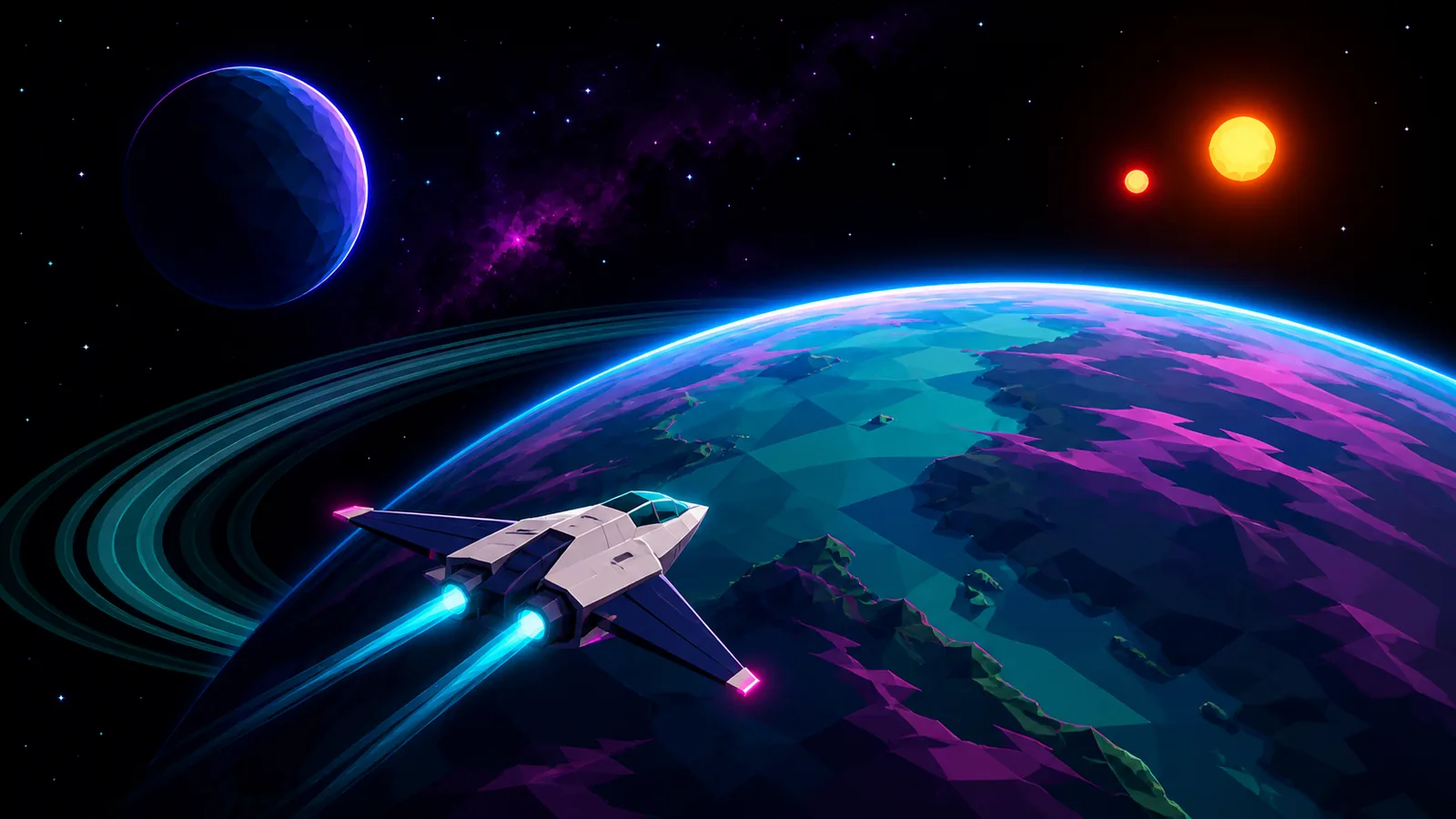
满意的图像被保存下来,成为轨道飞行、高速航行、大气进入和着陆的视觉参考。有了这些具体目标,后续版本是否接近预期就更容易判断。
架构演进:Three.js、WebGPU 与后台多线程解耦
前端技术选型采用了 TypeScript 与 Vite 构建工具,核心渲染层基于 Three.js。Three.js 赋予了代码对底层网格(Mesh)、材质(Material)、光照以及自定义程序化几何体的直接控制权,这正是 Void Explorer 绝大多数视觉表现的核心载体。
首个可玩渲染器使用 WebGL2。项目随后继续追问 Three.js 是否限制了视觉表现,Astra 建议保留宇宙、导航和地形系统,只把渲染层迁移到 Three.js 的 WebGPU 架构。
关键技术与分工:
- 节点材质与 TSL:Three.js 的节点材质和 Three.js Shading Language 让大气、水体和光照效果可以用代码定义。
- Web Workers:地形生成在负责输入与绘制的线程之外准备几何数据,避免把所有计算都挤在同一条执行线上。
- Vitest 与 Playwright:Vitest 检查可重复生成、坐标数学和地形契约;Playwright 则在浏览器里操作游戏,验证完整交互。
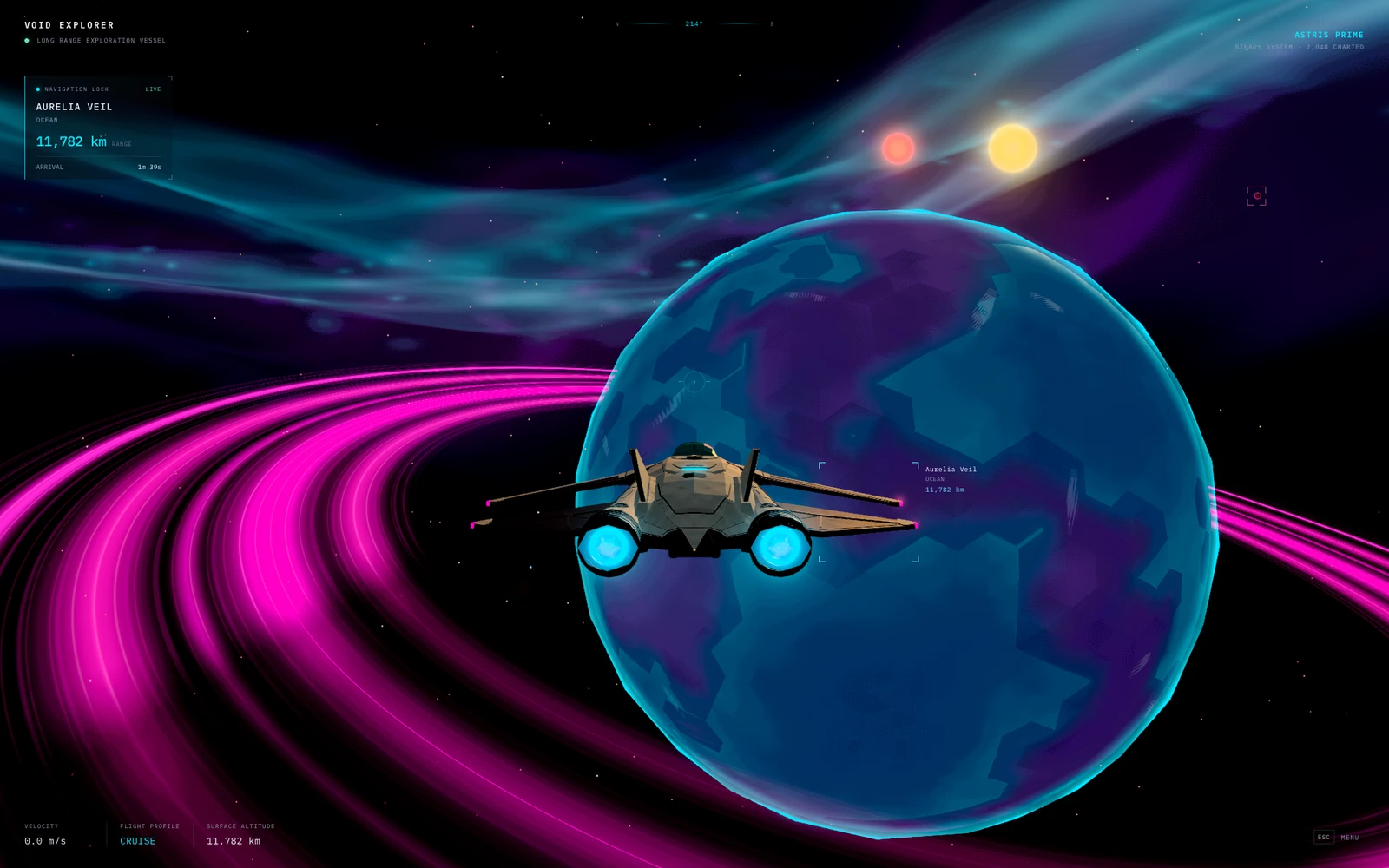
为了贴合概念图确立的美学方向,渲染管线加入了 Neon Phosphor 效果。它给画面增加复古显示纹理,同时保持导航信息可读。
赋予 AI 诊断工具:自动化巡检与状态透传
人负责实际试玩和判断,但 Astra 还需要一种比“我感觉这里不对”更具体的调查入口。项目因此暴露了一个小型 JavaScript 接口 window.__VOID_EXPLORER__,让浏览器测试可以读取正在接近的天体、当前飞行模式、地形是否就绪和活动摄像机。它还提供 draw calls、triangle counts、queued terrain jobs、buffered terrain data 等渲染与流式加载计数。
下一步是建立可重复返回的命名测试场景:orbit、pulse travel、atmospheric descent、coastal landing。Playwright 可以直接加载某个场景,等待地形就绪,截取画面并检查背后的状态。这样,Astra 不必每次都从宇宙另一端重新飞到问题发生的位置。
固定场景不能代替完整旅程。项目另有 journey tests,使用真实控制并记录飞行过程中的位置和状态变化,覆盖 landing、leaving the ship、walking、saving and reloading、boarding、taking off。它们能发现单张截图看不到的问题,例如碰撞面还未准备好,或飞船在状态切换时发生位置跳变。
实际试玩时,也可以让 Astra 检查正在游玩的浏览器标签页,例如在某一时刻确认 Aurelia 的云层是否仍然可见。这里的边界很重要:这是特定时刻的检查,并非 Astra 在持续观看每一帧。
由此形成的调试循环是:复现问题,检查截图与状态,追踪相关代码,修改实现,再重跑同一检查。对新的游戏项目,可以尽早准备少量可重复场景、有用的状态与性能计数器,以及主要交互的浏览器测试。
天文级尺度的数学解耦:从大整数网格到四叉树球面
光年尺度的位置与站在飞船旁的位置相差极大。如果把这些巨大的坐标直接发给 GPU,靠近地面时会失去所需精度。因此,系统把“物体在宇宙中的地址”和“这一帧用于绘制的位置”分开处理。
大整数单元格与局部偏移:宇宙位置由大整数 cell 和较小的 local offset 共同表示。渲染前再减去观察者的位置,让摄像机保持在原点,附近物体继续使用较小的相对坐标。显示距离和相对大小因此能保持一致。
解析轨道与统一时间:恒星、行星与卫星按 analytic orbits 运行,渲染器用与观察者相同的 simulation time 计算它们的位置。停放的飞船会随旋转的行星一起移动;恒星的位置与颜色也会进入光照系统,所以地面看到的双恒星落日与轨道上看到的是同一组恒星。
拥有上万颗行星不等于加载上万个高细节网格。每颗行星先是一份描述:半径、轨道、大气和 seed。seed 使同一片地形可以被重复生成;游戏只在玩家接近时生成附近几何,再在返回时重建相同景观。
立方体球面与四叉树 LOD:远处的行星先用廉价的多面体 proxy 表示。随着它在屏幕中变大,系统启用由 6 个 cube faces 投影到球面上的地形;每个面可以反复分成 4 个更小方块。这样只需细化可见区域和飞行方向附近的地形,靠近地面时再由 local patches 提供更细的几何。
共享高度场函数:粗细不同的网格都采样同一个行星生成函数。它组合 continents、mountain ridges、craters 和 smaller relief,并提供 elevation、water、biome 等信号;共享的颜色规则则帮助不同精度的表面保持外观一致。
这种高度场架构虽然在生成大规模地貌时极为稳定高效,但也存在天然的工程局限:每个地表法线方向只能容纳一个有效高度值。这意味着该系统无法原生支持垂直悬空的岩壁、多层重叠的溶洞或可被自由开凿爆破的地下隧道。
大气层平滑穿透:速度包线、互补遮罩与刚体物理
从太空接近地面时,飞行速度、地形流式加载和不同精度表面的交接必须一起处理。一次浅角接近行星的试玩暴露了这样的问题:
核心提示词(穿越优化): “当我以近乎贴着行星边缘的浅角切入时,速度依旧过快,地形来不及加载导致整颗星球几乎凭空消失。我们需要协同修正飞船的降速曲线与地形流式加载管线。是否能引入大气散射层来柔化远距离低模与近景高精度地形之间的突变?在接近地表的过程中,绝不能让行星出现哪怕一瞬的消失。”
针对这个问题,系统同时修改了飞行控制与网格切换逻辑:
浅角接近的独立速度上限:飞控根据高度,以及由行星半径与引力估算出的 orbital-speed,为浅角接近设置单独的速度上限。更靠近地面时,系统还会采样前方地形来调整制动。
旧表面等到新表面完整接班:远景行星继续显示,直到 6 个粗地形面全部就绪;一个 terrain tile 也继续保留,直到它的 4 个 children 全部就绪。交接期间,complementary pixel masks 把每个像素分配给旧表面或新表面,避免替代网格加载时整颗行星一起透明。
地表触地与离舰行走则引入了专门的物理管线处理:
Rapier 局部物理世界:角色在地表步行时,使用 Rapier 驱动的小型局部物理世界。
落地所需数据一起就绪:一个 contact patch 的可见地面、碰撞三角形和液体危险信息来自同一次生成,并且必须一起准备好。飞船的着陆逻辑还会分别检查脚部接触、坡度和净空。
掉帧背后的工程归因:受控基准下的数据治理
一帧变慢时,只看“卡不卡”无法判断浪费来自几何数量、数据传输还是被反复丢弃的任务。项目因此把玩家观察到的画面问题,转成可重复测量的浏览器测试。
在具体测试中,Astra 使用 Three.js renderer counters 检查 draw calls、triangles、geometries、textures;Playwright 采集 90 个 frame intervals,并报告 average 与 percentile timings。针对视觉故障,还可以比较某个效果启用和关闭时的 rendered pixels,例如对照地形开启与关闭 overlap-hiding mask 的结果,定位地面为什么消失,而不只是盯着一张故障截图猜原因。
在评估飞船资产替换时,Astra 在 WebGPU 后端,用 headless Chromium 和 SwiftShader 对前后版本运行同一个 90-frame orbital test:
| 评测维度 | 早期程序化生成机体 | 首版 Blender AURORA 机体 |
|---|---|---|
| 总场景绘制调用(Draw Calls) | 119 次 | 77 次 |
| 总场景三角形面数 | 48,809 面 | 61,092 面 |
| 平均帧间隔耗时(SwiftShader) | 251.48 ms | 199.26 ms |
如何读这组数字:新船的三角形更多,但这个特定测试里的 draw calls 和平均帧间隔都下降了。测试早于下文所示的四翼飞船,并且只反映该测试环境的变化,不是实际硬件上的游戏帧率;这些工具也没有测量单个 GPU 命令或 shader 执行时间。
围绕加载和下降过程,Astra 继续测量生成了多少几何、worker 与渲染器之间传了多少数据,以及多少地形任务尚未发挥作用就被丢弃。
按屏幕大小分配远景细节:填满视野的行星需要立刻有足够好的轮廓;小于一个像素的行星不需要相同几何。在受控起始场景对比中,两种策略使用同一个 geometry producer,新策略用了 7,040 个 proxy triangles,旧策略是 51,200 个。
用索引网格减少重复传输:相邻三角形可以复用顶点,不必重复传位置、颜色和法线。在 High 地形质量、6 个 ground layers、保持 241,952 个 triangles 不变的测试中,传输缓冲从约 35 MB 降到 15 MB。ground 与 scenery 也被拆成不同任务,让地面几何不必等待场景装饰。
稳定细分决策:旧 selector 会请求 chunks、改变决定、丢弃它们,再请求替代任务。改进后只有预算允许生成全部 4 个 children 时才细分一个 tile,减少尚未有用就被废弃的工作。
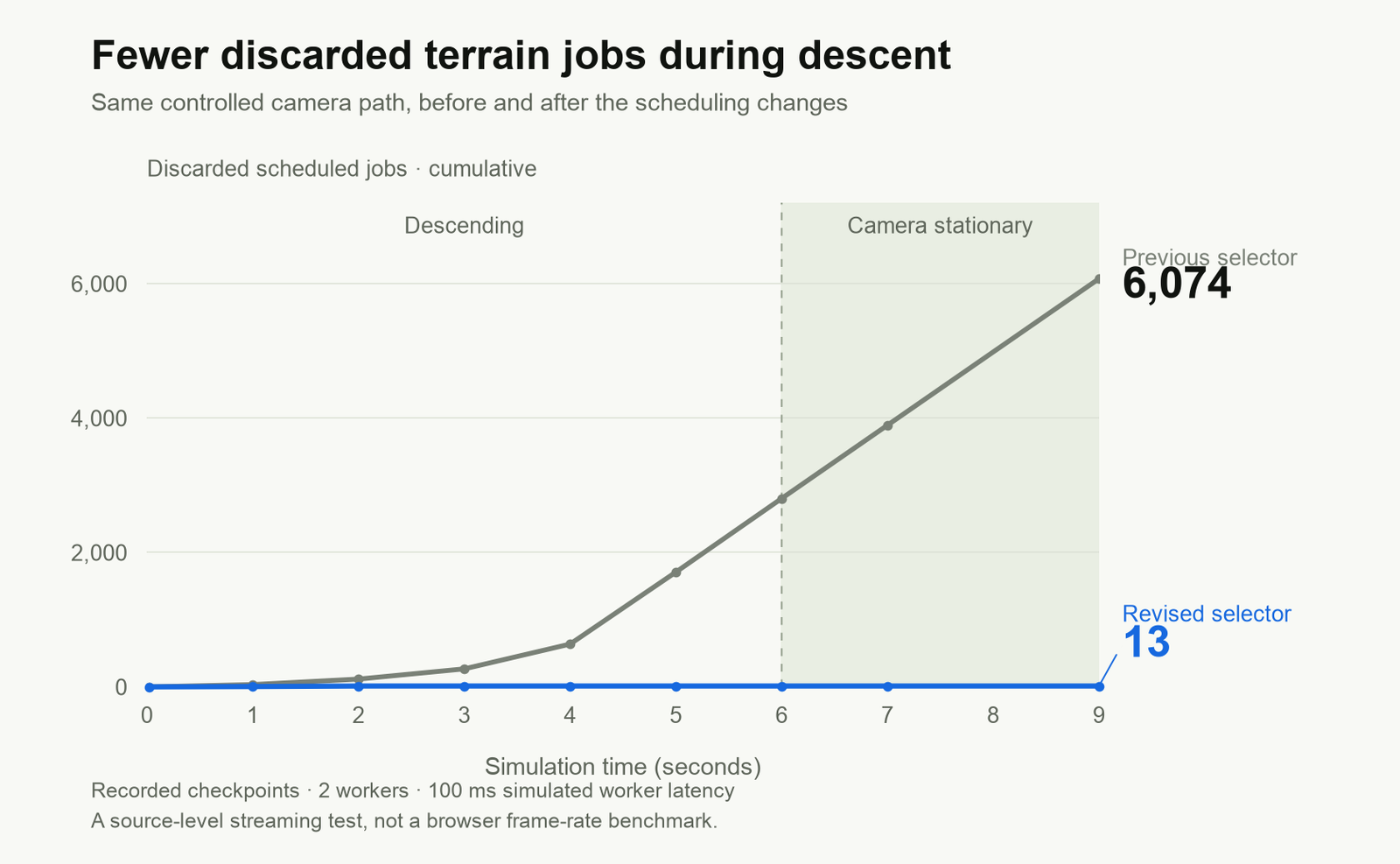
Web Workers 仍不能解决所有停顿。主线程上的地形 fallback 也被拆成可恢复步骤,每帧使用约 4 ms 的预算,避免一项大型地形任务必须一次跑完。系统还把 world resolution 与 interface resolution 分开限制,让降低世界画质时导航文字依然清晰。即便如此,这些结果也不覆盖 shader 编译、GPU 上传、运动观感等问题,浏览器试玩仍然必要。
混合资产管线:从 2D 概念图到轻量化 3D 资产
Void Explorer 的宇宙环境主要由纯代码与数学算法生成,但作为视觉聚焦焦点的飞船,则需要依赖经典的美术资产管线进行精细化刻画。
在这个环节,工作流从“用生图探索造型”进入“把选中的二维参考变成可运行资产”:先由人锁定核心特征,再让 Astra 在 Blender 中推进建模并把结果加入游戏。
针对早期机体机翼黏连、造型扁平的问题,开发者给出了明确的局部修正指令:
核心提示词(机型重构): “请从多个视角生成该飞船的干净视图,重点突出前翼与后翼的分离结构。我们将根据这些图像重新制作 3D 模型。我不喜欢当前模型上那种连在一起的圆弧形机翼。”
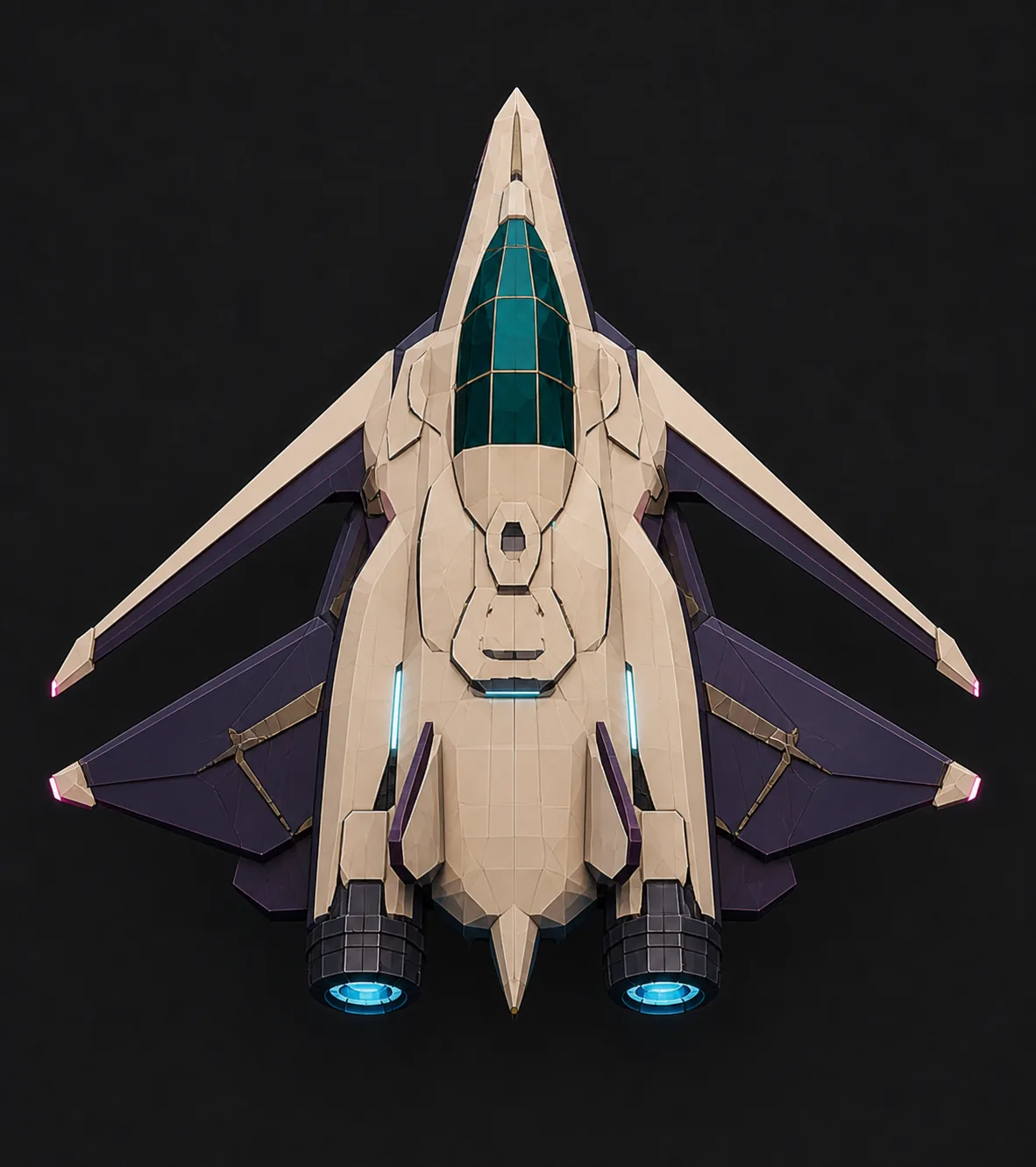
最终选中的是四片分离机翼、对称轮廓和粉色翼尖灯的参考图。接下来要求 Astra 在 Blender 中建立新模型、保持游戏的美术风格,并把它加入游戏。这个过程包括把参考图转成几何、检查轮廓与材质,以及准备运行时资产。Blender 源文件包含 193 个 editable meshes。
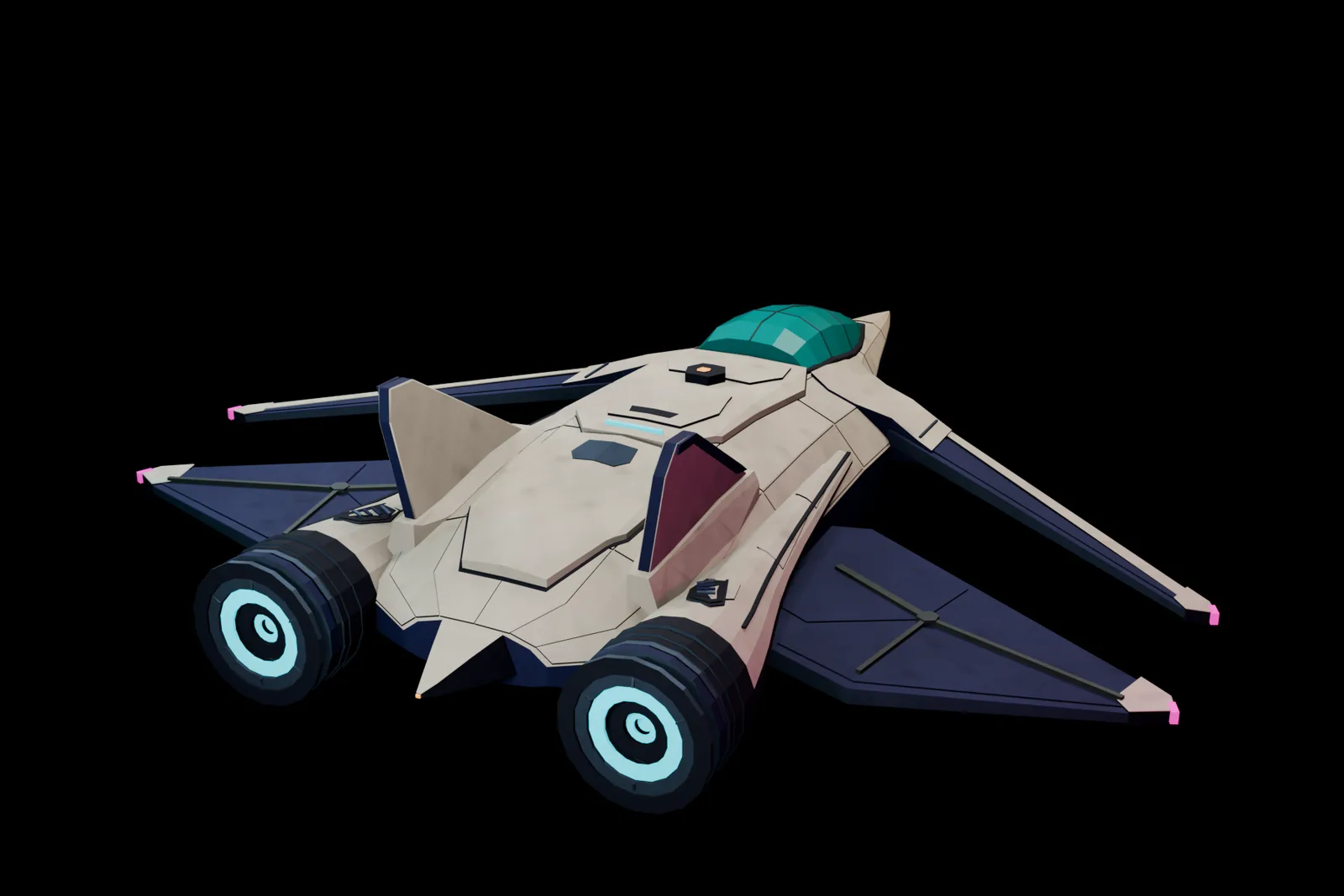
最终导出的船体包含 14,968 个 triangles,并分成 8 个 opaque material batches。人可以继续要求模型细化外观,同时让 Astra 关注导出资产的渲染成本。
水体模拟的延伸:Sunwake 与 Hollowflux 的跨形态实践
“让同一套模拟同时服务画面和玩法”的做法,也出现在另外两款游戏中:
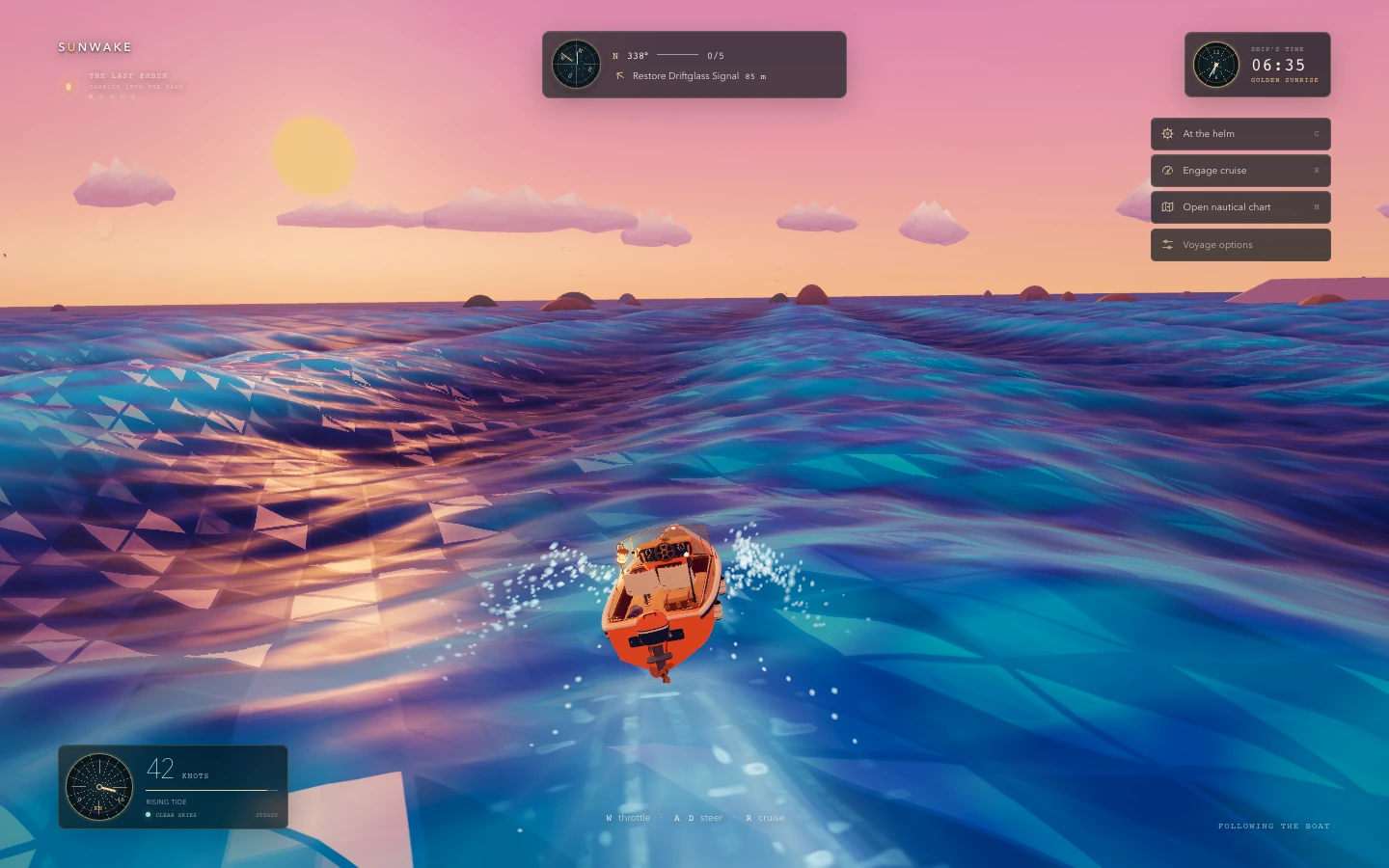
Sunwake:Astra 在 Three.js 中构建 custom water renderer,同一个 wave model 同时驱动可见海面与船体浮力。船体随波浪升降、俯仰和横滚;局部模拟负责 ripples 与 foam,船后留下 wakes 与 spray。随后再让 Astra 在 Blender 中制作更详细的船并加入游戏,形成“程序化环境 + 人工设计载具”的组合。
Hollowflux:这款 2D action RPG 的洞穴、角色和装备都由代码绘制,没有导入 sprite sheets。一个 grid cells 系统跟踪 water height、currents、foam 与 electrical charge。
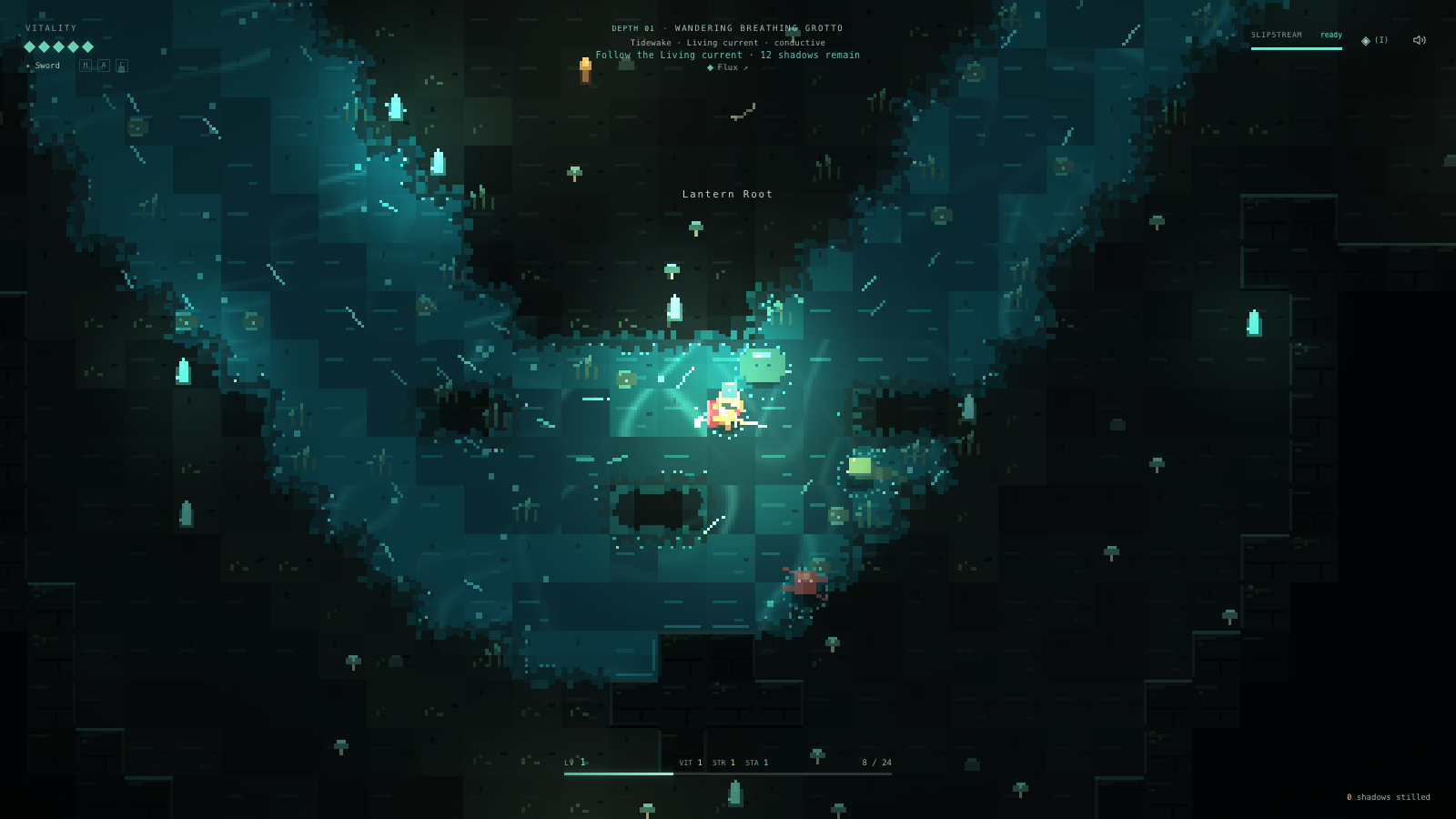
这里的水不只是视觉效果。脚步会留下涟漪,长矛划出狭窄尾迹,锤击发出环状波纹;水流会沿河岸卷动、把泡沫带向下游,也会推动玩家和敌人。电鳗的放电沿连通水域传播,站上干燥石面则能避开这次放电。
一键部署与独立开发者的起步建议
游戏准备好分享时,可以使用 Codex 的 @Sites 插件要求部署并取得链接:
Use @Sites to deploy this game and give me a link.
将站点设为公开访问后,其他人就能直接在浏览器里游玩。
如果想用 Astra 尝试游戏开发,可以从一套具体的方法起步:
- 只选一个首先要“感觉对”的东西:一艘船、一个房间或一个交互就足够。先做出可玩的最小版本,不必从完整宇宙开始。
- 给出少量视觉参考,再靠实际试玩反馈:先让 Astra 看清你期待的外观;拿到版本后亲自操作,明确说出哪里太快、哪里消失、哪种颜色不一致,而不是只说“感觉不好”。
- 尽早建立可重复检查:为主要阶段准备 repeatable scenes、state and performance counters 与 browser tests。人类继续判断外观与操控手感,Astra 则可以追踪代码、建立可重复测量、实施修改并复测。把这套循环跑起来,再逐步扩大游戏范围。
手把手拆解:如何使用GPT-6 Astra 打造一款大型太空探索网页游戏
让 AI 写一个单段代码的小型网页游戏原型并不困难;但若目标是一款能从星际深空连续飞入行星大气层并平稳降落到地表的大型 3D 浏览器游戏,美术、尺度、流式加载与渲染就必须严密协同。OpenAI 团队通过 Void Explorer 案例证明:与大模型协同的核心不在于代码片段生成,而在于确定体验边界、让 AI 获得可复现的诊断入口,并用受控测试衡量每次演进。
体验先行与非协商物理边界:在输入任何技术栈之前,先向 Astra 设定刚性物理原则——“所有视界内可见恒星必须可抵达、从太空降落到地表必须连续无跳关、真实宇宙距离通过脉冲引擎与超光速化解,而地球尺度的行星必须依赖程序化地形与分块渲染器”。概念图反复校准后锁定了象牙白机体、多面体青色行星与霓虹深空高对比度,成为后续视觉审查的统一参照。
为解决光年距离与厘米级触地并存的精度崩塌,并解决“开发者觉得卡顿却无法向 AI 描述”的沟通问题,系统构筑了两大底层支柱:
-
1
接口透传:向全局暴露
window.__VOID_EXPLORER__,使自动化脚本可读取活动摄像机、飞行模式、网格装载状态与 Draw Call 计数。 -
2
命名场景:Playwright 直接跳入 orbit、pulse travel、descent 等固定场景截屏,免去每次从宇宙尽头手动飞往现场。
-
3
客观基准:无头 Chromium 采集 90 帧区间耗时并对照像素遮罩,Astra 依据可量化指标实施修改并重跑验证。
-
1
大整数网格:宇宙绝对位置由大整数 cell 与局部 offset 组合表示,渲染前减去观察者坐标,将摄像机置于原点化解 GPU 浮点抖动。
-
2
四叉树球面:远景采用低多边形代理,接近时启用 6 个立方体面投影到球面(Cube-Sphere),每个面按四叉树递进细分。
-
3
统一高度场:各级细分网格采样同一套大陆、山脊与撞击坑函数,确保不同精度网格缝合时的海拔与生物群系外观一致。
从近轨道俯冲切入大气层并触地行走,是整套管线最脆弱的阶段。飞行速度、网格流式加载与多物理场交接必须协同运作,防止星球凭空消失或机体穿模。
针对浅角切入时的流式加载延迟,系统依据高度与引力计算 orbital-speed 设置独立降速上限;交接期间,旧表面必须等待新表面 4 个子节点全部就绪,并通过互补像素遮罩(Complementary Pixel Masks)逐像素分权,避免切换时出现透明瞬间。
步行模式采用 Rapier 驱动的小型局部物理世界,着陆点可见网格、碰撞体与液体危险数据必须同批生成就绪。高度场架构单法线仅容纳单一高度值,天然无法支持悬空岩壁与多层溶洞,需在设计前期明确这一工程边界。
在 WebGPU 与多线程架构下,画面掉帧往往并非算力不足,而是任务调度与管线传输的隐性浪费。Astra 通过受控基准推进了深度的数据治理:
独立开发者使用大模型推进复杂游戏的实践建议:
Building games with Astra | OpenAI Developers
How I built a procedural space exploration game in Codex, from concept art to planets you can land on.
Astra has become very good at translating what I have in mind into gameplay and art direction. I’ve been using it in Codex to build Void Explorer, a space exploration game where you can travel from distant stars down to alien landscapes.
The game has 2,048 star systems and more than 10,000 procedurally generated planets, including worlds the size of Earth. Every visible star belongs to the universe and can be targeted. You can pick a point of light in the distance and travel to it.
You can approach a planet from space, pass through its atmosphere, and keep descending until you’re flying over a coastline. You can land, get out of the ship, walk around, and take off again. Getting that journey to work meant solving the scale, terrain, controls, and rendering together.
I’ve included a few prompts from the build, edited for length and clarity. They show how I described what I wanted and how the technical work developed from there.
Start with the experience
My initial brief described what the player should be able to do:
Everything I can see should be reachable. Keep the distances real, then make travel work through scale and speed. I want to fly from space into a planet’s atmosphere and down to the ground. Planets can be as large as Earth, so we’ll need procedural terrain and a chunked renderer.
That gave Astra some concrete constraints. A star couldn’t just be a dot painted into the background. A planet couldn’t become a separate level when I approached it. Travel had to cover real distances, with fictional pulse travel and hyperdrive making those distances practical.
I also used image generation to work out the look before building much of the game. The first concepts were too realistic. The next direction was too simple. This was one of my corrections:
This is a little too simplistic now. We need a middle ground: better colors, neon light, and more contrast that evokes deep space. Show me what it looks like at high speed, with stars and dust around the ship.
Once I liked the images, I asked Astra to save them and turn the direction into references for the game. We had specific targets for orbital flight, high speed, atmospheric entry, and landing. Those images made it much easier to judge the next build.
Let Astra propose the architecture
I set the constraints, and Astra proposed the implementation. The application uses TypeScript and Vite, with Three.js for rendering. That gives the code direct control over meshes, materials, lighting, and procedural geometry, which is where most of this game’s visual work happens.
The first playable renderer used WebGL2. Later, I asked whether Three.js was holding the visuals back. Astra recommended keeping the simulation and moving the renderer to Three.js’s WebGPU architecture. We kept the universe, navigation, and terrain systems while changing the rendering layer.
The renderer uses Three.js’s node materials and Three.js Shading Language (TSL) to define the atmosphere, water, and lighting effects in code.
Terrain generation runs in Web Workers so it can prepare geometry away from the thread handling input and drawing. Vitest covers things like repeatable generation, coordinate math, and terrain contracts. Playwright exercises the game in a browser. This gave Astra ways to check the underlying systems while I kept reviewing how the game felt.
The art direction remained the target throughout. The atmosphere around a planet, the glow of its rings, the colored light from the stars, and the Neon Phosphor effect all contribute to the look. The filter adds a retro display texture while keeping navigation readable.
Give Astra a way to inspect and play
I kept playing the game myself, but Astra also needed ways to investigate a problem beyond reading my description. The game exposes a small JavaScript interface, window.__VOID_EXPLORER__, that browser tests can call to inspect the current state: which body I’m approaching, the flight mode, terrain readiness, and the active camera. It also exposes rendering and streaming counters, including draw calls, triangle counts, queued terrain jobs, and buffered terrain data.
The game has named test scenes for orbit, pulse travel, atmospheric descent, and coastal landing. Those let Astra return to a useful starting point without flying across the universe every time. Playwright can load a scene, wait for the terrain to become ready, capture a screenshot, and check the state behind it. Separate journey tests use the real controls and record positions and state changes as the game runs, so setting up a landing scene doesn’t substitute for testing the landing itself.
These tests cover landing, leaving the ship, walking, saving and reloading, boarding, and taking off. They can catch problems that a screenshot alone wouldn’t reveal, such as a collision surface that isn’t ready or a ship that jumps between positions during a transition.
I could also ask Astra to inspect the browser tab I was playing in. When I asked whether Aurelia’s clouds were still visible, it captured my current view and read the flight information on screen. These were checks at particular moments; Astra wasn’t continuously watching every frame of my flight.
The loop was to reproduce a problem, inspect screenshots and state, trace the relevant code, make a change, and rerun the check. I’d build these tools early in another game: a few repeatable scenes, useful state and performance counters, and browser tests for the main interactions. They give Astra ways to investigate and test changes independently while I keep reviewing the appearance and control feel.
Represent the universe at several scales
Having thousands of planets doesn’t mean loading thousands of detailed meshes. A planet starts as a description: its radius, orbit, atmosphere, and seed. The seed makes its terrain repeatable. The game generates the geometry around the area I’m approaching, and it can generate the same landscape again when I return.
Coordinates need similar care. Light-year distances and a person standing beside a ship are very different scales. Sending those enormous positions directly to the GPU would lose the precision needed near the ground.
Astra separated the physical address from the position used for drawing. The universe uses large integer cells with smaller local offsets. Before rendering, the game subtracts the observer’s position, so the camera stays at the origin and nearby objects have small coordinates. Displayed distances and relative sizes stay consistent.
The moving parts also need to agree on time. Stars, planets, and moons follow analytic orbits, and the renderer evaluates their positions at the same simulation time as the observer. A parked ship stays attached to the rotating planet. The stars’ positions and colors feed the lighting, so the two suns in a binary sunset are the same stars I saw from orbit.
Make the descent continuous
The transition from space to the ground took a lot of iteration. One of my prompts came from approaching a planet at a shallow angle:
When I approach almost parallel to a planet, I can still come in too fast, and the planet nearly disappears while terrain loads. We need to fix the speed curve and terrain streaming together. Could atmosphere soften the transition between distant LOD and detailed terrain? The planet should never disappear during the approach.
The flight controller now applies a separate speed cap to shallow approaches, based on altitude and an orbital-speed estimate from the planet’s radius and gravity. Closer to the ground, it also samples terrain ahead to adjust braking.
The game uses several levels of detail, or LODs. From far away, a planet is an inexpensive faceted sphere, called a proxy. As it occupies more of the screen, the renderer adds detail. Approaching the surface activates terrain built from six cube faces projected onto a sphere. Each face can split into four smaller squares, repeatedly: a quadtree.
That lets the game refine terrain in the visible area and along the direction of travel without generating an Earth-sized surface at walking resolution. Near the ground, local patches supply finer geometry around the ship and player.
All those representations sample the same underlying planet. A shared function combines continents, mountain ridges, craters, and smaller relief. It supplies elevation, water, biome, and other signals used by the landscape. Coarse and fine meshes approximate that data at different resolutions, with a shared color policy to keep the planet’s appearance consistent.
The handoff matters as much as the generation. The distant planet stays visible until all six coarse terrain faces are ready. A terrain tile stays in place until all four of its children are ready. During a transition, complementary pixel masks assign each pixel to the old or new surface. That avoids making the whole planet transparent while its replacement loads.
Atmosphere changes with physical altitude, and clouds move over the planet’s geography. They help connect the orbital view to the landscape. The renderer only removes coarse coverage where finer terrain is ready. Mountain silhouettes can still change as finer geometry appears.
Landing adds a stricter requirement. The visible ground, collision triangles, and liquid hazards for a contact patch must all come from the same generation and become ready together. Walking uses Rapier in a small local physics world. The ship’s landing logic separately checks its feet, slope, and clearance against the terrain.
There is a deliberate limit here: the planets use heightfields, with one elevation in each surface direction. That suits large landscapes, but it doesn’t provide caves, overhangs, or destructible tunnels.
Measure the work behind a slow frame
Some of my feedback combined appearance and performance, because I was seeing both problems during the same flight:
Can you look at how we load and render a planet as I fly from space toward the ground? The distant globe and detailed terrain don’t look consistent, and the transition is jarring, especially when the colors change. I want to understand what causes those visual jumps and where we can reduce the work needed to load more detail, so the descent looks better and runs smoothly.
Astra used Three.js’s renderer counters to inspect draw calls, triangles, geometries, and textures. A Playwright test collected 90 frame intervals and reported average and percentile timings alongside those counts. For visual problems, tests could also compare rendered pixels with a particular effect enabled and disabled, such as terrain with and without the mask that hides overlapping ground. That helped isolate why ground disappeared instead of relying only on a screenshot of the broken scene.
An earlier ship iteration showed why these measurements were useful. Replacing the procedural ship with the first AURORA model built in Blender increased the scene’s triangle count but reduced its draw calls. Astra ran the same 90-frame orbital test before and after the change on the WebGPU backend:
| Measurement | Before | After |
|---|---|---|
| Total scene draw calls | 119 | 77 |
| Total scene triangles | 48,809 | 61,092 |
| Average frame interval | 251.48 ms | 199.26 ms |
This comparison used headless Chromium with SwiftShader software rendering and predates the four-wing ship shown below. It measures the change in that test environment, not the frame rate on my GPU. The tools gave Astra browser timings, rendered images, and resource counts; they didn’t measure individual GPU commands or shader execution times.
Astra investigated the work happening during loading and descent: how much geometry was generated, how much data moved between workers and the renderer, and how often terrain jobs were discarded before they became useful.
One change was to allocate distant-planet detail according to its size on screen. A planet filling the view needs a good silhouette immediately. A planet smaller than a pixel doesn’t need the same geometry. In a controlled starting-scene comparison, the revised policy used 7,040 proxy triangles instead of 51,200. Both policies used the same geometry producer, so this isolated the loading decision.
Another improvement kept the exact same number of terrain triangles. Indexed meshes reuse vertices shared by neighboring triangles instead of repeating their position, color, and normal data. Across the six ground layers in the test at High terrain quality, transferred buffers fell from about 35 MB to 15 MB while retaining 241,952 triangles. Ground and scenery also became separate jobs, so ground geometry could become ready without waiting for decoration.
There was wasted work in the terrain selector too. It could request chunks, change its decision, discard them, and request replacements. Astra stabilized those refinement decisions and only refined a tile when the budget allowed all four children. In a controlled simulation with fixed worker latency, six seconds of descent followed by three seconds of settling produced 13 discarded jobs instead of 6,074.
Workers alone don’t solve every stall. The terrain fallback on the main thread also needed to yield. Astra split generation into resumable steps with a roughly 4 ms budget per frame, so a large terrain job didn’t have to finish in one uninterrupted block. The renderer also caps world resolution separately from the interface, keeping navigation text sharp when visual quality is reduced.
These terrain measurements show less geometry, less transferred data, and less discarded work. They aren’t hardware frame-rate benchmarks. Browser playtesting still matters for shader compilation, GPU uploads, motion, and how the transition actually looks.
My input was feedback from playing: what felt slow, what looked wrong, and what I wanted to improve. Astra traced the code, scripted repeatable terrain tests, and recorded the measurements. Once I approved the direction, it implemented the changes and reran the same tests to compare the results. It carried out that investigation and implementation without me prescribing each step, while I kept reviewing how the game looked and felt.
Turn concept art into game assets
The universe is mostly generated in code: planets, terrain, clouds, rings, and stars. The player ship is the main authored 3D asset, and I took a different approach with it.
I used generated concepts and Blender renders to review the ship before it went into the game. When the wings didn’t match what I had in mind, I asked for more useful references:
Generate clean views of this ship from several angles. Pay attention to the front and rear wings. We’ll use those images to remake the 3D model. I don’t like the joined, rounded wings on the current model.
I picked the reference with four separate wings, a symmetrical shape, and pink lights at the tips. Then I asked Astra to build a new model in Blender, keep the game’s art style, and add it to the game.
That involved turning the reference into geometry, reviewing the silhouette and materials, and preparing a runtime asset. The Blender source has 193 editable meshes. The exported ship has 14,968 triangles, grouped into eight opaque material batches. I could ask for detail in the model while Astra kept the exported rendering cost under control.
Experiment with procedural water
I also spent a lot of time experimenting with water in Sunwake, a game about piloting a small boat across a procedural ocean. I wanted faceted waves, smooth motion, and the colors of stained glass. Astra built a custom water renderer in Three.js, with the same wave model driving the visible sea and the boat’s buoyancy. The hull rises, pitches, and rolls with the waves, while a local simulation carries ripples and foam and the boat leaves wakes and spray. I later asked Astra to build a more detailed boat in Blender and bring it into the game. It’s the same approach as Void Explorer: a procedural environment with an authored vehicle, connected through the simulation.
Hollowflux took this in a different direction: a small 2D action RPG built around a glowing underground river. The caves, characters, and equipment are drawn in code, without imported sprite sheets. I kept asking Astra to make walking, dashing, and attacking disturb the water more convincingly. A grid of cells tracks water height, currents, foam, and electrical charge. Footsteps leave ripples, spear thrusts cut narrow wakes, and hammer blows send out rings. Currents curl along the banks and carry foam downstream, while the same flow pushes the player and enemies. Water also affects combat: an eel’s discharge travels through connected water, so stepping onto dry stone protects the player from that discharge.
Building and sharing games
What I like about working with Astra is that I can start with the experience I want, use images to make the visual direction concrete, and give feedback from actually playing. A complaint about a disappearing planet can lead to changes in streaming, geometry, and movement. A request for more convincing water can become a simulation shared by the visuals and gameplay. I still need to decide whether it feels right, but Astra can carry those decisions through the code, the assets, and the tests.
Sharing a browser game is straightforward too. With the Sites plugin, you can ask Astra:
Publish it with public access, and anyone can play directly in their browser.
You can play Void Explorer, Sunwake, and Hollowflux in your browser.
If you’ve had a game idea in mind, try building a small playable version with Astra. Start with one thing you want to feel right, give it a few visual references, and test the result. A boat, a room, or a single interaction is enough to start. Play it, be specific about what you want to change, and keep building from there.