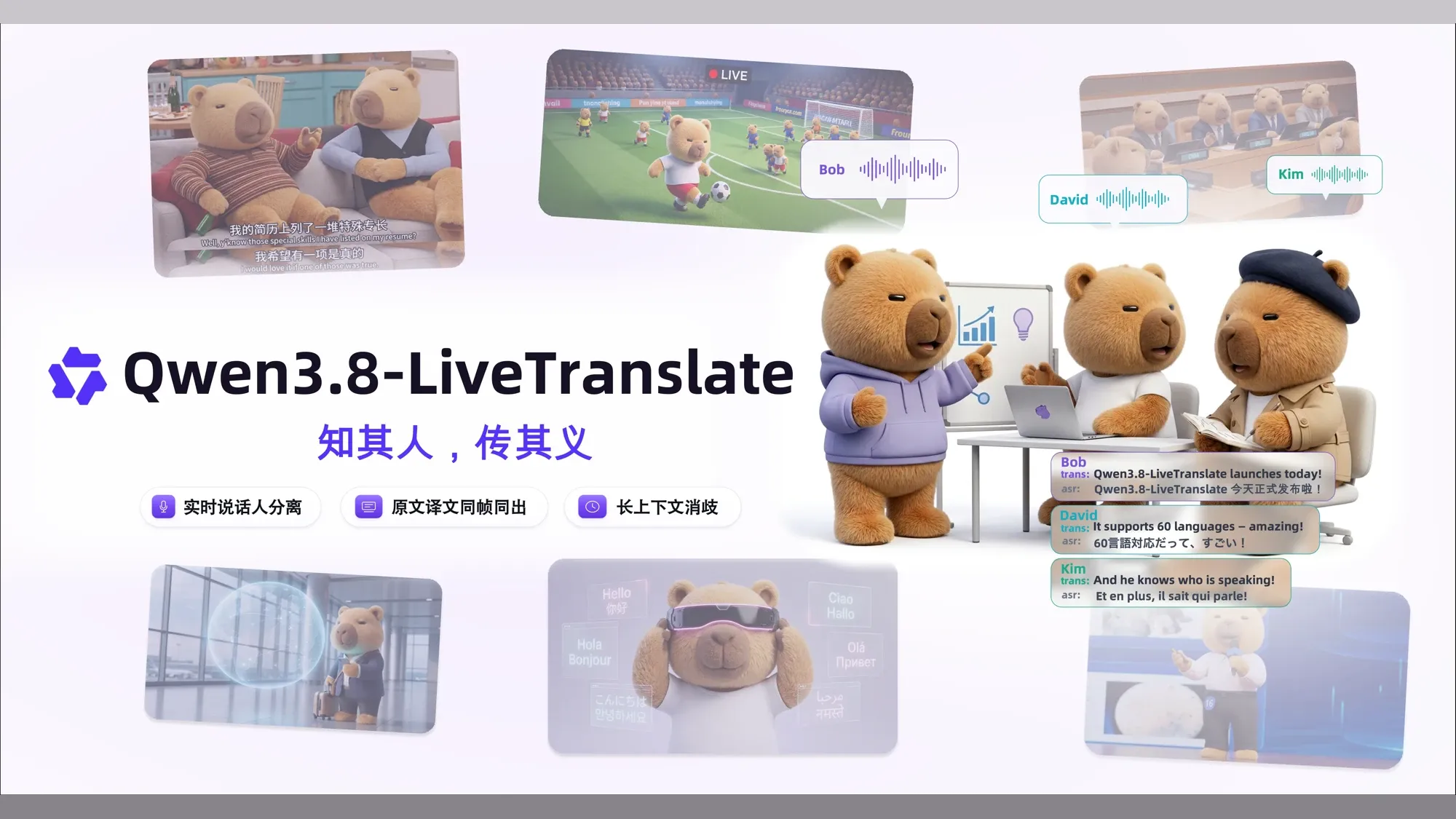
阿里巴巴发布 Qwen3.8-LiveTranslate实时语音翻译模型:实时同传,而且能区分多位说话人
它还能让原文译文同步出现,并结合长上下文和画面处理歧义。本文讲清架构、语种、评测、API 接入与实际价格。
一场多人参与的跨语言会议里,翻译得快只是起点。听众还要知道每句话是谁说的,遇到人名和专业术语时能对照原文,后面的对话也不能忘记前面已经交代的背景。实时同传要把这些信息一起传过去,才更接近可用的交流工具。
Qwen 团队推出了面向实时语音同传的大模型 Qwen3.8-LiveTranslate,并在阿里云百炼平台上线了流式接入接口 qwen3.8-livetranslate-flash-realtime。
Qwen3.8-LiveTranslate 由两个部分协作:Thinker 一边听、一边结合画面和前文理解内容,Talker 再把译文说出来。在官方 FLEURS 多语言测试中,译文进度平均落后原话 2.3 秒;这项指标的英文缩写是 LAAL,用来比较实时翻译系统跟上说话人的速度。
这次升级集中在四项能力:
- 分清谁在说话:流式区分多位说话人,并让译文语音尽量保留各自音色;
- 原文译文同步出现:同一条数据流同时返回源语言识别结果与目标语言译文,便于字幕核对与内容整理;
- 用前文和画面消歧:结合长上下文与静态图像帧,处理指代、专名和同音词;
- 减少流式等待:把音频和文字交替放进同一条处理流,复用已经听过的音频和已经生成的译文;在 FLEURS 测试中,译文平均落后原话的时间从上一代的 2.8 秒降到 2.3 秒。

它怎样一边听、一边译、一边说
常见的语音同传系统分三步工作:先把语音识别成文字,再翻译文字,最后把译文合成为语音。三步前后相接,前一步听错了,错误容易传到后面;说话人的音色也很难穿过这条以文字为中心的链路。
Qwen3.8-LiveTranslate 改用 Thinker–Talker 双模块。底层的 Hybrid MoE 是一种“按任务选择部分专家模块参与计算”的架构;Interleave 则表示音频、原文和译文不再分批排队处理,而是按时间顺序交替进入同一条处理流。

系统的核心运作由两个模块协作完成:
Thinker 负责“听懂”。它把画面、声音、识别出的原文和正在生成的译文按时间顺序放在一起处理。系统可以继续利用已经听过的音频和已经译出的内容,不必每次从头计算,因此能更快接着往下翻译。
Talker 负责“把译文说出来”。它同时参考译文和原始声音,让合成的目标语言语音尽量保留原说话人的音色。
四项能力怎样用在真实对话里
为了应对多人交流与复杂语境,Qwen3.8-LiveTranslate 引入了针对性的流式处理能力:

区分说话人,并保留各自音色
在多人轮流发言或交替对话时,模型会用 spk1、spk2、spk3 这样的标签区分每句话是谁说的,并让对应的译文语音保留各自的音色。
原文和译文同步出现
模型在返回译文的同时,也会给出识别出的原文。应用可以把两种文字同步显示,读者既能直接看翻译,也能随时对照原话;双语字幕、内容整理和信息检索也因此有了可以直接使用的数据。
用前文理解人名和指代
结合前文对话与历史语境,缓解流式翻译中代词指代、人名与专有名词的歧义。在官方演示片段中,对话呈现了围绕火焰山、四季常热与庄稼无法生长的前后脉络,并在末尾演示了模型结合上下文将“铁山郡/Tieshan Country”纠正为“铁扇仙/Iron Fan Fairy”(按片中文字显示)的过程。
用画面判断同音词
当声音里出现同音词,仅靠前后文仍难以判断时,模型还可以参考摄像头画面。官方演示用了 pear/pair、leek/leak、sail/sale 三组读音相同、含义不同的词:画面里出现哪件实物,模型就据此选择对应的意思。
翻译速度、质量和说话人区分表现
Qwen 团队在 FLEURS 多语言测试集上比较了 19 种语言之间的 70 个翻译方向,例如“中文译英文”和“英文译中文”会算作两个方向。衡量译文质量的自动评分 xCOMET-XXL 越高越好:Qwen3.8-LiveTranslate 得到 85.7 分,上一代 Qwen3.5 为 83.0 分,Seed LiveInterpret 2.0 为 79.4 分,Gemini 3.5 Live Translate 为 73.5 分,GPT-Realtime-Translate 为 65.2 分。

速度方面,LAAL 衡量译文平均落后原话多久,越低代表跟得越快。Qwen3.8 的结果为 2.3 秒,Gemini 为 2.5 秒,Seed 与 Qwen3.5 为 2.8 秒,GPT 为 3.1 秒。听写准确度用 WER(词错误率)衡量,越低越好:Qwen3.8 为 6.6%,Seed 为 7.0%,Gemini 为 11.4%。合成语音的自然程度用 UTMOS 评分衡量,满分 5 分,越高越自然;Qwen3.8 得到 4.0 分。Seed 的语音自然度只测试了其支持语音输出的 26 个翻译方向,其余系统覆盖 70 个方向。
在 Omnilingua-MSpeaker 这项多人长音频测试中,Qwen 团队把 Qwen3.8 与其他模型的译文两两比较,分别观察内容是否忠实、表达是否流畅、句子是否简洁:
- 忠实度:面对 Seed、GPT、Gemini,Qwen3.8 胜率分别为 81.0%、79.3%、79.9%(对手胜率为 15.4%、17.3%、15.0%,其余为平局);
- 流畅度:胜率分别为 87.2%、74.6%、95.6%(对手胜率为 9.9%、20.9%、3.4%);
- 简洁度:面对 Seed 时,Qwen3.8 有 20.3% 的样本更好、70.0% 持平、9.7% 较差;面对 GPT 与 Gemini 时,胜率分别为 39.2% 与 83.2%。

区分说话人是否准确,可以看 DER(说话人分离错误率),数值越低越好。Qwen3.8 一边接收声音一边处理时,错误率为 9.7%;同样采用实时处理的 Seed-asr-2.0 为 30.6%。另外两项对照是在拿到完整录音后再处理:GPT-4o-transcribe-diarize 为 18.0%,Gemini-3.5-transcribe-preview 为 26.7%。
把这组数字收成产品判断,Qwen3.8 的优势并不平均。翻译质量的领先较明显,延迟的领先较小,多说话人分离是最值得实测的差距。xCOMET 比上一代高 2.7 分;LAAL 只比 Gemini 快 0.2 秒、比 Seed 与 Qwen3.5 快 0.5 秒;实时 DER 则是 9.7% 对 Seed 的 30.6%。GPT 和 Gemini 的 DER 是完整录音到手后的离线处理结果,可以帮助了解数值范围,但不能当成同样实时条件下的正面对比。
语种支持与覆盖范围
系统对不同语种提供三种能力:
- 音频输入 · 60 种:可以把这些语言作为源语音送入模型;
- 文字输出 · 60 种:可以返回这些目标语言的翻译文本;
- 语音输出 · 29 种:只有这个子集可以进一步合成目标语言语音。
例如,粤语可以作为输入语音,也可以输出粤语文字,但目前不能合成粤语语音。下面按能力分组列出全部语种,也可以直接搜索某一种语言。
60 种可翻译 · 29 种可发声
查一个语种能用在哪一步
中文音频输入文字输出语音输出
可输出语音
29 种同时支持音频输入、文字输出与语音输出。
- 中文
- 英语
- 德语
- 意大利语
- 葡萄牙语
- 西班牙语
- 日语
- 韩语
- 法语
- 俄语
- 泰语
- 印度尼西亚语
- 阿拉伯语
- 越南语
- 土耳其语
- 芬兰语
- 波兰语
- 印地语
- 荷兰语
- 捷克语
- 乌尔都语
- 菲律宾语
- 瑞典语
- 丹麦语
- 希伯来语
- 冰岛语
- 马来语
- 挪威语
- 波斯语
仅输入与文字输出
31 种可以翻译文字,未列入当前语音合成输出清单。
- 南非荷兰语
- 阿斯图里亚斯语
- 阿塞拜疆语
- 白俄罗斯语
- 孟加拉语
- 波斯尼亚语
- 保加利亚语
- 粤语
- 加泰罗尼亚语
- 宿务语
- 克罗地亚语
- 爱沙尼亚语
- 加利西亚语
- 古吉拉特语
- 希腊语
- 匈牙利语
- 爪哇语
- 卡纳达语
- 哈萨克语
- 柯尔克孜语
- 拉脱维亚语
- 马其顿语
- 马拉雅拉姆语
- 马拉地语
- 旁遮普语
- 罗马尼亚语
- 斯洛伐克语
- 斯洛文尼亚语
- 斯瓦希里语
- 塔吉克语
- 乌克兰语
选择上方任一语言,即可查看它能否作为语音输入、文字输出和语音输出。
开发者接入:用 WebSocket 持续发送和接收
在百炼平台上,客户端通过 WebSocket 保持一条不断开的网络连接,边发送音频边接收译文,无需等整段录音上传结束。接入地址格式如下:
wss://{workspace_id}.cn-beijing.maas.aliyuncs.com/api-ws/v1/realtime?model=qwen3.8-livetranslate-flash-realtime
上述地址为华北 2(北京)地域接入端点,其中
{workspace_id}为百炼业务空间 ID;不同地域(如新加坡国际服务)的接入地址不同。鉴权通过 WebSocket 连接建立时的 HTTP 请求头Authorization: Bearer <DASHSCOPE_API_KEY>传递。
一次同传连接分四步
建立连接后,客户端要完成四件事:告诉服务端译成什么语言,持续发送声音或画面,接收翻译结果,最后等待剩余内容处理完再关闭连接。
1. 设定目标语言和输出形式(session.update)
客户端连接建立后,首个发往服务端的事件应为 session.update。根据官方最新文档,qwen3.8-livetranslate-flash-realtime 的最小配置示例如下:
{
  "type": "session.update",
  "session": {
    "output_modalities": [
      "text",
      "audio"
    ],
    "translation": {
      "language": "en"
    }
  }
}
几个字段分别控制这些内容:
- 要文字还是语音:
session.output_modalities设为["text", "audio"]时同时返回译文文字和语音;设为["text"]时只返回文字。 - 同时返回原文:Qwen3.8 会一直进行语音识别,也就是把听到的声音转成原文文字;这项结果免费返回,不需要像 Qwen3.5 那样用
input_audio_transcription手动开启。 - 译成哪种语言:在
translation.language中填写目标语言。还可以用translation.corpus.phrases提供术语对照,例如{"人工智能": "Artificial Intelligence"},帮助模型稳定翻译行业词汇和专有名词。
2. 持续发送声音,需要时加入画面
- 发送声音(
input_audio_buffer.append):把麦克风采集的声音切成小段,使用 16000Hz、单声道的 PCM 格式,再转成便于网络传输的 Base64 文本并持续发送。服务端会自动判断一句话何时开始、何时结束,然后触发翻译。 - 发送画面(
input_image_buffer.append):需要模型参考画面时,可以把静态图片转成 Base64 文本后发送。图片需满足以下条件:- 图像格式必须为 JPG 或 JPEG,建议分辨率为 480p 或 720p(最高不超过 1080p);
- 单张图片大小在 Base64 编码前不得超过 500KB;
- 图像推流频率不得超过每秒 2 张;
- 发送
input_image_buffer.append之前,会话中必须至少发送过一次input_audio_buffer.append音频事件。
3. 接收原文、译文和译文语音
服务端不会等整段对话结束才一次返回结果,而是用不同事件逐小段发送:
- 译文语音(
response.audio.delta):每次返回一小段 24000Hz、单声道的 PCM 音频,客户端按顺序放进播放队列。 - 译文文字:同时输出语音时,通过
response.audio_transcript.delta逐段返回;只输出文字时,通过response.text.delta返回。客户端按接收顺序把片段拼起来。 - 识别出的原文:
conversation.item.input_audio_transcription.text持续返回已经确认的原文;这一段话识别完成后,conversation.item.input_audio_transcription.completed给出完整原文和语种。 - 本轮结束(
response.done):表示这一轮翻译已经生成完,也会带回本轮使用的 Token 数量。Token 是 API 计算用量和费用的单位。
4. 等剩余内容处理完再关闭
录音结束时,客户端先发送 session.finish,告诉服务端“声音已经发完”。服务端把剩余声音处理完后会返回 session.finished。收到这个事件、并且本地播放队列也播完后,再断开连接,就不会截掉最后一句话。
客户端参考实现存档说明
官方博客此前提供过一份基于 Python 的全双工客户端示例代码,包含麦克风推流采集与后台多线程播放逻辑。该代码已原样存档供参考:official-client.py。
这份代码保留了博客发布时的原始注释,其中部分内容与当前 API 文档不同;实际接入时按当前文档调整。
API 价格与免费额度
这项 API 把声音、图片、文字和合成语音换算成 Token,再分别计费。根据阿里云百炼截至 2026 年 9 月 19 日公布的价格,华北 2(北京)地域中,qwen3.8-livetranslate-flash-realtime 每百万 Token 的原价为:
- 音频输入:40 元;
- 图片输入:3.3 元;
- 文字输出:100 元;
- 语音输出:160 元。
华北 2(北京)提供 100 万 Token 免费额度,有效期为开通百炼、模型发布或申请通过之日起 90 天内,以三者中较晚的日期为准;其他地域没有这项免费额度。新加坡地域的四项单价分别为 54.688 元、4.01 元、145.835 元和 218.752 元/百万 Token。
如果产品要同时返回译文语音,语音输出的单价最高;只需要字幕时,把 output_modalities 设为 ["text"] 就能避免这项输出。音频、图片、文字与语音各有不同的 Token 换算方式,所以价格表不能直接换算成“每分钟多少钱”。正式接入前,用一段典型会议同时试跑纯字幕与语音输出两种模式,再在百炼模型价格页和控制台账单中对比总用量。
接入后重点测试三件事
接入实时同传后,可以围绕说话人、术语和等待时间做三组测试:
能否分清每个人说了什么
- 测试问题:多人交替发言或快速接话时,系统能否稳定区分说话人归属并在译文中保持各自声线?
- 观察什么:spk 说话人标签是否跟着发言者正确切换;译文语音是否保留各人的音色;多人快速接话时是否出现角色混淆或声音变化。
- 不通过影响:听众无法凭字幕或声音分辨发言者身份,造成多人研讨或商务洽谈场景下的表达归属错乱。
人名和专业词能否前后一致
- 测试问题:领域专有名词、机构简称与同音词在长会话跨轮次交流中能否保持翻译一致?
- 观察什么:添加术语对照表前后,关键词的译法是否改善;对话进行一段时间后,同一个名字是否仍使用同一种译法,代词是否指向正确的人或事物。
- 不通过影响:专业词汇被误译为常见生活词汇,破坏专业会议的准确性,增加人工二次校正与核对成本。
声音切多长一段最合适
- 测试问题:每次发送多长的声音,才能既让译文尽快出现,又保持播放连贯?
- 观察什么:调整每段声音的长度(例如约 100 毫秒)后,第一段译文语音多久返回;网络不稳定时,播放是否断续或越积越多。
- 不通过影响:每段太长,模型要等更久才开始处理;每段太短,发送次数会增多。应在实际使用的网络中找到两者的平衡。
Qwen 团队接下来还计划继续缩短等待时间、探索跨会话的长期记忆,并覆盖更多小语种和区域方言。
开发者若需体验或接入该模型,可通过官方提供的 Demo 体验入口 进行试用,或查阅百炼官方 API 文档 获取最新的接入规范。
实操带走包
滚动查看原始 Markdown,复制后可按团队实际系统与政策修改。
正在载入 Markdown…
Qwen3.8-LiveTranslate:知其人,传其义
一场多人参与的跨语言会议里,翻译得快只是起点。听众还要知道每句话是谁说的,遇到人名和专业术语时能对照原文,后面的对话也不能忘记前面已经交代的背景。实时同传要把这些信息一起传过去,才更接近可用的交流工具。
常见的语音同传系统分三步工作:先把语音识别成文字,再翻译文字,最后把译文合成为语音。三步前后相接,前一步听错了,错误容易传到后面;说话人的音色也很难穿过这条以文字为中心的链路。
它怎样一边听、一边理解、一边说出译文
Qwen3.8-LiveTranslate 由两个部分协作:Thinker 一边听、一边结合画面和前文理解内容,Talker 再把译文说出来。底层的 Hybrid MoE 是一种“按任务选择部分专家模块参与计算”的架构;Interleave 则表示音频、原文和译文不再分批排队处理,而是按时间顺序交替进入同一条处理流。
声音、画面、原文和译文按时间顺序一起处理
负责“听懂”。把摄像头画面帧、声音切片、识别出的原文和正在生成的译文按时间顺序交替编排在同一流中。系统持续复用已处理的音频与前文译文,不必每轮推倒重算,大幅缩短流式等待。
负责“把译文说出来”。它同时参考译文文字和麦克风采集的原始声音特征,在生成目标语言语音的同时,尽量还原说话人的音色与表达质感,实现多人跨语言对话的自然辨识。
在 FLEURS 测试中,译文平均落后原话的时间从上一代的 2.8 秒降到 2.3 秒。Thinker 会继续利用已经听过的声音和已经译出的内容,Talker 再同时参考译文与原始声音,把译文说出来并尽量保留原说话人的音色。
四项能力怎样用在真实对话里
为了应对复杂的多人跨语言研讨、商务会谈与多模态交互,Qwen3.8-LiveTranslate 在流式会话中沉淀出针对性能力闭环:
在多人轮流发言或交替对话时,模型会用 spk1、spk2、spk3 这样的标签区分每句话是谁说的,并让对应的译文语音保留各自的音色。在官方多人长音频测试中,它一边接收声音一边处理时,分错说话人的比例为 9.7%;Seed-asr-2.0 为 30.6%。
模型在返回译文的同时,也会持续下发语音识别出的原文。应用层可直接双栏对齐展示,用户既能直观核对人名与数字原词,也为会后纪要整理和关键词搜索提供了原汁原味的底稿。
结合长上下文历史,缓解流式翻译中代词指代和专有名词的漂移。在官方西游演示中,围绕火焰山常热与庄稼不长的脉络,模型在末尾敏锐地将“铁山郡”自适应纠正为契合语境的“铁扇仙”。
当声音里出现同音词,仅靠前后文仍难以判断时,模型还可以参考摄像头画面,用画面里的实物选择正确意思。
开发者怎样接入:保持连接,边发送边接收
客户端通过 WebSocket 保持一条不断开的网络连接,边发送音频边接收译文,无需等整段录音上传结束。百炼提供的流式接入模型为 qwen3.8-livetranslate-flash-realtime,连接建立后遵循标准交互协议:
声明输出模态为文本或文本加音频,指定目标语种代码,并可注入专有术语对照表提高翻译稳定性。
持续发送 16kHz 单声道 PCM 切片(约 100ms 一段);需要画面消歧时追加 480p/720p JPG 帧。
按序播放 24kHz PCM 译文音频,并同步消费识别原文与译文字幕流,实现边听边看。
录音结束时,客户端先发送 session.finish,告诉服务端“声音已经发完”。服务端把剩余声音处理完后会返回 session.finished。
华北 2(北京)地域提供 100 万 Token 免费额度(90 天有效期)。API 将多模态统一折算为 Token 独立计费:音频输入 40 元/M Token、图片输入 3.3 元/M Token、文字输出 100 元/M Token、语音输出 160 元/M Token。不同模态换算系数不同,不能直接按通话分钟数推算成本,正式上线应以控制台账单为准。
Qwen3.8-LiveTranslate: Names the speaker. Carries the meaning.
API Demo Simultaneous interpretation is not only about translating fast — it must also hear clearly and translate accurately. Qwen3.8-LiveTranslate rebuilds real-time simultaneous interpretation with an Interleave architecture, improving faithfulness, fluency, and conciseness across the board, while average lagging (LAAL) drops from 2.8 seconds to 2.3 seconds. We want simultaneous interpretation to convey not only language but also the people and context behind a conversation. Building on support for 60 languages, Qwen3.
Simultaneous interpretation is not only about translating fast — it must also hear clearly and translate accurately. Qwen3.8-LiveTranslate rebuilds real-time simultaneous interpretation with an Interleave architecture, improving faithfulness, fluency, and conciseness across the board, while average lagging (LAAL) drops from 2.8 seconds to 2.3 seconds. We want simultaneous interpretation to convey not only language but also the people and context behind a conversation. Building on support for 60 languages, Qwen3.8-LiveTranslate adds three capabilities that bring simultaneous interpretation to a wider range of real-world scenarios: real-time speaker separation, with clear attribution for every sentence and more stable voice cloning; synchronized source-and-translation output on one bilingual screen; and long-context disambiguation that reads the present in light of what came before, making names and terminology more precise.
Qwen3.8-LiveTranslate adopts a Hybrid-MoE-based Thinker–Talker two-module design, connecting streaming understanding, text output, and speech generation through interleaving. Here, the Thinker arranges video, audio, source text, and translation into a single causal sequence — interleaved in temporal order and produced end to end — so that understanding and translation happen within one sequence; the Talker then combines the translation and the source audio to synthesize the translation into speech that preserves the original speaker’s timbre.
On Omnilingua-MSpeaker, a multi-speaker long-audio evaluation set covering 14 language directions, Qwen3.8-LiveTranslate outperforms today’s mainstream real-time interpretation systems across four dimensions: translation faithfulness, fluency, and conciseness, together with the Diarization Error Rate (DER).
We evaluate real-time interpretation performance across 70 language directions on the public FLEURS audio test set. Qwen3.8-LiveTranslate leads both the previous generation and current mainstream real-time interpretation systems across four dimensions: translation quality, average lagging, speech recognition accuracy, and speech synthesis quality.
Using two dialogues from Journey to the West and a set of homophone examples, the demos below showcase speaker attribution and voice cloning, synchronized bilingual output, and how context and visual information help with translation disambiguation.
Below is a complete real-time interpretation client example: it captures microphone audio, streams it to the server, and receives and plays back the translation. This generation’s new speaker separation and synchronized source-and-translation output capabilities are both enabled through session configuration; the server returns the speaker identifier and the source-language text alongside the translation, with no need to call a separate ASR interface.
import osimport timeimport base64import asyncioimport jsonimport websocketsimport pyaudioimport queueimport threadingimport tracebackclass LiveTranslateClient:    """Client for the DashScope live-translation service: captures mic audio, sends it to the server, and plays back the translated speech."""
    def __init__(self, api_key: str, workspace_id: str, target_language: str = "en", *, audio_enabled: bool = True):        if not api_key:            raise ValueError("API key cannot be empty.")        if not workspace_id:            raise ValueError("Workspace ID cannot be empty.")
        self.api_key = api_key        self.workspace_id = workspace_id        self.target_language = target_language        self.audio_enabled = audio_enabled        self.ws = None        # URL for the China (Beijing) region; replace {workspace_id} with your Model Studio workspace ID. URLs differ by region.        self.api_url = (            f"wss://{workspace_id}.cn-beijing.maas.aliyuncs.com"            "/api-ws/v1/realtime?model=qwen3.8-livetranslate-flash-realtime"        )
        # Audio input parameters (microphone capture)        self.input_rate = 16000        self.input_chunk = 1600        self.input_format = pyaudio.paInt16        self.input_channels = 1
        # Audio output parameters (local playback)        self.output_rate = 24000        self.output_chunk = 2400        self.output_format = pyaudio.paInt16        self.output_channels = 1
        # Runtime state and playback resources        self.is_connected = False        self.audio_player_thread = None        self.audio_playback_queue = queue.Queue()        self.pyaudio_instance = pyaudio.PyAudio()        # Set once the server returns session.finished, so close() can wait for a clean shutdown.        self.session_finished_event = asyncio.Event()
    async def connect(self):        """Open a WebSocket connection to the translation service."""        headers = {"Authorization": f"Bearer {self.api_key}"}        try:            self.ws = await websockets.connect(self.api_url, additional_headers=headers)            self.is_connected = True            print(f"Successfully connected to server: {self.api_url}")            await self.configure_session()        except Exception as e:            print(f"Connection failed: {e}")            self.is_connected = False            raise
    async def configure_session(self):        """Configure the translation session: target language, audio formats, and optional features."""        config = {            "event_id": f"event_{int(time.time() * 1000)}",            "type": "session.update",            "session": {                # `output_modalities` decides what the server returns:                #   ["text", "audio"] — both translated text and synthesized speech (recommended)                #   ["text"]          — translated text only                "output_modalities": ["text", "audio"] if self.audio_enabled else ["text"],                "input_audio_format": "pcm",                "output_audio_format": "pcm",                # `input_audio_transcription`: enable source-language ASR.                # Setting `model` to 'qwen3-asr-flash-realtime' also streams back the source transcript.                # "input_audio_transcription": {                #     "model": "qwen3-asr-flash-realtime",                #     "language": "zh"  # source language; defaults to 'en'                # },                "translation": {                    "language": self.target_language,                    # `corpus`: register hotwords to boost accuracy on proper nouns and domain-specific terms.                    # "corpus": {                    #     "phrases": {                    #         "人工智能": "Artificial Intelligence",                    #         "机器学习": "Machine Learning"                    #     }                    # }                }            }        }        print(f"Sending session config: {json.dumps(config, indent=2, ensure_ascii=False)}")        await self.ws.send(json.dumps(config))
    async def send_audio_chunk(self, audio_data: bytes):        """Base64-encode an audio chunk and send it to the server."""        if not self.is_connected:            return
        event = {            "event_id": f"event_{int(time.time() * 1000)}",            "type": "input_audio_buffer.append",            "audio": base64.b64encode(audio_data).decode()        }        await self.ws.send(json.dumps(event))
    async def send_image_frame(self, image_bytes: bytes, *, event_id: str | None = None):        """Send an image frame to the server as visual context for translation."""        if not self.is_connected:            return        if not image_bytes:            raise ValueError("image_bytes cannot be empty")
        image_b64 = base64.b64encode(image_bytes).decode()        event = {            "event_id": event_id or f"event_{int(time.time() * 1000)}",            "type": "input_image_buffer.append",            "image": image_b64,        }        await self.ws.send(json.dumps(event))
    def _audio_player_task(self):        """Background thread task: drain PCM chunks from the playback queue and write them to the speaker output stream."""        stream = self.pyaudio_instance.open(            format=self.output_format,            channels=self.output_channels,            rate=self.output_rate,            output=True,            frames_per_buffer=self.output_chunk,        )        try:            while self.is_connected or not self.audio_playback_queue.empty():                try:                    audio_chunk = self.audio_playback_queue.get(timeout=0.1)                    if audio_chunk is None:  # sentinel: stop the playback loop                        break                    stream.write(audio_chunk)                    self.audio_playback_queue.task_done()                except queue.Empty:                    continue        finally:            stream.stop_stream()            stream.close()
    def start_audio_player(self):        """Spin up the background audio playback thread (no-op when audio output is disabled)."""        if not self.audio_enabled:            return        if self.audio_player_thread is None or not self.audio_player_thread.is_alive():            self.audio_player_thread = threading.Thread(target=self._audio_player_task, daemon=True)            self.audio_player_thread.start()
    async def handle_server_messages(self, on_text_received):        """Continuously receive and dispatch event messages pushed by the server."""        try:            async for message in self.ws:                event = json.loads(message)                event_type = event.get("type")                if event_type == "response.audio.delta" and self.audio_enabled:                    audio_b64 = event.get("delta", "")                    if audio_b64:                        audio_data = base64.b64decode(audio_b64)                        self.audio_playback_queue.put(audio_data)
                elif event_type == "response.done":                    print("\n[INFO] Response complete.")                    usage = event.get("response", {}).get("usage", {})                    if usage:                        print(f"[INFO] Token usage: {json.dumps(usage, indent=2, ensure_ascii=False)}")                # Receive source-language ASR results (requires input_audio_transcription.model to be enabled)                # elif event_type == "conversation.item.input_audio_transcription.delta":                #     delta = event.get("delta", "")  # incremental transcript                #     print(f"[Recognizing] {delta}", end="", flush=True)                # elif event_type == "conversation.item.input_audio_transcription.completed":                #     transcript = event.get("transcript", "")  # final transcript for an utterance                #     print(f"[Source] {transcript}")                # In voice + text mode, the incremental translation text arrives alongside synthesized audio                elif event_type == "response.audio_transcript.delta":                    on_text_received(event.get("delta", ""))                # In text-only mode, the incremental translation arrives via response.text.delta                elif event_type == "response.text.delta":                    on_text_received(event.get("delta", ""))                # The server acknowledges session.finish and completes the shutdown handshake                elif event_type == "session.finished":                    print("\n[INFO] Session finished.")                    self.session_finished_event.set()
        except websockets.exceptions.ConnectionClosed as e:            print(f"[WARNING] Connection closed: {e}")            self.is_connected = False        except Exception as e:            print(f"[ERROR] Unknown error during message handling: {e}")            traceback.print_exc()            self.is_connected = False
    async def start_microphone_streaming(self):        """Continuously capture microphone audio and stream it to the server in real time."""        stream = self.pyaudio_instance.open(            format=self.input_format,            channels=self.input_channels,            rate=self.input_rate,            input=True,            frames_per_buffer=self.input_chunk        )        print("Microphone started, please begin speaking...")        try:            while self.is_connected:                audio_chunk = await asyncio.get_event_loop().run_in_executor(                    None, stream.read, self.input_chunk                )                await self.send_audio_chunk(audio_chunk)        finally:            stream.stop_stream()            stream.close()
    async def close(self):        """Gracefully close the WebSocket connection and release audio resources."""        # Ask the server to finish the session, then wait for its session.finished acknowledgement.        if self.is_connected and self.ws:            finish_event = {                "event_id": f"event_{int(time.time() * 1000)}",                "type": "session.finish",            }            await self.ws.send(json.dumps(finish_event))            print("Sent session.finish, waiting for the server to finish processing...")            try:                await asyncio.wait_for(self.session_finished_event.wait(), timeout=15)                print("Server finished processing.")            except asyncio.TimeoutError:                print("Timed out waiting for session.finished.")
        self.is_connected = False        if self.ws:            await self.ws.close()            print("WebSocket connection closed.")
        if self.audio_player_thread:            self.audio_playback_queue.put(None)  # signal the playback thread to exit            self.audio_player_thread.join(timeout=1)            print("Audio playback thread stopped.")
        self.pyaudio_instance.terminate()        print("PyAudio instance released.")def print_banner():    print("=" * 60)    print("  Powered by Qwen qwen3.8-livetranslate-flash-realtime")    print("=" * 60 + "\n")def get_user_config():    """Collect runtime parameters from the user via CLI: output mode and target language."""    print("Select mode:")    print("1. Voice + Text [default] | 2. Text only")    mode_choice = input("Enter option (press Enter for Voice + Text): ").strip()    audio_enabled = (mode_choice != "2")
    if audio_enabled:        lang_map = {            "1": "en", "2": "zh", "3": "ru", "4": "fr", "5": "de", "6": "pt",            "7": "es", "8": "it", "9": "ko", "10": "ja", "11": "yue"        }        print("Select target translation language (Voice + Text mode):")        print("1. English | 2. Chinese | 3. Russian | 4. French | 5. German | 6. Portuguese | 7. Spanish | 8. Italian | 9. Korean | 10. Japanese | 11. Cantonese")    else:        lang_map = {            "1": "en", "2": "zh", "3": "ru", "4": "fr", "5": "de", "6": "pt", "7": "es", "8": "it",            "9": "id", "10": "ko", "11": "ja", "12": "vi", "13": "th", "14": "ar",            "15": "yue", "16": "hi", "17": "el", "18": "tr"        }        print("Select target translation language (Text only mode):")        print("1. English | 2. Chinese | 3. Russian | 4. French | 5. German | 6. Portuguese | 7. Spanish | 8. Italian | 9. Indonesian | 10. Korean | 11. Japanese | 12. Vietnamese | 13. Thai | 14. Arabic | 15. Cantonese | 16. Hindi | 17. Greek | 18. Turkish")
    choice = input("Enter option (default is the first one): ").strip()    target_language = lang_map.get(choice, next(iter(lang_map.values())))
    return target_language, audio_enabledasync def main():    """Program entry point: connect, configure the session, and drive the live-translation loop."""    print_banner()
    api_key = os.environ.get("DASHSCOPE_API_KEY")    if not api_key:        print("[ERROR] Please set the environment variable DASHSCOPE_API_KEY")        print("  Example: export DASHSCOPE_API_KEY='your_api_key_here'")        return
    workspace_id = os.environ.get("DASHSCOPE_WORKSPACE_ID")    if not workspace_id:        print("[ERROR] Please set the environment variable DASHSCOPE_WORKSPACE_ID (your Model Studio workspace ID)")        print("  Example: export DASHSCOPE_WORKSPACE_ID='your_workspace_id_here'")        return
    target_language, audio_enabled = get_user_config()    print("\nConfiguration complete:")    print(f"  - Target language: {target_language}")    if not audio_enabled:        print("  - Output mode: Text only")
    client = LiveTranslateClient(api_key=api_key, workspace_id=workspace_id, target_language=target_language, audio_enabled=audio_enabled)
    # Callback fired as translated text arrives — stream it to stdout, character by character    def on_translation_text(text):        print(text, end="", flush=True)
    try:        print("Connecting to the translation service...")        await client.connect()
        # Launch the audio playback thread (only does real work when audio output is enabled)        client.start_audio_player()
        print("\n" + "-" * 60)        print("Connected! Please speak into the microphone.")        print("The program will translate your speech in real time and play the results. Press Ctrl+C to exit.")        print("-" * 60 + "\n")
        # Run two coroutines concurrently: server-message handling + microphone audio upload        message_handler = asyncio.create_task(client.handle_server_messages(on_translation_text))        tasks = [message_handler]        # Microphone capture is the translation input source — required regardless of output mode        microphone_streamer = asyncio.create_task(client.start_microphone_streaming())        tasks.append(microphone_streamer)
        await asyncio.gather(*tasks)
    except KeyboardInterrupt:        print("\n\nUser interrupted, exiting...")    except Exception as e:        print(f"\nFatal error occurred: {e}")    finally:        print("\nCleaning up resources...")        await client.close()        print("Program exited.")if __name__ == "__main__":    asyncio.run(main())
Simultaneous interpretation is far from its final destination. Guided by “hear it more fully, convey it more faithfully, use it more widely,” we are looking toward the following directions:
Feel free to cite the following article if you find Qwen3.8-LiveTranslate helpful:
@misc{qwen38livetranslateblog, title = {Qwen3.8-LiveTranslate: Names the speaker. Carries the meaning.}, url = {https://qwen.ai/blog?id=qwen3.8-livetranslate}, author = {Qwen Team}, month = {September}, year = {2026}}