ByteDance launches Seedance 2.5 with 30-second videos and up to 50 reference assets per prompt
Jimeng AI and Doubao Pro rolled it out the same day. The Volcano Engine Ark API is not yet available, and pricing remains undisclosed.
- A single generation used to top out at 15 seconds—enough for one shot. Building a full scene meant generating separate clips and stitching them together. A 30-second generation can now hold an entire scene.
- The reference limit has jumped from 15 assets to 50. One concert demo assigns distinct roles to all 18 reference images.
- Prompts have changed too: instructions are split into timed segments, and every asset is numbered.
Twice the length, over three times the references, and timestamp control
ByteDance Seed launched its latest video-creation model, Seedance 2.5, on July 31. For video creators, the upgrade goes beyond image quality: a single generation can contain an entire scene, dozens of reference assets can be directed at once, and edits can target a specific moment in the timeline.
The launch opened with a 4-minute, 22-second short film generated entirely by Seedance 2.5, with no live-action footage. The same film appeared in a ByteDance Seed (@ByteDanceSeed_) post that day. One obvious question remains: 4 minutes and 22 seconds is far beyond the 30-second single-generation limit, but the launch page never explains how the clips were joined.
Seedance 2.0 launched on February 12, 2026, a little over five months ago. The underlying architecture has not changed: it still uses the same multimodal system to jointly generate audio and video from text, images, audio, and video. The progress comes in three areas: how long one generation can run, how many references it can use at once, and how precisely a finished clip can be edited. That third point needs some context. Seedance 2.0 could already revise selected clips, characters, actions, or plot beats. Seedance 2.5 adds timestamp control and improves green-screen editing, viewpoint and camera-motion control, and reference-based editing.
Thirty seconds is enough for a complete scene
Doubling the duration may sound like a simple jump from 15 seconds to 30. The real claim is that 30 seconds can now hold a structured sequence of connected shots—not just the same image stretched to twice the length.
The demo follows a female singer taking the stage. The camera pushes through a gap in heavy red curtains into a warmly lit backstage dressing room, where she adjusts her earpiece with her back to the lens. A crew member tells her it is time to go on. She turns toward the camera and begins singing City Pop. The camera pulls backward as she passes through the curtains and down a backstage corridor, interacting naturally with a dancer while a staff member hands her a microphone. They step onto the stage together. The camera circles behind them, gradually revealing the red-and-black set, LED screens, tracking spotlights, smoke, and reflective floor. Finally, it pulls back to a wide view of the arena, packed with spectators, signs, and glow sticks.
一镜到底手持稳定器跟拍,镜头从红色厚重幕布缝隙缓缓推进,进入暖色后台化妆间。年轻女歌手背对镜头整理耳机,工作人员提醒她准备登台。她回头看向镜头,开始唱起 City Pop。镜头后退跟拍,歌手穿过幕布进后台通道,与舞伴自然互动,一位工作人员把麦克风递给她。随后歌手与舞伴登上舞台,镜头绕至背面,红黑舞美、LED 屏、追光、烟雾与反光地板逐渐展开。镜头最终拉远至体育馆全景,呈现满场观众、灯牌、荧光棒与欢呼声,营造年轻自由的演唱会高潮氛围。
The subject and background stay consistent through a full camera orbit
The longer a generated video runs, the more likely its subject is to mutate: a face changes after a turn, clothing patterns stop matching, or the background drifts. The Peking Opera demo is built to stress exactly that problem. As the lead spins and flicks her water sleeves, the camera completes an orbit around her. The characters and background stay consistent throughout, while the sleeves trace arcs that respond plausibly to gravity.
Taking aim at the familiar AI look
AI video often has a recognizable kind of falseness: waxy skin, vacant eyes, excessive saturation, and a greasy sheen over the entire frame. This release adjusts object materials, skin texture and gaze, lighting, and saturation to move closer to live-action footage. The same update also targets another common failure mode—unwanted subtitles or music appearing from nowhere. Neither improvement comes with a before-and-after demo, so the size of the gain can only be judged through hands-on testing.
Beyond 30 seconds, official sources disagree on extension limits
Thirty seconds is obviously not enough for a complete film. Longer sequences rely on extension: the model continues from an existing video while preserving its characters, setting, visual style, and sound. That removes several manual steps—splitting the sequence into shots, repeatedly generating and stitching clips, and repairing the joins.
Three official sources give different answers about the maximum length, with no explanation of how they relate. The launch blog says the model supports "multiple rounds of extension" for "several minutes" of coherent content. The Seedance 2.5 project page says it "supports two video extensions." Jimeng AI and its international counterpart Dreamina separately advertise a platform-level "long video mode" that runs up to 3 minutes.
My reading is that the model itself offers 30 seconds plus two extensions, while 3 minutes is a separate platform feature built by Jimeng AI and its international counterpart Dreamina. A Dreamina AI (@dreamina_ai) launch post lists it separately as "Long video mode: up to 3 minutes." Official sources never clarify which claim encompasses the others.
Prompts now read like second-by-second shot lists
Duration, references, and editing are the three headline changes. But when the demo prompts are placed side by side, another shift appears: instructions now need timed segments, and every asset needs a number.
The breakfast demo uses this prompt:
编辑 @视频 1,保持人物、动作及画风不变,仅调整运镜。15 秒分段运镜设计:0–4 秒,微型 FPV 贴锅穿行,跟随弹起的吐司后横甩至咖啡;4–7 秒,推近并沿锅边横移,跟随煎蛋翻起落回;7–11 秒,急速升至顶视角,匀速下压扫过餐盘和钥匙;11–15 秒,手持近镜跟随双手快速横甩,最后推近早餐,再拉回双人中景。全程连贯稳定。
The Peking Opera prompt follows the same pattern: "0-5 seconds: open on a close-up of the overlord in @Image 2... 6-10 seconds: orbit steadily around a medium shot of Consort Yu in @Image 1... 11-20 seconds: the martial performer in @Image 3 enters and performs an aerial backflip." Both prompts share two traits: timed segments and numbered assets.
The prompt is effectively a shot list, complete with a timeline, an asset list, and a fixed event for each segment. The launch page calls this "precise timestamp control." During generation, each time range can specify the story beat, viewpoint, camera movement, and pacing. After generation, a particular clip can be selected and its characters, actions, sound, or plot changed while maintaining continuity on either side of the edit.
The barrier to operating the tools is lower—you no longer need to know how to shoot, edit, or light a scene. The barrier to explaining what you want is higher. You need to plan the shots in your head and describe them accurately in text. If a generation fails, the usual approach is to reroll the entire clip. Once prompts become precise to the second, success depends on one more variable: whether you clearly specified what should happen when.
The launch blog does not quantify timestamp precision. A post from Dreamina AI (@dreamina_ai) claims "precise timestamp control down to 1 second." That is the platform's own wording.
One prompt gives each of 18 reference images a distinct role
More detailed instructions require more source material. The per-generation reference limit has climbed from 9 images + 3 videos + 3 audio clips clips—15 assets total—to 30 images + 10 videos + 10 audio clips clips, or 50 in all. The image allowance alone has risen from 9 to 30.
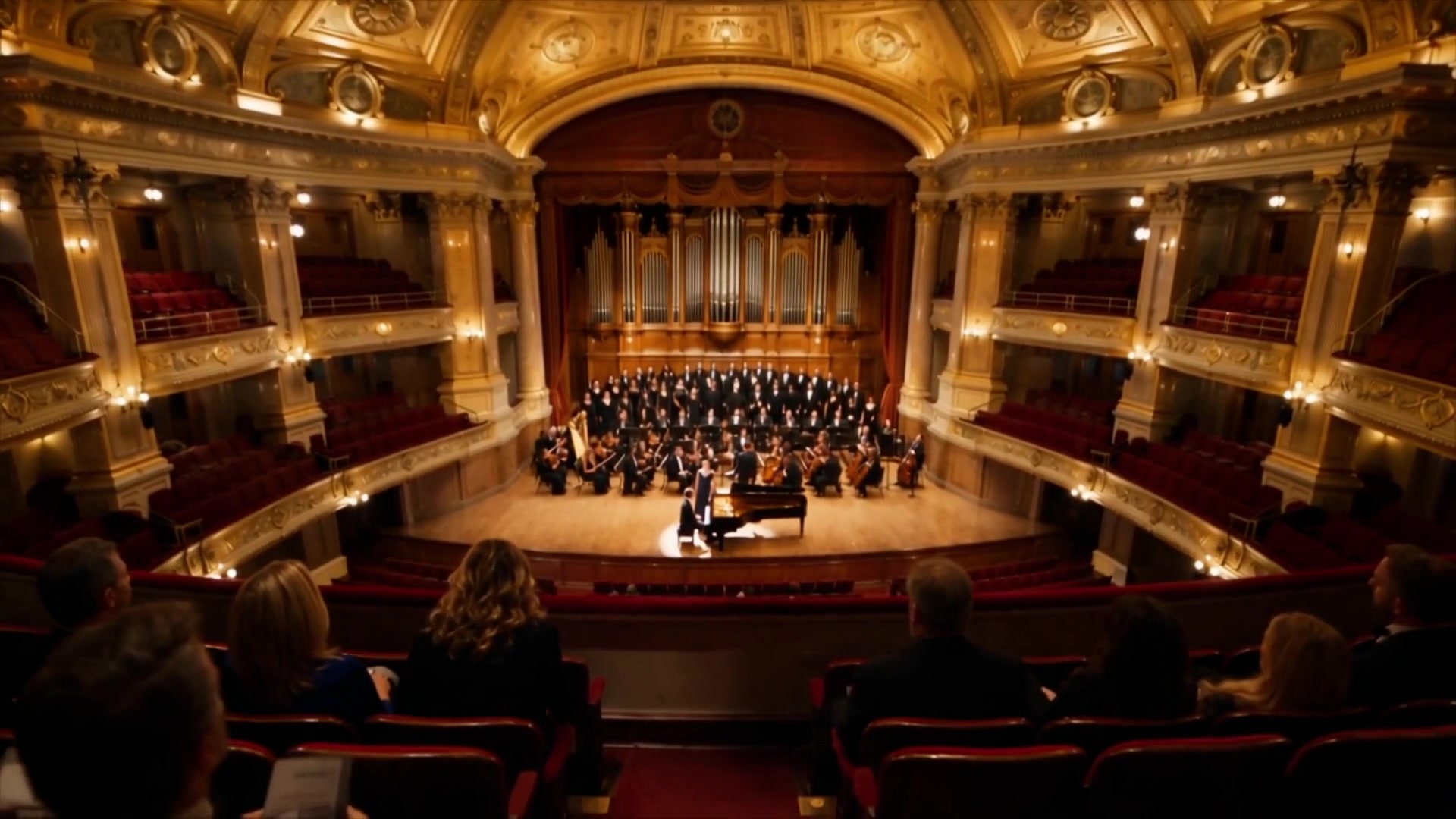
Fifty slots can feel abstract. The concert demo uses 18 of them, assigning each image a specific job in a single prompt.
30 秒音乐会片段,16:9 横屏,电影感写实,真实音乐厅光影,暖金色舞台灯,正式古典音乐会氛围。场景@图一,钢琴家参考@图二,大提琴参考@图三,小提琴参考@图四,主唱参考@图五,管弦等其他乐队参考@图六到图十,合唱团参考图十一到图十四,观众席参考@图十五到图十八。主唱舞台中央走向前沿,钢琴家在钢琴旁,乐队分布两侧与后方,合唱团在舞台后方。开场高位俯拍音乐厅全景,钢琴家落键,主唱进入追光演唱,镜头自然带过小提琴、大提琴与管弦乐队,小提琴明亮,大提琴温暖。后段合唱团加入,主唱与第一排观众短暂眼神交流,观众微笑点头。结尾镜头后移,演唱结束,观众跟随鼓掌。
Beyond the higher limit, the model adds or improves several reference modes: white-model reference, motion reference, and creative reference. Motion and creative reference are named but not explained or demonstrated. White-model reference gets a full demo, so it deserves a closer look.
White-model references and green-screen editing connect 3D and on-set workflows
White-model reference is a reference feature, while green-screen editing is an editing feature. The project page groups them under "built for professional video creation" because both aim at the same target: connecting the model to tools and assets already used in professional production. The terminology can be opaque, so here is what each means.
White-model references: build the structure, then render it
A white model is an untextured gray or white 3D model containing only shapes and positions. Film, advertising, and game teams already use this step: they block out a scene in 3D software, fixing the camera, character positions, composition, and motion paths before production. That process is called previs, short for previsualization. Seedance 2.5 can use the white model directly as a structural reference. Characters remain where they were placed, the camera follows the planned orbit, and objects move along the specified paths, making complex composition and staging more predictable.
Before filming, you block out the action on a table with toy bricks and figures. Previously, the director still had to recreate that layout on set. Now the layout itself can be handed to the model as the blueprint for the shot.
The same system also handles lighting. From the white model's spatial information, it can derive physically plausible light direction, color temperature, intensity, and cast shadows.
参考 @白模 1 的运镜、镜头节奏、景别变化、主体轨迹和镜头调度。参考 @图片 2 的角色外形、场景、材质、光照、色彩和童话氛围,将白模渲染为梦幻温暖、儿童幻想感、3D 动画短片。剧情依次为:幻想天空飞行→云海神兽伴飞→俯冲入海→鳐鱼海底穿梭→镜面时空裂缝→宇宙摘星→幻化回房间→爸爸盖被→合上绘本定格。
Green screen: replace the setting and recalculate how the clothes move
Green-screen editing works with another kind of existing footage: an actor filmed against a green backdrop. The model replaces the green screen with a realistic setting and can also swap obstacles, clothing, and supporting characters. This goes beyond cutting out the subject and pasting in a background. The direction of flowing fabric, the state of the hair, walking rhythm, and the way light falls across the body are recalculated to follow the physics of the new environment, helping the subject and setting fit together.
White models and green screens point to the same idea: structures prepared in 3D software and footage shot against green screen can feed directly into the next production stage. In its launch post that day, Dreamina AI (@dreamina_ai) paired the release with Maya and Blender plugins aimed squarely at film-grade production pipelines.
It is already in classrooms; industrial use is still a list of possibilities
Where is it actually being used? ByteDance offers one education demo and one industrial demo, but the evidence behind them is not equally strong.
Education: turn the world behind a textbook passage into a scene
The model is already part of "Doubao Classroom" in the Doubao AIXUE app. It turns the historical background, characters, and events behind a text into visual scenes, moving lessons beyond static explanation. It can also help teachers produce instructional videos, turning abstract topics such as scientific principles, historical events, and experiments into animated demonstrations. That lowers the cost of creating teaching materials and makes them easier to customize.
Industry, robotics, and autonomous driving: generate training footage
Industrial use is different. Generated video could train robots to perceive scenes and manipulate objects. It could also support industrial simulation, process training, and equipment demonstrations. For autonomous driving, it could simulate rare conditions such as extreme weather or complex road situations, providing additional test samples. But every claim in this section is framed as something the model "can" do. No deployed customer, volume, or timeline is provided.
Where you can use it
The launch blog says Seedance 2.5 is "rolling out progressively." Products in China and overseas moved on the same day.
| Channel | Status | Access / requirements |
|---|---|---|
| Jimeng AI | Launched that day | Web → Video generation → Select Seedance 2.5. The platform also offers a separate "long video mode" of up to 3 minutes, according to the Dreamina AI (@dreamina_ai) launch post |
| Doubao Pro | Launched that day | Video generation → Select Seedance 2.5. PChome reports that Enhanced and Premium plan users receive priority access to the "Creative Video" skill, which can work with models including Seedream 5.0 Pro |
| Volcano Engine Ark API | Not yet available | The launch blog says it "will also be available soon." It was not open on launch day, and pricing was not announced |
| Dreamina (international) | Launched that day | Available to Dreamina subscribers, initially in Southeast Asia, the Middle East, Africa, Europe, and South America, with other regions to follow; Maya and Blender plugins launched alongside it |
AI video prompts are turning into shot lists divided by the second
ByteDance's Seedance 2.5 generates 30 seconds at a time and accepts 50 reference assets. Here is the whole story on one illustrated page.
↓ One-page read · Includes an animated chart
Seedance 2.5 is a video-generation model launched by ByteDance Seed on July 31. Give it text and reference assets, and it produces a finished video with sound. Its predecessor, Seedance 2.0, launched on February 12. The underlying architecture remains the same, but three things have moved forward: how long a generation can run, how many references it can use, and how precisely the result can be edited.
References 9 images + 3 videos + 3 audio clips = 15 assets
Editing Clip / character / action / plot
References 30 images + 10 videos + 10 audio clips = 50 assets
Editing Adds timestamp targeting
Doubling the duration does not mean stretching the same image for twice as long. In the official demo, a single 30-second generation contains an entire scene: the camera pushes through a gap in the curtains into a dressing room; the singer turns and begins performing; the camera retreats through a backstage corridor, circles behind her onstage, reveals the production design, and finally pulls back to a wide arena view—all without a cut. Another update targets the instantly recognizable plastic AI look: waxy skin, vacant eyes, and oversaturated color. Materials, skin texture, lighting, and saturation have all been adjusted, though there is no before-and-after demo.
Place several demo prompts side by side and another unannounced change becomes obvious: prompts now need timed segments, and every asset needs a number. The diagram below shows the original structure of the official breakfast camera demo. The person writing the prompt explicitly fixed all four segment boundaries.
The barrier to operating the tools is lower—you do not need to know how to shoot, edit, or light. The barrier to explaining what you want is higher. You need to arrange the shots in your head, then describe them precisely. A failed generation usually means rerolling the entire clip. Once the prompt works by the second, getting the result you want depends on one more variable.
A 50-asset reference limit sounds abstract. The official concert demo uses 18 images and gives every one a specific job. Each image is bound to a performer or area, almost like issuing every subject an ID card.
References now include two features aimed directly at professional workflows. A white model is an untextured gray or white 3D model. Film and game teams already use one to block out cameras, staging, and motion paths in 3D software. That structure can now be fed directly to the model for rendering, with light direction, color temperature, intensity, and shadows calculated from its spatial relationships. Green-screen editing takes footage shot against a green backdrop and replaces the background, obstacles, clothing, and supporting characters. It also recalculates flowing fabric, hair, gait, and lighting for the new setting. Dreamina released Maya and Blender plugins the same day.
Jimeng AI and Doubao Pro offered the model on launch day: select it in the web interface, with no deployment required. Dreamina launched internationally the same day for subscribers. The Volcano Engine Ark API is listed as "coming soon"; it was not available on launch day, and pricing was not announced.
Where the figures come from: the 30-second limit, 50 reference assets, two extensions, and the 4-minute, 22-second opening film all come from ByteDance Seed's launch blog and the Seedance 2.5 project page. The 3-minute mode and 1-second timestamp precision are claims made by Jimeng AI and Dreamina at the platform level. Doubao Pro plan requirements come from PChome. No independent third-party testing is currently available.
Its predecessor came in February.
Same architecture, three upgrades.
Previously 15 sec.
Piano @Image 2 Cello @Image 3
Lead @Image 5
Choir @Images 11 to 14
Crowd @Images 15 to 18
30 images + 10 videos + 10 audio clips.
Previously 15.
split into four sections.
Then target a second to edit.
No full reroll.
Explaining gets harder.
- × Launch blog: multiple rounds, minutes
- × Project page: two video extensions
- × Jimeng AI and Dreamina: 3-minute mode
Members can copy or download the full Markdown, and let their AI subscribe and ask.
Found this useful? Leave your email — every new explainer, the moment it's out. Unsubscribe anytime.