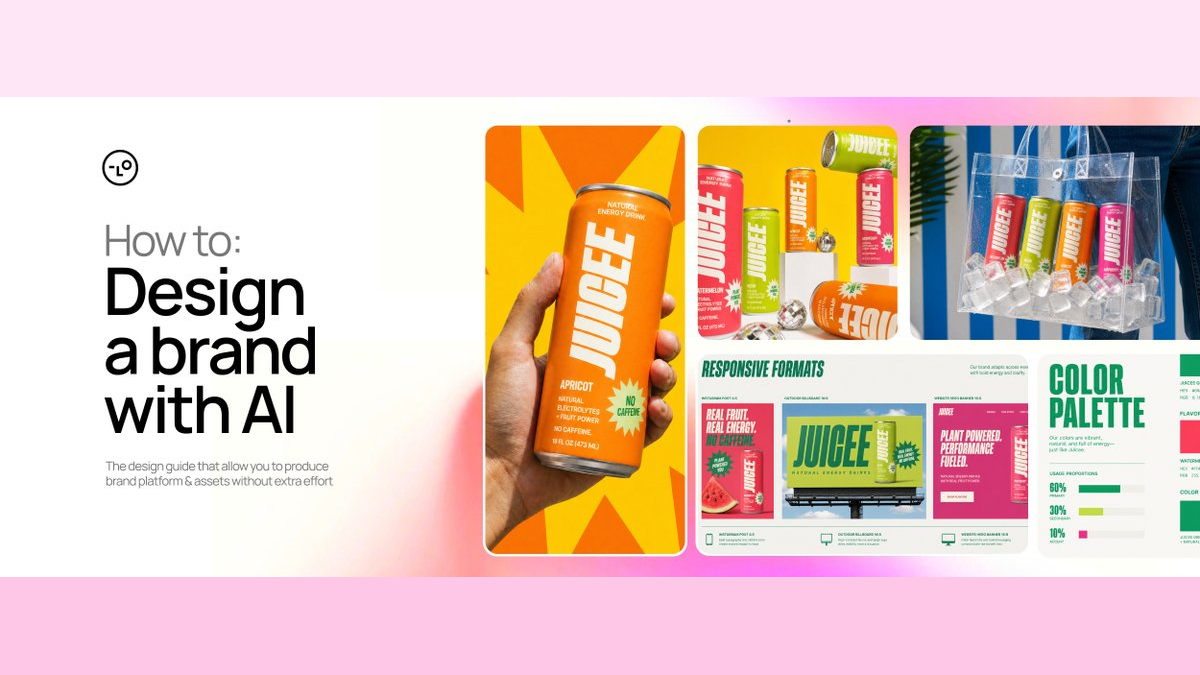
AI 品牌生成Skill :用一张腌黄瓜汽水图,做出一整个品牌
Amir Mušić 用 Juicee 案例展示了一套更可靠的 AI 品牌工作法:提取参考图的规则,锁定一个品牌锚点,再给每种参考素材划清控制权。
- 参考图先拆成构图、层级、摄影与留白规则,品牌身份和具体场景不进入复制清单。
- 第一版 Brand Kit 通过删减冲突元素形成锚点,后续资产只改变获批范围内的变量。
- Brand Lock 给场景、品牌和包装参考分配不同控制权,防止新素材覆盖既有品牌语言。
- 开源 Skill 用批准门、测试资产和一致性审计,把创意总监判断变成可执行的 Agent 流程。
AI 很容易连续生成二十张“单独看不错”的图,品牌系统却要求二十张图放在一起仍像同一个品牌。真正缺少的往往是一套能约束后续选择的规则。
品牌与广告设计师 Amir Mušić 用 Lovart Agent 做了一个完整案例:从 Pinterest 上一张 Pickle Potion 饮料图出发,为虚构的天然无咖啡因能量饮料 Juicee 建立视觉身份、四个口味、品牌规范、广告场景、概念包装和视频。文章由 Lovart 赞助,最值得带走的部分落在他怎样把创意总监的判断写进 Agent 工作流。
整套方法可以压缩成一句话:先从参考图中提取规则,再批准一个所有后续资产都必须服从的品牌锚点,最后给新增参考素材划清控制范围。
这段开场蒙太奇先给出终点:一个参考方向最终扩展成身份、包装、广告和动态素材。下文拆解的,是这批结果没有散成不同品牌的原因。视频:Amir Mušić。
参考图要先拆成规则
Juicee 的项目简报非常短:面向 20—35 岁活跃人群,产品是天然、无咖啡因的能量饮料,有西瓜、甜瓜、杏和覆盆子四个口味。参考图中的 Pickle Potion 是一款泡菜饮料,具体品牌身份当然不能搬过来,画面背后的组织方法却可以迁移。
Mušić 从中拆出了四个主要规则:左右分屏、真实食材摄影、强势粗体字、简单星爆元素。Pickle Potion 用这些规则制造“咸味冲击”,Juicee 则把同一套构图逻辑转译成“水果扑面而来的强烈新鲜感”。

对象、颜色和产品身份全部换掉,留下的是构图、层级、摄影与图形装置之间的关系。图:Amir Mušić。
这里最实用的动作,是把“我喜欢这张图”改写成 Agent 能执行的三份清单:
- 可迁移的原则:构图、层级、色彩行为、摄影方式、材质、留白和节奏;
- 禁止复制的对象:logo、包装、专有字体、角色、文案、独特图案和具体场景;
- 面向新品牌的转译:这些原则怎样服务新的受众、品类与卖点。
可以直接使用这样的任务骨架:
请以创意总监的视角分析这张参考图。

提取它的构图、视觉层级、字体行为、色彩逻辑、摄影方式、材质、留白和可扩展规则。
单独列出不能复制的品牌身份与专有元素。
最后把可迁移原则转译成适合「品牌 / 产品 / 受众 / 核心卖点」的新方向。
它迫使 Agent 先解释“为什么有效”,再动手生成;参考图由此成为一组设计约束,不会沦为一张等待换皮的模板。
第一版失败后,先删到只剩一个方向
第一版 Brand Kit 具备相当多的“设计内容”:写实液体、卡通角色、图标、产品图形、纹样、特效和多套字体方向同时出现。问题正出在这里。每个局部都在争夺主导权,材质语言与图形语言也互相冲突,整张板更像灵感拼贴,无法成为后续工作的共同依据。

第一版有许多可用元素,却没有清楚说明哪一套语言拥有最高优先级。图:Amir Mušić。
Mušić 给出的反馈很短:“增加留白,减少图形装置,只保留一个清晰方向。”他没有要求 Agent 继续扩写创意,而是先删除卡通角色、液体特效、波浪纹样和互相竞争的风格,再用模块化网格、窄体字、纯色口味区分、真实水果摄影、细长罐身和一个星爆装置重建 Brand Kit。

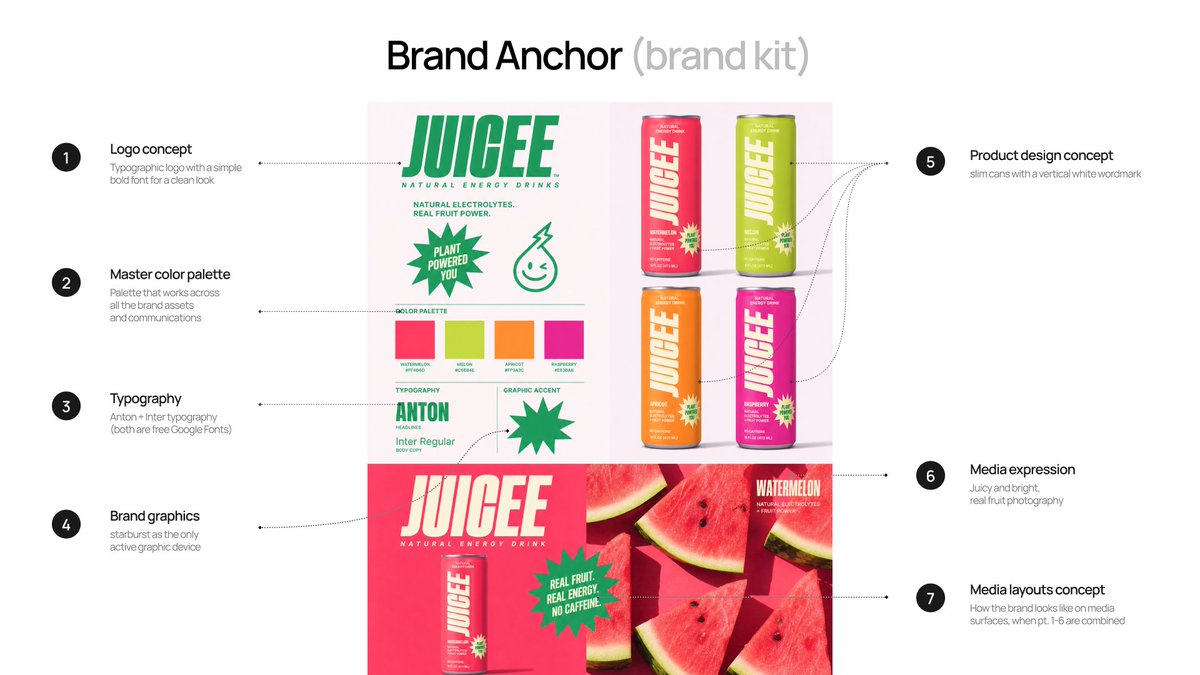
收紧后的锚点把 logo、色板、字体、罐身、图形装置和摄影规则放进同一套层级。图:Amir Mušić。
视频把两张静态图之间最容易被压掉的过程补回来:上传参考、生成第一版、给出批评,再收紧为可批准的品牌锚点。视频:Amir Mušić。
这张获批的板被称为 Anchor Brand Kit。它的作用很具体:后续任何品牌规范、包装和广告资产都要先回答“是否继续服从这个锚点”。锚点保存了已经付出判断成本的决定,Agent 无须在每一轮重新猜一次品牌长什么样。
开源 Skill 还把“修一修”和“推倒重来”分开:间距、单个颜色或局部层级有问题,可以 REFINE;整体情绪、字体、色彩、材质、包装架构等基础系统同时改变,就要 REJECT AND RESTART。被否决的 Brand Kit 会被明确标记为禁止引用,防止旧方向继续污染新生成。
锚点决定什么不许变,SKU 才能放心变化
一个可扩展的品牌系统同时需要稳定项和变量。只有稳定项时,所有画面会僵硬重复;没有稳定项时,四个口味会变成四个品牌。
锚点获批以后,Agent 才把它展开为多页品牌规范。作者列出的模块不是泛泛的“品牌手册”,而是 logo 使用、字体、颜色、图形元素、关键视觉规则、包装、品牌使用规则、设计规则和摄影规范。它们把一张方向板变成后续任务可以逐项检查的约束。
视频展示品牌锚点怎样在同一 Canvas 中被展开为一组相互连接的规范模块。视频:Amir Mušić。
| 必须持续稳定 | 可以按任务变化 |
|---|---|
| logo 与字标逻辑 | 水果与口味 |
| 字体家族、字重与信息层级 | 主色在已批准口味色板中的切换 |
| 星爆图形的形状与用法 | 画面比例与渠道尺寸 |
| 罐身结构与标签区域 | 产品角度、景别与场景 |
| 真实水果摄影和材质方向 | 标题内容与合法、已批准的产品卖点 |
| 留白、产品位置和阅读顺序 | 社交图、横幅、视频等载体 |
Mušić 的四个口味共用一套关键视觉机制:左侧水果、右侧产品、一条主标题、一个星爆卖点和一致的信息层级。西瓜、甜瓜、杏与覆盆子看起来各有性格,又不会彼此失去亲缘关系。

大量资产共享同一套视觉语法,变化被限制在口味、场景和格式等已批准范围内。图:Amir Mušić。
作者原始流程图把工作分成参考图研究、品牌编码、字体测试与资产精修;把决定权加入后,整条链路更接近下面这套控制流程。

构图 · 层级 · 摄影 · 留白
移除冲突的字体、材质与图形
logo · 字体 · 色板 · 包装 · 媒体规则
批准后才继续场景管镜头,锚点管身份,包装板管产品
检查品牌一致性与参考污染
审计通过才扩展只改变已经批准的变量
这条链的关键位置是两个闸门:锚点批准决定能否开始规模化,一致性审计决定某个新场景能否继续扩展。生成速度越快,这两个闸门越重要,因为一次错误方向会被迅速复制成几十个错误资产。
多张参考图需要一张“控制权表”
品牌锚点稳定以后,Mušić 又加入了 9 张场景参考图,希望扩展出俯拍水果、产品特写和生活方式场景。很快出现了视觉漂移:新参考图携带的字体、颜色、纹样和包装线索也被 Agent 带进结果,部分画面单独看很酷,放回 Juicee 系统却像来自别的品牌。

场景参考拥有太多控制权时,局部风格会盖过已经批准的品牌身份。图:Amir Mušić。
Brand Lock 解决的是参考素材之间的权限冲突。它没有神奇按钮,而是一张“谁能决定什么”的控制权表:
| 输入 | 允许控制 | 不得覆盖 |
|---|---|---|
| 场景参考图 | 镜头类型、机位距离、光线、材质类别、景深、负空间、节奏与情绪 | logo、字体、品牌色、包装、具体人物、姿势、物体排列与原作叙事 |
| Anchor Brand Kit | logo、字体、色彩、层级、图形语言与留白规则 | 不接管场景中的人物、环境和叙事细节 |
| 包装参考板 | 产品形状、包装设计、标签区域与 SKU 架构 | 不决定整个场景的摄影风格与构图 |

场景参考提供镜头语言,品牌锚点守住身份,包装板守住产品;三种输入不再争夺同一层决定权。图:Amir Mušić。
这里值得看的是连续动作:组合场景参考、Brand Kit 与包装板,生成新场景,识别视觉漂移,再把结果拉回已批准系统。视频:Amir Mušić。
新的广告画面仍要实质性原创:人物、姿势、服装、环境、道具、物体排列、产品互动、裁切和叙事细节都要重新设计。这样既能借用参考图的高层创意原则,也能避免把别人的作品改个 logo 就当成新图。
生成不是终点,精细编辑必须接在后面
作者把 Text Edit → Touch Edit → Edit Elements 放在完整资产生成之后。三者的价值不在于重新发散方向,而在于对已经选中的资产做文字、局部和元素级修正。这个顺序很关键:方向尚未获批时抠细节,只是在给可能被淘汰的方案增加沉没成本;方向稳定以后,精修才是在减少生产风险。

原图展示的是精细编辑界面:画面中的文字成为可选图层,并提供字体、段落等参数;它不应被笼统归类成“包装多视图”。图:Amir Mušić。
这段较长的录屏保留了静态截图无法替代的证据:编辑工具如何落到一件已完成资产上,而不是靠再次生成碰运气。视频:Amir Mušić。
同一系统还生成了正视、四分之三视角、等距视角和爆炸图等包装概念视图。这里必须分清“视觉探索”和“生产文件”:这些结果不是刀模、矢量生产稿、印前文件、量产 3D 模型或制造规格。
品牌规则还要经得起从静态到动态的换媒介
这套权限思路也延伸到视频。已批准的包装、色彩、字体和广告语言继续作为来源事实,Seedance 2.5 在 Lovart 中生成运动素材,最终广告再由作者在 Adobe 中装配和完成。静态到动态发生了媒介变化,品牌控制面没有跟着重置。
运动、剪辑和媒介变了,包装、颜色、字体与广告语言仍继续约束结果;这才是“品牌系统”比单张成图多出来的价值。视频:Amir Mušić。
完整 Canvas 把文章各阶段放回一张工作面:参考、锚点、规范、场景、包装与动态资产之间存在明确的上下游关系,而非一组碰巧风格相近的成图。视频:Amir Mušić。
开源 Skill 把审美经验写成了状态机
Mušić 把方法公开成了 Lovart Brand System Skill。这份 Skill 把巨型提示词扩展成会保存状态、等待批准、诊断失败和决定下一步的 Agent 工作流。
Skill 设置了四个会阻断下游工作的批准门:
- 项目简报获批,才分析参考图;
- 可迁移原则和创意方向获批,才生成第一版 Brand Kit;
- Anchor Brand Kit 获批,才制作品牌规范、广告与包装;
- 场景参考、品牌锚点和包装参考的角色获批,才开始 Brand Lock 测试。
每一次会消耗生成额度的动作,还要先提交一份 Generation Plan,列清目标、交付物、输入、参考素材角色、锁定决定、可变元素、确切字体、禁止项以及输出数量。用户明确批准以后,Agent 才能调用生成工具。
这种停顿并不拖慢真正的生产。它把返工成本放在便宜的文字决策阶段,避免等二十张图生成完成以后,才发现字体、包装和视觉语气从一开始就错了。

仓库把工作流写进 SKILL.md,并提供 35 分 Benchmark,用于检查流程遵守、参考独立性、品牌一致性、Brand Lock 和修正质量。图:Amir Mušić。
它还提供几个很像生产控制台的命令:STATUS 返回当前检查点,GO BACK 重开已批准阶段并说明哪些下游资产会失效,AUDIT 只检查一致性而不生成新图,REJECT DIRECTION 隔离失败方向,STOP 停止生成并保存当前状态。
仓库当前版本为 0.2.0-alpha,标注 CC BY 4.0,面向 Lovart Agent Thinking Mode 优化。它是独立社区项目,不是 Lovart 官方产品;“alpha”也意味着流程有了清楚结构,仍需要在更多真实项目中验证稳定性。
真正可迁移的,是生成前后的决策纪律
这套方法不只适合饮料包装。任何需要 AI 批量扩展、同时又必须保持一致的创意工作,都可以沿用同一套顺序:
- 先写最小项目简报,缺失的产品事实、受众和卖点不得由 Agent 猜;
- 把参考素材拆成“可迁移原则”和“禁止复制对象”;
- 只生成一个方向,先完成创意总监审查;
- 删掉互相竞争的语言,批准一个可被后续任务引用的锚点;
- 明确稳定项、变量和每份参考素材的控制范围;
- 先生成一个测试资产,做一致性审计,修正后再规模化;
- 把精细编辑放到完整资产生成之后,进入生产前再人工核对文字、字体、卖点、印刷与制造要求。
这个案例也有清楚边界。它展示了工作流和一组成功输出,没有提供与其他工具的对照、制作时间、失败率或成本基线。生成的包装图只是概念可视化,不能直接充当刀模、矢量生产稿、印前文件、量产 3D 模型或制造规格;生成模型还可能扭曲文字,字体和最终文案需要人工确认。
AI 能把探索与执行压缩得很快,品牌工作的稀缺环节因此变得更加清楚:有人必须决定什么值得保留、什么应该拒绝、什么可以变化,以及变化到哪里就算越界。稳定的品牌语言来自这些决定被写下来、获批并在每一轮继续生效。
一张参考图,怎样长成一个品牌系统
AI 品牌工作的关键不是一次生成更多图,而是先把审美判断写成规则,再用审批门和引用权限控制每一次扩展。
01|把“喜欢”拆成规则
Mušić 没有复制 Pickle Potion 的品牌身份,而是提取分屏构图、真实食物摄影、粗体字和放射形元素;具体产品、文字与场景留在禁区。
02|只批准一个品牌锚点
第一版 Brand Kit 先接受批评、删掉冲突语言,再收敛成唯一可引用的方向板。没有通过这道门,包装、广告和视频都不应开工。
03|在规则内扩展,而不是重新设计
西瓜、甜瓜、杏和覆盆子共享“左果实、右产品、单一标题、一个放射卖点”的骨架,各自改变口味与情绪,却保留家族相似性。
04|Brand Lock 给参考素材分配权限
场景参考只决定镜头语言,品牌锚点守住身份,包装板约束产品外观。三类输入不再争夺同一层控制权,视觉漂移才有明确的纠偏依据。
05|先测一个,再审计,再放大
开源 Skill 把创意总监的判断变成四道审批门、单资产测试和一致性审计。生成速度越快,这些停顿越值钱:它们把大规模返工拦在便宜的文字决策阶段。
规则 → 锚点 → 单资产 → 审计 → 扩展概念包装仍不是印刷、刀模或制造文件
这罐饮料,为什么越生成越不像自己?
工作室桌面中央只有一张 Pickle Potion 腌黄瓜汽水图;设计师把写着 Juicee 的空白罐放在旁边。
设计师:借它的方法,别复制它的品牌。
第一步不是生成,而是划清可迁移与不可复制的边界。
屏幕吐出一张堆满粗体字、果实、放射形和相互冲突卖点的品牌板;设计师拿红笔圈出三个冲突区域。
Agent:我把喜欢的元素都加进来了。
设计师:这正是问题。
单张图好看,不等于二十张图能像同一个品牌。
设计师撕掉多余贴纸,只留下分屏、真实水果、粗体字和一个放射形;在品牌板角上盖下 APPROVED 印章。
设计师:从现在起,后续资产都要向它对齐。
锚点没批准,包装、广告和视频就不该开工。
传送带上连续经过三个 Juicee 罐:第一个正常,第二个字体改变,第三个连包装纹样也变成新参考图的样子。
设计师:场景参考正在改写品牌身份。
生成越快,错误方向复制得越快。
设计师打开 Brand Lock 控制台:场景参考接到 CAMERA,品牌锚点接到 IDENTITY,包装板接到 PRODUCT;三根不同颜色的线分别通向同一只罐。
Agent:场景只管镜头,锚点守住身份,包装板管产品。
Brand Lock 的核心不是叠加参考,而是给参考分权。
测试罐通过写着 CONSISTENCY CHECK 的绿色门,门后展开西瓜、甜瓜、杏和覆盆子四只罐,以及广告、包装和运动画面;设计师仍把生产文件清单留在待办夹里。
设计师:先测一个、修正、审计,再放大。
生成速度带来产量;规则、审批门与审计才带来品牌系统。
How to design a Brand System from 1 reference image

For 10+ years, I've been creating branding & ads for Warner Music, PepsiCo, and others.
Now I combine that experience with AI to build hi-end visual systems faster.
This article shows my complete branding workflow with AI
This time, I turned one reference into an identity, brand guidelines, packaging, key visuals, and a scalable campaign world.
At the end, I’m also sharing the open-source Lovart Brand System Skill - a copy-paste workflow that guides Lovart Agent through the same process.
This article is sponsored by @lovart_ai. Thanks to the team for supporting this post and my work for you.
ONE REFERENCE -> BRAND SYSTEM
I wanted to test one question:
Can an AI agent understand why an image works -> not copy it -> and turn that logic into a new brand?
So I found a Pinterest image I like, sent it to the Lovart Agent and gave it a minimal brief of the brand I want to build:
- Brand: Juicee
- Product: natural, caffeine-free energy drink
- Audience: active people aged 20–35
- Flavors: watermelon, melon, apricot, raspberry
From that, we built a visual identity, a complete multi-slide brand system, four connected SKUs, campaign scenes, packaging concepts, videos & more.
Lovart accelerated the design process - and my role was to judge & direct the outputs, remove conflicting directions, define the rules & system.
My workflow:
Reference → Deconstruction → Anchor (Brand Kit) → Guidelines → Brand Lock → Campaign Assets → Packaging

Turn one reference into a brand system with Lovart Agent: → amirmushich.link/design_agent
1. DECODE THE REFERENCE
I found the reference of the Pickle Potion drink - and this visual gave us four transferable rules:
- Split-screen composition
- Real ingredient photography
- Bold typography
- Simple starburst elements
and more (see below).

Pickle Potion uses those rules to communicate briny shock. For my brand - Juicee - I translated them into a different idea:
The intensity of freshness - real fruit that hits.
The instruction I used
Analyze this reference as a creative director.

Do not copy it.
Extract its composition, typography, color logic, signature device, product hierarchy, and scalable campaign rules.

Translate those principles into an original identity for Juicee.
Important: A reference should inform the logic - not the design output.
2. FROM DRAFT TO BRAND ANCHOR
The first Brand Kit looked okay - but mixed too many styles, patterns, effects, and typography directions.
It was content, not a system.

My feedback was simple:
“Use more white space, less graphic devices, and one clear direction.”
My first job was not to generate more. It was to remove.
The problem was a lack of hierarchy:
Realistic liquid materials, cartoon mascots, icons, product graphics, and several micro-directions were all competing inside one board. Different materials did not match the graphic language, so the brand felt assembled from fragments instead of directed as one world.
I rejected it - because it was creatively inconsistent.
Correct the direction (if needed):
Rebuild Juicee as one minimal system:
more white space, a modular grid, condensed typography, flat flavor colors, real fruit photography, slim cans, and one starburst device.

Remove mascots, illustrations, liquid effects, wavy patterns, and competing visual styles.
The second version became a great anchor for the future brand - one approved image the entire brand could obey.
Here's how the whole process looks like:
On this stage, we locked:
- logo concept;
- color palette;
- typography (free Google Fonts);
- brand graphics (vector starbursts);
- can design;
- media rule - "real fruit photography";
- design foundation.
The system is now locked - let's scale it.
3. TURN THE ANCHOR INTO A BRAND SYSTEM
From one anchor, Lovart Agent created a connected set of brand-guideline modules:
Logo usage · Typography · Color · Graphic elements · Key visual rules · Packaging · Brand usage rules · Design rules · Photo guidelines
The same rules then produced 4 flavor key visuals with one repeatable mechanism:
[fruit on the left] → [product on the right] → [one headline] → [one starburst claim] → [one consistent hierarchy]
The SKUs feel different without becoming four different brands.

4. EXPAND THE CAMPAIGN (and keep the brand consistent)
Once the design system was locked, I introduced 9 additional scene references - to expand the brand campaigns world.
Lovart Agent quickly translated those references into a broad range of explorations - from fruit top views and product close-ups to lifestyle scenes.
Because each reference carried its own strong visual language, some early outputs began to over-weight its fonts, colors, patterns, and packaging cues alongside the composition.

This wasn’t a lack of generation capability - it was a creative-direction challenge. The Agent needed a clearer hierarchy for deciding which source controlled each part of the output.
One of Lovart’s strengths is that you can combine references and steer the system iteratively. I used that flexibility to define a clearer reference hierarchy - a workflow I call Brand Lock.
Brand Lock isn’t a button or a single prompt.
It’s a methodology for deciding what each reference is/isn’t allowed to control.
The final scene must still be materially original - not a recreated artwork with a different product.

Brand Locking with Lovart Agent
combine the scene references, Brand Kit, and packaging board → generate new branded scenes → identify and correct visual drift → reveal the complete scaled canvas
Use the new reference only as high-level inspiration for the shot type, camera distance, lighting, materials, depth, negative space, and visual rhythm.

Create a materially original scene.
Change the people, poses, wardrobe, environment, props, object arrangement, product interaction, crop, and narrative details.

Use the Juicee Brand Kit and packaging board as the only source of truth for typography, color, graphics, product design, and SKU architecture.

Do not recreate or rebrand the original artwork.
The references could now influence the scene language without owning the scene or redesigning the brand.
By repeating the same Agent workflow across different references and flavors, I expanded one approved system into dozens of connected visuals.
Agent generated the assets Brand Lock kept the system consistent.
Precision editing after generation
The editing tools came after generation. Text Edit, Touch Edit, and Edit Elements were useful for precise corrections to assets.
Refine one completed asset with Text Edit → Touch Edit → Edit Elements
The same connected system also produced front, three-quarter, isometric, and exploded packaging views.
Note: These are conceptual packaging visualizations - not final dielines, vector artwork, prepress files, production-ready 3D models, or manufacturing specifications.

5. TURN THE BRAND SYSTEM INTO MOTION WITH SEEDANCE 2.5
Once the visual system was locked, I used Seedance 2.5 inside Lovart to generate the motion assets, then assembled and finished the final Juicee ad in Adobe.
The same approved packaging, colors, typography, and campaign language became the source of truth for video - so motion extended the system.
The Agent kept the creative workflow connected - from static brand assets to video generation on the same Canvas. The brand/character consistency is really strong here.
ONE REFERENCE TO A COMPLETE BRAND WORLD
The clearest proof of the workflow is my Lovart canvas.
Reference → Brand System → Entire brand world.
Build a consistent brand system with Lovart Agent
MY BRANDING SKILL (GitHub)
I packaged the complete workflow as a copy-paste Skill for Lovart Agent
Instead of running prompts manually, paste the Skill into a new Lovart project and let the Agent guide you through:
- mass-user-friendly onboarding;
- reference deconstruction;
- Anchor Brand Kit development;
- creative-direction critique;
- fonts selection;
- generation approval gates;
- brand guidelines;
- Brand Lock;
- campaign assets;
- consistency audits;
- packaging concepts.
If you don’t know how to answer his questions - or why a visual direction isn’t working - the Skill can help diagnose the problem before you spend more credits.
Get the Brand System Skill on GitHub

5 THINGS TO REMEMBER
- One solid anchor beats twenty disconnected outputs
- Use references for principles (not for copy-paste)
- Approve the concept before spending credits on assets
- Use the Agent to generate complete assets - and editing tools to refine the details
- AI accelerates concepting; final production still needs human vision
THE REAL LESSON
We started with one Pinterest image.
Working with Lovart, I turned it into an identity, SKUs, brand guidelines, campaign scenes, packaging concepts, and a complete brand world.
The agent accelerated exploration and execution. My job was to choose the direction, reject visual contradictions, and define what could change - and what had to stay locked.
AI can create endless images. A brand begins when someone decides what must stay in its visual language.
Turn your next reference into a brand system with Lovart Agent
One reference can become more than an image. It can become an entire brand world.
#BuiltWithLovart #AiDesign #AIBranding