前苹果设计与研发团队负责人:如何把管理人类设计团队时形成的方法移植给 AI,让 AI 做出世界级设计
Anshu Chimala 把在苹果带设计与研发团队时形成的探索、评审和删减流程,改造成一套可由 AI 代理执行的设计指南。
- AI 的下个词预测与人类偏好训练会把设计推向高概率、低争议的安全模板;普通提示越空泛,模型替你做的默认决定越多。
- Discover 阶段用真正的外部随机、足够激进的方向和三步品味提取法,先扩大候选,再把人的偏好写成构建简报。
- Define 阶段让独立评审只看截图,用固定标准指出最大差距;同时把生成图像与视频当成界面材料,而非文章末尾的装饰。
- Deliver 阶段删除光晕、渐变、容器和无用文案,清理 AI 痕迹,并由人重写关键文案;最终按每阶段的产出与通过条件验收。
曾在苹果工作 12 年、领导软件工程与设计团队的 Anshu Chimala,在 Lenny’s Newsletter 发表了一篇客座文章,讲解他如何把管理人类设计团队时形成的方法移植给 AI 代理。他曾带领团队研究和制作未来 AI 产品原型;离开苹果后,又持续用 AI 制作产品与设计实验。
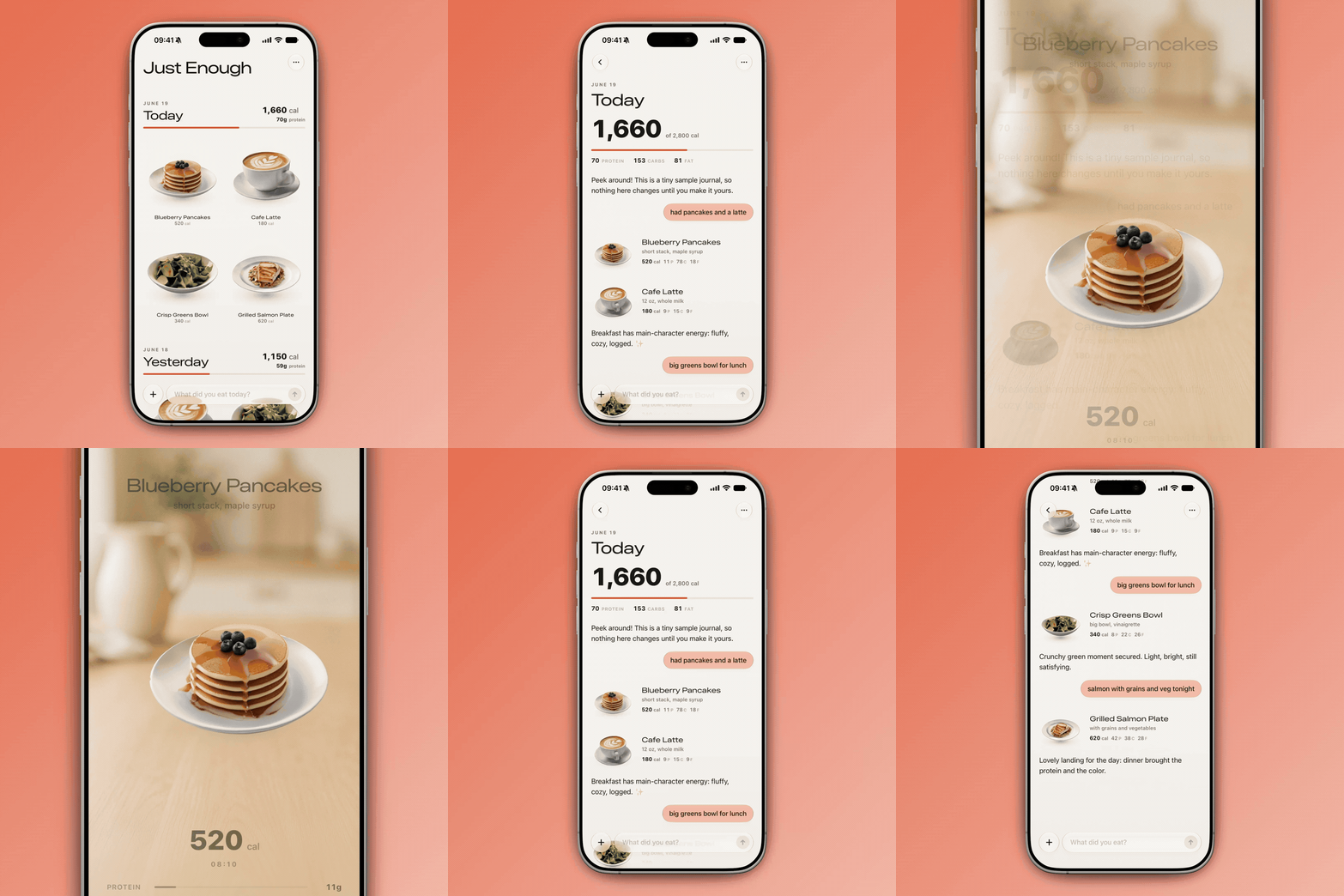
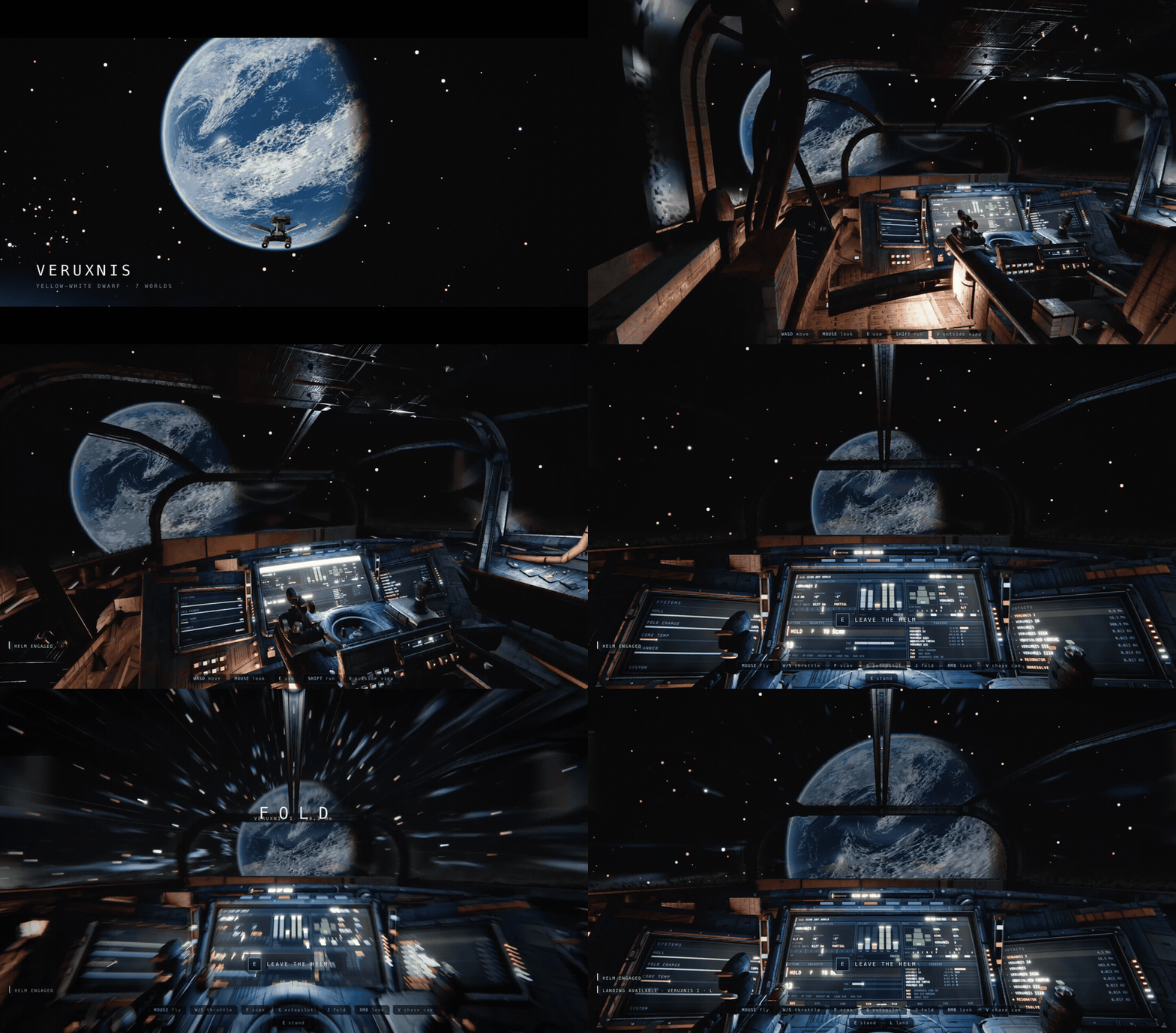
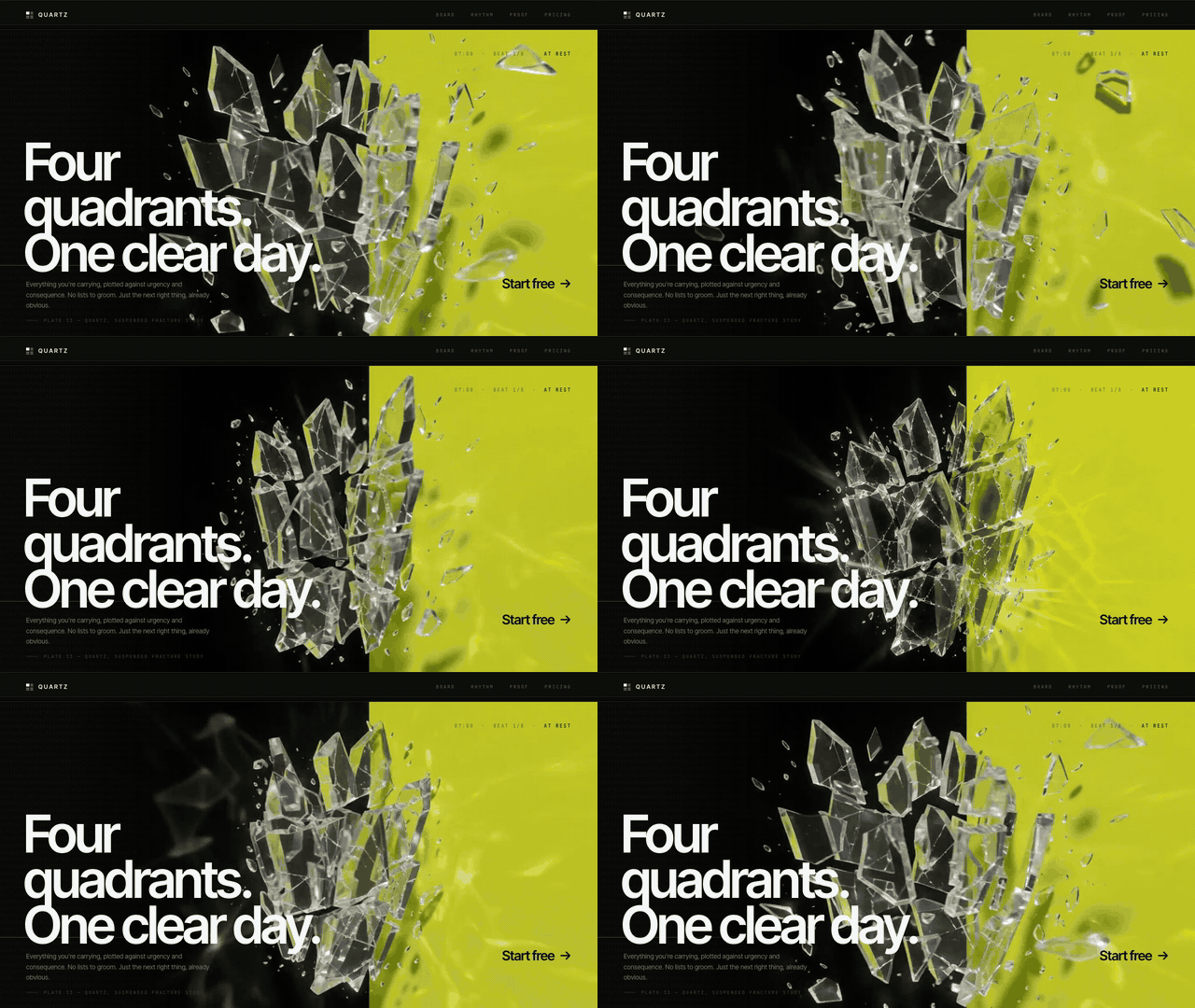
下面三个原文动态案例,先给出这套方法能达到的完成度。每个案例的任务类型、使用模型和提示轮数都直接标在素材旁边,不需要先靠一段文字想象结果。

默认输出只是高概率中心,不代表模型能力的边界。
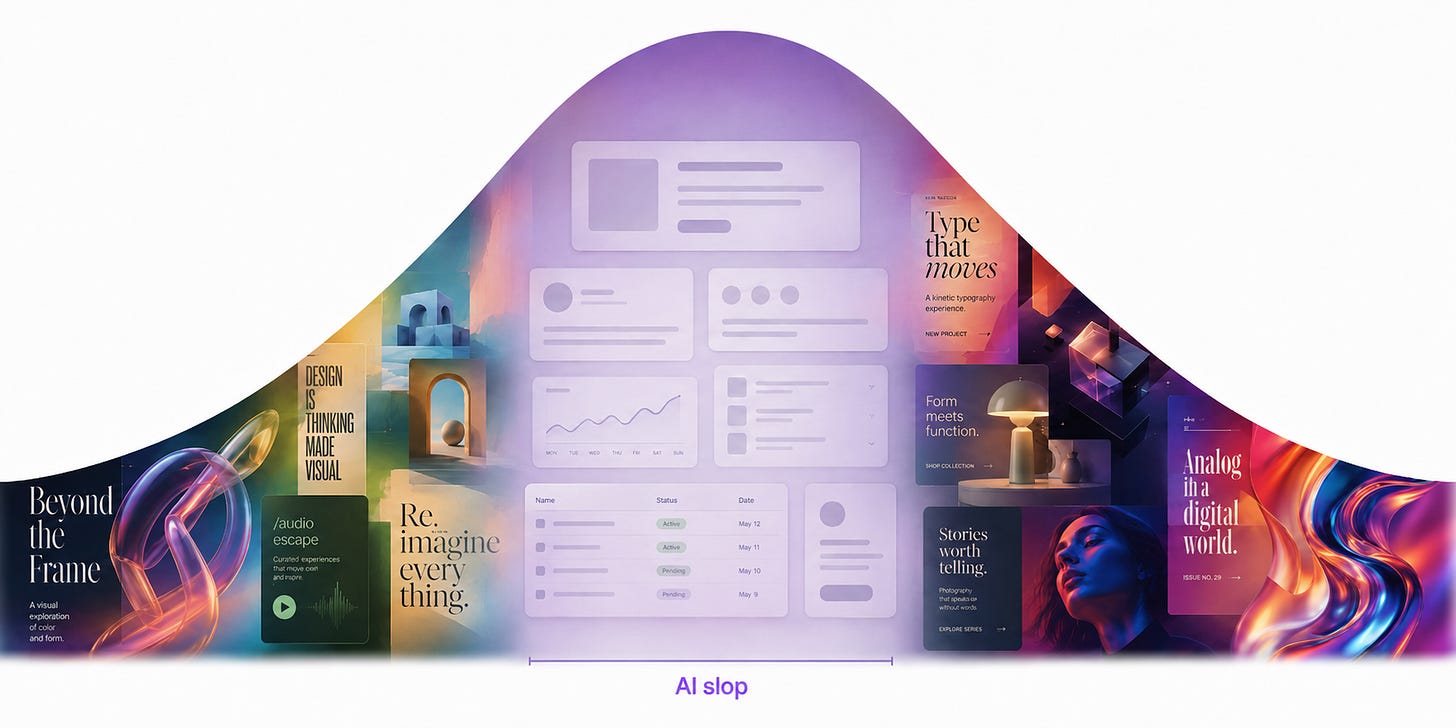
Anshu 发布这类作品时,反复收到同一个问题:为什么同样使用 Claude、Codex 等工具,有人能做出完整而鲜明的产品,自己的结果却总是紫蓝渐变、左文右图、玻璃卡片和醒目按钮组成的 AI slop?
他的解释是:大语言模型逐 token 预测接下来最可能出现的内容,又经过人类偏好反馈,学会稳定、可靠、容易被多数人接受的选择。设计要求模型连续决定颜色、字体、版式、材质和空间关系;提示没有提供鲜明取舍时,每一步都会把作品推回熟悉、安全、平均的组合。作者把它比作“委员会设计”:每个人都能接受,几乎没人会被打动。
这套解法最初不是为 AI 发明的。在苹果带团队时,Anshu 发现,设计师和工程师也会被既有界面经验限制,讨论一深入就退回以前做过的方案。他们因此建立更严格的探索与打磨流程:先逼团队走到想法边缘,再把选中的方向反复精修到可交付。如今,AI 代理把过去需要团队数周的探索和制作压缩到数小时,但负责人仍要决定探索哪里、什么算好、最后删除什么。
原文说这套流程“宽松地借鉴”了 Double Diamond(双钻模型)。它是英国 Design Council 用来描述设计与创新过程的框架:第一个菱形先发散地理解问题,再收敛地定义问题;第二个菱形再发散地发展多种方案,最后通过测试、淘汰和改进收敛到交付。Anshu 没有照搬 Discover、Define、Develop、Deliver 四阶段,而是按 AI 代理的工作方式压缩成三段:
| 阶段 | 要解决的问题 | 人负责什么 |
|---|---|---|
| Discover | 打开候选空间,摆脱默认模板 | 提供外部变化,选择有感觉的方向 |
| Define | 把方向深化成独立的设计语言 | 建立质量基线,组织代理反馈和多媒体材料 |
| Deliver | 清理粗糙边缘,让设计能够交付 | 删除无用元素,识别 AI 痕迹,重写关键文案 |
它没有要求 AI 自己“长出审美”。AI 负责高速探索、实现和调用多种媒介,人继续承担创意总监的工作:提供变化、表达品味、设定质量标准,并在最后做取舍。
为什么 AI 总会回到安全模板
原文把同一个“生产力应用落地页”任务做成三轮对照:普通提示、只在语言里要求随机、再加入由 shell 生成的外部随机字符串。先把三组结果连起来看:
01 · 普通提示:回到安全模板

02 · 只说随机:换皮不换结构

03 · 随机种子:候选明显分散

- 普通提示: 四个 Claude Code 实例几乎都回到紫色渐变、左侧标题、右侧图形、顶部导航和醒目按钮。品牌名变了,设计语法没有变。
- 只说“随机”: 页面换成相近的暖色与排版,甚至反复出现陶器隐喻。模型生成了“听起来随机”的方案,却没有获得外部变化源。
- 加入随机字符串: 字体、色彩、明暗和构图明显分散,候选不再挤在同一个风格家族内。
第三步证明的是候选空间变宽,不自动证明审美、可用性或复现率提高。原文的网页实验是示例对比;Sakana AI 的 SSoT 研究验证了概率采样和输出多样性,没有验证网页设计质量。
Discover:先把候选空间打开
Discover 阶段要避免一开始就钻进某个方案。先生成足够不同的方向,再用人的反应把空间逐渐缩小。
方法一:给模型一个真正外部的变化源
Anshu 借用了 String Seed of Thought 的思路,但做了适合 Coding Agent 的改造:让代理先用 shell 脚本生成一长串随机字母和数字,再从字符形状、重复模式、特殊数字或结构关系中提取视觉灵感。
可以把提示写成下面四步:
- 用脚本生成一段足够长的随机字母数字串。
- 从字符串中寻找可以转化为设计规则的结构,分别决定配色、字体、布局和视觉节奏。
- 按这个方向完成页面,不要中途退回常见 SaaS 模板。
- 字符串只用于思考,不出现在最终界面。
可检查产物: 同一产品至少生成 4 个候选,并排截图。
验收标准: 候选之间应在字体类别、明暗关系、构图骨架和信息节奏上出现结构差异。仅仅替换品牌名、主色或插图不算不同方向。
这里还要保留研究边界:原始 SSoT 方法让模型先在内部生成随机字符串并操作它,Anshu 的实现改为由 shell 提供外部随机串。两者都在打散默认偏好,具体机制并不完全相同。
作者还给出一个很实用的长期做法:保存那些今天失败的大胆提示,并在新模型发布后重新测试。 如果过去只能生成破碎页面的方向,升级后突然能稳定实现,说明新增能力已经进入你的可用设计空间;只用旧提示测新模型,很容易看不见这种变化。
方法二:把野心写成可以约束决策的世界
“更大胆”“更高级”“更有创意”没有提供视觉约束。有效提示会给出一个足以统领整页的世界,例如:
- 把生产力工具做成连续的像素游戏场景,每个区块像游戏中的一帧。
- 把功能组织成一座等距 3D 城市,让街区和建筑承担信息架构。
- 使用激进的不对称、冲突色和令人不舒服的负空间,同时保持功能可读。
这些方向可能失败。失败本身有用:如果一个想法听起来过于安全,它大概率只会得到训练分布里的平均答案;如果它让你怀疑“这能做成网页吗”,它才真正迫使模型尝试新的设计语法。
用三步把 AI 灵感变成个人品味
原创方向不能靠“让 AI 想主意,再把 AI 的主意原样喂回 AI”。Anshu 使用三步把人的选择加入流程:
- 只列方向,不展开。 让 AI 给出大量一两句话的概念,例如粗野主义工具、工业控制台、凝胶界面、纸板原型、漫画式 UI。这个阶段只负责刺激想象。
- 把喜欢的方向做成可见结果,然后记录反应。 例如,工业控制台应该有实体按钮的触感和声音;不要卡通和复古拟物;灰色渐变太闷,需要粉末涂层、阳极氧化或细颗粒材料。
- 方向稳定后,再让 AI 反写构建提示。 最终提示要包含视觉原则、材料、组件一致性、禁区和优先级,供 Coding Agent 制作第一版 POC。

- 01只列极简概念,打开脑洞

- 02指出喜欢与排斥,提炼原则

- 03反写成 Coding Agent 的初始提示

可检查产物: 一份不超过一页的设计简报,至少包含灵感来源、必须保留的感觉、明确排斥的做法、3 至 5 条设计规则和一组参考图。
验收标准: 另一个没有参与讨论的执行代理读完简报后,能够说明“该做什么、不能做什么、先实现什么”,而不是继续追问“高级感具体是什么”。
Define:把方向打磨成有个性的设计
随机种子能扩大差异,但第一批页面仍可能残留顶部导航、左文右图和 CTA 按钮。Define 阶段要把“有点不一样”推进到“形成独立身份”。
让独立评审代理只看结果
编码代理很难客观评价自己的工作。它同时背着代码结构、实现成本、之前的决定和为这些决定写过的理由,容易继续修补已有方案。
Anshu 引入第二个代理担任 Design Critic。每轮执行下面的循环:
- 执行代理完成当前版本并截图。
- 在全新上下文中启动评审代理,只给它截图,不给代码、实现细节、历史意见或上一轮辩解。
- 让评审识别作品追求的审美,想象顶级设计工作室会如何完成同一方向,再指出差距最大的部分。
- 评审给出 10 分制评分和少量具体修改项;执行代理按优先级修改,再提交新截图。
原文把 9/10 设为执行代理的完成条件,但明确要求不要把这个门槛写进评审提示,避免评审为了让流程结束而放水。评审提示在每轮保持一致,评分才具有相对可比性。
有变化,但骨架仍是熟悉的左文右图

- 01执行代理截图
- 02新上下文只看结果
- 03对照基线指出最大差距
- 04修改后重新截图
多轮评审后:视觉身份开始真正分开

评审标准可以分成三档:
- 差: “看看它是否漂亮、是否像 AI。”标准主观,每轮判断容易漂移。
- 可用: “判断当前审美方向;设想顶级工作室会怎样执行;对照这个质量基线找差距。”
- 更可靠: 提供 4 个专业案例和 1 张当前截图,让评审按完成度与品味排序,并解释排序依据。
参考图承担质量基线和 moodboard 的角色,不是临摹目标。停止条件也要谨慎:先跑一两轮,看最主要的问题和评分是否收敛;如果连续两轮意见反复、评分不升,应由人调整方向,而不是让代理无限消耗 token。
模型可以按职责分配:较快、较便宜的模型负责反复实现,能力更强的模型负责低频审美判断。在原文展示的几个案例中,Fable 评审模型的输出 token 少于各案例总量的 10%;作者称,让 Fable 直接重做页面会花约两倍成本并耗时更久。这个数字只描述他的案例,不能当作通用预算比例。
主动要求代理调用图像生成
Coding Agent 默认偏爱能直接写成代码的材料:渐变、几何形状、网格和玻璃卡片。它们并非不能用,但当所有视觉都来自几行 CSS 时,作品很容易暴露相同的生成痕迹。
原文的提示很直接:当前页面太平,使用图像生成增加个性;必要时把生成图与 shader、3D 效果结合;在浏览器里逐帧检查结果。
不同工具的接入方式不同:
- Codex、Antigravity 或 Grok Build 已有内置生图能力时,明确要求代理使用即可。
- Claude Code 等环境可以调用 Codex CLI 生图,但要确认使用的是订阅能力还是额外计费的 API。
- 直接使用 OpenAI 或 Gemini API 时,应创建独立、限额明确、可随时撤销的密钥。
- 需要让代理反复使用密钥时,放在不会提交到仓库的本地环境文件,并在项目规则中注明密钥只能用于开发、不能进入产品。
可检查产物: 页面中的每项视觉材料都能说明用途:建立空间、表达材质、承载角色,或者解释状态。
验收标准: 删除一张生成图以后,如果信息与体验没有损失,它很可能只是装饰;如果所有生成图都可以被普通渐变替代,视觉方向还没有做深。
把视频模型当成时间轴工具
文章给出两种适合界面设计的视频用法。
第一种是透明感循环动效:先生成纯色背景的循环片段,再使用色键或视频抠像模型去掉背景,把玻璃碎裂、旋转、折射、阴影和焦散等复杂物理运动叠进 UI。为了让玻璃折射更可信,可以先让视频在页面背景色上渲染,把折射效果烘进去,再移除背景。
第二种是状态之间的关键帧过渡:从两个产品静帧生成中间视频,把视频进度映射到滚动或手势。原文的行李箱案例依次呈现悬浮、落地打开、物品从上方落入;上一段视频的末帧继续作为下一段的起始帧,减少过渡跳变。
作者使用 fal.ai 这类聚合平台,让代理在不同视频模型之间选择;示例提示提到了 Seedance 2.5,是针对当时模型能力的建议,不是长期固定答案。
可检查产物: 动效文件、静止替代帧、触发条件和交互映射。
验收标准: 循环没有明显接缝;首尾状态连续;滚动方向与物体运动一致;关闭自动播放或启用 reduced motion 后,用户仍能理解页面;媒体体积和解码成本不破坏首屏体验。
Deliver:删除、去 AI 痕迹、重写文案
AI 喜欢继续添加,很少主动删代码。作者在交付阶段投入最多的工作,是删除不增加信息、操作能力或状态反馈的元素。
卡路里应用初稿已经有完整功能,但同时包含粉色光晕、渐变进度条、随机文字强调色、重复标签、大块空白,以及比 iOS 原生组件更粗糙的自制按钮和输入框。
他的修改要求只有三组:
- 把页面改成以食物图片为中心的网格。
- 删除渐变、光晕和无必要容器。
- 尽量使用原生 iOS 控件,收紧字号、间距和信息密度。
删减前

删减后

改版后,食物图片和当天摄入量成为视觉焦点,界面颜色更少、文字更短、控件更接近系统习惯。这组前后图表达的是作者的设计判断,不是用户研究或转化率实验。
可以对每个元素做一次删除测试:
- 删掉后,用户是否失去关键信息?
- 是否失去操作入口?
- 是否看不懂当前状态或下一步?
- 是否破坏这个设计方向最有辨识度的部分?
四个答案都是否定时,删除通常比继续美化更有效。
公开页面在 Technique 7“Remove AI tells”标题处进入付费墙;Technique 8“Rewrite the copy by hand”由发布方公开摘要确认。公开资料没有给出这两节的完整清单,因此这里不替作者补写细节。能确认的交付原则是:人要检查那些只为“看起来像科技产品”而堆出的视觉副产物,并亲自处理标题、按钮、空状态、错误提示等最影响产品语气的文案。
把它跑成一条可验收的工作流
下面这份执行顺序把公开方法整理成一条可以交给设计负责人和 Coding Agent 的流程:
- 写清产品约束。 记录目标用户、核心任务、必须保留的功能和设备边界。产物是一页问题定义。
- 生成 8 至 12 个短方向。 先宽后深,不允许同一套布局只换皮。产物是方向清单。
- 加入外部随机变化。 对缺少差异的方向使用随机字符串,生成至少 4 张并排截图。
- 注入人的品味。 选出 2 至 3 个方向,逐项写下喜欢、排斥、过量和缺失。产物是带禁区的设计简报。
- 制作第一版 POC。 让 Coding Agent 按简报实现,暂时不追求生产级完整度。
- 启动独立截图评审。 评审只看结果和固定质量基线;先迭代一两轮,确认意见正在收敛。
- 按理解需要加入图像和视频。 每项媒体都要有信息、材料、空间或状态职责,并准备静止与无动画替代。
- 进行删除审查。 移除不增加信息、操作、状态或辨识度的元素,优先使用成熟的系统组件。
- 人工完成文案与最终验收。 重写关键文本,检查响应式、性能、可访问性和真实任务流程。
Discover
外部随机、激进方向、三步品味提取
产出:多组可比较候选 + 一份构建简报通过条件:字体、配色、构图与隐喻不再只做表面换皮Define
截图评审、固定基线、生成图像与视频
产出:经评审的视觉系统 + 可降级富媒体通过条件:最大视觉差距已关闭,移动端与静态状态成立Deliver
删除装饰、清理 AI 痕迹、人工重写文案
产出:精简界面 + 人工文案 + 交付检查表通过条件:每个元素有功能,关键任务清楚,AI 痕迹被清理这套体系的投入不在于写一条更长的“神奇提示词”。它要求负责人愿意生成多个候选、认真看结果、表达具体偏好、建立稳定的质量基线,并在最后删掉已经完成的代码。AI 提供探索速度和实现能力,人负责方向、标准与取舍。
How to turn your AI into a world-class designer
An end-to-end process for tapping into AI’s hidden creativity
👋 Hey there, I’m Lenny. Each week, I share deeply researched product, growth, and career advice. For more: Lenny’s Jobs | Lenny’s Podcast | Lennybot | How I AI | Become an AI-Native Builder and my other favorite AI/PM courses
P.S. Get a full free year of Cursor, Notion, Replit, Lovable, Wispr Flow, Linear, ElevenLabs, Factory, PostHog, Granola, Brain.fm, Waking Up, and more, by becoming an Insider subscriber (while supplies last). Learn more.
I’d always thought AI was bad at design. But after reading this mind-blowing post by Anshu Chimala, I realize I was just doing it wrong. Anshu led software engineering and design teams at Apple for 12 years, focusing on research and prototyping for future AI products. He regularly shares design tutorials and demos on X (he’s one of my favorite follows). For deeper dives into crafting distinctive experiences with AI, check out his Substack and connect with him on LinkedIn.
Let’s get into it.
A conversational calorie tracker, built in three prompts with Claude Fable 5:
A space exploration game, built in two prompts with Claude Opus 5:
A dynamic landing page, built in three prompts with Claude Opus 5 + GPT-5.6 Sol:
I often post AI design demos like these on X. Every time I do, someone inevitably asks, “Why does the model create all this incredible stuff for you, but when I try, I only get generic slop? It’s like you’re using a completely different model.”
I’m not using a different model, but I am getting more out of the models I work with. Most people only see 1% of AI’s creative potential. I want to show you how to tap into the other 99%.
AI models are capable of amazing creativity, but that creativity gets stifled by how they’re trained. Large language models are next-token predictors: at each step, they look at a sequence of text and predict what comes next based on millions of examples. The results may be rated by humans, and those ratings fed back into the model. This teaches the model to make consistent, safe choices that fit everyone’s preferences.
This makes typical LLMs great at most tasks but poor designers. To create a design, an LLM has to build it out token by token. Whenever it needs to make a design decision—what colors to use, or how to arrange elements—the model fills in the tokens it thinks are most likely to please everyone. As a result, the design usually ends up being repetitive and bland. It’s like the ultimate case of design-by-committee.
Great design, on the other hand, starts with feeling and aims to create an emotional response. It bends the rules and delights users with memorable, unexpected choices. Great design is exactly the opposite of what an LLM does naturally, which is to make the most predictable choice at every step.
However, if we can get the model to reach beyond the most predictable choices, we can access a vast landscape of creative ideas that most people miss out on.
This is a lesson I learned from managing human designers, before I was managing AI ones. For most of my career at Apple, I led an R&D team designing exploratory future AI products. Early on, our preconceived notions about how user interfaces should work limited our creativity and kept us returning to the same old ideas. Through rigor and new processes, we learned to stop re-creating what’s comfortable and instead look to the fringes of what’s possible, to generate something new. We became experts at polishing the little details to an Apple level of quality.
Since my time at Apple, I’ve been working on applying that same process to my work with AI. In the past couple years, AI agents have become extremely capable. They can do in hours what used to take my team weeks. And with the right guidance, they can create designs that look completely unlike anything else.
Loosely inspired by the Double Diamond design process, I’ve reimagined the design process for a team of AI agents instead of human designers:
- Discover new ideas beyond the average slop by exploring a variety of directions and creating bold, ambitious design briefs.
- Define an individual design identity by pushing AI beyond its familiar patterns and chaining models together to fully realize the design’s potential.
- Deliver a stunning final result by polishing away the sloppy rough edges and focusing on the key elements.
By following these stages and applying the techniques within each one, you can create an incredible design remarkably quickly—and make people ask, “Why does AI create magic for you (and not me)?”
The hardest part of the design process is looking at a blank screen with infinite possibilities. The best way to tackle that moment is to start by going broad before going deep. AI is an excellent tool to explore a wide variety of potential directions.
As we know, though, models tend to overrely on familiar patterns and make conservative choices. To explore the full potential design space, we want to coax a model to do the opposite: be bold, be varied, and take risks. Below are two ways to push it out of its comfort zone.
The idea here is to get the model to find a new source of inspiration for designs, rather than relying on the defaults it learned from training. If you’ve tried to prompt a model to design a website or app, you’ve probably already seen what that default looks like.
As a simple example, I gave four instances of Claude Code the same prompt:
Prompt:
Build me a landing page for my productivity app.
Claude Opus 5:
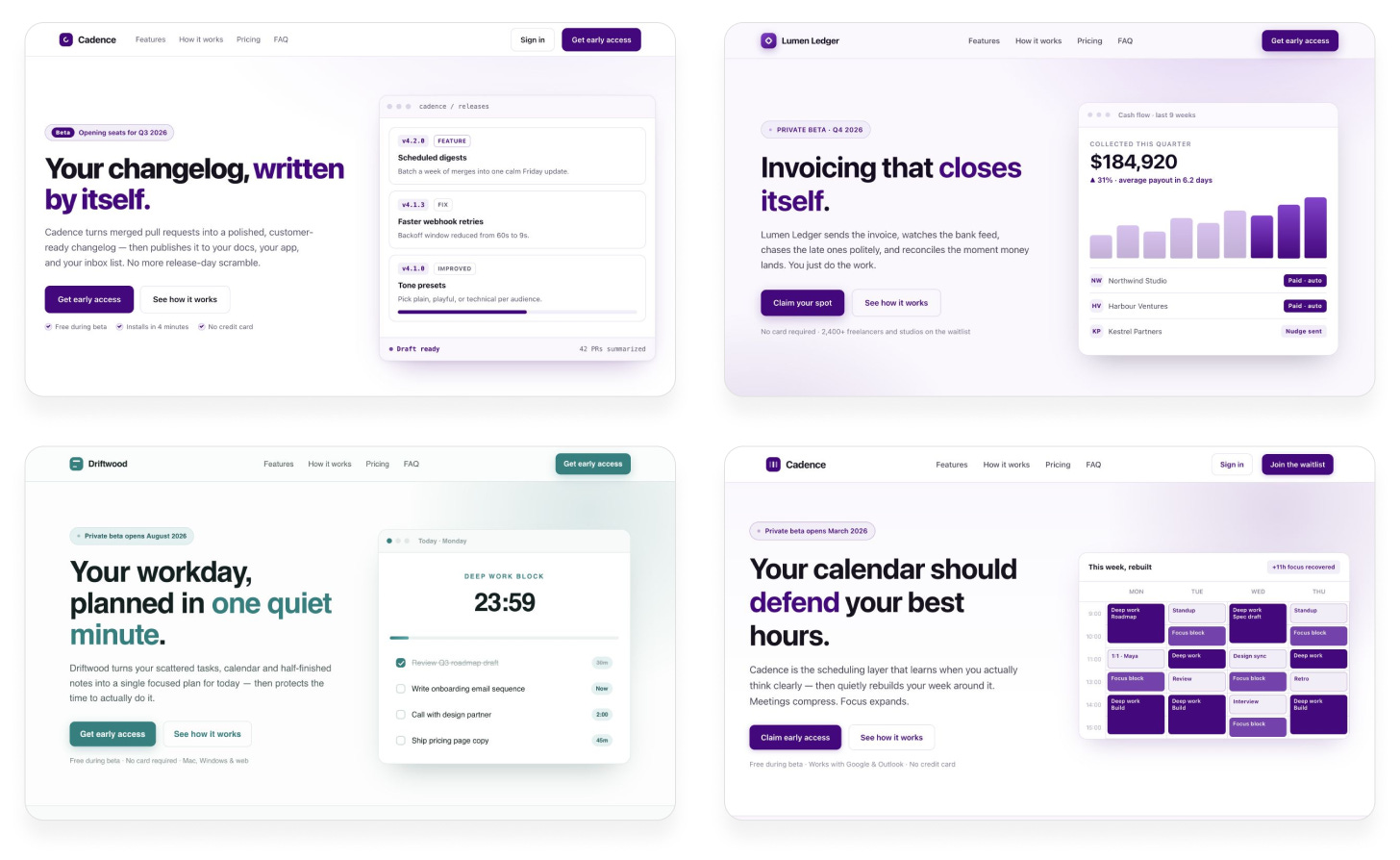
Almost every time, we get a purplish gradient, text on the left, graphic on the right, and the exact same structure. It looks like every AI-designed website ever.
We didn’t ask the model to do anything unique or varied, so it makes sense that it keeps falling back on the same patterns it knows well. But just asking for variety doesn’t work:
Prompt:
Build me a landing page for my productivity app. Give me something totally unique. Make every design decision completely at random.
Claude Opus 5:
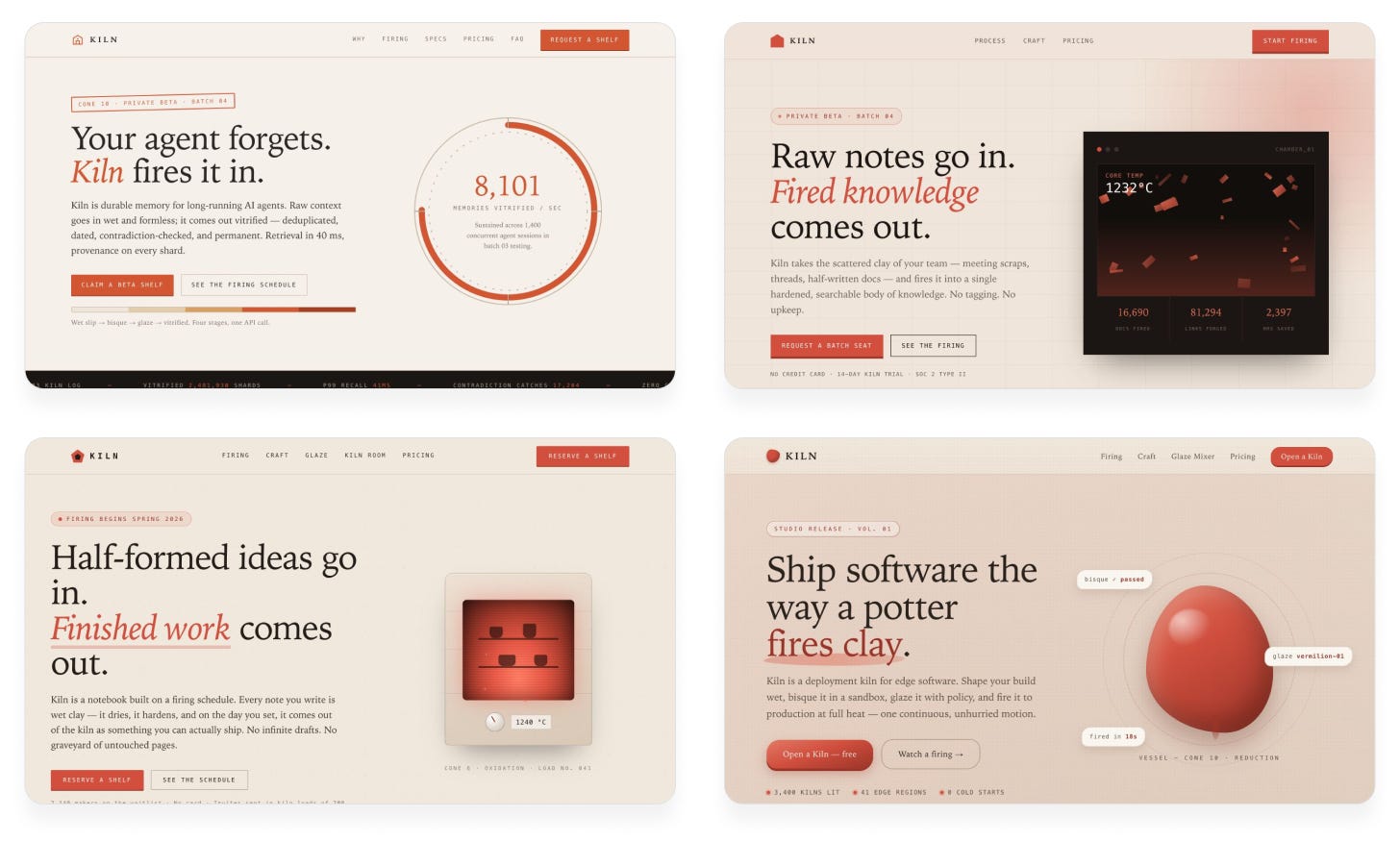
The results are different from before, but they’re still not varied. The model always uses the same color scheme, structure, and even the same awkward pottery metaphors. It’s predicting tokens that sound random but aren’t actually random.
The problem is that the model can’t inherently act randomly. It can only predict the most likely token. If we want variety, we have to bring it from outside the model. One technique for this is String Seed of Thought, published by Sakana AI. We make the AI generate a random string and use it as design inspiration. That way, the model is truly making different decisions each time.
Prompt:
I want you to build me a landing page for my productivity app.
Follow this procedure:
Don’t reveal the string in the design. It’s only for your inspiration.
Claude Opus 5:
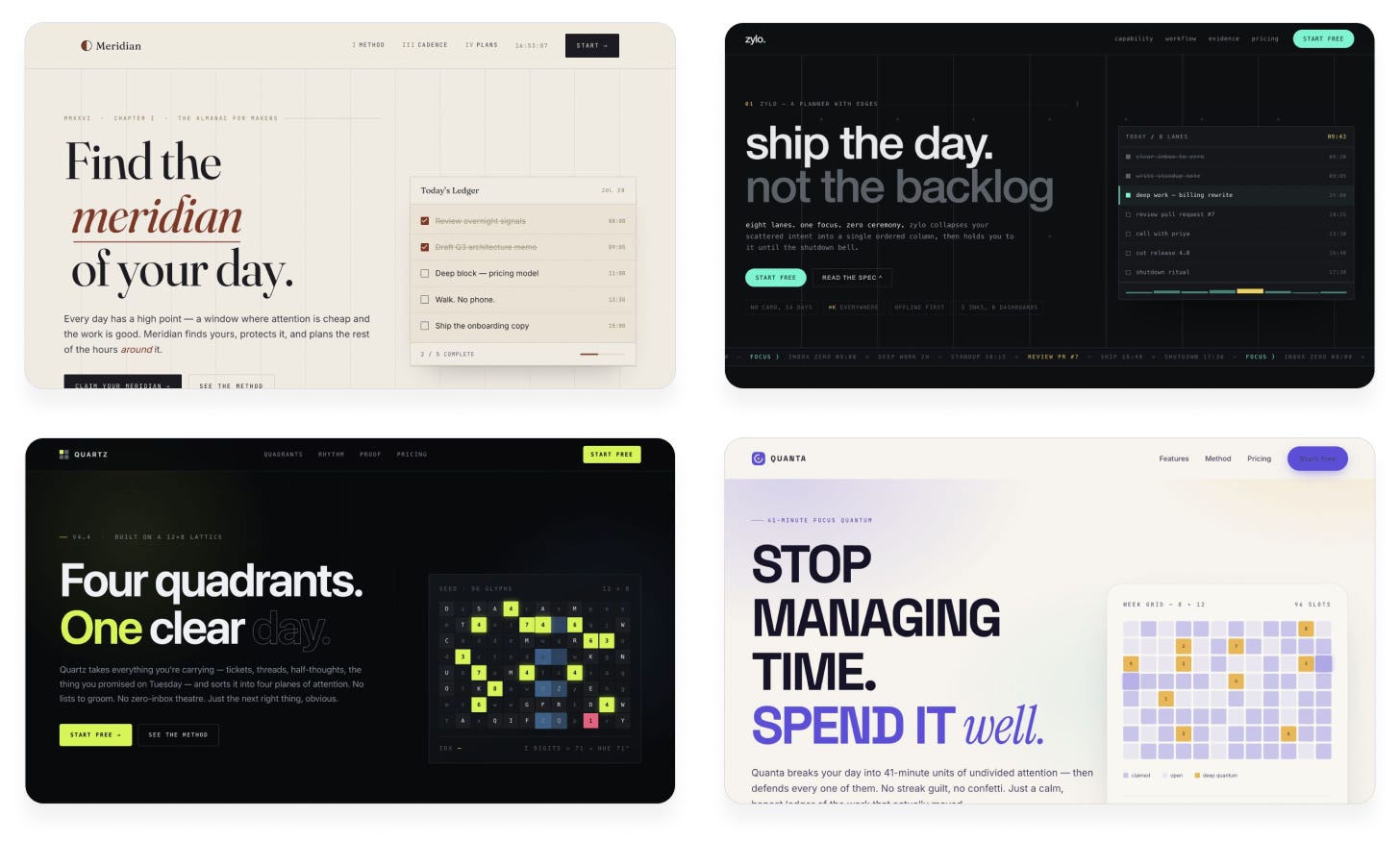
Suddenly the outputs are much more varied! Now we’re seeing different color schemes, fonts, and new ideas. The previous designs were ones that any Claude user could get. These designs are one-of-a-kind; no two runs ever produce the same result.
Another approach to giving a model a strong push is to get more specific and wild with your prompts. This gives the model a clear vision to base its decisions on, rather than letting it make them up on the fly. The best way to find a unique idea is by bringing your own taste into the equation. You first imagine the inspiration—a video game, an interior design trend, an art installation—and describe how you’d like that inspiration to influence the AI’s outputs. Here are some examples:
“Build me a landing page for my productivity app, with a bold pixel art theme and stunning graphics. Each section should feel like a still from a video game, yet somehow it should all function as a landing page.”
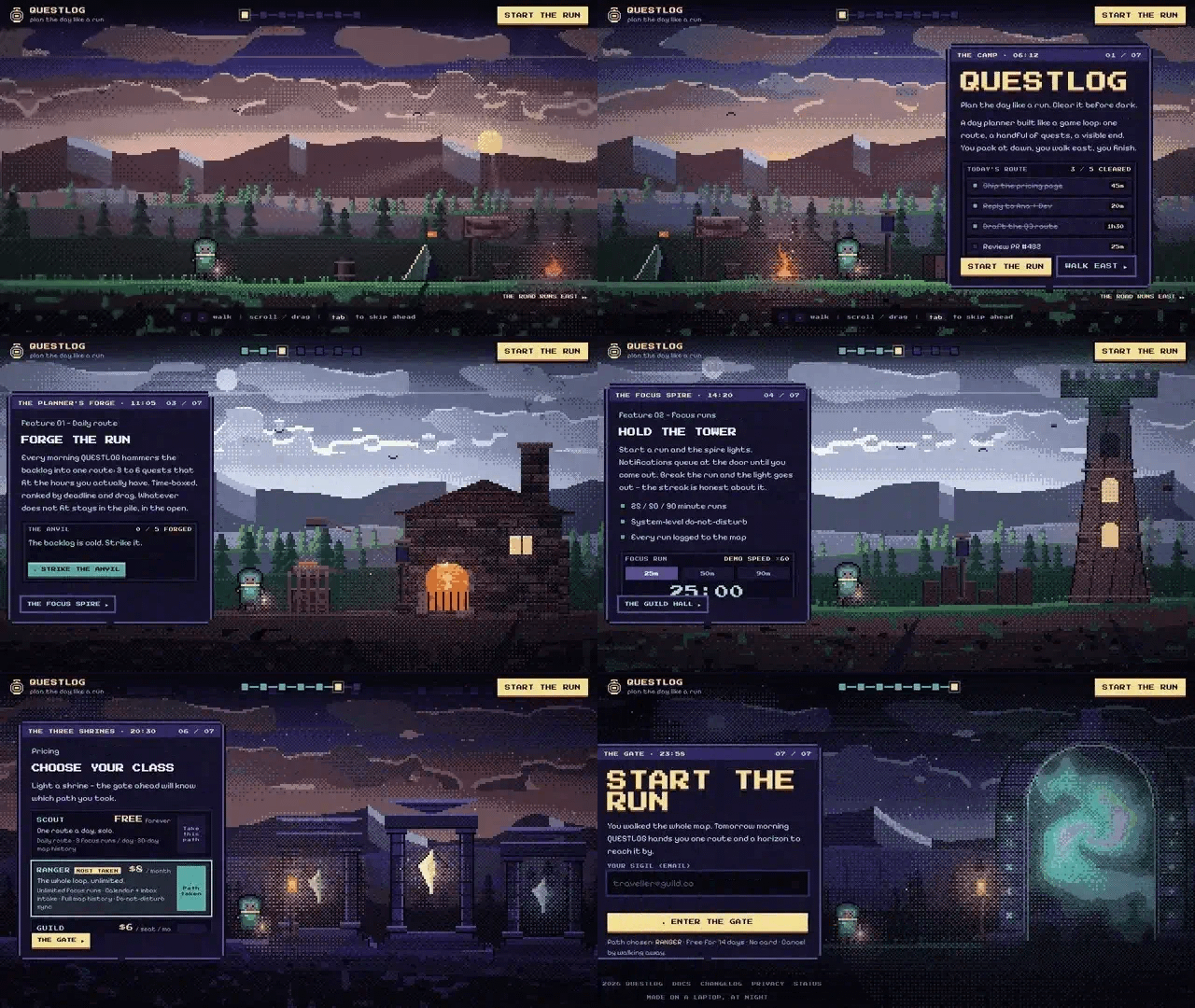
“Build me a landing page for my productivity app, set in an isometric living 3D city, where different features are somehow represented by neighborhoods or buildings.”
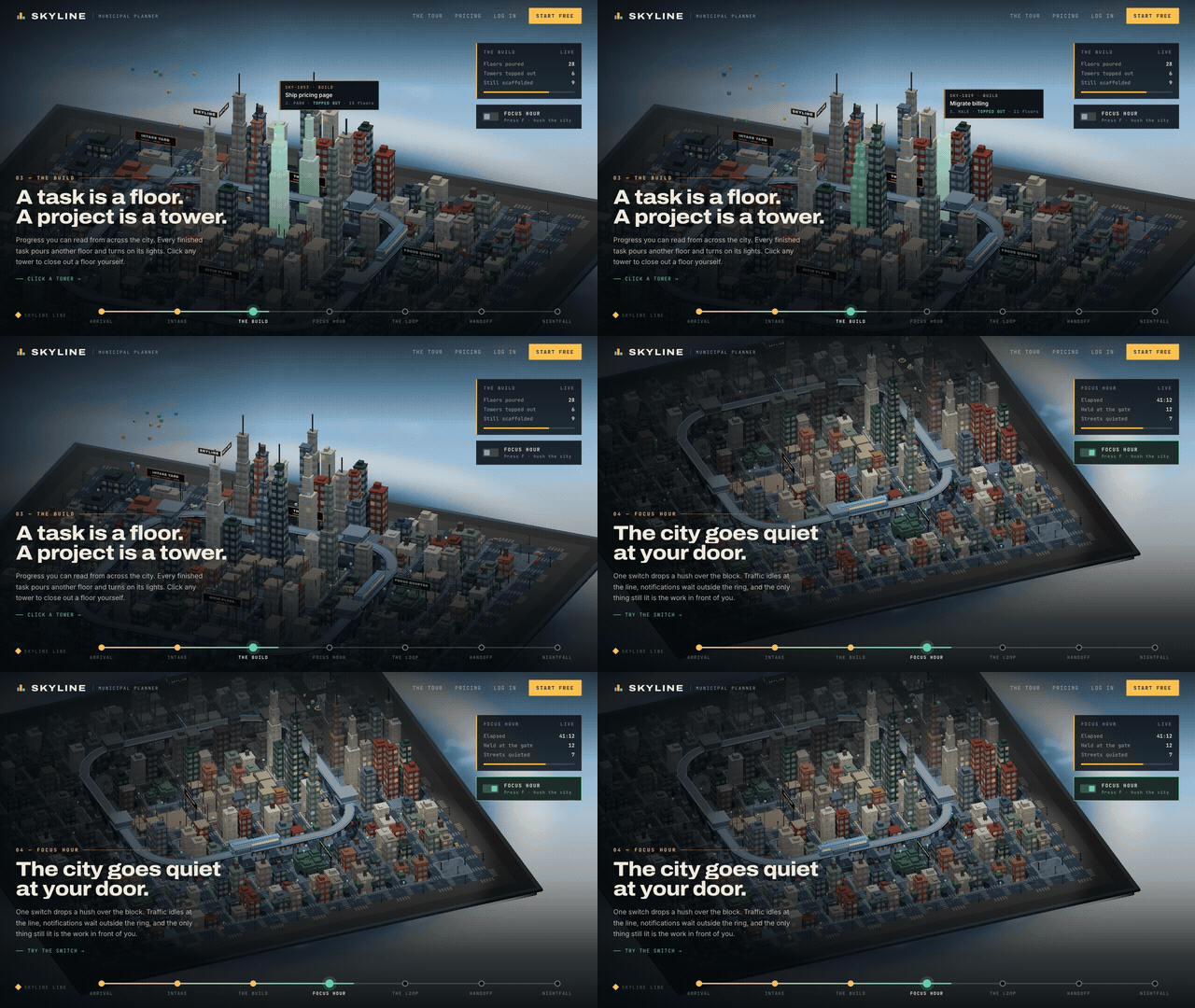
“Build me a landing page for my productivity app, with a radically asymmetric layout, dissonant colors and typography, and uncomfortable negative space. Break all the rules but still make it look good.”
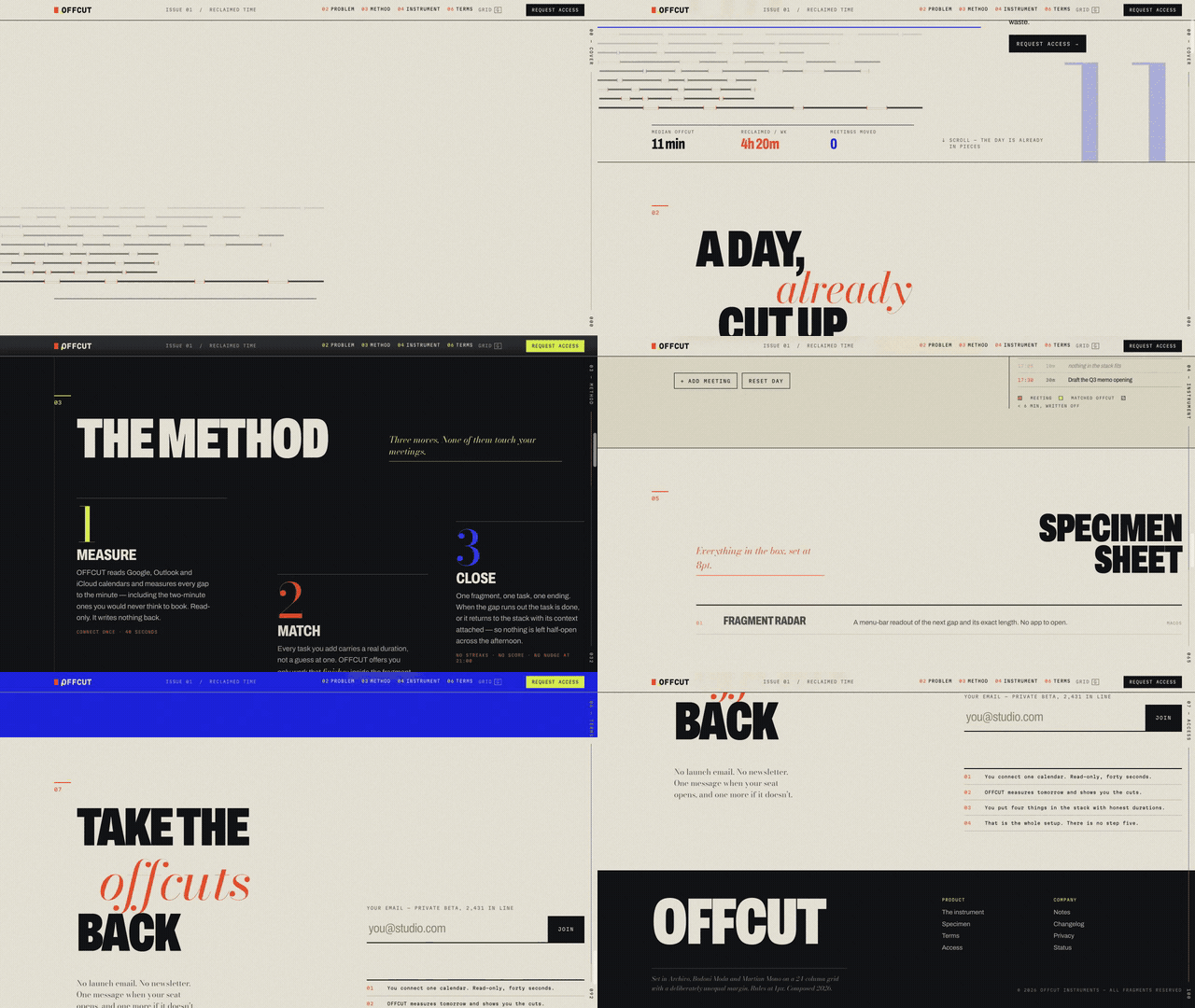
Of course, the hard part is coming up with original ideas to ask for. AI can help with this too, but if you simply ask it for ideas, you’ll get the same average ones everyone else gets. Here’s a system I use to find unique prompt ideas with AI:
I want to come up with a bold, unique design language for my product. Can you list as many ideas as you can, with short, high-level descriptions? Go broad, not deep.
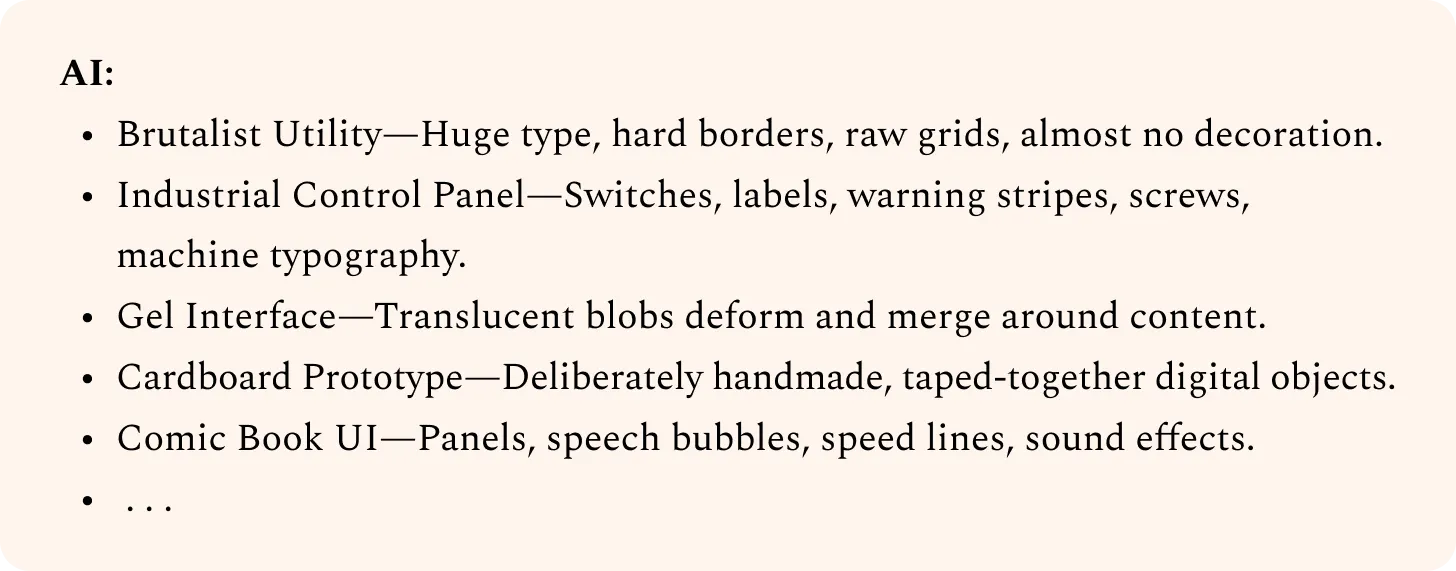
Industrial Control Panel:
Can you sharpen this one based on my tastes?
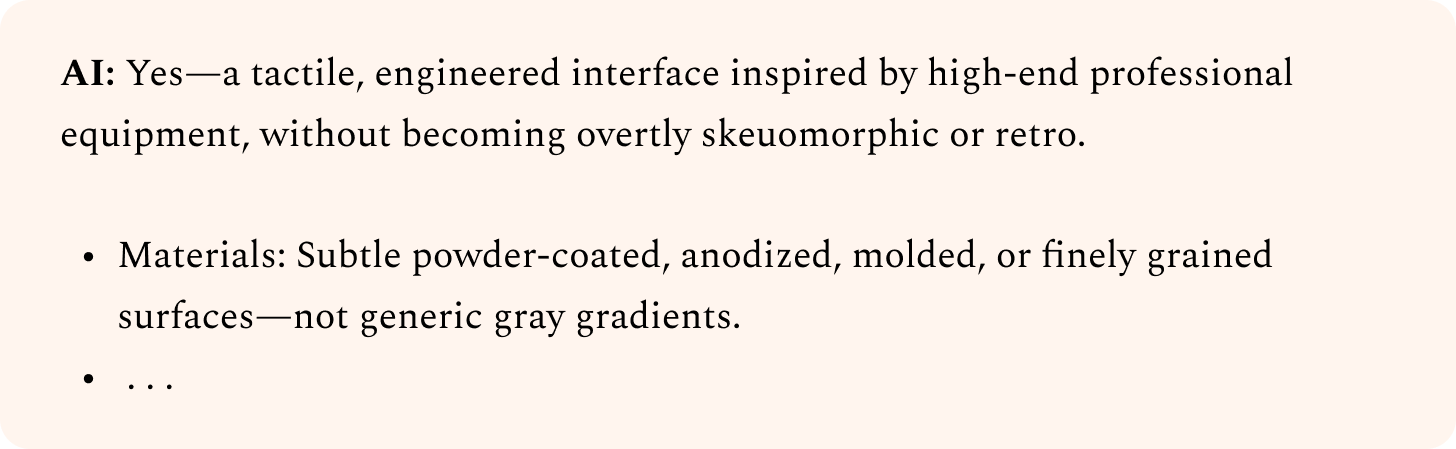
Can you write a concise prompt that an AI agent could use to build an initial POC page with this?
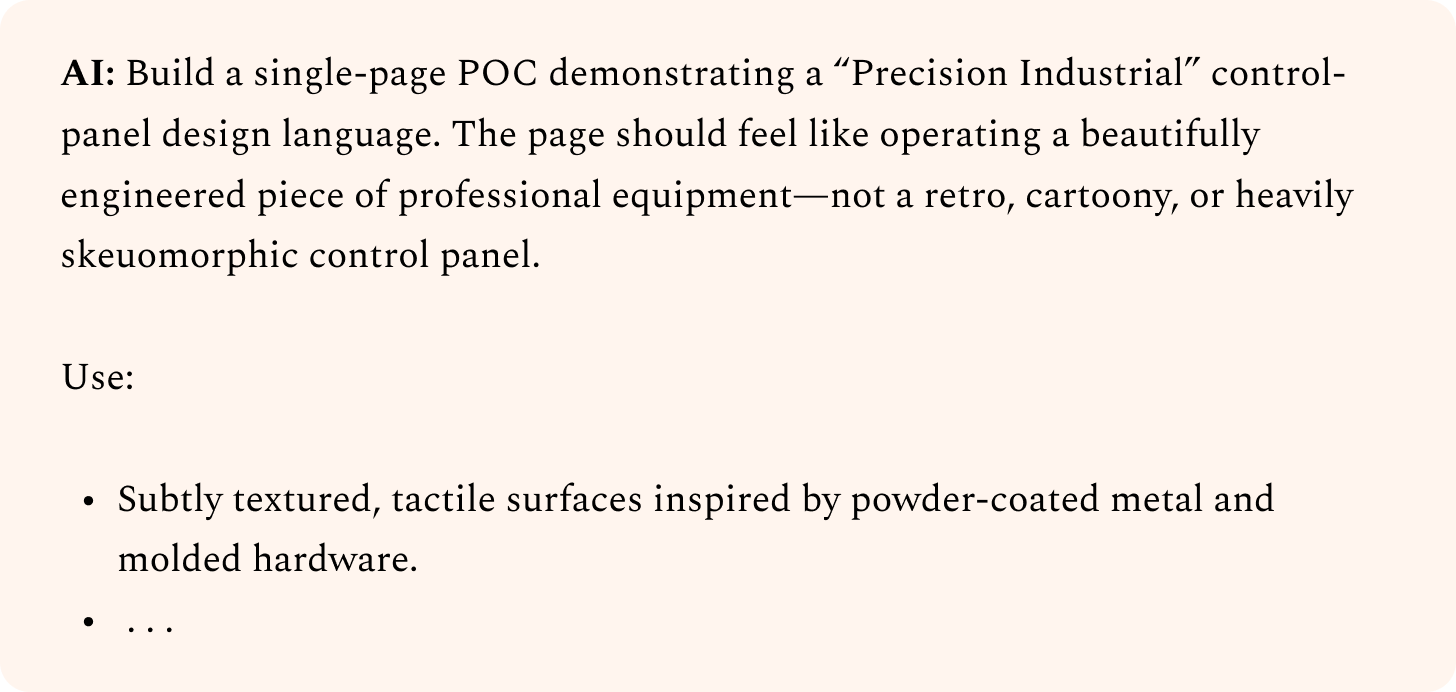
If you just paste AI-generated ideas back into AI, it’s hard to get something unique. After all, anyone else could have done the same thing. However, when you actively steer the design direction, you end up with something only you could have created.
Don’t be afraid to try ideas that sound terrible. If you find yourself thinking, “There’s no way this will work,” you’re on the right track. Often, your agent will surprise you, and you’ll realize you were underestimating it. If not, just throw away those results and try something else. But save the prompts that don’t work, and test them again when newer models come out. That way, you’ll know you’re taking full advantage of what the latest models can do.
So far, we’ve looked at how to explore a broad set of ideas and hopefully land on a promising initial design. No matter how we prompt, though, our initial AI-generated designs will usually still feel generic.
For example, look at the designs we came up with using seed strings:
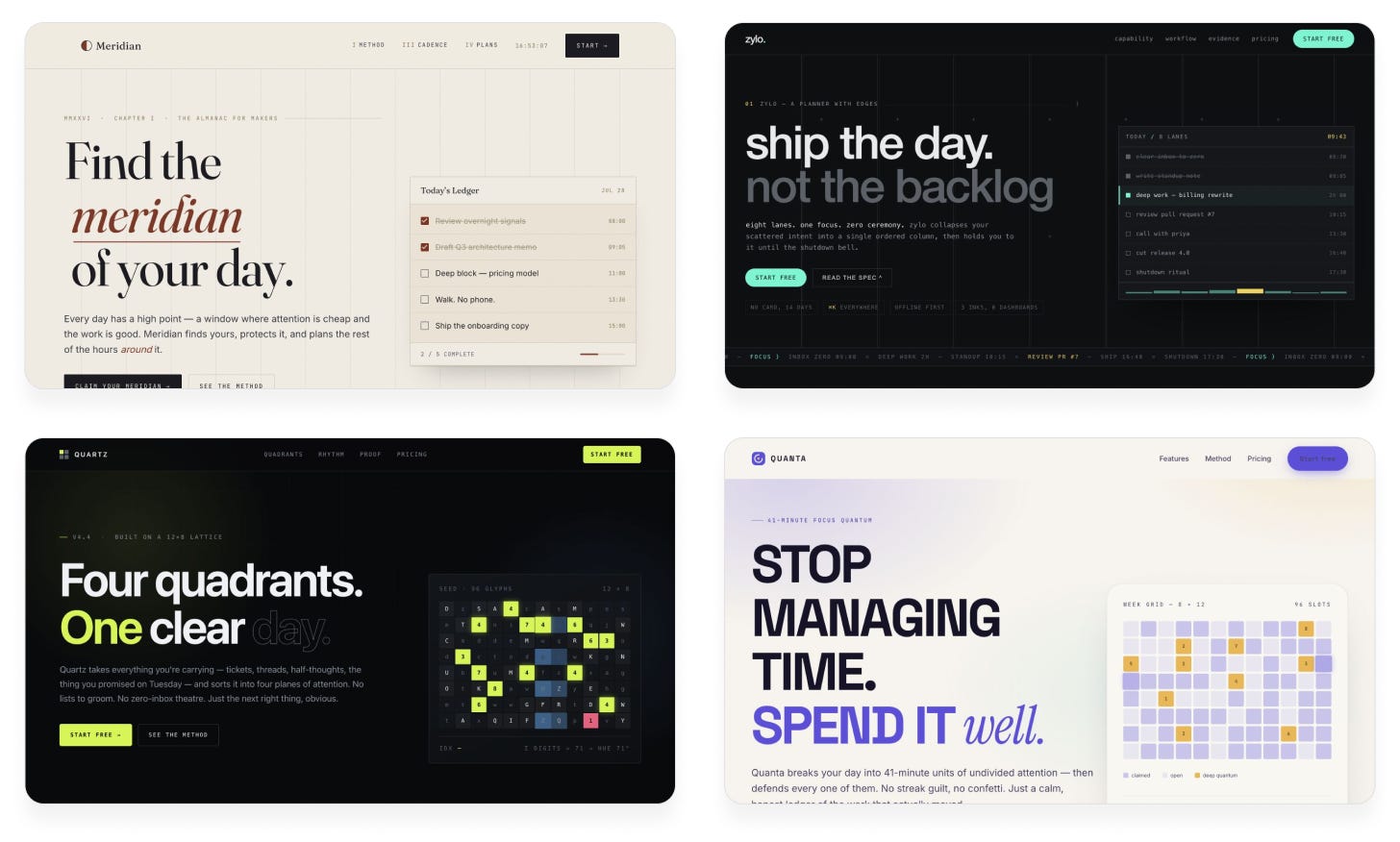
These have promise, but they’re still relying heavily on the same stale patterns: text on the left with a CTA button below, nav bar up top, graphic on the right.
Our next goal is to give each design an individual personality through distinct design choices. Below are my favorite techniques to do that.
We need to iterate on our designs to improve them. But simply asking our agent to look at the design and improve it won’t work, because the agent isn’t objective: it reviews its own code, past decisions, and previous rationale. AI can’t easily zoom out, look at the big picture, and “think different.”
To solve this, instead of letting the coding agent decide when the design is good enough, have it ask another agent—a “design critic.” The critic’s job is to look at screenshots of the current design and provide feedback. It doesn’t care how the current design is implemented or how much effort went into it, only if it actually hits the quality bar.
This approach has an extra benefit: we can use a big, expensive model for the critic without breaking the bank, because we’ll only use it for executive decisions. A cheap, fast model can do the grunt work, while the strong critic model provides taste.
Let’s try this on our previous designs, using Claude Fable 5 as the critic:
Prompt:
I want you to improve this design. To figure out what to focus on, use a Fable 5 subagent as a design critic.
Follow this procedure at each iteration:
Provide this guidance to the critic in its prompt:
Your work is only complete when the critic independently deems it 9/10 or higher. Do not put that criterion in the critic prompt; keep it objective in its scoring. Use the same critic prompt each time.
Claude Opus 5:
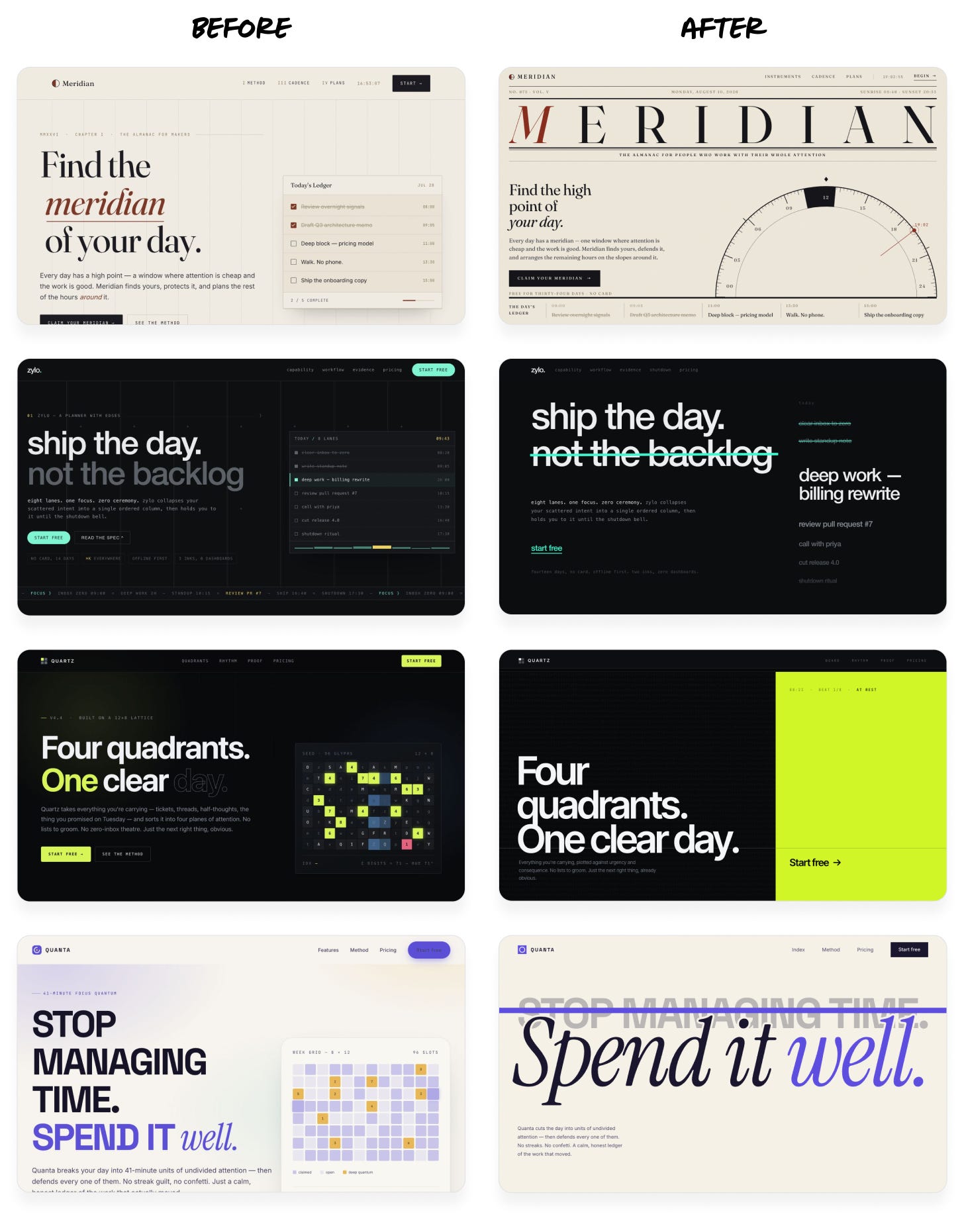
Instead of the same cookie-cutter layout over and over, each design now has its own identity—but still maintains its original high-level aesthetic.
Notably, in each case, Fable accounted for less than 10% of output tokens. Asking Fable to redesign the page directly would have cost twice as much and taken much longer.
The way you set these loops up matters a lot. Here are some tips:
- Make sure the criteria for the critic are as clear and objective as possible.Bad: “Judge if our design looks beautiful, not AI-generated.” This is too subjective, and the results will vary wildly from run to run.OK: “Review the aesthetic we’re going for, visualize how a top design studio would execute it, then judge our design’s quality against that bar.” The prompt is still mushy, but it provides a consistent framework and quality bar.Great: “Here are 5 designs: 4 professional examples and 1 screenshot of our product. Rank them by polish and taste level.” This instruction is concrete and objective, and gives a visual baseline for judgment.
- Provide example images to demonstrate the target quality bar. You can use comparable screenshots or designs you like, or even AI-generated concept art. Instruct the critic to treat these as a baseline or a moodboard, not a target. You don’t want it to copy other designs outright.
- Set the stopping criteria carefully. Otherwise, the critic may never consider the design good enough, and your agent will helplessly burn tokens trying to please it. Prompt it to do one or two iterations first, and see if it’s converging before adding more.
- Choose the right model for each job. Consider bigger models for the critic role, since more parameters generally translate to better design sense and a wider distribution of ideas. Small models can be effective as the implementer, but don’t go too small. You still need a model that’s capable of executing a design direction well.
Coding agents love to write code, but they usually don’t incorporate images. Instead, they tend to use the easy code-based alternatives: gradients, shapes, and basic patterns. Those are all strong giveaways of an AI-generated design.
Some agents have image tools built in, but they underutilize them. Others don’t have image tools out of the box but can easily use the OpenAI or Gemini APIs to generate images with an API key.
Let’s try this on the designs from the last step:
Prompt:
The design is pretty plain. Add more personality using image generation. Consider shaders or 3D effects in combination with images to create more interesting visuals.
For image generation, use this OpenAI API key (only use it locally, do not store it in the code or product): sk-a1b2c3d4…
Verify that your work looks right frame-by-frame in the browser.
Claude Opus 5 (before and after):
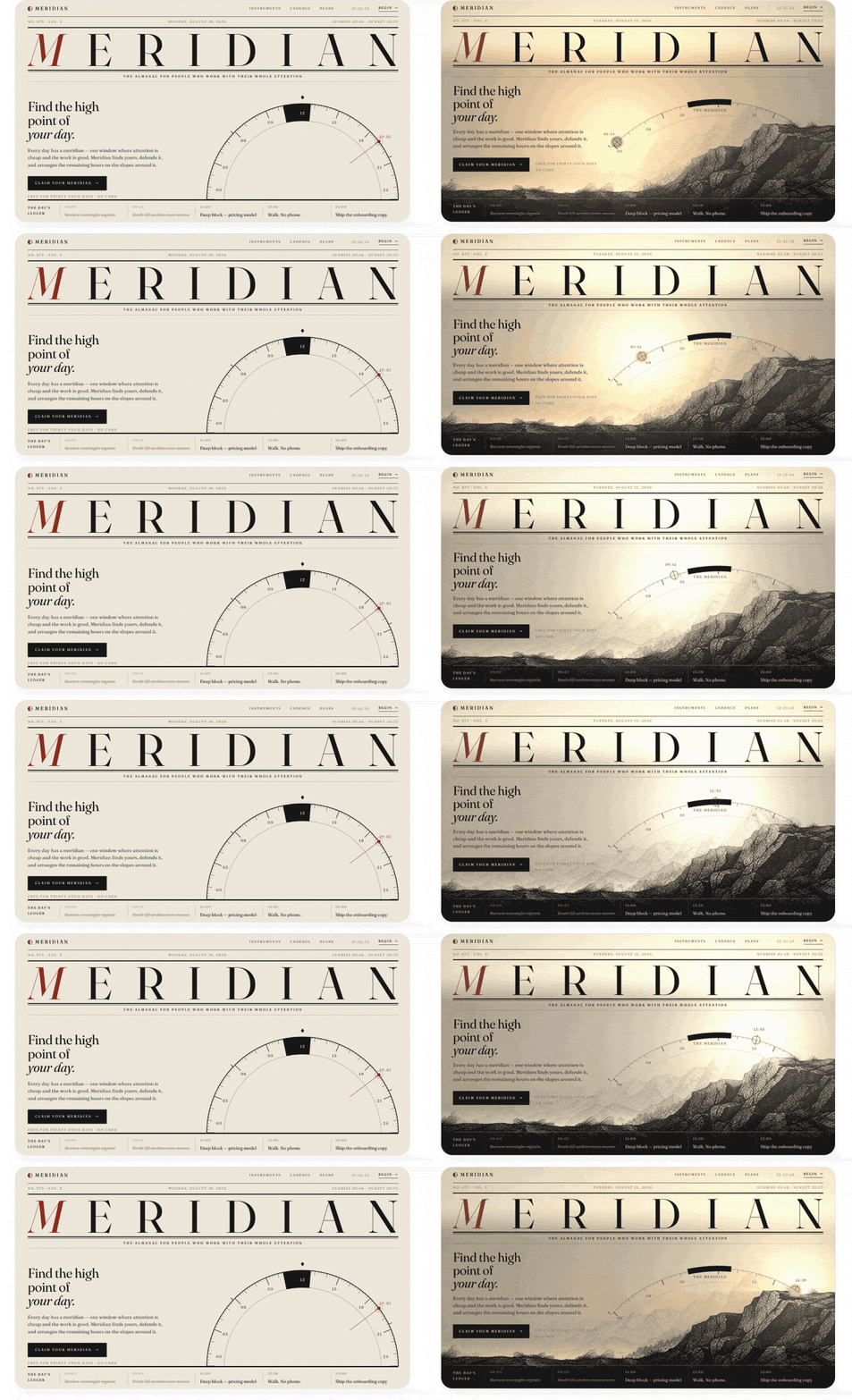
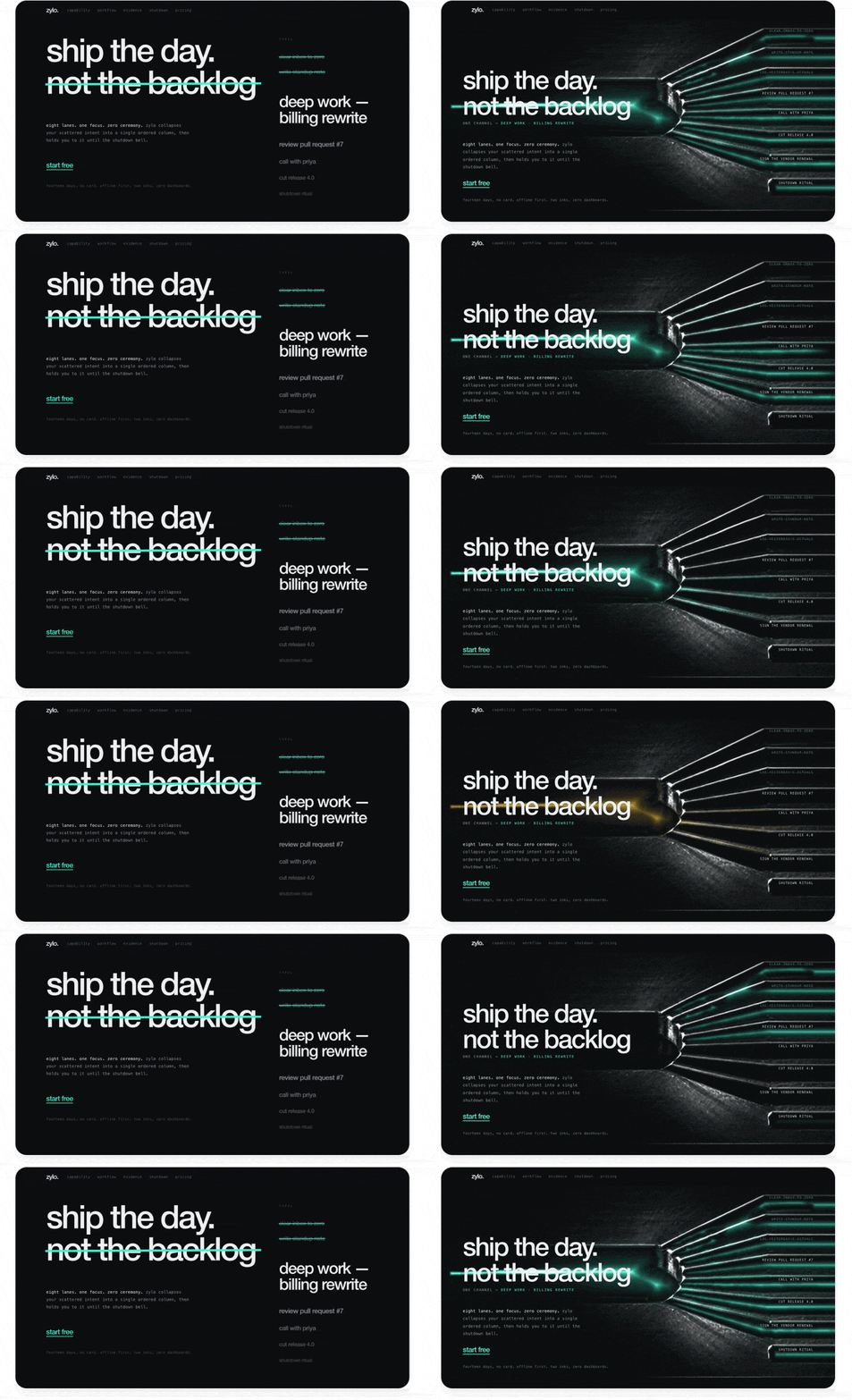
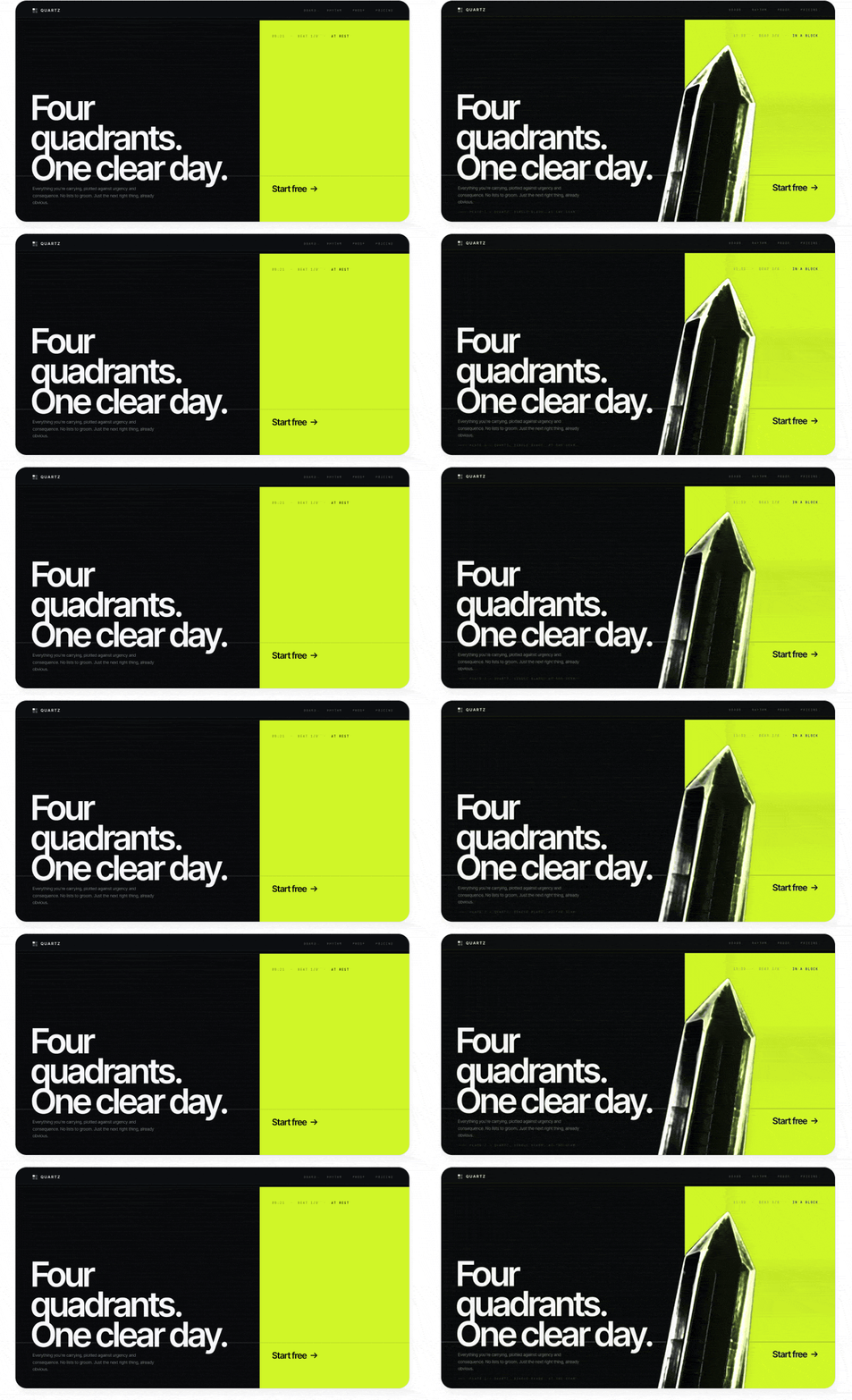
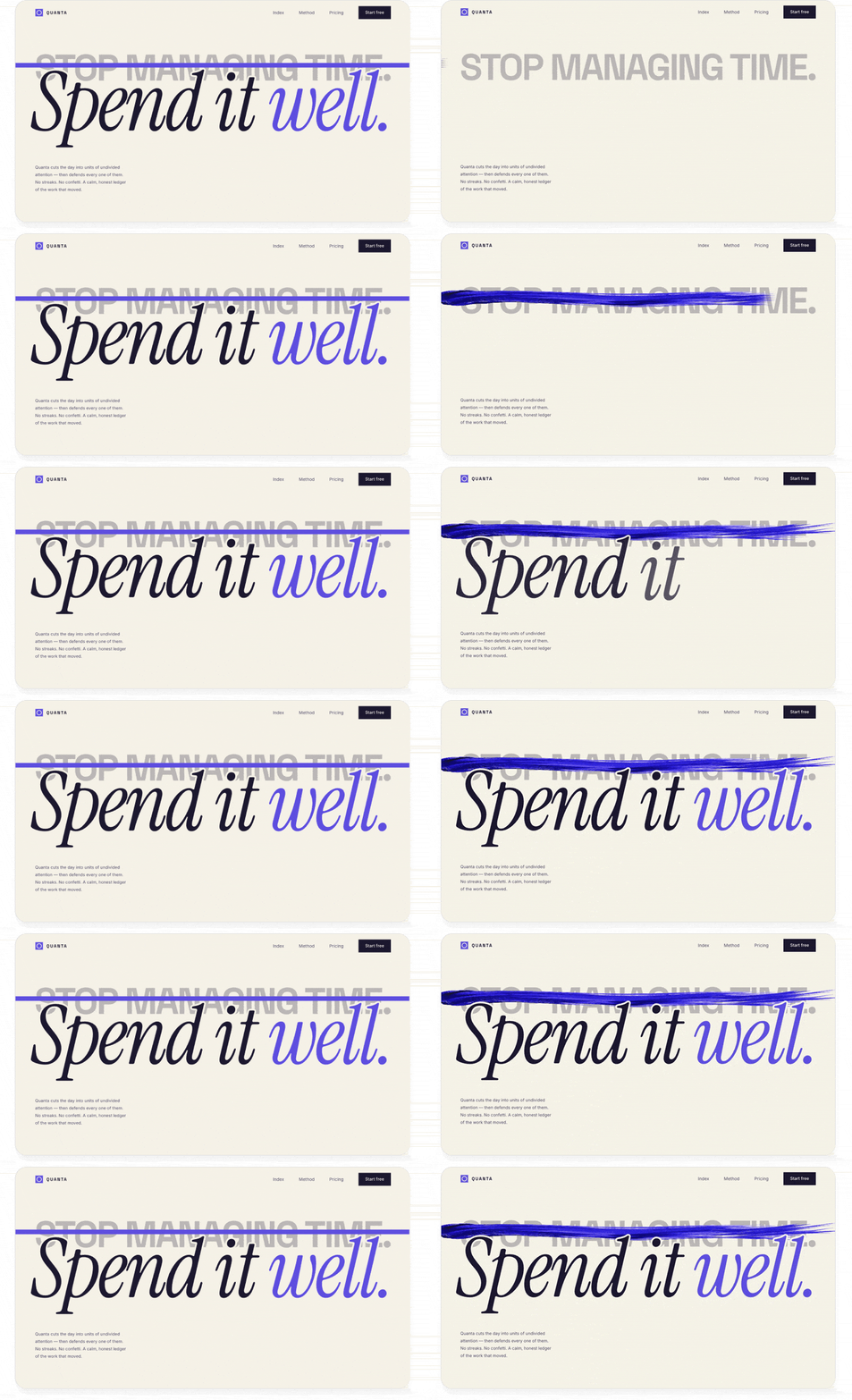
Images and effects like these can quickly add a lot of personality and make a design less obviously AI-generated, since they demonstrate more than surface-level effort.
Depending on your setup, there are different ways to connect your agent to image generation tools:
- If you use Codex, Antigravity, or Grok Build:Tell your agent to use its built-in image generation. The agent already knows how to do this but rarely does so until instructed.
- If you use Claude Code or another agent but also have a ChatGPT subscription:Tell your agent, “Use the Codex CLI to generate images. Help me install it if it isn’t already present. Make sure it’s billing my subscription, not an API key.” This lets you use your ChatGPT subscription for image generation without extra costs.
- If you only use Claude, or any other tool:The simplest path is to give your agent an OpenAI or Gemini API key to generate images. I recommend creating a separate API key with a tight spend limit, just for your agent. That way, your costs are controlled even if the key gets out or the agent misuses it, and you can easily revoke the key without disrupting other work.If you find yourself pasting keys into chats frequently, put them in a file instead, and point your agent to it in your project. Tell your agent: “Create a gitignored file called .env.agents, store this API key in it, and note to yourself in AGENTS.md/CLAUDE.md that these keys are for you to use during development (but must not ship with the product).”
Video generation models are incredibly powerful these days, but most people think of them as tools for generating UGC ads or clips of Will Smith eating spaghetti. They can work wonders for everyday design work too.
There are many video models out there, and the best ones change frequently, so I like to use an aggregator platform like fal.ai. This way, we can give our agent a single API key and let it evaluate different options and choose the best one without needing multiple integrations.
Here are two ways I love to use video models in my designs:
The trick is to generate a looping clip with a solid color background, then either chroma key it out (like a green screen) or, in more complex cases, use a video matting model to remove the background. This gives you an animation that you can layer anywhere in your UI without it looking like a video.
For example, I took one of our previous designs and ran this prompt:
Prompt:
Can you replace the image on this page with a looping video clip that does something more interesting? Have the crystal splinter apart and slowly spin around. It should have awesome glassy effects that refract the page background and cast shadows and light around it.
To get convincing glass refraction effects, render the video of the glass over the page background colors first (so it bakes in the refraction effects), then remove the background with a video matting model.
Use this fal.ai API key: sk-a1b2c3d4…
Find appropriate recent models for video generation and background removal.
GPT-5.6 Sol (before and after):
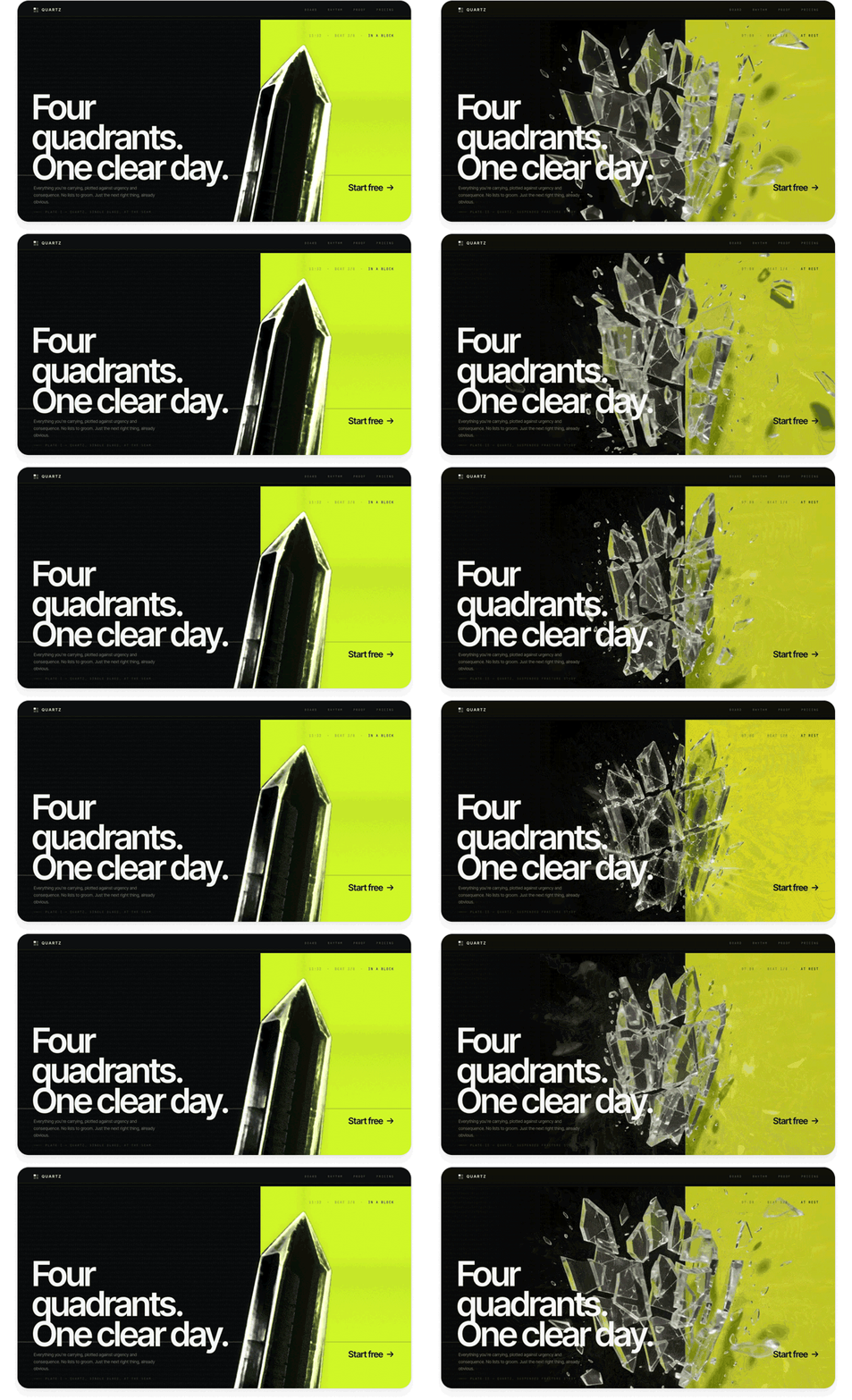
This is a much richer effect than you can get with code: interesting caustic reflections, glassy refraction effects, and complex physical motion.
This is a really underrated use case for video models. In addition to generating video from text, many video models can interpolate between keyframe images. This lets you take two product stills and create a transition clip between them. You can play the clip when the user takes an action (like navigating to another screen of your app) or scrub through it frame-by-frame in response to a gesture (like scrolling or swiping).
Here’s a demo page showing off a scroll effect. I built it with a single prompt using GPT-5.6 Sol in Codex:
Prompt:
Build a demo page for a suitcase that uses a video model to create interactive transitions between a couple of screens. Each screen should show the suitcase in a different state, with vertical motion that feels appropriate for scrolling:
Generate the initial frame using your image generation skill. Then, generate a video clip that starts from that frame and animates to the next state. Use the final frame of that video to seed the next transition so that it continues seamlessly. Scrub through the transitions one by one as the user scrolls.
Use this fal.ai API key: sk-a1b2c3d4…
Use a video model with strong physics and consistency, like Seedance 2.5.
GPT-5.6 Sol:
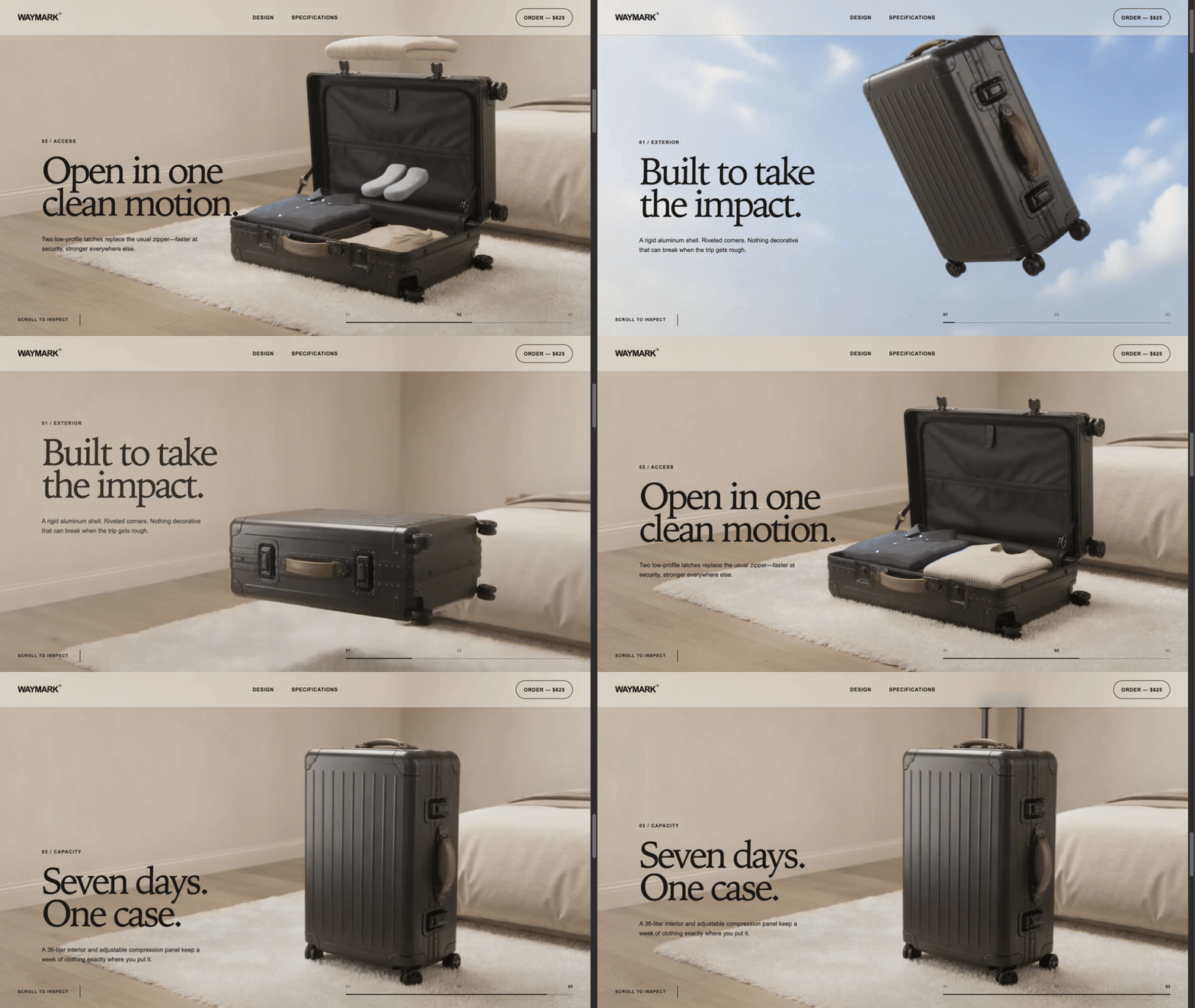
The transitions between pages scrub fluidly with the user’s scrolling and are fun to play with. Design like this makes the user want to keep scrolling and reading more about your product. And it only took one prompt!
Once we’ve gotten to a unique, standout design, the final step is to clean up the details and get it ready for production use. AI can build amazing, striking visuals, but your judgment will be key to making sure the design makes sense, flows well, and serves its practical purpose for your users.
AI loves to add more, but it rarely takes away. One of the biggest signs that a design is AI-generated is that it overexplains everything or contains elements that don’t serve any practical purpose. By contrast, a design that exercises restraint immediately looks premium and tasteful.
When polishing AI designs, most of my effort goes into removing things. For example, when I was building my calorie tracking app, this was my initial design from Claude:
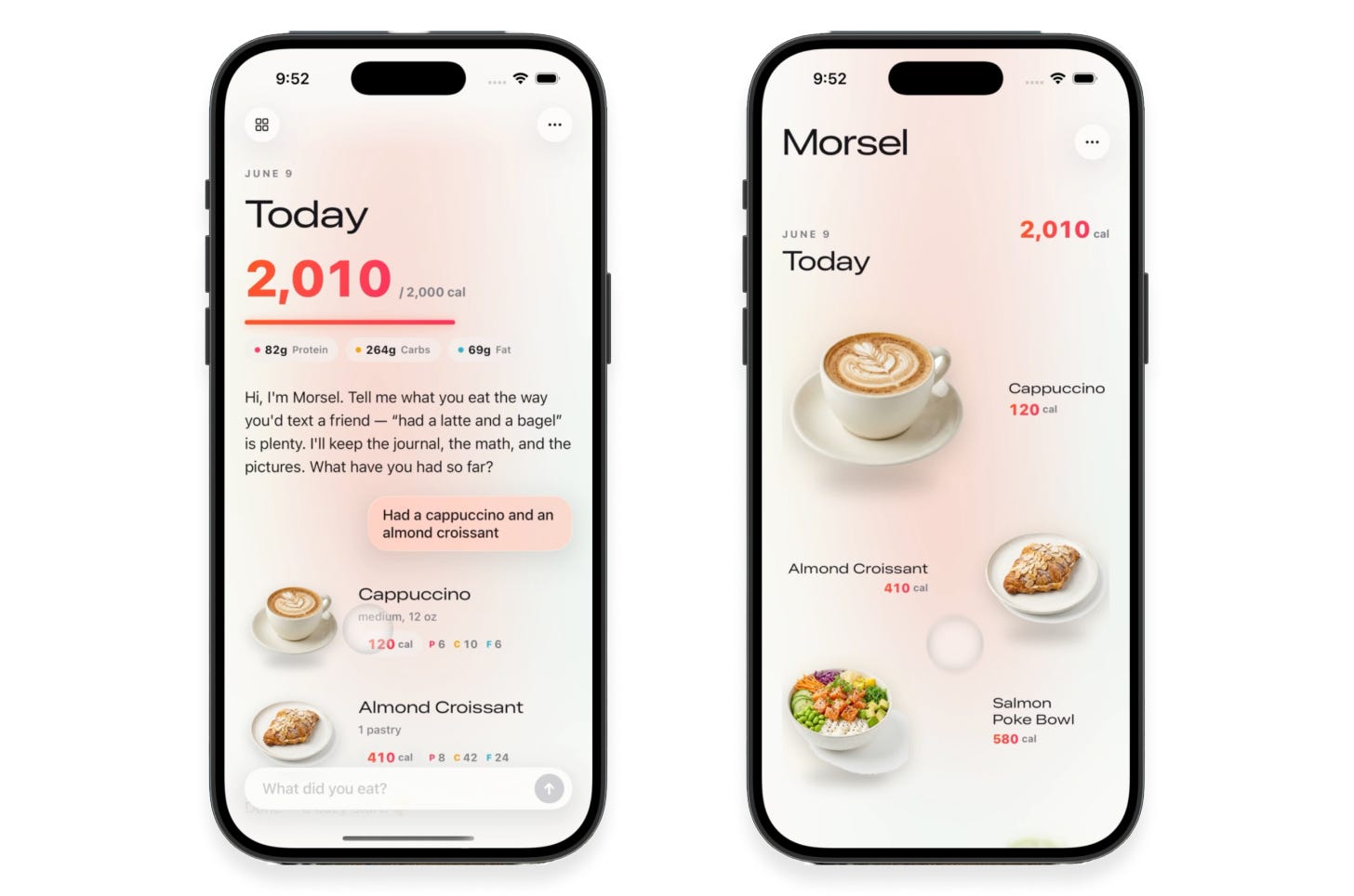
I’d described the app’s functionality and specifically asked for a “clean, minimalist design.” The results weren’t bad, and were certainly impressive for being fully AI-generated. However, despite my asking for minimalism, a lot in the design wasn’t adding value:
- Pink glowy effects in the background and on the progress bar
- Random colors and highlights on text
- Extra labels and empty space when displaying all the foods for a day, when the images already communicate this
- Custom buttons and text fields that look worse than built-in iOS components
I asked Claude to dial things back:
- Simplify the layout into an image-centric grid
- Get rid of gradients, glows, and unnecessary containers
- Aim for a truly minimalist aesthetic that feels Apple-native
This was the result:
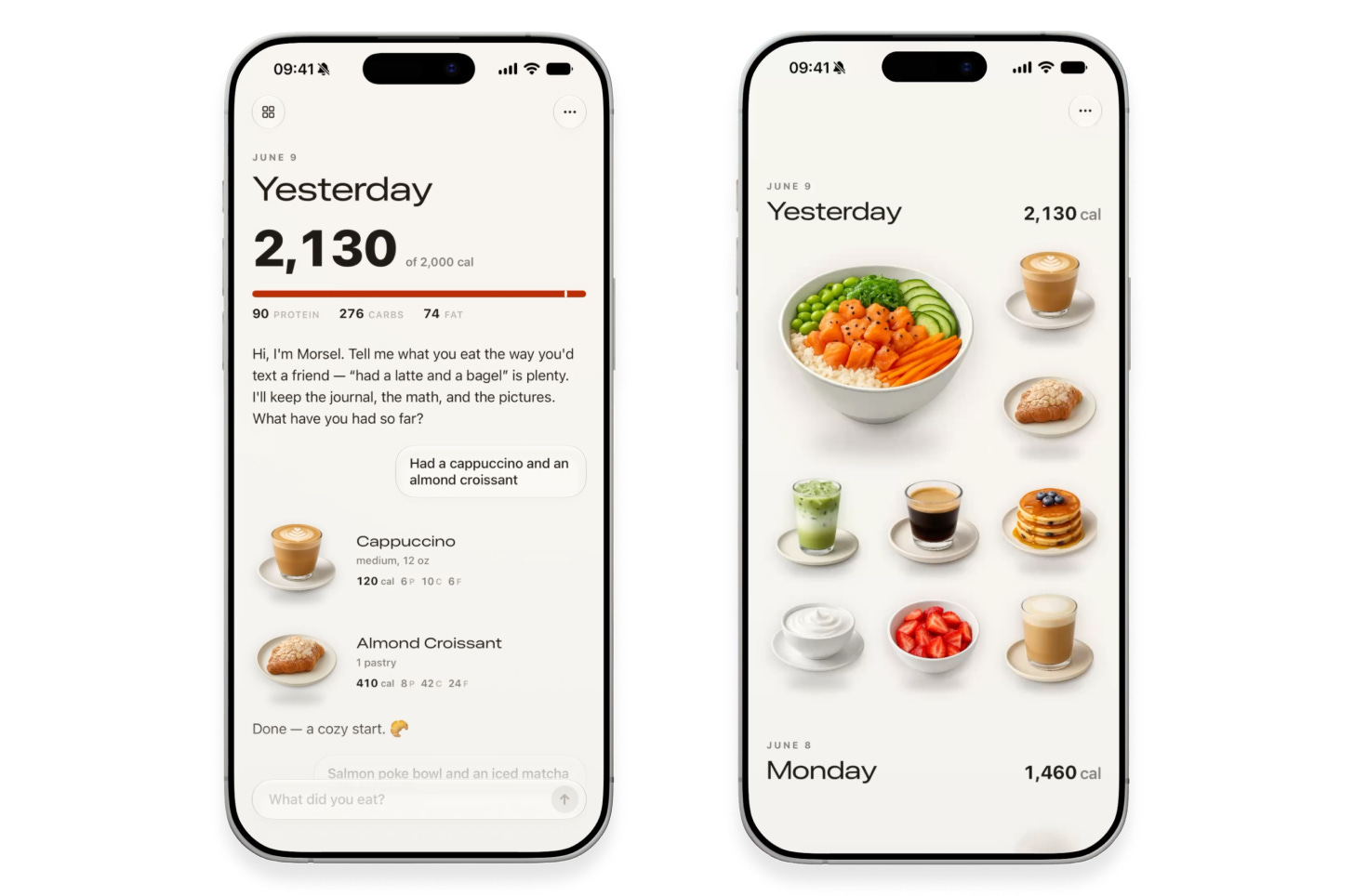
To my trained eye, the result is much better. It’s opinionated and allows the visuals to speak for themselves. It uses native iOS components, and the excessive colors and gradients are gone. The text is smaller, simpler, and tighter. This is good design.
Today’s AI models would never think to make these choices on their own. Remember, AI doesn’t like to take risks, and it’s risky to strip down a design and delete code. The model needs a push from you. Look over your design and ask yourself what really needs to be there. Often, putting less on the screen communicates more, because you can hold your users’ attention without overwhelming them with clutter.