
OpenAI官方案例:如何从一句简单描述出发,通过GPT-6 Astra 逐步完成一座现代住宅的设计、3D建模、材质光影优化,以及UE5实时交互
OpenAI 的 Astra 案例展示了一条可检查的 3D 创作路径:先把文字意图变成 Blender 场景,再用平面图、预览渲染与实时漫游推动下一轮决定。
在 3D 设计与建筑可视化中,如何从自然语言意向跨越到真正可编辑、可漫游的三维场景,是一项复杂的工程挑战。OpenAI 在开发者博客分享了他们如何利用 OpenAI 的 GPT-6 Astra 模型(在 Codex 中使用),从一段简单的文字提示词出发,在 Blender 和虚幻引擎 5(Unreal Engine 5,简称 UE5)中逐步完成一座现代住宅(命名为“Solace”)的设计、建模、材质光影优化,以及最终的动态漫游与实时交互。
整个过程中,人类作者负责持续定方向、审阅平面图、查看渲染预览并提出下一轮要求;Astra 则负责编写脚本生成几何体、配置材质、架设灯光,并通过渲染预览和界面检查自主纠错。随后,模型资产被进一步迁移至虚幻引擎 5(UE5),转化为支持第一人称漫游、开门与开关灯等操作的可交互空间。
核心工作流拆解
1. 初始概念与氛围设定(从一句话到 3D 雏形)
整个实验始于一个简洁的设计意向。初始提示并没有提供平面图(floor plan)或家具目录(furniture catalog),只给出了一句提示词:
初始提示词(Prompt 1)
EN: Design a beautiful house with minimalist but highly detailed furniture and a nice garden. Make the scene cinematic, with considered lighting, materials, and time of day.
中译:设计一座美丽的住宅,配备极简但细节丰富的家具和漂亮的花园。营造电影感的场景,考究灯光、材质与一天中的特定时间。
接到需求后,Astra 通过 Blender 的 Python 接口(bpy)快速建立了一个名为 Solace 的起步场景:一个带有低矮屋顶、开放式起居亭台、温暖木材与浅色石材相伴的独栋庭院。
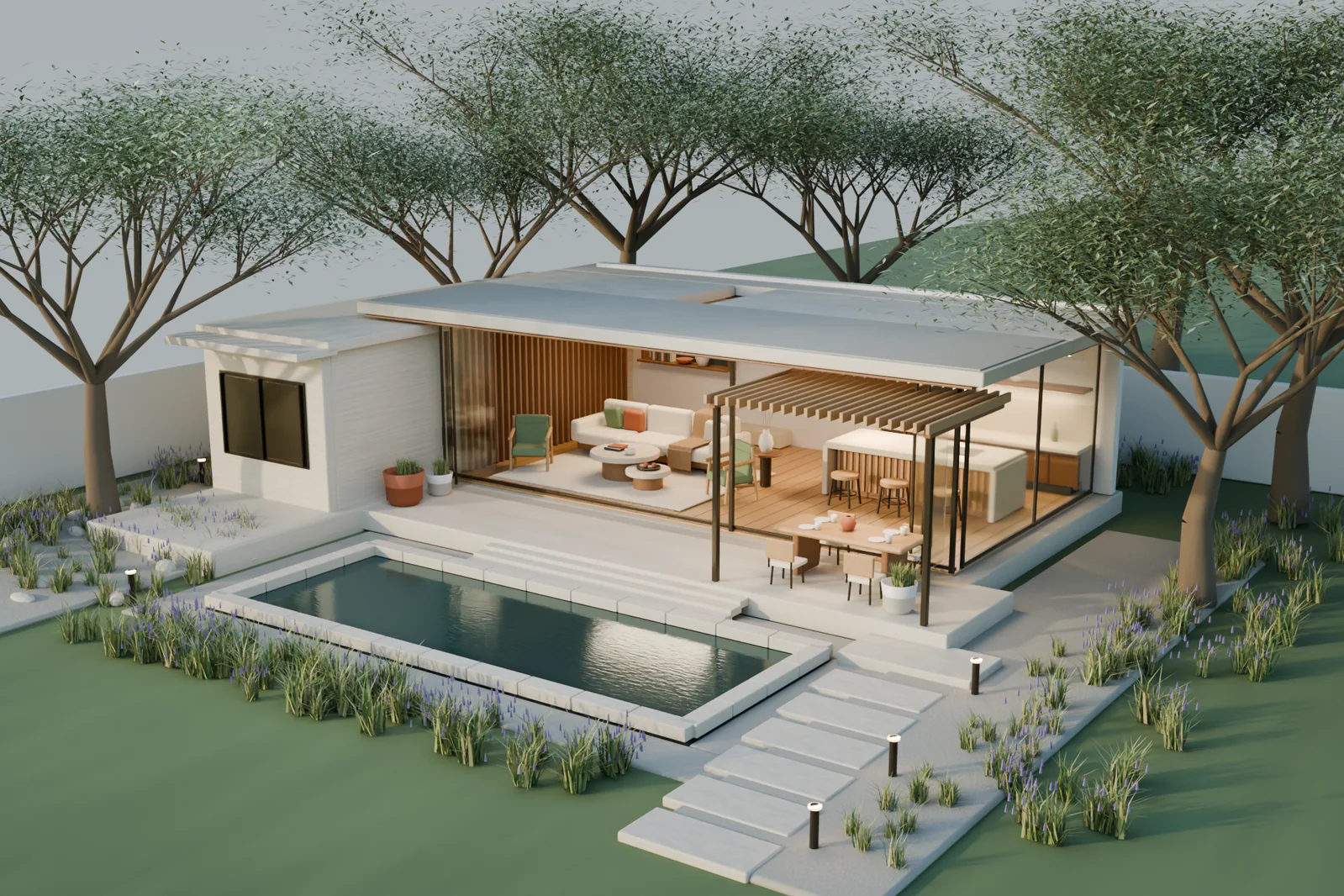
在这个过程中,核心机制是智能体的自主迭代回路:Astra 不仅执行建模代码,还会在把结果交给作者之前检查预览渲染图(preview renders),主动调整构图与光照,并修复植物穿模(planting intersections)以及沙发搭毯(sofa throw)的摆放细节。
紧接着,提示词要求将环境转移至林地深处:
环境调整提示词(Prompt 2)
EN: Make it golden hour. We should see the sun, and the house should be in the middle of a viridian forest.
中译:改为黄昏的黄金时刻。能看到太阳,房子座落在翠绿森林的中心。
Astra 完整保留了刚刚建好的建筑主体,在其外围布置树木与林下植被。为了呈现林间夕阳,它放置太阳并使用大气散射(Atmospheric Scattering),让低角度的金色阳光穿过树林,形成可见的光束。
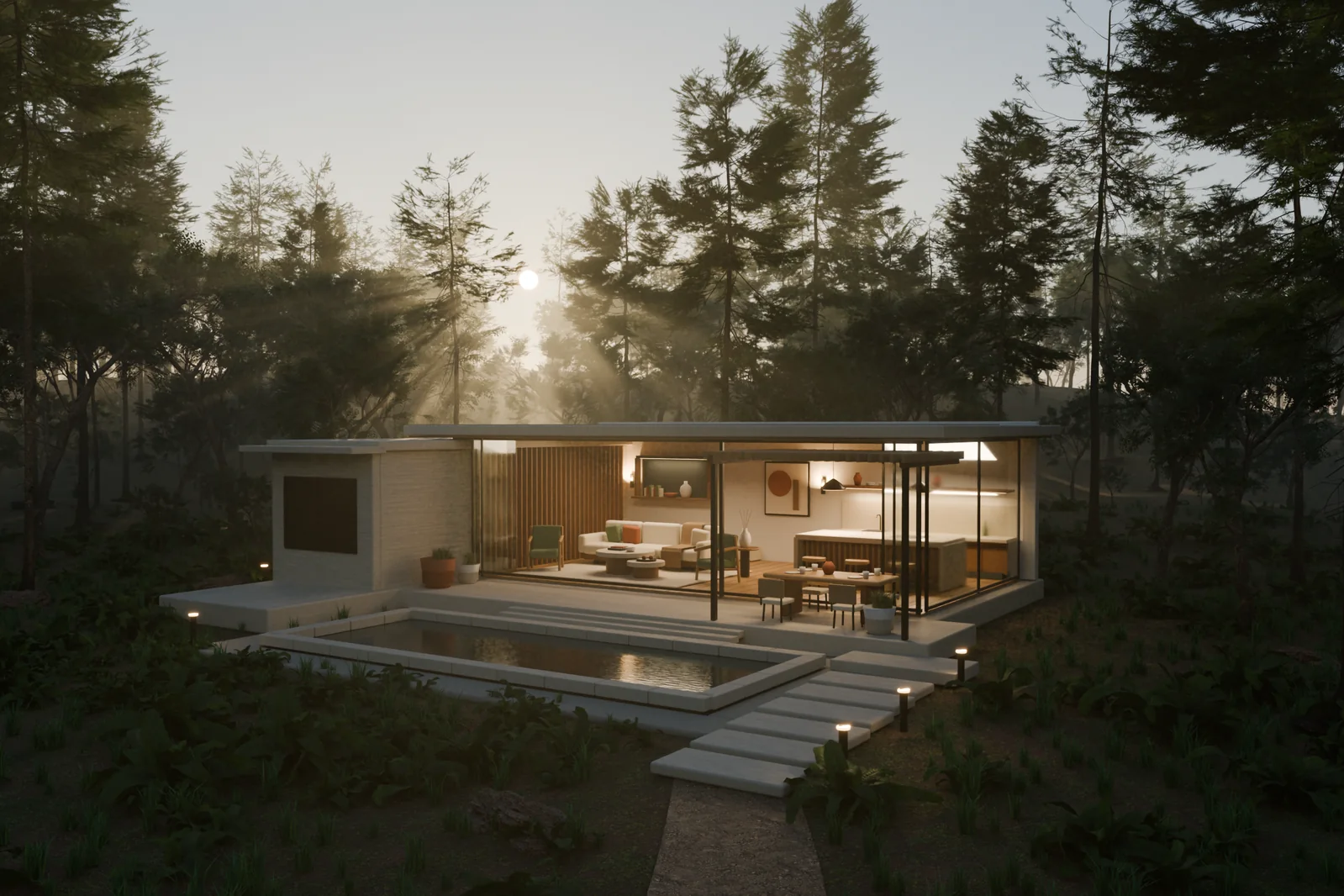
在资产使用上,后续森林环境引入了 Poly Haven 的树木、蕨类与岩石资产(tree, fern, and rock assets),配合程序化生成的建筑主体完成整体环境构图与氛围调校。
2. 先规划平面图,再建全屋结构
在初步确立美学基调后,作者提出将场景扩展为更具宜居性的住宅,并要求先绘制平面图以供审阅与演化:
扩建与平面图提示词(Prompt 3)
EN: I like the minimalist, modern style, so keep that while we grow the house to be much more livable. Draw me a floor plan first. We'll validate and evolve it from there.
中译:我喜欢这种极简现代风格,在将其扩展为更适合家庭居住的住宅时请保持这一风格。先给我画一张平面图,我们在此基础上验证和演化。
Astra 没有急于进入 3D 建模,而是先提出了一套封闭建筑总面积约 305 平方米(约 3,280 平方英尺)的 U 型概念平面方案(Floor Plan),露台、中庭和泳池不计入这个面积口径:
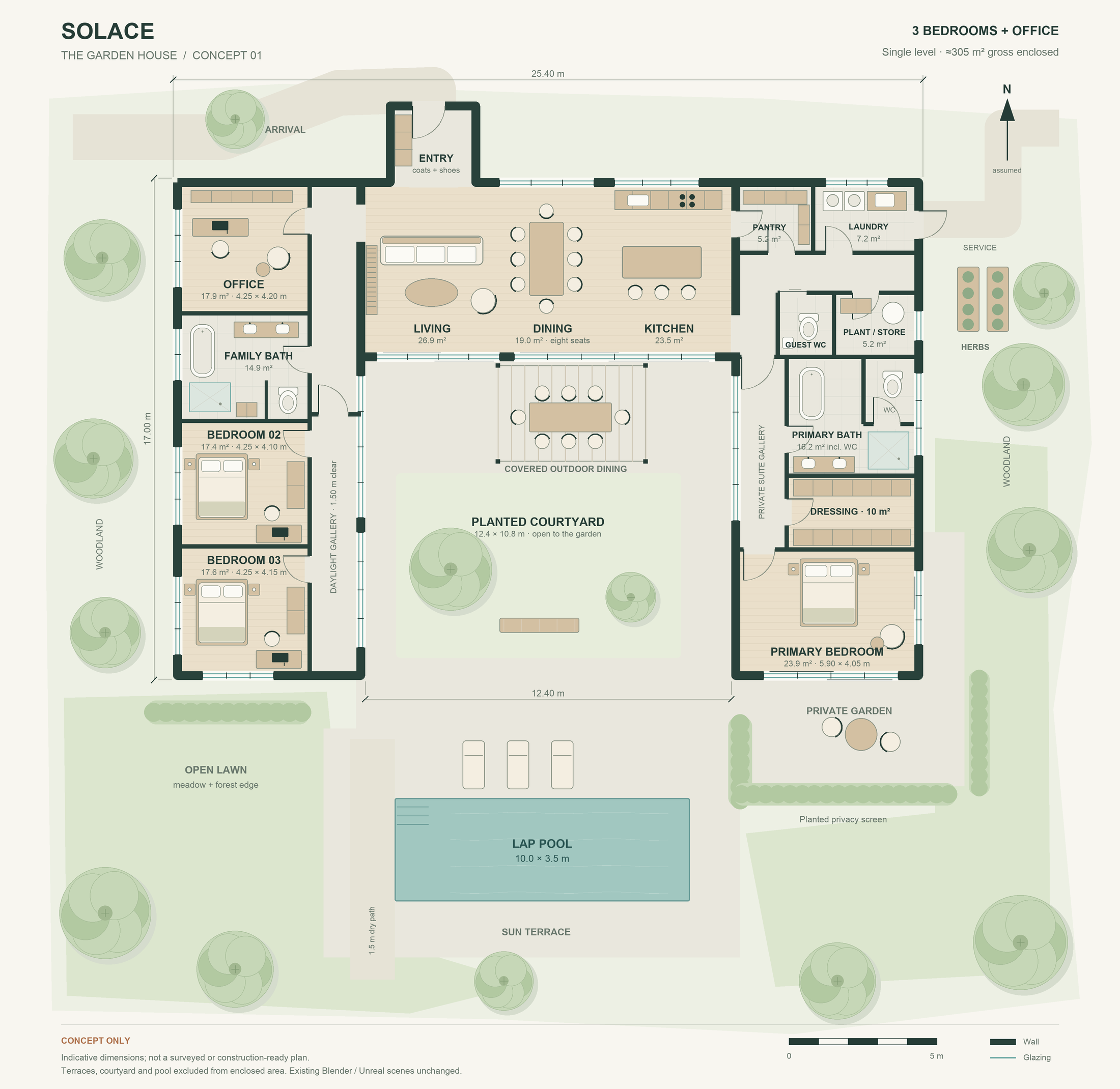
该方案对空间功能与动线进行了规划:
- 中央起居餐厨与双翼布局:中央布置主起居、用餐与厨房空间,两侧翼楼分别布置三间卧室与一间办公室,并配置卫浴与衣帽空间。
- 避免干扰的动线:绕中庭的路线避免了把卧室当作通道,也避免了穿过厨房工作走道。
- 辅助功能用房:规划包含了食品储藏间(pantry)、洗衣房(laundry)与收纳空间(storage)。
- 室内外空间延展:起居空间与中庭绿化庭院及泳池露台自然连接。
客观局限提示:该平面图属于概念方案。真实落地仍需专业审查场地(site)、结构(structure)与建筑要求(building requirements)。
3. 室内建模与极近距离细节打磨
平面图确认后,进入 3D 室内建造阶段。作者要求对现有工程做备份,并在 Blender 中正式落实:
正式建模提示词(Prompt 4)
EN: Keep the current scene as a backup, then build the updated house in Blender. Iterate until the house, furniture, and garden are detailed and the geometry is correct. Once we validate it in Blender, we'll export it to Unreal Engine 5.
中译:保留当前场景作为备份,然后在 Blender 中构建更新后的住宅。反复迭代,直到住宅、家具与花园细节丰富且几何形状正确。在 Blender 中验证通过后,我们将把它导出到虚幻引擎 5。
在具体建模中,Astra 将原文点名的坐垫(cushions)、床品(bedding)、餐具(dishes)等做成明确建模的实体几何(authored/modelled geometry),使得镜头在切换角度和近距离查看时依然成立;同时结合了扫描的橡木、胡桃木与抹灰纹理(scanned oak, walnut, and plaster textures,如 White Oak Veneer),对齐木纹方向,并让纹理尺度与家具尺寸保持一致,辅以程序化表面细节。
Astra 为室内各空间编写了具体的实体建模脚本:
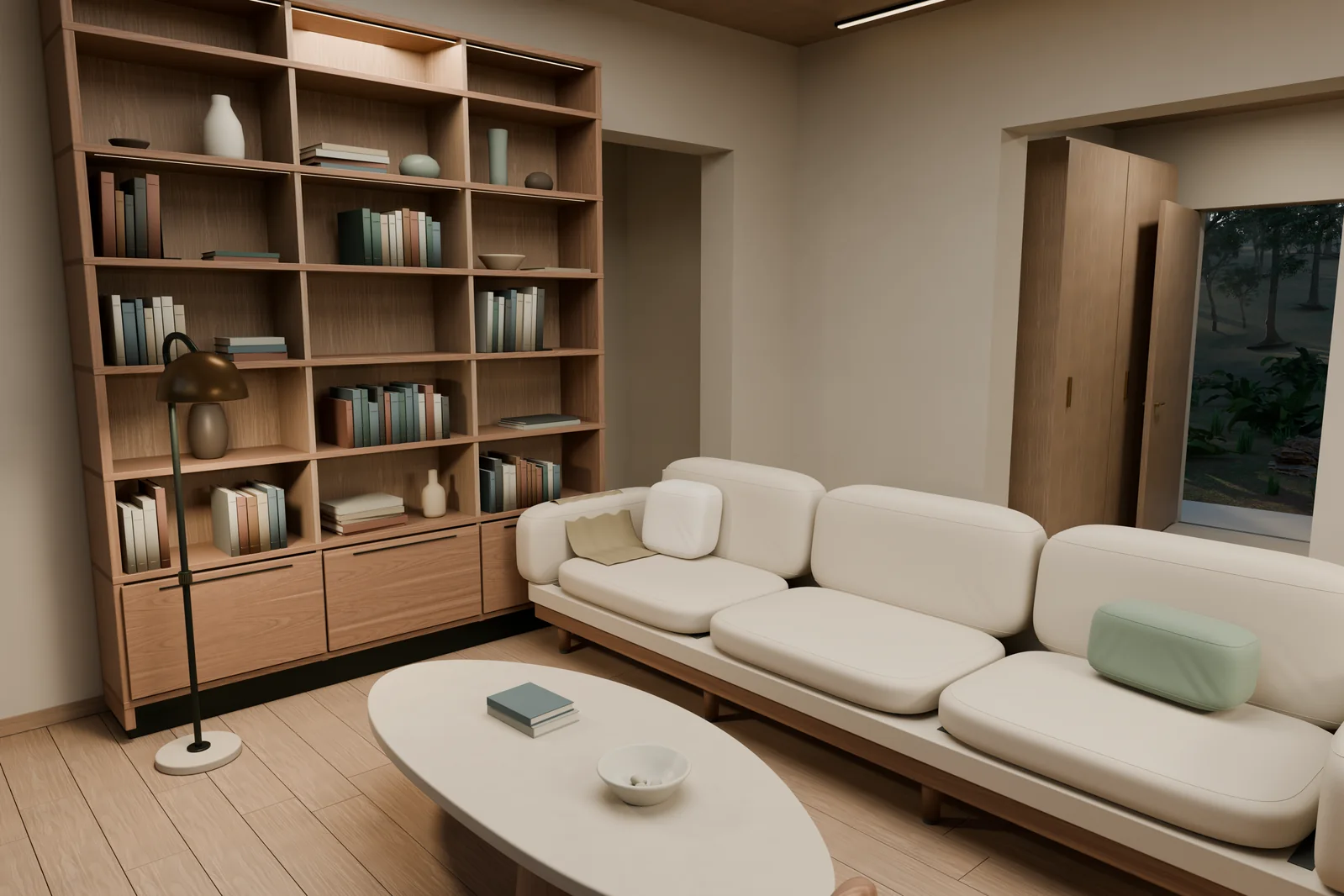
- 起居室:沙发坐垫做出了真实的边缘滚边(Piping),扶手椅带有弯曲木框架,书架上陈列厚度不一的书籍与陶瓷瓶罐。床具包含床架、排骨架(Slats)、床垫与被褥。
- 工作间与衣帽间:衣柜内部配备隔板与挂衣杆;书桌预留理线槽、显示器、键盘与带有万向滚轮的办公椅。
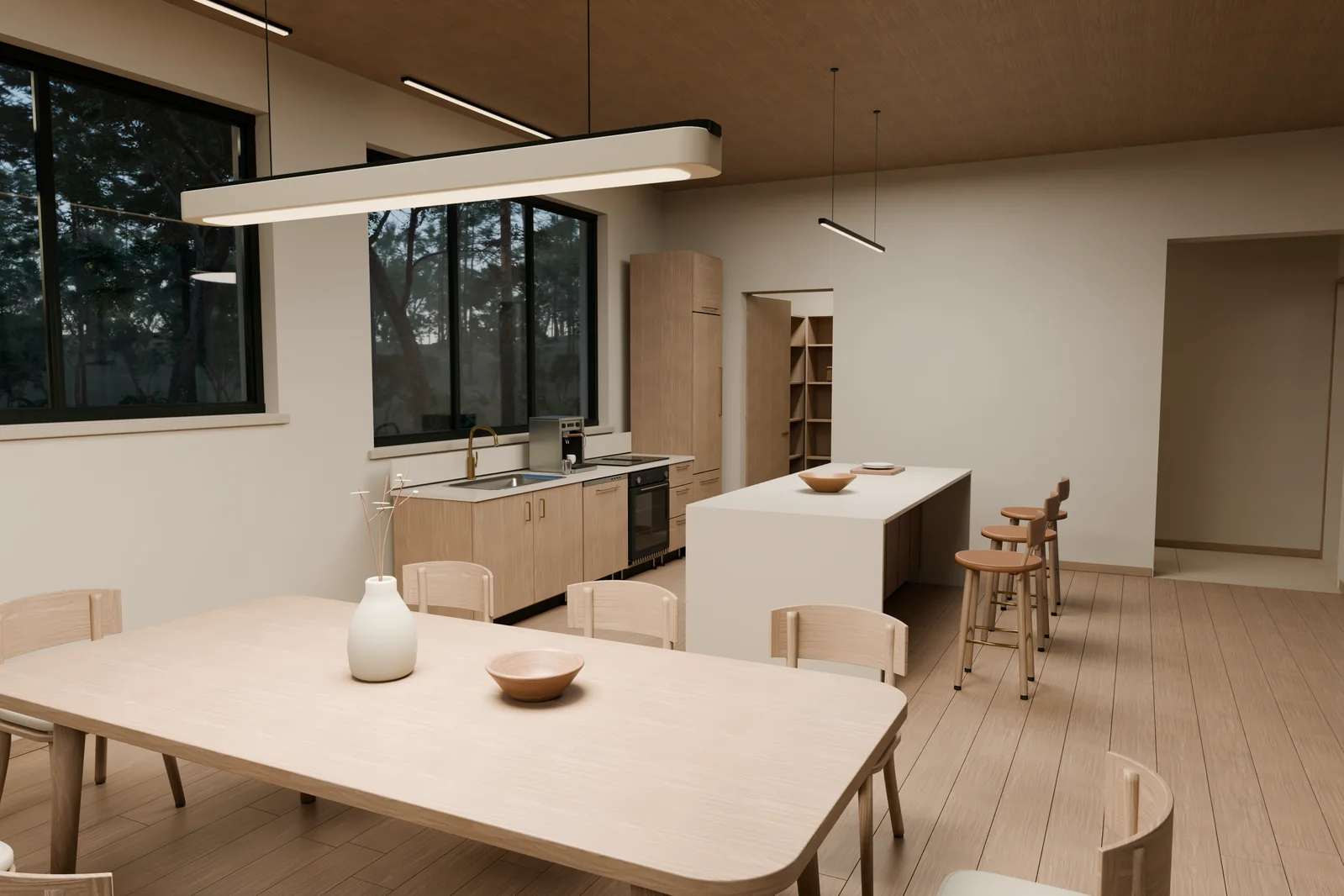
- 餐厨与卫浴:水槽与洗手盆具备实际的下凹容积;厨房岛台配备烤箱内胆、内部烤架、餐具刀叉抽屉与储物隔层。
渲染调试:修复水槽表面表现
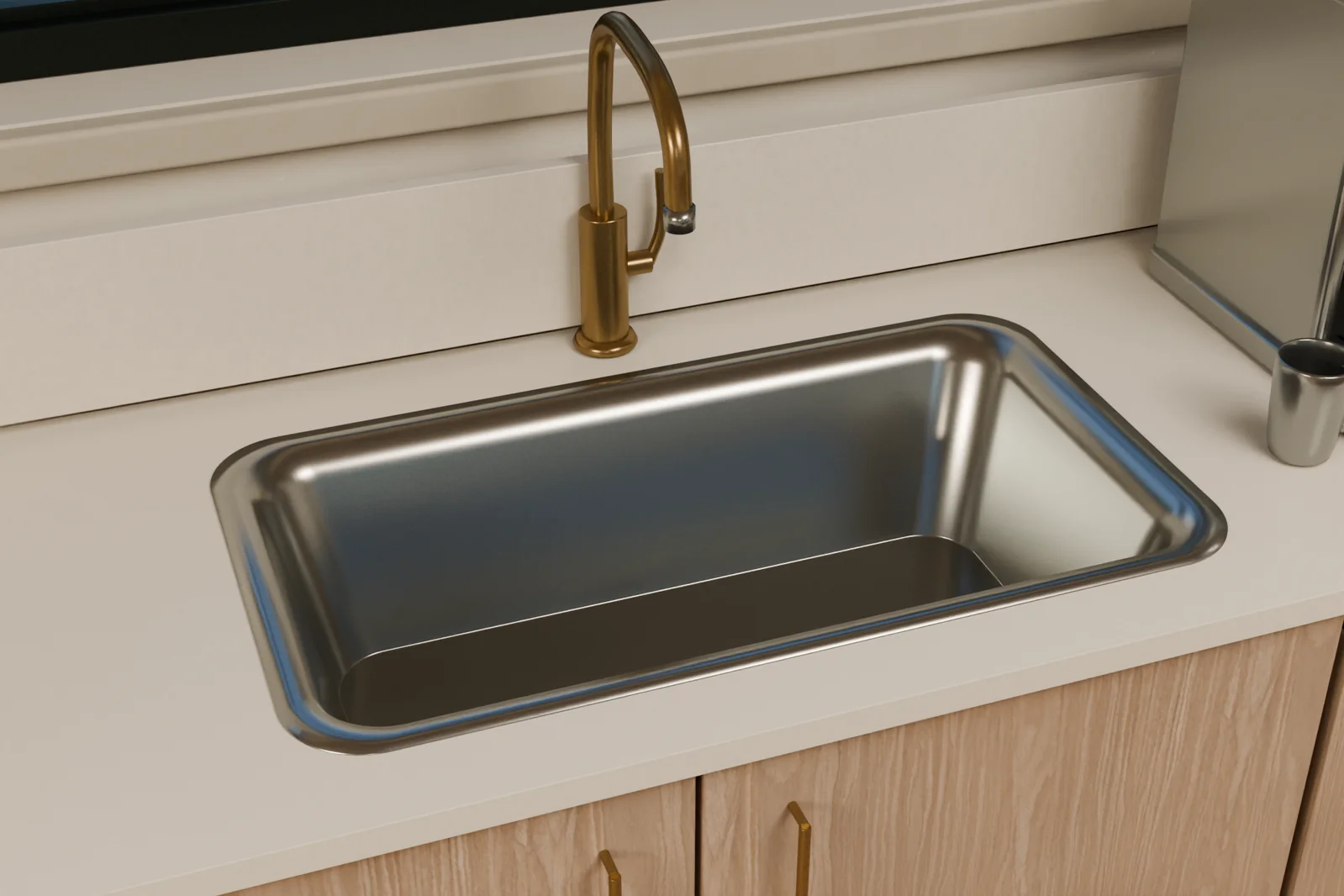
在特写渲染厨房不锈钢水槽时,由于表面法线(normals)的影响,平整表面一度看起来被挤压发皱(pinched)。Astra 在修正法线并细化圆角边缘(refining rounded edges)后,使金属表面的反光更加平滑干净。
纯几何体骨架透视
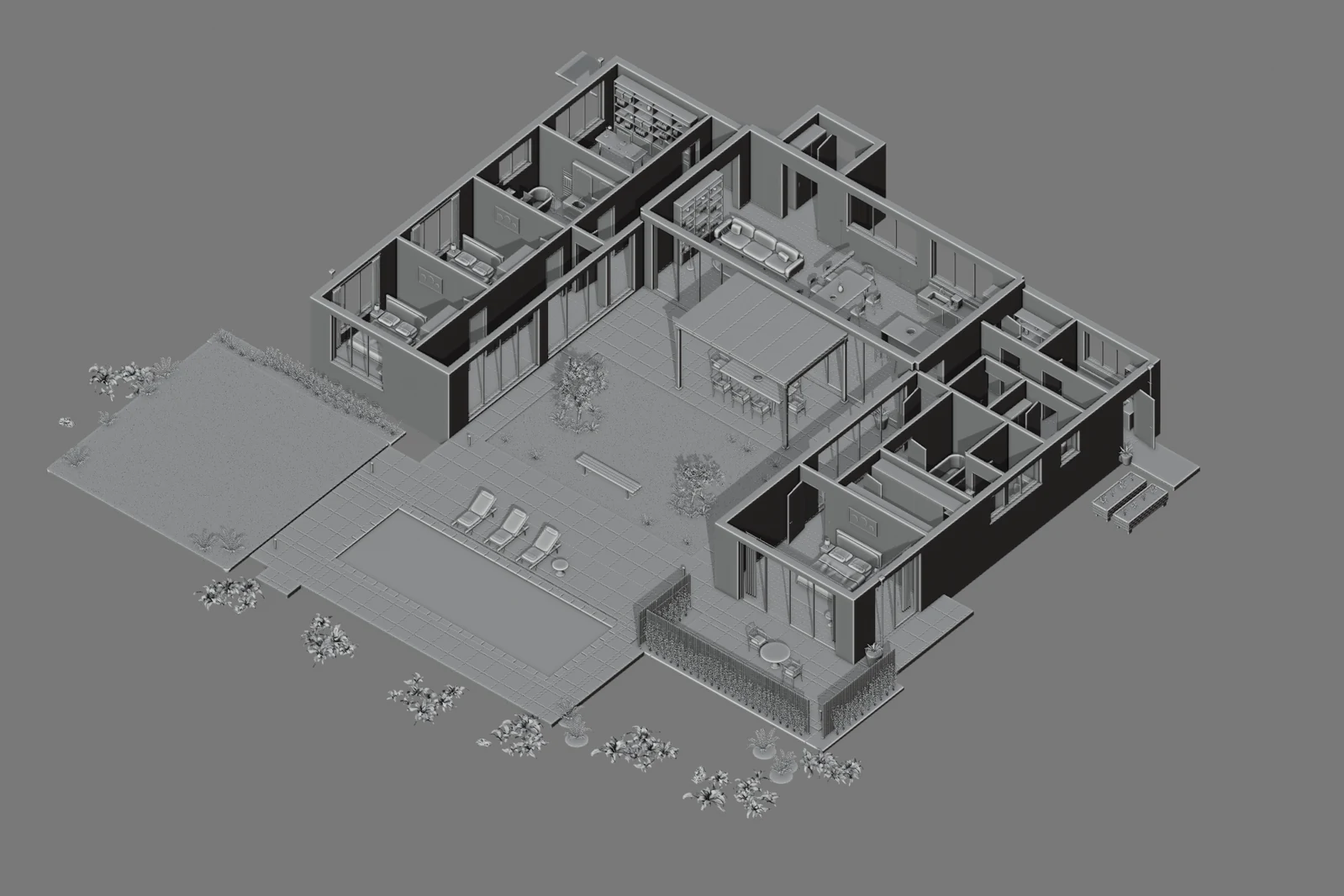
关闭材质与灯光后,通过 Blender 的白模视图(Solid Cutaway View)可以对门窗洞口、墙体连接与室内动线进行抽样检查。需要说明的是,这种抽样主要用于支持视觉审查,并不代表对每一个交叉点或具体建筑构造细节的工程认证。
4. 增加生活气息(Lived-in Look)与真实布光
模型建好后,作者提出了进一步的要求,希望调优光线并添加日常物件使空间具备生活气息:
生活细节与采光调优提示词(Prompt 5)
EN: Make the lighting quieter, warmer, and more accurate. Improve how the materials respond to light, and add dishes and everyday objects so the house feels lived in.
中译:让光线更加克制、温暖和精准。改善材质对光线的反应,添加餐具和日常物件,让整座房子充满生活居住的气息。
Astra 随后进行了两方面的调整:
1. 散落各处的生活物件
餐桌上摆放了餐盘、餐具、条纹水杯(ribbed glasses)与折叠餐巾;厨房台面上添加了面包、香草与瓶罐(bread, herbs, bottles);起居室茶几上摆放着手账、眼镜(reading glasses)、马克杯、手机与钥匙。
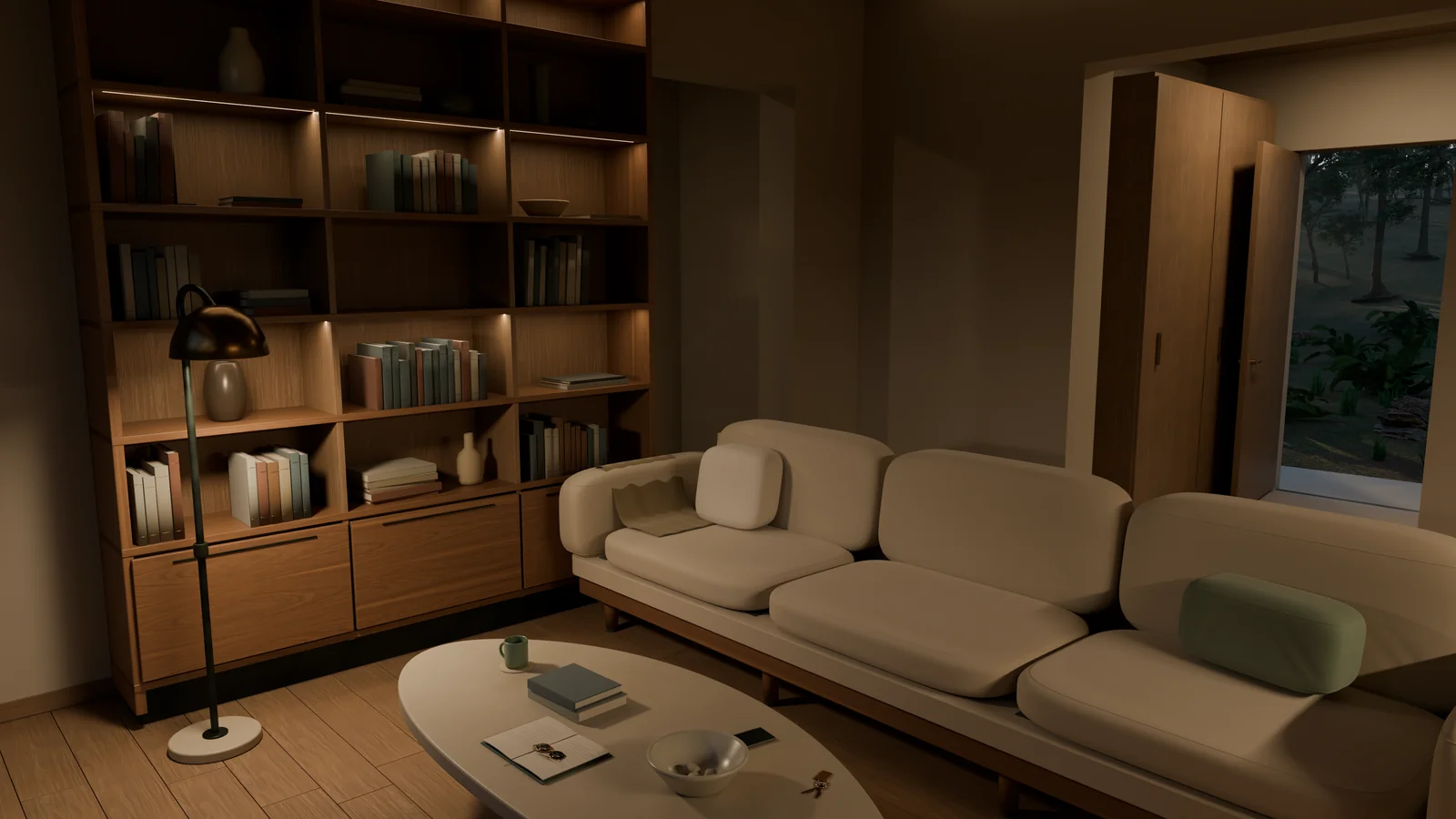
2. 调整光照与可见灯具
在照明调整中,Astra 移除了把空间照平的隐藏补光(hidden fill lights),并调暖了剩余光线(remaining light),使光源对应到空间中的可见灯具(visible fixtures)。具体做法包括在天花板上构建吸顶灯(ceiling lights),并在透光灯罩内放置发光灯泡(glowing bulbs),使光线更自然地漫射。
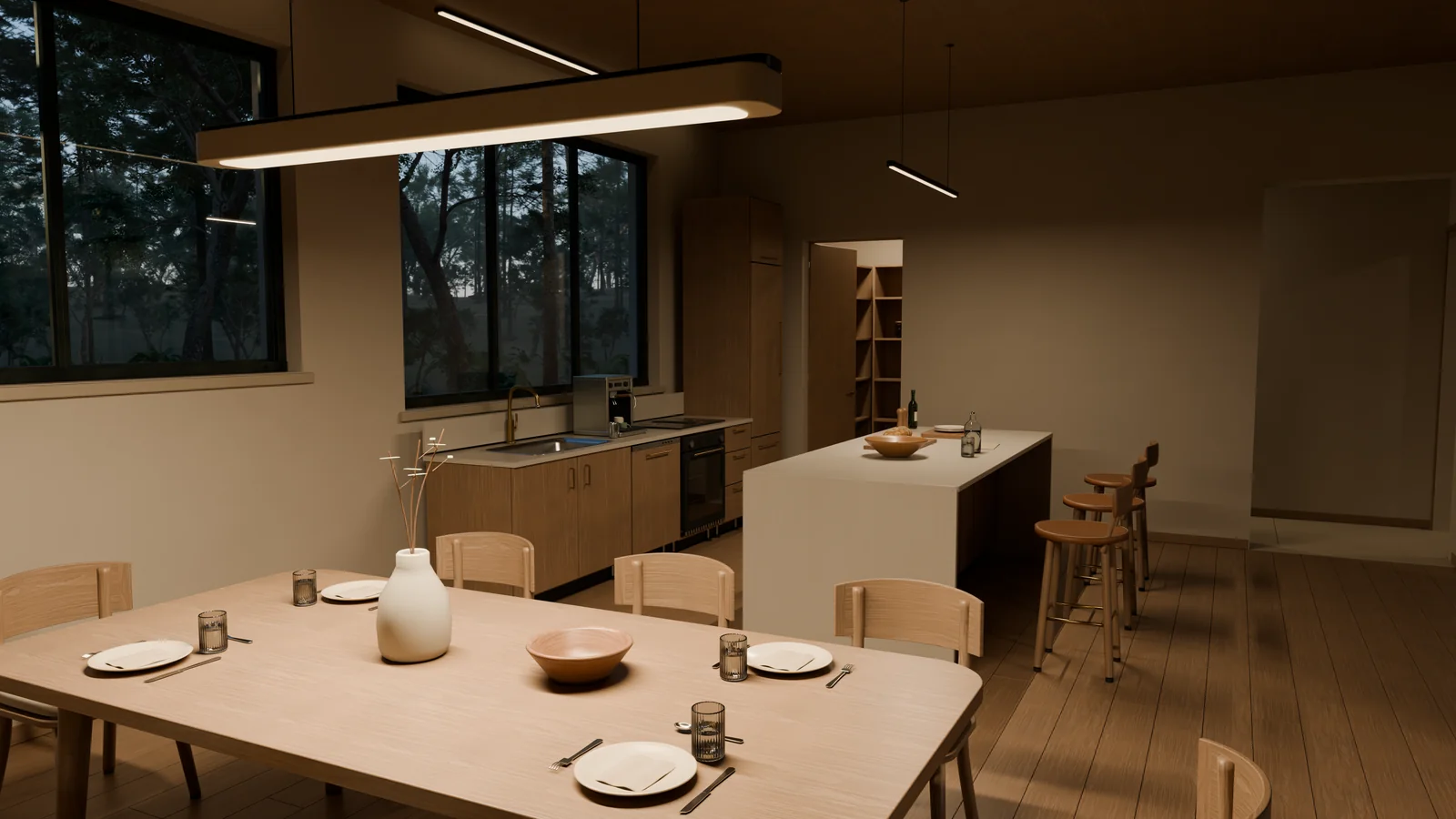
5. 制作 Blender 镜头运镜影片
在场景静态效果稳定后,作者要求制作一段 30 秒、1080p 的室内漫游短片。Astra 在 Blender 3D 场景中设置了虚拟摄影机动画轨道。
运镜参数设定
Astra 编写的 Python 运镜脚本包含以下设定:
- 视线高度:摄影机设置在地面上方约 1.65 米。
- 镜头焦距:镜头选用 24–26 mm 焦距。
- 步伐运动与缓动:添加了微弱克制的走动感(restrained walking motion),并在镜头起止处使用缓动曲线(easing)。
- 分镜设计:全片由 4 个镜头(takes) 构成,穿插起居区、书房、卫浴与主卧。当预览发现机位长时间停留于单调白墙时,Astra 主动调整了朝向。
- 关闭景深:关闭景深(depth of field off),使画面中的建筑边缘保持清晰。
30 秒 900 帧渲染
这段 30 秒动画以每秒 30 帧(30fps)计算,包含 900 个 1080p 帧。每一帧由 Blender Cycles 渲染,采用自适应采样(adaptive sampling)配合 OpenImageDenoise 降噪,并在不插入新帧的情况下合成为视频。
随后,根据追加要求,Astra 在片头加入了一段 5 秒的泳池入场镜头,构成了 35 秒的漫游短片:
此外,同一场景还产出了包括外观、庭院、客厅、厨房和卧室在内的五张原生 4K 静帧。
6. 导入 UE5 实现可交互漫游
在项目实际推进中,将模型迁移至 虚幻引擎 5(Unreal Engine 5,UE5) 并非在所有后期细节定稿后单向进行,而是经历了两阶段的双向往返。
在项目的较早阶段,当花园住宅的基本建筑体量与基础家具在 Blender 中建立后(尚未进入后续的生活物件细化与灯光升级),作者就要求将当时的 Blender 版本构建为一个可在 UE5 中探索的场景。Astra 为此搭建了自动化导出与重建流程,并产出了早期交互版本的漫游录屏:
自动化跨引擎导出与重建管线(Pipeline)
Astra 编写的跨引擎管线处理了从 Blender 到 UE5 的资产重构与视觉映射:
- 几何体导出与单位坐标处理:导出经过评估的几何体(evaluated geometry,包含曲线 curves 与修改器 modifiers 产生的细节)为 FBX 格式;转换流程中处理了米(meters)与厘米(centimeters)的单位换算以及坐标朝向(coordinate orientation)。
- 场景元数据记录:生成 JSON 场景描述文件(JSON scene description),记录各部件位置、材质分配、灯光参数与相机信息,指导 UE5 重建场景结构。
- 重复植被实例保持:针对森林中重复出现的树木,在 Unreal 中保持共享几何体实例(shared geometry instances),而非生成多份重复网格。
- 材质对应与调校:读取受支持的 Blender 材质输入(supported material inputs),复用源纹理(source textures),在 Unreal 中对应构建木材(timber)、石材(stone)、织物(fabric)、玻璃(glass)与水体(water)材质,保留纹理的位置与缩放(包含木纹走向)。由于部分着色器特性(shader behavior)在实时引擎中只能近似呈现,仍需在界面中查看并进行调校。
- 天空与体积雾匹配:在 UE5 中配置天空(sky)与体积雾(volumetric fog),与 Blender 渲染进行对照,微调外部补光(exterior fill)与大气薄雾(haze)。
碰撞与第一人称控制
进入引擎后,Astra 为场景建立了基础移动逻辑与阻挡边界:
- 通行阻挡规则:地板负责承托玩家;墙体、家具和玻璃窗具备碰撞以阻挡穿行;近处的树干可作为阻碍,但蕨类植物不作为隐形墙阻挡走动。
- 角色控制器与漫游验证:添加第一人称角色(first-person character)、行走控制(walking controls)与起始点(starting point),打包为原生 Mac 应用程序(native Mac app),并通过角色的正常移动沿路线进行了漫游测试。
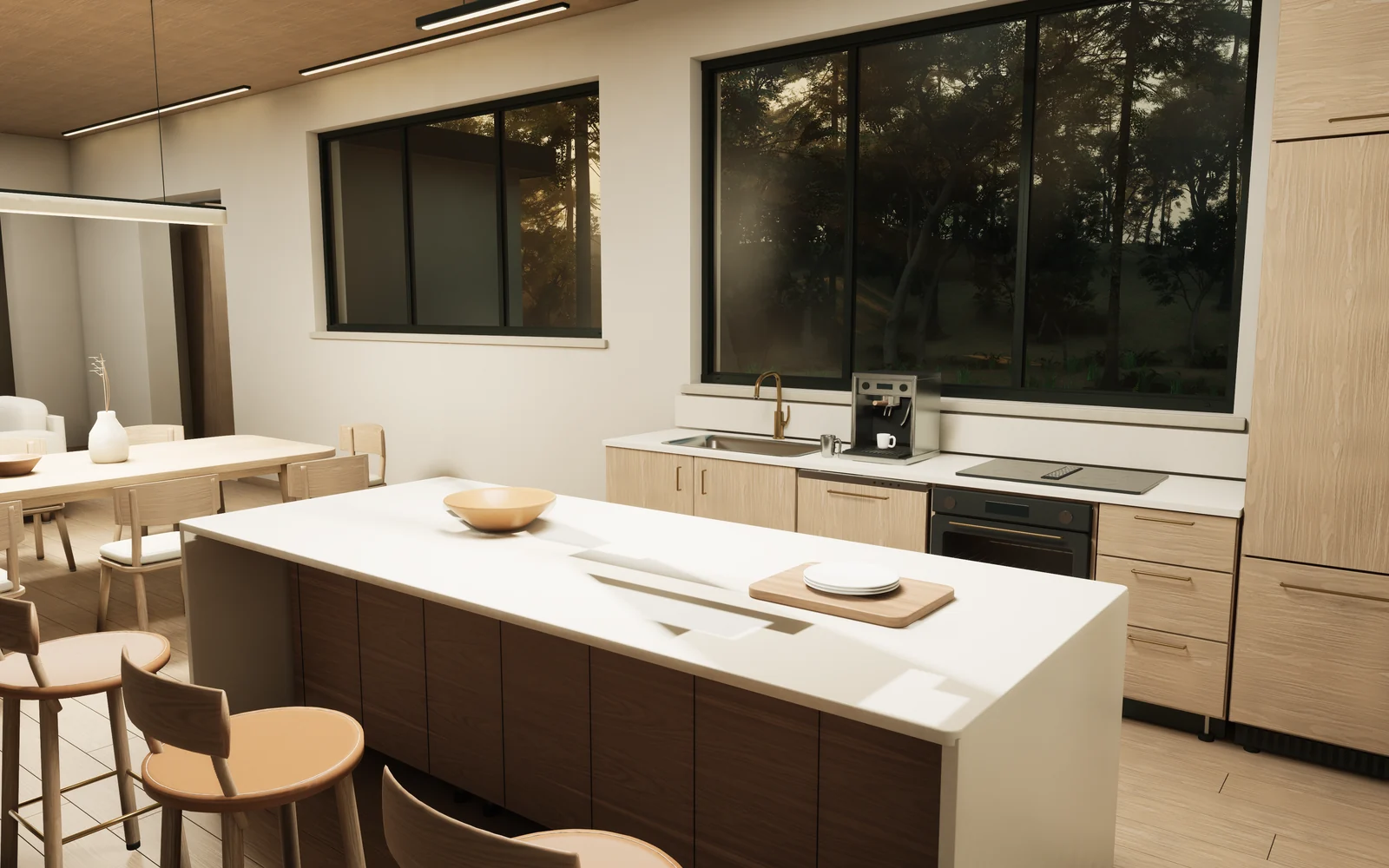
重新导入更新版:装配联动与交互拓展
在早期 UE5 场景走通后,作者回到 Blender 中进一步细化生活物件、实体灯具与运镜影片(即第四、五阶段内容)。随后,Astra 将更新后的模型重新导入既有的 UE5 项目中,并扩展了更丰富的交互能力:
- 部件装配与联动关系:管线记录了门与抽屉各部件、铰接(hinge)或滑动(slide)的位置,以及灯光与开关的控制关系;拉手(handles)、抽屉盒(drawer boxes)及内部物品(contents)随整体装配(assembly)一同移动。
- 按“E”键交互系统:漫游时屏幕显示上下文提示,按下 E 键 可打开房门(doors)、开启厨房储物抽屉(kitchen storage),以及开关指定区域的照明灯光(selected lights)。
- 意式浓缩咖啡机操作:靠近厨房咖啡机按下 E 键可触发冲煮序列(brewing sequence):机器按钮被按下,咖啡流注入杯中,杯内液面随之上升。
渲染对照:Cycles 离线渲染与 Lumen 静帧捕获故事板
为了在控制变量的前提下对照不同渲染环境下的视觉表现,Astra 将住宅的 7 个主题机位整理成了两套严格对应的故事板(Storyboards)。这项并排检查并非旨在做性能基准测试,而是固定摄影机参数后的视觉对照:
- 严格匹配的机位与构图:两套故事板按相同的 7 个主题顺序(林地外观、客厅、厨房、书房、卧室、卫浴、庭院花园)展开,保持了匹配的摄影机位置、朝向与视场角(matching camera positions, orientations, and fields of view)。
- 各自的渲染与色调特征:一套为 Blender Cycles 离线渲染图(Cycles renders),另一套为虚幻引擎 5 Lumen 静帧截取(Lumen still captures),两套画面各自保留自身的光照体系、材质表现与色调映射(lighting, materials, and tone mapping)。
- 反射表现对照:在虚幻引擎截取画面中,浴室镜面等区域存在反射瑕疵(reflection artifacts)。
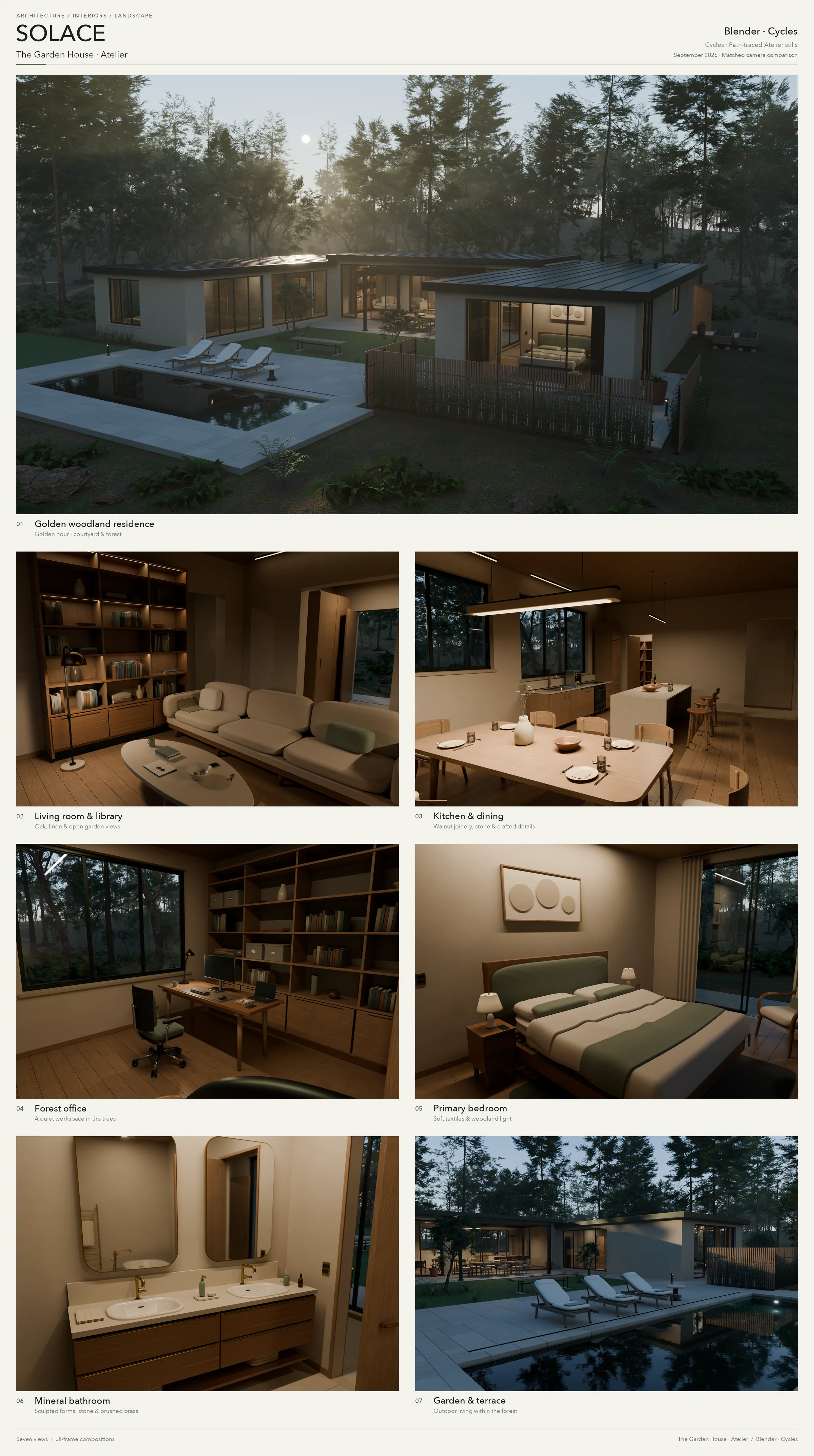
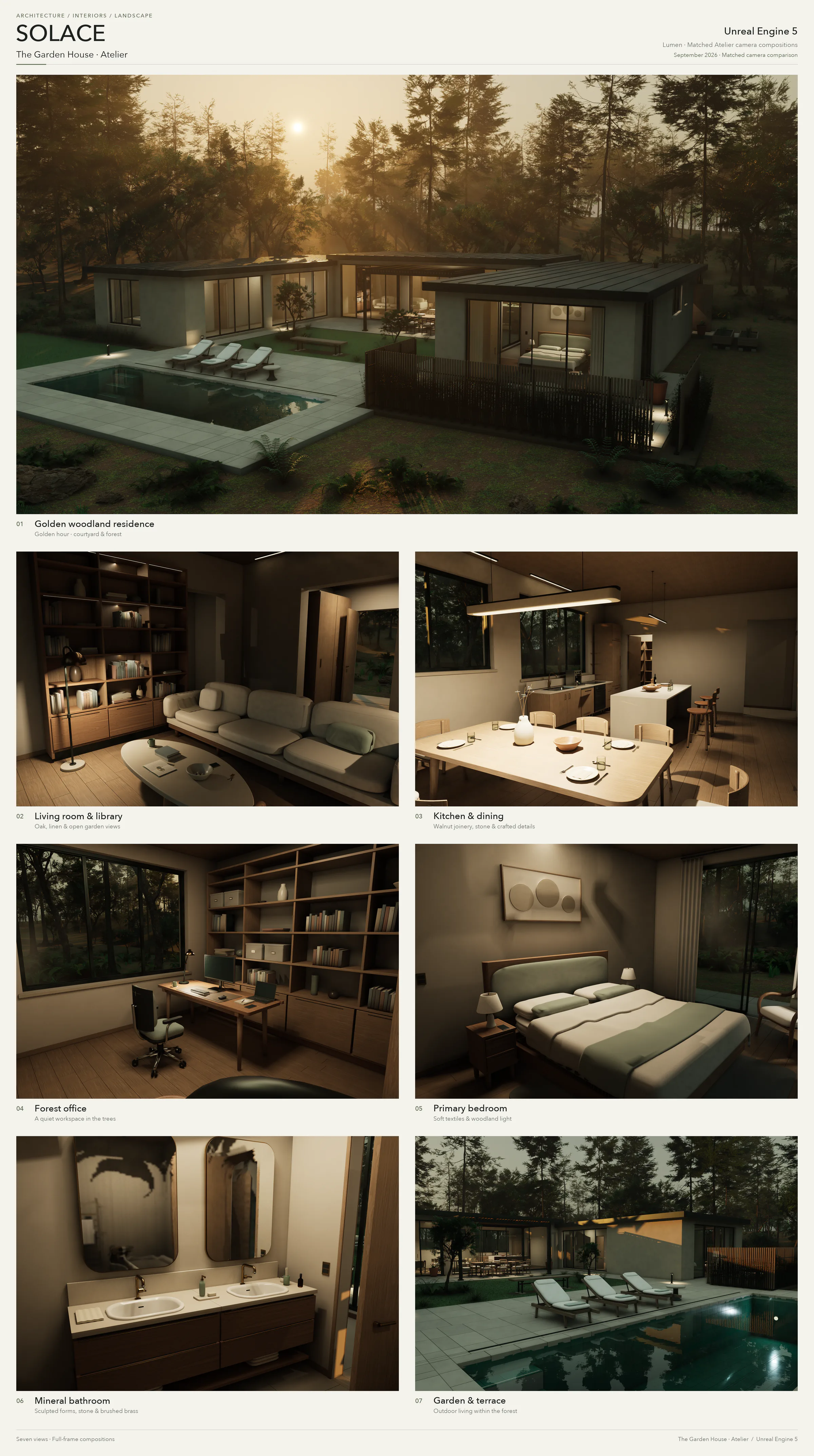
| 对照要点 | Blender (Cycles 离线渲染) | Unreal Engine 5 (Lumen 静帧捕获) |
|---|---|---|
| 机位与构图 | 覆盖 7 个主题(外观、客厅、厨房、书房、卧室、卫浴、庭院) | 严格匹配相同 7 个主题顺序、机位位置、朝向与视场角 |
| 光照与色调 | 保留 Cycles 离线渲染的光照配置与色调映射 | 保留 Lumen 的光照特性与自身色调映射 |
| 材质与反射 | 使用 Blender 场景自己的材质、灯光与色调映射 | 使用 UE5 场景自己的材质、灯光与色调映射;浴室镜面仍有反射瑕疵(reflection artifacts) |
| 对比性质 | 固定机位变量后的并排视觉检查,非引擎性能测试 | 固定机位变量后的并排视觉检查,非引擎性能测试 |
7. 延伸应用场景
在 Solace 住宅之外,作者还把这种“以代码建立可编辑 3D 场景、依靠渲染预览发现问题并持续推进”的工作方式,用在科幻与自然景观等不同题材中。下面三个例子展示的是具体做法与结果,并不是对通用能力的受控评测。
HELIOS(科幻场景)
在构建包围太阳的巨型人造结构 HELIOS 时,第一版场景包含了数千块独立三角面板(thousands of individual panels)、下凹表面(recessed surfaces)、散热鳍片(cooling fins)、带斜撑的检修结构(braced service structures)以及较大的控制枢纽(larger control hubs)。
在最初的渲染预览中,Astra 发现内部强光导致行星表面过曝泛白,且土星环被画框边缘截断。随后它主动减弱了内部环境补光,并拉宽了构图视场以容纳完整星环。
当作者要求生成一张从地球近地轨道眺望几乎完全合拢的戴森球构图时,Astra 构建了由 5,120 块面板 拼接而成的近闭合外壳,仅留出三道狭窄的泄光缝隙。在预览发现画面中只有一道光柱清晰可见后,Astra 调整了发光面的相对位置,并调弱了地球海洋表面过强的镜面反光,使整体画面更趋平衡。在这组渲染中,天体的尺寸与相对距离均是为了满足电影感构图而进行的艺术化调整,并非实际天文学比例。


数据与素材归属:HELIOS 使用的太阳观测数据来自 NASA JPL / STEREO 与 SDO 紫外线观测图(SVS 30362);地球贴图来自 NASA 地球观测站的 Blue Marble 与夜间灯光图(署名 NASA Earth Observatory / Robert Simmon,Suomi NPP VIIRS 数据由 NOAA NGDC 的 Chris Elvidge 提供);行星与云层纹理改编自 Solar System Scope / INOVE 的纹理资产,遵循 CC BY 4.0 许可。
Shipyard(硬表面飞船)
在太空飞船案例中,Astra 构建了一艘巡洋舰(cruiser),包含锥形舰体(tapered hull)、分段环(segmented ring)与四具细节丰富的驱动引擎(four detailed drives)。引擎结构具体包含了外层约束带(containment bands)、检修管线(service lines)、下凹喷嘴(recessed nozzles)以及同心发光开口(concentric illuminated openings)。
在初版预览中,作者与 Astra 发现舰艏造型过于扁平单调(bow too plain),且背景行星在构图中过于抢戏(background planet too prominent)。在随后的脚本迭代中,Astra 为舰身补充了拼装装甲板接缝(panels and seams)、对接硬件与环形紧固件(docking hardware and ring fasteners),并将背景行星向旁侧移动且压暗色调,使主体轮廓更加鲜明。


莫奈花园风格水景
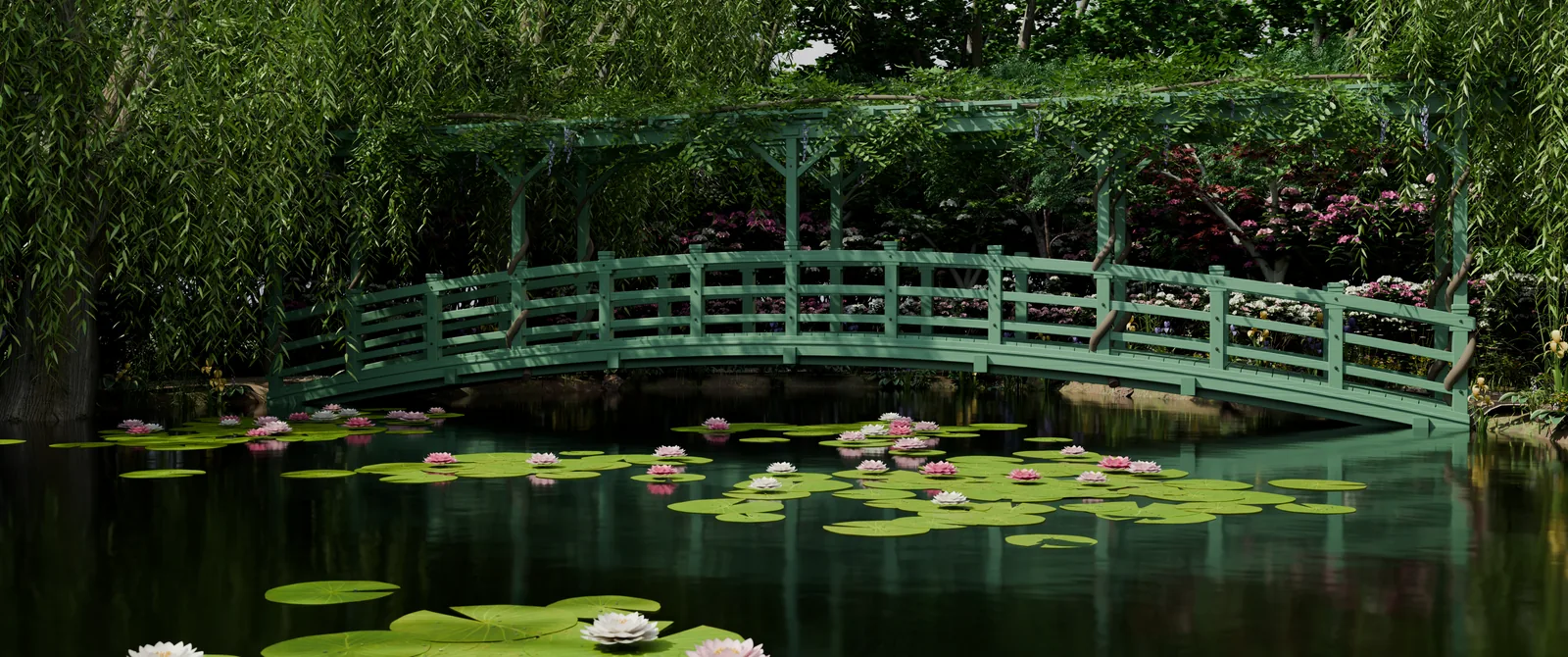
在面对有机自然形态时,作者要求 Astra 参照真实参考资料(study real references)进行场景构建,还原了标志性的绿色日本木桥、水塘、睡莲与垂柳。为了配合画面构图需要,场景对真实花园的比例进行了相应调整。在早期渲染显示池塘周边地面相对平整空旷后,Astra 根据作者的反馈增加了具质感的砂石与砌体地面(textured gravel and masonry),并细化了睡莲叶片与花瓣(lily leaves and petals),随后重新完成了最终渲染。
从 Solace 个案提炼的工作流:以渲染图为起点的渐进式构建
Astra 在 Solace 项目中的探索,展示了一条可供 3D 创作者尝试的渐进式构建路径。需要明确的是,这是一套从单一个案提炼的可尝试路径,并不保证在所有项目或题材中都能直接成功;它也并未规定所有 3D 题材都必须机械地绘制建筑平面图、导出虚幻引擎 5 或进行全实体建模。
该方法的核心逻辑在于:
- 从具体对象与氛围起步:从一个想要看到的具体场所或物体(place/object)开始,明确描述其功能用途与环境氛围(purpose/atmosphere),要求 AI 产出可编辑场景(editable scene)以及若干观察机位(views);
- 由宏观轮廓推进到局部细节:先查看整体宏观轮廓(broad shape)与构图体量,确认基调无误后,再逐步拉近距离细化内部结构、材质反应与微观物件;
- 让每次渲染成为下一次决策的起点:不试图通过单次提示词一步到位,而是把每一次预览渲染当作视觉检查的切入点,人类依据直观画面决定下一步调整,AI 再据此将修改落实为具体代码。
Solace 个案的五段推进
每一轮都留下一个可检查的中间物
流程并不要求所有项目都走完全程;关键是先产生可观察结果,再决定下一次修改。
- 01意向与初始场景
描述对象、用途和氛围,生成可编辑场景与观察机位。
- 02空间推演
建筑项目可先画平面图或体量白模,检查动线与比例。
- 03结构深化
依据已确认方向补足关键几何,边建边检查错误。
- 04生活痕迹与光影
加入日常物件、材质和可见灯具,再调整场景光线。
- 05镜头或实时交互
按目标选择渲染运镜,或经专用管线移入实时引擎。
原文提示词中英双语速查表
| 阶段 | 核心任务 | 原文提示词 (Prompt) |
|---|---|---|
| 阶段 1:概念基调 | 确定审美取向与首个微型场景 | EN: Design a beautiful house with minimalist but highly detailed furniture and a nice garden. Make the scene cinematic, with considered lighting, materials, and time of day. 中译: 设计一座美丽的住宅,配备极简但细节丰富的家具和漂亮的花园。营造电影感的场景,考究灯光、材质与一天中的特定时间。 |
| 阶段 2:环境与氛围 | 扩展场景上下文与特殊光线效果 | EN: Make it golden hour. We should see the sun, and the house should be in the middle of a viridian forest. 中译: 改为黄昏的黄金时刻。能看到太阳,房子座落在翠绿森林的中心。 |
| 阶段 3:空间规划 | 按项目需要推演空间动线与功能布局 | EN: I like the minimalist, modern style, so keep that while we grow the house to be much more livable. Draw me a floor plan first. We'll validate and evolve it from there. 中译: 我喜欢这种极简现代风格,在将其扩展为更适合家庭居住的住宅时请保持这一风格。先给我画一张平面图,我们在此基础上验证和演化。 |
| 阶段 4:实体建筑落地 | 依据平面图深化关键几何并排错 | EN: Keep the current scene as a backup, then build the updated house in Blender. Iterate until the house, furniture, and garden are detailed and the geometry is correct. Once we validate it in Blender, we'll export it to Unreal Engine 5. 中译: 保留当前场景作为备份,然后在 Blender 中构建更新后的住宅。反复迭代,直到住宅、家具与花园细节丰富且几何形状正确。在 Blender 中验证通过后,我们将把它导出到虚幻引擎 5。 |
| 阶段 5:生活痕迹与光影 | 调整材质响应与室内光线,加入生活物件 | EN: Make the lighting quieter, warmer, and more accurate. Improve how the materials respond to light, and add dishes and everyday objects so the house feels lived in. 中译: 让光线更加克制、温暖和精准。改善材质对光线的反应,添加餐具和日常物件,让整座房子充满生活居住的气息。 |
这个案例实际留下了什么
- 一套可继续编辑的 Blender 场景,以及用来建模、布置相机和渲染的脚本;
- 同一场景生成的多机位静帧和连续运镜影片;
- 一条为本项目编写的 UE5 导出与重建管线,以及两个阶段的第一人称漫游;
- 一组必须继续人工检查的差异:概念平面图不是施工图,几何抽样不是完整认证,部分着色器在 UE5 中只能近似还原。
总结:以可检查中间物为桥梁的人机协作
OpenAI 这一案例展示的核心方法,是把宽泛的设计意图拆成概念平面图、预览渲染、白模结构和引擎漫游等可以逐次检查的中间产物。作者根据看到的问题决定下一步,Astra 再把这些决定落实到 Blender 场景、Python 脚本和 Unreal Engine 5 项目中。对想尝试 AI 辅助 3D 创作的人,这比一开始就追求完整终稿更有参考价值:先做出能看的东西,再让每一次观察带来下一次具体修改。
实操带走包
滚动查看原始 Markdown,复制后可按团队实际系统与政策修改。
正在载入 Markdown…
从一句话到可漫游空间:Astra 的 3D 建筑可视化与引擎交互实践
在 3D 设计与建筑可视化中,如何从模糊的自然语言意向跨越到真正可编辑、可漫游的三维场景,是一项复杂的工程挑战。OpenAI 在开发者博客展示了其 GPT-6 Astra 模型(在 Codex 中调用),如何在 Blender 与虚幻引擎 5(UE5)中,将名为“Solace”的住宅逐步构建为支持实时交互与漫游的完整空间。
整个流程并没有采取端到端一键黑盒生成,而是构建了一条严密的人机协同回路:人类作者负责把控美学定位、审阅平面图与提出阶段性诉求;Astra 编写 Python(bpy)脚本生成几何与材质,并在交付前主动进行视觉检查与排错。
一、 拒绝“直接拉体量”:以 2D 平面图锁定功能动线
在由首句概念扩建为宜居住宅时,Astra 没有急于进入 3D 盲目拉伸模型,而是先提出了一套封闭建筑总面积约 305 平方米(约 3,280 平方英尺)的 U 型概念平面方案(Floor Plan),露台、中庭和泳池不计入这个面积口径。方案中央为主起居与餐厨,两侧翼楼分布三间卧室与书房,环绕中央庭院形成清晰动线,避免卧室沦为穿行走道。
实体建模原则:拒绝使用贴图凹凸敷衍。起居室沙发做出了边缘滚边(Piping),床具包含床架、排骨架与被褥,厨房水槽拥有真实的下凹容积,并在特写中针对发皱法线(Normals)与圆角边缘进行了微调,保证任何近景机位经得起推敲。
在生活气息(Lived-in Look)营造上,Astra 移除了照平空间的隐藏补光,代之以经过实际建模的吸顶灯与发光灯泡,并在桌面散落手账、眼镜、钥匙与条纹水杯,使空间从冰冷的样板间转变为有生活居住痕迹的真实居所。
二、 跨引擎管线:从 Blender 离线资产到 UE5 实时交互
场景并非在所有后期细节定稿后单向导入游戏引擎,而是在早期体量确立与后期生活物件细化两次阶段性导入 UE5。Astra 搭建了自动化导出与重建管线,消弭了 DCC 建模工具与实时引擎之间的断层:
在最终打包的 Mac 原生应用中,场景具备完整的第一人称控制器。漫游时屏幕显示上下文提示,按下 E 键 即可打开房门、开启厨房储物抽屉、开关指定区域照明,甚至触发意式浓缩咖啡机按钮按下并注入咖啡的全套冲煮动画。
三、 视觉对照:Cycles 离线光照与 Lumen 实时表现
为在控制变量前提下对照表现,Astra 将住宅的 7 个主题机位整理成了两套严格对应的故事板。两套故事板按相同的 7 个主题顺序(林地外观、客厅、厨房、书房、卧室、卫浴、庭院花园)展开,保持了匹配的摄影机位置、朝向与视场角(matching camera positions, orientations, and fields of view)。这项检查并非引擎性能跑分,而是固定变量后的并排视觉检查:
| 对照维度 | Blender (Cycles 离线路径追踪) | 虚幻引擎 5 (Lumen 实时动态光照) |
|---|---|---|
| 机位与视场 | 严格对齐 7 组主题机位与统一焦距(24–26mm) | 完全一致的位置、朝向与视场角,支持自由漫游 |
| 光照与色调 | 自适应采样 + OpenImageDenoise,保留细腻漫反射过渡 | 依赖实时网格距离场与屏幕空间光照,明暗对比更硬朗 |
| 反射表现 | 精准计算玻璃多重折射与金属镜面平滑反射 | 在浴室镜面等高光反光区域存在实时反射瑕疵(artifacts) |
| 交付产物 | 原生 4K 静帧、30秒 900 帧与 35 秒漫游影片 | 可按 E 键实时交互操作的第一人称原生 Mac 应用程序 |
结语:AI 辅助 3D 创作的工程范式
从包围太阳的科幻戴森球 HELIOS、硬表面巡洋舰 AURELION-07 到 Solace 现代住宅,这一系列实验展示的核心方法,是把宽泛的设计意图拆成概念平面图、预览渲染、白模结构和引擎漫游等可以逐次检查的中间产物。作者根据看到的问题决定下一步,Astra 再把这些决定落实到 Blender 场景、Python 脚本和 Unreal Engine 5 项目中。
1. 对象与氛围起步:先描述场所用途、光影时刻与氛围,索取可编辑的工程场景而非扁平像素。
2. 宏观轮廓再进微观:先校验体量与功能动线(必要时先出平面),再推进实体倒角与生活物件细节。
3. 每次渲染驱动下一次决策:把预览图视作人类与 AI 共同的质检切片,让人类判断主导方向,AI 代码落实修缮。
Architectural visualization with Astra
For the complete documentation index, see llms.txt. Markdown versions of documentation pages are available by appending
.mdto the page URL.
I started with a simple brief for a house: minimalist but detailed furniture, a garden, and a cinematic atmosphere. I asked Astra in Codex to turn that brief into an editable 3D scene in Blender. We developed it into a furnished family home, explored a version in Unreal Engine 5, and kept refining the Blender scene until I could direct a camera tour through it.
The first scene centered on a furnished living pavilion. We later developed a floor plan for a larger family home before building its rooms. Along the way, I worked with Astra on the architecture, furniture, materials, and lighting, using each version to decide what to develop next. The latest pass added the everyday objects and warmer lighting that made the house feel lived in.
<figure class="not-prose my-8"> <video class="block w-full rounded-lg border border-default" controls autoplay muted loop playsinline preload="metadata" poster="https://cdn.openai.com/devhub/blog/architectural-visualization/atelier-house-tour-30s-poster-d756eee072c7.webp" width="1920" height="1080" aria-label="Blender camera tour of the furnished house"
<source src="https://cdn.openai.com/devhub/blog/architectural-visualization/atelier-house-tour-30s-1080p-ddb8f2c81368.webm" type="video/webm" /> Your browser does not support the video tag. </video> <figcaption class="mt-3 text-sm text-secondary"> A camera tour of the house, rendered in Blender using Cycles. </figcaption> </figure>
I've included a few prompts from the project, edited for length and clarity. They show how the brief evolved as I saw what Astra could build.
Start with the house and the atmosphere
My first prompt described the result I wanted, without supplying a floor plan or a furniture catalog:
Design a beautiful house with minimalist but highly detailed furniture and a nice garden. Make the scene cinematic, with considered lighting, materials, and time of day.
Astra built an editable scene through the Blender Python API (bpy). It created the architecture, joinery, furniture, planting, materials, lights, and cameras. The first result already had the low roof, open living space, warm timber, pale stone, and connection to the garden that I was looking for. We named the house Solace.
<figure class="not-prose my-8"> <img src="https://cdn.openai.com/devhub/blog/architectural-visualization/original-courtyard-house-09be999ecfd3.webp" alt="The first Solace house rendered in Blender, with a low white roof, open furnished pavilion, timber screens, garden, and rectangular pool" width="1599" height="1066" loading="lazy" class="block w-full rounded-lg" /> <figcaption class="mt-3 text-sm text-secondary"> The original Courtyard House, delivered from the first design prompt. </figcaption> </figure>
That house came from one design prompt, but Astra still iterated on its own work before handing it back. It inspected preview renders, adjusted the composition and lighting, and corrected details such as planting intersections and the throw on the sofa. I didn't have to describe every object or direct each of those changes.
At this stage, the furnished living pavilion was the focus. The private wing was still represented by an exterior volume. It gave us a visual direction to develop, rather than a complete family-house layout.
My next request changed the setting:
Make it golden hour. We should see the sun, and the house should be in the middle of a viridian forest.
Astra kept the house and built the forest around it. It added layers of trees and understory, placed the sun, and used atmospheric scattering to make the light visible through the woodland. The view now had depth beyond the edge of the garden, and the warm interior stood out against the trees.
<figure class="not-prose my-8"> <img src="https://cdn.openai.com/devhub/blog/architectural-visualization/golden-hour-forest-f6761339ea68.webp" alt="The original Solace pavilion surrounded by dense woodland, with low sunlight filtering through the trees toward the pool and illuminated living room" width="1599" height="1066" loading="lazy" class="block w-full rounded-lg" /> <figcaption class="mt-3 text-sm text-secondary"> The same early house after the forest and golden-hour lighting pass. </figcaption> </figure>
The original house and its garden were modeled procedurally. For the larger forest, Astra used existing tree, fern, and rock assets from Poly Haven. That let the work focus on arranging the environment and getting the scene to feel right.
Draw the larger house before modeling it
Once I liked the direction, I wanted to go further. An intermediate version added a furnished bedroom suite and improved the geometry, kitchen, and furniture. Then I asked for a larger house that would make sense as a place for a family to live:
I like the minimalist, modern style, so keep that while we grow the house to be much more livable. Draw me a floor plan first. We'll validate and evolve it from there.
This changed the work. We had to decide how rooms connected, where the private spaces belonged, and how someone would move through the house. Adding more furniture to the first scene wouldn't answer those questions.
Astra proposed a single-story, U-shaped home around a planted courtyard. The living room, dining area, and kitchen formed the central pavilion. The wings added three bedrooms, an office, bathrooms, and a dressing room. A pantry, laundry, and storage spaces gave the kitchen and household their own supporting rooms.
<figure class="not-prose my-8"> <img src="https://cdn.openai.com/devhub/blog/architectural-visualization/garden-house-concept-plan-36481903216b.webp" alt="Solace Garden House concept floor plan: a central living, dining, and kitchen pavilion, three bedrooms and an office in two wings, a planted courtyard, and a pool terrace" width="2200" height="2140" loading="lazy" class="block w-full rounded-lg" /> <figcaption class="mt-3 text-sm text-secondary"> The concept floor plan we reviewed before rebuilding the house. Select the image to open it at full size. </figcaption> </figure>
The plan also gave us specific things to check. Bedrooms didn't need to become passageways. A route around the courtyard kept movement between the wings out of the kitchen's working aisle. Outdoor dining, the lawn, and the pool extended the living spaces without becoming enclosed rooms.
I approved the direction and asked Astra to preserve the existing scene before building the new version:
Keep the current scene as a backup, then build the updated house in Blender. Iterate until the house, furniture, and garden are detailed and the geometry is correct. Once we validate it in Blender, we'll export it to Unreal Engine 5.
That order mattered. We could review the plan, then the model, before taking on the extra work of a real-time walkthrough. This remained a visualization project; the concept plan still needs professional review of the site, structure, and building requirements before it could inform construction.
Build the rooms and the furniture
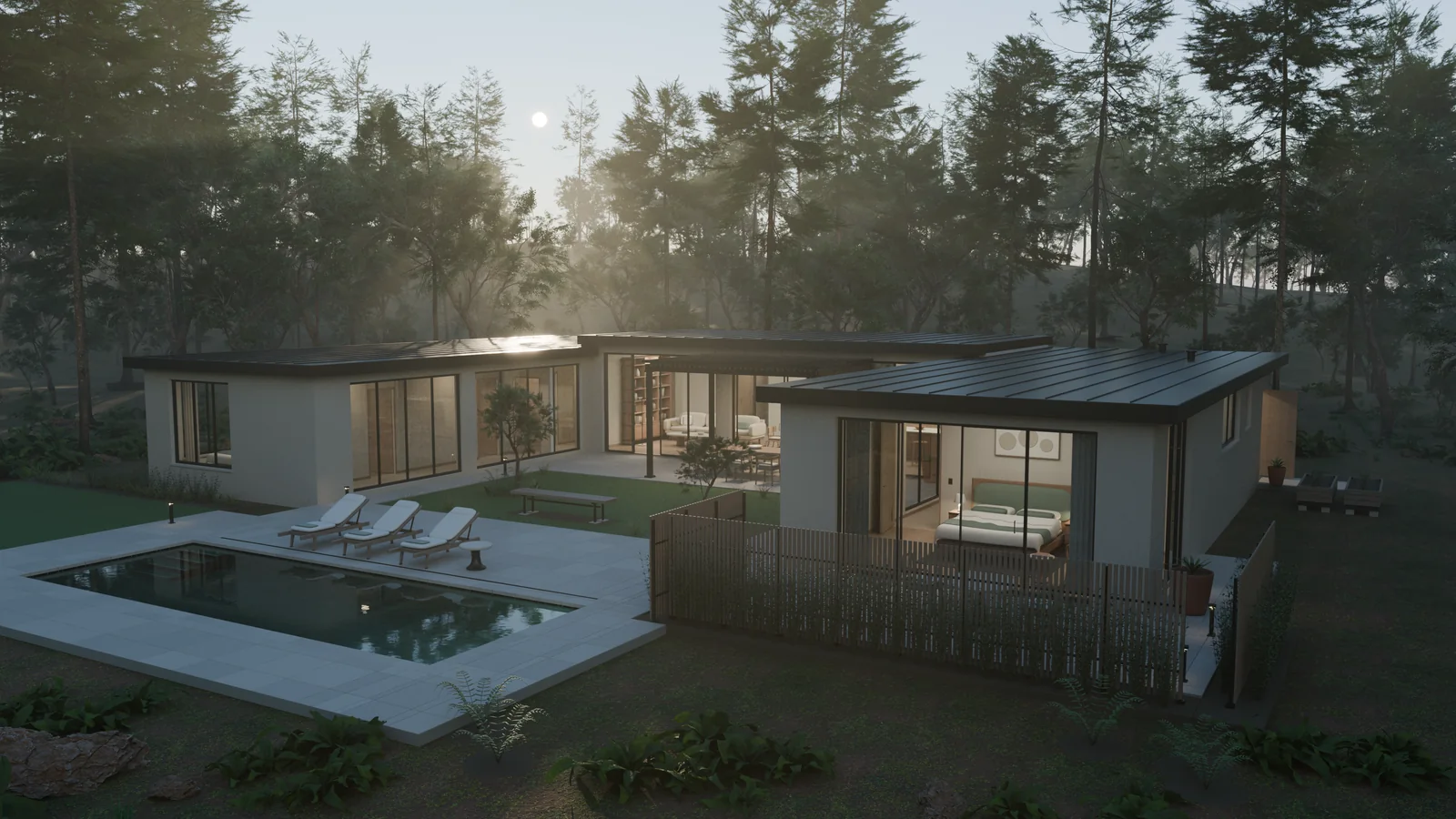
The Garden House kept the forest setting and restrained palette, but expanded the architecture around the approved plan. The courtyard became the center of the composition, with views across it from the rooms on either side.
<figure class="not-prose my-8"> <img src="https://cdn.openai.com/devhub/blog/architectural-visualization/garden-house-exterior-822ca33fb418.webp" alt="The expanded U-shaped Garden House rendered in Blender, with two furnished wings facing a planted courtyard and pool in the forest" width="1600" height="900" loading="lazy" class="block w-full rounded-lg" /> <figcaption class="mt-3 text-sm text-secondary"> The expanded Garden House, rendered in Blender after the architectural and cinematic finishing passes. </figcaption> </figure>
The furniture was a large part of making those rooms convincing. Astra modeled sofa cushions and their piping, curved chair frames, books, and hollow ceramic objects. Beds had frames, slats, mattresses, and shaped bedding. Wardrobes had interiors, shelves, and hanging rails. The office had a desk with cable management, a monitor, a keyboard, and a chair with casters.
These details were geometry in the scene. They could be inspected from another angle and carried into the walkthrough. The cushions and bedding were authored shapes, so the result didn't depend on running a cloth simulation.
<figure class="not-prose my-8"> <img src="https://cdn.openai.com/devhub/blog/architectural-visualization/garden-house-living-room-1c0e7ed4fa8f.webp" alt="A Blender render of the Garden House living room showing the shaped sofa cushions, rounded coffee table, floor lamp, books, and ceramics on a full-height timber bookcase" width="1599" height="1066" loading="lazy" class="block w-full rounded-lg" /> <figcaption class="mt-3 text-sm text-secondary"> The living room, with modeled upholstery, furniture, books, and ceramics. </figcaption> </figure>
The same attention went into the kitchen and bathrooms. Sinks and basins had actual openings and hollow bowls. The kitchen included an oven cavity, racks, a cutlery drawer, and pantry shelves. Those are small things in a wide exterior render, but they start to matter when the camera is close enough to look at the countertop or into a room.
Materials needed to work at that distance too. The later scene combined authored finishes with scanned oak, walnut, and plaster textures from Poly Haven, including White Oak Veneer. Astra aligned the timber grain and kept the texture scale consistent with the dimensions of the furniture.
<figure class="not-prose my-8"> <img src="https://cdn.openai.com/devhub/blog/architectural-visualization/garden-house-kitchen-dining-0c42f5052fd9.webp" alt="The Garden House kitchen and dining room rendered in Blender, with a timber dining table, curved chairs, pale island, brass tap, and large windows looking into the forest" width="1599" height="1066" loading="lazy" class="block w-full rounded-lg" /> <figcaption class="mt-3 text-sm text-secondary"> The kitchen and dining area, with the same restrained palette as the first house and more detail in the furniture and joinery. </figcaption> </figure>
For the cinematic studies, Astra ran scripts through Blender's own executable in background mode, using its --python option. Those scripts placed the cameras, chose lenses, and rendered the views. Astra also opened and inspected the scene in Blender through computer use, checking the application alongside the saved renders.
We kept checking the model through renders. Astra produced views of the rooms and close studies of the materials, then used them to find and repair problems. One example was the steel sink: its surface normals, which determine how light shades the mesh, made a flat part of the bowl look pinched. Correcting them and refining the rounded edges produced a cleaner result without changing the kitchen's design.
<figure class="not-prose my-8"> <img src="https://cdn.openai.com/devhub/blog/architectural-visualization/garden-house-kitchen-detail-fa857a81e21e.webp" alt="Close Blender render of the kitchen sink with a hollow steel bowl, rounded rim, brass tap, pale countertop, and oak cabinet front" width="1599" height="1066" loading="lazy" class="block w-full rounded-lg" /> <figcaption class="mt-3 text-sm text-secondary"> A close material study after the sink's shading and edge refinement. </figcaption> </figure>
Inspect the geometry without the materials
A cinematic image is useful for judging the atmosphere. Turning off the materials gives another view of the work: the walls, openings, furniture, and room layout that produce the image.
<figure class="not-prose my-8"> <img src="https://cdn.openai.com/devhub/blog/architectural-visualization/garden-house-solid-cutaway-bc0ed029bcfb.webp" alt="Untextured solid view of the actual Garden House Blender model, with the roof and surrounding forest hidden to reveal the U-shaped layout and furnished rooms" width="1599" height="1066" loading="lazy" class="block w-full rounded-lg" /> <figcaption class="mt-3 text-sm text-secondary"> The actual Blender geometry in solid mode. The roof, surrounding forest, and window panes are hidden for this inspection view; the source model is unchanged. </figcaption> </figure>
This makes the progression from the first pavilion easier to see. The new house has a continuous layout, furnished rooms in both wings, and openings connecting them to the courtyard. Those elements remain editable in Blender, independently of the lighting and final camera view.
Astra also checked the geometry, including door openings and wall connections, and sampled routes through the scene. Those checks supported the visual reviews. They didn't replace looking at the renders, and they weren't a certification that every possible intersection or architectural detail was correct.
Make the house feel lived in
After exploring the furnished house, I returned to Blender to push the details further. The layout already worked; I wanted the rooms to feel occupied and the materials to hold up when the camera moved closer. My next brief focused on the light and the signs of everyday life:
Make the lighting quieter, warmer, and more accurate. Improve how the materials respond to light, and add dishes and everyday objects so the house feels lived in.
Astra kept the architecture and added objects where someone might use them. The dining table gained plates, cutlery, glasses, and folded napkins. The kitchen had bread, herbs, and bottles on the counter. An open journal, reading glasses, a mug, a phone, and keys made the coffee table feel less like a display. The office and bedrooms gained similar traces of use.
<figure class="not-prose my-8"> <img src="https://cdn.openai.com/devhub/blog/architectural-visualization/atelier-living-library-887b57a4de62.webp" alt="Later Blender render of the living room, with warm shelf lighting, timber grain, cushions, and an open journal, mug, phone, and keys on the coffee table" width="1600" height="900" loading="lazy" class="block w-full rounded-lg" /> <figcaption class="mt-3 text-sm text-secondary"> The living room after the detail and lighting pass, from a native 4K Cycles render. </figcaption> </figure>
These additions were modeled objects: hollow dishes, ribbed drinking glasses, and folded linen with stitched hems. Astra also refined how surfaces caught the light, combining scanned timber and plaster textures from Poly Haven with procedural detail in fabric, ceramics, and metal. Texture scale, roughness, and small surface variations helped the materials read at close range.
The lighting changed with them. Astra removed hidden fill lights that had been flattening the rooms, warmed the remaining light, and matched light sources to visible fixtures. It modeled ceiling lights and placed glowing bulbs inside lampshades that let light through. That gave the highlights and shadows a clearer relationship to the objects in the room.
<figure class="not-prose my-8"> <img src="https://cdn.openai.com/devhub/blog/architectural-visualization/atelier-kitchen-dining-57bd6510a4e7.webp" alt="Later Blender render of the kitchen and dining room, with a set table, ribbed glasses, folded napkins, timber furniture, and warm light from modeled ceiling fixtures" width="1600" height="900" loading="lazy" class="block w-full rounded-lg" /> <figcaption class="mt-3 text-sm text-secondary"> The dining table and kitchen after the same pass. The table settings and lighting fixtures are geometry in the editable scene. </figcaption> </figure>
Direct a Blender camera walkthrough
I also wanted to judge that detail in motion. I asked for a 30-second house tour at 1080p, with camera work that felt dynamic and human. We reviewed preview renders first, then adjusted the framing and movement before committing to the full render.
Astra translated that direction into four camera takes covering the main pavilion, office, bathroom, and bedroom, joined by cuts. Its Python scripts placed the camera about 1.65 meters above the floor with 24–26 mm lenses, eased its speed at the start and end of each take, and added restrained walking motion. It directed the camera's gaze toward the furniture and views, and revised shots whose previews lingered on blank walls or ended awkwardly.
For a crisper view of the architecture, depth of field stayed off. Cycles rendered the 30-second tour as 900 individual 1080p frames at 30 frames per second, using adaptive sampling and OpenImageDenoise to control noise. Astra assembled those frames into a film without interpolating new ones. This was a rendered camera sequence, so it could spend much longer on each frame than an interactive walkthrough.
<figure class="not-prose my-8"> <video class="block w-full rounded-lg border border-default" controls muted playsinline preload="none" poster="https://cdn.openai.com/devhub/blog/architectural-visualization/atelier-pool-entry-poster-d3e69e94178c.webp" width="1280" height="720" aria-label="Blender film showing the pool, living room, kitchen, office, bathroom, and bedroom"
<source src="https://cdn.openai.com/devhub/blog/architectural-visualization/atelier-house-tour-35s-90c53b51857c.webm" type="video/webm" /> Your browser does not support the video tag. </video> <figcaption class="mt-3 text-sm text-secondary"> A poolside approach and a tour of the rooms, rendered in Blender using Cycles. </figcaption> </figure>
After watching the tour, I asked for five more seconds outside, showing the pool, water reflections, and loungers before entering the house. Astra rendered that approach and joined it to the existing film. It also produced five native 4K stills of the exterior, courtyard, living room, kitchen, and bedroom. The same scene could now support both a directed film and detailed still images.
Walk through the house in Unreal Engine 5
Earlier in the project, I also asked Astra to make the house playable in Unreal Engine 5. I wanted to move through it at a person's height, look around freely, and get a better sense of how the spaces connected. This walkthrough shows an earlier version of the house, before the Blender detail and lighting pass shown in the opening film.
<figure class="not-prose my-8"> <figcaption class="mt-3 text-sm text-secondary"> A recording of the earlier interactive Unreal walkthrough. </figcaption> </figure>
Astra wrote an export and import pipeline around the approved Blender file. It exported the evaluated geometry as FBX files, including detail produced by Blender's curves and modifiers. Alongside those files, it wrote a JSON scene description recording where the parts belonged, which materials they used, and where the lights and cameras were placed.
That description let Unreal reconstruct the scene. The transfer handled Blender's meters and Unreal's centimeters, along with the change in coordinate orientation. Repeated trees remained instances of shared geometry, so the forest didn't need a separate complete mesh for every occurrence.
The materials needed their own translation. Blender and Unreal use different material systems. Astra read the supported Blender material inputs, reused the source textures, and built corresponding Unreal materials for finishes such as timber, stone, fabric, glass, and water. It preserved how textures were positioned and scaled on the geometry, including the wood grain. Some shader behavior was approximated, so matching the appearance still required inspection.
Lighting was another part of that work. The sun direction and authored light placements provided a starting point, while Unreal's sky and volumetric fog recreated the woodland atmosphere. Astra compared views against Blender and adjusted the exterior fill and haze. The aim was to carry the visual direction into real-time lighting while keeping the scene responsive to movement.
<figure class="not-prose my-8"> <img src="https://cdn.openai.com/devhub/blog/architectural-visualization/ue5-kitchen-closeup-9dbf0b8bdf8b.webp" alt="Unreal Engine 5 still of the Garden House kitchen showing a pale island, curved timber stools, oven, coffee machine, sink, and woodland through the windows" width="1600" height="1000" loading="lazy" class="block w-full rounded-lg" /> <figcaption class="mt-3 text-sm text-secondary"> A closer Unreal view of the kitchen, showing the island, stools, appliances, and timber surfaces. Captured from the packaged application with settings chosen for still images. </figcaption> </figure>
Finally, the house needed a player and collision. Astra added a first-person character, walking controls, and a starting point. Floors needed to support the player; walls, furniture, and glass needed to block movement. Nearby tree trunks could be obstacles without making every fern an invisible wall. Astra packaged the result as a native Mac application and tested routes through it using the character's normal movement.
Walking through Solace gave me another way to review the design. I could approach the house from the garden, enter the living space, and look into the rooms from positions that weren't part of a composed render.
After the Blender detail and lighting pass, I asked Astra to bring the more lived-in house back into Unreal. It re-exported the updated geometry and materials into the existing project and added interactions to the model. The pipeline recorded which parts belonged to each door or drawer, where they hinged or slid, and which lights a switch should control. In Unreal, handles, drawer boxes, and their contents moved together with the assemblies they belonged to.
The biggest change was being able to use parts of the house. A contextual prompt and the E key let me open doors and kitchen storage, switch selected lights on and off, and operate the espresso machine. Its brewing sequence pressed the button, ran coffee into the cup, and raised the liquid level. The details we had modeled in Blender now had behavior I could try while walking through the rooms.
<figure class="not-prose my-8"> <video class="block w-full rounded-lg border border-default" controls muted playsinline preload="none" poster="https://cdn.openai.com/devhub/blog/architectural-visualization/atelier-ue5-interactive-house-poster-16be286418ee.webp" width="1856" height="1080" aria-label="Unreal Engine 5 walkthrough of the updated house, including the interactive coffee machine"
<source src="https://cdn.openai.com/devhub/blog/architectural-visualization/atelier-ue5-interactive-house-1a1b5c9b5e81.webm" type="video/webm" /> Your browser does not support the video tag. </video> <figcaption class="mt-3 text-sm text-secondary"> The updated house in Unreal Engine 5, including an interactive coffee machine. </figcaption> </figure>
Compare Blender and Unreal in storyboards
After the latest pass, I asked Astra to refresh the storyboards using the updated house and matching camera angles. It kept the individual shots and assembled separate storyboards for Blender and Unreal Engine 5. Each begins with a large exterior view, followed by six smaller views of the rooms and garden. Astra handled the numbered titles, short captions, typography, and spacing, while preserving each complete image without cropping it.
The updated boards use Cycles renders and Lumen still captures. They cover the same seven subjects in the same order, with matching camera positions, orientations, and fields of view. Each engine retains its own lighting, materials, and tone mapping. The Unreal bathroom mirrors still show some reflection artifacts. The shared layout makes the two versions easier to review together and turns the individual views into a presentation of the whole house. Select either storyboard to inspect its labels and images at a larger size.
<figure class="m-0"> <img src="https://cdn.openai.com/devhub/blog/architectural-visualization/solace-atelier-blender-storyboard-inline-1111c7788f77.webp" alt="Blender storyboard for the Garden House, with a large woodland exterior above six labeled images of the living room, kitchen, office, bedroom, bathroom, and garden" width="1000" height="1790" loading="lazy" class="block w-full rounded-lg" /> <figcaption class="mt-3 text-sm text-secondary"> The Blender storyboard, assembled from Cycles renders. </figcaption> </figure> <figure class="m-0"> <img src="https://cdn.openai.com/devhub/blog/architectural-visualization/solace-atelier-ue5-storyboard-inline-ecd466e31e18.webp" alt="Unreal Engine 5 storyboard for the Garden House, using the same seven subject labels and layout with still captures of the exterior, rooms, and courtyard" width="1000" height="1790" loading="lazy" class="block w-full rounded-lg" /> <figcaption class="mt-3 text-sm text-secondary"> The Unreal Engine 5 storyboard, assembled from Lumen still captures. </figcaption> </figure>
Design beyond architecture
I've used the same approach for very different 3D scenes. In HELIOS, I asked Astra to build a solar system with a Dyson sphere around the Sun. The fictional collector grew into thousands of individual panels with recessed surfaces, cooling fins, braced service structures, and larger control hubs. Astra combined that geometry with materials and lighting that made the construction visible around the bright star.
<figure class="not-prose my-8"> <img src="https://cdn.openai.com/devhub/blog/architectural-visualization/helios-stellar-collector-8f89b625bd2f.webp" alt="Blender render of HELIOS showing a bright Sun inside an open spherical structure of triangular collector panels, trusses, and machinery, with planets around it" width="1600" height="900" loading="lazy" class="block w-full rounded-lg" /> <figcaption class="mt-3 text-sm text-secondary"> The original HELIOS collector, with an open shell revealing the Sun. The sizes and distances are composed for cinema rather than shown at a uniform astronomical scale. </figcaption> </figure>
Astra reviewed the renders as it worked. In the first previews, it noticed that the planets looked washed out and Saturn's rings were clipped by the frame. It reduced the fill lighting and widened the composition. When I later asked for a view from Earth with the shell almost closed, it modeled a new version with three narrow openings. Only one shaft of light read clearly in the preview, so it moved the light-emitting surfaces closer to the openings. It also tested changes to the ocean material to soften a reflection that competed with the main subject.
<figure class="not-prose my-8"> <img src="https://cdn.openai.com/devhub/blog/architectural-visualization/helios-earthward-closed-collector-ff43b5366b9b.webp" alt="Blender render of a nearly closed HELIOS collector with three shafts of light escaping above Earth's curved horizon and illuminated cities" width="1600" height="670" loading="lazy" class="block w-full rounded-lg" /> <figcaption class="mt-3 text-sm text-secondary"> The Earthward composition, with a nearly closed shell of 5,120 panels and three light openings. This view also uses cinematic scale and lighting. </figcaption> </figure>
The HELIOS renders use solar imagery from NASA JPL / STEREO and SDO, adapted from false-color ultraviolet observations, and Earth imagery from NASA Earth Observatory's Blue Marble. The night lights are credited to NASA Earth Observatory / Robert Simmon, using Suomi NPP VIIRS data courtesy of Chris Elvidge, NOAA NGDC. Planetary and cloud maps from Solar System Scope / INOVE were adapted under CC BY 4.0.
In the Shipyard project, Astra built AURELION-07, a cruiser with a tapered hull, a segmented ring, and four detailed drives. The engines had containment bands, service lines, recessed nozzles, and concentric illuminated openings. Ceramic armor, machined metal, and glass had distinct materials. Procedural textures varied the color, roughness, and surface detail of the armor and metal. The geometry, materials, lights, and cameras remained editable in Blender.
<figure class="not-prose my-8"> <img src="https://cdn.openai.com/devhub/blog/architectural-visualization/aurelion-far-meridian-6f95d4a76080.webp" alt="Blender render of AURELION-07's tapered ceramic hull, supporting struts, and segmented ring against a blue planet" width="1600" height="900" loading="lazy" class="block w-full rounded-lg" /> <figcaption class="mt-3 text-sm text-secondary"> AURELION-07, an individually modeled ship from the Shipyard project, rendered in Blender. </figcaption> </figure>
Here too, Astra used a preview to identify what needed work. It found the bow too plain and the background planet too prominent. The next pass fitted panels and seams to the tapered hull, added docking hardware and ring fasteners, and moved and darkened the planet. It then inspected the ship from several angles, including the engines. The review led to changes in the model and the composition before I had to point out each detail.
<figure class="not-prose my-8"> <img src="https://cdn.openai.com/devhub/blog/architectural-visualization/aurelion-fusion-departure-00fae78e55f3.webp" alt="Rear Blender render of AURELION-07 showing four detailed drive pods with service lines, metal bands, and luminous concentric nozzles" width="1600" height="900" loading="lazy" class="block w-full rounded-lg" /> <figcaption class="mt-3 text-sm text-secondary"> A second view of the same ship makes the engine construction and surface details visible. </figcaption> </figure>
Design a garden from reference
I also asked Astra to build a garden inspired by Monet's garden at Giverny, with a lily pond, green bridge, and dense planting. When the early renders looked empty beyond the pond, I asked it to study real references and develop the surrounding garden and buildings.
My next feedback was about surfaces that still looked flat. Astra added textured gravel and masonry, refined the lily leaves and petals, and rendered new Cycles views for review. The result remained an editable Blender scene, with the real garden's proportions adapted for the composition.
<figure class="not-prose my-8"> <img src="https://cdn.openai.com/devhub/blog/architectural-visualization/giverny-water-garden-cec7107eed5b.webp" alt="Blender render of a Giverny-inspired garden, with a green Japanese bridge over a reflective lily pond, pink and white flowers, and dense willow foliage" width="1600" height="670" loading="lazy" class="block w-full rounded-lg" /> <figcaption class="mt-3 text-sm text-secondary"> A Cycles render of the Giverny-inspired water garden. Selected plants, textures, and the sky environment come from Poly Haven. </figcaption> </figure>
Start with your own scene
What I liked about Solace was being able to keep developing the same idea across those stages. I could describe an atmosphere, review a floor plan, ask for more precise furniture, and then explore the result. Astra carried the work through the scene, the scripts, and the Unreal project, while I kept deciding what kind of place I wanted to build. HELIOS and Shipyard gave me the same room to work from the overall design down to individual parts, with Astra inspecting and improving the result along the way.
For your own experiment, start with a place or object you want to see: a room, a piece of furniture, a spacecraft, or an imagined landscape. Describe its purpose and atmosphere, then ask Astra for an editable scene and a few views to review. Look at the broad shape first, then move closer and ask what needs to change. Each render can be a starting point for the next design decision, whether you want to refine one object or eventually explore a whole world.