OpenAI 发布GPT Images 2.5:Photoshop 级的精准图像编辑能力 强到可怕
定向改图、连续微调、参考照片换装与合照,再到草图、模板和提示词:看看 Images 2.5 能怎样融入创作。
- 2.0 已支持图像编辑;2.5 进一步改善定向修改、参考主体保留与多轮一致性。
- 照片换装、多人合照、中文长图、票券和烛火,可直接看完整图片与视频。
- Sketch、模板、图片批注与提示词分享,让构图和局部修改要求更容易表达。
- Flare 优先速度,Sunburst 优先画质;两款模型与 GPT Image 2 的对应 token 单价相同。
OpenAI 发布了其最新的图像生成模型 GPT Images 2.5,该模型最大的更新是提升了 AI 修图的三个关键能力:更准确地修改指定位置,更好地保留参考照片中的人物与物体,以及在连续修改时延续前面已完成的调整。GPT Images 2.0 已经支持图像生成与编辑,但 2.5 进一步改善的是修改的精度和一致性。
GPT Images 2.5 的核心功能特点包括:
- 修改更准确:定向调整指定位置,在连续修改中更好地延续已有结果。
- 照片更自然:更好地保留参考照片中的主体特征,呈现更自然的光照和更丰富的纹理。
- 复杂指令理解更好:更准确地理解视觉要求,组织复杂版式,改善包含现实世界信息的图像内容。
- 风格表达更贴合:更好地遵循指定的艺术风格,并支持透明背景输出。
GPT Images 2.5 图像生成延迟相比 2.0 最多降低 50%。还增加了草图、预置模板、图片批注和提示词分享;API 则提供了速度优先的 GPT Images 2.5 Flare 与质量优先的 GPT Images 2.5 Sunburst 两个版本。
OpenAI 称每周通过 ChatGPT 和图像 API 创建的图片已超过 30 亿张。
定向编辑:改指定位置,保留周围内容
在 AI 修图过程中,定向编辑(Precision Editing)的核心在于实现局部受控调整:更准确地修改指令指定的元素,并尽量保留周围人物、背景、光照和品牌风格。每次编辑得到一张修改后的图片;把不同轮次的结果连续播放,就能看到变化过程。
- 多城市旅行票券(Multi-city ticket):在手持倾斜构图和票根版式相近的情况下,依次定向替换票面上的城市名称与代表景观。例如将新德里印度门切换为圣保罗斜拉桥都市、东京樱花寺塔、巴黎埃菲尔铁塔及旧金山金门大桥,展示了卡片特定局部图文的精准置换能力。
- 全身人像独立编辑(Full-body edits):以同一位站立女性的全身正面照片作为基底,分别执行多项独立的局部改动:更换淡紫色缎面上衣、替换为陶土庭院背景、佩戴藏青色贝雷帽、转换为水粉画风,或调整为强烈的午后直射光与投影。在各项独立修改中,人物姿态、身材比例与核心五官特征均与基底保持相近。
多轮编辑:让新的调整延续已有结果
多轮编辑一致性(Multi-turn Editing Consistency)指的是:连续修改一张图时,新的要求更好地延续上一步的结果,减少先前改动丢失或画面质量下降。比如先改标题,再调整行程,最后删除一个模块,让一张图逐步接近需要的版本。
- 中文长图信息级改版(Travel infographic / 宜昌旅行):面对包含多区域排版与中文文本的信息图表,连续执行 5 步定向改版:
- 大标题由“宜昌”更新为“宜昌旅行”;
- 红色副标题条幅文字替换为“一泊两日攻略”;
- 右上角行程耗时标注修改为“2天1夜(约48小时)”;
- 蓝色推荐行程卡片标题更新为“推荐行程(2天1夜)”;
- 移除右下角紫色的“费用参考(人均)”卡片,该区域自然留白,底部总结文字与上方版面结构整体相近。
- 几何空间连续旋转(Cube rotation):在立方体多角度旋转变换中,立方体随角度变化呈现不同侧面,连续观察其几何结构和透视关系。
- 蛋糕烛火逐步点亮(Birthday candles):在树桩造型的巧克力长条蛋糕上,细蜡烛从左至右逐根点燃。在烛火逐步增加的整个过程中,长条蛋糕的树皮纹理、淋面光泽、桌面小蘑菇与右侧绿色青蛙立体装饰整体构图保持相近。
参考照片:换装、合照与整理房间
上传人物、宠物或房间照片后,可以在这些照片的基础上换装、组合场景或改变画风。2.5 更能保留主体的辨识度,并让光照和质感更自然。
- 照片内换装(Remixed baby portrait):输入一张手持儿童纸质照片的现实抓拍,在纸质照片内部将儿童的红色上衣替换为米白色西服配黑领结,外部持握照片的手指、倾斜角度与周围环境保持相近。


- 宠物换装(Dog in costume):浅色卷毛小狗站在日照露台黑色桌椅旁,换上一套印有“STUNTMAN”字样并配有红蓝星条头盔的特技服,小狗自身外貌特征与露台背景、地面长投影保持协调。


- 整理床铺(Making the bed):输入一张斜顶卧室中被褥散乱的真实照片,输出图将床单被褥铺平、枕头排列规整,保留了床品的自然褶皱质感,同时斜顶天花板、窗户、台灯与床头柜的空间布局保持相近。


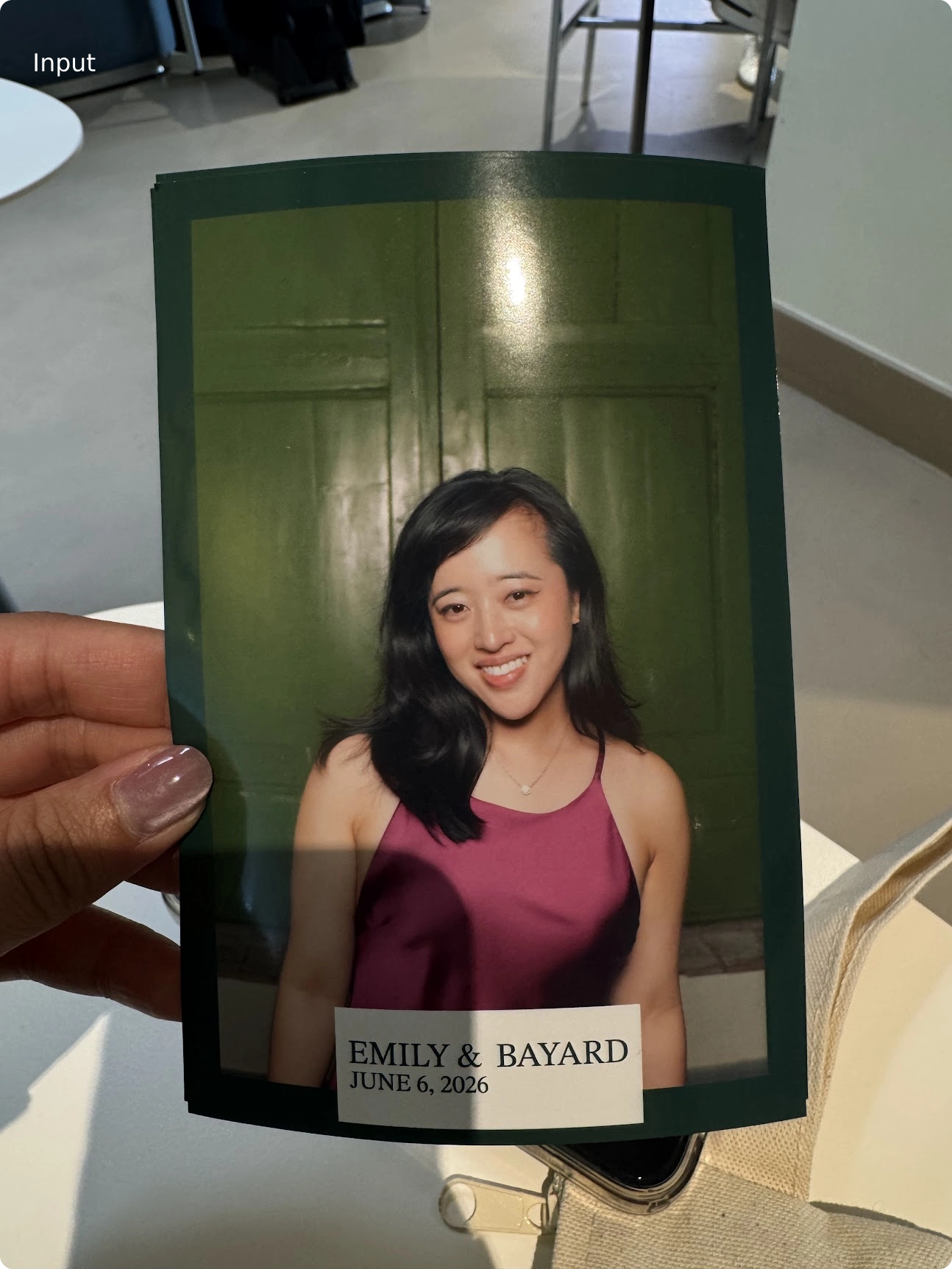
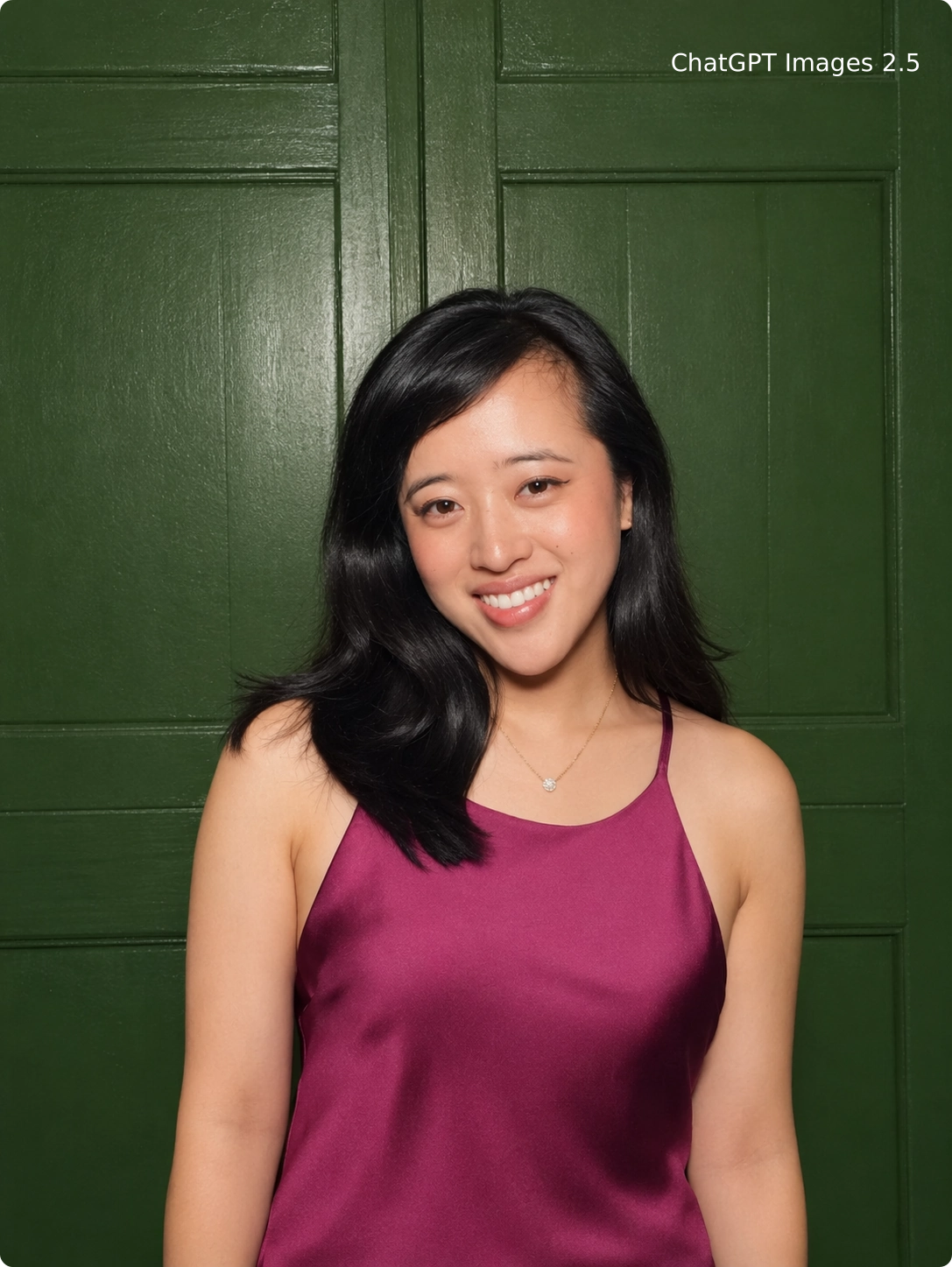
- 从快照提取人像(Headshot from photobooth):输入手持带有反光、相纸边缘及底部标签的抓拍快照,输出图去除了持握手指与反光遮挡,提取出干净的正身肖像,保留了紫红上衣和身后的绿门背景。
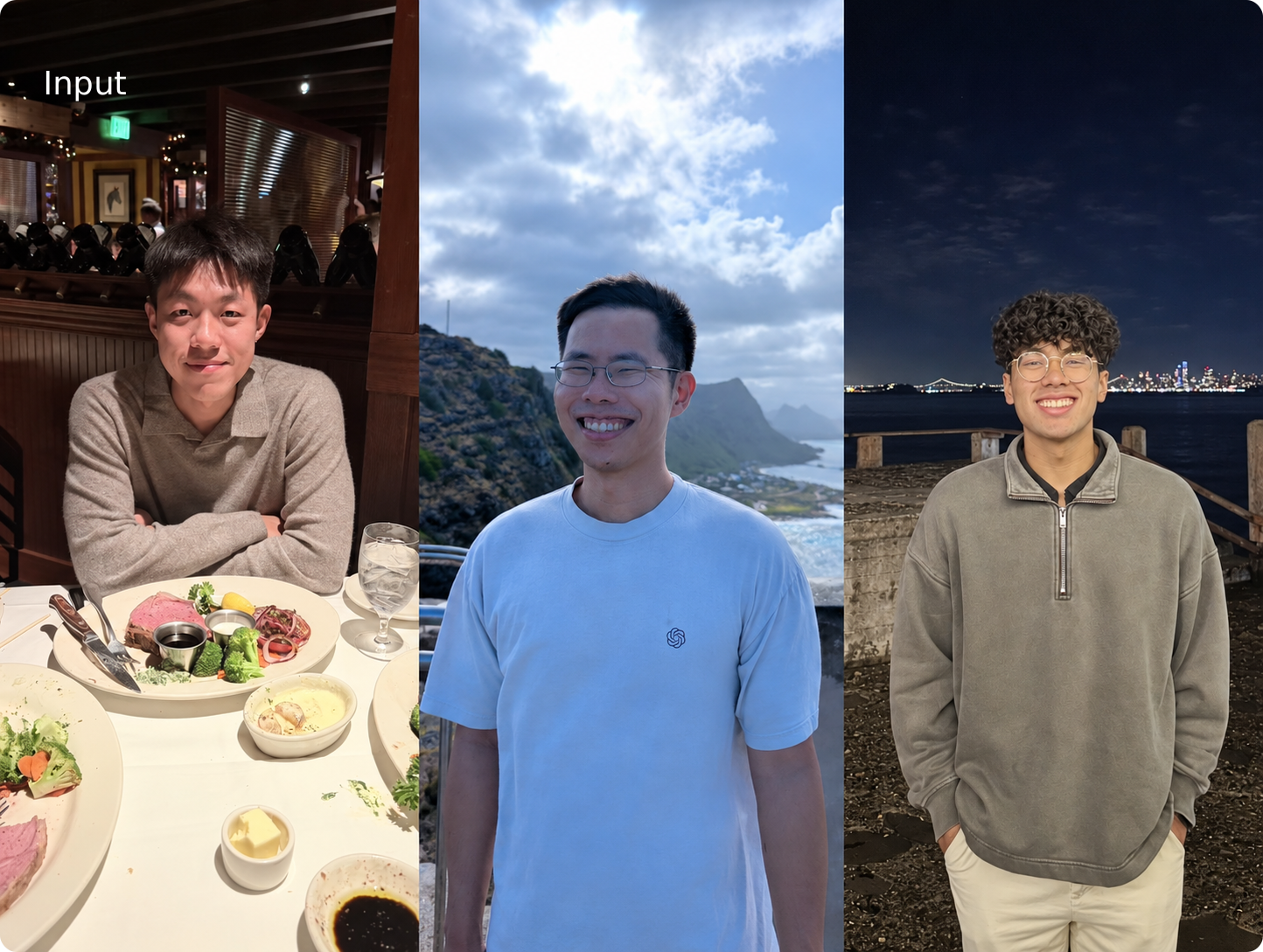
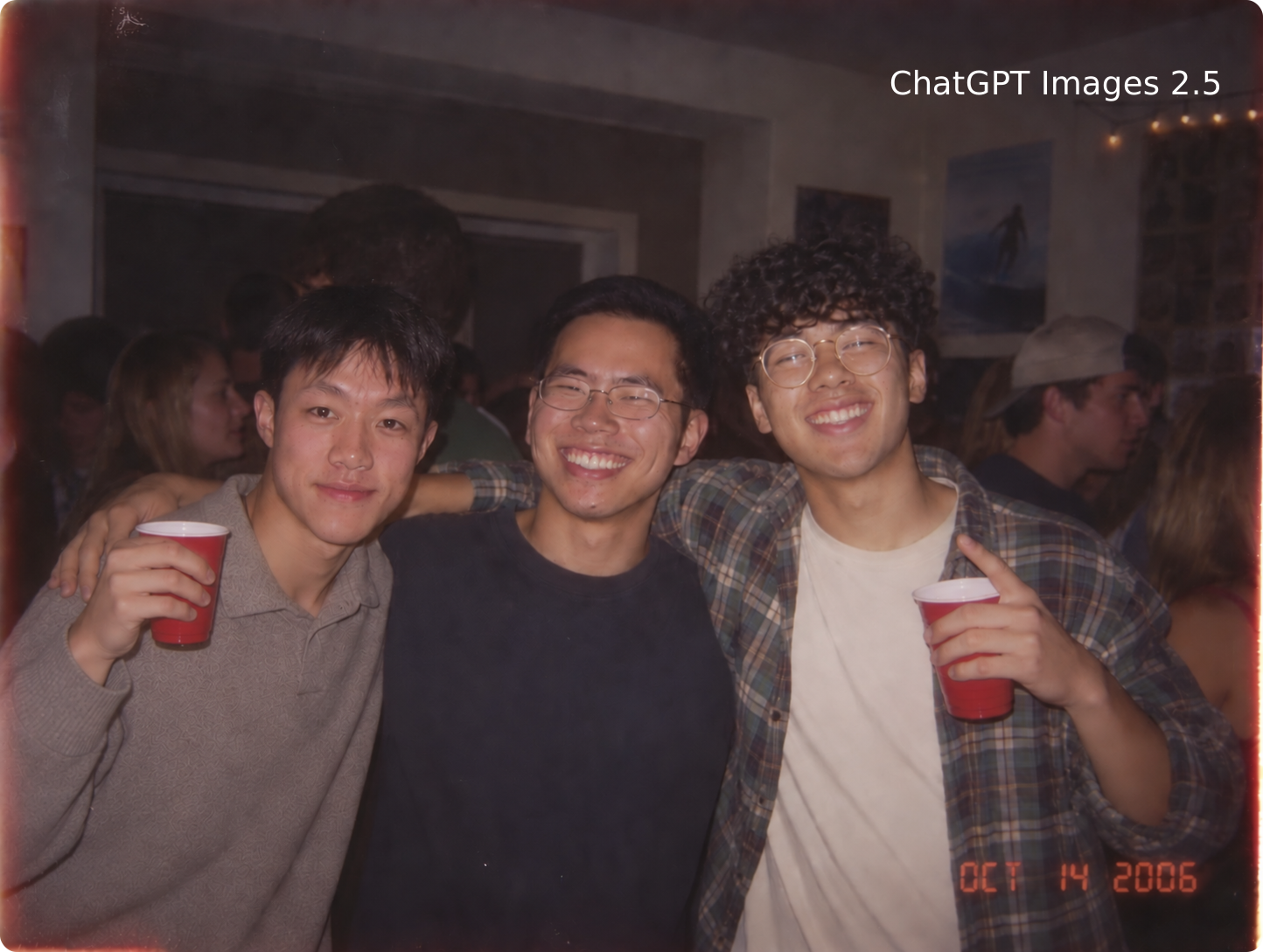
- 多张单人照合成(Composite party photo):输入三位男士在不同光照环境下的独立单人照片,融合成一张三人在室内派对并肩站立、手持红色水杯的聚会合影。
智能与风格理解:从复杂版式到系列物料
Images 2.5 增强了对复杂视觉指令的解析能力,在处理真实世界信息时更加准确,更能遵循特定艺术风格与版式要求,并支持原生透明背景输出。
- 多单元版式协同(世纪中叶现代风九宫格海报 mid-century-modern-posters):在 3×3 网格内协调 9 组独立的几何符号(波浪、花朵、人脸侧影、阶梯、眼睛等)与醒目的英文短语(如 CREATE、GROW TOGETHER、CHOOSE KINDNESS 等),展示了对多元素画面的综合组织力。
- 系列化物料风格统合(复古国家公园邮票 vintage-national-park-stamps):涵盖黄石(Yellowstone)、大峡谷(Grand Canyon)、冰川(Glacier)等 8 处不同地貌景观,全部统一遵循古典印画质感与锯齿邮票边框。
- 层级结构与真实世界信息(太阳耀斑演示页 presentation-image):模拟幻灯片编辑器界面,包含“What Causes Solar Flares?”主标题、太阳图像以及底部四步科学过程示意,符合专业报告的视觉层级结构。
- 多元艺术风格再现:
- 复古未来主义(retrofuturism):一家三口隔窗眺望巨大的太空圆柱居住体,呈现古典科幻宣传画风格;
- 印象派城市风光(impressionist-cityscape):利用厚涂彩色笔触表现海湾、斜坡街道与红色跨海大桥;
- 科幻超现实主义(sci-fi-surrealism):倒悬的城市建筑、夜空横向悬浮的人物与弧形地平线;
- 婚礼邀请函(wedding-invitation):奶油金典雅边框、对称徽章与手写字体排版;
- 马赛克拼贴(mosaic):蓝金马赛克瓷砖缝隙拼出地球与星系;
- 贴纸海报(stickers):复古质感海报中黑猫捧着贴纸页;
- 赛博朋克都市(cyberpunk):冷蓝雨夜高楼、巨型发光广告屏与空中悬浮飞行器。
- 原生透明背景支持(Transparent Background):支持在生成与编辑时直接输出带有 Alpha 通道的透明底图(PNG/WebP),在 UI 图标、商品抠图、PPT 配图与网页素材制作中,减少后期抠图工作。


ChatGPT 交互功能升级:四个实用创作工具
除了模型本身画质与一致性的提升,客户端增加了四个降低操作门槛、提升控制精度的交互工具:
@Sketch(手绘草图指引):空间布局或服装线条往往难以用纯文字完全描绘。在输入框输入@Sketch可调出画板,直接手绘房间走线、服饰轮廓或粗略构图作为视觉指引(visual guide),配合风格描述文字生成完整成品。
Templates(场景预置模板):为海报(Poster)、宣传单(Flyer)、周边商品(Merch)等热门创作格式提供起点,免去面对空白画布的困扰,用户只需填入文字信息与风格需求即可快速成型。
-
图像直点批注(In-image Comments):无需在对话框中用文字繁复说明修改方位,用户可以直接在生成图片的目标位置放置评论,发起针对局部的聚焦修改。
-
携带 Prompt 创意分享(Prompt Sharing):分享图片时可同步附带生成该图所用的完整提示词,接收者可以直接套用这套构图与风格方案,并置换入自己的照片或细节(例如流行的 80 年代复古写真风格)。

API 双轨选型与精准提示词(Prompting)实战
根据画质要求与等待时间,API 提供两款模型:
Flare:优先速度
GPT-Image-2.5 Flare 是较小的模型,图像质量与 GPT Image 2 相当,延迟相比 2.0 降低最多 50%。适合社交内容、产品 UI 原型、视觉搜索和高并发批量生成。
Sunburst:优先画质
GPT-Image-2.5 Sunburst 是基础模型,图像品质高于 GPT Image 2,跨轮编辑控制更精细,生成耗时相对更长。适合品牌视觉、广告物料和精修电商展示图。
如果 GPT Image 2 的画质已够用,可以先测试 Flare 能否缩短等待时间;如果复杂细节仍不理想,可以测试 Sunburst,并结合实际效果、耗时和预算选择。
GPT-Image-2.5 也已接入 Adobe Firefly,可以与其中的专业设计工具结合,完成从构思到成品的创作。
API 参数怎么设置
尺寸、质量和背景格式通过 API 参数设置;提示词负责描述画面内容。
模型 model
选择 gpt-image-2.5-flare 或 gpt-image-2.5-sunburst。
质量 quality
支持 auto(默认)、low、medium、high、xhigh、max。
图表小字或密集排版可尝试 high;有更细致的画面要求、且能接受更长等待时,再测试 xhigh 或 max。更高档位不保证每次都得到更好的结果。
尺寸 size
常用规格包括 1024x1024、1536x1024、1024x1536。自定义尺寸需满足:
- 每边不超过 3,840 像素,且为 16 的倍数。
- 长边与短边之比不超过 3:1。
- 总像素在 655,360 至 8,294,400 之间。
总像素超过 3,686,400(2560×1440)属于实验性支持。
背景 background
支持 auto、opaque(不透明)和 transparent(透明)。
透明背景使用 background="transparent",输出格式选 PNG 或 WebP。PNG 不使用 output_compression;WebP 可以设置压缩率。
提示词怎么写
写清目标、参考图的用途,以及哪些内容需要改变、哪些需要保留。更多场景可查阅 GPT Image 2.5 提示指南。
- 为参考图分配明确角色(Assign roles to references):当输入多张参考图时,在提示词中分别指定图像编号与用途(例如“图 1 为主体人物”、“图 2 为目标服饰”),说明元素组合逻辑。
- 严格分离修改项与保留约束(Separate changes from constraints):明确使用“仅修改 X(change only X)”,并逐项列出必须锁定的要素(如人物五官、表情、发型、体态、背景构图、相机视角与光照色温)。
- 画面文字原样加双引号(Verbatim text in quotes):把需要出现的文案原样放入引号,指定出现次数(如“render exactly once”)与排版位置,并显式要求不添加多余文字。
- 逐轮单点迭代(Refine across turns):将上一轮生成的图片作为下一轮请求的输入基底,单次只微调一个局部属性,确认无误后再推进下一项,便于发现并修正意外改动。
换装提示词:把修改项与保留项分开
API 请求参数单独设置,例如 model="gpt-image-2.5-flare"、quality="medium"、size="1024x1536"。提示词可以写成:
图 1 是人物参考,图 2 是服装参考。
仅替换服装:让图 1 中的人物穿上图 2 的衣服。
保留人物的脸、肤色、发型、体型、姿态和表情。
保留图 1 的背景、相机角度、光照方向和整体构图。
让服装贴合现有姿态,布料褶皱与接触阴影自然。
不添加文字、标志或水印。
每轮完成后比对改动区域与保留区域。连续编辑仍可能改变不希望改动的细节;如果某一区域必须逐像素保持一致,应把可用的修改部分合成回原图。
API 计费标准与成本构成
Standard(标准)模式按 token 用量计费,计费单位为美元 / 100 万 token($ / 1M tokens)。
在 GPT-Image-2.5 Flare、GPT-Image-2.5 Sunburst 与上一代 GPT-Image-2 之间,基础 Token 单价保持完全一致:
| 计费项目(美元 / 百万 token) | GPT Image 2 | 2.5 Flare | 2.5 Sunburst |
|---|---|---|---|
| 图像输入 | $8.00 | $8.00 | $8.00 |
| 缓存图像输入 | $2.00 | $2.00 | $2.00 |
| 图像输出 | $30.00 | $30.00 | $30.00 |
| 文本输入 | $5.00 | $5.00 | $5.00 |
| 缓存文本输入 | $1.25 | $1.25 | $1.25 |
三款模型的对应单价相比 2.0 均未改变。价格核对日期:2026 年 9 月 9 日。查看当前价格。
单张图片的费用怎么算
一次请求的费用,是文本输入、图像输入和图像输出三部分费用相加。每部分按实际使用的 token 数量,乘以上表对应单价,再除以 100 万。
- 提示词:按文本 token 数计费。
- 参考图:数量和尺寸会影响图像输入 token 用量;命中缓存的部分按缓存输入价计费。
- 生成图片:输出尺寸和
quality档位会影响图像输出 token 用量,最终费用以实际用量为准。
发布时间、可用范围与安全机制
- 发布时间与平台覆盖:2026 年 9 月 8 日起,逐步面向 ChatGPT、ChatGPT Work 以及 Codex 的所有层级用户开放,覆盖桌面客户端、移动端与 Web 网页端。
- API 开放范围:开发者已可在 API 中调用
gpt-image-2.5-flare与gpt-image-2.5-sunburst。 - 安全与合规治理:
- 对提示词与图像进行检查,帮助减少有害输出;
- 输出图像持续内嵌 C2PA 数字来源元数据 与 隐形数字水印(Invisible Watermarking),帮助识别图像的生成来源。
中文长图与海报多轮精准微调实战模板
现实照片主体锚定与环境/服装置换模板
Introducing ChatGPT Images 2.5IntroducingChatGPT Images 2.5ChatGPT Images 2.5
Every week, people create more than 3 billion images across ChatGPT Images and the GPT‑Image models in the API. Today, we’re expanding what you can create with ChatGPT Images 2.5—our new state-of-the-art image model that brings sharper details, more precise editing, and faster generation to your creative workflows.
Images 2.5 produces more natural lighting and richer textures, is better at preserving the subjects in your reference photos, and follows editing instructions more reliably across multiple turns. We’ve also reduced image generation latency by up to 50% compared with Images 2.0, so you can generate images and refine your concepts more quickly.
In ChatGPT, we’re introducing product features that give you more control over the creative process. Sketch(opens in a new window) is a new feature that lets you draw directly in ChatGPT as a reference for your final image. Templates make it easier to start creating across some of the most popular image formats, like flyers and product photos. You can also now place comments directly on images for more focused editing, and you can share prompts you’ve used to let others try your ideas with their own photos and details.
Images 2.5 is available to all ChatGPT, ChatGPT Work, and Codex users across desktop, mobile, and web.
For developers, we’re introducing two new models in the API. GPT‑Image‑2.5 Flare brings the same improvements in quality, editing, and speed, and GPT‑Image‑2.5 Sunburst offers an extra level of precision for detailed creative work with longer generation times.
The most meaningful images feel grounded in the real-life people, places, and memories they’re based on. Images 2.5 is better at working from reference photos to transform familiar subjects across new settings, visual styles, and compositions. Image subjects look more recognizable, lighting and textures feel more natural, and distinctive features are more likely to carry through.
For teams building with the API, this same fidelity makes reference-led workflows more reliable, so variations can stay anchored to the original source.
We’ve made it easier for you to make focused edits, so you end up with final images that are more aligned with what you actually had in mind. Images 2.5 is better at editing only what you’ve asked for, while keeping the rest of the details the same—even with more complex subjects and backgrounds.
For developers using the Images API, this gives users the ability to update a single element—such as a product, background, or piece of copy—while preserving the subject, composition, and brand treatment around it.
The following videos are made up of multiple images, highlighting the model’s improved ability to follow precise editing instructions.
During longer ChatGPT conversations, Images 2.5 follows specific editing instructions more reliably across multiple edits. Earlier changes are more likely to stay consistent, and each new edit builds on the work you’ve already done without degrading image quality over time.
That consistency also matters in production workflows, where developers need to make targeted changes without rebuilding the entire asset.
The following videos are made up of multiple images, highlighting the model’s improved ability to maintain image quality over multiple turns.
Images 2.5 is better at understanding complex visual instructions and translating them into coherent results. Images that include real-world information have more accurate content, and the model can handle more complex layouts including transparent backgrounds. It’s also better at reflecting visual styles, so your images are more aligned with your artistic vision.
For developers and businesses, this makes complex creative briefs more dependable. The model is more likely to retain the requested visual direction, composition, and individual details, instead of drifting as instructions become more specific. That matters when generating a series of on-brand creative assets, UI concepts that preserve a given hierarchy, or presentation visuals that fit a defined structure.
Sometimes the clearest way to explain an idea is by drawing it.
We’re introducing Sketch, a new feature which lets you draw right in ChatGPT and use it as a visual guide. Now you can quickly sketch the layout of a room, the contour of an outfit you’re concepting, or just a funny doodle, and ChatGPT will turn your rough art into a complete image. Add a description of the style and any other details you want to make sure it reflects your vision.
You don’t need to be a professional artist—this is just another way to get your final image closer to what you have in mind. To try it yourself(opens in a new window), just type “@Sketch” in ChatGPT.
At times you may have a clear idea of what you want to make—you just need some help getting started.
We’re introducing templates for some of the most popular creative formats. Instead of starting with a blank canvas, you can choose a template like “Poster” or “Merch” and add details like information to convey, design elements, or styles to personalize your results.
Often you end up with an image that’s too good not to share.
Now when you share an image, you can also choose to include the prompt that got you there. Someone else can then run with the same idea, bringing in their own images and details to make a version that feels like their own.
Developers are building image generation workflows into products used by creative, marketing, retail, and media teams every day with the Images API.
We’re releasing two new image models in the API:
GPT‑Image‑2.5 Flare brings the same improvements in quality, editing, and speed to the API and is the default choice for most applications, delivering higher-quality images than GPT‑Image‑2 at 50% lower latency. It’s well suited to everything from creator and social content to product experiences, visual search, rapid image prototyping, and high-volume generation.
GPT‑Image‑2.5 Sunburst is built for premium visual workflows that benefit from tighter control across edits. Use it for creative and editing workflows like production-ready campaign creative or polished product imagery.
Here’s what early customers have to say about the new models:
1 of 4
We’re building image generation to be useful, creative, and safe. ChatGPT Images 2.5 builds on our existing safeguards, with checks on prompts and images to help prevent harmful outputs. We continue to use C2PA metadata and invisible watermarking to help identify images made with our tools. You can read more about our evaluations and approach in the system card(opens in a new window).
Images 2.5 is rolling out today to ChatGPT, ChatGPT Work, and Codex users across all tiers on desktop, mobile, and web.