
ChatGPT Intelligent UI 技术拆解:模型描述界面,编译器和客户端把它运行起来
沿着 DIL 描述、服务端编译和客户端运行的链路,拆开流式显示、状态更新、数据填入与 AppBlock。
ChatGPT Intelligent UI 可以把回答变成带有按钮、图表和滑杆的界面。在原文的教学月费估算中,调整席位数就能看到价格改变;生成这份回答与拖动之后的更新,经过的步骤并不相同。
这套系统把工作分给模型、编译器和客户端:模型用 DIL 描述文字、组件与计算逻辑;编译器把描述转换成程序与数据;客户端运行逻辑,并用原生组件显示结果。用户随后拖动滑杆时,已经写好的计算可以在客户端完成,不必让模型再生成一遍。
AI 界面工程团队 Thesys 通过分析公共网页流量、抓取服务器推送补丁(SSE),并检查前端分发的核心运行时脚本与组件注册表,梳理出了网页端从模型输出到界面显示的运行链路。(以下实现细节来自 Thesys 对网页端的逆向观察)

模型、编译器和客户端分别负责什么?
在原生组件路径中,客户端的工作还分成两部分:运行时执行逻辑并产生更新操作,渲染器按这些操作绘制组件。沿着同一份月费估算,可以把模型、编译器与客户端的分工逐步接起来。
模型:用 DIL 描述内容、组件和逻辑
大模型在生成回复时,使用的并不是纯文本,也不是传统的 JSON 结构树,而是一种名为 DIL 的专用语言。它由三部分融合而成:
- 普通 Markdown:用于书写段落文字与排版标题;
- 类似 JSX 的组件标签:用于声明布局容器与功能组件(如
<box>、<slider>、<title>); - 内联 JavaScript(以
{@body ...}标识):用于声明内部响应式状态(State)与推导逻辑。
观察一个典型的教学测算示例(注:示例中 $29/席位/月为用于演示公式逻辑的教学数据,非真实套餐定价):
## Team plan estimate
Drag the slider to see the **monthly price** for your team.
{@body const [seats,setSeats] = DIL.useState(8)}
{@body const price = seats*29}
<box border padding={3} gap={2}>
  <slider min={1} max={50} value={seats} onChange={setSeats}/>
  <title size="xl">${price}/mo</title>
</box>
在这个片段里,模型通过 DIL.useState(8) 定义了默认席位为 8,通过普通 JavaScript 表达式计算总价,再将状态与滑块组件绑定。这条推文把主路径概括为“模型从不写原始代码”,这并不准确——模型确实在直接编写 JavaScript 逻辑,只不过它被放在专用标记语言中。
编译器:把描述转换成可运行程序与数据
客户端浏览器不会按原样直接执行模型生成的原始 DIL 字符串。OpenAI 的后端服务器会处理模型输出流,将其动态编译为一个独立的 JavaScript 执行函数和一份 JSON 常量配置表(在会话元数据中标记为 model_dil_v2)。回复中的普通 Markdown(标题、段落、粗体)也会被编译进同一棵组件树(如转化为 title、带 bold 的 text),文字则抽离移入 constants 常量表。
服务端编译器主要完成五项关键加工:
- 函数标准化:将所有 XML 风格的标签转译为
__dil.jsx(...)函数调用,客户端不再需要 DIL 语法解析器。 - 表达式容错:编译器用
__dilSafe包装表达式,出错时返回备用值,帮助隔离局部错误。这能减少一处异常对整份回答的影响,但不检查公式是否正确。 - 文本抽离为常量表:静态文字被移入名为
constants的哈希字典,例如{"0": "Team plan estimate", "4": "$"}。这样在后续打字流中,文本的增多只会修改 JSON 字典,而不需要修改 JavaScript 代码本身。 - 为状态加入稳定键:为每一个状态钩子注入稳定键(如
{ key: "seats" }),确保界面后续重新编译时,用户拉过的滑块位置不会被冲刷回初始值。 - 白名单校验与自动修复:依据设计系统字典(Catalog)严格过滤非法属性(例如发现模型写了未定义的
fill属性或格式错误的数值,直接在编译期剔除并打上诊断标记)。
客户端:隔离运行逻辑,把结果显示成原生界面
在沙箱里执行逻辑、保存状态
大模型生成的代码本质上是不受信任的外部输入。如果直接在宿主页面运行,极易带来 XSS 攻击或数据泄露隐患。
ChatGPT 在浏览器端采用了一套分层隔离方案:
- 页面预先加载一个隐藏的沙箱 iframe(
runner.html),并赋予严格的 CSP(内容安全策略:default-src 'none'),限制资源访问。 - 该 iframe 随即启动一个专属的 Web Worker。
- 限制可用能力:Worker 在执行程序前移除模型代码可访问的网络、定时器、消息传递和动态代码执行能力,并冻结剩余全局对象。运行时自身仍通过受控的求值入口执行编译程序。
- 内置微型调和器(Mini Reconciler):Worker 内部运行着一个类似 React 的调和器。它执行组件逻辑,比较新的组件树与上一次组件树,计算需要更新的操作,并序列化为底层的二进制 UI 操作指令(如
CREATE #9 slider)。 - 函数不离开沙箱:组件绑定的事件处理函数(如
onChange)绝不向主页面传输,主页面只能拿到一个标识符(如fn#1)。 - 看门狗机制(Watchdog):若某段逻辑陷入死循环或执行超时,看门狗会强行杀掉并重启 Worker。
在宿主页面中绘制组件、接收用户操作
主页面拿到 Worker 吐出的 UI 指令后,映射到 ChatGPT 自己的原生组件库中(约包含 70 个原生组件,捕获的响应中出现了 39 个)。页面自带进场动效:文字以 0.7 秒淡入,新行以 0.42 秒滑入,图表展开耗时 1.8 秒。
更关键的是反向交互链路:当用户用手指或鼠标将席位从 8 拖动到 9 时,主页面仅把 fn#1(9) 发给 Worker。Worker 内部执行 setSeats(9),调和器重新计算价格为 $261/mo,并向主页面发回界面更新操作。这个价格计算在客户端完成,不需要再次调用模型。这不意味着整个页面不会发出状态上报等其他网络请求。
生成的界面之所以能与 ChatGPT 原生视觉保持统一,核心在于各层共享的一套组件字典与设计系统(Catalog)。它包含三类内容:
- 原生组件:客户端已经知道怎样绘制的按钮、滑杆、文字等元素。
- 设计令牌(Token):统一间距、圆角与色彩等规则。部分属性也接受像素宽度或十六进制颜色,Token 是优先选择。
- 预制复合组件:OpenAI 预先用 DIL 写好并送入沙箱,例如图像和产品组件。
分析团队捕获的样本中,模型调用了预制组件,没有自行定义新的复合组件。
Catalog 同时发挥三重约束:规范模型只能挑选预设标签、充当编译器校验属性与类型的标准模式(Schema),并指导宿主页面如何具体绘制。
这种只传递底层 UI 指令的协议本身具备良好的跨端通用价值;沙箱运行环境中虽然保留了 React Native 引擎 Hermes 所需的全局对象,但移动端是否运行着完全相同的运行时,目前只是分析团队基于代码线索的推测,尚未经过直接抓包验证。
首次生成:初始 8 席位;价格 = 席位 × 29。拖动不会重写这段描述。
查看DIL 描述
## 团队月费估算
Drag the slider...
{@body const [seats,setSeats]
       = DIL.useState(8)}
{@body const price = seats*29}
<box border padding={3} gap={2}>
  <slider min={1} max={50}
          value={seats}
          onChange={setSeats}/>
  <title size="xl">
    ${price}/mo
  </title>
</box>初始程序:加入稳定的状态键;初始值仍为 8。拖动无需重新编译。
查看编译片段
// 编译产物 JS + JSON:
DIL.render(__dil.jsx(() => {
  const [seats, setSeats] =
    DIL.useState(8, {key: "seats"});
  const price = __dilSafe(
    () => seats * 29, undefined
  );
  return ...
}));

// 常量表 (JSON):
"constants": {
  "0": "团队月费估算",
  "4": "$", "5": "/mo"
}// 沙箱内部状态 (Hook State):
state.seats = 8;
state.price = 232;
// 触发用户事件:
recv: fn#1(8)
// 派发原生 UI 操作:
UPDATE #12 text "232"
(列出金额更新示意,非完整操作日志)流式编译:界面没写完,为什么已经能显示和操作?
流式输出普通纯文本非常简单,每来一个词直接拼在最后面即可。但流式输出一个包含嵌套节点和逻辑闭包的交互界面,却还要解决两个问题:
- 语法尚未完整:大模型是一个词一个词往外吐的。如果模型刚写了
<box border><slider min=,后面的属性还没吐出来,普通的解析器无法直接运行这段未完成语法。 - 打字机状态连贯性:用户可能在模型还在生成后半部分回复时,就已经在拖动前面的滑块了。此时后台源源不断送来新数据,绝不能把用户正在操作的控件重置掉。

在一次包含 6,341 个字符、正文流持续 18.7 秒的响应抓包中,逆向团队记录到了 84 次更新事件(通过 SSE 通道下发 JSON-Patch)。其中 76 次带有新文本,分成下面三类;另有 5 次送来图片结果、1 次建立消息、2 次标记完成:
一次响应里,84 次更新分别做了什么?
基于 Thesys 逆向抓取的 6,341 字符、正文流式输出持续 18.7 秒的流式会话样本。点击不同切片查看背后的处理逻辑:
模型当前输出状态 (Model Output)
<box border padding={3}>
  <slider min={1} max={50} value={seats} />
  // 新增了一个子组件...
服务端下发补丁 (SSE JSON-Patch)
{"p": "/message/metadata/model_dil_v2/code",
 "o": "replace",
"v": "DIL.render(__dil.jsx(() => { ...整个完整重编的JS程序... }))"}分布条按更新次数绘制;83% 指重复代码占补丁字节量的比例,两者口径不同。以上来自单次捕获,不能当作所有会话的平均表现。下方代码为简化示意。
- 结构变动包(52 次):在这些更新中,服务端对目前为止写出的全部 DIL 进行全量重编译。按照原文的观察,编译从第一个 Token 就开始,没有组件标签时也会处理 Markdown;服务端周期性重编译,是否恰好由每个新输出块触发仍是团队的推测。结构变化后,编译程序的闭合括号也会变化,不能像文字流一样直接追加,只能通过
replace整段重发,该次捕获中,重复发送的代码约占补丁数据量的 83%。服务端重新编译全部描述,客户端仍可以只更新需要改变的界面部分:客户端 Worker 在求值后仍会比对新旧组件树,向主页面发送更新操作。 - 仅文本增长包(14 次):当模型只是在普通段落里打字、未触碰组件结构时,编译出的 JavaScript 代码未发生变化,网络下发便只在 JSON 常量表里追加新字符;不重复发送相同脚本,不等于服务端跳过了编译。客户端更新文本节点,保持已有结构。
- 未闭合标签保护(10 次):当检测到模型正停留在写了一半的标签内部时,服务端的裁剪机制会把残缺未完的标签临时砍掉,或者将有内容的开标签自动补全闭合标记。客户端继续显示已经可用的部分。如果新程序求值或渲染失败,Worker 会保留上一次成功运行的版本。
数据填入:图片和价格怎样进入编译后的界面?
大模型生成界面时,经常需要呈现特定商品、地点地图或实物照片。如果让大模型自己去凭空“默写”一张图片的 URL 或最新的官方售价,会增加链接错误、抄错价格或编造细节的机会。
智能 UI 在这里运用了巧妙的数据旁路控制:
图片:模型写搜索需求,服务端补入结果
遇到图片时,模型只写搜索意图,不写具体链接:
<AsyncImage
  query="slow roasted rosemary garlic lamb shoulder browned golden roast in baking tray"
  aspectRatio="5:4"
  maxWidth="152px"
/>
当服务端编译器检测到这个标签闭合后,会直接在后台发起真实的图片检索,并在几秒后通过 appData 数据补丁把经过校验的真实图片地址注入进去。团队还观察到了同类的服务端解析组件,包括图片组、商品与地点标签(Entity)和来源引用(Cite)。
工具数据:引用已有字段,少经过一次模型转述
当模型此前调用过外部检索工具(例如查询到了耳机参数),它在界面里通过 {turn448791product0.displayed_price} 引用字段名,页面显示的 ₹35,989 和商户名称全部由后台原生 JSON 直接填注。在这个例子里,模型负责安排显示位置,数值来自工具结果本身。这降低了转抄错误的机会,却不保证来源或选择正确;团队也看到天气搜索结果由模型写回正文,并非所有数据都走旁路。

AppBlock:组件库装不下时,另一条路径怎样运行?
原生组件库即使再丰富,也无法满足所有需求——比如用户要求“写一个能发声合成节拍的 16 步鼓机”。
这类需求可以使用 AppBlock 扩展路径。大模型会直接生成包含 HTML、CSS 和 <script> 的代码。DIL 编译器不翻译其内部代码,编译后的程序中仅留下 __chatgptClientDefinedWidget 占位标记,客户端直接从原始回复文本中读取源码,并在独立域名的双层 iframe(Skybridge 沙箱:*.web-sandbox.oaiusercontent.com)中运行。为了不让这个网页显得像个格格不入的突兀补丁,宿主向其注入了 Tailwind 基础规范与官方 CSS 变量(如 --viz-text、--viz-panel),使其能自动与 ChatGPT 的深浅色主题配合。
与前面的原生组件链路不同,AppBlock 使用另一套运行路径,不能直接套用前文的 Worker 与 GenUI 通路:它由网页自身绘制界面,状态保存在小应用自己的 JavaScript 变量中。在分析团队捕获的网页端样例中,AppBlock 既没有调用回 ChatGPT,刷新页面后其内部状态也会丢失。

能点击不等于算得对,也不等于模型记住了你的选择
Thesys 的网页端样本还显示了几项影响实际使用的问题:
- 流式更新会重复发送代码:该次响应的补丁数据约 275 KB,其中约 83% 是重复发送的编译程序;这是单次捕获的传输开销,不能代表所有会话。
- 刷新页面状态即丢失:虽然客户端会向后台上报 view-state 状态事件,但在团队检查的网页端样本中,刷新页面后,修改过的数值回到初始状态。
- 本地状态不会自动进入模型上下文:并非所有交互都能做到零网络或完全不调用模型。在组件需要向外交互时,依赖宿主提供的
GenUI对象:其中copy负责复制文字、openUrl负责打开外链,这些动作由宿主环境处理,不需要模型重新生成回答;而真正让大模型知悉用户选择的唯一途径,是显式调用GenUI.issueNewTurn(...)。例如在设计狗狗背心的灵感板中,用户选好风格与主色后点击“继续推进”,组件内部其实是将本地状态拼接成一段文字(如“基于灵感板推进设计,风格:舒适,主色:沙色……”),作为一条新的用户回复发进对话框,大模型随后才据此生成新的回答。如果不触发这类显式发送,无论你在前端把滑块拉到多少、勾选了什么,大模型在上下文中都是完全不知情的,后续追问时也无法感知你此前在界面里做了哪些调整。 - 追问不会就地修改旧界面:用户提出下一步修改意见后,模型不会在原有卡片上做就地增量更新,而是直接在下方重新生成一个全新的卡片。
- 静默的逻辑错误:表达式抛异常时可能只显示空白;公式能运行却算错,则未必会触发异常。界面顺利渲染不能证明业务计算正确(逆向分析曾发现某看板切换指标时营收数字从 $6,930 骤变为 $256,410)。
- 纠错未能形成上下文闭环:服务端编译器虽然会剔除非法属性并打上诊断记录,但在多轮对话测试中,模型仍会反复犯同样的属性书写错误,这提示诊断可能没有传回模型,但仅凭这些样本无法确定内部反馈机制。
此外,调和器并不总能保证生成最小变更指令。在捕获的单次价格组件交互样本中,一次点击产生了 158 项操作指令,其中仅有 4 项带来了实际属性变更。
在兼容与布局层面同样存在现实妥协。为了兼容不能运行编译程序的客户端,服务端会在编译时同步生成一份纯 Markdown 回退版本(fallbackMarkdown),它保留正文,并用客户端已有的内联标记表示图片、商品、引用和地图;交互部分则变成静态内容。依赖状态推导的计算值以及 {#each} 循环内容在团队捕获的回退文本中缺失。同时,模型只输出检索词而不负责检验检索结果,图片搜索仍会出现偏差(在一次样本中,查询车把指拨特写却返回了电动自行车的商品图);团队捕获的界面采用固定列数与像素宽度,未调用已有的断点钩子(Breakpoint hooks),原生组件渲染并未让移动端排版自动得到妥善解决。
OpenUI 可以做出类似体验,默认示例仍依赖云端
要把这类体验放进自己的应用,可以从 OpenUI 提供的组件协议和渲染器入手。 Thesys 提供了名为 OpenUI 的开源 Generative UI 框架,并基于该框架开源了一套复刻类似交互体验的演示项目 Open Intelligent UI(旧金山一日游路线,支持相册展示、地图联动与偏好表单)。需要澄清的是,该演示项目使用的是 OpenUI 自身的流式标记语言(OpenUI Lang),并不是把 OpenAI 内部的 DIL 规范开源。
这套开源方案可以帮助开发者在自有应用中构建相似体验,但具体实现和部署依赖仍需分别厘清:
- OpenUI 框架的定位与价值:它定义了一套轻量级流式标记语言(OpenUI Lang),在项目自测的七种界面场景中,相比选定的 Vercel JSON 格式,整体少用约 52.8% 的 Token,单个场景最大减少约 67.1%(这是项目所选场景的自测结果,不能直接换算成通用速度提升),并提供了覆盖 React、Vue、Svelte、Angular 的渐进式流式渲染器。
- 演示项目的运行环境与模型依赖:Open Intelligent UI 默认运行要求 Node 24 与云端网关密钥(
THESYS_API_KEY),其预设模型为openai/gpt-5.5(这是专为该演示项目设定的配置,并非本篇 ChatGPT 实测采用的模型)。开发者虽然可以改接兼容接口的其他模型或本地 LLM,但项目本身并不是默认全离线架构;本地推理能否顺畅跑通,关键取决于所接模型能否稳定、可靠地输出合规的组件协议,框架支持改接模型,并不保证任意本地模型都能达到相同体验。 - 外接数据服务与体验边界:示例中图片搜索依赖 Gateway 工具与维基百科兜底;地图路线几何数据则来自公开 OSRM 服务的驾车模式(driving profile),这仅仅是一条道路走向的概览示意,并非步行或公共交通导航,实际步行与公交路线仍需另外查询。若脱离这些外围数据服务,单纯在本地调大模型是无法直接复现完整联动体验的。
接续前文提到的“模型看不到本地状态”,在该演示项目中,组件通过 useStateField 将用户增删景点的记录保存在回答状态中,随消息一同保留;后端的 /api/chat 通过 describeRouteEdits 将增删记录转写为提示文本,带入下一轮模型上下文。选中的景点(routeSelected)也保存在界面状态中,但这个转换函数没有读取它,因此不会被写进这段给模型的文字。
两者的图片数据流也有差别:OpenUI 是 Gateway 搜索后由模型拿到结果并将 URL 填入组件属性中,而团队观察到的 ChatGPT AsyncImage 路径,是服务端检索后直接向 appData 补入结果。交互体验相似,并不代表该项目复用了 OpenAI 的 DIL 编译器、Worker 沙箱或完全相同的数据流。
从模型生成到用户交互,智能 UI 的本质是把能描述需求的模型、能验证结构的编译器、能响应输入的客户端和可靠的数据来源紧密连接在一起,才让原本单向输出的打字流变成了可直接操作的实用工具。开源生态能够复现相似的交互体验,但这并不等于逆向拥有了整套成熟系统;Thesys 所称的编译输出字节级一致,也仅限于其实测捕获的具体样例,并不代表完整复刻了内部系统。理清每一层的分工与边界,才是理解并落地生成式界面的务实起点。
ChatGPT Intelligent UI 技术拆解:模型描述界面,编译器和客户端把它运行起来
ChatGPT 的智能回答可以带滑杆、图表和按钮。以席位测算为例,拖动滑杆就能刷新价格。它如何做到实时交互?Thesys 对网页端的逆向观察,揭示了模型、服务端编译器和客户端的分工。
生成一次,交互在客户端继续
拖动滑杆 → Worker 改状态、重算价格 → 页面更新。这次价格计算不必再调用模型。
客户端仍可能上报状态等网络事件。
没写完也能用:先显示有效部分
服务端周期性编译已有描述,暂时裁剪或补全残缺标签;稳定状态键帮助新程序接续用户输入。一次捕获的 84 次更新中:
整段替换编译程序
只发送常量变化
保护已可用界面
真实数据怎样填入界面?
AsyncImage 检索意图 → 服务端搜索 → 用 appData 补丁填入图片。这不是所有数据的统一通路:天气样本仍经模型改写,图片检索也可能命中错误内容。
AppBlock:另一条运行路径
原生组件装不下的功能,例如能发声的鼓机,可以用独立网页实现。
在团队捕获的 AppBlock 样例中,未观察到回调 ChatGPT,刷新后内部状态丢失。
能点、能算,不代表模型记住了
- 本地选择不自动进入模型上下文。原生组件可显式调用
GenUI.issueNewTurn,把选择写成新用户消息;后续生成新界面。 - 渲染成功不保证公式正确。容错能隔离异常,但逻辑错误仍需验证。
- 状态与布局仍有边界。捕获的网页样本刷新后重置状态,固定列数也未自动解决手机适配。
We reverse engineered ChatGPT Intelligent UI. Here's how it actually works

ChatGPT launched Generative UI (finally) and renamed the field over night to Intelligent UI. We had to see how they implemented it.
This post is an in depth study of how OpenAI implemented their flagship Intelligent UI, the layers, formats and rendering natively across Web & Mobile.
Building blocks
ChatGPT's implementation divides the work between the model, the backend server, and the client:
- Inference format: the model writes the interface in DIL, which combines Markdown with JSX-like tags and JavaScript.
- Server-side compilation: the server converts each partial response into a JavaScript program and a JSON document of text and data.
- Client runtime: a sandboxed runtime executes the program and produces UI operations.
- Rendering: ChatGPT applies the operations to its own native components.
- Design system and catalog: the components, properties, and design tokens available to the model.

Inference format
This is what the model writes. In ChatGPT, it is a language OpenAI calls DIL: Markdown for prose, JSX-like tags for components, and JavaScript for state and logic. We will follow one small response through every layer:
## Team plan estimate
Drag the slider to see the **monthly price** for your team.
{@body const [seats,setSeats] = DIL.useState(8)}
{@body const price = seats*29}
<box border padding={3} gap={2}>
  <slider min={1} max={50} value={seats} onChange={setSeats}/>
  <title size="xl">${price}/mo</title>
</box>
The heading and the paragraph are ordinary Markdown. The tags are components from ChatGPT's catalog. The two {@body …} lines are JavaScript: the first declares a piece of state, seats, and the second derives price from it. The slider is bound to seats, so moving it updates the price.
A dedicated format is needed because the model writes the interface token by token.
- It has to be easy to write reliably, so it is built from notation the model already knows well.
- It has to stay usable while half-written. Statements sit on their own lines, and any open element can be closed automatically. That lets the server cut a partial response at its last complete construct and still compile it.
Server-side compilation
The client never executes the model's output as written. OpenAI's server compiles it into a JavaScript program and a JSON document, which are stored with the message (as model_dil_v2). The response compiles to this (formatted for readability):
function __dilSafe(evaluate, failureValue) {
  try { return evaluate(); } catch { return failureValue; }
}

DIL.render(__dil.jsx(() => {
  const __dilConstants = DIL.useConstants();
  const __dilModelDataBindings = DIL.useAppData((appData) => appData.opGenui?.modelDataBindings ?? {});
  const [seats, setSeats] = DIL.useState(8, { key: "seats" });
  const price = __dilSafe(() => seats * 29, undefined);
  return __dil.jsx(__dil.Fragment, null,
    __dil.jsx("title", { size: "lg" }, __dilConstants["0"]),
    __dil.jsx("text", null, __dilConstants["1"], __dil.jsx("bold", null, __dilConstants["2"]), __dilConstants["3"]),
    __dil.jsx("box", { border: true, padding: 3, gap: 2 },
      __dilSafe(() => __dil.jsx("slider", { min: 1, max: 50, value: seats, onChange: setSeats }), null),
      __dil.jsx("title", { size: "xl" }, __dilConstants["4"], __dilSafe(() => price, null), __dilConstants["5"])));
}, { key: "body:2" }));
{
"constants": {
"0": "Team plan estimate",
"1": "Drag the slider to see the ",
"2": "monthly price",
"3": " for your team.",
"4": "$",
"5": "/mo"
},
"appData": { "opGenui": { "componentResults": {}, "modelDataBindings": {} } }
}The Markdown is compiled into the same tree as the components. The heading becomes a title, the paragraph a text with a bold inside it, and their words move into the constants table.
Compilation does work that every client would otherwise have to repeat:
- Plain function calls. Markup becomes calls to __dil.jsx, so a JavaScript runtime can evaluate the program without a parser for DIL.
- Error isolation. Expressions are wrapped in __dilSafe, so an expression that throws removes one element instead of aborting the whole render.
- Text in a separate table. Static text moves into the constants table, so as a response streams, growing text changes the data rather than the program.
- Stable state keys. Each piece of state receives a key ({ key: "seats" }), so its value survives every recompilation.
- Repair and validation. Incomplete statements and tags are dropped, unclosed elements are closed, and properties that fail validation against the catalog are removed and recorded as diagnostics.
The JSON document holds the text constants and any data the server resolves for the response, such as image search results (see Data).
Client runtime
The client receives the compiled program and the JSON document. Its work is split between a runtime, which executes the program, and a renderer, which draws the result.
The program is model-written code, so it does not run in the ChatGPT page. ChatGPT loads a hidden iframe (runner.html), sandboxed with allow-scripts and a content security policy of default-src 'none', which starts a Web Worker.
- Lockdown. Before evaluating a program, the worker removes network access, timers, messaging, and dynamic code evaluation from its global scope, and freezes the remaining globals.
- Evaluation. It then evaluates the program with new Function. The runtime objects (DIL, __dil, GenUI) and the catalog's composite components are passed in as parameters.
- Watchdog. A program that does not respond within a timeout is quarantined, and the worker is restarted.
The runtime is a small reconciler in the style of React. It renders the component and keeps hook state in keyed slots. It then compares the resulting tree with the previous one and encodes the differences as a list of operations. It does not draw anything.
The following illustrative example shows the operations from a first render, with one line per node. Entries that list each element's property names are omitted:
CREATE #1  title   SET size = "lg"                                    PLACE under root at 0
CREATE #2  text "Team plan estimate"                                  PLACE under #1 at 0
CREATE #3  text                                                       PLACE under root at 1
CREATE #4  text "Drag the slider to see the "                         PLACE under #3 at 0
CREATE #5  bold                                                       PLACE under #3 at 1
CREATE #6  text "monthly price"                                       PLACE under #5 at 0
CREATE #7  text " for your team."                                     PLACE under #3 at 2
CREATE #8  box     SET border = true, padding = 3, gap = 2            PLACE under root at 2
CREATE #9  slider  SET min = 1, max = 50, value = 8, onChange = fn#1  PLACE under #8 at 0
CREATE #10 title   SET size = "xl"                                    PLACE under #8 at 1
CREATE #11 text "$"                                                   PLACE under #10 at 0
CREATE #12 text "232"                                                 PLACE under #10 at 1
CREATE #13 text "/mo"                                                 PLACE under #10 at 2
Functions never leave the worker; the slider's handler is sent only as an identifier (fn#1). On the wire, the operations are encoded as a binary sequence of integers, with strings held in a separate table.
Rendering
The ChatGPT page applies the operations to its own component tree. Each CREATE instantiates a native component from ChatGPT's design system, and the page animates changes as they arrive. The page accepts operations only for known component types, so model output cannot introduce arbitrary markup or styles. The exceptions are the raw CSS values some properties accept (see Design system and catalog) and AppBlock apps, which run in an iframe (see Escape hatch).
Interaction runs in the opposite direction. When the user drags the slider to 9, the page sends the handler's identifier and arguments to the worker. The worker calls setSeats(9), re-renders, and returns update operations. No model call is involved.
Design system and catalog
The catalog defines what the model can request. It is needed because the model does not build an interface from raw layout and styling rules. It chooses from components ChatGPT already knows how to draw, and styles them with design tokens such as padding={3}. Raw CSS values, such as pixel widths and hex colours, are accepted for some properties, but design tokens are preferred. As a result:
- Generated interfaces look like the rest of ChatGPT on every platform.
- The compiler has a schema to check output against. A property that does not exist on a component, or a literal of the wrong type, is removed during compilation and recorded as a diagnostic.
In one response we captured, the compiler removed two properties: fill on an icon (an unknown_prop diagnostic) and gap="1" on a box (an invalid_literal diagnostic).
The catalog has three parts:
- Native components. Around 70 components are defined in the component registry in ChatGPT's client code; 39 of them appear in the responses we captured.
- Design tokens for spacing, radius, colour, and size.
- Composite components written by OpenAI in DIL and sent to the sandbox prebuilt, such as the image and product components. In our captures, the model used these components but never defined its own.
Streaming
Streaming text is simple: each new token is appended to what is already on screen. Streaming an interface is harder, for three reasons:
- The output is usually not runnable yet. At most moments it is an incomplete program, with a tag or expression still open, and it cannot be executed as written.
- The interface has to keep working while it grows. Components the user has already touched must keep their state.
- Some content arrives separately. Data such as images comes from the server, not from the text.
Server Side Streaming
A plain stream of appended tokens cannot express this. ChatGPT instead streams patches to a structured message that holds the raw text, the compiled program, and its data side by side.
The response reaches the browser over a server-sent event stream (POST /backend-api/f/conversation). Each event is a JSON-Patch-style update to the message being built. A single event usually updates the raw DIL text and its compiled form together. This is one update from a captured response, shortened:
{"o": "patch", "v": [
  {"p": "/message/content/parts/0", "o": "append", "v": " Sunday lamb roast with friends — generous food, …"},
  {"p": "/message/metadata/model_dil_v2/code", "o": "replace", "v": "DIL.render(__dil.jsx(()=>{…"},
  {"p": "/message/metadata/model_dil_v2/constants", "o": "append", "v": {"0": "Here's a plan for a proper Sunday lamb roast with friends — …"}},
  {"p": "/message/metadata/model_dil_v2/constants", "o": "append", "v": {"1": "Since you're"}},
  {"p": "/message/metadata/model_dil_v2/fallbackMarkdown", "o": "append", "v": " Sunday lamb roast with friends — …"}
]}
The server does not compile incrementally. Every few hundred milliseconds, most likely with each new chunk of model output, it recompiles everything the model has written so far and sends the result. Compilation starts with the first token, before any tag has appeared.
The compiler has to take care of: - Compiling a half written response - Updating text - Updating UI
The timeline looks something like this:
Client Side Streaming
The page passes each new update to the sandboxed worker. The worker evaluates it, re-renders with the existing state, and sends update operations to the page. State keeps its values across recompiles because of the keys added during compilation. If a new program fails to evaluate or render, the worker keeps the last one that worked.
The page then animates each change:
- text fades in over 0.7 s;
- new rows and grid items slide in over 0.42 s;
- charts draw over 1.8 s;
- container heights transition instead of jumping.
Escape hatch: AppBlock, an app in an iframe
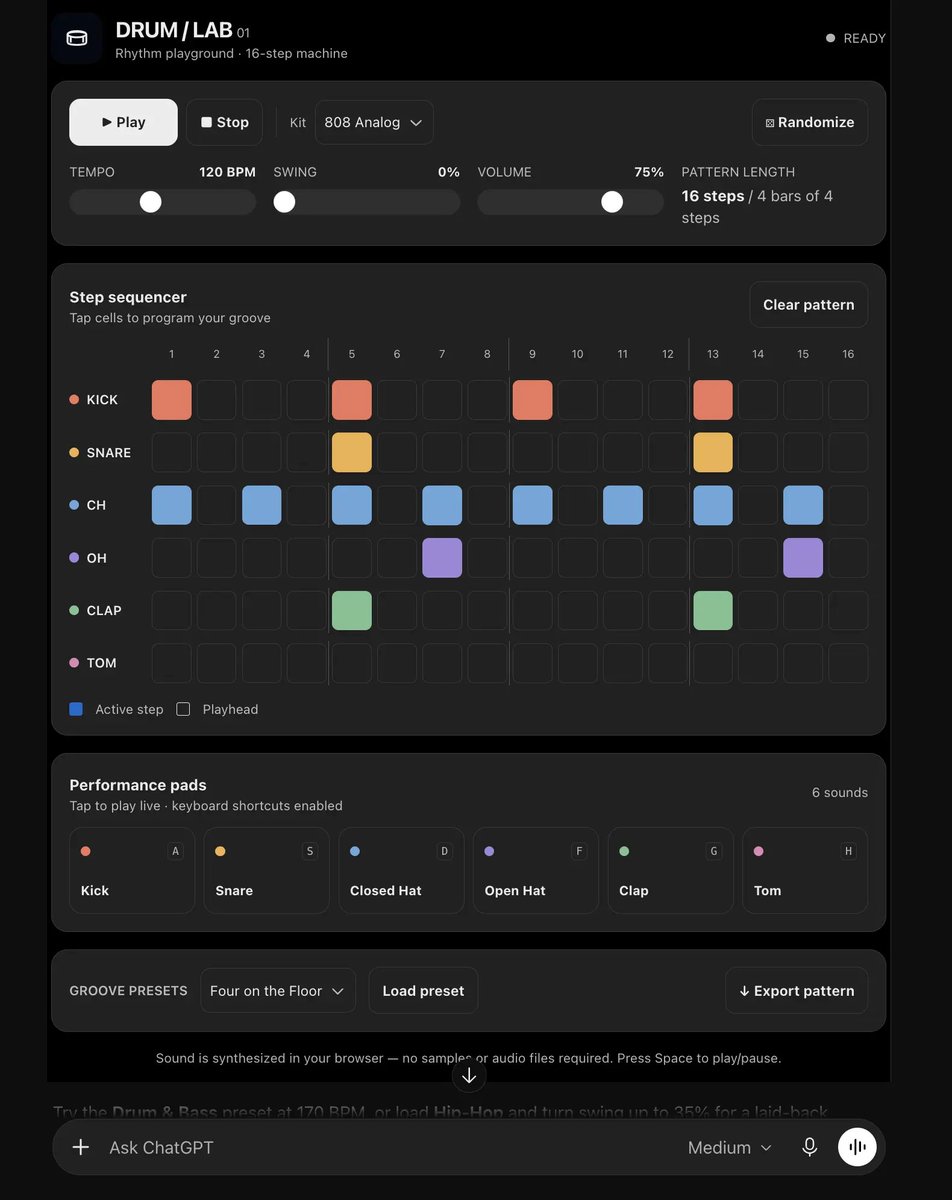
Some requests call for things the native components are not designed for, such as a drum machine that synthesizes sound with Web Audio. For these, the model can write an AppBlock: a self-contained web app in HTML, CSS, and JavaScript, embedded in the response. This is the start of one, shortened:
<AppBlock title="Drum Lab" icon="app-chatgpt" variant="inline" app_block_id="drum-lab-01">
<div id="dl" class="w-full min-w-0 space-y-4 text-base">
  <style>
    #dl{color:var(--viz-text)}#dl button{touch-action:manipulation}#dl .panel{background:var(--viz-panel);border:1px solid var(--viz-border);border-radius:15px}…
  </style>
  …
      <button id="dl-play" class="btn" style="background:var(--viz-text);color:var(--viz-card);min-width:100px">▶ Play</button>
  …
</div>
<script>
(function(){
const root=document.getElementById('dl');if(root.dataset.init)return;root.dataset.init="yes";
…
function audioInit(){if(!audio){const C=window.AudioContext||window.webkitAudioContext; if(!C)return false;audio=new C();…
…
})();
</script>
</AppBlock>
AppBlocks are rendered differently than Intelligent UI components.
Bringing it all together
You type a prompt. The model starts writing the interface, the server turns it into something ChatGPT can run, and the page builds it piece by piece as the response streams in. Once it’s there, moving a slider or ticking a checkbox updates the interface locally, without asking the model again.
A model specific language, a server compilation step, native renderers and a grounded design system bring it all together. Each part serves a critical part and together they serve the next generation of AI native interfaces to their billions of users worldwide. What a time to be alive!

Methodology
All observations come from our own ChatGPT accounts, from the traffic the ChatGPT web app generates, and from the JavaScript that chatgpt.com serves publicly. They were made in October 2026 with GPT-6 and GPT-6 Thinking.
Analysis done with the help of Codex & Claude. Written with Codex, Visualisations by Claude
(A more in-depth version is at https://www.openui.com/blog/how-chatgpt-intelligent-ui-works)