Anthropic 如何在两周内让 Claude 的常用操作快约 3 倍
Anthropic 报告:两周内 13 项常用操作的提速倍数几何平均为 3.1 倍;网页首次可输入快 5.6 倍,Cowork 发送消息的客户端处理快 19 倍。
打开 Claude,等输入框能打字;切进旧对话,等内容出现;点发送,等页面响应。这些等待通常只有几百毫秒到几秒,却会在每天反复操作时累积。用户向 Anthropic 反映 claude.ai 太慢,工程团队也承认这个问题。
为此,Anthropic 做了一次为期两周的性能冲刺。团队报告,claude.ai 和桌面端的核心交互整体快了约 3 倍:仅网页版首次打开到可输入的耗时,就从约 3.1 秒缩短到 0.55 秒。打开应用、开始对话、切换旧会话和发送消息,都有了不同程度的改善。
这次冲刺中,Claude 参与寻找瓶颈、建立测试和提交修改,工程师负责目标、取舍与发布。团队称,两周内合并了 3000 多项变更,没有发生面向用户的故障或回滚。
核心结果:四类常用操作快在哪里
团队跟踪的是占用户日常行为 95% 的四类核心操作:启动应用、开始新会话、加载已有会话与发送消息。结合网页端和桌面端各产品,这四类操作被细化为 13 项具体测量。各项都取第 75 百分位耗时(p75,即约 75% 的观测操作耗时不超过这个数值),再将提速倍数取几何平均,得到 3.1 倍。具体到用户手上的操作,变化是这样的:
变化最明显的是首次打开网页和 Cowork 发送消息:前者从约 3.1 秒降到 0.55 秒,后者的客户端处理从 928 毫秒降到 48 毫秒。这里的发送耗时只计客户端处理,不含模型生成回复。新建和切换会话的等待也普遍缩短。以下将全部 13 项结果按操作展开,前后数字可以直接逐行比较。
四类操作,前后对照
8 月 13 日 → 8 月 27 日 · p75 耗时 · 单位:毫秒
灰条为优化前,绿条为优化后;每一行灰条均为 100%,看绿条即可比较剩余等待比例。
打开应用
| 产品 / 平台 | 优化前 → 优化后 | 耗时减少 |
|---|---|---|
| claude.ai网页 · 首次加载 | 3,085→550 | −82% |
| 桌面应用冷启动 | 6,310→3,328 | −47% |
开始对话
| 产品 / 平台 | 优化前 → 优化后 | 耗时减少 |
|---|---|---|
| Chat网页 | 416→273 | −34% |
| Chat桌面 | 460→224 | −51% |
| Claude Code桌面 | 837→347 | −59% |
加载旧会话
| 产品 / 平台 | 优化前 → 优化后 | 耗时减少 |
|---|---|---|
| Chat网页 | 1,557→646 | −59% |
| Chat桌面 | 1,353→488 | −64% |
| Cowork桌面 · 云会话 | 2,566→728 | −72% |
| Claude Code桌面 | 545→262 | −52% |
发送消息 仅客户端处理
| 产品 / 平台 | 优化前 → 优化后 | 耗时减少 |
|---|---|---|
| Chat网页 | 180→59 | −67% |
| Chat桌面 | 140→64 | −54% |
| Cowork桌面 · 云会话 | 928→48 | −95% |
| Claude Code桌面 | 250→52 | −79% |
发送消息不包含模型生成回复的等待。各行条形独立归一化,绝对耗时请看数字;降幅按原始毫秒值计算并取整。数据来自 Anthropic 工程博客。
团队据此估计,这些优化每天可为用户累计节省数万小时的等待时间。
方法:把一条慢操作变成可重复的优化循环
冲刺开始时,团队建了一个专门的 Slack 频道,让使用内部研究模型的 Claude Tag(beta;Anthropic 称其能力大致相当于 Opus 5.5)参与讨论。
团队先让 Claude 通过 Datadog MCP 分析使用数据,再补齐埋点:每项测量从用户发起操作开始,到对应结果在界面上渲染结束,同时拆分客户端与服务端工作。这样,团队才有了可以横向比较、也能追查慢在哪里的基线。
工程师先选出约 20 个针对具体用户操作的项目并设目标;到第三天,13 个冲刺目标中已有 12 个达成。完成预定项目后,他们继续寻找新的可测量慢点。
有人在 Slack 线程里指出某个慢片段,常附录屏或截图;Claude 追踪代码并建立能复现问题的基准,随后提交便于审阅的 PR。部署后,它按版本和平台查看实际使用数据。有效就调低基准上限,无效就关掉开关继续迭代,再寻找这条操作中的下一个慢点。高峰期同时有 150 多条线程;最忙的一天落地 200 多项变更,约三分之一的 PR 还增加了新的遥测或防回退检查。一条线程完成最初的问题后还会继续追查,累计提出五十个、甚至一百个优化 PR;Claude 也会根据其他调查或夜间任务发现的问题主动开启新线程。新增测量持续暴露下一处瓶颈,让这轮冲刺超出了最初的项目清单。
测量:从实验室基准到 CI 棘轮
团队希望每轮尝试都能快于部署节奏。Claude 可以连续工作数小时,甚至整夜运行;如果每次改动都必须先上线、再等真实用户数据,优化就会不断停下来。实验室基准提供了一个能立即检验想法的环境:先在本地反复试,找到有效候选,再上线验证用户是否真的少等了。
在性能优化中,用户最终感知到的是墙钟时间(Wall-clock time,即实际耗时毫秒数)。但毫秒读数受系统调度和运行环境波动影响较大,若直接作为 CI 门禁容易引起频繁误报。
团队采取的做法是结合“实验室指标推动优化”与“线上真实数据验证”的双层测量:
- 在纯 JavaScript 路径上,使用 Valgrind 工具配合 Node.js 的确定性模式(
node --predictable)统计 CPU 指令数;在浏览器端则关注 React 提交次数、V8 调用次数、样式重算与 DOM 变动等相对确定的计数。 - 团队并未把所有指标直接设为门禁,而是要求先在实验中证明这些计数下降确实与实际耗时降低相关,再把有效的基准设为 CI 门禁。如果某项基准不稳定或无法对应实际耗时改善,就将其废弃。
例如在两个具体的密集计算路径实验中:
- 组装会话消息树时,原本解析逻辑将同一消息 ID 在字典中查询了三次;优化为单次查询后,指令数减少了 48%,JIT 预热后的实际运行耗时下降了 78%;
- Claude Code 状态行扫描通过先做廉价首字符判断再执行正则,指令数下降 31%,实际耗时下降 44%。
在验证两者的对应关系后,团队才在 CI 中加入“棘轮”(Ratchet):只要相关代码导致指令数上升,CI 就不予通过;若后续改动让计数进一步降低,脚本便自动下调上限,锁定优化成果。这里被锁住的是两个具体计算路径的指令数;整项用户操作是否更快,还要回到上线后的真实数据里看。
发布:特性开关与分级灰度
在快速迭代过程中,每个 PR 都经过自动化审查并至少获得一名人类工程师批准;团队先建立单元测试,再做优化。
对于可能影响用户可见表现的风险改动,团队会将其置于短期特性开关(Feature Flags)之后。高风险改动通常遵循分级发布策略:先推给内部员工,再扩大到 1% 的用户,最终全量开放。在两周冲刺期间,团队引入了近 200 个特性开关;同时专门设立讨论线程跟踪开关的生命周期,一旦确认改动稳定,便及时清理分支代码,冲刺结束时已有超过一半的开关被安全移除。
案例:静态输入框让用户提前打字
在单页 Web 应用中,浏览器加载 HTML 后还要执行 JavaScript、挂载组件树与状态。在这段初始化窗口期内,页面可能已经可见,输入框却还不能使用。
团队采取的方案是将一个静态输入框(static composer)直接烘焙进初始 HTML 中,让用户在 React 初始化完成前就能直接键入。
原页录屏对比清晰呈现了这一机制的作用:
- 提前获得可输入能力:原本需要等待 2.93 秒页面才能输入,加入静态输入框后,加载约 0.36 秒即可开始打字。这并不意味着整个 React 应用在 0.36 秒就完成了全部加载与初始化,而是把“能够输入”的时间点大幅提前。
- 平滑交接状态:用户键入过程中,React 继续在后台完成初始化;约 2.96 至 3.16 秒时,真实的 React 输入框接替静态元素,用户已输入的文本得到保留。
这种静态占位与动态组件交接的设计本身容易引发视觉瑕疵。如果静态 HTML 与后续 React 渲染在尺寸或位置上有哪怕 1 像素偏差,或者在接替瞬间漏掉按键,用户就会看到明显的跳动或丢字。
为了保证交接的一致性,团队建立了多项防护机制:
- 静态 HTML 标记由真实 React 组件在 jsdom 环境中生成,并用测试防止两者的呈现逐渐偏离;
- 在 14 种视口尺寸下进行自动比对,限制对齐偏差在 1 像素以内;
- 通过自动化测试模拟在交接过程中的连续按键,确认输入不会丢失;
- 在线上监控十分之一像素级别的位移事件。
内部灰度时,同事仍录到了新标签页打开后的下落。但静态输入框与 React 的交接记录显示没有位移。Claude 最后追到了浏览器窗口高度的变化:
- 预渲染时,页面先矮了一截。 Chrome 在用户输入网址时就提前渲染页面。受组织管理的新标签页底部有一个 56 像素高的页脚,预渲染采用了较矮的可用高度。
- 页脚消失,输入框跟着下移。 导航后,页面约在首屏出现 100 毫秒后增高 56 像素;输入框按页面高度的 18% 定位,因此下移约
56 × 18% ≈ 10像素。 - 原测试看不到这次变化。 无头 Chrome 没有这块浏览器界面;静态输入框和 React 界面又一起移动,测量两者交接偏差也抓不到它。
团队随后固定了这次高度调整期间的布局,并补上模拟预渲染流程的测试。这个问题此前就存在,只是页面现在显示得更早,才被看见。
在 Electron 桌面端,团队则利用 V8 引擎的代码缓存(Code Cache)预先编译主进程代码,避免冷启动时反复重新编译,使桌面端冷启动耗时大幅缩减。
切换对话也有更朴素的优化:输入框在不同对话之间保持挂载,鼠标悬停会话时预取数据,侧边栏的重复渲染减少了 90%。这些改动分别节省了重新创建界面、等待数据与无谓重绘的时间。
案例:三个隐藏在代码和指标里的慢点
在性能分析中,许多耗时并非来自明显的复杂算法,而是隐藏在细微的底层机制与代码调用路径中。
1. 字符编码对语法高亮性能的影响
在排查客户端 CPU 偶发停顿时,团队注意到一个现象:部分回复中的代码块在完成渲染后,语法高亮有时会导致页面停顿近 1 秒。
在实验室中分析调用栈后,团队发现这与非 Latin-1 字符相关:例如破折号(em dash —)或弯引号(curly quotes)。
在 V8 引擎内部,若字符串中仅包含 Latin-1 字符(每字符占 1 字节),会采用紧凑的单字节形式存储;一旦 Markdown 文本中包含破折号或弯引号等非 Latin-1 字符,V8 会将整段字符串内部存储转为双字节的 UTF-16 编码。这会导致后续正则表达式在执行高亮匹配时,走入相对较慢的双字节路径。
针对这一问题,团队提交了约 20 行代码:在提取出只含单字节字符的代码块后,将其复制为单字节字符串,再传入语法高亮处理。在原文图表给出的实验条件下(4 vCPU 容器、无头 Chrome,每个数值运行 2—3 次),页面上首个 TypeScript 代码块的主线程阻塞时间从 1.0 秒下降到 0.35 秒,后续每次高亮从 100 毫秒降至 40 毫秒。
2. 标准指标未能反映的侧边栏位移
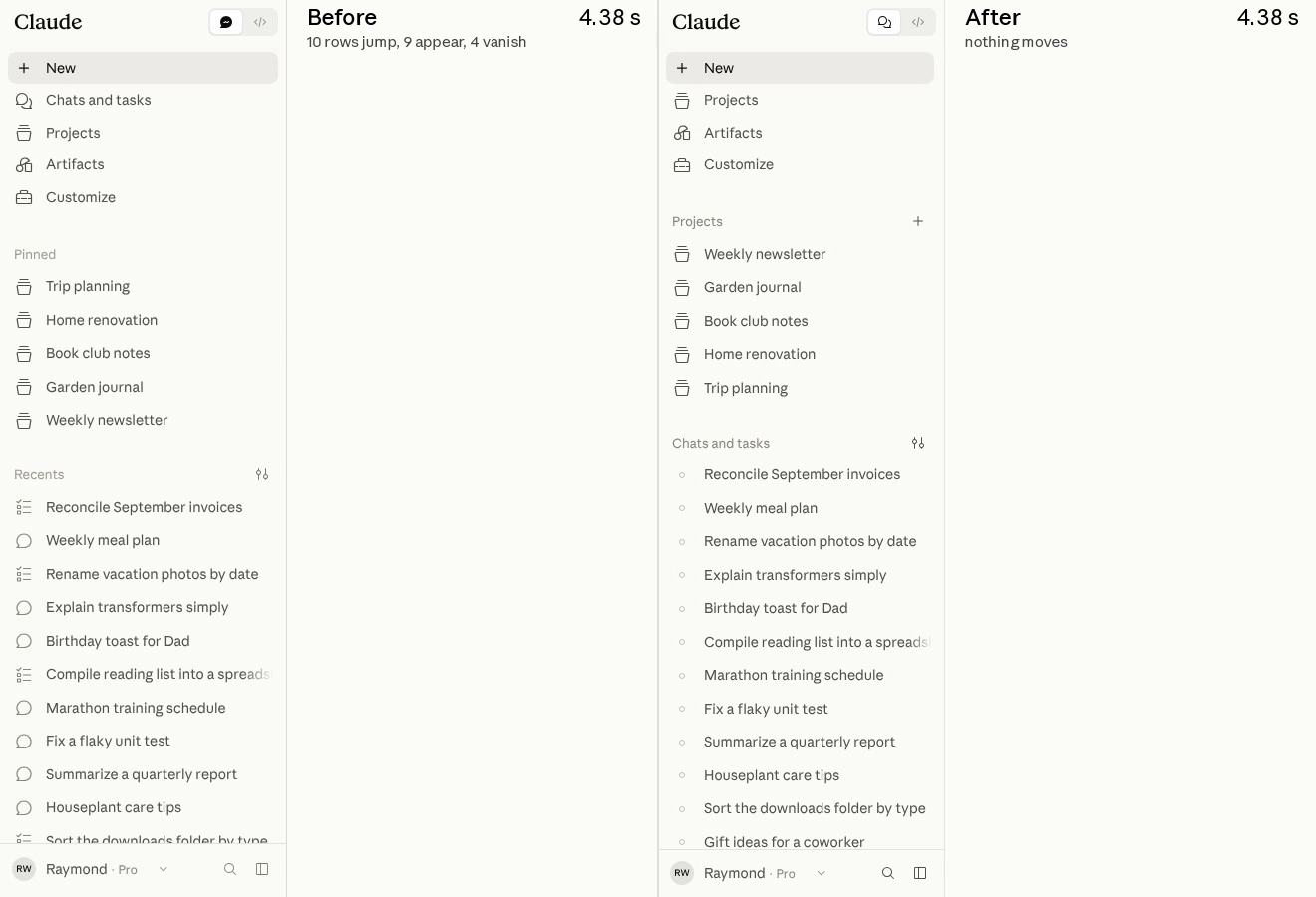
在早期版本中,工程师通过录屏发现:页面加载时,左侧侧边栏列表容易出现条目跳动。普通对话与 Cowork 云会话数据返回时机不同,导致列表前后错动。
但在常规前端监控中,累积布局位移(CLS)并没有报警。原页记录显示,这些跳动单次位移的评分大约仅为 0.008,远低于通常视为良好的 0.1 阈值,导致问题在综合指标中被忽略。
团队选择直接基于底层的 Layout Instability API 建立遥测,把每次位移条目的来源区域映射到命名分区(如侧边栏、正文区),并区分发生阶段(如首屏渲染前、可输入之后)。这让工程师能回答“用户已经开始操作后,究竟是哪一块还在动”,从总体评分追到具体原因。
接着,Claude 写了一个刻意制造问题的集成测试:先打开带有会话列表的页面,把侧边栏数据扣住,等首屏绘制后再放行;只要指定区域发生位移,就判失败。同一个测试在主分支上运行 20 次全部失败,在修复 PR 上运行 20 次全部通过。原本只能靠录屏描述的“看着抖”,由此变成了可以反复检验的修复目标。
线上数据显示:约 31% 的网页访问在页面已可输入且用户没有任何交互时,仍然存在元素位移。结合录屏看,修复前存在 10 行跳动、9 行出现、4 行消失的明显错动。定位到具体来源后,团队批量处理了后发的头部行、用户名加载后光标横向移动、滚动条出现引起的宽度变动等问题,修复后侧边栏条目在固定位置填充,消除了这部分多余位移。
3. 排查中发现并清理的其他瓶颈
随着测量深入,团队还在多个关键路径上排查并修复了一批隐藏问题:
- 输入路径上的依赖项过多:对输入组件进行梳理时,发现其输入路径上有 6900 个 React Hooks 和 900 个状态订阅(store subscriptions),都处在每次敲键时可能重新渲染的路径上。这个计数让原本难以注意到的开销有了明确检查对象。
- 全局选择器的重算开销:全局样式中包含一个
:root:has()伪类选择器,使得每次 DOM 变动额外增加了 24 毫秒的样式重算时间。 - 遗留的隐藏重载:首屏绘制后的一处历史遗留逻辑中存在
location.reload(),导致线上每天产生约 50 万次未被常规加载指标捕获的隐藏重载。 - 空闲标签页的主线程读写:在无操作的闲置标签页中,每分钟有两次将完全相同的缓存快照复制到 IndexedDB,持续占用了主线程资源。
案例:让长回复在 120Hz 屏幕上流畅出现
大模型产品在交互上的一个显著特征是流式输出(Streaming):回复内容随着数据块持续推进,页面文本也在持续增长。
在长回复场景下,文本累积往往会加重前端渲染负担。在原始逻辑中,每个数据块的处理常伴随与整条消息长度成正比的工作量。消息越长,每次新增内容需要重复处理的部分越多,容易导致界面掉帧。
在 120Hz 高刷新率屏幕上(如支持 ProMotion 的 MacBook Pro),每帧的渲染预算约为 8.33 毫秒。为了优化高刷体验,团队通过 DevTools 的 begin-frame 控制,在实验室搭建了 120Hz 的逐帧评测环境,逐帧测量长回复生成时的耗时分布,并进行了针对性重构:
- 缓存已完成块(Memoization):对已经输出完毕的内容块做缓存,消除每个数据块中与整条消息长度成正比的重复计算。
- 分词逻辑移入 Worker:仅将处于增长状态的代码围栏(growing code fences)的 tokenization 处理移至 Web Worker,避免占用渲染主线程。
- 表格呈现方式的选择:团队选择在流式输出时逐个单元格显示。这样可以分散原本集中在一帧里的工作量,但逐格出现是否比整行出现更好看,仍由工程师判断。
在这一专项线程中,团队合并了近 60 个 PR。在团队的测试实验中,一段长回复在主线程的累计阻塞时间从约 750 毫秒降到约 200 毫秒,CPU 占用降至约原本的三分之一;在一台 120Hz MacBook 上,演示长回复从头至尾保持了 120fps。该测试环境随后也被设为夜间回归监控任务。
人类工程师负责目标、取舍和关停
每条线程都有一名明确的人类负责人。凡是用户能感知的变化,Claude 都会附上修改前后的截图或录屏,让负责人判断体验是否值得。每条线程的范围也被限定在一个基准或一类操作上,避免不断向外扩张。工程师主要负责以下三个维度的裁定:
- 提高目标(Ambition):在默认设定下,模型对改动范围通常偏向谨慎,容易在评估可行性时留出缓冲,并在达成初始目标后放慢节奏。工程师的作用是鼓励其继续探索更深层的瓶颈,设定更高的优化预期。
- 权衡体验与复杂度(Taste):模型在寻找毫秒级优化时,需要人类对视觉呈现与工程代价进行取舍。例如在流式文本渲染中,是否为了文字逐字淡入效果牺牲五分之一的单帧渲染预算;或者当一个构建插件 PR 增加了 900 行代码却只能让单次发送节省 2 毫秒时,工程师会因维护复杂度过高而予以否决。
- 把控全局节奏(Direction):冲刺高峰期同时有超过 150 个讨论线程在运行。工程师需要聚焦各个线程的边界,协调不同线程间的改动优先级,合并相互影响的代码,并在某些方向出现边际收益递减时及时终止探索。
写在最后
这次冲刺最值得借鉴的,是把一次性能修复接成了持续运转的循环:先找到用户真实经历的等待,再建立能快速试验的基准;候选改动上线后,用真实用户数据确认效果;确认有效,就用自动化检查守住成果。
测量工具本身也留下了长期价值。新增的遥测会暴露下一处慢点,CI 检查会拦住性能回退,120Hz 测试则在夜间继续运行。团队观察到,其他项目开始主动来做性能审查,新代码也受到这些检查和 Claude 技能的影响。两周积累下来的,既有更快的页面,也有下一次优化可继续使用的工具和工作方式。
Anthropic 仍列出了尚待改善的第 95 百分位数(p95,即较慢一端的体验)、其他操作路径和超长会话。冲刺还产生了对 Electron、Chromium、Node.js 等上游项目的贡献,团队计划另文展开。本文能展示的是这套方法如何处理已被找到、能够度量的瓶颈;新的慢点仍需继续被发现和解释。
实操带走包
滚动查看原始 Markdown,复制后可按团队实际系统与政策修改。
正在载入 Markdown…
How we made claude.ai 3x faster in two weeks
Inside our performance sprint: the benchmarks Claude built, the loop each Slack thread ran, and the guardrails that let us ship 3,000 changes safely.
This August, we made the core user experience of claude.ai and the Claude desktop app about 3x faster in a two-week sprint. Users had been telling us it was slow, and they were right. We ran everything from a single Slack channel, with Claude in every thread.
We focused on four journeys that make up 95% of user activity. At the 75th percentile, time to a typeable page on a fresh load of claude.ai went from 3.1 seconds to 0.55, starting a new Claude Code session went from 0.8 seconds to 0.3, and loading a Claude Cowork cloud session went from 2.6 seconds to 0.73. In aggregate, we estimate that saves tens of thousands of user-hours of waiting every day.
We used Claude Tag (beta), running an internal research model roughly comparable to Opus 5.5. Claude found bottlenecks, built benchmarks, shipped improvements, and watched every deploy. We steered by setting goals, making tradeoffs, and approving every change. With that approach, we merged more than three thousand changes without a single customer-facing incident or rollback. This post covers what we shipped, how we measured it, and the loop we built with Claude to do it safely.
THE BRIEF
Before the sprint, we created a Slack channel with the following standing instructions:
@Claude Your job is to facilitate all things related to the performance of the claude.ai website and desktop app. Your responsibilities include monitoring deploys for performance regressions, assessing the accuracy and comprehensiveness of existing telemetry, maintaining well-curated observability dashboards, proactively implementing solutions for observed issues and low-hanging fruit, proposing performance project opportunities, and communicating with your human teammates. […]
The ultimate goal for this channel is for you to become as autonomous as possible, but today we know that isn’t yet possible.
We asked Claude to analyze usage data through the Datadog MCP server. It identified the four highest-impact user journeys: launching the app, starting a conversation, loading an existing conversation, and sending a message. Between web and desktop, and across our products, those journeys came to thirteen distinct measurements. To establish baselines, we added instrumentation until they were directly comparable: each started with a user interaction, ended once the result was rendered, and disambiguated client and server work.
We kicked off the sprint with a list of about twenty hand-picked projects, each targeting a specific journey. Claude estimated the impact of each project in milliseconds, and we aggregated those estimates to set our targets for the sprint. Some of the projects were fairly large, but we thought we could probably achieve most of them within two weeks.
We hit twelve of the thirteen targets by day three.
The planned projects landed early. For faster launches, we baked a static composer into the HTML so users can type during React initialization, and precompiled a V8 code cache so the desktop shell’s main process doesn’t recompile from scratch. For faster navigations, we kept the composer mounted between conversations, prefetched sessions when the user hovered over them, and cut sidebar re-renders by 90%.
We had also left room for Claude to identify opportunities and propose new workstreams. Those workstreams quickly ramped into full projects of their own, which far exceeded our initial targets. So we set new targets, then looked for more things to measure:
@Claude we’ve ended up funding nearly every project in the original projects list and more. let’s do a refresh […] what have we not explored, what can we hill climb on, where is the most opportunity at this point? […] i am open to WACKY ideas
ANYTHING CAN BE HILL CLIMBED
From the start, we knew we wanted to iterate faster than our deploy cadence. Claude could work asynchronously for many hours, even overnight, and we wanted to let it validate its prototypes without waiting for field reads. To achieve that, we looked for other ways to measure performance in the lab.
Sam found the first lead:
Recreated from a real conversation.
Eleven minutes later, five threads were running, each focused on a different measurement: instruction counts, V8 call counts, React commits, style recalculations, and DOM mutations.
We treated every new benchmark with some skepticism. Each one had two jobs: first, a metric Claude could move in the lab; second, a guardrail in CI with a number that could only ratchet down. If a benchmark was flaky, or if it didn’t actually correlate with user latency, we threw it out rather than let Claude climb the wrong hill.
@Claude please prove that hill climbing against each of these can result in measurable wall clock perf wins. we’ll unship the benches for any candidates that cannot prove that
Wall-clock time is what users feel, but it’s noisy, and milliseconds are too flaky to use as a CI gate. Instruction counts were appealing because they were deterministic, but we still needed Claude to prove they tracked wall-clock time.
So we asked Claude to drive the count down on two hot paths: the routine that assembles a conversation’s message tree, and a scanner for status lines in Claude Code output. Claude profiled both with Valgrind and found that a quarter of the first path’s instructions were megamorphic dictionary lookups, resolving the same message ID three separate times.
An hour later it had cut instructions on both paths by 48% and 31%, and wall-clock time had dropped 78% and 44%. We checked in two new ratchets. From then on, any PR that raised the instruction counts of those paths failed CI, and a daily job lowered each ceiling whenever the count went down.
That led us to the central lesson of the sprint. With Claude, measuring something makes it tractable.
Measurement used to be step zero: you’d add a metric, wait for data to roll in, and only then start to understand the problem. With Claude, it’s step one of the climb. As soon as Claude had a number to beat, it could start optimizing. This meant the highest-leverage thing we could do was find more things to measure.
THE LOOP, THREAD BY THREAD
All of this ran in the same Slack channel, with multiple engineers and Claude jamming in every thread. From there, the sprint settled into a loop:
- Someone would open a thread about a slow stretch of a journey, often with a screenshot or recording.
- Claude would trace the flow, then find or build a benchmark that demonstrated the problem.
- Once it had a promising result in the lab, Claude would come back with a PR — often several, sized for risk and review, with anything user-visible behind a flag.
- After it shipped, Claude watched the deploy and read the field data.
- If performance improved, Claude locked in the win by ratcheting the benchmark down; if not, it turned the flag off and iterated.
- Then it went looking for the next slow spot in the same journey.
An example: someone shared a screen recording that showed sidebar rows popping in after the page loaded. Chat and Cowork rows resolved at different times, making the page feel janky. None of our existing monitors detected it. The closest we had was Cumulative Layout Shift, but each shift only scored about 0.008 — well within the good threshold of 0.1.
Issac had the idea to reference the underlying Layout Instability API directly. Claude created a telemetry event that mapped the sources of each layout-shift entry to a named region (e.g. sidebar, transcript) and phase (e.g. before first paint, after typeable). It added an integration test that opened the page with a populated sidebar, held the sidebar’s data until after first paint, and failed on any shift in any named region. Claude used that as a benchmark to prove a fix: the test went red 20 of 20 runs on main, and green 20 of 20 on the PR.
After the event deployed, Claude read the field data and found that 31% of web page loads moved something after the page was usable, without any user interaction. From there, Claude worked through the causes by name: a header row that arrived late, a caret that slid sideways once the user’s name loaded, a list that moved when the scrollbar popped in. Claude fixed the top offenders as a batch, and when they were gone, it found the next batch.
That was one thread. During the sprint, we ran more than a hundred and fifty at a time.
SCALING HORIZONTALLY
Once the loop worked on one thread, running it on more was just a matter of opening them. Instead of closing a thread once its original request had been fulfilled, Claude would keep going. An individual thread would put up fifty, sometimes a hundred, optimization PRs. Increasingly, it was Claude, not one of us, opening new threads to chase opportunities it had found on its own, as part of a separate investigation or nightly job. Shelley, one of the engineers in the channel, observed, “[This model] is a numbers demon.”
Every measurement found something to improve. Claude ran a React hook census and found 6,900 hooks and 900 store subscriptions in the composer’s typing path, re-rendering on every keystroke. Claude counted style recalculations and found a single :root:has() selector adding 24 milliseconds to every DOM change. Claude traced code paths after first paint and found a leftover location.reload() causing half a million hidden reloads a day that none of our load metrics could see. Claude read profiler samples from idle tabs and found identical cache snapshots being cloned into IndexedDB twice a minute, all on the main thread.
We rarely knew where a thread would lead. In a sweep for CPU hitches, Claude noticed that highlighting a finished code block could freeze the page for about a second. It dug in the lab and found the culprit: em dashes. If a reply’s markdown contained any non-Latin-1 character, like an em dash or a curly quote, V8 stored the entire string as UTF-16, which put every syntax-highlighting regex on its slower two-byte path. Claude fixed it with a twenty-line change to copy each code block into a one-byte string before highlighting it.
By the second week, we could barely summarize our output into daily updates. On the busiest days, more than two hundred changes landed. Claude kept proposing new benchmarks; about a third of PRs included additional telemetry or guardrails, and each new instrument generated more threads with more opportunities.
Working in one channel meant everything happened in the open. We jumped in and out of each other’s threads to debate decisions and celebrate wins. Word spread: other teams started bringing their changes into the channel to have them reviewed for performance. New projects were written in subtly more performant ways because of all the guardrails and Claude skills that had been introduced.
GUARDRAILS
We’d prepared for the pace. Because nearly everything we touched was a hot path (the first paint, the composer, the transcript), we’d established our safety mechanisms up front. Every PR went through automated review with at least one human approval, unit tests always came before optimizations, and anything that could cause a user-visible problem shipped behind a short-lived feature flag.
When the flags started piling up, we opened a thread to coordinate their rollouts and cleanup. Claude classified every flag as a kill switch or ramp, and retired each one as soon as it was safe. Across the two weeks, we introduced nearly two hundred flags, more than half of which were already cleaned up by the end.
We also knew that performance wins decay in a fast-moving codebase, and code ships fast at Anthropic. Once a project proved a win, we invested in ways to protect it. The static composer, for example, is brittle by design. We show users an HTML copy of the page almost immediately, and let React paint directly on top of it.
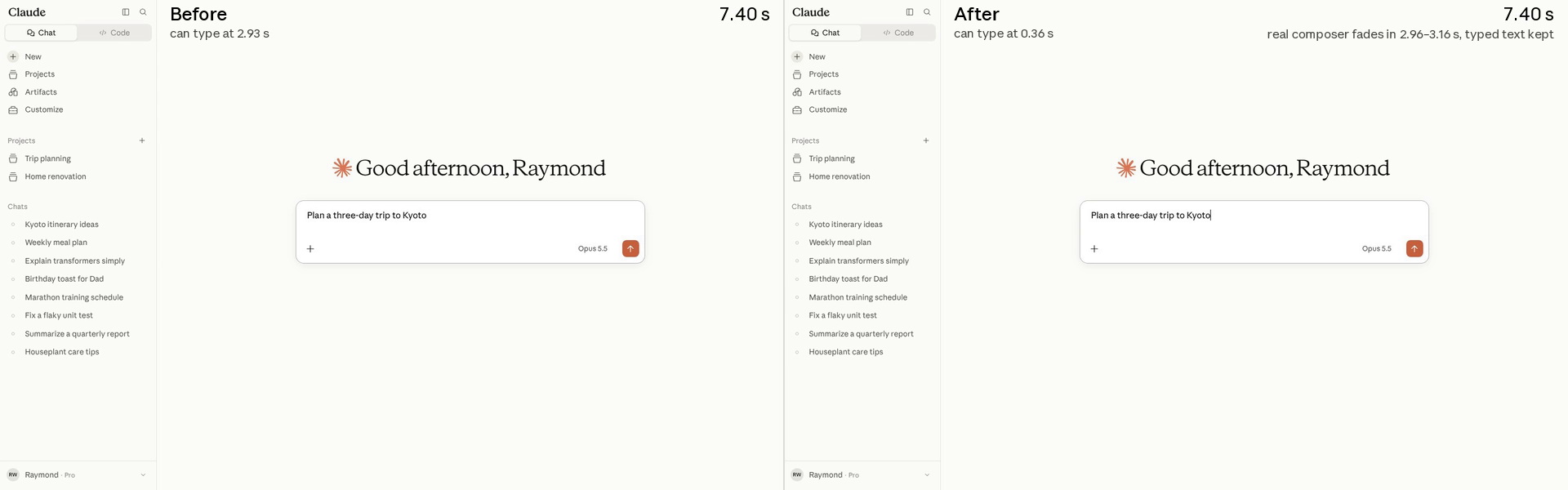
If the React render is off by even a pixel, the magic is lost. So Claude built dozens of guardrails:
- The static markup is generated by rendering the real React component in jsdom, and a test guarantees they never drift.
- An integration test suite compares the static page against the React render across fourteen viewport sizes, and asserts alignment within 1 px.
- A keystroke test types straight through the handoff and fails on any lost or reordered key.
- In the field, every handoff reports shifts to a tenth of a pixel. Claude opens a thread for any event with nonzero movement.
Not everything could be caught in the lab, so we also made use of the oldest guardrail in the book: incremental rollouts. High-risk changes were rolled out to employees first, then one percent of users, then everyone. Four hours after we released the static composer internally, a teammate shared a screen recording of a layout shift that none of our metrics could see. When he opened claude.ai in a new tab, the composer would drop — but it wasn’t our code.
Recreated from a real conversation.
Somehow, Claude traced it to an edge case in Chrome’s speculative loading. While a user was typing the URL into the address bar, Chrome would prerender the page in the background, at the height of the current tab. On browsers managed by an organization, the new-tab page is slightly shorter because of a footer. When the user pressed Enter, the first frame of claude.ai showed that slightly shorter layout, and Chrome resized it about a tenth of a second later. Claude pinned the layout across the resize, and we added a test to simulate the prerender flow.
STEERING
The loop was productive, but it wasn’t autonomous. Keeping it fast, safe, and on track was our job, and it had three parts.
Ambition. By default, Claude is careful about scope. It tickets findings, hedges on feasibility, and pads its estimates. But we were confident in our guardrails. A lot of what we did, especially early on, was to encourage Claude to be bolder.
Recreated from a real conversation.
When we started hitting the targets we’d set, we noticed that threads would slow down. Sam went thread to thread with the same message: “Let’s keep driving this down, the targets are not the stopping point. What’s next? Be ambitious.”
Taste. Every thread had a named human owner, and Claude highlighted any user-perceptible change with before-and-after screenshots or recordings for them to rule on. Should a table fill in cell by cell, or wait until each row is complete? Should a loading skeleton show up immediately, or only after half a second? Is a word-by-word fade on streamed text worth the fifth of the frame budget it costs? Claude looked for ways to shave milliseconds, and we weighed the tradeoffs.
Direction. We kept each thread deliberately narrow, focused on one benchmark or journey, and asked Claude to find improvements only within that scope. We thought of the threads as a hundred and fifty hammers seeking nails. Most of our calls were about sequencing and user impact: which surfaces to prioritize, how to combine threads that were stepping on each other, and when to close a thread that had reached diminishing returns. One 900-line PR got a one-line reply: “going to gavel that 2ms per send is not worth the complexity of maintaining this build plugin.”
AN 8-MILLISECOND BUDGET
One of our sidequests shows everything working together. To demonstrate an optimization to a regex used in live syntax highlighting, Claude attached a screen recording of a long answer streaming in the lab. In the corner, it had added a frame-rate readout, computed in the page from animation-frame timestamps.
Recreated from a real conversation.
Once the mechanism and ambition were established, Claude got to work. Each painted frame had a budget of 8.33 milliseconds, so Claude stepped through a long reply frame by frame, timing each one to find the slow parts. It eliminated O(message length) work per chunk by memoizing finished blocks, moved tokenization logic for growing code fences to a worker, and revealed tables cell by cell.
In that one thread, we landed nearly sixty PRs. Long replies blocked the main thread for about 200 milliseconds in total where they used to block it for about 750, ran on about a third of the CPU, and held 120 fps from start to finish on a 120 Hz MacBook. The 120 Hz rig itself became a nightly job, with Claude watching for regressions.
When we started the sprint, we hadn’t planned to hill climb on the milliseconds between frames while streaming. But it turned out we could count them — and anything we could count, Claude could climb.
WHAT’S NEXT
Today, claude.ai and the desktop app are about 3x faster than they were in early August, and the ratchets should keep them there. But we’re not done: the 95th percentile, other journeys, and very long conversations still have room to improve. In a separate post, we’ll also write about some of the sidequests that took us upstream during the sprint, with contributions landing in Electron, Chromium, Node.js, and more.
When we shared the results internally, Issac put it best: “You could not have convinced me this was possible even six months ago.” We expect to keep working this way, one thread at a time, at any scale. The channel’s still going.
With contributions from Alfred Xing, Anthony Morris, Benjamin Pasero, Chase McCoy, Joshua N., Luke Deen Taylor, Marius Schulz, and Shelley Vohr. Special thanks to Boris Cherny for encouraging us to be more ambitious.