Claude 动效实战指南:完整提示词、修改方法和导出步骤
跟着 Florence 的 Motion Lab,从一个短标题动画开始,再学耳机、液态铬和角色动画怎么做。
网上铺天盖地的“一句提示词(One-shot)生成惊艳动效”,看起来像是输入一句话,就能得到一段精致动画。真正上手,你却可能遇到另一番景象:白色陶瓷像塑料,金属反光把文字盖住,盒盖打开时多停了一帧。从“能动”到“好看”,中间差的是把这些问题逐个改掉的过程。
用 Claude Opus 5.5 做动效,要先把设计说具体:外壳是什么材质,灯从哪里照,镜头什么时候推进,哪一帧开始开盖。Claude 把这些要求写成动画代码,你再通过静帧和多帧拼图找到问题,带着帧号与参数让它修改。想把开盖提前、把回弹减小,就直接改对应的时间和数值。
下面从一个 4 秒标题动画开始,带你走完写提示词、预览、改画面、加音效和导出的步骤,再拆开耳机、液态铬文字与 3D 吉祥物的完整做法。提示词提供中英双语,初始请求和每轮修改分开放,既能照着做,也能看懂一段成片是怎样调出来的。
1. 为什么让 Claude 写动画代码
把动画写成代码,最直接的好处是修改有了明确的位置。 耳机盒开盖太慢,就改开盖的时间段;金属像塑料,就改材质和反射环境。产品展示、文字动画和角色短循环,都可以这样逐项调整。
Claude 根据你的要求生成 HTML 和 JavaScript,浏览器把代码画成每一帧,FFmpeg 再把这些帧合成 MP4 或 GIF。设计要求决定画面长什么样,代码里的时间和参数决定它怎样动。
- 能定格:把画面状态写成时间 t 的函数,固定资产、依赖版本和渲染环境后,可以重新渲染同一时刻,比较修改前后。
- 能调参数:位置、灯光、镜头和运动曲线由代码控制,修改有具体落点。
- 能看图再改:把静帧或多帧拼图交给 Claude,指出穿模、反光遮字或动作太迟的帧号,让它修改对应代码,再对比同一帧的前后变化。
提示词怎么用:中文用于读懂和修改,英文保留作者完整原件;选择一种语言发送即可,不用把两版一起贴。命令、API 名称和参数保持原样。案例中的“追问”是看到上一版结果后再发的修改意见,首次生成只发初始提示词。
在提示词末尾,加上下面的通用渲染要求。它让生成的动画更容易定格、检查和导出。
关键是让时间由外部输入,别依赖电脑此刻的时钟。window.renderAt(t) 要能画出指定时刻;URL 带 ?t= 时停用实时动画循环,字体、贴图和场景准备好后再设置 window.__ready = true。只加一个定格函数,却让后台动画继续跑,截图仍可能被下一帧覆盖。
中文译文
# 渲染要求:粘贴在任何动效提示词下方
输出单文件自包含 HTML。仅使用提示词中指明的库,且必须锁定版本。
除字体和上述锁定的库之外,不得发起任何网络请求。
每一帧必须是以秒为单位的时间 t 的纯函数。
若使用 JavaScript 驱动任何动效,必须暴露 window.renderAt(t) 用于精确绘制该帧。
使用 CSS keyframes、Web Animations API、SVG、Canvas 2D 或 WebGL 进行动画制作。
严禁使用 Date.now,严禁使用 setTimeout 或 setInterval 启动动画,严禁使用未设种子的 Math.random。
循环动效:仅渲染第 0 至第 N-1 帧,且第 N-1 帧必须流畅衔接回第 0 帧。
英文原件 · 通用渲染要求(完整可复制)
# The render contract: paste it under any motion prompt
Output one self-contained HTML file. Only the libraries the prompt names, pinned to a version.
No network requests except fonts and those pinned libraries.
Every frame must be a pure function of time t, in seconds.
If JavaScript drives any motion, expose window.renderAt(t) that draws exactly that frame.
Animate with CSS keyframes, the Web Animations API, SVG, Canvas 2D or WebGL.
No Date.now, no setTimeout or setInterval starts, no unseeded Math.random.
Loops: render frames 0 to N-1 only, and frame N-1 must flow into frame 0.
- 1 · 写清设计主体、材质、镜头、分镜与帧数
- 2 · Claude 写代码固定依赖,用时间 t 控制状态
- 3 · 浏览器渲染定格关键帧,导出 PNG 序列
- 4 · 检查并出片带帧号反馈,再用 FFmpeg 编码
看到哪一帧有问题,就带着帧号回到代码,调整相关参数或镜头,再对比这一帧的变化。
2. 把“高级、酷炫”写成具体要求
“高级、现代、酷炫”表达了感觉,却没有说明画面该怎么做。模型会自行选择材质、灯光和动作,你也很难指出下一步要改哪个部分。
先把这些感觉变成设计要求:外壳是什么材质,光从哪里来,镜头何时推进,盒盖哪一帧打开,不想要哪些装饰。下面的耳机实验能直观看出区别。
下面两版都用 Claude 制作无线耳机动画。看左侧的装饰和右侧的材质、布光、开盖动作,有哪些区别:
- 左侧(模糊提示词 A):仅用 27 个词,要求“酷炫、高级、现代”。这一版出现了深蓝背景、光环、粒子、旋转的耳机和自行添加的标语。
- 右侧(定向提示词 B):用了 448 个英文词,写明模型尺寸、陶瓷和铬材质、三点灯光的色值与强度、开盖前的预备动作、弹簧参数和禁用项。
左侧保留首稿,没有追加修改,约用了 30 分钟。右侧画面又改了 4 轮、共 15 次,约用了 90 分钟;声音另改了 12 次,也约 90 分钟。右侧的成片,是把设计写具体后,再逐轮调整出来的。复用时也按这个顺序做:“写清要求 → 看结果 → 再改”。
具体可以这样写:
- “高级感材质” 变成材质参数:陶瓷外壳为绸缎白
#F4F1EC(粗糙度 0.38、清漆 0.35)(粗糙度越低,反射越清晰;清漆是在表面再加一层透明高光),金属部分为镀铬(金属度 1.0、粗糙度 0.05),仅在耳机座舱内托使用 Claude 品牌橙色#D97757。 - “专业影棚布光” 变成三点光源系统:主光为暖白
#FFF4E8(强度 3.0,位于左前上方,投射柔和软阴影);辅光为微冷#E8EEF5(强度 0.6,位于右下方弥补暗部);轮廓光为纯白#FFFFFF(强度 4.0,位于右后上方勾勒边缘),另外构建影棚反射环境,让金属表面能映照出明暗光带。 - “现代动效运镜” 变成明确的镜头视场角与轨迹:指定 30° 视场角;方位角从 34° 移到 10° 再返回;2.0 秒开始推进,耳机升起时镜头和注视点也抬高。
- “生动自然的开盖动画” 变成弹簧与开盖前的预备动作:在开盖前的 0.72 至 0.95 秒,先执行一个“预备动作(Anticipation)”——盒盖反向下压 1.5 度,盒身微挤压 2%,定格 3 帧蓄力;随后要求盒盖以阻尼比 0.6 弹开至 100°、过冲约 10%,在 1.4 秒前稳定。
- “极简纯净” 变成明确的禁用项(BANNED):严禁出现紫蓝色渐变、发光球体、全局泛光(bloom)、霓虹灯、散落粒子、原地旋转展台、黑底和浮夸标语。
以下是左侧模糊提示词的中文译文,英文原件可展开对照:
中文译文
为一副无线耳机制作一段酷炫的 3D 产品动效。使其看起来高级且具现代感。单文件自包含 HTML,使用 three.js,960x1080,6 秒循环。
英文原件 · 耳机模糊提示词(完整可复制)
Create a cool 3D product animation for a pair of wireless earbuds. Make it look premium and modern. One self-contained HTML file using three.js, 960x1080, 6-second loop.
下面是右侧完整画面提示词。想复用时,先替换产品描述,第一轮保留动作和材质数值;看到结果后,再按自己的需要逐项调整。
中文译文
GOAL: 一部无线耳机的影棚产品短片:耳机盒打开,耳机升起朝向观众,随后全部卡嗒一声合上。
OUTPUT: 单文件自包含 HTML,通过 jsdelivr (importmap) 引入 three.js 0.160.0,960x1080。
TIME: 6 秒循环,60 fps = 360 帧,120 BPM(1 拍 = 30 帧)。关键卡点落在拍点上。

MODEL(1 单位 = 1 cm,带倒角的基础几何体):耳机盒 6.0 x 4.6 x 2.2,边缘倒角半径 1.0,在 3.3 处分缝,后置铰链盖,分缝倒角 0.06,接缝处绕一圈 0.045 镀铬线。内部:D97757 托盘面,两个深色椭圆插槽。耳机:椭球头部 1.6 x 1.5 x 1.5,车削硅胶耳塞套,1.6 椭圆手柄带镀铬底盖,深色网孔。耳机放入后头部与托盘面齐平。

LOOK: 缎面陶瓷白 F4F1EC(粗糙度 0.38,清漆层 0.35),镀铬(金属度 1,粗糙度 0.05),仅托盘面使用 D97757,墨色 1C1B1A,耳塞套 E4E0DA。背景由中心 F0EDE8 到角落 DEDAD3 抖动渐变。主光 FFF4E8 强度 3.0 位于左前上方,柔和阴影;辅光 E8EEF5 强度 0.6 位于右下方;轮廓光 FFFFFF 强度 4.0 位于右后上方。反射:代码构建的 PMREM 影棚(暖灰穹顶、顶部与主光柔光箱、轮廓光条)。接触阴影,不透明度 0.55。Neutral tone mapping,8% 暗角,每帧使用固定种子的 2% 颗粒。

SHOTS:
0.0 至 0.5 秒:一条 2.4 宽的影棚光条(延续自 5.5 秒)从左向右扫过,在闭合的盒盖与接缝上划过一道亮斑扫光。
0.72 至 0.95 秒:预备动作:盒盖紧压闭合 1.5 度,盒身下压变形 2%,保持 3 帧。
1.0 秒:盒盖弹开至 100 度(阻尼 0.6,约 10% 过冲,在 1.4 秒稳定)。
1.5 秒:耳机从插槽升起 4.0,右耳先升,左耳滞后 4 帧(阻尼 0.7)。从升起第 8 帧开始向外倾斜 14 度,并在更松的弹簧下朝向镜头转动 35 度(阻尼 0.5):手柄摆动到位并稳定。
2.0 秒:镜头推进。
2.4 至 4.0 秒:定格停留,耳机在 1 秒正弦周期内悬浮漂动 0.05。3.0 秒:第二道亮斑扫光划过耳机。
4.0 秒:耳机回正(0.2 秒)并下落(easeInOutCubic,0.45 秒),到位时带有 0.05 的磁吸下沉感。
4.75 秒:盒盖落下(easeInCubic),在 5.0 秒准时合上,弹跳 3 度,在 5.3 秒稳定;盒身受冲击回弹 1.5%。
5.5 秒:下一轮亮斑扫光开始。

CAMERA: fov 30,镜头永不停滞。方位角从 5.6 秒到 4.0 秒由 34 度过渡至 10 度(easeInOutSine),在 5.6 秒前返回(easeInOutCubic)。距离从 21 缓慢潜移至 20.2,在 2.0 秒推进至 16(easeOutExpo,0.8 秒),在 4.0 至 5.6 秒返回(easeInOutCubic)。耳机升起时:仰角由 12 度升至 19 度,目标注视高度由 2.3 移至 4.2。

BANNED: 蓝紫渐变、发光光球、bloom、霓虹、镜头光晕、粒子、通用自转展台、深色背景、文字。

QA: renderAt(t) 严格绘制时间 t 的画面,仅使用带种子的噪声。围绕每个关键冲击点渲染静止帧;第 359 帧流畅衔接至第 0 帧。
英文原件 · 耳机完整提示词(完整可复制)
GOAL: a studio product film for wireless earbuds: case opens, buds rise to the viewer, everything clicks shut.
OUTPUT: one self-contained HTML file, three.js 0.160.0 from jsdelivr (importmap), 960x1080.
TIME: 6-second loop, 60 fps = 360 frames, 120 BPM (1 beat = 30 frames). Hits land on beats.

MODEL (1 unit = 1 cm, primitives with bevels): case 6.0 x 4.6 x 2.2, 1.0 edge radius, split at 3.3, back-hinged lid, 0.06 split bevel, 0.045 chrome wire around the seam. Inside: D97757 deck, two dark elliptical wells. Buds: ellipsoid head 1.6 x 1.5 x 1.5, lathed silicone tip, 1.6 oval stem with a chrome end cap, dark grille. Seated heads sit flush with the deck.

LOOK: satin ceramic white F4F1EC (roughness 0.38, clearcoat 0.35), chrome (metalness 1, roughness 0.05), D97757 on the deck only, ink 1C1B1A, tips E4E0DA. Backdrop F0EDE8 center to DEDAD3 corners, dithered. Key FFF4E8 3.0 upper front left, soft shadows; fill E8EEF5 0.6 low right; rim FFFFFF 4.0 upper back right. Reflections: PMREM studio built in code (warm gray dome, overhead and key softboxes, rim strip). Contact shadows, opacity 0.55. Neutral tone mapping, 8% vignette, 2% grain seeded per frame.

SHOTS:
0.0 to 0.5 s: a 2.4-wide studio strip (from 5.5 s) sweeps left to right, glinting across the closed lid and seam.
0.72 to 0.95 s: anticipation: lid presses 1.5 degrees shut, case squashes 2%, hold 3 frames.
1.0 s: lid springs to 100 degrees (damping 0.6, about 10% overshoot, settled by 1.4 s).
1.5 s: buds rise 4.0 out of the wells, right first, left 4 frames later (damping 0.7). From rise frame 8 they tilt 14 degrees outward and turn 35 degrees to camera on a looser spring (damping 0.5): stems swing through and settle.
2.0 s: camera push-in.
2.4 to 4.0 s: hold, buds float 0.05 on a 1 s sine. 3.0 s: second glint crosses the buds.
4.0 s: buds straighten (0.2 s) and descend (easeInOutCubic, 0.45 s), seating with a 0.05 magnetic dip.
4.75 s: lid falls (easeInCubic), shuts exactly at 5.0 s, bounces 3 degrees, settles by 5.3 s; case recoils 1.5%.
5.5 s: next glint starts.

CAMERA: fov 30, never parked. Azimuth 34 to 10 degrees from 5.6 s to 4.0 s (easeInOutSine), back by 5.6 s (easeInOutCubic). Distance creeps 21 to 20.2, pushes to 16 at 2.0 s (easeOutExpo, 0.8 s), returns 4.0 to 5.6 s (easeInOutCubic). Buds up: elevation 12 to 19 degrees, target height 2.3 to 4.2.

BANNED: purple or blue gradients, glow orbs, bloom, neon, lens flares, particles, generic spinning turntables, dark backgrounds, text.

QA: renderAt(t) draws exactly time t, seeded noise only. Stills around every hit; frame 359 flows into frame 0.
展开:耳机案例 4 轮共 15 次视觉修改记录(中英双语)
这 15 次修改依次处理反光、盒盖厚度、耳机造型、扫光和开盖时序。最后,预备动作在第 57–60 帧停了 4 帧,解决方法是把释放时刻提前半帧,让第 60 帧开始开盖。把这些追问当成排查示例,遇到对应问题时再选用。
中文译文
# 第 1 轮,初版构建后(在 0、1.25、2.9 和 4.9 秒截取静止帧)
白色外壳与背景融在了一起,镀铬材质看起来发灰。将摄影棚穹顶光降到大约三分之一并推高柔光箱,使暗面暗下去,让镀铬呈现明暗交替的条带。
打开的盒盖看起来像一块扁平厚板。将其掏空:边框厚度 0.16,内凹腔体深 0.62,顶面内侧倒角 0.22。
深色圆形格栅看起来像一只眼睛。将其改为细长缝隙条。
耳机盒底部透出两个暗印:位于 0.3 的座舱底面超出了底部圆弧外壁(该高度处外壁向内缩进 0.29)。将座舱底面抬高到 0.5。
内衬基座看起来发三文鱼色。粗糙度设为 0.7。
# 第 2 轮,测量像素后
正面与顶面明度相同,右侧淹没在背景中。主光调至 (-7, 12, 8),轮廓光调至 (2, 8, -12),仍保持左前上方与右后上方。顶部柔光箱 2.2,曝光 0.8。
掠光变成了泛光照明:开关光条会导致 178,864 像素发生明暗改变,因为高 60 的光条照亮了整个正面。让光条仅存在于反射中(用第二个 PMREM 查找镜面反射,静态摄影棚用于漫反射),并恢复需求文档中的 2.4 宽度。
曝光调为 0.9,主柔光箱调为 4.5,使陶瓷质感显出白色。内衬基座镜面反射设为 0.3,避免掠射反光将 D97757 冲淡泛白。
给座舱开孔边缘添加 0.07 的机械加工圆角倒边。
耳机头看起来像老鼠头。将耳柄移到外侧,用短导音管和扁平硅胶耳帽替换球形耳塞头,并将格栅从头部移到耳柄上(它已经两次被看成眼睛了)。
摇臂升降加速:在 2.3 秒前到达高位目标,以便在镜头推进过程中耳机头能保留上方的构图空间。
# 第 3 轮,单独隔离每道掠光后
第一道掠光太弱,不足以抓住眼球。清漆粗糙度设为 0.08,光条峰值强度设为 24,扫掠角度调整为 -80 到 0 度,使光带在第 0 帧时刚好处于正面中央。
第二道掠光闪亮了整个盒盖内凹腔体(在 3.3 秒处有 207,791 像素),因为光条掠过了平面区域的镜面反射方向。将其仰角抬高至 8 到 61 度,宽度设为 4.8:使仅有带曲率的耳机头和耳柄能捕捉到光芒。
画面定格让摄像机完全静止了:在 2.8 到 4.0 秒加入 0.4 的平移微推。左耳机的浮动比右耳机落后 4 帧,如同其升起动作。
# 第 4 轮,单帧级精修
预备动作定格了 4 帧(57 到 60 帧),而不是 3 帧:弹簧在正好 1.0 秒时处于静止起跳点,导致重拍帧仍停在下压姿态。提前半帧释放(59.5/60 秒):第 57 到 59 帧保持定格(包括其运动模糊子帧),第 60 帧成为首个开启帧。
英文原件 · 耳机画面修改(完整可复制)
# Round 1, after the first build (stills at 0, 1.25, 2.9 and 4.9 s)
The white case melts into the backdrop and the chrome reads gray. Drop the studio dome to about a third and push the softboxes, so the unlit sides fall off and the chrome shows dark and bright bands.
The open lid reads as a flat slab. Hollow it: 0.16 rim, 0.62 deep cavity, 0.22 fillet at the ceiling.
The round dark grille reads as an eye. Make it a slim slot.
Two dark marks poke through the bottom of the case: the well floors at 0.3 sit outside the bottom arc, which insets the wall by 0.29 at that height. Raise the floors to 0.5.
The deck reads salmon. Roughness 0.7.
# Round 2, after measuring pixels
Front and top are the same value and the right side vanishes into the backdrop. Key to (-7, 12, 8), rim to (2, 8, -12), still upper front left and upper back right. Overhead softbox 2.2, exposure 0.8.
The glint is a flood light: strip on vs off changes 178,864 pixels because the 60-tall strip lights the whole face. Keep the strip in reflections only (a second PMREM for the specular lookup, the static studio for diffuse) and go back to the 2.4 width from the brief.
Exposure 0.9 and key softbox 4.5 so the ceramic reads white. Deck specular 0.3 so the grazing reflection stops washing out D97757.
Give the wells a 0.07 machined round-over.
The buds read as mouse heads. Move the stem to the outer side, replace the ball tip with a short nozzle and a flattened silicone cap, and move the grille off the head (it read as an eye twice) onto the stem.
Crane faster: reach the high target by 2.3 s, so the heads keep headroom during the push.
# Round 3, after isolating each glint
The first glint is too shy for a hook. Clearcoat roughness 0.08, strip peak 24, and shift the sweep to -80 to 0 degrees so the band is mid-face on frame 0.
The second glint flashes the whole lid cavity (207,791 pixels at 3.3 s) because the strip crosses the mirror direction of the flat faces. Raise it to 8 to 61 degrees elevation, 4.8 wide: only the curved heads and stems catch it.
The hold parks the camera: add a 0.4 dolly creep from 2.8 to 4.0 s. Float the left bud 4 frames behind the right, like its rise.
# Round 4, frame-perfect pass
The anticipation holds 4 frames (57 to 60), not 3: the spring starts at rest exactly on 1.0 s, so the beat frame is still the pressed pose. Release half a frame early (59.5/60 s): frames 57 to 59 hold, including their motion-blur subframes, and frame 60 is the first open frame.
展开:耳机案例声音提示词与 4 轮 12 次声音调优记录(中英双语)
首版音轨 80.6% 的能量集中在 60 Hz 以下,低音盖住了开盖、磁吸和落座声。12 次调音围绕低频、响度和峰值时刻展开。先发送 Sound prompt 生成音轨,再对照后面的追问处理具体问题。
中文译文
# 声音提示词
为 A/B 视频配乐。使用 Web Audio API 在代码中合成全部声音,不使用采样,不进行下载。120 BPM,6 秒循环,360 帧(60 fps)。每个打击点落在其对应视觉事件后 1 帧,伴奏亦同。
伴奏:每 60 帧一次底鼓,16 分音符沙锤,贝斯与铺底音色和弦为 F,120 帧处为降 B,240 帧处为 G 小调,300 帧处为 C。
仅右半部分:
44 到 60 帧:反向渐强。
60 帧盒盖弹开:咔哒声,880 Hz 琴体共鸣音,120 Hz 闷击声。
90、94 帧磁吸噗声,气流上升至 119 帧。
96 到 120 帧推进渐强。
180 到 216 帧、330 到 30 帧掠光闪烁。
240 到 267 帧下落呼啸,270 帧入座咔哒声。
285 到 300 帧呼啸进入关闭:咔哒声,200 Hz 沉闷撞击声,70 Hz 闷击声;306、312 帧轻微滴答声。
打击点高出伴奏 3 到 6 dB,8 kHz 以上无内容,单声道安全。渲染两次,保留第二次结果。48 kHz 立体声 WAV,约 -14 LUFS,峰值 -1 dBTP。混流合入 MP4 并在解码后的音频中检查每个打击点。
# 声音追问(12 条),原样发送
# 第 1 轮,测量首次渲染后(80.6% 的能量在 60 Hz 以下,3.5% 位于 150 Hz 至 6 kHz,中位数 58 Hz;打击点高出伴奏 0.5 到 1.6 dB;琴体共鸣峰值落后对应帧 2.5 到 5 毫秒)
1. 超低音掩盖了一切。将降 B、G 和 C 提高一个八度演奏(117、98、131 Hz),将贝斯放开到 900 Hz,底鼓缩短至 80 毫秒并赋予 190 Hz 的敲击感。将铺底音色提升 5 dB,每个打击点提升 6 dB,轻微滴答声分别低于关盒声 6 dB 和 10 dB。
2. 将每个琴体共鸣和闷击声以余弦相位起始并设置 0.5 毫秒起音,使首个波形峰值落在对应帧 + 1。
3. 给推进渐强一个清晰的峰值:60 毫秒指数级上升至第 121 帧,随后 25 毫秒衰减进入运镜尾段。
4. 从关盒到滴答 2 期间(301 到 313 帧)将伴奏闪避压低 4 dB。
5. 消除直流偏置:减去各声道的循环均值。
# 第 2 轮,测量第二次渲染后(全局混音 -14.0 LUFS,但在 200 Hz 至 6 kHz 手机频段仅有 -22.9 LUFS;打击点分轨减伴奏分轨,K 计权:snap 为 -0.3,pops 为 -3.1 与 -5.2,seat 为 -6.9,shut 为 +2.6,ticks 为 -0.8 与 -4.3,push-in 为 -9.3 dB;底鼓峰值落后对应帧 + 1 达 5 毫秒,弹开闷击落后 2.4 毫秒)
6. 贝斯依然主导着响度。将其正弦波降至三分之一,锯齿波放开至 1200 Hz,贝斯降低 2 dB,铺底音色提升 4 dB 且更明亮(1600 Hz)。
7. 打击点调至高出伴奏 3 到 6 dB:推进渐强 +8 dB,入座咔哒声 +6 dB,噗声 +4 dB,轻微滴答声分别低于关盒声 4 dB 和 8 dB。
8. 调整每个音色的相位,使首个波形峰值准确落在对应帧 + 1,包括底鼓在内(余弦起始,1 毫秒起音)。
# 第 3 轮,测量第三次渲染后(手机频段 -17.5 LUFS,全局 -14.0 LUFS;手机频段打击点减伴奏:snap 为 6.4,pops 为 5.6 与 3.5,seat 为 2.3,shut 为 8.4,ticks 为 3.0 与 1.8,push-in 为 3.0 dB;底鼓的首个峰值落在对应帧 + 1,但其较宽的第二瓣波形在 2.5 毫秒后响 10%;压限器压降达 4.4 dB)
9. 赋予底鼓一个 3 毫秒的瞬态(电平在对应帧 + 1 后的 3 毫秒内降至 65%),敲击感增加 3 dB,使其最大峰值成为第一个峰值。
10. 关盒声降低 2.5 dB,轻微滴答声保持当前位置(滴答 2 随后提升 3 dB),入座咔哒声 +2 dB,推进渐强 +2 dB。
11. 底鼓的第二瓣波形依然响 6%:敲击声的负半周刚好落在了上面。敲击声衰减 4 毫秒,底鼓起音 0.5 毫秒。滴答声音体在 12 毫秒内衰减,使较早的尾音不会翻转其波瓣。
# 第 4 轮,在 Chrome 中解码混流后的文章 MP4 后(偏移 -0.002 毫秒,每个打击点均在对应帧 + 1 后的 0.0 到 1.3 毫秒,但 AAC 编码将真实峰值从 -1.3 抬高到了 -0.4 dBTP)
12. 将 WAV 限制在 -2.2 dBTP,使解码后的 MP4 保持在 -1 dBTP 以下;保持 -14 LUFS。
英文原件 · 耳机音效与调音(完整可复制)
# Sound prompt
Score the A/B video. Synthesize everything in code with the Web Audio API, no samples, no downloads. 120 BPM, 6 s loop, 360 frames at 60 fps. Each hit lands 1 frame after its visual event, and so does the bed.
Bed: kick every 60 frames, 16th shaker, bass and pad F, B flat at 120, G minor at 240, C at 300.
Right half only:
44 to 60 reverse swell.
60 lid snap: click, 880 Hz body, 120 Hz thump.
90, 94 magnetic pops, air lift to 119.
96 to 120 push-in swell.
180 to 216, 330 to 30 glint shimmer.
240 to 267 falling swish, 270 seat click.
285 to 300 whoosh into the shut: click, 200 Hz thock, 70 Hz thump; ticks 306, 312.
Hits 3 to 6 dB over the bed, nothing above 8 kHz, mono-safe. Render twice, keep the second pass. 48 kHz stereo WAV, about -14 LUFS, peak -1 dBTP. Mux into the MP4 and check every hit in its decoded audio.
# Sound follow-ups (12), exactly as they were sent
# Round 1, after measuring the first render (80.6% of the energy under 60 Hz, 3.5% in 150 Hz to 6 kHz, median 58 Hz; hits 0.5 to 1.6 dB over the bed; bodies peaking 2.5 to 5 ms after the frame)
1. The sub buries everything. Play B flat, G and C an octave higher (117, 98, 131 Hz), open the bass to 900 Hz, shorten the kick to 80 ms and give it a 190 Hz knock. Raise the pad 5 dB and every hit 6 dB, ticks 6 and 10 dB under the shut.
2. Start every body and thump in cosine phase with a 0.5 ms attack, so the first waveform peak sits on frame + 1.
3. Give the push-in swell a clear peak: 60 ms exponential rise into frame 121, then a 25 ms drop into the camera tail.
4. Duck the bed 4 dB from the shut through tick 2 (frames 301 to 313).
5. Remove the DC: subtract each channel's loop mean.
# Round 2, after measuring the second render (full mix -14.0 LUFS but only -22.9 LUFS in the 200 Hz to 6 kHz phone band; hit stem minus bed stem, K-weighted: snap -0.3, pops -3.1 and -5.2, seat -6.9, shut +2.6, ticks -0.8 and -4.3, push-in -9.3 dB; kick peak 5 ms and snap thump 2.4 ms after frame + 1)
6. The bass still carries the loudness. Drop its sine to a third, open the saw to 1200 Hz, bass 2 dB down, pad 4 dB up and brighter (1600 Hz).
7. Hits to 3 to 6 dB over the bed: push-in swell +8 dB, seat click +6 dB, pops +4 dB, ticks 4 and 8 dB under the shut.
8. Phase every tone so its first waveform peak lands exactly on frame + 1, the kick included (cosine start, 1 ms attack).
# Round 3, after measuring the third render (phone band -17.5 LUFS against -14.0 full; phone-band hit minus bed: snap 6.4, pops 5.6 and 3.5, seat 2.3, shut 8.4, ticks 3.0 and 1.8, push-in 3.0 dB; the kick's first peak is on frame + 1 but its wider second lobe is 10% louder, 2.5 ms later; limiter up to 4.4 dB)
9. Give the kick a 3 ms transient (its level falls to 65% within 3 ms of frame + 1) and the knock 3 dB more, so its largest peak is the first one.
10. Shut 2.5 dB down with the ticks kept where they are (tick 2 then 3 dB up), seat click +2 dB, push-in swell +2 dB.
11. The kick's second lobe is still 6% louder: the knock's negative half lands on it. Knock decay 4 ms, kick attack 0.5 ms. Tick bodies decay in 12 ms so earlier tails cannot flip their lobes.
# Round 4, after decoding the muxed article MP4 in Chrome (offset -0.002 ms, every hit 0.0 to 1.3 ms after frame + 1, but the AAC encode lifts the true peak from -1.3 to -0.4 dBTP)
12. Limit the WAV to -2.2 dBTP so the decoded MP4 stays under -1 dBTP; keep -14 LUFS.
点选材质、灯光、镜头和动作,看“高级、酷炫”怎样变成可以直接写进提示词的具体要求。
3. 复制这份模板,换成你的内容
一份完整提示词要说清目标、输出、时间、外观、动作、分镜、禁用项和检查方式。做 3D 产品时,再加 MODEL(模型尺寸)和 CAMERA(镜头)。
每个字段回答一个具体问题,减少模型需要替你猜的部分:
中文译文
GOAL: 用一句话概括观众应该感受到什么或做出什么行动
OUTPUT: 单文件自包含 HTML(或 Remotion、HyperFrames),宽 x 高
TIME: 秒数 x fps = 总帧数。是否循环:是或否
LOOK: 十六进制调色板,一个强调色,字体 + 字重 + 字号 + 字距
MOTION: 缓动以 cubic-bezier 表示,弹簧以阻尼比表示,持续时长以帧数为单位
SHOTS: 帧范围,每个镜头一个核心主角动作,镜头之间如何衔接交接
BANNED: 你绝不想看到的默认样式
QA: 指定帧处的静止帧、多帧拼图(contact sheet),修复,然后导出完整渲染
英文原件 · 提示词结构(完整可复制)
GOAL: what the viewer should feel or do, in one sentence
OUTPUT: one self-contained HTML file (or Remotion, HyperFrames), W x H
TIME: seconds x fps = total frames. Loop: yes or no
LOOK: palette in hex, one accent, typeface + weight + size + tracking
MOTION: easing as cubic-bezier, springs as damping ratio, durations in frames
SHOTS: frame ranges, one hero move per shot, how each shot hands off
BANNED: the defaults you never want to see
QA: stills at named frames, a contact sheet, fix, then the full render
先定目标和时长,再安排动作
先写 GOAL:这段动画要展示什么。再写 TIME:总时长、帧率和总帧数。然后按时间安排镜头,别把开盖、文字入场和大幅运镜同时堆在一起。
一个镜头先突出一个主要动作。编排时可以先让次要动作晚 100–200 ms 开始,移动距离设为主要动作的 50%–70%,环境微动压在 5% 以内,让观众先看到主角。
中文通用模板
你可以直接复制下面这段中文模板,将其中的内容替换为你的实际需求发给 Claude:
GOAL: [用一句话明确动效的核心动作与情绪,例如:高级极简的智能手表旋转展示并展开核心传感器界面]
OUTPUT: 单文件 self-contained HTML,仅通过 jsDelivr importmap 引入指定版本库 [例如: three.js 0.160.0],画布尺寸 [例如: 1080x1080]
TIME: [X] 秒无缝循环,[60] fps = [总帧数] 帧,[120] BPM 节拍(每拍 = [X] 帧),关键卡点严格落在拍点帧上

LOOK:
- 主色调与材质: [给出 Hex 色值、金属度、粗糙度、清漆参数]
- 背景与环境: [例如纯色或微噪点渐变底色,严禁纯黑或杂乱纹理]
- 影棚灯光: [定义主光、辅光、轮廓光的 Hex 色值、强度与摆放方位,配置微弱接触软阴影]

MODEL / CAMERA(仅 3D 需要):
- 模型: [主体与部件尺寸、单位、相互位置、需要保持的角色比例]
- 镜头: [视场角、起止位置、注视点与移动时间]

MOTION:
- 缓动曲线: 进场 [cubic-bezier(0.16, 1, 0.3, 1)],退出 [cubic-bezier(0.7, 0, 0.84, 0)]
- 物理弹簧: 机械结构阻尼比 [0.6-0.7],跟随次级动作阻尼比 [0.5]
- 编排节奏: 主角动作持续 [X] 帧,次级元素错开 [Y] 帧并在主角完成 40% 时启动

SHOTS:
- 0 到 F1 帧: [镜头初始状态,扫光或预备蓄力动作]
- F1 到 F2 帧: [主角核心展开动作,镜头跟随轻微推拉]
- F2 到 F3 帧: [展示定格停留期,文字或细节呈现,保持 2% 极微呼吸推镜]
- F3 到 结束帧: [收拢归位,循环边界的位置、形变、镜头与运动速度平滑衔接]

BANNED:
- 严禁紫蓝科幻渐变、发光光球、过饱和 bloom、霓虹描边、杂乱漂浮粒子、原地匀速自转展台、纯黑底色

QA:
- 必须暴露 window.renderAt(t) 接口,所有运动和噪声完全由秒数 t 确定
- 严禁使用 Date.now(),随机值必须使用固定种子的伪随机函数
- URL 含 ?t= 时停止实时 requestAnimationFrame 循环
- 字体、纹理和场景就绪后设 window.__ready = true
- 先看指定关键帧及其相邻帧,确认动作、文字和循环衔接后再导出全片
- 循环动画仅渲染 0 至 N-1 帧,保持周期状态与速度连续
英文版 · 通用模板(本指南改编)
GOAL: [Clarify the core action and emotion of the motion in one sentence, e.g., A premium, minimalist smartwatch rotates to showcase and unfold its core sensor interface]
OUTPUT: One self-contained HTML file, importing specified pinned library versions via jsDelivr importmap only [e.g., three.js 0.160.0], canvas size [e.g., 1080x1080]
TIME: [X]-second seamless loop, [60] fps = [total frames] frames, [120] BPM tempo (1 beat = [X] frames), key hits strictly land on beat frames

LOOK:
- Primary palette & materials: [Provide Hex colors, metalness, roughness, clearcoat parameters]
- Background & environment: [E.g., solid color or subtle noise gradient backdrop, strictly no pure black or cluttered textures]
- Studio lighting: [Define Hex colors, intensities, and placement orientations for key, fill, and rim lights, configure subtle soft contact shadows]

MODEL / CAMERA (3D only):
- Model: [Dimensions, units, relative positions of main body and parts, character proportions that must be maintained]
- Camera: [Field of view, start and end positions, lookAt target, and movement durations]

MOTION:
- Easing curves: Entrance [cubic-bezier(0.16, 1, 0.3, 1)], exit [cubic-bezier(0.7, 0, 0.84, 0)]
- Physics springs: Damping ratio for mechanical structures [0.6-0.7], damping ratio for follow-through secondary motion [0.5]
- Choreography rhythm: Hero action lasts [X] frames, secondary elements staggered by [Y] frames and start when hero reaches 40% completion

SHOTS:
- Frame 0 to F1: [Initial camera state, glint strip sweep or anticipation wind-up action]
- Frame F1 to F2: [Hero core unfolding action, camera follows with subtle push/pull]
- Frame F2 to F3: [Showcase hold period, text or detail reveal, maintain 2% subtle breathing push-in]
- Frame F3 to End frame: [Retract and settle back, smoothly hand off position, deformation, camera, and velocity across loop boundary]


BANNED:
- Strictly ban purple/blue sci-fi gradients, glow orbs, oversaturated bloom, neon outlines, cluttered floating particles, stationary constant-speed spinning turntables, pure black backgrounds

QA:
- Must expose window.renderAt(t) interface; all motion and noise must be completely determined by time t in seconds
- Strictly no Date.now(); random values must use a seeded pseudorandom function
- Stop real-time requestAnimationFrame loop when URL contains ?t=
- Set window.__ready = true once fonts, textures, and scene are ready
- Inspect specified keyframes and adjacent frames first to verify action, text, and loop seams before full export
- Render frames 0 to N-1 only for loops, maintaining periodic continuity in state and velocity
先试一个 4 秒标题动画
第一次可以先做 4 秒的 “Launch day” 标题卡,熟悉提示词、预览和导出,不必同时处理复杂 3D 模型。
这份标题动画示例补好了退出分镜:字母依次进场,停留供阅读,最后退回画面下方,接上下一轮。(76–95 帧的退出为本指南补充)
GOAL: 产品发布日(Launch Day)标题卡,文字逐字上升、停留给观众阅读,再回到初始状态。
OUTPUT: 单文件自包含 HTML,原生 CSS/SVG 或 Canvas 渲染,画布比例 600x675。
TIME: 4 秒无缝循环,24 fps = 96 帧(第 0 帧至第 95 帧)。

LOOK:
- 画布底色: 纯白 #FFFFFF
- 文字排版: 采用 Geist 字体(或系统默认无衬线粗体),字重 800,字号 120px,字距微紧 -0.04em
- 文字颜色: 主标题 "LAUNCH" 采用极深碳黑 #0F0F0F,强调词 "DAY" 采用 Claude 品牌橙 #D97757

MOTION & SHOTS:
- 0 到 33 帧(字母错峰进场):
  字母从画布裁切区域下方上升,不通过透明度淡入。每个字母进场持续 14 帧,采用爆发感极强的 ease-out-expo 曲线:cubic-bezier(0.16, 1, 0.3, 1)。
  各个字母依次错开 2 帧启动(L 在第 0 帧,A 在第 2 帧,U 在第 4 帧...)。
- 34 到 75 帧(绝对阅读定格期,约 1.7 秒):
  所有文字完全静止,留出足够的认知时间供读者清晰阅读,保持文字可读,不加额外运镜。
- 76 到 95 帧(回环退出阶段 · 本指南改编补充):
76–89 帧:文字整体向下退回裁切区域,用 ease-in-out 过渡;90–95 帧保持与第 0 帧相同的初始状态,镜头也回到初始状态。
  不淡入淡出;检查循环边界的连续性。


BANNED:
- 严禁任何蓝紫渐变、严禁发光滤镜(drop-shadow/glow)、严禁无序的模糊淡入、严禁所有字母同时动作。

QA:
- 页面暴露 window.renderAt(t) 函数供外部逐帧驱动,URL 含 ?t= 时停止实时动画;字体加载完成后设 window.__ready = true。
英文版 · 4 秒标题动画(本指南改编)
GOAL: Product Launch Day title card: letters rise letter by letter, hold for the audience to read, then return to the initial state.
OUTPUT: One self-contained HTML file, rendered with native CSS/SVG or Canvas, canvas aspect ratio 600x675.
TIME: 4-second seamless loop, 24 fps = 96 frames (frame 0 to frame 95).

LOOK:
- Canvas background: Pure white #FFFFFF
- Typography: Using Geist font (or system default sans-serif bold), font weight 800, font size 120px, slightly tight tracking -0.04em
- Text colors: Main title "LAUNCH" in deep carbon black #0F0F0F, accent word "DAY" in Claude brand orange #D97757

MOTION & SHOTS:
- Frames 0 to 33 (Staggered letter entrance):
  Letters rise from below the canvas clip boundary, without fading in via opacity. Each letter entrance lasts 14 frames, using an explosive ease-out-expo curve: cubic-bezier(0.16, 1, 0.3, 1).
  Letters start staggered 2 frames apart sequentially (L at frame 0, A at frame 2, U at frame 4...).
- Frames 34 to 75 (Absolute reading hold period, approx. 1.7 s):
  All text remains completely still, allowing sufficient cognitive time for readers to read clearly, maintaining text legibility without additional camera movement.
- Frames 76 to 95 (Loop exit phase · Guide adaptation addition):
76–89 frames: Text descends as a whole back into the clip boundary, transitioning with ease-in-out; frames 90–95 maintain the identical initial state as frame 0, with camera also returning to initial state.
  No fade-in or fade-out; check continuity across loop boundary.


BANNED:
- Strictly ban any blue/purple gradients, ban glow filters (drop-shadow/glow), ban disorderly blur fade-ins, ban all letters moving simultaneously.

QA:
- Expose window.renderAt(t) function on the page for external frame-by-frame driving, stop real-time animation when URL contains ?t=; set window.__ready = true once font loading is complete.
4. 这些参数分别控制什么
“快一点”“太软”可以作为感觉的起点。接着告诉 Claude 改哪一段、哪个参数,结果才容易比较。
下面这些数值可作为第一次尝试的起点。
开始和停下:缓动曲线
| 缓动名称 | 贝塞尔参数 cubic-bezier |
最佳适用场景与视觉心理 |
|---|---|---|
| ease-out-expo | 0.16, 1, 0.3, 1 |
文字与 Logo 核心亮相。开始较快,随后减速,利落有力。 |
| ease-out-quint | 0.22, 1, 0.36, 1 |
高级硬件或卡片入场。平滑且富有承重感,减速更柔和。 |
| ease-in-out-quart | 0.76, 0, 0.24, 1 |
物体在屏幕内的大幅位移与摄像机推拉。两头极慢中间极快,适合平滑起步和停下。 |
| ease-in-expo | 0.7, 0, 0.84, 0 |
元素快速退出出画。先慢后快地退出,时长应比入场缩短 40%–50%。 |
| ease-out-back | 0.34, 1.56, 0.64, 1 |
轻快活泼的按钮微动与趣味卡点。冲过目标点后再收回(带有明显弹性过冲)。 |
进场先试 ease-out,让元素快速出现再慢慢停稳;退场先试 ease-in,时长比进场短 40%–50%,收走得更利落。恒速旋转、进度条和循环相位用 linear;需要起步、停下的位移用缓动。
弹多大、何时停:阻尼比
弹簧让物体在靠近目标时减速,有时还会越过目标再回来。阻尼比 ζ 控制振荡怎样消退,自然频率另控制运动节奏。
阻尼比 ζ = d ÷ (2 × √(k × m))。d 是阻尼系数,k 是刚度,m 是质量。
| 阻尼比 | 画面会怎样 |
|---|---|
| 1.0 | 临界阻尼,不反弹;在不振荡的条件下较快接近目标 |
| 大于 1.0 | 过阻尼,不反弹;相同自然频率下回位更慢 |
| 0.7–0.85 | 轻微越过目标后收回;标准二阶模型首次过冲约 4.6%–0.63% |
| 0.4–0.6 | 回弹更明显,适合活泼的动作 |
| 小于 0.3 | 振荡消退较慢,适合夸张的卡通动作 |
位置和尺寸可以用弹簧制造回弹;透明度和颜色保持单向变化,画面更稳定。拖动下面的阻尼滑块,看同一个物体怎样越过落点、回摆和停稳。
两条轨迹使用相同起点、终点和 2 Hz 自然频率。拖动滑块改变橙线的阻尼,灰线保持阻尼比 1,方便对照。
阻尼比 0.70:会越过目标后收回;首次超调约 4.6%。
低阻尼振动消退慢;阻尼比 1 是临界阻尼,大于 1 是过阻尼,两者均无反弹。
音乐卡点:先把节拍换成帧数
需要卡点时,把关键动作的帧号按节拍计算。
- 每拍帧数:FPS × 60 ÷ BPM。
- 120 BPM 在 24 FPS 下:每拍恰好是 24 × 60 ÷ 120 = 12 帧。
- 128 BPM 在 30 FPS 下:每拍是 30 × 60 ÷ 128 = 14.0625 帧。
- 别累计取整值:不要把每一拍都四舍五入为 14 帧然后反复累加!累加 32 拍后,你的视觉帧数是 14 × 32 = 448 帧,但音乐实际已经走到了 14.0625 × 32 = 450 帧,整整落后了 2 帧,音画会逐渐漂移。
- 正确做法:每一拍的帧号必须根据绝对时间计算并单独取整:
frame = Math.round(n * (fps * 60 / BPM))。
文字停多久,动作隔多久
- 文字阅读停留时间:英文的经验法则是每个词 0.3 秒加上 0.5 秒底数;对于中文读者,切忌机械换算,让目标读者实际试读后确定停留时长。
- 微交互反馈(Feedback):先试
100–200 ms。 - 元素移动过渡(Moves):
200–500 ms。 - 核心亮相展示(Hero Reveals):
600–900 ms。 - 错帧启动(Stagger):当一组列表或一组字母依次登场时,下一个元素在前一个元素运动到
30%–50%时可开始启动,完全依次串行会显得呆滞,完全同时发生又会丧失层级。
5. 从预览到成片,按这几步做
提示词写好后,先生成并预览画面,再检查、修改,最后加声音和导出。下面按实际操作顺序做。
初次上手无需一次复制所有长案例,建议先用最短路线跑通流程:直接取第三节 4 秒标题动画提示词,附上通用渲染要求让 Claude 生成 anim.html,确保能在页面暂停并看清具体帧;接着走后续步骤导出 96 张 PNG 并合成无声的 out/anim.mp4。画面改顺满意后,再追加音效生成 WAV 并压制出最终的 final.mp4。
第一步:选一种方式运行动画
先试效果:网页预览加录屏
如果你不想在电脑上配置任何开发工具,可以直接在浏览器中玩起来:
- 打开 Claude 网页端,模型选择 Opus 5.5。
- 粘贴带完整参数的提示词。特别在末尾补充一句:
“请在画面角落增加一个实时的当前帧计数器(Frame Counter),并支持按下键盘空格键随时暂停/播放。”
- 先在预览窗口运行生成的 HTML。按下空格键停在有问题的瞬间,记下左上角显示的精确帧数(例如第 84 帧),直接用帧号给 Claude 下修改指令。
- 满意后点击下载 HTML 文件,用本地 Chrome 打开全屏。
- 快速录屏成片:先让 Claude 隐藏帧计数器、暂停提示和调试控件,再录制。Mac 用户使用系统自带快捷键
Cmd + Shift + 5框选录制,Windows 用户使用系统“截图工具(Snipping Tool)”的视频录制模式。这种录屏方式非常适合快速在手机或社交平台查看视觉节奏。- 提示:部分使用了外部高阶着色器或复杂
importmap模块的 3D 代码,在 Claude 网页沙箱中有时会受限于安全策略报错,此时可把 HTML 下载到本地,用 Chrome 打开;仍报错时,把控制台错误交给 Claude 修复。
- 提示:部分使用了外部高阶着色器或复杂
需要逐帧导出:本地运行
要在本地实现无头浏览器逐帧截屏、消除掉帧并自动压制高码率无缝 MP4,推荐配置官方命令行工具 Claude Code。
安装前置说明: 请先确保电脑已安装好 Claude Code 官方客户端。
- Mac 用户可通过 Homebrew 安装:
brew install --cask claude-code(或运行官方安装脚本);- Windows 用户可通过系统包管理器安装:
winget install Anthropic.ClaudeCode。
完成 Claude Code 安装后,打开终端,执行下面对应系统的命令。Mac 这一组假定已安装 Homebrew;Windows 安装完成后先开一个新终端,PowerShell 若拒绝 npx,可改用 npx.cmd。
macOS 初始化脚本原件:
# macOS: Node, ffmpeg and a headless browser (Claude Code already installed)
brew install node ffmpeg
mkdir motion-lab && cd motion-lab
npm init -y
npm i -D playwright
npx playwright install chromium
claude            # then type /model and pick Opus 5.5
Windows 11 (PowerShell) 初始化脚本原件:
# Windows 11, PowerShell: the same lab (open a NEW terminal after winget)
winget install OpenJS.NodeJS.LTS
winget install Gyan.FFmpeg
mkdir motion-lab; cd motion-lab
npm init -y
npm i -D playwright
npx playwright install chromium
claude            # then type /model and pick Opus 5.5
运行 claude 后会进入对话界面,把第三节标题动画提示词交给它,要求保存为项目根目录下的 anim.html。执行下方 node、ffmpeg 命令时,先退出 Claude 对话,或另开终端进入同一个 motion-lab 文件夹。输入 node --version、ffmpeg -version,能显示版本说明工具已可用。
在本地项目根目录下,准备专用的无头渲染脚本。“无头浏览器”就是由脚本控制、无需弹出窗口的浏览器。该脚本基于 Playwright 启动 Chromium,打开带 ?t=0 的页面。动画代码要按前面的约定停用实时循环,等字体、贴图和场景就绪后设 __ready=true;脚本再逐帧调用 renderAt(t),保存 PNG。
// 本指南改编版:HTML 需在 ?t= 存在时停止实时动画,加载完成后设 __ready=true。
// 用法:node render.mjs anim.html 秒数 FPS 宽 高
import { chromium } from 'playwright';
import { pathToFileURL } from 'node:url';
import { resolve } from 'node:path';
import { mkdir, rename } from 'node:fs/promises';
import { randomUUID } from 'node:crypto';

const [file='anim.html', seconds='6', fps='24', width='1200', height='675'] = process.argv.slice(2);
const S=Number(seconds), F=Number(fps), W=Number(width), H=Number(height);
if (!(S>0) || ![F,W,H].every(x=>Number.isSafeInteger(x)&&x>0)) {
  throw new Error('秒数应大于0;FPS、宽、高应为正整数。');
}
const N=Math.round(S*F);
if (N<1) throw new Error('时长与帧率应至少产生1帧。');
const frameDir='out/frames';
// 保留上次导出的帧,再用空目录输出,避免把旧片段尾部接到新片段后面。
await mkdir('out',{recursive:true});
try {
  await rename(frameDir,frameDir+'-previous-'+randomUUID().slice(0,8));
} catch (error) {
  if (error.code!=='ENOENT') throw error;
}
await mkdir(frameDir,{recursive:true});
const url=pathToFileURL(resolve(file));
url.searchParams.set('t','0');
const browser=await chromium.launch();
try {
  const page=await browser.newPage({viewport:{width:W,height:H},deviceScaleFactor:1});
  await page.goto(url.href,{waitUntil:'networkidle'});
  await page.evaluate(async()=>{await document.fonts.ready;});
  await page.waitForFunction(
    ()=>window.__ready===true && typeof window.renderAt==='function',
    null,{timeout:60000}
  );
  for(let i=0;i<N;i++) {
    await page.evaluate(t=>{
      // CSS/WAAPI 动画也定格;renderAt 必须用 t 计算全部 JavaScript 状态。
      document.getAnimations().forEach(a=>{a.pause();a.currentTime=t*1000;});
      window.renderAt(t);
    },i/F);
    await page.screenshot({path:`${frameDir}/${String(i).padStart(4,'0')}.png`});
  }
  console.log(`已导出 ${N} 帧,帧号 0 至 ${N-1};视口 ${W}×${H},FPS ${F}。`);
} finally {
  await browser.close();
}
使用后面的原文案例时,也要补上第一节的通用渲染要求,并明确告诉 Claude:URL 含 ?t= 时停止实时动画,资源就绪后设 window.__ready = true。否则脚本可能一直等待或截到错帧。
把 Claude 输出保存为 anim.html,将上面的脚本保存为同一文件夹里的 render.mjs。这份脚本会保留旧帧目录,再用空目录导出,避免新片段混入上次剩余帧。准备好后运行:
node render.mjs anim.html 4 24 600 675
参数对应说明:
anim.html:你的 HTML 动画文件路径;4:标题动画总时长(秒);24:渲染帧率(FPS);600:画布像素宽度;675:画布像素高度。重要提示:宽、高和帧率应与动画匹配。如果是后面的 6 秒 60fps 1080x1080 方形画幅案例,命令必须改为
node render.mjs anim.html 6 60 1080 1080。
PNG 会保存在 out/frames。上面的标题动画应得到96张图;如果要把它们先合成无声视频,运行:
ffmpeg -framerate 24 -i out/frames/%04d.png -vf "pad=ceil(iw/2)*2:ceil(ih/2)*2" -c:v libx264 -pix_fmt yuv420p -crf 18 -movflags +faststart out/anim.mp4
标题画布为 600×675,pad 会在底部补 1 像素,得到可用 H.264 / yuv420p 编码的偶数尺寸 600×676,画面内容保持原比例。使用 60 FPS 导出时,把命令中的 24 改为 60。滤镜说明
思考强度先选 medium。连续两次从零生成都没达到要求时,再提高强度;材质、镜头和动作参数继续在提示词里写清楚。
第二步:看静帧,告诉 Claude 改哪里
首稿先看三件事:造型对不对,动作何时开始和停下,观众能否看清重点。液态铬、耳机和吉祥物分别经过 10、15 和 4 次画面修改,下面的审片方法就是用来定位这些问题的。
拿到第一版代码后,不要整段反复盯着看。使用 FFmpeg 导出一张 4x3 接触表(Contact Sheet),把不同时间点的切片拼在一张图上整体审阅:
# Contact sheet: every 12th frame, 4 across, 3 down
ffmpeg -framerate 24 -i out/frames/%04d.png -vf "select='not(mod(n\,12))',scale=400:-1,tile=4x3" -frames:v 1 out/contact.png
注意:上述接触表命令默认是针对 24FPS、每隔 12 帧(即每半秒)抽取一张,拼成 4x3 共 12 张图,刚好覆盖前 6 秒(144 帧)。如果你渲染的是类似后文的 8 秒 60FPS(480 帧)作品,切忌生搬硬套,需要将抽帧间隔增大到每 40 帧抽一张,或者分段生成两张接触表。
对于前面的 4 秒、24 FPS 标题动画,每隔 8 帧取一张,刚好得到 12 张总览图。复制这一条即可:
ffmpeg -framerate 24 -i out/frames/%04d.png -vf "select='not(mod(n\,8))',scale=400:-1,tile=4x3" -frames:v 1 out/contact.png
4 秒标题动画取第 0、24、48、72、95 帧检查。复制下面的审片指令时,把第 96 帧改成第 95 帧;要增加 36 帧停留,就相应调整退出时间和总帧数。
发现问题后,把“感觉不对”转成可检查的要求。下面是原文 7 条审片指令的中文译文,可以按需要复制:
- 核对分镜:“请渲染第 0、24、48、72 和 96 帧的单张静帧,用观众视角各用一句话描述你看到了什么。这与提示词里的分镜列表一致吗?把不一致的代码修好。”
- 清理多余动作:“生成一张每隔 12 帧的接触表。标出画面中存在两个物体同时在抢戏动作的每一帧,然后重新调整主次运动层级。”
- 洋葱皮检视缓动:“把第 24 到 47 帧以 25% 的透明度叠印成一张洋葱皮图像(Onion Skin)。如果间距完全均匀说明动作太机械,靠近关键帧的地方间距必须收紧。请调整贝塞尔曲线直到间距收紧为止。”
- 速度曲线排查死停:“把主角的 X 轴位置和缩放比例逐帧绘制成折线图。指出折线中呈现绝对直线(匀速线性)或急剧直角死停的地方,用我们的标准缓动参数替换修复。”
- 资深设计审查:“像一位资深动效设计总监那样审查当前版本:按视觉影响程度列出 10 条具体修改意见,每条必须指出确切的帧号和对应的具体代码改动。先执行影响最大的前 5 条。”
- 精简画面去噪:“当前画面信息量过载、过于杂乱。请删去 30% 不必要的琐碎动画,仅保留能够引导观众视线的核心运动。”
- 结尾呼吸定格:“收尾过于突兀。在结束前增加 36 帧的停留展示期,并伴随 2% 的镜头缓慢推近,最后让主体以阻尼比 0.8 的弹簧优雅定格。”
英文审片指令可展开复制,与上面的中文逐条对应:
英文原件 · 七条审片指令(完整可复制)
Render stills at frames 0, 24, 48, 72 and 96. Describe each in one sentence as a viewer would. Does that match the shot list? Fix what does not.
Make a contact sheet of every 12th frame. Mark every frame where two things move at once, then fix the hierarchy.
Onion-skin frames 24 to 47 at 25% opacity. Spacing should tighten near the keys. Adjust the easing until it does.
Plot the hero's x position and scale per frame as a PNG chart. Show me where the motion is linear or stops dead, then fix it with our tokens.
Review this like a senior motion designer: 10 notes ordered by impact, each with a frame number and the exact code change. Apply the top 5.
It is too busy. Remove 30% of the motion and keep only the moves that guide the eye.
The ending is abrupt. Add a 36-frame hold with a 2% push, then let it settle on a spring at damping ratio 0.8.
每轮先选 1–2 条,修改后再看结果。一次提出太多方向,容易把局部修复变成整片重写。
撞击或落地出现穿模时,把问题帧前后的相邻帧并排比较,定位形变或位置在哪一帧跳变:
中文译文
第 84 帧的修复未生效。将第 83 帧和第 85 帧渲染为 PNG,并排摆放并列出你能看到的所有差异。找出导致该问题的单行代码,仅修改该行,然后重新渲染这两帧。
英文原件 · 相邻帧修复(完整可复制)
The fix at frame 84 did not hold. Render frames 83 and 85 as PNGs, put them side by side and list every difference you can see. Find the line of code that causes it, fix only that line, then render both frames again.
第三步:画面稳定后,再加声音
先静音看画面,确认动作和叙事都成立,再加音效。
声音也能按帧编排:用 Web Audio API 合成底鼓、咔哒声、液滴声和音乐,再把它们安排到开盖、落地和扫光对应的时间点。
- 不需要下载任何外部音频采样:所有的底鼓(Kick)、下压吸气声(Inhale)、磁吸咔哒声(Click)与环境氛围声,全部用 Web Audio API 在代码中实时合成(正弦波、白噪声、指数衰减包络)。
- 先规定声音落点:这三组示例把音效峰值安排在视觉事件之后 1 帧,60 FPS 下约为 16.67 ms。用帧号对齐开盖、撞击和落地等关键声音。
- 规定音频输出:先生成 48 kHz 立体声 WAV,混音响度设为约 -14 LUFS,真峰值不高于 -1 dBTP。把格式和响度一起写进提示词。
先把声音保存成文件(本指南补充)
把声音合进 MP4 前,先导出 WAV 文件。此时可以让 Claude 借助 Web Audio API 的 OfflineAudioContext(在内存中计算整段声音,无需实时播放),按画面同等时长将混音渲染为 AudioBuffer(音频缓冲区),再编码为 48kHz 立体声 WAV,生成下载按钮,下载后把文件放到项目根目录,命名为 soundtrack.wav。音频时长要与画面一致,声音落点要按画面的帧率和事件帧换算,先在页面预览试听确认;仅在有具体动作时,才将声音峰值安排在事件后 1 帧。
中文追问(本指南补充)
为这个 4 秒(共 96 帧,24 fps)标题动画生成纯代码音效。所有声音均使用 Web Audio API 合成,不引用外部音频素材。音频时长与画面相同,按画面的 24 fps 换算声音事件时间;若画面中存在明确的动作事件(如标题定格),将对应声音的瞬态峰值落在事件后 1 帧。请使用 OfflineAudioContext 离线渲染完整长度的双声道混音,将 AudioBuffer 编码为 48 kHz 立体声 WAV 并提供下载按钮;下载后由我放到项目根目录,命名为 soundtrack.wav。同时在页面上提供预览试听播放控制,便于在导出前核对声画同步。
英文版 · 导出标题动画音效(本指南补充)
Score this 4-second title animation (96 frames, 24 fps). Synthesize all audio in code using the Web Audio API with zero external sound files. Match the audio duration to the animation and use its 24 fps to convert event frames into audio times. If explicit visual events occur, position the transient audio peak 1 frame after the event frame. Use OfflineAudioContext to render the full stereo mix in memory, encode the resulting AudioBuffer into a 48 kHz stereo WAV, and provide a download trigger for soundtrack.wav; I will place the downloaded file in the project root. Include a preview playback button in the page so I can audition the sound before exporting.
- 混音封装命令:使用 FFmpeg 将独立渲染出的画面与合成音轨压制回最终 MP4:
# Music + sound effects, mixed, normalized to -14 LUFS, muxed under the picture
ffmpeg -i out/anim.mp4 -i music.wav -i sfx.wav -filter_complex "[1:a][2:a]amix=inputs=2:duration=first,loudnorm=I=-14:TP=-1:LRA=11[a]" -map 0:v -map "[a]" -c:v copy -c:a aac -b:a 192k -shortest -movflags +faststart out/final.mp4
上面的命令假定已有 out/anim.mp4、music.wav 和 sfx.wav,输出 out/final.mp4。如果 Claude 直接生成了一条混好的 WAV,可将文件保存为项目根目录下的 soundtrack.wav,用下面这条命令合并;它不会把已经混好的声音再混一遍。
ffmpeg -i out/anim.mp4 -i soundtrack.wav -map 0:v:0 -map 1:a:0 -c:v copy -c:a aac -b:a 192k -shortest -movflags +faststart out/final.mp4
戴耳机听一次,确认声音与动作对齐;再用手机外放,听开盖、落座和滴答声是否清楚。手机扬声器难以重放 60 Hz 以下低频,低音太重时,需要提高中频音效,让关键动作听得见。
第四步:导出后,检查循环接缝
循环能否平滑,先检查两件事:
- 导出第 0 到 N−1 帧,避免重复首帧。 在周期为 N 帧的动画里,第 N 帧在数学上完全等同于第 0 帧。如果你把第 N 帧也导出来,整条视频在循环播放到接缝处时,就会连续播放两次一模一样的画面,在视觉上表现为一个短暂停顿。
- 画面状态和速度也要接上。 物体、镜头、光线和噪声都按周期设计:旋转一圈回到同一姿态,波动在片长内完成整数个周期,噪声沿闭合圆轨迹采样。接缝处既要位置衔接,也要运动速度衔接。
偶数宽高的画面用下面的 MP4 命令;600×675 的标题动画用上面带 pad 的命令。已有 MP4 后,可以继续导出 GIF 或生成连续播放三遍的循环检查视频。
# MP4 for an X post: H.264 High, yuv420p, starts playing at once
ffmpeg -framerate 24 -i out/frames/%04d.png -c:v libx264 -profile:v high -pix_fmt yuv420p -crf 18 -movflags +faststart out/anim.mp4

# GIF for an X Article: one palette for the whole clip, 1200 px wide
ffmpeg -framerate 24 -i out/frames/%04d.png -vf "scale=1200:-1:flags=lanczos,split[a][b];[a]palettegen=stats_mode=diff[p];[b][p]paletteuse=dither=bayer:bayer_scale=5:diff_mode=rectangle" -loop 0 out/anim.gif

# Loop check: play it three times back to back and watch the seam
ffmpeg -stream_loop 2 -i out/anim.mp4 -c copy out/loop_check.mp4
MP4 命令把 PNG 合为 H.264 视频;yuv420p 提高播放器兼容性,+faststart 让网页更容易开始播放。把 -framerate 24 改成实际渲染帧率。最后一条命令连续拼接三次,方便检查接缝。
GIF 使用整片统一的调色板,减少逐帧变色。scale=1200:-1 表示宽 1200 像素、高度按比例计算;方形画面可以改为 1080:-1。
GIF 不含声音,但帧延迟量化会改变视觉节奏:24 FPS 每帧约 41.67 ms,而 GIF 用 10 ms 为单位。若每帧存成 40 ms,144 帧仅 5.76 秒;用 5 帧 40 ms 加 1 帧 50 ms,6 帧正好 250 ms,144 帧才是 6 秒。需要严格跟音乐卡点时用 MP4;导出 GIF 时,要按这组延迟分配检查节奏。
常见问题,先这样改
| 看到的问题 | 可以发给 Claude 的修改要求 |
|---|---|
| 同一时刻重新渲染却闪烁 | 让每个值只由 t 决定,随机数用固定种子,去掉依赖真实时钟的计时器 |
| 字体不对 | 加载指定字体,等 document.fonts.ready 后再渲染首帧 |
| 循环接缝卡顿 | 不重复导出第 N 帧,再检查物体、镜头、噪声和速度的周期衔接 |
| 声音逐渐偏离节拍 | 用 n × 60 ÷ BPM 计算每拍绝对时间,再换算帧号,不累计取整帧数 |
| DOM 动画卡顿 | 优先用 transform 和 opacity,减少 width、height、top、left 的布局变化;这条针对 DOM 动画 |
| GIF 渐变出现色带 | 试纯色,或对整片使用统一调色板并加入抖动 |
| 文字模糊或轻微闪动 | 静止文字落在整像素位置;尝试2倍尺寸渲染后缩小 |
| 文字还没读完就走 | 先延长停留,让目标读者实际试读;原文英语经验为每词0.3秒加0.5秒 |
| 所有东西同时动 | 保留一个主要动作,其余晚150ms开始,移动距离减到主动作的60% |
想换工具时,按用途选
针对不同的项目需求,在提示词的 OUTPUT 字段指名道姓指定引擎,不要让 Claude 自作主张:
| 引擎工具 | 核心优势与适用场景 | 开源与商用授权边界 | 适合格式 |
|---|---|---|---|
| Three.js | 3D 场景。GPU 硬件加速、自定义着色器(SDF/Raymarching)、复杂光影与材质。本文 3 大案例均基于此。 | MIT 协议,完全自由商用。 | WebGL 网页 / MP4 离线视频 |
| Remotion | React 视频。将每一帧当作 React 状态渲染,官方提供完善的 Claude Code Skills。 | 个人、不超过3名员工的营利组织、非营利及评估用途免费;更大的营利组织需公司许可。安装命令已升级为:npx skills add remotion-dev/skills |
MP4 / WebM / 批量动态视频 |
| HyperFrames | HeyGen 开源的轻量自动化视频框架。输入 HTML+GSAP,直接在后台无头渲染出 MP4。 | Apache 2.0 协议,无规模商业限制。 | 快速营销视频 / 短片渲染 |
| GSAP | 网页时间轴。适合 SVG、文字与滚动联动。 | 官方现已 100% 免费商用(禁止做直接与 Webflow 竞争的无代码可视化动画工具)。 | 网页交互动效,视频另配渲染器 |
| Motion (原 Framer) | React 界面首选轻量声明式动效库。 | MIT 协议,完全免费。 | 产品级 UI 微交互(不支持直接导出视频) |
| 原生 HTML/CSS | 零依赖超轻量。仅用 CSS keyframes 与 SVG 实现 10 秒以内的极简图标与文字循环。 | 原生无限制。 | 免安装快速预览 / 简单 GIF |
6. 再试两个完整 3D 案例
接下来练两种不同的运动:液滴融合成文字,以及角色蓄力、跳跃、落地和空翻。先看成片,再照着画面提示词搭建,遇到问题时对照修改记录。
案例一:液态铬标题开场(Liquid Chrome Title)
- 项目规格:6 秒无缝循环,60 fps = 360 帧,1080x1080 方形画幅,单文件 HTML,基于 Three.js 0.160.0。
- 全流程耗时:视觉搭建与 10 次追问耗时约 2 小时,代码声音合成与 5 次追问耗时约 45 分钟。
- 核心技术难点与避坑:
- 画面前半段使用全屏着色器(Fragment Shader)结合光线步进(Raymarching)与符号距离场(SDF)实现高粘性液滴融合;后半段文字则是真正的 Three.js
TextGeometry三维几何网格。 - Three.js r160 的文字厚度参数:在 r160 版本中,
TextGeometry读取height来设置挤出深度。如果你在提示词里随手写了depth: 0.12,源码会覆盖 depth,使用 height 或默认值50,让文字厚度变成50个场景单位。直接在提示词中指明使用height: 0.12锁定版本特性。 - 倒角粘连与光斑穿帮:初始生成的文字因倒角过大粘成一团,通过手动读取字形物理轮廓、指定
0.09字间距与0.26单词间距彻底解决。
- 画面前半段使用全屏着色器(Fragment Shader)结合光线步进(Raymarching)与符号距离场(SDF)实现高粘性液滴融合;后半段文字则是真正的 Three.js
以下是液态铬完整初始提示词的中文译文;416 词英文原件可展开复制:
中文译文
液态铬金属:6 秒无缝循环,60 fps,1080x1080,单文件 HTML,仅通过 jsdelivr importmap 引入 three.js 0.160.0。

window.renderAt(t) 由以秒为单位的 t 设定一切状态;所有运动和噪声均以 6 秒为周期;带 ?t= 时绝不启动 requestAnimationFrame;字体与烘焙完成后设置 window.__ready。四分之一像素相机抖动,基于 frac(t*60) 产生 4 个偏移量。

在全屏着色器中将 blob、7 颗水滴和文字作为单一 SDF 进行 Raymarch。Smooth-min k 0.35,随水滴分离降至 0.1;每个水滴通过 mix(dropSDF, textSDF, K) 变为对应字形。文字:每个字形使用 TextGeometry "OPUS 5.5",采用固定版本 examples/fonts 中的 helvetiker_bold,大小 0.52,高度 0.12(r160 读取 height 而非 depth),倒角 0.03,10 个倒角分段和 24 个曲线分段,字距 -0.04 em,句点光学居中。在 GPU 上将相同的轮廓烘焙为 2048x512 有符号距离纹理(signed distance texture),挤压为圆角盒体以匹配网格。在 3.3 至 4.7 秒交叉淡入至真实网格(折痕法线,35 度),使用相同 GLSL,反射追踪至 SDF 中。

铬材质:F0 0.92,Schlick fresnel,粗糙度 0.04,3 次反射。

影棚:y 轴 -0.8 处设白色地面,顶部柔和阴影,接触变暗,6% 反射,z 轴 4 以外(摄像机侧)设为纯黑以使字母正面映出暗色反射。环境以方位角和仰角定义,摄像机方位角为 0:摄像机侧设 86x57 度黑色面板,顶部柔光箱(2.4)和左上方柔光箱(3.0),左右 75 度各设黑色挡光板,后方 149 度、仰角 24 度处设 D97757 轮廓光条,强度 1.4,一条 2 度宽的亮斑反光条(glint strip),强度 6,倾斜 40 度,在 3.3 至 4.1 秒由左向右扫过。

时间线:
0 至 1.2 秒:blob 半径 0.62,每 1.5 秒呼吸 3%,simplex noise 0.05。
1.2 至 1.4 秒:压扁 10%。
1.4 至 2.1 秒:横向拉伸至 2.4 倍宽并掐断挤出 7 颗水滴,水滴大小按字形面积分配;每颗水滴向上走弧线 0.2 到达其字形位置,过冲 7%,沿其速度方向拉伸。
2.2 至 2.9 秒:水滴由左至右变为字母,间隔 3 帧,每个用时 0.4 秒;倒角初始鼓起 0.07,随后弹性回弹展平。
2.9 至 4.8 秒:定格停留。
4.8 秒:膨胀持续 6 帧,字母下沉 0.12 并软化,以 ease-in 流向中心,在 5.62 秒融合,伴随 3 次弹跳晃动(14%,阻尼 0.25)并贯穿至第 0 帧。

摄像机:30 度镜头,在 2.6 秒前 dolly 从 5.6 到 7.2,定格期间推进至 6.95,在 5.9 秒前回到 5.6;以定格期为中心向两侧各环绕轨道旋转 7 度;仰角上方 6 度。

后期:bloom 阈值 1.0,强度 0.3;色调曲线在 0.9 前保持线性,随后平缓肩部过渡;暗角 7%;颗粒 1.5%,以帧索引为随机种子。
英文原件 · 液态铬初始提示词(完整可复制)
Liquid Chrome: 6 s seamless loop, 60 fps, 1080x1080, one HTML file, three.js 0.160.0 via jsdelivr importmap only.

window.renderAt(t) sets everything from t in seconds; all motion and noise periodic in 6 s; with ?t= never start requestAnimationFrame; window.__ready after font and bake. Quarter-pixel camera jitter, 4 offsets from frac(t*60).

Raymarch blob, 7 droplets and text as one SDF in a full-screen shader. Smooth-min k 0.35, falling to 0.1 as droplets part; each droplet becomes its glyph through mix(dropSDF, textSDF, K). Text: TextGeometry "OPUS 5.5" per glyph, helvetiker_bold from the pinned examples/fonts, size 0.52, height 0.12 (r160 reads height, not depth), bevel 0.03, 10 bevel and 24 curve segments, tracking -0.04 em, period optically centered. Bake the same outlines into a 2048x512 signed distance texture on the GPU, extruded as a rounded box to match the mesh. From 3.3 to 4.7 s cross-fade to the real mesh (creased normals, 35 degrees), same GLSL, reflections traced into the SDF.

Chrome: F0 0.92, Schlick fresnel, roughness 0.04, 3 bounces.

Studio: white floor at y -0.8, soft overhead shadow, contact darkening, 6% reflection, black beyond z 4 (camera side) so letter faces reflect dark. Environment in azimuth and elevation, camera at 0: black camera-side panel 86x57 degrees, softboxes overhead (2.4) and upper left (3.0), black flags at 75 degrees left and right, a D97757 rim strip behind at 149 degrees, 24 up, intensity 1.4, a 2 degree glint strip, intensity 6, tilted 40 degrees, sweeping left to right 3.3 to 4.1 s.

Timeline:
0 to 1.2 s: blob radius 0.62 breathes 3% every 1.5 s, simplex noise 0.05.
1.2 to 1.4 s: squash 10%.
1.4 to 2.1 s: stretch 2.4x wide and pinch into 7 droplets sized by glyph area; each arcs 0.2 up to its glyph, overshoots 7%, stretches along its velocity.
2.2 to 2.9 s: droplets become letters left to right, 3 frames apart, 0.4 s each; bevels start 0.07 puffy and spring flat.
2.9 to 4.8 s: hold.
4.8 s: 6-frame swell, letters slump 0.12 and soften, drain to the center with ease-in, merge at 5.62 s with a 3-bounce wobble (14%, damping 0.25) running through frame 0.

Camera: 30 degree lens, dolly 5.6 to 7.2 by 2.6 s, push to 6.95 in the hold, back to 5.6 by 5.9 s; orbit 7 degrees each way centered on the hold; 6 degrees above.

Post: bloom threshold 1.0, strength 0.3; tone curve linear to 0.9, then a soft shoulder; vignette 7%; grain 1.5% seeded by frame index.
展开:液态铬案例 10 次视觉修改记录(中英双语)
包含了针对“塑料白变真金属铬”、“扫光遮挡字母 P”、“第 85 帧水滴异常突起消除”等关键视觉修正的全部原始记录:
中文译文
1. 质感看起来像白色塑料,字母正面只能看到黑色地面导致掠光完全显不出来,且网格封顶面反射出扭曲的碎片。将摄影棚调暗(0.1 灰色),主体后方仅保留白色无缝背景(cyc),宽 140 度,从下方 10 度到上方 40 度。白色地面在 z 4 处截断,使摄像机一侧的光线能到达黑色挡板。将网格封顶法线展平。轮廓光条 12x40 度。水滴熔块噪声频率 1.0。
2. 掠光产生炫光抹掉了字母 P:将其宽度改为 0.6 度,强度设为 3。轮廓光始终照不到字母:将 D97757 光条移到后上方(165 度,仰角 42 度,70x16 度),并在右侧添加一盏柔和的 D97757 侧逆光,方位角 55 到 125,仰角 -16 到 10,让每个朝右的斜边都能捕捉到光。
3. 0.03 的斜角让每对字母粘连在一起。按测得的字形外轮廓设定字间距,字距为 0.09,词间距为 0.26;摄像机保持在 7.8 处,推至 7.55。网格在斜角处出现噪点斑驳:改用 SDF 梯度对其着色,使其与光线步进渲染的文本匹配。
4. 外侧水滴在大约第 112 帧时出画 8 像素。让它们从各自字形位置的 40% 处起步,用 u^2.4 进行飞行缓动,使 7% 的过冲刚好在 1.97 秒落地,并在 1.2 到 2.5 秒间运镜推进。
5. 字母成型过程中看起来像迷彩斑块,融合的水滴熔块看起来像揉皱的锡箔纸。表面波纹设为 0.008,频率 3.2。
6. 第 85 帧时熔块上突然冒出一个凸包。在 1.2 到 1.65 秒内让水滴半径从 -0.4 开始生长,同时让熔块也从 -0.4 重新生长,使其 smooth-min 的拉扯融合平滑淡入。
7. mix(sphere, letter) 过渡时穿过了扁平硬币状结构。改为让每个水滴注入对应的字形:为每个字形烘焙一个 SDF 通道,在从水滴生长出来的球体内显现每个字母(smooth max 0.05,ease-out,0.4 秒),将水滴缩入其中,用 smooth-min 连接二者,且仅在字母完全填满后才启动膨胀弹簧动画(阻尼 0.55,3 Hz)。反向融化,从 5.2 秒开始回流排空。
8. 掠光扫到字母 O 偏晚,离开最后一个 5 偏早。让它在 3.3 秒接触到 O,并在 4.1 秒扫离最后一个 5(校准后的扫掠范围:方位角 -0.083 到 0.302)。
9. 字母在水滴尚未生成前就消失了,且融合的大球出现膨胀。先让水滴重新长出(4.88 到 5.1 秒,字形尺寸的 1.15 倍),随后收缩撤回字母(5.0 到 5.35 秒),并从 5.15 秒开始生长中心熔块。
10. 字母正面看起来像扁平的木炭。在摄像机侧的面板内部 -6 度处添加一条 0.5 宽的细地平线反光条,并在 z 3.6 到 4.0 范围内对地面末端进行羽化柔化。
英文原件 · 液态铬画面修改(完整可复制)
1. It reads as white plastic, the letter faces only see the black floor so the glint never shows, and the mesh caps reflect bent shards. Make the studio dark (0.1 gray) with only a white cyc behind the subject, 140 degrees wide, from 10 below to 40 up. End the white floor at z 4 so camera-side rays reach the black panel. Flatten the mesh cap normals. Rim strip 12x40 degrees. Blob noise frequency 1.0.
2. The glint is a flare that erases the P: make it 0.6 degrees wide at intensity 3. The rim never reaches the letters: move the D97757 strip behind and up (165 degrees, 42 up, 70x16 degrees) and add a soft D97757 kicker on the right, azimuth 55 to 125, elevation -16 to 10, so every right-facing bevel catches it.
3. The 0.03 bevels fuse every letter pair. Space the glyphs by their measured outlines, 0.09 apart and 0.26 for the word space, and hold the camera at 7.8, pushing to 7.55. The mesh speckles on its bevels: shade it with the SDF gradient so it matches the raymarched text.
4. The outer droplets leave the frame by 8 px around frame 112. Start them at 40% of their glyph position, ease the flight with u^2.4 so the 7% overshoot lands at 1.97 s, and dolly from 1.2 to 2.5 s.
5. While the letters form they look like camouflage and the merged blob looks like crumpled foil. Surface ripple 0.008 at frequency 3.2.
6. A bump pops onto the blob at frame 85. Grow the droplets from radius -0.4 over 1.2 to 1.65 s and regrow the blob from -0.4, so their smooth-min pull fades in.
7. mix(sphere, letter) passes through flat coins. Let each droplet pour into its glyph instead: bake one SDF channel per glyph, reveal each letter inside a sphere growing from its droplet (smooth max 0.05, ease-out, 0.4 s), shrink the droplet into it, join them with smooth-min, and start the puff spring only once the letter is full (damping 0.55, 3 Hz). Melt in reverse, draining from 5.2 s.
8. The glint reaches the O late and leaves the last 5 early. Make it touch the O at 3.3 s and clear the last 5 at 4.1 s (calibrated sweep: azimuth -0.083 to 0.302).
9. The letters vanish before their drops exist and the merged ball inflates. Regrow the drops first (4.88 to 5.1 s, 1.15x glyph size), retract the letters after (5.0 to 5.35 s), and grow the central blob from 5.15 s.
10. The letter faces read as flat charcoal. Add a thin 0.5 horizon strip at -6 degrees inside the camera-side panel, and soften the floor's end over z 3.6 to 4.0.
展开:液态铬案例声音提示词与 5 次调音追问(中英双语)
包含 120 BPM 节拍铺底、液体吸收气声、五声音阶液滴滴落声与无缝平滑衔接的全部 Web Audio 纯代码合成规范:
中文译文
# 声音提示词
为这段 6 秒无缝循环(360 帧,60 fps)配乐。使用 Web Audio API 在代码中合成全部声音,不使用采样,不进行下载。每个打击点落在其对应视觉事件后 1 帧。
伴奏:120 BPM,四个 3/4 拍小节,每小节 90 帧,分别始于第 67、157、247 和 337 帧。底鼓位于 67、247 和 337 帧,后半拍沙锤仅在无打击点播放处发声,超低音与铺底音色和弦为 Bm、G、A、D。
事件:挤压吸气声在 84 帧达峰,拉伸滑音见于 84 到 112 帧,捏取气泡噗声位于 112、113、114 和 120 帧,倾倒气泡声在 136、138、141、145、147、150 和 153 帧沿 D 大调五声音阶上行,金属叮声位于 200 帧(分音低于 8 kHz),闪烁微光声从左至右声像平移直至 245 帧,液体渐强声从 288 帧起在 303 帧达峰,滴水声位于 309 帧,融合噗声位于 319、321、322 和 325 帧,在 337 帧吸入成为粘稠水珠声并以 2.4 Hz 摆动。
48 kHz 立体声 WAV,约 -14 LUFS,峰值 -1 dBTP,循环接缝处无爆音咔哒声。混流合入 MP4。
# 声音追问(5 条),原样发送
1. 对独立打击点测得:底鼓与粘稠水珠声达峰偏晚 8 到 11 毫秒(因 4 倍波形塑形器及相位 0 起始的正弦波所致),且高出伴奏的电平不均匀(ting +10 dB,gloop +1 dB,drips -8 dB,dot drop +1 dB)。将每个有调打击点构建为一个音频缓冲区,其起音在恰好 (F + 1) x 800 个采样点处的余弦波峰结束,不使用波形塑形器。使每个打击点(或同帧成对打击点)高出伴奏 3 到 6 dB(K 计权,前 60 毫秒)。混音经 150 Hz 高通滤波后损失 4.5 dB:将超低音削减 4 dB,各底鼓削减 1.5 dB,粘稠水珠声下方的底鼓削减 4 dB,并将铺底音色提升 1.5 dB。
2. 时间点现已精确。各打击点高出调暗后的伴奏 6.5 到 9 dB:将打击点总线削减 2.5 dB,随后将两组捏取对削减 1.4 dB,U 与 S 处的捏取削减 1 dB,渐强声削减 1.2 dB,最后一个倾倒气泡声削减 0.5 dB,并将滴水声提升 2.5 dB,粘稠水珠声提升 3 dB,使每个打击点均高出伴奏 3 到 6 dB。
3. 压限器将粘稠水珠声压掉了 3.4 dB,因为其所有分音与底鼓在同一采样点达峰。将粘稠水珠声的偶次谐波设为正弦相位,并将其下方的底鼓降低 2.7 dB,使压限器压降保持在 1.5 dB 以内,同时粘稠水珠声保持高出伴奏 3 到 6 dB。
4. 正弦相位谐波让粘稠水珠声的最大波形峰值移到了对应帧后 4 毫秒。将粘稠水珠声的所有谐波保持在余弦相位,使峰值落在第 270400 个采样点,将二次谐波设为 0.2,三次谐波设为 0.08,去掉四次谐波,并将粘稠水珠声降低 0.5 dB。
5. MP4 音频因编解码器填充比视频多出 16 毫秒,导致文件以生硬阶跃开头,循环播放器在 6.000 秒处突兀截断声音,播放 16 毫秒静音后又突兀重启。保留该无缝循环作为双循环推文的母带 WAV;对于文章内的单循环 MP4,仅在开头和结尾的 96 个采样点添加 2 毫秒的升余弦淡入淡出。
英文原件 · 液态铬音效与调音(完整可复制)
# Sound prompt
Score this seamless 6 s loop (360 frames, 60 fps). Synthesize everything in code with the Web Audio API, no samples, no downloads. Each hit lands 1 frame after its visual event.
Bed: 120 BPM, four 3/4 bars of 90 frames starting on frames 67, 157, 247 and 337. Kick on 67, 247 and 337, offbeat shaker only where no hit plays, sub and pad on Bm, G, A, D.
Events: squash inhale peaking at 84, stretch glide 84 to 112, pinch bloops at 112, 113, 114 and 120, pour bloops rising through D major pentatonic at 136, 138, 141, 145, 147, 150 and 153, metallic ting at 200 (partials under 8 kHz), shimmer panned left to right until 245, liquid swell from 288 peaking at 303, drips at 309, merge blups at 319, 321, 322 and 325, slurp into a gloop at 337 wobbling at 2.4 Hz.
48 kHz stereo WAV, about -14 LUFS, peak -1 dBTP, no click at the seam. Mux into the MP4.
# Sound follow-ups (5), exactly as they were sent
1. Measured on the isolated hits: the kick and the gloop peak 8 to 11 ms late (a 4x waveshaper and sines that start at phase 0), and the levels over the bed are uneven (ting +10 dB, gloop +1 dB, drips -8 dB, dot drop +1 dB). Build every tonal hit as a buffer whose attack ends on a cosine crest at exactly (F + 1) x 800 samples, with no waveshaper. Put every hit, or pair of hits on the same frame, 3 to 6 dB above the bed (K-weighted, first 60 ms). The mix loses 4.5 dB through a 150 Hz high-pass: cut the sub 4 dB, the kicks 1.5 dB and the kick under the gloop 4 dB, and raise the pad 1.5 dB.
2. Timing is exact now. The hits sit 6.5 to 9 dB over the quieter bed: trim the hit bus 2.5 dB, then the two pinch pairs 1.4 dB, the U and S pinch 1 dB, the swell 1.2 dB and the last pour bloop 0.5 dB, and raise the drips 2.5 dB and the gloop 3 dB, so every hit reads 3 to 6 dB over the bed.
3. The limiter takes 3.4 dB off the gloop because all its partials and the kick crest on the same sample. Put the gloop's even harmonics in sine phase and lower the kick under it 2.7 dB, so the limiter stays under 1.5 dB and the gloop keeps 3 to 6 dB over the bed.
4. Sine-phase harmonics moved the gloop's biggest waveform peak 4 ms after its frame. Keep every gloop harmonic in cosine phase so the peak is on sample 270400, set the 2nd harmonic to 0.2 and the 3rd to 0.08, drop the 4th, and lower the gloop 0.5 dB.
5. The MP4's audio runs 16 ms of codec padding past the video, so the file starts on a hard step and a looping player stops the sound hard at 6.000 s, plays 16 ms of silence and restarts hard. Keep the seamless loop as the master WAV for the two-loop post, and for the single-loop article MP4 add a 2 ms raised-cosine fade to the first and last 96 samples only.
案例二:3D 体素吉祥物与五大动画原则(Voxel Mascot)
- 项目规格:8 秒无缝循环,60 fps = 480 帧,1080x1080 画布,Three.js 0.160.0,Geist Mono 字体。
- 全流程耗时:视觉与 4 次修改约 2 小时,代码音效约 70 分钟。
- 按帧检查动作:这组案例设置了 71 项自动化数值检查,逐项核对第 432 帧的眨眼、每次落脚的位置等。首轮有 6 项偏差,修正后再渲染,让分镜要求落实到具体帧。
- 迪士尼动画五大经典原则的代码化翻译:
- 预备动作(Anticipation):起跳前先执行 11 帧的蓄力下蹲(比例压缩为
1.2 x 0.75)。 - 挤压与拉伸(Squash & Stretch):离地起飞瞬间身体拉伸为
0.85 x 1.28,滞空 25 帧,落地瞬间挤压扁平为1.25 x 0.7,随后以阻尼比 0.55 的弹簧反弹恢复。 - 次要与重叠动作(Overlapping Action):身体起跳时,四肢不要同步起飞,手臂滞后 4 帧跟随,腿部滞后 6 帧跟随。
- 跟随与惯性动作(Follow-Through):身体着陆停止后,手臂继续以 2.2 Hz、阻尼比 0.22 的振荡逐渐归位。
- 弧线运动(Arcs):从第 5 块踏板翻回第 1 块踏板时,运动轨迹沿着一条高度为 3.5 单位的虚线弧线完成 360 度后空翻。
- 预备动作(Anticipation):起跳前先执行 11 帧的蓄力下蹲(比例压缩为
保持角色辨识度,先把身体和四肢比例锁定:0.1 体素,身体14×10×8、手臂3×2、四条腿2×3、眼睛2×3。画面经过 4 次视觉修改;声音沿用首轮编排,并修复增益节点、压缩器等技术问题。
以下是 3D 吉祥物完整初始提示词的中文译文;399 词英文原件可展开复制:
中文译文
构建一个 3D 动画法则循环动效。单文件 HTML,通过 jsDelivr importmap 引入 three.js 0.160.0,从 Google Fonts 引入 Geist Mono。尺寸 1080x1080,8 秒 60 fps(480 帧),第 480 帧等同于第 0 帧。window.renderAt(t) 仅凭 t 绘制任意帧;仅使用带种子的伪随机数。

场景:微型影棚。在 F4F2EE 背景上悬浮一块 12x6 白色厚板。厚板顶部为时间轴:3 条由 0.25 尺寸的帧单元格构成的轨道(EFEEEA)、带帧数的标尺、位于中间轨道且相距 2 个单位的 5 个关键帧菱形(白色填充,0F0F0F 描边)。厚板周围放置灯架:主光柔光箱、轮廓灯条、悬臂架顶光。
主角:以 0.1 体素构建的像素版 Claude 吉祥物:D97757 身体 14x10x8,两条 3x2 手臂,四条 2x3 腿,0F0F0F 2x3 眼睛;粗糙度 0.45,清漆层 0.3。

灯光,0 至 1 秒:0.1 秒时开启带柔和阴影的主光 3200 K,0.4 秒时开启轮廓光 7500 K,0.7 秒时开启顶光 5000 K。每盏灯开启时伴有 3 帧闪烁,吉祥物的眼睛随之扫视该灯。
跳跃,1 至 5 秒:向菱形 2 至 5 进行 4 次跳跃,分别落在第 105、165、225 和 285 帧。每次跳跃:11 帧蓄力下蹲(1.2x0.75),起跳时拉伸 0.85x1.28,滞空 25 帧,着地压扁 1.25x0.7,以 0.55 阻尼弹簧回弹;手臂滞后 4 帧,腿部滞后 6 帧。每次着地将对应的菱形点亮为 FF6A2B,使单元格产生 0.08 高的波纹并迸射 12 颗体素火花。带有单点光源的 FF6A2B 播放头匀速移动,并在吉祥物着地帧恰好划过对应菱形。
空翻,5 至 6.4 秒:画出一条从菱形 5 连回菱形 1 的虚线弧线,随后进行 18 帧深蹲并沿弧线完成 360° 空翻,腾空高度 3.5,于第 384 帧落地,同时播放头在下方回卷倒带。
标签,左上角,Geist Mono 28 px:检查清单 01 ANTICIPATION、02 SQUASH & STRETCH(& 为 D97757)、03 OVERLAPPING ACTION、04 FOLLOW-THROUGH、05 ARCS,文字为 8E8A83。每行在精确帧变色为 0F0F0F 并填满其 FF6A2B 菱形:69(首次下蹲)、140(拉伸)、200(肢体拖尾跟随)、285(手臂稳定归位)、303(绘制弧线)。
结尾:定格停留,在 7.2 秒眨眼;在第 468 帧灯光、菱形与标签同时瞬间关闭。
摄像机:FOV 18,30° 仰角,8 秒内 ±10° 环绕轨道旋转,追踪跳跃时推入 25%,空翻落地时突进推焦 4%。
后期:自发光物体添加 bloom,景深聚焦于吉祥物,2% 颗粒,10% 暗角,抖动过渡背景。
英文原件 · 吉祥物初始提示词(完整可复制)
Build a 3D animation-principles loop. One HTML file, three.js 0.160.0 via jsDelivr importmap, Geist Mono from Google Fonts. 1080x1080, 8 s at 60 fps (480 frames), frame 480 equals frame 0. window.renderAt(t) draws any frame from t alone; seeded random only.

Set: a miniature studio. A floating white 12x6 slab on an F4F2EE backdrop. Its top is a timeline: 3 tracks of 0.25 frame cells (EFEEEA), a ruler with frame numbers, 5 keyframe diamonds 2 units apart on the middle track (white fill, 0F0F0F outline). Around it on stands: a key softbox, a rim strip light, a top spot on a boom.
Hero: the pixel Claude mascot as 0.1 voxels: D97757 body 14x10x8, two 3x2 arms, four 2x3 legs, 0F0F0F 2x3 eyes; roughness 0.45, clearcoat 0.3.

Lights, 0 to 1 s: key 3200 K with soft shadows at 0.1 s, rim 7500 K at 0.4 s, top spot 5000 K at 0.7 s. Each clicks on with a 3-frame flicker, and the mascot's eyes glance at it.
Hops, 1 to 5 s: 4 hops to diamonds 2 to 5, landing on frames 105, 165, 225 and 285. Each hop: 11-frame crouch (1.2x0.75), stretch 0.85x1.28 at takeoff, 25 frames of air, squash 1.25x0.7 on landing, spring back at damping 0.55; arms lag 4 frames, legs 6. Each landing lights its diamond FF6A2B, ripples the cells 0.08 high and throws 12 voxel sparks. An FF6A2B playhead carrying a point light moves at constant speed and crosses each diamond on its landing frame.
Flip, 5 to 6.4 s: a dotted arc from diamond 5 back to diamond 1 draws in, then an 18-frame deep crouch and a 360° flip along the arc, 3.5 high, landing on frame 384 while the playhead rewinds under it.
Labels, top left, Geist Mono 28 px: a checklist 01 ANTICIPATION, 02 SQUASH & STRETCH (& in D97757), 03 OVERLAPPING ACTION, 04 FOLLOW-THROUGH, 05 ARCS, in 8E8A83. Each row turns 0F0F0F and fills its FF6A2B diamond on its exact frame: 69 (first crouch), 140 (stretch), 200 (limbs trail), 285 (arms settle), 303 (arc draws).
End: hold, blink at 7.2 s; on frame 468 the lights, diamonds and labels snap off.
Camera: FOV 18, 30° elevation, ±10° orbit over 8 s, 25% push-in tracking the hops, 4% punch-in on the flip landing.
Post: bloom on emissives, depth of field focused on the mascot, 2% grain, 10% vignette, dithered backdrop.
展开:体素吉祥物案例 4 次视觉修改记录(中英双语)
中文译文
1. 渲染画面发灰且拥挤。调色使受光正面呈现 D97757,发光菱形呈现 FF6A2B;降低辅光使关灯状态落在 50% 附近,且每次咔哒亮灯都清晰可辨;将主光降至右前方 28 度,将冷色轮廓光置于左后方以勾勒我们看到的一侧轮廓。将全景后拉至 44 个单位,让整个悬浮板和全部三个灯架都入画,在板下方添加柔和阴影,并将火花改为 0.075 到 0.12,刻度尺数字调大。
2. 单帧检查修复。让所有道具避开标签文字区域:以 45% 追踪跳跃,并将顶部聚光灯通过悬臂挂在右后角 5.8 高度处,位于空翻轨迹上方。让每个点亮的菱形表面泛出柔和微光,将播放头指示灯移至轨道前缘并让其引线从菱形下方穿过。虚线弧线从吉祥物头部上方起笔,确保每个三脚架脚都落在板上,并给手臂一个更大、更慢的稳定缓冲(2.2 Hz,阻尼 0.22),使跟随动作清晰可辨。
3. 将轮廓光灯条的发光面转向摄像机,使其点亮瞬间清晰可辨。
4. 也让顶部聚光灯的点亮瞬间清晰可辨:将其收窄为 34 度、光强 45 cd 的光斑,并给灯具加上发光的透镜外圈。
英文原件 · 吉祥物画面修改(完整可复制)
1. The render is washed out and cramped. Grade so the lit front face reads D97757 and lit diamonds read FF6A2B; drop the fill so lights-off sits near 50% and each click is obvious; lower the key to 28 degrees from the front right and put the cool rim at the back left so it edges the side we see. Pull the wide shot back to 44 units so the whole floating slab and all three stands are in frame, add a soft shadow under the slab, and make sparks 0.075 to 0.12 and ruler numbers bigger.
2. Frame check fixes. Keep every prop out of the label block: track the hops at 45% and hang the top spot at 5.8 on a boom from the back right corner, above the flip. Light each lit diamond with a soft glow from its face, move the playhead light to the front edge of the track and run its line under the diamonds. Start the dotted arc above the mascot's head, keep every tripod foot on the slab, and give the arms a bigger, slower settle (2.2 Hz, damping 0.22) so the follow-through reads.
3. Turn the rim strip's panel toward the camera so its click reads.
4. Make the top spot's click read too: narrow it to a 34 degree pool at 45 cd and give the lamp a glowing lens rim.
展开:体素吉祥物案例声音提示词(中英双语)
中文译文
# 声音提示词
为这段 8 秒循环(480 帧,60 fps)配乐。使用 Web Audio API 在代码中合成全部声音,不使用采样,不进行下载。120 BPM,4 小节,F 大调。每个打击点落在其对应视觉事件后 1 帧。
伴奏:铺底声部 A3 E4(主光)、C5(顶光)、G5(轮廓光),各声部跟随对应灯光的闪烁。八分音符沙锤从 45 帧起,底鼓与贝斯从 60 帧起,各小节根音依次为 F、D、Bb、F;底鼓与沙锤在 330 到 420 帧休止,贝斯持续保持 C 音,随后在 384 帧为 F 音。
开关咔哒声:开灯 6、24、42 帧,关灯 468 帧。
下蹲 69、129、189、249、312 帧:吱嘎声,吸气上升音。
起跳 80、140、200、260、330 帧:向上呼啸声。
着地 105、165、225、285、384 帧:音调随挤压比例变化的橡胶挤压声,火花叮声,以 384 帧最大。
标签提示音 A5 C6 D6 F6 A6:69、140、200、285、303 帧。
虚线滴答声 303 到 318 帧,空翻呼啸声 330 到 384 帧,眨眼嘟声 432 帧。
48 kHz 立体声 WAV,约 -14 LUFS,峰值 -1 dBTP,无缝循环,混流合入 MP4。
英文原件 · 吉祥物音效(完整可复制)
# Sound prompt
Score this 8 s loop, 480 frames at 60 fps. Synthesize everything in code with the Web Audio API, no samples, no downloads. 120 BPM, 4 bars, F major. Each hit lands 1 frame after its visual event.
Bed: pad voices A3 E4 (key light), C5 (top), G5 (rim), each following its light's flicker. Shaker 8ths from 45, kick and bass from 60, roots F D Bb F by bar; kick and shaker rest 330 to 420, bass holds C, then F at 384.
Clicks: lights 6, 24, 42, off 468.
Crouches 69, 129, 189, 249, 312: creak, inhale riser.
Takeoffs 80, 140, 200, 260, 330: upward swish.
Landings 105, 165, 225, 285, 384: rubber squash pitched by the squash scale, spark tings, 384 biggest.
Label pings A5 C6 D6 F6 A6: 69, 140, 200, 285, 303.
Dot ticks 303 to 318, flip whoosh 330 to 384, blink blip 432.
48 kHz stereo WAV, about -14 LUFS, peak -1 dBTP, seamless loop, mux into the MP4.
第一次先改名称和文字,保留示例的时间与运动参数。第二轮再一次改一个数值,渲染后比较;把有效修改保留下来,逐步形成适合自己项目的提示词。
Claude 动效实战指南:完整提示词、修改方法和导出步骤
先跑通一个 4 秒标题动画
用 Claude 写动画代码,修改就有了具体落点:开盖太慢改时间,金属像塑料改材质和反射。浏览器运行 HTML,画出每一帧,再合成视频。
只想快速看成片,可以在网页预览里暂停、修改,隐藏帧数和调试控件后录屏;需要精确导出,再走本地逐帧渲染。
“高级”换成哪些具体要求
感觉词没有指定材质、布光或动作。先把它们拆成参数,下一轮才知道该改什么。
- 只要求“酷炫、高级、现代”
- 耳机首稿出现深蓝背景、光环、粒子和旋转展示
- 这一版保留首稿,约 30 分钟
- 陶瓷粗糙度 0.38、清漆 0.35
- 主光 / 辅光 / 轮廓光强度 3.0 / 0.6 / 4.0
- 开盖前下压 1.5°、停 3 帧,阻尼比 0.6
- 禁用蓝紫渐变、泛光、粒子和自转展台
- 画面再改 4 轮共 15 次,约 90 分钟
目标 → 输出文件与尺寸 → 时长 / FPS / 总帧数 → 模型 / 材质 / 灯光 → 按帧安排动作和镜头 → 禁用项 → 定格与检查要求。
中文用于理解和修改,英文保留完整原件。发送时选一种语言;初始请求先发,后续追问等看到结果再选用。
画面不对,先看哪里
追问可以这样写:“开盖在第 60 帧仍停着。把释放时刻提前半帧,让第 60 帧开始打开;其他镜头和材质保持原样。”耳机案例用这种调整消除了多停的一帧。
画面顺了,再把声音对上
让 Claude 用 Web Audio 合成咔哒声、底鼓和音乐,导出 48 kHz 立体声 WAV,命名为 soundtrack.wav,放到项目根目录。按正文的合并命令把它和 out/anim.mp4 合成。
先用动作发生后 1 帧作为音效峰值的起点,再试听微调。戴耳机检查对齐,用手机外放确认开盖、落座声没有被低音盖住。
结尾接回开头,检查两件事
帧数:只导出 0 到 N−1;4 秒标题就是 0–95。周期的第 N 帧等于第 0 帧,重复导出会让首帧连续出现两次。
运动:物体、镜头、灯光和噪声要接回起点,速度也要平滑衔接。把视频连续拼接三遍,检查接缝处是否突然停下或跳变。
Opus 5.5 Motion Lab: Make Claude Animate Like a Studio
Every animation in this lab was made by Claude Opus 5.5, and each one comes with the exact prompt that made it plus every follow-up it needed. No fake one-shots. Just motion design with receipts.
Since Opus 5.5 launched on September 22, the feed has filled with motion pieces captioned "one prompt". Some really were one line. The most viewed music video was five minutes of talking and a 12-hour run. Almost nobody posts the middle part: the second prompt, the third, the note that says "frame 84 peaks late".
This article is the lab notebook for that middle part. Three animations made by Opus 5.5, picture and sound, with every prompt and every follow-up printed. The numbers that made them work. The setup that takes you from an empty folder to a loop you can post on X.
The opening shot: liquid chrome that pours itself into a title, from a prompt full of numbers.
Six seconds, one loop: a chrome blob squashes, stretches and pinches into 7 drops, each drop pours into its letter, a glint sweeps the word, and the letters melt back into one wobbling blob. The liquid is a single raymarched shape drawn in a shader, the letters are real three.js TextGeometry, and the GPU rendered every frame at 60 fps with motion blur blended from subframes.
The exact prompt, pasted into Opus 5.5 as is:
Liquid Chrome: 6 s seamless loop, 60 fps, 1080x1080, one HTML file, three.js 0.160.0 via jsdelivr importmap only.

window.renderAt(t) sets everything from t in seconds; all motion and noise periodic in 6 s; with ?t= never start requestAnimationFrame; window.__ready after font and bake. Quarter-pixel camera jitter, 4 offsets from frac(t*60).

Raymarch blob, 7 droplets and text as one SDF in a full-screen shader. Smooth-min k 0.35, falling to 0.1 as droplets part; each droplet becomes its glyph through mix(dropSDF, textSDF, K). Text: TextGeometry "OPUS 5.5" per glyph, helvetiker_bold from the pinned examples/fonts, size 0.52, height 0.12 (r160 reads height, not depth), bevel 0.03, 10 bevel and 24 curve segments, tracking -0.04 em, period optically centered. Bake the same outlines into a 2048x512 signed distance texture on the GPU, extruded as a rounded box to match the mesh. From 3.3 to 4.7 s cross-fade to the real mesh (creased normals, 35 degrees), same GLSL, reflections traced into the SDF.

Chrome: F0 0.92, Schlick fresnel, roughness 0.04, 3 bounces.

Studio: white floor at y -0.8, soft overhead shadow, contact darkening, 6% reflection, black beyond z 4 (camera side) so letter faces reflect dark. Environment in azimuth and elevation, camera at 0: black camera-side panel 86x57 degrees, softboxes overhead (2.4) and upper left (3.0), black flags at 75 degrees left and right, a D97757 rim strip behind at 149 degrees, 24 up, intensity 1.4, a 2 degree glint strip, intensity 6, tilted 40 degrees, sweeping left to right 3.3 to 4.1 s.

Timeline:
0 to 1.2 s: blob radius 0.62 breathes 3% every 1.5 s, simplex noise 0.05.
1.2 to 1.4 s: squash 10%.
1.4 to 2.1 s: stretch 2.4x wide and pinch into 7 droplets sized by glyph area; each arcs 0.2 up to its glyph, overshoots 7%, stretches along its velocity.
2.2 to 2.9 s: droplets become letters left to right, 3 frames apart, 0.4 s each; bevels start 0.07 puffy and spring flat.
2.9 to 4.8 s: hold.
4.8 s: 6-frame swell, letters slump 0.12 and soften, drain to the center with ease-in, merge at 5.62 s with a 3-bounce wobble (14%, damping 0.25) running through frame 0.

Camera: 30 degree lens, dolly 5.6 to 7.2 by 2.6 s, push to 6.95 in the hold, back to 5.6 by 5.9 s; orbit 7 degrees each way centered on the hold; 6 degrees above.

Post: bloom threshold 1.0, strength 0.3; tone curve linear to 0.9, then a soft shoulder; vignette 7%; grain 1.5% seeded by frame index.
One line in it comes from a real three.js trap. In r160, TextGeometry reads "height" for the extrusion depth, and a "depth" parameter is overwritten with 50, so letters meant to be 0.12 deep come out 50 deep. Pin the version, name the right parameter, and the trap is gone.
Follow-ups: 10, printed below exactly as they were sent. The first build already had the whole choreography, blob to drops to letters and back. Follow-ups 1 to 5 fixed what stills and measurements showed: white plastic instead of chrome, a glint that erased the P, bevels that fused the letters, drops that left the frame. Follow-ups 6 to 9 came from checking 12 transitions frame by frame and caught things like a bump that popped onto the blob at frame 85. The last one added a horizon line for the letter faces to reflect, so they read as chrome instead of flat charcoal.
1. It reads as white plastic, the letter faces only see the black floor so the glint never shows, and the mesh caps reflect bent shards. Make the studio dark (0.1 gray) with only a white cyc behind the subject, 140 degrees wide, from 10 below to 40 up. End the white floor at z 4 so camera-side rays reach the black panel. Flatten the mesh cap normals. Rim strip 12x40 degrees. Blob noise frequency 1.0.
2. The glint is a flare that erases the P: make it 0.6 degrees wide at intensity 3. The rim never reaches the letters: move the D97757 strip behind and up (165 degrees, 42 up, 70x16 degrees) and add a soft D97757 kicker on the right, azimuth 55 to 125, elevation -16 to 10, so every right-facing bevel catches it.
3. The 0.03 bevels fuse every letter pair. Space the glyphs by their measured outlines, 0.09 apart and 0.26 for the word space, and hold the camera at 7.8, pushing to 7.55. The mesh speckles on its bevels: shade it with the SDF gradient so it matches the raymarched text.
4. The outer droplets leave the frame by 8 px around frame 112. Start them at 40% of their glyph position, ease the flight with u^2.4 so the 7% overshoot lands at 1.97 s, and dolly from 1.2 to 2.5 s.
5. While the letters form they look like camouflage and the merged blob looks like crumpled foil. Surface ripple 0.008 at frequency 3.2.
6. A bump pops onto the blob at frame 85. Grow the droplets from radius -0.4 over 1.2 to 1.65 s and regrow the blob from -0.4, so their smooth-min pull fades in.
7. mix(sphere, letter) passes through flat coins. Let each droplet pour into its glyph instead: bake one SDF channel per glyph, reveal each letter inside a sphere growing from its droplet (smooth max 0.05, ease-out, 0.4 s), shrink the droplet into it, join them with smooth-min, and start the puff spring only once the letter is full (damping 0.55, 3 Hz). Melt in reverse, draining from 5.2 s.
8. The glint reaches the O late and leaves the last 5 early. Make it touch the O at 3.3 s and clear the last 5 at 4.1 s (calibrated sweep: azimuth -0.083 to 0.302).
9. The letters vanish before their drops exist and the merged ball inflates. Regrow the drops first (4.88 to 5.1 s, 1.15x glyph size), retract the letters after (5.0 to 5.35 s), and grow the central blob from 5.15 s.
10. The letter faces read as flat charcoal. Add a thin 0.5 horizon strip at -6 degrees inside the camera-side panel, and soften the floor's end over z 3.6 to 4.0.
Then the sound, from one more prompt. Opus 5.5 can't hear, so it scored the loop from frame numbers: every sound synthesized in code with the Web Audio API, no samples, and each hit landing 1 frame after its picture. It took 5 sound follow-ups, all from measuring the decoded audio, none from listening: the first hits peaked 8 to 11 ms late, the levels over the bed were uneven, the limiter squashed the final gloop, and the codec added 16 ms of padding at the seam.
# Sound prompt
Score this seamless 6 s loop (360 frames, 60 fps). Synthesize everything in code with the Web Audio API, no samples, no downloads. Each hit lands 1 frame after its visual event.
Bed: 120 BPM, four 3/4 bars of 90 frames starting on frames 67, 157, 247 and 337. Kick on 67, 247 and 337, offbeat shaker only where no hit plays, sub and pad on Bm, G, A, D.
Events: squash inhale peaking at 84, stretch glide 84 to 112, pinch bloops at 112, 113, 114 and 120, pour bloops rising through D major pentatonic at 136, 138, 141, 145, 147, 150 and 153, metallic ting at 200 (partials under 8 kHz), shimmer panned left to right until 245, liquid swell from 288 peaking at 303, drips at 309, merge blups at 319, 321, 322 and 325, slurp into a gloop at 337 wobbling at 2.4 Hz.
48 kHz stereo WAV, about -14 LUFS, peak -1 dBTP, no click at the seam. Mux into the MP4.
# Sound follow-ups (5), exactly as they were sent
1. Measured on the isolated hits: the kick and the gloop peak 8 to 11 ms late (a 4x waveshaper and sines that start at phase 0), and the levels over the bed are uneven (ting +10 dB, gloop +1 dB, drips -8 dB, dot drop +1 dB). Build every tonal hit as a buffer whose attack ends on a cosine crest at exactly (F + 1) x 800 samples, with no waveshaper. Put every hit, or pair of hits on the same frame, 3 to 6 dB above the bed (K-weighted, first 60 ms). The mix loses 4.5 dB through a 150 Hz high-pass: cut the sub 4 dB, the kicks 1.5 dB and the kick under the gloop 4 dB, and raise the pad 1.5 dB.
2. Timing is exact now. The hits sit 6.5 to 9 dB over the quieter bed: trim the hit bus 2.5 dB, then the two pinch pairs 1.4 dB, the U and S pinch 1 dB, the swell 1.2 dB and the last pour bloop 0.5 dB, and raise the drips 2.5 dB and the gloop 3 dB, so every hit reads 3 to 6 dB over the bed.
3. The limiter takes 3.4 dB off the gloop because all its partials and the kick crest on the same sample. Put the gloop's even harmonics in sine phase and lower the kick under it 2.7 dB, so the limiter stays under 1.5 dB and the gloop keeps 3 to 6 dB over the bed.
4. Sine-phase harmonics moved the gloop's biggest waveform peak 4 ms after its frame. Keep every gloop harmonic in cosine phase so the peak is on sample 270400, set the 2nd harmonic to 0.2 and the 3rd to 0.08, drop the 4th, and lower the gloop 0.5 dB.
5. The MP4's audio runs 16 ms of codec padding past the video, so the file starts on a hard step and a looping player stops the sound hard at 6.000 s, plays 16 ms of silence and restarts hard. Keep the seamless loop as the master WAV for the two-loop post, and for the single-loop article MP4 add a 2 ms raised-cosine fade to the first and last 96 samples only.
The result: about 2 hours from the first prompt to the finished loop, including the 12 transition checks, plus about 45 minutes for the sound. The wobble that ends the loop runs straight through frame 0, so the seam never shows.
Every drop, light and camera move in that loop came from a number in the prompt or in a follow-up. That's the whole lab in one loop.
What's inside:
- Experiment 1: the same 3D product shot from a vague prompt and a directed one, side by side
- How it works: why Opus 5.5 writes code instead of pixels, and why that helps you
- Setup from zero: no install, Mac or Windows
- Prompt anatomy: the lines a directed motion prompt needs
- The numbers: easing, springs, durations, stagger, beat grid
- Experiment 2: anticipation, squash and stretch, overlapping action, follow-through and arcs on a 3D mascot
- The lab loop: how Opus 5.5 checks its own frames
- Equipment: Remotion, HyperFrames, GSAP, Motion, Three.js
- The last mile: sound, perfect loops, export for X
- Fixes: the failures you will hit, each with the prompt that fixes it
No After Effects needed. A browser and Claude are enough to start.
Experiment 1: Vague prompt vs directed prompt
The most copied motion prompt of launch week is 26 words long: make a 15-second showreel that proves "what an incredible motion designer you are". It comes from kirill sh, who posted it on September 24 with Opus 5.5 and GPT 6 Astra side by side, from an account with 885 followers. It passed 1.8 million views.
This is the original post. Many reruns followed within days. It makes a great model demo because the subject is the model itself: there is no brief to miss, so nothing can come out wrong.
Now point the same trick at your own launch. A showreel is a genre with known rules and no client. Your product, your words and your timing can all come out wrong, and a one-liner says nothing about any of them.
The other end of the scale is the most viewed Opus 5.5 music video, made by Donald. Credit where it's due: the song "Claude-Pop" and its first video are by deckard, posted on September 9, before Opus 5.5 existed. Donald made the Opus 5.5 version.
It crossed 3.6 million views. Donald calls it one prompt, and in the same post he says he spoke to his computer for five minutes and Claude worked for 12 hours. The one prompt was a spoken brief plus 12 hours of autonomous work: direction did the heavy lifting.
So the lab ran a controlled test. Same model, same subject (a pair of wireless earbuds), same technical line: one HTML file, three.js, 960x1080 per side, a 6-second loop. Only the direction changes.
Watch one full loop of each side before you read the prompts. The left is what three adjectives buy. The right is what 448 words of direction buy.
Prompt A, vague (left side):
Create a cool 3D product animation for a pair of wireless earbuds. Make it look premium and modern. One self-contained HTML file using three.js, 960x1080, 6-second loop.Prompt B, directed (right side):
GOAL: a studio product film for wireless earbuds: case opens, buds rise to the viewer, everything clicks shut.
OUTPUT: one self-contained HTML file, three.js 0.160.0 from jsdelivr (importmap), 960x1080.
TIME: 6-second loop, 60 fps = 360 frames, 120 BPM (1 beat = 30 frames). Hits land on beats.

MODEL (1 unit = 1 cm, primitives with bevels): case 6.0 x 4.6 x 2.2, 1.0 edge radius, split at 3.3, back-hinged lid, 0.06 split bevel, 0.045 chrome wire around the seam. Inside: D97757 deck, two dark elliptical wells. Buds: ellipsoid head 1.6 x 1.5 x 1.5, lathed silicone tip, 1.6 oval stem with a chrome end cap, dark grille. Seated heads sit flush with the deck.

LOOK: satin ceramic white F4F1EC (roughness 0.38, clearcoat 0.35), chrome (metalness 1, roughness 0.05), D97757 on the deck only, ink 1C1B1A, tips E4E0DA. Backdrop F0EDE8 center to DEDAD3 corners, dithered. Key FFF4E8 3.0 upper front left, soft shadows; fill E8EEF5 0.6 low right; rim FFFFFF 4.0 upper back right. Reflections: PMREM studio built in code (warm gray dome, overhead and key softboxes, rim strip). Contact shadows, opacity 0.55. Neutral tone mapping, 8% vignette, 2% grain seeded per frame.

SHOTS:
0.0 to 0.5 s: a 2.4-wide studio strip (from 5.5 s) sweeps left to right, glinting across the closed lid and seam.
0.72 to 0.95 s: anticipation: lid presses 1.5 degrees shut, case squashes 2%, hold 3 frames.
1.0 s: lid springs to 100 degrees (damping 0.6, about 10% overshoot, settled by 1.4 s).
1.5 s: buds rise 4.0 out of the wells, right first, left 4 frames later (damping 0.7). From rise frame 8 they tilt 14 degrees outward and turn 35 degrees to camera on a looser spring (damping 0.5): stems swing through and settle.
2.0 s: camera push-in.
2.4 to 4.0 s: hold, buds float 0.05 on a 1 s sine. 3.0 s: second glint crosses the buds.
4.0 s: buds straighten (0.2 s) and descend (easeInOutCubic, 0.45 s), seating with a 0.05 magnetic dip.
4.75 s: lid falls (easeInCubic), shuts exactly at 5.0 s, bounces 3 degrees, settles by 5.3 s; case recoils 1.5%.
5.5 s: next glint starts.

CAMERA: fov 30, never parked. Azimuth 34 to 10 degrees from 5.6 s to 4.0 s (easeInOutSine), back by 5.6 s (easeInOutCubic). Distance creeps 21 to 20.2, pushes to 16 at 2.0 s (easeOutExpo, 0.8 s), returns 4.0 to 5.6 s (easeInOutCubic). Buds up: elevation 12 to 19 degrees, target height 2.3 to 4.2.

BANNED: purple or blue gradients, glow orbs, bloom, neon, lens flares, particles, generic spinning turntables, dark backgrounds, text.

QA: renderAt(t) draws exactly time t, seeded noise only. Stills around every hit; frame 359 flows into frame 0.
Follow-ups: left side 0, by design. It is the untouched first output of a separate context that saw only Prompt A, and it came back as dark navy space, a glowing halo ring, bloom, particles, spinning buds and a made-up tagline: most of Prompt B's banned list. Right side: 15 follow-ups in 4 review rounds, printed below exactly as they were sent. The labels and the split were added after rendering.
# Round 1, after the first build (stills at 0, 1.25, 2.9 and 4.9 s)
The white case melts into the backdrop and the chrome reads gray. Drop the studio dome to about a third and push the softboxes, so the unlit sides fall off and the chrome shows dark and bright bands.
The open lid reads as a flat slab. Hollow it: 0.16 rim, 0.62 deep cavity, 0.22 fillet at the ceiling.
The round dark grille reads as an eye. Make it a slim slot.
Two dark marks poke through the bottom of the case: the well floors at 0.3 sit outside the bottom arc, which insets the wall by 0.29 at that height. Raise the floors to 0.5.
The deck reads salmon. Roughness 0.7.
# Round 2, after measuring pixels
Front and top are the same value and the right side vanishes into the backdrop. Key to (-7, 12, 8), rim to (2, 8, -12), still upper front left and upper back right. Overhead softbox 2.2, exposure 0.8.
The glint is a flood light: strip on vs off changes 178,864 pixels because the 60-tall strip lights the whole face. Keep the strip in reflections only (a second PMREM for the specular lookup, the static studio for diffuse) and go back to the 2.4 width from the brief.
Exposure 0.9 and key softbox 4.5 so the ceramic reads white. Deck specular 0.3 so the grazing reflection stops washing out D97757.
Give the wells a 0.07 machined round-over.
The buds read as mouse heads. Move the stem to the outer side, replace the ball tip with a short nozzle and a flattened silicone cap, and move the grille off the head (it read as an eye twice) onto the stem.
Crane faster: reach the high target by 2.3 s, so the heads keep headroom during the push.
# Round 3, after isolating each glint
The first glint is too shy for a hook. Clearcoat roughness 0.08, strip peak 24, and shift the sweep to -80 to 0 degrees so the band is mid-face on frame 0.
The second glint flashes the whole lid cavity (207,791 pixels at 3.3 s) because the strip crosses the mirror direction of the flat faces. Raise it to 8 to 61 degrees elevation, 4.8 wide: only the curved heads and stems catch it.
The hold parks the camera: add a 0.4 dolly creep from 2.8 to 4.0 s. Float the left bud 4 frames behind the right, like its rise.
# Round 4, frame-perfect pass
The anticipation holds 4 frames (57 to 60), not 3: the spring starts at rest exactly on 1.0 s, so the beat frame is still the pressed pose. Release half a frame early (59.5/60 s): frames 57 to 59 hold, including their motion-blur subframes, and frame 60 is the first open frame.
The sound, one more prompt with the same rules: one soundtrack for the split screen, with every hit on the directed side's beats. It took 12 sound follow-ups in 4 rounds, all from measurements: the first mix put 80% of its energy under 60 Hz, where phone speakers play nothing, and the hits sat only 0.5 to 1.6 dB over the bed.
# Sound prompt
Score the A/B video. Synthesize everything in code with the Web Audio API, no samples, no downloads. 120 BPM, 6 s loop, 360 frames at 60 fps. Each hit lands 1 frame after its visual event, and so does the bed.
Bed: kick every 60 frames, 16th shaker, bass and pad F, B flat at 120, G minor at 240, C at 300.
Right half only:
44 to 60 reverse swell.
60 lid snap: click, 880 Hz body, 120 Hz thump.
90, 94 magnetic pops, air lift to 119.
96 to 120 push-in swell.
180 to 216, 330 to 30 glint shimmer.
240 to 267 falling swish, 270 seat click.
285 to 300 whoosh into the shut: click, 200 Hz thock, 70 Hz thump; ticks 306, 312.
Hits 3 to 6 dB over the bed, nothing above 8 kHz, mono-safe. Render twice, keep the second pass. 48 kHz stereo WAV, about -14 LUFS, peak -1 dBTP. Mux into the MP4 and check every hit in its decoded audio.
# Sound follow-ups (12), exactly as they were sent
# Round 1, after measuring the first render (80.6% of the energy under 60 Hz, 3.5% in 150 Hz to 6 kHz, median 58 Hz; hits 0.5 to 1.6 dB over the bed; bodies peaking 2.5 to 5 ms after the frame)
1. The sub buries everything. Play B flat, G and C an octave higher (117, 98, 131 Hz), open the bass to 900 Hz, shorten the kick to 80 ms and give it a 190 Hz knock. Raise the pad 5 dB and every hit 6 dB, ticks 6 and 10 dB under the shut.
2. Start every body and thump in cosine phase with a 0.5 ms attack, so the first waveform peak sits on frame + 1.
3. Give the push-in swell a clear peak: 60 ms exponential rise into frame 121, then a 25 ms drop into the camera tail.
4. Duck the bed 4 dB from the shut through tick 2 (frames 301 to 313).
5. Remove the DC: subtract each channel's loop mean.
# Round 2, after measuring the second render (full mix -14.0 LUFS but only -22.9 LUFS in the 200 Hz to 6 kHz phone band; hit stem minus bed stem, K-weighted: snap -0.3, pops -3.1 and -5.2, seat -6.9, shut +2.6, ticks -0.8 and -4.3, push-in -9.3 dB; kick peak 5 ms and snap thump 2.4 ms after frame + 1)
6. The bass still carries the loudness. Drop its sine to a third, open the saw to 1200 Hz, bass 2 dB down, pad 4 dB up and brighter (1600 Hz).
7. Hits to 3 to 6 dB over the bed: push-in swell +8 dB, seat click +6 dB, pops +4 dB, ticks 4 and 8 dB under the shut.
8. Phase every tone so its first waveform peak lands exactly on frame + 1, the kick included (cosine start, 1 ms attack).
# Round 3, after measuring the third render (phone band -17.5 LUFS against -14.0 full; phone-band hit minus bed: snap 6.4, pops 5.6 and 3.5, seat 2.3, shut 8.4, ticks 3.0 and 1.8, push-in 3.0 dB; the kick's first peak is on frame + 1 but its wider second lobe is 10% louder, 2.5 ms later; limiter up to 4.4 dB)
9. Give the kick a 3 ms transient (its level falls to 65% within 3 ms of frame + 1) and the knock 3 dB more, so its largest peak is the first one.
10. Shut 2.5 dB down with the ticks kept where they are (tick 2 then 3 dB up), seat click +2 dB, push-in swell +2 dB.
11. The kick's second lobe is still 6% louder: the knock's negative half lands on it. Knock decay 4 ms, kick attack 0.5 ms. Tick bodies decay in 12 ms so earlier tails cannot flip their lobes.
# Round 4, after decoding the muxed article MP4 in Chrome (offset -0.002 ms, every hit 0.0 to 1.3 ms after frame + 1, but the AAC encode lifts the true peak from -1.3 to -0.4 dBTP)
12. Limit the WAV to -2.2 dBTP so the decoded MP4 stays under -1 dBTP; keep -14 LUFS.
The result: about 30 minutes for the left side and about 90 for the right, review rounds included, plus about 90 minutes for the sound. The last picture note is the kind of error only a frame-by-frame check catches: one extra held frame on the beat.
What changed between A and B:
- "Premium" became materials: satin ceramic at roughness 0.38 with a 0.35 clearcoat, chrome at roughness 0.05, and Claude orange only on the deck.
- "Cool" became a studio: a key, a fill and a rim light with exact colors and strengths, reflections from a studio built in code, soft contact shadows. No glow anywhere.
- "Modern" became a camera: a 30-degree field of view, a camera that never parks, an orbit from 34 to 10 degrees and one push-in on easeOutExpo at 2.0 s.
- "Animation" became beats and springs: 120 BPM, a 3-frame anticipation before the lid springs open at damping ratio 0.6, then buds rising at 0.7 with a looser 0.5 follow-through.
- The defaults got named: bloom, glow orbs, neon, particles, spinning turntables, dark backgrounds and text, banned by name. The left side shows almost every one of them.
Adjectives are where the default look lives. Every adjective you replace with a number is a decision you take back from the model.
How Claude Opus 5.5 actually makes motion
Opus 5.5 outputs text. Every motion design clip in the feed is a program that draws frames, and a browser records them. Gideon Frost of OrcaRouter said it in one line: "Claude Opus 5.5 does not generate pixels. It writes code that paints pixels."
In practice the program is usually one HTML file. Open it in a browser and it plays. Point a headless browser at it, freeze it at each frame, save the PNGs, and ffmpeg stitches them into a GIF or an MP4.
Code instead of pixels has three consequences you can use:
- Every frame is reproducible. Eric Kang's rule on the Hugging Face blog: "Every pixel is a pure function of t." Render frame 84 twice and you get the same image twice.
- Edits are cheap. You change one number and re-render. No re-rolling a video model and hoping.
- Opus 5.5 can check its own work. Anthropic says that even at its lowest effort setting it reads dense charts more accurately than Opus 5 did at its highest, and that it is better at seeing what changed between two versions of a diagram. A contact sheet of your animation is exactly that kind of image.
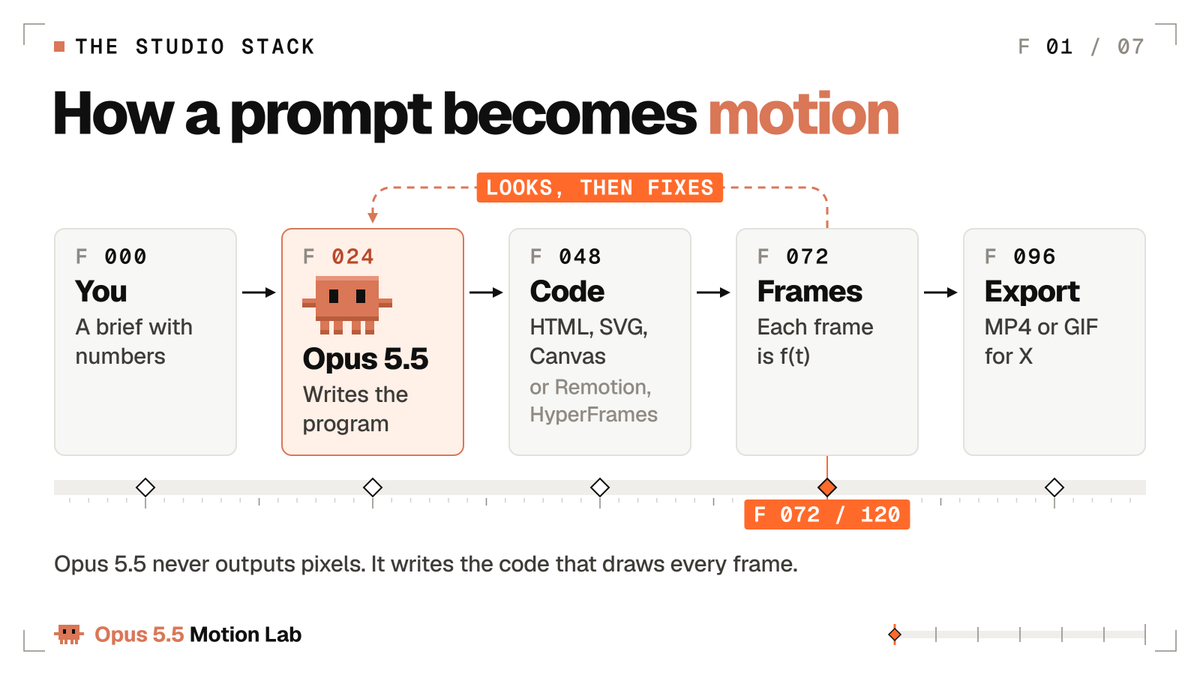
Posted on launch day by Kevin Ngo: "Claude Opus 5.5 drew every frame of this animation in JavaScript." It is a 28-second story in which a whole town sends Claude requests, and it passed 640K views. Code-drawn frames can carry a character and a story too.
The render contract. Paste it under any motion prompt so every frame can be rendered, checked and fixed:
# The render contract: paste it under any motion prompt
Output one self-contained HTML file. Only the libraries the prompt names, pinned to a version.
No network requests except fonts and those pinned libraries.
Every frame must be a pure function of time t, in seconds.
If JavaScript drives any motion, expose window.renderAt(t) that draws exactly that frame.
Animate with CSS keyframes, the Web Animations API, SVG, Canvas 2D or WebGL.
No Date.now, no setTimeout or setInterval starts, no unseeded Math.random.
Loops: render frames 0 to N-1 only, and frame N-1 must flow into frame 0.
Each line closes one way a render goes wrong. A clock or a timer makes frame 84 come out different on every run. Unseeded randomness makes shapes jitter from frame to frame.
Rendering frame N of a loop shows the first frame twice, which is the hiccup at the seam. All three are in the fixes table near the end, because all three will happen to you at least once.
Set up the Opus 5.5 lab from zero (no install, Mac or Windows)
Three ways in. Pick by how much you want to install.
Path 1: no install, in the Claude app
- Open Claude and pick Opus 5.5 in the model menu.
- Paste the opening-shot prompt from the top of this article.
- Claude writes the HTML and plays it in the preview panel.
- Ask for fixes with frame numbers, for example "the punch at frame 84 peaks late, move it 2 frames earlier".
- Download the file, open it in Chrome and record the screen (Cmd+Shift+5 on a Mac, the Snipping Tool's video mode on Windows).
One tip for the app: ask for a frame counter in a corner and a space bar that pauses, so your notes can name exact frames. Remove both before the final recording.
A screen recording is fine for a first post. It isn't frame-exact and can drop frames, so for anything that goes in a portfolio, use path 2 or 3.
Paths 2 and 3: Claude Code on Mac or Windows
Claude Code can render frames, open them and fix the code without you copying anything around. Install it with the one-line installer from Anthropic's Claude Code docs, then set up the lab:
# macOS: Node, ffmpeg and a headless browser (Claude Code already installed)
brew install node ffmpeg
mkdir motion-lab && cd motion-lab
npm init -y
npm i -D playwright
npx playwright install chromium
claude            # then type /model and pick Opus 5.5
# Windows 11, PowerShell: the same lab (open a NEW terminal after winget)
winget install OpenJS.NodeJS.LTS
winget install Gyan.FFmpeg
mkdir motion-lab; cd motion-lab
npm init -y
npm i -D playwright
npx playwright install chromium
claude # then type /model and pick Opus 5.5Two Windows notes. Windows PowerShell 5.1 has no &&, which is why the commands use a semicolon. If PowerShell refuses to run npx, type npx.cmd instead.
Then save this renderer as render.mjs. It opens your HTML in a headless browser, freezes it at every frame and saves the PNGs. It builds the file URL with pathToFileURL, so Windows paths work too.
// render.mjs   usage: node render.mjs anim.html 6 24   (file, seconds, fps)
// Freezes the page at t = i / fps and saves every frame as a PNG.
import { chromium } from 'playwright';
import { pathToFileURL } from 'node:url';
import { mkdirSync } from 'node:fs';

const [file = 'anim.html', secs = '6', fps = '24'] = process.argv.slice(2);
const FPS = Number(fps), N = Math.round(Number(secs) * FPS);   // frames 0 to N-1
mkdirSync('out/frames', { recursive: true });

const browser = await chromium.launch();
const page = await browser.newPage({ viewport: { width: 1200, height: 675 } }); // your canvas
await page.goto(pathToFileURL(file).href, { waitUntil: 'networkidle' });
await page.evaluate(async () => { await document.fonts.ready; });

for (let i = 0; i < N; i++) {
  await page.evaluate((t) => {
    if (window.renderAt) window.renderAt(t);
    document.getAnimations().forEach((a) => { a.pause(); a.currentTime = t * 1000; });
  }, i / FPS);
  await page.screenshot({ path: `out/frames/${String(i).padStart(4, '0')}.png` });
}
await browser.close();

// Then turn the frames into a video:
// ffmpeg -framerate 24 -i out/frames/%04d.png -c:v libx264 -pix_fmt yuv420p -crf 18 -movflags +faststart out/anim.mp4
One command, node render.mjs anim.html 6 24, and 144 PNGs land in out/frames. The ffmpeg line at the bottom turns them into an MP4. Every frame is exact because every PNG is the page frozen at one precise t, however slow your machine is.
The 3D showcase pieces in this lab use the same renderer idea with two upgrades. The browser renders on the real GPU (an RTX 4060 Ti here) instead of in software, at 60 fps. And every output frame averages several subframes spread over half a frame, blended in linear light, which is how a 180-degree film shutter records motion blur.
From then on you rarely type commands yourself. Tell Claude Code "render anim.html with render.mjs, open frames 0, 24 and 48, and tell me what you see before you change anything", and it runs the loop from there.
Now the effort setting. Opus 5.5 starts at medium. Anthropic says medium matches or beats Opus 5 at high on its coding and knowledge-work evals, and recommends keeping xhigh and max for work where you measured a gain. Lab rule: medium for everything; raise it only when a from-scratch piece misses twice.
Fast mode (/fast in Claude Code) runs up to 2.5x faster at $8 and $40 per million tokens instead of $4 and $20. On Pro, Max, Team and Enterprise plans it bills from usage credits, not from your plan's limits. It's for iteration sprints, when speed matters more than cost.
Shikhar's 3D browser world passed 1.75 million views. He built it from Blender assets, generated images and Three.js, and captioned it "Third iteration with Opus 5.5 medium." Medium effort and a third iteration made one of the biggest pieces of launch week.
Anatomy of a directed motion prompt
A directed prompt isn't long for its own sake. Each line removes one decision the model would otherwise make for you, and the model's own decisions are the default look.
Anthropic's Opus 5.5 prompting guide says this directly: without design direction, Opus 5.5 "falls back on a few default styles", and a general line like "avoid a generic AI look" mostly swaps one default for another. What works is naming the exact patterns to avoid, checking which defaults the first result used, and extending the list.

The template. Fill every line before you press enter:
GOAL: what the viewer should feel or do, in one sentence
OUTPUT: one self-contained HTML file (or Remotion, HyperFrames), W x H
TIME: seconds x fps = total frames. Loop: yes or no
LOOK: palette in hex, one accent, typeface + weight + size + tracking
MOTION: easing as cubic-bezier, springs as damping ratio, durations in frames
SHOTS: frame ranges, one hero move per shot, how each shot hands off
BANNED: the defaults you never want to see
QA: stills at named frames, a contact sheet, fix, then the full render
Prompt B in Experiment 1 is this template filled in, plus MODEL and CAMERA lines for 3D.
Write GOAL first. If you can't say in one sentence what the viewer should feel or do, Opus can't animate it, and no easing curve will rescue the piece. Then TIME, because every other number hangs off the frame count.
SHOTS is where the story lives. Give each shot a frame range, one hero move and a handoff: a hard cut on the beat, a match cut where one shape becomes the next, or a mask wipe. Default to the cut. A transition should be a decision.
The QA line matters more than it looks. It makes Opus check stills before it renders the whole clip, and that is where the lab loop below starts.
The motion ban list the lab starts from:
- purple or blue gradients, glow, lens flares
- floating particles as decoration
- everything fading in at once
- fade-and-slide-up on every element (Anthropic's frontend-design skill calls this the generic default that reads as AI-generated)
- centered-everything layouts
- text that moves while it is being read
Keep the list alive. After every first render, name what the model used anyway and add it. That's Anthropic's own advice, and it works on motion the same way it works on web pages.
One hero per shot. The same skill puts it well: a single orchestrated moment lands better than scattered effects. Everything else waits, dims to 40%, or holds still.
Then give the rest a rank. Secondary moves travel 50 to 70% as far as the hero and start 100 to 200 ms after it. Ambient motion stays under 5% of the hero's travel, runs on a slow sine and never stops.
Rexan Wong, whose breakdown of the trend reached about 600K views: "the context you give it is what makes it look pro."
The motion numbers cheat sheet
Motion designers talk in curves and frames, so give Opus 5.5 curves and frames. Here are the numbers and where each one comes from.
Easing. The values below come from the standard Easings reference by Andrey Sitnik.
| Name | cubic-bezier | Use it for |
|---|---|---|
| ease-out-expo | 0.16, 1, 0.3, 1 | Text and logo reveals |
| ease-out-quint | 0.22, 1, 0.36, 1 | Premium entrances |
| ease-in-out-quart | 0.76, 0, 0.24, 1 | Moves and camera pushes |
| ease-in-expo | 0.7, 0, 0.84, 0 | Fast exits |
| ease-out-back | 0.34, 1.56, 0.64, 1 | A playful pop with overshoot |
The rules: enter with ease-out, exit with ease-in and make exits 40 to 50% shorter (Material 3 pairs a 400 ms entrance with a 200 ms exit), move across the screen with ease-in-out. Linear only for rotation, progress bars and the phase of a loop. Linear easing on a move is the fastest way to make a render look like a render.
Springs. Every library names its knobs differently. One number translates between all of them: the damping ratio (the formula is in the code below). 1.0 never bounces. 0.7 to 0.85 feels premium. 0.4 to 0.6 is playful. Under 0.3 is a cartoon.
Remotion's default spring (mass 1, damping 10, stiffness 100) works out to 0.5; react-spring's default (tension 170, friction 26) to 1.0. Material 3's rule is worth stealing: position and size may bounce, opacity and color never do.
// motion.js: one tokens file, imported everywhere, no inline numbers
export const EASE = {
  enter: 'cubic-bezier(0.16, 1, 0.3, 1)',    // ease-out-expo
  move:  'cubic-bezier(0.76, 0, 0.24, 1)',   // ease-in-out-quart
  exit:  'cubic-bezier(0.7, 0, 0.84, 0)',    // ease-in-expo
  pop:   'cubic-bezier(0.34, 1.56, 0.64, 1)' // ease-out-back
};
export const MS = { feedback: 150, move: 400, hero: 750, exit: 240 };
export const STAGGER = { letter: 30, word: 90, item: 60 };

// Damping ratio from any library's numbers: 1 = no bounce
export const dampingRatio = (k, d, m = 1) => d / (2 * Math.sqrt(k * m));

// A spring as a pure function of time, from 0 to 1.
// zeta: damping ratio (1 no bounce, 0.7 premium, 0.5 playful). f: speed in Hz.
export function spring(t, zeta = 0.7, f = 2) {
  if (t <= 0) return 0;
  const w = 2 * Math.PI * f;
  if (zeta >= 1) return 1 - Math.exp(-w * t) * (1 + w * t);   // no bounce
  const wd = w * Math.sqrt(1 - zeta * zeta);
  return 1 - Math.exp(-zeta * w * t) *
    (Math.cos(wd * t) + (zeta * w / wd) * Math.sin(wd * t));
}
The spring function needs no simulation. It returns the progress at any t directly, so frame 84 renders on its own without computing frames 0 to 83, which is exactly what the render contract asks for. Hand the file to Opus 5.5 with one line: use only these tokens, no inline numbers.
Durations and stagger. UI feedback takes 100 to 200 ms (Nielsen Norman Group: 100 ms feels instant). The rest are the lab's starting points: UI moves 200 to 500 ms, hero reveals 600 to 900 ms, letters 1 frame apart, words 60 to 120 ms, list items 40 to 80 ms. Start the next element when the previous one is 30 to 50% done: fully sequential looks robotic, all at once looks cheap.
For video, say it in frames. At 24 fps one frame is about 42 ms, so a 400 ms move is 10 frames and a 750 ms reveal is 18.
Beat grid. Frames per beat = fps x 60 / BPM. At 120 BPM and 24 fps that's 12 frames. At 128 BPM and 30 fps it's 14.06, so compute every beat from time and round each one. Adding a rounded 14 again and again drifts off the music: after 32 beats you are 2 frames off.
Cut on the beat and change the layout on the bar, every 4 beats. Changing everything on every beat wears the viewer out.
Holds. On-screen text stays at least 0.3 s per word plus 0.5 s, so a two-word title needs 1.1 s. During a hold, a slow 2% push keeps the frame alive while the words stay readable.
Camera. Camera moves get the softest curves, like ease-in-out-quart; objects get the snappier ones. For parallax, start with speeds of 1.0 for the foreground, 0.5 for the middle and 0.2 for the background.
Contrast and flashes. Keep text at 4.5:1 contrast on every frame, including over moving backgrounds, and never flash more than 3 times per second. Both numbers come from WCAG, the web's accessibility standard.
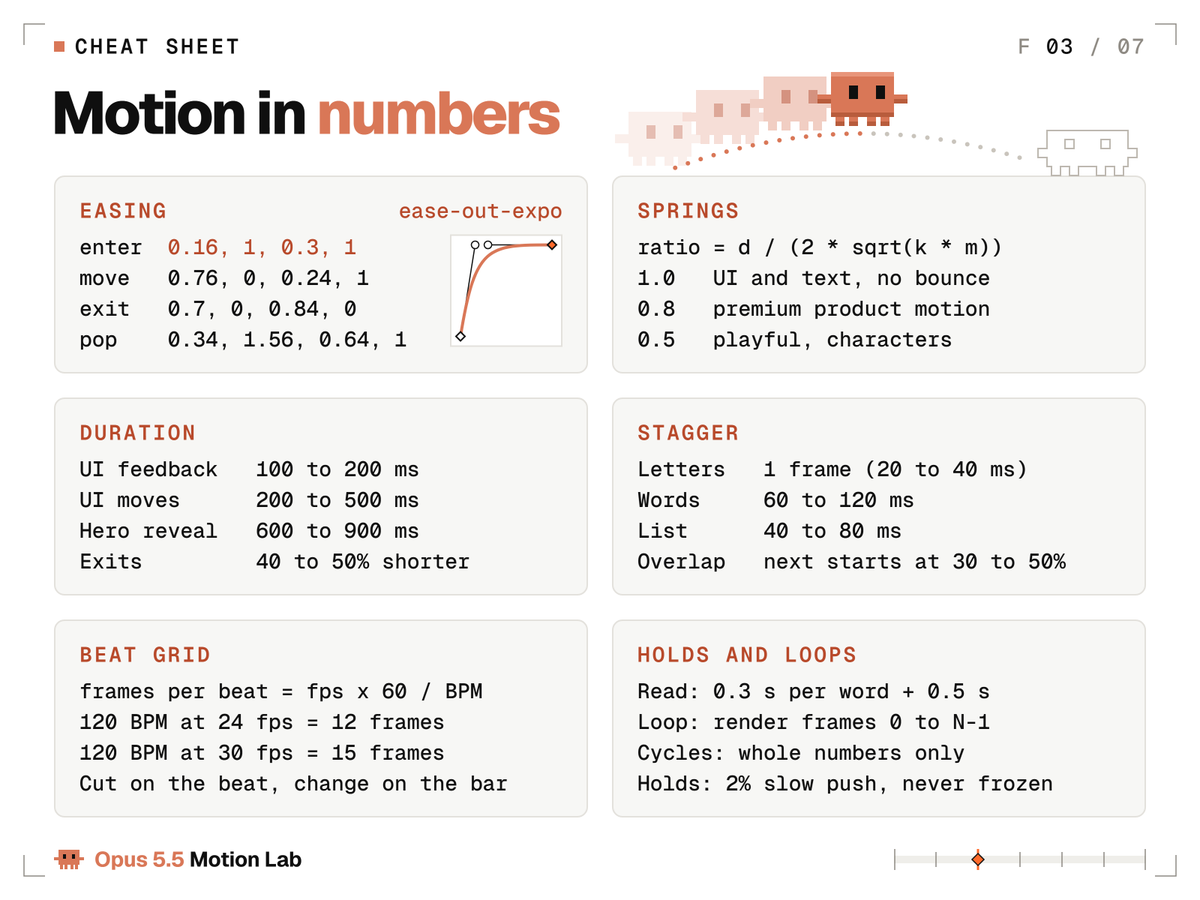
Screenshot this one.
Experiment 2: Five animation principles on a 3D mascot
Frank Thomas and Ollie Johnston wrote down Disney's 12 principles of animation in The Illusion of Life (1981). Five of them do most of the work in a short loop, and every one of them can be written as frames and sizes. This experiment gives Opus 5.5 the pixel Claude mascot rebuilt in voxels, a miniature studio and nothing but numbers.
Eight seconds, one loop: three studio lights click on, the mascot hops pad to pad along a floor that is a motion-tool timeline, then flips back to the first pad along a dotted arc. Each principle's label lights on the frame it happens, and a playhead tag tracks the frame. It is built in three.js and rendered on the GPU at 60 fps with motion blur blended from subframes.
The exact prompt:
Build a 3D animation-principles loop. One HTML file, three.js 0.160.0 via jsDelivr importmap, Geist Mono from Google Fonts. 1080x1080, 8 s at 60 fps (480 frames), frame 480 equals frame 0. window.renderAt(t) draws any frame from t alone; seeded random only.

Set: a miniature studio. A floating white 12x6 slab on an F4F2EE backdrop. Its top is a timeline: 3 tracks of 0.25 frame cells (EFEEEA), a ruler with frame numbers, 5 keyframe diamonds 2 units apart on the middle track (white fill, 0F0F0F outline). Around it on stands: a key softbox, a rim strip light, a top spot on a boom.
Hero: the pixel Claude mascot as 0.1 voxels: D97757 body 14x10x8, two 3x2 arms, four 2x3 legs, 0F0F0F 2x3 eyes; roughness 0.45, clearcoat 0.3.

Lights, 0 to 1 s: key 3200 K with soft shadows at 0.1 s, rim 7500 K at 0.4 s, top spot 5000 K at 0.7 s. Each clicks on with a 3-frame flicker, and the mascot's eyes glance at it.
Hops, 1 to 5 s: 4 hops to diamonds 2 to 5, landing on frames 105, 165, 225 and 285. Each hop: 11-frame crouch (1.2x0.75), stretch 0.85x1.28 at takeoff, 25 frames of air, squash 1.25x0.7 on landing, spring back at damping 0.55; arms lag 4 frames, legs 6. Each landing lights its diamond FF6A2B, ripples the cells 0.08 high and throws 12 voxel sparks. An FF6A2B playhead carrying a point light moves at constant speed and crosses each diamond on its landing frame.
Flip, 5 to 6.4 s: a dotted arc from diamond 5 back to diamond 1 draws in, then an 18-frame deep crouch and a 360° flip along the arc, 3.5 high, landing on frame 384 while the playhead rewinds under it.
Labels, top left, Geist Mono 28 px: a checklist 01 ANTICIPATION, 02 SQUASH & STRETCH (& in D97757), 03 OVERLAPPING ACTION, 04 FOLLOW-THROUGH, 05 ARCS, in 8E8A83. Each row turns 0F0F0F and fills its FF6A2B diamond on its exact frame: 69 (first crouch), 140 (stretch), 200 (limbs trail), 285 (arms settle), 303 (arc draws).
End: hold, blink at 7.2 s; on frame 468 the lights, diamonds and labels snap off.
Camera: FOV 18, 30° elevation, ±10° orbit over 8 s, 25% push-in tracking the hops, 4% punch-in on the flip landing.
Post: bloom on emissives, depth of field focused on the mascot, 2% grain, 10% vignette, dithered backdrop.
Follow-ups: 4, printed below exactly as they were sent. The first build already had everything the prompt lists: the voxel mascot, the timeline, 5 diamonds, the playhead, 3 light stands, the labels, the arc and the flip. The follow-ups fixed the look and the framing: a washed-out grade, props crossing the label block, a rim light seen edge-on and a top light whose click didn't read. Separately, a numeric audit read the live scene on all 480 frames and compared it with the prompt's numbers: 71 checks, from the blink on frame 432 to the feet touching each pad. The first run failed 6, and all 6 were fixed before the final render.
1. The render is washed out and cramped. Grade so the lit front face reads D97757 and lit diamonds read FF6A2B; drop the fill so lights-off sits near 50% and each click is obvious; lower the key to 28 degrees from the front right and put the cool rim at the back left so it edges the side we see. Pull the wide shot back to 44 units so the whole floating slab and all three stands are in frame, add a soft shadow under the slab, and make sparks 0.075 to 0.12 and ruler numbers bigger.
2. Frame check fixes. Keep every prop out of the label block: track the hops at 45% and hang the top spot at 5.8 on a boom from the back right corner, above the flip. Light each lit diamond with a soft glow from its face, move the playhead light to the front edge of the track and run its line under the diamonds. Start the dotted arc above the mascot's head, keep every tripod foot on the slab, and give the arms a bigger, slower settle (2.2 Hz, damping 0.22) so the follow-through reads.
3. Turn the rim strip's panel toward the camera so its click reads.
4. Make the top spot's click read too: narrow it to a 34 degree pool at 45 cd and give the lamp a glowing lens rim.
The sound, one more prompt with the same rules. No sound follow-ups were needed: the first build already matched the prompt's numbers. The technical fixes, like a Web Audio gain node that starts at full volume and a compressor that adds 6 ms of delay, are logged separately.
# Sound prompt
Score this 8 s loop, 480 frames at 60 fps. Synthesize everything in code with the Web Audio API, no samples, no downloads. 120 BPM, 4 bars, F major. Each hit lands 1 frame after its visual event.
Bed: pad voices A3 E4 (key light), C5 (top), G5 (rim), each following its light's flicker. Shaker 8ths from 45, kick and bass from 60, roots F D Bb F by bar; kick and shaker rest 330 to 420, bass holds C, then F at 384.
Clicks: lights 6, 24, 42, off 468.
Crouches 69, 129, 189, 249, 312: creak, inhale riser.
Takeoffs 80, 140, 200, 260, 330: upward swish.
Landings 105, 165, 225, 285, 384: rubber squash pitched by the squash scale, spark tings, 384 biggest.
Label pings A5 C6 D6 F6 A6: 69, 140, 200, 285, 303.
Dot ticks 303 to 318, flip whoosh 330 to 384, blink blip 432.
48 kHz stereo WAV, about -14 LUFS, peak -1 dBTP, seamless loop, mux into the MP4.
The result: about 2 hours from the first prompt to the finished loop, renders included, plus about 70 minutes for the sound. All 71 checks pass: every label lights on its printed frame, and every landing touches its pad on the planned frame.
The five principles on the checklist, plus the two that ride along with every move, written the way the prompt writes them:
| Principle | What it does | Write it in the prompt as |
|---|---|---|
| Anticipation | Winds up before the move | 11-frame crouch (1.2x0.75) |
| Squash and stretch | Shows weight and speed | stretch 0.85x1.28 at takeoff, squash 1.25x0.7 on landing |
| Overlapping action | Limbs start later than the body | arms lag 4 frames, legs 6 |
| Follow-through | Parts keep moving after the body stops | arms settle at 2.2 Hz, damping 0.22 (follow-up 2) |
| Arcs | Makes motion feel natural | a flip along a dotted arc, 3.5 high |
| Slow in and slow out | Speeds up and settles softly | spring back at damping 0.55 |
| Timing | Frame count sets weight | 25 frames of air per hop, 18 frames of crouch before the flip |
The labels double as a test. The prompt pins each one to a frame (69, 140, 200, 285 and 303), so a move that runs late shows up on screen as a label that lights before its move.
The prompt also says what may not change. The mascot keeps its pixel proportions exactly: a 14x10 body, 3x2 arms, 2x3 legs and 2x3 eyes, built from 0.1 voxels and 8 deep. That line is the guardrail that keeps the character recognizable in 3D. Every style you care about needs a line like that.
The set is the lesson. Motion tools show keyframes and a playhead so animators can check timing. Here they are the floor, and the playhead crosses each diamond on its landing frame. For your own pieces, ask Opus for a playhead and frame labels while you iterate, then switch them off for the final render.
The rest of the twelve still apply. Staging is the one-hero rule from the prompt anatomy. Exaggeration matters more at phone size: push key poses 10 to 30% further than feels right, because the feed shrinks everything.
The lab loop: render, look, fix
The first render is a draft. The loop that finishes it: render stills, look at them, write notes with frame numbers, fix, and re-render only what changed. Two to four rounds is normal.
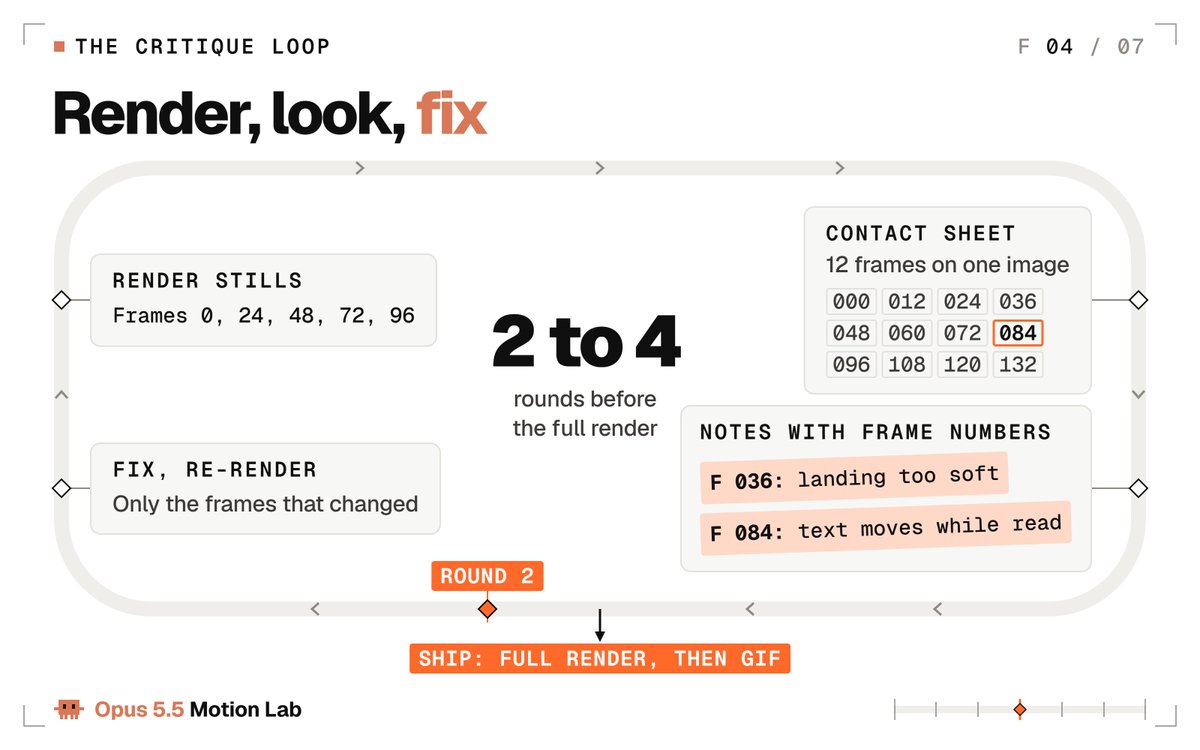
The trick that makes the loop cheap: freeze any frame by its URL. Paste this right before the closing body tag, open anim.html?t=2.5, and you are looking at the exact frame at 2.5 seconds. Opus can screenshot it and read it.
<script>
// Paste right before </body>. Open anim.html?t=2.5 to see the exact frame at 2.5 s.
(function () {
  var q = new URLSearchParams(location.search);
  if (!q.has('t')) return;
  var t = parseFloat(q.get('t')) || 0;
  function freeze() {
    if (typeof window.renderAt === 'function') window.renderAt(t);
    document.getAnimations().forEach(function (a) { a.pause(); a.currentTime = t * 1000; });
  }
  freeze();
  if (document.fonts && document.fonts.ready) document.fonts.ready.then(freeze);
  window.addEventListener('load', freeze);
})();
</script>
For the whole clip at once, a contact sheet puts 12 frames on one image. Opus reads it like a storyboard:
# Contact sheet: every 12th frame, 4 across, 3 down
ffmpeg -framerate 24 -i out/frames/%04d.png -vf "select='not(mod(n\,12))',scale=400:-1,tile=4x3" -frames:v 1 out/contact.png
Two views borrowed from animators make the notes sharper. An onion skin stacks frames at low opacity: even spacing means robotic motion, and spacing that tightens near the keys means the easing works. A speed graph plots position per frame: straight lines are linear motion, sharp corners are dead starts and stops. Opus 5.5 can draw both and read both.
The follow-ups that work best, ready to paste. Each one points at frames, not feelings:
Render stills at frames 0, 24, 48, 72 and 96. Describe each in one sentence as a viewer would. Does that match the shot list? Fix what does not.
Make a contact sheet of every 12th frame. Mark every frame where two things move at once, then fix the hierarchy.
Onion-skin frames 24 to 47 at 25% opacity. Spacing should tighten near the keys. Adjust the easing until it does.
Plot the hero's x position and scale per frame as a PNG chart. Show me where the motion is linear or stops dead, then fix it with our tokens.
Review this like a senior motion designer: 10 notes ordered by impact, each with a frame number and the exact code change. Apply the top 5.
It is too busy. Remove 30% of the motion and keep only the moves that guide the eye.
The ending is abrupt. Add a 36-frame hold with a 2% push, then let it settle on a spring at damping ratio 0.8.
Pick one or two per round. Pasting all seven at once turns a fix into a rewrite.
When a note reaches you as a feeling, translate it before you send it:
- "Make it pop": scale 1.0 to 1.08 to 1.0 over 6 frames, peak on the beat.
- "Make it feel premium": ease-out-quint on entrances, springs at damping ratio 0.8, no overshoot on text.
- "It drags": shorten each hold by 12 frames, one beat at 120 BPM and 24 fps, so every cut stays on the grid.
- "It feels busy": one hero move at a time; everything else starts 150 ms later at 60% of its travel.
- "It looks like AI": list the defaults it used by name, ban each one, and render again.
The lab's receipts, straight from the logs:
| Experiment | Prompt words | Creative follow-ups | Frames |
|---|---|---|---|
| Opening shot, liquid chrome | 416 | 10 | 360 |
| Experiment 1, vague side | 27 | 0 (by design) | 360 |
| Experiment 1, directed side | 448 | 15 | 360 |
| Experiment 2, 3D mascot | 399 | 4 | 480 |
A creative follow-up is any note that changes how the piece looks or moves. Technical fixes, like a capture hook or font loading, are logged too, in a separate list, and they don't count here.
Sound came last, one prompt per piece written against the frame numbers: 5 sound follow-ups for the chrome loop, 12 for Experiment 1 and 0 for the mascot, all printed with their videos.
Other people's numbers look the same once they are honest about them.
Miles runs a design studio. His launch video took 3 prompts and passed 590K views, and he calls Opus 5.5 "insanely good" at motion design. Pros count prompts, and 3 is a good number.
Vox asked Opus 5.5 to explain gravitational lensing: one prompt, then three overnight polish rounds, 5 hours 28 minutes end to end, about $90 at API prices. The polish rounds are the product.
Count your follow-ups and post every prompt with the work. Receipts convince people; "one prompt" makes them suspicious.
Lab equipment: pick your engine
Opus 5.5 can write for every engine below. Name the one you want in the prompt, or it will choose for you.
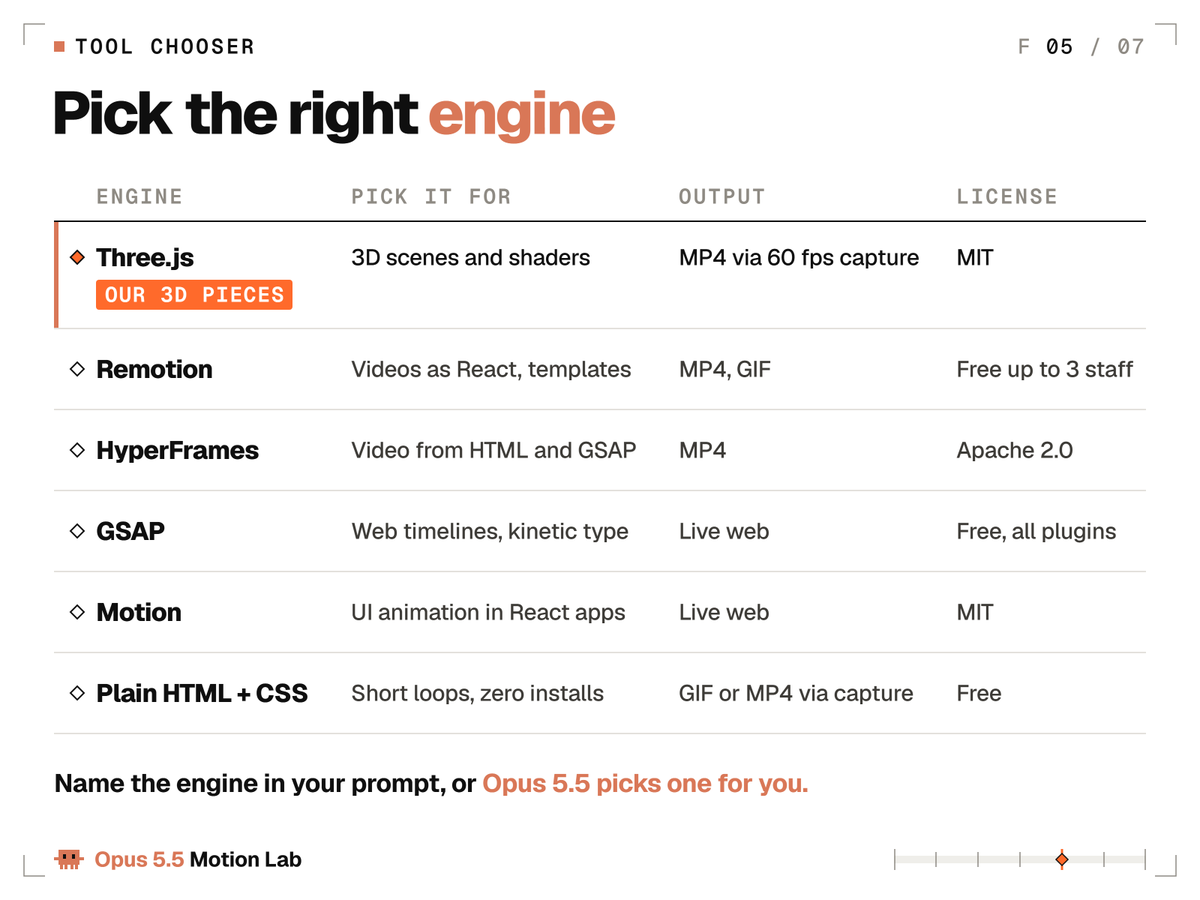
Three.js is what this lab's three showcase pieces use: 3D scenes, lights, materials and shaders on WebGL, drawn by the GPU (r186 shipped September 24). For video, drive time from the frame number, never the clock. Give the camera numbers too: a field of view of 35 to 50 degrees is a good starting point.
Remotion turns video into React components, frame-exact, with official Agent Skills for Claude Code. Free for individuals and companies of up to 3 employees; bigger companies need a company license.
HyperFrames by HeyGen was open-sourced on April 17, 2026 under Apache 2.0. Agents write HTML, CSS and GSAP timelines, and its CLI renders the MP4. No company-license rule.
GSAP is the web's timeline library and is now 100% free, including SplitText, MorphSVG, DrawSVG and ScrollTrigger. Its license only bars building a no-code animation builder that competes with Webflow.
Motion (formerly Framer Motion) animates React apps under the MIT license. It animates live interfaces and has no video renderer.
Plain HTML and CSS needs zero installs and covers 2D loops under 10 seconds: type, shapes and UI. The renderer above turns it into a GIF or an MP4.
# Remotion: video as React components
npx create-video@latest          # pick a template, name it my-video
cd my-video
npm i
npx remotion skills add          # Agent Skills for Claude Code
npm run dev                      # Remotion Studio in your browser
npx remotion render MyComp out/video.mp4   # MyComp = your composition id

# HyperFrames: HTML + GSAP in, MP4 out (needs Node 22+ and FFmpeg)
npx hyperframes init my-video
cd my-video
claude plugin marketplace add heygen-com/hyperframes
claude plugin install hyperframes@hyperframes
npx hyperframes preview
npx hyperframes render
The lab's rule of thumb: one idea under 10 seconds, plain HTML. A series, a template or a data-driven video, Remotion. If you think in web pages and GSAP, HyperFrames. Anything 3D, Three.js. And when the motion lives inside a product instead of a video, Motion or GSAP.
Then put the engine in the OUTPUT line of the template, with its numbers. "A Remotion composition, 1920 x 1080, 30 fps, 450 frames" leaves Opus nothing to guess.
Chubby's 3-minute history of AI: "every frame is rendered from code", made with Claude Code and Remotion, about 7,400 lines of React and TypeScript, no stock footage, no image or video generators. About 196K views. The same approach scales from a 6-second loop to a 3-minute film.
Meng To's playable boat ride through Japanese scenery, with weather, day and night, and water reflections, built in Three.js and seen about 473K times. When the piece is 3D, name Three.js and let Opus build the scene.
The last mile: sound, loops and export for X
The part tutorials usually skip, and the part viewers notice first.
Sound. The feed plays video muted until someone taps, so the picture has to work in silence first. When you add sound, mix music and effects, normalize to -14 LUFS (a common loudness target for web video) and put each visual hit 1 frame before its sound, never after.
A sound that arrives before its picture feels wrong sooner than one that arrives a little late. Real life runs in the same order: light beats sound.
The three lab videos follow that rule to the sample: every sound synthesized in code with the Web Audio API, each hit peaking 1 frame after its picture, mixed to -14 LUFS with peaks at -1 dBTP. Opus 5.5 can't listen, so it checked the sync by decoding the finished MP4 and lining each hit up with its frame.
# Music + sound effects, mixed, normalized to -14 LUFS, muxed under the picture
ffmpeg -i out/anim.mp4 -i music.wav -i sfx.wav -filter_complex "[1:a][2:a]amix=inputs=2:duration=first,loudnorm=I=-14:TP=-1:LRA=11[a]" -map 0:v -map "[a]" -c:v copy -c:a aac -b:a 192k -shortest -movflags +faststart out/final.mp4
Loops. Render frames 0 to N-1, never N. Frame N is frame 0 again, and showing it twice is the hiccup people see at the seam. Drive every loop from phase = frame / N with whole-number cycles.
A square that turns exactly 90 degrees per loop, or a wave that completes exactly 2 cycles, lands back on its first frame. For organic drift, sample noise along a circle, so it comes back to where it started.
Make frame 0 a finished composition, too. It's the first thing on screen while a GIF loads.
Export. MP4 for posts, GIF for X Articles and inline loops. One palette for the whole GIF keeps colors from flickering between frames.
# MP4 for an X post: H.264 High, yuv420p, starts playing at once
ffmpeg -framerate 24 -i out/frames/%04d.png -c:v libx264 -profile:v high -pix_fmt yuv420p -crf 18 -movflags +faststart out/anim.mp4

# GIF for an X Article: one palette for the whole clip, 1200 px wide
ffmpeg -framerate 24 -i out/frames/%04d.png -vf "scale=1200:-1:flags=lanczos,split[a][b];[a]palettegen=stats_mode=diff[p];[b][p]paletteuse=dither=bayer:bayer_scale=5:diff_mode=rectangle" -loop 0 out/anim.gif

# Loop check: play it three times back to back and watch the seam
ffmpeg -stream_loop 2 -i out/anim.mp4 -c copy out/loop_check.mp4
The X limits that matter, from X's media docs and Help Center:
| Spec | GIF | Video |
|---|---|---|
| Size limit | 15 MB | 140 s without Premium |
| Frame size | up to 1280 x 1080 | 1920 x 1080 for 16:9 |
| Frames and speed | at most 350 frames | up to 60 fps |
| Format | one palette, loop forever | H.264 High, yuv420p, AAC audio |
| Lab default | 1200 px wide, 24 fps | CRF 18, faststart |
At 24 fps, the 350-frame cap means a GIF tops out at about 14.5 seconds. A 4 to 6 second loop is 96 to 144 frames, well under it.
One timing trap in GIF exports: delays are stored in hundredths of a second, so a 24 fps frame (41.7 ms) can't be stored exactly. Round every frame to 40 ms and the loop runs 4% fast, off your beat grid. The fix: five frames at 40 ms, then one at 50 ms, which keeps a 6-second loop at exactly 6.00 seconds.
Pick the canvas before the first frame, because changing it later means re-directing every shot. The common sizes: 1920 x 1080 for 16:9, 1080 x 1080 for 1:1, 1080 x 1350 for 4:5 and 1080 x 1920 for 9:16. X accepts video between 1:3 and 3:1.
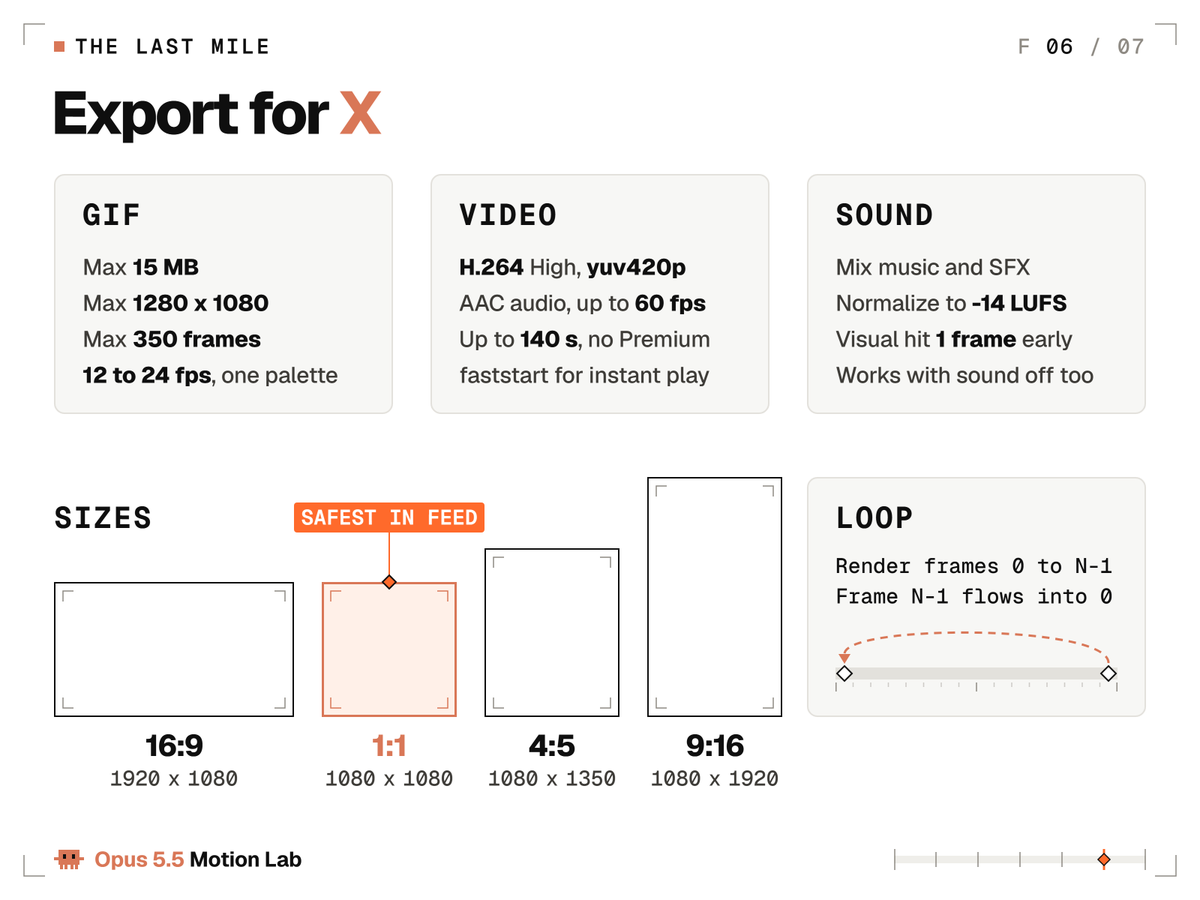
Leon Lin asked Claude Code on Opus 5.5 for a launch video for a made-up calendar app: name, logo, UI, animation, soundtrack and sound effects, all in code, from one prompt in about 8 hours. It passed 85K views. Sound can be code too.
When an experiment breaks
The same failures come back in every project. Here they are, each with the prompt that fixes it.
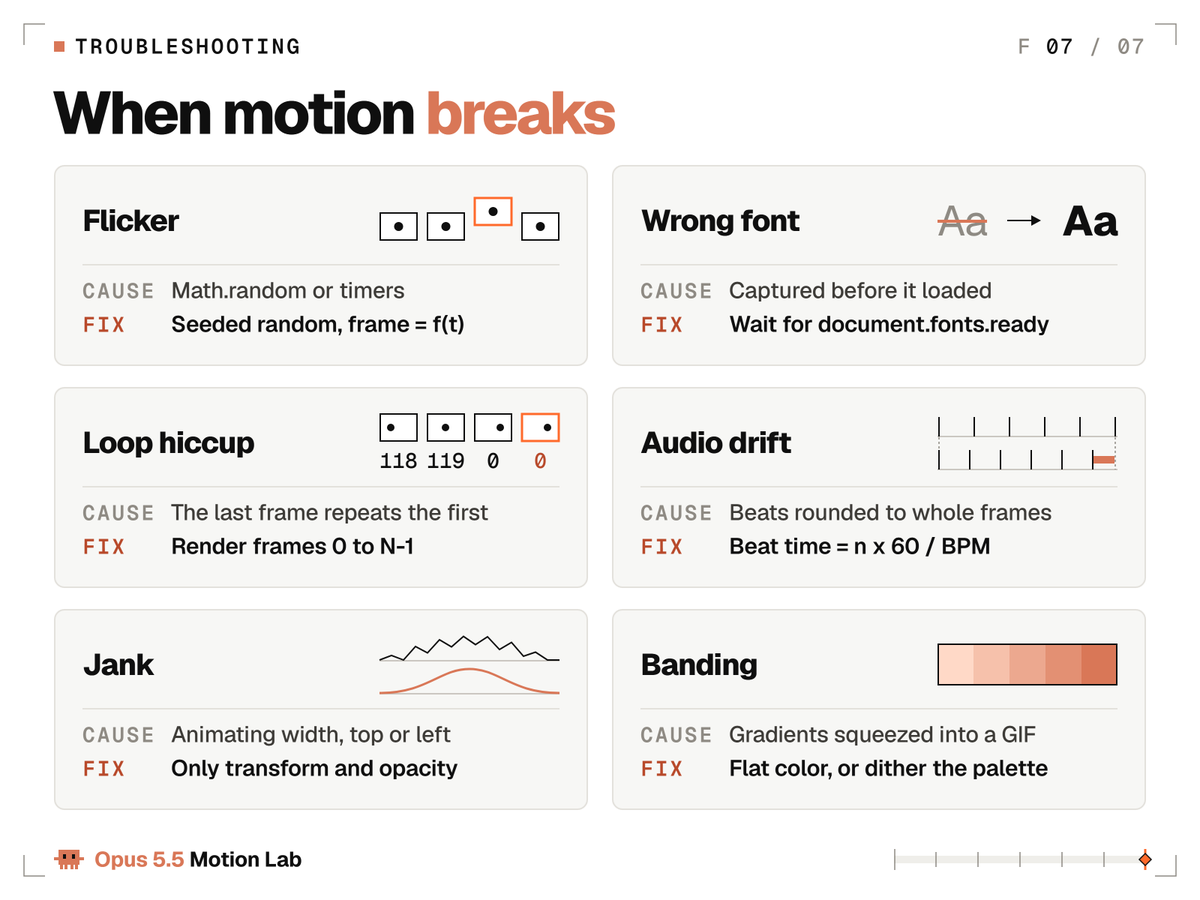
| Symptom | Paste this fix |
|---|---|
| Flicker or jitter | Make every value a pure function of t. Replace Math.random with a seeded generator. Remove timers and CSS transitions. |
| Wrong or fallback font | Load the font with display=block and wait for document.fonts.ready before the first frame. |
| Hiccup at the loop seam | Render frames 0 to N-1 only. Drive the loop from phase = frame / N with whole cycles. |
| Audio drifts off the beat | Compute each beat as n x 60 / BPM and round per beat. Never add a rounded frame count. |
| Jank or dropped frames | Animate only transform and opacity. No width, height, top or left. |
| Banding in the GIF | No gradients. Flat colors only, or dither the palette. |
| Blurry or shimmering text | Snap resting text to whole pixels. Render at 2x and scale down. |
| Text moves before you can read it | Hold every text state 0.3 s per word plus 0.5 s before it moves. |
| Everything moves at once | One hero move at a time. Others start 150 ms later at 60% of its travel. |
If a fix doesn't hold, ask Opus to render the two frames on either side of the problem and describe the difference. Spotting what changed between two images is exactly what its sharper vision is for.
The fix at frame 84 did not hold. Render frames 83 and 85 as PNGs, put them side by side and list every difference you can see. Find the line of code that causes it, fix only that line, then render both frames again.When a fix works, add it to the render contract. The contract is the lab's memory: every line in it is a failure you never have to see again.
Experiment 3 is yours
The lab is open. Tonight's run:
- Copy the opening-shot prompt and swap its words for your product or your name.
- Run it on Opus 5.5 at medium effort, in the Claude app or in Claude Code.
- Render stills at frames 0, 24, 48, 72 and 96, and write two notes with frame numbers.
- Fix, re-render, and repeat until you run out of notes.
- Export with the GIF command and post it with your prompt and every follow-up in the first reply.
Keep the numbers on the first run and change only the words. On the second run, change one number at a time, so you can see what each one does.
The model is the same for everyone. The numbers you give it are yours.
I post every new piece with its exact prompt and every follow-up, picture and sound. No fake one-shots. Follow @flxrnc so the next one lands in your feed, and bookmark this article so the numbers are here when you need them.