
把任务交给 Dot,和 Codex 一起做:开发者的新协作方式
从 Slack 里的一个 Bug,到通勤时的电话,再到部署后的提醒:Dominik Kundel 分享,主动个人 Agent 怎样接起 Codex 任务之间的跟进工作。
OpenAI 开发者体验团队的 Dominik Kundel 已经花了不少功夫配置 Codex:用记忆记录偏好,装插件,设自动化,还专门开了一个“参谋长”线程统筹工作。可他用了一段时间 Dots 后,发现最明显的变化是自己不必再记着每一个跟进步骤。
会写代码,不等于替你记住后续的每件事。 作者过去的流程是:
把 Appshot(应用画面快照)或 Slack 消息链接带给 Codex,让它实现功能,并交代它监控部署状态以及回到 Slack 回复结果;但每遇到一项新需求,都必须单独要求它设置自动化来跟进功能或发布计划的变动,每件事都要重复设置一次。
真正的负担在于:每项新工作都要自己组织指令、额外配置跟进方式。
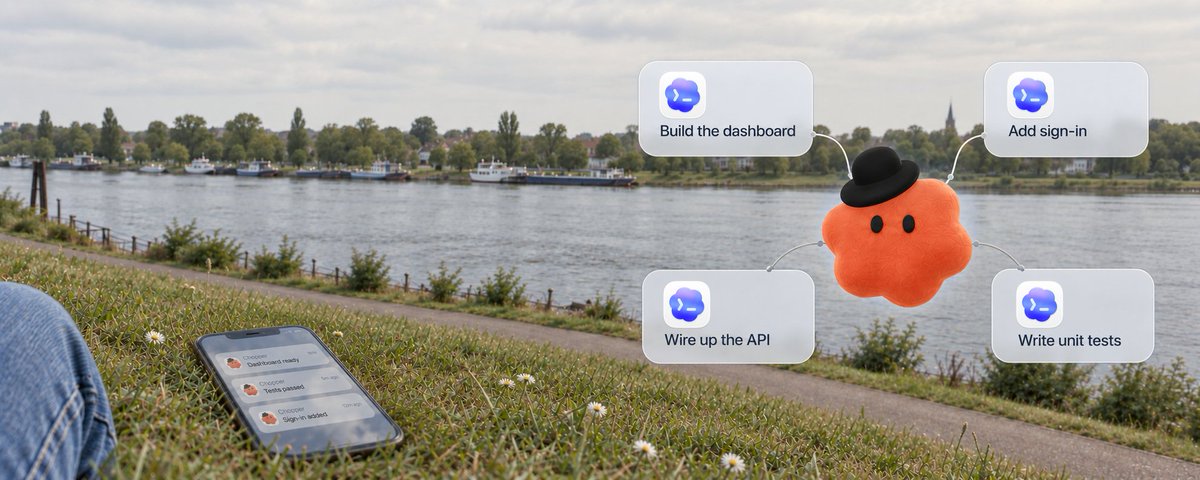
现在,作者可以直接在同一个 Slack 线程里 @自己的 Dot。Chopper 接下任务、处理问题,再回到原线程回复结果,还会留意与发布有关的变化并提醒他。这让交办、执行、回报和后续跟进接在一起,作者不必每来一项新工作,就亲自拼好这套流程。
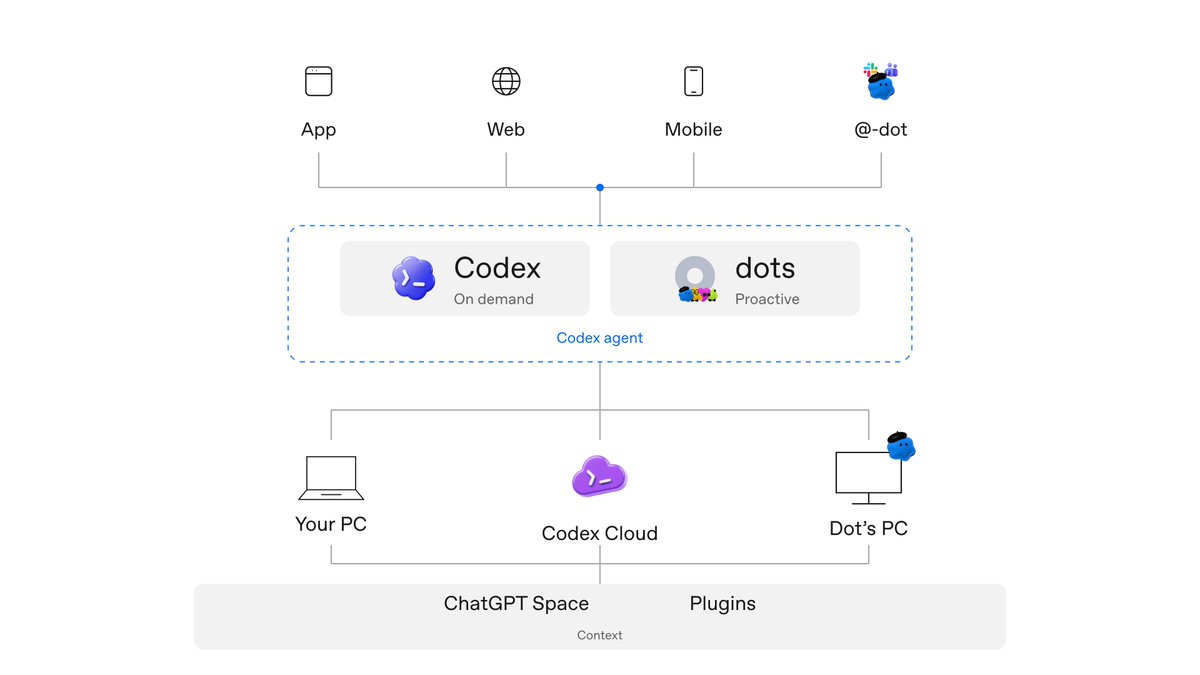
而 Dots 的出现,正是为了接管这层组织与跟进的负担。它不是要取代 Codex,而是基于同一套开源 Codex Agent 执行框架(harness,也就是让模型调用工具、推进任务的运行系统),负责接住任务并持续跟进。
这也解释了为什么已经配好 Codex 的人仍能用上它:Dot 可以沿用账号中已连接的 ChatGPT / Codex 插件,借助这些插件查询资料、在原有工具和服务中开展工作,也能利用已有的相关上下文。你不用为了增加一个交办入口,把之前的配置全部重做。
Dot 是一个可以持续交办工作的个人 Agent
简单来说,Dot 是由 GPT-6 Astra 模型驱动的常驻专属助理。作者写作时,只能创建一个 Dot,你可以给它自定义名字、专属外观,甚至可以用你家宠物的照片作为形象。
例如 Dominik Kundel 就给自己的 Dot 起名叫 Chopper,并为它定制了一套顶着黑色小帽的橙色小兽形象。
Dot 的特点在于常驻与跨端协同。它拥有专属 Handle(比如 @tibo-alfred 或 @yourname-dot),你可以直接向它派发任务,而无需在开始前先挑选具体的 Codex 线程。
从换个窗口聊天,到换一种交办方式
从直接使用 Codex 转向与 Dot 协同,主要体现在三方面的变化上:
1. 跨渠道连贯性:随时随地对话,上下文不再归零
平时和同事或家人沟通,我们可能会在聊天软件、电话、社交媒体之间切换,但彼此讨论的背景依然延续,不用每次都从头交代。Dot 也能做到类似的事情:
- 场景持续接力:同事在 Slack 里反馈了一个 Bug,作者把它转给自己的 Dot(Chopper),Chopper 便开始查找所需资料并展开工作;下班通勤路上,作者可以直接打电话给 Chopper 继续聊这个 Bug,或者探讨完全不同的新话题;回到工位后,作者可以在桌面端聊天中继续沟通,或者直接审阅它已完成的工作。整个过程面对的都是同一个 Dot。同一个 Dot 可以利用跨渠道的相关上下文,但 Slack 与 ChatGPT 中的消息不会自动互相复制。新委托任务也只收到完成该任务所需的上下文,不会自动拿到所有历史对话;私聊信息要分享给别人,仍需你的授权。
- 多通道同时并发:在与 Dot 打电话沟通时,双方可以同时使用文字交流。例如 Chopper 可以在通话中途发来内容供作者查看,作者无需挂断电话即可在屏幕上打字回复或发送链接(作者就是以这种方式在 ChatGPT Space 中迭代文章的);在持续通话的同时,Dot 还能在另一项任务完成时发来提醒,或在紧急事务出现时主动通知。
- 记忆与笔记机制:除了可以使用已有的 ChatGPT 记忆与相关会话外,Dot 在 Codex 原有的会话压缩(compaction)机制之外,还拥有一套独立的私有备忘笔记工具。Dot 会记录重要笔记,并适时唤醒对相关主题展开后台研究,借此逐渐掌握你的工作细节与协作关系;私有笔记与会话压缩是不同的工具,OpenAI 不直接用主动研究和私人笔记训练模型;如果其中的信息进入符合条件的对话或任务,仍适用你的数据设置。
2. 你继续聊,它把不同任务交给合适的环境
很多开发者最关心的就是:Dot 和 Codex 的底层环境到底怎么分工?
事实上,Dot 本身并不受单一设备限制。在与用户持续对话的同时,一个 Dot 可以并行启动子 Agent 和独立任务,随后将结果汇回;用户随时可以打开对应的 Codex 线程直接与 Codex 协作,也可以交给 Dot 继续协调。例如在路上打电话提出想法时,就能让 Dot 直接启动一个 Codex Cloud 云端任务。

这三台计算环境各司其职:
Dot 自己的云端电脑(Dot's PC)
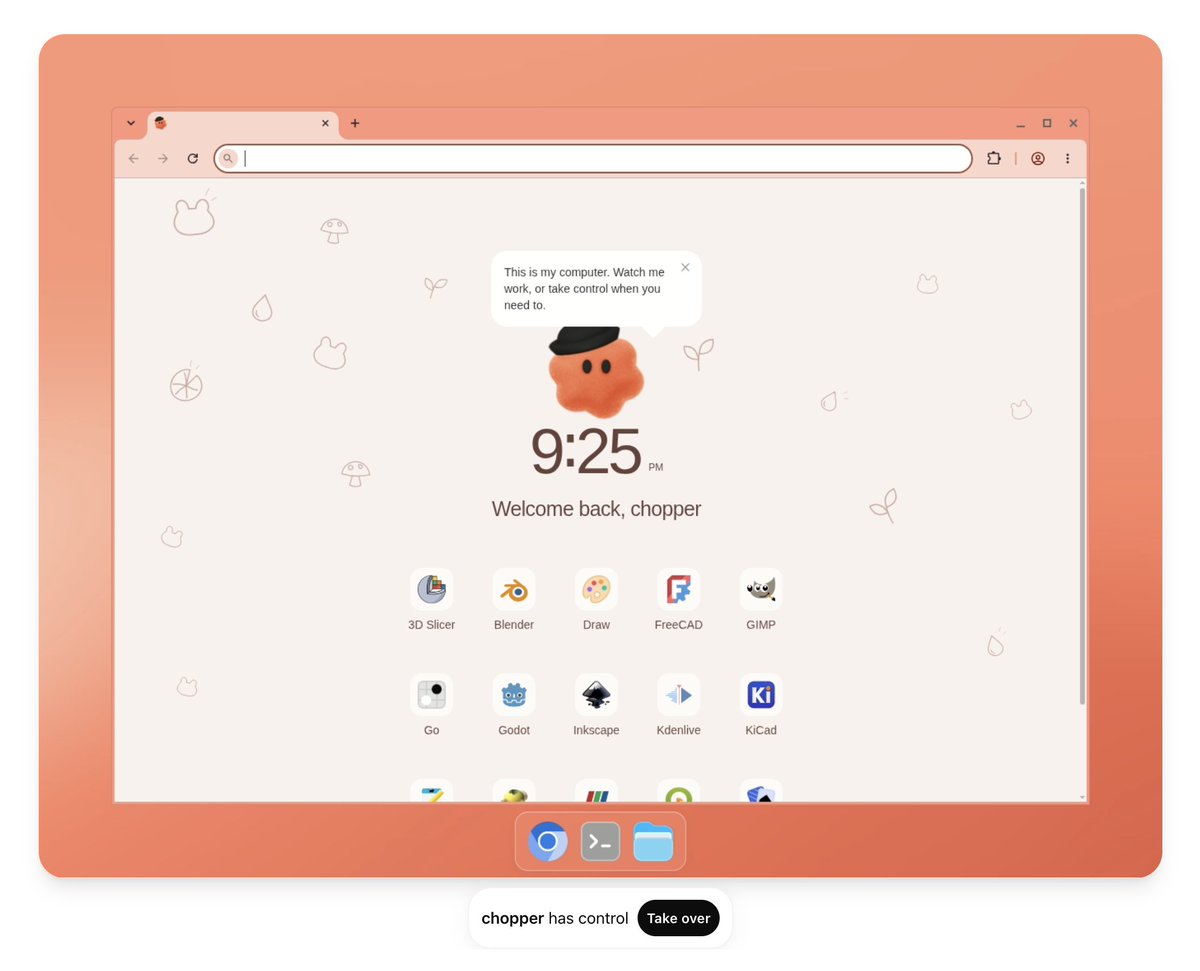
Dot 在云端拥有独立的虚拟机与浏览器。云端任务在用户的电脑关闭后依然可以继续运行,并且机器可以在使用间隙保留状态。它不仅能检索信息,还预装了 Blender、FreeCAD、GIMP、Godot、Kdenlive 等工程与多媒体软件。云端浏览器拥有独立的会话,不会继承用户本地浏览器的登录状态。

你的本地电脑(Your PC)
通过桌面端授权连接本地电脑后,Dot 就能调用本地的文件、工具以及已登录的本地浏览器环境(包括计算机使用能力)。这需要本地电脑保持联网,且 ChatGPT 客户端保持开启运行。连接本地电脑并不等于把所有应用的全部对话都开放给 Dot。
Codex 云端环境(Codex Cloud)
对于需要特定代码仓库与配置的编码任务,Dot 可以在用户预先配置好的 Codex 云端环境中拉起独立任务。这类云端编码任务同样可以在本地设备离线时继续运行。
在实际使用中,Dot 会根据用户的习惯逐渐适应其偏好。例如作者个人更喜欢将后端修改或快速文案调整交给云端处理,而重大前端界面的改动则习惯在本地笔记本上执行;作者说,Dot 会随着互动逐步了解并适应这些偏好;这里描述的是他的使用方式。
作者还举了一个可能的场景:你正通过 Dot 在本地 Codex 做任务,日历显示马上要通勤,Dot 可能建议改到云端继续工作。它考虑的不只是任务做到哪一步,还包括接下来什么环境能继续干活。这里说的是主动提出建议;实际切换仍要安排云端任务,不能理解为已有任务和全部运行状态会自动搬过去。
3. 把新消息和旧任务连起来,提醒下一步该做什么
主动性(Proactivity)是 Dot 带来的显著不同。在用户交代的事情之外,Dot 能在后台结合已连接应用与工具的信息,主动跟进工作进展,无需每一步都由人来主动提示。例如 Slack 里的一条新消息或会议纪要里的新决定,可能关系到上周讨论过的事项,Dot 就能把两者关联起来并提醒用户注意。
- 案例一:跟踪 PR 部署 作者曾让 Chopper 跟踪一个 PR 部署到生产环境的全过程,并在确认可以重新测试修复时告知自己。这免去了人工反复查看状态的麻烦,作者关心的核心更新就是确认能够重新尝试了。
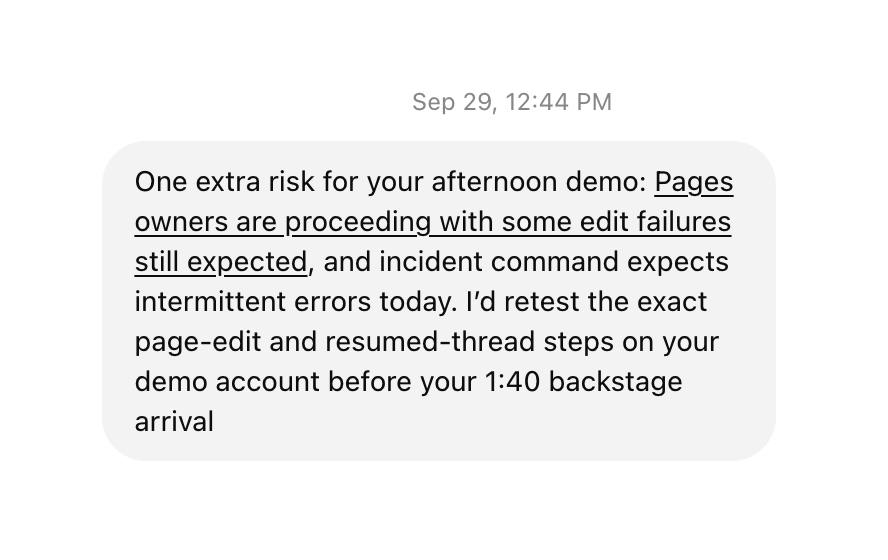
- 案例二:大会现场的潜在风险预警 在技术峰会(DevDay)期间,作者在 Slack 中排查开场演讲遇到的问题是否会波及自己演讲的技术演示。Chopper 注意到了这一点,同时还发现当时有另一起作者尚未看到的事故正在发生。Chopper 交叉比对了故障情况、演讲脚本与日程安排,提醒作者检查演示中的对应部分。

- 案例三:自动调查反馈与修复验证 Dots 团队的一位工程师赋予了自己 Dot 更进一步的权限:不仅监控反馈频道,还能主动调查反馈的问题,启动 Codex 修复任务,检查 CI(代码提交后自动运行的构建与测试)并处理其中的失败项。遇到重大问题时,Dot 会标记给工程师介入处理;由于这些任务本身都是 Codex 线程,工程师可以随时直接进入并接续工作。
哪些事可以交给它,哪些事要自己决定?
给 AI 代理这么高的自由度,会不会失控乱改代码或乱发消息?
关键是区分它在研究什么,以及你允许它实际做什么。
1. 默认防护、主动研究与操作审查
Dot 在后台开展的主动研究(Proactive Research)属于只读性质。用于该项研究的工具本身无法发送消息、更改应用内容,也无法控制你的浏览器或电脑。对于可能影响账户或共享信息的后续操作,必须经过授权与自动审查:系统会结合用户指令、应用权限、自定义规则与内建安全机制,判断操作是直接允许执行、需要征得你的批准,还是必须交由你亲自操作(例如修改密码)。
仅仅将 Dot 接入 Slack 等消息渠道并不会自动建立监控,必须明确指定需要观察的频道、事件以及持续履行的职责。对于正在进行的长期跟进任务,Dot 可以自主决定何时暂停与唤醒继续工作,而无需为每次跟进单独设置固定日程;但在固定时间重复执行的工作,仍需明确保存日程安排。
2. 用规则说明哪些操作要先问你
自定义规则是为特定长期行动要求提供的可选控制项,可以在设置中针对特定操作选择四种行为模式:
- 无需询问直接执行(Take action without asking):直接执行指定操作,不请求批准。
- 经你明确要求后执行(Take action when you say so):当你明确提出该操作请求时直接执行,否则在行动前立即询问确认。
- 行动前询问确认(Ask before taking action):在执行指定操作前必须先请求批准(例如向客户发送消息)。
- 交由你亲自操作(Hand off to you):要求改由你亲自完成该操作(例如删除共享项目文件)。
自定义规则是 Dot 努力遵循的指令,但它仍有可能出现疏漏。这些规则本身不会授予对应用或电脑的访问权限,不能绕过内建的安全防护要求,也无法免除某些必要确认(例如使用已保存密码进行新登录时的授权确认)。
3. 控制、接管与终止工作
如果需要接管云电脑中的操作,可以打开该云电脑并选择 Take over(接管),直接使用鼠标和键盘进行操作;待完成后选择 Return control(归还控制) 让 Dot 继续。
当需要暂停或终止任务时,不同控制项的作用范围并不相同:
- Pause(暂停):仅停止 Dot 当前正在运行的主任务,它不是全局急停,既不会停止所有已分发的委托任务,也不会取消未来的计划日程。
- Activity(活动面板):需要停止由 Dot 派发的独立子任务时,需在 Activity 面板中打开对应任务分别进行检查与终止。
- Scheduled(日程面板):取消固定周期的重复任务需进入 Scheduled 面板单独禁用或删除。
- 通话与任务分离:结束语音通话只会关闭语音交流本身,已指派的后台任务仍可继续运行。
额度政策与如何上手
开放范围与额度
- 开放范围:目前正面向符合资格的账户逐步推出。包含 Pro 100、Pro 200 与 Pro 500(适用于 18 岁以上且位于欧洲经济区、英国和瑞士以外地区的用户);Business Premium 与 Enterprise 正在全球逐步推出(Enterprise 默认关闭,需工作空间管理员启用)。
- 额度消耗规则:与 Dot 的对话不计入 ChatGPT 的使用限额;由 Dot 在 Work 或 Codex 中启动或管理的工作任务,照常计入对应产品的用量限额。用户的订阅计划中包含深度工作额度,并在推出后首月提供扩展限额。作者所说的“几乎不限量”,主要是指与 Dot 本身的日常交流不占用常规额度,不能理解为后台工作任务可以无限制消耗。
- 入口与连接要求:创建 Dot 必须在桌面端应用或桌面网页端进行,不支持移动网页版创建;创建完成后,在获得相应更新的手机端应用中即可使用同一 Dot。连接本地电脑是独立的设置,并非只有连接了本地电脑才能在手机端与 Dot 交流。
推荐的渐进式上手路径
如果你已经自己搭好了循环跟进流程(loops),或用一个总线程统筹多个工作线程(thread of threads),那么你已经解决了一部分组织与跟进问题。作者也坦言,这类用户短期内未必马上感受到 Dots 的收益,产品仍处于早期阶段。
想要开始尝试,可以参考作者引用的 Claire Vo 的“反向待办清单(Anti-to-do-list)”:找出那些你反复亲自做、反复盯的工作,逐项教给 Dot。目标不是让它替你列一张更长的清单,而是在流程、结果和权限明确后,减少你必须亲自承担的重复工作。具体可以这样做:
- 挑选高频且有明确验收标准的工作:挑选每天或每周要做几次、且你清楚合格结果是什么样的事情(例如定期比对接口变更或跟进特定检查)。
- 演示流程并共同打磨:带着 Dot 演示一遍操作过程,一起调整并完善结果,再将工作正式交给它。
- 给足资料,讲清允许做的事:提供相关的链接与必要访问权限,并在会话中明确交代它允许处理的范围,或通过自定义规则设定需要向你确认的时机。
- 理顺协同关系:作者总结的协作方式是“把任务委托给 Dot,需要亲自讨论时与 Codex 协作(delegate to my Dot, collab with Codex)”。Dot 同样可以承接复杂任务,不必局限于日常琐事;当需要深入讨论或针对具体问题结对排查时,直接与 Codex 交流;而日常的持续跟踪、多任务分发与协调推进,则放手交给 Dot。
把任务交给 Dot,和 Codex 一起做:开发者的新协作方式
已经配好 Codex 的开发者,还得为每项新需求组织指令、配置后续跟进。Dominik Kundel 最明显的变化,是不必再记着每一个跟进步骤。
他的实际流程:在 Slack 原线程 @自己的 Dot → 接任务、处理问题 → 原线程回复结果 → 留意发布变化、提醒下一步。
你和 Dot 对话,任务交给合适的环境
Dots 与 Codex 使用同一套 Agent 执行框架。Dot 接住任务、协调多个 Codex 线程并汇回结果;需要亲自讨论时,你仍可直接进入对应线程与 Codex 协作。已有插件和相关上下文可以继续使用。
Slack 交办、路上打电话、回桌面继续聊,面对的都是同一个 Dot。相关记忆与私有笔记帮助衔接;消息不会自动镜像,委托任务也不会获得全部历史对话。
选择不同环境,不代表已有任务与全部状态会自动迁移。
提醒的价值:把变化连到下一步
作者让 Chopper 跟踪 PR 部署,等修复可以重试时提醒他。在 DevDay,Chopper 把另一场事故、演讲脚本和日程连起来,建议候场前重测页面编辑与恢复线程。
更进一步,一位工程师明确授权 Dot 监控反馈、调查问题并启动 Codex 修复与 CI 检查;遇到重大问题,再交给人介入。接入 Slack 本身不会自动建立监控,仍要指定频道、事件和职责。
研究与行动,要分开授权
后台主动研究使用只读工具;发送消息、更改内容或操作电脑属于后续行动,受授权与安全审查约束。
规则不会授予访问权限,也不能绕过内建防护;Dot 仍可能出现疏漏。
从一件反复要做、要盯的事开始
“反向待办清单”不是列出更多任务,而是逐项减少你必须亲自承担的重复工作。
How dots took over my Codex
What’s the difference between dots and Codex? And if you’re already happy with Codex, why would you use a dot?
I’d already put a fair amount of work into my Codex setup, so I was skeptical how dots would fit in. I wrote earlier this year about using memories, plugins and automations together, including a “Chief of Staff” thread that helped me keep up with what I was working on. Now after using my dot for a bit, I can’t imagine working without it.
For me, the biggest difference is how much mental bandwidth my dot frees up. I can hand something over and stop keeping track of every step myself.
If you’ve been playing with loops or a “thread of threads” to get more out of Codex, you’ll quickly come to love working with dots. Dots give you another way to get more done with Codex.
But what are dots?
Your dot is your proactive personal agent. You can personalize its name, looks (yes, you can use your pet) and how you interact. My dot is called Chopper.
A common workflow for me, before dots, used to involve taking an Appshot or a Slack message link into Codex, asking it to build the feature and telling it to monitor the deployment and close the loop back in Slack. I’d have to separately ask it to set up an automation to keep up with any possible changes to the feature or launch plan. Then repeat that for every new thing.
Now I can tag my dot directly in the Slack thread. It takes on the task, works through the problem and replies there. And because it’s proactive, it will automatically keep an eye on changes around the launch and bring them to my attention.
Dots are built on the same open-source Codex harness and can use a lot of the same context, including the plugins you already have installed in your account.
At the moment you can only create one dot. But personally, I’ve found it helpful to have one agent to send work to without first choosing a Codex thread.
Here are the three biggest aspects of dots that may feel different from how you use Codex today:
- Continuity & personalization: your dot can share context across the different channels you engage in, manage relevant context over prolonged periods, and become increasingly more personalized
- Coordination: your dot can work on independent tasks in parallel and fan things out to your local Codex and Codex Cloud while you keep talking to it. That way I can focus on what to build, not how to organize the work.
- Proactivity: dots are designed to follow up on work and notice things that need your attention without you having to explicitly ask. It gives me peace of mind in a busy day.
Continuity & personalization
I regularly talk to my friends or my spouse in multiple different places like WhatsApp, Slack, phone or social media about different topics, but we still share the context and don’t have to start from scratch with every conversation. Dots can do the same thing.
For me, that might start with a colleague reporting a bug in Slack. I forward it to my dot, Chopper, and it can dig into getting the information it needs and start the work. Later, on my commute, I can call Chopper and pick up the same topic or even a completely different one. When I’m back at my desk, I can continue in the desktop chat or review the work it has done. It’s the same dot across all those conversations.
I can even use more than one channel at the same time. While we’re on the phone, Chopper can send me something to look at, and I can type a reaction or send it a link without ending the call. That’s how I’ve been iterating on this post in ChatGPT Space. It can also let me know that another task has finished while we keep talking or notify me when something urgent comes up just like a great colleague does.
Dots have a new set of tools to manage these never ending conversations, on top of the existing compaction that you are familiar with from Codex. My dot can keep track of important notes for itself and wake up at times to do background research on the topics that are relevant. This leads to a much better personalized experience with your dot. It learns the nuances of the work I’m doing and my relationships at work, and as a result I trust it much more to handle my work.
My dot also has access to my ChatGPT memory along with any ChatGPT conversations. And the plugins I’ve connected in ChatGPT/Codex let it look up information and perform tasks in the tools and services I use. So if you’ve been using Codex already, you don’t have to start from scratch.
Coordination
Since I only use one dot, it’s important that it can do multiple things at the same time, while you keep talking to it. It does this by starting subagents and independent tasks in parallel, and can then bring the results back. I can keep talking through the bug while another task researches something entirely different.
To do this, your dot has its own cloud computer and browser. It can log into sites there, perform tasks, even use some powerful pre-installed apps like Blender. It can also start coding tasks in Codex Cloud environments I’ve set up for my repos, or on my own local computer.
Cloud tasks can keep running with my laptop off. Local work needs my computer connected, online and running the app, but it means it can use all my local context incl. computer use or controlling my logged in browser. I can open those tasks to work directly with Codex, or leave Chopper to coordinate them. It can also personalize its behavior based on your needs. For example, I prefer backend changes or quick copy changes to be handled in the cloud while I like to do major front-end changes on my local laptop. Over time your dot learns these preferences and will handle them automatically.
Say I’m on the road and have an idea for something I want to build. I can call my dot, explain the idea and have it start a Codex Cloud task while we keep talking. Later, I can open that thread and iterate directly with Codex, or leave my dot to keep working on it.
Proactivity
Probably the biggest difference with dots is their proactivity. Alongside the things I ask Chopper to do, it can piece together information from my connected apps and tools in the background to keep up with my work, without me having to prompt it. A new Slack message or a decision in meeting notes might matter to something we discussed last week. Chopper can connect the two and bring it to my attention.
One example from my own work was having Chopper follow a PR through production and confirm when I could retry the fix. That saved me from having to keep checking. The update I cared about was that I could try again.
During DevDay I was checking on Slack whether any issues we were facing during the keynote were impacting my own talk’s demos. My dot noticed this but also realized that there was another incident going on that I had not seen. It cross checked my talk script against the outage and my talk schedule and let me know that I should check that part of the demo.
I can also set up explicit automations for checks at particular times or supported events. For ongoing work, my dot can sleep and wake up to continue on its own, whether that means doing more research or checking on a task. I don’t have to turn every follow-up into an automation myself.
You can also take this further. One of the engineers on the dots team gave his dot the permission to not just monitor the feedback channel but to go and investigate the issues, start Codex tasks for a fix, check the CI work and work through any failures. For any major issues it would flag those back to the engineer to jump in. Because all of these tasks were Codex threads, he could immediately jump in and pick up where the dot left off.
Proactivity can also stretch into existing tasks. For example, if you are working on a task using your dot on your local Codex and your calendar indicates that you have to commute soon, it might suggest moving the task over to the cloud to continue working on it while you are traveling.
Connecting your dot to your email or Slack/Teams is a great start for it to start collecting signals to be proactive, but the best way to get the most out of it is to interact with it. The more you send tasks from your dot, the more it will learn where it can be helpful. By default it will do research but not perform tasks. The more you build the trust, the more you can prompt it to be empowered to perform more tasks on its own without alerting you first. You can use custom rules to set when it should ask you.
Where I would start
Now I’ll be honest: if you’ve built your own loops or a thread-of-threads setup, you might not notice the benefit of dots immediately. However, right now dots do not consume any of your ChatGPT usage limits (unless they delegate to your local Codex or Codex Cloud) and are virtually unlimited. It’s a great opportunity for you to give it a shot and send tasks through your dot. You’ll quickly see it become proactive and help you get even more out of your Codex.
Start by setting up your dot in the ChatGPT desktop app and connect it to your local Codex. Use it as a replacement for any “thread of threads” you have by asking your dot to spin up the Codex tasks for you. From here you can:
- Pick a task you’re tired of doing every day or a few times a week, where you know what a good result looks like. Show your dot how you do it and refine the results together before handing it over. Give your dot the relevant links and access as well as what it’s allowed to handle. Claire Vo calls this the “anti-to-do-list”.
- Ask it to keep an eye on any bugs you get tagged in and handle them for you.
- Tell it what it can do itself and what you want to review. You can either prompt it to do so or use custom rules for ongoing instructions about when it should ask you. Those rules will apply on top of the regular app permissions and built-in safeguards.
For me, a useful shorthand is: delegate to my dot, collab with Codex. I still talk to Codex directly when I want to actively pair on a problem, but increasingly I found myself just sharing my thoughts and problems with my dot and letting it handle the rest. It makes me move faster while freeing up a lot of my mental load.
Dots are still early and we’re iterating quickly on them. What’s missing that would make dots more useful in your workflow?