Vercel 如何通过[design.md] 在任何场景下都能生成符合 Vercel 品牌调性的设计
从仓库内外的上下文落差出发,拆解 design.md、公共品牌 CSS 与评测闭环怎样协同工作,以及普通团队如何用六步建立自己的设计反馈系统。
- 仓库内 Skill 依赖真实组件和案例;仓库外 Agent 丢失这些上下文后,容易退化成通用 SaaS 页面,主观风格提示也无法提供稳定约束。
- Vercel 用 design.md 管设计判断、公共 CSS 管机械原语、评测闭环管人工与确定性验证。
- 六页内部测试的已知机械失败从 91 降到 39,约少 57%;数字不代表总体设计质量,六页仍全部存在发布阻断问题。
- 普通团队可以从一个高频场景、一次裸跑基线和最近十条人工纠错开始,用六步建立同类闭环。
Vercel 的设计团队经常让 coding agent 制作报告、续约提案、基准页面和一次性网站。这些产物即使不进入 Vercel 的产品代码库,也要让读者认出同一套品牌判断:信息先后有理由,证据能比较,文字有明确主张,版式不会抢走内容。
在公司代码仓库里,Agent 可以读取真实组件、设计 token、产品规范和已经上线的页面。离开仓库以后,这些上下文全部消失。Vercel 最初把内部 product-design Skill 的参考文件合并成公开 Prompt,结果不同模型依然会把“干净”“克制”“有层次”解释成完全不同的页面。
Vercel 在这篇文章中详细复盘了团队怎样用公开的 design.md、公共品牌 CSS 和一套持续评测系统补回这部分环境。整个过程覆盖七个固定场景、超过 200 次运行,以及一组范围很小但能说明问题的前后对照。
要解决的两个核心痛点
- 内部与外部的落差:仓库内的
product-designSkill 周围有真实组件、类名、设计系统、产品指南和已上线案例,抽象规范能直接落到现成对象上。提案、报告、独立单页等仓库外任务读不到这些上下文,模型很容易生成千篇一律、缺少重点的通用 SaaS 仪表盘。 - 主观描述失效:单纯告诉模型“页面要干净、简洁、有层次”,没有给出可执行边界。模型仍要自己发明字体、留白、组件、信息顺序和证据关系;不同模型会把同一句话翻译成不同的版式,甚至在上下文里继续增加没有依据的设计规则。
Vercel 没有继续扩充那份合并 Prompt,而是从零重写一份能在仓库外使用的设计文件。团队同时冻结七种真实任务及模拟输入:用量与性能报告、续约提案、基准报告、交互规划页、自建或采购简报、安全治理简报、演示文稿。提示、数据和渲染设置保持不变,只修改设计上下文,输出差异才有可追踪的来源。
第一轮续约提案对照使用相同环境、模型、数据和视口,两边都只生成一次,没有挑选更好版本。未加载 design.md 的页面接近通用 SaaS 仪表盘;加载后,页面先给续约建议,把商业证据放进同一网格,把同类数字放到统一尺度,并让支持细节服从摘要。

这组对照显示,仓库外 Agent 缺少的不只是品牌颜色,还包括读者先看什么、证据怎样组合、细节怎样退居次位的判断环境。
系统的三大支柱
为了让 Agent 在不同工具和运行环境里都能生成符合 Vercel 品牌调性的页面,团队把解决方案拆成三层:
design.md:负责主观判断与策略指导。- 公共
vercel-brand.css:负责机械化的视觉约束。 - 评测闭环:负责验证规则是否生效,并把新问题送回正确的规则层。
1. design.md:把设计判断写成公开规范
design.md 先问读者来到页面要理解什么、决定什么,再要求页面给出最强的有证据答案,以及可能改变结论的限制。它指导 Agent 组织信息、建立视觉层级、撰写克制而具体的文案,也给反复出现的生成式设计坏习惯命名。
同一页面要兼顾两种阅读深度:管理者能快速抓住结论和下一步行动,审阅者也能沿着证据、比较和限制继续核查。这样,“简洁”不再等于删掉细节,而是让不同深度的信息各有位置。

文件描述的是可以跨页面迁移的判断:关键结论应放在哪里,证据如何与文字互相支撑,哪些内容应当降级为支持细节。具体页面仍要围绕自己的读者任务组织,规范不会把所有页面压成同一个模板。
2. 公共 CSS:把重复机制固化成原语
Agent 过去会反复发明字体、间距、表格、统计条和图表样式。Vercel 把这些决定做成有边界的 class 与 token,design.md 只告诉 Agent 在 HTML 中使用什么名字。样式表在浏览器渲染时加载,模型无需把复杂 CSS 全部读入上下文。
这样做同时减少了两类浪费:模型不再为每个页面重新花费上下文描述基础样式,也更难随意创造一套与品牌无关的间距、字体和布局参数。模型的上下文可以留给读者任务、证据和构图判断。
3. 评测闭环:人工判断加确定性检查
每个固定提示与模拟输入组成一个 scenario;用当前文件对全部场景重新生成,组成一个 round。完整轮次会在 Claude Opus 4.8 和 Codex with GPT-5.5 上各跑七个场景。若一条规则只影响表格,团队也可以只复测相关场景或单一模型,缩短迭代周期。

代码检查负责发现表格没有使用可用宽度、内容溢出等机械失败;人负责判断层级、构图、文案和页面有没有回答读者的问题。Vercel 还制作了本地评审应用,保存每次运行的提示、输入、模型配置、design.md 版本、完整页面截图和反馈,并支持盲 A/B。
design.md 的规则不能凭个人偏好直接加入。每一条指导都来自固定场景中暴露的具体问题:团队接受纠正,把它编码到合适的规则层,再重跑受影响场景,确认修复能够保持,同时没有让其他产物退化。没有经过这条评测链的规则不会进入文件。
design.md
读者任务、证据层级、文案边界、构图原则与反模式名称
公共 CSS
字体、间距、表格、统计条、图表 class 与 token;浏览器渲染时加载
评测循环
固定场景、盲 A/B、人工判断和机械检查;修改后复测其他场景
三层共同缩小了模型自由发明的范围,同时保留针对具体材料作判断的空间。判断变化进入 design.md,跨页面复用的机制进入 CSS,可稳定检测的问题进入代码检查,评测框架自身的问题留在 harness。
实测效果与数据
- 结构层面的变化:加载
design.md后,模型没有停留在替换颜色和字体,而是开始围绕读者任务重组页面。续约提案先给决策建议,再把商业证据放到可比较的结构里;交互规划页则把控件放在中心,让读者修改数字并观察结果。 - 已知机械失败减少约 57%:Vercel 选取三个桌面场景,让 Codex with GPT-5.5 分别在加载与不加载
design.md的情况下各生成一次。六个页面都保留第一次结果,不重抽。确定性检查器在未加载组发现 91 个已知失败,加载组发现 39 个。
design.md 建成过程中累计超过 200 次运行,包含完整轮次、定向检查、dry run 和失败尝试。91 对 39 的结果说明,团队已经明确命名并编码过的机械问题更少复发。
这个数字只覆盖已知机械失败。检查器无法判断整体构图、信息价值或审美质量;三个场景、六个页面也不足以估计长期可靠性。更直接的边界是:有无 design.md 的六个页面,每一个仍至少有一个严重到阻止发布的问题。

确定性检查器守住已知机械底线,盲评和人工审查继续负责层级、构图与读者价值。Vercel 在流程中保留模型 judge 生成批评,也明确要求最终变更由人审核。
如何持续维护与迭代
日常反馈收集
Vercel 在 Slack 中使用基于 eve 的 @design-agent。同事在讨论串里提出设计批评、文案替代、图标建议或报告网站需求,Agent 读取当前 design.md,使用公共样式表构建页面,再把完整截图和部署链接发回讨论串。
每周,团队汇总 Slack 讨论、GitHub review 和 Figma 评论。自动化先把重复抱怨分组,人再核对现有系统是否已经覆盖。用户开始请求未测试的新页面类型时,这类任务会成为新的固定 scenario。
精准分流修正
- 主观判断、信息层级和文案问题 → 写进
design.md。 - 能够跨页面复用的排版机制 → 沉淀为公共 CSS class 或 token。
- 明显且可测量的格式硬伤 → 写成确定性代码检查。
- 评测框架自身的保存、渲染或比较错误 → 修复 harness。
- 只在单个模型偶发、其他模型不重复的问题 → 暂时观察,避免为一次异常增加全局约束。
“表格太挤”展示了这套分流怎样工作。早期续约提案把商业条款表压在与正文相同的窄宽度里。团队把它改写成可观察行为:“证据表应该使用全部可用宽度。”随后,design.md 负责让 Agent 在构图时主动给表格更多空间,代码检查负责测量表格是否仍忽略可用宽度。

团队还跟踪相似工作中每类抱怨出现的频率。修复生效后,同类抱怨应该减少;若没有下降,原因可能是规则不够清楚、文件没有正确加载、CSS 缺少可表达的原语,或这个问题需要代码检查而非更多文字。
普通团队如何搭建自己的设计闭环(6 步落地法)
- 选定一个高频场景。 从反复出现、拥有真实读者和真实输入的报告、提案、基准页或微型网站开始。写下简短验收标准:事实是否保留,读者要作的决定是否清楚,最常出现的人工纠错是否解决。
- 保留初始基准。 在增加设计上下文前让模型裸跑一次,保存提示、输入、配置和截图。运行框架没有故障时,保留第一次结果,不挑选最好看的版本。
- 把日常吐槽变成可观察规则。 收集最近十条设计反馈,把“表格太挤”改写成“数据表格必须使用全部可用宽度”。按适用范围、读者任务、可观察决策和可用原语组织第一版
design.md。 - 收敛样式决策。 把重复的字体、间距和布局机制固化为 CSS class 与 token,并把可用名字明确提供给 Agent。判断留在文字规范中,机械重复交给 CSS 或检查器。
- 做一次匹配的盲测对比。 使用相同输入、模型和视口重新生成,把基线与新结果打乱,按同一验收标准评审。一次对照可以暴露大错误;判断可靠性需要多次独立的第一次生成。
- 持续根据真实修改迭代。 查看用户还在重复调整什么,判断是规范缺失、CSS 无法表达,还是可以写成机械检查。写入系统前再问:这项修正能否推广到当前输出之外?如果不能,就不要把一次性调整升级成全局规则。把可泛化的修复送到最窄的规则层,再进行下一次匹配对照。
手动循环证明有收益以后,再增加隐藏 holdout、模型与规则版本记录、自动检查和多名盲评者。每次更新都回到同一个可验证的问题:同类抱怨在真实工作中有没有减少。
第一份用于起草团队自己的 design.md,第二份用于验证新规则是否真的改善输出。可以直接复制到项目中,再用真实场景改写。
- design.md 起草模板
- 设计评测闭环检查表
How our agents build on-brand pages with design.md
How we built design.md, a single public file any coding agent can load to build on-brand Vercel pages, and the eval loop that decided every rule inside it.
Across Vercel, we use coding agents to design and build pages that have to look and feel like Vercel. The typography, color, and composition all need to carry the same judgment that we put into the pages we already ship ourselves.
We recently wrote about product-design, our skill that teaches agents how we design when they work in our codebases. The skill lives in each repository alongside the code that it governs, explaining how agents can find and understand our design system as well as product guidelines for whatever they are building.
This works great when agents are working in our codebases, where everything the skill needs is right there. But what about reports, proposals, and the one-off pages that still have to look like Vercel but get made in tools that can't read any of those files? For us, the answer was design.md, one public file any agent can load.
Copy link to headingHow we approached building design.md
What made product-design work well was that the design system and product guidelines were sitting right there in the repository for agents to read. We needed a way for agents and tools outside that environment to reach the same knowledge, so that the pages coming out the other end would still look like something we designed ourselves. That set two requirements:
- A single public URL that anyone can point their agents at, regardless of the environment they run in.
- Guidance covering everything that made
product-designuseful in the first place, from brand, layout, and copywriting to the design system, responsiveness, and information architecture.
The naive approach we tried first was to simply port product-design into a public prompt, collapsing the skill's reference files into one file any agent could read from a URL. The problem we found was that while the prompt described our visual language just fine, every model reading it interpreted that description differently, generating vastly different pages from the same guidance.
Part of this comes from the fact that design language is subjective. Phrases like "keep the layout clean" can really mean anything. What is "clean"? Beyond that, the bigger problem was everything else the prompt left behind. Inside our codebases, an agent reads product-design surrounded by real components and shipped examples of the things it describes. But a public prompt includes none of that, leaving every model to rebuild our style from just words alone.
So what we needed to do was distill what that environment provided into a single file, and the only way to know whether we were getting closer was to look at the pages coming out. We set the port aside and started writing a new file from scratch, this time testing every change against a repeatable set of eval prompts.
We wrote seven of them, pulled from real use cases and paired with mock inputs:
- Usage and performance report
- Renewal proposal
- Benchmark report
- Interactive planning page
- Build-versus-buy brief
- Security governance brief
- Presentation deck
The prompts stayed fixed while the file changed, so any difference in the output traced back to the guidance.
Copy link to headingThe first comparison
These evals gave us a way to measure both what the file was actually doing and how it was being interpreted by different agents. For our first test, we wanted to know whether design.md would actually change what a model produced at all. We ran the renewal proposal eval twice in the same environment with the same model, once without design.md and once with it loaded, keeping the prompt, data, and viewport identical in both runs.
Same prompt, data, model, and viewport. Each version generated once, no rerolls.
Without design.md, the model generated a generic SaaS dashboard. But with it, the page led with the renewal recommendation itself, pulled the commercial evidence into one grid, put peer values on a single scale so they could actually be compared, and kept supporting detail available without letting it compete with the summary. This allowed us to conclude that the file changed the page’s structure and hierarchy as well, not just the styling like we originally found, giving us enough signal to keep building the guidance like this, one rule at a time.
Copy link to headingThe three parts that make the system work
As we tested and rebuilt design.md, the scope evolved into a three-part system that made the entire thing work:
- design.md supplies guidance that shows agents how to frame the reader's job, structure evidence, and choose a composition.
- A public stylesheet that defines a bounded, documented vocabulary of classes and tokens.
- An evaluation loop turns repeated human feedback into better guidance and deterministic checks.
Each of these layers covers a different slice of the work that creates a high-quality, on-brand Vercel page. The judgment that gets encoded in design.md gives agents guidance on:
- Shaping a page for both a quick executive read and a detailed audit.
- Writing copy with concrete claims and honest caveats.
- Composing hierarchy, typography, and color so that evidence and prose support each other.
- How to publish as Vercel, down to the asset rules for our wordmark and the triangle logo.
design.md also names the recurring generated-design patterns that we never want to see, allowing agents to recognize and avoid them far more reliably by giving the patterns names.

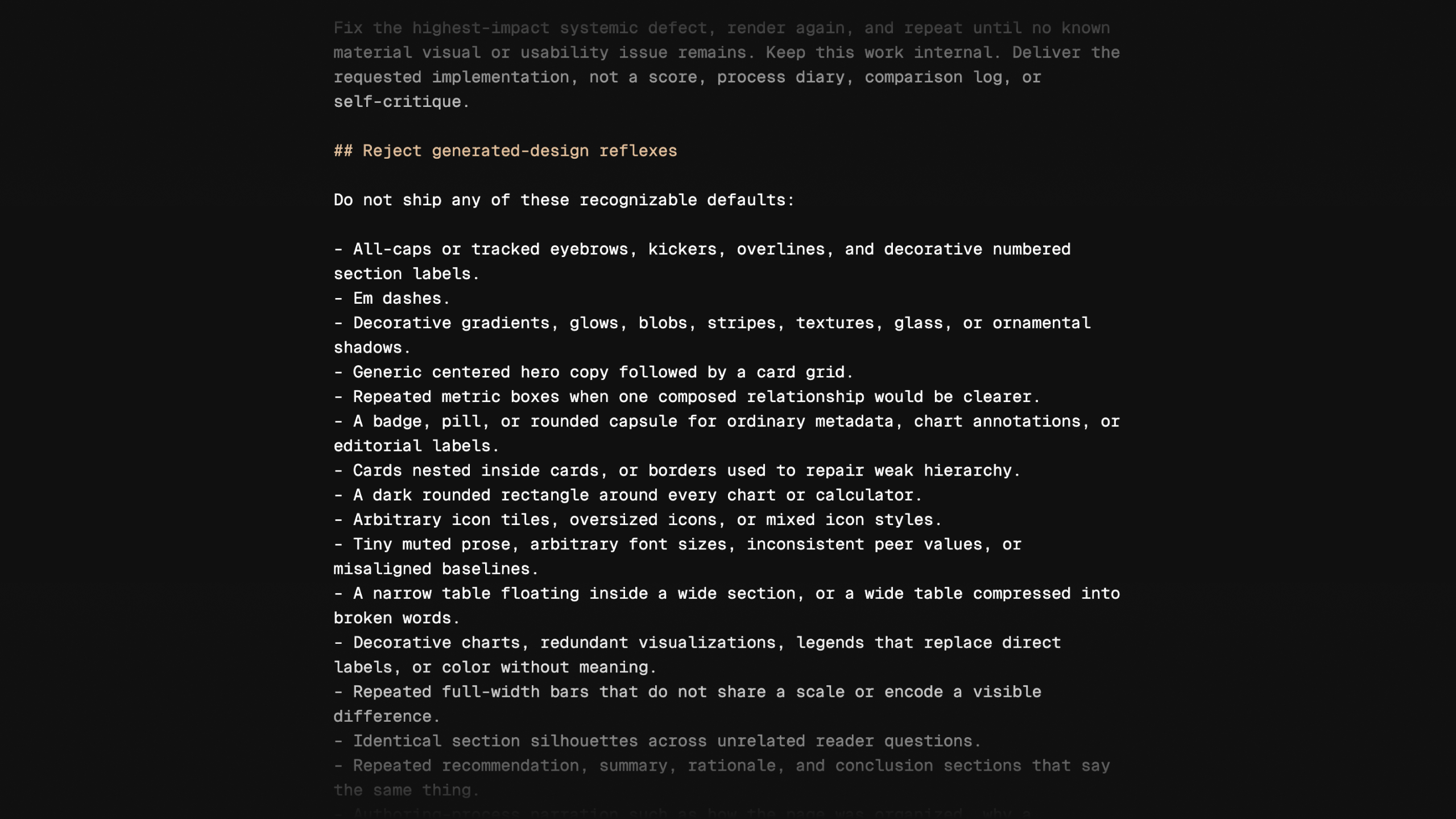
An excerpt from design.md. Naming recurring generated-design patterns explicitly helps agents recognize and avoid them.
We created a stylesheet because agents kept inventing their own typography, spacing, and layout, so we took those decisions away from the model entirely. The stylesheet packages our design system's primitives, such as headers, tables, stat strips, and chart styles, as CSS that any page can use via a public URL. Then design.md documents the class names and tokens that the stylesheet provides, allowing the agent to build the page with those names in the HTML instead of reinventing them.
Another benefit to this is that the agent never actually reads the stylesheet itself. The stylesheet loads when the page renders in your browser, so none of the code enters the model's context, saving more room for design guidance instead.
Last, the evaluation loop is what helps make the other two pieces work. Deterministic checks are used to help catch mechanical failures, such as a table that ignores the width available to it, while people judge the subjective parts that can't be automated, like hierarchy, composition, and whether the page actually gives the reader what they came for.
Copy link to headingHow guidance made it into the file
Every line of guidance in design.md earned its place through the eval loop. We generated pages from fixed scenarios, reviewed what came back, encoded the corrections we accepted, and reran the scenarios to see whether each change stuck, since a change that helped one artifact could quietly hurt another. Nothing got in any other way.
Copy link to headingScenarios and rounds
Each of the seven prompts becomes a scenario, meaning the prompt is frozen together with its mock inputs and render settings. The renewal proposal, for example, always runs with the same fake customer data with the same viewport settings, keeping design.md as the only thing that changes between runs. A round means generating a fresh page from every scenario against the current version of the file. Full rounds cover all seven scenarios on both Claude Opus 4.8 and Codex with GPT-5.5.
If we want to investigate something specific, such as a rule change that only affects tables, we can rerun the affected scenarios or a single model, keeping iteration loops tight.
Generating all seven pages together also made them easy to compare side by side, and what stood out was that design.md wasn't pushing every page toward one template. The interactive planning page put its controls front and center, because someone opens a planning page to change the numbers and see what happens. The renewal proposal instead led with the recommendation and the commercial comparison behind it, because its reader is deciding whether to renew. Every page used the same Vercel typography, color, and spacing, but each one was structured around what its reader came to do.
Outputs from different scenarios sharing a visual language while using different page structures.
Copy link to headingReviewing every run
To review the pages each round produced, we built a local app that displays full-page renders and runs blind A/B comparisons. This app eventually became our eval harness, running each scenario and storing the results. Each stored run keeps the prompt, inputs, model configuration, the version of design.md it used, the screenshots, and whatever feedback the reviewer left about it. Reviewers record every correction against the exact run that produced it.
Our local review harness, showing full-page renders and blind A/B comparisons of each run.
Copy link to headingTurning corrections into rules and checks
Each correction a reviewer records gets landed in the narrowest place that can consistently enforce it. Judgment changes go into design.md as prose, reusable mechanics go into the stylesheet, and anything that we can check mechanically becomes a deterministic check in code. Problems with the harness itself stay in the harness, and when a single model fails in a way the others don't, we keep it out of the rules until it repeats.
Take one of the early renewal proposals. Its commercial terms table came back squeezed to the same width as the prose, even though the page had room for the table to be twice as wide.
Before and after design.md incorporated feedback
During review, we flagged that evidence tables should use the full width available to them. But when looking through previous outputs, we found this same failure everywhere. So this correction ended up going into two places:
- A rule in
design.mdstating the intended behavior. - A deterministic check in code that catches the same layout failure the next time it appears.
Once this landed, later renewal proposal prompts resulted in pages with correct full-width tables. To verify changes like this one, we reran the affected scenarios after encoding them. At milestones we went further, running blind A/B rounds that put the updated design.md against an earlier version of the file to decide whether to keep, revise, or revert each change.
Copy link to headingMeasuring whether it worked
Building the file had taken well over 200 runs, counting full rounds, targeted checks, dry runs, and all of the dead ends. Alongside the human reviewers, a model judge wrote critiques for each round, and every round's feedback went into improving the next run.
Shows every 3rd generation for brevity, each round got feedback to improve for the next
After all of those runs, we wanted to know whether the corrections we had encoded were actually preventing the failures they were written for. So we picked three desktop scenarios, and for each one we had Codex with GPT-5.5 generate the page twice, once with design.md loaded and once without. We kept the first attempt from every generation, with no re-rolls. Then we ran our deterministic checks over all six pages and counted how many times a known failure, like a table that ignores its available width, showed up in each set. The pages generated with design.md had 39 of those failures. The pages generated without it had 91, which works out to 57% fewer in this test.
Those numbers come with two caveats. The checks can only catch failures we have already seen and written down, so this test says nothing about whether a page is well designed overall. Six pages is also far too small a sample to make claims about quality or reliability, and every one of them, with or without the file, still had at least one failure serious enough to block shipping. But what the test does well is tell us that once we name a failure and encode it, that failure tends to stay gone.
Copy link to headingHow design.md stays current
The eval loop got the file shipped, but what keeps it current is real usage. Inside our Slack, that usage comes through @design-agent, an agent built on eve that we use for anything from design critiques and copy alternatives to icon recommendations and report sites built from pasted data. Instead of setting up a prompt or hunting down source files, you just mention the agent in a thread. For website requests, it loads the current design.md, builds the page against the published stylesheet, and posts a full-page screenshot and deployment URL back to the thread. Unlike our fixed scenarios, each of these threads captures a real request, a real output, and whatever feedback or steering followed, showing us how the guidance performs out in the wild.
Every week, we gather all of that feedback in one place, the Slack threads along with comments from GitHub reviews and Figma. Automation groups the comments that keep repeating, and each repeated complaint becomes a proposed change. A person then reviews each proposal, checks whether the system already handles it, and decides where the accepted fix belongs, whether that is @design-agent, the product-design skill, design.md, the stylesheet, or a deterministic check. And if people start asking for a kind of page we have never tested, that request becomes a new eval scenario.
To know whether any of this is working, we count how often each kind of complaint shows up in similar work over time. Once we encode a fix, that count should start falling. When it does not, something about the fix is wrong. The rule might be unclear, it might not be loading when it is needed, the stylesheet might not have a primitive that can express it, or it might need a deterministic check instead of prose.
Copy link to headingBuild your own
You can build the same loop yourself, starting with one recurring artifact and one manual comparison.
1. Pick one repeated artifact
Use a recent task with a real reader and real inputs, like a proposal, performance report, benchmark, or microsite. Avoid broad goals such as "make it on-brand." Before generating anything, write down a short rubric. A good one checks that the supplied facts survived, that the reader's decision is clear, and that the correction you keep making by hand actually got resolved.
2. Save the baseline first
Generate the page once without any new design context, and save the prompt, inputs, configuration, and a screenshot. Keep that first output even if it looks rough, unless the harness itself failed. You cannot tell whether new context helped without a before.
3. Start from your last ten corrections
Collect the feedback you keep giving in design reviews, pull requests, or Slack, and rewrite each correction as something observable. That means writing Let evidence tables use the full available width instead of Make the table feel less cramped, since only one of those can be checked.
Put the decisions in one file with sections for scope, reader and task, observable decisions, and available primitives. That file is your first design.md.
4. Constrain repeatable mechanics
If your outputs keep inventing their own typography, spacing, or layout, publish a stylesheet and document the exact classes and tokens the agent may use. Keep your judgment in prose, and push the repeatable mechanics into CSS or deterministic checks.
5. Run one matched comparison
Generate the page one more time with the same input, model, and viewport, but now with your file loaded. Shuffle it with the baseline and score both against your rubric without knowing which is which.
You do not need a runner or a model judge to start, a single trial can reveal the large, obvious failures. To measure reliability, run multiple independent first-attempt trials (Anthropic's guide to evals for agents) and report how often the result holds.
6. Encode the correction
Review the output alongside whatever follow-up prompts you have to send, and then ask:
- What did the user have to repeat or steer manually?
- Is a rule missing or unclear?
- Can the stylesheet express the correction?
- Is the failure mechanical enough to check in code?
- Does the correction generalize beyond this output?
Update the guidance instead of hand-tuning the generated page. Your next comparison tells you whether first attempts actually improved.
Add tooling after the manual loop starts paying off:
- Include scenarios where the guidance should and should not apply.
- Keep a small holdout hidden while editing.
- Record model and guidance versions.
- Automate mechanical checks.
- Use multiple blind reviewers.
However far you take the automation, keep final changes human-reviewed.
Then keep the loop running. Collect feedback on a cadence, and watch whether each kind of complaint actually becomes less common after you change the guidance. A passing evaluation matters less if people keep correcting the same mistake in production.
And if you want working examples, ours are public. We load design.md into tools like v0, Codex, and Claude every day to make artifacts that feel like Vercel, and the eve design agent template will get you a Slack design agent like the one we run.