
Vercel Labs 开源 fx0:超快的 HTML 工件构建器
fx0 主打快速生成与局部修改:高速模型、紧凑 HTML、精确替换和流式预览怎样配合?附三个真实可玩案例与完整提示词。
Vercel Labs 开源了一个叫 fx0 的网页设计 Agent,主打快速生成、快速修改:你描述想做的页面,它就写出一份可以在浏览器直接运行的单文件 HTML,让想法尽快变成能操作的首稿。
它同时是底层 Agent 库 libfx 的应用示例,用来展示这套运行机制的速度与持久性。主要特点包括:
- 尽快出首稿,局部修改少重写。 默认使用高速模型,并要求 Agent 减少步骤,简单改色、改文案时直接修改对应代码。
- 生成时就能先看预览。 HTML 还没全部写完,页面结构与样式就可以陆续出现;完整提交后再运行交互脚本。
- 带着风格和参考继续做。 支持十种预设或自上传
design.md,也能搜索、抓取参考网页,在制作途中补充文字要求。 - 一个文件交付,逐轮保留版本。 HTML 可以复制、下载,旧版也能重新打开;执行中的步骤会保存,处理中断后可以接续。
快在哪里,又是怎样实现的?
fx0 把速度放进了模型选择、生成步骤、修改方式和预览过程。首稿少生成一些不必要的内容,微调少重写一些已有代码,用户也能更早看见画面。本次没有做端到端计时或同条件产品对照,能核对的是这些具体设计。
首稿:高速模型、少步骤、紧凑文件
默认模型是 claude-opus-5.5-fast。访客试用固定使用 low effort(低思考强度)与 Fast 模式;登录后的聊天可以分别选择模型、推理强度和 Fast 设置。
系统指令也在减少等待:需求已经明确时,Agent 选择合理默认值直接开做;修改颜色或文案时,思考量要与改动规模相称;同一个请求里的多处修改,应合在一次工具调用里完成。
首次制作页面,指令要求用一次 publish_design 提交完整 HTML,正常首稿尽量控制在 12 KiB 以内。设计 Agent 没有文件系统、shell 或部署环境;它直接交付 HTML,不需要先搭一个多文件工程、安装依赖再构建,产物本身就能由浏览器打开。代码写得紧凑,也就少了一部分需要模型生成的文本。
本次 ORBIT / FORM 原件为 10,854 字节,约 10.6 KiB;CHROMA FLOW 原件为 9,028 字节,约 8.8 KiB。这两个数是文件大小,不是生成用时。12 KiB 是给模型的首稿建议,最终验证器执行的体积硬上限则是 512 KiB。
修改:只传需要替换的片段
如果要把 FORM 海报的大字换成蓝色,同时把随机按钮改名为“SHUFFLE POSTER”,系统指令要求优先调用 edit_design,传入对应的旧文本与新文本,而不是重新输出整份 HTML。已知要改哪段时,也不必先把全文再读一遍。
一次调用可带 1–20 项精确替换:每段旧文本都必须唯一匹配,按顺序应用后,一起校验并提交成一个新版本;其中一项失败,整批不会成为新版本。这样既能把同一轮要求一起落实,也减少了模型反复输出已有代码和来回调用工具的次数。
| 操作 | 交给工具的内容 | 提交结果 |
|---|---|---|
| 首稿或整体重做 | publish_design 接收完整 HTML |
校验后生成完整设计 |
| 局部修改 | edit_design 接收旧文本、新文本的替换数组 |
整批修改提交为一个版本 |
预览:代码还在写,页面先出现
模型调用 publish_design 时,HTML 放在工具参数的 html 字段里。fx0 的传输层会观察模型返回的 tool-input-delta 事件,逐段解码这个字段,把已经收到的 HTML 经 Redis 频道推到浏览器。它不用等工具参数全部传完,才开始显示页面。
未完成的代码不能直接当成品运行。前端会先移除脚本、事件属性、嵌套页面和外部资源,并用 script-src 'none' 禁止执行脚本。所以生成途中能先看文字、布局与样式,Canvas 动画和按钮交互要等完整提交后再运行。
预览更新也不是每收到一段代码就重建整页。draft-preview.ts 会比较并修补已有 DOM,保留未变的节点和滚动位置;最终 HTML 校验完成后,才切换到可执行 JavaScript 的沙箱。
这里同时改善了两种等待:少生成、少重写,是减少完成任务所需的工作;流式预览则让用户更早看见进度,不能把两者都当作总耗时的缩短。正常提示词还会由接收请求的函数直接开始执行,不先经过一次队列投递;请求模型前,读取计费身份、准备草稿观察器和预留本轮步数也会并行进行。Vercel Queues 负责后备接管、长任务接续,以及运行中引导等跨请求工作。
两次输入,做出三个可玩的场景
这次直接在 fx0 线上服务 使用访客试用:第一轮生成 ORBIT / FORM 双展厅,第二轮生成 CHROMA FLOW 粒子画布。界面显示的模型为 claude-opus-5.5,每轮只发送一次,未追加模型追问。
主视觉、画布算法和控件来自 fx0。文章里的演示是展示适配副本:修正了海报文字出界、轨道显示比例、部分触控尺寸和“减少动态”设置。未经修改的 HTML 原件也保留下来,可以在每个案例旁下载。
01 ORBIT:把网页变成轨道控制台
深黑星空、青色轨道、橙色太阳,再加上任务读数,组成一个太空控制台。点击 EARTH、MARS 或 SATURN,选中行星及其轨道会高亮,左侧的任务、目标半径、公转周期等读数同步变化。三条轨道和土星环本来就在画面里,切换改变的是强调对象。
可以拖动时间倍率滑块,在 0.1× 到 5.0× 之间以 0.1 为步长调节运动速度;点 PAUSE 暂停,按钮随之变成 RESUME。这是艺术化模拟,轨道比例、运动和遥测读数不能当作科学计算。

02 FORM:拖动滑块,重排一张动态海报
同一份 HTML 切到 FORM,画风换成了暖白底、黑橙大字和密集波纹。“MAKE SOME NOISE”三个单词压在波浪线条上,画面本身就是可调整的海报。
拉高波浪频率,线条起伏更密;改变密度,画面里的线条数量随之变化。橙、黑、蓝、红四种墨水可以直接切换。点击 RANDOMIZE COMPOSITION,会重新组合频率、密度、颜色、相位和文字偏移。
原件的随机偏移有时会把首字母挤出画面,展示副本限制了偏移并调整字号。这也说明,生成出一个有风格的页面之后,仍要亲自试试控件的极端状态。

ORBIT 和 FORM 来自同一次生成。第一轮提示词同时说明了两个场景的视觉方向、具体控件,以及“操作必须改变画面”的要求。
第一轮完整提示词:英文原件与中文译文,任选一种发送
英文为本次实际发送的原件;中文为对应译文。
Create a spectacular interactive exhibition called ORBIT / FORM with TWO distinct full-screen exhibits accessible through clear persistent tabs and URL hashes #orbit and #form. Exhibit 1 ORBIT: a cinematic orbital mission-control scene, near-black space, glowing cyan orbital trajectories and a vivid orange sun rendered with Canvas/SVG/CSS (no external assets). Hundreds of subtle animated stars, planet orbit paths, small telemetry panels with clearly labelled SIMULATED data. Visitors can pause/resume motion, adjust time speed, and switch between Earth/Mars/Saturn missions; selection must visibly change orbit and readouts. Exhibit 2 FORM: a completely different Swiss editorial generative kinetic typography poster studio, warm ivory background, huge black/orange type saying MAKE SOME NOISE, sculptural parametric ribbon or moire geometry, controls for wave frequency, density and ink color, plus a randomize composition button; all controls must change the live artwork. Polished art direction, intentional typography, no generic SaaS cards. Both scenes need distinct strong composition, responsive layout that works on a 390px phone, keyboard-accessible real controls, prefers-reduced-motion support, and a small plain-language instruction visible on each scene. All content and code in one self-contained HTML, no CDN, no external network requests, no mock buttons. This is a design exploration: use only fictional/simulated data, no real account or backend. Make it beautiful and publish the finished design.
创建一个名为 ORBIT / FORM 的精彩交互式展览,包含两个完全独立的全屏展厅,通过清晰的常驻标签页和 URL 哈希(#orbit 与 #form)进行访问。展厅 1 ORBIT:电影级的轨道任务控制中心场景,近乎纯黑的太空背景,使用 Canvas/SVG/CSS 渲染出发光青色轨道轨迹与明亮的橙色太阳(无外部资源)。数百颗微妙闪烁的动态恒星、行星运行轨道,以及带有明确“SIMULATED(模拟)”标注的遥测数据面板。访客可以暂停/恢复运动、调节时间流速,并在地球/火星/土星任务之间切换;切换选项必须能够直观改变轨道高亮与读数。展厅 2 FORM:完全不同的瑞士平面设计流派动态字体海报工作室,暖象牙白背景,巨大的黑橙双色大字呈现“MAKE SOME NOISE”,雕塑般的参数化飘带或莫尔几何波纹,提供波浪频率、线条密度和墨水颜色的控制项,以及一个随机版面按钮;所有控件必须能实时改变画面。要求考究的艺术指导与排版意图,不要通用的 SaaS 卡片。两个场景都需要鲜明的构图、能在 390px 手机上自适应的响应式布局、支持键盘访问的真实控件、支持系统偏好减少动态(prefers-reduced-motion),并在每个场景中显示简短易懂的文字说明。全部内容和代码整合在一个完全自包含的单文件 HTML 中,不使用 CDN,不发出外部网络请求,不包含无效假按钮。这是一次设计探索:仅使用虚构/模拟数据,无需真实账号或后端。请打造出优雅视觉并发布最终设计。
03 CHROMA FLOW:用鼠标搅动一片发光粒子
第二轮换成一件暗色的生成艺术作品:品红、青色和荧光黄绿的光点,在黑色画布上形成光带或线网。鼠标移入、拖动或触碰画布,会扰动图形。
三个模式的区别可以直接看出来:
- VORTEX(漩涡):粒子围绕三个移动中心流动,留下拖尾;指针进入后增加一个旋转扰动中心。
- WAVES(波阵):一行行曲线叠加正弦起伏,指针附近出现扩散、衰减的波纹。
- CONSTELLATION(星群):点缓慢移动,距离足够近的点之间画线,形成不断变化的网络。
TURBULENCE 调节扰动强度,FREEZE / RESUME 冻结或恢复画面,RESEED 重新生成初始分布。也能用左右方向键换模式、空格键暂停。它是生成艺术,没有求解真实的流体物理方程。
原件在系统开启“减少动态”时仍会持续运行,只减慢时间参数、调低初始扰动。展示副本改成默认显示静止星群,用户需要时再手动恢复动画。

第二轮完整提示词:英文原件与中文译文,任选一种发送
英文为本次实际发送的原件;中文为对应译文。
Build CHROMA FLOW, an extraordinary interactive liquid-light instrument, as one complete self-contained HTML file. Make it look like a physical creative instrument / experimental museum exhibit: almost-black background, enormous vivid magenta/cyan/acid-lime luminous flowing particle ribbons or fluid-like interference field on Canvas, editorial condensed CHROMA FLOW headline, delicate numbered scales, small generous controls. The artwork must fill most of the page and react to pointer/touch movement with attractive ripples or swirls. Provide three visually very different working modes (VORTEX, WAVES, CONSTELLATION), a turbulence/intensity slider, a real freeze/resume toggle, and an actual reset/reseed button. Each mode should change the algorithm/composition, not only color. Keep readable visible instructions and mode description, do not overclaim physical fluid simulation; label it generative art. Ensure attractive initial composition without interaction. No external assets, libraries, fonts, CDN or network. Use Canvas and inline JS/CSS only. Make it responsive at 390px width and large desktop with all controls readable, no clipped headline or overlapping instructions, min 44px touch targets, keyboard-accessible controls and prefers-reduced-motion support. Respect safe particle counts for mobile. Strong composition, bold visual identity, no SaaS cards. This is fictional artwork, no backend. Publish the completed design.
构建一个名为 CHROMA FLOW 的非凡交互式液体光影艺术仪,输出为一个完全自包含的单文件 HTML。将其打造成类似实体创意乐器或实验博物馆展品的外观:近乎纯黑的背景,Canvas 上呈现出巨大且鲜艳的品红/青色/亮酸橙色发光流体粒子光带或干涉场,搭配排版紧凑的 CHROMA FLOW 大标题、精致的数字刻度尺与小巧克制的控件。艺术画面必须占据页面主体,并对指针/触控移动产生引人入胜的涟漪或旋涡响应。提供三种视觉差异显著的运行模式(VORTEX 涡流、WAVES 波阵、CONSTELLATION 星座)、一个湍流/强度滑块、一个真实的定格/恢复开关,以及一个真实的重置/重新播种按钮。每种模式都应改变底层的生成算法和构图,而不仅仅是改变颜色。保持清晰可见的说明文字和模式描述,不要夸大声称为真实的物理流体模拟,应标注为生成艺术。确保即使无交互时也具备赏心悦目的初始构图。不使用任何外部资源、库、字体、CDN 或网络请求。仅使用 Canvas 以及内联的 JS/CSS。适配 390px 手机屏与大屏桌面端,所有控件保持清晰可读,标题不被截断,说明不发生重叠,触控目标最小 44px,支持键盘访问控件并适配偏好减少动态设置。在移动端遵循安全粒子数量限制。强调构图与大胆的视觉识别度,不使用 SaaS 模版卡片。这是虚构的艺术作品,无需后端支持。请发布完整设计。
怎样复现,并把网页带走?
- 打开 fx0,在输入框粘贴一轮完整提示词,中文译文和英文原件任选一种。
- 发送后等待预览完成,测试任务切换、滑块和随机按钮,确认画面确实响应。
- 从顶部菜单选择
copy HTML或download HTML,保存单文件。打开下载后的 HTML 就能在本地浏览器查看,无需先部署完整 fx0 服务,也无需使用publish with Drop。 - 想继续调整,可以在同一会话提出具体修改,例如只调整颜色或控件位置。fx0 的局部修改工具会在现有文档上做文本替换;每轮设计都有自己的版本,能重新打开并导出。
生成具有随机性,同一提示词不保证得到同样的构图。本次两个完整输入是供复现和改造的起点。
仓库可选开启的访客试用功能是每个 IP 共五次输入,没有周期补充;本次进入时只显示剩余两次,用完后提示登录。这个剩余数不是新用户的默认额度。登录后,模型调用通过 AI Gateway 计入用户自己的 Vercel 团队,费用随所选模型和用量变化。
模型设置、运行中引导和版本记录,让后续调整有了更细的控制。
模型、推理强度与 Fast 分别可选。 简单改色与复杂逻辑不必使用同样的思考设置,可以按任务调整。Fast 是速度选项,不表示免费;实际费用仍随模型和使用量变化。
生成途中可以补方向。 在付费纯文字对话中,Agent 还在工作时就能追发补充要求,例如“保留构图,只调整颜色”。libfx 会在当前工具结束后把引导交给模型,不必总等整轮结束再提要求。含图片的消息会作为下一轮处理,免费试用中的每次输入也各自成为一轮。
每轮版本都能取回。 可以从对应轮次的版本入口重新打开旧设计,对比改动,再复制或下载那一版 HTML。比如一轮调色不理想,旧版文件仍然可取,不用靠记忆重新描述原来的样子。
一个 HTML,为什么能做出动画?
以 FORM 海报为例,一份 HTML 里同时放了三部分:页面结构提供滑块和按钮,CSS 决定颜色、字号与位置,JavaScript 接收操作并重新画图。
当你把密度滑块从 44 调到 80,脚本读到新数值,画布在下一次重绘时就画出更多线条;选择蓝色,则改变画线时使用的颜色。持续动画会通过浏览器的 requestAnimationFrame 逐帧更新角度、粒子坐标或波纹相位。模型负责写代码,打开成品后的操作和绘图由浏览器执行,不需要每拖一次滑块就再问模型。
本次三个场景都只用了浏览器原生能力。fx0 的约束并不是“禁止某个前端框架”,而是要求交付一个完整、自包含的文件:CSS 和脚本内联,图片等素材也要嵌入文件,不能从外部 CDN 加载资源。
从请求到成品,Agent 怎样工作?
网页里的滑块由浏览器执行,写出这些代码的过程则由后台 Agent 负责。具体调用链是:
- 前端向 Next.js 的
POST /api/prompt发送需求;fx0 保存消息,并记录这一轮使用的试用或付费身份。 - libfx 会话通过 AI Gateway 请求模型,把模型回复中的工具调用交给 fx0 执行,得到结果后继续这一轮任务。
- 首稿由
publish_design交完整 HTML,局部修改由edit_design交精确替换。完整产物进入验证器,检查文档结构、资源限制与 512 KiB 体积上限。 - 校验通过后更新当前设计,前端将成品载入隔离的 iframe,交给浏览器执行脚本;完成轮次的记录与设计版本再由投影层写入 Neon。
在每个服务进程里,fx0 通过 createFxAgent() 创建并复用 Agent 实例,不同聊天各有自己的会话。需要派发独立子任务时,工具内部再用 createFxEngine() 启动内存子引擎。两者负责的范围不同:前者提供会话与持久任务运行,后者执行这一项子任务。
// 简化示意:配置对象由 fx0 提供,不是可直接复制运行的完整程序。
const agent = createFxAgent(agentOptions)
const session = agent.session(sessionId, sessionOptions)
session.prompt(message, { messageId })
const engine = await createFxEngine(subtaskOptions)
方便带走,也带来了取舍
后端验证器把单个设计文件限制在 512 KiB 以内,并限制外部资源、表单和嵌套页面。fx0 还把生成页放进沙箱 iframe,用浏览器的内容安全策略限制网络请求,避免它直接访问应用的 Cookie、存储和凭证。
因此,Agent 制作页面时可以查网页,生成页在 fx0 预览里却不能调用业务 API、读取外部数据库或加载网络字体。普通 HTTPS 参考链接仍可由用户另行打开。
这些是浏览器执行的隔离措施,不等于页面永远无漏洞或无错误。单文件方便离线打开,但换到不同屏幕、浏览器和设备后,排版、交互和性能仍要检查。
生成中断了,后台怎样接着做?
假设 Agent 正在写粒子画布,负责处理这次请求的云函数突然停止。只保留聊天记录还不够:系统还需要知道哪些步骤已经完成、现有设计是什么,以及后续该从哪里继续。
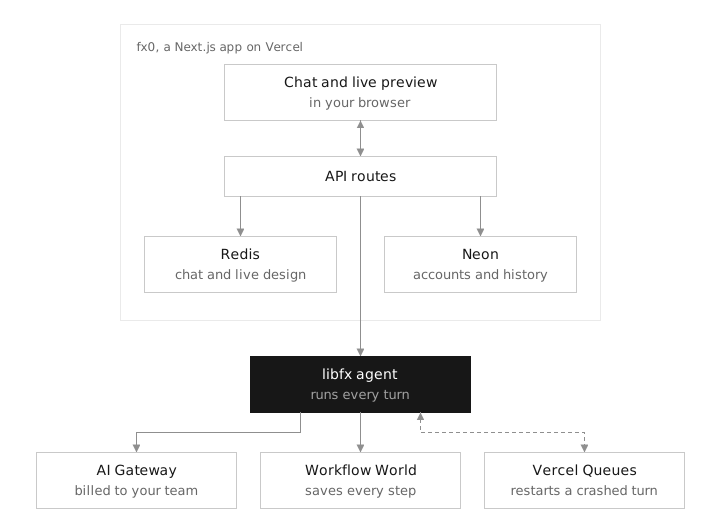
fx0 把这些工作分开:自己负责聊天、预览、账号与设计版本;libfx 负责模型调用、工具执行、重试和每一轮任务。Redis 保存聊天与实时设计,Neon 保存账号、归属、完成的轮次及版本;执行中的逐步记录存进 Workflow World。需要接续时,Vercel Queues 唤醒新的函数,让 libfx 从已保存的步骤继续。
用户提交的消息先存入 Redis,libfx 接受后才确认;执行结果流式返回,完成的一轮再留下设计版本。恢复任务也保留原来的计费身份,避免把试用请求转成某个付费账号的账单。
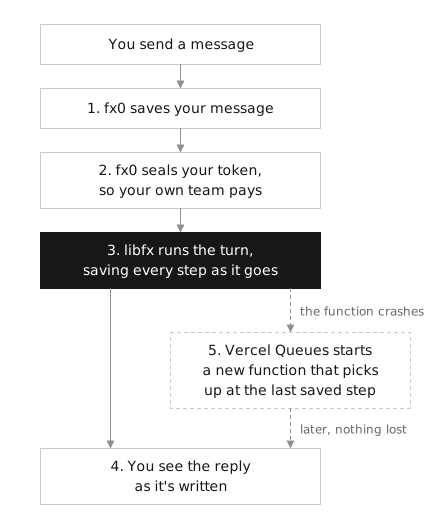
恢复也不意味着把所有工具调用再执行一遍。读取设计、抓取网页等安全可重复操作可以重跑;编辑、提问和子 Agent 不会被盲目重放,模型会收到中断提示,再检查该怎样继续,减少重复改动。
为什么有时要等到发送后约 13 分钟?
在 Vercel 上,libfx 无法立即判断原请求是崩溃了,还是仍在缓慢工作。为避免两个执行者同时修改同一会话,原请求继续持有会话,直到 800 秒的时限结束;后备队列在再过 5 秒后接管。
所以,初始请求若意外崩溃,恢复时点可能在首次发送提示词后约 805 秒,不是每次崩溃后另等 13 分钟。正常运行但耗时较长的任务,会在时限前 30 秒保存并交接,不必额外等到这个后备时点。
每轮父 Agent 与子 Agent 合计最多 64 个模型步骤,用来限制失控循环;它不是费用封顶。聊天历史也不会被裁剪,轮次很长时打开会变慢。本次实际测试覆盖了页面生成和交互,没有主动制造云端崩溃,也没有测试真实账单。
用风格规范约束设计,用适合的任务开始
fx0 内置十种 design.md,包括以 Apple、Vercel、Stripe、Linear 等命名的风格,也可以上传自己的文本文件。这些预设来自 VoltAgent 对品牌公开官网的分析,不是各品牌官方发布的规范。
风格文件约束后续每一轮修改。 文件用文字说明主色、字阶、间距和组件规则,整份内容会进入该聊天后续的模型请求。比如希望连续做几张同风格的页面,可以把这些要求写进自己的 design.md,不必每次重述。上传上限为 100 KB,超限会拒绝,不会自动压缩。
参考网页可以交给 Agent 读取。 它能用 web_search 搜索,也能用 web_fetch 抓取公开页面。抓取工具移除脚本、样式与 HTML 标签,把文字内容交给模型参考。这条路径取回的是文字参考,不是把原网站的图片、字体和框架整套搬进成品;生成页仍要遵守单文件资源规则。
子任务可以交给子 Agent。 例如单独提炼一份参考资料,或整理样式要求。子 Agent 使用同类设计工具,但不能继续派生下级 Agent;它与主 Agent 共用本轮 64 个模型步骤,分派任务不会绕过这个预算。已有的持久化与恢复机制,则负责在执行中断后保留并接续这些工作。
从本次结果看,fx0 很适合探索交互展品、单页视觉作品、动效原型和教学小工具:生成后就能操作,下载后还能查看和修改代码。它的预览环境无法直接承接需要登录、实时数据库和业务接口的完整应用;如果要把导出的页面发展成业务项目,这些部分仍需另行搭建。512 KiB 的限制也不适合装入大量高清图片、视频或重型三维素材。
打开成品很轻,完整自部署有门槛
在浏览器打开下载的 HTML,与在自己的服务器上运行整套 fx0,是两个不同任务。后者需要 Node.js 24,以及 Vercel 登录应用、Neon Postgres 和 Upstash Redis 三项服务。
完整自部署的准备与仓库启动命令
先准备 Sign in with Vercel 应用:作用域为 openid profile email offline_access,权限为 AI Gateway: Use 与 Team: Read Only,回调地址包含 http://localhost:3000/api/auth/callback。offline_access 用于获得刷新令牌,不能省略。
克隆并进入仓库,把 .env.example 复制为 .env.local,填入登录应用、Neon 和 Upstash 的配置;SESSION_SECRET 使用至少 32 字符的随机字符串。若本地与已有部署共用 Redis,应设置独立的 FX0_REDIS_PREFIX,避免会话混在一起。
git clone https://github.com/vercel-labs/fx0.git
cd fx0
cp .env.example .env.local
填好配置后执行:
npm ci
npm run db:migrate
npm run dev
数据库迁移需要显式执行,应用不会自动完成。本次未运行这套完整后端;具体环境变量与部署设置以仓库说明为准。
这三个案例最有价值的地方,是把一句设计要求里的动作变成了可以检查的反馈:换任务是否联动读数,调密度是否真的多画线,切模式是否换了一套图形规则。用这些具体变化去判断成品,比只看首屏是否漂亮更可靠。
Vercel Labs 开源 fx0:超快的 HTML 工件构建器
Vercel Labs 的 fx0 是网页设计 Agent:把想法写成一份 HTML,按钮、滑块和动画都由浏览器运行。文件可下载带走,无需先安装工程依赖。
默认高速模型配合少步骤指令,简单改色不必过度思考。本次没有做端到端计时或竞品速度对照,下面解释的是源码中的具体做法。
如果只改 FORM 的颜色和按钮名
例如提出“标题改成蓝色,随机按钮改名 SHUFFLE POSTER”,系统优先修改对应片段。这个微调是说明机制的假设例子。
交完整 HTML
publish_design 一次提交首稿,正常页面尽量控制在12 KiB以内。这是建议;紧凑代码减少需要生成的文本。
只交旧文本与新文本
edit_design 接收1–20项精确替换:每项唯一匹配、按序应用,整批校验后提交一版。一项失败则不发布,不必重写已有代码。
页面可以继续改,也能带走
上传 design.md 可延续风格;付费纯文字对话可在运行中补方向,每轮旧设计都能重新打开并导出。步骤会保存,中断后可以接续;初始请求崩溃时,可能到首次发送后约805秒才恢复。
两次输入,三个实际场景
第一轮:ORBIT / FORM,切行星任务联动高亮与读数,拖滑块改变海报线条;第二轮:CHROMA FLOW,切换漩涡、波阵和星群模式。
演示是修过文字出界、触控和减少动态的展示副本,未经修改的HTML原件保留。艺术读数与图形不作科学模拟。
适合交互原型,完整业务仍要另建
下载的单HTML可在浏览器打开。fx0预览沙箱限制联网,不能直接接业务API、登录与实时数据库;512 KiB体积上限也不适合装入大量高清媒体。
怎样判断好不好?看换任务是否联动读数、调密度是否真多画线、切模式是否换了图形规则,再检查手机排版与控件边界。
GitHub - vercel-labs/fx0: A lightweight design agent built with libfx. Describe a page and an agent writes it as one HTML file.
A lightweight design agent built with libfx. Describe a page and an agent writes it as one HTML file. - vercel-labs/fx0
fx0 is an open-source, lightweight design agent built with libfx. You describe a page and an agent writes it as one HTML file.
fx0 is also a working example of an app built on libfx. One createFxAgent() call gives it the agent loop, streaming, tool calls, retries and durable sessions, and createFxEngine() runs each subagent.
Try it at fx0.vercel.dev, or clone it and make it your own.
Features
- Sign in with Vercel to bill model calls through AI Gateway to your own team.
- Optionally offer five free Opus 5.5 Fast prompts per IP without sign-in or a card. BotID protects the trial; a server-only Gateway key funds its admitted prompts.
- A chat survives the function dying mid-reply: the turn continues where it stopped. See Durability.
- Every turn keeps its version of the design. You can reopen any of them and copy or download the HTML.
- Pick each chat's model, with its reasoning effort and fast mode. New chats start on fast Claude Opus 5.5, or on
FX0_MODELwhen it's set. - The agent can search the web and fetch pages for reference.
- Start from one of ten
design.mdstyles, or upload your own. The ten styles, and the one-line descriptions in the picker, come from VoltAgent's awesome-design-md, which you can browse at getdesign.md. Thanks to VoltAgent for publishing them. - Type a message before you sign in. The draft, images included, waits in the tab for 15 minutes while you sign in.
- A turn stops after 64 model steps, its subagents' included, which keeps an agent stuck in a loop from running up a bill.
- In paid-only chats, a text message sent while the agent works steers it, as in the fx CLI. Trial chats run each input as its own turn so free and paid funding stay separate.
How fx0 uses libfx
fx0 is the app. libfx is the agent inside it. Vercel keeps the agent's work safe while it runs.

- fx0 owns what you see and what's yours: the chat and live preview, sign-in, the design tools the agent calls, and the chat history in Redis and Neon.
- libfx runs every turn, meaning one message and everything the agent does to answer it: the model loop, tool calls, retries and steering. fx0 creates one agent with
createFxAgent()and passes each chat's messages to it. - Workflow World, the store behind Vercel Workflow, is where libfx saves each turn as it runs: the prompt before it's accepted, then every step.
- Vercel Queues keeps a backup of each prompt. When the function running a turn crashes or reaches its time limit, the queue wakes a new one at
/api/libfx, and libfx continues from the last saved step. - AI Gateway receives every model call. Paid turns use the sender's OAuth token and team; explicitly sponsored turns use the server's trial key.
Durability
fx0 runs one durable libfx agent per server. libfx keeps each chat's conversation as a session and backs every turn with Vercel Queues, so a turn finishes even when the function running it dies. fx0 has no code of its own to recover a turn. Durability takes three pieces.
The agent. fx0 passes no durability option, so createFxAgent() uses libfx's default: on Vercel, libfx keeps its sessions in Vercel's World, the store behind Vercel Workflow, and uses Vercel Queues. libfx bundles both clients, so fx0 neither writes workflows nor calls Vercel Queues itself. A prompt runs its turn in the request that sent it, so the reply starts without a queue hop, and Vercel Queues keeps the prompt as a backstop until just after that request's 800-second limit. fx0 sends a message as a prompt when the chat is idle. One sent while a turn runs or waits to start is a steer instead, which libfx delivers through Vercel Queues to the running turn.
// lib/libfx-agent.ts, simplified
const agent = createFxAgent({
  // No durability option: Vercel's World and Queues on Vercel, local files elsewhere.
  apiKey: 'session-authenticated',
  fetch: chatFetch,
  tools,
})

// lib/agent.ts, simplified: a chat gets a libfx session on its first message,
// and each message is one turn of it
const libfxSessionId = await agent.newSessionId()
const session = agent.session(libfxSessionId, { model, instructions, context: { chatId, turnId } })
session.prompt(`[${author}] ${text}`, { messageId: `m${turnId}` })
The route. Vercel Queues delivers the turns no request runs itself to app/api/libfx: the rest of a turn that outlasted its prompt request, and a prompt's backstop when that request died. libfx's handler runs them:
// app/api/libfx/route.ts
export const maxDuration = 800
export const POST = agent().wakeHandler()
The trigger. One entry in vercel.json subscribes that route to libfx's queue topic:
{
  "functions": {
    "app/api/libfx/route.ts": {
      "experimentalTriggers": [{ "type": "queue/v2beta", "topic": "__libfx_wkf_workflow_session", "retryAfterSeconds": 5 }]
    }
  }
}
fx0 keeps the transcript, designs and settings in Redis. Here is one message from send to reply. The numbers match the steps below:

1. Save the message before answering. POST /api/prompt adds the message to the transcript in one Redis script, then hands it to libfx with its message id. libfx stores it before acknowledging, so a message that shows as sent can't be lost, and a retried request reaches the same turn.
2. Keep the turn's funding. A queue delivery has no browser cookie, so the prompt route seals its funding in Redis. Every message records the funding of the turn it starts: either the admitted sponsorship or its paid sender's OAuth grant and team. Fresh SDK diagnostics and the journal's restore hook identify the executing turn after a crash. Refresh tokens stay in the cookie, and the server trial key stays out of every stored credential. Missing or expired trial funding never falls back to a customer's paid grant.
3. libfx runs the turn. One worker holds a session at a time, and libfx fences out any other. The prompt request runs the turn first; it and each delivery to /api/libfx can run for 800 seconds, their maxDuration. libfx stops a turn 30 seconds before that limit, keeping what it has done so far, and a delivery to /api/libfx continues it, so a long turn spans several invocations.
4. Copy the stream into the transcript. Any route following the chat, the prompt's own response or an open tab, copies libfx's stream into the transcript. A cursor check makes each line land once, however many follow. The same Redis script marks a turn running when its start lands, and when its end lands it leaves the turn's history to write, with the design the turn left. The copy then writes that history and design version to Neon, and a write that fails waits in Redis for the next copy to retry.
5. Pick up where it stopped. On Vercel, libfx can't tell a crashed function from a slow one, so the request running a turn holds its session until its time limit. The prompt's backstop comes due 5 seconds after that limit: if the request died, the backstop takes the session over and the turn continues where its records end. In a delivery to /api/libfx, a process that exits has its delivery run again about a second later, and a function that stops without exiting holds its message until the queue's hold runs out, up to five minutes. The model is told the turn was interrupted, so it can check what happened before going on. A function that only stalled and wakes after that stops at its next write, so two never write at once.
A tool call the crash cut off runs again only if it's safe to repeat. libfx refuses a tool that doesn't say which it is, and fx0 marks its tools in lib/libfx-agent.ts: reading the design, publishing it, fetching a page, paging through a tool result and searching the tools run again. Edits, questions and subagents don't, so the model is told those calls may have run and decides what to do. The reads start as soon as the model asks for them, while libfx saves the call.
A subagent is an in-memory createFxEngine() inside its tool call, billed to the same chat. It has the same design tools, except that it can't start a subagent of its own. Its model requests count toward the parent turn's 64 steps, in a count kept in Redis (lib/turn-budget.ts), so subagents can't multiply what one turn spends. A retried or recovered request counts once.
TL;DR:
- A crash delays the reply, by up to about 13 minutes, but never loses the chat or the reply in progress.
- The turn continues instead of starting over, so finished model calls aren't paid for twice.
- Each turn keeps its authorized funding after a crash too.
You can watch this happen. Open session diagnostics from the header to see the chat's libfx session, its running turn and how far the transcript has copied libfx's stream.
Limits
- If a prompt request crashes while it runs its turn, for example by running out of memory, the turn continues about 13 minutes after the send, however early the crash came. On Vercel, libfx can't tell a crashed function from a slow one, so a crashed request still holds the session until its 800-second limit, and the prompt's backstop takes over 5 seconds later. The page keeps showing the reply as running meanwhile. A turn that only runs long isn't affected: libfx stops it 30 seconds before the limit and queues the rest at once for a delivery to
/api/libfx. - A text message sent while a tool runs, such as while a design is being written, waits for that tool before the model sees it. A message with images runs as its own turn, after any running turn finishes.
- Every turn bills the login and team that sent the message that started it; a later message cannot change an earlier turn's funding. A text message that joins a running turn is billed to that turn. Token renewal from the same login keeps the turn's billing team.
- Free prompts start in a new design on Opus 5.5 Fast with low effort. Existing paid-only chats keep their own billing. The allowance is five per IP across chats and browsers, with no periodic refill; clearing cookies does not reset it. After it is used, sign in to continue with your own team.
- A design being written streams through a bounded, expiring Redis channel, so viewers on other instances can see it too. Reconnecting resumes from the full prefix; generation IDs and offsets prevent duplicated bytes. The provisional preview strips active markup and runs without scripts. Publishing or ending a turn closes its draft before it can replace the finished preview.
- Deleting a chat removes fx0's records and credential. libfx's session data expires with the World's retention.
- When no route follows a chat, its transcript catches up the next time someone opens it.
- Transcripts are never trimmed, so very long chats get slower to open.
Where things are
| Path | What's there |
|---|---|
lib/agent.ts | Each chat's prompts, questions, cancel, deletion and sign-out |
lib/libfx-agent.ts | The durable agent, its per-chat fetch and its tools |
lib/projector.ts | Copies a chat's libfx stream into its transcript |
lib/turn-credential.ts | The sealed credential each chat's turns bill |
lib/trial.ts | Guest identities and the atomic per-IP trial allowance |
lib/journal.ts | The Redis journal. Every write is a single Lua script, so it's atomic. |
app/api/libfx/ | Where Vercel Queues delivers libfx's turns |
lib/tools.ts | The agent's tools: read, publish and edit the design, fetch a URL, ask a question, page through a long tool result, search the available tools and start a subagent. AI Gateway's web search runs beside them. |
lib/design-artifact.ts | Checks that a design is one HTML file of at most 512 KB, with no external assets |
app/api/ | Route handlers. Chat routes check sign-in and ownership before anything else. |
components/ | The chat, composer, preview and diagnostics panel |
Neon Postgres holds accounts, who owns each chat, finished turns and every design version (migrations/).
Run it locally
You'll need Node.js 24 and three services:
- A Sign in with Vercel app with the scopes
openid profile email offline_accessand the permissions AI Gateway: Use and Team: Read Only. Addhttp://localhost:3000/api/auth/callbackas a callback URL. Don't leave outoffline_access: without it, Vercel sends no refresh token and sign-in fails. - A Neon Postgres database. Use a separate branch for local work.
- An Upstash Redis database.
Copy .env.example to .env.local and fill it in. SESSION_SECRET has to be a random string of at least 32 characters. If your local app shares Redis with a deployment, set FX0_REDIS_PREFIX (for example fx0:local) to keep the chats apart. FX0_MODEL changes the model new chats start on.
npm ci
npm run db:migrate
npm run dev
db:migrate applies the files in migrations/ in order. Each one is idempotent, so running it twice is fine. The app never migrates on its own.
Deploy
Set the same variables on Vercel. The Neon and Upstash integrations in the Vercel Marketplace fill in DATABASE_URL, KV_REST_API_URL and KV_REST_API_TOKEN for you. Set APP_URL to your production URL and add <APP_URL>/api/auth/callback to your Sign in with Vercel app.
OAuth redirects never trust the request's Host header. They go to APP_URL, or, on a preview deployment without one, to that deployment's own Vercel URLs.
To enable the free trial, apply the migrations, set FX0_FREE_PROMPTS=1 and a server-only AI_GATEWAY_API_KEY, then rebuild and deploy. BotID's client protection and server verification are included. Production uses Vercel's trusted client IP; local development shares one local allowance. Keep local Redis prefixes separate from production.
Test
npm run typecheck                 # generates the route types, then runs tsc
npm run test:core
npm run test:auth
npm run build
npm run test:smoke                # runs the production build with fake sessions
npm run test:journal:integration  # needs KV_REST_API_URL/TOKEN, writes under its own prefix
npm run test:trial:integration    # needs local redis-server/redis-cli; no remote services
npm run test:artifact:browser     # needs local Chrome (or CHROME_PATH); checks design CSP enforcement
npm run test:budget:integration   # needs local redis-server/redis-cli; no remote services
npm run test:turns:integration    # needs local redis-server/redis-cli; no remote services
The auth and route tests mock Vercel, AI Gateway and both databases, so check a real sign-in and real billing on a deployment.
Safety
Generated pages run in a sandboxed iframe on an opaque origin. They can't read the app's cookies, storage or credentials, and their Content Security Policy blocks network requests (connect-src 'none'). It's still the browser enforcing all of this, though, not a sealed VM.
Paid model requests carry the sender's OAuth token only to AI Gateway. Between requests it stays sealed in Redis and expires with the token. Sponsored requests require a recorded trial admission; the server key is never sent to a browser, cookie, journal or model prompt. Signing out deletes that login's stored credentials and revokes its token. A running turn it funded stops at its next model request; another login's turns keep running. Treat the session cookie and SESSION_SECRET as credentials.
License
Apache-2.0. The design.md styles in lib/design-md/ come from VoltAgent/awesome-design-md, under the MIT license.