
Claude Opus 5.5 使用指南:从交代任务到验收结果
按一次任务的实际顺序,学会写完成标准、控制 Claude Code 长任务、核查交付物,并处理模型切换与速度设置。
把 Claude 用在大型代码修改或复杂工作上时,很多人会把任务切成一小步一小步,反复问“继续吗”,再加一句“仔细思考”。这些做法原本是为了防止任务跑偏;面对更能持续执行的 Opus 5.5,却可能把本可连贯完成的工作切断。
Anthropic 的这份使用指南观察到三个变化:Opus 5.5 比前代更能推进多步骤长任务;每次回复前会自行决定思考量;结束时更清楚地说明做了什么、发现了什么、还需要你处理什么。与其一路催步骤,更有用的是在开始时讲清整项任务、完成标准和必须停下来的条件,运行中补充真正新增的要求,结束后核对证据和产物。
“放手让它跑”有边界:删除数据、强制推送、修改仓库外文件等难以撤销的操作,仍要保留停顿规则和权限确认;模型汇报做完了,也要检查测试、改动和未确认事项。
想先了解 Opus 5.5 的能力、表现和价格,可以从站内已发布的模型介绍读起;本文继续讲怎样把它用于实际任务。
一、 核心心智模型与初次尝试的三件事
驾驭 Opus 5.5 的首要变化不是掌握更复杂的提示词技巧,而是减少低效的人工干预。在与它的第一次会话中,Anthropic 建议优先尝试以下三件事:
- 交出整项任务并讲清终点:在单条消息中给出完整任务目标,明确说明“怎样才算完成”,以及“在什么情况下停下来询问”,然后让它自主运行。
- 删掉“仔细思考”等提示词:Opus 5.5 在每次回复前已经内置深度思考,并会自行评估所需的计算量,无需再手动添加思维催促词。
- 长任务结束时,先看它需要你做什么:当漫长的执行告一段落,第一眼先找模型抛出的卡点或需要你决策的事项,确认没有阻塞项后再去通读改动摘要。
二、 如何提问:组织提示词与边界约束
在发起任务前,需要调整以往与旧模型的对话习惯。按 Anthropic 的说明,Opus 5.5 相比前代最大的提升在于多步骤复杂工作(例如在大型代码仓库中端到端推进一项重构直至测试全部通过)。
1. 一次性讲清“全貌”、“完成线”与“停顿条件”
- 做什么:将整项任务组织在单条提示词中一次性下发。明确说明什么时候才算“完成”(Finish line),并交代哪些情况必须停下来向你提问。
- 为什么有效:早期测试者反馈,在少有人工干预的情况下,Opus 5.5 可以连续运行编程任务数小时。给予它清晰的终点线,它能自主排错直到达成目标;清晰的完成线也让你在事后能明确核对它有没有真正做完。
- 实操示例(适用于 Claude Code):
Migrate the payment endpoints from the old client to the new one.
Done means: every endpoint uses the new client, the old client is deleted, and the test suite passes.
Stop and ask me only if a test fails for a reason you can't explain.
中文对照与结构拆解:
- 整体任务:将支付端点从旧客户端迁移到新客户端。
- 完成标准(Done means):每个端点均接入新客户端、旧客户端代码已彻底删除、测试套件全部通过。
- 停顿条件(Stop and ask):仅在测试失败且原因无法解释时,才停下来问我。
这三条完成标准对应三项可检查的结果:逐个端点确认已使用新客户端,确认旧客户端不再留在仓库中,最后查看测试套件的运行结果。若测试失败且原因仍说不清,模型应把失败现象和已检查的线索交给你,而不是把“代码已改”当作完成。
 图 A:单条提示词明确整项任务、完成线与停顿条件(Anthropic 官方示例)
2. 彻底删除“仔细思考”(think hard / think step by step)
- 做什么:从你的提示词、系统指令或项目预设配置中,删除诸如
think carefully(仔细思考)、think step by step(一步一步思考)等语句。 - 为什么有效:Opus 5.5 本身具备内置深度思考能力,会在生成回复前自动决定思考深度。Anthropic 指出,在一款聊天产品的具体测试中,删除一条“think carefully”指令后,回复开始得更早,且未见质量出现明确下降;这是一项具体测试观察,不代表所有任务都能获得同等提速。
- 如何调控思考:
- 如果只是需要简单问题的快速回复,直接在提示词中加上:
Answer directly(直接回答)。 - 在 Claude Code 终端中,如需调节整体思考深度,可通过调整系统的
effort(计算投入度)参数进行配置。
- 如果只是需要简单问题的快速回复,直接在提示词中加上:
3. 运行中途有遗漏?直接敲回车追加指令
- 做什么:当任务已经在终端跑起来后,如果你突然想起某个约束或遗漏细节,不必为此中断任务推倒重来。直接在终端中输入补充说明并按 Enter。
- 为什么有效:由于 Opus 5.5 单次任务用时较长,重新启动的成本显著提高。Claude Code 支持在模型工作期间接收补充消息。
- 实操示例:在模型持续工作时直接输入:
Also keep the old endpoint names as aliases.(顺便把旧的端点名称保留为别名)。
4. 设计类需求:逆向列出“不要的样式清单”
- 做什么:要求生成网页、前端应用界面或演示物料(Artifact)时,明确列出你不希望看到的具体设计模式与视觉习惯。
- 为什么有效:在没有任何设计指引时,Opus 5.5 容易退回几种常见的默认风格。如果只给一句宽泛的要求(比如“避免平庸/通用的外观”),模型往往只是从一种默认风格机械跳到另一种默认风格。具体明确的负向清单效果明显更好。
- 实操示例:
Build a personal website with placeholder content.
Don't use a cream or off-white background, italic accent words in
headings, numbered "01 / 02 / 03" section labels, monospace labels, or
pill-shaped buttons.
提示词含义:“制作一个带有占位内容的个人网站。不要使用奶油色或米白色背景、不要在标题中使用斜体强调词、不要使用 '01 / 02 / 03' 式的数字章节序号、不要使用等宽字体标签,也不要使用胶囊状圆角按钮。”
- 后续跟进:观察它替代选用的样式。如果新样式仍不符合心意,直接将新出现的样式特征继续追加进排除清单中再次生成。
三、 在 Claude Code 中驾驭长任务
在终端工具 Claude Code 中,长任务可能频繁汇报进展,也可能在关键操作前犹豫不决。通过预设明确的规则和权限提示,可以让长任务平稳推进。
1. 配置 CLAUDE.md:设定明确的停顿与放行规则
名词解释:
CLAUDE.md是可供 Claude Code 读取的项目指令文件,适合存放项目中持续适用的工作约定。
- 做什么:在项目的
CLAUDE.md中写下简短规则,规定什么时候允许它自主向下推进,什么时候必须强制停下来问你。 - 为什么有效:Opus 5.5 习惯在长任务中向用户同步状态。如果不加约束,它有时会停下来:只汇报下一步却不执行、询问“是否继续”,或列出其实不妨碍继续推进的选项。把停顿条件写清楚,能减少不必要的中断。
- 推荐配置代码(放入项目根目录
CLAUDE.md):
When a step doesn't need my input, keep going. Put status notes in the
same message as your next action.
Stop and ask only when you can't continue without me, or before anything
destructive: deleting data, force-pushing, or changing anything outside
this repository.
规则拆解:
- 继续推进(Keep going):当某一步不需要人类输入时,继续执行下一步;把当前进度状态与下一步动作合并在同一条消息中发送。
- 暂停确认(Stop and ask):只有在没有人类输入就无法继续时,或者在破坏性操作之前(删除数据、Git 强推
force-push、修改当前代码仓库以外的文件),才必须暂停并询问。
 图 B:CLAUDE.md 规则定义:何时自动推进,何时停下来等待确认
- 停顿与权限注意事项:
- 如果任务偶尔停下来询问
Want me to continue?(想让我继续吗?),直接回复continue即可;如果出现过于频繁,说明上述规则需要写入或强化。 - 给予模型更少停顿的自主权时,必须保留终端对破坏性操作的手动权限确认提示(Permission prompts),使高风险操作在执行前仍需人工确认。
- 结对编程场景的变体:如果你更喜欢手把手结对编程,可以在
CLAUDE.md中指定相反的交互方式:“开始前给出一句话计划,结束后给出简短小结”。Opus 5.5 同样能遵循这种交互约定。
- 如果任务偶尔停下来询问
2. 大型排查与重构:分派给子代理(Subagents)并行执行并严审证据
- 做什么:面对跨大范围代码库的审计、迁移或审查任务,要求 Opus 5.5 调起多个并行子代理,并由主模型负责汇总与证据核验。
- 背景与机制:早期测试者让 Opus 5.5 自主协调并行子代理处理长时间的代码审计与迁移,主代理负责拆分分发任务,各子代理独立探查具体子目录或服务。
Audit every service in services/ for the retry bug in the linked issue.
Give each service to its own subagent. When a subagent reports back,
check its evidence before you accept it.
Finish with one table: service, affected yes or no, and the evidence.
提示词含义:“审计
services/目录下所有微服务是否存在关联 issue 中提到的重试 Bug。将每个微服务独立分派给一个子代理。子代理汇报结果时,必须先核查其提供的证据代码后才能采纳。最终输出汇总为一张三列表格:服务名称、是否受影响(yes/no)、具体证据。”
 图 C:任务分发至子代理,主代理严审证据后汇总输出(图中 4 个子代理为示意数量)
3. 任务清单存入独立文件,抵御上下文被压缩
- 做什么:对于预期耗时较长的任务,命令它在本地文件中维护检查清单(例如
TASKS.md),随时更新完成状态;查看任务进度时直接阅读该文件,而不是翻阅终端的滚屏输出。 - 为什么有效:
机制解释(上下文窗口压缩):长任务运行产生的大量终端输出与代码检索会填满上下文窗口(Context Window),随后 Claude Code 会对早期对话轮次进行自动总结压缩。写在终端滚屏里的清单容易随着压缩丢失细节,但保存在本地磁盘文件中的清单能保留下来,让你和模型随时掌握剩余事项。
- 实操提示词:
Keep a checklist in TASKS.md. Tick each item when it’s done, and add anything new you find.(在 TASKS.md 中维护任务清单,每完成一项就打勾,一旦发现新问题随时追加记录)。
四、 如何验收与审查:从卡点到代码与分析
当长任务执行结束时,不必盲目通读所有冗长的执行日志,按以下步骤可以高效验收结果:
1. 第一时间查看“需要你处理的事项”(Blocked on me)
- 做什么:长任务结束后,目光首先锁定在报告最显眼处:寻找模型当前正在等待你做出决定的事项(例如一个待选的技术方案或需要你审批的架构变更)。确认没有卡点后,再去通读本次改动的正文。
- 为什么有效:Opus 5.5 的行为特征之一是汇报风格非常直白平实(Plain language),其工作总结会清晰划分“做了什么”、“发现了什么”以及“需要人类做什么”。
- 格式固化技巧:可以在项目的
CLAUDE.md中强制约束终末汇报格式,例如加入:End every run with three headings: Blocked on me, Changed, Found.(每次任务结束时,必须使用三个固定小标题输出:等待我确认的阻碍项、已修改内容、新发现内容)。
2. 人工 Review 之前,让模型先行自审 Diff / PR
- 做什么:在提交人类同事审查前,要求 Opus 5.5 对当前分支的代码改动(Diff)或 Pull Request 进行针对性审查。
- 测试反馈与优势:
测试者反馈:有一位早期测试人员提到,Opus 5.5 即使在最低计算投入(lowest effort)下,找到的错误也多于在最高计算投入下的旧版 Opus 5,且误报更少。此外,由于其语言风格自然通俗,由它生成的 PR 描述也更便于人类审阅。
- 实操提示词:
Review the diff on this branch against main.
List only problems you'd block the merge for. For each one, give the
file and line, why it's wrong, and how to show it fails.
提示词含义:“对比当前分支与 main 分支的 diff 代码。仅列出严重到足以阻碍合并(Block the merge)的问题。针对每处问题,必须明确指出:所在文件及行号、错误原因,以及如何展示它会失败。”
3. 分析与研究任务:明确要求标注“未找到 / 无法确认”的内容
- 做什么:进行代码调研、市场分析或技术方案选型时,主动命令它标明查不到的盲区。
- 为什么有效:在严肃的工程与研究场景中,把“没找到”和“无法核实”明确写出来,读者才知道哪些结论仍待验证。
- 通用后缀:在提问末尾加上:
Mark anything you couldn't confirm, and say where you looked.(标出所有你无法确认的内容,并注明你在哪些路径或资料中进行了检索)。这一要求在 Claude 研究报告和 Claude Code 中同样适用。
五、 在 Claude 应用中处理日常工作
在使用 Claude 应用(网页版或桌面版)前,首先核对模型选择器,确认当前选中的确实为 Opus 5.5。
1. 涉及图表或界面:直接发截图,切勿手打抄录
- 做什么:遇到架构图、流程图、数据报表或日历截图,直接作为附件上传,不要花时间手动誊写数字或描述拓扑。
- 为什么有效:按 Anthropic 的说明,Opus 5.5 读取图表、流程图和截图比 Opus 5 更准确,无需额外处理步骤;它也更能理解依赖图中空间位置关系的含义,例如箭头连接了哪些框、两版流程图哪里发生了变化,或日历截图中某场会议何时开始和结束。
- 提问方式:上传原图后直接提问,例如:
Which of these services call the billing API directly?(在这些微服务中,哪几个直接调用了账单 API?)。
2. 检查长文档与长规划:查找自相矛盾之处
- 做什么:输入长篇项目计划、评估报告或演示文稿,让它专项查找文内互相矛盾的错误。
- 为什么有效:Opus 5.5 对细节的关注度高于以往的 Opus 模型。Anthropic 指出,在官方测试中,它发现过长规划对话里日期与星期不符的问题,也捕获过演示文稿中图表与正文数字不一致的错误。
- 实操提问:
Check this deck for anything that contradicts itself: numbers, dates and names. Quote each problem and say where it is.(检查这份演示文稿中数字、日期和姓名是否自相矛盾;逐项引用并注明位置。)
3. 索取成品文件,不要只拿粗略大纲
- 做什么:当你需要数据报表、排期表或文档时,直接要求输出可导出的成品表格或完整文件,不要只索取大纲。
- 为什么有效:Anthropic 指出,Opus 5.5 生成的电子表格和文档在对外分享前,需要人工修改的地方比 Opus 5 更少(成品仍建议按实际用途进行最终复核)。
- 实操示例:
Make this a spreadsheet I can share: one row per vendor, with columns for cost, contract end date and owner.(把这些内容做成可以直接分享的电子表格:每个供应商占一行,表头包含成本、合同截止日期和负责人)。
4. 长对话追问变慢时:在项目指令中声明“已确定的回答视为完成”
- 发生现象:在长篇连续对话中,当你追问一个很短的问题时,如果感觉模型回复的思考时间异常漫长,原文指出,一个可能的原因是模型在思考简短追问时,又回头去重新审视之前的回答。
- 解决办法:在项目的自定义指令(Project instructions)中加入锁定声明:
Once you have answered something, treat that answer as done. Focus on
what I'm asking now, and don't go back over an earlier answer unless I
ask about it or point out a problem with it.
指令含义:“一旦你对某个问题做出了回答,就将其视为已确定的结论。专注于我当前提出的问题,不要重新推翻或复查早前的回答,除非我明确要求复查或指出了其中的错误。”
- 例外提示:对于长链路的深度综合分析或研究类任务,不要加入这条规则。因为深入分析往往需要后一步骤去动态纠正前一步骤中暴露出来的偏差。
六、 安全拦截排查与速度调节
按 Anthropic 的说明,Opus 5.5 是首个在推出时就搭载 Fable 级别生物与网络安全防护策略的 Opus 模型。这一高规格防线在保护底线的同时,也可能对部分合法的日常工程操作产生误拦截。理解其触发机制能够避免陷入卡壳。
1. 切换机制:触发拦截时会发生什么?
- 发生现象:在 Claude 应用和 Claude Code 中,多数被标记(Flagged)的消息会让会话自动切换到某款旧模型继续进行。
- 允许与受限范围:
- 明确允许的任务:在源代码中寻找安全漏洞属于合规操作,明确被允许。
- 普通问答:日常健康与教育类问题通常仍可正常使用。
- 误伤与调优:官方说明,当前安全机制可能会对部分合法的日常工程操作产生误判,团队正在持续调优以减少误拦截。
2. 遭遇切换后的具体应对路径
在 Claude 应用端(网页版 / 桌面版):
- 界面提示:你会看到一条以
Switched to...(已切换至……)开头的通知,标明当前回答已由旧版模型生成,后续对话也将默认停留在该旧模型上。 - 应对操作:
- 切回模型:手动点击界面上方的模型选择器,重新选回 Opus 5.5。特别注意:安全检查会扫描整段对话历史、上传的附件文件和搜索结果;如果触发拦截的内容依然留在历史记录中,很可能再次触发切换。此时,新建对话可避免旧消息再次触发拦截。
- 关闭自动切换:如果你希望在触发时先由你决定,而不是被系统悄悄切换:进入
Settings(设置)→Capabilities(功能)→ 关闭Switch models when a message is flagged(消息被标记时自动切换模型)。关闭后,触发时会弹出一张带有具体选项的暂停卡片供你选择。
在 Claude Code(终端命令行):
- 界面提示:终端会输出提示通知,注明已切换到某款旧模型,并在该旧模型下继续会话。
- 应对操作:
- 输入
/model命令手动切回 Opus 5.5。 - 连续按两次
Esc键(EscEsc),即可快速调出并重新编辑你刚才发送的上一条消息,修改后重新提交。 - 输入
/config命令,可以调整“触发标记时是否自动切换模型”的全局设置。 - 如果确认是正常代码操作被误杀,直接输入
/feedback提交误报反馈。
- 输入
3. 不要要求在回复中复现内部推理
- 具体做法:从你的提示词、系统设定或项目说明中,删除要求“在回复中完整输出/复现内部推理过程”(reproduce internal reasoning in the reply)的语句。
- 深层原因:要求在回复中复现内部推理属于可能触发标记的分类之一,这类请求可能会被模型直接拒绝。
- 可用问法:如果你需要了解它的决策依据,请索要归纳性解释,例如:
Explain why you chose this approach in three sentences.(用三句话简要说明你为什么选择这个方案)。
4. 快速交替对话:按需开启 Fast 模式
- 什么时候用:在 Claude Code 中来回协作、每收到一条回复都要先阅读再继续提问时,可考虑打开快速模式(Fast Mode)。
- 技术背景与成本说明:Fast 模式在推出时作为 Research Preview(研究预览)提供。它运行的依然是相同的 Opus 5.5 完整模型,但文字到达得更快。需要注意的是,该模式需要账户开启额外用量(extra usage),且每个 Token 的单价高于标准模式。
- 开启方法:在 Claude Code 终端中输入
/fast即可开启或切换。
全流程自查清单(可直接对照执行)
在开启下一次长时间开发或复杂任务前,可快速比对以下清单:
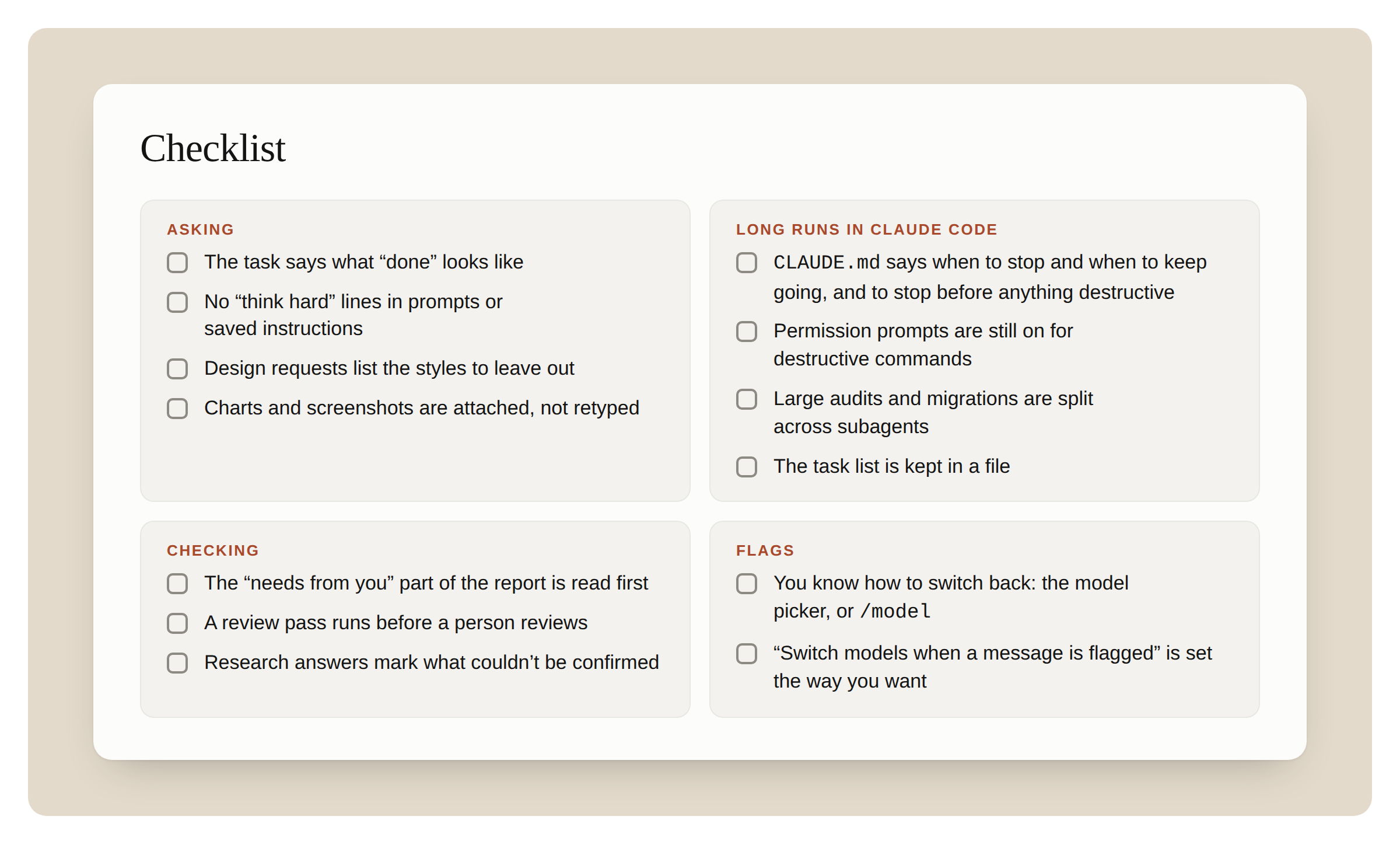
 图 D:Opus 5.5 上手与执行全流程检查清单
1. 提问与准备阶段(Asking)
- [ ] 提示词是否包含了明确的“完成标准”(Done means...)?
- [ ] 提示词及全局指令中是否已彻底删除了 "think hard"、"step by step" 等冗余词?
- [ ] 涉及设计与前端物料时,是否列出了具体的“逆向样式排除清单”?
- [ ] 遇到图表、流程图或日历时,是否直接附带了原始截图,而非人工抄写?
2. Claude Code 长任务执行(Long runs in Claude Code)
- [ ] CLAUDE.md 中是否已配置“何时继续推进”与“破坏性操作前必须停下来确认”的规则?
- [ ] 破坏性命令的手动权限确认提示(Permission prompts)是否保持开启?
- [ ] 面对超大型代码审查或迁移,是否提示模型将其拆分给并行子代理(Subagents)?
- [ ] 是否已命令模型将进度任务清单保存在本地文件(如 TASKS.md)中?
3. 结果验收与审查(Checking)
- [ ] 长任务结束后,是否优先处理了报告中“等待人类决策”(Blocked on me)的部分?
- [ ] 在人类审核前,是否让模型先进行了一轮 Diff / PR 缺陷自查?
- [ ] 调研或分析任务中,是否明确要求标出“未找到”与“无法确认”的内容?
4. 安全拦截与恢复(Flags)
- [ ] 是否掌握发生切换后重新切回 Opus 5.5 的路径(模型选择器或 /model)?
- [ ] 是否在设置或 /config 中,将“触发标记时自动切模型”调整为符合个人习惯的状态?
- [ ] 确认没有向模型提出“在正文中复现内部思考过程”的请求。
Claude Opus 5.5 使用指南:从交代任务到验收结果
把 Claude 用在大型代码修改或复杂工作上时,很多人会把任务切成一小步一小步,反复问“继续吗”,再加一句“仔细思考”。这些做法原本是为了防止任务跑偏;面对更能持续执行的 Opus 5.5,却可能把本可连贯完成的工作切断。
Anthropic 的指南观察到:Opus 5.5 更能推进多步骤长任务,会自行决定回复前的思考量,并更清楚地说明任务结束后还需要你做什么。用法因此从“逐步催促”转为“定义终点、设好停顿、核对结果”。
Migrate the payment endpoints from the old client to the new one.
Done means: every endpoint uses the new client, the old client is
deleted, and the test suite passes.
Stop and ask me only if a test fails for a reason you can't explain.
在 Claude Code 中设定停顿与放行规则
长任务需要平稳推进,又必须防止破坏性风险。在项目的 CLAUDE.md 中配置规则,能准确界定何时自动前进、何时强制停顿:
保留权限确认提示:给予模型自主权时,必须保留终端对破坏性操作的手动权限确认提示(Permission prompts)。运行中途若有新要求,直接按回车追加指令,无需推倒重来。
长任务执行:抵御上下文压缩与并行分派
应对超大规模代码库或多服务审计时,充分利用并行子代理并维护本地物理状态:
TASKS.md 中的清单能完整保留,随完成动态打勾。结果验收与审查:从卡点到代码与分析
长任务结束后,按下面的顺序检查报告与交付物:
按场景补充:设计任务列出具体排除样式;图表与架构图直接传原图;文档或表格直接要成品。被标记后若切到旧模型,在模型选择器或用 /model 切回;避免要求复现内部推理。Claude Code 的 /fast 可降低交替对话延迟,每 Token 成本更高。
Getting the most out of Opus 5.5 in Claude and Claude Code
How to prompt Opus 5.5, steer a long run, and check your results in Claude apps and Claude Code.
Opus 5.5 works well with the way you already use Claude. A few things behave differently, though: it works for longer on its own, it tells you plainly what it did, and it thinks before every reply. This guide covers how to work with Opus 5.5 in Claude apps and Claude Code, including how to prompt the model, steer a long run, and check your results.
TRY THIS FIRST
Three things to try in your first session with Opus 5.5
- Hand over the whole task. Say what “done” looks like and when you want it to stop and ask. Then let it work.
- Delete “think carefully” lines. Opus 5.5 already thinks before every reply.
- When a long run ends, read what it needs from you first.
1. HOW TO ASK
Say what “done” looks like, then let it run
What to do. Give the whole task in one message. Name the finish line, like “the tests pass” or “every endpoint is migrated.” Then let it cook.
Why it matters on Opus 5.5. Opus 5.5 keeps going on long, multi-part work better than Opus 5 did. Compared to prior Opus models, its biggest gains are on multi-step work, like carrying a change through a large repository until the tests pass. Early testers had it run long coding tasks for hours with little oversight. With a clear finish line, it knows when it’s done.
How. In Claude Code, for example:
CODEText
Migrate the payment endpoints from the old client to the new one.
Done means: every endpoint uses the new client, the old client is
deleted, and the test suite passes.
Stop and ask me only if a test fails for a reason you can't explain.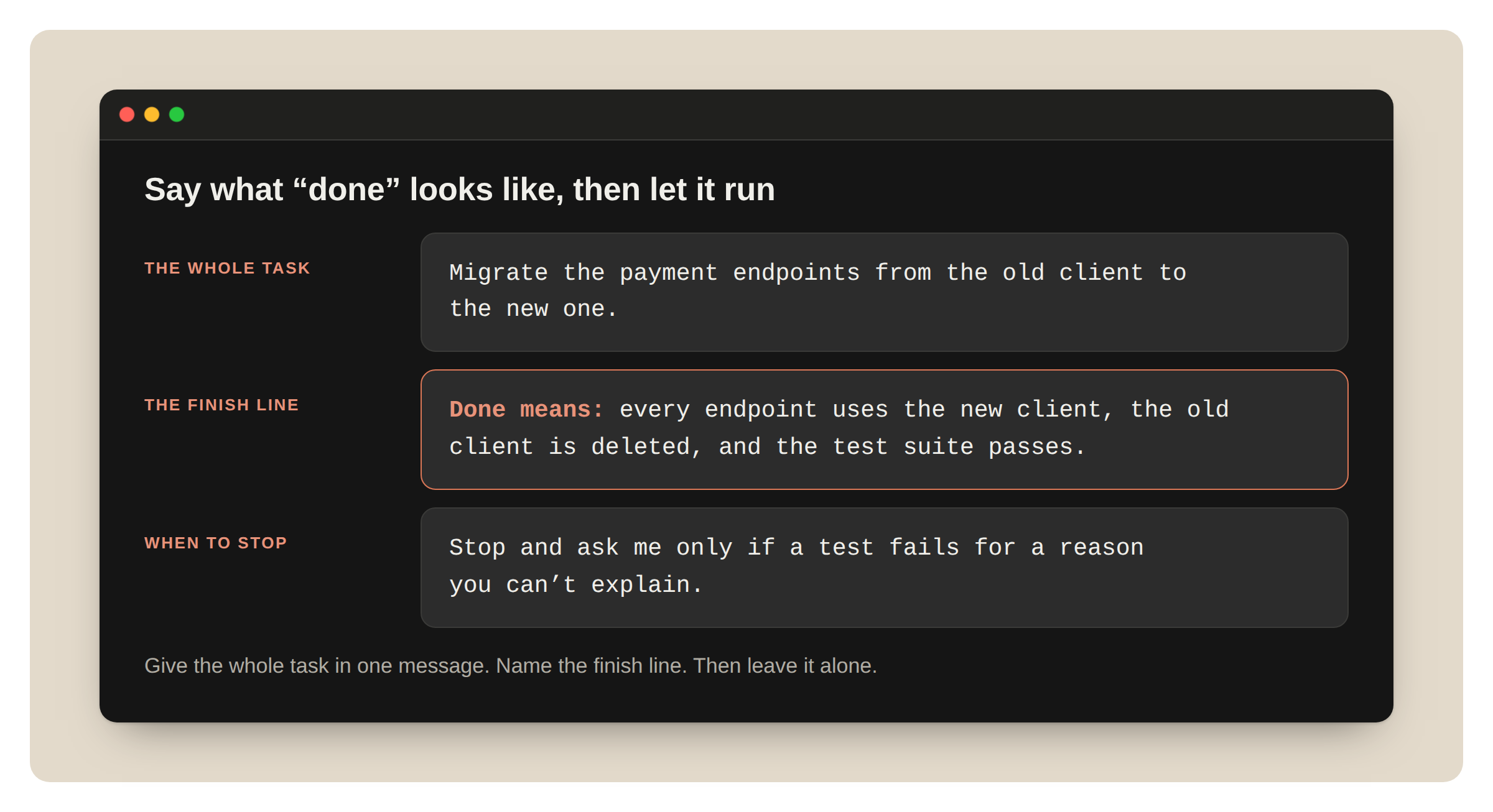
Stop telling it to “think hard”
What to do. Remove “think carefully,” “think step by step,” and similar lines from your prompts and your saved instructions.
Why it matters on Opus 5.5. Opus 5.5 always thinks before it replies, and it decides how much. You don’t need to ask it to think. In our testing in a chat product, removing a “think carefully” line made replies start sooner, with no clear drop in quality.
How. Delete the line. For a quick answer to a simple question, say so: “Answer directly.” To change how much it thinks in Claude Code, change effort.
Add to a running task
What to do. If you remember something mid-run, you can type a follow-up while it works.
Why it matters on Opus 5.5. Runs are longer now, so a restart costs more.
How to do it. In Claude Code, type the message and press Enter while Claude works, for example, “Also keep the old endpoint names as aliases.”
For design work, name the styles you don’t want
What to do. When you ask for a page, an app, or an artifact, list the design habits you want left out.
Why it matters on Opus 5.5. With no design direction, Opus 5.5 falls back on a few default styles. A general instruction like “avoid a generic look” mostly swaps one default for another. A list of specific patterns works much better.
How. Name the patterns:
CODEText
Build a personal website with placeholder content.
Don't use a cream or off-white background, italic accent words in
headings, numbered "01 / 02 / 03" section labels, monospace labels, or
pill-shaped buttons.
Then look at what it chose instead. If you don’t like that either, add it to the list and ask again.
2. STEERING A LONG RUN IN CLAUDE CODE
Tell it which stops you want
What to do. Put a short rule in your CLAUDE.md file about when to stop and ask, and when to keep going.
Why it matters on Opus 5.5. Opus 5.5 keeps you posted as it works. On a long task, it sometimes stops to report instead of going on: a summary that names the next step without taking it, an offer to continue, or a list of choices that don’t block the work. It follows instructions that name these stops. Name the stops you want, too.
How. Add this to CLAUDE.md, and edit it to fit your project:
CODEMarkdown
When a step doesn't need my input, keep going. Put status notes in the
same message as your next action.
Stop and ask only when you can't continue without me, or before anything
destructive: deleting data, force-pushing, or changing anything outside
this repository.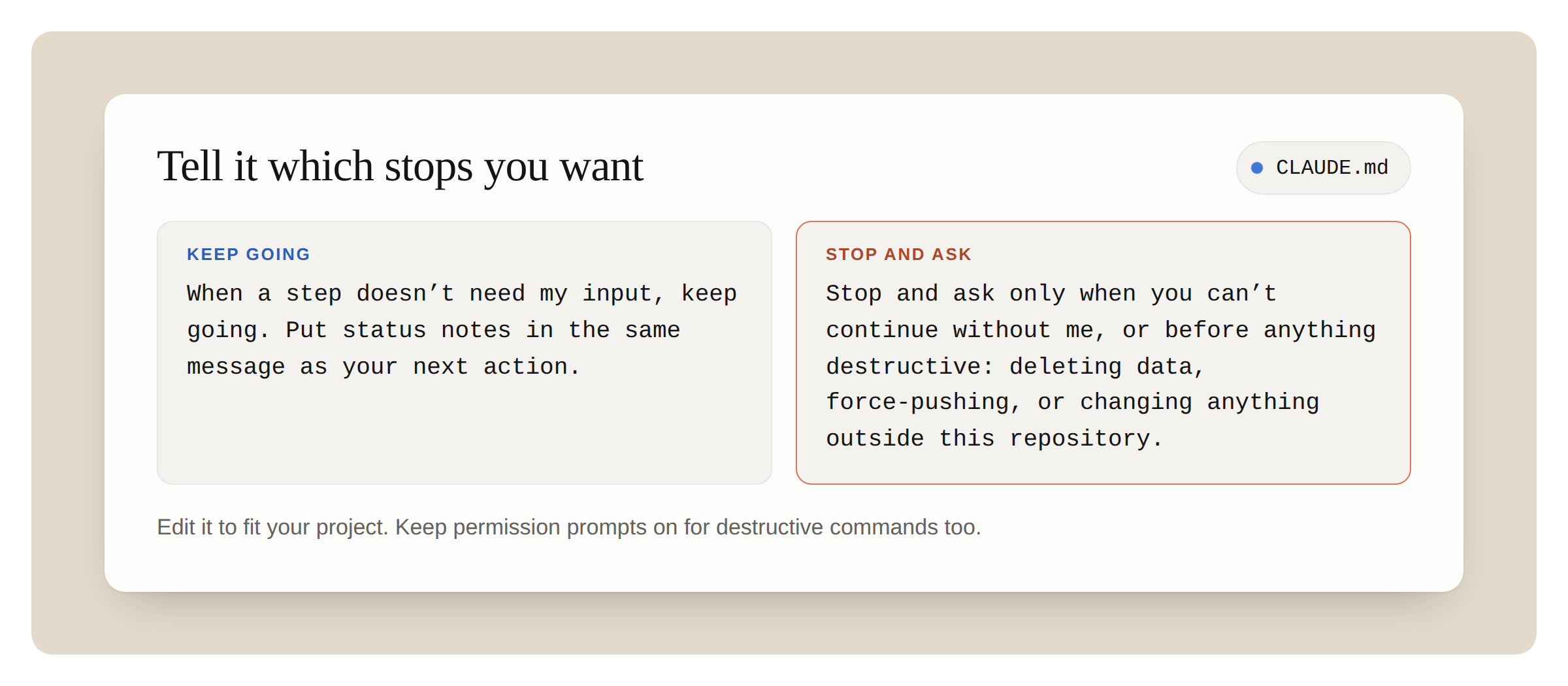
If a run stops with “Want me to continue?” reply “continue.” If that happens often, the rule above will help.
A rule to keep going means fewer stops, so keep your own check before anything risky or hard to undo. The last line of the rule above does that. Keep permission prompts on for destructive commands too.
For pair programming, you may want the opposite: a one-line plan before it starts and a short recap at the end. Say that in your CLAUDE.md instead. Opus 5.5 follows either one.
Ask it to split big work across subagents
What to do. For an audit, a migration, or a review across a large codebase, ask Opus 5.5 to split the work across subagents and check each result.
Why it matters on Opus 5.5. Early testers had Opus 5.5 coordinate parallel subagents on long audits and migrations, with little oversight.
How.
CODEText
Audit every service in services/ for the retry bug in the linked issue.
Give each service to its own subagent. When a subagent reports back,
check its evidence before you accept it.
Finish with one table: service, affected yes or no, and the evidence.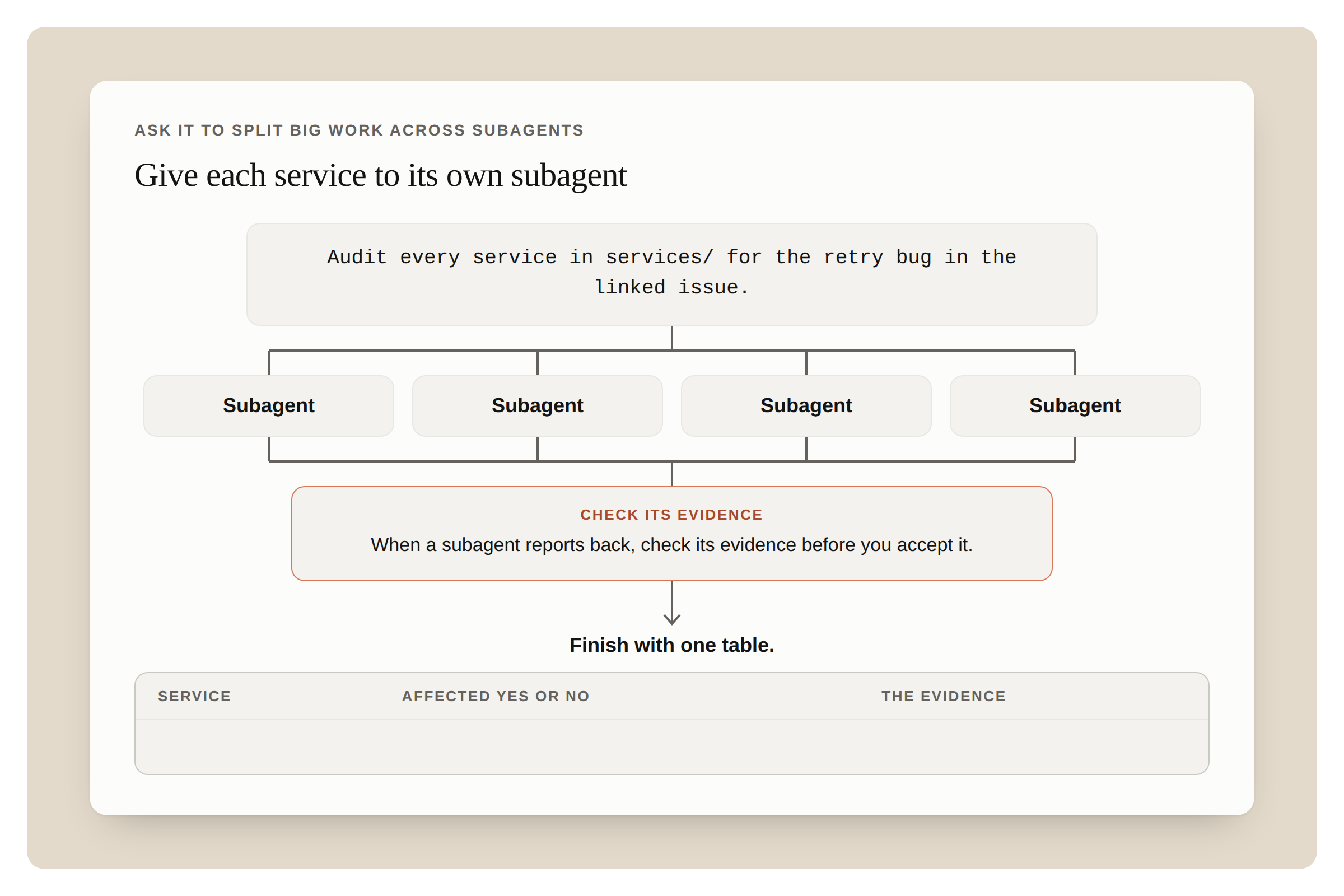
Keep the task list in a file
What to do. For a run that will take a while, ask Opus 5.5 to keep its task list in a file and update it as it goes. Then read the file, not the scrollback, to see where the run is.
Why it matters on Opus 5.5. Runs are longer now. A long run fills the context window, and Claude Code then summarizes older turns. A list in a file survives that, and it shows you at a glance what’s done and what’s left.
How. “Keep a checklist in TASKS.md. Tick each item when it’s done, and add anything new you find.”
3. CHECKING THE RESULT
Read what it needs from you first
What to do. When a long run ends, look first for anything Claude is waiting on you for, like a decision it left open or a change it wants you to approve. Then read the rest of Claude’s summary.
Why it matters on Opus 5.5. Opus 5.5 reports on its work more clearly than Opus 5. Its updates and its final summary say what it did, what it found, and what it needs from you, in plain language.
How. To change the summary’s format, say so in CLAUDE.md, for example, “End every run with three headings: Blocked on me, Changed, Found.”
Ask it to review the code
What to do. Ask Opus 5.5 to review a diff or a pull request before a person does.
Why it matters on Opus 5.5. One early tester said Opus 5.5 at its lowest effort caught more bugs than Opus 5 at high effort, with fewer false alarms. It also explains its changes in plain language, so its pull request descriptions are easier to review.
How. Feed this prompt to Claude:
CODEText
Review the diff on this branch against main.
List only problems you'd block the merge for. For each one, give the
file and line, why it's wrong, and how to show it fails.
Ask it to mark what it couldn’t confirm
What to do. For research and analysis, ask it to say what it couldn’t find or couldn’t check.
Why it matters on Opus 5.5. “I couldn’t find this” is worth reading, and asking for it makes it easy to find.
How. Add “Mark anything you couldn’t confirm, and say where you looked” to the request. This works in a Claude research report and in Claude Code.
4. IN CLAUDE APPS
First, check that the model picker says Opus 5.5.
What to do. Attach the chart, diagram, screenshot, or slide. Don’t retype the numbers.
Why it matters on Opus 5.5. Opus 5.5 reads charts, diagrams, and screenshots more accurately than Opus 5, and it needs no extra steps to do it. It’s also better at meaning that depends on where things are in the image: which boxes an arrow connects, what changed between two versions of a diagram, or when a meeting starts and ends in a calendar screenshot.
How. Attach the image and ask a specific question: “Which of these services call the billing API directly?”
Ask it to check a long document
What to do. Give it a long plan, report, or deck, and ask it to find mistakes.
Why it matters on Opus 5.5. Opus 5.5 pays more attention to detail than prior Opus models. In our testing, it caught a date that fell on the wrong weekday in a long planning thread, and a chart that didn’t match the numbers in a deck.
How. Submit the prompt: “Check this deck for anything that contradicts itself: numbers, dates and names. Quote each problem and say where it is.”
Ask for the finished file
What to do. When you want a spreadsheet or a document, ask for the file, not an outline.
Why it matters on Opus 5.5. The spreadsheets and documents Opus 5.5 makes need less editing than Opus 5’s before you share them.
How. “Make this a spreadsheet I can share: one row per vendor, with columns for cost, contract end date and owner.”
In a project, say when answers are settled
What to do. If follow-up questions in a long chat feel slow, add an instruction that earlier answers are settled.
Why it matters on Opus 5.5. In a long chat, Opus 5.5 sometimes goes back over an earlier answer while it thinks about a short follow-up. That slows the reply.
How. Add this to the project’s instructions:
CODEText
Once you have answered something, treat that answer as done. Focus on
what I'm asking now, and don't go back over an earlier answer unless I
ask about it or point out a problem with it.
Leave it out of projects for long analysis, where a later step can show a mistake in an earlier one.
5. WHEN A MESSAGE IS FLAGGED
Opus 5.5 is the first Opus model to launch with Fable-level bio and cyber safeguards. In Claude apps and Claude Code, most flagged messages move to an older model, and your work goes on there. Finding security vulnerabilities in source code is allowed, and everyday health and educational questions should still work. These safeguards can sometimes flag legitimate work, and we’re tuning them to cut down on incorrect flags. If you’re switched, here’s what you’ll see and what to do.
In Claude apps
What you see. A notice that starts with “Switched to” and the name of an older model. Claude answers on that model, and the chat stays on it.
What to do.
- To go back to Opus 5.5, choose it in the model picker. If the earlier message is still in the chat, it may be flagged again. Starting a new chat avoids that.
- To be asked first, go to Settings, then Capabilities, and turn off “Switch models when a message is flagged.” You’ll see a “paused” card with your options.
The check covers everything in the conversation, including files and search results. So a flag can come from earlier content, not only your last message.
In Claude Code
What you see. A notice that names the older model. The session continues on that model.
What to do.
- Run /model to switch back.
- Press Esc twice to edit your last message and try again.
- To be asked first, run /config and change “Switch models when a message is flagged.”
- Run /feedback if the flag was wrong.
Don’t ask it to show its reasoning in the reply
What to do. Remove requests to reproduce its internal reasoning in the reply from your prompts and instructions.
Why it matters on Opus 5.5. A request to reproduce its internal reasoning in the reply can be declined. It’s one of the flag categories.
How. Ask Claude for what you need instead, for example, “Explain why you chose this approach in three sentences.”
6. SPEED
Turn on fast mode when you’re waiting on each reply
What to do. In Claude Code, use fast mode for back-and-forth work, where you read each reply before you send the next message.
Why it matters on Opus 5.5. Fast mode is available for Opus 5.5 at launch as a research preview. You get the same model, and the text arrives sooner. It needs extra usage turned on, and it costs more per token than standard mode.
How. Type /fast into Claude.
YOUR OPUS 5.5 CHECKLIST
Run through this before your next long task.
Asking
- The task says what “done” looks like
- No “think hard” lines in prompts or saved instructions
- Design requests list the styles to leave out
- Charts and screenshots are attached, not retyped
Long runs in Claude Code
- CLAUDE.md says when to stop and when to keep going, and to stop before anything destructive
- Permission prompts are still on for destructive commands
- Large audits and migrations are split across subagents
- The task list is kept in a file
Checking
- The “needs from you” part of the report is read first
- A review pass runs before a person reviews
- Research answers mark what couldn’t be confirmed
Flags
- You know how to switch back: the model picker, or /model
- “Switch models when a message is flagged” is set the way you want
Start building with Opus 5.5!
With thanks to Molly Vorwerck for reviewing.