Anthropic 官方开发团队分享如何让 Claude API 降本不降质:缓存、提示词与 Effort 的三类优化策略
降本与性能并非只能二选一:先排除重复计算、无效指令和不匹配的思考投入,再决定是否更换模型。
- 缓存读取要求请求前缀按字节一致,并受模型绑定与 TTL 限制。
- 旧模型时代的核验仪式、强制步骤和矛盾规则,可能让前沿模型多做无用工作。
- Effort 应通过自己的评测逐档校准,更高并不必然更好。
- prompt-audit、cost-optimize 与 hillclimb 分别处理提示词、整体成本和配置搜索。
Anthropic 官方开发团队给出的核心判断是:Claude API 的降本,不必先从牺牲模型能力开始;先找出缓存重算、提示词遗留规则和 Effort 失配,往往更划算。
为什么账单变贵了,效果却没有同步变好?
很多团队看到 Claude API 账单上涨,第一反应是换更便宜的模型、缩短输入,或者让模型少思考。但这些做法都可能直接伤到结果质量,于是降本与性能看起来像一道单选题。
Anthropic 官方开发团队提醒:在做这道选择题之前,应该先排除另一种情况——系统正在为没有产生额外价值的工作付费。
你应该检查一次请求中的三个层面:
- 输入层:重复内容被重新 Prefill:检查缓存前缀、模型绑定和 TTL。
- 指令层:旧规则与新模型能力不再匹配:检查核验仪式、强制步骤、陈旧样例和冲突规则。
- 推理层:思考投入与任务难度不匹配:用自己的评测扫过多个 Effort 和模型组合;过高可能浪费,过低则可能损害表现。
后文的缓存优化、提示词清理和 Effort 校准正对应这三层。它们没有固定顺序:缓存命中异常就从输入层查,刚升级模型就先审提示词,已有评测集则直接比较模型与 Effort;需要系统降本时,再把缓存、批处理、输出长度和模型选择放进同一张账单里审计。
缓存开了,为什么还是在重复付费?
在大语言模型的交互中,生成回复之前必须经历一个“预填充(Prefill)”阶段。模型需要将你输入的所有文字、历史对话和工具定义转化成内部的工作状态,即键值缓存(KV Cache)。Prefill 是处理输入时成本较高的步骤。
提示词缓存(Prompt Caching)的核心逻辑非常朴素:如果当前请求的前半部分与之前某次请求的前缀完全一致,Claude 就可以直接把内存中保存的 KV 状态读取出来,而无需重新计算一遍。缓存读取的费用仅为完整输入价格的一小部分。
但接入缓存并不等于一定命中。要看清成本为何没有下降,先要理解三个约束。
先弄清缓存为什么会失效:三个硬约束
- 缓存绑定具体模型:同一份提示词缓存不能跨模型读取。
- 前缀按字节一致(Byte-exact):缓存读取要求对应的请求前缀按字节一致;前缀发生变化,相关部分就可能无法命中。
- 有限的生命周期(TTL):默认缓存生命周期只有 5 分钟(从请求开始计时)。如果一个智能体(Agent)中途执行复杂工具调用或等待子智能体返回超过 5 分钟,父级上下文的缓存就会超时失效。
再排查是谁破坏了前缀:四个常见来源
- 对话途中变更 Effort 设置:Effort 设置会被渲染在具体内容之前,属于缓存前缀的一部分。中途修改会改变前缀;目前只有包括 Opus 5、Fable 5.1 在内的部分模型支持对话中途更新 Effort而不破坏缓存。
- 在前缀中放入动态变量:系统提示词里的时间戳或请求 ID 每次变化,前缀也随之变化,可能导致缓存未命中。
- 工具定义发生变化:Claude Messages API 按固定顺序组装提示词,并把工具定义放在前面。工具顺序、描述或定义变化,会改变后续可复用的前缀。
- 子任务分支(Forking)未对齐环境:创建分支对话或调度 Subagent 时,只有在模型型号、Effort 强度、历史前缀字节完全一致的情况下,分支才能复用主进程的缓存。
最后修请求结构与运行时机:六种做法
针对上述问题,可以从请求结构和运行时机入手调整。
做法 1:静态内容前置,动态内容后移
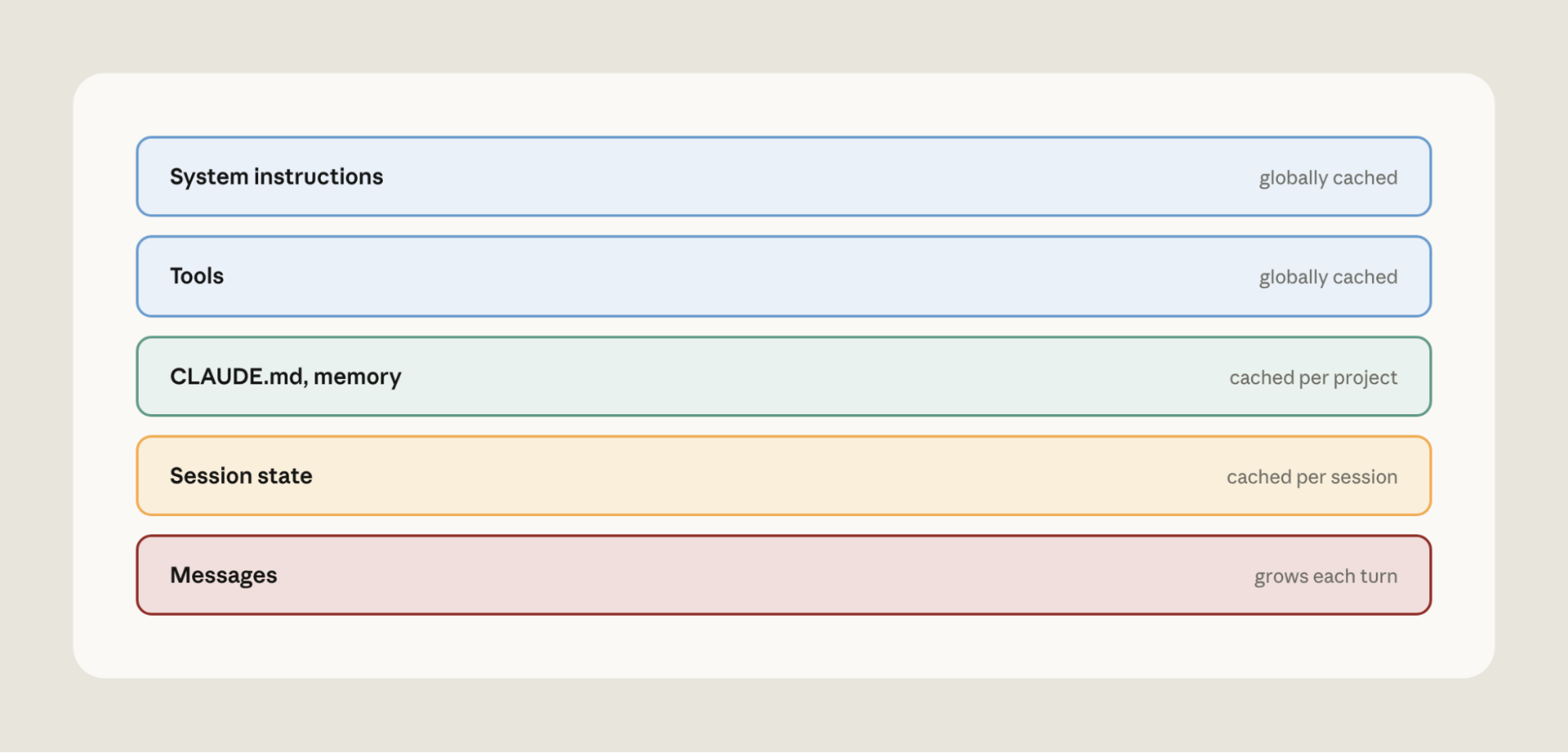
组装 Prompt 时,把最稳定的静态上下文(工具定义、系统全局规则)放在前面,再接逐步增长的多轮对话和动态输入。

做法 2:低频工具延迟加载(defer_loading)
可以预先声明所有工具,同时把低频工具标记为 defer_loading。这些工具定义不进入缓存前缀,只有 Claude 通过 Tool Search 找到它们时才追加到对话中,从而保留已有缓存。
做法 3:把系统提示词变更转成追加消息
对话中途需要补充全局指示时,直接修改最前面的 System Prompt 会改变前缀。部分 Claude 模型支持把系统指令作为消息追加,而不是编辑原 System Prompt,从而保留前面的缓存。
做法 4:在上下文压缩(Compaction)时切换配置
当长会话触发上下文压缩归纳(Compaction)时,对话历史会被大范围重写,缓存本就会发生未命中。如果需要切换模型或调整 Effort,这是一个合适的时机,因为无论如何都要承担这次缓存未命中。
做法 5:推进缓存断点,并提前预热
- 动态推进断点:缓存断点决定前缀写入缓存到哪里。随着对话增长,使用自动缓存(Automatic Caching),让断点跟随最后一个可缓存的数据块,新增消息就能接在已缓存前缀之后,而不是让越来越长的历史重新计算。
- 预热缓存:在用户刚建立会话或正在前端打字时,后台可以先行发出一条显式指定断点、设置
max_tokens: 0的空请求,并使用与真实流量相同的 Effort。该请求只做 Prefill 写入缓存而不生成回答。当用户真正按下发送键时,首个真实请求可命中同一份预热缓存,从而降低延迟。 - 针对长阻塞考虑 1 小时 TTL:如果工具或子代理耗时超过默认 5 分钟,父级缓存可能在结果回来前过期。此时可考虑为前缀设置 1 小时 TTL。
做法 6:用控制台与 API 找到具体分歧点
开发者无需只靠代码猜测缓存是否生效。先持续观察缓存命中率;出现异常后,再用 Claude Console 和 Cache Diagnostics API查看未命中原因,并定位两个请求从哪里开始分歧。

模型升级了,为什么旧提示词可能反而拖后腿?
当应用从上一代模型(如 Opus 4.8 或更早版本)迁移到前沿模型(如 Opus 5、Fable 系列)时,很多开发者会直接保留旧项目的 Prompt。然而,这些经过反复修补、堆叠的提示词,往往充斥着针对旧模型缺陷所打的“补丁”。
前沿模型更擅长遵循指令,也有原生推理能力。过去用于修补旧模型弱点的规则,可能与这些能力叠加,造成额外 token、工具调用或性能下降,这就是这里所说的提示词“反模式(Anti-patterns)”。
先找出六类与新模型能力不再匹配的规则
<scratchpad> 标签里严格按 6 步思考”。这类脚手架会叠加在模型的原生推理之上,增加 token;在实验的 3 张工单中,模型把工具调用写进推理而没有真正执行。再看一次迁移实验:清理后为何更省也更准
为了验证这些反模式的具体危害,官方在客服基准测试(Customer Support Benchmark)中做了一组对照实验。研究团队从干净的基准提示词出发,每次只植入一种典型的历史反模式,构建出 6 组遗留 Prompt。
对比三组运行结果:
- 基线组:运行在老模型 Opus 4.8 上;
- 裸迁组:直接将模型 ID 换成 Opus 5,提示词原封不动;
- 优化组:在 Opus 5 上运行
/claude-api prompt-audit,清除反模式后再跑。

实验数据显示,通过 /claude-api prompt-audit 清理反模式后,平均运行成本下降 14.6%,业务准确率提高 5.3%。
为什么成本下降? 因为移除了“再三检查”和“绝对穷尽”等要求,减少了重复工具查询与冗余推理。
为什么准确率反而上升?
- 移除了废弃的思考配置后,API 不再拒绝实验中的每一个路由请求;
- 清理了矛盾的退款规则后,Opus 5 不再扣留本应发放的退款;
- 移除了
<scratchpad>草稿本约束后,不再出现实验中 3 张工单把工具调用写入 reasoning、却没有真正执行的问题。
Effort 拉满,为什么不一定换来更好结果?
在 Claude 平台中,effort 用来告诉模型“这项任务要投入多少工作”:
- 低 Effort(Low):模型通常更快得出结论;
- 高 Effort(High / Max):模型更倾向于在回答前推演、验证并探索替代方案。
算力、准确率与成本之间的关系并非单调线性上升。盲目把 Effort 拉到满格,或者为了省钱一律调到最低,都会落入工程陷阱。
先看任务曲线:更多思考何时有用,何时浪费
在不同模型和不同任务难度下,Effort 的投资回报率截然不同:
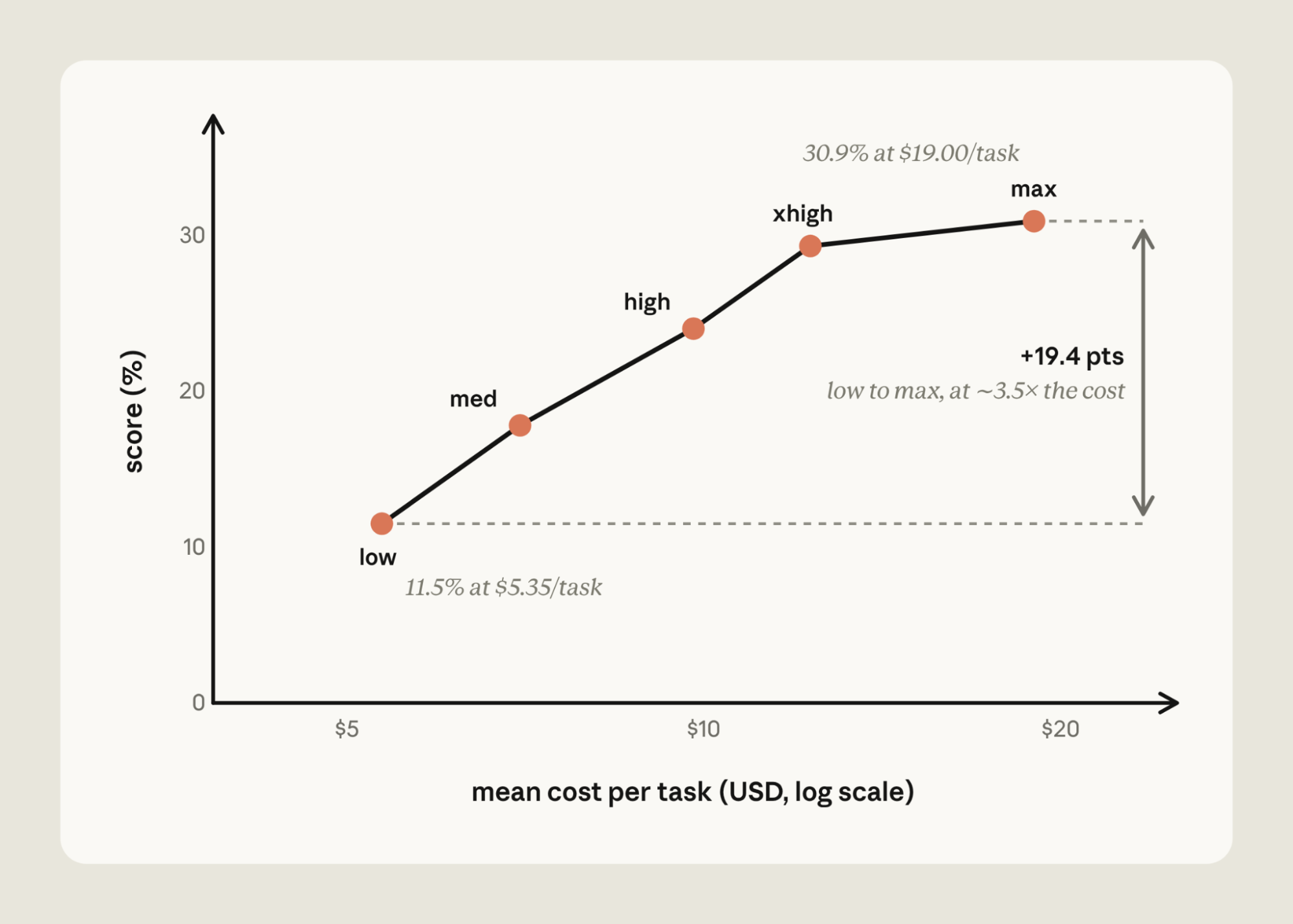
- 高难任务的算力表现:在包含 50 道极难代码任务的 FrontierCode Diamond 基准测试中,Claude Fable 5 在 Low Effort 下得分仅为 11.5%,单个任务成本 5.35 美元;调至 Max Effort 时,得分提升至 30.9%(提升约 2.7 倍,+19 个百分点),单任务成本达 19.00 美元(约 3.5 倍)。

- 边际回报陷阱:在无工具参与的 Humanity’s Last Exam 测试中,更先进的 Claude Fable 5.1 展现出了一条陡峭后迅速走平的曲线: - Low Effort 阶段:耗费约 0.30 美元,准确率约 53%; - Max Effort 阶段:耗费约 2.23 美元,准确率约 61%; - 边际回报最低的一段跃迁:从 High 迈向 Max,成本增加了 46%,但准确率仅微增 0.5 个百分点;这半个百分点落在测试的随机波动范围内,也就是没有测出稳定收益。
两个方向都可能配错:过度思考与过早停止
- 误区一:认为越高越好(过度深思 / Over-thinking):高 Effort 会导致过度深思。Claude 会花费超过任务所需的时间进行推演,增加成本与延迟,并可能降低答案质量。推演仅在仍有证据可供寻找时才有帮助。
- 误区二:偏向极低 Effort:Effort 设得过低时,Claude 会在掌握充足证据前停止。它会减少工具调用,可能依据第一条搜索结果而非第三条直接作答;在困难步骤上思考减少,并跳过通常会自行运行的检查。答案表面上看已完成,却建立在不完整的信息之上。
不只调档位:比较“新模型低 Effort”与“旧模型高 Effort”
一个值得实测的组合是:更强的模型搭配较低 Effort,可能比弱模型搭配高 Effort 更便宜,同时保持相近表现。
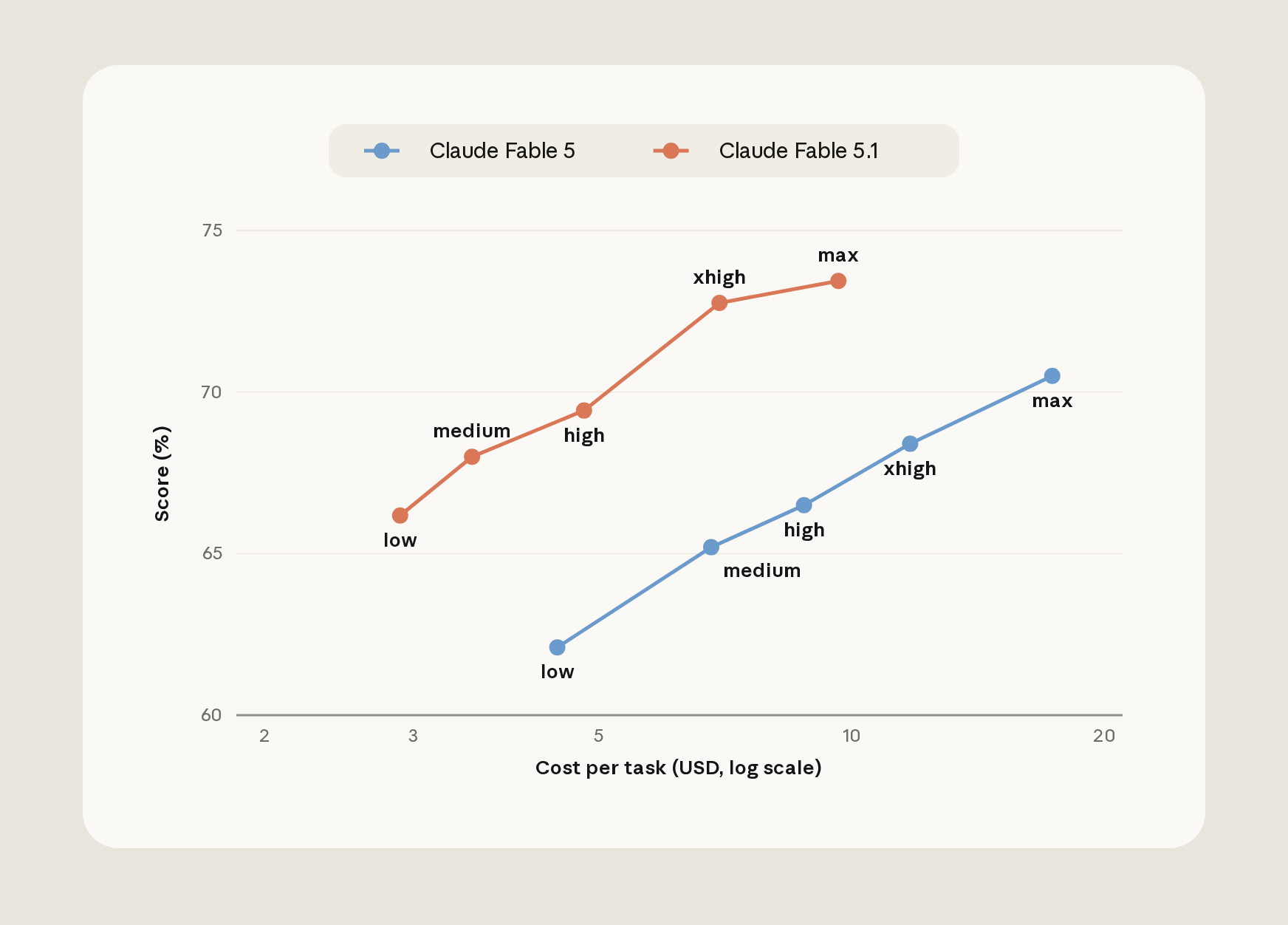
以 CursorBench 3.2 编程基准测试为例,Claude Fable 5.1 在 low effort 下表现相当于上一代 Fable 5 在 high effort 下的水平,而成本约为后者的三分之一(图 5)。
新模型更便宜的原因主要有两点:
- Low Effort 下任务工作量更少:模型在 low effort 下每个任务做的工作更少;
- 提示词缓存定价差异:Fable 5.1 的提示词缓存读取价格为每百万 token $0.25,而 Fable 5 为 $1.00。即使按 Fable 5 的价格计算,Fable 5.1 在 low effort 下的成本仍约低 40%。

- 理解任务形态(Effort sweep):测量应用在多个 Effort 档位扫描(sweep of effort levels)下的表现,是理解特定任务成本—性能权衡的有效方法。这里有一个重要前提:评测必须尚未“触顶”,仍能区分不同配置的好坏。此时如果跨 Effort 档位的曲线近乎平坦,才说明任务不受 thinking compute 限制;如果评测本身已经饱和,平坦曲线不能支持这个结论。
有了评测集,再用 hillclimb 搜索配置
这种校准通常需要在不同模型与 Effort 档位间运行评测。在 Claude Code 中,/claude-api hillclimb 可以代为执行这种评测驱动的配置搜索:它将评测集划分为训练集与测试集,提出配置变更,并读取失败的训练样例来针对性修复发现的问题。需要注意的是,这是一种配置搜索策略,并非模型训练、自愈机制,也不保证必然追平基准。
在客服基准上的实验过程如下:
prompt-audit 去除强制工具调用仪式、草稿暂存(scratchpad)步骤与相互矛盾的规则。这以 98.9% 的训练集准确率超过了 Opus 4.8 基线,且每张工单成本降至 2.6 美分(图 6);
三处单点查完,怎样审计整张账单?
把提示词缓存、反模式清洗、Effort 校准、批量处理(Batching)和输出长度约束结合起来,可以形成一套常用的综合成本优化流程。
为了让这套流程标准化,官方提供了全局成本审计命令:/claude-api cost-optimize。它不仅定位成本,还会应用适合当前应用的削减措施;如果提供评测集,它会同时展示节省与表现之间的权衡。
它先找钱花在哪里,再排序节省杠杆
- 定位 Token 消耗来源:该工具首先定位 Token 消耗去向。数据来源优先级依次为:若持有 Claude Admin API key,优先从组织的 usage and cost reports(使用量与成本报告)获取;若应用记录了日志,则从每次 API 响应携带的
usage对象获取;若两者皆无,则通过读取请求构建代码进行估算。最后一种只是估算,不能当成真实账单。 - 排序可用节省项:建立分析后,自顶向下对可用的节省杠杆进行排序:优先采用提示词缓存(prompt caching),裁剪每次请求携带的内容(包括 prompt-audit),限制输出长度(bounding output),以及将无人值守任务转移至批处理(batching)。
- 结合评测权衡成本与表现:如果开发者提供了评测集(evaluation),它会进一步计算并比较不同 Effort 级别与模型选择下的成本与表现,展示开销节省与性能表现之间的权衡。
四项公开基准说明:不同任务,节省手段并不相同
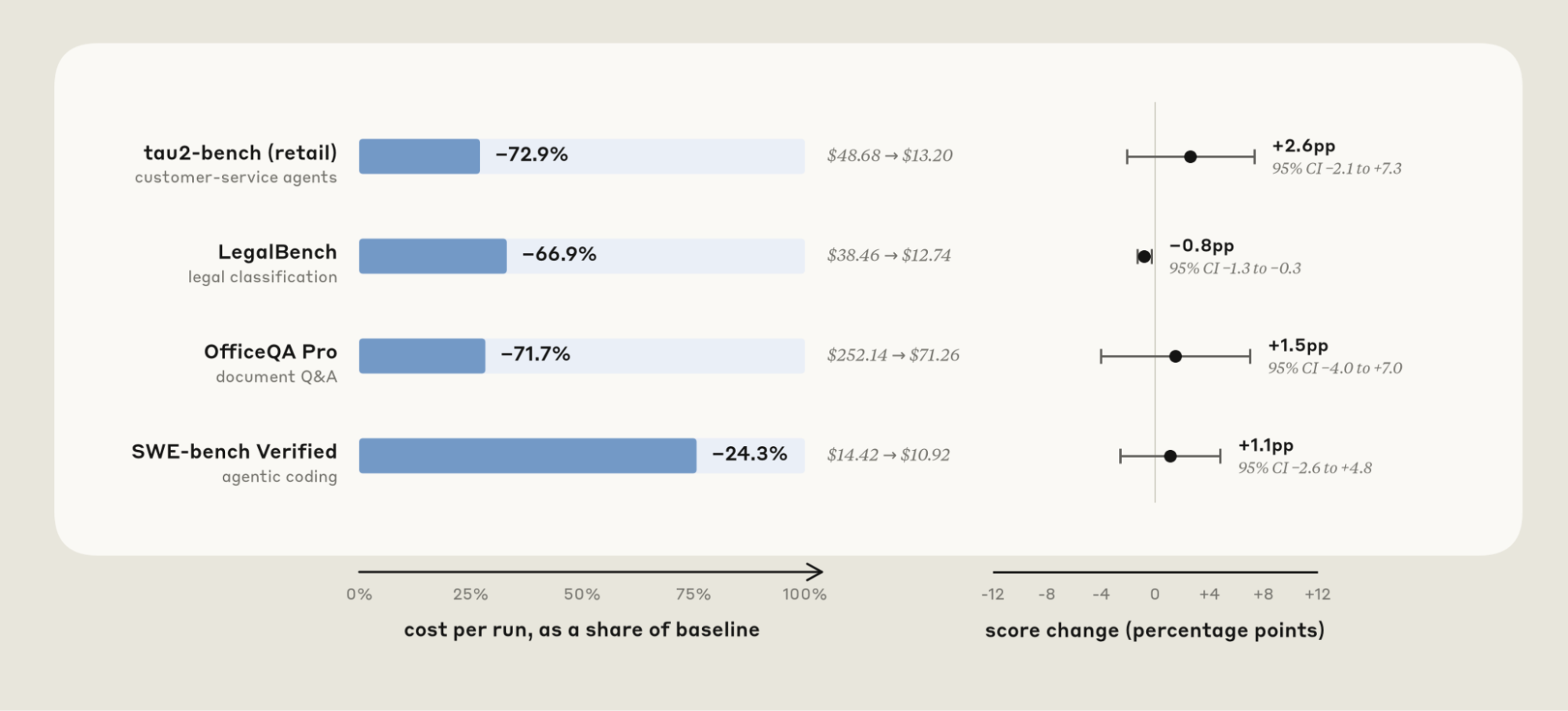
以常用的主力模型 Sonnet 5 作为基线,运行 /claude-api cost-optimize 在四个公开基准测试中测试了优化效果(图 7):

- LegalBench 法律合规推理(降本 ~58%): cost-optimize 建议缓存跨任务的共享前缀、将 effort 设为 low,并通过 Batch API 处理任务。思考 Token(Thinking tokens)从 102,779 降至 8,284,通过率变化保持在噪声范围内,成本降低约 58%。
- tau2-bench retail 零售客服场景(降本 ~73%): 通过设置显式断点实现提示词缓存,cost-optimize 将支出降低了 72%(四舍五入约 73%),同时通过率保持持平。
- OfficeQA Pro 办公文档长问答(降本 ~52%): cost-optimize 引入了批处理与文档缓存,总运行成本直接从 136.20 美元降至 64.87 美元。
- SWE-bench Verified 软件工程代码修复(降本 ~55%): 检测发现默认配置已经正确进行了缓存。节省来自将 effort 统一设为 medium,并将 agent 的回复输出约束为简明扼要的几句话。单个任务的中位数执行步数从 29 步降至 17 步,Prompt Token 消耗从 75.2M 降至 33.7M,成本降低约 55%。
把文章变成一次真实排查
先用清单定位缓存问题,再用同一张表比较模型与 Effort。两个工具都可以在页面里编辑。
提示词缓存未命中排查清单
模型与 Effort 评测记录模板
三个工具怎么选:看你从哪类问题开始
这三个命令都属于 claude-api skill,并已内置在 Claude Code 中。它们不是必须依次执行的三道关卡,而是对应不同起点:
/claude-api prompt-audit
CLAUDE.md、Skills 和工具描述,找出可能带来额外 token、工具调用、冲突或报错的反模式。/claude-api cost-optimize
/claude-api hillclimb
继续实操
- 优化指南|Cut spend without losing quality——从缓存、模型选择和 Effort 入手制定降本方案。
- 成本优化 Cookbook|Claude Cost Optimization Cookbook——查看 Prompt Caching 等方法的具体实现。
- Claude API Skill 源码|GitHub / anthropics / skills / claude-api——查看文中三个自动化命令的源码与说明。
Reducing cost and improving performance with Claude Platform
Tuning prompt caching, instructions, and effort can reduce Claude's cost without sacrificing application performance.
Update: This blog article was originally published on September 8, 2026, including benchmarks reflecting the cost and performance of using Opus 5 and Sonnet 5. We’ve since re-run several of these benchmarks to incorporate or highlight Opus 5.5, which launched on September 22, 2026.
Performance and cost are often viewed as a trade-off: to spend less, you accept worse results. In practice, we've found that many applications using Claude Platform can cut costs without giving up performance with three fixes: maximize the prompt cache hit rate, remove anti-patterns from your prompts when upgrading to frontier Claude models, and calibrate effort to the task. We've put this guidance into the claude-api skill. In this article, we show how Claude Code with the claude-api can often find ways to reduce cost while maintaining or improving performance.
Prompt cache
Before Claude generates a response, it first processes your prompt into an internal working state. This step, called prefill, is the expensive part of handling input. Prompt caching saves that state (the key–value, or KV, cache): when a request starts with the same prefix, Claude reads it back instead of recomputing it. Cache reads arebilled at a fraction of the full input price.
There are a few practical considerations to ensure effective use of the prompt cache. First, the prompt cache is pinned to a specific model. Second, prompt cache reads must be byte-exact across the full span of the prompt. Finally, the prompt cache has a limited time-to-live (TTL).
With these points in mind, there are a few practical tips:
- Avoid changing effort or thinking settings mid-conversation. These settings render into the prompt ahead of your content, so they are part of the cached prefix. With Claude Opus 5 and Fable 5.1 specifically, you can update effort mid-conversation without breaking the cache.
- Keep volatile values out of the prefix. A dynamic timestamp or ID in the system prompt can change across model calls, and break the cache.
- Avoid tool definitions that reorder themselves. When using the Claude Messages API, the prompt is assembled in a fixed order with tool definitions rendered at the top. Any change to the tool definition will break the cache.
- Be careful when forking conversations. Subagents and branches only share the parent’s cache when the fork’s prefix is byte-identical, on the same model, and using the same effort.
- Avoid synchronous tool calls and subagents that outlive the cache TTL. If an agent blocks on a long-running tool call or sub-agent, the cache can expire before the results come back. The next turn has to rewrite the cache, at 1.25× the normal input price (2× for a 1-hour cache) instead of the cheap read price.
How to fix it
We’ve accumulated a few lessons for prompt cache management:
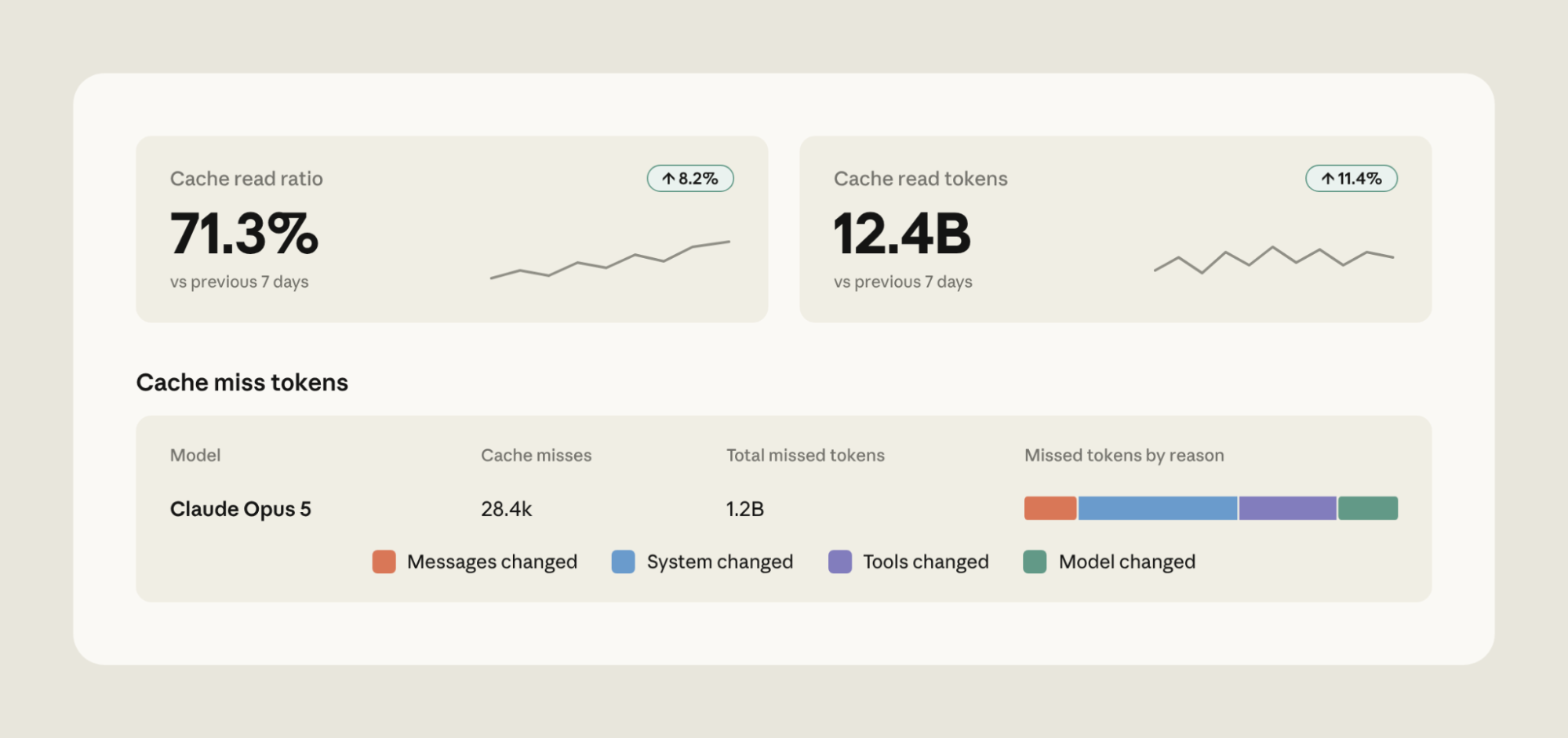
- Monitor your prompt cache hit rate carefully. Claude Console provides prompt cache diagnostics, including reasoning for prompt cache misses (Figure 1). If hits drop unexpectedly, the cache diagnostics APItells you exactly where two requests diverged.
- Defer rarely used tools. Declare all your tools up front but mark the rarely used ones defer_loading: they stay out of the cached prefix and are appended into the conversation only when Claude looks them up with tool search, so the cache is preserved.
- Apply system prompt updates as messages. Claude Platform lets you add a system instruction as a message mid-conversation instead of editing the system prompt, which preserves the cache.
- Lay out the request out so the stable part stays stable. Add static context (tool definitions and the system prompt) first and the growing conversation behind them (Figure 2).
- Make changes to model or effort when the prompt cache will already be broken. Certain operations, like compaction, already rewrite much of the cache (the conversation). That is a good moment to switch model or effort, since you are paying for a miss anyway.
- Move the cache breakpoint as the conversation grows. With Claude Platform, you can set automatic caching to automatically apply the cache breakpoint to the last cacheable block.
- Pre-warm the cache. To reduce latency, send a request with
max_tokens: 0and an explicit cache breakpoint. This processes the prompt and writes it to the cache without generating anything. If you run it at session start (for example, while a user is typing), the first real request hits a warm cache. - Don’t exceed the prompt cache TTL. The 5-minute cache TTL counts from the start of the request. If an agent blocks on tool calls or sub-agent requests that run longer than 5 minutes, the parent's cache expires before the result comes back. In cases like this, consider setting a 1-hour TTL on the prefix instead.
Instructions
Prompts can accumulate instructions that patch model weaknesses. These instructions can drift relative to the capabilities of the latest Claude models. Here are common prompting “anti-patterns” that hobble frontier Claude model and can inadvertently increase costs:
- Verification rituals. Instructions like "double-check your work” or "verify twice before responding” are often taken literally by frontier models and can waste tokens.
- Thoroughness and emphasis boosters. "Be maximally thorough," "CRITICAL: YOU MUST ALWAYS…" can lead to verbosity and extra tool calls when working with frontier models.
- Mandatory procedures and scratchpad scaffolds. Fixed step processes (e.g., "think step by step in a scratchpad") or reasoning templates are rituals that frontier models don't need. This scaffolding can stack on top of native reasoning and use unnecessary tokens.
- Stale examples. Few-shot examples tuned to an older model's failure modes can teach a frontier model to imitate long reasoning chains on requests that don't need them.
- Contradictory rules. Frontier models are better at instruction following. Contradictory instructions ("always refund within policy" vs. "never issue refunds without escalation") can be followed more literally by frontier models, resulting in degraded performance.
- Dated configuration. Settings written for an older Claude generation (e.g., manual thinking budgets) can be rejected by the Claude Platform when upgrading to frontier models.
How to fix it
We've updated the claude-api skill with a new command that watches out for these anti-patterns. In Claude Code, run /claude-api prompt-audit against your prompts, skills, or tool descriptions. The audit covers anything in your working directory, including application code that calls the Claude API and Claude Code's own configuration (e.g., CLAUDE.md or skills).
For example, we tested a model migration from Opus 4.8 to Opus 5.5 on a customer support benchmark. We started from a clean prompt and planted one anti-pattern at a time (a retired thinking setting, a pair of contradictory refund rules, a manual scratchpad, "verify twice", "be maximally thorough", and a mandatory six-step procedure), giving six legacy prompts.
We ran each on Opus 4.8, on Opus 5.5 with only the model ID changed, and on Opus 5.5 after running /claude-api prompt-audit once per prompt (Figure 3 shows the average across the six).
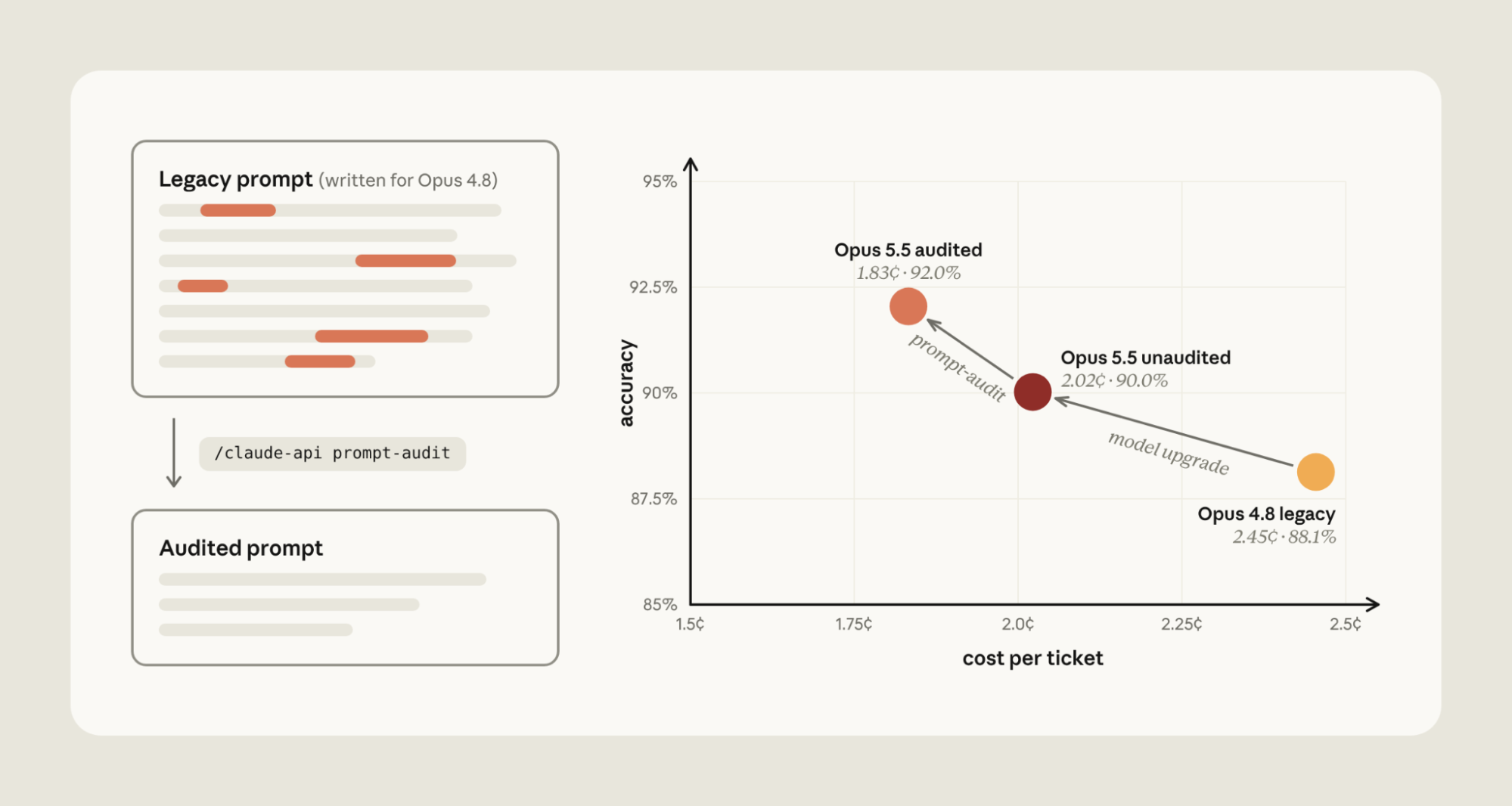
The migration from Opus 4.8 to Opus 5.5 reduces cost by around 18%. This is because the Opus 5.5 input tokens and prompt cache reads are cheaper than Opus 4.8.
With Opus 5, verification rituals ("verify twice") use unnecessary tokens by duplicating order lookup on every refund. Emphasis boosters ("be maximally thorough") became dozens of unneeded knowledge-base searches.
Running /claude-api prompt-audit removed the anti-patterns, decreasing costs by an additional 9%. Cost dropped because extra tool calls and duplicated reasoning were eliminated. Accuracy rose by around 2 percentage points for three reasons. The retired thinking setting made the API reject every routing request outright. The contradictory refund rules led Opus 5.5 to withhold four refunds it owed while it asked the customer to confirm. And the manual scratchpad collided with Opus 5.5's built-in thinking: on three tickets it wrote the tool call inside its reasoning and never executed it.
Effort
Effort tells Claude “how hard to work.” At low effort Claude generally reaches conclusions faster. At high effort, Claude deliberates, verifies, and explores alternatives before answering.
Cost-versus-performance across effort levels on a single model can vary. For example, Claude Fable 5 scores 11.5% at low effort for $5.35 per task on FrontierCode Diamond (the hardest 50 tasks). At max effort, Fable 5 gets 30.9% for $19.00 per task; changing effort raises the score about 2.7x (+19 points) for about 3.5x the cost (Figure 4).
On Claude Fable 5.1, Humanity's Last Exam (without tools) shows a steep curve with a diminishing last step. It scores about 53% at low effort for about $0.30 per question and about 61% at max effort for about $2.23; the last step up to max adds about half a point for 46% more cost. The gain inside the benchmark's run-to-run noise, so you pay more for no measurable gain.
Effort can be miscalibrated in either direction:
- Assuming higher is always better. High effort can cause *over-*thinking. Claude spends more time deliberating than the task warrants, which adds cost / latency and can degrade answer quality. Deliberation only helps while there's still evidence to find.
- Biasing to low effort. Set too low, Claude stops before it has enough evidence. It makes fewer tool calls, so it may answer from the first search result instead of the third. It thinks less on hard steps and skips the check it would normally run on its own. The answer looks finished, but it's built on partial information.
How to fix it
There are some useful ways to calibrate effort:
- Test stronger models at lower effort. A stronger model at low effort can be cheaper than a weaker model working hard (high effort). For example, on CursorBench 3.2, Claude Fable 5.1 at low effort matches the performance of Fable 5 at high effort at a third of the cost (Figure 5). Two things make the newer model cheaper: at low effort it does less work per task, and Fable 5.1's prompt-cache reads are priced at $0.25 per million tokens versus $1.00 for Fable 5. Even at Fable 5's prices, Fable 5.1 at low effort would cost about 40% less.
- Understand your task shape. Measuring application performance across a sweep of effort levels is a useful way to understand the cost-performance tradeoff for your particular task. On a non-saturated evaluation, a flat performance-cost curve across effort levels suggests that the task is not bound by thinking compute; increasing effort is not beneficial.
This calibration often involves running an evaluation across models and effort levels. In Claude Code, /claude-api hillclimb performs this search for you: it splits your evaluation into train and test sets, proposes configuration changes, and reads failing train examples to fix what it finds.
We ran it on a customer support benchmark, starting from Opus 4.8 at its default (high) effort. The hillclimber first tried Opus 5 at low effort, applying prompt-audit to remove mandatory tool-call rituals, scratchpad steps, and contradictory rules. That cleared the Opus 4.8 baseline at 98.9% train accuracy and cut cost to 2.6 cents per ticket.
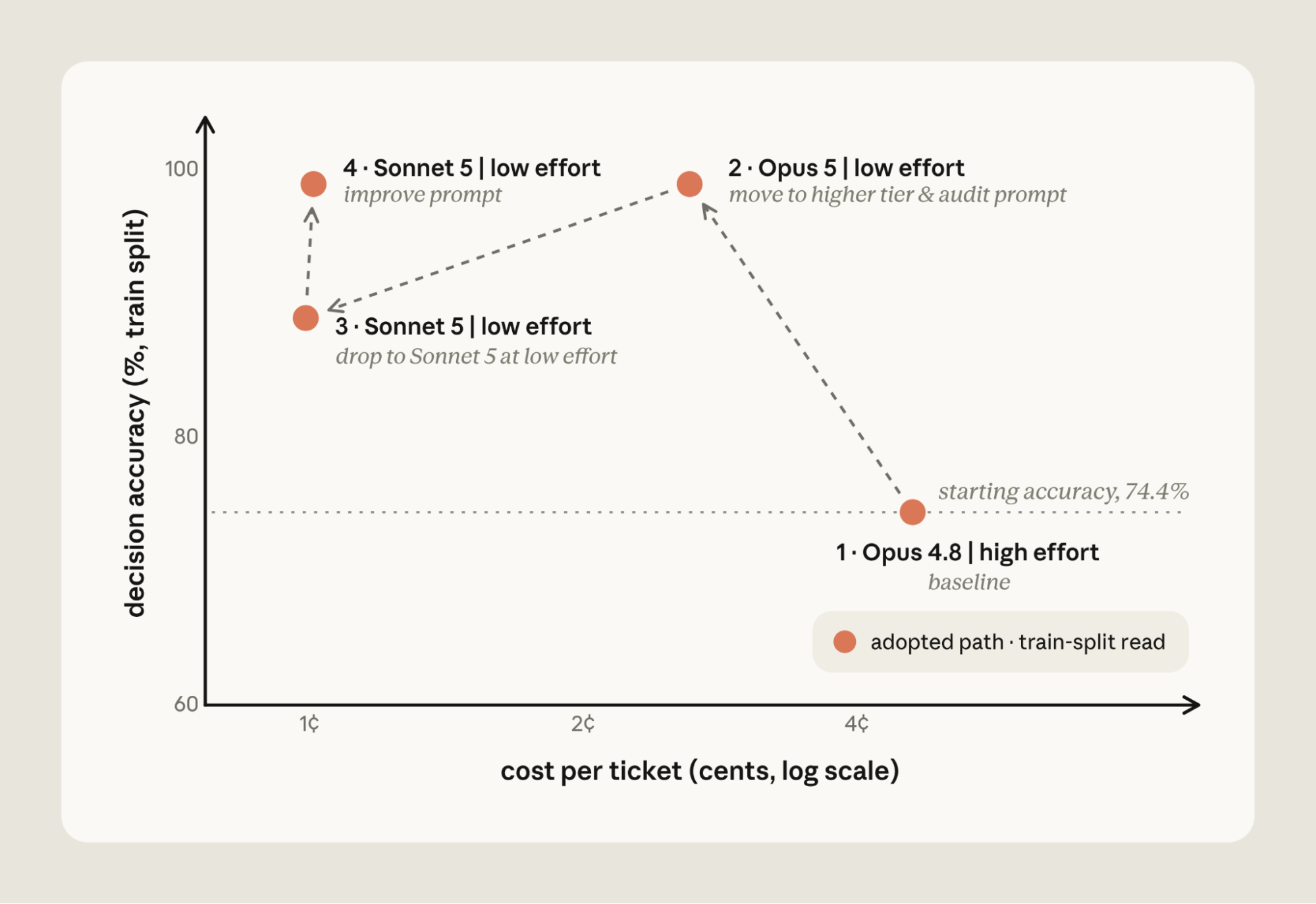
It then stepped down to Sonnet 5 at low effort, which was cheaper still at 1 cent per ticket, but accuracy fell to 88.9%. Reading the failing train tickets, Claude added routing rules and a refund-cap cross-reference to the prompt, bringing Sonnet 5 back to 98.9% at the same cost.
On the 14 held-out tickets the search never saw, the final configuration scored 90.5% against the original setup's 78.6%, at about one fifth the cost.
Automating cost reduction
Prompt caching, instructions, and effort are common levers for reducing cost. Ourdocumentation covers even more. To run a holistic cost audit of application code that uses the Claude API, we've added /claude-api cost-optimize: it profiles where your spend goes, applies cost reductions, and, if you provide an evaluation, shows how savings trade off with performance.
cost-optimize starts by finding where your tokens go: from your organization'susage and cost reports if you have a Claude Admin API key, from the usage object on each API response if your application logs it, or, failing both, by reading your request-building code and estimating.
It then ranks the available savings, starting with prompt caching, trimming what each request carries (including a prompt-audit), bounding output, andbatching unattended work. If you supply an evaluation, it goes further and computes cost and performance across effort levels and model choices.
We ran this on four public benchmarks, starting with Opus 5.5 as a baseline (Figure 7):
- LegalBench (~67% lower cost):
cost-optimizefinds an opportunity to cache part of the prompt, sets low effort, and processes tasks via the lower cost Batch API. Thinking tokens dropped by ~84%, accuracy moved by less than a point, and cost dropped by ~67%. - tau2-bench retail (~73% lower cost):
cost-optimizefound that ~93% of the prompt could be cached, reducing spend by ~73% with no change in the pass rate. - OfficeQA Pro (~72% lower cost):
cost-optimizeapplied the Batch API and trimmed oversized documents to their most relevant sections, reducing cost by ~72% with no significant change in the score. - SWE-bench Verified (~24% lower cost):
cost-optimizefound that prompt caching was already applied, so savings came from setting effort to medium and constraining the agent's output to a few concise sentences. Together, these reduced cost ~24%.
Getting started
Start with /claude-api prompt-audit when you've migrated to a frontier Claude model and want to check your existing prompts against it. It scans the prompts, skills, and tool descriptions in your working directory. This can be application code that calls the Claude API or Claude Code's configuration (CLAUDE.md, skills). It removes common anti-patterns that hobble frontier models.
Reach for /claude-api cost-optimize when your application uses the Claude API and you want a cost audit. It profiles token spend and then tests different levers: it applies prompt-audit, but also checks for ways to lower cost via prompt caching, batching unattended work, or bounding output. If you provide an evaluation, it measures the effort and model selection trade-offs.
Finally, use /claude-api hillclimb for an iterative search over cost and performance. Given an evaluation, Claude splits it into train and test sets, then proposes updates to your application that aim to reduce cost while maintaining baseline performance. Claude reads the failing train cases to guide the search, and the final configuration is scored on the held-out test set.
To learn more: