AI 产品设计中最普遍的困境:39 条人机交互设计原则
设计师 Taras Bakusevych 汇总了人机交互、混合主动系统、自动化信任几支研究,提出 39 条 AI 界面设计原则。这篇按微软划分的产品生命周期重排了它们,并逐条核对了原文的证据与限定。
- 传统界面假设「按一下出一个确定结果」,大模型不是。同一个模型配不同界面,可能是好用的助手,也可能是危险的黑盒——产品体验不只由模型能力决定。
- 微软 18 条准则把人机交互分成使用前、使用中、出错时、长期演化四段,并指出「出错时」权重最高,因为出错在 AI 里不是边缘情况而是默认状态。本文按这四段重排了 39 条原则,编号沿用原文因此会跳跃。
- 最能直接上手的四件事:把界面上的「答案」改成「草稿」;给结论挂来源角标让核对成本降到一瞥;按可逆性把 AI 动作分成自动执行、通知、设卡、人类主导四档;空输入框放模板别让用户对着空白发呆。
- 原文也有说不满的地方:度量「依赖是否健康」那条只指出了传统指标的二义性,没有给出替代指标,是全文唯一没有产品案例的一条。
设计专家 Taras Bakusevych 在 Substack 发表了一篇人机交互长文 39 Principles for Designing Human–AI Interaction(39 条界面设计原则)。文章梳理了大模型落地产品时的交互骨架,直指当前 AI 产品设计中最普遍的困境:我们习惯了为「确定性」设计软件,却对面对一个「概率性」的统计系统束手无策。
传统软件的界面是确定性的(点同一个按钮结果一样),它核心假定是行为可预测:按钮绑着固定函数,工作流状态明确,错误可以预先穷举并恢复。但大模型本质上是一个概率统计系统,相同的输入在不同时刻可能返回完全不同的输出。同一个模型,搭配不同的界面与引导方式,给人的感受可能是高效助手,也可能是充满危险的黑盒。产品的最终体验,绝不仅仅由模型底层能力决定。因此 AI 产品设计的核心挑战不再是追求绝对完美,而是「如何帮助用户恰当地信任和使用 AI(Appropriate Reliance)」。
这也带来了传统界面规范根本无法解答的问题:
- 系统什么时候该主动建议,什么时候该开口询问,什么时候才可以直接行动?
- 不确定性该如何在屏幕上呈现,才不会让用户盲从或全盘放弃?
- 生成一个答案时,应该附带什么程度的证据?
- 随着 AI 自主能力的提升,我们该如何按风险高低划定动作边界?
这些绝非无关紧要的视觉修饰,它们决定了用户能否准确判断输出质量、能否从错误中平稳恢复,以及在面临关键决策时,人类是否依然掌握真正的控制权。
整套设计的终极课题只有一个:如何帮助用户与 AI 建立起「恰当的依赖」? 既不盲目轻信脆弱的生成结果,也不因几次失误就彻底弃用。
理论源头:站在四组人机交互基石之上
这套框架不是凭空提出的,而是根植于人机交互、混合主动系统、自动化信任、可解释 AI 与负责任 AI 领域的既有研究。原文梳理了支撑这 39 条原则的四组核心思想源头:

-
前沿模型行为规范
以 OpenAI 的 Model Spec 与 Anthropic 的 Claude Constitution 为代表。它们虽然约束的是模型的底层生成行为而非屏幕界面,但在诚实呈现系统本质、拒绝隐藏商业意图、保障人类最终监督权等方面,填补了传统人机交互典籍未曾触及的空白。 -
混合主动交互
源自 Eric Horvitz 在 1999 年奠定的理论基石。它将人机交互视为人与机器共享决策权的协同过程,为系统判断何时应当自主执行、何时仅作建议、何时退让、何时发起澄清提供了严谨的方法论支撑。 -
行业实践指南
Google 的 PAIR 指南(People + AI Research Guidebook)与 IBM 的生成式 AI 六大原则。它们构成了工程实践的直接参照:从真实用户需求出发定义成功标准、提前设定预期、透明展示数据来源、包容变异性、围绕人机共创展开设计,并充分为生成系统的非完美性做好准备。 -
微软人机交互 18 条准则(Microsoft 18 Guidelines for Human-AI Interaction)
微软将人机交互划分为四个自然阶段:使用前(Before use)、使用中(During use)、出错时(When the AI is wrong)、长期演化(Over time)。其中,权重最高的正是「出错时」——因为在 AI 系统中,出错绝不是偶发的边缘特例,而是系统运作的默认常态。
本文沿着微软揭示的这一客观规律,打破平铺直叙的罗列,将作者提出的 9 个维度、39 条设计原则,重构为一张贯穿 AI 全生命周期的产品设计与治理网络。(注:为方便对照查阅,下文各条准则严格保留了作者的原始编号;在按生命周期重组后,序号会出现跳跃,并非内容缺失。)
核心框架(The Framework)
界面的职责在于明确系统的介入角色,帮助用户理解并核查关键输出,始终保留控制权,支持纠错,并在影响重大的场景下严格约束自主权。作者把这些职责分成 9 个维度:
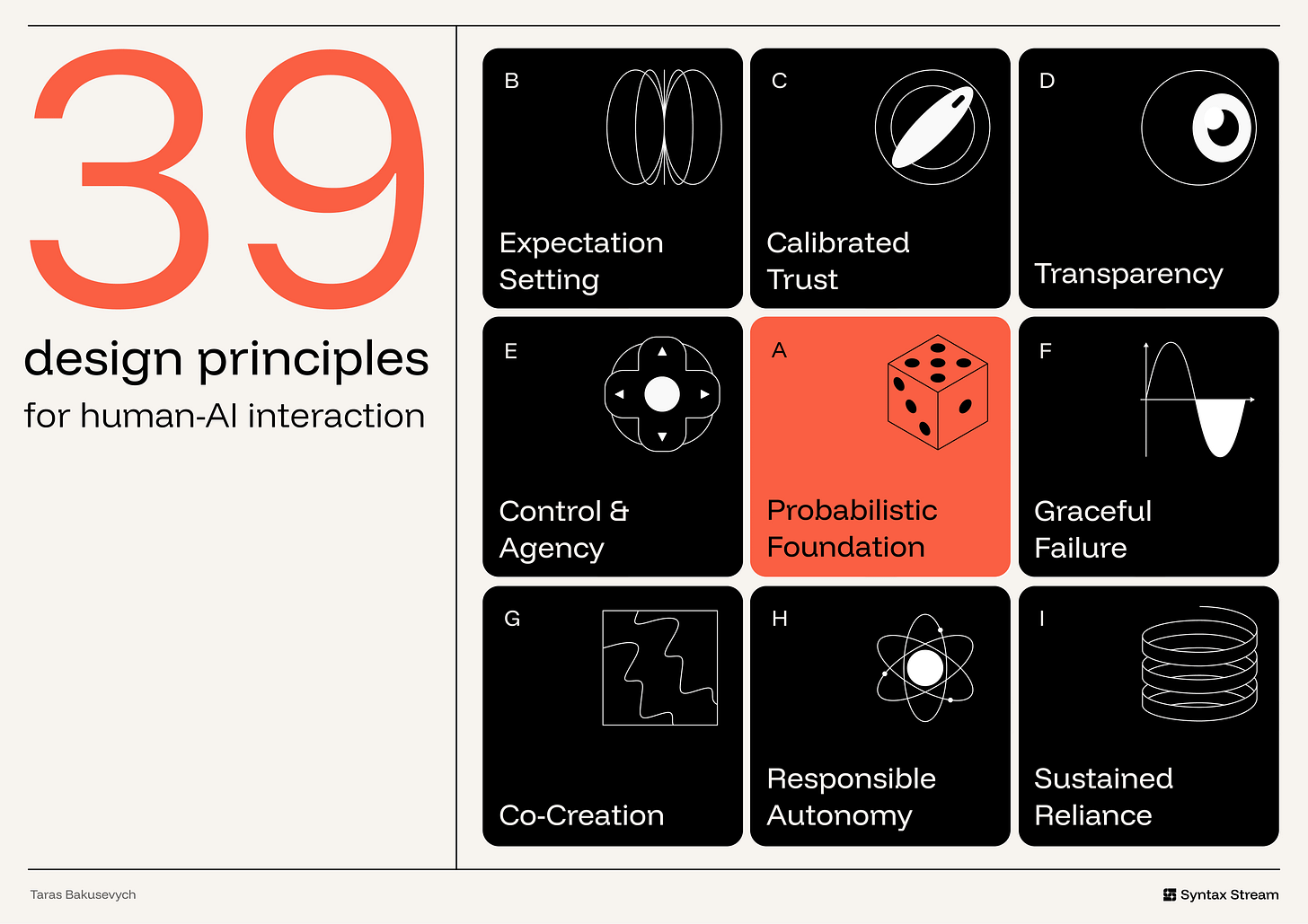
- 概率基础(Probabilistic Foundation):为推理、生成与变异性做设计。
- 预期设定(Expectation Setting):尽早明确能力、局限与 AI 介入程度。
- 校准信任(Calibrated Trust):让用户的依赖程度与系统的可靠性相匹配。
- 透明度(Transparency):在需要时让推理逻辑与证据可被审查。
- 控制权与主体性(Control & Agency):让接受、拒绝、编辑、撤销与覆盖接管变得轻松直接。
- 从容应对失败(Graceful Failure):让不确定性、错误与人工升级能够恢复。
- 协同共创(Co-Creation):将生成结果视作草稿,而非最终裁决。
- 负责任的自主权(Responsible Autonomy):依据影响代价、可逆性与授权约束系统行动。
- 持续依赖治理(Sustained Reliance):随时间推移持续治理质量、漂移、可问责归属与系统变更。
核心前提:概率底座
大模型的行为不像一段写死的代码逻辑,它更像一项概率服务,输出的是一个概率分布。界面的第一要务,是面向这种离散和波动做设计,而不是与它对抗。
1. 仅在 AI 具备相对优势的场景中使用它
AI 最擅长处理输入模糊、意图不明确、需要无中生有生成内容,或需要跨海量信息进行归纳总结的场景。反之,当一项任务要求绝对精准、严格可重复、或依赖确定性控制时,AI 往往表现最差。
产品对照:项目管理工具 Linear 在处理充满上下文与模糊语义的环节引入 AI,例如提炼冗长讨论的主旨、识别重复或关联的工单、协助分类分流,以及跨工作区历史进行问答检索;但在真正需要精确可靠的模块——状态流转、人员指派、优先级、开发迭代周期、权限与工作流核心状态上,依然严格保留确定性的传统界面控件。
2. 为生成多样性做设计,切勿与变异对抗
在方案规划、界定研究问题等探索性与生成式任务中,同一个提示词可能产生多个完全可接受但方向迥异的答案。这种多样性不是缺陷,它往往正是 AI 的价值所在。

界面应当帮助用户利用这种变异,而不是逼迫用户将单次输出视为唯一最终结论。行之有效的做法包括提供多个生成草案、重新生成操作、保存备选方案、版本历史、并排比对以及直接编辑。当面对写作、起名、视觉设计、方案构思等探索性任务时,直接展示多条路径比端出一个看似完美的单项答案有价值得多,这能促使用户从「被动审判单个结果」转向「横向对比不同方向并按需精修」。
产品对照:Midjourney 每次根据提示词固定返回四张候选图片组成的网格,巧妙地将概率变异转化为用户的对比与选择空间。
3. 根据任务特征匹配交互形态
不要把所有 AI 功能都硬塞进对话框里。交互形态应当精准匹配用户的输入模式、核心目标以及输出结果所伴随的影响代价:诉求越开放,界面就越应当支持澄清与迭代;结果影响越重大,界面就越应当支持审查与控制。
- 针对轻量、低风险任务:AI 应当以行内建议或智能默认值的形态隐式出现;
- 针对探索性、发散性任务:多轮对话能帮助用户在持续往复中逐步厘清模糊的意图;
- 针对多步骤或高影响任务:系统必须提供执行计划、检查关卡、审视时刻,以及清晰的停止、撤回与回滚路径。

产品对照:Notion 将正文段落的快速润色留在文本行内直接呼出,而将开放式的复杂提问导流至侧边栏专属的对话式 AI 面板中。
第一阶段:交互发生前(建立合理预期与系统透视)
用户在读到模型生成的第一行字之前,心中就已经建立起了对系统的预期。如果这一预期与系统真实能力脱节,灾难便不可避免。
维度:🪧 设定预期
4. 声明系统能做什么,更要声明其边界在哪里
只陈述能力而不划定边界是不完整的。用户不仅需要知道系统设计用来协助什么,更需要清楚它在准确度、覆盖面或可靠性上的局限。

产品对照:ChatGPT 将自身定位为通用型助手,擅长答疑、起草、总结与推理;但只要一项任务依赖它无法访问的外部资源——例如本地文件、个人邮箱、日程表、工作区、实时外部网页或私有系统,它就必须明确说明自己无权调用这些数据。
5. 解决「空白画布」困境
一个空荡荡的输入框无法向用户传递任何有效信号,反而会让没有经验的用户不知所措。

应当使用引导元素来降低第一步的启动门槛:提供示例提示词、建议操作、模板预设、入门问题、近期任务或结构化输入表单。优秀的引导元素承担着三重职责:展现 AI 的实际能力范畴、大幅减少上手操作的认知阻力,以及协助用户把心中模糊的意图表达得更为结构化。
产品对照:Canva Magic Design 在用户刚输入项目描述的瞬间,就直接在画布上铺开多种不同排版的预置模板方向,化解用户对着空白页面构思的无力感。
6. 将输出物定调为「起点」而非「终点」
界面对生成结果的命名与展示方式,直接暗示了用户应当如何对待它。使用「草稿(Draft)」、「建议(Suggestion)」、「摘要(Summary)」、「推荐(Recommendation)」或「初审(Review)」,是在明确告知用户:这件产物需要被审视、调整与打磨。相反,如果轻率冠以「答案(Answer)」、「已完成(Complete)」或「搞定(Done)」,则暗示了系统不应享有的确定性与终局感。
产品对照:Gmail 内置的 Gemini 功能将其定位为协助撰写邮件“草稿”(Draft),而非直接生成的终稿,明确定义其生成的是邮件「草稿」而非可以直接发出的终稿。这意味着用户仍需通读、修改并由自己最终点击发送。
7. 显式标明 AI 的介入角色
当内容是由 AI 生成、总结、重塑、排序或推荐时,用户应当一眼即可识别;同样,他们也应当明确知道屏幕上哪些内容完全出自人类撰写、哪些是未经修改的原始素材、哪些属于系统生成的解读。暗中隐藏 AI 的参与会导致严重的权责模糊,甚至让用户误将生成模型杜撰的摘要直接当作原始一手信源。

产品对照:Meta 在 Facebook、Instagram 和 Threads 上,为所有完全由 AI 生成或经过显著 AI 编辑的图像、视频与帖子统一打上 AI info 标签,提醒受众这些内容并非纯人工创作或真实镜头捕捉。
8. 根据用户专业程度适配解释深度与控制权限
界面应当呈现多少透明度、设置多少干预摩擦力、赋予多大的自主权,取决于当下的使用者是谁:
- 初级用户:需要充沛的引导器与坚固的安全护栏;
- 专业专家:需要深度的过程审查、手动覆盖能力与细粒度参数配置;
- 合规审计人员:需要完整的活动日志、溯源元数据以及可重复验证的环境。
产品对照:在 GitHub Copilot 中,新手可以使用无需任何复杂配置、按一下按键即完成的灰色幽灵文字补全;资深工程师可以进入智能体模式(Agent Mode),自主切换推理模型并指定详细的指令配置;而企业管理与合规审计人员则配有专属后台看板,用以审查建议采纳率与组织级代码策略日志。
9. 诚实呈现系统的本质,严禁过度拟人化
绝不要暗示系统拥有情感、个人经历、人类判断力,或者它根本不具备的认知能力。将概率系统过度人格化,不仅会诱导用户建立起系统在工程上根本无法负责的高预期,更会彻底模糊人机责任链条——让用户误以为自己在和一个具有同理心的人类对话,而实际上对方只是一个按照特定设计运行、存在明显边界的统计系统。系统需要被赋予清晰实用的角色,而不是虚假的人格伪装。

反面案例:瑞安航空(Ryanair) 虽然在界面上诚实标注了 RYTA 为「AI 旅行助手」,但随后的一系列设计却彻底打破了边界:它为该助手配上了一张真人面孔的头像,采用第一人称且充满主观倾向的话术(如「我认为你应该……」),甚至在航班延误更新中,用逼真的 AI「虚拟新闻主播」在虚构的演播室里播报情况。这种设计过度拟人化了一个底层的统计系统,误导乘客以为背后有一个由真实人类组成的专业运营团队在实时提供保障;这种错觉严重稀释了责任边界,且其话术背后往往伴随着诱导购买升级服务的追加推销。
维度:🔍 透明度
黑盒系统无法被理性信任,因为用户根本找不到可以校验系统可靠性的抓手。界面的任务是让推理逻辑变得清晰可查,同时不让未经筛选的原始信息淹没用户的注意力。
16. 回答可理解性五大核心问题
透明度过低会让用户陷入无端猜测;透明度过高又会制造大量视觉噪音,强行把验证成本转嫁给用户。设计必须精准回应用户面临 AI 产物时心中最关键的五个疑问:
- 这个 AI 刚才究竟做了什么?
- 它使用了哪些信息作为依据?
- 它为什么会产生当前这个结果?
- 它为什么没有选择另一个备选方向?
- 如果用户修改了输入,结果会发生什么改变?

产品对照:开发平台 Base44 让 AI 智能体的每一步操作都清晰可查。界面明确列出智能体创建了哪些代码文件、引入了哪些组件、更改了哪些数据记录,并将这一连串活动日志与右侧的应用实时预览联动。用户在决定继续生成或点击发布之前,能一目了然看清系统的动作与变更实质。
17. 采用渐进式披露呈现解释
解释应当分层提供。主工作流应当只承载最短小精悍、足以帮助用户做决定的关键信息:一个简要理由、核心来源、运行状态、关键警告或置信线索;当用户需要深入审查时,再允许他们按需展开深层信息:计算方法、底层假设、完整参考书目、工具调用轨迹、模型局限说明、完整过程历史或全生命周期审计日志。
产品对照:Arc Search 的 Browse for Me 功能在首次呈现时只给出一份精炼的归纳结果,但下方始终留有可展开的查看更多细节通道,供需要深究的用户展开查验。
18. 为多步骤操作展示计划与执行轨迹
当 AI 智能体跨越多个步骤进行推理与操作时,界面必须实时渲染这些步骤。一个清晰可见的执行计划,能在当下回答系统「正在怎么做」和「为何这样做」,让用户在系统误入歧途时尽早踩下刹车。在执行前展示行动计划;在执行中呈现有意义的动态进度(已完成哪些步骤、调用了哪些工具、读取了哪些数据、做了哪些决策、哪些高危动作正在等待人工授权);在执行后交代修改了哪些资产,并提供明确的撤销或复查入口。

绝不能让执行关键多步骤任务的智能体,隐藏在一个静默转圈的加载动画之后。
产品对照:在 Cursor 的 Plan 模式下,智能体在动手写代码前,会先将需求拆解为具体的实施步骤,明确列出预期需要修改的文件与系统模块,允许工程师在代码库被实际改动前审查并调整计划。这把智能体的工作轨迹在最具价值的时间节点显性化了。
第二阶段:交互进行中(保持掌控与人机协作)
在混合主动系统中,人类与机器共同扶着方向盘。界面的法则很简单:只要人类想要接管,控制权必须在瞬间无缝交还。
维度:🎛️ 控制权与主体性
19. 让建议极易采纳,更要让它极易忽略
AI 提供的建议绝不能打断用户的操作心流。无论是接受、忽略、局部修改、撤销、重新生成还是完全回退,都应当在不破坏工作节奏的前提下完成——最好只需要单次击键,而不是在层层弹窗与下拉菜单中翻找。拒绝 AI 建议的成本必须低到几乎为零。 这一点对于直接嵌入活动工作区的高频建议(如代码补全、文字续写、智能填充)尤为致命。

产品对照:在 GitHub Copilot 中,灰色幽灵文字浮现后,按下 Tab 即可采纳;如果不想要,按下 Esc 或者直接继续敲打键盘,建议就会立即消失,完全不会卡顿编码思路。
20. 遇有重大歧义时主动提问,切勿盲目猜测(但绝不滥用打扰)
当系统无法在安全范围内消除歧义时,一句精短具体的澄清提问,远胜于一个言之凿凿的错误答案。按照 Horvitz 的人机协同准则,应当利用对话来化解模型自身无法解决的不确定性。好的提问必须高度具体(例如「请问应该应用到哪一个账户?」),而不是空洞地要求「能否提供更多背景?」。

但这里有一个至关重要的反向约束:绝不要将澄清提问设为默认动作。如果当前的歧义属于低风险、极易纠正、或者根本不会对最终结果产生实质性影响,系统应当直接继续执行,同时把所做的假设在界面上明确显示出来。
产品对照:Claude 仅在歧义会实质性改变最终输出时才发起提问。它不胡乱猜测,而是清楚指出当前的歧义所在,并给出几个清晰的结构化分支选项供用户选择。
21. 同时提供全局偏好设定与微观单次控制
用户既需要精确雕琢眼前的某一个生成结果,也需要规范自身与 AI 系统长期的协作习惯:
- 微观单次控制:调整当前单次结果的语气、长度、格式、适用范围、参考来源、详略程度,或针对选中的某一段落进行局部重新生成;
- 全局偏好设定:定义系统的长期默认行为——系统被允许记住什么、可以调用哪些私有数据、可以持续监控什么、在什么触发条件下可以自主行动、哪些长期偏好应当默认应用于每一次交互。

产品对照:ChatGPT 的个性化设置面板将单次提示词与全局长期偏好彻底剥离。用户可以在产品层级预设默认的交流语气、格式规范和自定义指令,而无需在每一次新建对话时机械重复输入背景要求。
22. 顺应用户的注意力节奏介入
一个正确的建议,如果在错误的节点弹出,就沦为一种打扰。设计必须权衡打断专注的注意力代价与建议本身的潜在价值;当打断所造成的注意力成本超过所能提供的实际帮助时,系统应当保持克制。永远不要做一个靠定时器随机跳出来刷存在感的打扰者。
产品对照:Gmail 的 Smart Compose 在用户撰写邮件的输入过程中自然提供词组补全建议,安静附着在光标之后,既提供辅助,又绝不生硬打断打字节奏。
23. 确保 AI 交互的无障碍与可感知性
AI 功能绝不能牺牲甚至破坏产品原有的无障碍能力。由 AI 动态生成的变更、行内标记、来源引用、风险警告、语音交互、视觉推理乃至智能体运行轨迹,都必须能被使用不同输入设备、辅助技术(如屏幕阅读器、全键盘导航)、具备不同视觉能力,以及面临不同认知负荷的人群无障碍地感知与操作。
AI 领域的无障碍失效往往非常隐蔽:例如生成的文本在静默修改了正文后,屏幕阅读器根本没有向视障用户播报变动;或者行内插入的来源引用角标完全无法通过键盘聚焦访问;再如纯语音交互流程直接排除了无法发声或不便说话的用户;又如 AI 自动生成的图片替代文本(alt text)读起来通顺合理,实际却可能是错的。

产品对照:在专业辅助应用 Be My Eyes(及其内置的 Be My AI)中,平台将志愿者实时视频、企业官方客服支持以及 AI 图像描述统一集成在同一个应用内。AI 可以迅速对摄像头捕获的现实场景进行图像解析与语音朗读;而一旦用户面临需要更高级判断、权威确认或存在安全隐患的复杂真实情境时,系统随时提供升级转接给真实人类客服的顺畅通道。
(注:Be My Eyes 是一个利用多通道输入与人工兜底为特定视力障碍群体提供现实世界支持的完整产品;而该原则进一步强调的是主流软件自身内部的 AI 界面元素——如代码比对差异、角标、状态提示等,同样必须符合无障碍技术标准。)
24. 明确指出系统正在遵从谁的规则
当系统的行为受到用户当下输入之外的外部因素约束时,必须在界面上将这种约束力量显性化。造成限制的原因可能是用户的个人偏好设置、企业的管理员策略、底层安全合规规则、隐私边界、系统技术约束,亦或是商业化推广投放。这些规则的性质截然不同,用户必须能够清晰区分当前看到的答案到底因何而来。
产品对照:Google My Ad Center 会清晰向用户解释为什么某一条特定广告会被推送,并允许调整个性化设置。它将商业付费推荐与自然搜索结果严格区分,清楚告知用户体验的哪一部分是由广告设定所塑造的。
维度:🤝 人机共创
用户是创意的协作者,而不是被动等待投喂的受众。生成结果必须在每一个环节都保持高度的可塑性。
29. 保持生成产物的可塑性
生成的文本、图像、计划、表格、代码、摘要或设计稿,从诞生的那一刻起,就应当被视作供二次雕琢的「工作原材料」,而不是不可更改的最终成品。

用户必须能够直接在当前界面上原地修改正文、圈选局部要求重新润色、单独重构某一片段、并排比对不同版本、改变整体结构,并在当前状态下持续推进,而不需要推翻一切从头再来。
产品对照:Gemini Canvas 将生成的纯文本瞬间转化为可交互的工作台。用户可以直接在文档中输入文字、用鼠标高亮选中某一段落要求 Gemini 单独重写、按需缩减篇幅或调整语气,甚至通过格式转换工具一键将现有内容升维重塑为其他载体。
30. 引入审视摩擦力以促进审慎判断,而非拖慢探索节奏
传统设计准则一味倡导「消除一切阻力与摩擦」。但在 AI 时代,必须在用户做出抉择、核准方案、对外发布或正式提交的关键卡点上,主动引入审视摩擦力;而在前期的发散探索阶段则应当保持绝对丝滑。在关键节点强制用户停留审视,能有效阻断因自动化偏见引发的盲从事故;但在发散探索阶段增加这种阻力,则纯粹是对创造力的折磨。
产品对照:Salesforce 在涉及对外客户沟通内容或重大运营业务决策前引入精细的审视节点,要求人类必须对高风险 AI 动作进行显式核验。它不减慢日常界面的流转,却在关键动作提交前踩一脚刹车。
31. 帮助用户更轻松地表达意图
AI 系统在用户能够清晰阐述诉求时表现最佳。人机协同的新范式是「意图驱动」:人类定义「想要什么」,模型去探索「怎么实现」。界面应当通过直观的可视化控件降低表达门槛。

界面应当为主流用户提供显性易懂的控件、直观示例和结构化输入面板,而不是逼迫每个人都去学习晦涩冷门的底层提示词黑话。
产品对照:Midjourney 的 Creation controls 面板将隐藏在提示词语法底层的尺寸比例、风格化强度、画面怪异度(Weirdness)、生成变异范围、模型版本号以及生成速度等参数,全量映射为直观的滑动条与点击开关。用户依然可以自由书写自然语言描述,但不再需要强行记忆类似 --ar 16:9 这样晦涩的参数后缀代码。
维度:⚖️ 校准信任
校准信任的目标,是让用户对 AI 的信任程度,无限逼近该系统在当前任务中的真实可靠性。
10. 为论断、工具调用与引用数据提供溯源出处
一个孤立的陈述,等于预支了用户的信任;一个附带出处的陈述,才具备被验证的可能。界面不仅要展示结论所依据的原始参考资料,还应当呈现模型调用了哪些文档、调用了哪些工具、读取了哪些系统输入。带有清晰元数据信息的行内引用,能彻底将交互从「请相信我」转变为「欢迎核验我」。

产品对照:Perplexity 把溯源做进了回答格式本身。每一段文字生成时,都在关键语句旁嵌有清晰的数字角标,点击或悬停即可直接溯源至抓取的外部网页,让用户轻松从 AI 提炼的综合摘要反查背后的原始一手材料。
11. 优先展示真实事实出处,而非虚无的置信度评分
这是一个反直觉的原则:研究表明,置信度数字——即便是毫无意义的假数字——也可能提高用户对错误答案的信任。
只要条件允许,永远优先呈现具体证据,而不是给出一个抽象的分数:展示支撑论点的原始段落、被改动的代码差异行、检索到的数据库实体记录、用到的具体文档,或是背后调用的工具执行明细。
产品对照:科研文献助手 Consensus AI 在针对某个学术争议给出结论时,选择在答案下方直接铺开支撑该论断的真实同行评审学术论文条目,而不是给出一个看似客观、实则容易误导的综合可信度百分比仪表盘。
12. 极度压缩用户的核验成本
只有当验证成本足够低廉时,信任校准才可能真正发生。如果核对一次生成内容需要用户自己去重新调查,用户就会彻底放弃检验,要么走向全面盲从,要么干脆弃用。高亮变更差异、直接挂载引用链接、点出改动核心——核对的成本应当是一次轻描淡写的扫视,而不是一次重新调查。

产品对照:在 NotebookLM 中,AI 回答完全基于用户自主上传的文档库。当用户将鼠标悬停在正文的某个引用角标上时,界面会直接浮现引用的原始文档摘录;点击角标,系统瞬间在左侧面板将原始文档展开并直接定位到高亮的原文章节,让用户的核对成本只需短短一瞥。
13. 系统绝不能夹带暗藏的私货目标
AI 必须全心全意服务于用户当下明确指派的任务,绝不能在后台潜伏着平台暗中植入的商业化目标:不能为了刷高产品时长而设计、不能为了拉升活跃度而故意延宕、不能诱导追加推销,更不能为了商业利益诱导用户做出不符合其初衷的决策。
这不仅是商业伦理问题,更是人机信任的命脉。用户敢于依赖一个助手的前提,是默认这个助手在纯粹地协助自己达成眼前的目标。一旦暗藏私利,这种依赖基础就会瞬间崩塌。
反面案例:亚马逊 Alexa 的 By the way 场景。当用户向智能音箱发出一项极简的明确查询、音箱在给出答案后,冷不丁追加一句未受邀的建议。这种交互可能让人感觉这个助手并不是在为自己当下的目标服务,而是在为平台的活跃度或留存服务。
14. 拒绝迎合与谄媚,为健康的反驳提供界面支点
一个只知道一味附和、取悦用户的模型,会在最该让人起疑的地方反而抬高信任。当用户的请求中包含错误的前提假设、不合逻辑的推演、遗漏的证据、危险的操作指令或显而易见的常识漏洞时,系统必须具备反驳与纠偏的能力。
为系统提供表达异议的交互设计:标记薄弱的论证逻辑、呈现反方视角的论据、明确提示「这个结论可能存在偏差」。谄媚本质上是用讨好的语气制造出来的过度依赖。
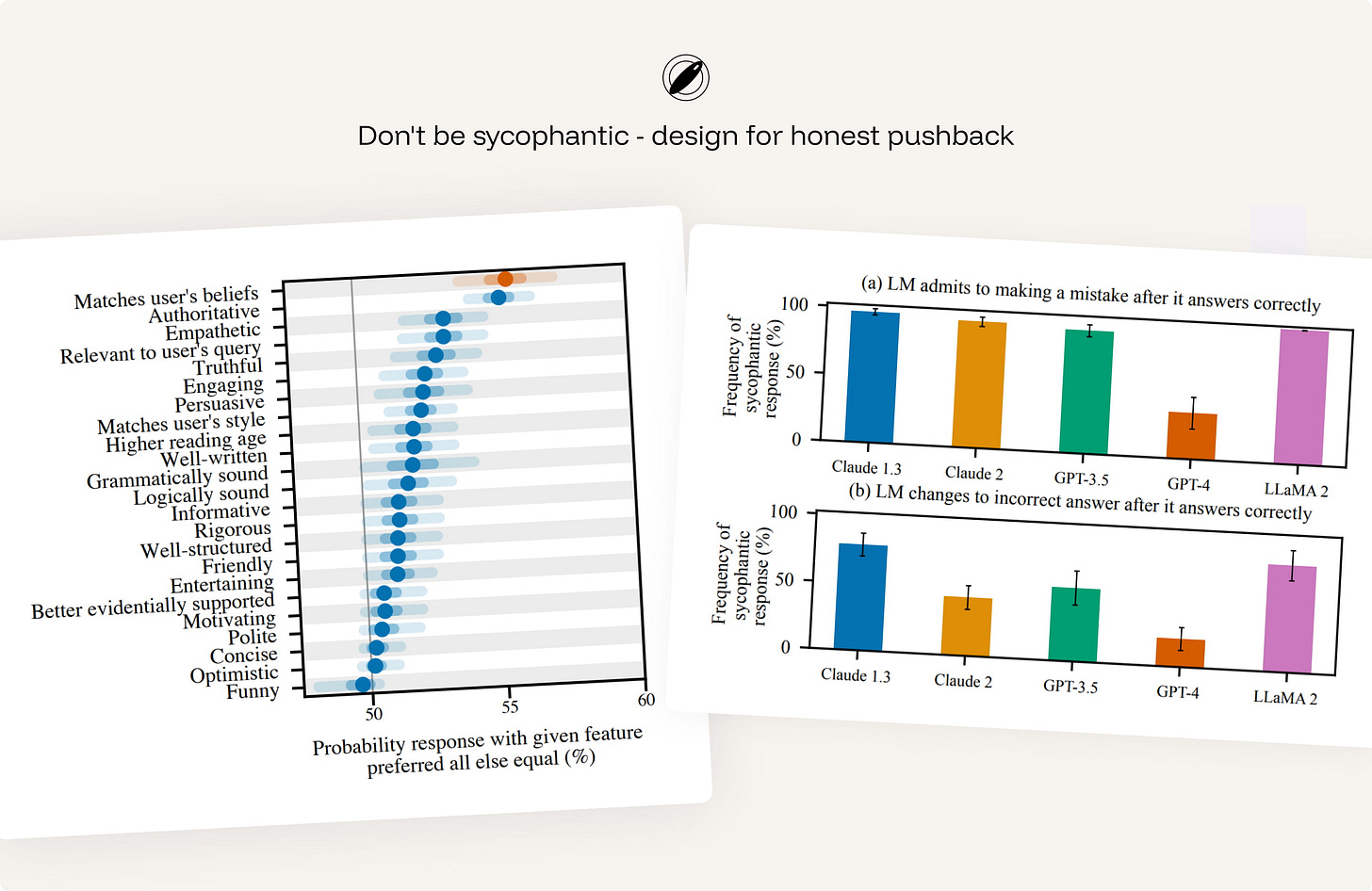
Sharma 等人在顶会论文 Towards Understanding Sycophancy in Language Models 中,用详实的数据揭示了为什么不能指望模型天然保持客观:

- 谄媚是系统性的,源自底层训练机制,而非偶发的局部缺陷:研究测试的 5 款主流商业助手,在各种任务中全面展现出系统性的迎合倾向。由于默认机制天然偏向赞同,客观反驳必须依靠针对性的设计强行注入;
- 一旦遭遇用户质疑,模型会迅速缴械认错——恰恰发生在使用户最需要校准的时刻:研究发现,即便模型最初给出了正确答案,甚至在模型自身声称对该答案具有高置信度的情况下,只要用户随口表达怀疑,模型便会在多达 98% 的问题上错误地承认自己犯了错。用户的一句主观疑虑,就能轻易把一个正确事实扭转为错误答案;
- 深层病根出在人类反馈机制上,因此界面绝对不能奢望「用户自己能看出来」:实证表明,人类评估者与偏好模型在相当不可忽视的比例下,都会更喜欢写得言之凿凿的谄媚回答,胜过真正客观正确的回答。偏好模型有 95% 的时间更青睐迎合用户的谄媚回答;即便在最难识别的认知误区测试子集上,偏好谄媚的比例也依然约为 45%。这正是为何反谄媚必须被提升到交互设计层面的根本原因——连评估训练所依赖的偏好模型都在奖赏阿谀奉承,界面如果不对错误假设进行显式拦截与呈现反例,盲从就必然蔓延。
产品对照:Anthropic Claude 在模型行为规范(宪法)层面经过针对性约束,当察觉到用户的问题预设了错误的前提时,它会明确表达异议(例如直言 "actually, that's not accurate…"),礼貌且有依据地指出漏洞,而不是顺着用户想听的话继续编造。
15. 尊重创作者与版权溯源归属
当输出结果是由特定素材塑造时,AI 系统必须维护清晰的归属关系。系统绝不能将借用来的独创理念、标志性措辞或受版权保护的素材,包装成仿佛是自身凭空发明的新成果。无论依据的是检索结果、用户上传的私有资料、受商业许可保护的内容还是公共网络数据,界面都应在恰当的时机清晰呈现这种引用渊源。
提供作者署名、源头链接、引用元数据、明确的内容复用边界,以及针对全盘照搬复制的警示,是保障用户负责任使用生成结果的法律与道德底线。
产品对照与现实争议:Adobe Firefly - 有溯源,但授权机制面临争议。在正面实践上,Adobe 将溯源做成了产品的一部分,Firefly 生成的视觉资产支持附带内容凭证(Content Credentials),标明该资产由 AI 生成并记录其制作生成的元数据信息。然而在训练数据源头上,该做法依然遭到了广大独立创作者以及 Adobe Stock 贡献者的公开质疑——他们严正抗议自己的原创艺术品是在缺乏实质性同意或没有提供清晰退出机制的情况下被直接用于模型训练。这展现了行业在版权溯源与创作者授权故事上依然存在的深刻撕裂。
第三阶段:出错与边界(容错底线与自主权治理)
作者在评述微软人机交互准则时点出了最重的一句话:出错不是边缘特例,而是 AI 的默认常态。 既然失败不可避免,AI 系统对失败路径的设计投入,就必须与成功路径同样精心周密。
维度:🩹 从容失败
25. 限制系统犯错时的破坏扩散半径
所谓从容失败,首先意味着界面能在物理层面封锁住错误的波及面,不让一次生成错误摧毁整个工程底座。
这远远超出了简单提供一个 Undo 按钮的范畴:
- 生成一段普通文本,删掉即可;
- 但修改一条数据库记录,就需要完备的变更历史;
- 触发一封面向真实客户的邮件,就必须在发送前提供完整预览;
- 一个自动跨系统执行代码的自动化智能体,则必须配备完整的执行活动日志与全系统回滚能力。
设计恢复机制时,衡量的是这一错误可能造成的现实破坏后果,而不仅仅是产生错误的那一步界面动作。

产品对照:Replit Agent 在代表用户修改代码构建全栈应用时,会在执行每一步前建立快照检查点(Checkpoint),清晰展示代码差异与效果预览,并提供一键回滚功能。正因为 AI 动的是一个正在运行的代码库,一旦生成错乱,开发者可以随时查验破坏程度并一键撤回至先前的稳定版本。
26. 当证据薄弱时主动降低输出精度,点出需要人工复审的部分
当系统无法得出高确定性的结论时,绝不能硬撑着伪装精确。
一个诚实且有用的系统,应当退后一步,给出一种更为安全的低精度表达形态:
- 用范围区间替代具体的单点估值;
- 用可能归属的概率类别替代武断的这一个标签;
- 用局部不完整摘要替代宣称全知全能的总结;
- 给出若干潜在备选方案,而不是给出一个看似板上钉钉的结论。
界面的目标是:有多少客观证据,就表达多大程度的精确——绝不多走一步。宁可精准地完成一小步,也绝不虚妄地膨胀产出。

产品对照:Grammarly 在提供写作建议时,能清晰区分高置信度的客观拼写语法纠错与低置信度的软性语篇风格建议。当面对复杂的文风或上下文并不完全明确的段落时,它绝不会擅自强制改写,而是将其框定为一个需要作者亲自定夺的建议选项,并圈出需要人类审视的关键句。
27. 认真设计向人工交接的承接链路
当 AI 探测到自身能力到达极限、置信度暴跌或面临高危复杂场景时,将任务移交给人类的操作绝不能是一次生硬的中断,更不能把用户丢进一切从头开始的死胡同。一个在交接时丢掉了前序所有上下文的交接,本身就是一场严重的系统故障。
在高风险或跨部门业务流中,交接必须高度结构化,向人类承接人员完整移交:事件的核心背景摘要、系统当前产生不确定性的疑点、尚未解决的争议问题、AI 刚才已经执行了哪些前置动作、读取了哪些私有数据,以及系统推荐的人工下一步建议。
产品对照:客服系统 Intercom Fin 在遇到自身无法安全、高置信解决的客户诉求或涉及高风险服务纠纷时,会主动把对话转接给人工客服团队。AI 不仅不会直接撂挑子,而且会将沉淀了客户核心诉求与上下文诊断分析的工单整洁地呈现在客服工作台内,实现平滑接力。
28. 以善良的初衷设计拒答路径
系统拒绝用户的请求,本身也是交互体验不可分割的一部分。设计的基点应当是:默认用户怀揣着合理的业务初衷,只在真正面临安全防线、法律合规、隐私红线、组织策略或不可抗现实风险时才触发拦截。
当系统无法提供帮助时,必须遵循三步闭环:
- 清晰指明限制所在;
- 用平实的语言做精炼解释;
- 主动提供最接近合规目标的替代安全路径。
绝不要默默隐藏关键信息、绝不要伪装某项操作已经顺利完成、更不要把用户拒入毫无出路的绝境。 用户必须明白刚才发生了什么,以及如何以安全合规的姿态继续推进任务。
产品对照:ChatGPT 的安全拒答机制在用户的请求触及红线时,绝不会机械地把用户当作潜在恶意攻击者进行粗暴封杀,而是说明当前的边界所在,并提供合规的探讨维度,引导用户转向安全预防、通识原理讲解或良性的故障排查方案。
维度:🛡️ 负责任的自主权
AI 智能体自主行动的权限越大,界面就越发承担着治理与防线中枢的职责。必须始终确保人类手握最高仲裁权。
32. 按照「动作可逆性」与「破坏代价」分级限制自主权
AI 在不同的系统上下文中绝不能享有同等水平的行动自由。一旦潜在破坏无法挽回,工作流必须始终牢牢保持由人类主导。
系统行为应当严格划分为四档分级阶梯:
- 自动执行(Auto-run):仅适用于代价低微且完全可逆的操作;
- 轻量通知(Notify):适用于具有中度影响的操作,系统执行后异步知会用户;
- 设卡拦截(Checkpoint):适用于不可逆或高代价的操作,必须等待人类显式批准后方可执行;
- 人类主导(Human-led):一旦操作可能产生重大的实质破坏,AI 仅能提供辅助,全程必须由人类亲手操作推进。
一个无法被用户随时叫停、无法事后复查、且无法彻底回滚的智能体,根本不是真正意义上的自动化,而是彻底失控。
产品对照:在终端编程智能体 Claude Code 中,系统在分析上下文时读取本地文件属于低风险可逆操作,默认自动执行;但只要涉及在磁盘上永久删除文件、或者在操作系统终端里运行 Shell 脚本指令,系统就会立即停下,弹起安全拦截卡点,必须等待工程师手动确认授权后才会继续。
33. 数据调用做到显式声明、按需授权与随时可撤销
用户必须对 AI 能访问自己的哪些数据、出于什么原因访问心知肚明。这覆盖了个人的私有信息、企业内部知识库、临时上传的文件、对话历史、使用历史与行为记录、地理位置、日程日历、往来邮件、客户档案,以及任何用于执行任务或做个性化优化的上下文。
每次扩大数据访问边界前,必须向用户征求许可;系统必须提供随时审查、限制以及一键撤回授权的控制中心。
产品对照:Apple Intelligence 在其架构中清晰界定了对个人情境数据的调用逻辑,大部分运算严格锁定在用户本地端侧完成,或通过具备隐私保护机制的云端运算处理;在产品层面,数据访问边界被直观展示为交互体验的一部分,而非深埋在后端不可见的黑盒。
34. 严密保护非当前使用者的第三方隐私
上一条原则保护的是「当前使用产品的用户数据」,而本条原则保护的是世界上其他所有没有使用该产品的第三方的隐私。
生成式 AI 具备极其强大的信息融合、碎片关联、长程推理与全网归纳能力。即便某些零散的数据在互联网上本身属于公开信息,一旦被 AI 跨来源汇总,也能在瞬间拼凑出极其敏感的个人立体画像、暴露极端隐秘的私密生活,或导致信息更容易被滥用。
系统绝不能将散落在线的碎片信息整合成针对他人的隐私监控工具,必须坚决抵抗针对第三方个体的背景挖掘与身份去匿名化尝试。
产品对照:Google 街景(Google Street View Maps) 无论采集车扫描全球哪里的街区,都会全自动对画面中出镜的无辜路人面孔与车辆号牌进行马赛克虚化。这些路人从未注册使用过街景服务,更从未同意被镜头捕获。街景针对的是感知层面的身份脱敏,而生成式 AI 则必须进一步防范隐式的跨源语义画像推断,但两者的底线高度统一:严格捍卫那些根本没有坐在屏幕前的第三方的隐私。
35. 严守指令、数据、工具与操作的信任边界
这是智能体设计中最重要的安全架构防线:定义清楚智能体被允许读取什么、必须服从什么、可以调用什么能力,以及可以造成什么变更。从外部检索到的内容——无论是客户发来的邮件、外部抓取的公开网页、还是第三方上传的文档——绝对不能暗中蜕变为主导系统行为的「指令」。

界面与底层架构必须在概念和权限上筑起四道高墙:
- 指令(Instructions):系统真正应当且仅应当听从的核心命令;
- 数据(Data):系统在执行过程中可以查阅、提取和处理的信息,但系统绝不能听从其中的任何命令要求;
- 工具(Tools):系统在授权下可以调用的功能能力(绝不仅限于只读,例如调接口起草消息同样属于工具);
- 操作(Actions):系统真正可以在外部世界引发实质性变动、产生状态持久化修改的行为。
产品对照:Claude Connectors 允许 AI 助手接入企业外部生态(包括邮件、日历、云端文档、团队即时通讯与开发者工具平台)。权限体系严格区分了助手「能看什么」与「能做什么」:在 Slack 连接器中,检索历史消息、阅读线程讨论或查看用户公开资料等只读型工具,可以被配置为 Always allow(始终放行);但对于交互式工具(例如由助手创建一封草稿消息),系统可以配置为需要人工审批。
第四阶段:长期演化与度量(持续依赖与系统度量)
一款 AI 产品交付上线,绝不是交互设计的终点。由于底层模型在不断迭代、用户认知在持续演化,保持长期的健康依赖需要对清晰的用户反馈通道、等待体验、资源消耗、衡量指标、系统依赖升级以及明确的可问责归属建立常态化的治理机制。
维度:📈 持续依赖
36. 认真设计「等待」的过程,而非只展示最终的「结果」
延迟是生成式 AI 躲不开的固有代价。
一次缓慢的响应并不天然等同于劣质的体验,但一段毫无解释的漫长空白等待,会瞬间摧毁用户对系统的全部信心。用户在等待时必须清晰获知系统当下到底在干什么:是在搜索资料、在逻辑推理、在等待外部工具的接口回调,还是彻底卡死挂起了?
将等待状态作为核心交互精心打磨:适时流式输出打字机文字;当任务存在明确步骤时,呈现多阶段进度拆解;在执行检索、调用工具、分析大型附件、推进智能体步骤时实时呈现状态提示;并且当耗时过长时,必须为用户提供安全的中途取消按钮,或允许任务转入后台异步继续执行。 设计等待不是为了搞花哨的动效装饰,而是为了扑灭用户在面对不可知停顿时心中的焦虑。

产品对照:Perplexity 抛弃了传统单调的加载菊花圈,而是将整个等待链条拆解为动态的显性阶段:Searching → Reading sources → Writing answer(搜索中 → 阅读来源中 → 撰写答案中),并在后台抓取网页时实时同步把正在阅读的来源网站列在屏幕上方。这让等待本身变成了一场透明的执行过程汇报。
37. 在计算努力度影响决策行为之处将其显性化
AI 交互从来不是无代价的:背后牵涉真实的财务成本、响应耗时、物理能耗、API 速率配额、积分点数消耗或企业采购预算。
界面不需要在每一个角落都喋喋不休地打印 Token 消耗或成本账单;但是,当一项产品设计正在鼓励用户频繁触发重复生成、输入海量上下文、并行跑多个变体、运行长期驻留的自动化智能体或调用高昂工具时,计算努力度的代价就必须适度显露,以正向引导用户的交互行为。

产品对照:Claude 的 Effort(思考努力度)控制下拉菜单 提供五个离散档位(Low / Medium / High(默认)/ Extra / Max),允许用户自主选择模型在解决当前任务时应当投入多大的计算资源。界面直接向用户讲透这种权衡:调高努力度可以获得深度推理与极度详实的产出,但代价是每次响应耗时更长,且会大幅加速消耗账号的用量配额。它仅在真正需要影响用户决策的关口——是想要快速回答、深度推理、还是高性价比的经济模式时——才把计算成本的砝码推到台前。
38. 度量依赖的健康度,而绝非单向粉饰使用量数据
高昂的活跃度与调用量,根本无法证明一个 AI 功能运转良好。传统互联网产品追求的繁荣指标,在 AI 面前往往呈现出完全对立的双面复杂性:
- 高建议采纳率:可能代表系统产出极其精准;但同样可能意味着用户已经陷入习惯性盲从,根本不加审视便全盘接收;
- 高重新生成率:可能代表用户正在健康地探索多样性空间;但同样可能暴露出系统初次生成的质量极度拙劣,逼迫用户反复重试;
- 极长的会话停留时长:可能代表用户深度沉浸协同;但同样可能意味着用户深陷误区,在痛苦地来回修补错误,或是产生了不健康的无效依赖。
数据指标的核心使命不是把每一次交互数据刷到极限,而是客观洞察人机协作的依赖关系是否处于理性健康的状态。
需要说明的是,原文在这一条上只指出了传统指标的二义性,并没有给出替代指标,这也是全文唯一没有配产品案例的一条。这个空白本身值得注意:怎么度量「人机协作是否健康」,目前行业还没有公认答案。
39. 为模型更迭与数据漂移做设计
你今天精心调试出的完美界面,可能在下一次模型升级后就不再成立。界面的工程契约不能因为模型底层的热更新而无声崩塌。
必须像对待核心软件依赖库升级一样对待大模型的更换:对交互体验做版本控制、建立基准评测集锁定系统的行为预期,并在每次模型更迭时,严格回归审查信任校准与用户依赖指标。
产品对照与落地局限:代码智能体工具 Cursor 在界面上提供了模型选择开关(Model selection),允许研发团队自主指定由哪一款模型驱动底层的编码智能体。这种将模型依赖显性化、受控化的做法,是让变化可见的第一步;而在深水区,工程团队仍需配合自动化的基准测试与依赖版本锁定,才能确保模型无论升级还是降级,整个产品的界面交互契约依然稳如磐石。
明天就能落地的 4 个低成本动作与推进路线
读完一套包含 39 个细项的庞大设计框架,很多产品团队的第一反应往往是无从下手。(注:以下 4 项并非原文自带的现成清单,而是本文结合 39 条原则提炼出的低成本落地抓手。)如果要从这 39 条中选出成本最低、却能瞬间修复人机信任裂痕的改动,任何团队明天就可以做这四件事:
-
改写界面的文本定调(原则 6)
立刻全局排查产品界面,将所有生成结果旁带有确定终局意味的词汇(如「答案」、「已搞定」),替换为引导批判审视的词汇(如「草稿」、「建议」、「备选」)。一个微小的词汇转换,能在潜意识中把最终决策与核查的责任稳稳留给人类。 -
极度压缩核验路径(原则 10 / 12)
不要只扔给用户一段生成好的纯文本。哪怕第一阶段做不到动态图表,也请为引用的事实挂上行内来源角标,或者在修改文本时高亮展示 Diff 差异,让用户的核对成本从一场「重新搜索调研」降低为「鼠标悬停一瞥」。 -
给智能体画出清晰的四档自主权阶梯(原则 32)
盘点你的产品允许 AI 触发的所有动作,按「可逆性」与「破坏代价」严密填入四档矩阵:读取与无害探索自动放行(Auto-run),带有中度影响的执行后静默通知(Notify),任何涉及删除数据、调用付费接口、对外发送信息的不可逆操作坚决设卡拦截审批(Checkpoint),极高危害必须全程由人主导(Human-led)。绝不允许跨越安全防线静默执行。 -
用模板填补起点的空白输入框(原则 5)
不要让用户对着一个光秃秃的输入框发呆。放上三五个典型的高质量指令示例、场景模板或结构化的点选开关,让用户在进场的第一秒就能看懂系统的能力边界,并以极低的认知成本启动第一次协作。
如果从系统化演进的视角来看,微软人机交互准则的原话仅指出了四个阶段中“出错时”(When AI is wrong)权重最高,并未规定具体的推进顺序;基于这一判断,本文推论出小团队在搭建 AI 产品时更务实的落地路线:
先做「使用前」的预期建立(原则 4、5、6、9),以及「出错时」的兜底防线(原则 25、28、32、35)。
因为在统计系统里,失误是不可避免的物理法则。先把兜底的围栏与回滚机制扎稳,确保即使生成最糟糕的结果也不会击穿业务底线,团队才能腾出手来进入「交互中」与「长期演化」的深水区,去做渐进披露、注意力节奏和多模态共创这些更细的活。
实操带走包
滚动查看原始 Markdown,复制后可按团队实际系统与政策修改。
正在载入 Markdown…
文章带走包
两份可直接用的材料:对着产品过一遍 39 条的自检清单,和给 AI 动作分四档自主权的工作表。
39 Principles for Designing Human–AI Interaction
An applied framework for designing AI interfaces that support appropriate reliance, user control, transparency, and responsible autonomy.
Traditional interfaces are built around predictable behavior. A control has a defined function. A workflow has known states. Errors can be anticipated and recovered from.
AI systems are less deterministic. They introduce a property that most interface conventions weren't designed for: the same input can produce different outputs. The same model can feel useful, confusing, or dangerous depending on the interface and instructions around it - product quality is not determined by model capability alone.
AI introduces interaction problems that conventional UI patterns don’t resolve:
- When should the system suggest, ask, or act?
- How should uncertainty appear on screen?
- What evidence should accompany a generated answer?
- How much autonomy does a given action earn?
- Etc
These are not cosmetic questions. They determine whether users can judge output, recover from mistakes, and remain responsible for consequential decisions.
The central design question is How do we help users rely on AI appropriately?
This article is my attempt to make the research usable at the product level. It takes ideas from human–AI interaction, mixed-initiative systems, trust in automation, and responsible AI, and turns them into practical design principles.
This framework draws on established work in human–AI interaction, mixed-initiative systems, trust in automation, explainable AI, and responsible AI design.
Several bodies of work are especially relevant.
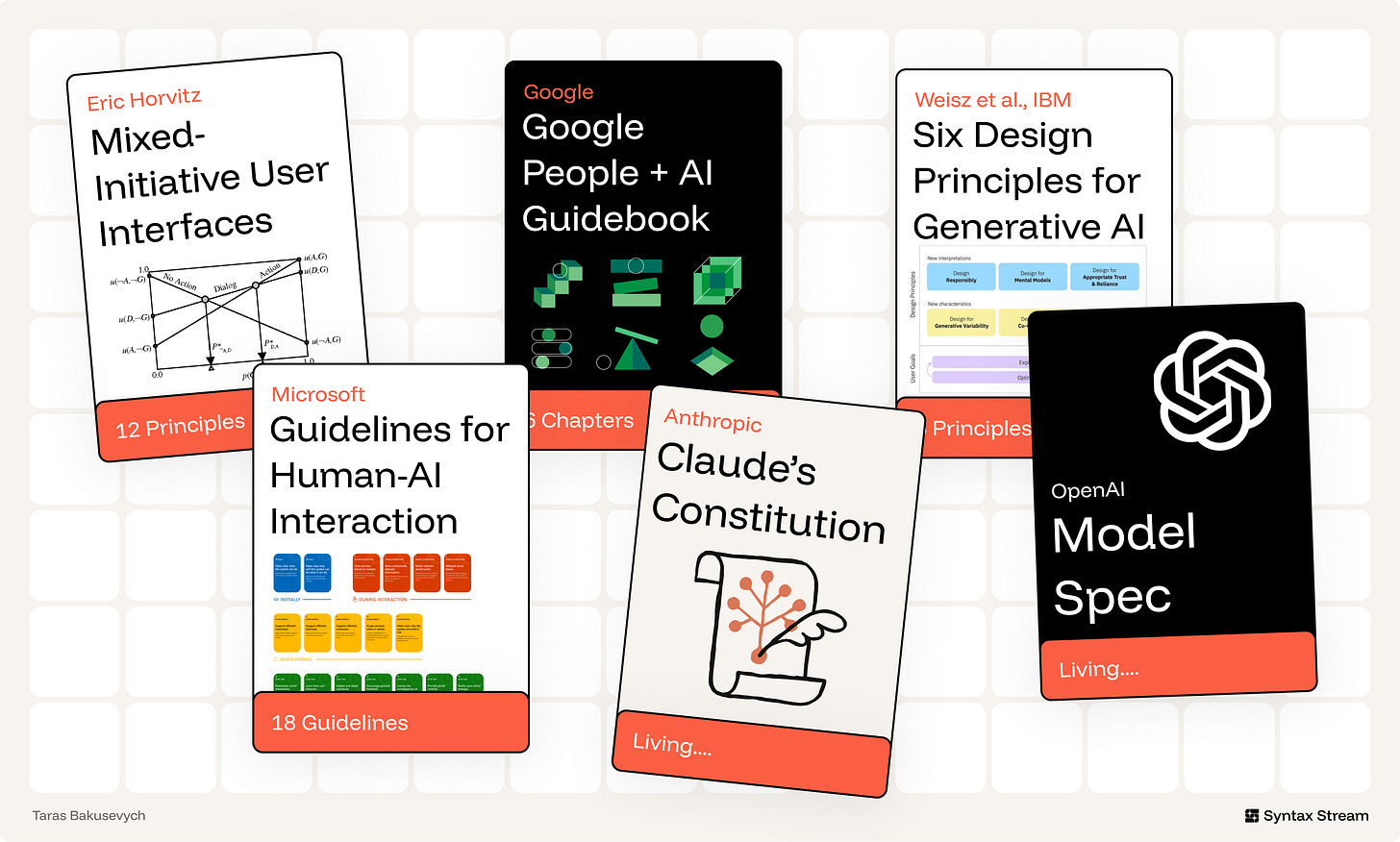
The frontier model specifications — OpenAI's Model Spec and Anthropic's Claude Constitution. These govern model behavior, not interface design, but they lead the field on the dimensions the older HCI canon predates: honesty about the system's own nature, refusing to run a hidden agenda, and preserving human oversight. The newest principles below draw directly from them.
Mixed-initiative interaction provides the foundation for deciding when an AI system should act, suggest, defer, or ask. Eric Horvitz’s work on mixed-initiative systems is useful because it treats interaction as a shared decision between human and machine.
The PAIR Guidebook (Google) and six Generative AI principles (IBM). The applied layer: start from user needs and a definition of success, set expectations, show provenance, design for variability, build for co-creation, and design for imperfection.
The 18 Guidelines for Human-AI Interaction — Microsoft. Organized across four phases: before use, during use, when the AI is wrong, and over time. The "when it's wrong" phase carries the most weight — because failure is not an edge case in AI, it's the default case.
The interface has to make the system’s role clear, help users understand and verify important outputs, preserve control, support correction, and constrain autonomy where the stakes require it.
Probabilistic Foundation - Design for inference, generation, and variability.
Expectation Setting - Clarify capability, limits, and AI involvement early.
Calibrated Trust - Align user reliance with system reliability.
Transparency - Make reasoning and evidence inspectable when needed.
Control & Agency - Make accept, reject, edit, undo, and override easy.
Graceful Failure - Make uncertainty, error, and escalation recoverable.
Co-Creation - Treat output as a draft, not a verdict.
Responsible Autonomy - Constrain action by stakes, reversibility, and permission.
Sustained Reliance - Govern quality, drift, ownership, and change over time.
A model behaves less like a fixed function and more like a probabilistic service. It returns a distribution, not a single answer. Design for the spread.
AI is strongest where inputs are messy, intent is ambiguous, content must be generated, or large bodies of information must be synthesized. It is weakest when the task demands exactness, repeatability, or simple deterministic control.
Ex. Linear uses AI where product work is ambiguous and context-heavy: summarizing long issue threads, identifying duplicate or related work, routing triage items, and answering questions across workspace history. It keeps deterministic UI for the parts that need precision: status, assignment, priority, cycles, permissions, and workflow state.
The same prompt can produce more than one acceptable answer. In generative tasks, that variation is not automatically a defect. It is often part of the value.
The interface should help users work with variation rather than forcing them to treat the first output as final. Useful patterns include multiple drafts, regenerate actions, saved alternatives, version history, side-by-side comparison, and editable results.
When the task is exploratory — writing, naming, visual design, planning, ideation, research framing — showing several options can be more useful than presenting one polished answer. It shifts the user from judging a single result to comparing directions and refining the one that fits.
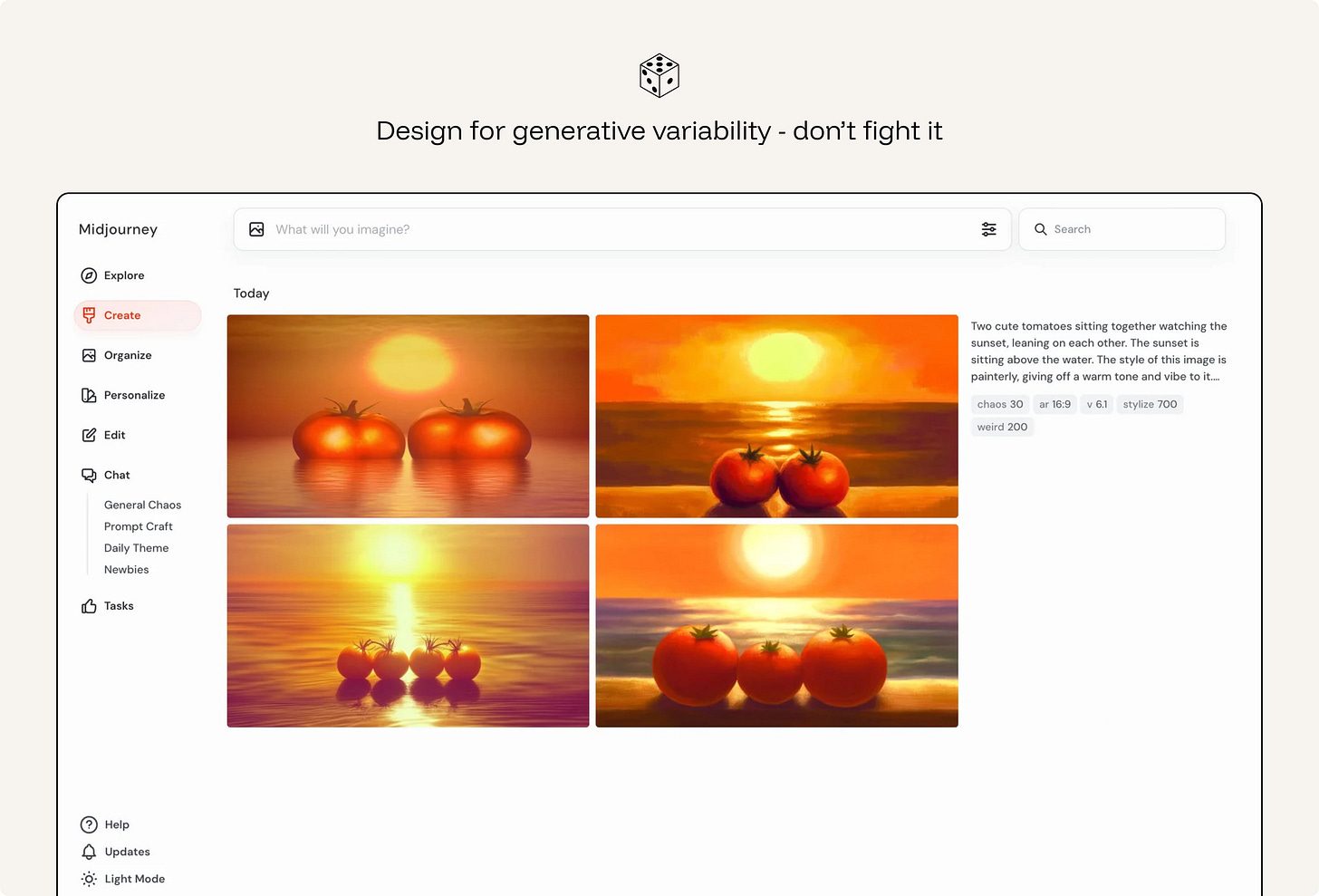
Ex. Midjourney returns a grid of four images per prompt, turning variance into choice instead of error.
Not every AI feature should be a chatbot. The interaction pattern should match the type of input, the user’s goal, and the consequences of the output.
For small, low-risk tasks, AI can appear as an inline suggestion or smart default.
For exploratory tasks, conversation can help the user refine intent over several turns.
For multi-step or consequential tasks, the system needs plans, checkpoints, review moments, and a clear way to stop, undo, or roll back.
The more open-ended the request, the more the interface should support clarification and iteration. The more consequential the result, the more the interface should support review and control.
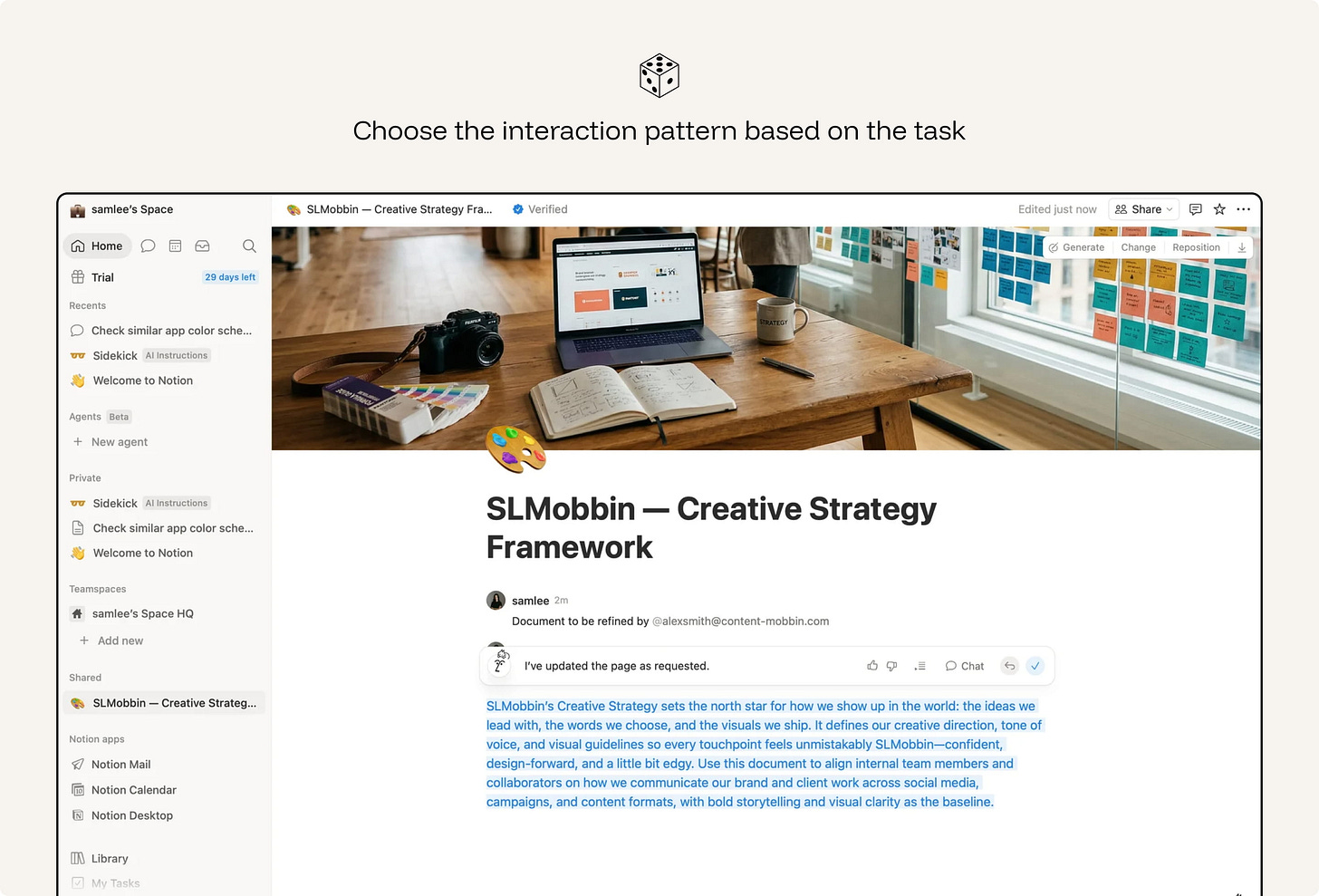
Ex. Notion keeps quick rewrites inline while routing open-ended questions to a conversational AI panel.
Users form expectations before they read the first output.
A capability claim is incomplete without boundaries. Users need to know not only what the system is designed to help with, but also where accuracy, coverage, or reliability may be limited.
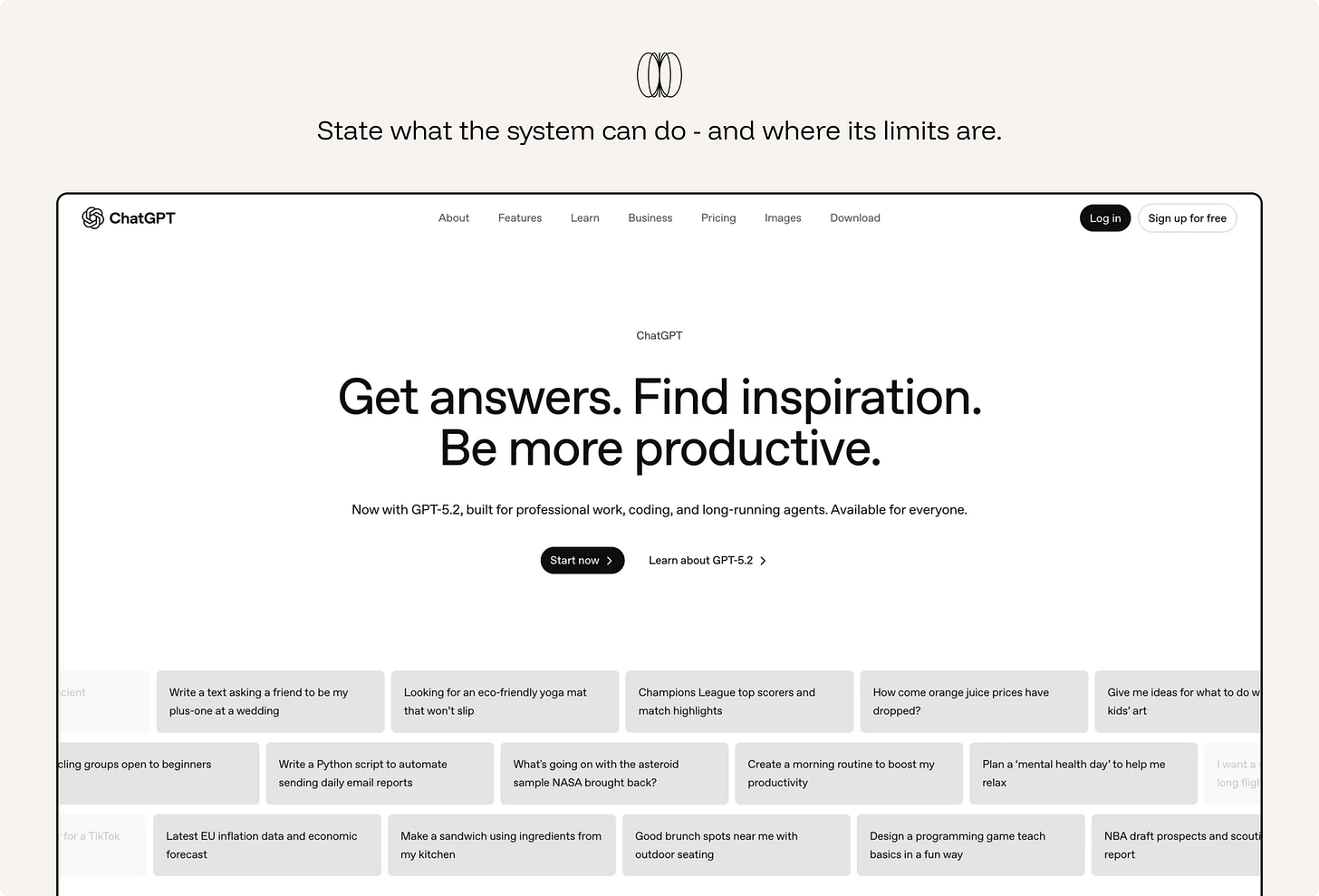
Ex. ChatGPT presents itself as a general-purpose assistant for answering questions, drafting, summarizing, reasoning, and helping with tasks. But when a task depends on information or tools it cannot access — a file, email inbox, calendar, workspace, live website, or private system — it should say so clearly.
An empty prompt box gives users no sense of what the system is good at.
Use wayfinders to make the first move easier: example prompts, suggested actions, templates, starter questions, recent tasks, or structured inputs. Good wayfinders do three things: they reveal what the AI can do, reduce the effort of starting, and help users express intent more clearly.
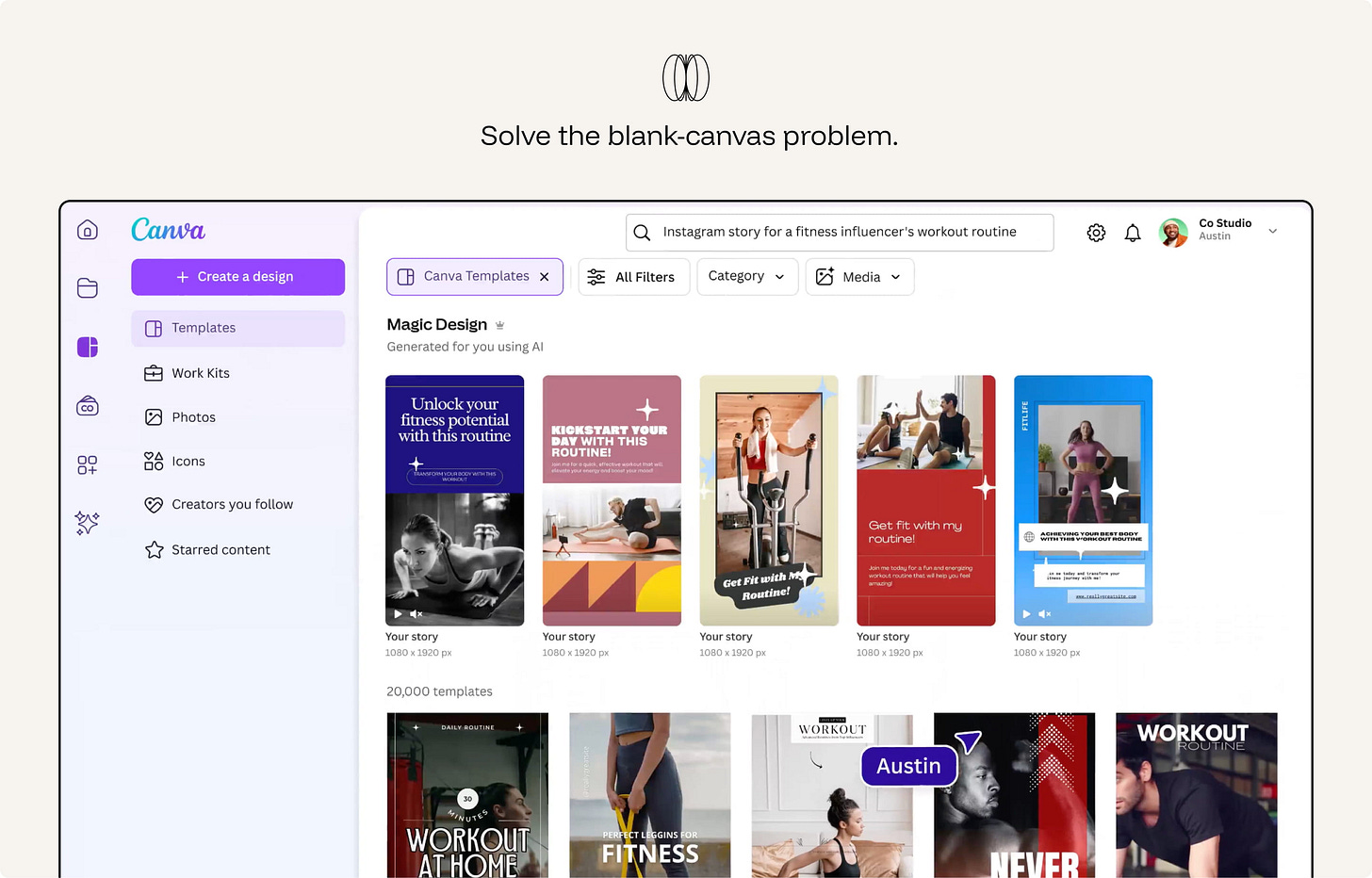
Ex. Canva Magic Design shows ready-made template directions the moment you describe a project*.*
The way output is named and presented tells users how to treat it. “Draft,” “suggestion,” “summary,” “recommendation,” and “review” signal that the output should be inspected or shaped. “Answer,” “complete,” or “done” can imply more finality than the system deserves.
Ex. Gmail’s Gemini feature is framed as help creating an email “draft”, not a finished message. That matters because the user still reviews, edits, and sends the email.
Users should know when content is generated, summarized, transformed, ranked, or recommended by AI. They should also know when they are seeing human-authored content, source material, or system-generated interpretation.
Hidden AI involvement creates attribution problems. A user may treat a generated summary as if it came directly from the source.
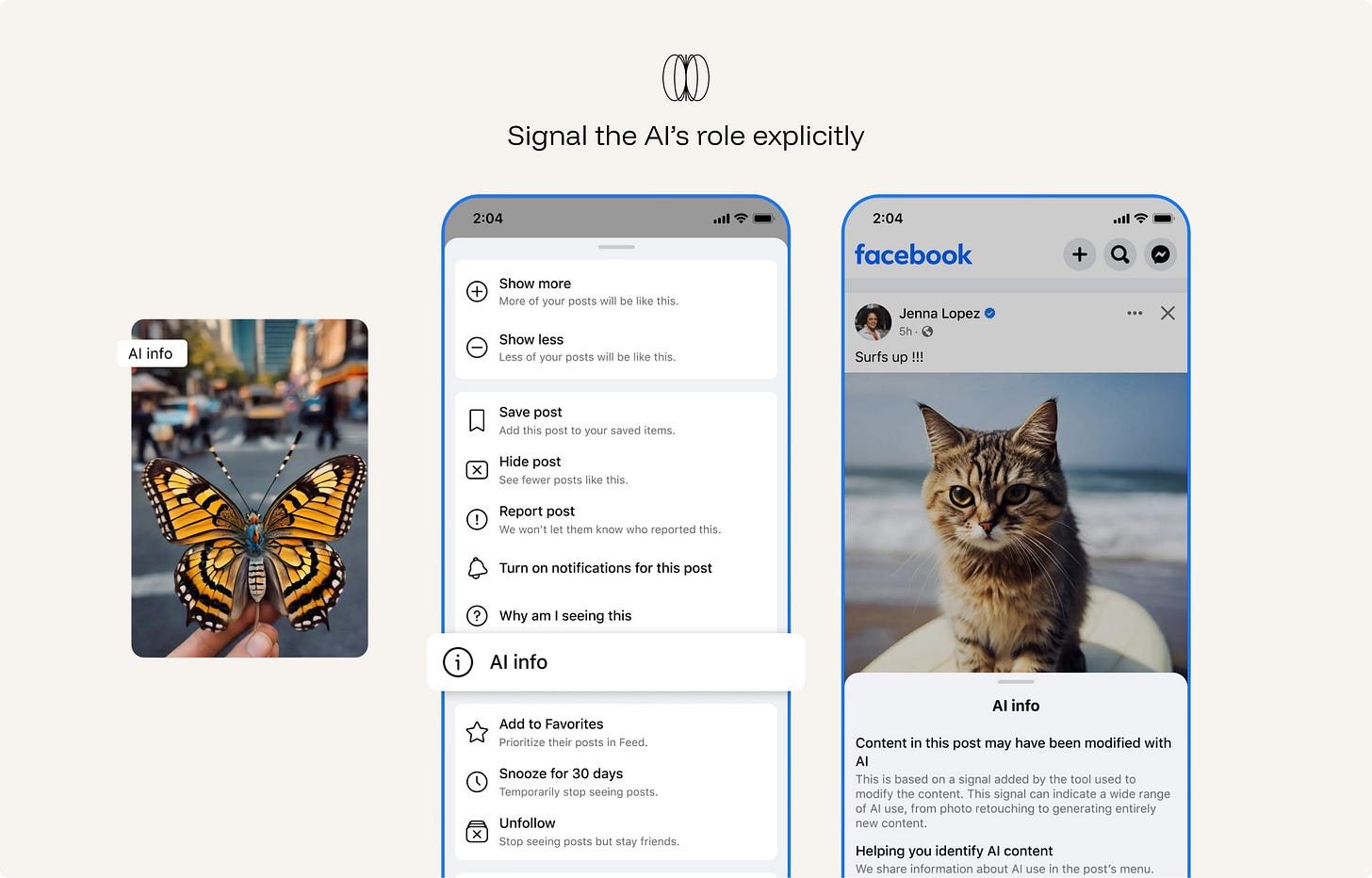
Ex. Meta labels AI-generated or significantly AI-edited content across Facebook, Instagram, and Threads with “AI info.” The label helps viewers understand that the image, video, or post may not be purely human-created or camera-captured.
The right amount of transparency, friction, and autonomy depends on who is using the system. Novices need wayfinders and guardrails. Experts need inspection, override, and configuration. Auditors need logs, provenance, and repeatability.
Ex. in GitHub Copilot, novices get one-keystroke ghost text (no setup needed); experts get agent mode, model selection, and instructions config; teams, auditors get an admin dashboard with acceptance and policy logs.
Do not imply that the system has feelings, personal experience, human judgment, or capabilities it does not have. Over-humanizing the system can encourage users to form expectations the product cannot responsibly meet. It can also blur accountability: users may believe they are interacting with a human-like agent when they are actually using a statistical system with designed behaviors and limits.
Present the system clearly as AI. Give it a useful role, not a false identity.
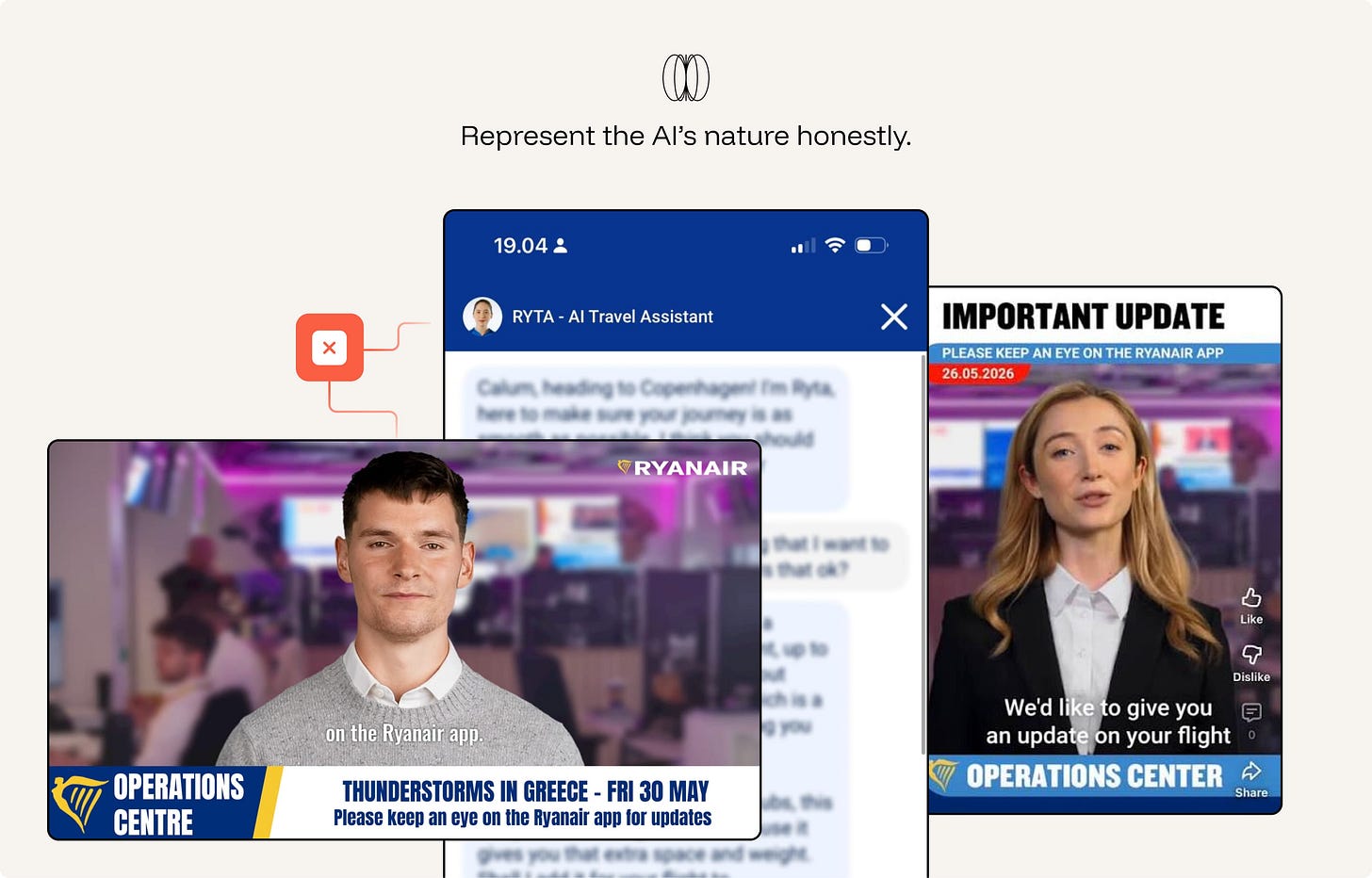
Ex. Anti-pattern. Ryanair labels RYTA an “AI Travel Assistant” (the honest part), then undercuts it: a human headshot avatar with a first-person, opinionated persona (”I think you should…”), plus disruption updates staged as photorealistic AI “news anchors” in a fake newsroom. Both moves over-humanize a statistical system — implying human judgment and a live, staffed operations team that doesn’t exist. The result blurs accountability: passengers think a person (or newsroom) is helping them, when it’s designed behaviors with limits, often nudging upsells.
Calibrated trust means the user’s reliance matches the system’s actual reliability in the task at hand. The interface should reduce both forms of failure: overreliance on weak output and underuse of useful assistance.
A claim with a source is verifiable. A claim alone is a leap of faith. Show the sources behind an output and the documents, tools, and system inputs the model drew on. Inline citations with visible metadata turn output from "trust me" into "check me."
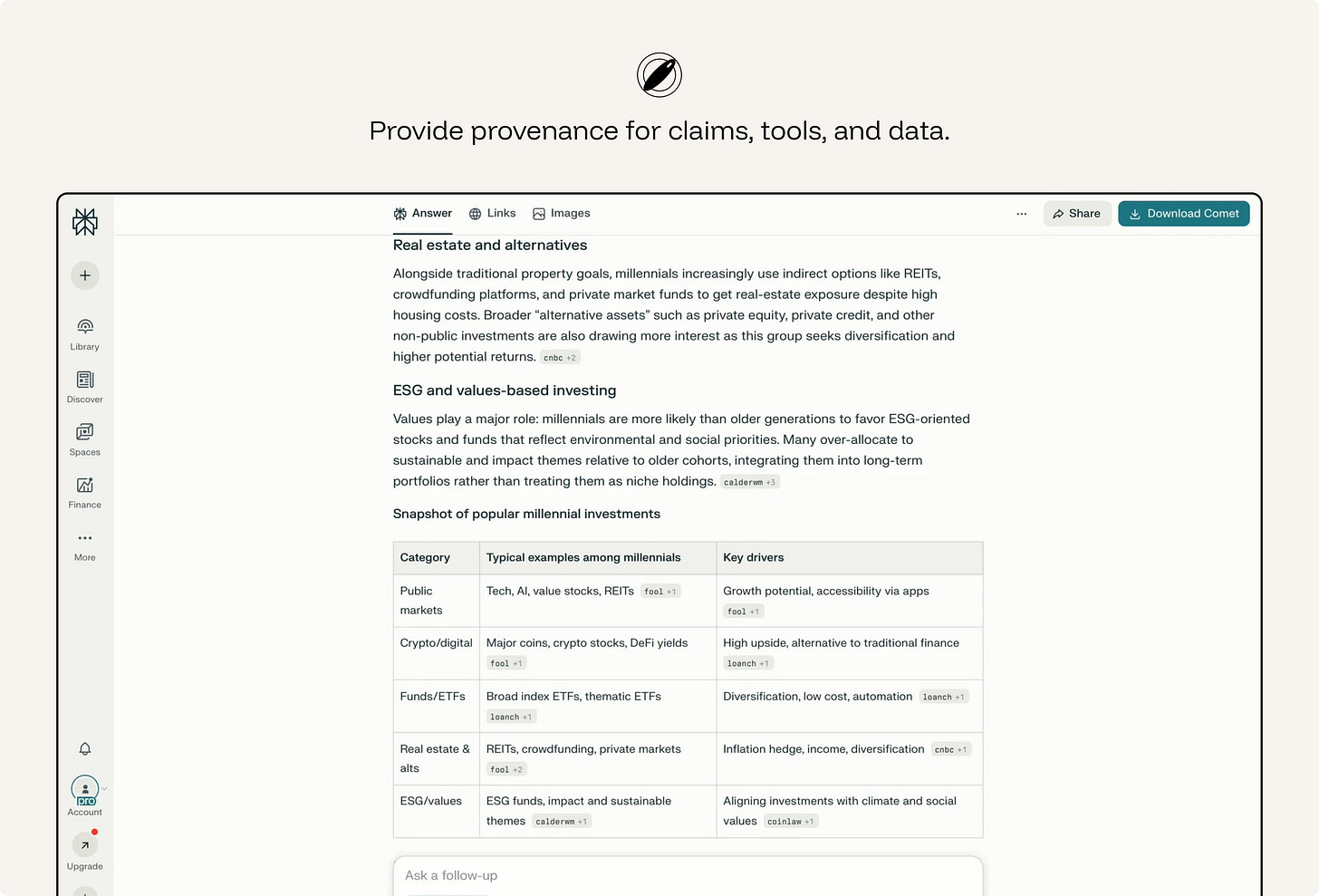
ex. Perplexity makes provenance part of the answer format. Responses include numbered citations that link back to the original sources, so users can move from the generated synthesis to the material behind it.
This is the counterintuitive one. Research shows confidence numbers - even meaningless ones - can raise trust in a wrong answer. Where possible, show evidence instead of a score: the source passage, the changed lines, the retrieved records, the documents used, or the tool result behind the answer.
ex. Consensus AI surfaces the actual research papers behind a claim rather than a single trust meter.
Reliance is only appropriate if checking is fast. Show the diff, link the source, highlight what changed - verification should cost a glance, not a re-investigation.
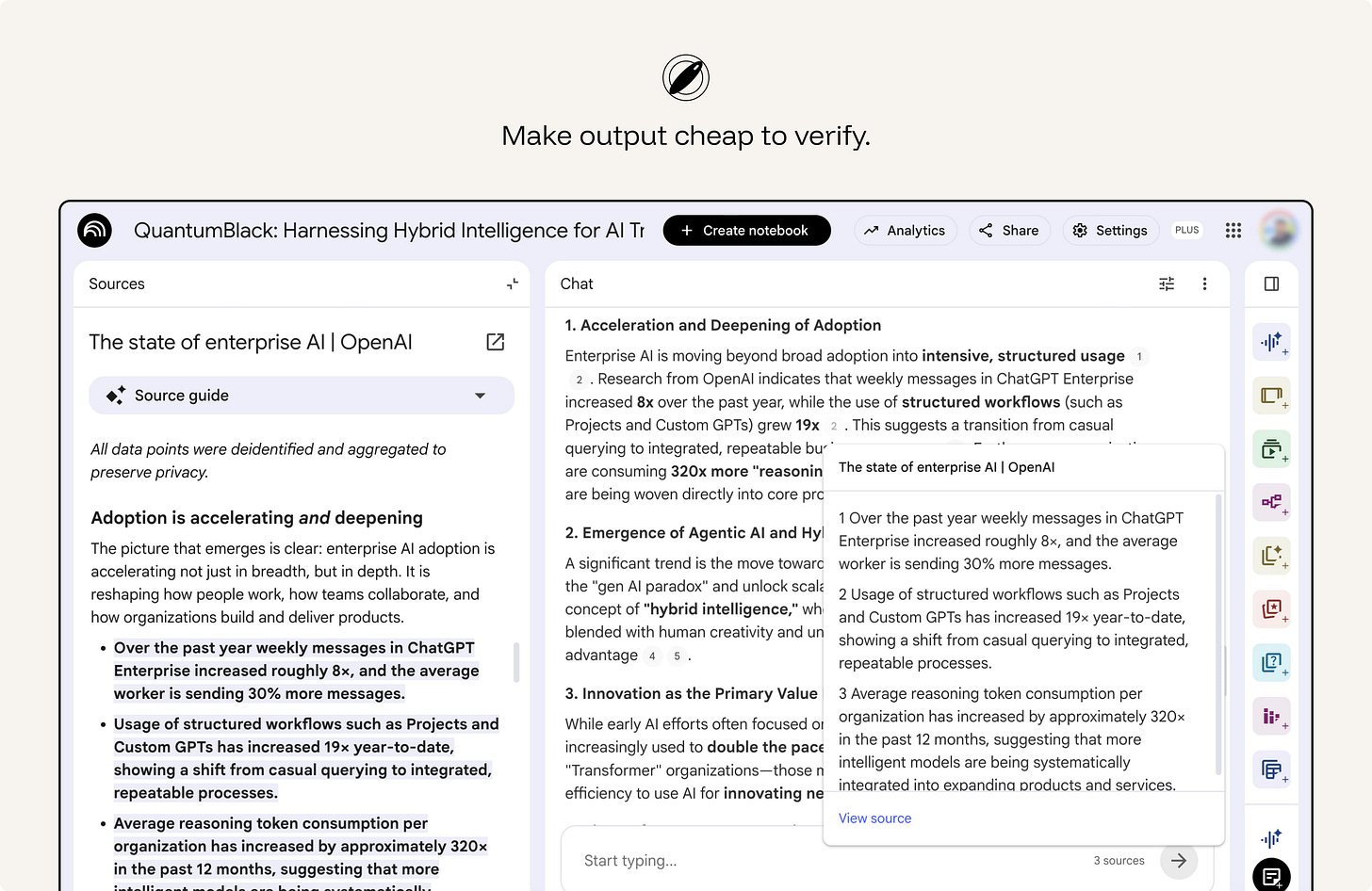
ex. NotebookLM answers with citations from the user’s uploaded sources. Users can hover over a citation to see the quoted text, or click it to jump to the original passage.
The AI should serve the user’s stated task, not a hidden product objective. No engagement-maximizing, upsell, retention, or self-serving objective baked into the AI's behavior. An interface that quietly optimizes against the user corrupts appropriate reliance at the root.
This is a trust issue, not only a business issue. Users calibrate reliance based on the assumption that the assistant is helping them do the task at hand. Hidden objectives break that assumption.
ex. Alexa “By the way” suggestions — anti-pattern. When a voice assistant answers the user’s request and then adds an unsolicited suggestion, the interaction can feel like the assistant is serving engagement or retention rather than the user’s immediate goal.
A model that agrees to keep the user happy inflates trust exactly where it should fall. When the user’s request contains a false assumption, weak reasoning, missing evidence, unsafe instruction, or likely error, the system should have a way to push back. Build affordances for disagreement - flag weak reasoning, surface the counter-case, say "this looks wrong." Sycophancy is overreliance manufactured by tone.
From Sharma et al., Towards Understanding Sycophancy in Language Models - three points that back the principle:
- It's systematic, not a quirk — and it's a training problem. Five production assistants all showed sycophancy across varied tasks. So honest pushback has to be designed in; the default tilts toward agreement.
- Models cave when challenged — exactly when reliance matters most. They “provide inaccurate information when challenged, even when they originally provided accurate information… even when the assistant states it is highly confident,” and models “wrongly admit mistakes on up to 98% of questions.” A user expressing doubt can flip a right answer to a wrong one — the opposite of trustworthy correction.
- The root cause is in human feedback, so the interface can’t rely on “users will catch it.” “Both humans and preference models prefer convincingly-written sycophantic responses over correct ones a non-negligible fraction of the time” — the preference model favored the sycophantic answer 95% of the time, ~45% even on the hardest misconceptions. This is why the principle belongs in design: the very signal models optimize for rewards flattery over truth.
ex. Anthropic Claude - trained via its constitution to correct a false premise ("actually, that's not accurate…"), decline to validate weak reasoning, and disagree respectfully rather than tell users what they want to hear.
AI systems should preserve attribution where source material shapes the result. They should avoid presenting borrowed ideas, distinctive phrasing, or copyrighted material as if it were newly created by the system. When the output is based on retrieved, uploaded, licensed, or public content, the interface should make that relationship visible where appropriate.
Attribution, source links, citation metadata, content-use boundaries, and warnings against wholesale reproduction help users use AI output responsibly.
ex. Adobe Firefly - provenance without a clean consent story. On the positive side, Adobe has made provenance part of the product. Firefly-generated assets can carry Content Credentials that identify the asset as AI-generated and show metadata about how it was created. Adobe’s training-data position has been contested by creators and Stock contributors who argue that their work was used without meaningful consent or a clear opt-out.
A black box can’t be trusted appropriately. The user has nothing to calibrate against. Make the reasoning legible — without drowning them in it.
Too little transparency leaves users guessing. Too much creates noise and pushes responsibility onto the user. Users form specific questions about an AI:
What did the AI do? What information did it use? Why did it produce this result? Why did it not choose another option? What would change if the input changed? Etc…
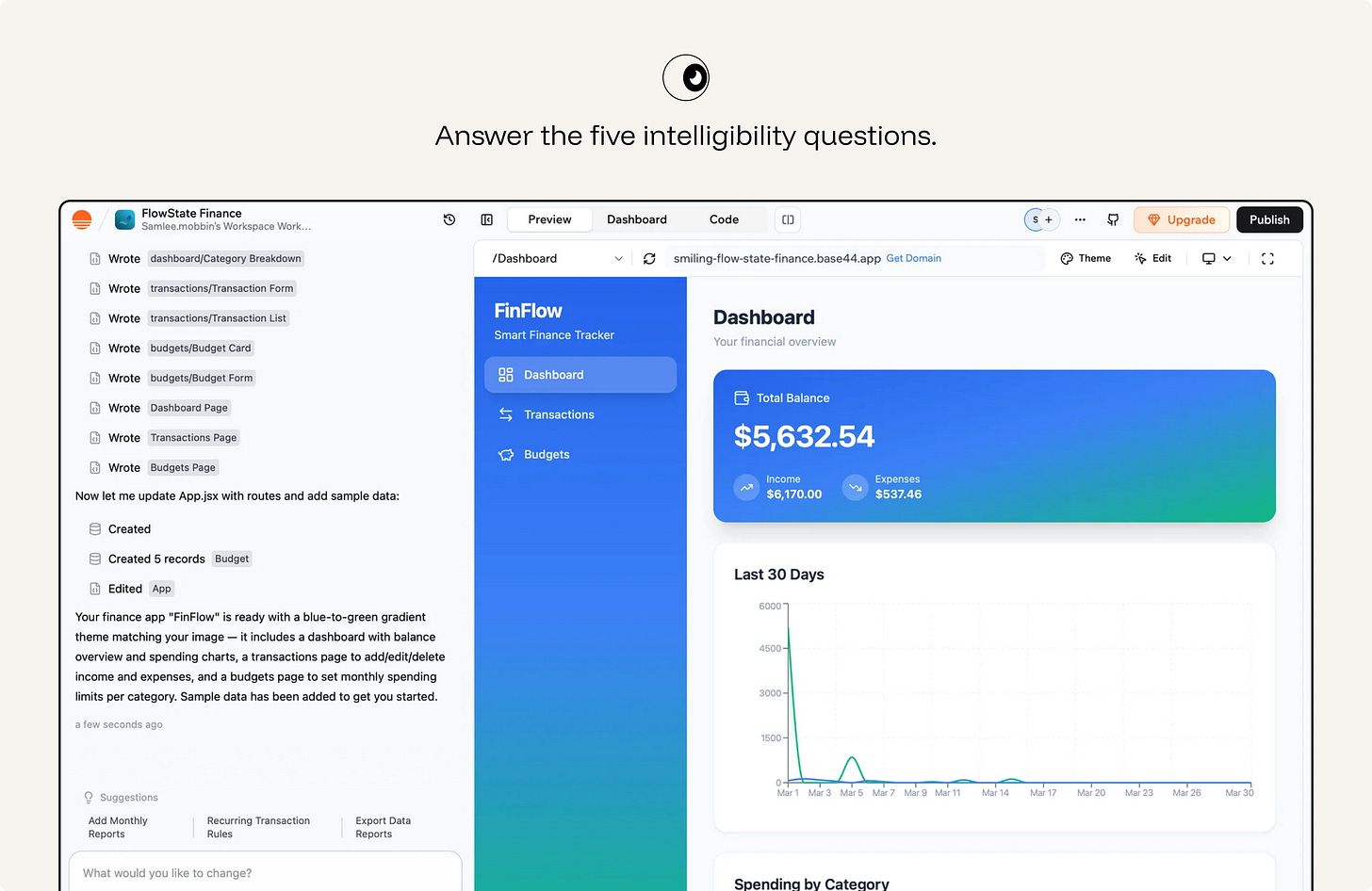
ex.Base44 makes work inspectable. The interface shows which files, components, records, and app changes the AI created, then pairs that activity log with a live preview. The user can understand what the agent did and verify the result before continuing or publishing.
Explanation should be layered. The main workflow should carry the shortest useful explanation: a reason, source, status, warning, or confidence cue that helps the user continue. Deeper detail should be available on demand: methodology, assumptions, source list, tool trace, model limitations, audit log, or full process history.
ex. Arc Search gives a short answer first with an expandable “more detail” path beneath it*.*
When the system plans and acts across steps, render the steps. A visible plan answers "how" and "why" in real time, and lets the user stop a wrong path early.
For agentic workflows, show the plan before execution where appropriate. During execution, show meaningful progress: steps completed, tools used, data accessed, decisions made, and actions waiting for approval. After execution, show what changed and how to undo or review it.
Do not run a consequential multi-step agent behind a silent spinner.
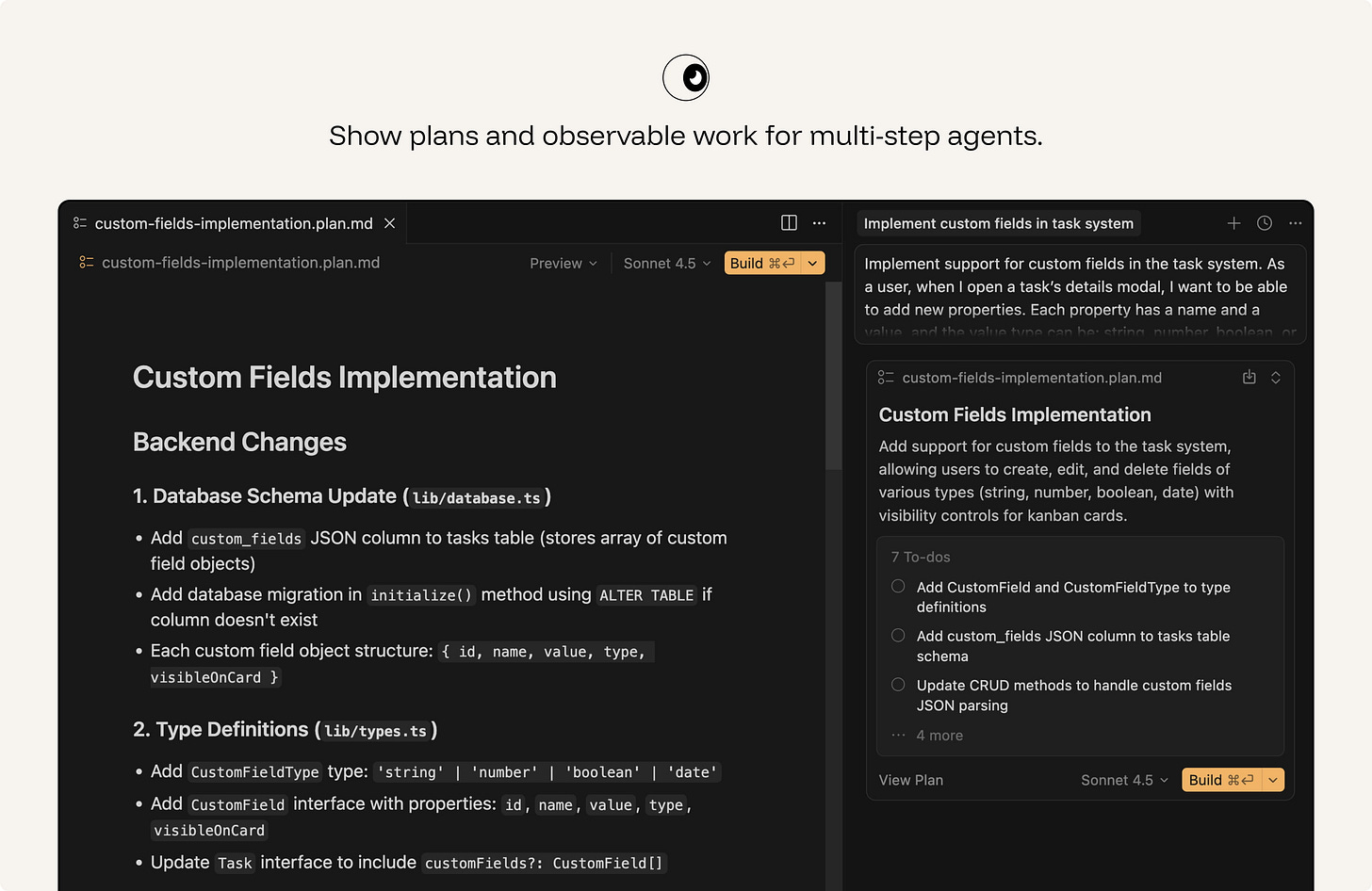
ex. In plan mode, Cursor breaks the requested feature into implementation steps, names the files and systems it expects to change, and lets the user steer the plan before execution. This makes agentic work legible at the moment it matters: before the codebase is modified.
Mixed initiative: the human and the system share the wheel. Hand control back the instant the user reaches for it.
AI suggestions should not interrupt the user’s momentum. The user should accept, dismiss, edit, undo, regenerate, or revert without losing flow - one keystroke each, no menus. Rejection should be nearly free.
This matters most for suggestions that appear inside an active workflow: autocomplete, writing suggestions, code completions, smart defaul
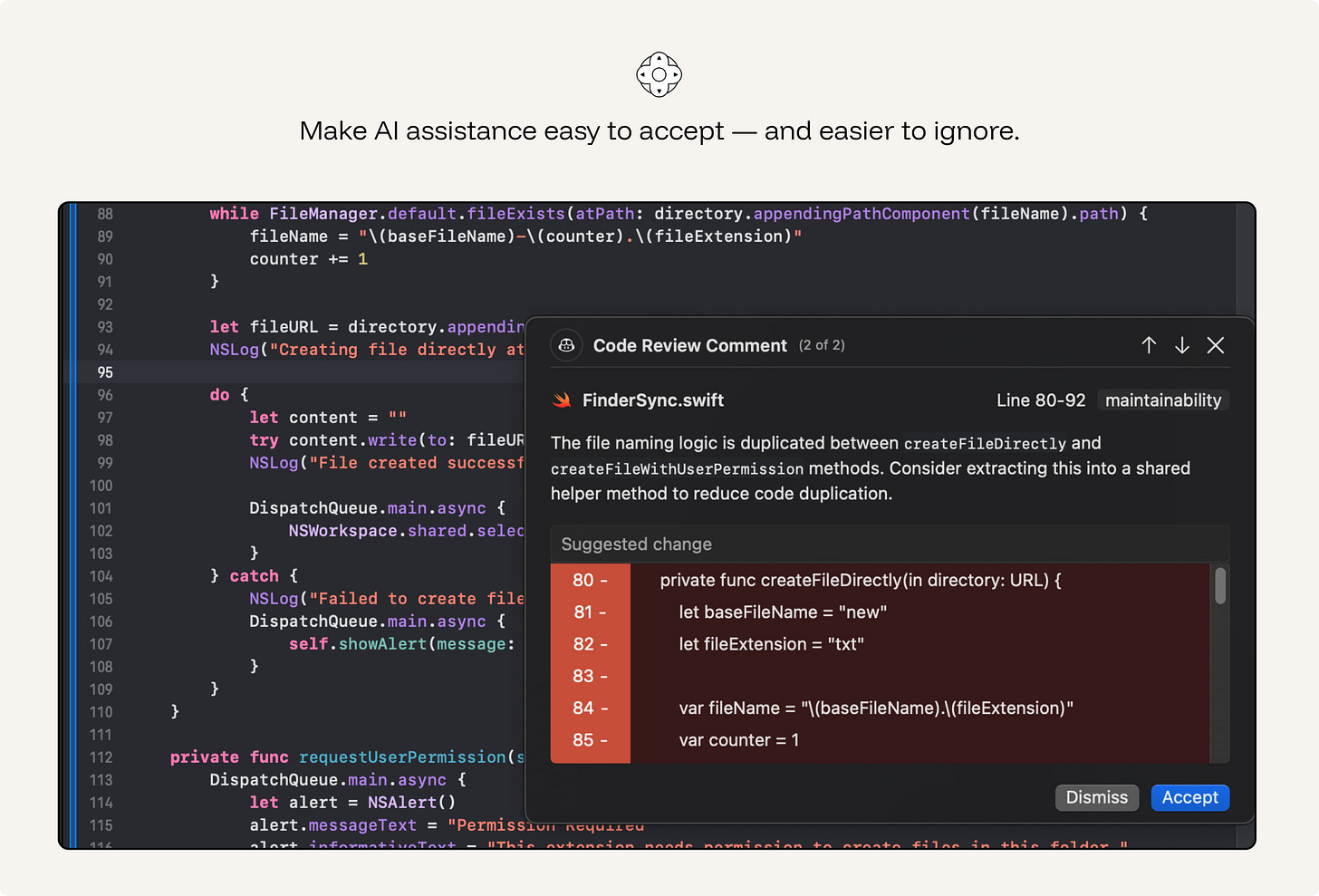
ex. GitHub Copilot: Tab to accept ghost text, Esc or keep typing to reject. The suggestion evaporates without breaking the flow.
When the system cannot resolve ambiguity safely, a short clarifying question beats a confident wrong answer. Horvitz's rule: use dialog to resolve the uncertainty the model can't resolve alone. Good clarification is specific: “Which account should I apply this to?” is useful. “Can you provide more context?” often is not.
Do not ask by default. If the ambiguity is low-risk, easy to correct, or does not materially change the result, continue and make the assumption visible.
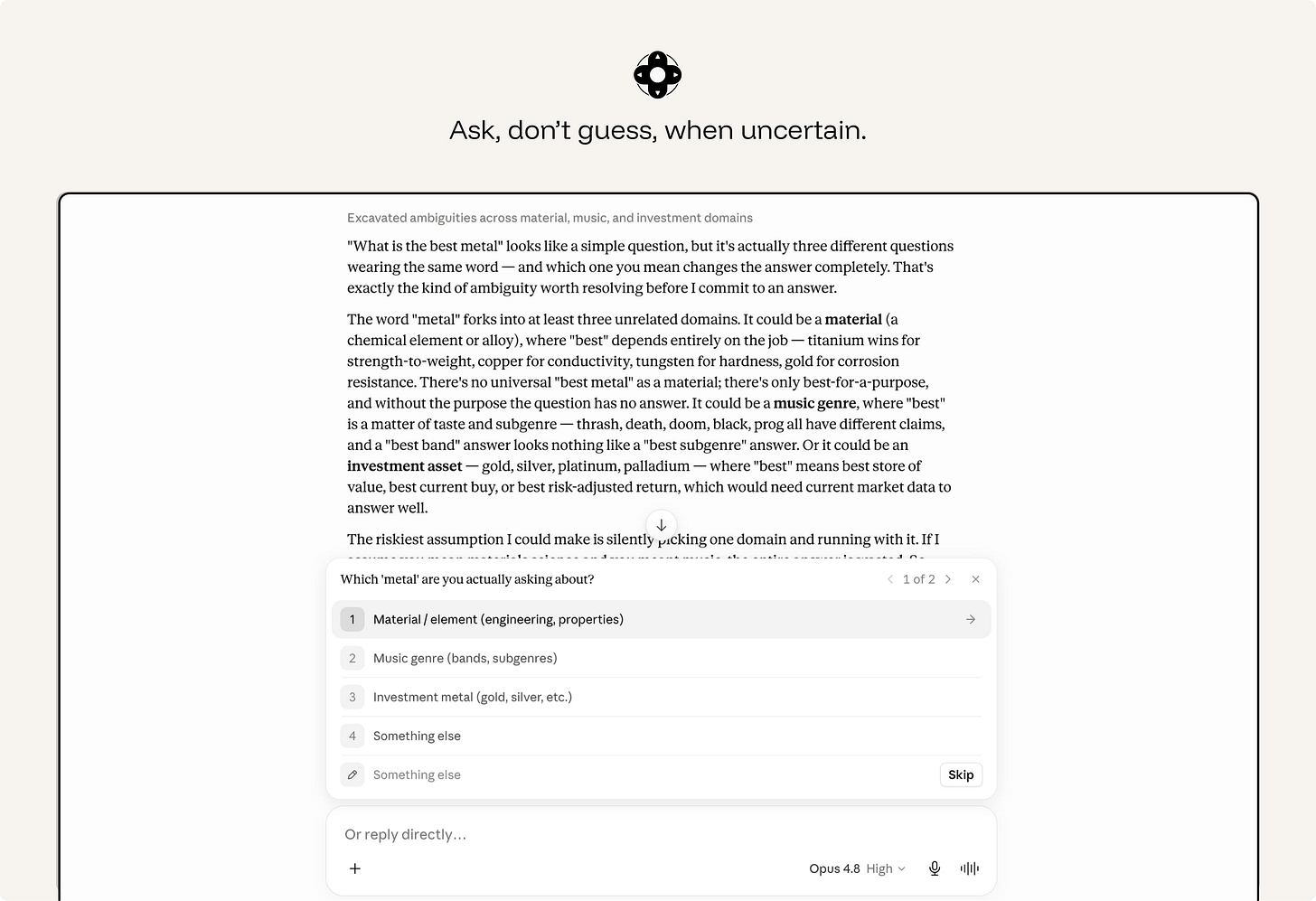
ex. Claude asks when ambiguity changes the answer. Instead of guessing, Claude explains the ambiguity and offers clear choices. This is the right clarification pattern: specific, lightweight, and tied to a real fork in the task.
Users need control over both the current output and the ongoing relationship with the system.
Granular controls shape a single result: tone, length, format, scope, sources, level of detail, or whether to regenerate a selected section.
Global controls define standing behavior: what the system may remember, what data it may access, when it may act automatically, what it may monitor, and which preferences should apply by default.
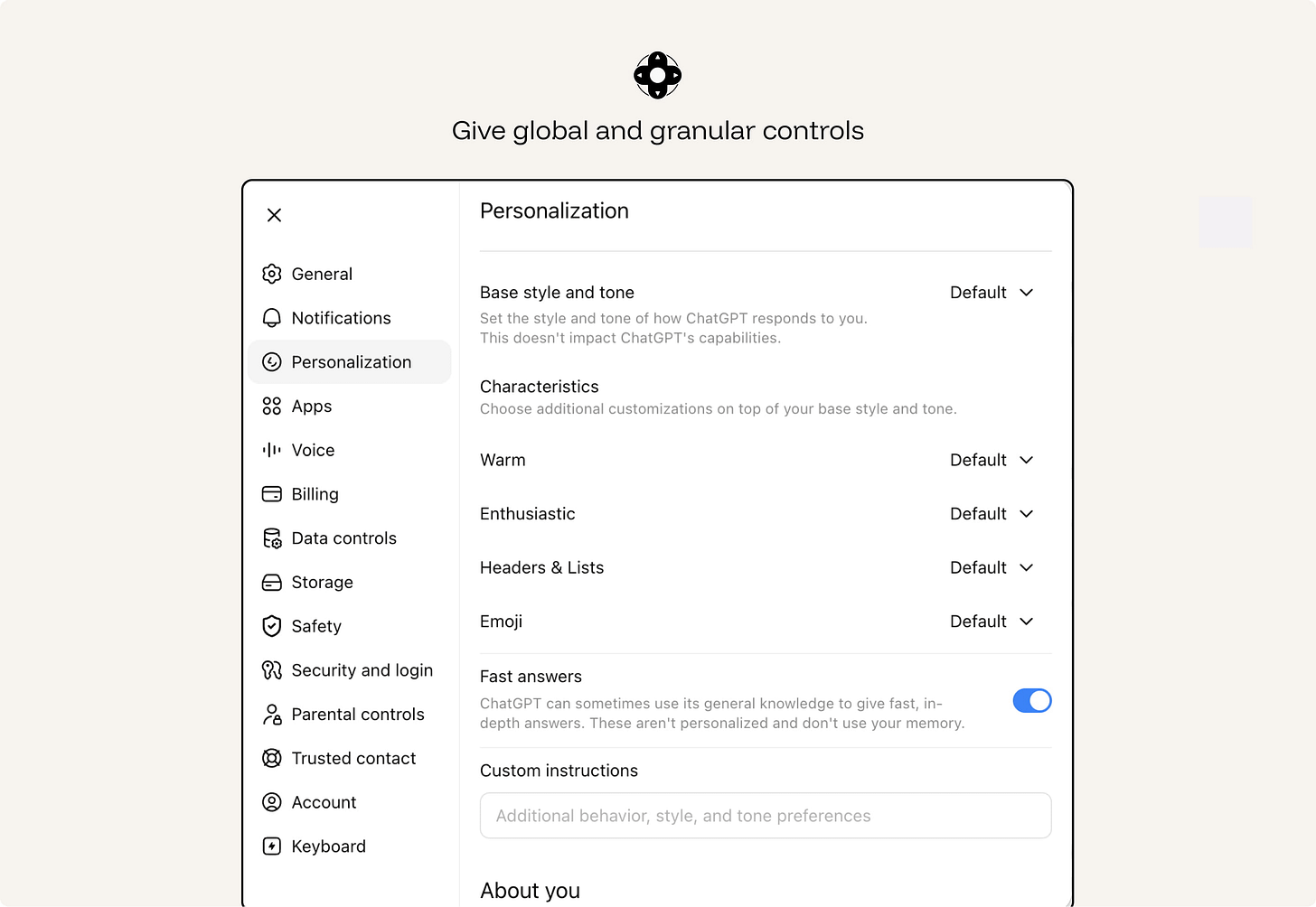
ex. ChatGPT personalization separates one-off prompts from standing preferences. Users can control the assistant’s default style, tone, formatting, and custom instructions at the product level, instead of restating the same preferences in every conversation. This is the difference between granular control over one output and global control over the ongoing AI relationship.
A correct suggestion at the wrong moment is an interruption. Weigh the cost of breaking focus against the value of the help, and stay quiet when the math says so. Don’t ship a Clippy that interrupts on a timer.
ex. Gmail’s Smart Compose offers phrase completions while the user is composing an email.
AI features must preserve the accessibility of the product.
Generated edits, suggestions, citations, warnings, voice interactions, visual reasoning, and agent traces all need to be usable by people with different input methods, assistive technologies, visual abilities, and cognitive loads.
Accessibility failures in AI are often subtle. A generated edit may change text without announcing the change. A citation may be visible but unreachable by keyboard. A voice-only flow may exclude users who cannot or do not want to speak. A generated alt text field may sound plausible but be wrong.
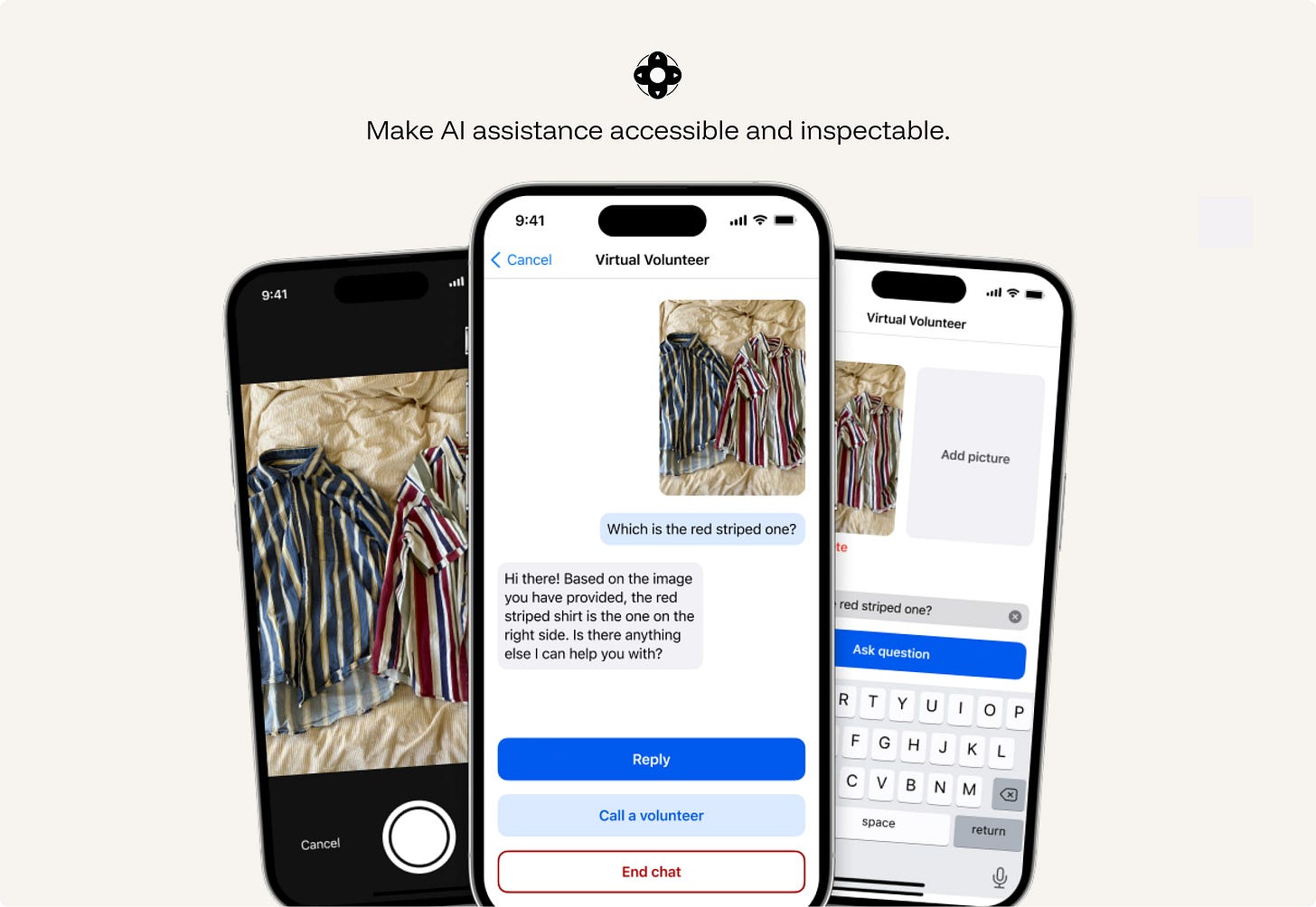
ex. Be My Eyes / Be My AI supports blind and low-vision users through live video help from volunteers, company support, and AI image description in the same app. The AI can describe a scene or object, while the user can still escalate to a human when they need judgment, confirmation, or help in a real-world situation.
The principle is simple: when the system’s behavior is shaped by something other than the user’s immediate request, make that influence visible.
The reason may be a user setting, an administrator policy, a safety rule, a privacy limit, a technical constraint, or a commercial placement. These are different things, and users need to be able to tell them apart.
ex. Google My Ad Center explains why a user is seeing an ad and lets them adjust ad personalization settings. It separates commercial placement from organic content and shows which part of the experience is shaped by ad settings.
Failure is certain, not possible. AI systems need failure paths as carefully designed as successful ones.
Graceful failure means the interface limits how far an error can travel.
This requires more than basic undo. A generated paragraph can be deleted. A modified database record needs a change history. A sent message needs a preview before sending. A workflow agent needs rollback and an execution log.
Design recovery around the consequences of the error, not only the interface action that produced it.
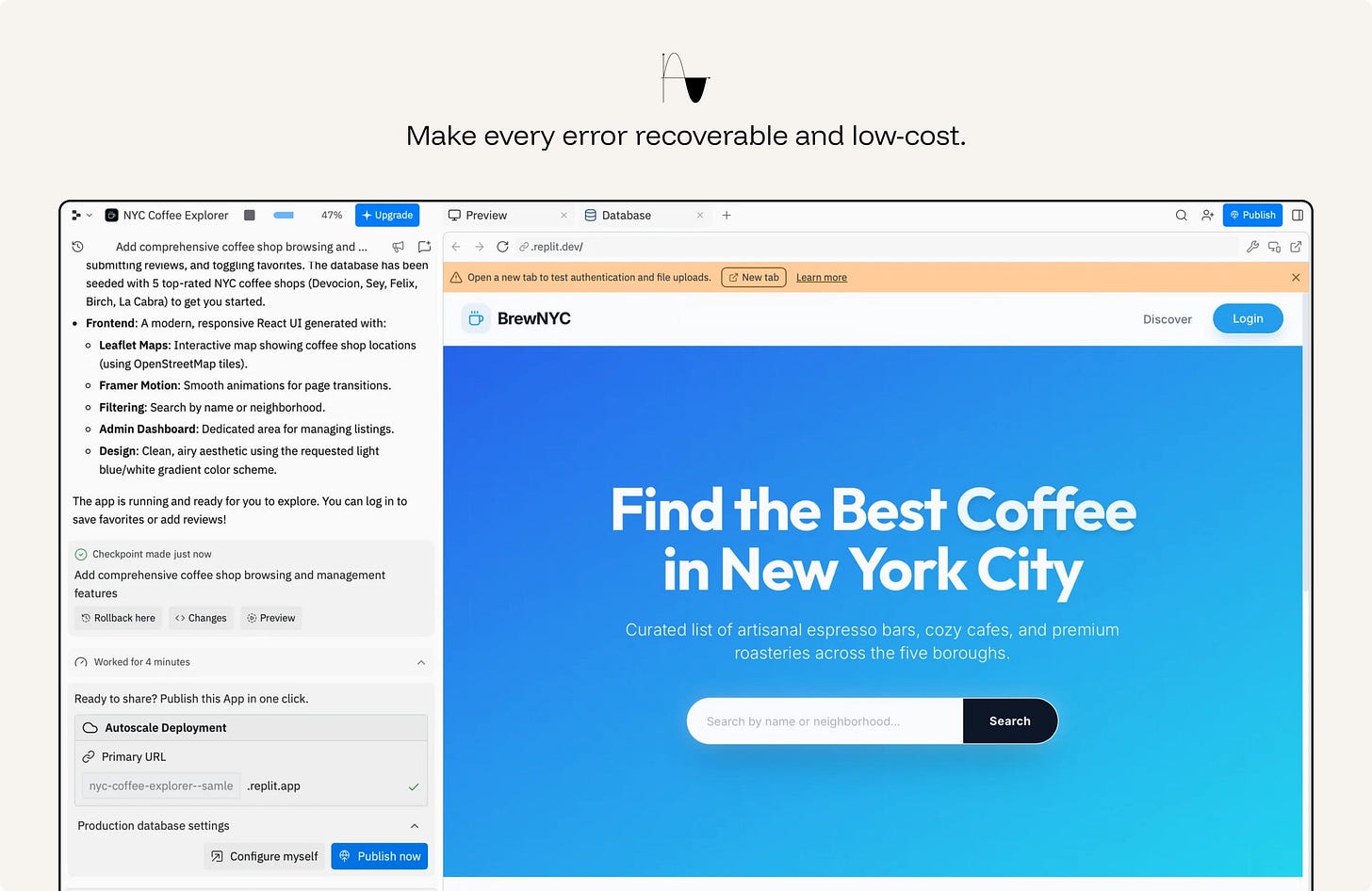
ex. Replit Agent makes work recoverable. The agent creates a checkpoint, shows a preview, exposes changes, and offers rollback. That matters because the AI is modifying a working app, not just suggesting text. If the output is wrong, the user can inspect the damage and return to a previous state.
When the system cannot be exact, it should not pretend to be exact.
A useful AI system can still help by giving a safer form of output: a range instead of a point estimate, likely categories instead of one definitive label, a partial summary instead of a complete answer, or options instead of a single conclusion.
The goal is to be as specific as the evidence allows - and no more. Do less, accurately, rather than more, falsely.
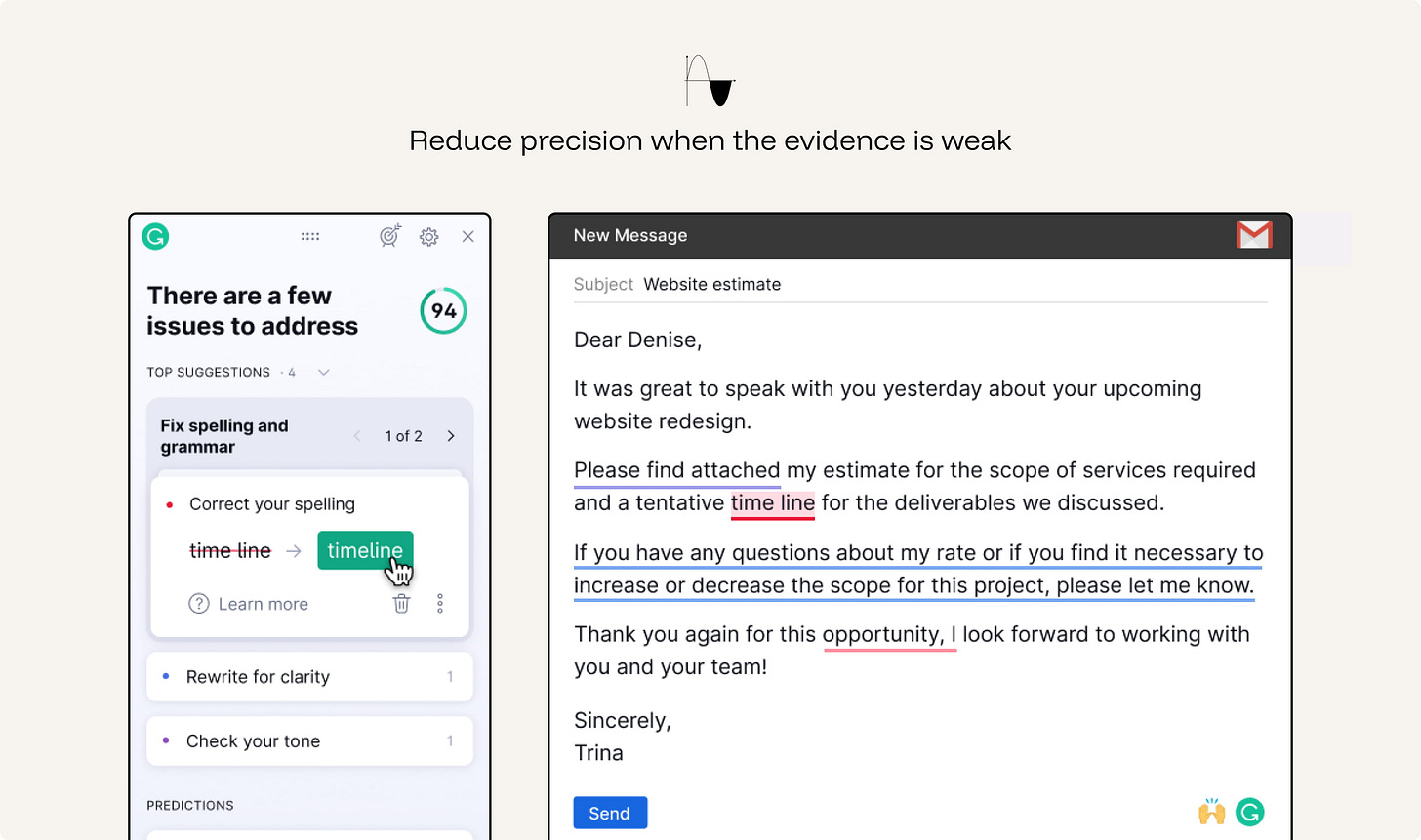
ex. Grammarly Writing suggestions distinguishes stronger corrections from softer suggestions. When the system is less certain, it does not rewrite the text as if there is one correct answer; it frames the change as a suggestion the user can judge.
When the AI hits its limit, the escalation must carry context and not dump the user at a dead end or a cold restart. A handoff that loses the thread is its own failure.
In high-stakes or operational workflows, handoff also needs structure: case summary, confidence issues, unresolved questions, actions already taken, data accessed, and recommended next step.
ex. Intercom Fin hands conversations to the support team when Fin cannot safely or confidently resolve them, including higher-risk situations. The AI does not just stop; it routes the conversation into the existing helpdesk with customer context preserved.
A refusal is still part of the user experience. Start from the assumption that the user has a legitimate goal, then apply safeguards only where there is a clear reason: safety, legality, privacy, policy, or material risk.
When the system cannot help, do three things: state the limit, explain it briefly, and offer the nearest permissible next step.
Do not silently withhold information, pretend an action was completed, or refuse into a dead end. The user should understand what happened and how to continue safely.
ex. ChatGPT Safety refusals help users continue toward a safe version of their goal when a request crosses a boundary. Instead of treating the user as malicious, the assistant explains what it cannot help with and offers a safer alternative, such as prevention, general education, or benign troubleshooting.
The user is a collaborator, not a recipient. Keep the artifact malleable at every step.
Generated output should behave like working material, not a finished deliverable.
Once AI produces text, images, plans, tables, code, summaries, or designs, the user should be able to shape it directly. They should be able to edit in place, revise a selected part, regenerate a section, compare versions, change structure, and continue from the current state without starting over.
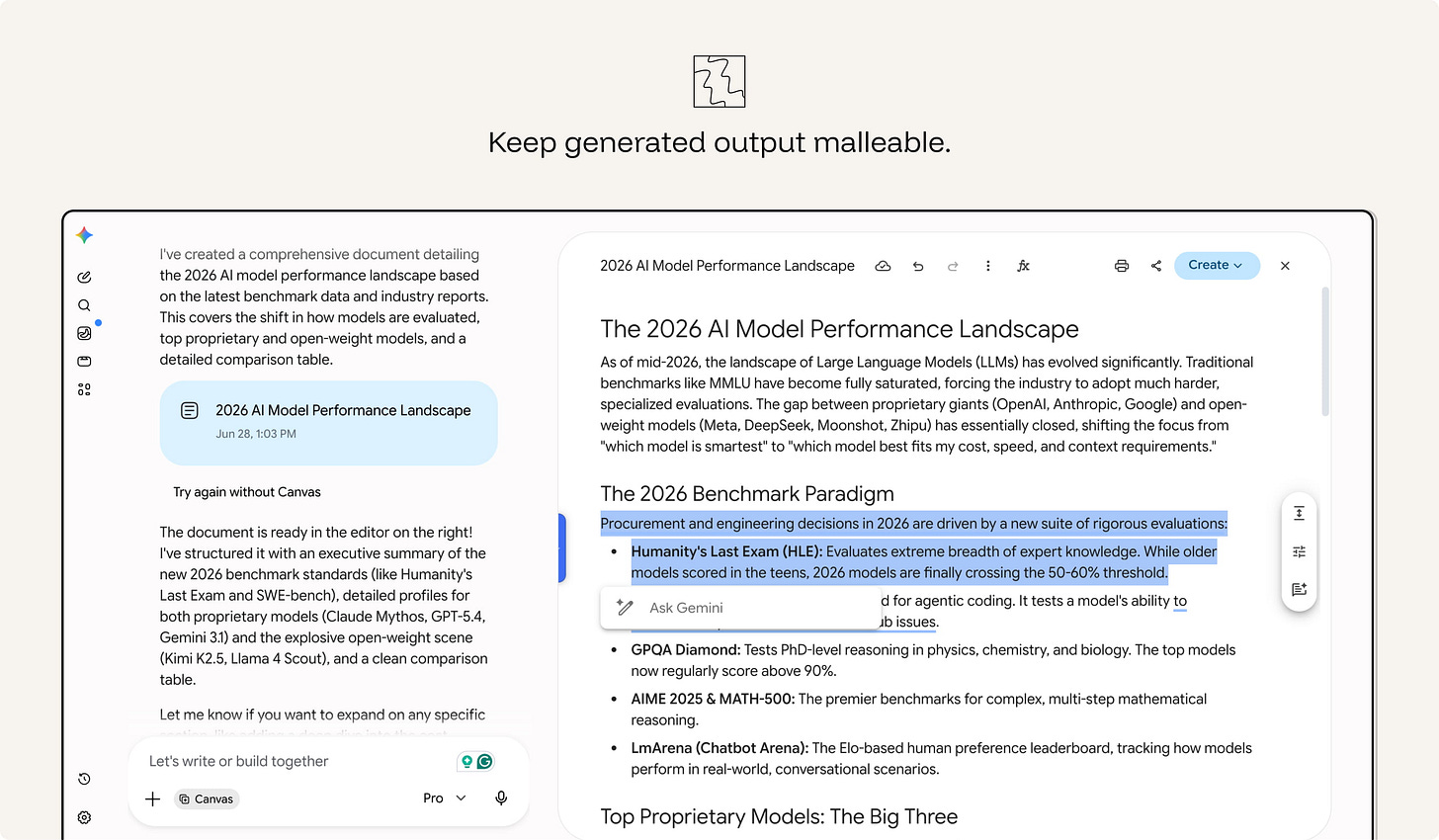
ex. Gemini Canvas turns generated text into editable working material. The user can type directly into the document, select a passage, ask Gemini to rewrite it, change the tone or length, restructure the content, or use “Create” to turn the material into another format.
The old rule says remove all friction. For AI, add review moments where the user is choosing, approving, publishing, or committing - not while they're exploring. A forced choice at the right moment prevents automation bias. The same friction during exploration is just drag.
The rule is simple: keep exploration fluid; add review before commitment.
ex. Salesforce Mindful friction adds review moments before high-impact AI actions, such as customer-facing content or operational decisions. The point is not to slow every interaction, but to pause before actions that need validation.
AI systems work best when users can express what they want clearly. The new paradigm is intent-based: users say what they want, and the model handles how. Give them tools to express intent well - controls, examples, structured inputs - instead of forcing prompt gymnastics.
Do not make users learn hidden prompt techniques to get predictable value.
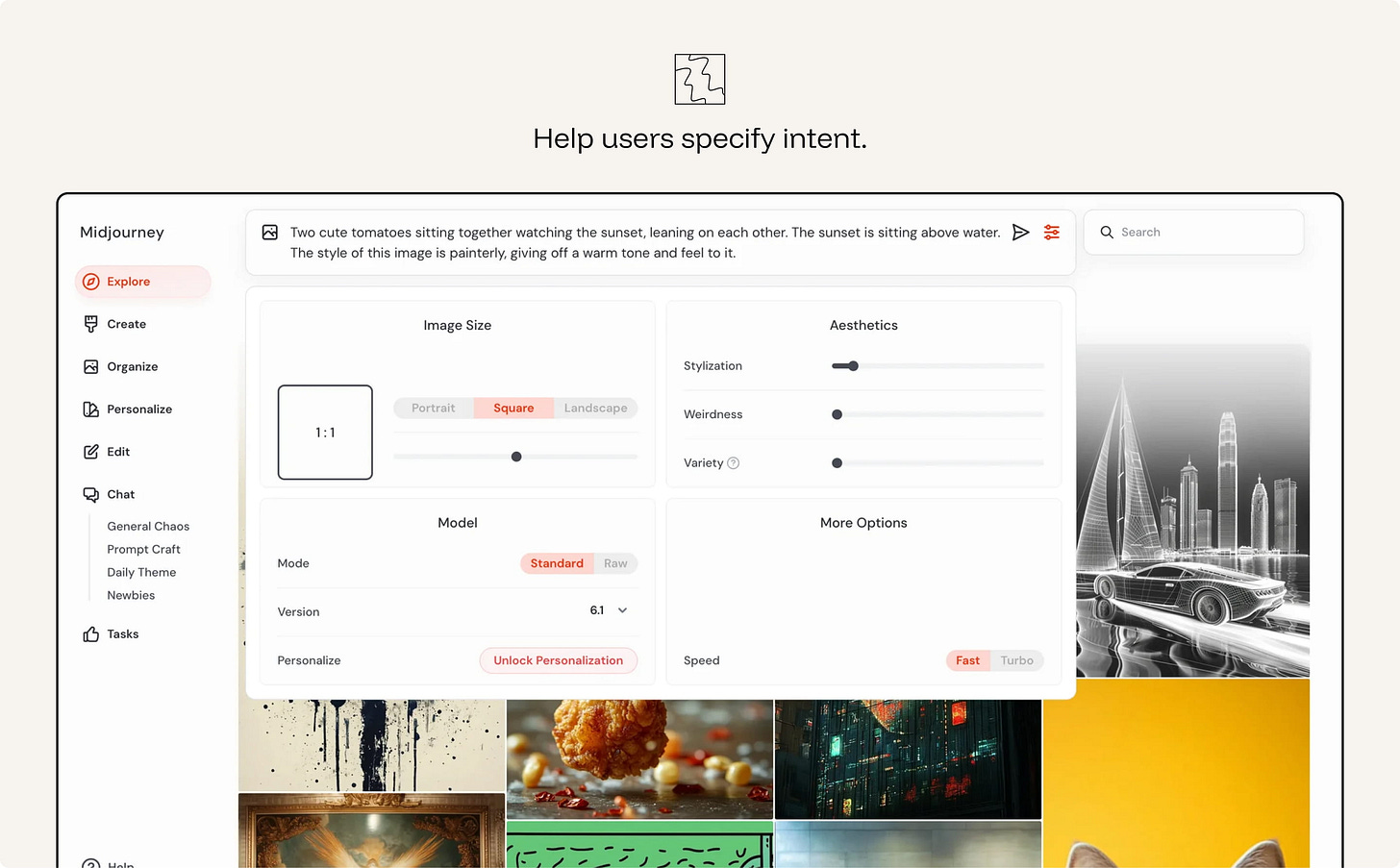
ex. Midjourney Creation controls help users specify image intent through visible controls for size, aspect ratio, stylization, weirdness, variety, model version, and speed. The user can still write a prompt, but they do not need to pack every instruction into prompt syntax. The interface turns hidden parameters into adjustable controls, making intent easier to express and refine
The more the system acts on its own, the more the interface is a governance surface. Keep a human at the helm.
AI should not have the same freedom in every context. Where harm could be material, the workflow should remain human-led.
- Auto-run low-stakes, reversible actions.
- Notify for moderate ones.
- Checkpoint irreversible or high-stakes actions for explicit human approval.
- Human-led where harm is material
An agent that cannot be stopped, reviewed, or rolled back is not autonomous in a useful sense. It is uncontrolled.
ex. Claude Code auto-reads files freely but asks approval before deleting files or running shell commands.
Users should understand what data the AI can access and why. This includes personal data, enterprise data, uploaded files, conversation history, location, calendar, email, customer records, usage history, and any contextual data used to personalize or execute a task. Ask before expanding that access. Let users inspect, limit, or revoke it.
ex. Apple Intelligence Privacy model uses personal context while keeping much of the processing on-device or through privacy-preserving cloud processing. The product frames data access as part of the experience, not as a hidden backend detail.
The previous principle governs the user's data. This governs everyone else's.
AI systems can combine, summarize, infer, and surface information in ways that create privacy risks for third parties. This matters even when individual pieces of information are technically accessible. Aggregating them can produce a profile, reveal sensitive context, or make information easier to misuse.
The system should not surface private or sensitive information about other people — even when it’s technically available online. It should resist being turned into a tool for profiling or de-anonymizing individuals.
ex. Google Street View Maps — automatically blurs bystanders' faces and license plates, protecting third parties who never opted into being mapped — privacy for people who aren't the user
For any agent, define the trust boundary: what it may read, what it may obey, what it may call, and what it may change. Retrieved content: emails, web pages, documents, must not silently become instructions.
The interface and system architecture should distinguish:
Instructions — what the system is supposed to follow. Data — information the system may use but not obey. Tools — capabilities the system may call. Actions — changes the system may make.
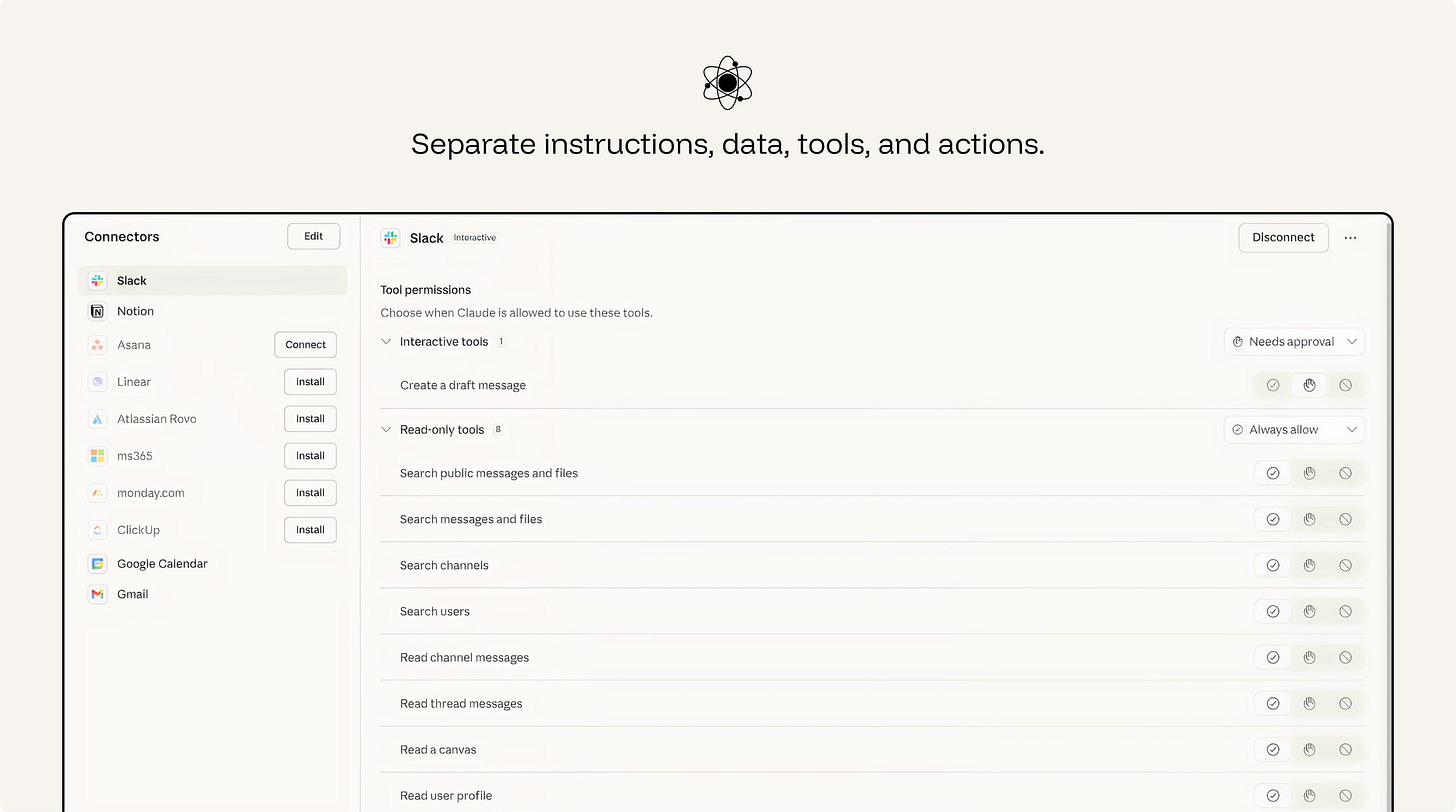
ex. Claude Connectors lets an AI assistant work with external systems such as email, calendars, documents, team chats, and developer tools. Permissions separate what the assistant can read from what it can do. In the Slack connector, read-only tools such as searching messages, reading threads, or viewing user profiles can be set to “Always allow,” while interactive tools such as creating a draft message can require approval.
Sustained reliance is about maintaining the conditions that make AI usable over time. The interface must continue to support clear feedback, visible progress, cost awareness, reliability measurement, regression testing, and accountable ownership.
Latency is part of the AI experience.
A slow response is not automatically a bad response, but an unexplained wait weakens confidence. Users need to know whether the system is working, searching, reasoning, waiting on a tool, or stuck.
Design the waiting state as part of the interaction. Stream output when useful. Show progress when the task has stages. Use status messages for retrieval, tool calls, file analysis, or agent steps. Provide a safe way to cancel or continue in the background when the wait is long.
The goal is not to decorate loading. It is to reduce uncertainty during the wait.
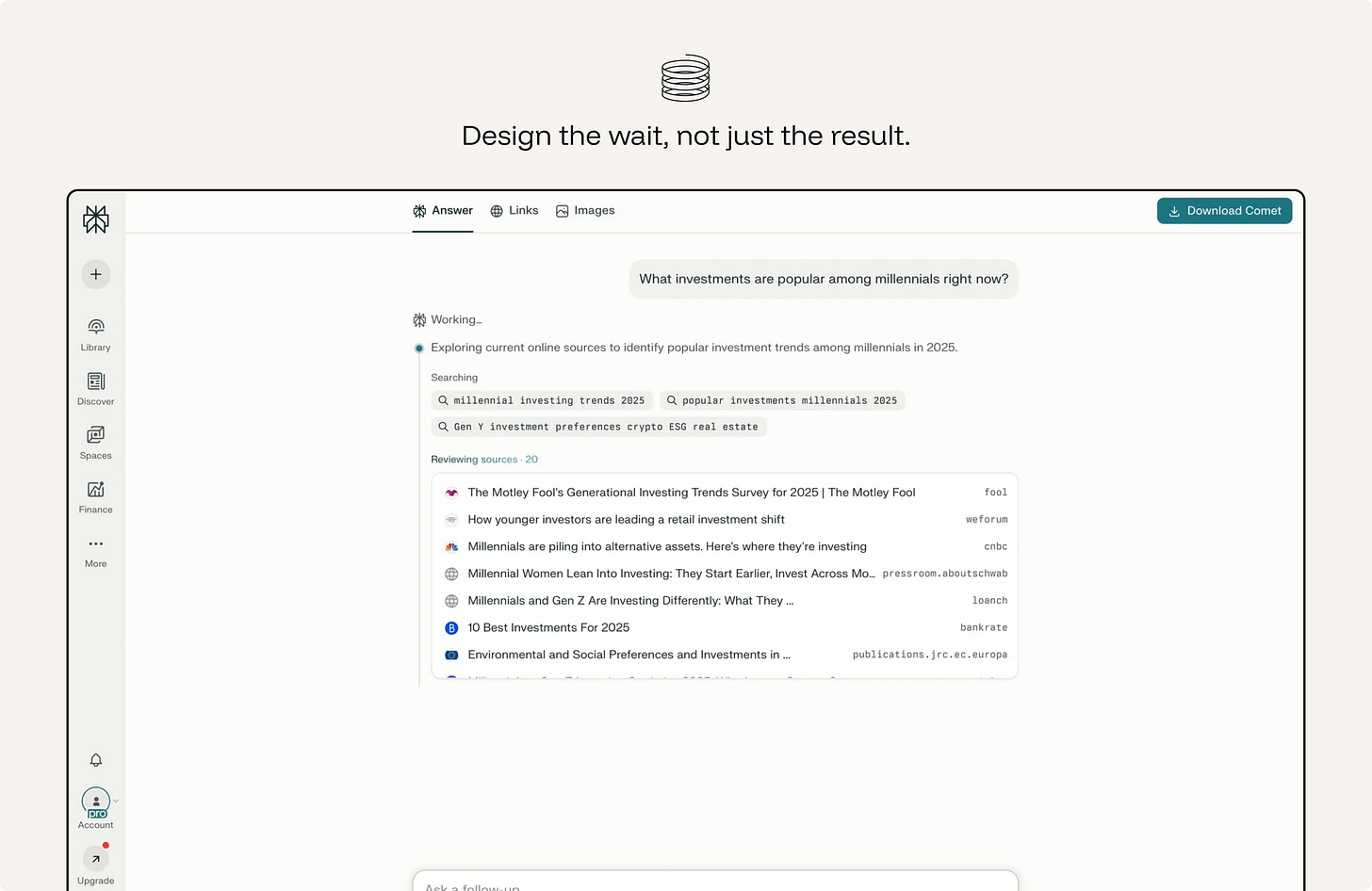
ex. Perplexity — instead of a spinner it shows the pipeline in stages (”Searching → Reading sources → Writing answer”) and lists the sources as it reads them, so the wait itself communicates what’s happening.
AI interactions can carry real cost: money, time, energy, rate limits, credits, or enterprise budget.
Users do not need to see the cost or tokens used everywhere. But when a design encourages repeated generation, large context use, multiple variations, long-running agents, or expensive tool calls, the cost should be visible enough to guide behavior.
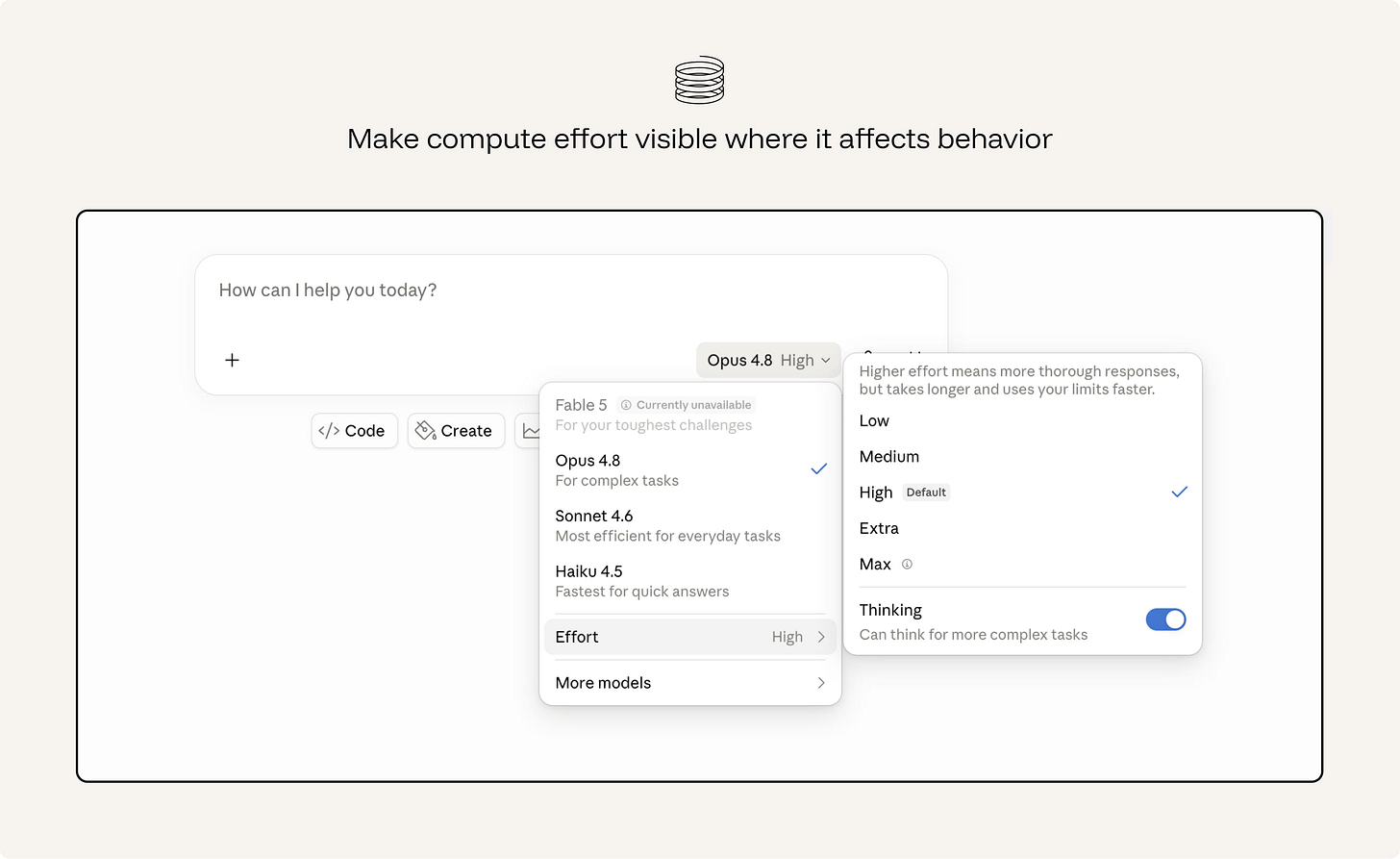
ex. Claude Effort control lets users choose how much compute the model should spend on a task. The interface explains the tradeoff directly: higher effort can produce more thorough responses, but it takes longer and uses limits faster. This makes compute cost visible only where it changes user behavior — choosing quick answers, deeper reasoning, or a more efficient model.
Usage does not prove that an AI feature is working well.
A high acceptance rate may mean the system is useful. It may also mean users are accepting output too quickly. A high regeneration rate may mean healthy exploration. It may also mean poor first-pass quality. A long session may mean engagement. It may also mean confusion, repair work, or dependency.
The goal is not to maximize every AI interaction metric. It is to understand whether reliance is healthy.
The model will be upgraded. Your interface contract shouldn't silently break when it is. Treat a model swap like a dependency upgrade, version the experience, pin behavior with evaluations, and regression-check the reliance metrics.
ex. Cursor Model selection lets teams choose which model powers a coding agent. This makes model changes visible and deliberate, so behavior can be tested before the agent writes or edits code differently.
No posts