
你可以定制自己的 Claude Code 了:改界面、拦住危险命令、逐步查看代码改动
把上下文读数放在输入框上方,在危险命令执行前查看影响,再按步骤复核一轮修改:三个官方例子讲清 Mods 的作用与写法。
在终端使用 Claude Code 编程时,不同开发者常有三种具体的工作需求:
- 随时查看关键读数:希望在输入框上方有一行常驻读数,直观确认当前上下文占用,而不用特意去查状态栏;
- 拦截让人不放心的命令:当准备执行清理、重置或迁移等高风险命令前,先停下来看清具体会触碰哪些文件,再决定是否放行;
- 按自己的习惯复核改动:在单轮涉及多处文件编辑后,能逐项查看每次修改的前后差异,而不是等全部改完再去翻零散的 Git diff。
此前,Claude Code 已经支持通过设置(settings)、权限规则(permission rules)、斜杠命令(slash commands)、技能(skills)和状态行来调整行为。在版本 2.1.287 或更高 中默认启用的 Mods 则更进一步:它允许通过 JavaScript 或 TypeScript 模块重写或替换部分行为,甚至绘制自定义 UI。
可以把它想成给 Claude Code 添几个你自己选的功能,想要什么,直接描述给 Claude:
- 输入框上方多一行用量:比如你可以这样描述需求:“在输入框上方加一行上下文用量,快满时变色,显示最近变化”。Claude 生成这个 Mod,你允许在当前会话热重载(保存代码即可生效)后,输入框上方就会出现一行每轮更新的用量显示;你若接着说“把暴风雨门槛从 75% 改成 70%”,保存修改后的代码,新的阈值就会生效。
- 删文件前,先看清会删什么:装上 Blast Radius 后,在执行删除
build目录前,界面会打开面板,列出将删除的文件和占用空间,等待你按下数字键选择 Proceed 继续或 Cancel 取消。 - 改完后,逐项看哪里变了:装上 Replay Theater 后,一轮交互改完多个文件,输入框上方就会出现回放提示;只需按下
r键或输入/replay,即可在侧边面板逐项翻看每次编辑前后的差异(diff)。看完关闭面板即可,文件保持修改后的状态。
在底层,Mod 本质上是包含在插件(Plugin)里的钩子,作为模块在会话中运行并接收各项事件。Anthropic 官方的部分能力(如侧边栏 /diff 面板与 AGENTS.md 规范支持)也是直接以 Mod 形式实现的。例如,内置的 /diff 功能现在就是一个 Mod,用户可以在 /plugin 中将其关闭,也可以替换成自己定制的版本;官方后续还计划将更多内置功能迁移为 Mod,让用户按需精简核心或扩展功能。
官方教程用约 80 行代码做出一个上下文用量显示条,再用两个案例展示命令拦截和修改回放。看懂这些例子,就能知道自定义工具需要接入哪些事件、保存哪些状态。
一、 核心概念:什么是 Mod?它和以前的 Hooks 有什么本质不同?
用一句话总结:Mod 本质上就是一个打包在 Plugin 里的 JavaScript/TypeScript 模块,在你的会话内常驻运行,接入 Claude Code 提供的事件,观察、改写输入或直接返回结果。
1. 它是如何运行的?
在文件结构上,Mod 依然遵循标准的 Claude Code Plugin 规范:
- 根目录有一个
.claude-plugin/plugin.json清单文件; - 在
hooks/hooks.json里通过modules字段指向具体的 JS/TS 文件; - 该模块导出一个
register(on, options)函数; - 在函数内部,通过
on(event, matcher?, hook)注册各种钩子。
每个钩子的基础代码骨架都长这样:
on("tool.call", { tool: "Bash" }, async ($, e, next) => {
  // $    代表 Mods API:提供 ui、session、state、store、fs、process、clock 等系统能力
  // e    本次事件的输入数据(纯数据对象)
  // next 把事件传递给下一个插件,最后传递给 Claude Code 本身
  return next(e);
});
2. 一个事件可以被观察、改写或直接回答
当一个事件触发时(例如 Claude 即将调用 Bash 执行一条命令),它会像 Express 或 Koa 的中间件一样,一层层流经你的 Mod、其他插件,最终到达 Claude Code 默认的执行器。
你的 Mod 在这个链条里,拥有三种截然不同的控制手段:
Observe:观察,保留原行为。 在对话轮次结束后读取输入 Token 数,或者记录 Claude 改过的文件。
const r = await next(e); // 先让后续链条执行
// 检查结果
return r;               // 原样返回
Rewrite:修改输入,再往下传。 比如替换命令参数,或在提交提示词时附加团队规范。后续插件和 Claude Code 收到修改后的数据。
return next({ ...e, command: saferCommand });
Answer:直接返回自己的结果。 比如拒绝一次工具调用,或处理一个斜杠命令。没有调用 next,事件就不会继续传到后续链条。
return { deny: "拒绝原因" }; // 不调用 next
事件链概念示意。切换方式,查看事件是否继续传递;这里不会运行任何命令。
- 工具调用事件原始输入 e
- 你的 Modawait next(e),等待结果
- 其他插件收到原始输入 e
- Claude Code执行原行为,结果沿链返回
观察:事件继续传递,Mod 读取结果后原样返回,不改变原行为。
改写:next(修改后的输入),后续插件与 Claude Code 收到新输入。直接回答:返回结果且不调用 next,后续链条不再执行。
3. Mod 与 Settings Hooks 的区别
Settings hook 在每个事件发生时运行一条 Shell 命令,并通过标准输入(stdin)和标准输出(stdout)传递 JSON 数据。
Mod 则在启动时加载一次并持续驻留在会话中:
- 保持状态:可以在整个会话期间保存内部状态;
- 界面与交互绘制:能够随着事件实时绘制和更新 UI,同时支持终端与桌面应用;除了自定义面板或提示外,还可以添加按钮与输入元素,并由其他 Mod 响应输入交互;
- 事件干预与改写:可以在提示词发送给模型前进行改写、拦截并重试工具调用、批准或拒绝权限请求,或者在模型读取工具输出前主动隐藏密钥(需要由 Mod 实现过滤规则);
- 回调能力:可以调用 Claude Code 的宿主能力,例如打开侧边面板(Pane)、运行进程、注册新的斜杠命令,或者注册供模型调用的自定义工具。
Mod 的运行时环境中没有浏览器 DOM,也没有 Node.js 全局对象,所有外部交互均通过 $ 对象提供的 API 进行。这种运行环境隔离不限制 Mod 对机器的访问,Mod 依然拥有与 Claude Code 完全相同的本地系统权限。
二、 80 行代码实战:手把手写一个“Token 天气预报”(Token Weather)
官方教程从零实现了一个名为 Token Weather 的 Mod:在每轮对话后读取上下文窗口的占用情况,并在输入框上方绘制一行信息,包括天气图标、占用百分比、当前读数占窗口上限的比例、最近轮次的小趋势图(火花图),以及上一轮新增的 Token 数量。
☀ Clear 18% of context 36.1k / 200k last turns ▁▂▃▄ ▲ +36.1k last turn
天气图标与文字仅根据当前占用比例进行映射,对应关系如下:
- 25% 以下:☀ Clear
- 25%–49%:☁ Cloudy
- 50%–74%:☂ Showers
- 75%–89%:☇ Storm
- 90% 及以上:↯ Compact soon
先试起来:描述需求,让 Claude 帮你写
Claude Code 内置了编写 Mod 的指引,可以按你的需求生成插件。在终端启动 claude,直接粘贴下面这段提示词:
Make me a Claude Code mod called token-weather: a live forecast of my context window, shown in the band above the prompt.

What it should show, on one line:
- A weather icon and word for how full the context window is: under 25% ☀ Clear (yellow), 25–49% ☁ Cloudy (cyan), 50–74% ☂ Showers (blue), 75–89% ☇ Storm (magenta), 90% and up ↯ Compact soon (red).
- The percentage used, then the tokens used out of the window, like "134.4k / 200k".
- A small chart of the last 12 turns, drawn with ▁▂▃▄▅▆▇█.
- How much the last turn added, like "▲ +98.3k last turn".

It should update after every turn.
Claude 会询问一次是否在当前会话开启热重载(Hot Reloading)。允许后,当该轮次结束,输入框上方就会出现这一行天气条。之后每次保存修改都会就地重载,可以直接让 Claude 进行微调(例如“把暴风雨门槛改成 70%”、“在末尾加上美元花费”)并实时查看变化。通过该捷径创建的 Mod 仅在当前会话中加载,其目录后续会被系统清理;如果想长期保留使用,需要将生成的目录复制出来,并按第 6 步的方式进行安装。
如果你想深入理解它的构造,或者亲手定制更复杂的功能,我们一步步拆解它的内部实现。
第 1 步:搭建插件目录结构
首先确认本地的 Claude Code 版本是否满足要求:
claude --version # 必须是 2.1.287 或更高版本
然后建立如下的标准目录:
token-weather/
├── .claude-plugin/
│   ├── plugin.json
│   └── types/            (每次加载时,Claude Code 会写入本版类型声明)
├── hooks/
│   ├── hooks.json
│   └── token-weather.mjs
├── types/
│   └── index.d.ts        (第 3 步声明插件状态类型)
└── tests/
    └── token-weather.test.ts
.claude-plugin/plugin.json 是标准的清单描述:
{
  "name": "token-weather",
  "version": "0.1.0",
  "description": "A live forecast of the context window, drawn above the prompt.",
  "author": { "name": "You" }
}
hooks/hooks.json 用来告诉 Claude Code 钩子脚本在哪里(一个 Mod 对应一个入口模块):
{
  "modules": ["./token-weather.mjs"]
}
第 2 步:在界面上画出第一行文字(UI 挂载与热重载)
Claude Code 的界面划分成了不同的组件区域。在输入框正上方有一块空地,叫做 AbovePrompt。默认情况下官方在这里什么都不画,正好适合我们放置常驻状态栏。
我们在 hooks/token-weather.mjs 里拦截 ui.render 事件:
// hooks/token-weather.mjs
export function register(on) {
  on("ui.render", { component: "AbovePrompt" }, ($, e, next) => {
    // UI 组件不能使用全局变量,必须通过 $.ui.resolve(e) 解析当前渲染环境下的构造函数
    const { Box, Text } = $.ui.resolve(e);
    return Box({
      paddingX: 1,
      children: [Text({ color: "yellow", bold: true, children: "☀  Clear skies" })],
    });
  });
}
特别注意:Mod 运行在沙箱里,
Box、Text等组件并不是全局可用的对象。因为 Claude Code 可能运行在纯终端字符界面,也可能运行在桌面图形客户端,不同的渲染宿主支持的组件略有差异。因此必须通过$.ui.resolve(e)动态获取当前环境下的组件工厂方法。
测试运行这个插件:
claude --plugin-dir ./token-weather
终端输入框上方会出现黄色的“☀ Clear skies”。保持会话开启,当修改并保存 token-weather.mjs 时,由于目录处于监视状态,代码会就地重载而无需重启会话。
第 3 步:采集真实数据与状态持久化($.state 与响应式渲染)
有了界面壳子,接下来要抓取真实的 Token 占用。
调用 $.session.usage() 可以拿到和状态栏完全一致的统计信息:
context.tokens:上一轮回答所依据的输入 Token 数;context.window:模型的上下文窗口上限(如 200k);context.percent:两者相除得出的占用百分比。
这个调用的开销非常低,因为除非你明确要求抓取详尽的细项分析(breakdown),否则它不会向远端发起额外的 Token 计算请求。
我们需要在会话刚启动(session.start)以及每一轮对话完成(turn.complete)时记录一次数据:
on("session.start", async ($, e, next) => {
  const result = await next(e);
  await takeReading($);
  return result;
});

on("turn.complete", async ($, e, next) => {
  const result = await next(e);
  if (!e.agentId) {
    await takeReading($); // 关键细节:只统计主会话,忽略子 Agent 产生的内部轮次
  }
  return result;
});
为什么不能用普通的模块变量存储历史?
定义模块顶层变量(如 let readings = [])看似直观,但在热重载时无法保留数据。热重载是一次全新的加载过程:register 会重新执行,session.start 也会再次触发,模块作用域变量会重新初始化。
正确做法是将历史记录保存在 $.state 中。它由宿主在会话期间统一维护,能够在热重载时保留数据。
// 声明保存在宿主中的状态 key
const readings = { plugin: "token-weather", key: "readings" };

async function takeReading($) {
  const { context } = await $.session.usage();
  if (!context?.window) return;
  const tokens = context.tokens ?? 0;
  const percent = context.percent ?? Math.round((tokens / context.window) * 100);

  // 从 $.state 取出旧记录,追加新记录并保留最近 12 轮
  const { value: history = [] } = await $.state.get(readings);
  await $.state.set(readings, [...history, { tokens, window: context.window, percent }].slice(-HISTORY));
}
类型契约与自动重绘机制
使用 $.state 时,Claude Code 要求在插件的类型契约中做显式声明。我们在 types/index.d.ts 中添加:
export type TokenWeatherReading = { tokens: number; window: number; percent: number };

declare module "claude-code" {
  interface PluginState {
    "token-weather": { readings: TokenWeatherReading[] };
  }
}
然后在 plugin.json 加上 "types": "./types/index.d.ts"。如果跳过这一步,claude plugin validate 会提示类型契约中缺少声明。
在 ui.render 钩子运行期间调用 $.state.get,宿主会自动建立对该状态的订阅。后续只要调用 $.state.set 更新状态,状态条就会自动重新绘制,无需手动调用 $.ui.invalidate。
第 4 步:完整组装——天气映射、火花线与趋势展示
现在把所有逻辑拼合到一起。下面是 hooks/token-weather.mjs 的完整源码:
// Token Weather: 输入框上方的上下文窗口实时天气预报
const HISTORY = 12;
const BARS = "▁▂▃▄▅▆▇█";
const FORECAST = [
  { upTo: 25, icon: "☀", word: "Clear", color: "yellow" },
  { upTo: 50, icon: "☁", word: "Cloudy", color: "cyan" },
  { upTo: 75, icon: "☂", word: "Showers", color: "blue" },
  { upTo: 90, icon: "☇", word: "Storm", color: "magenta" },
  { upTo: Infinity, icon: "↯", word: "Compact soon", color: "red" },
];

const readings = { plugin: "token-weather", key: "readings" };

export function register(on) {
  on("session.start", async ($, e, next) => {
    const result = await next(e);
    await takeReading($);
    return result;
  });

  on("turn.complete", async ($, e, next) => {
    const result = await next(e);
    if (!e.agentId) {
      await takeReading($);
    }
    return result;
  });

  on("ui.render", { component: "AbovePrompt" }, async ($, e, next) => {
    const { value: history = [] } = await $.state.get(readings);

    // 礼貌让位:如果当前有官方满意度调查,或者没有历史读数,把该区域交回给官方默认行为
    if (e.props.hasSurvey || history.length === 0) {
      return next(e);
    }
    const { Box, Text } = $.ui.resolve(e);
    return band(Box, Text, history, e.props.bodyColumns);
  });
}

async function takeReading($) {
  const { context } = await $.session.usage();
  if (!context?.window) return;
  const tokens = context.tokens ?? 0;
  const percent = context.percent ?? Math.round((tokens / context.window) * 100);
  const { value: history = [] } = await $.state.get(readings);
  await $.state.set(readings, [...history, { tokens, window: context.window, percent }].slice(-HISTORY));
}

function band(Box, Text, history, columns) {
  const now = history[history.length - 1];
  const f = FORECAST.find((b) => now.percent < b.upTo);
  const parts = [
    Text({ color: f.color, bold: true, children: `${f.icon}  ${f.word}` }),
    Text({ children: `  ${now.percent}% of context` }),
    Text({ dimColor: true, children: `  ${short(now.tokens)} / ${short(now.window)}` }),
  ];

  // 响应式自适应:如果终端可用宽度大于等于 60 列,才展示火花图和增量走势
  if (columns >= 60) {
    parts.push(Text({ dimColor: true, children: "   last turns " }));
    parts.push(Text({ color: f.color, children: sparkline(history) }));
    if (history.length > 1) {
      parts.push(Text({ dimColor: true, children: trend(history) }));
    }
  }
  return Box({ flexDirection: "row", paddingX: 1, children: parts });
}

// 用 Unicode 单字符高度块拼接最近 12 轮的微型趋势图
function sparkline(history) {
  const top = Math.max(...history.map((r) => r.tokens), 1);
  return history.map((r) => BARS[Math.floor((r.tokens / top) * (BARS.length - 1))]).join("");
}

// 计算本轮相对于上一轮的 Token 增减量
function trend(history) {
  const delta = history[history.length - 1].tokens - history[history.length - 2].tokens;
  if (delta === 0) return "  steady";
  return delta > 0 ? `  ▲ +${short(delta)} last turn` : `  ▼ ${short(-delta)} last turn`;
}

function short(n) {
  if (n >= 1_000_000) return `${+(n / 1_000_000).toFixed(1)}M`;
  if (n >= 1_000) return `${+(n / 1_000).toFixed(1)}k`;
  return String(n);
}
这段代码里值得学习的 3 个工程细节:
- 从
e.props获取组件属性:e.props.hasSurvey会告诉你官方是否有调查问卷正在占用该栏位,如果有,直接执行return next(e)让位;e.props.bodyColumns代表当前终端这一行的真实可用列宽(比如旁边开了 diff 面板时,可用宽度会变窄)。 - 不画东西时一定要调用
return next(e): 不要返回null或空节点,调用next(e)能把控制权交还给其他插件和官方行为。 - 坚持使用单宽字符,避免使用 Emoji:
代码中使用了
☀ ☁ ☂ ☇ ↯和▁▂▃▄▅▆▇█。在终端中,复杂的 Emoji 经常会出现双字宽、字形截断甚至把光标错位的问题,而标准的单宽字符在所有终端等宽字体下都能对齐。
第 5 步:插件自检与自动化测试
Claude Code 提供了插件校验和测试命令,用于检查声明、调用与实际表现。
静态校验:claude plugin validate
运行 claude plugin validate ./token-weather,它会静态扫描你的模块:
$ claude plugin validate ./token-weather
  > types ./types/index.d.ts declares state: token-weather.readings
  > ./token-weather.mjs hooks: session.start, turn.complete, ui.render{component=AbovePrompt}
  > ./token-weather.mjs calls: $.session.usage (via takeReading), $.state.get, $.state.set (via takeReading), $.ui.resolve
  > ./token-weather.mjs state writes: token-weather.readings
  > ./token-weather.mjs state reads: token-weather.readings
√ Validation passed
它能清晰列出你监听了什么事件、调用了哪些 API、读写了什么状态,状态是否经过 TypeScript 类型契约声明。
单元测试:claude plugin test
Mod 可以编写自动化测试。测试脚本直接在真正的 Claude Code 运行时环境中执行。测试里通过 on 注册的钩子会自动排在你的 Mod 后面,正好用来 Mock(模拟)官方的接口返回值:
// tests/token-weather.test.ts
import { describe, expect, test } from "claude-code/testing";

describe("token-weather", () => {
  test("天气条能够随上下文增长正确切换", async ($, on) => {
    let tokens = 36_100;
    // 模拟会话环境与 Token 用量
    on("session.start", ($, e) => ({ cwd: e.cwd }));
    on("session.usage", () => ({
      value: { startedAt: 0, rateLimits: [], context: { tokens, window: 200_000, percent: Math.round(tokens / 2_000) } },
    }));
    on("turn.complete", () => ({ text: "" }));

    await $.session.start({ surface: "terminal", isInteractive: true, cwd: "/work" } as any);
    const ui = await $.ui.mount({
      plugin: "token-weather",
      surface: "terminal",
      component: "AbovePrompt",
      props: { hasSurvey: false, isWorking: false, maxRows: 10, bodyColumns: 120 },
    } as any);

    // 初始状态:36.1k / 200k (18%),应展示 Clear
    expect(await ui.find({ type: "Text", text: /Clear/ })).toBeDefined();

    // 模拟第二轮对话:Token 增长到 134.4k (67%)
    tokens = 134_400;
    await $.turn.complete({ reason: "answer", answer: "ok", durationMs: 1 } as any);

    // 验证 UI 自动响应式刷新,无需手动触发 invalidate
    expect(await ui.find({ type: "Text", text: /Showers/ })).toBeDefined();
    expect(await ui.find({ type: "Text", text: /67% of context/ })).toBeDefined();
    expect(await ui.find({ type: "Text", text: /▲ \+98\.3k last turn/ })).toBeDefined();

    await ui.unmount();
  });
});
在官方示例测试中,claude plugin test ./token-weather 验证了输入框上方的状态行能随 Token 增长与轮次完成正确更新文本,同时也验证了第 3 步中的自动重绘机制:在 turn.complete 触发后,无需 Mod 手动请求重绘即可完成界面更新。
第 6 步:分享与安装
Mod 本身就是标准的 Claude Code 插件,因此分发方式完全一致。可以创建一个包含 .claude-plugin/marketplace.json 的目录或代码仓库作为市场:
{
  "name": "my-mods",
  "owner": { "name": "You" },
  "plugins": [{ "name": "token-weather", "source": "./token-weather" }]
}
对于本地插件目录,可通过 CLI 命令添加市场并安装:
claude plugin marketplace add ./my-mods
claude plugin install token-weather@my-mods --scope user
如果将 Mod 与市场配置存放在 GitHub 仓库中,其他用户可以在 Claude Code 会话中通过三条命令完成安装:
/plugin marketplace add your-org/my-mods
/plugin install token-weather@my-mods
/reload-plugins
执行重载后 Mod 便会生效;如果未正常显示,可以重启 Claude Code。
Mods API 可能会随版本更新发生变化。每次 Claude Code 加载 Mod 时,都会向 .claude-plugin/types/ 写入当前版本对应的类型声明文件,本地编码和校验应以这套声明为准。此外,包含 Mod 的插件也可以提交至官方插件目录:claude.ai/directory/manage。
三、 进阶拆解:官方两个高阶 Mod 还能怎么玩?
Token Weather 只是一个“只读并画图”的轻量 Mod。官方教程紧接着展示了两个更强大的 Mod,全面展示了事件拦截、弹窗交互以及复杂数据流的处理。
案例 1:Blast Radius(高危命令预演与拦截)
当 Claude 准备调用 Bash 执行 rm -rf、git reset --hard、git clean、强制推送(force push)或数据库迁移(database migration)时,Blast Radius 会暂停这次调用。它会先分析命令具体会触碰哪些文件,并打开一个包含 Proceed 与 Cancel 选项的确认面板。按 2 会向 Claude 返回拒绝原因,按 1 则放行命令继续执行。
该 Mod 注册了三个钩子:针对 Bash 的 tool.call,以及针对 Pane 和 AbovePrompt 的 ui.render。其核心逻辑属于前文提到的“Answer(接管/拦截)”机制:
on("tool.call", { tool: "Bash" }, async ($, e, next) => {
  const risk = classify(String(e.command ?? ""));
  if (risk === null) return next(e); // 未被分类器识别的命令正常放行

  const report = await measure($, risk, await $.session.cwd()); // dry-run:git status, git clean -n, du, ...
  held = { command: e.command, risk, report, decision: null };
  const opened = await $.ui.open({ id: "blast-radius", title: "Blast Radius", focus: true });
  if (!opened.isPlaced) held.where = "band"; // 终端宽度不足以停靠侧边面板:降级到输入框上方绘制

  while (held.decision === null && !next.signal.aborted) {
    await $.process.run(["sleep", "0.25"]); // 等待用户操作
  }
  if (held.decision === "proceed") return next(e); // 用户确认:放行
  return { deny: `Blast Radius held this command: the user pressed Cancel. It would have: ${report.summary}.` };
});
核心机制与设计考量:
- 使用
$.process.run搭配参数数组执行预演(dry-run): 影响报告来自工具自身提供的命令(如git status --porcelain、git clean -n、git log HEAD..origin/main、showmigrations)。参数通过 argv 数组传入,路径中的内容不会被当作 Shell 代码解析。 - 等待时间如何计算:
每个钩子派发自身拥有 10 秒执行时间限制,但在
$API 调用内部等待的时间(例如这里的sleep进程)不计入钩子自身的时间限制。循环等待直到按钮触发决策,或者在next.signal.aborted(如用户按 Esc)时退出循环。 - 按钮支持多种交互方式:
Button({ label: "Proceed", hotkey: "1", onPress })支持鼠标点击、Tab 选中后回车(Enter),或者直接按数字键1和2。 - 降级到输入框上方绘制:
当终端宽度足够时,面板会停靠在转录区右侧;当
$.ui.open返回isPlaced: false(例如在 120 列终端下宽度不足以停靠侧边面板)时,相同的报告会降级绘制在输入框上方。

Blast Radius 能在执行前展示影响、让用户决定是否放行。它依赖命令文本匹配,因此 $(…)、命令别名(alias)或内部调用 rm 的脚本可以绕过该检查。如需对高危操作进行硬性阻止(hard block),仍需使用 Claude Code 的原生权限规则(Permission Rules)。
案例 2:Replay Theater(单轮改动逐项复盘)
在单轮对话中,Replay Theater 记录每一次 Edit 和 Write 工具调用所涉及的文件及修改前后的文本。当轮次结束时,输入框上方会显示提示;按 r(或输入 /replay)即可打开面板,单步查看每一次编辑的 diff。面板提供了数字步骤条以及 Prev、Next 和 Close 按钮。
该工具仅用于回放和复盘改动,并不执行代码回滚,关闭面板也不会更改任何文件。
它完全不阻拦也不篡改编辑,属于纯观察(Observe)钩子:
on("tool.call", async ($, e, next) => {
  if (EDIT_TOOLS.has(e.tool)) state.pending.push(...(await stepsFor($, e))); // 旧/新文本生成 diff
  return next(e);                                                             // 编辑原样执行
});

on("turn.start", ($, e, next) => { if (!e.agentId) state.pending = []; return next(e); });

on("turn.complete", async ($, e, next) => {
  const r = await next(e);
  if (!e.agentId && state.pending.length) state.replay = state.pending;       // 每轮生成一组回放
  return r;
});

on("session.start", async ($, e, next) => {
  const r = await next(e);
  await $.command.register({ name: "replay", description: "Step through the last turn's file edits" });
  return r;
});
on("command.run", { command: "replay" }, async ($, e) => ({ text: (await openReplay($)) ? "Replaying" : "No edits" }));
核心机制与实现细节:
- 配对事件组织生命周期:
turn.start与turn.complete将编辑划分到单轮中,并通过检查!e.agentId排除子 Agent 产生的内部轮次。 - 注册斜杠命令:在
session.start中调用$.command.register注册命令,并在command.run钩子中响应处理。 - 写入前读取旧内容:对于 Write 操作,在实际写入前通过
$.fs.read读取旧内容,从而计算出修改前后的真实 diff。 - 布局由渲染宿主决定:在全屏终端下,面板停靠在右侧;在 80 列宽度终端下,则内联在输入框上方打开,Mod 内部返回相同的组件树。

四、 编写 Mod 值得注意的 4 个习惯
结合官方实现,有 4 个开发习惯值得参考:
- 参考系统自动生成的类型定义:
每当 Claude Code 加载 Mod 时,都会将当前构建版本的类型声明写入
.claude-plugin/types/。事件字段、$上的 API 方法以及 UI 元素支持的属性,都可以直接查看该目录。 - 从
e.props获取组件属性: 在ui.render事件中,只有e.component、e.surface、e.requestId和e.viewport位于e顶层;具体的布局与业务参数(如bodyColumns、hasSurvey)均在e.props中。 - 针对热重载规划数据存储:
每次保存代码触发热重载时,
register与session.start都会重新执行。需要在会话内跨重载保留的数据应放入$.state,避免仅保存在模块顶层变量中。 - 界面未显示时检查调试日志:
如果组件未按预期渲染,可以启动
claude --debug查看输出,排查钩子返回的组件树是否存在未通过校验的情况。
五、 扩展思路与安全考量
Token Weather、Blast Radius 和 Replay Theater 分别解决了三个具体问题:上下文用了多少、高危命令即将修改什么,以及上一轮具体改动了哪些代码。在实际开发中,官方也给出了几个可以继续探索的方向:
- 成本与用量监控:结合
$.session.usage()与$.ui.status,在状态行展示花费或速率限制情况; - 提示词约定注入:通过
prompt.submit钩子,在提交前为提示词附加团队协作规范; - 已读文件列表:在面板中列出会话内读取过的文件,形成直观的上下文地图;
- 长轮次完成提醒:利用
$.ui.toast,在耗时较长的轮次结束时弹出 toast 提示; - 命令调用守卫:针对生产环境上下文(如
kubectl生产集群配置或terraform apply)定制特定的tool.call拦截规则。
团队用途与集中管控
除了个人开发者的效率定制,Mod 也能为团队与企业级工程提供统一规范与安全管控:
- CI/CD 状态显示:在对话侧边面板实时展示流水线构建状态,并随构建成功或失败动态更新,无需频繁切换到网页端查看;
- 生产配置操作前确认:在任何可能触碰生产配置的命令执行前增加二次确认面板,让操作者看清影响后再决定是否执行;
- 最先加载 Mod 做调用审计:由于事件链条中最先加载的 Mod 会最早接收到事件并最晚看到执行结果,团队可以把审计 Mod 配置在首位加载,记录其他 Mod 的调用。
在组织管理方面,因为 Mod 均打包在插件中分发,企业现有的插件管控规则完全适用:
- 管理后台与托管设置:在 Team 和 Enterprise 订阅中,组织所有者可以直接在管理后台(admin console)统一允许或拦截插件市场;在 Claude API 或第三方 API 方案中,管理员则可以通过向用户设备下发托管设置(managed settings)进行集中管理;
- 内置安全默认 Mod(
sec-default):在 Team、Enterprise 订阅以及任何应用了托管设置的机器上,系统会默认最先加载名为sec-default(security default)的内置 Mod。它的核心作用是约束用户自行安装的 Mod,防止它们执行高危越权操作,例如限制用户通过 Mod 覆盖企业预设的权限拒绝规则(permission deny rules); - 管理员自定义列表时的保留要求:管理员也可以选择让企业自研的 Mod 最先加载以实现自定义管控;但如果管理员指定了自己的 Mod 优先加载,需要将
sec-default显式保留在列表中,才能保留它的限制。
安全与信任边界
理解 Mod 的安全性,需要区分运行环境与系统权限两个层面:
在运行环境上,Mod 的执行环境中没有浏览器 DOM,也没有 Node.js 全局对象,所有外部交互均需通过 $ 对象的 API 进行。但这种运行环境的隔离并不意味着对本地机器的访问受到沙箱限制——Mod 在本地设备上运行,具备与 Claude Code 完全相同的系统权限。
因此,安装第三方 Mod 时应遵循与安装软件包相同的原则:代码由发布者编写,安装前先阅读仓库源码,仅安装来自可信来源的 Mod;在主动执行安装命令前,系统不会自动加载外部 Mod。
同时,这并不意味着 Mod 在组织内不受任何控制。在企业与团队环境中,管理员依然可以通过管理后台禁用不可信市场、利用托管设置下发策略,并通过排在最前方的 sec-default 与审计 Mod 对行为进行约束与留痕。
一个 Mod 可以从一个具体需求开始:把常查的数据放在手边,把执行前的影响列出来,或者按自己习惯复核一次修改。事件负责告诉它什么时候行动,状态负责记住数据,界面负责让你看见并操作。
你可以定制自己的 Claude Code 了:改界面、拦住危险命令、逐步查看代码改动
在终端使用 Claude Code 编写代码时,开发者经常面临三大痛点:无法直观掌控上下文 Token 消耗、难以防止 rm -rf 等破坏性命令误执行、以及多文件批量编辑后难以逐项复查 diff。此前可以用设置、权限规则、命令和技能调整行为;Mods 进一步让模块在会话内持续运行,更新自定义界面并介入事件处理。
从 2.1.287 版本起,Claude Code 正式内置并默认启用了 Mods(模块扩展体系)。它不再是单次触发的 Shell 钩子,而是常驻在会话进程中的完整 JS/TS 模块,让开发者像写中间件一样改写命令、挂载界面并构建安全防线。
核心机制:事件驱动的中间件控制链
每个 Mod 都打包在标准的 Claude Code 插件中,向外暴露 register(on) 入口。当 Claude Code 触发工具调用、轮次完成或 UI 渲染时,事件会像 Express 或 Koa 中间件一样逐层流经每个已加载的 Mod。
($, e, next):$ 提供系统能力,e 为事件载荷,next 传递给下个插件或原生执行器return r;
command: saferCmd });
deny: "拒绝执行" };
register。需要在会话内跨热重载保留的历史,不应只放在模块顶层变量中;应通过 $.state.get / set 交由宿主保管,并在 types/index.d.ts 中显式声明扩展类型。
落地范式:从状态预报到高危阻断与单步复盘
官方教程通过三个具体案例,展示了界面读数、执行前确认和编辑后复核:
拦截 rm -rf、git reset --hard 与数据库迁移:注册 tool.call 拦截 Bash,利用 $.process.run 传入参数数组执行预演(dry-run,如 git status --porcelain),避免路径被当作 Shell 代码解析;随后打开交互面板,支持按键 1 Proceed 放行或 2 Cancel 阻断。
!opened.isPlaced)时,自动从侧边 Pane 降级在输入框上方(AbovePrompt)内联展开,让窄终端也能显示报告与确认选项。
单轮多文件修改前后对照:通过 Observe 模式监听 Edit/Write 工具调用;在写入前用 $.fs.read 记录旧文件内容,启动会话时注册 /replay 命令;轮次结束后按 r 或输入该命令,单步查看每一次编辑生成的差异(diff),只查看,不回滚;关闭面板后文件保持修改后的状态。
约 80 行代码的上下文气象站:监听 turn.complete 并调用 $.session.usage();在 AbovePrompt 挂载天气图标(☀/☁/☂/☇/↯)与 Unicode 单宽火花线(▁▂▃▄▅▆▇█),通过 $.state 响应式触发重绘且避开双宽 Emoji 排版抖动。
从一个需求试起来
先确认 claude --version 为 2.1.287+,再直接告诉 Claude:“在输入框上方加一行上下文用量,快满时变色,显示最近变化”。Claude 生成 Mod 后,允许当前会话热重载,保存代码即可看到变化。
.claude-plugin/types/ 的当前类型声明为准。安全与信任边界:隔离沙箱不等于系统受限
理解 Mod 的安全性,必须分清运行环境隔离与系统访问权限两个截然不同的维度:
$ 对象 API(如 $.fs、$.process、$.ui)。组件树必须通过 $.ui.resolve(e) 动态获取,不能访问浏览器 DOM。sec-default 内置 Mod,限制用户 Mod 覆盖企业预设的权限拒绝规则。企业自研审计 Mod 若优先加载,必须在列表中显式保留 sec-default 才能维持安全基线。
Getting started with Claude Code mods
Mods are hooks that ship inside plugins and run inside your Claude Code session. Build one from an empty folder, then tour two larger mods.
Claude Code already lets you change a lot about how it behaves: settings, permission rules, slash commands, skills and a status line. Mods go further. Mods can rewrite or replace what Claude Code does, and can even draw custom UI. Under the hood, mods are hooks, and they ship inside plugins. Each one is a small JavaScript or TypeScript module that runs inside your session and sees every event as it happens.
That makes mods a way to fit Claude Code to how you work. You can add a readout you check all the time, put a guard in front of the commands that make you nervous, or build a review view for how you like to read changes.
This guide builds one mod from an empty folder, Token Weather, a live forecast of the context window drawn above the prompt. It's about 80 lines. Then it tours two larger mods, Blast Radius and Replay Theater, to show what else the API can do.

Claude Code 2.1.287 or later. Mods are on by default, so there's nothing to turn on. The API can change between releases. Each time Claude Code loads a mod, it writes the type declarations for your build into the mod's .claude-plugin/types/ folder, and those are the authority for your version.
HOW A MOD WORKS
A mod is a Claude Code plugin whose behavior lives in a JavaScript or TypeScript module:
- The folder is a normal plugin, with a
.claude-plugin/plugin.jsonmanifest. hooks/hooks.jsonnames one module undermodules.- The module exports
register(on, options). Inside it,on(event, matcher?, hook)adds a hook.
Every hook has the same shape:
CODEJavaScript
on("tool.call", { tool: "Bash" }, async ($, e, next) => {
  // $    the mods API: ui, session, state, store, fs, process, clock, http, tool, command, model, ...
  // e    this event's input, as plain data
  // next passes e to the other plugins and then to Claude Code's own behavior
  return next(e);
});
Hooks form a chain, like middleware. Yours runs, next(e) hands the event to the next plugin, and at the bottom Claude Code does what it would have done anyway. A hook can do one of three things:
| Move | How | Example |
|---|---|---|
| Observe | const r = await next(e); /* look */ return r | Record every file edit. Take a reading after each turn. |
| Rewrite | return next({ ...e, command: safer }) | Change what the rest of the chain sees. |
| Answer | return { deny: "…" } without calling next | Refuse a tool call. Serve a command or a tool yourself. |
The events cover tool calls, the prompt as submitted, turns starting and finishing, the session starting and ending, slash commands, and ui.render: every piece of the interface as it's drawn. The module runs in a sandbox of its own, with no DOM and no Node, so everything outside it goes through $.
How this differs from settings hooks. A settings hook runs a shell command for each event and passes JSON over stdin and stdout. A mod is loaded once and stays in the session. It can keep state, draw UI that updates as events happen, and call back into Claude Code: open a pane, run a process, register a slash command, or register a tool the model can call.
Claude Code uses them itself. Some of Claude Code's own features are built as mods, including AGENTS.md support and the /diff pane beside the conversation. Their source, with tests, is in the public anthropics/claude-code repository under mods/, so you can read how the team builds them.
BUILD YOUR FIRST MOD: TOKEN WEATHER
Token Weather reads how full the context window is after each turn and draws one line above the prompt: a weather icon, the percentage, the tokens used out of the window, a small chart of recent turns, and how much the last turn added.
| Used | Forecast |
|---|---|
| under 25% | ☀ Clear |
| 25–49% | ☁ Cloudy |
| 50–74% | ☂ Showers |
| 75–89% | ☇ Storm |
| 90% and up | ↯ Compact soon |
Here it is in a real session. Each turn reads more files, and the band fills from ☀ Clear to ☂ Showers to ☇ Storm:
The shortcut: let Claude build it
You can skip the six steps. Claude Code knows how to write mods, so you can describe the one you want and let it do the work. Start a session with claude and paste the prompt below:
CODEText
Make me a Claude Code mod called token-weather: a live forecast of my context window, shown in the band above the prompt.

What it should show, on one line:
- A weather icon and word for how full the context window is: under 25% ☀ Clear (yellow), 25–49% ☁ Cloudy (cyan), 50–74% ☂ Showers (blue), 75–89% ☇ Storm (magenta), 90% and up ↯ Compact soon (red).
- The percentage used, then the tokens used out of the window, like "134.4k / 200k".
- A small chart of the last 12 turns, drawn with ▁▂▃▄▅▆▇█.
- How much the last turn added, like "▲ +98.3k last turn".

It should update after every turn.
Claude asks once whether to turn on hot reloading for the session. Allow it, and the band appears above the prompt when Claude's turn ends. From then on, every change reloads in place, so you can keep asking for tweaks ("make Storm start at 70%", "add the dollar cost at the end") and watch the band change. The mod loads only in this session, and its folder is cleaned up later, so to keep it, copy the folder out and install it like any plugin (Step 6).
Notice that the prompt only describes what you want to see. You don't need to know the API to write one. Claude Code's built-in guide for writing mods covers the how: where to keep state so it survives a reload, how to check the plugin with claude plugin validate, and which events to hook. Change the "What it should show" lines and it's your mod, not ours.
If you'd rather see how it's put together first, or want to check what Claude wrote, read on.
Step 1: Create the folder
Check that your Claude Code is new enough:
CODEShell
claude --version # 2.1.287 or laterCreate this layout:
CODEText
token-weather/
├── .claude-plugin/
│   ├── plugin.json
│   └── types/            (written by Claude Code when it loads the mod)
├── hooks/
│   ├── hooks.json
│   └── token-weather.mjs
├── types/
│   └── index.d.ts        (added in step 3)
└── tests/
    └── token-weather.test.ts   (added in step 5)
.claude-plugin/plugin.json is a standard plugin manifest:
CODEJSON
{
  "name": "token-weather",
  "version": "0.1.0",
  "description": "A live forecast of the context window, drawn above the prompt.",
  "author": { "name": "You" }
}
hooks/hooks.json points at the module. A mod has exactly one:
CODEJSON
{
  "modules": ["./token-weather.mjs"]
}
Step 2: Draw something
The band directly above the prompt is a component called AbovePrompt. Claude Code draws nothing there itself, so it's a good first target. Hook its ui.render event and return a tree of elements:
CODEJavaScript
// hooks/token-weather.mjs
export function register(on) {
  on("ui.render", { component: "AbovePrompt" }, ($, e, next) => {
    const { Box, Text } = $.ui.resolve(e);
    return Box({
      paddingX: 1,
      children: [Text({ color: "yellow", bold: true, children: "☀  Clear skies" })],
    });
  });
}
The elements aren't globals. $.ui.resolve(e) returns the constructors for the surface being drawn, because each surface Claude Code draws on supports a slightly different set. JSX works too, with h as the factory.
Start a session with the plugin loaded:
CODEShell
claude --plugin-dir ./token-weather"☀ Clear skies" appears above the prompt. Keep the session open. The folder is watched, so every save reloads the module in place, with no restart. That quick feedback loop is most of what makes mods fun to write.
Tip: Once you know the shape, describe the next mod to Claude the way the shortcut does. It writes the plugin to a folder that hot-reloads in the same session.
Step 3: Read real numbers and keep them in $.state
$.session.usage() returns the same figures as the status line. context.tokens is the input the last response was answered over, context.window is the model's window, and context.percent is one over the other. The call is free: it only sends a token-count request if you ask for a breakdown.
Take a reading when the session starts and after every turn:
CODEJavaScript
on("session.start", async ($, e, next) => {
  const result = await next(e);
  await takeReading($);
  return result;
});

on("turn.complete", async ($, e, next) => {
  const result = await next(e);
  if (!e.agentId) {
    await takeReading($); // main-loop turns only, not subagents
  }
  return result;
});
Both hooks call next(e) first and then observe. Neither one changes what happens.
Where to keep the readings. A module-level let readings = [] looks like the obvious choice, but a hot reload is a fresh load: register runs again, session.start fires again, and module variables start over. Put the history in $.state instead. It holds named values in the host for the whole session, and they survive reloads.
CODEJavaScript
// Held by the host, so the history survives a hot reload of this file.
const readings = { plugin: "token-weather", key: "readings" };

async function takeReading($) {
  const { context } = await $.session.usage();
  if (!context?.window) return;
  const tokens = context.tokens ?? 0;
  const percent = context.percent ?? Math.round((tokens / context.window) * 100);
  const { value: history = [] } = await $.state.get(readings);
  await $.state.set(readings, [...history, { tokens, window: context.window, percent }].slice(-HISTORY));
}
A state value is declared in the plugin's type contract, which is a small .d.ts file the manifest points to. Add types/index.d.ts:
CODETypeScript
export type TokenWeatherReading = { tokens: number; window: number; percent: number };

declare module "claude-code" {
  interface PluginState {
    "token-weather": { readings: TokenWeatherReading[] };
  }
}
Then add "types": "./types/index.d.ts" to plugin.json. If you skip this step, claude plugin validate stops you with an error that names the fix: token-weather.readings is not declared: the manifest's types contract must name it in interface PluginState { … }.
In return, you get redraws for free. A $.state.get made while a render hook runs subscribes that drawing, so every later $.state.set redraws the band. You never call $.ui.invalidate.
Step 4: Draw the forecast
Here is the whole module:
CODEJavaScript
// Token Weather: a live forecast of the context window, above the prompt.

const HISTORY = 12;
const BARS = "▁▂▃▄▅▆▇█";
const FORECAST = [
  { upTo: 25, icon: "☀", word: "Clear", color: "yellow" },
  { upTo: 50, icon: "☁", word: "Cloudy", color: "cyan" },
  { upTo: 75, icon: "☂", word: "Showers", color: "blue" },
  { upTo: 90, icon: "☇", word: "Storm", color: "magenta" },
  { upTo: Infinity, icon: "↯", word: "Compact soon", color: "red" },
];

// Held by the host, so the history survives a hot reload of this file.
const readings = { plugin: "token-weather", key: "readings" };

export function register(on) {
  on("session.start", async ($, e, next) => {
    const result = await next(e);
    await takeReading($);
    return result;
  });

  on("turn.complete", async ($, e, next) => {
    const result = await next(e);
    if (!e.agentId) {
      await takeReading($); // main-loop turns only, not subagents
    }
    return result;
  });

  on("ui.render", { component: "AbovePrompt" }, async ($, e, next) => {
    const { value: history = [] } = await $.state.get(readings);
    if (e.props.hasSurvey || history.length === 0) {
      return next(e);
    }
    const { Box, Text } = $.ui.resolve(e);
    return band(Box, Text, history, e.props.bodyColumns);
  });
}

async function takeReading($) {
  const { context } = await $.session.usage();
  if (!context?.window) return;
  const tokens = context.tokens ?? 0;
  const percent = context.percent ?? Math.round((tokens / context.window) * 100);
  const { value: history = [] } = await $.state.get(readings);
  await $.state.set(readings, [...history, { tokens, window: context.window, percent }].slice(-HISTORY));
}

function band(Box, Text, history, columns) {
  const now = history[history.length - 1];
  const f = FORECAST.find((b) => now.percent < b.upTo);
  const parts = [
    Text({ color: f.color, bold: true, children: `${f.icon}  ${f.word}` }),
    Text({ children: `  ${now.percent}% of context` }),
    Text({ dimColor: true, children: `  ${short(now.tokens)} / ${short(now.window)}` }),
  ];
  if (columns >= 60) {
    parts.push(Text({ dimColor: true, children: "   last turns " }));
    parts.push(Text({ color: f.color, children: sparkline(history) }));
    if (history.length > 1) {
      parts.push(Text({ dimColor: true, children: trend(history) }));
    }
  }
  return Box({ flexDirection: "row", paddingX: 1, children: parts });
}

function sparkline(history) {
  const top = Math.max(...history.map((r) => r.tokens), 1);
  return history.map((r) => BARS[Math.floor((r.tokens / top) * (BARS.length - 1))]).join("");
}

function trend(history) {
  const delta = history[history.length - 1].tokens - history[history.length - 2].tokens;
  if (delta === 0) return "  steady";
  return delta > 0 ? `  ▲ +${short(delta)} last turn` : `  ▼ ${short(-delta)} last turn`;
}

function short(n) {
  if (n >= 1_000_000) return `${+(n / 1_000_000).toFixed(1)}M`;
  if (n >= 1_000) return `${+(n / 1_000).toFixed(1)}k`;
  return String(n);
}
Three details are worth copying into your own mods:
- The component's props are on
e.props.hasSurveytells you a survey wants the band, so the hook yields to it withnext(e).bodyColumnsis the band's real width, which is narrower than the terminal while a pane is docked beside the transcript. Size the tree to it. Onlye.component,e.surface,e.requestIdande.viewportsit at the top level ofe. - Pass when you have nothing to draw. Returning
next(e)gives the band back to Claude Code and to other mods. - Use single-width symbols, not emoji. ☀ ☁ ☂ ☇ ↯ line up in every terminal font.
Save the file and the running session picks it up. After a few turns that read large files, the band moves from Clear to Showers to Storm, as in the recording at the start of this section.
Step 5: Validate and test
claude plugin validate reads the manifest and the module's source the same way Claude Code will, and reports what the module hooks and calls:
CODEText
$ claude plugin validate ./token-weather
  > types ./types/index.d.ts declares state: token-weather.readings
  > ./token-weather.mjs hooks: session.start, turn.complete, ui.render{component=AbovePrompt}
  > ./token-weather.mjs calls: $.session.usage (via takeReading), $.state.get, $.state.set (via takeReading), $.ui.resolve
  > ./token-weather.mjs state writes: token-weather.readings
  > ./token-weather.mjs state reads: token-weather.readings
√ Validation passed
claude plugin test runs the plugin's *.test.ts files against the real Claude Code runtime. Hooks that a test registers with on run after the mod in the chain and stub what Claude Code would answer, so you control exactly what $.session.usage() returns:
CODETypeScript
// tests/token-weather.test.ts
import { describe, expect, test } from "claude-code/testing";

describe("token-weather", () => {
  test("the band follows the context window", async ($, on) => {
    // Hooks registered here run after the mod and stub what Claude Code would answer.
    let tokens = 36_100;
    on("session.start", ($, e) => ({ cwd: e.cwd }));
    on("session.usage", () => ({
      value: { startedAt: 0, rateLimits: [], context: { tokens, window: 200_000, percent: Math.round(tokens / 2_000) } },
    }));
    on("turn.complete", () => ({ text: "" }));

    await $.session.start({ surface: "terminal", isInteractive: true, cwd: "/work" } as any);
    const ui = await $.ui.mount({
      plugin: "token-weather",
      surface: "terminal",
      component: "AbovePrompt",
      props: { hasSurvey: false, isWorking: false, maxRows: 10, bodyColumns: 120 },
    } as any);
    expect(await ui.find({ type: "Text", text: /Clear/ })).toBeDefined();

    tokens = 134_400;
    await $.turn.complete({ reason: "answer", answer: "ok", durationMs: 1 } as any);
    expect(await ui.find({ type: "Text", text: /Showers/ })).toBeDefined();
    expect(await ui.find({ type: "Text", text: /67% of context/ })).toBeDefined();
    expect(await ui.find({ type: "Text", text: /▲ \+98\.3k last turn/ })).toBeDefined();
    await ui.unmount();
  });
});
CODEText
$ claude plugin test ./token-weather
(pass) token-weather > the band follows the context window
 1 pass
 0 fail
The test also checks the redraw behavior from step 3. The band updates after turn.complete without the mod ever asking for a redraw.
A mod is a plugin, so it ships the same way. Put it in a marketplace, which can be as simple as a folder with a .claude-plugin/marketplace.json:
CODEJSON
{
  "name": "my-mods",
  "owner": { "name": "You" },
  "plugins": [{ "name": "token-weather", "source": "./token-weather" }]
}
CODEShell
claude plugin marketplace add ./my-mods
claude plugin install token-weather@my-mods --scope user
SHARING YOUR MOD
A mod is a Claude Code plugin, so you share it the same way as any other plugin, and there's nothing new to learn. Put the mod in a GitHub repo with a marketplace file and that repo becomes your marketplace. Anyone can install from it, and you can update it with a normal push.
Installing takes three commands in Claude Code:
CODEText
/plugin marketplace add your-org/my-mods
/plugin install token-weather@my-mods
/reload-plugins
The mod starts when you reload. If it doesn't show up, restart Claude Code.
A mod is code that runs inside Claude Code on your machine, with the same access Claude Code has, and it's written by its publisher, not Anthropic. So install mods the way you'd install a package: read the repo first and only install from people you trust. Nothing gets installed until you run the command.
The Claude directory accepts plugins that include mods, and you can submit yours at claude.ai/directory/manage, so people can find it without a link from you.
TWO MORE MODS
Token Weather only watches and draws. The next two mods step into events, open panes, and take input.
Blast Radius: see what a risky command would change before it runs
When Claude calls Bash with rm -rf, git reset --hard, git clean, a force push, or a database migration, Blast Radius holds the call. It works out what the command would touch and opens a pane with Proceed and Cancel. Press 2 and Claude gets a refusal with the reason. Press 1 and the command runs as written.
It uses three hooks: tool.call on Bash, and ui.render on Pane and on AbovePrompt. The core of it is the "answer" move from the table above:
CODEJavaScript
on("tool.call", { tool: "Bash" }, async ($, e, next) => {
  const risk = classify(String(e.command ?? ""));
  if (risk === null) return next(e);                 // everything else runs as normal

  const report = await measure($, risk, await $.session.cwd());  // git status, git clean -n, du, ...
  held = { command: e.command, risk, report, decision: null };
  const opened = await $.ui.open({ id: "blast-radius", title: "Blast Radius", focus: true });
  if (!opened.isPlaced) held.where = "band";         // too narrow for a pane: draw above the prompt

  while (held.decision === null && !next.signal.aborted) {
    await $.process.run(["sleep", "0.25"]);          // time inside $ calls doesn't count against the hook's time limit
  }
  if (held.decision === "proceed") return next(e);   // let it run
  return { deny: `Blast Radius held this command: the user pressed Cancel. It would have: ${report.summary}.` };
});
What it teaches:
$.process.runfor dry runs. The report comes from the tools' own commands:git status --porcelain,git clean -n,git log HEAD..origin/main,showmigrations. Arguments go in as an argv array, so nothing in a path is run as shell code.- Holding a call. A hook gets 10 seconds of its own time per dispatch, but time spent waiting inside a
$call doesn't count. The loop waits on shortsleepprocesses until a button'sonPresssets the decision, and it gives up whennext.signalaborts (you pressed Esc). - Buttons with hotkeys.
Button({ label: "Proceed", hotkey: "1", onPress })works by click, by Tab and Enter, or by the digit. - Degrade to the band. The terminal docks a pane beside the transcript when it's wide enough. When
$.ui.openanswersisPlaced: false, the same report is drawn above the prompt:
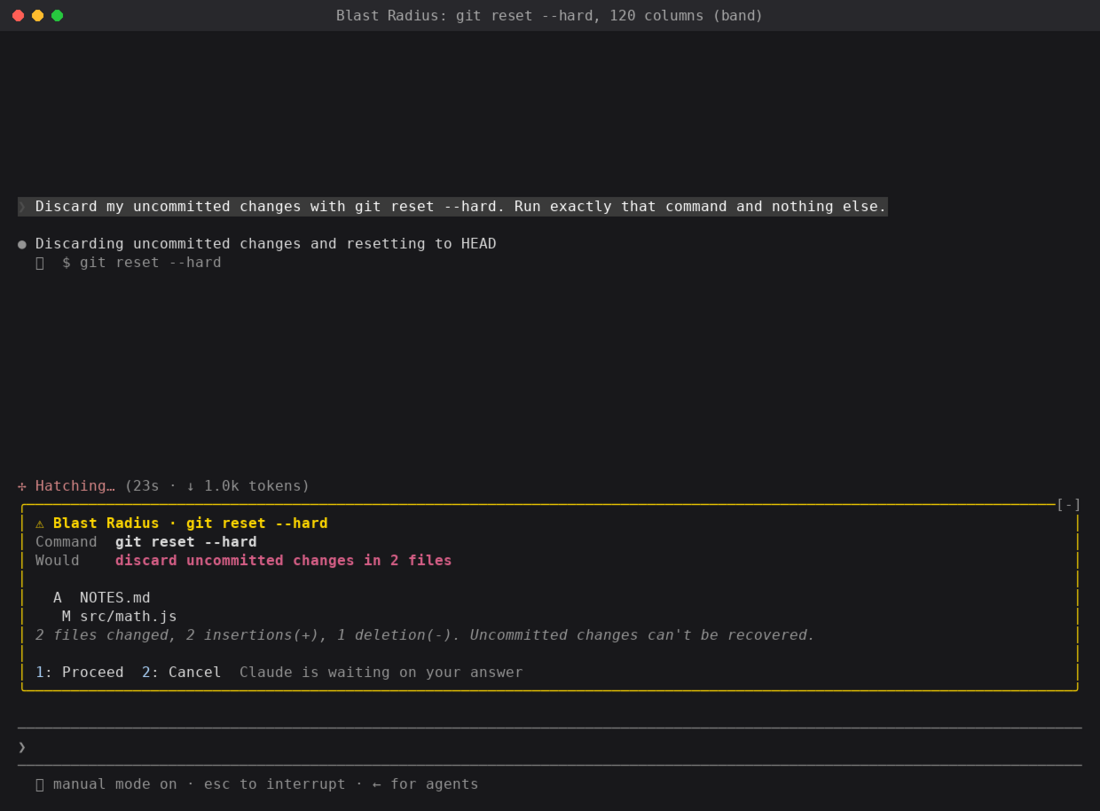
It's a safety net, not a permission system. It reads the command text, so $(…), aliases and scripts that call rm get past it. Use permission rules for a hard block.
Replay Theater: step through the last turn's edits
While a turn runs, Replay Theater records every Edit and Write call: the file, plus the text before and after. When the turn ends, a hint appears above the prompt. Press r (or type /replay) and a pane walks through the edits one diff at a time, with a strip of numbered steps and Prev, Next and Close buttons.
It never blocks or changes an edit. It observes:
CODEJavaScript
on("tool.call", async ($, e, next) => {
  if (EDIT_TOOLS.has(e.tool)) state.pending.push(...(await stepsFor($, e)));  // old/new text → diff
  return next(e);                                                              // the edit runs untouched
});

on("turn.start", ($, e, next) => { if (!e.agentId) state.pending = []; return next(e); });

on("turn.complete", async ($, e, next) => {
  const r = await next(e);
  if (!e.agentId && state.pending.length) state.replay = state.pending;       // one replay per turn
  return r;
});

on("session.start", async ($, e, next) => {
  const r = await next(e);
  await $.command.register({ name: "replay", description: "Step through the last turn's file edits" });
  return r;
});
on("command.run", { command: "replay" }, async ($, e) => ({ text: (await openReplay($)) ? "Replaying" : "No edits" }));
What it teaches:
- Pairing events.
turn.startandturn.completebracket the edits into one replay per turn, ande.agentIdkeeps subagent turns out of the grouping. - Registering a slash command.
$.command.registerinsession.start, then answer it oncommand.run. - Reading files. For a Write,
$.fs.readgets the old contents just before the write lands, so the diff is real. - Placement is the surface's job. In fullscreen the pane docks on the right. At 80 columns it opens inline above the prompt. The mod draws the same tree either way.
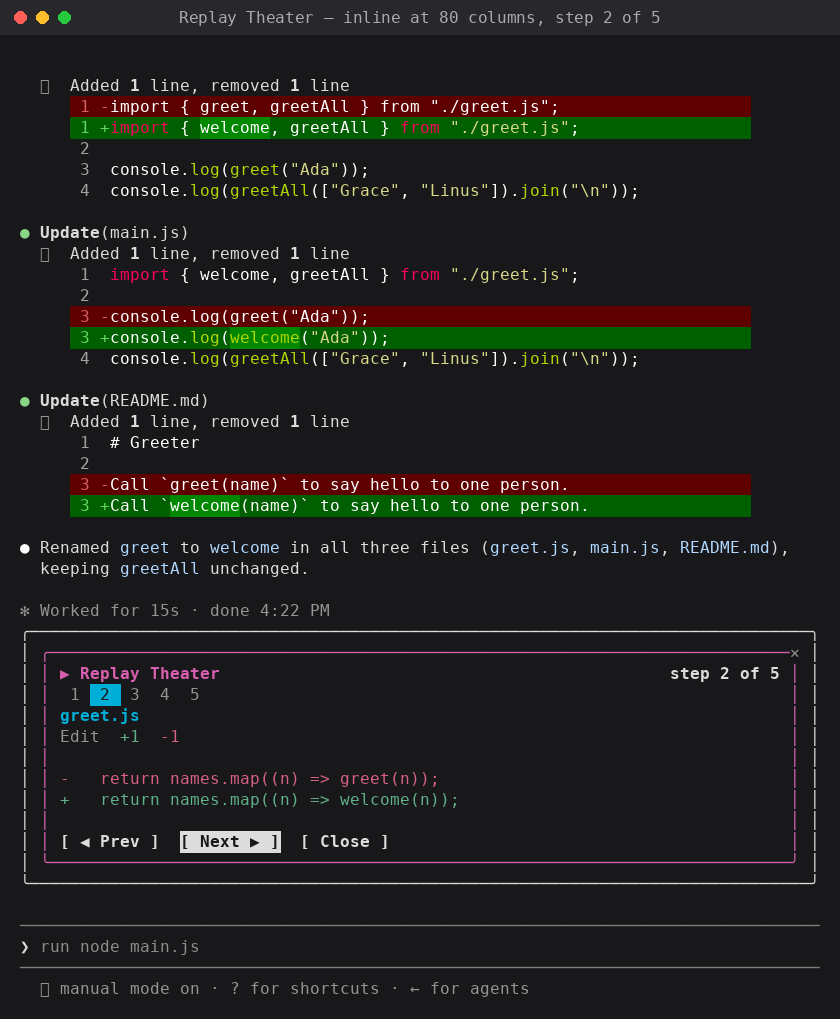
FOUR HABITS WORTH KEEPING
- Lean on the types Claude Code writes for you. Each time it loads your mod, Claude Code writes the declarations for your build into the mod's
.claude-plugin/types/folder, so your editor andtsc -pwork with no extra step. They're the reference for every event, every method on$and every element's props. - Read props from
e.props.hasSurvey,bodyColumnsand the rest live there, not oneitself. - Plan for hot reload. Every save runs
registerandsession.startagain, so keep data in$.state, not in module variables. - When a drawing doesn't show, read the log. Run
claude --debugand look for a line saying a hook returned a tree that does not validate.
WHAT WILL YOU MOD?
The three mods here came from one question each: how full is my context?, what is this command about to delete?, and what did Claude just change? Your questions will be different, and that's the point. Some ideas to start from:
- A cost or rate-limit meter from
$.session.usage(), as a status line with$.ui.status - A
prompt.submithook that adds your team's conventions to every prompt - A pane that lists the files Claude read this session, as a live map of what it has seen
- A focus timer that sends a toast with
$.ui.toastwhen a long turn finishes - A
tool.callguard tuned to your stack, such as production kubectl contexts orterraform apply
Made a mod you now use every day? Post it on X or LinkedIn with a GIF or a screenshot of it running, so other developers can see what's possible. Put the plugin in a marketplace (Sharing your mod) and link to it, so anyone who likes it can install it with three commands.