Claude Code effort 实战指南:什么时候用 Low,什么时候该升档
先弄清 effort 改变了哪些工作,再看三组开发实测,最后用需求访谈、快速实现、人工评审和深入验证四步选档。
Claude 的新模型 Opus 5.5 能根据 effort 设置调整投入,并且在 Claude Code 中切换时不会破坏提示词缓存。从原文给出的测试看,它还可能用更低的档位达到接近的表现:Opus 5.5 在 High 档的通过率,与 Fable 5.1 在 Max 档相近。但用户仍经常问:effort 到底是什么,为什么需要它,又该如何选档?Anthropic 的 Thariq Shihipar 为此写了一篇文章,详细介绍 effort 到底该怎么用。
为回答这些问题,Thariq Shihipar 既做了日常开发实验,也深入查看了 Terminal-Bench 3.0 的内部运行。他关心的是:额外投入究竟增加了哪些自主决策、验证和边界测试。下面沿着“理解机制 → 看实测 → 用到研发流程”的顺序,把原文整理成一份选档指南。
effort 是什么,实际改变了什么
这里的 effort 是告诉模型:这项任务大致值得投入多少计算资源。它不是严格的时间限制,也不是只控制最终回复字数的开关。同样要完成任务,低档位会倾向于尽快给出满足要求的版本;高档位则更可能继续查资料、试不同路径、审自己的实现,并检查那些提示词没有逐项列出的边界情况。作者用一个人的工作时间打比方:给一小时,先做出可讨论的版本;给十二小时,便有空间独立打磨和验证。
这也解释了为什么“更高”不必然等于“更合适”。如果任务还没想清楚,更多努力可能被花在替你做产品决定上;如果任务是安全过滤器、存储引擎故障这类容易漏掉特殊情况的工作,多做验证反而是价值所在。选择档位前,先想清楚现在需要的是一轮反馈,还是一个尽量自足的交付。
同一项任务,调整投入方式
换一个档位,Claude 的工作重心如何变化?
Low · 先给出便于反馈的起点
- 模型推进什么
- 尽快做出满足当前要求的初版,方便你判断方向。
- 验证侧重点
- 适合轻量改动和快速迭代;重要边界测试可另设验证阶段。
- 你如何配合
- 及时审阅并给反馈,明确下一轮要改什么。
取舍:更快进入下一轮讨论,自主打磨通常较少。
依据原文整理的行为示意,不代表固定时间、token 预算或质量保证。实际行为仍取决于任务和提示词;低档也会尝试合理完成任务,高档仍可能选错方向。
三组实测:需求清晰度如何改变选档
作者用三个小型开发任务观察 effort 带来的行为差异。以下耗时是展示运行的记录,用来理解取舍,不是每次任务都能复现的时间表。
需求模糊:低档先给底子,高档替你补更多决定
作者先让 Opus 5.5 从一句话“做一个个人健身和训练记录应用”开始。在这组单次演示中,low 用约 1.5 分钟做出记录和简单图表;medium 约 4 分钟,high 约 11 分钟;max 则用了约 67 分钟,做出更完整的应用,加入热力图等细节。图 A 的互动对照显示,low 版本主要围绕记录、每周训练量和历史,max 版本还有更完整的导航、训练流程等。多出来的不仅是功能,也包括 Claude 自行决定哪些功能和界面值得做。
怎么选: 要一个底子并准备马上反馈,可以选 Low;想看模型一次自主完善到什么程度,可以提高档位,但要接受它替你做更多选择。
探索设计:先看方向,还是直接看高保真原型
换一个任务:重新设计 Claude Code 的 /config 菜单。各档位的基本想法差不多,都是用子菜单和更好的搜索;low 约 1 分钟给出能看出方向的交互草图,却不太像现有的 Claude Code;max 约 28 分钟给出更贴近产品的样稿,还走查了不同操作路径。作者在这个任务里反而偏向 low,因为他想先看方向、再自己反馈。若只想要一次交付就尽量完整,max 的成品程度才更有吸引力。
怎么选: 早期探索先用 Low;方向确定后,才值得为更完整的细节和操作流投入时间。
规格详细:输出更接近,耗时仍有明显差别
再把条件改变:作者先让 Claude 深入访谈,补齐健身应用的需求,再把同一份详细规格交给不同模型、不同 effort 档位实现。这次 low、medium、high、max 分别用了约 16、22、33、79 分钟,但做出的设计和实现相近得多。max 仍在一些细节上做了简化。这个对照说明,明确规格可以减少 Claude 需要替你猜的事情;提高 effort 不能替代把需求说清楚。以上三组都是作者展示的具体运行,适合用来理解工作方式,不能把分钟数当成你的任务耗时承诺。
怎么选: 对这种规格充分、有人审阅的初步实现,可以从 Low 或 Medium 起步;重要测试仍安排在后续阶段,不从这一次应用演示推导所有复杂任务都能用低档完成。
三组实测 · 三种任务条件
切换任务,看等待时间花在哪里
健身记录应用:只有一句需求
记录、每周训练量图表和历史,可快速拿来继续改。
更完整的应用和训练流程,增加热力图等细节,也做了更多产品决定。
取舍:需要一轮反馈,先选 Low;希望一次自主完善,才考虑更高投入。
来自作者展示的单次运行。三组条形统一以 80 分钟为上限;未提供的耗时不补值。
困难任务的测试结果:什么工作值得升档
日常应用演示都在模型能完成的范围内。为了看 effort 何时影响成败,作者又检查了社区提供任务的 Terminal-Bench 3.0:它覆盖安全、硬件、机器学习、科学、软件、运营事务、媒体等,难度普遍高于普通开发需求。比如有任务要求用 Verilog 构造能运行测试 ROM 的 8 位游戏机,也有任务要求在 Lean 4 里形式化证明定理、合并 16 片混合专家模型权重,端到端完成公司的月末欧盟贸易统计申报,或把海报重建成可编辑版式。这些不是一般“写段代码”的任务。
提高档位能提高通过率,也增加投入
一张总览图把每次尝试的通过率和 token 消耗放在一起。作者给出的 Opus 5.5 在这组任务中从 low 的 36.6% 升到 max 的 65.7%;它在 high 的 58.9% 与 Fable 5.1 在 max 的 58.0% 接近,而中位 token 约为后者一半。图的横轴是每次尝试消耗 token 的中位数,不是价格,也不是运行时间。它说明不同模型与档位可以有不同的“通过率—投入”组合。图中也有收益停滞的反例:Fable 5 从 xhigh 升到 max,通过率仍为 43.4%。因此,不能据此说任意模型、任意任务升档都会得到同样收益。
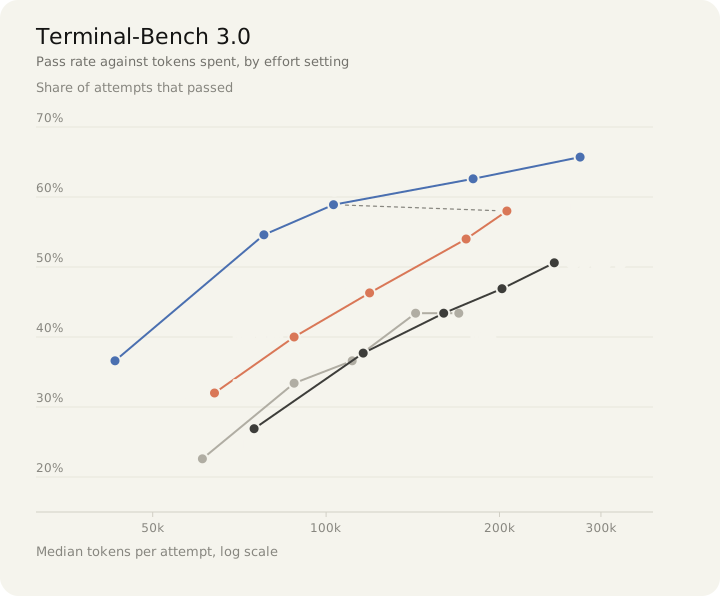
比较使用共同的 70 道题,排除了 4 道 GPU 题;Opus 5.5 的运行晚了约三周,并设有 128k 输出上限且无法访问 GitHub、PyPI。图中的 Opus 5 max 对应其 effort-120 运行。读跨模型排名时需要带上这些条件。
多花的时间用在了哪些检查上
最能说明机制的是 HTML 净化器任务 html-js-filter:要过滤掉各种把 JavaScript 偷带进页面的写法。Anthropic 的内部运行里,Fable 5.1 从 low 的 5 次中通过 1 次,升到 xhigh 后 5 次全部通过。作者追踪的一次低档运行约两分钟,基本一次写完,只拿手写页面测试;他追踪的高档运行约 33 分钟,先从攻击者角度审查初稿,再读已安装解析器的代码,检查正常输入不会被误伤,跑 XSS 测试集,最后写随机文档生成器继续找漏洞。对这类“漏一个入口就失败”的工作,额外时间确实可能换来更有意义的检查。
查漏改善明显,错误方向仍可能留下
但这不表示高 effort 能把错误判断全部修好。图 D 把 Fable 5.1 各 370 次尝试分类:从 low 到 max,通过数由 140 升到 214,中位 token 从 7.3 万升到 22.2 万;“漏掉某种情况”的失败由 59 降到 24,“做错判断”的失败总数由 133 降到 107。后者仍然很多,其中“选错对题目的理解”这一细项甚至从 25 升到 47。失败类别是模型评审给出的近似分类,不能当成精确的因果拆解。
| 结果(各 370 次) | low | max |
|---|---|---|
| 通过 | 140 | 214 |
| 漏掉某种情况 | 59 | 24 |
| 做错判断 | 133 | 107 |
| 其他失败 | 38 | 25 |
| 中位 token/次 | 7.3 万 | 22.2 万 |
比较可靠的读法是:多投入显著改善了一部分查漏问题,不保证模型会选对问题的解释和解决路线。
三个难题:从“写完”到“证实有效”
作者给出的其他任务也呈现相同的工作差异:
- 修复存储引擎压缩故障的
mvcc-lsm-compaction,Opus 5.5 从 low 的 0/5 到 xhigh 的 4/5。low 每次约 1 分钟,常常还没构建或复现故障就改代码;xhigh 每次约 11 分钟,先复现崩溃,用不会压缩的参考实现做随机对照,还确认测试能够抓到未修完的版本。 - 写 Python 命令行线性规划求解器的
cli-2ph-simplex,从 low 的 0/5 到 high 的 5/5。低档只跑少数小题,约消耗 1 万 token 就停止,虽然提醒大题可能慢,却没测;高档拿随机题和独立的暴力求解器对答案,再压测大题,发现过慢或崩溃后重做搜索。 - 在蛋白质组数据的八个处理组中,找与目标组织相似处理组的
gsea-proteomics,从 low 的 0/5 到 high 的 4/5。低档选一套看似合理的数据预处理就报结果;高档试两套预处理,发现显著组名单改变后追查原因,再选择方法。这说明有时真正的问题发生在分析前提,而不在最后一行代码。作者补充,如果有人参与,Claude 可能向人询问分析该如何设定;无人参与时,高 effort 在这个案例里做得更好。
哪些领域更值得增加投入
按任务领域汇总,Fable 5.1 在七类题目上的通过率都提高了,但幅度不同:
| 领域(题数) | 低档合并 | 高档合并 |
|---|---|---|
| 安全(7) | 64% | 87% |
| 硬件(5) | 34% | 75% |
| 机器学习(13) | 54% | 73% |
| 科学(15) | 41% | 61% |
| 软件(20) | 43% | 56% |
| 媒体(4) | 18% | 30% |
| 运营事务(10) | 12% | 22% |
这里的“低档”和“高档”分别合并了最低两个和最高三个 effort 设置,因为各领域题数很小;这些百分比不是“单独从 low 调到 max”的精确效果。领域题数合计 74,与前面总览图排除 GPU 题后采用的 70 题分母不同。安全与硬件的增幅在这组运行中较突出;按业务规则办事的运营事务题即使升档,通过率仍低。这提示读者:需要大量验证、隐藏边界多的任务,更值得为额外 effort 付费;首先卡在理解规则或选错路径时,光增加计算量未必解决。
实战指南:把 effort 分配到每一步
作者因此采用一个实用循环:先交代目标,让 Claude 访谈并找出规格缺口;用 low 做初版;人审方向,必要时继续用 low 迭代;最后用 high 做验证和测试。
先按当前任务选一个起点
作者的经验刻度是:low 用于脑暴、草图、简单改动和人会立即反馈的工作;medium 用于常规功能开发;high 用于旧代码库排障、重要验证和边界情况多的任务;max 留给希望 Claude 高度自主完成的困难任务,例如端到端构建并验证应用,或审查关键软件的安全漏洞。
把它应用到自己的任务,可以先看下面四种情形。这里的 Low、Medium、High、Max 是作者给出的常用起点;前文实验中的 xhigh 是介于 High 与 Max 之间的额外高投入档位。
- Low:快速形成反馈。 头脑风暴、交互草图、小改动,或需求已说清、你会马上审初版。先看方向和核心流程,不把初版直接当成经过充分验证的交付。
- Medium:常规实现。 在目标较清楚、需要相对完整地写新功能时,作为日常起点;如果只是要一个马上讨论的骨架,可以先降到 Low。
- High:把隐患查出来。 旧代码库修 Bug、性能验证、安全检查和边界多的任务。所谓 Brownfield,就是在已有系统和约束里改代码,需要确认补丁没有破坏原有行为。
- Max:让它承担更多自主工作。 你希望模型自己推进困难任务、选路线并完成验证,而且接受更长等待和更高消耗时再考虑。仍然要提供清楚目标、验收标准和权限范围。
按这一轮的工作来选
现在从哪个档位开始?
规格明确,而且你会很快评审;先拿可运行初版,减少等待一轮反馈的成本。
下一步:审核心流程;方向确认后,切 High 做重要验证。
依据原文经验整理的起点建议;先看原因与下一步,再决定是否采用。
让 Claude 访谈,先补齐规格
给出初步目标后,让它反向提问。优先补齐会改变实现的选择:谁使用、核心流程是什么、数据如何保存、哪些失败情况必须处理、什么结果算完成。把回答整理成一份可检查的规格,再开始实现;不要让模糊需求变成模型默认替你决定的产品细节。
这一步的产出: 双方对齐的范围、仍待确认的决定、验收标准。若它仍在猜核心需求,就继续澄清;此时单纯升档并不能替你回答业务问题。
用 Low 做一个能判断方向的初版
在快速实现阶段,把范围限制在最重要的一条用户流程。明确哪些决定可以由它处理,哪些需要回来问你。详细规格已经减少了猜测,Low 可以更快给出一个便于讨论的版本;需要常规完整实现、又不打算每一步都跟进时,也可以从 Medium 开始。
这一步的产出: 能运行、能看出核心逻辑的初版,以及已做与未做的事项。基础运行检查仍然要做,深入验证放在后面的专门阶段。
人工评审,先确认做对了东西
亲自走一遍核心流程,并对照规格确认三件事:目标用户能否完成主要任务,关键数据和逻辑是否符合预期,Claude 有没有擅自扩大功能范围。界面更精美或代码更多,都不能代替这一步。
方向不对,就给具体反馈,用 Low 继续迭代;发现规格漏项,先补规格。如果核心逻辑正确、剩下的问题是有没有漏测和隐患,再进入 High 验证。这样能避免把额外计算花在一个本来就要推倒的方案上。
切 High,用证据验证而非只问“有没有问题”
把待验证对象、验收标准和重点风险一起交给 Claude。修 Bug 时,让它先复现原问题,并确认新测试能在旧实现上失败;做性能优化时,实际测目标规模的数据;复杂算法可用独立参考实现做对照;安全过滤器既要测危险输入,也要测正常内容是否被误伤。
这些方法来自原文难题案例。它们的共同点是给模型一个可以检查的外部结果,避免“我看了一遍,应该没问题”成为验证终点。
这一步的产出: 实际运行的检查、观察结果、已修问题,以及尚未验证的部分。若失败来自漏测、测试不足,可以追加有针对性的验证;若失败来自误解需求或方法前提,应回到规格和方案上修正。多投入显著改善了一部分查漏问题,不保证模型会选对问题的解释和解决路线。
可直接复用的四步任务说明
下面是依据作者工作流整理的提示词示例,可在对应阶段分段使用,不是原文逐字提示词。开始前填好目标、项目环境和允许修改的范围;提示词里的“Low / High”只用于提醒你选档。作者针对 Opus 5.5 和 Fable 5.1 建议:在 Claude Code 中使用 /effort,同一次会话中也能按阶段切换。原文还指出,新模型切换 effort 不会破坏提示词缓存,即可复用的既有提示词内容不会仅因换档而失去缓存。这让“Low 实现 → High 验证”可以直接在当前会话里进行。
【需求访谈】
我的目标是:[目标]。使用者是:[用户]。
项目环境与允许修改范围:[环境、目录、限制]。
请先问清会影响实现的缺失信息,整理范围、待确认决定和验收标准。
遇到关键业务选择先问我,不替我扩展需求。

【初版实现|先选 Low】
按已确认规格实现核心流程:[核心流程]。
先做一个可运行、便于我审阅的版本,完成基本运行检查。
交付时列出已做、未做以及仍需要我决定的事项。

【人工评审后的迭代】
我的检查结果是:[具体问题和期望行为]。
请只处理这些问题,并回查受影响的核心流程。
若反馈涉及需求冲突,先指出冲突位置。

【深入验证|切到 High】
以已确认验收标准检查当前实现,重点风险是:[风险]。
实际运行相关检查;修 Bug 时确认测试能抓到原始错误。
需要时用参考结果、目标规模数据或正常/异常输入做对照。
报告实际检查、结果、修复与仍未验证的部分。
何时调高,何时调低
调低的信号: 当前目的只是快速讨论方向,模型却持续添加未要求的细节;或已经有清楚规格,你希望频繁给反馈。缩小这轮任务,并减少模型需要自行决定的范围。
调高的信号: 方向已经确认,但任务有大量隐藏边界、必须证明补丁有效,或需要模型较长时间自主完成。升档时同时说清重点检查和完成标准。
先改输入的信号: 它把题目理解错、依赖错误前提,或不知道业务上哪种行为才正确。此时先补信息、纠正方案,再决定需要多少验证投入。
原文数据来自 Anthropic 内部运行,每题 5 次。Fable 5.1 的安全任务关闭了生产环境的安全干预,且安全题没有网络访问;实际 Claude 产品中,有些安全请求会被转交给 Opus。文中的行为分析来自个别运行,其中一些使用了中间 effort 设置;不要把一段运行轨迹的耗时视为某档位五次尝试的平均值。这些条件影响与公开榜单或日常使用的可比性。把上述档位当作起点,用自己的任务比较交付质量、耗时和消耗,再调整。
Claude Code effort 实战指南:什么时候用 Low,什么时候该升档
同一个开发任务,Claude 可以很快交一个初版,也可以继续打磨和验证。effort 告诉模型这项任务值得投入多少计算资源,影响它自主补全、尝试路线和检查边界的程度。
它不是固定时限,也不只决定回复长短。选档前,先想清楚这轮需要什么结果。
这轮要反馈,还是要验证?
需求模糊时,高档可能忙着替你做产品决定。如果题目理解错了,先补规格。
把投入分配给研发循环
需求访谈 →
补齐使用者、核心流程、数据与验收标准。
可运行初版 →
完成核心流程与基础检查,列出已做、未做。
确认方向 →
走一遍流程,检查目标、逻辑和功能范围。
拿到检查证据
测目标规模及正常、异常输入;新测试要能抓到旧错误。
/effort 在当前会话中切换。原文指出,Opus 5.5 和 Fable 5.1 换档不会破坏提示词缓存。四档作为起点,按任务调整
实测:需求越清楚,猜测越少
模糊需求 · 健身应用
高档增加功能与界面细节,也替人补更多产品决定。
探索方向 · /config 菜单
草图与高保真原型的差别。先看方向时,低档便于更快反馈。
详细规格 · 输出更接近
依次为 Low、Medium、High、Max。此组同时用了不同模型;清楚规格减少猜测,不能由此推导所有复杂任务都适合低档。
以上是作者展示的具体运行,不是耗时承诺。
升档,要拿到检查证据
高档轨迹增加攻击视角审查、解析器检查、正常输入测试和随机文档测试。xhigh 介于 High 与 Max 之间。
漏测、没验证:给它更明确的检查任务和投入。
误解需求、方法前提错:先修输入。更多计算帮助查漏,但不保证路线正确。
Using Claude Code: Spending your effort
What effort really is and when to use which level in Claude Code, from my own tests of three builds and a deep dive into Terminal-Bench 3.0 on Opus 5.5 and Fable 5.1.
One of the best parts of our newest Claude models is how they respond to effort without breaking the prompt cache in Claude Code, but I’ve received a lot of questions on this from users. What is effort really, and when do you use which effort level? Why do we need effort at all?
To answer this, I decided to do a deep dive into the evals and do my own tests of effort across normal work.
At a high level, I found that effort was a great way of modulating how much verification and edgecase testing Claude did and how much of its own judgement it used. Extra effort gave better results in domains where verification and edgecase testing was more useful like hardware, code review, and security.
For normal software engineering, I’m running a loop of getting the model to interview me then implementing on low effort, reviewing what it built, and then running verification on high effort.
WHAT IS EFFORT?
At a high level, effort gives the model an approximation of how much compute you want it to spend on the task. It’s somewhat related to your modeling of the difficulty of the task.
Think of it this way, if someone asked you to do something in 12 hours straight, you might assume they just want you to do it and try very hard. If someone asked you to do the same task in 1 hour, you’d try to get them the best version that meets their task and then expect to iterate from there.
Or, you might push back and say the task requires at least 3 hours and then work for 3 hours to deliver it.
You should think of effort in the same way. Claude will always try and do your task reasonably, but higher effort will involve Claude taking more independent action for judgement and verification.
EFFORT CURVES
Fable 5.1 and Opus 5.5’s effort curves are our best yet: at each level, there is an uptick in benchmark scores and tokens consumed.
Terminal-Bench 3.0, the same 70 tasks for every model (the 4 GPU tasks are left out). Opus 5.5 ran about three weeks later, with responses capped at 128k tokens and no GitHub or PyPI access; Opus 5’s max is its effort-120 run.
But what does this mean in practice? To evaluate this, I tried several tasks at different effort levels and pored over the benchmarks.
BUILDING WITH EFFORT
The best way to understand how models work is to run experiments. I tried doing the same tasks at several different effort levels on Opus 5.5 to understand the work it would do. I did this on a wide variety of work, but am illustrating this with a few toy examples.
Underspecified build task
If I ask Claude to “build a personal fitness and workout tracker app,” effort changes dramatically how fleshed out the app is, but also results in Claude making more choices along the way. At low effort, the fitness app is just a log and a simple graph. At higher effort levels the app is more complex with additional detail. At max effort there’s a heat chart.
FIG A
If I wanted a simple base to iterate from, low effort would get it done. Max effort would be if I wanted Claude’s best one shot.
Lightly specified design task
What if I have a task that is fairly specified already but I want some exploration with Claude? As an example I tried to ask it to redesign the /config menu in Claude Code. Every pass had roughly the same idea, to use submenus and better search.
At low effort (which took 1 minute), I got an interactive sketch that conveyed the idea but didn’t look very much like Claude Code.
At max effort (which took 28 minutes), I got a mockup that looked very much like Claude Code, along with a bunch of walkthroughs for different flows.
If my goal was to iterate and give feedback, low effort would get there much faster. But max effort gives me something much more polished right off the bat. For this particular task, I think I prefer using low effort to understand Claude’s vision.
FIG B
Highly specified build task
What if I gave Claude lots of details? I tried asking Claude to interview me in-depth about the fitness app and then gave that spec to be implemented by different models at different effort levels.
I found that given this spec, the models behaved much more similarly. I got designs that looked fairly similar and had similar implementations but with different details, at max effort Claude took some time to simplify a few of the details.
FIG C
Takeaways
For regular software engineering, particularly new feature work, the effort level depends a lot on how in the loop I want to be. Low effort allows Claude to respond quickly with a starting point, higher effort levels will get more work done but Claude will also make more assumptions on my behalf.
A particularly fruitful loop for feature development I’ve been using is:
- Give Claude a spec and ask it to interview me about any details I’m missing
- Implement it on low effort
- Review to make sure it got the gist of it correct, iterate on low effort as needed
- Verify and test on high effort
HOW EFFORT LEVELS IMPACT OUTPUT ON DIFFICULT TASKS
But these are obviously toy examples, where Claude is well able to complete them. What about when the difference is between Claude completing the task or not completing the task?
To find these difficult problems, you have to go to the benchmarks so I dove into one I like: Terminal-Bench 3.0, a community-sourced benchmark.
Terminal-Bench 3.0 problems can broadly be separated into categories like security, hardware, ML, science, software, operations and media. You can see all of the problems here: https://github.com/harbor-framework/terminal-bench/releases/tag/v3.0.0. They’re sourced from the community, so anyone can contribute.
It’s worth reading to get a sense of the type of problems these models face. I found I was surprised by the scope and ambition of a lot of these tasks. They are much more complicated than the average task I’d face.
For example, some of the tasks included:
- Hardware (
retro-console-soc): build an 8-bit game console in Verilog that fits a small FPGA and renders a test ROM. - Science (
takens-embedding-lean): formally prove Takens’ embedding theorem in Lean 4. - ML (
mp-checkpoint-consolidation): merge 16 shards of a mixture-of-experts checkpoint into one file that reproduces the reference logits. - Operations (
intrastat-meldung): run a company’s month-end EU trade-statistics filing end to end. - Media (
layout-config-recreation): rebuild a poster image as an editable layout file.
Higher effort levels help when there are many edge cases
My main takeaway from reading the Terminal-Bench 3.0 results was that higher effort is best for tasks with lots of hidden edge cases.
A clean example is html-js-filter, a Terminal-Bench 3.0 task that asks for an HTML sanitizer that strips every way of smuggling JavaScript into a page. Fable 5.1 went from 1/5 at low to 5/5 at xhigh.¹
A typical attempt at low effort takes about 2 minutes. Each of these attempts wrote a filter in roughly one pass, then tested it against a single hand-written page.
A high-effort run finishes in about 33 minutes. In the run I traced, it adversarially reviewed its first draft, then read the installed parser’s source to check for bugs, ran many clean test cases until they gave the same output as the input, ran a standard XSS test suite, and finally, wrote a random-document fuzzer.
For something as edge-cased as a HTML sanitizer, this extra effort is well worth it. Spending more tokens for thoroughness also makes sense for complex tasks with high production requirements such as performance optimization or security review.
But you don’t need this level of effort for every task.
The diagram below shows every Terminal-Bench 3.0 result and how it failed, across different models and effort levels. Overall, increasing effort tends to reduce failures due to missing edgecases (purple blocks), but does not fix when the model has the wrong approach (blue blocks).
FIG DEach square is one attempt. Failure kinds come from a model judge and are approximate.
Problem areas where effort helps
One of the most interesting takeaways for me from evaluating these models on Terminal-Bench 3.0 was that there were some problem areas that benefited from effort more than others. You can see a breakdown in the following diagram:
FIG EPass rate. Low effort pools each model's two lowest settings, top effort its three highest, since categories are small.
To illustrate this, I chose a few problems from different areas from Terminal-Bench 3.0 where Opus 5.5 failed at low effort but succeeded at high effort — mostly because it tested and accounted for edge cases:
mvcc-lsm-compaction: a Terminal-Bench 3.0 task that asks for a fix to a storage-engine bug from its crash report, without breaking compaction. Opus 5.5 went from 0/5 at low to 4/5 at xhigh.
At low (about a minute per attempt), Claude would edit the code before building it or running the reproducer, and did not check that its new test would have caught the original bug.
At xhigh (about 11 minutes), Claude reproduced the crash first, wrote a randomized test against a reference that never compacts, and checked that its tests failed on half-finished fixes.
cli-2ph-simplex: a Terminal-Bench 3.0 task that asks for a CLI linear-program solver written in Python. Opus 5.5 went from 0/5 at low to 5/5 at high.
The low attempts wrote a solver in one pass, checked it with a few small problems and stopped around 10k tokens. In the final message, Claude warned it might be slow on big problems, but did not check.
During the high attempts, Claude tested its solver on random problems against a separate brute-force solver, then timed bigger ones, hit cases that ran far too long or crashed, and reworked its search.
gsea-proteomics: a Terminal-Bench 3.0 task that asks for a gene set enrichment analysis (GSEA) on proteomics data to find which of eight treatments resemble a target tissue. Opus 5.5 went from 0/5 at low to 4/5 at high.
At low effort, Claude picked a reasonable-sounding way to prep the data, ran the analysis that one way, and reported the result.
At high, Claude tried two ways of prepping the data, noticed that the list of significant treatments changed, and dug into why before choosing the correct one.
If a user were in the loop, Claude may have asked the user about the way to set up the problem, but without a user in the loop, high effort does better.
When to use different effort levels in Claude Code
Here’s my rule of thumb on when to use which effort level:
- Low: for when I want quick responses that are in the loop, e.g. brainstorming, sketching, easy changes
- Medium: for most of my regular software engineering work, e.g. new feature implementation.
- High: for work where verification is important or there are edge cases, e.g. fixing a bug in a brownfield codebase.
- Max: When I want Claude to operate fully autonomously to solve difficult problems, e.g. end to end building and verification of an app, finding security vulnerabilities in critical software.
Try varying effort for Opus 5.5 and Fable 5.1 based on your task or even mid-conversation by using /effort in Claude Code and let me know if this matches your intuition.
¹ A note on the numbers: these come from our own internal runs, 5 attempts per task, with our production safety interventions off for Fable 5.1; in Claude products, Fable 5.1’s safeguards hand some security requests to Opus. The security tasks also ran without internet access, so the per-task counts here won’t line up with the public leaderboard or the launch post. The worked examples come from individual runs, some at intermediate effort settings.