
Opus 5.5 降价后,Claude Code 完成一项任务到底花多少钱?实操省钱与提效指南
先用官方标价算清一项任务,再按测试、effort、模型、缓存与 /usage 找到适合自己的省钱做法;附两份可复用模板。
一次任务到底花多少钱:从标价到真实账单
使用 Claude Code 的开发者往往想知道完成任务的总成本。目标可能是交付一个新功能、完成一次依赖迁移或排查一处线上 Bug。最终消耗多少 Token,取决于完成任务经过多少轮、每轮处理多少输入与输出。
随着 Opus 5.5 的推出,官方对 API 单价进行了全面下调。在讨论具体怎么省钱之前,我们先从原文给出的 API 标价切入,算清原文设定的一次示意任务到底需要支付多少美元。
1. 任务的计费循环与 Opus 5.5 单价
在 Claude Code 内部,一次任务本质上是一个连续的 Agent 循环:模型读取当前上下文与对话历史,决定调用某个工具(如读文件、运行测试、执行检索),读取工具返回的结果,并将所有历史与新内容重新打包发回,直到任务完成。
每一次循环就是一轮请求(Turn),而一个任务的总成本由四个核心要素决定:
- 轮次(Turns):每一轮都会将截止到该轮的所有对话与文件内容重新发送给模型。轮次越多,累计吞吐的输入 Token 总量就越庞大。
- 缓存读取(Cache Reads):每一轮重新发送的内容中,有一部分是上一轮模型已经见过的重复文本。这部分由 Prompt 缓存机制承载,单价仅为新输入的极小一部分。
- 输出 Token(Output Tokens):这是单价最高的 Token 类型,达到输入单价的 5 倍。模型的思考过程(Thinking)在底层同样按输出计费。因此,模型在得出答案前思考得越多,输出账单越高。
- 模型单价(Model):选取的模型直接决定了每个 Token 的单价基准。
在 Opus 5.5 的 API 官方标价中,每百万 Token(1M Tokens)的具体费率为:
- 新输入(Fresh Input):$4.00 / M
- 输出(Output,含思考):$20.00 / M
- 缓存读取(Cache Read):$0.20 / M(低至新输入价格的 1/20,即 5%)

2. 40 回合基准测算:不同缓存命中率下的实际花费
为了直观看到这些单价如何组合成最终账单,我们可以代入一个原文设定的示意任务:
假设任务以 20K Token 的初始上下文(系统提示词、规则文件与项目骨架)启动;随着模型不断读取代码库文件和工具返回结果,会话上下文增长到 120K Token。整个过程平均每轮发送约 70K Token。
- 输入总规模:40 轮 × 平均每轮 70K = 2.8M 输入 Token。注意:虽然对话窗口最终仅增长到 120K,但由于每轮重复发送历史,累计处理的输入达到了 2.8M。
- 若输入都未按缓存读取计费:2.8M 纯新输入需支付 11.20 美元:280 万 × 每百万 4 美元 = 11.20 美元。
- 在 90% 缓存命中率下:
- 缓存读取:252 万 × 每百万 0.20 美元 ≈ 0.50 美元。
- 新输入:28 万 × 每百万 4 美元 = 1.12 美元。
- 输入总费用:约 $1.62
- 在 96% 缓存命中率下:
- 缓存读取:268.8 万 × 每百万 0.20 美元 ≈ 0.54 美元。
- 新输入:11.2 万 × 每百万 4 美元 ≈ 0.45 美元。
- 输入总费用:降至约 $0.99
再假设任务另产生 60K 输出 Token(包含代码编写与隐藏的思考推理): 6 万 × 每百万 20 美元 = 1.20 美元。
在 Opus 5.5 上,输出单价是缓存读取单价的整整 100 倍。这 60K 输出 Token 产生的 1.20 美元,相当于读取 6M 缓存 Token 的开销。
如果把这个输出量和前述输入算例合在一起,且暂不计缓存写入,得到:
- 90% 缓存命中时:输入 $1.62 + 输出 $1.20 = $2.82
- 96% 缓存命中时:输入 $0.99 + 输出 $1.20 = $2.19
如果同样的任务通过更精准的上下文组织和规划,在 25 轮内收敛完成,总输入将缩减至 1.75M,90% 命中下的输入成本会从 $1.62 进一步降至 $1.02。
3. 与 Opus 5 的对比:固定用量下约省 31%,实际任务还要看完成过程
在官方对比测算中,一个由 2M 缓存读取、部分新输入和一定输出构成的示意会话,在 Opus 5 的标价下(输入 $5.00/M、输出 $25.00/M、缓存读取 $0.50/M)总成本为 $3.50;在 Opus 5.5 标价下,该会话总费用降幅约为 31%。
这约 31% 只计算两代模型处理相同数量、相同构成的 Token 时,标价变化带来的差额。
在实际编码工作中,情况要复杂得多:
- 价格维度的下调:Opus 5.5 的输入和输出单价降低了 20%,而缓存读取单价下降 60%(从 $0.50/M 降到 $0.20/M)。对于高缓存占比的长时间端到端开发,纯单价差异会更明显。
- 工作量维度的变动:Opus 5.5 引入了默认的 Extended Thinking 机制,在作答前会更全面地推理,这可能增加输出 Token 数量;如果它更早定位并解决问题,也可能减少回合,从而减少重复轮次。
如果是一个边界极其清晰的小任务,两代模型可能都在差不多的轮次内收敛,此时你的账单降幅主要体现为纯价格下调;但在开放性、多分支的复杂任务中,如果旧模型多次走错方向、出现返工,而新模型更快完成,实际节省可能高于 31%。
4. 账单形态分离:API 美元账单与订阅计划额度
理解成本时,还需要将开发者的计费模式区分开来:
- 使用 Anthropic API Key:可以用上述 API 标价估算费用;经第三方云厂商调用时,应以对应平台的计费规则为准。在长会话的输入有较高缓存命中率时,缓存读取单价降至 $0.20/M 是账单中降幅最大的一项(在 2M 缓存读的样例中,该项开销直接从 $1.00 跌至 $0.40)。
- Pro、Max、Team 等订阅计划用户:日常消耗的是订阅内置的速率限制与上下文额度条(Usage limits)。Anthropic 称,Opus 5.5 的较低价格已反映到订阅限额中,包括缓存上下文;限额约可比使用 Opus 5 时多覆盖 25% 的用量。
- 终端
/usage命令的读数:在 Claude Code 终端运行/usage时,屏幕显示的美元估算是客户端根据 API 列表价本地计算得出的。对于订阅用户,这个美元数字仅作为衡量客观代码工作量的统一参考尺标,并不代表实际信用卡扣款账单。
实操省钱与提效指南
知道钱花在哪里之后,下一步是减少完成任务时不必要的轮次与输出,同时留意省 Token 的设置是否导致返工。
例如,降低 effort 省下的思考 Token,可能被一次多轮重试抵消;原文给出了两笔同为约 0.40 美元的示意成本。以下指南从测试配置、推理档位、模型分工、提示词瘦身到缓存维护,逐一梳理实操策略。
策略一:优先配置自动化测试,让错误尽早暴露
- 适用情形:跨模块函数修改、接口重构、涉及连锁依赖的业务逻辑编写。
- 具体操作: 在向模型发出执行指令的同时,明确提供可执行的检验手段——例如项目现有的单测、构建或接口检查命令。检查应覆盖这次修改实际影响的调用链路,例如客户端与后端接口,而不仅是被改的函数。
- 会改变什么 / 代价: 测试本身会增加一轮工具调用及其输出。但具备自检能力后,模型在发现失败后尽早纠正,减少后续反复排查的轮次。原文的要点是:少一次无用的返工,可能比少一点单轮思考更省钱。
策略二:按需调节 Effort 档位(思考深度)
Effort 决定了模型在每个回合中分配给思考推理、文本阐述和工具调用的基础资源倾向。Opus 5.5 支持 low、medium、high、xhigh 以及单会话专用的 max 档位。
- 适用情形与档位选择:
medium(日常起点):适用于日常边界清晰、有既定参考实现的常规开发任务。low:适用于纯机械性编码工作,例如批量变量重命名、将已知模板或类型定义机械复制到多个文件。此类任务不需要深度权衡,压低思考量可减少思考相关的输出费用。high:当模型在medium档位下出现“只修复了表面单层代码”的典型瓶颈时启用。例如在接口重构中,模型只更新了后端 Handler 且单元测试通过,却漏掉了前端调用方——这个例子说明模型可能只检查到一层调用关系。提高 effort 可能让模型在写入前查找更多调用处。
- 具体操作:
终端执行
/effort high即可生效,运行/effort status可查看当前档位。 - 会改变什么 / 代价:
- 从经济学角度测算:假设在整个任务周期内,
high档位额外增加了 20K 思考 Token,在 Opus 5.5 上直接成本约为 $0.40。而一次在 100K 缓存上下文下跑 10 轮、伴随 10K 输出的排错重试循环,消耗同样在 $0.40 左右。因此,如果high恰好避免一次这样的重试,额外思考费就可能回本;反之,若在medium即可独立解决的简单任务上盲目开high,增加的思考开销就是额外支出。 - 重要限制:在会话中途切换 effort 前,要考虑缓存重新写入的成本。由于推理参数和系统引导词属于 Prompt 缓存匹配前缀的一部分,更改 effort 设置会直接导致既有缓存失效,下一次请求可能要重新支付缓存写入费用。
- 从经济学角度测算:假设在整个任务周期内,
策略三:梯度配置模型阶梯与委派检索
模型档位直接锁定了会话中每一个 Token 的基础单价,其影响权重比 effort 更大。更重要的是,在多 Agent 协同体系中,未另行指定模型的 Subagent 会继承主模型及其价格。

- 日常主力:Opus 5.5
- 定位:适用于有人监督的日常业务开发、复杂跨文件联调、代码审查与后续跟进修复。开发者随时观察输出并在偏差时介入,能维持极短的收敛闭环。
- 向上跃升:Fable 5.1
- 适用情形:无人值守、缺少既有模式或需要协调多个 Agent 的复杂任务。例如无人监督的长任务、在代码库中完全没有现成模式可借鉴的难题,或是需要协调大量 Subagent 的宏观架构改造。
- 切换规则:不要等到第三次失败。如果 Opus 5.5 在
high档位下连续两次在同一个核心问题上受挫,原文建议此时用/model切换到 Fable 5.1;难点解决后再切回 Opus 5.5。 - 价格差距:Fable 5.1 每百万 Token 的输入标价为 10 美元,输出标价为 50 美元,均为 Opus 5.5 的 2.5 倍。缓存读取价仅为 0.25 美元,是 Opus 5.5 的 1.25 倍。在高度依赖缓存的长程会话中,两者的成本差距会缩小;需要大段生成新代码时,差距会扩大。
- 操作细节:模型切换会导致缓存无法跨模型复用,新模型第一轮需支付全量写入费。切换前建议先运行
/compact压缩上下文,或新开会话并粘贴精简计划。
- 向下委派:降级至 Sonnet 或 Haiku 做纯信息检索
- 适用情形:委派搜索、摘要、读日志等容易核对结果的信息工作——如全局文件遍历、日志排查、测试输出过滤、跨仓库定位符号定义。
- 留意:原文建议将主要代码修改留给 Opus 5.5。如果是跨多文件的机械性简单修改,原文建议保留 Opus 5.5 作为主模型并将 effort 设为
low,以较低 effort 完成机械性修改。 - 具体操作:在自定义 Subagent 配置中显式声明
model: haiku或model: sonnet,或通过全局环境变量CLAUDE_CODE_SUBAGENT_MODEL统一指定。 - 机制与权衡:Subagent 运行在独立的上下文窗口中,检索文件消耗的 Token 计入它自身的会话,汇总后的精简结论交回主模型,避免这些原始检索内容直接挤占主会话上下文。但代价是:若小模型误读了搜索结果,主模型可能沿错误线索排查,最终为主模型的无效轮次买单。
- 注意:部分环境中的
opusplan模式(Opus 负责规划,Sonnet 执行代码编写)与上述“让主模型保持写代码、只下放检索”的逻辑不同,在团队中将其设为默认配置前,务必在自身业务任务上实测对比。
策略四:清理历史指令与提示词反模式(Prompt-audit 实证)
随着模型迭代,老版本模型遗留下来的提示词套路往往会变成新模型的额外成本。
- 适用情形:从旧版本迁移的项目、写满仪式性规则的
CLAUDE.md文件、定制技能或调用 Claude Platform 开发的内嵌代码。 - 具体操作:
在终端运行
/claude-api prompt-audit,扫描配置与技能中隐藏的提示词反模式;同时审查项目根目录的CLAUDE.md,官方建议将其精简压缩在 200 行以内;输入/mcp检查当前挂载的 MCP 服务器,断开当前任务用不到的连接。 - Prompt-audit 的 44 工单测试分析: 官方在将一套包含大量历史累赘提示词的内部客户支持基准(共 44 个工单)从 Opus 4.8 迁移至 Opus 5.5 时进行了对照实验。

- 数字如何得出:
- 第一步:直接将运行环境从 Opus 4.8(默认 effort)切换到 Opus 5.5(low effort),基准测试的总成本下降了约 18%(每工单成本从约 2.46 美分降至 2.02 美分,决策准确率从 88.1% 升至 90%)。
- 第二步:运行
prompt-audit针对性剔除提示词反模式,成本在降低后的基准上再下降约 9%,使得整体成本比最初 Opus 4.8 基线累计降低约 25%(单工单降至 1.83 美分,准确率进一步微升至 92.1%)。
- 背后剔除了什么: 审计移除了过去为引导旧模型不得不写的“仪式性规则”——例如强行规定的六步拆解流程、强制性草稿纸规则(Scratchpad rule)、死板的二次验证规则(Verify-twice rule)以及彼此冲突的配置指引。在这次测试中,这类规则使模型增加输出和重复工具调用。
- 可迁移做法: 不要将 25% 视为普适定律,而应将其视为信号:检查你的规则配置,把诸如“每一步必须写出思维链草稿”、“每次修改必须重复确认两次”等旧咒语删掉,让新模型减少不必要的输出和重复调用。
策略五:维护缓存有效生命周期与精准压缩
Prompt 缓存是降低输入账单的主要因素之一,但其前缀匹配原理决定了部分操作会使缓存前缀失效。

- 缓存底层机制与计费细节:
- 前缀匹配:缓存只复用从开头完全吻合的部分。一旦前面的内容发生任何变动,变动点之后的所有上下文全部失效。
- 写入成本与读取成本:在 Opus 5.5 上,读一次缓存仅需 $0.20/M,但写入缓存是昂贵的。5 分钟寿命的写入单价是新输入的 1.25 倍($5.00/M),1 小时寿命的写入单价则是新输入的 2 倍($8.00/M)。每次成功命中(Hit)都会免费重置其存活寿命。
- 寿命差异:订阅计划用户默认享有 1 小时缓存寿命(进入用量信用计费后降为 5 分钟);API 开发者默认仅有 5 分钟寿命(API 允许支付 2 倍写入溢价升级至 1 小时)。
- 五种可能导致缓存重新写入的情况:
- 停顿超时:在 API 模式下,一次超过 5 分钟的起身冲咖啡,会让接下来的请求面临重新写入缓存。以 120K 上下文为例,原本一次只需约 $0.02 的缓存读取,会立刻变成一次高达约 $0.60 的全量写入,在这个示例中,一次写入的价格相当于约 25 次读取。
- 中途更改 Effort 或 Thinking 设定:配置更改破坏了前缀匹配,整段会话重新写入。
- 动态挂载或卸载 MCP 服务器:改变了请求初始加载的工具签名。
- 跨模型切换:新模型必须重新建立缓存。
- 会话压缩(Compaction):压缩改写了历史,相当于开启一条新前缀。
- 为什么长会话每轮越来越贵: 每一轮都需完整重发历史。20K 上下文时,单轮缓存读仅需约 $0.004;当上下文膨胀至 150K 时,单轮读开销升至 $0.03。在此体积下连续跑 30 轮,光是缓存读取就要花费 $0.90(而在 20K 下仅需 $0.12)。那些两小时前报错的无用堆栈和早已关闭的文件内容,依然在持续收取路费。
/clear与/compact的取舍平衡点:/clear:彻底清空上下文,费用为 $0。只要当前开发任务已经告一段落,转入无关的新需求时,可以使用/clear。/compact:由模型提取摘要以保留上下文连续性,压缩本身需要支付一次完整的请求费用。以 150K 上下文为例,执行一次压缩大约花费 $0.25(包含读取长历史、生成数千 Token 的摘要输出,以及将缩短后的新上下文写入缓存)。压缩之后,后续每轮能省下约 $0.025 的读取费——这意味着:在这个示意计算中,后续还要约 10 轮才抵得过压缩费用。如果你只剩一两轮就要收尾,执行/compact可能增加费用。- 精准压缩指令:压缩容易丢失细枝末节的调试信息。执行时带上具体要求,例如:
/compact 保留报错的测试用例名称和数据库 Schema 的变动内容。
策略六:用 /usage 诊断异常,在 3-4 项真实任务上建立基线
不要依赖单一玩具用例得出结论,也不要盲目套用网传经验。
- 读取
/usage的三项核心指标: 在任务结束时输入/usage(或/cost),重点审视 Session 栏目的三个信号:- 缓存命中比例(Cache Share):持续进行的长会话通常会有较高的缓存占比;原文的 90% 是算例,不是统一达标线。若命中率反常偏低,立刻倒查会话中是否存在超长停顿、中途调参或动态插拔 MCP。
- 输出对输入的占比(Output vs. Input):若只是微调几行代码,输出 Token 明显高于自己同类任务,可以排查 effort 是否过高,或模型是否在反复尝试。
- 输入总量与最终上下文体积的倍数(Total Input vs. Context Size):若累计处理的输入是最终上下文体积的几十倍,说明任务经历了较多轮次,此时可以回看会话记录,找出循环卡顿的症结。
- 行业基准参考: 根据 Claude Code 官方成本文档披露的企业级部署统计,活跃开发者在日常工作中的花费每活跃开发者每天平均约为 $13,且 90% 的用户日均消费低于 $30。若某次会话远高于自己平时的任务水平,可结合上述读数检查原因。
- 科学对照实验方案: 从日常待办(Backlog)中挑选 3 至 4 个具有代表性的真实开发任务(而非 Hello World)。分别在 Opus 5 与 Opus 5.5 下、或在不同的 effort 组合下完整跑完,如实记录完成轮次、输出 Token 消耗及账单数字。只有在自己代码库里跑出的真实数据,才更适合作为自己团队的配置依据。
实操带走包
滚动查看原始 Markdown,复制后可按团队实际系统与政策修改。
正在载入 Markdown…
一次任务到底花多少钱:从标价到真实账单
使用 Claude Code 的开发者往往最关心交付一个功能或修复一处 Bug 究竟要付多少美元。在 Agent 内部,任务本质是一个不断重发上下文的反馈循环:模型每读取一次文件或运行一次测试,就会将截至当前的所有历史与新输出打包重发。轮次越多,累计吞吐的输入规模就越发惊人。
输入 $1.62 + 输出 $1.20
输入降至 $0.99,累计 2.8M
输出 $20/M 对比缓存读 $0.20/M
在一个以 20K 上下文启动、最终增长到 120K 的示意性的 40 轮任务中,平均每轮发送约 70K Token。虽然对话窗口最终仅增长到 120K,但由于每轮重复发送历史,累计处理的输入达到了 2.8M。若全按新输入计费需支付 11.20 美元;正是由于 Prompt 缓存的存在,输入费用才被压缩到 1 至 1.6 美元区间。
思考档位的经济学:省思考 vs 多轮重试的 $0.40 临界线
Opus 5.5 引入了 Extended Thinking 机制。许多开发者试图通过调低 effort 来节约思考 Token,但盲目压低深度常常导致模型“只修复表面单层代码”(例如修了后端 Handler 却漏掉前端调用)。
只要 `high` 档位避免了一次无意义的排错循环,额外思考费就能够完全回本;但在简单机械修改上开 `high` 则属于纯粹浪费。此外,切忌在会话中途随意切换 effort,因为推理参数的变化会破坏前缀匹配,导致既有缓存全量失效重写。
缓存前缀匹配原理:5 大击穿陷阱与压缩打平周期
Prompt 缓存只复用从开头完全吻合的前缀。读取极便宜($0.20/M),但写入成本高昂(5 分钟写入 $5.00/M,1 小时写入 $8.00/M)。一旦发生以下五种情况,既有缓存前缀将立刻失效:
关于会话清理的决策分界:若需求已完成,执行 /clear 彻底重置上下文,费用为 $0;若在 150K 长会话中执行 /compact,压缩操作自身需提取长历史并输出数千 Token 摘要,直接产生约 $0.25 费用。
如果任务只剩一两轮即将收尾,执行 /compact 反而是在凭空增加账单支出。
模型阶梯与实证基准:把每分钱花在刀刃上
模型档位锁定了每个 Token 的单价基准,其杠杆权重远高于 effort。在体系协同中,合理的模型分工与历史提示词清理能带来系统性降本:
在历史资产维护上,Anthropic 的 44 工单测试表明:从 Opus 4.8 切换到 Opus 5.5 low effort 降低了约 18% 成本,进一步运行 prompt-audit 剔除强制思维链、仪式性二次确认等旧反模式后,成本在降价基础上再降 9%(累计降低 25%),且准确率提升至 92.1%。
行业基准与异常诊断指南:
企业部署数据显示,活跃开发者在日常工作中的花费每活跃开发者每天平均约为 $13,且 90% 的用户日均消费低于 $30。在终端通过 /usage 重点观测三个信号:缓存命中比例(明显低于自己同类任务的常态时,再查闲置与调参)、输出对输入的占比(异常偏高排查过度思考)以及总输入对比最终上下文倍数(超几十倍说明多轮卡顿)。在自己代码库挑选 3-4 项真实任务建立基线,是掌控真实账单的最优解。
What a task costs on Opus 5.5
The same token price can cost very different amounts per task. Learn what Claude Code tasks cost on Opus 5.5 and which settings change the bill.
The cost of a task, and the cost of a retry
You don't set out to buy millions of tokens. You set out to build a feature, finish a migration, or run a task. The token count is whatever the model needed to get there.
Two models with the same cost per token can cost very different amounts on the same task. One reads the code once. The other reads it, tries a fix, and reads it again. Each of those steps is a turn, and each turn resends the conversation so far. So the model that needs more turns costs more, even at the same price.
By the end of this post you should be able to answer three questions about your own work:
- What do my typical tasks cost me on Opus 5.5?
- Which settings change that, and by how much?
- How do I check my own session usage?
The tradeoff I want to share upfront is that every way to spend fewer tokens can also cost you a finished task. Lower effort, a smaller model, or less context can all certainly save tokens. A retry costs more than those savings. This post attempts to put a price on each tradeoff.
Some numbers here are list prices, and some are illustrations built from them. The figures are interactive, so change the inputs as you read. These are best effort illustrations, so be sure to check our docs and your own math.
What does a task cost?
A task in Claude Code is a loop. The model reads the conversation, calls a tool, reads the result, and goes round again until it's done. Each trip round the loop is one request. Four things set what the loop costs.
Turns. Every turn resends the conversation so far. Fewer turns means less input processed.
Cache reads. Most of what a turn resends is text the model saw on the previous turn. It's billed as a cache read, at a small fraction of the input price.
Output token type. The most expensive tokens, at five times the input price. Thinking is billed as output, so a model that reasons less on the way to the answer costs less.
Model. Each model has its own prices, listed on the pricing page, so the model you pick sets the price of every token.
Our examples use Opus 5.5 API list prices: $4 per million input tokens, $20 per million output tokens and $0.20 per million cache reads. Like the calculator further down, the examples bill cached input at the read price and everything else at the input price, and leave out cache writes. The token counts are illustrations.
Turns
Let’s say a task starts with 20K tokens of context and grows to 120K as the model reads files and tool results. At 40 turns, the average turn sends about 70K tokens. That's about 2.8M input tokens for the task, though the conversation never grew past 120K. With 90% read from cache, the input costs about $1.62. The same task in 25 turns processes about 1.75M tokens and costs about $1.02 in input.
A turn costs more than the tokens it adds, because it resends everything before it. So the cheapest turn is the one you don't need.
One habit that can cut turns is giving the model a way to check its work. For example, a test to run, a build, or a script that calls the endpoint. A model that can check its own work finds its mistakes earlier.
A model that gathers what it needs in one pass, and batches its tool calls, pays the resend fewer times too.
Cache reads
The same 2.8M input tokens cost $11.20 if none come from cache. At a 90% hit rate they cost $1.62, and at 96% about $0.99. No other setting moves input cost this much. A steady session keeps a high hit rate on its own. I cover some actions to avoid breaking your cache later in this post.
Output tokens
On Opus 5.5, an output token costs 100 times a cache read. The 60K output tokens of a typical task cost $1.20, the same as reading 6M tokens from cache. Output includes thinking. You pay for all of it, even when Claude Code only shows you a summary. That's why effort, which mostly changes how much the model thinks, moves the bill so much.
Model
A model with cheaper cache reads mostly helps long sessions. One with cheaper output mostly helps tasks that need a lot of reasoning.
What changed in Opus 5.5
Two things changed: the price, and how much work the model does.
Every price line is lower. Input and output tokens are 20% cheaper than on Opus 5. Cache reads are 60% cheaper. The input price falls, and the read rate falls with it, from a tenth of the input price to a twentieth. Fig A compares the two models per million tokens. These are API list prices. On a Pro, Max or Team plan, the lower Opus 5.5 price is passed on to your limits, including cached context, so they go about 25% further than on Opus 5. The extra cut on cache reads is an API price change.
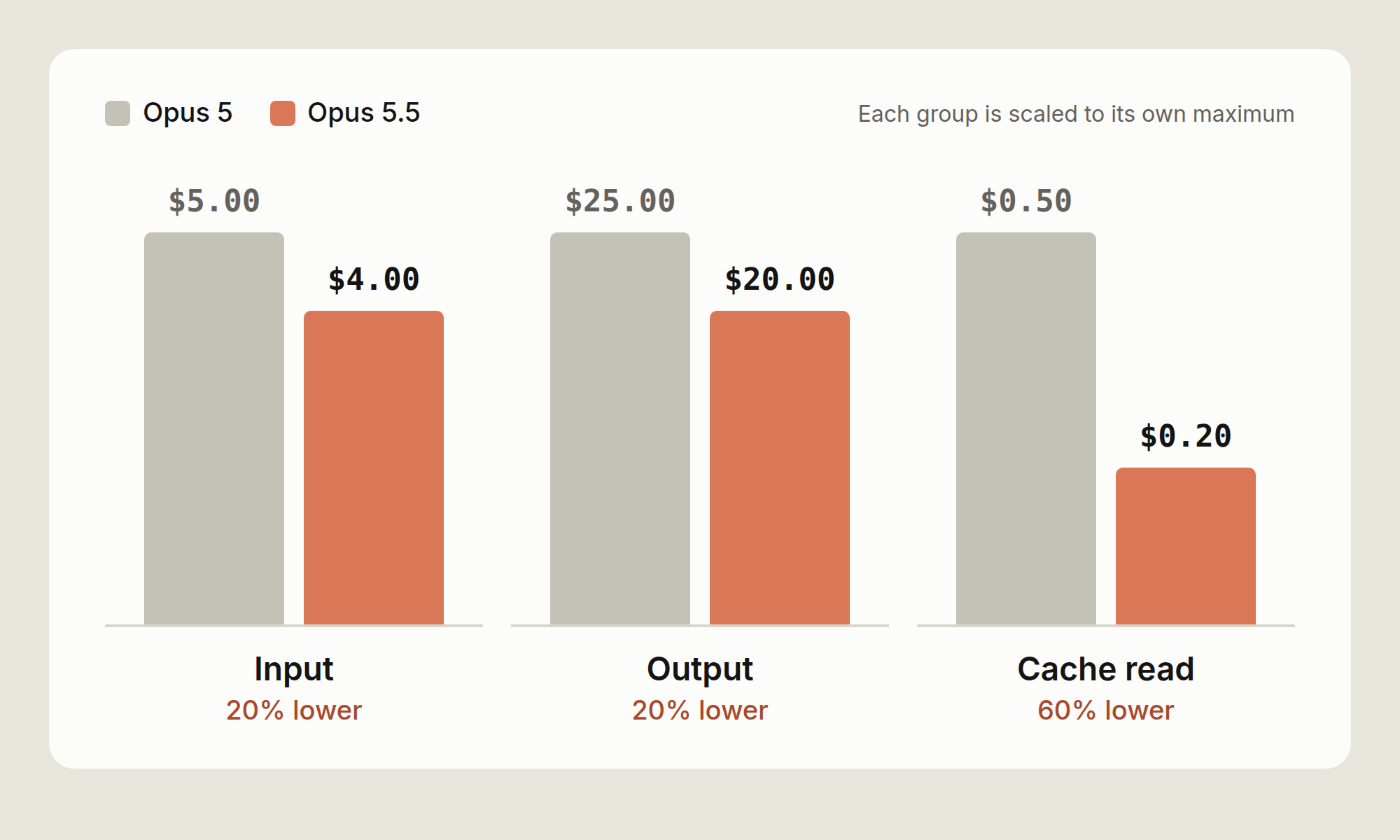
On an API key, the cache-read price cut matters most for Claude Code. A long agentic session spends most of its input on cache reads. In the session priced in Fig B below, the cache line falls from $1.00 to $0.40, the largest drop on the receipt.
How much you save depends on the shape of your work. A session that is mostly cache reads can save up to 60% on input. A short question with no cache and a long answer can save up to 20%, because output dominates it. Most Claude Code tasks sit between the two. The calculator below shows where yours sits.
Opus 5.5 can use more tokens on an answer, because it always thinks before it replies. We expect people to get more done on Opus 5.5, but it varies by task, so measure it on your own work. Fig C compares cost per task on the two models. This part depends on your work far more than the price does.
On a well-scoped task, both models finish in about the same number of turns, and the price cut is all you get. The gap should be biggest on open-ended tasks, where a model can spend many turns on the wrong idea. No single number holds for every codebase, so measure it (see the last section).
Long runs end with a report. Opus 5.5 closes a long run with what it changed, what it found, and what it needs from you. That can save money too, because you rerun a session less often when you can see what happened.
The same tasks side-by-side
Fig B prices one session on both models with the same token counts. So the difference is the price change and nothing else. Switch models to compare. The token counts are illustrative.
$3.50
at Opus 5 list prices
Fig B. Illustrative session with the same tokens on both models, so this is the price change alone.
Fig B. Illustrative session with the same tokens on both models, so this is the price change alone.
The receipt has the three lines /usage shows for a session. Cache reads are the biggest line by tokens, at 2M. Output is the smallest by tokens and the biggest by cost. Fresh input sits between them. It covers the first read of each file and each new tool result.
Fig B gives both models the same token counts, so it shows the price change alone. Your own sessions can use more or fewer tokens on Opus 5.5. Priced that way, the session costs about 31% less.
A recorded run adds the second effect, the change in how much work the model does. On a task with a false start, the gap should widen. Try your own numbers
Set what one of your tasks uses, or start from a preset. The presets are pretty illustrative but I’d still recommend doing your own math. Cached input bills at the cache-read price and fresh input at the input price, so the cache slider shows how much of the gap comes from cache reads.
To fill the sliders from a real session, run /usage at the end of a task. The Session block gives input, output and cache figures. The last slider is your assumption about how much less work Opus 5.5 does on your tasks. Leave it at 0% for the price change alone. To set it from your own work, here's how: run the same task on Opus 5 and on Opus 5.5, and compare turns and output tokens. Measure it yourself walks through it, and Reading a session shows what to check in /usage.
Input tokens per task Everything sent to the model across all turns, cached or not.
Read from cache
Output tokens per task Includes thinking, which is billed as output.
Tasks per day
Fewer tokens on Opus 5.5 (your assumption) Leave at 0% for price alone. Opus 5.5 does more with fewer tokens, but measure that on your own tasks.
Opus 5 per task––
Opus 5.5 per task––
Change per task––
A month is working days. List prices. No batch or volume discounts, and cache writes are not counted (see the caching section below).
Tips for maximizing the value of your session
Opus 5.5’s lower price makes each token cost less. How you run a session decides how many tokens you use, and these steps help.
Raise effort before you change models
Effort sets a general disposition for how many tokens the model spends on each turn: its thinking, the text it writes, and its tool calls. At lower effort it makes fewer tool calls and keeps them shorter. Opus 5.5 has four levels (low, medium, high and xhigh), plus max for a single session. Pick a level below to see when to use it and the command that sets it.
Levels run from least to most thinking per turn.
Claude Code sets a default level for each model, and /effort status shows yours. Try medium for well-scoped, day-to-day work. When medium stalls, try high. It spends more per turn than medium, but less than moving to a bigger model. Use low for mechanical work, like renames or applying a known pattern across files.
A rough way to think about effort pricing: say high adds 20K thinking tokens across a task. On Opus 5.5 that's $0.40. A retry loop of ten turns at 100K of cached context, with 10K output tokens in total, costs about the same. So high pays for itself on a task where it saves one retry. On a task medium would have finished the first time, it's wasted.
When medium fixes one layer
The clearest sign you need more effort is a fix that stops at one layer.
Say a field is renamed in an API handler. At medium, the model updates the handler, the handler's tests pass, and the client still sends the old field. It did what it was asked. It just didn't read far enough to find the second caller. At high, it spends more turns reading call sites before it writes, and it changes both layers in one pass.
A check can catch the same bug. If the model can run a test that goes through the client, the old field fails that test on the turn it was written, at medium. So before you raise effort, check whether the model has a way to check its work. A test run costs one turn and its output. More effort adds thinking to every turn.
If upgrading effort levels and adding checks doesn’t work, then switch to a bigger model.
Changing effort mid-session
In Claude Code, run /effort with a level, for example /effort high. /effort status prints the current level. You can change it mid-task, and the new level applies to the next request.
Changing effort or thinking settings clears the cached conversation, because those settings are part of the prompt the cache matches. The next request pays the cache-write price on the whole conversation.
Choose the right model for your work
Model choice sets the price of every token in a session, so it moves the bill more than effort does. It also reaches further. Every subagent that inherits the main model inherits its price too. Most days need three models: a small one for lookups, Opus 5.5 for work you supervise closely, and a bigger one for the hardest tasks.
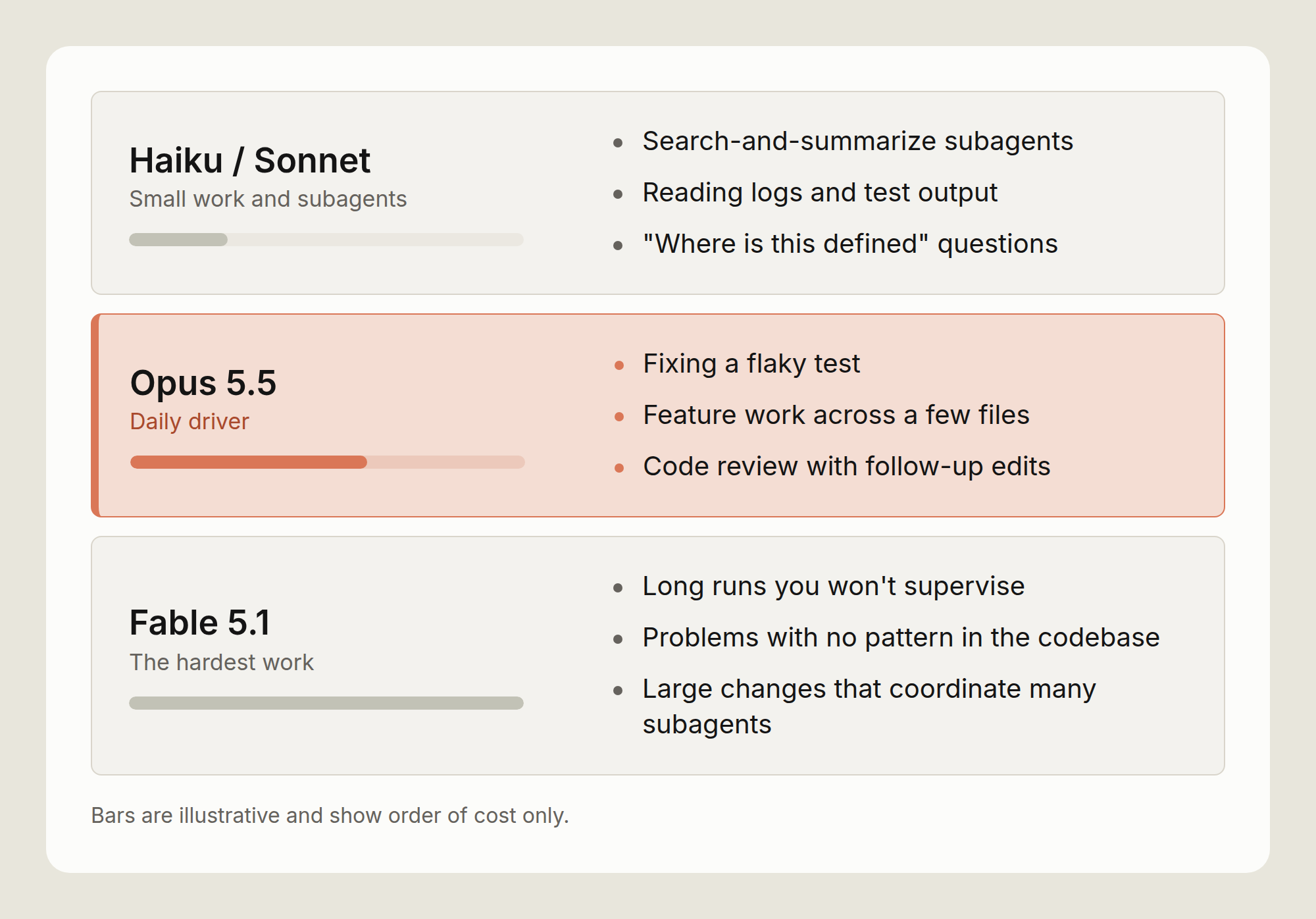
Opus 5.5 as the daily driver
Use Opus 5.5 for work you supervise: feature work across a few files, debugging, and code review with follow-up edits. You read what it does and step in when it drifts, so the loop stays short. Moving up to Fable 5.1
Move up to Fable 5.1 when the result matters more than the token price. For example long runs you won't supervise, problems with no existing pattern in the codebase, and large changes that coordinate many subagents. Don't wait for a third failure. If Opus 5.5 on high hits the same problem twice, switch, and switch back once it's solved. For interactive work, Opus 5.5 is a better fit as it has lower latency and costs less.
Fable 5.1 lists at $10 per million input tokens and $50 per million output, two and a half times the Opus 5.5 price. Its cache reads cost $0.25 per million, only 1.25 times the Opus 5.5 rate, because they bill at 0.025 times its input price. So the gap is smallest on a long, cache-heavy run, and largest on a task that writes a lot.
Switch at a natural break. The cache belongs to the previous model, so expect the first turn on the new model to pay the write price on the whole conversation. Run /compact first, or start a fresh session with a short written plan, to make that turn smaller. Run /model with an alias or a model name to switch. /model also saves your choice as the default for new sessions, so switch back when the hard part is done.
Moving down for lookups
Move down to Sonnet or Haiku for lookups, not for writing code: subagents that search and summarize, reading logs and test output, and "where is this defined" questions. For a mechanical edit across many files, keep Opus 5.5 and set effort to low. The edit stays on the model that writes the rest of your code, at a lower cost per turn.
To put a subagent on a smaller model, set model: haiku or model: sonnet in its definition. To put every subagent on one model, set the CLAUDE_CODE_SUBAGENT_MODEL environment variable. A model named in a subagent's definition overrides the variable. A subagent with no model setting runs on your main model, unless the variable is set.
Each subagent runs in its own context window and hands back a summary, so its file reads stay out of your main conversation. It still pays for its own tokens, so the model setting decides what that spend costs.
The tradeoff: a small model that misreads a search result sends the main model after the wrong file, and the main model pays for the detour. Keep the small model on work where a mistake is cheap to spot, like finding files, running tests and reading logs.
Keep judgment calls on the main model. The opusplan alias splits the work a different way: Opus plans in plan mode, and Sonnet carries out the plan. That puts the code edits on Sonnet, the opposite of the advice above. Measure it on your own tasks before you make it a default.
Check your prompts when you migrate
Instructions written for an older model can make Opus 5.5 write more and repeat tool calls. Run /claude-api prompt-audit in Claude Code to check your Claude Code setup, such as your skills and CLAUDE.md file, for these prompting anti-patterns. It also checks the code of an app you build on the Claude Platform.
We tested this on a migration from Opus 4.8 to Opus 5.5, using an internal customer support benchmark of 44 tickets whose prompt had several of these patterns. The move to Opus 5.5, at low effort, cut the benchmark's cost by about 18%. Running prompt-audit cut it by a further 9%, to about 25% below the Opus 4.8 starting point. The audit removed ritual instructions that made the model write more and repeat tool calls: a mandatory six-step procedure, a scratchpad rule, a verify-twice rule, and instructions that contradicted each other.
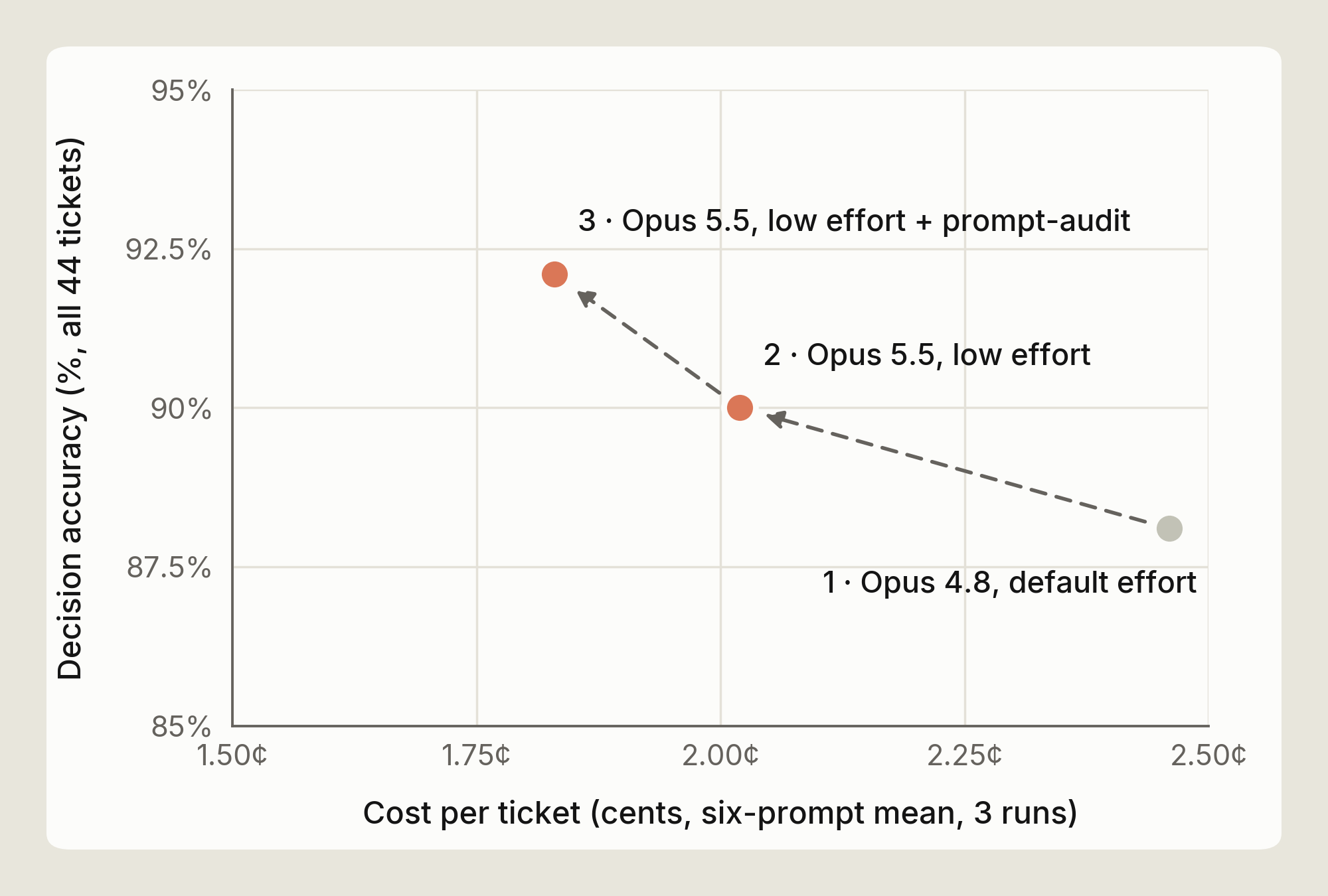
That result comes from one benchmark, so treat it as an example rather than a number to expect. Run the audit, then compare /usage on a real task before and after (see Measure it yourself).
Caching and compaction
Claude Code handles caching and compaction for you. How you run a session decides how much they save.
How the cache works
Claude Code caches the parts of a request that repeat, such as the system prompt, tool definitions, and the conversation so far.
On Opus 5.5 a cached read costs 5% of a fresh input token. Writing to the cache costs more than a fresh read, at 1.25 times the input price for a five-minute cache and twice the input price for a one-hour cache, on today's pricing. Each hit resets the lifetime at no charge.
In Claude Code the lifetime depends on how you pay. On a Claude subscription it's an hour. On an API key or a cloud provider it's five minutes by default, and a subscription drops to five minutes once it's drawing on usage credits.
At 120K tokens of context, a five-minute write on Opus 5.5 costs about $0.60 and a read about $0.02. One write costs as much as 25 reads. On an API key, a six-minute coffee break turns the next $0.02 read into a $0.60 write. A one-hour write at the same size costs about $0.96, and on the API you can pay that premium to cover the gaps in your day.
Session shape and hit rate
The cache stores a prefix, so it can reuse only the part of a request that matches the previous one from the start.
A steady session appends to the end of the conversation on every turn and keeps its hit rate high. Anything that changes an earlier part of the request lowers it. Changing the tool definitions clears the whole cache, and a change to the system prompt clears it from that point on, which is almost everything.
In practice, expect a cache write when:
- You pause longer than the cache lifetime;
- You change effort or thinking settings (see the effort section), which can clear the cached conversation;
- You connect or disconnect an MCP server, which can change what loads at the start of each request;
- You switch models, since the new model starts from an empty cache; and
- The conversation is compacted, which rewrites the history the cache matched.
So set these up when the session starts, and leave them alone while it works.
Why long sessions cost more per turn
Every turn resends the whole context, so a turn costs more as the context grows, even with a warm cache. At 20K tokens of context a turn's cache read costs about $0.004 on Opus 5.5. At 150K it costs about $0.03, and 30 turns at that size spend $0.90 on reads alone. The same 30 turns at 20K cost about $0.12. On Claude 4.6 and later models a bigger context window doesn't change the price per token, so the cost comes entirely from resending the conversation.
Much of that context is left over from earlier work: a stack trace from an hour ago, a file you've finished with, the output of a test run you've since fixed. It's all still sent on every turn.
Compaction, /compact and /clear
When a session gets close to its context limit, Claude Code summarizes older history so later turns send less. Run /autocompact with a token count to change how full the context gets before that happens.
Two commands let you do this yourself. /clear empties the conversation and costs nothing, so use it when you move to unrelated work. /compact keeps continuity and costs one request. It reads the conversation it summarizes, and you can say what to keep, for example /compact keep the failing test names and the schema change.
A rough price for compacting at 150K tokens is about $0.25. That's the read, a summary of a few thousand output tokens, and a new cache write on the shorter context. Each later turn saves about $0.025 in reads, so the compaction pays for itself within about ten turns. A compaction just before you finish costs more than it saves.
The summary also loses detail. A compaction in the middle of a debugging session can drop the one log line that mattered. Compact at a natural break, and when the next step depends on something specific, say so in the /compact instruction.
What loads before you type
Your CLAUDE.md file loads into the context at the start of every session, so each line in it is part of what every turn resends. The costs docs suggest keeping it under 200 lines. MCP tool definitions are deferred. Only tool names and server instructions load at the start, and a full definition loads when its tool is used. Run /mcp to see which servers are connected, and turn off the ones you aren't using.
The rest of the bill
The table lists the other billing rules that affect a Claude Code session, with a link to the docs where one exists.
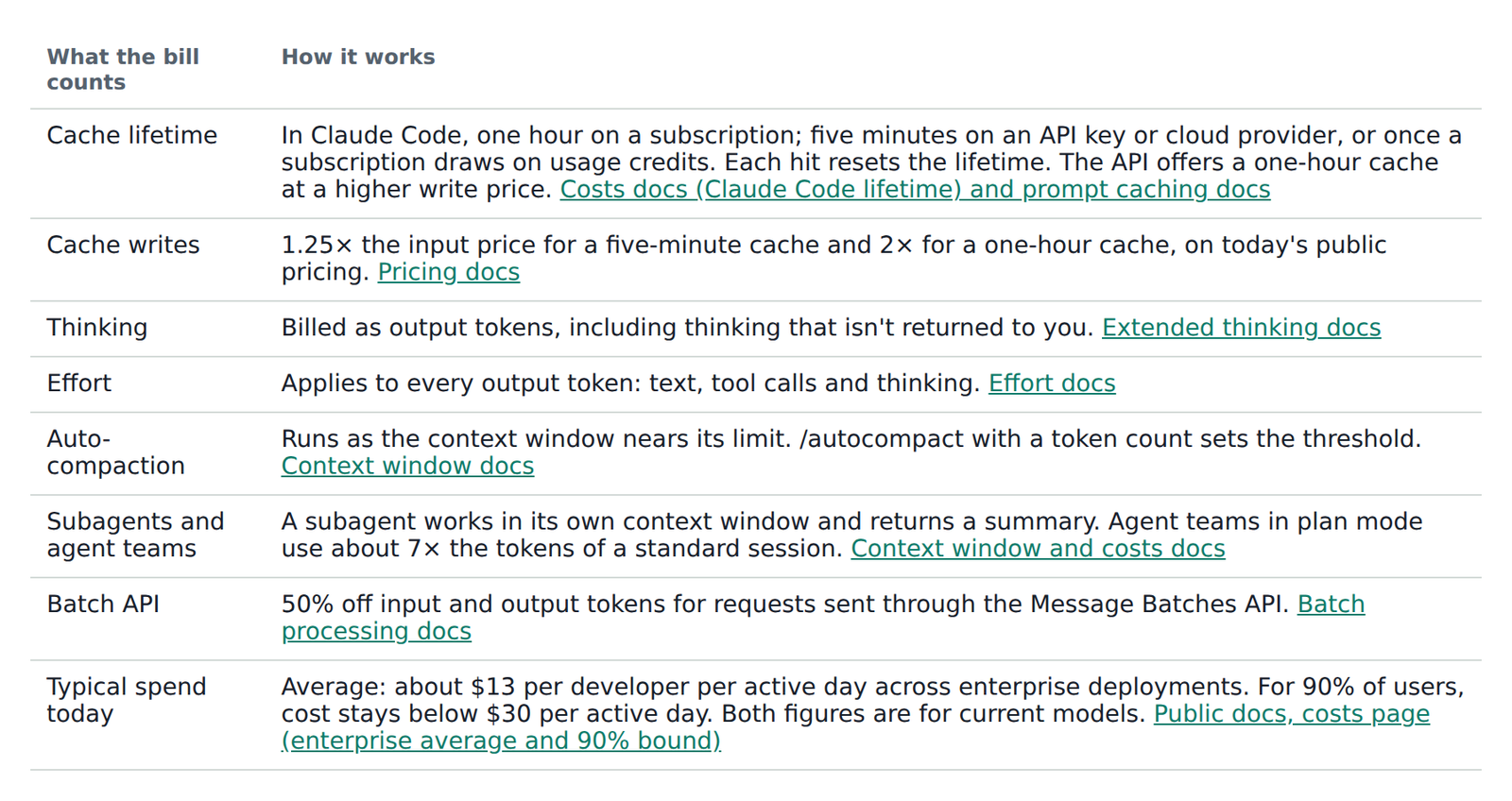
Measure it yourself
The figures in this post are illustrations. Your codebase, prompts and habits are different, so measure cost on your own tasks. Here's how to check.
- In a session, run /usage. /cost does the same thing. The Session block shows token use and an estimated dollar cost at list price. A prompt-cache line shows how much of your input came from cache. On a Pro, Max, Team or Enterprise plan, the same screen shows your plan usage bars. The dollar figure is computed on your machine at list price, so on a subscription it is a guide to how much work you did, not a bill.
- Run the same task twice. Pick something from your backlog, not a toy example. Use /model to switch between Opus 5 and Opus 5.5. Note turns, output tokens and cost for each run. Do three or four tasks before you draw a conclusion.
- For a team, use the usage and cost reports. The Claude Code Analytics API gives estimated cost per user. The Usage and Cost API breaks spend down by model and by cached versus uncached tokens.
- Try the effort ladder. Run one hard task at medium and then at high. Run one mechanical task at low.
Reading a session
Check three things in /usage at the end of a task.
- Cache share. For a long session it should be high. If it's low, look for a long pause, a change of effort or model, or an MCP server connected partway through.
- Output against input. A lot of output on a small change usually means the effort level is too high for the task, or the model is retrying.
- Total input against the size of the conversation. If the total is many times the size of the conversation, the session took many turns, and the conversation is worth reading to find where the loop repeated.
For a baseline, the Claude Code costs docs give an average across enterprise deployments of about $13 per developer per active day, and under $30 per active day for 90% of users. A session that costs well above your own normal level is worth reviewing.
Keep in mind
- Use medium effort for well-scoped daily work.
- Give the model a way to check its work, and start changes that span files in plan mode.
- When medium stalls, raise effort to high. Change it at a break, since the change can cost a cache write.
- If high hits the same problem twice, switch to Fable 5.1. Switch back once it's solved.
- Put search and log-reading subagents on Sonnet or Haiku. Keep code edits on Opus 5.5.
- Keep a long session moving, so its cache stays warm.
- Use /clear between unrelated tasks, and /compact at a break with a note on what to keep.
- The one that matters most: run one real task on each model and compare what /usage reports. Your own numbers are the ones to trust.
I hope this post was helpful. If your limits don’t go further on Opus 5.5 than on Opus 5, tell us with /feedback.
Further reading: Manage costs effectively · Model configuration · Choosing a Claude model and effort level in Claude Code · Effort · Prompt caching · Maximizing the value of your Claude Code sessions
With thanks to Michael Segner, Kacie Jenkins and Molly Vorwerck for their reviews.